What's inside
- Key Takeaways
- Quick Picks
- How We Chose These Picks
- Side-by-Side Comparison
- How to Choose a Fast IPS Monitor
- What Makes Fast IPS Different from Ordinary IPS?
- Is 240Hz at 1080p Better than 144Hz at 1440p?
- Do You Need a Special Cable for 240Hz?
- How Should You Set Up a Fast IPS Panel on the First Evening?
- Common Mistakes
- Final Recommendation
- Frequently Asked Questions
- Related Guides
As an Amazon Associate I earn from qualifying purchases. This post may contain affiliate links at no extra cost to you.
[SITE_DOMAIN] is reader-supported. When you buy through links on our site, we may earn an affiliate commission.
Behind every name in this roundup is a live Amazon listing carrying the manufacturer’s full wording, the port photographs and the current price, and this category rewards the visit: Fast IPS panels are sold on figures — refresh rates, response claims, overclocked modes — whose exact phrasing in a title tells you what was actually promised. Read the listing for the model you choose with the review below open beside it, and the two will agree, because the review was written from that wording and nothing else.
The hunt for the best fast ips monitors is really a hunt for a panel family that ended an old compromise. IPS glass was once the beautiful slow option — rich colour, wide angles, leisurely pixels — while speed belonged to TN panels that washed out at a glance. Fast IPS is the industry’s answer: IPS panels engineered for high refresh and quick transitions, so a screen can run 240Hz and beyond without surrendering the colour and viewing angles that made IPS worth wanting. All six picks here belong to that family or to the high-refresh IPS class it created, with titles quoting rates from 240Hz to an overclocked 275Hz and response figures of 1ms, 0.3ms and 1ms MPRT by their various methods.
The field divides by resolution before anything else. Four picks render 1080p — the ASUS VG279QM5A, the Dell SE2426HG, the Pixio PX279 Wave and the KTC H25T7-A — where high frame rates are cheapest for a graphics card to feed. Two render 1440p, the SANSUI and the KTC H27E6S, asking more of the card in exchange for a sharper picture at 27 inches. Size divides them again: 23.8 and 24.5 inches at the compact end, 27 inches for the rest, which at 1080p is where pixel size becomes a matter of taste and viewing distance.
Sync support is broad but not uniform, and the titles keep the differences visible: G-SYNC wording on the ASUS, FreeSync Premium on the ASUS, Dell and SANSUI, and Adaptive Sync as the stated standard on the Pixio and both KTC models. Adaptive Sync is the open VESA standard underneath the brand names, so an Adaptive Sync panel still runs variable refresh with modern cards of either family — but the reviews report each title’s own claim rather than translating them all into one reassuring phrase.
Brightness, HDR tiers and colour volume vary across the six in ways the titles state unevenly — some print a gamut figure, some an HDR claim, some neither — and the reviews treat that unevenness as data rather than as a gap to be papered over. A panel whose title leads with ports and warranty is telling you where its maker spent the money; a panel whose title leads with colour volume is telling you the opposite. Reading titles as budgets, not just as specifications, is the skill this whole guide is quietly teaching, and it transfers to every monitor purchase after this one.
Key Takeaways
- Fast IPS is the whole field here: high-refresh IPS panels from 240Hz to the KTC H27E6S’s 275Hz overclocked ceiling, with response claims of 0.3ms, 1ms and 1ms MPRT by differing methods.
- Resolution splits the six — four 1080p panels where frame rates come cheap, and two 1440p panels, the SANSUI and KTC H27E6S, for sharper 27-inch play.
- The ASUS VG279QM5A is the feature flagship: G-SYNC wording, ELMB Sync, variable overdrive and a three-year warranty at 240Hz.
- The KTC H27E6S is the only pick stating built-in speakers, and it pairs them with a full tilt, swivel, pivot and height stand in white.
- The Dell SE2426HG is the compact esports shape — 23.8 inches at 240Hz with two HDMI inputs and DisplayPort 1.4.
Quick Picks
| Pick | Badge | Why it earns a place |
|---|---|---|
| ASUS TUF VG279QM5A | 240Hz feature flagship | G-SYNC, ELMB Sync, 0.3ms and variable overdrive on a 27-inch Fast IPS panel. |
| Dell SE2426HG | Compact 240Hz | 23.8 inches of FHD at 240Hz with FreeSync Premium and two HDMI inputs. |
| SANSUI 27 280Hz | 1440p speed | WQHD Fast IPS quoting 280Hz and 240Hz modes, HDR10 and four video inputs. |
| Pixio PX279 Wave White | White 240Hz | A white-framed 27-inch 1080p Fast IPS at 240Hz with 1ms GTG and Adaptive Sync. |
| KTC H27E6S | 275Hz with speakers | QHD Fast IPS at 240Hz and 275Hz, built-in speakers and a full-travel stand. |
| KTC H25T7-A | 24.5-inch value speed | 240Hz FHD Fast IPS with 114 percent sRGB, VESA mount and an HDMI cable in the box. |
How We Chose These Picks
Every pick had to state its speed in its own listing title: a refresh rate of 240Hz or higher, or a dual figure such as the SANSUI’s 280Hz and 240Hz pairing, on an IPS or Fast IPS panel named as such. That rule sounds mechanical, and it is — deliberately. Fast IPS is a claim about engineering, and the only evidence a buyer can audit from the outside is the manufacturer’s own published wording, so titles were transcribed exactly, including the places where two rates appear and the buyer must understand which is native and which is an overclocked mode.
Response figures were recorded with their methods attached wherever the title gives one. The ASUS’s 0.3ms arrives without a method in its title and is reported that way; the Pixio’s 1ms is labelled GTG; the KTC H25T7-A’s 1ms is MPRT. Those labels are not decoration — they are the difference between measurements — and the reviews refuse to rank the six by a digit whose units change from line to line. Refresh rate, sync family and panel type carry the comparisons instead.
The resolution split was kept rather than resolved. A guide that only listed 1080p panels would serve esports and starve everyone else; a guide that only listed 1440p would price out the players whose cards live happily at Full HD. Both camps are real, both appear here with their trade stated plainly, and the how-to-choose section below is built to route you by the frame rates your own card sustains at each resolution.
Finally, the supporting cast was read from titles: stands from tilt-only to the KTC H27E6S’s full travel, speakers stated exactly once across six performance panels, an HDMI cable included in one box, eye-care certification on the Dell. Speed sells these monitors, but ownership is lived in those details, and a roundup that ignores them would be a benchmark chart rather than a buying guide.
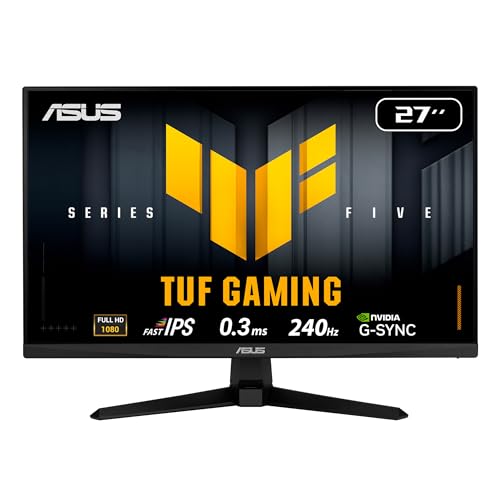
ASUS TUF VG279QM5A — 240Hz Fast IPS with ELMB Sync and variable overdrive
The VG279QM5A is the most completely specified 1080p panel in this guide: a 27-inch Fast IPS screen at 240Hz, listed with G-SYNC, carrying ELMB Sync, a 0.3ms response figure, FreeSync Premium, variable overdrive, 99 percent sRGB, HDMI and DisplayPort, and a three-year warranty. The headline pairing is G-SYNC wording alongside FreeSync Premium — both camps’ variable refresh, in one title — which makes this the panel least likely to be orphaned by a future graphics-card decision in the whole roundup.
ELMB Sync and variable overdrive are the two technologies that separate a merely fast panel from a tuned one. ELMB Sync runs backlight strobing for motion clarity together with variable refresh rather than forcing the historic choice between them. Variable overdrive adjusts the pixel-driving voltage to the current refresh rate, which matters because a fixed overdrive tuned for 240Hz misbehaves at 90Hz — ghosting in one direction, fringing in the other — while a variable system keeps transitions clean across the whole range a variable-refresh panel actually visits. Together they describe a monitor engineered for the messy reality of fluctuating frame rates, not just for its ceiling.
The 1080p resolution at 27 inches is the deliberate trade. Competitive players accept the larger pixels because 240 frames per second at Full HD is achievable on attainable hardware, and because at gaming distance the motion clarity is the picture quality that decides matches. Buyers who read documents on the same screen all day should weigh the softer text honestly — this is the sharpest criticism available of this pick, and the 1440p pair below exist for exactly that reader. The 99 percent sRGB figure keeps colour honest for the standard gamut, and the three-year warranty states ASUS’s confidence in writing.
Stand and speaker details go unstated in the title, so both belong on your listing check; the TUF line’s audience usually arrives with a headset and often with an arm, but a guide should not spend your money on assumptions. What the title does state is a complete performance system. If your card sustains high frame rates at 1080p and your games reward clarity over density, the VG279QM5A’s Amazon page is where to check the price — it is the pick in this guide with the fewest unanswered questions.
There is a maturity to this specification that the newer challengers below have not all matched. Variable overdrive in particular is the kind of feature that never appears in a headline photograph and decides real image quality every second the frame rate moves — which is to say, every second of actual play. Panels are increasingly bought on their ceilings; this ASUS makes its case on the whole range beneath its ceiling, and experienced buyers will recognise that as the more expensive kind of engineering.
Consider the ownership arc as well. A three-year warranty, both sync ecosystems and a mature motion-processing suite describe a monitor bought to be kept through two graphics cards, and the TUF line’s gaming-with-a-day-job positioning shows in the colour figure too: 99 percent sRGB is the working web gamut, so the same panel that runs a tournament bracket on Friday renders a presentation faithfully on Monday. Buyers sometimes apologise for choosing the complete panel over the extreme one; this specification is the rebuttal, because completeness is what a screen you live with actually is.
- Size and resolution: 27-inch, 1080p FHD
- Panel: Fast IPS
- Refresh rate: 240Hz
- Sync as titled: G-SYNC, FreeSync Premium
- Motion: ELMB Sync, variable overdrive, 0.3ms response
- Colour: 99 percent sRGB
- Inputs: HDMI, DisplayPort
- Warranty: 3 years, per listing title
Strengths
- Both sync families are named, so the panel survives any graphics-card allegiance.
- Variable overdrive keeps transitions clean across the full variable-refresh range.
- ELMB Sync pairs blur reduction with variable refresh instead of trading them off.
Trade-offs
- 1080p at 27 inches renders text softer than the 1440p picks at desk distance.
- Stand travel and speakers are not stated in the title.
- The 0.3ms figure arrives without a stated measurement method.
Best for: competitive players at 1080p whose frame rates fluctuate and who want tuned motion across the whole range.
Not suited for: a work-first desk reading documents all day at 27 inches, where 1080p pixel size shows.

Dell SE2426HG — 240Hz in the compact 23.8-inch esports shape
Dell’s SE2426HG takes the opposite size bet from the 27-inch crowd: a 23.8-inch FHD panel at 240Hz using in-plane switching technology, with AMD FreeSync Premium, a TÜV 3-Star eye-comfort rating, two HDMI inputs, DisplayPort 1.4 and a tilt stand. The compact diagonal is not a budget compromise; it is the classic esports geometry. A smaller screen keeps the whole map, the whole minimap and the whole HUD inside the player’s central vision without head movement, and 1080p at 23.8 inches is also the densest Full HD in this guide, so the picture stays tight.
The connection set rewards a second look. Two HDMI inputs plus DisplayPort 1.4 on a 24-inch class panel means a PC and a console can both live on it permanently — the exact arrangement of a bedroom or dorm desk — and DisplayPort 1.4 is the full-bandwidth path the 240Hz headline assumes. FreeSync Premium covers the variable-refresh brief for AMD cards and, as an Adaptive Sync implementation, keeps the door open to the wider ecosystem; G-SYNC wording, by contrast, does not appear in this title, and GeForce buyers should note the distinction the way the G-Sync guide teaches it.
The TÜV 3-Star rating is Dell’s eye-comfort evidence, stated in the title, and it matters in this size class because compact gaming monitors get used for everything — homework, work, films — by owners who bought them for one game. The tilt-only stand is the specification’s honest limit: posture must be solved by the desk and chair, or by a riser, since no mount claim appears in the title either. What you get instead is focus — a current-generation 240Hz Dell panel with no money spent on size you did not want.
For students and younger players especially, this is the shape that fits the room as well as the game: a 23.8-inch screen leaves a small desk still usable for books and a laptop, where a 27-inch panel evicts them. Dell’s presence also carries the support network of a major maker, which first-time buyers of high-refresh panels tend to value the first time a setting confuses them. Open the SE2426HG’s listing and check the price on Amazon if compact speed is your brief — within this guide, nothing else this size runs this fast.
One more consideration separates this Dell from the challenger brands below: consistency of the everyday experience. A 240Hz panel spends most of its life showing a desktop, a browser and a document between matches, and the makers with long office-monitor pedigrees tend to get the unglamorous parts — text rendering, stand stability, sensible menus — quietly right. The title cannot prove that, but the TÜV rating and the port selection both point the same way, toward a panel designed by people who expect it to be stared at for eight hours, not two.
The size also future-proofs the desk in a way the big panels cannot. A 23.8-inch screen can become the second monitor in a later dual setup without overwhelming it, slide into a smaller room at the next house move, or hand down to a younger player as a complete 240Hz gift rather than as an oversized cast-off. Compact panels have longer second lives, and a Dell with this port set and this eye-comfort rating will be useful in every one of its incarnations. Speed dates quickly; usefulness does not, and this model is quietly rich in the second while holding its own in the first.
- Size and resolution: 23.8-inch, FHD 1920×1080
- Panel: in-plane switching (IPS) technology
- Refresh rate: 240Hz
- Sync as titled: AMD FreeSync Premium
- Eye comfort: TÜV 3-Star
- Inputs: 2x HDMI, DisplayPort 1.4
- Stand: tilt
- G-SYNC wording: Not stated in the listing title — verify with the manufacturer documentation
Strengths
- The compact 23.8-inch shape keeps the whole game view in central vision.
- Two HDMI inputs plus DisplayPort 1.4 suit a PC-and-console desk.
- A TÜV 3-Star eye-comfort rating is stated in the title for long sessions.
Trade-offs
- Tilt-only stand, with no VESA mount claim in the title to rescue it.
- No G-SYNC wording appears in the title for GeForce buyers to rely on.
- The smaller canvas gives split-screen work less room than the 27-inch picks.
Best for: esports-leaning players in small rooms who want 240Hz in the classic compact shape.
Not suited for: a desk needing height adjustment from the stand, or a large-screen setup for films and split windows.

SANSUI 27 280Hz — 1440p Fast IPS with two DisplayPort and two HDMI inputs
SANSUI’s entry is the resolution rebel of the group: a 27-inch WQHD 2K panel — 1440p — on Fast IPS, quoting 280Hz and 240Hz in its title, with a 1ms figure, FreeSync Premium, 117 percent sRGB, HDR10, two DisplayPort 1.4 inputs, two HDMI 2.0 inputs and a crosshair feature for gaming. The dual refresh figures follow the pattern this guide has taught you to read: 280Hz is the panel’s overclocked ceiling and 240Hz its native working rate, and the title printing both is more honest than a single inflated number would be. Spec the purchase against 240Hz and treat anything above as experiment.
The input count is the quiet headline. Two DisplayPort 1.4 connections is a specification the flagship brands ration carefully, and here it arrives alongside two HDMI 2.0 ports — four machines can live on this panel, both PCs on the better connection. For a desk that runs a gaming PC beside a work machine, or a PC beside a capture setup, that is a functional advantage no refresh figure can substitute for. The 117 percent sRGB figure is a volume claim in the ASUS’s family — saturation headroom beyond the standard gamut — and HDR10 support covers the media side.
The crosshair feature, an on-screen reticle the monitor itself draws, is a gaming utility some players love for titles that withhold one; it costs nothing and can simply be left off. What the title does not give you is stand detail or a warranty flourish, and SANSUI’s support footprint is thinner than Dell’s or ASUS’s — the specification is the argument here, and it is a strong one for the money this class usually asks. Players stepping from 1080p to 1440p without surrendering speed should visit the SANSUI’s Amazon listing and check the price against the KTC below, its only 1440p rival in this guide.
There is a strategic point about the 1440p step that this panel embodies well. Moving up in resolution at the same 27-inch size is the one upgrade that improves every genre at once — strategy maps gain legibility, racing cockpits gain depth, even the desktop gains room — whereas a pure refresh upgrade mostly rewards the fastest games. A monitor that attempts both at once, 240Hz native at 1440p with the inputs to feed it from two machines, is aiming at the player who upgrades rarely and wants the single purchase to close the question for years.
The two DisplayPort inputs also change the monitor’s role in a household with a work laptop policy. A work machine that cannot be modified, cannot install games and cannot share a screen by software can still share this panel by cable, taking the second DisplayPort while the gaming PC keeps the first, with the input button as the entire IT department. That arrangement — one good screen, two sealed worlds — is increasingly how real desks operate, and it is usually discovered after purchase. Here it can be planned before it, because the title prints the port count where everyone can read it.
- Size and resolution: 27-inch, WQHD 1440p 2K
- Panel: Fast IPS
- Refresh rates: 280Hz and 240Hz as listed
- Response: 1ms
- Sync as titled: FreeSync Premium
- Colour: sRGB 117 percent
- HDR: HDR10
- Inputs: 2x DisplayPort 1.4, 2x HDMI 2.0
- Feature: crosshair
Strengths
- 1440p at a 240Hz native rate is the sharp-and-fast combination most of the guide cannot offer.
- Four video inputs, two of them DisplayPort 1.4, lead this guide’s connection counts.
- FreeSync Premium and HDR10 cover sync and media without extra purchases.
Trade-offs
- The 280Hz figure is the overclocked ceiling; 240Hz is the rate to spec against.
- Stand adjustment is not described in the title.
- 1440p asks more of the graphics card than the 1080p picks at the same refresh.
Best for: a two-machine desk stepping up to 1440p while keeping 240Hz-class speed.
Not suited for: a modest graphics card that sustains high frame rates only at 1080p.

Pixio PX279 Wave White — A white 240Hz Fast IPS panel with 1ms GTG
Pixio’s PX279 Wave White leads with the thing its rivals mostly ignore: it is white. The specification beneath the finish is a 27-inch Fast IPS panel at 240Hz with FHD 1080p resolution, a 1ms GTG response figure and Adaptive Sync — a complete high-refresh specification wearing the colour that bright, modern desks are actually decorated in. Anyone who has built a pale setup knows the usual ending: every component available in white except the monitor, which arrives as a black rectangle and dominates the room. This panel exists for that room.
The 1ms figure carries its method in the open — GTG, grey-to-grey — which lets you place it honestly among this guide’s claims: comparable in kind to the other GtG-style figures, distinct from the MPRT number on the smaller KTC below. Adaptive Sync is the open standard rather than a camp badge, so variable refresh runs with modern cards through the standard implementation; the title claims neither G-SYNC nor FreeSync Premium branding, and the review does not upgrade the claim on Pixio’s behalf. What you are promised is the standard itself, properly implemented at 240Hz.
At 27 inches and 1080p the pixel-size conversation from the ASUS review applies unchanged — gaming distance forgives it, document distance notices it — and Pixio’s audience of style-conscious players has largely already made that peace. Stand and input details are not in the title beyond the panel’s essentials, so the listing visit carries more weight here: confirm the ports and the stand’s travel before ordering, because the white finish is doing the persuading and the hardware still has to fit your desk’s cables and posture. When you check the PX279’s price on Amazon, check those two lines of the listing with it, and the purchase will be as sound as it is good-looking.
The Wave name and the white frame also hint at the desk this panel expects to join: the curated setup, photographed as often as it is played on, where a monitor is furniture. There is nothing unserious about that priority — a screen is the largest object on most desks, and living with its appearance for years is a legitimate specification. Pixio simply refuses to make you choose between the room and the refresh rate, and in a guide full of black rectangles, that refusal is a genuine differentiator rather than a coat of paint.
Practical buyers should simply schedule the homework this title leaves them. The listing carries the input list, the stand’s range and the warranty terms that the title omits, and five minutes there converts this from the guide’s most attractive gamble into a fully audited purchase. That done, what remains is a coherent proposition: a specialist maker, a complete speed specification, a response figure with its method printed beside it, and a finish that treats the monitor as part of the room. Setups built around pale cases, white desks and daylight rooms have waited a long time for the performance class to notice them.
- Size and resolution: 27-inch, FHD 1080p
- Panel: Fast IPS
- Refresh rate: 240Hz
- Response: 1ms GTG
- Sync as titled: Adaptive Sync
- Finish: white (Wave White)
- Inputs: Not stated in the listing title — verify with the manufacturer documentation
Strengths
- A full 240Hz Fast IPS specification in a white finish the big brands rarely offer.
- The 1ms figure is labelled GTG, an honestly stated measurement method.
- Adaptive Sync covers variable refresh without tying the panel to one card camp.
Trade-offs
- Inputs and stand travel are absent from the title and must be verified on the listing.
- 1080p at 27 inches shares the ASUS’s softer text at close reading distance.
- No branded sync tier is claimed, for buyers who shop by badge.
Best for: a white or bright-themed gaming setup that refuses to surrender 240Hz for its looks.
Not suited for: a purchase that needs ports and stand range confirmed by the title alone, or close-range document work.

KTC H27E6S — QHD at 240Hz and 275Hz, with speakers and a full stand
The KTC H27E6S is the maximalist of this guide: a 27-inch Fast IPS QHD monitor quoting 240Hz and a 275Hz figure in its title, with built-in speakers, HDR 400, Adaptive Sync, HDMI and DisplayPort, and a stand that tilts, swivels, pivots and adjusts height, finished in white. Read the refresh pair the way this guide has taught: 240Hz is the working specification, 275Hz the overclocked headroom above it. Even read conservatively, the combination of 1440p, 240Hz, speakers and full stand travel in one title is something none of the other five picks assembles.
The speakers deserve emphasis precisely because this is a performance class. Fast panels almost never make sound — the ASUS, Dell, SANSUI and Pixio titles are all silent on the subject — so a QHD high-refresh panel that also covers calls, alerts and casual video without a peripheral is solving the whole desk, not just the game. HDR 400 in the title is stated without the VESA DisplayHDR prefix the G-Sync guide’s certified models carry, so read it as an HDR capability claim rather than a certification, and weight it accordingly.
The stand is the other half of the argument. Tilt, swivel, pivot and height on a 27-inch panel means posture is solved by the purchase rather than by a subsequent arm, and pivot opens the portrait second-monitor mode for documents and chat columns that competitive desks quietly love. The white finish pairs it with the Pixio as this guide’s bright-desk contingent, though the KTC adds the resolution and the ergonomics the Pixio leaves unstated. KTC is a challenger brand, and its support network is not Dell’s; the counterweight is a specification sheet that reads like a wish list. Go to the H27E6S listing on Amazon and check the price with the stand and speakers in mind — rival panels make you buy those two things separately.
There is a buyer this panel fits almost suspiciously well: the one upgrading from a basic 27-inch office monitor to a first serious gaming screen, who needs the new panel to keep doing the office job — calls on its speakers, documents in portrait, height set correctly — while adding a 240Hz game life in the evenings. Most performance monitors force that buyer to rebuild the desk around the screen. This KTC is specified as if its designers interviewed exactly that person, and the title’s completeness is the evidence.
The white finish, read together with the stand and speakers, completes a profile the big brands assemble only across several models: their fast panels are black and speakerless, their white panels are slow, their full-stand panels are office machines. KTC has simply refused those segmentations in a single product. Whether the refusal reflects a challenger’s hunger or a genuine insight about how desks are actually used, the buyer benefits either way — provided the listing visit confirms the details the title leaves open, as it should for every pick in this guide and this one no less.
- Size and resolution: 27-inch, QHD 1440p 2K
- Panel: Fast IPS
- Refresh rates: 240Hz, 275Hz as listed
- Speakers: built in, per listing title
- HDR: HDR 400, per listing title
- Sync as titled: Adaptive Sync
- Inputs: HDMI, DisplayPort
- Stand: tilt, swivel, pivot, height adjust
- Finish: white
Strengths
- The only speakers in this guide, on a 1440p 240Hz panel.
- Full stand travel — tilt, swivel, pivot, height — is stated outright.
- 275Hz overclocked headroom sits above an already-fast native specification.
Trade-offs
- HDR 400 is claimed without a VESA DisplayHDR certification in the title.
- Adaptive Sync is the stated standard, without a branded G-SYNC or FreeSync Premium tier.
- A challenger brand’s support network is thinner than Dell’s or ASUS’s.
Best for: an upgrader who needs one white 1440p panel to run calls, documents and 240Hz play without extra peripherals.
Not suited for: a setup that requires certified HDR or a branded sync tier in writing before purchase.

KTC H25T7-A — 24.5-inch 240Hz with the cable in the box
KTC’s second entry shrinks the formula to the other classic esports size: a 24.5-inch FHD Fast IPS panel at 240Hz, with a 1ms MPRT figure, Adaptive Sync, 114 percent sRGB, HDR support, HDMI and DisplayPort, a tiltable stand, eye care features, a VESA mount and — a detail this guide wishes were universal — an HDMI cable included. The 24.5-inch diagonal is the tournament-standard footprint, close kin to the Dell’s 23.8, keeping the full field of view in central vision for players who sit near the screen.
The specification shows its working-class priorities in the right places. The VESA mount is stated, which the Dell’s title omits, so an arm-based setup is a certainty rather than a hope. Eye care features are claimed for the long sessions this size class lives through. The 114 percent sRGB volume gives games their saturation headroom, HDR support is claimed without a tier and should be weighted as such, and the 1ms figure is MPRT — the strobing-based motion measurement — which the title states and the review preserves rather than converting into a GTG rival.
Nothing here pretends to be a flagship, and that is the appeal: every line of the title serves the player who wants 240Hz at the right size with the mounting and the cable settled, and nothing is spent on size, speakers or badges that player did not ask for. The tiltable stand is the one ergonomic limit, answered by the stated VESA mount for anyone whose posture needs more. Students, ladder-climbers and second-PC desks are the natural homes. Check the H25T7-A’s price on its Amazon listing if that is your desk — in this guide it is the straightest line from a modest budget to a genuine 240Hz Fast IPS panel.
Notice, too, what the included cable quietly prevents: the most common first-night failure in this category is a new 240Hz panel connected with an old cable that caps it at a fraction of its rate, followed by a disappointed review written by someone who never saw the product they bought. A maker who puts the right cable in the box has thought about the owner’s first evening, and that thoughtfulness tends to correlate with the rest of the ownership experience. It is a small line in a title, and this guide weights it as a character reference for the whole product.
The 24.5-inch size has one more virtue that only appears in shared houses: it travels. Between rooms, to a friend’s place for a tournament night, into a car for a holiday setup — a panel this size is luggage in a way a 27-inch screen never quite is, and the VESA mount means it can land on whatever stand or arm the destination offers. Players whose gaming life is social and mobile get more from this portability than from any single specification in the title, and it costs them nothing in speed to have it.
- Size and resolution: 24.5-inch, FHD 1080p
- Panel: Fast IPS
- Refresh rate: 240Hz
- Response: 1ms MPRT
- Sync as titled: Adaptive Sync
- Colour: 114 percent sRGB
- HDR: HDR support, tier not stated
- Inputs: HDMI, DisplayPort
- Mount and stand: VESA mount, tiltable
- In the box: HDMI cable included
Strengths
- The 24.5-inch tournament size at a full 240Hz Fast IPS specification.
- VESA mounting is stated, unlocking arm setups the Dell’s title leaves open.
- An HDMI cable in the box prevents the classic first-night refresh-rate cap.
Trade-offs
- The stand tilts only, so height comes from an arm or not at all.
- HDR is claimed as support without a certified tier.
- No speakers are stated, so game and call audio need a headset or speakers.
Best for: competitive players on a disciplined budget who want the tournament size, 240Hz and a mount-ready panel.
Not suited for: a desk needing sound from the screen, or height adjustment without buying an arm.
Side-by-Side Comparison
| Pick | Size | Resolution | Refresh | Sync as titled | Distinguisher |
|---|---|---|---|---|---|
| ASUS TUF VG279QM5A | 27-inch | 1080p | 240Hz | G-SYNC, FreeSync Premium | ELMB Sync, variable overdrive |
| Dell SE2426HG | 23.8-inch | 1080p | 240Hz | FreeSync Premium | TÜV 3-Star, 2x HDMI |
| SANSUI 27 | 27-inch | 1440p | 280Hz / 240Hz | FreeSync Premium | 2x DP 1.4, 2x HDMI 2.0 |
| Pixio PX279 Wave | 27-inch | 1080p | 240Hz | Adaptive Sync | White finish, 1ms GTG |
| KTC H27E6S | 27-inch | 1440p | 240Hz / 275Hz | Adaptive Sync | Speakers, full stand |
| KTC H25T7-A | 24.5-inch | 1080p | 240Hz | Adaptive Sync | VESA mount, cable included |
How to Choose a Fast IPS Monitor
Choose the resolution by your card’s honest output, not by the panel you wish you owned. If your graphics card sustains very high frame rates at 1080p and strains at 1440p, the four Full HD picks will show you more of this family’s talent than the 1440p pair running starved; if your card holds strong rates at 1440p, the SANSUI and the KTC H27E6S convert that power into a visibly sharper game. Refresh ceilings only pay out in frames actually delivered.
Choose the size by your distance and your genre. The 23.8-inch Dell and 24.5-inch KTC exist because competitive players sit close and want the entire scene in central vision; the 27-inch panels serve players who sit a little further back and split the screen’s life with media and work. There is no prestige order between them — there is only the geometry of your chair.
Read dual refresh figures the way this guide does: the lower, native number is the specification, the higher is an overclocked mode to try once the panel is yours. A monitor bought honestly against its native rate can only pleasantly surprise you; a monitor bought against its overclock begins its life as a small disappointment with a settings menu.
Close with the ownership lines: stand travel or a stated VESA mount, speakers if your desk has none, a warranty length in writing, and the cable situation on night one. Speed is the reason this family exists, but those four lines decide whether the speed is comfortable to live with.
Viewing angle deserves a place in a Fast IPS decision that it never needed in the TN era. These panels hold their colour and contrast when the viewer moves — a coach standing behind the chair, a friend on the bed, the player themselves leaning back between rounds — and that stability is part of what the family name buys. If your screen is watched by anyone but a single centred player, or if it doubles as the room’s film screen, weight the IPS family’s angles as a working feature rather than a brochure line, because they are the difference between a panel that serves a room and a panel that serves a posture.
Finally, think about the second monitor you may own one day. High-refresh panels pair best with a twin of similar size and rate in a dual setup, and the compact picks here — the Dell and the little KTC — are sized to become the flanking screen of a future rig without overwhelming it, while the 27-inch models are sized to become its centre. Buying with that trajectory in mind costs nothing today and saves the awkward mixed-desk phase tomorrow, when one fast panel beside one slow panel teaches you exactly why matched pairs exist.
What Makes Fast IPS Different from Ordinary IPS?
Engineering aimed at transition speed. A conventional IPS panel switches its liquid crystals quickly enough for 60Hz to 144Hz duty and prioritises colour and viewing angle; a Fast IPS panel is built — in its cell design, its driving voltages and its overdrive tuning — to complete those transitions within the much shorter frame windows of 240Hz and above, while keeping the colour and angle behaviour that define the family. The practical result is the end of the old fork in the road: you no longer choose between the panel that looks right and the panel that moves right. Every pick in this guide is evidence, but the ASUS’s variable overdrive shows the idea at its most developed, adjusting the driving effort continuously as the refresh rate wanders.
The frame-window arithmetic is worth doing once, because it explains why the engineering had to change. At 60Hz a pixel has about sixteen milliseconds to change its mind; at 240Hz it has about four, and the whole transition — not the start of it, the whole of it — must fit inside that window or the next frame arrives while the pixel is still travelling, which the eye reads as smear. Fast IPS is the set of techniques that compresses real transitions into that four-millisecond discipline at production scale and sane prices. When a title in this guide quotes 240Hz beside a Fast IPS panel, that compression is the product being sold, and the response figures, for all their methodological quarrels, are attempts to certify it.
Is 240Hz at 1080p Better than 144Hz at 1440p?
For competitive play, usually yes; for everything else, it depends on the rest of your day. Motion clarity and input responsiveness scale with frame rate, and a 240Hz Full HD panel fed properly gives a shooter player a measurable, feelable edge that resolution cannot imitate. Picture richness scales with pixels, and the 1440p screen makes strategy maps, open worlds, films and documents visibly finer. The hybrid answer this guide keeps pointing at is the 240Hz 1440p pair — the SANSUI and the KTC H27E6S — for cards that can feed them, because they decline the choice. Cards that cannot should take the 1080p speed without a backward glance; a starved 1440p panel is worse than a fed 1080p one in every genre.
Do You Need a Special Cable for 240Hz?
You need an adequate one, which is not always the one in the drawer. DisplayPort is the reliable path to 240Hz at either resolution here, and the cable must be a sound specimen of its standard — a damaged or very old lead can negotiate the connection down silently, leaving the panel running far below its badge while the settings insist otherwise. The KTC H25T7-A’s included HDMI cable removes the guesswork for its HDMI path; for the rest, use the cable supplied with the monitor first, then open your display settings and verify the active rate reads what the title promised. That verification, two minutes on the first evening, is the cheapest performance in this entire category.
How Should You Set Up a Fast IPS Panel on the First Evening?
Four settings decide whether you ever see the monitor you paid for. Set the refresh rate to its maximum in your operating system’s display panel, because panels often start life at a conservative default. Enable variable refresh for your card in its driver software and confirm the monitor’s own sync setting agrees. Choose the middle overdrive level as your starting point and adjust only if moving edges show fringing or smearing in your fastest game. Then position the screen — top edge near eye level, at the distance your size choice assumed — and play for a week before judging anything subtler. Owners who skip the first two steps own expensive 60Hz monitors with excellent colour, and the saddest part is how many never find out.
Common Mistakes
Spec’ing the purchase against the overclocked number
Two picks here print a pair of rates, and the higher one is a mode, not the native specification. Buyers who budget, compare and brag against the overclocked figure start ownership with a grievance the manufacturer never actually caused. Read the lower number as the product — 240Hz on both the SANSUI and the KTC H27E6S — and let the mode above it be a bonus your unit may hold gracefully.
Comparing response digits across measurement methods
The 0.3ms, 1ms GTG and 1ms MPRT figures in these titles are not three runners in one race. GtG times measure pixel transitions; MPRT measures perceived motion persistence under strobing; an unlabelled figure measures whatever its maker chose. Ranking these six by digit alone crowns a winner by typography. Use refresh, sync and panel family for the ranking and the response figures as supporting evidence inside each maker’s own range.
Putting a 27-inch 1080p panel at reading distance
Full HD spread across 27 inches makes large pixels, and a buyer whose day is documents will meet them at arm’s length all day long. The size is a gaming choice, made for gaming distances and gaming priorities. If your screen’s life is half text, the 1440p pair — or a smaller 1080p panel like the Dell or the little KTC — respects your eyes in a way the big Full HD screens cannot.
Forgetting the stand until the neck complains
Three of these six titles describe tilt-only or unstated stands. A 240Hz panel at the wrong height is a daily tax that no refresh rate refunds, and the fix — an arm — requires a VESA mount the title may or may not state. Check the stand and mount lines before the price line; the KTC pair and their stated ergonomics exist in this guide partly as a reminder of what to look for.
Final Recommendation
Match the panel to the frames you truly produce. Competitive 1080p players get the most complete instrument in the ASUS TUF VG279QM5A, the compact classic in the Dell SE2426HG, and the disciplined-budget route in the KTC H25T7-A. Players whose cards feed 1440p should choose between the SANSUI’s four inputs and the KTC H27E6S’s speakers and full stand, while the Pixio PX279 Wave White owns the bright, styled desk at 240Hz. Fast IPS has made the old speed-versus-beauty argument obsolete; what remains is the honest arithmetic of your card, your distance and your desk — do that arithmetic with the titles above, and the panel you choose will still feel fast in three years. And when it arrives, spend its first evening on the unglamorous settings — rate, sync, overdrive, height — because in this family the difference between the monitor in the reviews and the monitor on too many desks is rarely the hardware; it is whether anyone finished setting it up.
Frequently Asked Questions
Is Fast IPS better than VA or TN for gaming?
It is the current centre of gravity: TN’s raw speed advantage has narrowed to the extreme esports fringe, VA keeps a contrast advantage for dark cinematic play, and Fast IPS holds speed, colour and viewing angles in one panel, which is why every pick in this guide comes from the family. Players with a specific devotion — contrast above all, or the last fraction of a millisecond — have their own guides; the broad recommendation lives here.
Can my console use a 240Hz Fast IPS monitor?
It can display on one happily through HDMI, at the rates the console itself outputs, which sit well below 240Hz. The panel’s ceiling is a PC feature; the console simply enjoys the size, the panel quality and, on the Dell, a second HDMI input waiting for it. Buy these monitors for a PC first and let the console be a welcome guest.
What is variable overdrive and should I care?
Overdrive is the voltage push that hurries pixels between shades; variable overdrive, stated on the ASUS, retunes that push as the refresh rate changes under variable refresh. You should care if your frame rates wander — and in real games they always wander — because fixed overdrive tuned for the ceiling leaves artefacts at the rates you actually visit most. It is an invisible feature with visible consequences.
Why do two KTC models quote two refresh rates?
Because the higher figure in each pair is an overclocked mode and the lower is the native rate: 240Hz native with 275Hz available on the H27E6S, in a pattern the SANSUI shares with its 240Hz and 280Hz figures. Enable the mode in the monitor’s menu if you want to try it, judge its stability in your own games, and keep the native rate as the figure your purchase decision rests on.
Do any of these monitors have speakers?
One does by its title: the KTC H27E6S states built-in speakers. The other five titles are silent on speakers, so plan on a headset or desktop speakers with them — which most players in this class already own, and which is why the family so often leaves the feature out.
Will a 240Hz monitor make a 60fps game look worse?
No — with variable refresh engaged, the panel simply refreshes in step with the game’s output, and a 60-frame game on a synced 240Hz panel looks like itself, only without tearing. The ceiling is capacity, not a demand. What can look worse is a fixed high refresh with sync disabled and a low frame rate beneath it, which is an argument for enabling the sync your title promises rather than for buying a slower screen.
Related Guides
Readers narrowing by sync ecosystem should continue to our roundup of the best G-Sync monitors at 1440p, where the NVIDIA tiers are separated model by model. And for the contrast-first alternative to this panel family, our guide to the best VA monitors covers the other great gaming glass. Fast IPS earns its premium in motion clarity alone: if your games live at high frame rates, panel speed matters more here than contrast ever will.
Related guides
- Best 3.0 Qualcomm Quick Chargers: QC 3.0 Adapters That Still Earn Their Outlet
- Best Time Machine Compatible Hard Drives: Mac-Ready and Reformatted Picks
- Best 3D Mechanical Engineering Laptops: Certified Workstations for CAD and Simulation
- Best Tattoo Printers: Thermal Stencil Machines for Clean, Lasting Transfers


