What's inside
- Key Takeaways
- Quick Picks
- How Did We Choose the Coolest Affordable Cases?
- Which Affordable Cases Actually Run Cool?
- How Do These Cool Cases Compare Side by Side?
- What Should You Check Before Buying a Case for Cooling?
- How Can You Make an Affordable Case Run Even Cooler?
- What Are the Most Common Mistakes When Buying a Case for Cooling?
- How Does Air Actually Move Through a PC Case?
- What About Noise — Can a Cool Case Also Be Quiet?
- Which of These Cases Fits Your Kind of Build?
- How Do We Judge Cooling Without a Laboratory?
- How Should You Maintain a Cool Case Through the Year?
- Which Cooling Features Are Worth Paying For — and Which Are Not?
- What Happens When a Case Runs Hot — and How Do You Spot It Early?
- Does Case Cooling Matter More for the Processor or the Graphics Card?
- Final Recommendation
- Frequently Asked Questions
- Related Guides
As an Amazon Associate I earn from qualifying purchases. This post may contain affiliate links at no extra cost to you.
widgetverdict.com is reader-supported. When you buy through links on our site, we may earn an affiliate commission.
Where to buy: Every case in this guide is sold through Amazon, and each linked pick below takes you to that model’s listing so you can check the current configuration, colour options and stock before you commit.
Plenty of cheap cases look fast in photos and then cook a graphics card behind a solid plastic front panel. If you are shopping for the best affordable cool pc cases, the front panel matters more than the fan count printed on the box: a case only stays cool when air can actually enter, cross the components and leave again without fighting through a sheet of glass or a decorative grille with pinhole vents. This guide is built around that single priority. Every pick here has a genuinely open intake path, fans already fitted where they do the most good, and enough exhaust capacity that a mid-range gaming build will not need a rescue fan purchase a week later.
Cooling on a budget is a balancing act rather than a spec-sheet contest. A case with six slow fans behind a restrictive panel can run hotter than a case with two large fans breathing through open mesh, and a huge tower with empty fan mounts is a promise, not a result. So the six cases below were chosen for the temperatures they deliver on the day you build, with the fans in the box, before you spend anything extra. There is a compact micro-ATX option for small desks, a big E-ATX chassis for long graphics cards, and several straightforward mid-towers between them.
Key Takeaways
- An open mesh front is worth more than extra fans behind glass; intake area decides how cool an affordable case can run.
- Large-diameter fans move more air at lower speed, so twin 160mm or 140mm intakes usually beat a row of small fans on noise as well as temperature.
- The Lian Li LANCOOL 216 RGB is the cooling benchmark here thanks to its two big front fans and unobstructed mesh.
- Graphics cards cool best when fresh air reaches them from the front or below, so check where each case feeds the GPU zone.
- Every pick includes at least two fitted fans, and most include three or more, so none of them needs an immediate extra purchase.
- Dust filters only help if you clean them; a clogged filter quietly turns a cool case into a warm one over a few months.
Quick Picks
| Pick | Badge | Why it earns its place |
|---|---|---|
| Lian Li LANCOOL 216 RGB | Coolest out of the box | Two 160mm front fans pull air through open mesh with very little restriction. |
| Montech Air 903 MAX | Most airflow headroom | A large mesh chassis with four fitted fans and room for radiators top and front. |
| Phanteks XT Pro Ultra | Best fan bundle | Four 140mm fans arrive pre-installed, a bundle most rivals charge extra for. |
| NZXT H5 Flow | Compact and cold | Perforated panels and a tidy interior keep a smaller build breathing freely. |
| Montech Air 100 ARGB | Small footprint pick | Micro-ATX sizing with a mesh front and four fans already doing the work. |
| Montech X3 Mesh | Six fans fitted | Three 140mm intakes plus three exhausts give a complete airflow path immediately. |
How Did We Choose the Coolest Affordable Cases?
We started by throwing out every budget case whose front panel is mostly solid. That single filter removes a surprising share of the market, including several famous names that rely on narrow side slits to feed their fans. A slit-fed case can be quiet and attractive, but it starts every build with an intake handicap, and no fan curve fixes a shortage of incoming air. What survived the cut had to show a front that is mesh across most of its area, or a perforated design with genuinely open holes rather than stamped decoration.
Next we looked at what arrives in the box. Affordable stops meaning affordable when you must add three fans before temperatures settle, so each pick ships with a working intake and exhaust arrangement. We favoured larger fans where possible because a 140mm or 160mm fan delivers a given volume of air at lower rotational speed than a 120mm fan, which usually means less motor whine and less turbulence noise for the same cooling. Fan quality still varies, and we say so plainly in the individual reviews where a bundle leans on basic fixed-speed units.
Clearances were the third filter, because a cool case that cannot fit your hardware is useless. We checked graphics card length, air cooler height and radiator support against the parts people actually buy in this price class: dual-fan and triple-fan graphics cards, tower coolers of mainstream height, and 240mm or 360mm liquid coolers. Finally we weighed the everyday details that decide whether a case stays cool for years rather than a week — removable dust filters, cable room that keeps the intake path clear, and panels that come off without a fight when it is time to clean.
Which Affordable Cases Actually Run Cool?
The six reviews below are ordered by cooling ability first and convenience second. Read the trade-offs as carefully as the strengths: a case can be superb at moving air and still be the wrong choice if its fans are loud, its front filter is awkward to reach, or its footprint swallows your desk. Cooling is the theme of this guide, but the build still has to live with you afterwards.

Lian Li LANCOOL 216 RGB — Coolest out of the box
The LANCOOL 216 RGB earns the top spot because its intake design attacks the problem at the source. Two 160mm fans sit behind a wide mesh front, and fans of that diameter shift a serious volume of air without spinning fast. In practice that means the case feeds a hot graphics card properly while staying calmer than towers that rely on three smaller fans screaming through a narrower opening. A 140mm rear fan handles exhaust, and the overall path — in through the front, out through the back and top — is the textbook arrangement that every cooling guide recommends and many budget cases quietly abandon.
There is more thought here than the headline fans. The case supports graphics cards up to around 392mm, so long triple-fan models fit without drama, and the top accepts a 360mm radiator if you later move to liquid cooling. Lian Li also shaped the interior so the front fans’ air reaches the graphics card instead of dying against a solid power supply shroud wall. Cable management behind the motherboard tray is generous for the class, which matters for cooling more than people expect: a nest of cables stuffed into the main chamber disrupts the very airflow you paid for.
The honest compromises are size and lighting control. This is a substantial mid-tower, not a desk-friendly box, and the RGB fans add wiring that a first-time builder should route patiently rather than bundle in a hurry. The mesh front also means dust reaches the filter quickly in a carpeted room, so the filter needs a rinse on a regular schedule. None of that dents the central verdict: as an affordable case bought specifically to run cool, the 216 RGB is the one the others are measured against.
- Form factor: ATX mid-tower
- Included fans: two 160mm ARGB front, one 140mm rear
- Graphics card clearance: up to about 392mm
- Radiator support: up to 360mm at the top
- Front panel: full-area mesh
Strengths
- Huge front fans deliver strong intake at modest noise levels.
- Open mesh across the front gives the fans an unrestricted supply of air.
- Roomy interior suits long graphics cards and tall tower coolers.
Trade-offs
- Footprint is large for a small desk or a shelf build.
- RGB fan wiring adds a step to cable management.
- Front filter collects dust quickly and needs regular cleaning.
Best for: gamers who want the coolest affordable starting point for a powerful graphics card. Not suited for: anyone building on a narrow desk or chasing the smallest possible footprint.

Montech Air 903 MAX — Most airflow headroom
The Air 903 MAX approaches cooling with volume. It is a big mesh-fronted chassis that accepts E-ATX motherboards, graphics cards up to roughly 400mm, and radiators at both the front and the top, and it arrives with four fans already fitted so the airflow path works from the first boot. Where the LANCOOL 216 wins on finesse, the 903 MAX wins on sheer capacity: if your long-term plan involves a flagship graphics card, a thick radiator, or both, this case will not be the part that forces an upgrade.
That capacity shows up in daily use as flexibility. You can run the stock fan layout for a quiet mid-range build, then add fans or a 360mm liquid cooler later without rearranging the whole machine. The front mesh is fine enough to act as a first line of dust defence, the interior has proper cable space behind the tray, and small modern touches such as a USB-C port on the front panel keep it from feeling like a cut-price design. Vertical graphics card mounting is supported too, although for pure cooling we would keep the card in its standard slot, where the front intakes feed its fans directly.
Be clear about what you are buying, though. This is a large, plainly styled box, and its size is the price of the headroom. The included fans are competent rather than premium, and in a big case the distance from front intake to components means fan curves deserve ten minutes of attention in the BIOS so the intakes actually keep positive pressure. Builders with limited floor or desk space should measure twice. For anyone with the room, the 903 MAX is the affordable case that leaves every future cooling option open.
- Form factor: E-ATX mid-tower
- Included fans: four pre-installed
- Graphics card clearance: up to about 400mm
- Radiator support: 360mm front and top
- Front connectivity: includes USB-C
Strengths
- Exceptional room for long cards, big coolers and thick radiators.
- Four fitted fans give a working airflow path immediately.
- Upgrade path stays open for years of component changes.
Trade-offs
- Large footprint will not suit compact rooms or small desks.
- Stock fans are serviceable rather than especially quiet.
- Styling is functional and will not win design awards.
Best for: builders planning powerful hardware now or a serious upgrade later. Not suited for: small desks, minimalist setups or anyone who moves their PC often.

Phanteks XT Pro Ultra — Best fan bundle
Most affordable cases make you choose between a good chassis and a good fan bundle; the XT Pro Ultra refuses that choice by including four 140mm fans as standard. Four fans of that size, arranged across a high-airflow mesh front and rear exhaust, give this mid-tower a complete and balanced cooling setup at a price where rivals often include two fans and a shrug. For a buyer whose budget is genuinely fixed, that completeness is the whole argument: the money other builds spend on a fan multipack stays in your pocket.
The chassis underneath the fans is a modern, sensible design. There is a tempered glass side panel for showing the build, USB-C connectivity on the front panel, and enough space for the long graphics cards and tower coolers that dominate this segment. Airflow follows the front-to-back pattern the mesh encourages, and because the intakes are 140mm units, the case reaches good temperatures without the fans working at their noisiest speeds. Phanteks has a long history in enthusiast cooling, and the fan quality here reflects it — these are proper units rather than the fixed-speed afterthoughts found in many bundle deals.
Where does it give ground? The interior layout is competent rather than clever, so cable routing is fine but not class-leading, and builders who love hidden-cable back-connect motherboards should look at cases designed specifically for that standard. The glass panel also asks for the usual care during a build. Judged on the brief of this guide — cool, affordable, complete on day one — the XT Pro Ultra is arguably the most sensible purchase of the six, even if the LANCOOL edges it on peak intake power.
- Form factor: ATX mid-tower
- Included fans: four 140mm
- Front panel: high-airflow mesh
- Front connectivity: USB-C 3.2 Gen 2
- Side panel: tempered glass
Strengths
- Four 140mm fans included is an outstanding bundle at this level.
- Mesh front lets the fan package work as intended.
- Modern front connectivity including fast USB-C.
Trade-offs
- Cable routing is adequate rather than generous.
- No special support for back-connect motherboard layouts.
- Glass panel needs careful handling during the build.
Best for: fixed-budget builders who want cooling finished in one purchase. Not suited for: back-connect motherboard builds or buyers wanting the absolute largest chassis.

NZXT H5 Flow — Compact and cold
The H5 Flow is the answer for builders who assumed a smaller case had to run warm. NZXT perforated the panels extensively, so intake air arrives through a fine pattern of holes across the front and lower sections rather than through a single mesh window. Two 120mm fans are included and the front accepts a 360mm radiator, which is generous for a compact ATX tower. The design trick that matters most is how directly the incoming air reaches the graphics card: the perforated lower panel feeds the card’s own fans with cool air from beneath the shroud area, a path that suits modern cards with hungry coolers.
Building inside it is a pleasant surprise. The interior is uncluttered, cable channels are where your hands expect them, and the tempered glass panel shows off a tidy result without trapping the components behind a sealed front. Because the chassis is compact, component choice needs a little more care than in the Montech 903 — check your graphics card length and plan the radiator position before ordering — but within its limits the H5 Flow cools with a confidence that embarrasses bigger, more expensive glass boxes.
Its compromises follow from the concept. Only two fans are in the box, so builders chasing the last few degrees will add an exhaust or two, and the perforated panels, while effective, pass fan noise more readily than a damped solid panel would. It is also a case with a definite aesthetic — clean, squared, minimalist — that either suits your desk or does not. As a compact route to genuinely cool temperatures, though, it is the strongest option in this guide.
- Form factor: compact ATX mid-tower
- Included fans: two 120mm
- Radiator support: up to 360mm at the front
- Panels: extensive perforation for intake
- Side panel: tempered glass
Strengths
- Perforated panels give a compact case unusually free breathing.
- Lower intake path feeds the graphics card directly.
- Clean interior makes a tidy, unobstructed build easy.
Trade-offs
- Only two fans included, so keen builders will add more.
- Perforations let more fan noise escape than solid panels.
- Compact dimensions demand a clearance check before ordering parts.
Best for: tidy desk builds that still run a powerful graphics card. Not suited for: builders who want every fan included or the quietest possible enclosure.
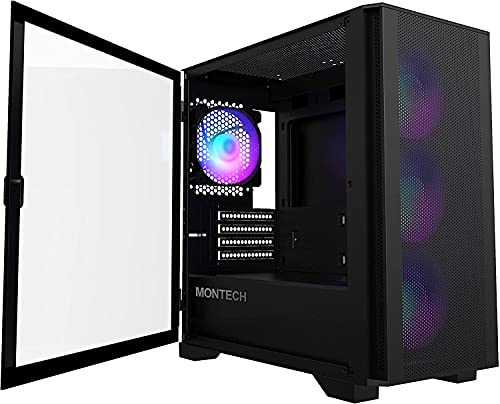
Montech Air 100 ARGB — Small footprint pick
Micro-ATX cases have a reputation for trapping heat, because a small box concentrates hot components and leaves little room for air to organise itself. The Air 100 ARGB dodges that fate with the oldest trick in this guide: a real mesh front and four fans already installed. Three intakes pull air through the mesh and one exhaust clears it, so the airflow path is complete before you spend anything extra, and the small internal volume means the air actually changes over quickly instead of swirling in dead corners.
Despite the size, the clearances are grown-up. Graphics cards up to about 330mm fit, tower coolers up to roughly 161mm are welcome, and the swivelling tempered glass door makes the inside easy to reach for a quick dust-out or a memory upgrade. A lighting controller is included for the ARGB fans, which keeps a first build simple — no motherboard header puzzles just to get the fans lit and spinning. For a student room, a living-room PC or a second machine, this combination of small footprint and honest cooling is hard to argue with.
The limits are the ones physics imposes. A micro-ATX board caps your expansion, very long flagship cards will not fit, and there is no room for a thick top radiator, so liquid cooling plans should stay modest. Working space is tighter than in a mid-tower, and patience with cable routing pays off double here because stray cables sit closer to the intake stream. Accept those boundaries and the Air 100 is the coolest small case in this guide by a clear margin.
- Form factor: micro-ATX
- Included fans: four ARGB with controller
- Graphics card clearance: up to about 330mm
- Cooler clearance: up to about 161mm
- Side panel: swivelling tempered glass
Strengths
- Four fitted fans and a mesh front in a genuinely small case.
- Swivel glass door makes maintenance unusually easy.
- Lighting controller included for a painless first build.
Trade-offs
- Micro-ATX platform limits expansion and card length.
- No room for large top-mounted radiators.
- Tight interior rewards patient cable routing.
Best for: small desks, student rooms and compact gaming builds. Not suited for: flagship-length graphics cards or elaborate liquid cooling loops.

Montech X3 Mesh — Six fans fitted
The X3 Mesh is the brute-force entry: six fans included, three 140mm units pulling through a mesh front and three more exhausting at the rear and top. On paper and in practice that is a complete wind tunnel for very little money, and for a builder who wants to assemble a PC and never think about airflow again, the appeal is obvious. The case runs cool because every position that matters is already occupied by a fan pushing air in the right direction.
Temper that enthusiasm with one honest caveat: the fans are fixed-RGB, fixed-speed units. They light up, they move air, and they ask nothing of your motherboard headers beyond power — but they do not slow down when the machine idles, so the X3 Mesh is never the quietest case in this guide, and the rainbow lighting cannot be reprogrammed or switched to a subtler scheme through software. Some builders will love the simplicity; anyone who works beside their PC all day should weigh the LANCOOL or the Phanteks instead.
Elsewhere the package is respectable: graphics cards up to about 305mm fit, a 240mm radiator can be mounted, dust filters are fitted, and the swivelling glass side panel is a friendly touch at this end of the market. Think of the X3 Mesh as cooling by overwhelming numbers — not refined, not silent, but undeniably effective, and the easiest recommendation here for a gaming-first build in a room where a little fan hum goes unnoticed.
- Form factor: ATX mid-tower
- Included fans: six fixed-RGB (three 140mm intake)
- Graphics card clearance: up to about 305mm
- Radiator support: up to 240mm
- Side panel: swivelling tempered glass
Strengths
- Six fitted fans deliver a complete airflow path for minimal money.
- Triple 140mm intakes keep the graphics card well fed.
- Nothing extra to buy before the build runs cool.
Trade-offs
- Fixed-speed fans cannot be quietened at idle.
- Lighting is fixed rainbow, with no software control.
- Shorter card clearance than the larger picks here.
Best for: gaming builds where cooling per coin matters most. Not suited for: noise-sensitive rooms or builders who want full fan control.
How Do These Cool Cases Compare Side by Side?
| Case | Size | Fans included | Max GPU length | Cooling character |
|---|---|---|---|---|
| Lian Li LANCOOL 216 RGB | ATX mid-tower | 3 (2×160mm + 140mm) | ~392mm | Strongest intake, low noise |
| Montech Air 903 MAX | E-ATX mid-tower | 4 | ~400mm | Huge headroom, radiator-ready |
| Phanteks XT Pro Ultra | ATX mid-tower | 4×140mm | Long cards supported | Balanced, complete bundle |
| NZXT H5 Flow | Compact ATX | 2×120mm | Mid-length cards | Perforated, direct GPU feed |
| Montech Air 100 ARGB | Micro-ATX | 4 | ~330mm | Fast air turnover, small box |
| Montech X3 Mesh | ATX mid-tower | 6 | ~305mm | Maximum fan count, fixed speed |
What Should You Check Before Buying a Case for Cooling?
Start with the front panel, because everything else is secondary. Hold the product photos up to one question: can I see through this intake, or is it a wall with decoration? Fine steel mesh and dense perforation both work; a glass or solid panel with slim edge vents is a compromise you will hear every evening in fan noise. If a listing hides the front behind glamour shots of lighting, treat that as your answer.
Then count fans, but count them intelligently. Two large intakes plus one exhaust is a complete system. Six fans with no exhaust is a pressurised box that leaks hot air through random seams and cooks its own power supply. Check fan sizes as well as numbers, check whether the fans are speed-controllable through your motherboard, and check whether the case includes a hub or controller if it expects you to run four or more fans from one header.
Clearances decide whether the cool case fits your parts at all. Measure your graphics card, including any protruding power connector bend, against the stated maximum length. Check tower cooler height if you cool the processor with air, and radiator thickness plus fan depth if you use liquid — a case that accepts a 360mm radiator on paper may only accept it with slim fans once a long card is installed. Finally, look at the filters: every intake that matters should have one, it should slide or pop out without tools, and you should honestly commit to cleaning it, because a neglected filter can erase the advantage of the best mesh front in this guide within a single dusty season.
How Can You Make an Affordable Case Run Even Cooler?
Set fan curves before you judge temperatures. Most motherboards ship with conservative curves that let components warm up before the case fans respond, which makes a good case look mediocre. Tie case fan speed to a sensor that reflects gaming load, give the intakes a head start over the exhausts so pressure stays slightly positive, and let the curve rise early rather than steeply — a gentle ramp at moderate temperature beats a sudden roar at high temperature for both noise and component life.
Route cables like they matter, because they do. Use the space behind the motherboard tray, keep the channel between the front intakes and the graphics card empty, and never leave a spare power cable bundle parked in front of an intake fan. If your case has a perforated base or lower panel feeding the graphics card, keep that zone clear underneath the machine too: a PC standing on thick carpet can smother its own bottom intake, so a hard surface or a simple stand is a genuine cooling upgrade that costs almost nothing.
Finish with housekeeping. Dust filters should be rinsed or vacuumed every month or two in a typical home, more often with pets. Once a year, take the machine outside, open both panels and blow the heatsinks and fan blades clean. And when you add hardware — a second drive cage, a capture card, a bigger card — glance at the airflow path again. Cooling is a system, and every change to the build is a change to the system.
What Are the Most Common Mistakes When Buying a Case for Cooling?
The classic error is choosing by photograph: a glowing glass tower looks fast and runs hot, while the plain mesh box beside it quietly wins every temperature test. The second mistake is counting fans without asking where the air comes from — fans recycling hot internal air accomplish little, and an intake fan pressed against a solid panel accomplishes almost nothing. Third comes ignoring the exhaust side entirely, leaving heat to escape through whichever gaps it finds, including past the power supply.
Buyers also underestimate size in both directions. A huge case with two small fans can cool worse than a compact case with a disciplined airflow path, while a tiny case bought for a flagship card can throttle it despite good mesh, simply because the card’s cooler exhausts into a wall of glass an inch away. Match the case volume to the heat your parts produce, leave the graphics card room to breathe on every side its cooler uses, and the affordable end of the market will serve you far better than its reputation suggests.
How Does Air Actually Move Through a PC Case?
Understanding three ideas will make every claim in every case review easier to judge. The first is that air follows the path of least resistance, always. When a front fan spins, it does not politely push a column of air straight at the graphics card; it pressurises the front of the case, and air escapes through whatever openings offer the least resistance — the graphics card’s cooler if the path is clear, or a gap beside the power supply shroud if that is easier. This is why the tidy interiors of the H5 Flow and the LANCOOL 216 matter: they remove the easy wrong paths, so the air has little choice but to wash over the components that need it.
The second idea is that heat leaves a case only when air leaves it. Intake fans get the attention, but a case with powerful intakes and a single choked exhaust becomes a warm balloon, its internal pressure pushing back against the very fans trying to fill it. Balanced systems — the four-fan layouts in the XT Pro Ultra and the Air 903 MAX, the six-fan arrangement of the X3 Mesh — work because every litre pushed in has a planned route out, ideally passing a hot component on the way. When you read a case specification, mentally draw that route from front panel to rear grille; if you cannot, the manufacturer probably could not either.
The third idea concerns the graphics card itself, because in a gaming PC it is usually the hottest and most temperature-sensitive component. Most cards draw air from below their fans and exhaust it through the sides of their cooler shroud, into the case. That means the card depends on a supply of cool air arriving underneath it — from the front intakes travelling low, or from a perforated base like the H5 Flow’s — and on the case exhausts clearing its warmed air before the card breathes it again. A case can post a fine processor temperature while quietly suffocating the card, which is why this guide weighs the GPU air path so heavily in every pick.
What About Noise — Can a Cool Case Also Be Quiet?
Cooling and silence are often presented as enemies, but at the affordable end they are mostly allies, because both come from the same source: fans that do not have to work hard. A case with an open front lets its fans achieve target temperatures at moderate speeds, and moderate fan speeds are quiet fan speeds. The loud budget PC is almost never loud because its fans are powerful; it is loud because a restrictive case forces ordinary fans to spin at their maximum all evening. Buy the open case first and the noise problem usually shrinks on its own.
Fan size is your second lever. Larger fans move a given volume of air at lower rotational speed, and lower speed means less bearing noise and less of the turbulent hiss that comes from blades chopping air at high revolutions. That physics is the quiet argument for the LANCOOL 216’s 160mm pair and for the 140mm bundles in the Phanteks and the Air 100. It is also the honest weakness of the X3 Mesh: its fixed-speed fans cannot slow down when the machine idles, so its cooling comes with a constant background note that the others can drop below.
Your third lever is control. Where fans connect to the motherboard, set curves per zone rather than running everything from one sensor: front intakes answering to graphics card temperature, exhausts answering to a blend or to the processor. Give the curves a floor as well as a ceiling, so fans never hunt up and down around a threshold — a steady low hum disappears from attention in a way that a pulsing fan never does. Finally, remember the case sits somewhere: under a desk it is muffled but starved if the floor is carpeted, on the desk it breathes freely but sits closer to your ears. The coolest, quietest affordable setup is an open case, on a hard surface, with curves set once and filters kept clean.
Which of These Cases Fits Your Kind of Build?
For a first gaming PC built around a mainstream card and a mid-range processor, the choice is between the LANCOOL 216 RGB and the XT Pro Ultra, and it is a pleasant argument to have. Pick the Lian Li if temperatures and low noise lead your priorities and your card is long; pick the Phanteks if the budget is truly fixed and you value the complete four-fan bundle and modern front connectivity. Either way you will finish the build with nothing left to buy for cooling, which is exactly what an affordable case should promise.
For a small room, a student desk or a living-room machine, the shortlist narrows to the H5 Flow and the Air 100 ARGB. The NZXT suits a full ATX board in a compact shell and rewards tidy builders; the Montech takes a micro-ATX board, costs the least floor space, and its swivelling door makes it the easiest case here to live with in a cramped room where the PC must be serviced in place. Both run cool because their panels are honest — and both ask you to confirm card length before ordering, the one chore compact builders cannot skip.
For a build that will grow — a flagship card next year, a liquid cooler after that, drives and capture hardware along the way — the Air 903 MAX is the only pick designed to never be the limiting factor, and its four stock fans keep it respectable until the upgrades arrive. And for the purely gaming-focused builder who wants maximum airflow for minimum outlay and does not mind a fixed fan note, the X3 Mesh does one job completely. Match the case to the build you actually have planned, not the one in the advertisement, and every case in this guide will keep its components cool for years.
How Do We Judge Cooling Without a Laboratory?
Readers deserve to know how a guide like this reaches its verdicts, because case cooling invites exaggeration. We do not publish invented temperature figures, and you should distrust any affordable-case roundup that quotes suspiciously precise degrees without describing a test bench. What can be judged reliably from design, specification and the accumulated record of each model is the airflow architecture: how much open intake area the front presents, how much air the included fans can move through it, how direct the path is from intake to graphics card to exhaust, and how much of that path survives contact with real cables, drive cages and radiators.
That architectural judgement is more predictive than it sounds. Two cases with the same fans can differ enormously because one feeds them through open mesh and the other through a slit; two cases with the same mesh can differ because one exhausts properly and the other recirculates. When we rank the LANCOOL 216 first, the claim is specific and checkable: twin 160mm fans, full-area mesh, a 140mm exhaust and an unobstructed interior give it the strongest intake-to-exhaust path in this group at the lowest fan speeds. When we place the X3 Mesh last despite its six fans, the reasoning is equally concrete — fixed speeds waste its numerical advantage and its card clearance trails the leaders.
We also weigh the ownership record: whether a model’s filters are reachable, whether its panels survive repeated removal, whether its fan bearings are the kind that stay quiet in year two. A case that cools brilliantly for a month and then rattles, clogs or cracks its clips is not an affordable case at all, because you will pay for it twice. Every pick here has the mundane durability to match its airflow, and where a model asks something of you in return — the 216’s filter schedule, the H5 Flow’s two-fan starting point — the review says so in plain terms.
How Should You Maintain a Cool Case Through the Year?
Cooling performance is not a fixed property of the box you bought; it drifts with dust, seasons and the slow accumulation of small changes. Summer is the obvious test — a room five degrees warmer hands every component a five-degree handicap — but the quieter enemy is the filter you forgot. A mesh front with a clogged filter behaves increasingly like the solid panels this guide told you to avoid, and the fans compensate by spinning harder, so the first symptom of neglect is usually noise rather than heat. When your PC sounds busier than it did in spring, check the filters before you check anything else.
Build a rhythm that matches your home. Homes with pets or carpets may need the front filter rinsed monthly; a hard-floored room without animals can stretch to a season. Twice a year, open the case and clear the graphics card’s heatsink fins and the processor cooler’s tower, because dust mats there insulate exactly the surfaces that must shed heat. While the panels are off, confirm every fan still spins freely and quietly — a fan that has begun to grind is a fan whose airflow figure no longer matches its specification, and replacing one fan is far cheaper than replacing the card it failed to cool.
Finally, revisit the setup whenever the room changes. A PC moved from a desk to a carpeted floor corner has lost its bottom intake and gained a dust supply; a machine pushed against a wall may be rebreathing its own exhaust. Leave a hand’s width behind the rear exhaust, keep the top panel clear if it vents, and never stack books on a case that breathes through its lid. These habits cost nothing, and on an affordable case — where the engineering margins are honest but not lavish — they protect the exact advantage you bought the case for.
Which Cooling Features Are Worth Paying For — and Which Are Not?
Affordable cases are a minefield of features that photograph well and cool badly, so it helps to sort the genuinely useful from the decorative before you spend. Worth paying for, first: fan size. A case built around 140mm or 160mm fans starts with a physical advantage no software can imitate, because those fans deliver their air slowly and quietly. Second, a hinged or tool-free side panel — not a cooling feature on paper, but the panel you can open in ten seconds is the panel you will actually open to clean the filters and heatsinks, and maintenance is cooling over any timescale longer than a month.
Third, a front panel you can remove without tools, for the same reason: the filter behind it is the component that decides whether the case still cools in year two. Fourth, fan control that reaches the motherboard — PWM fans or a proper hub — because the ability to slow fans at idle and raise them under load is what turns a merely cool case into a pleasant one. Notice what these four have in common: none of them glow, and all of them compound quietly over the life of the machine.
Now the decorative list. Vertical graphics card mounts look dramatic and usually press the card’s fans against the glass, throttling the very component this guide exists to protect; admire them in other people’s builds. Tempered glass front panels with edge vents are the single most reliable predictor of a hot, loud affordable PC. Fan counts beyond four, quoted without sizes or speeds, are marketing arithmetic — the X3 Mesh earns its six because three of them are 140mm intakes behind real mesh, not because six is a magic number. And elaborate liquid-cooling support in a case bought for an air-cooled build is money spent on holes you will never use; buy the case your actual hardware needs.
The pattern to remember is that cooling value hides in dimensions and materials, not in feature lists. Millimetres of clearance, square centimetres of open mesh, fan diameters, filter access — these decide temperatures. Everything else is styling, and styling is a perfectly good reason to choose between two cases that cool equally well. It is a terrible reason to choose a case that does not.
What Happens When a Case Runs Hot — and How Do You Spot It Early?
A hot case rarely announces itself with a shutdown. The first symptom is usually performance that fades during long sessions: a game that starts smooth and stutters forty minutes in, export times that stretch on the second job, frame rates that sag exactly when the action peaks. That pattern is thermal throttling — the graphics card or processor quietly lowering its clocks to protect itself — and it is the tax this entire guide exists to remove. The second symptom is noise creep, as fans work harder each month against dust and warm rooms, until a machine that was pleasant in winter is intrusive by August.
Spotting the problem early is simple and free. Run a hardware monitor while you play your most demanding game for half an hour and watch the graphics card temperature trend rather than its peak: a card that climbs steadily and then plateaus near its limit is breathing recycled air, while a card that settles early and holds is being fed properly. Then take the front panel or filter off and repeat the test. If temperatures fall noticeably with the panel removed, the case — not the card, not the cooler — is the bottleneck, and no internal upgrade will fix it as cheaply as airflow would have.
The encouraging news is that every pick in this guide was chosen to keep you out of that diagnosis entirely. Their fronts are open, their fans are fitted, their exhaust paths are planned, and their filters are reachable. A case bought on those principles does not need monitoring rituals or rescue purchases; it simply holds its temperatures from the first summer to the fifth, which is the whole definition of an affordable case that runs cool.
Does Case Cooling Matter More for the Processor or the Graphics Card?
For gaming builds the graphics card is the component your case choice protects most, and it is not close. A modern processor under a competent tower cooler sheds its heat into a heatsink with a dedicated fan blowing through fins in a straight line; give it almost any airflow at all and it behaves. The graphics card, by contrast, carries the largest heat load in the machine, cools itself with fans that draw from the cramped space beneath it, and dumps much of its exhaust back into the case interior for the case fans to clear. When a case fails a gaming PC, it fails the card first — in temperature, in noise, and in the quiet clock reductions that steal performance mid-session.
That asymmetry should shape how you read every specification in this guide. Front intake position matters most where it feeds the card’s zone, which is why low-mounted intakes, perforated bases and unobstructed shroud lines appear so often in these reviews. Exhaust placement matters most at the rear and top rear, where the card’s warmed air naturally collects. Processor-focused features — a top radiator mount, say — are welcome, but they are the supporting act. Choose the case that feeds and clears the graphics card, and the processor will almost always be fine; choose for the processor alone and the card may still suffocate beneath it.
Workstation builders should flip the emphasis only if their workloads genuinely invert the heat load — long processor renders on an idle card, for instance. Even then, the cases here cope, because a path that clears graphics heat clears processor heat too. The reverse is not always true, which is precisely why this guide ranks by the harder problem.
Final Recommendation
Buy the LANCOOL 216 RGB if cooling is truly the priority and your desk has the room; its big, slow front fans are the most effective affordable intake arrangement in this guide. Choose the Phanteks XT Pro Ultra if the budget is fixed and you want four quality fans included, or the Air 903 MAX if a future flagship card or radiator is already on your roadmap. The H5 Flow and Air 100 ARGB prove small cases can run cool when their panels are honest, and the X3 Mesh remains the blunt instrument for builders who value airflow above refinement. Whichever you pick, rinse the filters and set the fan curves — a cool case is a habit as much as a purchase, and the quietest degrees are the ones your fans never have to chase.
Frequently Asked Questions
Does a mesh front really make that much difference?
Yes, and it is the single biggest factor at this end of the market. A fan can only move the air it can reach; behind a solid panel it recirculates the thin layer trapped in the front cavity and starves. Open mesh lets the same fan draw freely from the room, which lowers temperatures and lets the fan spin slower for the same result, so mesh wins on noise as well.
How many fans does an affordable case actually need?
Three well-placed fans — two intake, one exhaust — cool a typical gaming build properly. More fans help in larger cases or with very hot components, but placement and an open intake path matter more than raw count. One extra exhaust at the top rear is the most useful first addition if your case ships with only two fans.
Is positive or negative pressure better for cooling?
Slightly positive pressure, where intakes move a little more air than exhausts, is the usual goal: it forces air out through filtered paths and seams rather than sucking unfiltered dust in through every gap. Pure cooling performance is similar either way in a mesh case, but positive pressure keeps the interior cleaner between maintenance sessions.
Can a small case cool a powerful graphics card?
It can, provided the panels are mostly open and the card has clearance around its cooler. The Air 100 ARGB in this guide feeds cards up to about 330mm through a mesh front with four fans, and its small volume exchanges air quickly. What small cases cannot forgive is a sealed front or a card wedged against glass.
Should I choose a bigger case for future cooling?
Only if your future plans are concrete — a longer card, a 360mm radiator, an E-ATX board. Oversizing just in case buys you a larger footprint and longer cable runs, and a half-empty big case does not automatically run cooler than a well-matched mid-tower. The Air 903 MAX is here for builders whose roadmap genuinely needs the room.
Do I need liquid cooling to keep an affordable build cool?
No. A mesh case with a sensible fan layout and a decent tower air cooler handles mainstream gaming hardware comfortably. Liquid cooling earns its place with very hot processors, compact builds that lack cooler height, or a preference for its looks and noise profile — not because air in a good case is inadequate.
Related Guides
Keep exploring our case coverage: best pc cases for airflow, best quiet pc cases and best micro atx pc cases.
Related guide: Best RGB PC Cases
Related guide: Best Retro Style Pc Cases


