What's inside
- Key Takeaways
- Quick Picks
- How Did We Vet These Combos for Spectrum Shoppers?
- What Does DOCSIS 3.1 Actually Buy You over DOCSIS 3.0?
- How Do You Activate a Combo on a Cable Network Without Drama?
- Which Combo Fits Your House — and Your Plan?
- What About Upload Speeds and the Evening Congestion Question?
- How Should Your Floor Plan Choose Between a Combo and the Mesh Combo?
- Why Does the Coax Itself Decide Half of Your Result?
- What If Activation Fails on the Day?
- DOCSIS Generation, Wi-Fi Class and Port Counts at a Glance
- Which Devices Deserve the Combo’s Wired Ports?
- How Long Should a Combo Serve Before You Replace It?
- Renting versus Owning: How Should You Think About the Money?
- What Mistakes Do People Make When Replacing a Provider Gateway?
- Final Recommendation
- Frequently Asked Questions
- Related Guides
As an Amazon Associate I earn from qualifying purchases. This post may contain affiliate links at no extra cost to you.
widgetverdict.com is reader-supported. When you buy through links on our site, we may earn an affiliate commission.
Where to buy: all six modem router combos below link to verified Amazon listings. Before ordering any cable modem, confirm your exact address’s provider and plan with the provider itself — compatibility in this category is ultimately decided at your street, not in a shopping cart.
A modem router combo is two devices sharing one shell: a DOCSIS cable modem that speaks to the provider’s network, and a Wi-Fi router that speaks to your household. Shoppers hunting for the best cable modem routers that work with Spectrum are really asking two questions at once — will the modem side be accepted on that network, and is the router side good enough that they will not end up buying a second router anyway? This guide keeps those two questions separate for every pick, because a combo can pass the first test brilliantly and fail the second in a large house.
On compatibility, the discipline of this guide is strict: we claim exactly what each listing title claims, no more. All six titles name Spectrum or Charter Spectrum among their compatible providers, and all six are DOCSIS 3.1 models — the current generation of cable modem technology, and the one that matters for gigabit-class plans. Where a title adds a plan figure, such as service up to 1 Gbps, we print it as the title states it. What we will not do is invent a list of approved plans or promise that a specific tier at your address will activate without the provider’s own confirmation, because providers update their approved-device lists and plan rules on their own schedule.
The six picks divide by ambition. Two NETGEAR Nighthawk combos bookend the range — one at 2.7 Gbps Wi-Fi class, one at 6 Gbps — with multi-gig ports and guided setup. Two ARRIS Surfboard models offer the classic cable-modem lineage, one a Wi-Fi 6 AX3000 design with a coverage figure in its title, one an AC2350 model that states its OFDM channel count. Motorola’s entry adds an “Intelligent Power Boost” claim and explicit Charter Spectrum approval language. And NETGEAR’s Orbi combo answers the big-house problem by making the modem the base of a tri-band mesh system instead of a single box.
Key Takeaways
- Every pick is a DOCSIS 3.1 modem router combo whose listing title names Spectrum or Charter Spectrum compatibility — that title-level claim is the compatibility evidence used here.
- A combo is two purchases in one shell; judge the modem generation and the Wi-Fi class separately before buying.
- Plan-speed figures appear only where titles state them: two ARRIS and Motorola titles reference 1 Gbps-class service.
- The Orbi CBK752 is the mesh answer — a modem base with tri-band AX4200 mesh Wi-Fi for larger homes.
- Four gigabit ports recur across the NETGEAR and ARRIS titles; the Motorola title does not state a port count, and its spec box says so.
- Always confirm your address and plan with the provider before ordering; approved-device lists change.
Quick Picks
| Pick | Badge | Why it earns its place |
|---|---|---|
| NETGEAR Nighthawk CAX30 | Mainstream Nighthawk combo | DOCSIS 3.1 with WiFi 6 at 2.7 Gbps class, multi-gig port and four gigabit ports. |
| ARRIS Surfboard G34 | Coverage-stated all-rounder | DOCSIS 3.1 and AX3000 Wi-Fi 6, with the title stating coverage up to 2,500 sq ft and plans up to 1 Gbps. |
| NETGEAR Nighthawk CAX80 | High-class Nighthawk combo | The 6 Gbps WiFi 6 sibling of the CAX30 for households that want the bigger router half. |
| ARRIS SBG8300 | Channel-count classic | DOCSIS 3.1 gigabit modem with AC2350 Wi-Fi and four OFDM channels stated in its title. |
| Motorola MG8702 | Power Boost pick | DOCSIS 3.1 combo with AC3200 Wi-Fi, Intelligent Power Boost and Charter Spectrum named as approved. |
| NETGEAR Orbi CBK752 | Mesh modem system | A DOCSIS 3.1 modem inside a tri-band AX4200 Orbi mesh system for multi-room homes. |
How Did We Vet These Combos for Spectrum Shoppers?
The first filter was the modem generation: DOCSIS 3.1 only. Earlier DOCSIS 3.0 combos still circulate at tempting prices, but 3.1 is the generation that carries gigabit-class cable service and the providers’ current attention, and every title in this guide states 3.1 outright. The second filter was the compatibility sentence itself — each title had to name Spectrum, Charter Spectrum or, in the ARRIS SBG8300’s phrasing, Spectrum among its listed providers. No title naming, no place in the guide.
The third filter was router-half honesty. A combo’s Wi-Fi class ranges here from AC2350 to a 6 Gbps WiFi 6 design and a tri-band mesh system, and the reviews grade the router half on its own merits rather than letting the modem’s compatibility halo cover a weak wireless side. Homes that already know they need serious wireless should read the Orbi review first; homes that mainly need the modem accepted and the Wi-Fi adequate can save their attention for the mid-list picks. The wireless-first thinking in Best Wireless Routers for Smart Homes is a useful companion once the modem question is settled, and the port-and-sharing angle in Best Routers with USB 3.0 Ports covers what none of these combos emphasise.
Finally, a rule about evidence: activation is an event between you and the provider. This guide can tell you what each manufacturer claims in its listing title, and does. It cannot see your street’s plant, your plan’s fine print or this month’s approved list — so the last step of every purchase here is a two-minute confirmation on the provider’s own channels.
What Does DOCSIS 3.1 Actually Buy You over DOCSIS 3.0?
DOCSIS is the standard that lets data ride the cable network, and 3.1 is its current mainstream generation. The practical differences a buyer feels are headroom and longevity: 3.1 modems are built for gigabit-class downstream plans, handle busy neighbourhood nodes more gracefully through newer channel technology — the SBG8300’s title even counts its four OFDM channels, the wide channels 3.1 adds — and they are the generation providers continue to certify for their faster tiers. A 3.0 modem can be entirely adequate on a modest plan today; it is simply a purchase with a shorter future.
There is also a rental arithmetic that motivates most combo purchases. Providers commonly charge a monthly fee for their gateway, and an owned combo replaces that line item while consolidating two boxes into one. The payback period depends on your bill, which this guide will not guess — but the direction of the maths is why this category exists, and why buying the current DOCSIS generation matters: the longer the modem stays approved and adequate, the longer the arithmetic keeps paying you back.
One caution belongs here: a combo welds the modem’s fate to the router’s. If you later want a much stronger wireless system, a separate modem lets you upgrade the router alone. The Orbi pick below is the exception that anticipates exactly that desire, by making the combo the base of a mesh system from the start.
How Do You Activate a Combo on a Cable Network Without Drama?
Sequence is everything. Connect the coax, power the combo, and let it sit longer than feels reasonable — first boots involve the modem ranging, bonding channels and often receiving configuration from the provider, and impatient power-cycling restarts that courtship from zero. When the modem’s lights settle, the activation step begins: providers typically offer a self-activation page that appears when you first browse, an app flow, or a phone call where you read out the modem’s MAC address from its label. Photograph that label before the unit goes behind furniture.
Keep the old gateway connected and returnable until the new combo is live and every important device has reconnected. Activation hiccups are usually mundane — an account flag, a plan code, a signal level at the edge — and they are all easier to solve while the household still has internet through the old box and you are not troubleshooting by phone torchlight.
One more piece of housekeeping belongs to activation day: change the admin password and set the Wi-Fi name and password deliberately, ideally reusing the old network’s credentials as the mistakes section advises, so the household’s devices migrate on their own. Write the admin details down and store them with the house paperwork. The combo will outlive your memory of that afternoon, and the person who needs those credentials in three years — possibly you, possibly a technician — will be grateful for the envelope.
After activation, do the unglamorous checks: a speed test at the modem’s location, a walk around the house noting where the combo’s Wi-Fi thins out, and a look at whether your plan’s tier matches what the line delivers. If the wireless is thin at the edges, that is a placement or mesh conversation — the Orbi review below exists for it — not a modem fault.
Which Combo Fits Your House — and Your Plan?
The detailed reviews follow Quick Picks order. Note how often the deciding factor is the router half: the modem halves are uniformly DOCSIS 3.1, so the differences that will shape your daily experience are Wi-Fi class, port counts, mesh or not, and the coverage claims each title is willing to print.

NETGEAR Nighthawk CAX30 — Mainstream Nighthawk combo
The CAX30 is the sensible centre of this guide: a DOCSIS 3.1 modem router combo with WiFi 6 in the 2.7 Gbps class, dual-band wireless, a multi-gig port alongside four gigabit ports, guided setup, and a title that names Xfinity, Spectrum and Cox as compatible. For the large middle of cable households — a gigabit-or-below plan, a normal house, a family that streams and works — that specification is not a compromise; it is a precise fit.
The multi-gig port deserves its sentence. It gives the combo a wired path faster than gigabit for the one device that can use it — a NAS, a desktop, a switch uplink — which is the port arrangement most households actually benefit from, as opposed to a full bank of multi-gig ports serving devices that do not exist yet. Four gigabit ports handle the television, the console, the office machine and the printer without a switch.
Guided setup in the title speaks to NETGEAR’s activation flow, which matters in this category more than in ordinary routers: the first hour with a cable modem involves the provider as much as the product, and a guided path through it is a genuine feature. The CAX30’s larger sibling below exists for households whose wireless ambitions outgrow 2.7 Gbps class dual-band; everyone else should start here and interrogate whether they need more.
Ownership economics favour this tier of combo in a way worth stating plainly. The household replaces a rented gateway with a single owned unit whose modem generation will stay current for years, and the router half is strong enough that no second purchase follows it home. That is the whole value proposition of the category at its best — and the CAX30, sitting at the centre of the class range, is where the proposition is easiest to believe.
- Modem: DOCSIS 3.1 cable modem built in
- Providers named in the title: Xfinity, Spectrum, Cox
- Wi-Fi: WiFi 6 dual-band, 2.7 Gbps class
- Ports: multi-gig port plus 4 × gigabit ports, per the title
- Setup: guided set up, per the title
- Plan ceiling: no specific plan figure is stated in the title — confirm your tier with the provider
Strengths
- Balanced specification matched to mainstream gigabit-era plans.
- Multi-gig port gives one device a faster wired path.
- Guided setup softens the provider activation process.
Trade-offs
- Dual-band Wi-Fi will not stretch to a large or difficult house alone.
- The CAX80 above it offers a much larger router half for heavier homes.
- Combo format means modem and router upgrade together later.
Best for: a typical family house on a mainstream plan that wants one tidy box and no rental gateway.
Not suited for: a sprawling multi-storey home whose far rooms need mesh coverage rather than a stronger single box.

ARRIS Surfboard G34 — Coverage-stated all-rounder
The G34’s title is the most forthcoming in this guide, and it deserves quoting in pieces: a DOCSIS 3.1 cable modem and Wi-Fi 6 router, AX3000, suitable for plans up to 1 Gbps, AX3000 Wi-Fi 6 covering up to 2,500 sq ft, four 1 GbE ports, and works with Xfinity, Cox and Spectrum. A manufacturer willing to print a plan figure and a coverage figure in the title is giving buyers the two numbers they actually shop with, and this guide rewards that directness with attention.
Treat those numbers as the title’s own framing. “Up to 1 Gbps plans” is the modem’s stated plan territory — confirm your specific tier with the provider, as with every pick here — and the coverage figure describes favourable conditions, not a guarantee for a house of brick and foil-backed plasterboard. Within those honest limits, the G34 is the easiest pick in the guide to match to a household on paper: plan at or under the stated figure, home at or under the stated area, and the specification simply fits.
There is a support angle to the Surfboard choice as well. Because ARRIS modems are so common on these networks, provider support staff know the model’s menus and lights, and the internet’s accumulated troubleshooting knowledge for the line is deep. When activation day produces a puzzle, being on common hardware shortens the path to the answer — an unglamorous virtue that owners appreciate precisely once, at exactly the moment it matters.
ARRIS’s Surfboard line is the cable modem establishment — the brand descends from the modems providers themselves deployed for years — and the G34 carries that lineage into the Wi-Fi 6 combo era without drama. Four gigabit ports cover the wired basics. For the household that wants the decision to be simple and the numbers to be printed where they can be checked, this is the guide’s most legible option.
- Modem: DOCSIS 3.1
- Providers the title lists: Xfinity, Cox, Spectrum
- Plan figure in title: up to 1 Gbps plans
- Wi-Fi: Wi-Fi 6 AX3000; coverage up to 2,500 sq ft per the title
- Ports: 4 × 1 GbE ports
- Mesh expansion: not described in the title — see ARRIS documentation
Strengths
- Plan and coverage figures printed in the title simplify matching.
- AX3000 Wi-Fi 6 is a step above the guide’s entry classes.
- Surfboard lineage suits buyers who value the modem pedigree.
Trade-offs
- Coverage figure assumes friendly construction; dense walls shrink it.
- No multi-gig port is stated for faster-than-gigabit wired devices.
- Above-1-Gbps plans sit outside the title’s stated territory.
Best for: a mid-size home on a plan up to the stated 1 Gbps figure that wants the matching done in the title itself.
Not suited for: a household already on a faster-than-gigabit tier, which should look at the higher-class picks instead.
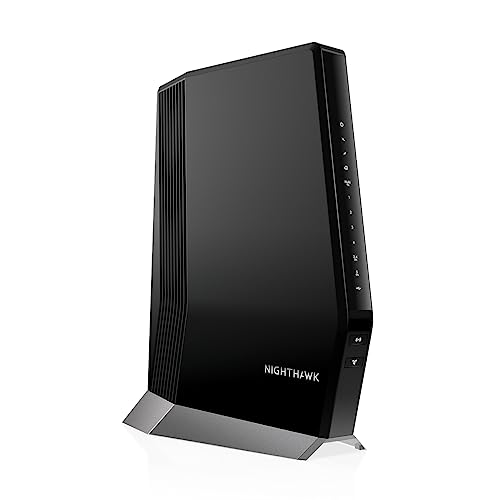
NETGEAR Nighthawk CAX80 — High-class Nighthawk combo
The CAX80 is the CAX30’s bigger sibling in every router-half respect: the same DOCSIS 3.1 modem foundation and the same Xfinity, Spectrum and Cox compatibility line, but WiFi 6 in the 6 Gbps class, dual-band, with multi-gig capability, four gigabit ports and guided setup. If the CAX30 is the precise fit for the mainstream, the CAX80 is the answer for the household that reads that sentence and thinks: we are not the mainstream.
Who is that in practice? The house with several simultaneous heavy streams, a gamer who treats latency as a personality trait, a home office whose video presence is a professional asset, and a growing fleet of devices competing for airtime. The 6 Gbps class figure is an aggregate across bands, as all such figures are, but the platform beneath it is simply a stronger router — and in a combo, where the router cannot be swapped without replacing the modem, buying the stronger router half at the start is the prudent version of the purchase.
The trade is equally plain: you pay for wireless capacity that a small flat on a modest plan will never touch, and the modem half — identical in generation to its sibling’s — gains nothing from the upgrade. Judge this pick purely as a router decision. If the house needs the router, the CAX80 is the combo that avoids a second purchase; if it does not, the CAX30 is the same modem wisdom for less commitment.
Placement advice for this pick is unfashionable but real: a stronger router tempts owners to hide it, because it feels like infrastructure. Resist. The CAX80’s wireless advantage is earned in open air at a sensible height, and the difference between its shelf position and a cupboard can be larger than the difference between this model and its sibling. Buy the strong router, then give it the stage it needs.
- Modem: DOCSIS 3.1 generation
- Title compatibility line: Xfinity, Spectrum, Cox
- Wi-Fi: WiFi 6 dual-band, 6 Gbps class
- Ports: multi-gig capability plus 4 × gigabit ports, per the title
- Setup: guided set up, per the title
- Plan ceiling: the title states no specific plan figure — verify your tier with the provider
Strengths
- The strongest single-box router half in this guide’s NETGEAR pair.
- Multi-gig capability future-proofs the wired side.
- Same guided activation path as its mainstream sibling.
Trade-offs
- Wireless capacity is wasted on small homes and modest plans.
- Still a single box — placement limits remain placement limits.
- Premium positioning within the combo category.
Best for: a busy, device-dense household that wants the strongest single-box router half on its cable modem.
Not suited for: a small flat on an entry plan, where its wireless headroom would never be used.

ARRIS SBG8300 — Channel-count classic
The SBG8300’s title reads like a specification sheet from a more literal era: cable modem router combo, fast DOCSIS 3.1 gigabit, AC2350 Wi-Fi, Comcast Xfinity, Cox, Spectrum and more, 1 Gbps maximum internet speeds, four OFDM channels. Each element earns a comment. The compatibility line names Spectrum plainly. The 1 Gbps figure states the modem’s internet-speed territory. And the four OFDM channels — the wide channels that distinguish DOCSIS 3.1 — are a detail most titles omit entirely, printed here for buyers who know what they signify.
The router half is where the model’s generation shows: AC2350 is Wi-Fi 5-era dual-band, a class below the WiFi 6 picks in this guide. For a household whose devices and habits are similarly seasoned — browsing, streaming in high definition, a couple of simultaneous calls — that remains a workable wireless platform, and the combo’s appeal is the modem specification and the Surfboard name at a step below the Wi-Fi 6 entries. For a house filling with Wi-Fi 6 devices and 4K streams, the G34 above is the same brand’s more current answer.
Buy the SBG8300 with its identity clear: a modem-forward combo. The household that cares most about the cable side — the stated gigabit territory, the OFDM count, the provider list — and treats Wi-Fi as a utility will find it well-aimed. The household that cares most about wireless should let the guide’s Wi-Fi 6 picks argue instead.
One more SBG8300 trait deserves recording: its title’s “and more” after the provider list is doing quiet work, suggesting a broad certification footprint beyond the three named networks. For a household that may move between cable providers — renters, students, anyone whose next address is uncertain — a combo with a wide compatibility list is a small hedge against buying the same product twice. Confirm the new provider at the new address, as always, but start from a title that already speaks broadly.
- Modem: DOCSIS 3.1 gigabit, 4 OFDM channels per the title
- Compatibility in title: Comcast Xfinity, Cox, Spectrum and more
- Plan figure in title: 1 Gbps max internet speeds
- Wi-Fi: AC2350 class
- Ports: the title does not state a port count — check the manufacturer’s documentation
- Wi-Fi generation note: AC class, a generation behind the WiFi 6 picks
Strengths
- OFDM channel count printed in the title — rare transparency.
- Stated 1 Gbps modem territory matches gigabit-era plans.
- Surfboard modem pedigree in a value-leaning combo.
Trade-offs
- AC2350 Wi-Fi is a generation behind the guide’s WiFi 6 picks.
- Port count is not stated in the title and must be checked.
- Heavy modern households will feel the wireless class first.
Best for: a modem-first household on a gigabit-class plan whose wireless needs are modest and stable.
Not suited for: a device-dense modern home that would outgrow AC-class Wi-Fi within a year.
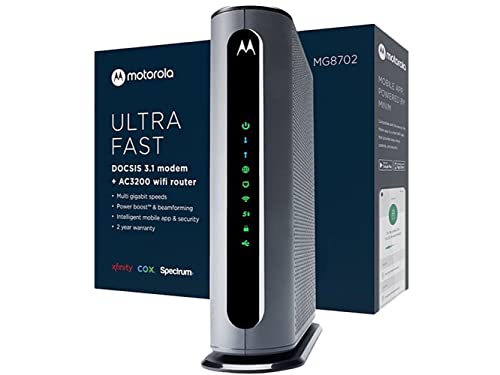
Motorola MG8702 — Power Boost pick
Motorola’s entry phrases its compatibility with a lawyer’s care: a DOCSIS 3.1 cable modem plus Wi-Fi router combo, approved for Comcast Xfinity, Cox, and Charter Spectrum. Charter Spectrum is the corporate name behind the Spectrum brand, and its explicit appearance in the title is the compatibility evidence this guide relies on — the same standard applied to every pick here, no stronger and no weaker for the formal wording.
The model’s distinguishing claim is Intelligent Power Boost, attached in the title to its AC3200 Wi-Fi. Power boost language in wireless refers to amplifier strength behind the signal — the quality that decides how a router performs at the edges of a house rather than beside it. We report the feature as the title names it, without inventing range figures the title does not print; the honest reading is that Motorola is signalling reach as this model’s router-half priority, which pairs naturally with its AC3200 class sitting between the SBG8300’s AC2350 and the Wi-Fi 6 entries.
Motorola’s brand carries its own kind of reassurance in this category: the name has sat on cable hardware for decades, and the MG8702’s documentation and support trail reflect that tenure. For a buyer whose last modem decision is a distant memory and who wants the new one to be equally forgettable — installed, activated, ignored for years — a mainstream maker with explicit Charter Spectrum wording is a rational kind of comfort, and this pick trades on it fairly.
The title leaves the port count unstated, so the spec box records that and the buyer with several wired devices should check Motorola’s documentation before ordering. Within those limits, the MG8702 is the reach-leaning middle of this guide: current DOCSIS generation, explicit Charter Spectrum approval language, and a router half whose headline is signal strength rather than class figures.
- Modem: DOCSIS 3.1
- Title approval line: Comcast Xfinity, Cox, and Charter Spectrum
- Wi-Fi: AC3200 class with Intelligent Power Boost, per the title
- Ports: count not given in the title — the maker’s manual is the place to check
- Plan figure: no specific plan speed is stated in the title — confirm your tier with the provider
- Mesh expansion: not described in the title — see Motorola documentation
Strengths
- Charter Spectrum approval stated in full formal wording.
- Power Boost positioning targets edge-of-house performance.
- AC3200 class sits above the guide’s entry wireless tier.
Trade-offs
- AC-class Wi-Fi rather than WiFi 6.
- Port count unstated in the title — wired-heavy homes must verify.
- No coverage or plan figure printed to shortcut the matching.
Best for: a house whose rooms at the edges struggle for signal and whose provider paperwork says Charter Spectrum.
Not suited for: a wired-heavy desk setup needing a confirmed bank of Ethernet ports before purchase.

NETGEAR Orbi CBK752 — Mesh modem system
The CBK752 dissolves the combo’s oldest problem — one box, one location, chosen by where the cable enters rather than where the house needs signal — by making the modem the base station of an Orbi mesh system. Its title: a DOCSIS 3.1 modem router combo with mesh WiFi 6, 4.2 Gbps class, tri-band AX4200, four gigabit ports, guided setup, and Xfinity, Spectrum and Cox compatibility. The modem lives where the coax is; the mesh satellite lives where the house actually needs coverage; the router half stops being a hostage to the cable entry point.
Tri-band is the mesh detail that matters. A dedicated band for the conversation between base and satellite keeps the devices’ bands freer, which is the difference between a mesh that extends coverage and a mesh that extends coverage while halving its speed at the far end. For the multi-storey house, the long ranch, the home with a detached office — the floor plans where every single-box pick in this guide quietly fails — this architecture is the correct answer, and it is the only one of its kind in the list.
The system thinking extends further: Orbi estates can grow with additional satellites in a way a single combo cannot, and readers planning that kind of whole-home build will find the mesh-first perspective in Best VPN Mesh Routers a useful next read. The costs of the CBK752 route are the system’s price of entry and the commitment to one ecosystem. For the house that needs it, neither is a real objection; for the flat that does not, every other pick in this guide is simpler.
Installation rhythm differs for a system: activate the modem base first, confirm the internet is live at the base, and only then place the satellite, midway between the base and the rooms that struggle, in open air rather than inside furniture. The guided setup in the title walks that sequence, and households that follow it patiently end up with the coverage the box promised. Households that place the satellite in the dead room itself — where signal is already weakest — discover that a mesh node cannot amplify what it cannot hear.
- Modem: DOCSIS 3.1 at the base of the mesh
- Providers named: Xfinity, Spectrum, Cox
- Wi-Fi: mesh WiFi 6, tri-band AX4200, 4.2 Gbps class
- Ports: 4 × gigabit ports, per the title
- Setup: guided set up, per the title
- Coverage figure: the title states no area figure — consult NETGEAR’s documentation
Strengths
- Mesh architecture frees coverage from the cable entry point.
- Tri-band design protects speed between base and satellite.
- Expandable Orbi ecosystem grows with the house.
Trade-offs
- System pricing for a problem single-box homes do not have.
- Commits the household to one mesh ecosystem.
- Setup involves placing satellites well, not just plugging in.
Best for: larger, multi-storey or awkwardly shaped homes that need the modem and real whole-house coverage in one purchase.
Not suited for: a compact flat where a single combo already covers every corner.
What About Upload Speeds and the Evening Congestion Question?
Cable networks are famously asymmetric: the downstream river is wide, the upstream path narrower, and plan marketing quotes the river. None of the six titles here print an upload figure, so this guide will not rank the picks by one. What a buyer can control is expectations and timing: the household that schedules its cloud backups for the small hours and keeps its video calls off the congested evening peak will feel its combo is faster than the neighbour’s identical hardware, because in every way that matters, it is.
Neighbourhood congestion is the other invisible variable. Cable segments are shared, and the same plan on the same street can feel different at 7 p.m. and 7 a.m. A DOCSIS 3.1 modem handles the busy segment with newer tools than its predecessors — one more practical reason the generation filter in this guide is not snobbery. If your speed tests sag only in the evening and recover by morning, the modem is rarely the culprit; the segment is, and the provider’s network team, armed with your dated speed tests, is the fix.
Keep a small log for the first fortnight after activation: a morning test, an evening test, and a note of anything odd. That log converts vague dissatisfaction into evidence, and evidence is what support organisations are built to respond to. It also protects you from blaming a good combo for a street problem — or excusing a bad installation as a street problem when the log shows the sag follows your own wiring.
How Should Your Floor Plan Choose Between a Combo and the Mesh Combo?
Start with the cable entry point, because the house chose it, not you. If the coax arrives in the living room of a two-bedroom flat, any single-box pick in this guide will cover the home, and the decision collapses to Wi-Fi class and ports. If it arrives in a basement utility corner of a three-storey house, no single box — not even the CAX80’s stronger platform — repeals the physics of floors and distance, and the Orbi’s architecture stops being a luxury and becomes the only honest answer in the list.
The middle cases reward a walk with a phone. Stand where the modem must live, then walk the current network’s weak rooms and note them. One weak room at the same level often yields to placement and a stronger router half; weak rooms on other floors, or beyond two dense walls, are mesh territory. This guide deliberately contains exactly one mesh pick, because within the discipline of title-stated Spectrum compatibility, it is the one the evidence supports — and one correct answer is worth more than three speculative ones.
Renters face a version of this question with an extra constraint: the combo goes where the outlet is, and the outlet is not negotiable. For them the mesh satellite is also a diplomatic instrument, placing coverage where the lease allows furniture rather than where the infrastructure demands hardware. Judge your own constraint honestly before the box arrives, and the purchase will feel less like a gamble and more like a plan.
Why Does the Coax Itself Decide Half of Your Result?
Every combo in this guide can be undermined by the last three metres of the installation: the coax run inside your walls. Old splitters fitted for a television era, corroded connectors, a cable stapled too enthusiastically — these decide the signal levels the modem negotiates with, and no router half, however strong, repairs a modem that is shouting through a bad line. If a new combo underperforms the rental gateway it replaced, suspect the wiring before the product, especially if a splitter sits between the entry point and the modem that the old installation did not use.
The practical rules are simple. Give the modem the first, cleanest run from the entry point; put splitters after it, not before; hand-tighten connectors firmly and check them when performance mysteriously sags in humid months. Providers can read your modem’s signal levels remotely during a support call, which is one more reason activation problems are worth a call rather than a return: the fix is often a £-free visit to replace a splitter older than the household’s children.
Placement interacts with wiring in one more way — heat. Modem combos run warm, and the convenient coax point inside a closed media cabinet is also the hottest shelf in the house. Ventilation is not a cosmetic concern for a device expected to run for five years without a day off; give the combo air, and it will repay you in the only currency that matters here, which is never thinking about it again.
What If Activation Fails on the Day?
Stay calm and work the mundane list, because activation failures are almost always mundane. Is the coax connected to the right outlet — many homes have several, only one live? Has the modem finished its first long boot? Did the provider’s system record the new modem’s MAC address correctly, character by character? Is the account flagged for the old gateway’s return before the new device is authorised? Each of those has stranded more installations than defective hardware ever will.
Keep notes as you go: times, light patterns, the exact wording of any error page. Support calls move faster with evidence, and the second call — if one is needed — should never have to repeat the first. And hold onto the rental gateway until the combo has survived a full ordinary day: morning calls, evening streaming, the printer’s opinion. A combo that passes a weekday has passed the only review that counts, including this one.
DOCSIS Generation, Wi-Fi Class and Port Counts at a Glance
| Pick | Modem | Wi-Fi class | Ports in title |
|---|---|---|---|
| NETGEAR Nighthawk CAX30 | DOCSIS 3.1 | WiFi 6, 2.7 Gbps | Multi-gig + 4 × gigabit |
| ARRIS Surfboard G34 | DOCSIS 3.1 | Wi-Fi 6 AX3000 | 4 × 1 GbE |
| NETGEAR Nighthawk CAX80 | DOCSIS 3.1 | WiFi 6, 6 Gbps | Multi-gig + 4 × gigabit |
| ARRIS SBG8300 | DOCSIS 3.1, 4 OFDM | AC2350 | Not stated |
| Motorola MG8702 | DOCSIS 3.1 | AC3200, Power Boost | Not stated |
| NETGEAR Orbi CBK752 | DOCSIS 3.1 | Mesh WiFi 6 AX4200 tri-band | 4 × gigabit |
The modem column is deliberately boring — uniformity is the point of the guide’s first filter — which throws the decision onto the other three columns. Read the Wi-Fi column as a ladder from utility to enthusiast, the port column as a checklist against your wired devices, and remember the empty cells: two titles do not state port counts, and those two picks ask a documentation check of wired-heavy buyers.
One row deserves a second look from large households: the Orbi’s numbers are not the largest in the table, yet its architecture will outperform the bigger single boxes across a real floor plan. Tables rank specifications; houses reward placement. Keep both truths in view and the right row usually identifies itself.
Which Devices Deserve the Combo’s Wired Ports?
Four gigabit ports — the count three of these titles state — is a small parliament that should be seated deliberately. The fixed, bandwidth-hungry, latency-sensitive devices win seats first: the work computer whose calls pay the mortgage, the television or streaming box that anchors the evening, the game console, the NAS or backup drive. Everything mobile, occasional or patient can live on Wi-Fi without grievance, and the multi-gig port on the two Nighthawk combos should go to the single fastest wired device, which in most homes is a NAS or a desktop with a matching network card.
If the parliament overflows, a small unmanaged switch extends it for the price of a pizza, and there is no shame in that arrangement — the combo remains the network’s brain while the switch merely adds chairs. What deserves avoidance is the daisy-chain of ancient hubs and powerline improvisations that accumulates in long-owned houses; a combo upgrade is the natural moment to retire them, because every weak link you keep is a future troubleshooting session you have chosen in advance.
Cable management is the final, unglamorous paragraph: label both ends of every run on installation day. The combo will sit undisturbed for years, and when a port’s device is eventually replaced, the label is the difference between a two-minute swap and an afternoon of unplugging things to see what turns off. Households consistently rate this advice as obvious and consistently fail to follow it; be the exception.
How Long Should a Combo Serve Before You Replace It?
Plan on the modem generation’s clock, not the router fashion cycle. A DOCSIS 3.1 combo bought today sits on the current mainstream standard, and providers retire generations slowly because their own installed base depends on them. The realistic replacement triggers are a provider move to a newer standard for your tier, a plan upgrade beyond the title’s stated territory, or the household’s wireless needs outgrowing the router half — in roughly that order of likelihood.
That last trigger is the combo format’s known cost, and this guide has priced it into its advice from the start: buy the router half for the house you expect to have in three years, not the flat you have today. The CAX80 and the Orbi exist in this list precisely as the three-year answers, at two different architectures. Buyers who honestly expect to move, renovate or fill the house with devices should weight those two picks accordingly.
When replacement day eventually comes, the drill in this guide transfers unchanged: confirm the new unit against the provider’s current list, activate on a quiet morning, keep the old box until the new one passes an ordinary day. The second time is an errand. The first time is the education — and you are reading the guide that makes it a short one.
Renting versus Owning: How Should You Think About the Money?
The rental gateway’s fee is small enough to ignore monthly and large enough to matter across the years a household keeps it. Owning a combo converts that endless fee into a single purchase, but the honest comparison includes risk: the owned unit is yours when it fails, yours when the provider’s standards move, and yours to replace. DOCSIS 3.1 is the hedge against the standards risk — it is the current generation, with years of relevance ahead — which is why this guide restricted itself to 3.1 titles rather than letting cheaper 3.0 stock into the list.
There is a second, quieter saving: one box instead of two means one power supply, one shelf footprint and one device to reboot in a storm. And a third consideration runs the other way — the rental gateway comes with provider support and free replacement, which some households rationally prefer. The guide’s position is simply that the six households in ten who never call support are subsidising the ones who do, and an owned combo is how the self-sufficient stop paying that subsidy.
Do the arithmetic with your own bill in hand, over a three-year horizon, including the combo’s price and a realistic allowance for your time at activation. If the numbers favour owning — they usually do at this modem generation — the remaining question is only which row of the comparison table fits your house, and that is a question about Wi-Fi and floor plans, not about money at all.
What Mistakes Do People Make When Replacing a Provider Gateway?
The first mistake is ordering before confirming. A two-minute check of the provider’s approved-device information for your plan prevents the specific misery of an unreturnable modem that the network will not activate. Titles make claims — all six here name Spectrum — but the provider’s current list is the referee, and this guide has told you so in every section for a reason.
The second mistake is throwing the rental gateway back too fast. Keep it until the combo is activated, tested at speed and carrying the household’s real devices; returns windows and provider logistics both reward patience. The third mistake is placement by coax alone: the modem must live where the cable enters, but a combo’s Wi-Fi suffers in a basement corner exactly as a router’s would — if the entry point is hopeless, that is the argument for the mesh pick, made by the house itself.
A fifth mistake is activating on the busiest evening of the week. Choose a quiet morning, when support lines are short, the household can tolerate an hour of flux, and a problem leaves the whole day to solve. Activation is a small project; schedule it like one, and the drama this section exists to prevent mostly schedules itself away.
The fourth mistake is forgetting the devices with memories: printers, cameras and smart plugs that knew the old network’s name and password. Reuse the old network name and password on the new combo and most of the household reconnects without a tour of every device — the single most valuable tip in the entire replacement ritual.
Final Recommendation
For the mainstream Spectrum household, the CAX30 and the G34 are the twin centres of this guide — one leaning on NETGEAR’s guided polish and multi-gig port, the other on ARRIS’s printed plan and coverage figures — and choosing between them is a matter of which evidence style you trust. Step up to the CAX80 when the router half must be the strongest single box, choose the SBG8300 or MG8702 when the modem side and signal reach are your priorities, and let the Orbi CBK752 take the large and awkward houses. Buy the current DOCSIS generation, confirm your plan before the box arrives, and the cable entry point of your house becomes the least interesting thing about your network — which is exactly what a good combo is for.
And if the house contains someone whose work depends on the connection, tell them the activation morning in advance and let them plan around it. The best-executed modem swap still involves an hour of flux; announced, it is a diary entry — unannounced, it is an incident. Project management of this humble kind is most of what separates a smooth installation from a story the household retells at dinners.
File the activation notes with the house paperwork when you finish: the date, the model, the MAC address photograph and the fortnight of speed tests if you kept them. A modem combo is a five-year appliance, and the household that can produce its network’s birth certificate on demand solves every future support call in half the time.
Frequently Asked Questions
Will any DOCSIS 3.1 modem work with Spectrum?
Not automatically. Compatibility depends on the provider’s approved devices for your plan and region, which is why this guide only includes models whose listing titles name Spectrum or Charter Spectrum — and why it still tells you to confirm your address and tier with the provider before ordering. The title claim plus the provider check together make the purchase safe.
Is a combo better than a separate modem and router?
A combo is simpler, tidier and one activation instead of two; separates are more flexible to upgrade. The exception in this guide is the Orbi CBK752, which builds mesh growth into the combo itself. Households that change routers often should buy separates; households that want one box for years should buy a combo with a strong router half.
Does the combo replace my router as well as the modem?
Yes — that is the definition of the category. Each pick here contains both halves, so the rental gateway and any separate router it fed can both leave the shelf. If you prefer to keep an existing router or mesh system, most combos can be set to a modem-only bridge arrangement, but households planning that from the start should ask whether a standalone modem serves them better than a combo used halfway.
What plan speed do I need DOCSIS 3.1 for?
DOCSIS 3.1 is the generation built for gigabit-class cable service, and the titles here that state plan figures reference 1 Gbps-class territory. On slower plans a 3.1 modem still works and buys longevity as plans creep upward — providers raise baseline speeds over time, and the modem you own should be ready for the plan you will be offered next year.
Can I use one of these combos and still add a mesh system later?
Yes, with the usual caveat that two routers on one network need one of them set to a bridge or access-point role to avoid conflicts. The cleaner path for mesh-intent households is the CBK752, whose modem is already the mesh base. Either way, the modem half of these combos remains the same DOCSIS 3.1 foundation.
What should I do with the rental gateway after switching?
Return it promptly once the combo has passed a full ordinary day, and keep the return receipt — unreturned-equipment charges are the most avoidable bill in this entire process. Photograph the unit and its serial label before it leaves the house. The rental era of your network should end with paperwork, not with a mystery charge three months later.
Do these combos include voice or telephone service?
None of the six listing titles mention telephone or voice ports, so this guide makes no claim for them. If your plan includes provider voice service, raise it during the pre-purchase confirmation with the provider — it is exactly the kind of account detail that decides compatibility at activation time.
Related Guides
Continue with Best Wireless Routers for Smart Homes, Best VPN Mesh Routers and Best Routers with USB 3.0 Ports.


