What's inside
- Where to Buy
- Key Takeaways
- Quick Picks
- How We Chose These Picks
- Comparison
- How to Choose a Brother Colour Inkjet for Home Life
- How Should a Family Read the Up to One Year of Ink Claim?
- Work Smart or INKvestment: Which Brother Branch Fits a Home Office?
- When Does a Home Actually Need 11 by 17 Inch Printing?
- Brother Inkjet Errors That Start at the Model Code
- Final Recommendation
- Frequently Asked Questions
- Related Guides
As an Amazon Associate I earn from qualifying purchases. This post may contain affiliate links at no extra cost to you.
[SITE_DOMAIN] is reader-supported. When you buy through links on our site, we may earn an affiliate commission.
Where to Buy
Brother current colour inkjet family sells on Amazon under names that mix two naming systems, so match the full model code before anything else. The home line opens with the Brother Work Smart 1360, whose listing describes it as best-for-home in its own words, and continues at the Brother Work Smart 1410 for the touchscreen version of the same idea. The INKvestment branch begins at the Brother INKvestment 4355 and the Brother INKvestment 1365, widens at the Brother INKvestment 6960 with its larger paper format, and reaches back to the established Brother MFC-J4335DW INKvestment Tank, whose title carries the family famous in-box ink claim.
Families comparing the best brother inkjet printers are usually choosing colour for the whole of home life: school projects that must be green where the map is green, photographs for the fridge and the grandparents, documents with a chart that means nothing in grey. The six machines below are all Brother wireless colour inkjet all-in-ones in spirit, yet they split into two distinct philosophies that this guide keeps separate — the Work Smart pair, built as straightforward home machines, and the INKvestment branch, Brother hybrid answer to the running-cost question.
INKvestment needs a sentence of honest framing before the reviews. Brother describes the system through its titles as a printer family of its own, pairing cartridge convenience with tank-like economy ambitions; the established MFC-J4335DW title goes furthest, claiming up to a year of ink in the box. That claim is a claim — printed on the listing, attributed to it throughout this guide, and dependent on how a household actually prints. Read it as the manufacturer promise it is, and weigh it against your own page habits rather than as a measurement this guide performed.
Everything else follows the evidence rule this guide follows throughout: duplex, feeders, display sizes and paper formats appear below only where a title prints them. Display sizes turn out to be a tidy ladder in this family — 1.8 inches on several models, 2.7 inches on the Work Smart 1410, 3.5 inches on the wide-format 6960 — and one model, the INKvestment 6960, prints up to 11 by 17 inches, a format claim no sibling here makes.
One more distinction runs under the whole family and is worth surfacing early: these are colour machines bought for variety, and variety is harder to serve than volume. A laser can be judged by documents alone, but a home inkjet is judged by a photograph on Saturday, a fifty-page handout on Sunday night and a copied birth certificate on Monday morning, all from the same tray. The reviews below keep returning to that variety test, because it is the test the household will actually set.
Key Takeaways
- All six are wireless colour inkjet machines with scanning and copying in the family pattern; five titles say all-in-one outright, and the INKvestment 4355 title says printer while listing a manual feed slot and display.
- Two naming systems divide the range: Work Smart (1360, 1410) for straightforward home use, and INKvestment (4355, 1365, 6960, MFC-J4335DW) for the hybrid ink-economy branch.
- Display sizes stated in titles run 1.8 inches (1360, 4355, 1365), 2.7 inches (1410) and 3.5 inches (6960).
- The INKvestment 6960 is the format outlier, claiming 11 by 17 inch capability in its title.
- The MFC-J4335DW title claims up to one year of ink in the box — a manufacturer claim, reported as such, alongside duplex, mobile and cloud print, and Alexa support.
Quick Picks
| Pick | Badge | Why it earns a place |
|---|---|---|
| Brother Work Smart 1360 | Best-for-home all-rounder | Print, scan and copy with duplex, an auto document feeder, mobile printing and a 1.8-inch display. |
| Brother Work Smart 1410 | Touchscreen home all-in-one | A 2.7-inch touchscreen, automatic duplex printing and a Refresh trial, under model code MFC-J1410DW. |
| Brother INKvestment 4355 | INKvestment entry with feed slot | The INKvestment branch in a wireless colour printer with a 1.8-inch colour display and a manual feed slot. |
| Brother INKvestment 1365 | INKvestment all-in-one with trial | All-in-one INKvestment with automatic duplex, a 1.8-inch colour display, a Refresh trial and code MFC-J1365DW. |
| Brother INKvestment 6960 | Wide-format 11×17 all-in-one | 11 by 17 inch capability, a 3.5-inch colour touchscreen, a Refresh trial and code MFC-J6960DW. |
| Brother MFC-J4335DW INKvestment Tank | Established model with in-box ink claim | Up to a year of ink in the box per its title claim, with duplex, mobile and cloud print, and Alexa. |
How We Chose These Picks
The set was drawn from one brand and one engine — Brother colour inkjet — because the interesting argument inside this family is not inkjet against laser but two inkjet philosophies against each other. A buyer who has already decided on Brother colour for the home deserves to see the Work Smart simplicity case and the INKvestment economy case made by machines that share a badge, an app culture and a design language.
Titles were read for the features families actually use. Automatic duplex and auto document feeders were noted where claimed, because school and home-office paper runs in both directions. Display sizes were recorded exactly as printed, since a touchscreen is the control surface a family shares, and the difference between 1.8 and 3.5 inches is the difference between a menu and a conversation.
The in-box ink claim on the MFC-J4335DW was handled as attributed evidence. It appears in this guide inside quotation of the title claim, never as a tested duration, because a year of ink for a household printing ten pages a week and a year for a household printing two hundred are different substances entirely. Readers should perform that translation with their own page count in hand.
Finally, the wide-format model was kept in the set deliberately. Most home inkjet guides quietly cap the conversation at standard paper, yet home life includes the poster, the chart and the art project that want 11 by 17 inches. One machine here claims that format in its title, and its presence disciplines the other five reviews: each must explain why a household would not need the bigger sheet.
Colour itself was treated as the given, not the variable. Every machine here prints colour; the guide therefore spends no words ranking colour quality it cannot evidence from titles, and instead ranks the things titles do evidence — functions, feeders, screens, formats and supply philosophies. That restraint keeps the comparison honest and leaves the photograph test where it belongs: on the buyer paper, in the buyer light, during the returns window.

Brother Work Smart 1360 — Best-for-home all-rounder
The Brother Work Smart 1360 states its candidacy in its own title: best-for-home. Around that phrase it assembles the complete domestic checklist — wireless colour inkjet printing, scanning, copying, duplex printing, an auto document feeder, mobile printing, a 1.8-inch display and Alexa support. For a household that wants one machine to absorb the whole of family paper life without a research project, this is the most direct answer in the guide, and its review is correspondingly straightforward.
The feeder is the feature that elevates it above the basic home tier. School correspondence, club paperwork and the seasonal form arrive in stacks, and a feeder turns scanning those stacks from a lid-lifting marathon into a loading task. Paired with duplex printing for the output side, the 1360 handles paper in both directions with the two automations families feel most: nobody stands over it, in either direction, for long.
The 1.8-inch display is the modest end of this family screen ladder, and the review says so without apology. It is a control surface for the essentials, not a touchscreen stage, and households that navigate happily by phone app — mobile printing is right there in the title — will rarely consult it. Households that prefer walking up and tapping should look at the 1410 next door, which exists for exactly that preference.
Home positioning deserves respect as an engineering brief. A best-for-home machine is tuned for variety rather than volume: a photograph on Saturday, a worksheet on Monday, a boarding pass at midnight, a copied passport before a holiday. The 1360 specification reads like that week written as a feature list, which is why it opens this guide — it is the shape of the average household actual demand, rather than the shape of any single extreme.
Alexa support, named in the title, will divide households cleanly. Voice households will fold printing into their routines and wonder how they managed; non-voice households will ignore the line entirely and lose nothing. The guide treats it as a genuine but optional layer, present in this title and in the MFC-J4335DW below, absent from the other four — a small map of which Brother models expect to be spoken to.
Ownership rhythm for a machine like this is seasonal. Term time brings documents, holidays bring photographs and travel paper, and the all-in-one that handles both without a personality change earns its permanent place on the shelf. Keep the paper tray stocked with the family standard sheet and a small reserve of photo paper beside it, and the 1360 will meet the household year as it comes.
- Functions: print, scan, copy (all-in-one)
- Output: colour inkjet
- Duplex: named in the title
- Auto document feeder: named in the title
- Mobile printing: named in the title
- Display stated in title: 1.8 inches
- Voice: works with Alexa
- Positioning stated in title: best-for-home
Strengths
- The complete home checklist sits in one title: duplex, feeder, mobile.
- Best-for-home positioning matches its feature balance.
- Alexa support joins the family voice minority.
Trade-offs
- The 1.8-inch display is the family smallest control surface.
- No Refresh trial is mentioned in this title.
- Standard paper format only; the wide sheet belongs to the 6960.
Best for: a family wanting one wireless colour machine for documents, school paper, copies and phone printing. Not suited for: printing an 11 by 17 inch poster for a school project, because that format claim belongs to the INKvestment 6960 title, not this one.
Set the 1360 up where the family actually gathers paper — not in a study exile — and connect every phone in the house during the first evening, because a home printer that only one person can reach becomes that person second job. Run the feeder once on a real stack of school letters to learn its manners. When you order, open the Work Smart 1360 page and look at today figure there, matching the full model name against its 1410 sibling before paying.
Brother Work Smart 1410 — Touchscreen home all-in-one
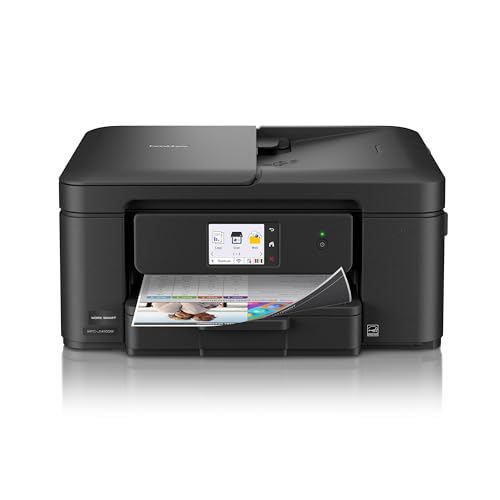
The Work Smart 1410 upgrades the home formula at the surface a family touches. Its title leads with a 2.7-inch touchscreen — half again the display of its sibling — and automatic duplex printing, then adds the Refresh Subscription Trial that the 1360 title never mentions. The model code in parentheses, MFC-J1410DW, is the string to match at checkout, because the Work Smart names and the MFC codes travel together through this family and confusing them is the easiest buying error available here.
A touchscreen changes who can use a printer. The walk-up copy — a parent with a permission slip, a grandparent with a letter — stops requiring the household phone or the household expert, because the machine explains itself at reading size. In homes where the printer serves several generations, that independence is worth more than any engine statistic, and it is the honest core of this model proposition.
The Refresh trial introduces the managed-ink idea into the Work Smart branch. Households that print steadily and hate the empty-cartridge surprise can let supply become a subscription; households that print in bursts should read the trial terms on the listing and decide with their own rhythm in mind. Either way, the presence of the trial in this title and its absence in the 1360 title is a real difference between the siblings, and the guide flags it as such.
Compare the two Work Smart titles directly and a small philosophy lesson emerges. One spends its words on a feeder and a voice line; the other spends them on a screen and a subscription. Neither is the upgraded model in any simple sense — they are two answers to the question of what a home finds annoying. Families annoyed by standing over paper choose the feeder; families annoyed by menus and ink surprises choose the screen and the trial. Naming your household annoyance is the fastest route through this entire guide.
Automatic duplex, present in both siblings, deserves its recurring defence. Homework, handouts and home-office drafts printed on both sides halve the paper pile that colonises kitchen surfaces in term time, and children learn the setting as the normal way paper behaves. Set it once as the default and the saving compounds silently across the school year.
The touchscreen also future-proofs the household against its own growth. A printer bought for a toddler photo habit will be operated, within a few years, by that child printing homework, and a screen a young user can navigate without a phone is a small gift to the future parent standing behind them. Machines live long in homes; buying the interface the household will grow into is quiet wisdom.
- Functions: all-in-one (model code MFC-J1410DW)
- Output: colour inkjet
- Display stated in title: 2.7-inch touchscreen
- Duplex: automatic duplex printing, per title
- Subscription: includes Refresh Subscription Trial
- Connectivity: wireless
- Auto document feeder: Not stated in the listing title — verify with the manufacturer documentation
Strengths
- A 2.7-inch touchscreen serves walk-up users of every generation.
- Automatic duplex is stated plainly in the title.
- The Refresh trial offers managed ink supply.
Trade-offs
- No feeder is claimed in this title, unlike its sibling.
- Alexa support is not mentioned in the title.
- The dual naming — Work Smart and MFC code — demands cart care.
Best for: a multi-generation household whose members print and copy at the machine itself, not only from phones. Not suited for: batch-scanning a term of school letters hands-free, because no auto document feeder is claimed in this title.
Teach the touchscreen to the household in the first week: one copy, one scan, one print from the panel, performed by the least technical person in the house, proves the interface better than any manual. Read the Refresh trial terms on the listing before the trial clock matters. To close the purchase, pull up the Work Smart 1410 listing, note what it costs today, and verify the MFC-J1410DW code in the cart, since that code — not the friendly name — is the machine identity.

Brother INKvestment 4355 — INKvestment entry with feed slot
The INKvestment 4355 is the doorway into Brother hybrid ink branch, and its title is the briefest of the six: a wireless colour inkjet printer with a 1.8-inch colour display and a manual feed slot. No all-in-one language, no duplex claim, no feeder. The review therefore treats this as the printing-centred entry to the INKvestment idea — the machine for a household whose interest in the branch is its ink philosophy, and whose paper life is mostly outbound.
The manual feed slot is the one functional detail the title offers beyond the display, and it deserves its moment. A manual feed is where the awkward media travel: the thick card for a school project, the envelope that should not bend through the main tray, the single sheet of photo paper for one good print. Households whose printing includes a steady trickle of special media will use that slot weekly and understand why it earned title space on an otherwise terse listing.
Everything else about this model must be verified rather than assumed, and the spec box is honest about that posture. Buyers who need scanning, duplex or a feeder confirmed should either confirm them on this listing page or move to the siblings whose titles claim those features outright. The guide will not promote the 4355 on borrowed specifications; its case rests on the INKvestment badge, the display and the feed slot it actually advertises.
INKvestment as an idea deserves explanation at its entry point. Brother positions the branch between classic cartridge machines and refillable tank machines: the convenience and cleanliness of cartridges, with an internal reservoir concept intended to stretch the interval between purchases. The titles in this guide do not quantify that system beyond the one in-box claim on the established model below, so the reviews discuss the philosophy as positioning, and leave durations to the household arithmetic each buyer must do with their own page count.
A printing-centred machine also suits a particular modern household: the one whose scanning has already migrated to phones. Forms get photographed, receipts get app-scanned, and the printer only job is producing paper — schoolwork, labels, photographs, tickets. For that household, an all-in-one lid is furniture they never lift, and a focused printer with a useful feed slot is the honest tool.
The colour display, though small, signals the branch manners: settings and ink status at the machine, in colour, without a computer. Owners should learn the ink screens in the first week, because the entire INKvestment proposition is about ink awareness — knowing what remains, planning purchases calmly, and never meeting an empty channel at a deadline.
- Function: printer (all-in-one language absent from title)
- Output: colour inkjet
- Branch: INKvestment
- Display stated in title: 1.8-inch colour display
- Feed detail in title: manual feed slot
- Connectivity: wireless
- Duplex printing: Not stated in the listing title — verify with the manufacturer documentation
- Scanning: Not stated in the listing title — verify with the manufacturer documentation
Strengths
- The INKvestment branch entry for ink-focused households.
- A manual feed slot handles card, envelopes and single photo sheets.
- A colour display keeps ink status visible at the machine.
Trade-offs
- Its title claims no duplex, feeder or scanning.
- The terse title makes listing-page verification essential.
- Households needing an all-in-one should look at its siblings.
Best for: a phone-scanning household whose printer exists to produce colour paper, including occasional card and envelopes. Not suited for: a home that must scan multi-page documents at the machine, because this title claims no scanner at all.
Approach this listing as a verification exercise: open the page, confirm the functions your household cannot live without, and only then let the INKvestment idea persuade you. Keep a small stock of the special media you feed manually, stored flat beside the machine. When the evidence satisfies you, the INKvestment 4355 page itself carries the number to act on, and its brief title makes it the easiest model in this family to confuse with a sibling, so read the cart line twice.

Brother INKvestment 1365 — INKvestment all-in-one with trial
The INKvestment 1365 assembles the branch complete home form: a wireless colour inkjet all-in-one with automatic duplex printing, a 1.8-inch colour display, a Refresh Subscription Trial, and the model code MFC-J1365DW printed in its title. Against the terse 4355, this is the INKvestment machine for households that want the ink philosophy and the full function set in the same box, with the subscription trial bridging the two supply styles the branch straddles.
Automatic duplex is the workhorse claim, and in an ink-economy machine it carries a second meaning: paper saved is also ink placed on fewer sheets, and a household counting its consumables will feel the duplex default in both columns. The all-in-one layout restores the scanning and copying the 4355 title omits, returning the sign-and-return paperwork loop to the branch for families whose forms still travel on paper first.
The Refresh trial, again, is a rhythm choice. INKvestment already aims to lengthen the interval between ink purchases; a subscription aims to remove the purchasing thought entirely. Households can hold both ideas at once or neither, and the listing page carries the trial terms that decide the matter. What the title establishes is that Brother offers the managed route on this model — an option, printed plainly, for the buyer to weigh.
The model code deserves a consumer warning that applies across this family. MFC-J1365DW and the Work Smart MFC-J1410DW differ by a handful of characters while describing machines from two different branches with different displays and different ink stories. Every comparison in this guide is keyed to those codes, and every buyer should perform the same discipline at checkout: read the code in the cart aloud, digit by digit, before paying.
Colour inkjet ownership at home runs on small kindnesses to the machine. Regular light use keeps ink flowing happily; a household that prints a page or two most weeks will meet fewer surprises than one that prints two hundred pages twice a year. The all-in-one that sits at the centre of family paper life tends to get that regular use naturally, which is an unglamorous argument for the complete form this model takes.
Scanning and copying also change the ink equation in a way buyers miss. A household that copies in colour — school artwork, recipe cards, a child drawing for the grandparents — spends colour ink on joy as well as on documents, and an economy-minded branch earns its keep exactly there. The 1365 is built for that mixed economy of necessity and delight.
- Functions: all-in-one (model code MFC-J1365DW)
- Output: colour inkjet
- Branch: INKvestment
- Duplex: automatic duplex printing, per title
- Display stated in title: 1.8-inch colour display
- Subscription: includes Refresh Subscription Trial
- Connectivity: wireless
Strengths
- INKvestment economy with the full all-in-one function set.
- Automatic duplex saves paper and ink together.
- The Refresh trial adds a managed-supply option.
Trade-offs
- The 1.8-inch display is smaller than both touchscreen siblings.
- No feeder is claimed in the title.
- Its code is easily confused with the Work Smart MFC-J1410DW.
Best for: a family wanting INKvestment ink economics plus scanning, copying and duplex in one machine. Not suited for: hands-free batch scanning of long documents, because no auto document feeder appears in this title.
Make the duplex default and the scan destination your two first-evening decisions, and read the Refresh terms while the trial is a choice rather than a deadline. Keep the model code somewhere the household can find it for supply orders. For the transaction itself, head to the INKvestment 1365 listing for its current figure, verifying MFC-J1365DW character by character against the Work Smart code it so closely resembles.
Brother INKvestment 6960 — Wide-format 11×17 all-in-one
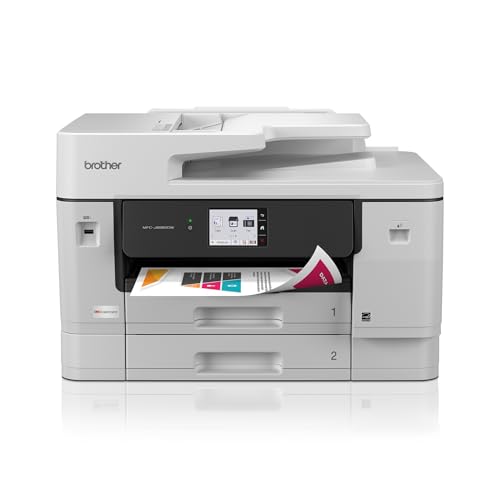
The INKvestment 6960 is the family expansionist: a wireless colour inkjet all-in-one whose title claims 11 by 17 inch capabilities and a 3.5-inch colour touchscreen, the largest display in this guide, with a Refresh trial and the code MFC-J6960DW. The format claim alone justifies its existence. Posters, charts, spreadsheets that refuse to shrink, art projects and architectural sketches all live at that larger size, and a household or home business with that traffic has exactly one candidate in this family.
Ledger-size printing changes the jobs a home machine can accept. A teacher can produce classroom displays without a print shop; a small business can run its own charts and signage drafts; a family can print the photo collage at the size the wall actually wants. The all-in-one layout means the big sheet works in both directions — large copies and scans join large prints — which turns the format from a party trick into a working capability.
The 3.5-inch touchscreen suits the machine ambition. Bigger jobs involve more settings — paper size, scaling, copy layout — and a screen that can present those choices legibly is part of how a wide-format machine stays approachable for the whole household rather than belonging to its most technical member. Add the Refresh trial for supply management, and the 6960 presents as the family flagship in everything but name.
Wide paper has a logistics of its own that new owners should plan during the first week. Ledger sheets store flat or not at all, the output needs a landing surface that accepts the full size, and the machine footprint itself grows with the paper path. Households that measure the desk, the storage and the doorway before ordering will enjoy the format from the first poster; households that improvise will spend a month negotiating with furniture.
The format also reframes the ink conversation. A full-bleed 11 by 17 photograph spends ink at a rate that makes the INKvestment economy argument tangible rather than theoretical, and the subscription trial may look different to a household printing large colour regularly. Do the arithmetic with your own largest regular job in mind; at this size, consumable planning is part of the craft.
Against its siblings, the 6960 asks the cleanest question in the guide: does anything in your household life actually want to be 11 by 17 inches? A yes with examples — the poster, the chart, the portfolio page — makes this the flagship choice. A yes composed only of someday makes it an expensive way to store ordinary paper, and the standard-format siblings will serve the real household better.
- Functions: all-in-one (model code MFC-J6960DW)
- Output: colour inkjet
- Branch: INKvestment
- Paper capability stated in title: 11 by 17 inches
- Display stated in title: 3.5-inch colour touchscreen
- Subscription: includes Refresh Subscription Trial
- Connectivity: wireless
Strengths
- 11 by 17 inch capability is unique in this family guide.
- The 3.5-inch touchscreen is the largest display here.
- All-in-one layout makes the large format work both directions.
Trade-offs
- The footprint follows the format and exceeds compact shelves.
- Large colour prints spend ink at a serious rate.
- Standard-format households pay for capability they never use.
Best for: a teacher, home business or art-project household printing posters, charts and large copies at 11 by 17 inches. Not suited for: a small desk in a bedroom corner, because an 11 by 17 inch paper path needs measured space around it.
Measure the home for this machine before the cart: desk depth, flat storage for ledger paper, and a landing zone for finished sheets. Stock the large paper from day one so the format gets used while enthusiasm is high, and keep the reference print at full size as your quality standard. When the room agrees, the INKvestment 6960 page will tell you what the flagship costs this week; confirm the MFC-J6960DW code there, since that code separates it from its standard-format siblings.

Brother MFC-J4335DW INKvestment Tank — Established model with in-box ink claim
The Brother MFC-J4335DW is the established name in this family, the INKvestment Tank machine whose title makes the branch boldest claim: up to one year of ink in the box. This guide reports that as what it is — the manufacturer claim printed in the listing title — and the phrase up to does the honest work inside it. A household printing lightly may find the claim conservative; a household printing daily may find it optimistic. Either way, the claim signals the machine entire proposition: buy it, and do not think about ink for a long while.
Around the claim sits a complete specification: wireless all-in-one colour printing, duplex, mobile and cloud print, and Alexa support. Cloud print is unique in this family titles, extending the machine reach beyond the home network to documents sent from wherever the household actually is. For families whose paper originates in school portals, shared drives and phones in other postcodes, that reach is the feature that turns a home printer into a household service.
As the senior model here, the MFC-J4335DW also carries the reassurance of an established listing: a known machine with a known claim, bought by households who value the proven over the newest. Its display size and feeder status are not stated in its title, so the spec box records the gap and the listing page becomes the authority — the same discipline applied to every silent title in this guide.
The in-box claim deserves a household translation exercise. Count your pages for one honest month — school, work, photographs, forms — and multiply by twelve. That number, held against the claim framing on the listing, tells you whether a year of ink is your likely experience or your best case. Buyers who perform that small arithmetic buy this machine with calibrated expectations, and calibrated expectations are the difference between a claim that delights and a claim that disappoints.
Cloud printing quietly changes family logistics. A document can be sent to the home machine from a school office, a workplace or a grandparent house and be waiting on the tray at teatime, signed by whoever is home. Households spread across places — students away, parents travelling, family in two homes — feel that reach weekly, and it is the feature owners of this model tend to describe first once the ink claim has faded into routine.
Established models also reward buyers with a settled knowledge base: ink behaviour, paper preferences and maintenance routines all documented by years of owners. A household that prefers its appliances debugged by the crowd will find that maturity comforting, and should weigh it honestly against the newer siblings fresher titles, rather than assuming newest is a synonym for best.
- Functions: all-in-one
- Output: colour inkjet
- Branch: INKvestment Tank
- Ink claim in title: up to 1 year of ink in-box (manufacturer claim)
- Duplex: named in the title
- Mobile and cloud print: named in the title
- Voice: works with Alexa
- Display size: Not stated in the listing title — verify with the manufacturer documentation
Strengths
- The in-box ink claim is the boldest supply promise in the family.
- Cloud print extends reach beyond the home network.
- An established, documented model with duplex and Alexa.
Trade-offs
- The year of ink is a manufacturer claim, dependent on household volume.
- Display size is not stated in the title.
- No feeder is claimed in the title.
Best for: a busy family that prints steadily and wants the longest possible interval before thinking about ink. Not suited for: a household printing hundreds of pages weekly, because the up-to-a-year framing in the title will not survive that volume.
Do the page-count arithmetic before ordering, so the in-box claim meets a calibrated expectation, and set up cloud printing in the first week while the household is paying attention — it is the feature most often discovered too late. Keep a note of the setup date; it turns the ink claim into a household experiment with a start line. To buy, visit the MFC-J4335DW page for the live figure, where the full INKvestment Tank name distinguishes it from the newer numbered siblings.
Comparison
| Pick | Branch | Display from title | Signature claim from title |
|---|---|---|---|
| Brother Work Smart 1360 | Work Smart | 1.8 inches | Auto document feeder, best-for-home |
| Brother Work Smart 1410 | Work Smart | 2.7-inch touchscreen | Refresh Subscription Trial |
| Brother INKvestment 4355 | INKvestment | 1.8-inch colour | Manual feed slot |
| Brother INKvestment 1365 | INKvestment | 1.8-inch colour | Automatic duplex, Refresh trial |
| Brother INKvestment 6960 | INKvestment | 3.5-inch colour touchscreen | 11 by 17 inch capability |
| Brother MFC-J4335DW | INKvestment Tank | Not stated in the listing title | Up to 1 year of ink in-box (title claim) |
The table sorts the family by the two questions that matter: which branch, and what does its title actually claim? Display sizes climb from 1.8 inches to the 3.5-inch touchscreen on the wide model, signature claims range from a feeder to a year of ink, and one cell — the established model display — stays honestly blank because its title never states a size.
Notice what the table cannot rank: ink endurance. Only one title quantifies supply at all, and it does so as a claim with an up-to built into it. Households choosing on running cost should therefore compare their own monthly page counts against the branch philosophies described in the reviews, rather than hunting for a number this family mostly declines to print.
How to Choose a Brother Colour Inkjet for Home Life
Start with the branch decision, because it colours everything after. Work Smart machines are the straightforward home offer: clear positioning, familiar cartridge thinking, features aimed at family variety. INKvestment machines are Brother answer to running-cost anxiety, built around stretching the interval between ink purchases, with the established MFC-J4335DW putting a duration claim on that idea in its title. Households that think about ink rarely should buy Work Smart and relax; households that think about ink monthly should read the INKvestment reviews twice.
Next, count the directions paper travels. Printing is universal, but scanning and copying divide households sharply, and one title here — the 4355 — does not claim them at all. Feeders divide households again: the Work Smart 1360 claims one, the others stay silent, and a family digitising stacks should treat that silence as a listing-page question. Decide the directions first and the family shortlist usually halves itself.
Give the display its due. These machines are operated by everyone in the house, including the people who will never open the phone app, and the stated screen sizes — 1.8, 2.7 and 3.5 inches in ascending order of ambition — predict how independent those users can be. A household of confident phone users can ignore this axis; a household spanning grandparents to young children should weight it heavily.
Paper format is the fourth question, and it is binary. Standard sheets serve almost everything, until the household meets the poster, the chart or the spreadsheet that wants 11 by 17 inches. That format exists in exactly one title here. Buy it when the examples are real and recent; admire it from a standard machine when they are hypothetical.
Finally, translate every ink claim into your own arithmetic. A year of ink, a subscription trial, a hybrid reservoir — all of these are offers whose value is set by your monthly page count, which only you can measure. One honest month of counting, done before purchase, is worth more than any claim printed on any box in this family.
Inkjet placement has one rule lasers do not impose: ventilation and a level, stable surface matter to a machine whose medium is liquid. A wobbling shelf in a steamy utility room is where colour printers go to be blamed, while a firm desk in a lived-in room is where they quietly serve for years. Choose the room as carefully as the model, and half the folklore about inkjet unreliability evaporates.
Last, involve the household in the choice at the level of the jobs they own. The teenager poster, the treasurer spreadsheet, the grandparent letters — each job in this guide maps to a machine, and a family that lays its jobs on the table will watch the shortlist assemble itself. Printers fail in homes when they are bought for an abstraction; they succeed when they are bought for named paper.
Setup day deserves a small ceremony of its own in a colour household: one photograph everyone loves, one document everyone recognises, one copy of something precious, printed and compared before the machine is declared ready. That trio becomes the family reference set, pinned near the printer, against which every future paper change and ink change can be judged in seconds instead of argued from memory.
How Should a Family Read the Up to One Year of Ink Claim?
As a ceiling with a household variable inside it. The MFC-J4335DW title claims up to a year of ink in the box, and the words up to mark the claim as a best case set by the manufacturer, not a promise calibrated to your kitchen table. A light-printing household may exceed the spirit of it; a home business printing daily will fall short of the letter of it, while still enjoying a long first interval without an ink order.
The practical response is measurement, not scepticism. Count a month of real pages, project the year, and the claim becomes a planning figure instead of a slogan. Families who do that arithmetic tend to be satisfied with economy machines of every brand, because their expectations were built from their own paper rather than from a box.
There is a second, quieter reading of the claim worth making. Even a household that exhausts the in-box supply in eight months has spent eight months not thinking about ink, and that freedom has value independent of the calendar. Economy claims in printing are really attention claims, and they should be judged by how long the machine stays out of the household mind, not only by how long a cartridge physically lasts.
Work Smart or INKvestment: Which Brother Branch Fits a Home Office?
The home office that prints documents steadily and scans occasionally will find both branches plausible, so the deciding evidence is the ink rhythm and the feeder. Work Smart offers the feeder on the 1360 and the touchscreen-plus-trial combination on the 1410. INKvestment offers its economy philosophy across four models, the complete all-in-one form on the 1365, and the wide format on the 6960. A desk drowning in paper stacks should chase the feeder; a desk drowning in ink receipts should chase the branch.
There is no wrong branch here, only a mismatched one. A household that buys INKvestment and never thinks about ink again has wasted the philosophy; a household that buys Work Smart and resents every cartridge has wasted the simplicity. Match the machine to the anxiety you actually have, and either branch will feel designed for you.
Children complicate the branch question in a productive way. School colour printing is bursty, joyful and wasteful in the best sense — drafts, experiments, the poster printed three times because the blue was wrong. A branch chosen for economy teaches a household to enjoy that abundance without a background hum of cartridge anxiety, while a branch chosen for simplicity teaches it to enjoy the same abundance without a background hum of menus. Either lesson is worth having; choose the hum your family would rather not hear.
Budget shape can break a tie between the branches. A household that prefers its costs bundled at purchase will lean toward the machine whose title talks about ink in the box; a household that prefers its costs smoothed across the year will lean toward a model carrying the subscription trial. Neither preference is more rational — they are temperaments about money, and printers, which live in a home for years, should be bought in the temperament of the people paying for them.
When Does a Home Actually Need 11 by 17 Inch Printing?
When the examples can be named with dates. The teacher printing classroom posters each term, the treasurer whose spreadsheet dies at standard width, the art student building a portfolio, the family that prints a photo collage for every reunion — those households will use the INKvestment 6960 format monthly and should buy it without guilt. The format earns its footprint only through repetition.
Occasional large prints argue the opposite. A print shop handles the annual poster happily, and the money and desk space saved by a standard machine serve the other fifty weeks. Buyers should be suspicious of their own someday reasoning at exactly this point in the guide, because wide-format capability is the most seductive unused feature in home printing.
Storage tells the truth about format ambitions too. A household that already keeps a flat drawer of large paper, boards or artwork has the ecosystem the 6960 feeds; a household that would need to invent that storage is confessing that large paper is a visitor in its life, not a resident. Buy for the resident, and let the visitor keep using the print shop down the road.
Teachers occupy the clearest yes in this whole discussion, because classroom paper is relentlessly large: displays, labels for a wall of cubbies, charts that must be read from the back row. A teacher household will know within one term whether the wide machine was a luxury or a liberation, and the term evidence almost always votes for liberation.
Brother Inkjet Errors That Start at the Model Code
Confusing the MFC codes at checkout. MFC-J1410DW and MFC-J1365DW sit in different branches with different screens and ink stories, and MFC-J6960DW adds a paper format. One transposed digit buys a different machine; read the cart code aloud before paying.
Treating the in-box ink claim as a guarantee. The MFC-J4335DW claim carries an up-to in its own wording. Households that budget a full year of heavy printing against it are planning on a best case, and best cases make poor budgets.
Assuming every all-in-one has a feeder. Only the Work Smart 1360 title claims an auto document feeder in this family. The others may or may not carry one — their titles do not say, and a scanning household should verify on the listing rather than discover at the first stack.
Buying the wide format for a hypothetical poster. The 6960 capability is real and its footprint is real. Households without a named, repeated large-print job will store an expensive standard printer inside a wide body.
Ignoring the display because the phone exists. The phone belongs to one person; the printer belongs to the house. A 1.8-inch panel and a 3.5-inch touchscreen describe different levels of independence for everyone else who prints, copies or scans at home.
Final Recommendation
Most families should start with the Work Smart 1360 for its feeder-equipped completeness or the Work Smart 1410 for its touchscreen and managed-ink option. INKvestment households should choose the 1365 for the complete branch form, the 4355 for printing-centred simplicity, the 6960 when the large format has real work waiting, and the MFC-J4335DW when the in-box ink claim — read with household arithmetic — matches their rhythm.
Whichever Brother takes the family shelf, spend its first week connecting every phone, setting the duplex default where the model offers it, and printing the household greatest hits in colour; a home inkjet earns its place by absorbing the whole variety of family paper without complaint, and the machine that does that will still be absorbing it, unremarked and indispensable, when the school year turns.
Choose the branch by your ink temperament, the model by your paper directions, and the code in the cart by reading it aloud — a Brother bought that carefully tends to become part of the furniture of family life, which is the highest office a home printer can hold.
Frequently Asked Questions
What is INKvestment, in plain terms?
Brother ink-economy branch within its colour inkjet family, positioned between ordinary cartridge machines and refillable tank models. In this guide its titles emphasise longer intervals between ink purchases, most boldly on the MFC-J4335DW, whose title claims up to a year of ink in the box as a manufacturer claim.
Which Brother inkjet here prints the largest paper?
The INKvestment 6960, whose title claims 11 by 17 inch capabilities. The other five models make no such claim in their titles and should be treated as standard-format machines.
Which models have touchscreens?
Two titles say so: the Work Smart 1410 with a 2.7-inch touchscreen and the INKvestment 6960 with a 3.5-inch colour touchscreen. The other models state smaller 1.8-inch displays, and the MFC-J4335DW title states no display size.
Do all six scan and copy?
Five titles describe all-in-one machines. The INKvestment 4355 title describes a printer with a display and a manual feed slot and claims no scanning, so households needing a scanner should verify that listing carefully or choose a sibling whose title says all-in-one.
What does the Refresh Subscription Trial add?
It appears in the titles of the Work Smart 1410, INKvestment 1365 and INKvestment 6960, offering a managed ink supply arrangement whose terms live on the listing pages. Households printing steadily may value it; bursty printers should read the terms against their own rhythm first.
Related Guides
Colour inkjet decisions often end up compared against the rival badge and against the photo specialists, and the neighbouring guides hold both arguments. Shoppers cross-shopping the other big name in home inkjet should read Best Canon Inkjet Printers next. The household monochrome workhorse question is answered in Best Brother Black and White Laser Printers for Home Use. And photographers whose colour ambitions outgrow family printing belong with Best Canon PIXMA Pro Printers.


