What's inside
- Key Takeaways
- Quick Picks
- How Did We Decide Which Cisco Names Could Be Linked and Which Could Not?
- What Does Dual WAN Actually Do for a Small Organisation?
- Why Does the Meraki Pick Come With a Licence Conversation?
- The Cisco Picks in Detail
- What Kind of VPN Does a Small Organisation Actually Need?
- How Should a Small Organisation Plan Its Network Around an RV Router?
- When Does It Make Sense to Migrate Away From the Legacy Pair?
- What Security Housekeeping Does an RV-Based Network Still Owe?
- How Do You Read a Cisco Listing the Way a Reseller Would?
- What Does Five Years of Ownership Actually Cost Across These Picks?
- What Wireless Should Sit Behind a Wired Cisco Router?
- How Should a Growing Business Choose Between Adding Sites and Strengthening One?
- What Should Be in the Box Room Next to the Router?
- What Does “Limited Lifetime Protection” Change About the RV Decision?
- Cisco’s Five Linked Picks and One Honest Absence, Compared
- How Do You Test Dual-WAN Failover Without Taking the Office Down?
- What Mistakes Do Cisco Buyers Keep Making?
- Final Recommendation
- Frequently Asked Questions
- Related Guides
As an Amazon Associate I earn from qualifying purchases. This post may contain affiliate links at no extra cost to you.
widgetverdict.com is reader-supported. When you buy through links on our site, we may earn an affiliate commission.
Where to buy: Cisco equipment reaches buyers through Amazon, IT resellers and Cisco partners, and the listings behind this guide were checked one by one — a necessary chore with this brand, for reasons the next paragraph states plainly. Check the exact model code, including the suffix after the dash, before ordering any unit here.
Honesty first, because the best cisco routers conversation usually avoids it: a large share of Cisco hardware offered on Amazon is renewed, refurbished or sold by third-party refurbishers, and several famous Cisco lines — the ISR enterprise routers among them — appear there almost exclusively in renewed form. This guide links only the five picks whose listings are clean retail listings, and it handles the sixth name, the ISR 4331, as prose only: a respected enterprise router that you should source through a proper channel with licensing and support sorted, not through a renewed marketplace listing. Readers who understand that distinction before shopping will understand every choice that follows.
What remains is a genuinely useful small-business shelf. The RV340 and RV345 are Cisco’s dual-WAN VPN routers for small organisations, differing chiefly in port count — four gigabit ports against sixteen. The RVS4000 and WRVS4400N are older gigabit security routers, one wired, one with Wireless-N built in. The Meraki MX67W-HW is a different philosophy altogether: a cloud-managed security appliance, sold as appliance only, which works inside Meraki’s licensed dashboard ecosystem. None of these is a home router in disguise, and the guide treats them as the business tools they are.
Key Takeaways
- Most Cisco listings on Amazon are renewed; this guide links five clean retail listings and deliberately keeps the ISR 4331 prose-only.
- The RV340 (4 GbE ports, dual WAN) and RV345 (16 GbE ports, dual WAN) are the current small-business core of the guide — VPN routers with limited lifetime protection named in their listings.
- The Meraki MX67W-HW is appliance only: it belongs to a licensed, cloud-managed ecosystem and is not a standalone bargain box.
- The RVS4000 and WRVS4400N are legacy gigabit security routers — capable VPN endpoints whose age must be priced into the decision.
- Dual WAN is the recurring theme: two internet connections, failover and continuity for organisations that cannot go dark.
- Cisco buying rewards channel discipline — exact model codes, licensing clarity and support terms matter more than headline throughput.
Quick Picks
| Pick | Badge | Why it is here |
|---|---|---|
| Cisco RV340 | Dual-WAN core — small office | VPN router with 4 gigabit Ethernet ports plus dual WAN and limited lifetime protection (RV340-K9-NA). |
| Cisco RV345 VPN Router with 16 Gigabit Ethernet (GbE) Ports | Dual-WAN core — wired-heavy office | The RV concept at sixteen gigabit ports plus dual WAN, for offices wiring everything that sits still. |
| Cisco RVS4000 4-Port Gigabit Security Router – VPN | Legacy wired security | A 4-port gigabit security router with VPN, from Cisco’s earlier small-business generation. |
| Cisco WRVS4400N Wireless-N Gigabit Security Router – VPN v2.0 | Legacy wireless security | Wireless-N plus a built-in 4-port full-duplex gigabit switch and VPN, in one older security router. |
| CISCO DESIGNED Meraki MX67W-HW Wireless Network | Cloud-managed appliance | A Meraki security and firewall appliance with wireless — appliance only, inside a licensed dashboard ecosystem. |
| Cisco ISR 4331 | Prose only — enterprise, renewed-only listings | A serious branch router that reaches Amazon mainly as renewed stock; source it through a proper channel instead. |
How Did We Decide Which Cisco Names Could Be Linked and Which Could Not?
The rule was simple and it cost the guide its most famous name: a pick gets a link only when its listing is a clean retail offer of that exact model. Renewed and refurbished listings — however reputable the refurbisher — were excluded from linking, because a business buying network infrastructure deserves new hardware with the maker’s protection intact, and because renewed stock varies unit by unit in ways a guide cannot certify. Applied honestly, that rule admitted the RV340, RV345, RVS4000, WRVS4400N and the Meraki appliance, and it excluded the ISR 4331, whose Amazon presence is renewed stock. The ISR still earns its prose section: readers searching this keyword are often really asking about branch routing, and the answer — buy it through a channel that handles licensing — is more helpful than silence.
Within the admitted five, selection favoured legibility: listings that state port counts, WAN arrangement and protection terms in the title itself. Business buyers read differently from home buyers; uptime, failover and support are the specifications, and raw wireless class barely appears in this guide because most of these boxes are wired by design. Organisations whose continuity plan leans on a phone line as the backup path will find the neighbouring question examined in Best Routers for Tethered Phone Failover, which treats failover as its own discipline rather than a feature bullet.
What Does Dual WAN Actually Do for a Small Organisation?
Dual WAN means the router accepts two separate internet services and treats them as one resilient supply. In failover arrangement, the second connection idles until the first fails, then takes over — the card terminal keeps authorising, the phones keep ringing, the cloud till keeps syncing. In balancing arrangement, both carry traffic day to day and either can absorb the whole load at reduced comfort. For a café, clinic, agency or shop, the difference between those minutes of outage and a shrug is measured in transactions and trust, which is why both RV models print dual WAN in their titles ahead of almost everything else.
The discipline dual WAN demands is administrative rather than technical: two provider bills, two sets of credentials recorded properly, and a failover test performed deliberately — pull the primary line on a quiet afternoon and watch what happens — rather than discovered during a storm on the busiest Friday of the year. A dual-WAN router that has never been tested failing over is a hope with two cables. The RV340 and RV345 both assume an organisation willing to run that test; the guide’s recommendation of them carries the same assumption.
Why Does the Meraki Pick Come With a Licence Conversation?
Because Meraki is not sold the way the RV line is sold. The MX67W-HW’s title ends with the words “Appliance Only”, and those words carry the business model: the hardware is one half of the product, and a Meraki licence — the subscription that activates the cloud dashboard, the security services and the support — is the other half. Without a current licence, a Meraki appliance is not a functioning security gateway in any sense a business should rely on. Buyers must therefore price the appliance and the licence together, confirm the licence term and tier before ordering, and understand that the organisation is adopting a managed ecosystem, with all the ease and all the dependence that ecosystems bring.
None of that is a warning against Meraki; for many small organisations the dashboard is precisely the point — one screen for security, wireless and remote sites, administered without a network engineer on staff. It is a warning against comparison errors: setting the MX67W-HW’s appliance price beside an RV340’s full price and calling the difference a bargain. The honest comparison is licence-inclusive cost over the term you intend to run, against the RV’s buy-once economics plus your own administration time. Cisco sells both philosophies under one corporate roof; this guide’s job is to keep their receipts separate.
The Cisco Picks in Detail
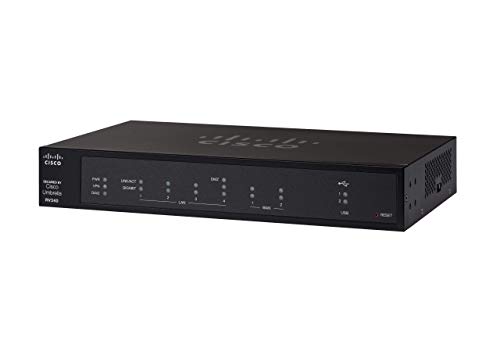
Cisco RV340 — Dual-WAN core for the small office
The RV340 is the guide’s centre of gravity: a VPN router with four gigabit Ethernet ports, dual WAN, and limited lifetime protection named in its listing, carrying the full model code RV340-K9-NA. Four ports suits the classic small-office cluster — a switch can extend the count whenever the office outgrows them — while the dual WAN and VPN brief define the product’s real purpose: keep a small organisation connected to the internet and to its other sites, its cloud services and its remote staff, through the failures that end a working day for lesser setups. This is Cisco’s small-business line doing exactly what it was drawn for.
Choosing the RV340 over its sixteen-port sibling is a statement about your office’s wiring. If a separate switch already handles the desk rows, four router ports are not a limitation but a tidier architecture; if the router is the switch — a compact office wiring its phones, printer, till and access point directly — the RV345 below exists for you. Either way, the RV340 buyer should budget the unglamorous companions of business routing: a second internet service worth failing over to, credentials documented somewhere the organisation controls, and a failover test in the calendar. The hardware is the easy half of continuity.
- Type: VPN router, wired
- Ports: 4 gigabit Ethernet (GbE)
- WAN: dual WAN
- Protection: limited lifetime protection, per the listing
- Model code: RV340-K9-NA
Strengths
- Dual WAN failover sized and priced for a small organisation.
- Limited lifetime protection named in the listing — a business-grade assurance.
- Four gigabit ports suit offices that switch downstream anyway.
Trade-offs
- No built-in Wi-Fi — wireless arrives via separate access points.
- Four ports fill quickly in an office that wires everything to the router.
- Business configuration depth exceeds home-router habits; allow setup time.
Best for: a small office or shop needing dual-WAN continuity and site VPN on a four-port core.
Not suited for: a wired-heavy office expecting the router alone to socket sixteen desk devices.

Cisco RV345 VPN Router with 16 Gigabit Ethernet (GbE) Ports — Dual-WAN core for the wired-heavy office
The RV345 takes the RV340’s brief — VPN routing, dual WAN, limited lifetime protection — and multiplies the socket count by four: sixteen gigabit Ethernet ports in the router itself. That single difference reorganises a certain kind of office. Phones, tills, printers, cameras, access points and desk machines can all land on the router directly, with no separate switch to buy, power, mount or blame. For a retail floor, a dental practice, a small hotel desk operation — anywhere devices are numerous, fixed and wired by preference — the RV345 is the tidier and often cheaper whole-system purchase, despite the larger box price.
The counter-consideration is concentration: sixteen ports on the router means the router is also the single point through which every wired conversation passes and fails. Organisations that think in those terms sometimes prefer the RV340 plus a switch they can swap independently. Neither instinct is wrong; they are different maintenance philosophies. What is not in question is the family’s shared spine — dual WAN, VPN, business protection — and the RV345 simply serves the branch of that family whose offices are wired like workshops rather than like lounges. Readers planning the home side of a hybrid life should note this guide’s wired bias is deliberate; the domestic counterpart conversation lives in Best Routers for Large Homes and Multiple Devices.
- Type: VPN router, wired
- Ports: 16 gigabit Ethernet (GbE)
- WAN: dual WAN
- Protection: limited lifetime protection, per the listing
- Model code: RV345-K9-NA
Strengths
- Sixteen gigabit ports can eliminate a separate switch entirely.
- The full RV brief — dual WAN, VPN, lifetime protection — at office scale.
- One device to mount, power and administer for the whole wired floor.
Trade-offs
- Concentrates routing and switching in a single point of failure.
- Oversized for offices that wire only a handful of devices.
- Still no built-in Wi-Fi; access points remain a separate purchase.
Best for: a wired-dense small business — retail, practice, workshop office — wiring many fixed devices directly.
Not suited for: a small team of laptop workers paying for sixteen ports that will hold four cables.

Cisco RVS4000 4-Port Gigabit Security Router – VPN — Legacy wired security
The RVS4000 represents the previous small-business generation: a 4-port gigabit security router with VPN, wired only, from the era when Cisco’s small-business line wore the Linksys-era design language. Its presence in a current guide needs the honest framing its age deserves. This is legacy hardware — its security feature set, throughput assumptions and firmware horizon belong to its period — and it earns its place only for specific buyers: an organisation maintaining an existing RVS-based setup, a lab or training environment, or a buyer who finds it at a price that honestly reflects its generation and needs a simple gigabit VPN endpoint.
What should not happen is a like-for-like comparison against the RV340 at a similar price, because the generations differ in support life more than in port furniture. The RVS4000’s four gigabit ports and VPN brief remain functionally respectable; networks of its era ran real businesses on exactly this class of box. But a business buying its primary edge router today should buy the current line and its protection horizon. Read the RVS4000 as this guide reads it — a documented legacy option with a narrow, legitimate audience — and it will not disappoint the readers it is actually for.
- Type: security router with VPN, wired
- Ports: 4-port gigabit
- Generation: legacy small-business line
- Wireless: none built in
- Positioning: maintenance and budget-legacy use
Strengths
- Gigabit ports and VPN in a simple, understood package.
- Continuity for organisations already running this generation.
- Can make sense at a genuinely legacy-reflecting price.
Trade-offs
- Legacy support and firmware horizon — price must acknowledge it.
- Security expectations have moved since its design era.
- The RV340 supersedes it for any new primary deployment.
Best for: an organisation maintaining an existing setup of this generation, buying with its age fully priced in.
Not suited for: a business choosing a new primary edge router for the next several years.

Cisco WRVS4400N Wireless-N Gigabit Security Router – VPN v2.0 — Legacy wireless security
The WRVS4400N adds the one thing its RVS4000 sibling lacks: Wireless-N built in, alongside a 4-port full-duplex 10/100/1000 gigabit Ethernet switch and VPN, in version 2.0 of the design. In its period this was the complete small-office box — routing, security, switching and wireless in a single unit — and its listing preserves that completeness. A very small office of its era could run entirely on this device, and some still do, which is precisely the audience this section serves: owners maintaining, matching or replacing like with like.
The wireless generation is the honest caveat that dominates all others. Wireless-N in a modern office is a bottleneck with antennas — contemporary laptops, phones and cloud workloads expect far more — so any deployment where wireless carries real work has outgrown this box regardless of its wired competence. Its gigabit switch and VPN remain what they were; its radio belongs to history. Buy it, if at all, as legacy continuity for a wired-first site that needs the model it already knows, and let the RV line carry any office whose future is being planned rather than preserved.
- Type: security router with VPN, wireless built in
- Wireless: Wireless-N
- Switch: built-in 4-port full-duplex 10/100/1000 gigabit Ethernet
- Version: v2.0, per the listing
- Generation: legacy small-business line
Strengths
- Routing, security, gigabit switching and wireless in one legacy unit.
- Like-for-like continuity for sites already standardised on it.
- Full-duplex gigabit switch was properly specified for its class.
Trade-offs
- Wireless-N cannot carry a modern office’s wireless workload.
- Legacy firmware and support horizon, as with its sibling.
- New deployments belong on the RV line instead.
Best for: a wired-first legacy site replacing a failed unit with the model its network already knows.
Not suited for: an office expecting built-in wireless to serve today’s laptops and phones at modern speeds.

CISCO DESIGNED Meraki MX67W-HW Wireless Network — Cloud-managed security appliance
The MX67W-HW is the guide’s philosophical outlier: a Meraki wireless network security and firewall appliance — the W denoting built-in wireless — sold as appliance only under the CISCO DESIGNED banner. Its natural habitat is the organisation with several small sites and no network engineer: a chain of cafés, a group of clinics, a retailer whose every location needs the same security policy administered from one dashboard. In that habitat the Meraki proposition is genuinely compelling, because the product being bought is not the box but the management plane above all the boxes.
The licence condition stated earlier governs everything here, so it is repeated in this pick’s own section where a skimming buyer cannot miss it: this appliance operates inside Meraki’s licensed ecosystem, and a valid licence is required for it to function as your security gateway — budget the licence with the hardware, confirm its term and tier with the seller, and treat any listing that glosses over licensing as a listing to walk away from. Priced honestly on those terms, the MX67W-HW competes not with the RV340’s box price but with the RV340 plus the administration hours its dashboard saves. Organisations with one site and a competent local administrator will usually find the RV economics kinder; organisations with five sites and no administrator will find Meraki’s.
- Type: security and firewall appliance with wireless
- Sale basis: appliance only — Meraki licence required to operate
- Management: cloud dashboard ecosystem
- Wireless: built in (W model)
- Positioning: multi-site, centrally managed small organisations
Strengths
- One dashboard administers security and wireless across many small sites.
- Security services maintained as part of the licensed ecosystem.
- Built-in wireless suits compact sites needing a single device.
Trade-offs
- Licence is a continuing cost and a hard requirement, not an option.
- Ecosystem dependence: leaving Meraki means replacing the appliance layer.
- Single-site buyers may pay for management scale they never use.
Best for: a multi-site small organisation wanting centralised, licensed security management more than box economics.
Not suited for: a single-site buyer seeking a licence-free router that runs forever on one payment.
Cisco ISR 4331 — Prose only: the enterprise router to source properly
The ISR 4331 is a genuine branch-office router from Cisco’s Integrated Services Router line — the class of machine that anchors a real site to a real WAN with modular options and enterprise support behind it. It appears in this guide without a link for the reason stated at the top: at the time of checking, its Amazon presence consists of renewed listings, and renewed enterprise hardware bought casually is how organisations inherit other people’s configurations, unknown wear and licensing gaps. A router is the wrong device to buy on a shrug, and an enterprise router doubly so.
The correct route to an ISR is the channel route: a Cisco partner or reputable enterprise reseller who supplies the unit with its licensing in order, its software entitlements clear and a support contract available. Priced that way it will cost more than a renewed marketplace listing, and the difference is not markup — it is the product. Businesses whose needs have genuinely reached ISR level have also reached the level where an hour of a partner’s advice is worth more than any guide, this one included. Everyone else should recognise the ISR’s appearance in their search as a sign their requirements are probably RV-shaped, and come back to the five linked picks above with fresh eyes. Home users who landed here by brand gravity alone may find the domestic shelf more relevant in Best Cable Modem Routers That Work with Spectrum.
- Type: enterprise branch router (ISR line)
- Availability note: Amazon listings at checking time were renewed — hence no link here
- Correct sourcing: Cisco partner or enterprise reseller, licensing in order
- Support: contract-based, arranged through the channel
- Positioning: beyond small-business scope of the RV line
Strengths
- Enterprise branch capability beyond anything else named in this guide.
- Modular, support-backed platform when sourced through proper channels.
- The right answer for organisations whose WAN needs are genuinely branch-grade.
Trade-offs
- No clean retail listing to link — renewed marketplace stock is the Amazon norm.
- Licensing and support must be arranged deliberately, not assumed.
- Far beyond the needs, and the sensible budget, of most readers of this keyword.
Best for: an organisation with branch-grade WAN requirements, buying through a Cisco partner with licensing arranged.
Not suited for: a bargain hunter expecting a renewed marketplace unit to arrive licensed, configured and supported.
What Kind of VPN Does a Small Organisation Actually Need?
Every router in this guide prints VPN in its title, and the word covers two different jobs that buyers routinely confuse. The first is site-to-site: two premises — the shop and the warehouse, the practice and its satellite office — joined into one private network, so a machine at either end reaches the other’s printer, server or phone system as if the buildings were adjacent. The second is remote access: one person, at home or on the road, tunnelled into the office network to reach what lives there. Most small organisations need the second immediately and the first eventually, and a router’s VPN brief should be read against both jobs — how many tunnels it sustains, and whether its configuration tools match the patience of whoever administers it.
The honest constraint is administrative, again. A VPN is not a checkbox but a small ongoing practice: credentials issued and revoked as staff change, tunnels tested after provider changes, firmware kept current because the VPN is, by design, the door from the internet into the building. The RV line’s business framing assumes an organisation that will perform that practice, in-house or through a support provider. A business unwilling to maintain a VPN should not comfort itself that owning VPN hardware equals having a VPN; it equals having the obligation. That sentence is not a deterrent — remote access done properly is transformative for a small firm — but it belongs in a buying guide precisely because the listings, understandably, print only the capability.
How Should a Small Organisation Plan Its Network Around an RV Router?
Draw the building before touching the catalogue. Mark where the internet enters, where the wired devices live, and where people actually work wirelessly. The RV sits at the entry point as the edge — the device that faces the provider, holds the VPN, and enforces the boundary. Behind it, the design forks by census: few wired devices, and the RV340’s four ports carry the core directly, with one port feeding a switch or an access point as needed; many wired devices, and the RV345 absorbs them, or the RV340 feeds a switch sized to the floor. Wireless is a separate layer in both drawings — access points placed where people are, wired back to the router or switch, never an afterthought radio in the comms cupboard.
Then plan the second internet connection with the same seriousness as the first, because dual WAN is this family’s reason to exist. The backup service should fail differently from the primary — a different provider, ideally a different physical path into the building — or the same fallen pole takes both. Decide in advance which traffic matters most during an outage; a small office on a modest backup line cannot run everything at full comfort, and the time to rank the card terminal above the guest Wi-Fi is before the outage, in writing. Finally, document the finished design — addresses, credentials, provider contacts, the failover test date — in a place the organisation controls. An RV-based network documented that way can be supported by any competent technician; undocumented, it can be supported only by whoever installed it, which is a dependency no router purchase should create.
When Does It Make Sense to Migrate Away From the Legacy Pair?
The RVS4000 and WRVS4400N sections above treat those models with respect, and respect includes naming their retirement conditions clearly. Migrate when any of three things becomes true. First, when the security conversation changes: a business that begins handling card payments under stricter obligations, client data under contract, or remote access for many staff has outgrown a legacy edge, whatever its uptime. Second, when wireless becomes load-bearing — the WRVS4400N’s Wireless-N was a convenience in its era and is a ceiling now. Third, when the organisation’s continuity depends on the box: a legacy router carrying a business alone, with no spare and a thinning support horizon, is a risk that compounds quietly until the Friday it announces itself.
Migration from the legacy pair to the RV line is deliberately undramatic, which is part of the RV line’s appeal to this audience: the concepts carry over — ports, VPN, WAN — at a current support horizon. The sensible sequence is to install the RV alongside, migrate services in a planned window, keep the legacy unit as a short-term fallback while the new edge proves itself, and then retire it properly, configuration wiped. Organisations that treat edge migration as routine maintenance, done on a calm schedule, almost never experience it as an emergency; the ones that defer it until failure get the emergency version at failure’s prices.
What Security Housekeeping Does an RV-Based Network Still Owe?
The router is the boundary, and boundaries need tending. Change every default credential at installation — the single highest-value act in this entire section. Keep firmware current on a schedule the organisation actually keeps, because edge devices are the most probed addresses on the internet and their updates are disproportionately security-shaped. Turn off services the business does not use: an unused remote-administration path or an idle VPN portal is attack surface kept for nobody’s benefit. Segment what can be segmented — guest wireless away from the till network, cameras away from the file store — using the controls the router provides, so that a compromised gadget does not become a compromised business.
And keep the human layer as tidy as the technical one. The list of people who know the router’s credentials should be short, written down in the organisation’s records rather than in one person’s memory, and revised when roles change. A departing administrator who remains the sole holder of the edge router’s password is a security incident scheduled in advance. None of this housekeeping is Cisco-specific — it is the standing price of owning the boundary of a business network — but a guide that sells the boundary without mentioning the tending would be leaving its readers with half a product.
How Do You Read a Cisco Listing the Way a Reseller Would?
A reseller reads a Cisco listing in a fixed order, and buyers can borrow the habit wholesale. Condition first: new, renewed, refurbished or used — the word that decides what you are actually purchasing, and the word marketplace listings place where a hurried eye skips it. This guide’s linking policy exists because that word, on this brand, so often says renewed. Seller second: is the offer from the manufacturer, an authorised channel, or a third party whose warranty is their own promise? The same model code can ride behind very different accountability. Model code third, read to the last character, because Cisco’s suffixes distinguish bundles, regions and licence inclusions that change what arrives in the box.
Fourth comes the entitlement question, the one home buyers never learn to ask: what software rights, protection terms and support eligibility travel with this unit? The RV listings answer part of it in their titles — limited lifetime protection is printed, and a buyer can hold a seller to printed words. The Meraki listing answers it by pointing at the licence the buyer must add. Legacy listings answer it mostly by silence, which is itself the answer. A buyer who works through those four readings — condition, seller, code, entitlement — before looking at the price has performed the entire discipline of Cisco purchasing. The price, read last, then means something; read first, it means whatever the listing wanted it to mean. That is as true for a forty-seat office buying an RV345 as for the enterprise buyer who belongs in a partner’s office discussing the ISR, and it is why this guide’s own sections repeat the conditions attached to every pick rather than letting the Quick Picks table travel alone.
What Does Five Years of Ownership Actually Cost Across These Picks?
Compare the picks on a five-year ledger and their personalities reorder themselves. The RV340 and RV345 ask for their purchase price, a second internet service if dual WAN is to mean anything, and the administration time of whoever tends them — a ledger with no subscriptions and a long protection horizon. The Meraki MX67W-HW asks for its appliance price plus licence renewals across the whole term, in exchange for shifting administration into the dashboard; over five years the licence column is the decision, and it should be totalled before the order, not discovered at the first renewal notice. The legacy pair ask the least at purchase and potentially the most in risk — a mid-term forced replacement, bought urgently, is the most expensive line any of these products can generate.
The ISR, on its proper channel terms, prices like the enterprise platform it is: hardware, licensing and support as continuing, budgeted lines. None of these ledgers is the “expensive” one in the abstract; each is expensive only when mismatched to its buyer. A one-site business that buys Meraki pays five years of licence for management scale it never uses. A five-site business that buys RVs pays in scattered administration what it saved in licences. The five-year view converts those mismatches from surprises into arithmetic, and arithmetic — unlike a failed router on a Friday — can be done calmly, in advance, at a desk.
What Wireless Should Sit Behind a Wired Cisco Router?
New RV buyers sometimes stall at the discovery that neither RV model contains Wi-Fi, mistaking an architectural choice for an omission. In business premises, wireless belongs where the people are — the sales floor, the meeting room, the waiting area — and the router belongs where the lines enter, and those are rarely the same room. Separate access points resolve the geography: wired back to the RV or its switch, mounted high and central to their areas, administered as a layer of their own. One good access point behind an RV340 will out-serve any router-with-antennas locked in the comms cupboard, and a second can be added when the premises grow, without touching the edge at all.
Planning that layer deserves the same plain discipline as the rest of this guide: count the areas, not the square metres; wire every access point you can rather than repeating wirelessly; keep the guest network separated from the business network at the router; and resist placing an access point where it merely looks tidy. The Meraki pick collapses this layer back into the appliance for compact sites, which is its own legitimate answer. The legacy WRVS4400N tried the same collapse in the Wireless-N era. The RV line’s refusal to collapse it is not a gap in the product — it is the product’s opinion about how business premises actually work, and experience mostly sides with the opinion.
How Should a Growing Business Choose Between Adding Sites and Strengthening One?
The picks in this guide map onto two different growth stories, and naming yours clarifies the shelf. The strengthening story belongs to a single premises getting busier: more staff on the same floor, more wired devices, more dependence on the connection never dropping. Its hardware answer is vertical — the RV345’s port depth, a properly tested dual-WAN pair, access points added room by room. The adding-sites story belongs to the organisation replicating itself: a second café, a third treatment room across town, each needing the same till, the same policies, the same remote visibility. Its answer is horizontal, and it is where the Meraki appliance earns its licence — every new site is a known device joining a known dashboard, rather than a fresh act of local administration.
Businesses frequently buy for the wrong story out of optimism: the single-site firm that buys multi-site management it will not use for years, or the quietly expanding group that keeps installing standalone routers and discovers, at site four, that it owns four networks and no system. The honest forecast is not about ambition but about leases and plans — sites actually contemplated, in writing, within the hardware’s life. Buy the RV depth for the strengthening story you can see; adopt the licensed ecosystem when the second site’s paperwork exists. Cisco, unusually, sells both stories under one roof, which makes the forecast — not the brand — the whole decision.
What Should Be in the Box Room Next to the Router?
A short, unglamorous inventory separates organisations that recover in minutes from those that recover in days. A labelled spare Ethernet cable in each length the rack uses. The provider’s account details and fault-line number, printed, because the fault you are reporting may be the internet itself. The router’s configuration backed up to a file held off the device, refreshed after every deliberate change, so a replacement unit can inherit the network’s memory in an afternoon. A note of the failover test date and its result. And the credentials, sealed in the organisation’s records, known to more than one responsible person.
None of this costs more than an hour to assemble, and all of it is invisible until the day it is priceless. Business routers like the RV pair are bought for continuity; the box-room inventory is continuity’s paperwork. A guide that recommended the hardware without the paperwork would be selling half the discipline — the same half, in the end, that separates the organisations in this keyword’s audience who treat their network as infrastructure from those who treat it as furniture.
What Does “Limited Lifetime Protection” Change About the RV Decision?
The phrase appears in both RV listings, and it deserves more than a skim, because protection terms are where business hardware quietly separates from consumer hardware. A limited lifetime protection arrangement means the maker’s hardware commitment extends across the product’s working life on defined terms — the precise scope, claim process and exclusions are the manufacturer’s to state in their documentation, and a careful buyer reads them there rather than from a guide’s summary. What can be said here is the decision-relevant part: for a device whose failure darkens a business, a long protection horizon changes the risk arithmetic of the whole purchase, and it is one of the concrete reasons the RV pair lead this guide while the legacy pair — whose horizons belong to an earlier era — are framed as continuity buys rather than new foundations.
Protection also interacts with the renewed question that opened this guide. A renewed unit’s protection is whatever the refurbisher offers, which is a different species of promise from the maker’s own. Two listings can show the same model at similar prices and differ entirely in what stands behind the box — one more reason condition and seller outrank price in the reseller’s reading order taught above. Buy the RV whose protection you have actually read, from a seller accountable for it, and the phrase in the title becomes what it should be: not a comfort blanket, but a term of the contract you chose on purpose.
Cisco’s Five Linked Picks and One Honest Absence, Compared
| Pick | Role | Ports | WAN | Wireless | Standing condition |
|---|---|---|---|---|---|
| RV340 | VPN router | 4 GbE | Dual WAN | None | Limited lifetime protection as listed |
| RV345 | VPN router | 16 GbE | Dual WAN | None | Limited lifetime protection as listed |
| RVS4000 | Security router, legacy | 4-port gigabit | Single-WAN era design | None | Legacy generation — price accordingly |
| WRVS4400N | Security router, legacy | 4-port gigabit switch | Single-WAN era design | Wireless-N | Legacy generation — price accordingly |
| Meraki MX67W-HW | Security appliance | Not the deciding figure | Appliance-class | Built in | Appliance only — licence required |
| ISR 4331 | Enterprise branch router | Modular platform | Enterprise WAN | None | Prose only — renewed listings only |
The table’s last column is the one to read twice. Every pick here carries a condition — protection terms, a legacy caveat, a licence requirement, a sourcing warning — and Cisco buying is largely the discipline of honouring the condition attached to the row you choose. The two RV rows carry the lightest conditions and the most current relevance, which is why they lead the guide; the legacy rows ask for price honesty; the Meraki row asks for licence arithmetic; the ISR row asks for a different shop entirely.
How Do You Test Dual-WAN Failover Without Taking the Office Down?
Schedule the test the way you would schedule a fire drill: announced, brief and on a quiet period the business chooses. Warn the team, pick the least painful hour of the week, and then physically disconnect the primary WAN at the router. Watch three things in order — how long the router takes to declare the failure and move traffic, whether the services the business actually lives on (card payments, phones, the till, the booking system) recover on the secondary line, and whether anything quietly stays broken, because some services bind to the primary connection’s address and need their own arrangements. Time the whole event. Then reconnect, confirm the router returns to the primary, and write down what the test taught you while it is still true.
Repeat the drill whenever the network changes materially — new provider, new router firmware, new premises — and at least often enough that the newest staff member has seen one. Failover that exists only in a specification is a rumour; failover that the team has watched working is a capability. The RV routers give an organisation the mechanism; the drill is what converts the mechanism into the calm that dual WAN was bought to provide.
What Mistakes Do Cisco Buyers Keep Making?
The renewed mistake leads, and this guide has built its linking policy around refusing it: enterprise and small-business Cisco gear circulates widely in renewed form, and a buyer who does not check the listing’s condition may receive refurbished hardware with a past life and a thin warranty. The second mistake is model-code carelessness — Cisco suffixes encode region, licensing and bundle differences, and the code in the listing title (RV340-K9-NA, RV345-K9-NA) is the product, not decoration. The third is Meraki arithmetic: comparing an appliance-only price against complete products. The fourth is buying legacy security hardware at current-line prices. Each mistake is a reading mistake before it is a money mistake, which is why this guide keeps returning to the titles themselves.
Final Recommendation
For most organisations behind this keyword, the decision is between the RV340 and the RV345, and it is a port census: wire the office in your head, count what lands on the router, and buy the row that holds it — four ports with a switch downstream, or sixteen in the box. Choose the Meraki MX67W-HW when the organisation’s real shape is several small sites and no administrator, and price it licence-included from the first minute. Let the RVS4000 and WRVS4400N serve the legacy continuity they are honestly suited to. And let the ISR 4331 stand in this guide as the useful reminder it has become: that in Cisco’s world, the channel is part of the product — and the buyers who respect that end up with networks that respect them back, quietly, for years.
A final note for the reader who arrived here from a home-network search and stayed out of curiosity: the discipline in this guide — read the condition, respect the licence, test the failover, document the credentials — is not business ceremony. It is what networking looks like when other people’s livelihoods depend on it, and a household that borrows even half of it will run a calmer home network than the one that buys by headline alone.
Frequently Asked Questions
Why does this guide refuse to link the ISR 4331?
Because at checking time its Amazon listings were renewed stock, and this guide links only clean retail listings for infrastructure a business will depend on. The ISR 4331 is an excellent branch router when sourced through a Cisco partner with licensing and support arranged; bought renewed from a marketplace, it can arrive with configuration history and entitlement gaps that erase the apparent saving.
Does the Meraki MX67W-HW work without a licence?
Not in any sense a business should plan around. The listing states “Appliance Only” because the licence is the operating half of the Meraki product — dashboard management, security services and support all ride on it. Budget appliance plus licence together, confirm the term before ordering, and treat listings silent about licensing as a reason to choose another seller.
RV340 or RV345 — how do I actually choose?
Count cables. If your office wires a handful of devices to the router and switches the rest downstream, the RV340’s four gigabit ports suffice and its price is the tidier one. If the router itself must socket the phones, tills, printers, cameras and access points — roughly, if your honest count passes eight — the RV345’s sixteen ports remove a switch from the design and earn their premium.
Are the RVS4000 and WRVS4400N too old to buy at all?
Not for their narrow honest uses: maintaining an existing deployment of the same generation, a lab, or a wired-first site replacing like with like at a legacy-reflecting price. They are the wrong purchase as a new primary edge router in the present day, where the RV line’s support horizon is the specification that matters most.
Do any of these Cisco picks suit a home?
Only incidentally. The RV routers assume business administration and offer no consumer Wi-Fi; the Meraki assumes a licence budget; the legacy pair assume history. A technically confident home lab can enjoy an RV340, but households shopping for domestic coverage and streaming should look at consumer mesh and combination guides instead — Cisco’s small-business shelf solves a different building’s problems.
How can I tell whether a Cisco listing is renewed before I buy?
Read the listing the way this guide’s reseller section teaches: find the condition statement — new, renewed, refurbished or used — in the offer details rather than the headline, check who the seller is and whose warranty stands behind the unit, and be suspicious of enterprise models priced far below their channel cost, because the discount usually is the condition. If the condition cannot be established clearly from the listing, treat that ambiguity itself as the answer and choose a seller who states it plainly.
Should a small business keep a spare router?
Once the business genuinely cannot trade without its connection, yes — and the spare need not be grand. A documented configuration backup plus a plan for obtaining a replacement within a day covers most firms; firms whose outage cost is measured hourly often keep the previous router, wiped and boxed, as the emergency stand-in after an upgrade. The RV pair’s protection terms reduce the likelihood of needing the spare; they do not reduce the value of having decided, in advance, what happens on the bad day.
Who should administer an RV router in a very small business?
One named person, with a second person holding the sealed credentials — the same rule this guide applies to the paperwork generally. In a five-person firm that is usually the owner plus the external support provider who installed the unit, both recorded in the organisation’s own files. Administration that lives in nobody’s job description becomes administration that happens only during emergencies, which is precisely backwards for the device standing at the business’s front door.
Related Guides
- Best Cable Modem Routers That Work with Spectrum
- Best Routers for Large Homes and Multiple Devices
- Best Routers for Tethered Phone Failover


