What's inside
- Key Takeaways
- Quick Picks
- How Did We Assemble This SteamVR Shortlist?
- What Does SteamVR Tracking Actually Mean for Your Room?
- Why Does Your PC Matter More Than the Headset?
- The Six SteamVR Headsets in Detail
- Reading the Lineup: Resolution, Tracking and Completeness at a Glance
- What Do First-Time SteamVR Buyers Most Often Get Wrong?
- How Should You Set Up a SteamVR Space That Stays Set Up?
- What Else Belongs in a SteamVR Budget Besides the Headset?
- How Do You Stay Comfortable Through Long VR Sessions?
- Final Recommendation
- Frequently Asked Questions
- Related Guides
As an Amazon Associate I earn from qualifying purchases. This post may contain affiliate links at no extra cost to you.
widgetverdict.com is reader-supported. When you buy through links on our site, we may earn an affiliate commission.
SteamVR is a platform before it is a product, and that distinction organizes everything about shopping for the best steam vr headsets. A SteamVR headset is a PC peripheral: your computer renders the world, the headset displays it and tracks you inside it, and Steam’s runtime ties the two together. That is a different species from the standalone headsets that dominate advertising, the ones with a phone-class processor inside the visor. Standalone devices can visit SteamVR through a link cable or wireless streaming, and some do it well, but they are guests on the platform rather than natives. This guide covers the natives and the serious PC-first designs, and it deliberately leaves standalone-first headsets, including the Meta Quest line, to guides written for them. If your library lives on Steam and your GPU is ready, you are in the right place.
Where to buy: all six picks are listed on Amazon, and the linked names below lead to the exact listings whose titles grounded this guide. VR hardware attracts variant confusion more than almost any category we cover. A title that says headset only means precisely that, with no controllers and no base stations in the box, and one pick below carries exactly that warning in its name. Read the box contents implied by the title before you compare totals, because a cheaper headset-only listing can become the most expensive route once tracking hardware is added.
Key Takeaways
- Every pick here is PC-driven; none renders games by itself, so your graphics card is part of every purchase decision.
- Tracking divides the field: Valve and HTC’s classic designs use external base stations, while the HP, Pimax and DPVR picks track from cameras on the headset.
- One pick is sold as headset only, which suits owners upgrading inside an existing SteamVR tracking ecosystem and nobody else.
- Resolution claims climb as high as 2880×2880 per eye on the Pimax, aimed at flight simulation and racing, where distant detail is the entire hobby.
- The HTC Vive Focus Vision is the hybrid of the group, a mixed reality and PC VR design, and it should be bought for that dual character rather than as a pure SteamVR purist’s tool.
- Comfort, cables and room setup decide daily happiness in VR more than any panel specification, so the trade-off sections matter as much as the resolutions.
Quick Picks
| Pick | Badge | Why it is here |
|---|---|---|
| Valve Index VR Headset, Black, for PC/SteamVR | The platform’s own reference | Made by the company that runs SteamVR, and still the ecosystem’s benchmark for tracking and controllers. |
| HP Reverb G2 VR Headset With Controller, Adjustable Lenses & | Best clarity per setup effort | 2160 x 2160 panels per eye, four tracking cameras and Valve-designed speakers without base stations. |
| HTC Vive Pro 2 Headset Only | Best upgrade for tracked rooms | A high-end visor for owners who already own SteamVR base stations and controllers. |
| HTC Vive Focus Vision VR Headset | Best hybrid | Mixed reality and PC VR in one consumer edition package with controllers included. |
| Pimax Crystal Light VR Headset for PC, 2880×2880 per Eye, 8K | Best for simulation detail | The sharpest panels in this guide, inside-out tracking, pitched at flight sims and iRacing. |
| DPVR E4 PC VR Headset, Virtual Reality Headset for PC, SteamVR | Best flip-up convenience | Up to 120Hz, a 116-degree field of view and a visor that flips up instead of coming off. |
How Did We Assemble This SteamVR Shortlist?
The first test was nativeness. A pick had to be designed for PC VR with SteamVR as a primary habitat, not a standalone headset whose PC mode is a side door. That single rule explains the absence of famous names a casual shopper might expect, and it is a deliberate editorial choice rather than an oversight: a buyer searching this exact phrase wants hardware whose reason to exist is a gaming PC and a Steam library. The Valve Index passes the test by authorship. The Reverb G2 passes by design, a Windows Mixed Reality headset whose SteamVR compatibility is stated in its own title and whose entire rendering budget comes from your PC. The Vive Pro 2, Pimax Crystal Light and DPVR E4 are PC headsets in their bones. The Focus Vision is the admitted border case, included because its title itself declares PC VR as one of its two modes and because some buyers genuinely want one device for both worlds.
The second test was completeness honesty. VR listings hide their omissions in plain sight, so we read titles the way a contract lawyer would. Headset only means a visor seeking an ecosystem. With controller means controllers are in the box. Full payment version, in the Pimax title, is a purchasing detail worth noticing rather than glossing. Each pick’s section states plainly what its title promises and what it leaves for you to supply, because in VR the accessories are not accessories: base stations and controllers are half the system.
The third test was use-case spread. Simulation players, room-scale players, upgrading enthusiasts and convenience seekers need different headsets, and a guide that recommended six variations of the same answer would fail all of them. The six below disagree with each other productively, which is what a shortlist is for.
What Does SteamVR Tracking Actually Mean for Your Room?
Two tracking philosophies divide this guide, and choosing between them is choosing how your room participates in your hobby. Base-station tracking, the SteamVR Lighthouse system behind the Index and the Vive Pro 2, places powered sensors in your room that sweep the space with reference signals while the headset and controllers locate themselves within that field. Set up well, it is the precision benchmark: stable, occlusion-resistant, and shared by every tracked object in the room. The price is literal installation. Stations need mounting or stands, power, sight lines, and a room whose layout you are willing to semi-permanently dedicate.
Inside-out tracking, used by the Reverb G2 with its four cameras and by the Pimax and DPVR designs, puts the cameras on the headset and lets it watch the room instead. Nothing is installed, the system travels between rooms and houses, and setup is measured in minutes. The compromises appear at the edges: controllers held behind your back or tight against your chest can leave the cameras’ view, and tracking quality leans on your room’s lighting and visual texture. For most seated and standing play, modern inside-out tracking is entirely sufficient. For competitive room-scale play with objects tracked all around you, Lighthouse remains the connoisseur’s answer, which is why both philosophies survive in this guide rather than one being declared obsolete.
Your floor matters under both systems. SteamVR asks you to define a play area, and the honest size of yours should be measured with furniture in its real positions, not in a fantasy layout you will tire of rearranging. Seated simulation needs almost no floor at all, which is one reason the sim-focused picks can pour their entire budget into panels. Room-scale titles need honest meters. Buy the headset your actual room supports, and your guardian boundary will be a safety feature rather than a recurring interruption.
Why Does Your PC Matter More Than the Headset?
Every frame in every pick here is rendered by your computer, and resolution multiplies the bill. A headset displaying 2160 x 2160 per eye asks your GPU to sustain two dense images at high refresh; the Pimax’s 2880×2880 per eye asks considerably more. SteamVR’s supersampling settings let you tune the load, and a sensible owner treats the headset and GPU as one system with one budget. Buying the sharpest visor in this guide to pair with an aging mid-range card produces a beautiful slideshow, while a modest headset on a strong PC produces fluid presence. Presence, the feeling of actually being in the virtual place, depends on frame rate stability more than on any other single variable.
Ports and cables are the unglamorous half of PC readiness. Tethered headsets need the right display output and USB bandwidth from your machine, and cable routing from PC to play area deserves a thought before the box arrives: across a doorway is a trip hazard, while along a wall or through a ceiling pulley system it disappears from attention. Players who know they cannot tolerate a tether at all should be honest early, because that preference changes the shortlist more than resolution does, and it may point toward streaming arrangements this guide deliberately treats as a separate topic.
Finally, remember that SteamVR itself is software with settings that reward ten minutes of learning. Render resolution, refresh rate choices where the hardware offers them, and per-game supersampling let one headset serve a weak GPU politely and a strong GPU gloriously. The picks below state their hardware facts; the software layer is where you reconcile those facts with the PC you actually own.
The Six SteamVR Headsets in Detail
Read the Vive Pro 2 section with particular care if you are new to VR, because its title contains the guide’s most consequential two words. Everyone else: match the pick to your room and your GPU, in that order.

Valve Index VR Headset, Black, for PC/SteamVR — The platform’s own reference
The Index is the headset SteamVR would recommend if platforms could speak. Valve built it as the reference implementation of its own ecosystem, and years into its life it remains the design other PC headsets are measured against, particularly for tracking fidelity and for the controller philosophy that accompanies the system. The listing title is almost aggressively plain — Valve Index VR Headset, Black, for PC/SteamVR — and that plainness is itself information. This is a listing for the headset, and a buyer should confirm exactly which kit components a given listing includes, because the Index has historically been sold in configurations ranging from the visor alone to full kits with controllers and base stations.
What the Index represents, beyond any single specification, is integration. Its tracking is the Lighthouse system described earlier, with the precision and room commitment that implies. Its audio approach, off-ear speakers, became an industry talking point because it delivers spatial sound without sealing the ear, keeping players aware of their actual room while immersed in a virtual one. Its controllers popularized finger tracking as an input idea. None of those qualities appear as numbers in the title, yet they are the reason the Index still anchors guides like this one: it is the complete, considered answer from the platform’s author, and SteamVR features tend to arrive here first and work here most predictably.
The counterweight is ecosystem cost and commitment. Lighthouse tracking asks for base stations, mounted and powered, and the full Index experience assumes them. The headset is tethered, as every pick here is in its primary mode. And because the design is no longer the newest silicon in this guide, buyers chasing maximum panel resolution per eye will find the Pimax and Reverb G2 speaking more directly to them. The Index is not the sharpest visor below. It is the most authoritative system, and for room-scale players who value tracking and platform citizenship above pixel counts, that remains a winning argument.
- Platform: PC and SteamVR, as stated in the listing title
- Tracking family: SteamVR Lighthouse base-station tracking, the system’s native method
- Color: black, per the title
- Box contents: the title names the headset itself, so confirm whether controllers and base stations are included in the specific listing before ordering
- Resolution and refresh figures: the listing title quoted here states neither, so rely on Valve’s own documentation for panel numbers rather than on marketplace summaries
Strengths
- First-party integration with SteamVR means features and updates are built around this hardware.
- Lighthouse tracking remains the precision standard for room-scale play and tracked accessories.
- Off-ear audio design keeps spatial immersion without sealing you away from your real room.
Trade-offs
- Full experience requires base stations and controllers, which a headset-only listing leaves you to supply.
- Panel resolution is no longer the guide’s frontier; clarity chasers should compare the Reverb G2 and Pimax.
- Room installation is a real project compared with camera-tracked rivals that work in minutes.
Best for: a room-scale player committing to the SteamVR ecosystem on its author’s own hardware.
Not suited for: a buyer expecting a complete in-the-box system from a listing whose title names the headset alone.
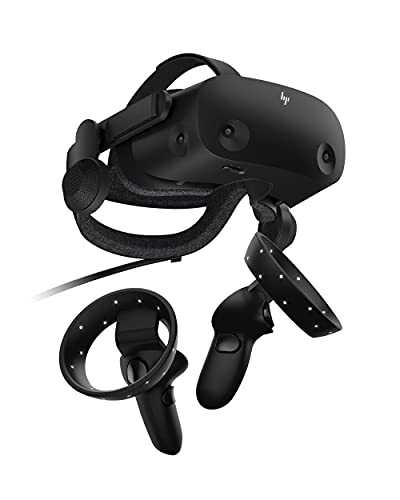
HP Reverb G2 VR Headset With Controller, Adjustable Lenses & — Best clarity per setup effort
The Reverb G2 was built around a single seductive proposition: simulation-grade clarity without installing anything in your room. Its title carries the numbers plainly — 2160 x 2160 LCD panels — and for flight and racing simulation, where a distant runway threshold or braking marker is a smudge on lesser panels, that resolution is the product. Four cameras on the headset provide inside-out tracking, controllers are included per the title, and the speakers come from Valve, a collaboration detail the title itself advertises. Adjustable lenses address interpupillary fit, the unglamorous adjustment that decides whether VR looks sharp or merely almost sharp for your particular eyes.
Compatibility in the title spans SteamVR and Windows Mixed Reality, which describes the G2’s dual citizenship honestly. It lives in Microsoft’s platform layer and plays SteamVR content through that bridge, a route that served its owners well for Steam libraries while adding a software intermediary the native Lighthouse headsets do not need. For seated simulation, the arrangement is close to ideal: no base stations on the walls of a room that also serves as an office, controllers present when wanted and ignorable when a wheel or a stick is the real input, and panels that reward a strong GPU immediately.
The G2’s compromises live at the room-scale edges. Inside-out controller tracking, guided by those four cameras, is happiest when your hands are in front of you, which describes simulation and most standing play, and less happy when controllers disappear behind your back or down at your hips outside the cameras’ view. The tether is a fact of life. And the WMR layer means your troubleshooting, when it comes, spans two platforms’ settings rather than one. Buyers whose VR life is a cockpit and a wheel will rarely meet those compromises. Buyers building a competitive room-scale arena should weigh the Index instead.
- Panels: 2160 x 2160 LCD per eye, as stated in the title
- Tracking: four cameras, inside-out, with controllers included per the title
- Audio: speakers from Valve, per the title’s own wording
- Fit: adjustable lenses for interpupillary alignment
- Compatibility named in the title: SteamVR and Windows Mixed Reality
Strengths
- Panel clarity serves simulation detail better than any comparably simple setup in this guide.
- No base stations to install; the system moves between rooms as easily as a laptop does.
- Valve speakers bring the Index’s off-ear audio philosophy to a camera-tracked headset.
Trade-offs
- Controller tracking fades when hands leave the cameras’ forward view.
- The Windows Mixed Reality layer adds a second software platform between you and SteamVR.
- Seated-first design is less at home in aggressive room-scale play than Lighthouse systems.
Best for: a simulation player wanting maximum legibility of distant detail with a five-minute setup.
Not suited for: a competitive room-scale player whose controllers routinely travel behind their back and out of camera sight.

HTC Vive Pro 2 Headset Only — Best upgrade for tracked rooms
Headset Only. Those two words in this title are the most important specification in the entire guide, and this section exists to honor them. The Vive Pro 2 in this listing is a visor seeking an ecosystem: it presumes you already own, or will separately obtain, SteamVR base stations and controllers. For the upgrading enthusiast whose room already wears Lighthouse stations in its corners and whose controllers still serve faithfully, that is not a warning but a welcome economy — why buy a second set of tracking hardware to replace a headset alone? For a first-time VR buyer, the same listing is a trap disguised as a bargain, because the visor by itself can do almost nothing.
Within its intended audience, the Pro 2 is HTC’s high-end statement in the Vive line that helped define PC VR. It belongs to the base-station tracking family, sharing the Lighthouse precision philosophy with the Index, and it targets enthusiasts who prioritize the visor’s display and fit as an upgrade step within a system they already trust. HTC’s ecosystem also spans tracked accessories, so a Pro 2 can join rooms that include additional tracked objects in a way camera-based systems do not attempt. The purchase logic is modular: keep the room, replace the eyes.
Because the title is so spare, this guide will not decorate it with invented numbers. Resolution, refresh and field-of-view figures for the Pro 2 live in HTC’s documentation, and a buyer at this tier should read them there, alongside compatibility notes for their existing base station generation, before ordering. That discipline is the real content of this pick: it is a component for experts, sold as a component, and it rewards the buyer who verifies their ecosystem the way they would verify a lens mount before buying a camera body. Do that verification and it is a rational, even elegant purchase. Skip it and it is an expensive ornament.
- Package: headset only, stated in the title itself
- Tracking family: SteamVR base-station tracking, requiring stations the buyer supplies
- Controllers: not part of this listing as titled
- Audience: existing Vive or Lighthouse room owners upgrading their visor
- Display figures: the listing title states none, so HTC’s own specification sheet is the source to consult before purchase
Strengths
- Lets an established Lighthouse room upgrade its visor without repurchasing tracking hardware.
- High-end positioning within the line that pioneered consumer PC VR.
- Joins an accessory ecosystem of tracked objects that camera-based headsets cannot use.
Trade-offs
- Useless alone; first-time buyers must add stations and controllers before it plays anything.
- Total system cost is invisible in this listing’s headline and must be assembled by the buyer.
- Sparse title means specification verification is entirely the buyer’s homework.
Best for: an existing SteamVR tracking-room owner replacing an aging visor with HTC’s high-end model.
Not suited for: a first-time VR buyer starting from an empty room, since nothing here tracks or controls by itself.

HTC Vive Focus Vision VR Headset — Best hybrid
The Focus Vision is the pick that tests this guide’s premise, and it earns its place by being honest about its dual nature in its own title: mixed reality and PC VR headset, with controllers, consumer edition. HTC built the Focus line for standalone operation, and the Vision carries that heritage into a package that also serves PC VR duty. A buyer who wants one device that can operate away from the PC for mixed reality experiences and then connect for SteamVR sessions gets a coherent product here. A buyer who wants a pure, single-purpose SteamVR instrument should notice that half of what they are paying for is a second personality they may never use.
That framing is not a dismissal. Households are not laboratories, and a headset that entertains in the living room without the gaming PC, then joins the PC for serious SteamVR evenings, solves a real scheduling problem in homes with one good computer and several interested people. Controllers are included, per the title, so the box is a working system rather than a component, which distinguishes it sharply from its Vive Pro 2 sibling above. The consumer edition wording also matters: HTC sells into enterprise markets with related hardware, and this listing is the home-user variant, the one whose software and support expectations match a gaming household.
The compromises are the mirror image of the Index’s. A hybrid spreads its design budget across two jobs, so the PC VR purist will always find a dedicated headset that out-specializes it at the same tier, whether in tracking philosophy, tether arrangement or panel priorities. Standalone capability also means onboard computing hardware whose weight and heat exist even when your PC is doing the rendering. Judge the Focus Vision as a bridge and it is well built. Judge it as a specialist and you are grading a bridge on its lap times.
- Character: mixed reality and PC VR in one device, per the title
- Package: controllers included, per the title
- Edition: consumer edition, the home-user variant
- PC VR role: one of its two stated modes rather than its sole purpose
- Panel and tracking figures: the listing title states none in numbers, so HTC’s documentation is the authority for a buyer comparing specifications
Strengths
- One purchase covers standalone mixed reality sessions and PC VR evenings.
- Complete box with controllers, ready to use without an existing tracking ecosystem.
- Consumer edition positioning matches home support and software expectations.
Trade-offs
- Hybrid budget means dedicated PC headsets out-specialize it for pure SteamVR play.
- Onboard standalone hardware adds weight even when the PC does the rendering.
- Buyers certain they will never use mixed reality are paying for an unused second personality.
Best for: a household wanting one headset that lives both beside the sofa and at the gaming PC.
Not suited for: a SteamVR purist allocating every part of the budget to PC-only performance.
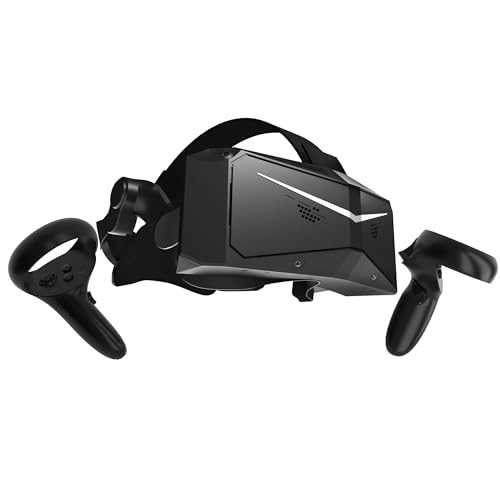
Pimax Crystal Light VR Headset for PC, 2880×2880 per Eye, 8K — Best for simulation detail
Pimax built its reputation on refusing to compromise the two numbers simulation players worship: resolution and field of view. The Crystal Light’s title leads with 2880×2880 per eye, the highest panel figure in this guide, wrapped in an 8K marketing banner and a QLED display with local dimming. Local dimming matters because it attacks LCD’s historic weakness, contrast: dark cockpit nights and space scenes gain real depth when the backlight can darken in zones rather than glowing uniformly gray. Inside-out tracking keeps the setup free of base stations, which suits the sim-rig reality that the player’s chair, wheel and pedals already own the room.
The title names its congregation without embarrassment: flight sims, iRacing and gaming. That ordering is truthful. In a cockpit, your head moves in small arcs, your eyes hunt for distant detail, and panel resolution converts directly into earlier sightings of runways, rivals and apex markers. The Crystal Light is engineered for exactly that visual workload. The full payment version note in the title is a purchasing mechanic worth reading carefully on the listing itself, since Pimax has used varied payment structures across its line and the buyer should know precisely what the transaction includes.
Now the honest bill. 2880×2880 per eye is a rendering mountain, and the GPU required to climb it at fluid rates is a serious component, not an afterthought; owners routinely balance resolution against refresh to keep simulation smooth, and SteamVR’s scaling settings become a weekly tool rather than a set-once preference. Pimax is also a smaller company than Valve or HP, and its software and support experience reflects a specialist maker serving enthusiasts who enjoy tuning. If you are that enthusiast, the Crystal Light offers the guide’s most thrilling ceiling. If you want VR that behaves like an appliance, the Reverb G2 delivers most of the clarity story with a gentler ownership curve.
- Panels: 2880×2880 per eye, the highest figure stated in this guide
- Display type: QLED with local dimming, per the title
- Tracking: inside-out, no base stations named or required by the title
- Stated audiences in the title: flight sims, iRacing and gaming
- Purchase note: title specifies a full payment version, a term to verify on the listing before checkout
Strengths
- Sharpest panels here turn distant simulation detail from guesswork into information.
- Local dimming gives dark scenes the contrast that plain LCD headsets wash out.
- Inside-out tracking suits fixed sim rigs where base stations would be clutter.
Trade-offs
- Demands a powerful GPU to feed its panels at fluid frame rates.
- Specialist maker’s software expects an owner willing to tune settings.
- Its advantages concentrate in simulation; room-scale players gain less from the panel budget.
Best for: a flight or racing simulation devotee with a strong GPU chasing maximum cockpit legibility.
Not suited for: a modest-PC owner expecting full native resolution at smooth rates without turning settings down.

DPVR E4 PC VR Headset, Virtual Reality Headset for PC, SteamVR — Best flip-up convenience
The DPVR E4’s signature is a gesture: the visor flips up. Anyone who has played PC VR seriously knows the micro-interruptions that gesture answers — finding the keyboard, reading a phone code, checking on a child or a kettle, locating the drink that has migrated across the desk. On most headsets each interruption means removing the whole apparatus and rebuilding your fit afterward. The E4 hinges instead, and that single mechanical kindness, repeated daily, is a legitimate design philosophy. Its title pairs the gesture with real numbers: a 3664×1920 combined display, up to 120Hz refresh, a 116-degree field of view, 6DoF tracking and stated SteamVR compatibility.
DPVR is a specialist VR maker, less famous in living rooms than Valve or HTC and long established in location-based and enthusiast VR circles. The E4 is its PC gaming proposition: inside-out 6DoF tracking without base stations, a wide stated field of view that competes with the sense of peripheral presence, and a refresh ceiling that fast-paced titles can exploit when the GPU allows. The flip-up design also serves developers, streamers and anyone whose VR sessions interleave with ordinary desk work, a pattern more common than the fully-immersed stereotype suggests.
Balance the enthusiasm with ecosystem realism. A smaller brand means a smaller community when you search for a fix at midnight, fewer third-party accessories fitted precisely to the visor, and software polish that may trail the platform owner’s own hardware. The resolution, while respectable, sits below the Reverb G2’s per-eye figure and far below the Pimax, so clarity absolutists should look up the table. The E4’s buyer is purchasing workflow: quick in, quick glance at the real world, quick back in, at a fluid refresh rate. For that buyer, the hinge is not a gimmick. It is the feature they will use more than any other.
- Display: 3664×1920 combined, per the title
- Refresh: up to 120Hz, as stated in the title
- Field of view: 116 degrees, per the title
- Tracking: 6DoF, inside-out style with SteamVR compatibility stated
- Design signature: flip-up visor for returning to the real room without removal
Strengths
- Flip-up visor dissolves the small interruptions that punctuate real PC VR sessions.
- 120Hz ceiling and wide stated field of view serve fast, presence-hungry titles.
- No base stations to install, keeping setup at the plug-in-and-play end of this guide.
Trade-offs
- Smaller brand community means thinner peer support and accessory choice.
- Panel resolution trails the Reverb G2 and Pimax for buyers prioritizing fine detail.
- Hinged design is one more moving part to treat kindly over years of use.
Best for: a PC player whose sessions constantly interleave with desk tasks, messages and real-world checks.
Not suited for: a clarity maximalist ranking headsets by per-eye resolution above every workflow concern.
Reading the Lineup: Resolution, Tracking and Completeness at a Glance
| Headset | Tracking style | Panel figure in title | In the box, per title | Natural habitat |
|---|---|---|---|---|
| Valve Index | Base-station Lighthouse | Not stated | Headset named; verify kit contents | Dedicated room-scale |
| HP Reverb G2 | Inside-out, 4 cameras | 2160 x 2160 per eye | Controllers included | Seated simulation |
| HTC Vive Pro 2 | Base-station Lighthouse | Not stated | Headset only | Existing tracked rooms |
| HTC Vive Focus Vision | Standalone plus PC VR modes | Not stated | Controllers included | Hybrid households |
| Pimax Crystal Light | Inside-out | 2880×2880 per eye | PC headset, full payment version | High-end simulation |
| DPVR E4 | Inside-out 6DoF | 3664×1920 combined | PC headset | Desk-interleaved play |
The table’s most instructive column is the one about box contents, because it is where money quietly multiplies. Two of these six require or invite further hardware decisions before the first game launches. The rest are systems. Neither arrangement is a defect; the Pro 2’s component logic is correct for its audience. But a buyer comparing headline numbers across the table without reading that column is comparing a visor with a room, and the guide’s recurring advice follows from it: price the system, not the listing.
What Do First-Time SteamVR Buyers Most Often Get Wrong?
The classic error in this category is buying the panel and forgetting the computer. A new owner unboxes a high-resolution headset, launches a demanding title on a mid-range GPU, meets stutter, and concludes that VR makes them ill, when the actual diagnosis is an underfed display. Motion discomfort in VR tracks frame instability closely, so the kindest first purchase is often a headset your PC can drive comfortably, with settings headroom, rather than the sharpest visor your budget can stretch to. The second error is room optimism: measuring the play area in a furniture-free imagination, then playing inside a guardian boundary that interrupts every session. Measure the room as it truly is, choose seated or standing play honestly, and let that decision, not advertising, pick your tracking system.
The third error is treating headset-only listings as bargains, already covered above but worth repeating because it is the most expensive misunderstanding in the category. The fourth is neglecting the tether. Every pick here connects to a PC, and the cable’s path across your space is a daily experience, not a detail: route it deliberately, consider a pulley if you play standing, and never let it cross a walkway where another person will find it at shin height. The fifth error is subtler and sadder: buying for the VR life you wish you had. The simulation rig, the dedicated room, the daily room-scale workouts — purchase for the sessions you actually held last month, and the headset will be used, loved and upgraded in due course rather than gathering the specific dust of good intentions.
For orientation in the wider category, readers comparing species of headset may find Best 360 VR Headsets and Best VR Headsets for Gaming, Mixed Reality, and Simulation useful, while those setting up a home workspace around the PC might browse Best Affordable Headsets for Work at Home for the non-VR side of the desk.
How Should You Set Up a SteamVR Space That Stays Set Up?
Decide the room’s permanent truth first: where the PC lives, where you stand or sit, and where the cable runs. Base-station owners should mount stations high, angled down into the play area, with power routed so nothing dangles across a doorway; the hour spent mounting properly repays itself every session in tracking that never needs re-explaining. Inside-out owners should invest in light instead: bright, even room lighting and some visual texture on blank walls give cameras the references they track by, and a featureless white box is the hardest room for them to read. Both camps should define the SteamVR play area conservatively, a step inside the true obstacle line, because enthusiasm expands arm swings beyond intention.
Then build the session ritual. A hook or stand where the headset always rests, the cable coiled the same way each time, controllers charging in one known place, and a small mat or rug edge that your feet can feel as a positional anchor without looking down. VR presence deepens when the physical routine disappears, and the routine disappears when every object has a home. Finally, schedule the software courtesies: update the platform and drivers on a weekday, not in the excited ten minutes before a Friday session, and keep one known-good configuration in mind before experimenting with supersampling heroics. The best SteamVR room is boring between sessions and magical during them, and boring is achieved entirely by these small, decided-in-advance arrangements.
What Else Belongs in a SteamVR Budget Besides the Headset?
New owners consistently under-budget the supporting cast, and then blame the headset for an incomplete experience. Begin with the unglamorous essentials. Lighthouse buyers may need stands or wall mounts, and everyone needs cable management, whether that is a simple set of clips along a wall or a ceiling pulley kit for standing play. A stand or hook for the headset protects lenses from desk clutter and sunlight, and sunlight deserves its sentence: direct sun through a window can damage VR lenses and panels in minutes, so where the headset rests is a safety decision, not a tidiness preference. Keep it shaded, covered or boxed, every day, without exception.
Comfort accessories follow. Facial interfaces and straps are wear items and fit items at once; a different foam thickness changes both hygiene and the distance between your eyes and the lenses, which changes clarity. Glasses wearers should plan their solution deliberately, whether that is wearing frames carefully inside headsets designed to allow them or ordering prescription lens inserts for the visor they settle on, because scratched spectacle lenses and scratched headset lenses are both expensive ways to learn the same lesson. Players who share a headset within a household should treat the facial interface as personal equipment, with a wipeable spare for guests, the way a household keeps spare toothbrushes rather than sharing one bravely.
Then there is the PC side of the ledger. A long, high-quality cable run, a powered USB hub where ports are scarce, and eventually the GPU upgrade that a high-resolution headset quietly argues for all belong in the honest total. None of this diminishes the picks above. It simply prices the hobby truthfully: the headset is the ticket, and the room, the rig and the computer are the theater. Buyers who plan the theater in advance spend less overall than buyers who discover it one emergency purchase at a time.
How Do You Stay Comfortable Through Long VR Sessions?
Comfort in VR is a system of small negotiations. Fit comes first: the headset should rest on the face and crown as a balanced whole, tightened only until it stops sliding, because over-tightening is the most common self-inflicted cause of the famous forehead ache and the ring-marked face. Take the extra minute to set interpupillary alignment where the headset allows it, as the Reverb G2’s adjustable lenses do, since eye strain from misaligned optics accumulates quietly and announces itself as a headache an hour after the session ends. Balance the tether’s pull with routing or a counterweight habit, because a cable dragging one side of the visor teaches your neck to compensate, and your neck keeps the receipts.
Heat and air come second. VR is light exercise wearing a warm mask, and rooms that feel fine for desk work grow stuffy in play. A small fan aimed at the play area is the veteran’s trick: it cools the player and, just as valuably, gives a constant directional reference that helps the brain stay oriented in the real room. Schedule breaks on a timer rather than on willpower, especially in the first month, because presence suppresses the ordinary signals of fatigue and thirst. The players who build long VR habits are the ones who treat sessions like exercise, with warm-up, intervals and an end time, rather than like a sofa activity that happens to involve standing.
Finally, respect the adaptation curve. New owners should begin with seated, low-locomotion content and short sessions, letting the vestibular system learn the medium over days. The headsets in this guide will happily serve gentle content at modest settings while you acclimate, whatever their ceilings are. Pushing a simulation at full resolution with artificial locomotion on day one is how promising headsets end up back in their boxes, blamed for a curriculum their owner skipped. Build up gradually, and the same hardware that overwhelmed you in week one becomes the transparent window it was designed to be by week four.
Final Recommendation
Let your room cast the first vote and your GPU the second. A dedicated space with mounting permission points to the Index as a system or the Vive Pro 2 as its visor upgrade. A sim rig points to the Reverb G2 for effortless clarity or the Crystal Light for the fullest measure of it, provided the graphics card signs the same cheque. A household divided between sofa and PC points to the Focus Vision, and a desk-bound player who lives half in the real world points to the DPVR’s hinge. SteamVR rewards the buyer who assembles a system honestly; choose the headset that completes the room and computer you already have, and the platform will do the rest of the persuading.
Frequently Asked Questions
Can I play SteamVR games on a standalone headset instead?
Often yes, through a wired link or wireless streaming from your PC, and many owners do exactly that. This guide excludes standalone-first devices by design, because their PC mode is a secondary feature and their value proposition includes a mobile processor and storefront you may not want. If your heart is set on one device for both worlds, the Focus Vision is the pick here that was built with that duality in its title, and dedicated standalone guides cover the rest of that market properly.
Do I need base stations for SteamVR?
Only for headsets in the Lighthouse family, here the Index and the Vive Pro 2. The Reverb G2, Pimax Crystal Light and DPVR E4 track with cameras on the headset and need no room hardware. Base stations deliver the most robust room-scale tracking and support tracked accessories; inside-out systems deliver portability and instant setup. Choose by your room’s permanence and your play style, not by a belief that one approach is simply newer and therefore better at everything.
Which of these is best for flight simulation?
The Pimax Crystal Light states the highest resolution in the guide and names flight sims in its title, making it the ceiling choice for a powerful PC. The Reverb G2 is the balanced answer, with 2160 x 2160 panels per eye, Valve speakers and no installation, which is why so many sim players settled there. Both are seated, tethered, GPU-hungry propositions, and both reward a proper stick or yoke far more than any room-scale accessory would.
What does headset only actually mean in the Vive Pro 2 listing?
It means the box contains the visor, and the tracking and input system must come from elsewhere: SteamVR base stations to locate it and controllers to interact with. Owners upgrading from an earlier Lighthouse setup typically own both already, which is the listing’s intended audience. A newcomer adding those components separately should total the full system before comparing against complete-box rivals, because the visor’s headline figure is only part of the real expenditure.
How powerful a PC do these headsets need?
Power enough to render two high-resolution views at high, stable frame rates in the games you actually play, which in practice means a strong modern gaming GPU for the Reverb G2 and a stronger one again for the Pimax at native resolution. SteamVR’s resolution scaling lets a modest PC participate at reduced settings, and that is a legitimate way to start. What does not work is demanding native resolution and maximum settings from hardware that cannot hold the frame rate, because instability, not softness, is what makes VR uncomfortable.
Is the tether really that annoying?
It is a managed annoyance rather than a deal-breaker for most PC players, and an entire accessory culture of pulleys and cable guides exists because the fix is easy. Seated players barely notice a well-routed cable. Standing players notice it during turns until routing and habit tame it. Every pick in this guide is PC-driven, so the honest question is not how to escape the tether within this shortlist but how deliberately you will arrange it in your room.
Should I wait for the next generation instead of buying now?
VR hardware improves in steps, and there is always a sharper panel on some horizon. The practical test is your library and your PC today: if both are ready and a pick above matches your room, the months of play between now and any future launch are worth more than a specification you cannot yet buy. Buyers whose GPU is due for replacement anyway may reasonably sequence the computer first and the headset second, since every pick here will look better for that order of operations. Waiting is a strategy when your current setup cannot serve the headsets; it is merely postponement when it can.
Can several people share one SteamVR headset comfortably?
Yes, with hygiene and fit treated as routines rather than afterthoughts. Choose wipeable or replaceable facial interfaces, reset the fit adjustments for each player instead of forcing one compromise setting on every head, and store controllers with their straps intact so a new player can be playing safely in minutes. Households that share well also share the setup knowledge: where the play area boundary sits, how the cable is routed, and which settings belong to which games, so the headset is a family instrument rather than one expert’s fragile shrine.
What should I check in the first week before the return window closes?
Run your most demanding game and your favorite seated experience, in your real room, with your real lighting. Confirm the tracking holds at the edges of your actual play style, confirm the fit survives a full session without escalating pressure, and confirm your PC sustains the frame rate at the resolution you intend to use rather than the resolution the box celebrates. Check for dead pixels and lens blemishes early, while remedies are simple. A headset that passes those four tests in week one almost always becomes a long-term instrument; one that fails them rarely improves with optimism.
Does SteamVR work the same on every headset in this guide?
The library and the storefront are the same, and your purchased games follow your account across all six. The path to them differs: the Lighthouse pair speak to SteamVR natively, the Reverb G2 arrives through its Windows Mixed Reality layer, and the inside-out and hybrid designs each bring their own runtime courtesies. In daily play those differences mostly vanish once a game is running. They reappear in setup, in settings menus and in troubleshooting, which is why this guide keeps returning to ecosystems rather than treating SteamVR compatibility as a single identical checkbox.
How much room do I honestly need?
Seated simulation needs a chair’s footprint and clear air for your arms. Standing play needs enough space to turn with controllers extended without your guardian boundary interrupting constantly, and room-scale ambitions need honest meters in both directions with furniture at its real coordinates. The correct amount is whatever your room provides permanently, not what it provides on the day you move everything for a demonstration. Choose the headset and the play style that fit the permanent room, and VR becomes a daily habit instead of a furniture rearrangement ritual you quietly stop performing.
Related Guides
- Best 360 VR Headsets
- Best VR Headsets for Gaming, Mixed Reality, and Simulation
- Best Affordable Headsets for Work at Home


