What's inside
- Where to Buy
- Key Takeaways
- Quick Picks
- How We Chose These Picks
- Comparison Table
- How to Choose a ZINK Printer
- How Does Ink-Free ZINK Printing Actually Work?
- What Should You Budget for Paper Over a Year?
- Where Do Pocket Prints Earn Their Keep?
- Common Mistakes When Buying a ZINK Printer
- Final Recommendation
- Frequently Asked Questions
- Related Guides
As an Amazon Associate I earn from qualifying purchases. This post may contain affiliate links at no extra cost to you.
[SITE_DOMAIN] is reader-supported. When you buy through links on our site, we may earn an affiliate commission.
Where to Buy
Five of the six picks below are live Amazon listings with links; the third is a bundle listing covered in prose, for reasons its review explains. The set opens with the KODAK Step Instant Printer, a portable mini printer producing ZINK 2×3-inch sticky-back photographs over Bluetooth, with an editing app for iOS and Android. Canon’s entry is the Canon Ivy 2 Mini Photo Printer in Pure White, printing sticky-back photographs from compatible phones — and it appears twice in this guide, the second time as a prose-only stock-up bundle of the same printer with a large paper supply. HP’s candidate is the HP Sprocket 2×3 in purple, a ZINK pocket printer with a fun-focused app, while the Liene Pearl K100 bundles fifty sheets of ZINK adhesive paper with Bluetooth 5.2 in the box. The set closes with the Nelko PP01, a 2×3-inch portable sticker printer whose listing leans on AI app editing.
A ZINK printer performs a small magic trick that never quite stops being delightful: it prints colour photographs with no ink at all. The colour lives inside the paper itself, in crystals that heat activates, so the printer is really a precision heater with a Bluetooth radio — no cartridges, no ribbons, no ink levels, nothing to run dry at a party except the paper pack. Shoppers comparing the best zink printers are therefore comparing a different set of virtues than ordinary printer buyers: pocket size, app quality, paper cost per print, and the sticky-backed 2×3-inch format that turns photographs into stickers, journal entries and locker decorations the moment they emerge.
All five linked machines in this guide are true ZINK printers, verified as such, printing on 2×3-inch ZINK paper with adhesive backs. That uniformity is worth stating because the pocket-printer shelf also holds dye-sublimation models — a different technology with ribbons and different paper — and the two are casually confused in marketing. Dye-sublimation gets an honourable mention in this guide’s comparison thinking, labelled as what it is, but no dye-sub machine is ranked here: this is the zero-ink list, kept pure on purpose.
What actually separates six machines printing the same size on the same paper technology? The app, mostly — the editing, filters, frames and print queue living on your phone are the daily interface, while the hardware is a warm box that says yes. Then come the bundle economics: how much paper ships in the box, and what the refills cost per photograph over a year of birthdays. Then the small physical graces: Bluetooth generation, colour of the shell, how the lid opens, whether the printer charges while it prints. The reviews weigh those real differences and decline to invent fake ones — where two machines genuinely tie, the review says so and lets the app screenshots and the paper price cast the vote.
Expectations deserve one honest paragraph before the picks. A 2×3-inch ZINK print is a keepsake, not a gallery object: colour is cheerful rather than forensic, detail is sized for a journal page, and the charm is precisely the instant, sticky, shareable physicality that phone photographs lost. Readers understanding that buy these machines happily and use them for years. Buyers expecting lab quality in a pocket format return them within the week, and the machines deserve better than that misunderstanding.
Key Takeaways
- Every linked pick is a true ZINK printer — zero ink, colour crystals in the paper, heat doing the work — printing sticky-back 2×3-inch photographs.
- The Canon Ivy 2 appears twice: as the standalone Pure White printer, and as a prose-only 110-sheet bundle listing for buyers stocking up on paper.
- The Liene Pearl K100 is the bundle-minded pick, with fifty sheets of ZINK adhesive paper included and Bluetooth 5.2 stated.
- Apps are the real interface of this category: Kodak, HP and Nelko all headline their editing apps, with Nelko’s listing emphasising AI editing.
- Dye-sublimation pocket printers are a different technology and are not ranked here; this list is zero-ink only.
- Running cost in this category means paper cost — count sheets per pack and price per print before choosing.
Quick Picks
| Pick | Badge | Why it earns a place |
|---|---|---|
| KODAK Step Instant Printer | The classic pocket starter | ZINK 2×3 sticky-back prints over Bluetooth, with an editing app for iOS and Android, in white. |
| Canon Ivy 2 Mini Photo Printer | Canon’s pocket standard | Sticky-back prints from compatible iOS and Android devices, in Pure White, from Canon’s Ivy line. |
| Canon Ivy 2 — 110-sheet bundle listing | Stock-up bundle, prose only | The same Ivy 2 printer paired with a large paper supply, covered without a link as a bundle listing. |
| HP Sprocket 2×3 | The playful purple option | ZINK sticky-back photographs over Bluetooth with a fun-oriented app, in a purple shell. |
| Liene Pearl K100 | Bundle with paper included | Fifty sheets of ZINK adhesive paper in the box, Bluetooth 5.2, for iOS and Android phones. |
| Nelko PP01 Photo Printer | AI-editing newcomer | 2×3 sticky-back printing over Bluetooth with AI app editing, in white. |
How We Chose These Picks
The gate for this guide was technological and absolute: ZINK, verified. Every linked machine prints on ZINK paper with no ink, no ribbon and no toner. Models using dye-sublimation — the other pocket-photo technology — were excluded from ranking however good their reputations, because a guide titled for zero-ink printing that quietly ranked a ribbon printer would betray its premise in its first table. The excluded technology is discussed once, openly, in the chemistry section below, so readers who prefer it know where to look next.
Within the gate, the set covers the category’s real spread: the heritage names — Kodak, Canon, HP — whose apps and paper ecosystems are the safe defaults; a bundle-led challenger in Liene, whose in-box paper supply changes the first month’s economics; and a newcomer in Nelko, whose AI editing pitch represents where the category’s software is heading. The Canon Ivy 2’s second appearance is not padding: its 110-sheet bundle listing is how a meaningful share of buyers actually purchase this printer, and it is covered in prose, without a link, as a bundle rather than disguised as a sixth distinct machine.
Specification lists quote the titles: print size where stated, Bluetooth generation where stated, in-box paper where stated. Several titles in this category are terse about hardware detail, and where a title withholds a figure the list marks it in the standard unstated wording instead of borrowing it from a sibling model. App quality, the category’s true battleground, is discussed as the listings present it — named features only — with the final judgement left, properly, to the buyer’s own phone and photographs.

KODAK Step Instant Printer — The classic pocket starter
Kodak’s Step is the pocket printer as most people picture it: a portable mini colour printer for smartphone photographs, printing ZINK 2×3-inch sticky-back photos over Bluetooth, compatible with iOS and Android, with an editing app, finished in white. Every element of that title is a category essential stated plainly — the size, the adhesive back, the wireless link, the app — which makes the Step the natural reference point for the whole set. If a rival cannot explain how it differs from this formula, it is this formula with a different badge, and several sections below use the Step as the baseline for exactly that reason.
The Kodak name carries a particular weight in instant photography, and the Step trades on it honestly: this is the company that taught the world to expect a photograph in their hand within the minute, miniaturised for the phone era. The editing app is where Kodak expects the fun to happen — the print itself is the same 2×3 ZINK sheet everyone here produces, so the filters, borders and collage tools are the personality. Buyers choosing the Step are choosing the heritage ecosystem: Kodak’s app, Kodak’s paper packs, and a design language of cheerful simplicity aimed at people who print at parties, not at desks.
Practical ownership follows the category pattern. The printer lives in a bag or a jacket pocket, the paper lives in foil packs of modest counts, and the cost conversation is entirely about paper: count your prints per event, price the refill packs, and the Step’s true running cost appears. Bluetooth pairing to both major phone platforms covers the social reality that a party printer serves everyone’s phone, not only its owner’s — a small specification with outsized consequences for how often the machine actually gets used.
- Print format: ZINK 2×3-inch (5.1 x 7.5 cm) sticky-back photos, as its title states
- Connectivity: Bluetooth, compatible with iOS and Android devices
- App: Editing app stated in the title
- Finish: White
- Battery and charging detail: Not stated in the listing title — verify with the manufacturer documentation
Strengths
- The complete category formula stated in one honest title.
- Kodak’s instant-photography heritage and app ecosystem.
- Sticky-back output turns prints into stickers instantly.
Trade-offs
- No paper bundle is headlined, so refills start immediately.
- White finish shows bag and party wear honestly.
- Hardware detail beyond the essentials requires the documentation.
Best for: a first pocket printer for parties, journals and gifts. Not suited for: high-volume event printing without a paper stockpile.
First-time pocket printing starts well here — Amazon’s KODAK Step listing lays out the app and paper ecosystem beside the printer’s price.
The Step’s social physics deserve a closing note. A pocket printer at a gathering changes the gathering: photographs stop being files promised for later and become objects handed over now, stuck to a fridge, a laptop, a birthday card. Hosts who own one describe a ritual forming around it — the print queue as a party game, the sticky-back as the evening’s souvenir currency. That ritual is the product Kodak is really selling, and the Step, as the category’s reference design, delivers it in its purest form: no learning curve, no ink, no waiting.
Journal keepers are the Step’s second tribe. A 2×3 sticky print drops into a notebook margin like it was designed there — because, across this whole category, it was — and a travel day becomes a page with evidence attached. If your notebook is already half stickers and ticket stubs, the Step is the missing press for it.

Canon Ivy 2 Mini Photo Printer — Canon’s pocket standard
Canon’s Ivy 2 keeps its title as minimal as its design: a mini photo printer, printing from compatible iOS and Android devices, producing sticky-back prints, in Pure White. No paper dimensions in the title — the specification list records the format line in the standard unstated wording, while noting what the guide’s verification establishes: the Ivy 2 is one of this set’s true ZINK machines, printing in the category’s standard 2×3 class. Canon’s restraint in the title mirrors the product’s design philosophy — the Ivy line is the fashion-conscious end of pocket printing, sold on how it looks in a hand and a flat-lay as much as on what emerges from it.
That aesthetic seriousness is not frivolous in this category. A pocket printer is carried, displayed and handed around; it is closer to a phone case than to office equipment in its social life. The Pure White finish, the mini format, the Canon badge — the Ivy 2 is engineered to be the one that looks right on the café table. Underneath the styling, the job is the category job: send a photograph from the phone, receive a sticky-back print, repeat. Canon’s app carries the editing side of the experience, and Canon’s paper ecosystem carries the refills.
Buyers should note the Ivy 2’s double presence in this guide, because it reflects a real shopping pattern. The standalone printer, reviewed here, is the starting purchase. The bundle listing reviewed next — the same printer with a large paper supply — is the stocking-up purchase, and comparing the two is really comparing paper arithmetic: how many sheets the bundle adds, and what those sheets cost against buying the packs separately. Canon owners who print heavily often end up owning the bundle’s economics whether they buy the bundle or assemble it, which is why this guide treats the bundle as a pick in its own right rather than a footnote.
- Output: Sticky-back prints, as its title states
- Connectivity: Prints from compatible iOS and Android devices
- Finish: Pure White
- Print size: Not stated in the listing title — verify with the manufacturer documentation
- Class: Mini photo printer, per the title
Strengths
- Canon’s design-led Ivy line in a clean Pure White finish.
- Sticky-back output for journals, lockers and gifts.
- A bundle ecosystem for owners who print in volume.
Trade-offs
- The title states neither size nor paper count — homework required.
- Style-led pricing may trail the bundle-first rivals on paper value.
- App depth must be judged from Canon’s own presentation.
Best for: a style-conscious phone photographer printing sticky keepsakes. Not suited for: bulk event printing on the tightest paper budget.
The Ivy 2’s Amazon page presents the Pure White machine alongside Canon’s paper packs — a useful single view of the printer and its appetite.
There is a gifting logic to the Ivy 2 that its design makes obvious. It is the pocket printer most often bought for someone else — the teenager, the scrapbooker, the friend whose phone holds ten thousand unprinted photographs — because it presents like a considered object rather than a gadget. If the printer in your cart is destined for a gift bag, the Ivy 2’s restraint is a feature: no gamer angles, no novelty colours, just a small white Canon that prints stickers of your friends. Pair it with a paper pack so the first evening is not rationed, and the gift is complete in a way a bare printer never is.
Owners printing their own lives rather than gifts will find the same restraint grows on them. The Ivy 2 disappears into a bag, pairs without ceremony, and produces the category’s standard keepsake on demand — Canon’s bet being that reliability and looks, compounded over years, beat any single headline feature. In this set, it is the pick for readers seeking technology that stays invisible while the photographs take the stage.
Canon Ivy 2 — 110-Sheet Bundle Listing (Prose Only)
This third pick is the same Canon Ivy 2 wearing its shopping-cart clothes: a bundle listing pairing the printer with a 110-sheet paper supply. It carries no link and no image in this guide, deliberately — a bundle is a purchasing configuration, not a different printer, and presenting it as a separate linked product would inflate the set. It earns its place as a review because the bundle is how heavy printers should buy, and its arithmetic deserves a paragraph of daylight.
One hundred and ten sheets changes the psychology of ownership. A starter pack teaches rationing — every print a small decision. A hundred-sheet reserve teaches abundance: print the second copy for the other grandparent, the test crop, the duplicate for your own journal beside the one in the gift. ZINK’s whole charm is spontaneity, and spontaneity is a function of paper supply more than of any hardware feature in this guide. Owners certain they will print at events, through a school year, or across a wedding season should price this bundle’s per-sheet cost against the standalone printer plus separate packs; the bundle usually exists because that arithmetic favours it.
The cautions are equally concrete. A bundle is only a bargain if the printer is the one you want — the paper does not rescue a wrong machine — and a large paper stock commits you to Canon’s ecosystem for its duration, which is a fine commitment if made knowingly. Storage matters too: ZINK paper keeps its quality in its sealed packs, stored away from heat, so a hundred-sheet reserve wants a drawer, not a car boot. Read the bundle as the Ivy 2’s volume form, decide whether your printing life is a volume life, and let the standalone review above carry the machine’s own verdict — this listing adds paper, not new hardware, and this guide scores it as exactly that.
- Contents: Canon Ivy 2 printer with a 110-sheet paper supply, per the bundle listing
- Printer identity: The same Ivy 2 reviewed above — not a separate model
- Link status in this guide: Prose-only coverage, no purchase link
- Best use: Stock-up purchase for established, heavy printing habits
- Storage note: Keep spare paper sealed and away from heat
Strengths
- A hundred-plus sheets turns printing spontaneous from day one.
- Bundle arithmetic typically favours the per-sheet cost.
- One purchase covers printer and a season of paper.
Trade-offs
- Commits the buyer to Canon’s paper ecosystem at volume.
- No advantage if your printing is occasional — paper outlasts enthusiasm.
- Covered here without a link, as a configuration rather than a product.
Best for: an established Ivy 2 fan stocking up for an event season. Not suited for: a tentative first-time buyer testing the category.
Because this bundle is covered in prose only, price it by searching the Ivy 2 bundle listing on Amazon directly and comparing its per-sheet cost with the standalone printer plus separate paper packs.
A final bundle discipline: count your first month’s prints before committing to the big reserve. Thirty prints in the first month says the bundle will be gone by summer and was money well placed; three prints says the standalone machine and a modest pack would have served, with the difference spent on the frame, the journal or the party itself. The bundle rewards the honest count — like every pick in this guide, it is a mirror held up to your own habits.
HP Sprocket 2×3 — The playful purple option
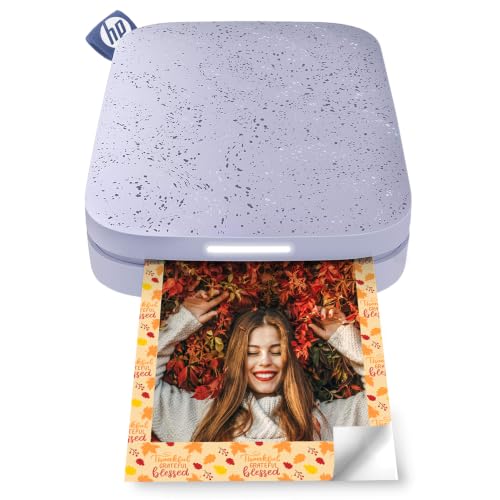
HP’s Sprocket is the extrovert of the set, and its title wears the personality openly: a 2×3 instant smartphone photo printer, portable, colour, wireless, producing ZINK sticky-back photos from compatible iOS and Android devices over Bluetooth, with a fun app — in purple. The word fun in a specification title is doing honest work. The Sprocket line has always aimed at the social, share-first end of photography, and the purple shell announces that the machine is an accessory to a good time rather than a tool pretending otherwise.
The Sprocket name carries its own ecosystem weight. HP built the line early in the pocket-printing era, and its app emphasises the social layer — shared albums, print queues that friends can feed, the party where everyone’s phone connects to the same little printer. That shared-queue idea is the Sprocket’s genuine differentiator in a category of identical paper: the printer as a jukebox, taking requests. Gatherings with one Sprocket develop a rhythm — photographs appear, get stuck to things, get photographed themselves — that gatherings with a more solitary machine do not quite replicate.
Ownership economics follow the category rule: the machine is the cheap part, the paper is the subscription you did not sign. Sprocket paper packs are the refill to price, and a heavy social season consumes them at a rate that surprises first-time owners — a good party can eat a pack the way it eats a bowl of crisps. Budget the packs with the printer, keep a spare in the bag, and the purple machine will never be the reason a moment went unprinted. Shoppers preferring invisible technology should look at the Canon; shoppers after a printer that joins the entertainment should start here.
- Print format: 2×3 ZINK sticky-back photos, as its title states
- Connectivity: Bluetooth, from compatible iOS and Android devices
- App: Fun app stated in the title
- Finish: Purple
- Positioning: Portable smartphone photo printer, per the title
Strengths
- A social, shared-queue personality built for gatherings.
- The Sprocket ecosystem is an established pocket-printing name.
- A colour finish that treats the printer as part of the fun.
Trade-offs
- Purple is a commitment — subtler dressers have Canon and Kodak options.
- Party printing consumes paper packs at a startling rate.
- App features should be sampled before assuming they fit your style.
Best for: a social photographer printing at gatherings with friends. Not suited for: a minimalist desk aesthetic.
The Sprocket’s Amazon listing presents the purple machine with HP’s paper packs alongside — worth viewing together, since the packs are the real subscription.
One practical Sprocket habit deserves passing on: appoint the printer a home corner at any event — beside the drinks, near the light — rather than letting it wander. A pocket printer that circulates gets admired; a pocket printer with a station gets used, and the queue forms where the machine sits. Hosts learn this after one party. The second party, with the Sprocket enthroned and a spare paper pack in the drawer beneath it, is the one where the sticky-back wall of the evening becomes a tradition.
For journal and classroom use, the same playfulness translates directly. Teachers printing reward stickers from photographs, youth-group leaders documenting a trip in real time, parents turning a birthday into an instant guest book — the Sprocket’s fun-first design serves all of them without a settings menu standing in the way.

Liene Pearl K100 — Bundle with paper included
Liene’s Pearl K100 makes the bundle argument from inside the box: a 2×3-inch photo printer, mini, instant and portable, bundled with fifty sheets of ZINK adhesive paper, running Bluetooth 5.2 to iOS and Android phones, in white. Fifty sheets is not a token starter supply — it is several events’ worth — and its inclusion reframes the purchase: where rivals sell a printer and a paper habit separately, the Pearl sells the first season outright. For gift-givers especially, that completeness matters; a printer that arrives with fifty prints inside it cannot be exhausted on the first evening.
Bluetooth 5.2 is the title’s technical headline, the newest connection generation stated in this set, and its virtues are the unglamorous kind: steadier pairing, better behaviour in the radio-crowded rooms where pocket printers actually work — parties, classrooms, markets — and kinder battery manners. Nobody buys a printer for a Bluetooth version, but everyone has lost a print moment to a pairing failure, and the K100’s specification is aimed precisely at that small, memorable frustration.
Liene’s positioning across its range is worth a clarifying sentence, because the brand also sells dye-sublimation models — the M100 line among them — which are not ZINK and are not in this guide. The Pearl K100 is the ZINK machine, verified as such, and buyers comparing within Liene’s own catalogue should hold that distinction firmly: same brand family, different chemistry, different paper. Within this guide, the Pearl’s case is the bundle plus the modern radio — the pragmatic pick for a shopper wanting the box to contain the whole first chapter of ownership.
- Print format: 2×3-inch photos on ZINK adhesive paper, as its title states
- Included paper: Bundle of 50 ZINK adhesive sheets stated
- Connectivity: Bluetooth 5.2, compatible with iOS and Android
- Finish: White
- Positioning: Mini instant portable printer for phone stickers, per the title
Strengths
- Fifty included sheets make the first season paper-proof.
- Bluetooth 5.2 is the set’s newest stated connection standard.
- A complete gift: printer and paper in one box.
Trade-offs
- Liene’s app ecosystem is younger than Kodak’s, Canon’s or HP’s.
- Brand siblings use dye-sublimation — check you are buying the ZINK model.
- Fifty sheets still end; refill pricing decides the long game.
Best for: a gift buyer wanting printer and paper in a single box. Not suited for: a loyalist of the heritage brands’ apps.
Amazon’s Pearl K100 listing itemises the fifty-sheet bundle beside the printer — the clearest first-season offer in this set.
The Pearl also suits the deliberate beginner: the person who has watched friends’ pocket printers at events and wants the experience without assembling an ecosystem from three shopping carts. One box, one app download, fifty prints to learn on — by the fiftieth sheet, that beginner knows their real print rate, their favourite subjects at 2×3, and whether the category is a season or a habit. Education that cheap, in a category built on consumables, is a genuinely kind piece of packaging, and it is why the Pearl holds a place here beside names with decades behind them.
Refill discipline, when the fifty run out, follows the universal rule of this guide: price the per-sheet cost of Liene’s ZINK packs against the pack prices of the shelf generally, since the paper standard is shared across the category’s machines. The Pearl’s long-term value lives in that comparison, and running that comparison before the first refill is the mark of a buyer the bundle has educated well.
Nelko PP01 — AI-editing newcomer
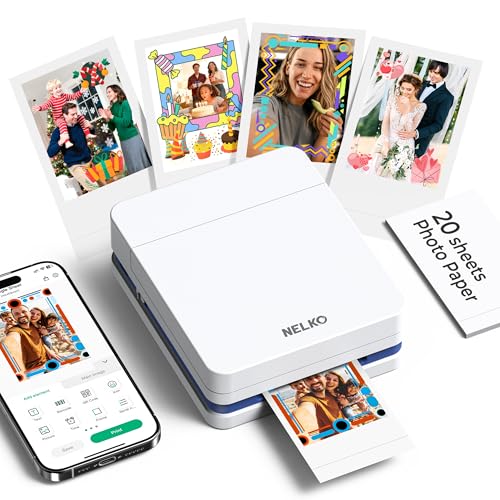
Nelko’s PP01 closes the set as the software-forward newcomer: a 2×3 portable photo printer in white, an instant colour sticker printer for smartphones, producing sticky-back photos over Bluetooth for iOS and Android, with AI app editing as its headline. That last phrase marks where this category is travelling. When every machine prints the same size on the same paper, differentiation moves to the phone — and Nelko’s bet is that intelligent editing, automatic enhancements and app-side cleverness are worth more to the next generation of buyers than another decade of brand heritage.
Judge that bet on its own terms. AI editing in a pocket-printer app means the photograph gets help before it becomes a sticker: faces brightened, crops suggested, backgrounds played with, the casual snapshot nudged toward the keepsake. For the PP01’s intended user — printing friends, pets, trips and small celebrations, at speed, for fun — that help is not a gimmick but the product, because the printer’s output quality is capped by the paper while the app’s creativity is not capped by anything. Photographers with carefully edited libraries will value it less; owners of raw, unedited camera rolls will value it more.
The hardware brief is the category standard stated completely: portable, 2×3, sticky-back, Bluetooth to both phone platforms, white. Nelko, known to many shoppers for label printers, brings a small-device sensibility to the category — the PP01 reads as a gadget that expects to be carried and used casually rather than ceremonially. Its risks are the newcomer’s risks: a younger app ecosystem, a thinner community of owners to ask, paper economics that must be verified pack by pack. Its promise is the newcomer’s promise too — that the software layer, where this category’s future will be decided, is exactly where it has chosen to compete.
- Print format: 2×3 portable photo printing, as its title states
- Output: Sticky-back photos, instant colour sticker printing
- Connectivity: Bluetooth compatible with iOS and Android
- App: AI app editing stated in the title
- Finish: White
Strengths
- AI editing leads the app’s pitch where the category is heading.
- The full category formula — portable, sticky-back, Bluetooth — stated plainly.
- A fresh ecosystem for buyers unattached to heritage brands.
Trade-offs
- The youngest app and owner community in this set.
- Paper pack economics need verifying before heavy use.
- AI features reward casual snapshots more than edited portfolios.
Best for: a casual phone photographer wanting editing help in the app. Not suited for: a brand-loyal buyer invested in another ecosystem.
Nelko’s Amazon page for the PP01 showcases the AI editing beside the printer — the right way to judge this pick, since the software is its argument.
A word on where the PP01 fits a household’s longer story. Pocket printers are often a family’s first step back into printed photographs after a decade of screens, and the member who drives that step is usually the one whose phone is fullest and whose patience for editing is shortest. An app that meets that person where they are — one tap between the camera roll and the sticker — can be the difference between a printer used weekly and a printer admired twice. If that person is you, or is the person you are buying for, the newcomer’s priorities may match your household better than the heritage machines’ polish.
Keep the standard cautions in view — count the paper cost, keep a spare pack, store the sheets sealed — and the PP01’s gamble is a fair one: proven paper, proven format, and its innovation spent where innovation still has room to run.
Comparison Table
| Pick | Format | Included paper | Standout trait |
|---|---|---|---|
| KODAK Step Instant Printer | ZINK 2×3 in. | Title gives no bundle figure | Heritage editing-app ecosystem |
| Canon Ivy 2 Mini Photo Printer | ZINK — size in documentation | Title gives no bundle figure | Pure White design-led build |
| Canon Ivy 2 bundle listing | ZINK 2×3 class | 110 sheets | Stock-up configuration, prose only |
| HP Sprocket 2×3 | ZINK 2×3 in. | Title gives no bundle figure | Social app, purple shell |
| Liene Pearl K100 | ZINK 2×3 in. | 50 sheets | Bluetooth 5.2 with paper in the box |
| Nelko PP01 | 2×3 in. | Title gives no bundle figure | AI app editing |
How to Choose a ZINK Printer
Start with the app, because the app is where you will live. Every machine here prints the same size on the same paper technology, so the daily experience — choosing, editing, framing, queuing — is software. Spend ten minutes with each candidate’s app presentation before pricing hardware: the filters you will actually use, the collage tools your journal wants, the sharing model your parties need. Kodak and HP sell heritage ecosystems, Canon sells design-led simplicity, Liene sells bundle completeness, Nelko sells AI assistance. Those are five different daily experiences wearing similar hardware.
Then run the paper arithmetic, the category’s only real running cost. Price a year of your honest printing — an event a month, a journal page a week, a holiday season — in each brand’s refill packs, and add the in-box supplies: the Pearl’s fifty sheets and the Ivy bundle’s hundred and ten are not marketing garnish, they are the first chapters of that arithmetic, already paid. A machine that looks dearer can easily be the cheaper year.
Finish with the social question: whose phones will this printer serve? All five linked machines speak Bluetooth to iOS and Android, so the gate is universal — but the experience of a shared queue at a party, a grandparent’s solo printing at home, and a teenager’s journal session are different products in practice. Buy for the room the printer will actually work in, and the category’s uniform paper stops being a limitation and becomes what it is: a standard that lets the software and the bundles compete honestly.
How Does Ink-Free ZINK Printing Actually Work?
The paper is the ink. A ZINK sheet is a layered construction — a base, dye crystal layers for the colours, and a protective top coat — and the crystals sit colourless until heat wakes them. The printer’s thermal head applies precise pulses of heat as the sheet passes, developing each colour layer where the image needs it, and the photograph emerges dry, smudge-resistant and finished, with no liquid involved at any stage. That is why these machines are so small and so clean: the entire chemistry budget was spent in the paper factory, and the printer is a heater with good manners.
The consequences shape the whole category. No cartridges means nothing to leak in a bag and no ink to dry out between uses — a ZINK printer shelved for three months prints its next photograph like it printed yesterday, a trick no inkjet can match. The trade is that quality is bounded by the paper’s chemistry: colour is cheerful, contrast is modest, and the 2×3 format forgives both by keeping prints small and immediate. It also means every brand’s paper is the consumable that matters, and paper prices — not printer prices — are where the category’s economics live.
One neighbouring technology must be named so it is never confused: dye-sublimation pocket printers, such as Kodak’s Mini 2 Retro or Liene’s M100, print by vaporising dye from a ribbon onto paper, in multiple passes. Their output character differs — often richer, usually slower, always ribbon-dependent — and they are legitimate machines. They are simply not ZINK, not ink-free in the same sense, and not ranked in this guide, which keeps its zero-ink promise literally.
Classrooms deserve their own paragraph in the pocket-printing story, because teachers adopted this format faster than almost anyone. A ZINK printer on a classroom desk turns the day’s work into artefacts before the bell: the science experiment photographed and stuck into the lab book, the reading group’s picture lining the corridor board, the reward that is a photograph of the achievement itself rather than a generic sticker. The adhesive back is the whole trick — no glue sticks, no tape, no laminator queue — and the absence of ink removes the classroom’s traditional printer anxieties about mess and cost-per-colour-copy in one stroke. Any of the five linked machines can run that desk; the Pearl’s included fifty sheets and the Sprocket’s shared queue are the two features teachers mention most.
Travel is the other natural habitat, and it tests a different virtue: indifference to neglect. A pocket printer rides in a rucksack for a month, prints at a hostel table, then vanishes into a drawer until the next trip — and because there is no ink to dry, clog or leak, it wakes up exactly as it went to sleep. Inkjet owners recognise that as a small miracle. Pack the paper flat, keep the packs sealed against humidity, and the printer becomes the trip’s printing press: border crossings, mountain huts and night trains all acquire a sticky-backed documentary record, assembled into the journal while the journey is still happening rather than reconstructed from a camera roll in the winter.
What Should You Budget for Paper Over a Year?
Count prints, not packs, and be honest about your social calendar. A light user — journal pages, the odd gift — might print sixty sheets in a year. A party-and-family user can print sixty in a month with a wedding in it. The machines in this guide all drink from the same paper format, so the budgeting exercise is portable: estimate your sheets, price them in each ecosystem’s packs, and notice how the in-box bundles shift the first year’s total. The Pearl’s fifty and the Ivy bundle’s hundred and ten are real money in that table.
Storage discipline protects the investment. ZINK paper keeps best sealed in its foil packs, in a drawer away from heat and sun; a pack left open on a sunny dashboard ages before its time. Buy paper at the pace your counting justifies — the big bundle is a bargain only for the printer whose appetite is proven, which is why this guide reviews the 110-sheet listing as a stock-up purchase for established habits rather than a starter’s default.
Finally, remember the prints themselves are the point of the budget. A year of ZINK paper buys a year of physical photographs in a decade that mostly stopped producing them — journal pages with evidence, fridges with faces, guest books that fill themselves. Priced against that, the per-sheet arithmetic tends to look less like a cost and more like the cheapest time machine on the shelf.
Where Do Pocket Prints Earn Their Keep?
Journals and planners are the format’s homeland. A 2×3 sticky print was sized by fate for a notebook margin, and travel journals, baby books, training logs and gratitude diaries all run on the same fuel: a small, immediate, stickable photograph that turns a written page into a kept one. Writers who print as they go keep journals that readers — including their future selves — actually linger over.
Events are the second homeland. Weddings, birthdays, school fairs and office parties all generate the same small miracle when a pocket printer is present: the photograph becomes a favour, taken home the same night, stuck somewhere by morning. Hosts should note the operational lesson repeated in the Sprocket’s review — give the printer a station and a spare pack, and the miracle runs itself.
The third homeland is the gift economy. A sticky print inside a card, on a wrapped parcel, or lining a lunchbox carries a charge out of all proportion to its size, because it is a photograph that escaped the phone. Grandparents, in particular, are owed more escaped photographs than any generation in history, and a pocket printer in a grandchild’s bag is the escape route. Choose any machine in this set for that duty and it will be loved out of proportion to its price.
Care is minimal but not zero, and the habits are quick to learn. Keep the printer’s exit slot unobstructed while a sheet emerges — a half-caught print is a ruined print — and let each photograph finish its journey before handling it, because the surface is warm and the moment deserves its two seconds. Run the calibration or cleaning sheet a pack provides when colours look tired, store the machine out of the heat that its paper also dislikes, and charge it before the event rather than during it. None of this amounts to maintenance in the inkjet sense; it is closer to the care a camera asks, which is fitting, since that is the company these machines keep.
A last social observation, offered because every owner reports some version of it: the pocket printer reverses the usual direction of photography at a gathering. Instead of disappearing into a phone to send a picture later, people gather around a small warm object and wait for a photograph to exist. That waiting — thirty seconds of anticipation, a peel, a stick — is a ritual the smartphone era accidentally deleted and this category accidentally restored. The machines in this guide are, in the end, six different invitations to that ritual, and choosing among them is choosing whose invitation you like the look of.
Common Mistakes When Buying a ZINK Printer
Confusing ZINK with dye-sublimation leads the list, because the two share shelves, sizes and marketing adjectives. They are different chemistries with different consumables — crystals in paper against dye on a ribbon — and anyone purchasing ribbon-printer paper for a ZINK machine owns expensive confetti. Check the technology word on the listing, as this guide has for every pick, and check it again when buying refills from a brand, like Kodak or Liene, that sells both.
Expecting gallery quality from a keepsake format is the second error, and it is a category error rather than a product failure. A 2×3 ZINK print is a sticker with a photograph’s soul — judged as a keepsake, it delights; judged as a portfolio piece, everything in this guide disappoints equally. Buy it for the journal, the fridge and the party, and let the wide-format machines in this site’s other guides carry the gallery ambitions.
Ignoring the paper pipeline completes the trio: the printer bought without a spare pack, the bundle bought without a proven appetite, the sheets stored in a hot car. Paper is this category’s ink, fuel and film in one — the owners who thrive are the ones who treat the pack shelf with the same respect inkjet owners give the cartridge drawer.
Final Recommendation
For the classic, heritage route, take the KODAK Step as the category’s reference or the HP Sprocket when the printing is social and shared. For design-led everyday carrying, the Canon Ivy 2 in Pure White is the pocket standard — and its 110-sheet bundle is the stock-up form heavy printers should price first. For a complete gift or a beginner’s first season, the Liene Pearl K100’s fifty included sheets and modern Bluetooth make the most self-contained box here. For app-first shoppers with camera rolls needing help, Nelko’s PP01 spends its innovation in the right place. Whichever name you choose, the paper is the same small magic — a photograph, from heat and crystals, ready to stick to the year it happened in.
One more buying lens is worth applying before the cart closes: the second owner. Pocket printers are gifted, lent, inherited by younger siblings and rediscovered in drawers by their next enthusiast, and the machines that survive those transfers are the ones whose paper stays buyable and whose apps stay maintained. That is the heritage trio’s quiet advantage and the standard the newcomers must meet over time — a consideration worth a moment’s thought if the printer is meant to be a family object rather than a season’s toy. Whichever you choose, register the habit, not just the hardware: a shared family album, physical or otherwise, that the printer feeds on a rhythm, so the machine’s story continues past its first owner’s enthusiasm.
And on the first evening, print the photograph you would have scrolled past. Not the best frame of the day — the ordinary one, the laughing one, the one with someone mid-sentence. Stuck inside the journal’s cover or onto the fridge, it will explain this entire category better than any review can: the point was never the perfect print. The point was that the moment became a thing, warm from the machine, while the moment was still in the room.
Keep one pack permanently in the bag the printer travels in, separate from the home supply. The two-stock system — drawer stock and bag stock — sounds fussy for a week and then quietly prevents the only failure this category really knows: a perfect moment, a willing printer, and no paper. Owners who adopt it stop counting sheets anxiously and start counting them the way they count memories, which is to say afterwards, with pleasure.
Date the back of the prints you keep, in pencil, before they go into the journal or the box. A sticky photograph with a date becomes a document; without one it becomes a riddle for your future self. The habit costs three seconds per print and is the difference, twenty years on, between an archive and a shoebox of mysteries.
Share the printer, too, when the moment asks for it. A pocket printer lent for a cousin’s wedding weekend or a friend’s road trip returns with its owner’s enthusiasm renewed by other people’s delight — and, not incidentally, with its paper appetite honestly measured across more hands than your own. Few gadgets improve by being lent. This one, built entirely around giving photographs away, is the exception that proves the rule.
Print one for the person standing next to you before you print one for the album — the category makes more sense, faster, in that order.
Frequently Asked Questions
Does a ZINK printer really use no ink?
Really. The colour chemistry lives in the paper as heat-activated crystals; the printer contributes only precise heat. There are no cartridges, ribbons or reservoirs — when output stops, the missing ingredient is always paper, never ink.
Are ZINK and dye-sublimation pocket printers the same thing?
No. Dye-sublimation models — Kodak’s Mini 2 Retro and Liene’s M100 are the familiar examples — vaporise dye from a ribbon in several passes. They are good machines of a different kind, excluded from this ranking so the guide stays true to its zero-ink brief.
Why does the Canon Ivy 2 appear twice in this guide?
Because it is sold two ways: as a standalone printer, reviewed with a link, and as a bundle listing with a 110-sheet paper supply, reviewed in prose without a link. The bundle is the same printer — its review is about paper arithmetic, not new hardware.
How long do ZINK prints last?
As keepsakes, well: kept in journals, albums and away from prolonged direct sun, they hold their cheerful colour for the years a keepsake is asked to serve. They are not archival objects — for multi-decade promises, the pigment machines in this site’s other printer guides are the correct tool.
What paper should I buy for these printers?
2×3-inch ZINK sticky-back paper, in the packs sold for this category — and priced per sheet before brand loyalty votes. Keep packs sealed until use, store them away from heat, and let your first month’s real print count decide whether the big bundles earn their discount.
Related Guides
Desk displays pair with pocket printing in most home setups, starting with 1440p monitors running at 144 Hz for editing sessions. Larger workspaces are covered by 27-inch monitors at 144 Hz, and brand-loyal desk builders can browse 4K Dell monitors for the premium end.
Related guides
- Best 17 Laptops: The Complete Tier-by-Tier Guide to Big-Screen Machines
- Best 4K Monitors for MacBook Pro: USB-C Panels With Real Power Delivery
- Best Routers for Remote Work: VPN Gateways, Travel Routers and Home Wi-Fi That Holds a Call
- Best Sim Racing Monitors: Ultrawide Cockpits From 34-Inch OLED Speed to the 49-Inch Wrap


