What's inside
- Key Takeaways
- Quick Picks
- How These Picks Were Chosen
- Six Ways to Store a Household’s Films and Music
- Side-by-Side Comparison
- What Should a Living Room Prioritise: Quiet, Capacity, or Simplicity?
- Keeping a Media Center Cool and Quiet in Practice
- Building the Library: Ripping, Organising, and Naming
- Power, Standby, and the Always-On Question
- Common Mistakes in Media Center Storage
- Frequently Asked Questions
- Final Recommendation
- Related Guides
As an Amazon Associate I earn from qualifying purchases. This post may contain affiliate links at no extra cost to you.
widgetverdict.com is reader-supported. When you buy through links on our site, we may earn an affiliate commission.
Where to buy: the Seagate IronWolf 4TB NAS HDD opens this guide as the balanced starting point, and each of the other five picks links to its own checked listing in its review below.
The best hard drives for media centers solve a problem that ordinary desktop storage never has to think about: they work in the room where people are trying to listen. A media center drive spins a few feet from the sofa, inside a NAS box or a small server that also warms the cabinet it sits in, and it does this for years without a day off. Noise that would be invisible in an office becomes a companion to every quiet film scene. Heat that a tower case shrugs off accumulates in a closed entertainment unit. The drives gathered here — four NAS-rated internal models from Seagate and Western Digital, plus two ready-made Buffalo network storage units with drives already inside — were chosen because their designs speak to that room, that cabinet, and that always-on rhythm.
Two philosophies divide the list. The four bare drives assume you already own, or intend to buy, a NAS enclosure or media server to house them, and they reward that setup with capacities from 2TB to 10TB, CMR recording technology across the board, and designs rated for network storage duty. The two Buffalo LinkStation units assume the opposite: that you would rather buy storage the way you buy a speaker, as a finished appliance that joins the network, serves media, and asks almost nothing of you. Neither philosophy is superior in the abstract. The right one is the one that matches the equipment already in your cabinet and the amount of tinkering you genuinely enjoy.
A note on the living-room priorities that shaped the ranking: rotational speed matters here less as performance and more as temperament. The 5400 RPM class drives in this guide run with a calmer acoustic and thermal profile, suiting cabinets and bedrooms, while the 7200 RPM models trade a little of that calm for responsiveness in bigger libraries and busier households. Every pick below names its speed class openly in its title, so the trade is yours to make with eyes open.
Key Takeaways
- Media center storage works beside the listener, so noise and heat behaviour matter as much as capacity.
- All four bare drives here are NAS-rated and use CMR, the recording approach suited to RAID arrays.
- The 5400 RPM class picks suit quiet cabinets; the 7200 RPM picks suit larger, busier libraries.
- Buffalo’s LinkStation units include their drives and act as media servers straight from the box.
- Capacity planning should count the whole household library, including backups of it, before choosing a size.
- A NAS beside the television earns a ventilated spot; sealed cabinets shorten every drive’s patience.
- Count the library honestly, protect the irreplaceable parts, and let the room’s acoustics arbitrate the rest.
Quick Picks
| Pick | Badge | Why it earns its place |
|---|---|---|
| Seagate IronWolf 4TB NAS HDD | The balanced NAS starter | Four terabytes of 5400 RPM CMR storage tuned for network duty. |
| WD Red Plus 2TB NAS HDD | The compact quiet pair-drive | Two terabytes at 5400 RPM for small mirrored libraries. |
| Western Digital 10TB WD Red Plus NAS Internal Hard Drive HDD | The big-library engine | Ten terabytes at 7200 RPM with a 512MB cache for serious collections. |
| Seagate IronWolf 8TB NAS HDD | The multi-bay workhorse | Eight terabytes with RV sensors and a 180TB/year workload figure. |
| BUFFALO LinkStation 720 8TB 2-Bay NAS | The finished appliance, large | A complete 8TB two-bay NAS and media server with drives included. |
| BUFFALO LinkStation 720 4TB 2-Bay NAS | The finished appliance, modest | The same complete idea at 4TB for households starting smaller. |
How These Picks Were Chosen
The first requirement was honesty about duty. A media center drive is not a desktop drive on a day trip; it is storage expected to serve films at midnight, index a music library at dawn, and accept a backup while both are happening. That is NAS work, so every bare drive here carries a NAS designation in its title and CMR recording, the approach that behaves predictably when several drives rebuild an array together. Desktop-class drives were left out deliberately: they are fine products in a PC, but their titles make no promise about the multi-drive, always-available life a media server imposes, and this guide refuses to make that promise on their behalf.
The second requirement was a spread of temperaments. A single-terabyte household streaming a modest film collection and a household archiving a decade of family video in high resolution are both “media centers,” yet they need different hardware. The list therefore runs from a 2TB drive meant to be bought in mirrored pairs up to a 10TB flagship, with the two Buffalo appliances offering an exit ramp for readers who would rather not assemble anything. Rotational speed was treated as a living-room variable in its own right: 5400 RPM models for cabinets near seating, 7200 RPM models for libraries large enough that browsing and searching them should feel brisk.
The third requirement was title discipline. Everything claimed in the reviews below — cache sizes, workload figures, warranty and rescue mentions, bay counts — appears in the listing titles themselves. Where a title is silent, the spec boxes say so in plain words and point to the manufacturer’s documentation, because a media center purchase often hinges on a detail (a noise figure, a power draw, a standby behaviour) that marketing titles routinely omit. Silence is treated as a fact to report, not a gap to wallpaper over with guesses borrowed from a neighbouring model.
Readers may wonder why no portable or desktop external drives appear in a guide about rooms that usually contain several. The answer is architectural: a media center worthy of the name serves more than one screen, and network storage is the shape that serves them all at once. A portable drive chained to one player makes that player a bottleneck and a single point of failure for the whole household’s evening. The internal NAS drives and the finished appliances gathered here all assume the library deserves a network address of its own — an assumption the sections below treat as settled, because for a true media center it is.
Finally, the guide weighed the room as a system. A drive is only as quiet as the enclosure amplifying it and only as cool as the cabinet feeding it air, so the advice sections return repeatedly to placement, ventilation, and the unglamorous physics of a box that never sleeps. Hardware choices start the job; placement finishes it.
Six Ways to Store a Household’s Films and Music

Seagate IronWolf 4TB NAS HDD — the balanced NAS starter
If a media center build has a natural first drive, it looks like this one. The Seagate IronWolf 4TB NAS HDD states a calm, complete specification in its title: 4TB of capacity, CMR recording, a 3.5-inch form, SATA 6Gb/s connection, 5400 RPM rotational speed, and a 64MB cache, aimed at RAID network attached storage and accompanied by Rescue Services. Read that list as a temperament profile. The speed class favours quiet running in a cabinet near the sofa. The capacity holds a substantial film and music library without forcing immediate hard choices. The NAS rating means the drive expects company — other drives, an array, a server that never truly rests — and is built to be a good citizen in that company.
In a two-bay living-room NAS, a pair of these in a mirrored arrangement gives a household a protected 4TB library with a drive failure reduced from catastrophe to errand. In a four-bay unit, they scale into a larger array while keeping the acoustic character gentle. The IronWolf name is Seagate’s NAS family, and this model sits at its sensible centre: not the smallest, not the flagship, just the size at which most households’ libraries actually live once the films, the music, the photographs, and the backups of the children’s tablets are honestly counted.
Strengths
- 5400 RPM class suits cabinets near seating, where drive noise competes with dialogue.
- CMR recording and a NAS rating suit mirrored and RAID arrays in home servers.
- Rescue Services are named in the title, adding a recovery path for a failed drive’s data.
Trade-offs
- Households archiving raw video will outgrow 4TB sooner than they expect.
- The 64MB cache is the modest end of this guide’s range, matching its calm brief.
- It is a bare drive; an enclosure or server must exist to receive it.
Spec snapshot: Capacity 4TB · Form 3.5 inch · Interface SATA 6Gb/s · Speed 5400 RPM · Cache 64MB · Recording CMR · Model ST4000VNZ06/006 · The listing title does not publish an acoustic figure, so check Seagate’s documentation if a specific noise level decides your cabinet placement.
Consider how this drive ages inside a real household. Year one, it holds the library with room to spare and the cabinet stays quiet. Year two, a camcorder’s worth of family footage arrives and the spare room shrinks politely. Year three, the household either tidies or adds a bay-mate, and either decision is easy because the drive was bought as part of a system rather than as a lone hero. That is the pattern NAS-rated storage enables, and the IronWolf 4TB is priced and sized for households at the start of that pattern.
Best for: a living-room NAS build seeking quiet 5400 RPM running and a mid-size library in mirrored safety.
Not suited for: a media server expected to archive many terabytes of raw camera footage from day one.
For the household building its first proper media library, start with the IronWolf 4TB listing and plan the pair or array around it.
One scenario deserves a direct answer: the household replacing a failed drive in an existing array. A NAS-rated CMR drive of this class is precisely what an array wants as a replacement citizen, because the rebuild process writes heavily and continuously while the surviving drives carry the evening’s streaming at the same time. Keep the replacement’s capacity at or above the failed member’s, let the rebuild finish before judging performance, and resist the temptation to tidy the library mid-rebuild. Patience during the one weekend the array is healing buys years of not thinking about it again.

WD Red Plus 2TB NAS HDD — the compact quiet pair-drive
The WD Red Plus 2TB NAS HDD is the smallest bare drive in this guide, and its smallness is a strategy rather than a shortcoming. Its title lays out the classic Red Plus formula: 2TB, 5400 RPM, SATA 6 Gb/s, CMR, a 64 MB cache, 3.5-inch form, model WD20EFRX. Western Digital’s Red Plus line exists for network storage in homes and small offices, and at this size the natural purchase is a pair — two drives mirrored in a compact two-bay NAS, giving a household 2TB of protected library that shrugs off a single drive failure. For a film collection measured in hundreds rather than thousands, plus a family’s music and photographs, that protected 2TB is a complete answer.
The quiet argument is strongest here. A small mirrored pair at the 5400 RPM class is about the gentlest mechanical arrangement a media center can have, short of going solid-state at many times the cost per terabyte. Placed in a ventilated cabinet, such a NAS can sit in a bedroom or a studio flat without announcing itself during quiet scenes. The households that choose this size deliberately tend to share a trait: their library is curated. They keep what they love, they delete what disappointed them, and their storage stays honest because it was never sized for hoarding.
Strengths
- Mirrored pairs at this size give real failure protection at a modest total outlay.
- 5400 RPM running suits bedrooms and small flats where the NAS shares the room.
- Red Plus NAS design and CMR recording suit always-on home server duty.
Trade-offs
- Two terabytes is a ceiling a growing high-resolution library will eventually press.
- Bought singly, it offers no redundancy; the pair is the point of the size.
- The title states no rescue service, unlike the Seagate picks flanking it.
Spec snapshot: Capacity 2TB · Form 3.5 inch · Interface SATA 6 Gb/s · Speed 5400 RPM · Cache 64 MB · Recording CMR · Model WD20EFRX · Power and acoustic figures do not appear in the listing title; Western Digital’s documentation carries them for readers planning a bedroom install.
There is a budgeting elegance to starting here, too. A household unsure whether a media server will become a permanent fixture can build the small mirrored system, live with it for a year, and learn its true library growth rate from experience rather than forecasts. If growth is gentle, the system serves for years untouched. If growth is fierce, the lesson was learned at the cheapest size in the guide, and the larger Red Plus below becomes the obvious next chapter rather than an opening gamble.
Best for: a curated library seeking a quiet mirrored pair in a compact two-bay NAS.
Not suited for: a single-drive setup with no mirroring, where its modest capacity carries the whole library alone.
Readers building small and safe should look at the Red Plus 2TB listing — and think in pairs from the first click.
Small libraries also fail differently, and the difference favours this pick. When a mirrored pair guards 2TB, a drive replacement is a modest purchase and a rebuild is an overnight event rather than a long weekend. Households with limited patience for maintenance drama — which is to say, most households — experience storage at its most peaceful at exactly this scale. The Red Plus 2TB is therefore not the guide’s compromise pick; it is the pick for people who have correctly identified that their media center should be the least interesting appliance they own.

Western Digital 10TB WD Red Plus NAS Internal Hard Drive HDD — the big-library engine
At the other end of the guide’s scale sits the Western Digital 10TB WD Red Plus NAS Internal Hard Drive HDD, a drive whose title reads like a declaration of intent: 10TB, 7200 RPM, SATA 6 Gb/s, CMR, and a 512 MB cache in a 3.5-inch body, model WD100EFGX. Everything about that specification serves a large library in active use. Ten terabytes swallows a serious film archive, a lossless music collection, and the family’s photographic history with room left for the next decade. The faster rotational class and the large cache suit a server that is searched, browsed, and streamed from by several rooms at once, where a calmer drive would still work but would feel its size.
The honest trade is temperament. A 7200 RPM drive in a living-room cabinet is a presence in a way its 5400 RPM cousins are not; during quiet passages, in a small room, an attentive listener may notice the mechanism at work, and the cabinet will run warmer for its efforts. The households that choose this drive happily tend to house their NAS in a hallway cupboard, a utility space, or a well-ventilated cabinet away from the main seating — or they simply value a vast, responsive library over absolute silence and accept the exchange with open eyes.
Strengths
- Ten terabytes ends capacity anxiety for even ambitious household archives.
- 7200 RPM and a 512 MB cache keep big libraries feeling responsive under browsing.
- Red Plus NAS design with CMR suits multi-drive arrays and constant duty.
Trade-offs
- The faster speed class runs less quietly than the 5400 RPM picks in this guide.
- A single 10TB drive is a large basket; mirroring at this size doubles the commitment.
- Its talents are wasted on a small library that a 2TB pair would hold entirely.
Spec snapshot: Capacity 10TB · Form 3.5 inch · Interface SATA 6 Gb/s · Speed 7200 RPM · Cache 512 MB · Recording CMR · Model WD100EFGX · Standby power behaviour is not something the listing title covers; consult Western Digital’s documentation when planning an always-on cabinet.
Think of this drive as the answer to a specific sentence: “we are done deleting things.” Households reach that sentence after years of curating, when the library has become a family asset — the films the children grew up on, the concerts, the footage no cloud account has been trusted with. At that point the purchase is not about this year’s viewing but about stewardship, and a big, fast, NAS-rated drive in a mirrored or parity array is what stewardship looks like in hardware form.
Best for: a large, actively browsed library seeking 10TB of responsive NAS storage per drive.
Not suited for: a bedroom cabinet where a 7200 RPM mechanism would be audible from the bed.
When the library has outgrown diplomacy, examine the Red Plus 10TB listing and plan its array partner at the same time.
There is a multi-room dimension to the big Red Plus that smaller libraries never meet. When three televisions, two tablets, and a music system all draw from one server during a holiday gathering, the drive’s job stops being a single steady stream and becomes a small crowd of simultaneous requests, each expecting an answer without a pause. Headroom — in capacity, in cache, in rotational pace — is what keeps that crowd orderly. Households that entertain, or whose teenagers have developed independent viewing schedules, should read this drive’s specification as crowd management rather than extravagance.

Seagate IronWolf 8TB NAS HDD — the multi-bay workhorse
The Seagate IronWolf 8TB NAS HDD carries the most engineering vocabulary in its title of any pick here: SATA 6 Gb/s, a 24/7 NAS-optimised design, AgileArray, all-CMR recording, RV sensors for multi-bay use, a 180TB/year workload figure, and a 3-year warranty paired with 3-year Rescue cover. Translate the vocabulary into living-room meaning. The RV sensors address vibration — the quiet enemy inside multi-bay enclosures, where several drives spinning together can disturb each other — which matters directly to a media server holding three or four drives in a compact box. The workload figure tells you the drive expects to be written and read heavily, every day, as a household server is. The warranty and Rescue pairing tell you Seagate expects the relationship to last.
Eight terabytes is the size for a media center that has become the house’s memory: films in high resolution, a music library ripped once and kept forever, security-camera archives for some households, and the shared folder where everyone’s photographs eventually land. In a multi-bay NAS, drives of this class form arrays that can lose a member and keep serving dinner-party playlists while the replacement is ordered. That resilience, more than raw capacity, is what the IronWolf’s title is selling, and for a media center that other rooms depend on nightly, resilience is the correct thing to buy.
Strengths
- RV sensors suit multi-bay enclosures, where neighbouring drives disturb each other.
- A stated 180TB/year workload figure matches busy household server duty.
- Three-year warranty plus three-year Rescue cover, both named in the title.
Trade-offs
- Its multi-bay talents are underused in a single-drive enclosure.
- Eight terabytes per drive makes mirrored arrays a serious commitment.
- The title gives no rotational speed figure; check Seagate’s documentation for it.
Spec snapshot: Capacity 8TB · Interface SATA 6 Gb/s · Model ST8000VNZ04 · Recording all-CMR · Duty 24/7 NAS-optimised with AgileArray · Workload 180TB/year per the title · Warranty 3 years with 3-year Rescue per the title · Rotational speed is absent from the listing title, so Seagate’s documentation is the authority for that figure.
Placement advice sharpens with a drive like this. In a four-bay unit under a television, its workhorse nature will keep the cabinet warmer than the gentler picks, so ventilation stops being a suggestion. Give the enclosure an open back or a cabinet with genuine airflow, keep it off carpet, and the IronWolf will repay the courtesy by disappearing into years of service. Starve it of air and even the best-engineered drive becomes a complaint waiting for a warm evening to happen.
Best for: a multi-bay media server seeking vibration-aware drives with a stated heavy workload rating.
Not suited for: a single-bay enclosure where its multi-bay engineering has nothing to work with.
Households building the house’s permanent memory should read the IronWolf 8TB listing in full, workload and warranty lines included.
Buyers graduating from a single external drive often underestimate what changes when storage joins the network properly. The library stops belonging to one machine. A film paused in the living room can resume in the bedroom; the music collection serves the kitchen speaker without a laptop acting as a waiter; a guest’s request no longer involves cables. The IronWolf 8TB is hardware for that transition — the point where the media center becomes household infrastructure, maintained like the router and thought about as rarely.
BUFFALO LinkStation 720 8TB 2-Bay NAS — the finished appliance, large
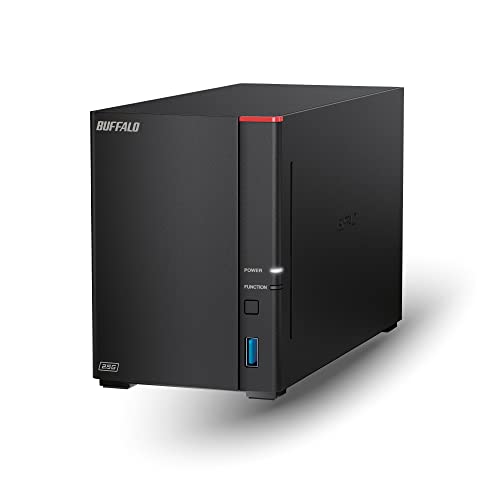
The BUFFALO LinkStation 720 8TB 2-Bay NAS changes the question entirely. Its title promises a complete object: an 8TB two-bay home and office private cloud storage unit with hard drives included, described as network attached storage, a media server, and a file server in one. There is no enclosure to choose, no bare drive to install, no array to design. You unbox a finished appliance, connect it to the router, and the household gains a private cloud and a media server that serves the television, the tablets, and the laptops from one quiet box. For readers who reached this guide wanting the outcome of a media center rather than the hobby of building one, this is the most direct route on the page.
Eight terabytes across two bays also carries an implicit decision the buyer should make consciously: how the bays are arranged. Configured for protection, a two-bay unit mirrors its drives and the usable library halves; configured for capacity, the full space serves media and a drive failure becomes a restore-from-backup exercise. The title does not dictate the choice, and Buffalo’s own setup material will walk through it, but a media center holding the only copy of family footage deserves the mirrored answer, while a library of re-rippable discs can reasonably choose space.
Strengths
- Drives included: a complete NAS and media server without a separate enclosure hunt.
- Two bays allow a mirrored arrangement that protects the library from one failure.
- Private cloud and file server roles extend it beyond the television to the whole home.
Trade-offs
- A finished appliance offers less freedom to choose individual drive models later.
- Mirroring halves the headline capacity, which buyers must plan around honestly.
- The title leaves drive particulars inside the unit unstated; Buffalo’s documentation describes them.
Spec snapshot: Total capacity 8TB · Bays 2 · Drives included per the title · Roles per the title: private cloud storage, NAS storage, network storage, media server, file server · Intended setting per the title: home and office · Internal drive specifications are not something the listing title details, so Buffalo’s documentation is the reference for them.
The living-room fit is where this appliance quietly shines. A single box, designed as a unit, with its thermals and acoustics considered together by its manufacturer, behaves more predictably in a cabinet than a self-assembled pairing of enclosure and drives chosen from different shelves. It will not win a specification argument against the IronWolf array above. It wins the evening argument: it arrives, it works, it serves the film, and nobody in the household had to learn what CMR means unless they wanted to.
Best for: a household seeking a complete 8TB media server appliance with drives already inside.
Not suited for: a builder seeking to hand-pick each drive model inside a multi-bay array.
If finished beats assembled in your household’s temperament, consider the LinkStation 720 8TB listing as the whole purchase, not a starting point.
The appliance route also changes the support conversation in a household. When a self-built server misbehaves, the builder becomes the help desk, and every film night carries a small risk of becoming a troubleshooting session. A finished unit from a single manufacturer concentrates responsibility: one box, one maker, one set of documentation. Families that have lived through the builder-as-help-desk era tend to value that concentration far beyond what specification tables can express, and they are not wrong to.
BUFFALO LinkStation 720 4TB 2-Bay NAS — the finished appliance, modest
The BUFFALO LinkStation 720 4TB 2-Bay NAS is the same complete idea at half the capacity, and for a great many living rooms half is the truthful size. Its title mirrors its sibling’s promises word for word in structure: a 4TB two-bay home and office private cloud storage unit, hard drives included, serving as network attached storage, a media server, and a file server. A household whose media life is a few hundred films, a music library, and the family photographs will live inside 4TB comfortably for years — especially in a streaming era, where the NAS increasingly holds the treasured and the personal rather than everything ever watched.
The mirrored arithmetic deserves the same honesty as with the larger unit. Arranged for protection, this appliance guards a 2TB library; arranged for space, it serves the full 4TB with backup duties falling to the household. Either way, the purchase remains refreshingly singular: one box, one setup, one place where the household’s media lives, instead of a constellation of drives attached to whichever computer happened to be awake. For families whose current “media center” is a laptop that must not be closed during a film, that singularity alone justifies the appliance.
Strengths
- Complete two-bay NAS with drives included, at a size matched to modest libraries.
- Media server and private cloud roles arrive configured as one appliance’s job.
- Two bays keep the mirroring option open for the footage that cannot be replaced.
Trade-offs
- A fast-growing high-resolution library will press 4TB sooner than the 8TB sibling.
- Like its sibling, internal drive particulars stay inside Buffalo’s documentation.
- Appliance simplicity trades away the mix-and-match freedom of bare drives.
Spec snapshot: Total capacity 4TB · Bays 2 · Drives included per the title · Roles per the title: private cloud storage, NAS storage, network storage, media server, file server · Intended setting per the title: home and office · For anything about the drives sealed inside, the listing title stays quiet and Buffalo’s documentation speaks instead.
Think of this unit as the media center for households that measure their library in favourites rather than in terabytes. It replaces the tangle — the portable drive that lives on top of the player, the laptop library, the USB stick in the television — with a single network citizen that every screen in the home can visit. That tidiness has a value beyond specification tables, particularly in rooms where the entertainment unit is furniture first and infrastructure second.
Best for: a modest library seeking a complete two-bay media server without assembly.
Not suited for: an archiving household whose collection already exceeds this unit’s total capacity.
For the smaller complete answer, browse the LinkStation 720 4TB listing and decide the mirroring question before it arrives.
Finally, consider the household that streams almost everything and keeps a local library mainly for the beloved and the unavailable-elsewhere. For them the 4TB appliance is not a smaller ambition but a precise one: the favourites in high quality, the family archive protected, and no money spent warehousing films that a subscription already serves. Precision about what local storage is for is the mark of a mature media center, and this unit is built exactly to that measure.
Side-by-Side Comparison
| Pick | Capacity | Speed class | Shape of the purchase | Headline trait |
|---|---|---|---|---|
| Seagate IronWolf NAS HDD | 4TB | 5400 RPM | Bare internal drive | CMR, 64MB cache, Rescue Services named |
| WD Red Plus NAS HDD | 2TB | 5400 RPM | Bare internal drive | CMR, 64 MB cache, built for mirrored pairs |
| WD Red Plus NAS HDD, large | 10TB | 7200 RPM | Bare internal drive | CMR, 512 MB cache, flagship capacity |
| Seagate IronWolf NAS HDD, large | 8TB | Not stated in title | Bare internal drive | RV sensors, 180TB/year, 3-year Rescue |
| BUFFALO LinkStation 720 | 8TB | Inside the appliance | Complete two-bay NAS, drives included | Media server and private cloud in one box |
| BUFFALO LinkStation 720, smaller | 4TB | Inside the appliance | Complete two-bay NAS, drives included | The same appliance at a modest size |
What Should a Living Room Prioritise: Quiet, Capacity, or Simplicity?
Begin with the room’s acoustics, because they cannot be upgraded later with a setting. Sit in your usual seat during a quiet evening and notice what you already hear: a refrigerator’s hum through a doorway, a receiver’s fan, traffic softened by glass. A media center drive joins that soundscape permanently. If your NAS will sit within a few feet of the seating in a small room, the 5400 RPM picks and the finished Buffalo appliances are the natural shortlist. If the NAS can live in a hallway, a utility cupboard, or a ventilated cabinet in another room, the faster and larger drives come back into play, and the household that records gameplay elsewhere in the home will recognise the same trade from our guide to Best Hard Drives for Recording Gameplay, where sustained work matters more than silence.
Capacity comes second, and it should be counted rather than guessed. Add up the current library, then add the honest growth: the camcorder footage per year, the music still on discs awaiting ripping, the photographs multiplying on two phones. Then double whatever protection arrangement you intend, because a mirrored 8TB plan is a 4TB library. Readers assembling their own server rather than buying an appliance should also weigh the bare-drive route in Best Hard Drives to Use for a Media Server, which approaches the same library from the builder’s side. Households whose drives will live partly outside a NAS — in docks and cases for rotation and backup — will find the complementary thinking in Best Hard Drives for External Enclosures worth an evening as well.
Budget enters last, and it should be framed per year of service rather than per purchase. A media center drive is a five-year appliance in most homes; the difference between the modest pair-drive build and the flagship array, divided across the evenings it will serve, is smaller than the cost of one streamed rental a month. That arithmetic does not argue for overspending — it argues for buying the size and temperament you will still be pleased with in year four, when the library has grown into whatever it was always going to become and the novelty of the purchase has long since faded into furniture.
Simplicity comes third, but for some households it should come first. Be honest about whether assembling an enclosure, choosing an array layout, and maintaining a server sounds like a hobby or a chore. If it sounds like a chore, the Buffalo units are not the lesser choice; they are the correct one, because a media center that nobody maintains becomes a media center that nobody trusts. The best system is the one still being backed up in year three.
Keeping a Media Center Cool and Quiet in Practice
Placement solves more problems than purchasing does. A NAS on an open shelf behind a perforated cabinet door lives a different life from the same NAS sealed in a glass-fronted box beside a warm amplifier. Leave space behind the unit for exhaust air, keep the intake side away from the amplifier’s vents, and never stack the enclosure directly on top of a receiver that runs hot during films. If the cabinet is enclosed, a door left ajar during long viewing sessions is a crude but effective courtesy, and small adhesive feet that lift the enclosure off a resonant shelf can quiet a surprising amount of transmitted hum.
Resonance deserves a sentence of its own, because it is the gremlin behind many “noisy drive” complaints that are not really about the drive. A mechanism’s gentle vibration, coupled into a hollow cabinet or a thin shelf, can emerge as a hum across the room, the way a tuning fork makes a table sing. Soft feet, a cork or rubber mat beneath the enclosure, and a shelf that does not act as a sounding board can transform the same hardware’s manners. Before blaming a drive for noise, change what it stands on; the fix is embarrassingly often a mat rather than a return.
Scheduling is the second tool. Backups, library indexing, thumbnail generation, and other housekeeping can be set for the small hours in most server software, moving the drive’s busiest and warmest work out of the evening entirely. A media center that idles politely during films and does its chores at 3 a.m. feels quieter and runs cooler than the same hardware grinding through indexing during the opening act. The drives in this guide are built for constant duty; arranging that duty thoughtfully is the owner’s half of the bargain.
Temperature has a memory, too: a drive that spends three summers in a hot cabinet may keep working, yet it spends its resilience doing so. If a thermometer left in the cabinet during a film marathon reports a small sauna, believe it, and fix the airflow before the library grows precious. Ventilation is the least expensive protection a media center can buy, and it also makes the room quieter, because cool drives and cool enclosures ask less of their fans.
Building the Library: Ripping, Organising, and Naming
Hardware is only half of a media center; the other half is the discipline of the library itself, and it deserves a section because the best drive in this guide cannot rescue a chaotic collection. Decide on a folder structure before the first rip, not after the five-hundredth: films by title, series by show and season, music by artist and album, family footage by year and event. Consistency matters more than the particular scheme, because server software organises itself around your folders and rewards tidiness with clean browsing on every screen in the house.
Naming deserves the same forethought. Files named in a single, predictable pattern — title, year, and nothing decorative — are recognised reliably by media server software, while creative filenames produce mismatched posters and episodes filed under the wrong season. The hour spent settling a naming pattern before the big ripping weekend returns itself every time a guest finds the right film unaided. Likewise, rip at the quality you actually intend to keep. Storage in this guide is generous but not infinite, and a library ripped twice — once hastily, once properly — wastes both the space and the weekend.
Finally, schedule the library’s growth honestly. A media center tends to fill at the speed of the household’s enthusiasms: a new camera, a discovered director, a child’s sudden documentary phase. Glance at the free space monthly, the way you would glance at a fuel gauge, and let the trend — not a crisis — time your next drive purchase. The picks above all belong to families with larger siblings and array partners, so growth, when it comes, can be an addition rather than a migration.
Power, Standby, and the Always-On Question
A media center drive lives a different life from a drive in a computer that sleeps. It waits — through nights, holidays, and the working week — for the moment a screen somewhere in the house asks for a film. That waiting has a cost in electricity and a benefit in immediacy, and households should strike the balance consciously rather than by default. Server software and NAS enclosures offer standby schedules: spinning the library down during the deep night hours, waking it for the evening. Used thoughtfully, such schedules trim the power bill and the cabinet’s warmth without making anyone stare at a loading message on film night.
The counterweight is mechanical courtesy. A drive asked to spin down and up many times a day lives a harder life than one turning steadily, which is why the sensible schedules use a few long sleeps rather than constant napping between requests. Set the timeout generously — long enough that a mid-evening pause for a phone call does not park the library — and let overnight be the one true rest. Readers planning a cabinet install should treat the manufacturer’s documentation as the source for each model’s standby behaviour and power figures, since the listing titles in this guide leave those numbers largely unstated, and an always-on purchase deserves always-accurate arithmetic.
Common Mistakes in Media Center Storage
Desktop drives in NAS clothing is the founding error: a bargain internal drive, designed for a PC that sleeps at night, placed in a server that never does. It may work for a season and then teach an expensive lesson about duty ratings. Every bare drive in this guide carries its NAS purpose in its title for a reason. The second error is buying capacity without counting protection. A household planning a mirrored array but budgets for the headline terabytes discovers, at setup time, that half the library space it imagined was actually its insurance policy. Count the library after the array layout, never before.
Third, the sealed cabinet: an enclosure entombed with an amplifier, a console, and a tangle of power supplies, in a box with no airflow, in August. Drives tolerate warmth poorly over years, and media centers live for years. Fourth comes the single-copy library — a media server holding the only version of the family’s footage, treated as a backup because it feels like a vault. A NAS is a server, not a backup; the footage that matters deserves a second home, whether that is a rotated external drive or a cloud copy. Fifth, and quietest, is ignoring the room: choosing the fastest, largest mechanism for a studio flat and then spending years turning the volume up over it.
Two further errors appear once a system is running. The first is firmware and software neglect: a NAS is a small computer, and leaving its software unpatched for years invites both insecurity and odd behaviour that gets blamed on the drives. Put updates on the same monthly rhythm as the free-space glance. The second is the mystery second library — downloads, rips, and backups scattered across a laptop, a portable drive, and the NAS, with nobody certain which copy is canonical. Choose the NAS as the library of record, let everything else be a copy of it or a staging area feeding it, and the household’s media stops existing in quantum states.
Frequently Asked Questions
Why do these picks favour NAS drives over ordinary desktop drives?
A media center is a server: always available, often multi-drive, written and read at all hours. NAS-rated drives state that duty in their design — CMR recording for arrays, and in the IronWolf 8TB’s case a workload figure and vibration sensors for multi-bay life. A desktop drive makes no such statement in its title, so this guide does not ask it to do a server’s job.
Is 5400 RPM fast enough for streaming films?
Comfortably. Streaming even high-resolution video asks a drive for a steady, modest flow rather than bursts of speed, and network storage of this class was designed around exactly that flow. The 7200 RPM picks earn their place through library scale and browsing responsiveness in big collections, not because a film needs them to play.
Should a two-bay unit be mirrored or spanned?
Decide by replaceability. Films ripped from discs you still own can be re-ripped after a failure, so spanned capacity is a defensible choice. Family footage, personal recordings, and anything existing in one copy deserve mirroring, where one drive can fail and the library survives intact. Many households mirror first and expand later; regret runs in the opposite direction.
Where should the NAS physically live?
Somewhere ventilated, stable, and within cable reach of the router. A hallway cupboard with airflow beats a sealed entertainment cabinet; an open shelf beats both for cooling but loses on tidiness. Avoid stacking the enclosure on warm equipment, keep it off carpet, and if the room is a bedroom, let the quieter picks and a little distance do the acoustic work.
Do the Buffalo units replace the need to choose drives?
Yes, that is their entire proposition: the drives are included, the roles of media server and file server are the appliance’s job, and the household’s decisions shrink to capacity and mirroring. Readers who enjoy choosing hardware will prefer the bare drives; readers who enjoy watching films will prefer the appliance. Both preferences are respectable.
Can a media center NAS also back up the household’s computers?
Yes, and for many households that double duty is what justifies a proper NAS over a simpler streamer box. The same array that serves films at night can receive laptop backups in the small hours, hold the family photograph archive, and act as the home’s private cloud, as the Buffalo titles state outright. Just count that extra duty in your capacity plan: backups grow relentlessly, and a library squeezed by three computers’ worth of backup history will start the deletion arguments this guide exists to prevent.
How much capacity does a household library really need?
Count, then add growth, then apply your protection layout. A curated film and music library with family photographs commonly lives between 2TB and 4TB. High-resolution collectors and households archiving years of video should look at 8TB and beyond. The mistake is not choosing a size; it is choosing a size without the counting step, in either direction.
Final Recommendation
Most living rooms should start with the Seagate IronWolf 4TB: quiet in its speed class, honest in its NAS design, and sized for the library most households actually own, ideally as a mirrored pair. Small, curated libraries can step down to the Red Plus 2TB pair-drive arrangement and gain the gentlest running in the guide. Collections that have become family archives should step up without hesitation — the IronWolf 8TB for multi-bay resilience, the Red Plus 10TB where sheer responsive capacity leads. And households that want the destination without the journey should buy a Buffalo LinkStation at the size their counting supports and spend the saved weekends watching the library instead of administering it. Choose the temperament first and the terabytes second, and the media center will sit in the room the way good furniture does: present in every good evening, noticed in none of them.
One last encouragement, whatever you choose: set the system up on a quiet weekday, not on the evening of the gathering it is meant to serve. Give the array a day to settle, copy the library in daylight, test a film from every screen that matters, and let the first real audience arrive to a system that has already proven itself. A media center introduced calmly becomes part of the home’s furniture of the mind; one baptised under deadline pressure carries the memory of that stress into every evening that follows. The drives above are patient machines — let their first week be a patient one too.
Related Guides
- Best Hard Drives for Recording Gameplay
- Best Hard Drives for External Enclosures
- Best Hard Drives to Use for a Media Server


