What's inside
- Key Takeaways
- Quick Picks
- How These Picks Were Chosen
- Six Drives for Sessions That Cannot Be Replayed
- Side-by-Side Comparison
- How Much Capacity Does a Recording Habit Actually Need?
- Sustained Writes: What Recording Actually Asks of a Drive
- From Capture to Edit: Giving Footage a Second Life
- Common Mistakes When Recording to External Drives
- Frequently Asked Questions
- Final Recommendation
- Related Guides
As an Amazon Associate I earn from qualifying purchases. This post may contain affiliate links at no extra cost to you.
widgetverdict.com is reader-supported. When you buy through links on our site, we may earn an affiliate commission.
Where to buy: the WD_BLACK P10 Game Drive 5TB leads this guide as the capture-friendly all-rounder, and the other five picks each link to their own checked listing inside their reviews.
The best hard drives for recording gameplay are judged by a harsher standard than game storage alone. A drive that merely holds a library can rest between launches; a drive recording gameplay works continuously, absorbing a capture stream for hours at a stretch while a session unfolds, and it must do so without stuttering, overheating in a cramped desk setup, or filling up mid-tournament. Whether the footage comes from a console’s own recording features or a capture setup feeding a PC, the demand is the same shape: sustained sequential writing, generous capacity, and the reliability to be trusted with the one match that cannot be replayed.
The six drives here approach that demand from different corners of a gaming setup. Two carry the WD_BLACK gaming banner in portable and large-capacity forms. One is LaCie’s rugged traveller, built to survive the bag between home, studio, and tournament venue. Two come from Avolusion, pre-formatted for PlayStation households that want to plug in and play. One is Western Digital’s plain Easystore, the generalist that serves consoles and computers without gaming livery. All six connect over USB, all six offer capacities from 1TB to 8TB, and each review below is frank about which recording life each drive actually suits.
The audience for recorded gameplay has grown past the solo creator. Teams review sessions together, coaches dissect them, friends who missed the match ask for the full recording rather than the highlight, and community tournaments increasingly expect footage as evidence and entertainment alike. That social weight lands on the drive: it is no longer storing a hobby’s by-product but a small group’s shared memory of the season. The picks below were weighed with that weight in mind, which is why reliability and capacity head every review and novelty appears nowhere.
One discipline runs through the whole guide: a recording drive is a working drive, not an archive. Footage worth keeping deserves a second home after the session, and the drive that captured it deserves regular tidying so its free space — and therefore its writing manners — stays healthy. Buy for the session, manage for the season.
Our Top Picks
Key Takeaways
- Recording gameplay means sustained writing for hours; judge drives by steadiness, not launch speed.
- Capacity is session insurance: long captures at high quality consume space faster than intuition suggests.
- Console-branded and pre-formatted drives shorten setup; generalist drives repay with flexibility.
- A rugged shell matters when the drive travels between home, studio, and tournament venues.
- Keep meaningful headroom free; a nearly full recording drive is a stutter waiting for a final.
- Captured footage worth keeping should be copied to a second home after the session ends.
- Rehearse the whole recording chain with a practice session before the event that matters.
- Label the drive with its job and its home platform; borrowed and tidied drives cause real losses.
Quick Picks
| Pick | Badge | Why it earns its place |
|---|---|---|
| WD_BLACK P10 Game Drive 5TB | The capture all-rounder | Five terabytes of gaming-branded portable storage for PlayStation, Xbox, and PC. |
| WD_BLACK 8TB D10 Game Drive | The home-base vault | Eight terabytes for a fixed desk setup across consoles, PC, and Mac. |
| LaCie Rugged USB-C | The travelling recorder | Five terabytes rated resistant to drops, shock, dust, and rain. |
| Avolusion 1TB Portable for PS5 PS4 | The plug-in PlayStation drive | Pre-formatted for PS5 and PS4, in white, ready on arrival. |
| WD Easystore 5TB External Portable Hard Drive | The plain generalist | Five terabytes of USB 3.0 storage without gaming branding. |
| Avolusion HDDGear 8TB External Gaming Hard Drive (PS4) | The big pre-formatted vault | Eight terabytes pre-formatted for PS4 Pro and Slim, with a two-year warranty. |
How These Picks Were Chosen
The first filter was the shape of the work. Recording gameplay writes large files sequentially for long periods, which is a kinder workload than random access but an unforgiving one: any hesitation in the chain shows up in the footage. Candidates therefore had to be honest, single-drive USB storage with capacities that respect how quickly high-quality capture accumulates. One terabyte is a working session drive. Five terabytes is a season. Eight terabytes is a vault for a creator whose backlog is measured in series, not matches.
The second filter was the ecosystem each drive declares in its own title. Cross-platform drives that name PlayStation, Xbox, PC, and Mac give a household freedom to move the recording habit between machines. PlayStation-specific, pre-formatted drives give a different gift: the near-total removal of setup, at the cost of that freedom. Both gifts are real, and the guide keeps them clearly labelled rather than pretending one drive offers both. A creator recording on PC and console in the same week should not buy a drive formatted for one console’s convenience; a PlayStation household that never records elsewhere should not pay in complexity for freedom it will never use.
The third filter was physical life. Recording happens in real rooms: desks crowded with controllers, studios shared with other creators, bags carried to venues. The LaCie earned its row through stated resistance to drops, shock, dust, and rain. The desktop-scale drives earned theirs by staying home and being capacious. Portability, ruggedness, and sheer size are not interchangeable virtues, and the reviews treat them as separate answers to separate lives.
Noise and heat, the living-room variables, were weighed here in their desk form. A recording drive sits beside a player who is listening for game audio and, often, wearing a headset with a microphone that will happily broadcast a rattling desk to an entire team. Drives earned credit for forms that sit stably and quietly in a working setup, and the advice sections return to placement — off the console’s warm top, away from the subwoofer’s enthusiasm — because in a recording room, the drive’s manners are part of the production quality whether the creator thinks of them that way or not.
Finally, titles were read literally and only titles. Where a listing states compatibility, formatting, or warranty, the guide uses it. Where a listing is silent — about rotational speed, about cache, about the finer points of sustained throughput — the spec boxes acknowledge the silence and direct you to the manufacturer’s documentation, because a creator planning a recording workflow deserves verified figures rather than borrowed ones.
Six Drives for Sessions That Cannot Be Replayed

WD_BLACK P10 Game Drive 5TB — the capture all-rounder
The WD_BLACK P10 Game Drive 5TB is the drive this guide would hand to a creator who records everywhere. Its title states the essentials plainly: a portable external hard drive of five terabytes that works with PlayStation, Xbox, and PC, model WDBA3A0050BBK-WESN. That breadth is the whole argument. The same drive can sit under the console for a week of recorded matches, move to the PC when a capture card enters the setup, and travel in a bag to a friend’s house for a recorded session there — one library, one cable habit, no reformatting drama as long as each host’s expectations are respected.
Five terabytes is the thoughtful size for recording. It is large enough that a creator can keep a rolling month of sessions without nightly triage, yet portable enough that the drive remains a tool rather than furniture. Sustained capture is sequential writing, and a spacious drive with healthy free headroom handles that writing in its stride; the discipline required from the owner is simply to keep the headroom healthy by archiving finished projects elsewhere. WD_BLACK is Western Digital’s gaming line, and while branding alone proves nothing, the P10’s stated cross-platform purpose matches the recording life precisely.
Strengths
- PlayStation, Xbox, and PC compatibility stated in the title — one drive for mixed setups.
- Five terabytes balances session capacity against genuine portability.
- Portable form moves between console desk and capture PC without a power plan.
Trade-offs
- Creators archiving entire seasons locally will eventually want the 8TB class.
- The title does not state rotational speed or cache; Western Digital’s documentation holds those figures.
- A portable that travels needs a cable-and-case habit to survive its own convenience.
Spec snapshot: Capacity 5TB · Form portable external · Stated platforms PlayStation, Xbox, PC · Model WDBA3A0050BBK-WESN · Interface particulars beyond the product family are absent from the listing title, so Western Digital’s documentation is the place to verify them before building a capture chain around a specific port.
Consider the weekly rhythm this drive enables. Weeknights, it records ranked sessions on the console. The weekend, it rides to the PC for a recorded collaboration, then comes home with the footage for editing. Nothing about that rhythm requires heroics — just a drive whose stated compatibility covers every room the hobby happens in. Creators whose recording life is genuinely multi-platform will feel the absence of that coverage in any narrower pick, which is why the P10 leads this guide despite strong competition below.
One caution belongs to all portable recording drives, this one included: end sessions cleanly. Let the console or PC finish writing and eject the drive properly before the cable moves, every time, even when the match ended badly and the room is loud. More capture libraries are lost to impatient unplugging than to any mechanical failure, and the habit costs four seconds.
Best for: a creator recording across console and PC who needs one portable drive fluent in both rooms.
Not suited for: a fixed studio vault expected to hold several seasons of footage in one place.
For the mixed-setup life, start with the P10 Game Drive listing and plan its archive partner from day one.
There is a subtler virtue to a drive that lives on both sides of the console-PC divide: it becomes the household’s neutral ground. Footage recorded on the console can be carried to the editing machine on the same device that holds the game library, and a creator’s entire season — raw sessions, edited highlights, the project files between — can travel as one object when a collaboration or a new desk enters the picture. Neutral ground reduces the number of copies in the world, and every reduction in copies is a reduction in the chance that the only good version of a clip is the one that got deleted.
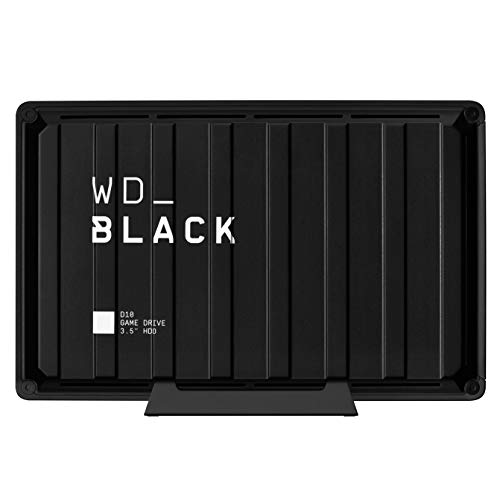
WD_BLACK 8TB D10 Game Drive — the home-base vault
The WD_BLACK 8TB D10 Game Drive is the P10’s stay-at-home counterpart: eight terabytes of external storage whose title names PlayStation, Xbox, PC, and Mac, model WDBA3P0080HBK-NESN. Where the P10 optimises for movement, the D10 optimises for accumulation. A fixed recording desk — console, capture PC, editing monitor, a shelf that never gets packed away — generates footage at a rate that makes five terabytes feel like a diary and eight feel like a filing cabinet. This is the drive for the creator who records everything, edits selectively, and deletes almost nothing until a project is truly finished.
Eight terabytes also changes the psychology of a session. With a vault of this size underneath the desk, the record button stops being a decision. Whole tournaments can be captured on speculation, practice sessions recorded for later review, and the interesting failure kept alongside the highlight. Creators develop by reviewing what they actually did, not what they remember doing, and capacious storage is what makes that review habit affordable. The D10’s cross-platform title means the vault can serve the console corner and the editing machine in the same setup without a diplomatic incident.
Strengths
- Eight terabytes ends session-by-session capacity anxiety at a fixed desk.
- Four platforms named in the title: PlayStation, Xbox, PC, and Mac.
- Home-base scale suits a combined role of capture target and footage library.
Trade-offs
- Its virtues are stationary; creators who record in several homes should look at the P10.
- A single vast drive concentrates risk, so finished projects still deserve a second copy.
- The listing title leaves speed-class particulars unstated; check Western Digital’s documentation for them.
Spec snapshot: Capacity 8TB · Stated platforms PlayStation, Xbox, PC, Mac · Model WDBA3P0080HBK-NESN · Line WD_BLACK Game Drive · Anything about power arrangement or rotational behaviour sits outside the listing title, so the manufacturer’s documentation should confirm the details your desk setup depends on.
Think about where a vault like this sits in a room’s ecology. It anchors the setup: consoles and capture gear come and go across hardware generations, while the footage library persists. A creator who has changed consoles twice and kept every season’s recordings in one addressable place owns something genuinely valuable — a searchable history of their own play. That continuity is the D10’s real product, and eight terabytes is simply the size at which continuity stops needing constant housekeeping to survive.
The vault habit does impose one duty: organisation. Eight terabytes of footage named by date alone becomes an archaeological dig within a year. Folder by game, then by session, and keep a small text index of the matches that matter. The drive provides the room; the creator provides the map, and future-you, hunting a specific clip at midnight, will be grateful for both.
Best for: a fixed recording desk seeking an 8TB cross-platform vault for capture and library in one.
Not suited for: a creator whose sessions happen in several locations and need the drive in a bag.
When the desk is permanent and the backlog is serious, look over the D10 Game Drive listing and give it a shelf of its own.
Budget the vault’s companions as part of the purchase, because a drive of this size rarely works alone for long. A second, smaller drive for session overflow, a tidy cable set that lives with the desk rather than migrating around the house, and eventually a backup arrangement for the finished projects all belong to the same ecosystem. None of that diminishes the D10; it simply recognises that eight terabytes of someone’s creative history deserves a small support staff, and that planning the staff at purchase time is cheaper than improvising it after the first scare.

LaCie Rugged USB-C — the travelling recorder
The LaCie Rugged USB-C states its character in the vocabulary of survival: a 5TB portable external hard drive, resistant to drops, shock, dust, and rain, for Mac and PC, model STFR5000800. Recording gameplay increasingly happens away from the home desk — at tournaments, in shared studios, at a collaborator’s house, in a hotel room the night before an event. Every one of those journeys is a small hazard course for storage, and this is the drive designed to walk it. The rugged brief is not decoration for creators who travel; it is the difference between footage that arrives home and a story about footage that did not.
USB-C connectivity suits the modern capture laptop, and the stated Mac and PC compatibility covers the two editing worlds without adaptation drama. Five terabytes holds a tournament weekend many times over, with room for the home library besides. What the title does not claim is console compatibility, and this guide will not claim it on the drive’s behalf: the Rugged’s stated home is the computer side of the recording chain, as the capture target or the shuttle between capture machine and editing machine. Within that role, few drives state a clearer case.
Strengths
- Drop, shock, dust, and rain resistance stated in the title — built for bags and venues.
- USB-C connection matches current capture and editing laptops.
- Five terabytes carries a full event weekend plus the working library.
Trade-offs
- Consoles are absent from its stated compatibility; its home is the computer side.
- Rugged design is a specialism you pay for; a drive that never travels wastes it.
- The title names no rotational figures; LaCie’s documentation carries the engineering detail.
Spec snapshot: Capacity 5TB · Interface USB-C · Stated platforms Mac and PC · Resistance per the title: drop, shock, dust, rain · Model STFR5000800 · The listing title does not extend its claims to consoles, so plan its role on the computer side of the setup and confirm specifics in LaCie’s documentation.
There is a professional habit this drive encourages: the shuttle discipline. Record to the Rugged at the venue, copy to the home vault the same night, and let the Rugged be wiped and ready for the next trip. Travel drives earn their keep as couriers, not as archives, and a rugged courier that survives the road is worth more than a fragile archive that fears it. Creators with a fixed desk can admire this drive and buy the D10; creators with a calendar of venues should do the opposite.
Weather deserves its own sentence, because rain resistance sounds like marketing until the first outdoor-adjacent event: a marquee tournament, a dash between buildings with the bag open, a spilled drink in a crowded media room. Storage that treats these as survivable events rather than obituaries changes how calmly a creator works in the field, and calm, during a final, is a competitive advantage all by itself.
Best for: a creator recording at venues and studios who needs 5TB that survives the journey.
Not suited for: a console-only setup seeking a drive the console itself will host.
If your recording calendar has postcodes in it, examine the LaCie Rugged listing and picture your own bag before ordering.
Creators who work with a producer or an editor will recognise another use for the shuttle pattern: the handover. Footage that leaves the venue on a drive built for the road, in a labelled case, with the session’s notes in a file beside the video, is footage a collaborator can start work on without a preliminary rescue operation. The Rugged’s resistance figures buy the hardware’s survival; the creator’s labelling buys the workflow’s. Together they are what “professional” actually means in a recording kit — not expensive, just considered.

Avolusion 1TB Portable for PS5 PS4 — the plug-in PlayStation drive
The Avolusion 1TB Portable for PS5 PS4 sells a single, valuable thing: the absence of a setup evening. Its title states a 1TB USB 3.0 portable external gaming hard drive in white, pre-formatted for PS5 and PS4, model family HD250U3-Z1-PRO-WH. Pre-formatted is the operative promise. A PlayStation household that records sessions on the console and keeps a working library of games and captures can plug this in and be finished, without a formatting detour or a compatibility investigation. The white finish matches the current console generation’s aesthetic, which matters more in a tidy entertainment unit than specification purists like to admit.
One terabyte defines its honest role: a working drive, not a vault. It holds the current rotation — the games in play, the recent sessions awaiting editing or deletion, the captures that matter from this month. Households that record casually, share the best clips, and let the rest go will find a terabyte ample. Creators building an archive should read this pick as the console-side partner to a larger home vault, or skip to the 8TB Avolusion below. Judged as a convenience purchase for a PlayStation desk, though, it is exactly shaped for its job.
Strengths
- Pre-formatted for PS5 and PS4 per the title — setup shrinks to plugging in.
- USB 3.0 connection and portable form suit a tidy console corner.
- White finish suits the current PlayStation generation’s look on the shelf.
Trade-offs
- One terabyte fills quickly under a serious recording habit.
- Its stated world is PlayStation; PC and Xbox households should look elsewhere here.
- The title offers little engineering detail beyond capacity, format, and connection.
Spec snapshot: Capacity 1TB · Interface USB 3.0 · Form portable · Colour white · Formatting per the title: pre-formatted for PS5 / PS4 · Model HD250U3-Z1-PRO-WH · For anything beyond those stated facts, Avolusion’s own documentation is the reference to consult.
The deeper appeal is for households where the console is shared. A family PlayStation accumulates everyone’s games and clips, and its internal storage fills with the particular speed of other people’s hobbies. An inexpensive, ready-formatted terabyte absorbs that pressure without a household summit about what to delete. It is the drive you buy on a Saturday morning and forget by Saturday afternoon, which is a perfectly honourable destiny for storage.
Keep the role discipline, though: because it arrives ready, it tempts its owner to treat it as permanent and infinite. It is neither. Set a monthly habit of moving treasured captures to a computer or a larger vault, and let this drive remain what it is — the console’s cheerful, capacious sidekick, always with room for tonight’s session because last month’s highlights already emigrated.
Best for: a PlayStation household seeking pre-formatted portable storage that works on arrival.
Not suited for: a cross-platform creator whose recording happens on PC and Xbox as well.
For the shortest path from box to recording, check the Avolusion 1TB listing and confirm the white unit is the one in your basket.
A word about households graduating from this drive: the terabyte that feels generous in month one becomes the constraint that teaches good habits by month six. Keep a simple rule visible — when the drive passes three-quarters full, something graduates to the computer or leaves. Creators who learn that rule on a small, inexpensive drive carry it profitably to every larger drive they ever own, while creators who start with a vault often learn it never, and meet their fullness crisis at eight terabytes instead, with proportionally more archaeology to excavate.

WD Easystore 5TB External Portable Hard Drive — the plain generalist
The WD Easystore 5TB External Portable Hard Drive is what happens when a mainstream storage line walks into a gaming guide without changing its clothes. The title is almost aggressively plain: Western Digital, Easystore, 5TB, external USB 3.0 portable hard drive, black. No gaming banner, no console names, no promises beyond capacity and connection. And yet it belongs here, because a great deal of gameplay recording happens through computers and capture software that ask only for honest USB storage — and because its five terabytes can hold a console library or a capture archive with equal indifference to the label on the footage.
The generalist bargain cuts both ways, and the review should say so. Nothing about the Easystore is tuned, styled, or pre-arranged for a gaming desk; setup on a console follows the console’s own formatting path, and its manners are those of a standard portable drive. In exchange, the drive is never stranded by its specialism. When the recording hobby changes shape — a new capture PC, a editing laptop, a household backup role — the Easystore simply changes jobs, the way a good plain tool does. Households that value that kind of future flexibility over gaming presentation will find this the most quietly sensible pick in the guide.
Strengths
- Five terabytes of standard USB 3.0 storage that any recording chain can use.
- No gaming specialism means an easy second career in backup or editing duty.
- Plain black portable form disappears into any desk setup.
Trade-offs
- No console compatibility is stated in the title; consoles will treat it as generic storage.
- Nothing is pre-formatted for a gaming purpose, so setup follows each host’s own path.
- Creators wanting gaming-line presentation should look at the WD_BLACK picks above.
Spec snapshot: Capacity 5TB · Interface USB 3.0 · Form portable external · Colour black · Brand line Easystore · The listing title keeps its claims to capacity and connection, so Western Digital’s documentation should settle any further figure your workflow depends on.
There is also a budgeting story here. Generalist drives are the ones households often already own, purchased for photographs or backups and currently half-empty in a drawer. Before buying anything in this guide, it is worth checking the drawer: a 5TB generalist with healthy free space can serve as a capture drive tonight, and the money saved can go toward the archive vault the footage will eventually need. Advice in a buying guide rarely includes “check the drawer first,” but recording storage is exactly the category where the drawer deserves the courtesy.
Used as the capture target, the Easystore asks for the same courtesies as every drive here: healthy free headroom, clean ejections, and a tidy folder habit. Meet those, and its plainness becomes invisible — which, for a working drive in the middle of a recording chain, is the highest available praise.
Best for: a PC-centred recording setup seeking 5TB of flexible USB 3.0 storage without gaming livery.
Not suited for: a PlayStation desk seeking a pre-formatted drive that arrives console-ready.
For the flexible route, review the Easystore 5TB listing and match it against the drawer before deciding.
The Easystore also plays well in a two-drive household strategy that this guide quietly recommends everywhere: a working drive and a keeping drive. Record to the generalist, where speed of setup and flexibility matter, then graduate finished projects to the vault — a D10 at the desk or a NAS in the cupboard — where permanence matters. Two modest drives with distinct jobs outperform one heroic drive asked to be both sprinter and museum, and the Easystore’s plainness makes it the natural sprinter in that pairing.
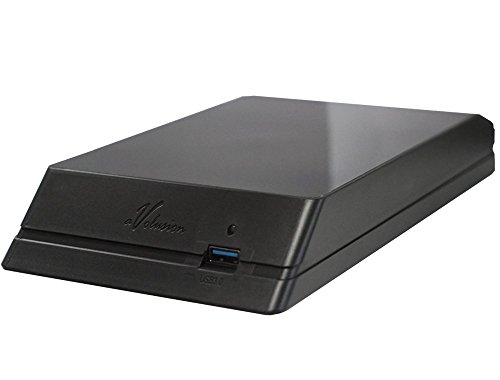
Avolusion HDDGear 8TB External Gaming Hard Drive (PS4) — the big pre-formatted vault
The Avolusion HDDGear 8TB External Gaming Hard Drive (PS4) pairs the convenience of the small Avolusion with the scale of the D10: eight terabytes, USB 3.0, pre-formatted for PS4 Pro and Slim per its title, and a two-year warranty stated outright. For a PlayStation household with a deep library and a recording habit to match, that combination is potent. The drive arrives speaking the console’s language, offers vault-sized room for games and captured sessions together, and carries a warranty line that its smaller sibling’s title does not state.
Read the compatibility line with care, because it is this pick’s defining boundary: the title names PS4 Pro and Slim. Households on those consoles get the full pre-formatted convenience at full scale. Households on other hardware should treat this as a PlayStation-4-generation purchase and choose accordingly from the rest of the guide. Within its stated world, though, the HDDGear answers the heaviest PlayStation recording life in this list — the player who records every session, keeps the library installed, and regards deleting a game as a small bereavement.
Strengths
- Eight terabytes pre-formatted for PS4 Pro and Slim — scale without setup.
- A two-year warranty is stated in the title, unusual clarity for its class.
- USB 3.0 external form keeps installation to a cable and a decision about shelf space.
Trade-offs
- Its stated compatibility centres on PS4 Pro and Slim, not the wider console world.
- Eight terabytes in one unit concentrates the library; backups of treasures remain wise.
- The title leaves internal engineering particulars unstated, as its class tends to.
Spec snapshot: Capacity 8TB · Interface USB 3.0 · Formatting per the title: pre-formatted for PS4 Pro and Slim · Warranty per the title: 2 years · Line HDDGear · Beyond those stated facts, Avolusion’s documentation is the authority for the details of a given unit.
The recording angle at this scale is abundance as a workflow. A PS4 creator with eight terabytes can record entire seasons of a single game — every ranked climb, every tournament run — and review them the way athletes review film. Patterns emerge across fifty matches that no single replay reveals. That analytical depth is a genuine competitive tool, and it only becomes practical when storage stops rationing curiosity. This drive’s proposition, stated plainly, is unrationed curiosity for one console generation.
Set it up like the vault it is: a permanent shelf position, a cable routed away from feet and chair wheels, and a household understanding that the big drive is not borrowed for other duties. Vaults fail socially before they fail mechanically, usually by being unplugged for a favour. Grant it diplomatic immunity and it will hold a PlayStation era entire.
Best for: a PS4 Pro or Slim household seeking 8TB of pre-formatted room for games and recorded sessions.
Not suited for: a household whose consoles sit outside the PS4 generation this drive is formatted for.
PlayStation loyalists with vault ambitions should read the HDDGear 8TB listing closely, warranty line included, before it ships.
One organisational gift an eight-terabyte pre-formatted drive offers is the end of the installed-or-not debate. With room for the library and the recordings together, the household stops uninstalling games to make space for the weekend’s sessions, and the console returns to being a place where everything owned is simply present. That presence changes play habits for the better: older titles get revisited, recorded retrospectively, and appreciated with the perspective that only distance gives. Storage abundance, used this way, is a back-catalogue revival programme disguised as a hardware purchase.
Side-by-Side Comparison
| Drive | Capacity | Stated platforms | Defining trait | Natural home |
|---|---|---|---|---|
| WD_BLACK P10 Game Drive | 5TB | PlayStation, Xbox, PC | Cross-platform portable | A desk that changes rooms |
| WD_BLACK D10 Game Drive | 8TB | PlayStation, Xbox, PC, Mac | Vault-scale capacity | A permanent recording desk |
| LaCie Rugged USB-C | 5TB | Mac, PC | Drop, shock, dust, rain resistance | A bag between venues |
| Avolusion Portable | 1TB | PS5, PS4 (pre-formatted) | Arrives console-ready | A tidy PlayStation corner |
| WD Easystore | 5TB | Generic USB 3.0 storage | Ungaming flexibility | A PC capture chain |
| Avolusion HDDGear | 8TB | PS4 Pro, Slim (pre-formatted) | Vault scale, two-year warranty | A PlayStation vault shelf |
How Much Capacity Does a Recording Habit Actually Need?
Estimate from the session outward. Record one typical session at your usual quality, note the footage size, and multiply by how many sessions you keep before archiving or deleting. Most creators are surprised in one direction or the other: the disciplined editor who keeps only highlights discovers a terabyte is a palace, while the analyst who keeps every match discovers that a season eats terabytes the way a tournament eats weekends. Your own arithmetic, from one real session, beats every general chart — including the rough tiers in this guide — because recording quality settings vary so widely between setups.
Then match the arithmetic to a living arrangement. Creators who also keep footage libraries beside the television will recognise the capacity discipline from Best Hard Drives for External Enclosures thinking — bare drives and cases are how archives grow once a single external drive stops being the whole plan. Those building a desk where the recording PC and the storage live together should weigh Best Hard Drives for a Desktop PC as the internal counterpart to this guide’s externals. And creators whose recordings feed an editing workflow will eventually meet the questions in Best Hard Drives for Editing 4K, where the footage’s second life begins.
There is a middle path worth naming for households between the tiers: record to the drive you have, archive to a schedule, and let the archive’s growth — measured over a real season — choose the next drive’s size for you. Data about your own habits is the one specification no listing can provide, and a single season of honest numbers will pick a better vault than any amount of forum opinion. The tiers in this guide are spaced so that the step up, when the numbers demand it, is a purchase rather than a migration project.
The last variable is temperament. Some creators record everything and think later; some record deliberately and delete ruthlessly. Neither is wrong, but they need different drives, and buying the other temperament’s drive produces either constant fullness or constant waste. Be honest about which creator you are at midnight after a long session, not which one you are in the shop.
Sustained Writes: What Recording Actually Asks of a Drive
A capture stream is a river, not a series of buckets. From the moment a session starts until it ends, data arrives continuously and must be laid down in order, without the drive pausing to tidy, hesitate, or negotiate with a nearly full volume. Mechanical hard drives are historically good at exactly this: sequential writing is their home terrain. The enemies of the river are interruptions — a cable nudged loose, a laptop sleeping mid-session, a drive so full that every new file becomes a search for scattered room. Most “drive too slow for recording” stories are, on inspection, one of those three interruptions wearing a disguise.
Cable quality joins the list of unglamorous decisive factors. The lead that ships with a drive is the lead its maker tested; substituting a longer, thinner, or visibly tired cable introduces a variable into a chain that has enough variables already. Route the original cable, give it a gentle path without sharp bends or chair-wheel crossings, and treat any intermittent disconnection as a cable investigation before it becomes a drive accusation.
Heat is the quiet fourth enemy. Hours of continuous writing in a closed desk cabinet warm a drive steadily, and a drive that would shrug off a twenty-minute file transfer may grow unhappy in hour three of a tournament. Leave air around the recording drive, keep it off the top of a hot console, and let a long session be a reason to open the cabinet door rather than admire it. The drives in this guide are built for gaming duty and long sessions; giving them air is how the owner holds up the other end of that design bargain.
File systems and session length interact in a way worth one paragraph. Very long recordings produce very large single files, and every part of the chain — the console or capture software, the drive’s formatting, the editing machine that will receive the footage — must be comfortable with files of that size. Creators planning marathon sessions should test a full-length recording at home rather than discovering a chain’s limit during the marathon itself. Splitting a long session into chapters at natural breaks is the low-tech insurance: smaller files, easier edits, and a failure that costs a chapter instead of a day.
Finally, verify your chain before it matters. Record a practice session at full quality, watch it back entire, and check the footage for the stutters and gaps that reveal a weak link while the stakes are a practice match. Every creator in this guide’s audience has a session coming that cannot be replayed; the rehearsal is how you make sure the drive’s first real test is not also its first test of any kind.
From Capture to Edit: Giving Footage a Second Life
Recording is only the first half of a creator’s workflow, and the drive choices in this guide echo into the second half every time footage moves. A session captured to a portable drive arrives at the editing machine as a physical handover — plug in, copy, verify — and that ritual, done properly, is a feature rather than a chore: the copy is checked, the project folder is created with a sensible name, and the capture drive returns to its post empty and ready. Creators who skip the ritual and edit directly from the capture drive discover the flaw the first time the drive is needed at a console while a half-finished edit still lives on it.
Folder discipline pays compound interest here. One folder per project, named with the date and the game, containing the raw session, the project file, and the exported result, means that a drive of any size in this guide remains navigable years later. The vault-scale picks reward this discipline most, because eight terabytes of well-named projects is a library, while eight terabytes of default-named captures is a landfill with a search box. The hardware provides the room; only the habit provides the retrieval.
Finally, think about the audience’s copy. The exported highlight, the uploaded VOD, the clip sent to a friend — those are the versions the world sees, and they deserve a place in the archive beside the raw footage, because platforms change, accounts lapse, and the raw session of a famous match is a heavy thing to re-edit at short notice. A recording drive ecosystem that keeps raw and finished together, backed up once, is a creator’s memory in trustworthy form.
Common Mistakes When Recording to External Drives
Recording onto a nearly full drive is the classic self-inflicted wound. As free space shrinks, the drive works harder to place each new file, sessions grow fragile, and the failure chooses the final of the tournament with unerring comic timing. Keep a fifth of the drive free as a matter of religion. The second mistake is treating the capture drive as the archive: months of irreplaceable sessions living on one portable that travels in a bag. Capture drives work; archive drives keep. Footage graduates from one to the other, or it eventually graduates to nowhere.
Two more mistakes belong to the social side of a shared setup. The first is the helpful household member who tidies the desk mid-season and reconnects the recording drive to a different machine, a different port, or a drawer. The second is the borrowed drive that returns with a friend’s library mingled into your session folders, doubling the archaeology at exactly the moment a deadline arrives. A labelled drive with a stated home is the entire defence against both, and it costs one piece of tape. Recording setups fail through people far more often than through platters, and the fixes are correspondingly human: label, agree, and leave the working drive working.
Third is the impatient unplug — the cable pulled while the console is still writing its index of the session just ended. Eject properly, every time, and teach everyone who shares the setup the same four-second courtesy. Fourth is the mystery format: a drive borrowed for a friend’s differently-formatted machine and returned silently changed, discovered at the next session’s first minute. Label the drive with its job and its home platform; labels are cheaper than lost footage. Fifth is recording at a quality the workflow cannot support — footage so heavy that editing becomes a punishment and the archive grows faster than any vault in this guide. Choose the quality your future self will actually use.
Frequently Asked Questions
Can one drive record gameplay from both a console and a PC?
The cross-platform picks here — the WD_BLACK pair — state PlayStation, Xbox, and PC compatibility in their titles, and the LaCie and Easystore serve the computer side. The practical caveat is formatting: each host may want the drive arranged its own way, so many creators keep one drive per host rather than asking one drive to hold two loyalties. Decide the arrangement before the season starts, not mid-tournament.
How is recording storage different from game library storage?
A library drive mostly reads: it loads games. A recording drive mostly writes, continuously, for hours. That difference shifts the buying criteria toward capacity headroom, thermal calm, and steadiness rather than loading speed. Several drives here serve both roles well, but when the two roles compete for one drive’s space, the recording role should win the planning argument, because a library can be re-downloaded and a session cannot be re-played.
Is a pre-formatted PlayStation drive worth choosing over a general one?
If your recording life is entirely PlayStation, yes: the Avolusion picks remove setup from the purchase and arrive ready for their stated consoles. The cost is flexibility — their titles promise a PlayStation world, not a cross-platform one. Households recording on several platforms should take the WD_BLACK route instead and accept a few minutes of setup as the price of freedom.
What should happen to footage after a session ends?
Review it, name it, and graduate the keepers. A simple ritual — copy the session to the editing machine or vault, confirm the copy plays, then clear the capture drive’s working space — keeps the recording drive fast, empty, and ready. Footage that skips the ritual accumulates into the archaeological layer every creator eventually has to excavate at the worst possible time.
Does a rugged drive actually matter for recording?
Only if the drive travels — and if it travels, it matters enormously. Drops in transit, dust in venues, a rainstorm between buildings: the LaCie’s title states resistance to all of them. A desk-bound creator gains nothing from the specialism and should spend on capacity instead. Match the armour to the journey, honestly assessed.
Should the recording drive also hold the game library?
It can, and on the larger picks it sensibly does — the D10 and the HDDGear are sized for library and capture together. The caution is accounting: a library grows by purchases and a capture archive grows by sessions, and the two growth curves together can ambush a drive that looked spacious in January. If one drive carries both, glance at the free space monthly and let the trend, not a failed recording, announce when the next tier of storage is due.
Why does this guide keep insisting on free headroom?
Because nearly every recording failure that blames the drive is, underneath, a fullness failure: fragmented free space, no room for the session’s index, a volume at the edge during the longest match of the year. Headroom is not wasted capacity. It is the margin that lets a drive do its steadiest work on the night you can least afford anything less.
Final Recommendation
Most creators should start with the WD_BLACK P10 5TB: its stated fluency across PlayStation, Xbox, and PC matches the way recording habits actually wander, and five terabytes is a season’s worth of sessions in a bag-friendly form. Fixed desks with serious archives should step up to the D10’s eight terabytes and build the vault habit around it. Travelling recorders belong with the LaCie Rugged, PlayStation households seeking zero setup belong with the Avolusion pair at their scale, and PC-centred creators will find the Easystore’s plain flexibility hard to outgrow. Whichever you choose, keep its headroom healthy and its footage graduating to safety, and the drive will do the only thing you truly ask of it: be boring, completely and reliably, while the match of your life happens in front of it.
A last thought on timing: buy the recording drive before the big event on your calendar, not during it. A drive installed a month early gets its rehearsals, its folder structure, and its first archived projects out of the way in peacetime, so that when the tournament, the launch week, or the charity marathon arrives, storage is the one part of the setup nobody is thinking about. That invisibility is the true product every pick in this guide is selling, at six different sizes and temperaments.
Related Guides
- Best Hard Drives for External Enclosures
- Best Hard Drives for a Desktop PC
- Best Hard Drives for Editing 4K


