What's inside
- Key Takeaways
- Quick Picks
- How We Chose These Picks
- Side by Side: Where Does Each Budget Bag Spend Its Money?
- How Do You Match a Budget Bag to a Student, a Commuter, and a New Graduate?
- What Should You Check in the First Week Before the Returns Window Closes?
- Which Corners Can a Cheap Backpack Cut, and Which Ones Must It Never Cut?
- How Long Should an Affordable Laptop Backpack Realistically Last?
- What Size and Fit Checks Matter Before You Order?
- When Should You Skip the Budget Tier Entirely?
- How Do You Keep a Budget Bag Clean, Dry, and Presentable?
- What About Buying for a Child or Teenager?
- Common Mistakes That Turn a Bargain Bag into a Bad One
- Final Recommendation
- Frequently Asked Questions
- Related Guides
As an Amazon Associate I earn from qualifying purchases. This post may contain affiliate links at no extra cost to you.
widgetverdict.com is reader-supported. When you buy through links on our site, we may earn an affiliate commission.
Where to buy: the two linked picks below lead to their Amazon listings, where you can check price on Amazon today; the remaining four are named in prose so you can search them by name at whichever retailer you prefer and compare them on equal terms.
Every semester, thousands of shoppers type some version of “best afforable laptop backpacks” into a search box — spelling wobble and all — and get buried under lists that treat cheap as a personality. It is not. A budget backpack is a set of compromises, and the only useful question is which compromises a given bag has chosen. Some inexpensive bags protect the laptop beautifully and organise nothing. Others offer pockets for everything and padding for nothing. A few, the ones worth your money, spend their limited budget on the unglamorous essentials: a padded compartment that actually wraps the machine, zippers that glide instead of grating, and straps anchored well enough to survive a year of being hauled off a bus seat by one handle.
This guide ranks six affordable laptop backpacks by that standard. Affordable here is a design philosophy rather than a number: these are bags from the value end of each maker’s range, the models students, new graduates, and careful commuters actually buy. Two picks carry links because their listings were verified. Four are covered in prose — they are widely sold, easy to find by name, and worth your consideration, but no verified listing is attached to them here.
A word about expectations before the ranking. No bag at this level offers the decade-long durability of a premium commuter pack, and pretending otherwise would be a disservice. What the best affordable designs do offer is two to four honest years of daily service, sensible protection, and comfort that does not punish a twenty-minute walk. Buy with that horizon in mind and the value end of the market stops being a gamble and becomes what it should be: the smart default for most people.
Key Takeaways
- The Lenovo B210 is the value benchmark in this group: featherweight, sensibly padded, and organised for a laptop, a charger, and not much else.
- The MATEIN Travel Backpack packs a surprising amount of structure — a separate laptop compartment and a luggage strap — into a budget frame.
- At this level, zipper quality and strap stitching predict lifespan far better than fabric thickness or pocket count.
- Prose picks like the JanSport Big Student trade laptop-specific design for sheer book-swallowing volume.
- Plan on a two-to-four-year service life from an affordable backpack used daily, and treat anything beyond that as a genuine bonus earned by good habits.
Quick Picks
| Pick | Badge | Why it is here |
|---|---|---|
| Lenovo Casual Backpack B210 | Top Choice | A featherweight everyday bag whose padded 15.6 inch compartment does the essentials properly. |
| MATEIN Travel Laptop Backpack | Best Organised | A separate rear laptop bay, anti-theft touches, and a luggage strap at a value-tier position. |
| JanSport Big Student | Prose Pick | Enormous book volume and a lifetime-warranty heritage behind a simple two-pocket design. |
| Amazon Basics Laptop Backpack | Prose Pick | The house-brand baseline: plain, padded, and sold in sizes up to 17 inches. |
| KROSER Laptop Backpack 15.6 | Prose Pick | A dressier budget option with a USB pass-through port and a structured silhouette. |
| Mancro Laptop Backpack | Prose Pick | A slim commuter shape with a lockable laptop compartment aimed at train-and-office days. |
How We Chose These Picks
Judging budget bags requires ignoring most of what their listings shout about. Pocket counts, USB ports, and “anti-theft” labels cost pennies to add and photograph beautifully; padding density, zipper gauge, and anchor stitching cost real money and photograph terribly. So the evaluation weighted the invisible things. Each candidate’s laptop compartment was judged on whether the padding wraps the base as well as the back — machines die from set-down impacts far more often than from blows to the lid — and on whether the compartment is suspended or sewn to the bag’s floor.
Comfort came next, tested by the standard load of this class: a 15.6 inch laptop, its charger, a water bottle, a paperback or two, and the small clutter of a working day. Straps that cut at that weight were marked down harder than straps that merely looked thin, because budget foam varies enormously. Organisation was scored last and lightest: at this level a single well-placed front pocket beats five badly placed ones, and several famous budget bags organise poorly while protecting well, which is the correct order of priorities.
Owner longevity reports were weighed as evidence, with a sceptic’s discount. Budget listings attract both suspicious praise and pile-on complaints, so the signal we trusted was pattern rather than volume: the same zipper praised across years of reports, the same anchor criticised across different sellers. Bags whose reputations rested on a single season’s reviews were treated as unproven however glossy their photography, and that caution is why some heavily marketed names you may expect are absent from this ranking.
Finally, each maker’s support story entered the ledger. A budget bag from a brand with a real warranty process and a returns channel is a different purchase from an identical bag sold by a name that exists only on a listing. The two linked picks lead the ranking partly because buying them is a transaction with a company that will still be there next semester.
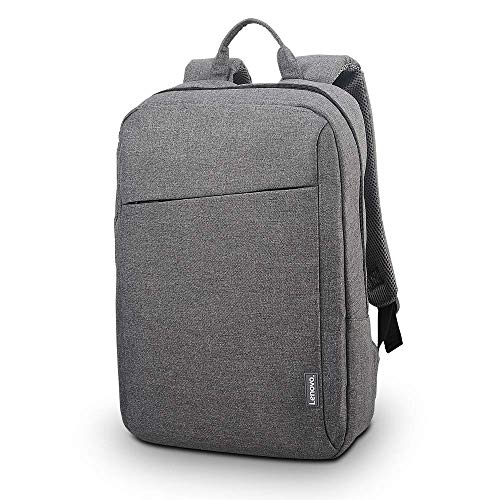
Lenovo Casual Backpack B210 — Top Choice
The B210 succeeds by refusing to be interesting. Lenovo designed it as the bag a laptop company gives its own machines to travel in, and the priorities show: a padded compartment sized honestly for 15.6 inch laptops, a main bay that takes the charger and a change of clothes or a couple of textbooks, and a front pocket for the phone-and-keys layer of your life. Nothing is overbuilt, nothing is missing that a normal day requires, and the whole thing weighs so little that the laptop itself becomes nearly the entire load.
The fabric deserves specific praise at this tier. It is a durable, water-repellent polyester that shrugs off platform scuffs and light rain with more composure than the shiny, thin shells common among no-name rivals. Seams are clean, the zippers run true without the gritty catch that predicts early failure, and the padded back panel keeps the laptop’s corners from announcing themselves against your spine on a crowded train. The straps are modestly padded — adequate for commutes, honest about their limits on long walks.
Organisation is deliberately thin. There is no tablet sleeve worth the name, no headphone hanger, no hidden pocket for a passport. Buyers who carry a laptop, a charger, a bottle, and a book will never notice the absences; buyers who carry a small office will feel them within a week. That clarity is the B210’s real virtue. It is a bag that knows its job description, and in the affordable class that self-knowledge is rarer than padding.
Durability expectations should be set by its weight class. The B210 is a light bag, and light bags ask to be treated like it: lift it by both straps rather than swinging it by one, and the anchors will serve for years. Treated that way, owner reports consistently describe a bag that outlasts the laptop it was bought for, which is the finest compliment this category can earn.
Colour choice is a small strategic decision with this model. The grey of the verified listing hides platform dust and office scuffs gracefully, and it pairs with the bag’s role as a quiet professional accessory. Lenovo also sells brighter tones in some markets; they age less discreetly but delight owners who are tired of black luggage. Either way, the B210’s plain face is a security feature in disguise — nothing about it advertises the value of what is inside, which is exactly how a laptop bag should behave in a crowded carriage.
- Laptop fit: padded compartment for machines up to 15.6 inches
- Fabric: water-repellent polyester with a matte, office-friendly finish
- Layout: main bay plus a single quick-access front pocket
- Weight character: among the lightest full-size options in this guide
- Colours: muted tones including the grey of the verified listing
Strengths
- Genuinely light, so the laptop dominates the load rather than the bag
- Padding and zipper quality a step above the no-name crowd
- Understated styling that suits classrooms and offices equally
Trade-offs
- Minimal organisation for multi-device carriers
- Strap padding is commute-grade, not hiking-grade
- No luggage strap for rolling-suitcase travel
Best for: students and commuters whose daily kit is a laptop, a charger, and the basics.
Not suited for: travellers who need a trolley strap and a pocket for every accessory they own.

MATEIN Travel Laptop Backpack — Best Organised
MATEIN built its reputation by studying what buyers admired in bags costing far more and rebuilding those ideas at a value position, and this grey travel model is the clearest example. The headline feature is a genuinely separate laptop compartment at the rear, opening wide for easy loading and keeping the machine against your back where it rides best. In front of it sits a main bay with real depth, and in front of that an organiser panel with slots for pens, cards, and cables — a three-layer arrangement that budget bags usually promise and rarely deliver.
Two travel touches lift it further. A strap across the back panel slides over a rolling suitcase handle, turning airport transits into a one-handed affair, and a pocket hidden against your back keeps a passport or wallet out of a pickpocket’s reach. The external USB pass-through port is the feature listings shout about; treat it as a minor convenience for a power bank you supply yourself, not a reason to buy, and the bag still justifies its place comfortably.
Comfort is a step beyond the B210’s: the straps carry more foam, the back panel is padded in sections that breathe a little, and the overall structure holds its shape when half empty, which makes it look tidier in an office corner. The cost of that structure is a touch more weight and bulk — noticeable on a small frame, irrelevant on most. The water-resistant fabric handles commutes in bad weather with the same caveat as every bag here: resistant is not sealed, and a drowned laptop is nobody’s definition of a bargain.
Where the MATEIN earns its ranking is the total absence of a fatal flaw. Each element — compartment, zippers, straps, organisation, travel features — rates a solid mark rather than a spectacular one, and in the affordable class the bag with no weak point beats the bag with one brilliant feature and three quiet failures.
One more scenario flatters this bag: the one-bag weekend. With the laptop left at home, the rear compartment swallows a tablet or a document wallet, the main bay takes two days of clothes rolled tight, and the organiser keeps chargers and toiletries from staging a coup. Few budget commuter bags moonlight as weekend luggage without looking overstuffed; the MATEIN’s structure lets it pass. That versatility is worth remembering if your luggage shelf has room for exactly one bag.
- Laptop bay: separate rear compartment for 15.6 inch machines
- Travel kit: luggage strap and a hidden back-panel pocket
- Organisation: three-layer layout with a proper organiser panel
- Convenience: external USB pass-through for your own power bank
- Profile: slim, structured silhouette in grey
Strengths
- Separate laptop compartment normally found in pricier designs
- Luggage strap makes it the natural flyer’s choice in this group
- Balanced in every category with no glaring weakness
Trade-offs
- Slightly bulkier than the featherweight B210
- USB port is a pass-through only; the battery is yours to supply
- Structured shape swallows bulky items less willingly
Best for: commuters who fly occasionally and want one bag for the office and the airport alike.
Not suited for: minimalists who count every ounce and carry almost nothing beyond the laptop.
JanSport Big Student — Prose Pick
The Big Student is not really a laptop backpack, and its presence here is a deliberate argument: for many students, the best affordable laptop bag is a superb ordinary backpack with a laptop sleeve added by its owner. What JanSport sells is volume — a very large main compartment and a second big pocket, built in the brand’s famously plain style, in colours and prints numbering in the dozens. Textbooks, gym clothes, a lunch bag, and a hooded sweatshirt disappear into it in a way no slim commuter bag can imitate.
The laptop rides in the main compartment, ideally inside a padded sleeve you add yourself, because JanSport’s own padding at the back is more about comfort than armour. Judged as a system — Big Student plus a decent sleeve — the protection is entirely adequate for campus life, and the total remains firmly in affordable territory. The brand’s warranty heritage is the other half of the argument: JanSport has repaired student backpacks for generations, and a bag that can be repaired outlives three bags that cannot.
The compromises are real. There is no luggage strap, no separate laptop access, no organiser worth the name beyond a front utility pocket, and the silhouette reads “school” in any colour. Adults buying for an office should look at the other five names here. Students buying for a quad should understand that this design has carried more laptops to more lectures than every other pick combined, and it earned that record on capacity and toughness rather than features. We list it without a link because JanSport’s colour and print variants make any single listing a poor representative; search the model name and choose your pattern.
There is a social dimension to this bag that spec sheets miss: it is the one backpack a student can buy in September and still be carrying, unembarrassed, at graduation. The design has barely changed across decades, so it never dates, and the enormous colour range means a replacement or a second bag for a sibling never has to match the first. In a category where most products are redesigned yearly to chase trends, that continuity is a kind of quality all by itself.
- Capacity: among the largest main compartments in this guide
- Laptop carry: main compartment, best paired with your own sleeve
- Design: two big pockets plus a front utility pocket
- Heritage: decades of campus service and a repair-friendly warranty
- Choice: an unusually wide range of colours and prints
Strengths
- Swallows books, clothes, and lunch that defeat commuter bags
- Simple construction with very little to break
- Warranty and repair culture extend its working life
Trade-offs
- Laptop protection depends on a sleeve you buy separately
- No travel features and no separate laptop access
- Schoolyard styling will not pass in a formal office
Best for: students whose load is measured in textbooks first and electronics second.
Not suited for: office workers who need their carry to look like it belongs in a meeting.
Amazon Basics Laptop Backpack — Prose Pick
Every category needs a baseline, and in affordable laptop bags the baseline wears Amazon’s own label. The Basics backpack is the reference point against which fancier budget bags must justify themselves: a padded laptop compartment in sizes that reach up to 17 inches, a main bay, a front organiser with the expected slots, and side pockets for a bottle. It is the bag a thousand offices have bought in bulk for new starters, and its ordinariness is precisely its qualification.
Build quality sits exactly where the positioning suggests — serviceable, unremarkable, and honest. The fabric is a sturdy synthetic, the padding is adequate rather than generous, and the zippers do their job without inspiring poetry or complaints. What elevates the Basics above anonymous rivals is the transaction around it: Amazon’s returns machinery and the sheer volume of owner feedback make it the lowest-risk purchase in this guide, a bag you can evaluate at home with your real load and send back without a quarrel if the fit disappoints.
Choose it when the requirement is simply “a laptop bag, soon, without drama” — for a temporary role, a backup bag for the car, or a teenager whose relationship with possessions is still evolving. Choose against it when you know you will carry the bag daily for years; the picks ranked above it spend their budgets on the straps and zippers that decide year three. As a prose pick it carries no link here; it is trivially findable by name, and the size choice — match it to your laptop’s diagonal, then check the compartment dimensions — matters more than the colour.
One underappreciated virtue: because the Basics design is so widely owned, its real-world sizing behaviour is thoroughly documented in owner feedback. If your laptop is an unusual shape — a thick gaming model, a workstation with a rear battery — a few minutes reading reports from owners of the same machine will tell you more than any dimension chart. Few budget products offer that depth of field data, and for odd-sized laptops it can settle the purchase more reliably than a tape measure.
- Sizes: versions for laptops up to 17 inches
- Layout: padded compartment, main bay, organiser, bottle pockets
- Build: serviceable synthetic shell and standard hardware
- Buying experience: backed by Amazon’s returns process
- Role: the category’s reference baseline
Strengths
- Available in a 17 inch size most budget rivals skip
- Lowest-friction purchase and return in this guide
- Perfectly adequate at every task a laptop bag performs
Trade-offs
- Padding and straps are adequate, never generous
- Anonymous styling with no distinguishing features
- Heavy daily use will find its limits sooner than the leaders here
Best for: bulk office purchases, backup bags, and anyone who values an easy return over a distinctive design.
Not suited for: daily carriers planning on a single bag for many years.
KROSER Laptop Backpack 15.6 — Prose Pick
KROSER aims at the buyer who finds most budget bags too casual for the office, and its 15.6 inch backpack is the dressiest design in this group: a structured, upright silhouette in fabrics with a woven, almost textile character, finished with metal hardware that looks a class above plastic. For interns, junior staff, and students heading to interviews, that presentation is not vanity — it is the difference between a bag that disappears into a professional room and one that announces itself.
The laptop compartment is padded and rearward, the main bay takes documents and a charger neatly, and a USB pass-through port mirrors the MATEIN’s convenience for a power bank of your own. Organisation leans toward flat things — files, a notebook, a tablet — rather than bulky cargo, and the bag’s structure resists overstuffing by design. Carry it like a professional accessory and it rewards you; treat it like a gym bag and it will object.
Comfort is respectable for commute distances, with padded straps and a back panel that keeps the bag’s flat profile against you. Longevity reports are mixed in the way of fashion-leaning budget bags: the structure holds, while cosmetic wear on corners and handles arrives earlier than on the Lenovo or JanSport. Buy it for how it presents, maintain it a little more carefully than the others, and it serves its purpose well. It appears here without a link because KROSER sells several near-identical variants under similar names; search carefully and confirm the 15.6 inch compartment version before ordering.
Pairing advice, offered seriously: this is the bag in the group that rewards a matching habit — a slim laptop sleeve inside it for the days the machine travels to a café without the full bag, and a small pouch for the charger so the main bay stays document-flat. Owners who treat it as part of a small system rather than a single container report the highest satisfaction, because the design’s structure is an asset only when the load respects it.
- Presentation: structured, office-appropriate silhouette
- Compartment: padded rear section for 15.6 inch laptops
- Hardware: metal fittings and a USB pass-through port
- Load character: documents and flat tech rather than bulky cargo
- Care note: corners benefit from gentler treatment than rivals here
Strengths
- Looks professional enough for interviews and client sites
- Structured body keeps documents crisp and flat
- Padded protection is fully adequate for office commutes
Trade-offs
- Cosmetic wear arrives earlier than on plainer rivals
- Resists bulky loads by design
- Variant naming makes ordering the right version fiddly
Best for: early-career professionals whose bag must pass in a formal room.
Not suited for: students stuffing gym kit and textbooks into one compartment.
Mancro Laptop Backpack — Prose Pick
Mancro’s slim backpack targets a specific commuter: the train-and-desk worker whose laptop is the cargo and everything else is negotiable. The design is narrow and upright, the laptop compartment sits at the back with a lockable zipper arrangement on some versions — bring your own small lock — and the interior is organised for a machine, its charger, a tablet, and documents. It slips between train seats and under desks with an ease the bigger bags here cannot match.
The security framing deserves a calm reading. A lockable zipper discourages the opportunist in a café; it does not make the bag a safe, and the fabric remains fabric. What Mancro genuinely offers is tidiness and discretion: a bag that looks like it contains paperwork, rides close to the body in crowds, and keeps its contents in assigned places. The USB pass-through appears here too, as it does across this class, and earns the same shrug — convenient with your own power bank, irrelevant without one.
Capacity is the hard limit. A change of clothes overwhelms it, textbooks bend its slim profile into complaint, and the straps are tuned for station-to-office distances rather than cross-campus hikes. Within its brief, though, it is a coherent little design, and commuters whose days match that brief tend to reorder the same bag when the first one finally tires. No link is attached in this guide; Mancro’s range includes several similar silhouettes, so verify the lockable-compartment 15.6 inch version by name and description when you shop.
The Mancro also suits a growing pattern of work: hot-desking. When your desk changes daily and your belongings live on your back between home and whichever workstation is free, a slim bag with assigned places for everything becomes a portable office rather than a container. The lockable compartment earns a second mention in that context — a bag left beside a borrowed desk in a shared space benefits from even a modest deterrent while you fetch coffee.
- Profile: slim, upright commuter silhouette
- Security touch: lockable zipper pulls on the laptop compartment
- Interior: sized for laptop, charger, tablet, and documents
- Convenience: USB pass-through for a user-supplied power bank
- Limits: minimal capacity for clothing or bulky extras
Strengths
- Discreet, close-riding shape for crowded transit
- Lockable compartment deters casual opportunists
- Tidy internal organisation for a paper-and-laptop day
Trade-offs
- Capacity ceiling arrives quickly with bulky items
- Security features deter hands, not determined thieves
- Straps are tuned for short commutes only
Best for: rail commuters carrying a laptop and documents through crowded stations.
Not suited for: anyone whose bag doubles as luggage or a gym holdall.
Side by Side: Where Does Each Budget Bag Spend Its Money?
| Backpack | Money spent on | Money saved on | Laptop access | Best day for it |
|---|---|---|---|---|
| Lenovo B210 | Padding, fabric, light weight | Organisation, extras | Main compartment sleeve | Everyday class or office commute |
| MATEIN Travel | Structure, separate bay, travel kit | Nothing glaring | Dedicated rear compartment | Office days with flights mixed in |
| JanSport Big Student | Volume, warranty heritage | Laptop-specific design | Main bay, add your own sleeve | Heavy textbook days |
| Amazon Basics | Size range, easy returns | Refinement everywhere | Padded compartment | Needed-it-yesterday purchases |
| KROSER 15.6 | Presentation, hardware finish | Cargo capacity | Padded rear section | Interviews and client visits |
| Mancro Slim | Discretion, lockable compartment | Capacity, strap padding | Rear lockable compartment | Crowded-train commutes |
The “money spent on” column is the honest summary of this entire category. A budget bag is a fixed sum of engineering, and every maker allocates it differently: Lenovo buys lightness and fabric, JanSport buys cubic inches, KROSER buys appearances. None of these allocations is wrong — they are answers to different questions. Your job as a buyer is simply to notice which question matches your own week.
How Do You Match a Budget Bag to a Student, a Commuter, and a New Graduate?
The student’s load is spiky: light on lecture days, brutal on library days, and always one rainstorm away from disaster. Volume and toughness outrank polish, which is why the JanSport pattern — huge main bay, sleeve added, warranty behind it — has survived decades of freshers. A student should also value a bag that tolerates being used as a pillow, a footrest, and occasionally a seat; budget bags with rigid structure resent all three, while simple soft designs absorb the abuse and ask for more.
The commuter’s load is metronomic: the same laptop, charger, bottle, and book, twice a day, in crowds. For that rhythm, strap comfort and a close-riding profile beat raw volume, and quick access to a travel card pocket saves a daily fumble at the barrier. The B210 and the Mancro serve this life from opposite directions — one by lightness, one by slimness — and either will feel like an upgrade to anyone currently using the free conference tote that most commuters secretly rely on.
The new graduate’s problem is presentation on a budget, which is a real constraint rather than vanity: a bag walks into the interview before its owner says a word. Structure, muted colours, and hardware that does not look like it came free with a games console matter here, and that is the KROSER’s entire brief. The graduate should also think a year ahead — the first job’s laptop is often a 14 inch machine issued by an employer, so a bag bought with a little size grace keeps its job when the hardware changes.
What Should You Check in the First Week Before the Returns Window Closes?
Day one: load the bag with your heaviest realistic kit and close every zipper. Any zipper that needs two hands or a held breath is a defect at this price, not a personality trait, and it will not improve. Day two: wear it for your actual commute, not a stroll around the kitchen, and pay attention to where the straps land after twenty minutes — pressure that starts as a note becomes pain by Friday. Day three: set it down hard, the way you will a thousand times, and listen for the laptop’s corner meeting the floor through the padding; a bag that fails this test in your hallway will fail it on concrete.
Later in the week, test the small betrayals. Fill a bottle and ride a bumpy route to see whether the side pocket keeps it. Rain-test nothing deliberately — life will handle that — but check that the zippers’ fabric flaps actually cover the teeth, since that overlap is the whole of a budget bag’s weather defence. Finally, photograph the strap anchors and base corners as a baseline. If wear races ahead of that baseline within the first months, you have evidence for a warranty conversation while the bag is still young enough for the maker to care.
Which Corners Can a Cheap Backpack Cut, and Which Ones Must It Never Cut?
Safe cuts first. A budget bag may skip the trolley strap, the hidden pockets, the premium lining, the metal hardware, and the elaborate organiser without endangering anything you own. It may use a single fabric throughout, offer two colours instead of twelve, and arrive in a plain poly bag instead of a presentation box. These economies are the entire reason the affordable class exists, and a buyer who demands their absence at this level is shopping in the wrong aisle.
The forbidden cuts are fewer and absolute. The laptop compartment’s padding must wrap the machine’s base, because set-down impacts are the leading cause of cracked corners in student and commuter bags. The main zipper must be a recognised gauge that runs smoothly when the bag is new, since a zipper that grates on day one is announcing its retirement date. Strap anchors must be bar-tacked or boxed with dense stitching. And the back panel must place something — foam, mesh, structure — between your spine and the laptop’s hard corners. A bag that fails any of these four tests is not affordable; it is merely cheap, and the difference will be invoiced later by a repair shop.
Between the two lists sits fabric. Listings love denier numbers, yet in this class the weave and coating matter more than the headline figure: the B210’s water-repellent finish will serve a commuter better than a nominally thicker shell with no coating at all. Judge fabric by hand and by owner reports, not by the biggest number on the page.
How Long Should an Affordable Laptop Backpack Realistically Last?
Two to four years of daily carrying is the honest expectation, and the variance inside that range is mostly about load and handling rather than luck. A bag carrying a light laptop and a paperback across a gentle commute can sail past year four; the same bag hauling a gaming laptop, three textbooks, and a gym kit through a winter of being swung by one strap may surrender its anchor stitching in year two. Weight is the tax everything pays, and budget bags pay it at a higher rate.
You can move your own bag toward the top of the range with habits that cost nothing. Lift by both straps or the top handle, never by a single strap. Open zippers with the pull rather than tearing the sides apart. Keep the load honest — the day the bag will not close without sitting on it is the day its seams begin their countdown. Empty it monthly and shake out the grit that accumulates in the corners, because grit inside a laptop compartment is sandpaper with a long-term plan. Finally, store it unloaded; foam that rests uncompressed keeps its protective loft for the days it is needed.
Repair deserves a sentence before wear arrives. A local tailor or shoe-repair shop can restitch a strap anchor or replace a zipper pull for less than a replacement bag, and budget bags with simple construction — the JanSport pattern above all — accept such repairs gracefully. Glued, moulded, fashion-structured designs resist the needle and retire instead. If you are the sort of owner who repairs things, weight simple construction higher in your choice; it is a durability feature disguised as plainness.
When wear does arrive, it announces itself in a fixed order: zipper pulls loosen, strap foam thins, the base corners scuff through their coating, and only then do seams begin to open. The first three are cosmetic or repairable. An opening seam at a strap anchor is the true retirement signal — retire the bag that week, because anchors fail completely and suddenly, usually over a hard floor.
What Size and Fit Checks Matter Before You Order?
Start with the laptop’s real dimensions, not its marketing class. A “15.6 inch” gaming laptop with thick bezels and a rear cooling shelf can be larger in every direction than a slim 15.6 inch ultrabook, and budget compartments are cut closer to the ultrabook pattern. Measure width and depth, compare them with the compartment dimensions on the listing, and leave a finger’s width of grace. If the listing publishes no compartment dimensions at all, that silence is itself information — prefer a rival that does.
Do not overlook the charger’s brick when you rehearse the fit. Budget compartments assume the slim adapters of ultrabooks; a chunky gaming adapter or an older workstation brick can claim the space you had mentally assigned to books, and its cable end is exactly the hard object you least want pressed against a screen through a thin divider. Pack the brick where you will actually carry it during the trial, not where the listing’s photograph puts it.
Then check the bag against your body. Torso length decides whether a bag’s straps land comfortably or saw at your neck, and slim designs like the Mancro suit smaller frames while the JanSport’s volume hangs better on larger ones. If you are between sizes or buying for a growing teenager, choose the bag whose straps adjust widest. Finally, rehearse the load: pack everything you carry on your heaviest day, close every zip without force, and wear the bag around the house for ten minutes. Shoulders deliver their verdict quickly and honestly at this weight class.
When Should You Skip the Budget Tier Entirely?
Sometimes the honest advice is to spend more, and an affordable-bag guide earns its credibility by naming those moments. If your laptop is a heavy gaming machine or a mobile workstation, its weight will defeat budget straps and anchors on a schedule measured in months — buy the stronger bag once. If you cycle or walk miles daily in real weather, sealed seams and serious back systems live a tier up. If the bag will carry camera bodies, medical equipment, or anything whose loss dwarfs the bag’s price, protection stops being a place to economise.
There is also the arithmetic of repetition. A professional who replaces a budget bag every two years for a decade has spent premium money in instalments while enjoying budget comfort throughout. The affordable tier shines for students, for the first years of a career, for second bags and backup bags, and for anyone whose load is light and whose route is gentle. Outside those conditions, the tier above is not indulgence; it is the cheaper decade. Knowing which side of that line you stand on is worth more than any single pick in this guide.
Conversely, do not let anyone shame you out of the budget tier when your life fits it. A light laptop, a short commute, and a bag chosen with the care this guide describes is a completely respectable system — the B210 on a student’s back has carried more honest work than many premium bags in many executive closets. Price is a fact about a bag; fitness for your week is the verdict.
How Do You Keep a Budget Bag Clean, Dry, and Presentable?
Care is where budget bags repay attention most visibly, because their coatings and foams have less margin to begin with. Shake the bag out weekly — crumbs, grit, and a surprising archaeology of ticket stubs collect in the laptop compartment, and grit is the enemy of both lining and laptop feet. Spot-clean scuffs with a damp cloth and mild soap rather than machine washing, which budget foams and glued structures tolerate poorly; if a full wash is unavoidable, use cold water, a gentle cycle inside a pillowcase, and air-dry away from radiators that warp foam.
For rain, prevention beats treatment. A packable rain cover costs very little, weighs almost nothing, and converts a water-resistant bag into a genuinely weatherproof system for the twenty minutes that matter. Owners in wet climates should also rotate where the bag rests at home — a bag stored damp against a wall will mildew its back panel foam, and mildew in foam is forever. A dry hook by the door is the cheapest accessory in this entire guide and the one most likely to double a bag’s presentable life.
Presentability has its own small rituals. A lint roller restores a dark bag in seconds. Loose threads should be snipped, never pulled, since budget stitching chains can run. Zipper pulls that begin to rattle can be quieted with a wrap of tape while you decide whether the bag is entering its final season. None of this is fussiness; it is the maintenance schedule of an object you rely on daily, priced in minutes rather than money.
What About Buying for a Child or Teenager?
Young carriers change the equation in two ways: they grow, and they are gloriously careless. Adjustable straps with real range matter more than any feature, because a bag bought in September should still fit the taller person who returns after the summer. Durability priorities shift too — drag resistance at the base and corners outranks padding density, since a school bag’s natural habitat includes floors, fields, and the underside of bus seats. The JanSport and the Amazon Basics, in that order, are the natural candidates, and both tolerate the repair-and-repatch culture of school life.
Size discipline deserves emphasis. Adults routinely buy teenagers bags far larger than the load, and an oversized bag invites oversized packing until a young spine is hauling a small library daily. Match the bag to the actual timetable — the heaviest day, not the imagined one — and prefer the design that closes comfortably over that load. A budget bag sized honestly is also cheap enough to replace when growth or taste outruns it, which is the final, practical argument for this tier in family life: it forgives change.
Common Mistakes That Turn a Bargain Bag into a Bad One
The classic error is buying by pocket count. Pockets are nearly free to add, so listings compete on them while quietly thinning the padding that actually protects your machine. A related error is trusting the phrase “waterproof” on a budget listing; the bags here are water-resistant, which means light rain on a short walk, not a soaked platform wait — a laptop that must survive real weather deserves a rain cover or a bag from a higher class.
Sixth, buyers treat the laptop compartment as general storage on laptop-free days, stuffing it with chargers, tools, and gym shoes whose hard edges chew the lining and compress the foam into uselessness. The compartment’s padding is a dedicated asset; spending it on cargo means it will not be there for the machine. Use the main bay for everything else, even on days when the laptop stays home, and the protection you paid for remains intact for the days it travels.
Overloading is the third mistake, and it is a habit rather than a purchase: the affordable bag asked to carry a holiday’s worth of cargo will fail at its anchors and be remembered as junk, when the true failure was the assignment. Fourth, buyers ignore the returns window and discover the strap geometry hates their shoulders in week three, when the lesson has become expensive. And fifth, people buy the exact size of their current laptop with zero grace, then replace the laptop with a slightly larger model and find the bag has retired early through no fault of its own.
Final Recommendation
For most people reading a guide like this one, the Lenovo B210 is the answer: light, protective, presentable, and built by a company that answers for it. Step up to the MATEIN Travel if your weeks mix office days with airport runs, because its separate compartment and luggage strap solve travel problems the B210 politely ignores. Students with textbook-heavy loads should pair the JanSport Big Student with a good sleeve and enjoy the volume, while early-career professionals who need the room to take them seriously should look at the KROSER.
A closing note on timing: this tier discounts aggressively around the back-to-school season and the major sale events, and the bags themselves change little between model years. A patient buyer who has settled on a model can simply wait for its season. The reverse also holds — when your current bag’s strap anchor starts to open, do not wait for a sale. A failing bag is a laptop accident with a countdown attached, and no discount is large enough to cover a screen.
The deeper recommendation is to buy the compromise you actually want. Every bag in this guide is good at something specific and ordinary at the rest, and the shoppers who end up happy at this end of the market are the ones who named their priority — lightness, volume, polish, discretion — before they named their bag. Do that, respect the four forbidden cuts, and an affordable backpack stops being a compromise you apologise for and becomes simply the right tool bought at the right level — the quiet outcome every shopper in this category was actually hoping for when they first typed the search.
Frequently Asked Questions
Is a budget backpack really safe for an expensive laptop?
Yes, provided the compartment padding wraps the base and back and you handle the bag sensibly. Think of protection as a partnership: the foam handles the physics of knocks and set-downs, while your habits handle the scenarios no foam can fix — the bag dropped from a luggage rack, the machine left loose in a car boot, the strap swung one-handed a thousand times until its anchor gives up. Most laptop damage in daily life comes from set-down impacts and corner knocks, which honest foam absorbs well at any price. What budget bags cannot promise is a decade of that protection, so inspect the padding yearly and retire the bag when the foam feels thin.
What does “affordable” mean in this guide if no prices are listed?
It describes the value tier of each maker’s range — the models built to a strict budget with sensible economies — rather than a fixed figure. Prices drift with seasons and sales, so check price on Amazon for the linked picks and compare the prose picks by name; the ranking here judges design and durability, which do not drift.
Should I choose the B210 or the MATEIN Travel?
Choose the B210 for lightness and simplicity on daily commutes, and the MATEIN when you fly with a rolling suitcase or want a separate laptop compartment with an organiser panel. Both protect a 15.6 inch machine properly; the difference is travel structure versus featherweight minimalism.
Do affordable backpacks work for cycling commutes?
Short, gentle cycling commutes, yes — with the straps snugged so the load rides high and still. Nothing in this tier offers a hip belt or a stabilising chest strap as standard, so longer or faster rides will set the bag swinging, and a swinging bag on a bicycle is a safety issue rather than a comfort footnote. Regular cyclists should add a chest strap accessory or step up to a cycling-oriented design.
Can these bags handle a 17 inch laptop?
Only the Amazon Basics line in this group is sold in a 17 inch version, and even then you should verify the compartment dimensions against your machine. The other five are cut for 15.6 inch laptops; forcing a larger machine into them strains zippers and voids the point of the padding.
Is a USB charging port worth paying for?
It is a pass-through hole with a cable inside, not a charger — the power bank is yours to supply and carry. As a free inclusion it is mildly handy on trains; as a headline feature justifying a weaker bag, it is a distraction. Judge the compartment, zippers, and straps first.
Are budget backpacks a false economy for daily commuters?
Not when the commute is short and the load is light — those are the conditions this tier was designed for, and a well-chosen budget bag handles them for years. The false economy appears when a heavy laptop and a long walking route meet a light bag: replacements then arrive often enough that a stronger bag would have cost less across the same years. Match the bag to the load honestly and the arithmetic takes care of itself.
What is the first thing to check when a budget bag arrives?
The laptop compartment’s base padding, with your hand, before anything else. Press where the machine’s corners will rest; if you can feel the bag’s floor clearly through the foam, the protection is decorative and the bag should go back. Then run every zipper end to end under a light load, and tug each strap anchor firmly. Five minutes of this on day one prevents the classic month-three disappointment.
How do I make a cheap backpack last longer?
Lift it by both straps, keep loads within what the zips close over comfortably, empty the grit from its corners monthly, and store it unloaded so the foam recovers. Those four habits, none of which cost anything, are worth roughly an extra year of service from any bag in this guide.
Related Guides
When you are ready to look beyond the everyday carry questions, these guides continue the thread: best 1TB laptops for machines with serious storage built in, best 10-11 inch laptops for the smallest laptops worth carrying, and best 10 laptops for a wider shortlist of current models across sizes.



[…] written from daily use, best 18-inch laptop backpacks for the largest gaming machines of all, and best afforable laptop backpacks when the budget, rather than the tape measure, is the binding constraint. Whatever the size, the […]