Our Top Picks



What's inside
- How public printing differs from ordinary office printing
- Monochrome laser printers for patron self-service areas
- Multifunction devices for staff workrooms and desks
- Duty cycle, recommended volume, and honest workload maths
- Toner yield, cartridge strategy, and supply cupboards
- Automatic duplex printing and paper handling
- Secure printing, PIN release, and the public queue
- Connectivity, mobile printing, and network management
- Colour printing: where it belongs in a library fleet
- Noise, heat, and placement in quiet spaces
- Maintenance that non-specialist staff can actually manage
- Enterprise monochrome workhorses and fleet standardisation
- Receipt printers, card printers, and the circulation desk
- Accessibility, language, and patron support at the printer
- Sizing a fleet for small, medium, and large branches
- Energy use, paper policy, and environmental responsibility
- Common purchasing mistakes and how to avoid them
- Questions to ask suppliers before signing
- Frequently asked questions
- Rolling out new machines without disrupting service
- Check prices on Amazon
- Pulling the decision together
As an Amazon Associate I earn from qualifying purchases. This post may contain affiliate links at no extra cost to you.
A public library printer lives a double life. In the morning it may produce a single page for a patron printing a bus pass, by mid-afternoon it faces a queue of students releasing coursework, job applications, tax forms, and boarding documents, and in the evening a staff member may rely on a different machine in the workroom to copy a programme schedule or scan an interlibrary loan request. Choosing well means matching each device to the corner of the building where it will work, rather than searching for one model that does everything adequately and nothing particularly well.
When this guide earns a commission through a qualifying purchase made after following a retail link, that income helps sustain independent editorial coverage of office technology for civic institutions. Prices and availability change without notice, so readers should confirm current details at checkout, and no payment from any manufacturer influenced which categories, criteria, or cautions appear in the sections that follow.
This article separates the fleet into its natural parts. Patron-facing monochrome lasers carry the heaviest and most unpredictable load. Staff multifunction devices handle copying, scanning, and administrative paperwork behind the desk. Small thermal and card units support circulation transactions. Each group rewards different specifications, and confusing their roles leads to familiar failures: a quiet but slow machine overwhelmed on the public floor, or a powerful workgroup printer wasted on occasional receipts.
How public printing differs from ordinary office printing
Office users usually print documents they created, on devices they understand, during predictable hours. Library patrons arrive with files on phones, email attachments, web pages that reformat badly, and USB drives containing forms designed for another paper size. Jobs arrive in bursts tied to school dismissal, benefits deadlines, exam seasons, and local events. A machine that performs comfortably under steady departmental use can struggle when thirty short jobs land within one hour, each requiring authentication, release, and sometimes staff help.
Privacy expectations also set libraries apart. A released page might contain medical correspondence, legal paperwork, immigration documents, or a résumé with contact details. Leaving such pages in an open output tray, visible to the next person in line, is unacceptable in a setting built on confidential access to information. Hold queues, PIN release, and proximity card options therefore belong near the top of any specification sheet, not as optional extras considered after purchase.
Another distinction involves who maintains the equipment. Many branches have no technician on site. The person clearing a jam may be a librarian between storytime sessions, a page shelving returns, or a volunteer at the information desk. Controls must be legible, access panels must open without tools, and routine supply changes must be possible without memorising a sequence learned months earlier. Published librarian reports consistently highlight this human factor, because a technically capable printer that intimidates staff will sit idle while people queue at another device.
Finally, libraries answer to public budgets and public scrutiny. Running costs must be defensible across years, not merely attractive on the day of purchase. Toner yield, energy consumption during long idle periods, paper waste from abandoned jobs, and service contract terms all shape the true expense. A thoughtful procurement weighs those recurring figures against the purchase figure, and favours models whose consumables remain widely stocked by multiple sellers.
Monochrome laser printers for patron self-service areas
Black-and-white laser technology dominates the public floor for sound reasons. Most patron jobs are text: application forms, articles, tickets, study notes, legal documents, and shipping labels. Toner produces crisp letterforms that remain legible after copying, pages come out dry and ready to collate, and the powder inside a cartridge does not clog during a quiet holiday week the way liquid ink systems can suffer. Manufacturer specifications for workgroup monochrome lasers routinely emphasise speed, first-page output time, and monthly volume ratings suited to shared environments.
Speed matters, but interpret it carefully. Pages-per-minute figures describe continuous output after the engine reaches full pace. Patron work consists of short jobs, so the interval between pressing release and receiving page one often shapes perceived performance more than headline velocity. A device that wakes quickly from sleep, processes a PDF without long pauses, and delivers an initial sheet promptly will feel responsive even if its sustained rate sits below a larger workroom model.
Memory and processor capacity influence that responsiveness. Complex PDFs, scanned images saved as print files, and web pages rendered as graphics can stall an underpowered controller, blocking the queue behind one difficult file. Libraries benefit from generous built-in memory and, where offered, the ability to add storage for job retention. Held jobs must remain available while a patron walks from a computer terminal to the printer, enters a code, and waits for companions ahead in line.
Output quality settings deserve attention during configuration rather than selection. Draft modes save toner on internal drafts but frustrate patrons printing forms that must scan cleanly at government offices. A sensible default balances density, legibility, and cartridge life, while staff retain access to higher quality for signage masters or board documents. Automatic duplex, discussed later, should be enabled by default for multi-page patron jobs, with a simple override for forms requiring single-sided presentation.
Readers comparing broad categories may find it useful to study best aio laser printers alongside dedicated single-function models, because the right answer depends on whether the public area also needs copying. Some branches place a copier function where patrons can duplicate identification or pages from reference books; others restrict copying to staff mediation. That policy choice, made before shopping, narrows the field more effectively than any specification comparison.
Multifunction devices for staff workrooms and desks
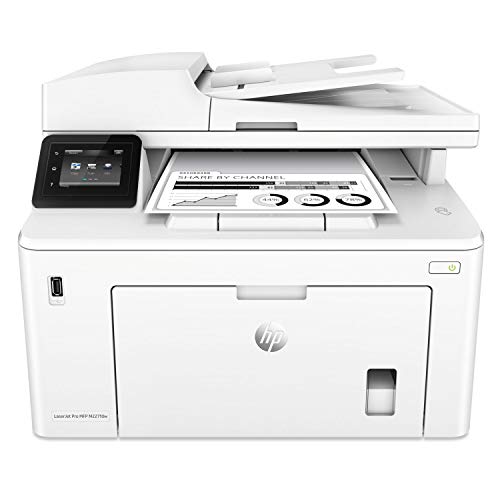
Behind the scenes, library work is document heavy in quieter ways. Staff print hold slips, transit labels for items moving between branches, programme flyers, meeting agendas, volunteer rotas, and incident forms. They scan invoices, signed agreements, local history material, and interlibrary loan chapters within copyright limits. They copy identification for new accounts and duplicate archival photographs for displays. A multifunction printer combining print, scan, copy, and sometimes fax consolidates these tasks into one footprint.
Scanning quality separates adequate staff devices from genuinely useful ones. Look for an automatic document feeder that handles mixed paper weights without skewing, supports two-sided originals in a single pass where possible, and offers optical resolution sufficient for archival capture at moderate settings. Scan-to-email, scan-to-folder, and scan-to-USB destinations cover the routes staff actually use. Optical character recognition software, bundled or integrated, turns scanned minutes and policies into searchable text, saving hours of retyping.
The circulation desk presents a hybrid case. Devices there serve staff exclusively but operate in public view, handling account paperwork, fine and fee records where applicable, hold notifications, and registration forms. Compact multifunction models suit these counters, provided their paper paths tolerate labels and heavier stock for card carriers or temporary passes. Noise and heat output matter at a desk where conversations with patrons continue all day.
Fax capability, though fading elsewhere, persists in some library systems because local agencies, healthcare offices, and legal aid organisations still request it. If your branches transmit forms to such partners, retain fax on at least the central staff device rather than scattering the function across every machine. Consolidation simplifies line rental, address book maintenance, and compliance with whatever retention rules your municipality applies.
Finishing options rarely justify their cost on the public floor but can earn their place centrally. A sorter or stapling finisher at a main library helps assemble board packets, annual reports, and training manuals. Smaller branches can send such work to the central site rather than maintaining complex attachments locally. This hub approach mirrors how many systems already handle binding, lamination, and large-format display printing.
Duty cycle, recommended volume, and honest workload maths
Few specifications are quoted more often, or misunderstood more thoroughly, than duty cycle. Manufacturers publish a maximum monthly figure representing what the engine can survive in an exceptional month, not what it should carry routinely. A separate recommended monthly volume, usually far lower, describes the range within which wear, noise, and operating costs remain reasonable. Procuring against the maximum figure is like buying a car based on its top speed for a daily commute.
Begin instead with counted reality. Most public print management systems log jobs, pages, and abandoned releases. Pull a full year of those logs if available, because September enrolment surges and April tax deadlines distort single-month samples. Divide total pages by device, note the busiest month rather than the average, and add headroom for growth in mobile printing, which continues to expand as patrons shift from library computers to personal devices.
Where logs do not exist, estimate conservatively. Count public terminals, observe queue lengths during peak afternoons, ask staff how often trays empty, and review toner purchase history, since cartridge consumption reveals volume indirectly. A branch replacing high-yield cartridges every few weeks is printing far more than a branch where a cartridge lasts a season, whatever impressions casual observation suggests.
Match the recommended range so your busiest month sits comfortably inside it, not at its ceiling. Running persistently near the top accelerates roller wear, increases jam frequency, and shortens the interval between service visits. Oversizing carries penalties too: larger engines cost more, consume more standby energy, and may cycle toner less efficiently at very low volumes. The goal is a fit with margin, in the way a well-chosen reading room seats the Saturday crowd without echoing emptily on Tuesday mornings.
Fleet planners should also consider failure tolerance. If a branch owns a single public printer running near its recommended limit, any breakdown halts the service entirely. Two mid-range devices sharing the load provide redundancy, shorter queues, and the option to direct long jobs to one machine while quick single pages use the other. Published duty-cycle figures help compare candidates, but resilience comes from deployment design as much as engine ratings.
Toner yield, cartridge strategy, and supply cupboards
Toner represents the largest recurring expense in most library print fleets, so cartridge yield deserves the same scrutiny as engine specifications. Yields are measured under international standards using standardised test pages, which means real-world coverage on dense forms, shaded government documents, and flyers with heavy graphics will return fewer pages. Treat published yield as a comparison tool between cartridges, not a promise of pages in your building.
High-yield and extra-high-yield cartridges usually lower cost per page and reduce intervention frequency. Fewer cartridge changes mean fewer interruptions during busy periods, less packaging waste, and smaller risks of a patron-facing machine sitting empty because the spare shelf was bare. For branches with limited storage, however, the largest cartridges tie up budget in inventory and can outlast the model itself if a replacement cycle arrives unexpectedly. Balance yield against realistic consumption within a year.
Standardising models across branches simplifies everything about supplies. One or two cartridge types can be stocked centrally, moved between sites when a delivery slips, and ordered in quantity. Staff transferring between branches already know the replacement routine. Waste toner containers, drum units, and maintenance kits follow the same logic. A fleet of six different models, each bought opportunistically at a discount, often repays its savings in confusion, expired stock, and emergency purchases at retail counters.
Separate drum and toner designs offer an economic nuance. Where the imaging drum outlasts several toner cartridges, replacing only the toner reduces waste and expense. Integrated cartridges, containing a fresh drum each time, cost more per cycle but simplify maintenance and resolve some quality problems automatically with every change. Either architecture can serve libraries well; the deciding factors are published yields, local pricing from multiple sellers, and how confidently non-specialist staff can perform the swap.
Guard the supply chain as carefully as the budget. Counterfeit and low-grade compatible cartridges circulate widely, and their failure modes — leaking toner, poor fusing, damaged drums — create cleaning and repair work that erases apparent savings. Many systems choose original manufacturer cartridges for patron devices under service agreements, while reserving vetted alternatives for internal drafts. Whatever policy you adopt, write it down, label shelves clearly, and keep one sealed spare for every public machine as a non-negotiable minimum.
Automatic duplex printing and paper handling
Two-sided printing by default transforms paper consumption in a building where students print lengthy readings and patrons produce multi-page forms. Automatic duplex hardware flips each sheet internally, sparing users the confusion of manual reinsertion, which in a public setting generates misprints, wasted paper, and queues at the desk for help. Specify true automatic duplexing on every patron and staff device, then set it as the driver default while preserving an obvious single-sided option for official forms.
Not every duplex engine performs equally. Some models slow dramatically when printing on both sides because they pause between passes; others maintain close to their single-sided pace. Manufacturer specifications sometimes list duplex speed separately, and that figure matters in libraries where the majority of jobs will use the feature. A machine that patrons perceive as sluggish in duplex mode invites them to override the default, quietly defeating the policy.
Those weighing speed against paper savings can compare dedicated categories such as best duplex laser printers to see how manufacturers balance throughput, tray design, and two-sided performance across workgroup models. Use such comparisons to form questions for suppliers rather than to crown a universal winner, because branch size and queue design reshape the answer.
Tray capacity determines how often staff interrupt other work to refill paper. A public printer with a small standard tray may need attention several times during an after-school surge, and an empty tray mid-queue produces a cascade of held jobs, confused patrons, and release codes timing out. Look for generous standard capacity plus optional add-on trays that lift total input toward a full ream or beyond for busy sites. Separate multipurpose trays handle envelopes, labels, and heavier stock without emptying the main supply.
Paper size support should reflect local reality. Letter and legal sizes cover most North American patron work, while A4 dominates elsewhere; some branches also print tabloid or A3 posters for programme promotion on staff devices. Check the maximum weight each tray accepts, because flyer stock and card for tent signs exceed plain copier paper. Clear markings inside trays, adjustable guides that lock firmly, and sensors that detect size automatically all reduce the misfeeds that follow hurried refills.
Output capacity matters less visibly until it fails. A small output bin overflows during a long job, pages spill or mix between patrons, and privacy suffers. Raised or offset output designs that keep completed jobs contained, combined with hold release so pages print only when the owner stands present, largely solve the problem. For staff devices producing board packets, an output tray that supports the full document without curling pages onto the floor is a modest but real requirement.
Secure printing, PIN release, and the public queue
Secure print release is the defining feature of responsible library printing. In a hold queue model, a job sent from a public terminal or personal phone waits on a server or within the device, invisible and unprinted, until its owner authenticates at the printer. Authentication may involve a PIN chosen when submitting, a library card number, a barcode scan, or a proximity badge for staff machines. Only then do pages emerge, directly into the hands of the person who requested them.
This arrangement solves several problems simultaneously. Confidential documents never sit exposed. Abandoned jobs — a surprisingly large share of public printing, as patrons change their minds or run out of time — expire automatically after a set interval instead of consuming paper and toner. Payment, where a library charges for printing beyond a free allowance, can be tied to actual release rather than submission, so nobody pays for pages they never collected.
Evaluate the release experience from a patron’s perspective. Screens should present large, legible prompts in the languages your community uses. Entering a code should require few steps, because every additional screen multiplies confusion and desk questions. A release station shared between two printers can streamline a busy area, letting patrons choose whichever device is free, while a small branch may prefer release directly at the machine’s own panel to reduce hardware.
Staff printing raises parallel concerns with different credentials. Payroll forms, disciplinary records, and patron account correspondence must not mingle with general workroom output. Staff devices should support individual PINs or badge release tied to user accounts, with audit logs where policy requires them. Department codes can also allocate costs between programmes, children’s services, and administration for internal accounting.
Consider accessibility throughout the queue design. Release panels mounted at wheelchair-accessible height, high-contrast displays, and alternatives for patrons unable to memorise numeric codes — such as card-based release — keep the service genuinely public. Privacy and accessibility reinforce each other here: both insist that the system adapt to the person, rather than demanding the person adapt to the system.
Connectivity, mobile printing, and network management
Fixed public stations usually connect by wired Ethernet, and for good reason. A cabled connection avoids wireless congestion, simplifies print server management, and keeps the device address stable for drivers and queues. Place network drops during any refurbishment with printers in mind, because retrofitting cable runs through historic library buildings can cost more than the hardware it serves. For staff areas with shifting furniture, wireless models add flexibility, provided signal strength is verified at the exact shelf or desk position.
Mobile printing has moved from novelty to expectation. Patrons arrive with documents on phones and tablets, often without library computer accounts, and ask to print an email attachment or a file from cloud storage. Solutions range from a dedicated email address per printer, where attachments sent to the address enter the hold queue, to web upload portals and standards-based protocols that let personal devices discover the printer on the local network. Each route needs the same PIN release and payment logic as terminal printing, or it becomes a privacy loophole.
Driver management consumes invisible staff time across a system. Models supporting universal drivers and standard print languages simplify deployment across mixed computer fleets and survive operating system upgrades more gracefully. Centralised administration tools let information technology staff push settings — duplex defaults, monochrome enforcement on public devices, tray selections — to every branch at once, instead of configuring machines one panel at a time during site visits.
Security on the network deserves explicit attention. Printers store job data, address books, and sometimes credentials for scan destinations, making them legitimate targets in any institutional threat model. Choose devices receiving regular firmware updates, disable unused protocols, change default administrator passwords during installation, and place public printers on a network segment separated from staff systems where architecture permits. These steps, documented in many manufacturer security guides, protect patron data as surely as PIN release protects paper output.
Remote monitoring completes the picture. Management software that reports toner levels, page counts, error states, and offline devices across all branches lets a small support team refill, dispatch help, or reorder supplies before a patron encounters an empty machine. Alerts for repeated jams at one location can reveal a developing hardware fault or a paper storage problem, such as damp stock in a basement room, that no single incident report would expose.
Colour printing: where it belongs in a library fleet
Patron demand for colour is real but narrower than it first appears. Photographs for school projects, charts in assignments, presentation slides, and craft patterns benefit from colour, while the bulk of forms and text gain nothing. Colour toner multiplies supply costs and maintenance variables, so most systems concentrate colour capability in one supervised device per branch, or at a central location, rather than distributing it across every public station.
A staff colour multifunction device often serves double duty: programme flyers, shelf signage, exhibition labels, and social media print proofs all need credible colour, and staff mediation naturally limits waste. Configure such machines with individual defaults so colour is selected deliberately per job, not inherited accidentally from the previous user. Where a branch offers public colour, hold release and per-page accounting become even more important, because a single mistaken full-colour print run of a long document can consume a startling share of a cartridge.
Branches exploring this middle ground can review best color laser printers with duplex to understand how colour workgroup models combine two-sided output with larger trays and network management. The category illustrates the trade-off clearly: colour engines carry more consumables — typically four cartridges plus transfer components — so maintenance simplicity scores should be weighted accordingly.
Ink-based colour devices occasionally appear in libraries for photo printing at events or in makerspaces. Those are specialist tools supervised by programme staff, not substitutes for the laser fleet handling daily patron volume. Keeping their budgets and expectations separate prevents disappointment when a photo-oriented machine proves slow and expensive under form-printing workloads it was never designed to carry.
Noise, heat, and placement in quiet spaces
Libraries promise relative quiet, and a printer’s acoustic footprint can undermine that promise more than its size suggests. Manufacturers rate sound output in decibels for both operating and standby states, measured under standard conditions. Compare those published figures when shortlisting devices for reading rooms, study areas, and children’s sections, where a sudden mechanical burst during a quiet morning can startle toddlers and disturb concentrated readers alike.
Placement mitigates much of the problem before procurement begins. A printer alcove near the entrance, a position beside the photocopying area patrons already associate with activity, or a small enclosed print room at larger branches all separate noise from silent study zones. Acoustic panels, carpet, and even a well-fitted enclosure designed with ventilation in mind can soften the impact of an existing machine. Never enclose a laser device in an unventilated cabinet, though, because heat build-up shortens component life and creates its own risks.
Standby behaviour matters during the long stretches between jobs. Devices that drop into genuinely quiet sleep, with fans stopping rather than idling, preserve the atmosphere of a reading room. Wake time then becomes the compromise: a machine that sleeps deeply but takes half a minute to stir will frustrate the first patron of each quiet period. Adjustable sleep timers let each branch tune that balance to its own rhythm, deeper at night, lighter during Saturday peaks.
Heat and air quality enter the discussion in small, enclosed spaces. Laser printers warm their fuser rollers and can emit a faint odour during heavy runs, noticeable in a cramped staff office. Adequate room ventilation, sensible duty matching so small rooms do not host oversized engines, and locating the busiest patron device in a larger shared area all keep conditions comfortable. Facilities staff should be part of placement decisions, alongside librarians who understand traffic patterns.
Maintenance that non-specialist staff can actually manage
Every library printer eventually jams, runs out of toner mid-job, or displays an error code nobody recognises. The question is whether the person standing in front of it — likely a librarian, not an engineer — can restore service in minutes. Front-facing access to the entire paper path, illustrated instructions on the inside of panels, and toner cartridges that slide in with an unambiguous click all distinguish designs that respect their real-world operators.
Before committing to a model, study its manual’s routine care chapter. Count the steps for clearing a jam in each zone, changing the drum, and replacing the waste toner container. Look for tasks requiring tools, gloves, or reaching deep into a warm machine; each one argues for a service contract or a different model. Librarian reports from systems that standardised fleets frequently cite this everyday maintainability as the factor they underestimated in earlier purchases.
A laminated quick-reference card, produced locally for each model in service, multiplies the benefit of good design. One side can show the toner replacement sequence with photographs of your actual machine; the other can list jam zones, the correct paper loading orientation, and the number to call when a problem exceeds local remedy. Store the card on top of or beside the device, and keep a digital copy where relief staff working an unfamiliar branch can find it.
Preventive habits extend intervals between failures. Storing paper in its wrapper until loading keeps moisture out and edges crisp. Fanning a ream before filling a tray, aligning guides snugly without forcing them, and respecting maximum fill lines prevent the double feeds that staff often blame on the machine. A monthly wipe of accessible rollers with a lint-free cloth, following the manual’s guidance, takes minutes and suits a closing-time routine.
Service agreements deserve the same clear-eyed reading as hardware specifications. Clarify response times for a downed public printer, whether loaner devices are provided, which parts count as consumables excluded from coverage, and how meter readings are collected. A branch forty minutes from the nearest engineer needs different terms than a central library beside the supplier’s depot. Record serial numbers, installation dates, and agreement details in one fleet register so any staff member can answer a support caller’s first questions.
Enterprise monochrome workhorses and fleet standardisation
Large systems — a central library plus branches — gain compounding advantages from treating printers as a fleet rather than a series of individual bargains. Identical or closely related models share drivers, cartridges, spare trays, and staff knowledge. A device can even be swapped between branches during a repair, loaded with the same configuration profile, and returned without anyone learning a new control panel under pressure.
At the heavy end of the range, departments comparing best enterprise black and white laser printers will notice features that rarely appear on smaller machines: expandable input measured in thousands of sheets, high-capacity toner options, hard drives for job storage, advanced accounting, and finishing attachments. Such capacity suits a central print room or the busiest urban branch, where a single device may absorb the combined load of public release, staff administration, and programme production.
Standardisation should not become rigidity. A small rural branch with a handful of daily jobs does not need the central library’s engine, and forcing one wastes money and space. A two-tier approach works well: one workgroup model for high-volume sites, one compact sibling from the same family for small branches, sharing as many supplies and interface conventions as the manufacturer’s range allows. Procurement documents can name both tiers while preserving the operational benefits of a unified fleet.
Plan replacement as a rolling programme rather than a crisis purchase. Tracking age, page counts, and repair history per device reveals when rising service calls and obsolete drivers justify retirement. Replacing a portion of the fleet each budget cycle smooths expenditure, keeps at least some machines under manufacturer support at all times, and gives staff a predictable rhythm of change instead of a disruptive wholesale swap.
Receipt printers, card printers, and the circulation desk
Not every printing task in a library involves a full page. Thermal receipt printers produce checkout slips listing borrowed items and due dates, hold pickup notices, and payment records for printing credits or replacement cards. Thermal technology needs no toner or ink; heat darkens coated paper. Devices are compact, quick, and mechanically simple, which suits a busy circulation counter where staff hand a slip to a patron dozens of times a day.
Choose receipt units for reliability of their cutters, ease of loading a new roll — ideally a drop-in design staff can manage while talking to a patron — and compatibility with your library management system. Paper rolls are a recurring purchase, so confirm roll dimensions are standard sizes stocked by several suppliers. Some libraries now offer emailed or texted receipts as alternatives, reducing paper use, but printed slips remain essential for patrons without reliable digital access.
Library card production sits at the opposite pole: low volume, high visibility. Dedicated card printers create durable plastic credentials with the patron’s name, barcode, and sometimes a photograph. Centralising card production at one or two locations usually makes sense, because the equipment, blank stock, and ribbons represent a significant investment for a task each branch performs only occasionally. Branches can issue temporary paper cards and route permanent card requests centrally, or share a portable unit on a schedule.
Label printing threads through back-room operations: spine labels, property stamps replaced by printed markers, hold transit slips, and shelf signage. Some libraries use the staff multifunction device with label sheets; others keep a small dedicated label printer beside the cataloguing desk. Either approach works if the chosen labels’ adhesive suits book coverings and survives shelving wear, a detail worth confirming with technical services staff before ordering in bulk.
Accessibility, language, and patron support at the printer
A public printer is a public service point, and its usability determines whether patrons complete their task independently or join a queue at the reference desk. Instruction signage should use plain language, large type, and pictograms showing the sequence: send the job, come to this machine, enter your code, collect every page. Where the community reads several languages, prioritise signage and screen prompts in those languages rather than relying on ad hoc translation by bilingual staff.
Physical access deserves a design review before installation. Counter height, knee clearance for wheelchair users approaching the release panel, output trays reachable without stretching over the machine, and control screens that tilt or offer high-contrast modes all affect who can use the service unaided. Procurement checklists in many public institutions now include accessibility criteria for self-service equipment; libraries should adopt the same habit.
Payment interfaces, where charges apply, must handle the payment methods patrons actually carry. Card payment at the release station, account balances tied to a library card, and staff-mediated cash payment each serve different populations. A system that only accepts one method will quietly exclude some residents from printing essential documents, an outcome at odds with the library’s mission even when the technology functions perfectly.
Staff support remains the final layer. Even the clearest system generates questions: a file that will not upload, a form that prints across two pages, a release code forgotten. Training every front-line worker on the five most common problems, and empowering them to reprint a spoiled job without a lengthy authorisation chain, turns potential frustration into a brief, friendly interaction that patrons remember kindly.
Sizing a fleet for small, medium, and large branches
A neighbourhood branch with two public terminals and a modest programme schedule needs reliability more than raw capacity. One sturdy monochrome laser with automatic duplex, a tray holding at least a ream, PIN release, and a compact staff multifunction device behind the desk covers nearly every scenario such a site encounters. Money saved by avoiding oversized hardware can fund a spare toner shelf, a service agreement, or a second patron device later if demand grows.
Mid-sized libraries, serving schools and commuter populations, feel the sharpest peaks. Two patron printers sharing a release queue prevent a single long job from blocking everyone else, and staff gain a dedicated multifunction unit plus the circulation desk device. Colour capability, if offered, belongs on the supervised staff machine or one designated public unit with accounting enabled. Tray upgrades and extra memory often deliver more real improvement here than stepping up to a faster engine.
Central libraries operate almost as print centres. High-volume monochrome engines with expanded input, job storage, and accounting anchor the public area, while a colour production-capable device supports exhibitions and publications. A small print room, staffed during peak hours, can absorb complex patron requests — booklets, large files, unusual paper — that would otherwise tie up self-service machines. Fleet management software and a named staff owner for printing services become essential at this scale.
Bookmobiles and outreach vehicles present a miniature version of the same puzzle. Space, power draw, vibration, and intermittent connectivity dominate the specification. A compact, low-energy monochrome device that tolerates being moved, wakes quickly, and works happily from a laptop connection serves outreach staff far better than a shrunken office machine chosen only by price. Receipt printing for loans made in a park or school hall usually matters more on board than full-page output.
Energy use, paper policy, and environmental responsibility
Libraries increasingly report sustainability commitments, and printing is a visible place to honour them. Devices certified under recognised energy programmes, with aggressive sleep settings and low typical electricity consumption figures in manufacturer data, reduce both emissions and running costs across a fleet that sits powered for long opening hours. Scheduling machines to sleep deeply overnight, while remaining reachable for morning start-up, trims waste further.
Paper policy delivers larger savings than any hardware feature. Duplex defaults, hold queues that delete unreleased jobs, and clear free-printing allowances discourage speculative printing — sending a document just in case, then abandoning it. Some systems display a gentle prompt showing page count before release, which alone persuades many patrons to cancel or trim a job. Recycled-content paper, chosen in a grade that feeds reliably, closes the loop; verify compatibility with your models, because very rough stock can increase dust and jams.
Cartridge return and recycling schemes should be arranged at purchase, not improvised later. Manufacturers and suppliers commonly provide collection for used toner units, and a labelled box in the workroom plus a scheduled pickup keeps empties out of general waste. Staff devices can also default to toner-saving modes for internal drafts, reserving full density for public-facing documents. These small defaults, multiplied across branches and years, produce measurable results that annual reports can cite with confidence.
Common purchasing mistakes and how to avoid them
Buying on maximum duty cycle alone
Treating the headline maximum as a working target leads to machines run into the ground within a few years. Anchor decisions in recommended monthly volume, your own logged page counts, and a margin for peak months. If a supplier quotes only the maximum figure, ask for the recommended range in writing and compare that number across every candidate on the shortlist.
Forgetting the release workflow
A fast printer without hold-and-release creates privacy risks and paper waste that no engine specification can offset. Budget for the complete workflow — software licences, release method, payment integration where needed — as part of the initial purchase. Retrofitting queue management onto incompatible hardware is slower, costlier, and sometimes impossible without replacing the device.
Underestimating tray and memory upgrades
Base configurations often assume light office use. A public machine with a small tray and minimal memory will generate daily friction that staff feel immediately. Price the trays, memory, and storage you actually need during procurement, when bundle pricing and installation visits make additions cheapest, rather than discovering each limitation during the first busy month.
Ignoring the people who refill and unjam
Specifications rarely mention how a cartridge feels in the hand or whether a jam door opens toward a wall. Insist on seeing the exact model, or a close sibling, operated by someone opening every panel. If a demonstration unit is available, let a librarian — not the salesperson — perform a toner change and clear a simulated jam while you watch the clock and their confidence.
Letting each branch buy independently
Fragmented purchasing feels flexible and quietly destroys standardisation. Cartridges multiply, drivers diverge, and no branch can borrow supplies from another. A system-wide framework with two approved tiers preserves local choice where it matters — quantity, placement, colour — while keeping the fleet coherent enough to support efficiently.
Questions to ask suppliers before signing
Ask how long the manufacturer guarantees spare parts and firmware updates for the model, because a library expects a longer service life than many offices. Ask which components count as user-replaceable, what the published yield is for each cartridge tier, and whether recommended monthly volume appears in the manufacturer’s own documentation. Ask about accessibility features of the control panel, supported languages for the display, and the exact steps a patron follows to release a held job.
Request references from other public institutions with similar patron volumes, ideally libraries rather than generic offices, and follow them up with questions about jams, noise, and support responsiveness. Ask what happens when the print management software is upgraded: are licences perpetual, are configurations migrated, and does the supplier provide training for new staff or only an initial session? Written answers protect the library when personnel change on either side.
Clarify end-of-contract arrangements as well. Data stored on a device’s drive — held jobs, address books, scan destinations — must be wiped or the drive retained when a leased machine leaves the building. Certificates of data destruction, return shipping responsibilities, and options to purchase the device at term end all belong in the agreement, reviewed before the first machine is installed rather than the week it is collected.
Frequently asked questions
Should every public printer offer colour?
Generally no. Concentrating colour on one supervised or account-controlled device per location controls toner expense and maintenance complexity, while monochrome machines handle the forms, articles, and applications that make up most patron demand. Branches can review actual colour requests over a season and expand provision if logged demand justifies another unit.
How long should a library printer last?
Service life depends on volume more than age. A lightly used branch device may serve many years, while a central public machine running near its recommended ceiling may justify replacement far sooner. Track page counts, repair frequency, driver support, and parts availability together; when service calls cluster and a major component approaches replacement, retiring the unit is usually wiser than funding another major repair.
Can one device serve both patrons and staff?
In the smallest branches, sometimes, provided the queue system separates jobs by user, release credentials differ, and the machine’s location does not force patrons behind the desk or expose staff documents. As soon as volume or confidentiality conflicts appear, separating the roles onto two modest devices produces a calmer building and clearer accountability.
What paper should libraries stock?
A good-quality general-purpose sheet of standard weight, stored flat in its wrapper away from damp, prevents more problems than premium stock chosen for appearance. Heavier paper and card belong in the multipurpose tray for specific staff jobs. Whatever brand a system selects, consistency helps: switching paper frequently makes it harder to tell whether a new jam pattern comes from the machine or the latest delivery.
How are abandoned print jobs handled?
Hold queues solve the issue elegantly. A job that nobody releases within the configured window — a few hours is common — is deleted automatically, consuming no paper or toner. Staff should publicise the window on signage so patrons returning later in the day are not surprised, and desk workers can explain that re-sending a document takes only a moment.
Rolling out new machines without disrupting service
Installation day in a working library is a small logistical performance. Patrons still need forms, students still face deadlines, and staff cannot close the building to learn a new panel. Schedule device swaps during the quietest morning of the week, keep the outgoing machine available until the replacement has printed its first genuine patron job, and place temporary signage explaining any change in release steps before confusion reaches the desk. A short overlap period costs little and prevents the kind of chaotic first impression that colours opinion of good hardware for months.
Configuration should be completed and documented before the device meets the public. Record its network address, queue name, default duplex and monochrome settings, sleep timers, administrator credentials held by the appropriate support team, and the expiry rule for held jobs. Photograph the final placement, tray labels, and signage so another branch can reproduce the arrangement exactly. When every site mirrors the same setup, a staff member covering an unfamiliar location encounters a familiar routine instead of improvising under pressure.
Training works best in brief, practical doses. Show each front-line worker how to release a job, cancel a stuck queue entry, load every tray, change toner, and clear the two most common jam points. Then let them practise on the actual machine while a colleague watches, because confidence comes from having done the task once calmly rather than from reading a manual during a rush. Keep the session short, repeat it for evening and weekend teams, and add the material to induction for new starters.
During the first fortnight, gather feedback deliberately. Ask desk staff which question patrons ask most often, whether signage wording matches the words people actually use, and where queues form at peak times. Adjust screen prompts, sign placement, or the position of a release station promptly while habits are still forming. Small corrections made in week two prevent workarounds from hardening into permanent practice that nobody chose on purpose.
Data from the new fleet should be reviewed on a regular cycle, perhaps quarterly for a system office and monthly for a single-site library. Page counts by device reveal imbalance: one machine worn heavily while its neighbour idles suggests queue settings or placement need attention. Toner replacement intervals, jam logs, and the proportion of jobs never released all tell a story about how the service is really used. Sharing a short summary with branch staff closes the loop, showing that the figures they generate lead to visible improvements rather than disappearing into a distant office.
Finally, keep a modest contingency. A spare device, even an older retired unit kept in working order, can cover a breakdown during exam season or a benefits deadline week when demand cannot wait for an engineer. Label its supplies clearly, exercise it occasionally so it does not fail from neglect, and record in the fleet register exactly which locations it can serve. Resilience of this kind rarely appears in brochures, yet patrons remember a library that kept printing on a difficult day long after they forget which model produced their pages.
Check prices on Amazon
Live listings for the shortlist in this guide are pulled from Amazon below, so prices and availability are always current at the moment you look.

Pulling the decision together
The strongest library print fleets share a recognisable pattern. Patron areas run monochrome lasers matched honestly to logged volume, with deep trays, automatic duplex, and release that protects both privacy and paper budgets. Staff areas rely on multifunction devices chosen for scanning and everyday maintainability as much as print speed. Circulation counters add small thermal units for slips, while card production stays centralised. One or two standard models per tier keep supplies simple and knowledge portable between branches.
None of this requires exotic technology. It requires counting real demand, reading manufacturer specifications for recommended volume and yield rather than headline maxima, insisting on a release workflow patrons can understand, and respecting the librarians who will refill, unjam, and explain the system every day. Buildings that follow those principles find printing fades into the background of library life, noticed only when a needed page arrives promptly in the right hands.
Start with the busiest hour in your busiest branch, picture the resident who has never used a release code before, and let that scene — not a brochure’s boldest number — cast the deciding vote on every model you shortlist.