What's inside
- Key Takeaways
- Quick Picks
- How We Chose These Picks
- Comparison: The i5 Field at a Glance
- What Can a Core i5 Still Do Well in 2026, and Where Does It Stop?
- How Do You Read a Laptop Listing Like a Professional Buyer?
- What Happens When an i5 Laptop Joins a Household With Children?
- Can an i5 Laptop Drive a Monitor and Become a Home Office?
- What Does Battery Life Look Like Across a Real i5 Working Day?
- How Do You Set Up a New i5 Laptop in the First Evening?
- Why Does the i5 Badge Keep Surviving Every Processor Fashion?
- What Accessories Does a Mainstream Laptop Actually Need?
- How Should Students Choose Between the Linked Picks Here?
- Who Buys i5 Laptops in Bulk, and What Can Individual Buyers Learn From Them?
- How Does an i5 Laptop Fit a Hybrid Worker’s Week?
- How Much Does the Screen Shape Matter at Fourteen Inches?
- What Should an i5 Buyer Check During the Return Window?
- How Do You Keep a Mainstream Laptop Fast for Four Years?
- Common Mistakes When Buying an i5 Laptop
- Final Recommendation
- Frequently Asked Questions
- Related Guides
As an Amazon Associate I earn from qualifying purchases. This post may contain affiliate links at no extra cost to you.
widgetverdict.com is reader-supported. When you buy through links on our site, we may earn an affiliate commission.
Hunting for the best 14-inch i5 laptops means hunting in the most honest segment of the laptop market. The Intel Core i5 has spent a decade as the processor of people who buy computers to do work rather than to make statements, and at 14 inches it powers machines for students, office staff, home users, and entire corporate fleets. This guide examines six of them: three with verified listings you can buy directly, and three familiar models whose exact i5 configurations drift in and out of retail availability, covered in prose so you know what to look for when they surface.
Amazon links for the three verified machines live in the Quick Picks table and in their detailed sections — check price on Amazon when you use them, since i5 models are discounted and reconfigured constantly. The prose-only entries — Lenovo’s IdeaPad Slim 5 14, ASUS’s Vivobook 14, and Acer’s Swift Go 14 in their i5 forms — are included because shoppers will encounter these names everywhere, and a guide that pretended they did not exist would fail its readers. Their sections explain plainly why no link is attached and what specification to demand when buying them elsewhere.
Key Takeaways
- Two Dell Inspiron 14 listings here both carry the Core i5-1334U, yet differ in graphics, camera, and service terms — proof that the model name alone never tells the whole story.
- HP’s Pavilion x360 14 adds a folding touchscreen to the i5 formula with an older i5-1235U, trading raw freshness for convertible versatility.
- Every linked pick in this guide ships with 8GB of memory, so multitasking habits should be audited before purchase, not after.
- The IdeaPad Slim 5 14, Vivobook 14, and Swift Go 14 all exist in i5 form but surface through shifting listings, so they are covered without links.
- An i5 at 14 inches handles documents, browsing, calls, and coursework with ease; its limits appear in heavy media work and demanding games.
- Storage is uniformly 512GB across the linked picks, removing one variable from an otherwise specification-heavy decision.
Quick Picks
| Pick | Badge | Why it is here |
|---|---|---|
| Dell Inspiron 14 i5-1334U | Camera-ready mainstream pick | Iris Xe graphics, a 1080p camera, and Wi-Fi 6 in Dell’s 2025 Inspiron listing. |
| Dell Inspiron 14 5440 i5 | Service-backed office pick | The same i5 heart with UHD graphics and Dell’s onsite service promise attached. |
| HP Pavilion x360 14 i5 | Folding touch pick | An i5 convertible with a Full HD touch panel for notes, sofas, and shared spaces. |
| Lenovo IdeaPad Slim 5 14 (i5) | Prose-only all-rounder | A respected mainstream name whose precise i5 listings rotate too often to verify. |
| ASUS Vivobook 14 (i5) | Prose-only value name | A value-line staple sold in many regional i5 variants through shifting channels. |
| Acer Swift Go 14 (i5) | Prose-only portable name | A travel-friendly line whose i5 configuration appears and vanishes by season. |
How We Chose These Picks
An i5 guide lives or dies on configuration literacy, because the same processor badge hides meaningful differences in graphics, memory, screens, and support. We therefore started from verified listings and read every word of their titles, separating machines that share a chip but not a character. The two Dells in this guide are the perfect illustration: near-identical names, the same i5-1334U, yet different graphics silicon, different cameras, and different service arrangements. Any guide that merged them into one entry would be saving words at the reader’s expense.
Convertibility earned the Pavilion its seat despite its older processor generation, because an i5 buyer choosing a folding touchscreen is making a form-factor decision first and a silicon decision second. The three prose-only seats went to the models readers most often ask about by name, with an explicit explanation of their listing instability: i5 variants of popular lines are frequently sold through regional and seasonal channels, and attaching an unverified link to the wrong configuration would be worse than attaching none. What each prose section does instead is arm you with the specification to insist on — memory, storage, and panel — wherever you find the machine.
We also set expectations for the tier as a whole. These are 8GB machines in their linked forms, aimed at the enormous centre of the market. Readers who already know they run heavy multitasking loads should read this guide as a map of what the i5 class offers and where its ceiling sits, then step up a tier with open eyes rather than buying hopefully and discovering the ceiling in month two.
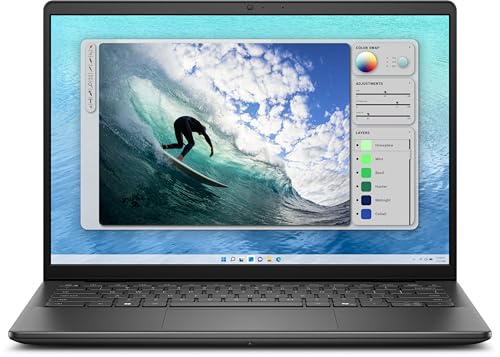
Dell Inspiron 14 i5-1334U — Camera-ready mainstream pick
Dell’s 2025 Inspiron listing is the fuller-featured of the two near-twins in this guide, and its verified title rewards a slow read: a 14-inch IPS display at 1920 x 1200, an Intel Core i5-1334U processor described as ten-core, Intel Iris Xe graphics, 8GB of DDR5 memory, a 512GB solid-state drive, Windows 11 Home, a backlit keyboard, Wi-Fi 6, Bluetooth 5.2, a 1080p camera, and a Carbon Black finish. The details that elevate it are the camera and the graphics. A 1080p webcam remains surprisingly rare in mainstream laptops, and on an i5 machine bought for hybrid work it transforms daily calls from apologetic to professional. Iris Xe graphics, meanwhile, give the integrated side of this laptop noticeably more muscle for photo work and casual gaming than the basic UHD silicon in its sibling below.
The 1920 x 1200 panel deserves its own sentence, because the extra vertical space over old-fashioned 1080p screens is the upgrade your eyes will thank daily: more lines of a document, more rows of a spreadsheet, less scrolling through everything. Paired with the backlit keyboard, the Inspiron reads as a machine specified by someone who has actually worked on trains and in dim rooms. Wi-Fi 6 is a generation behind the newest standard yet entirely adequate for homes, offices, and campuses as they exist today, and Bluetooth 5.2 covers the headset-and-mouse reality of modern desks.
The honest limitation is memory. Eight gigabytes is the working minimum of modern Windows life, comfortable for documents, browsing, coursework, and calls, but tight when all four happen at once alongside a photo editor. Buyers whose habits are orderly will never notice; buyers who treat tabs as a filing system should read the prose sections and the flagship guide with a 16GB minimum in mind. Within its intended life, though, this Inspiron is the most completely specified linked i5 here, and the one we would hand to a hybrid worker without a speech attached.
- Screen: 14-inch IPS panel, 1920 x 1200
- Chip and graphics: Intel Core i5-1334U with Iris Xe graphics
- Memory and storage: 8GB DDR5, 512GB SSD
- Daily details: 1080p camera, backlit keyboard, Wi-Fi 6
Strengths
- A 1080p camera lifts call quality above mainstream norms.
- Iris Xe graphics outmuscle basic integrated alternatives.
- The taller 1200-pixel screen suits documents and study.
Trade-offs
- 8GB of memory caps heavy multitasking headroom.
- Wi-Fi 6 trails the newest wireless generation.
- Home edition lacks business management features.
Best for: hybrid workers and students whose days run on video calls.
Not suited for: power multitaskers running many heavy applications at once.

Dell Inspiron 14 5440 i5 — Service-backed office pick
Place this listing beside its sibling above and a small masterclass in laptop shopping unfolds. The Inspiron 14 5440 carries the same Intel Core i5-1334U processor, the same 8GB of DDR5 memory, the same 512GB solid-state drive, and a 14-inch 16:10 FHD+ display at 1920 x 1200 — but it pairs the chip with Intel UHD graphics rather than Iris Xe, and its title closes with two words the other listing never mentions: onsite service. That difference reframes the machine. This is the Inspiron for a buyer who values what happens when something goes wrong — a technician coming to the machine rather than the machine being posted away — over a graphics tier they may never stress.
UHD graphics are entirely sufficient for the workload this variant courts: office suites, browsers, streaming, video calls, and the occasional light photo tidy. The penalty appears only when a buyer strays into gaming ambitions or heavier creative work, where the Iris Xe sibling pulls ahead. Screen, memory, and storage parity means the daily experience of documents and study is effectively identical between the two Dells, which is precisely why the deciding factors become the camera, the graphics, and the service promise rather than any core specification.
Small offices and careful home buyers often underrate service terms until the first failure, at which point the terms become the entire product. A mainstream laptop is a three-to-five-year appliance for most households, and an onsite arrangement converts its worst week into a scheduled visit. If your work cannot tolerate a fortnight without a machine, this variant’s priorities may suit you better than its flashier twin — an unfashionable conclusion that experienced IT buyers reach quickly and first-time buyers reach eventually.
- Screen: 14-inch 16:10 FHD+ display, 1920 x 1200
- Chip and graphics: Intel Core i5-1334U with UHD graphics
- Memory and storage: 8GB DDR5 RAM, 512GB SSD
- Ownership note: Dell onsite service included in the listing
Strengths
- Onsite service shortens any future repair ordeal.
- The tall FHD+ screen matches its sibling for documents.
- Core specification covers office and study work fully.
Trade-offs
- UHD graphics trail Iris Xe for games and creative apps.
- Memory remains 8GB with the same multitasking ceiling.
- Camera specification is less emphasised than its twin’s.
Best for: small offices and households that prize repair convenience.
Not suited for: casual gamers or photo editors wanting stronger integrated graphics.

HP Pavilion x360 14 i5 — Folding touch pick
Among this guide’s i5 machines, only the Pavilion folds. Its verified configuration centres on an Intel Core i5-1235U — a generation older than the Dells’ chip — with 8GB of memory, a 512GB PCIe solid-state drive, Intel Iris Xe graphics, Windows 11 Home, and a 14-inch IPS touchscreen at Full HD 1920 x 1080 mounted on a 360-degree hinge. Read as a processor contest, the Pavilion concedes ground. Read as a versatility contest, it wins the guide outright, because neither Dell can become a tablet for reading, a tent for a recipe, or a stand for a video call propped on a kitchen counter.
The i5-1235U deserves fair treatment rather than dismissal. Its performance cores and efficiency cores handle the mainstream workload — browsing, documents, streaming, coursework, calls — without drama, and Iris Xe graphics keep light creative work and older games within reach. Where the generation gap shows is in sustained heavy loads and in the 16:9 screen shape, which gives documents less vertical room than the Dells’ taller panels. Buyers should therefore choose the Pavilion for its hinge and its touch layer, accepting the older silicon as the known price of that flexibility at this configuration.
Households are this machine’s natural habitat. It is the laptop that does homework at the table, folds for a film on the sofa, stands in the kitchen following a recipe with flour-safe touch controls, and returns to the desk for email without any of those roles feeling like a misuse. Shared machines accumulate exactly this kind of varied duty, and a conventional clamshell simply cannot follow them through it. As the only convertible in an i5 guide, the Pavilion x360 earns its place by answering a question the Dells never ask.
- Screen: 14-inch IPS touch panel, Full HD 1920 x 1080, folding hinge
- Chip and graphics: Intel Core i5-1235U with Iris Xe graphics
- Memory and storage: 8GB RAM, 512GB PCIe SSD
- System: Windows 11 Home in a 2-in-1 Pavilion body
Strengths
- The 360-degree hinge serves rooms a clamshell cannot.
- Touch input suits notes, recipes, and shared family use.
- Storage matches the Dells at a full 512GB.
Trade-offs
- The processor is a generation behind the Inspirons.
- 16:9 shape shows fewer document lines than 16:10 rivals.
- 8GB memory shares the class-wide multitasking ceiling.
Best for: families and students wanting one folding machine for every room.
Not suited for: buyers chasing the newest silicon or the tallest screen.
Lenovo IdeaPad Slim 5 14 (i5) — Prose-only all-rounder
Lenovo’s IdeaPad Slim 5 is one of the most recommended mainstream laptops of recent years, and its 14-inch i5 form is exactly the machine many readers arrive here hoping to find. It appears in prose because standalone listings for the precise i5 configuration rotate constantly — surfacing through regional sellers, changing memory pairings, and vanishing between our verification passes — and attaching a link to a configuration we had not verified would risk sending you to a different machine wearing the right name. The line itself is well understood: a slim aluminium-topped chassis, a tall 16:10 display in its recent generations, and a reputation for keyboards a class above its price.
When you find this model through Lenovo’s store or a reputable retailer, the specification to insist on is 16GB of memory where the budget allows, since Slim 5 configurations exist in both 8GB and 16GB forms and the difference decides the machine’s useful lifespan. Storage of 512GB is the sensible floor, and the panel should be the brighter, higher-resolution option where two are offered. Bought in that form, the IdeaPad Slim 5 is arguably the most balanced mainstream 14-inch laptop in this entire guide — which makes its listing instability genuinely frustrating rather than merely inconvenient.
Shoppers who locate one should also confirm the exact i5 generation, because the Slim 5 name has spanned several Intel generations and the performance and battery character shift meaningfully between them. A current-generation i5 with Iris Xe-class graphics is the configuration this guide blesses. Older clearance units can still be sensible purchases for light duties, provided the discount honestly reflects the older silicon and the buyer walks in with eyes open.
- Form: 14-inch slim mainstream laptop from Lenovo’s IdeaPad line
- Configuration to seek: current-generation Core i5, 16GB memory preferred
- Storage guidance: 512GB SSD as the sensible floor
- Coverage here: prose-only, because exact i5 listings rotate too quickly to verify
Strengths
- Keyboard and build punch above the mainstream class.
- Balanced specification when bought in 16GB form.
- Widely stocked through Lenovo and major retailers.
Trade-offs
- Configurations vary enough to demand careful checking.
- 8GB variants share the multitasking limits noted above.
- Availability of the ideal specification is inconsistent.
Best for: patient shoppers who can verify a 16GB configuration before buying.
Not suited for: buyers requiring a guaranteed specification today.
ASUS Vivobook 14 (i5) — Prose-only value name
The Vivobook 14 is ASUS’s value workhorse, a line sold in so many regional variants that the name alone specifies almost nothing — which is why it stands here without a link. Across its generations the Vivobook 14 has carried several different i5 chips, panel types ranging from dim basic screens to genuinely lovely OLED options, and memory configurations that swing the machine’s character entirely. A verified listing for one variant would silently misrepresent the others, so this guide treats the Vivobook the way experienced buyers do: as a family to be interrogated configuration by configuration.
The interrogation is worth conducting, because the best Vivobook 14 i5 configurations are excellent. Where an OLED panel option exists, it transforms the value proposition, delivering display quality that embarrasses machines far above the Vivobook’s station. The line’s keyboards are consistently pleasant, its port selection tends toward the generous, and ASUS frequently includes thoughtful extras that rivals reserve for premium lines. The worst configurations, by contrast, pair the famous name with a dim, washed-out panel that no processor can redeem — the single most important Vivobook check is therefore the screen, in person if possible.
Our advice is mechanical: identify the exact model number, read its panel specification first, confirm memory is 16GB or upgradeable, and only then compare its price against the Dells in this guide. A Vivobook 14 i5 with a good panel and 16GB of memory is a legitimate rival to anything linked above. The same name with a poor panel and 8GB is a different and lesser machine, and the gap between those two products is the widest inside any single model name in this article.
- Form: 14-inch value-line laptop from ASUS, many regional variants
- Configuration to seek: Core i5 with the OLED or high-quality panel option
- Memory guidance: 16GB, or confirm an upgrade path exists
- Coverage here: prose-only, because variant spread makes one listing misleading
Strengths
- Top configurations offer OLED quality at value-line money.
- Generous ports and pleasant keyboards recur across the line.
- Frequent promotions make the good variants easy to find.
Trade-offs
- Panel quality swings wildly between variants.
- Model numbers require decoding before any comparison.
- Base configurations can feel built to a strict budget.
Best for: bargain hunters willing to decode one exact model number.
Not suited for: shoppers inclined to buy by name alone.
Acer Swift Go 14 (i5) — Prose-only portable name
Acer’s Swift Go 14 occupies the portable corner of the mainstream market — a light, travel-minded 14-inch machine that has appeared with a carousel of processors across its seasons, including Core i5 configurations that surface and sell through quickly. That churn is why no link is attached: the Swift Go listings stable enough to verify at the time of writing carried different silicon, and presenting one of those under an i5 banner would mislead exactly the readers this guide serves. The model’s identity, though, is consistent — low weight, a bright tall display in its better configurations, and a feature set aimed at people who carry their laptop daily.
The Swift Go’s appeal for commuters is easy to state. A light chassis changes whether the laptop comes along at all, and a machine that comes along gets used — in the café between meetings, on the train home, at the kitchen table after hours. Buyers hunting the i5 form should prioritise the panel and memory over small processor differences: the brighter, higher-resolution screen options and a 16GB configuration are the two choices that will still matter in year three, long after the exact i5 generation is forgotten.
One caution belongs specifically to fast-churning lines: confirm warranty and return terms with extra care, because a configuration bought from a short-lived listing can complicate later service conversations. Bought from Acer directly or an established retailer, the Swift Go 14 in i5 form is a legitimate portable alternative to the Dells — lighter in the bag, similar in the office, and different mainly in how often its ideal specification is actually on sale.
- Form: 14-inch lightweight mainstream laptop from Acer’s Swift line
- Configuration to seek: Core i5 with the brighter tall panel option
- Memory guidance: 16GB strongly preferred for longevity
- Coverage here: prose-only, because i5 listings sell through too fast to verify
Strengths
- Light carry weight suits daily commuting and travel.
- Better configurations carry bright, tall displays.
- Feature set is aimed squarely at mobile workers.
Trade-offs
- The ideal i5 configuration is only intermittently available.
- Specification varies considerably between seasons.
- Service experience depends heavily on the selling channel.
Best for: commuters who can pounce when the right configuration appears.
Not suited for: buyers on a fixed deadline who need stock certainty.
Comparison: The i5 Field at a Glance
| Model | Processor | Graphics | Memory / Storage | Distinguishing point |
|---|---|---|---|---|
| Dell Inspiron 14 (2025 listing) | Core i5-1334U | Iris Xe | 8GB / 512GB | 1080p camera, Wi-Fi 6 |
| Dell Inspiron 14 5440 | Core i5-1334U | UHD | 8GB / 512GB | Onsite service included |
| HP Pavilion x360 14 | Core i5-1235U | Iris Xe | 8GB / 512GB | Folding touchscreen body |
| Lenovo IdeaPad Slim 5 14 | Core i5, generation varies | Varies by configuration | Seek 16GB / 512GB | Keyboard and balance |
| ASUS Vivobook 14 | Core i5, variant-dependent | Varies by configuration | Seek 16GB | Panel lottery, OLED upside |
| Acer Swift Go 14 | Core i5, season-dependent | Varies by configuration | Seek 16GB | Lightweight commuting design |
The table’s most honest column is the last one. Core specifications in the i5 class converge — the same memory and storage figures recur like a chorus — so the purchase is decided by the distinguishing points: a camera, a service promise, a hinge, a keyboard, a panel lottery, a light chassis. Buyers who choose by those points will be happy; buyers who choose by the processor badge alone are flipping a coin among near-equals and calling it research.
What Can a Core i5 Still Do Well in 2026, and Where Does It Stop?
The i5’s competence is broad enough that listing it risks sounding like faint praise, so let the workload speak. A modern i5 at 14 inches opens office suites instantly, juggles a browser’s worth of research tabs, runs video calls with background effects, streams high-resolution video without breaking a sweat, handles coursework platforms, light photo editing, coding environments, and the entire administrative machinery of a small business. For the majority of laptop owners, the majority of the time, an i5 is not a compromise at all — it is simply the correct amount of computer, and the money saved against higher tiers buys the monitor, the chair, or the warranty that improves working life more than a faster chip would.
The ceiling appears in specific, nameable places. Video export at high resolution takes patience. Large software builds and data jobs run, but slowly enough to change how you schedule them. Modern demanding games exceed what integrated graphics — even Iris Xe — can serve at satisfying settings. Virtual machines multiply memory pressure until the 8GB configurations in this guide are simply full. None of these are surprises, and none are failures; they are the boundary lines of a class that has never claimed otherwise. The buyer’s task is locating their own workload honestly on one side of those lines.
Longevity follows from the same honesty. An i5 bought for office and study duties in 2026 will still perform those duties respectably in 2030, because those workloads grow slowly. An i5 bought hopefully for a video-editing career will feel old within eighteen months. Processor classes do not age in the abstract; they age against the specific demands placed on them, and the i5’s long reign as the default recommendation rests on how many people’s demands genuinely sit inside its borders.
How Do You Read a Laptop Listing Like a Professional Buyer?
This guide’s two Dell listings teach the core skill: never trust the model name, always read the full configuration string. The professional habit is to extract five figures from any listing before forming an opinion — exact processor model, memory size and type, storage size, panel resolution and type, and graphics tier — then to check what the title omits, which is usually the camera, the wireless generation, and the service terms. Sellers arrange titles to emphasise strengths; the omissions are where compromises hide. The Inspiron that shouts about its 1080p camera and the sibling that closes with onsite service are both telling the truth, selectively, in opposite directions.
Generation literacy is the second skill. Intel’s naming places the generation inside the model number — the 13 in i5-1334U, the 12 in i5-1235U — and each generation brings efficiency and graphics changes that matter more than the i5 badge itself. A newer i5 routinely outperforms an older i7 in battery-sensitive work, which inverts the hierarchy casual shoppers assume. When a listing hides the full processor model behind a bare “Intel Core i5” label, treat the omission as information and walk to a seller who prints the whole string.
Finally, verify at the configuration page, not the headline. Marketplace titles accumulate text across variants, as this guide has noted elsewhere, and the checkout configuration is the only legally meaningful description of what will arrive. Screenshot it, compare it against the five figures you extracted, and only then pay. Ten minutes of this discipline prevents the single most common mainstream laptop disappointment: the machine that arrives being a lesser sibling of the machine the headline described.
What Happens When an i5 Laptop Joins a Household With Children?
Household duty is the least reviewed and most common fate of a mainstream laptop, and it changes the buying calculus in favour of durability, repairability, and accounts discipline. Set up separate user accounts from day one — an administrator account held by an adult, standard accounts for everyone else — and the machine survives childhood with its settings and files intact. Enable the find-my-device service, because household laptops migrate between rooms, relatives, and occasionally cars, and a machine that can announce its location is a machine that comes home.
Physically, the rules are humble: the laptop lives on tables, never floors; drinks stand on the other side of the room’s geography from the keyboard; and the charger cable is routed where feet and chair wheels cannot feud with it. The Pavilion’s folding design earns a specific household mention, because a screen that folds flat for a shared recipe or stands for a grandparent call gets borrowed constantly — which is either its glory or its curse, depending on how the household shares. Buy the machine whose loss of exclusivity you can bear, because a good mainstream laptop in a family home belongs to everyone within a month, whatever the receipt says. A washable keyboard cover and a hard sleeve for the school run are the two household accessories that consistently justify themselves, protecting against the two forces — crumbs and gravity — that end more mainstream laptops than any component failure ever recorded by a service department. Teach the household one more ritual and the machine’s odds improve again: the lid is closed with nothing on the keyboard, because a pen, an earbud, or a coin left on the deck has cracked more screens in family homes than any drop from a table ever managed. The five-second glance before closing the lid is, pound for pound, the most valuable maintenance habit a household laptop can be given, and the only currency it asks for is attention. Pair it with a household rule that the laptop charges in one agreed place overnight, and the morning hunt for a missing machine — the second most common family laptop drama — quietly disappears from the weekly script altogether, replaced by the mild domestic miracle of a charged laptop waiting exactly where everyone agreed it would be.
Can an i5 Laptop Drive a Monitor and Become a Home Office?
Comfortably, yes, and for many households this is the purchase that makes the laptop the only computer needed. A single external monitor at a desk transforms posture, screen space, and the length of a comfortable working day, and every machine in this guide has the graphical headroom to run one alongside its own display. The i5’s integrated graphics treat a second screen as light work; the arrangement only strains when gaming or heavy media production enters the picture, which the desk-bound hours of an office worker rarely include.
Setup rewards ten minutes of intention. Place the monitor at eye height, set it as the primary display, and let the laptop sit open beside it as a second screen for calls, notes, or the reference document — or closed, if the machine’s vents and your desk arrangement prefer it, with an external keyboard and mouse completing the posture. The Pavilion adds a party trick here: folded into stand mode beside the monitor, it becomes a dedicated touch surface for calls and quick annotations while the big screen carries the work. Mainstream hardware, arranged thoughtfully, delivers an office experience that flagship owners would recognise instantly.
What Does Battery Life Look Like Across a Real i5 Working Day?
Manufacturers measure battery life with video loops and gentle brightness; your day is ruder. A realistic i5 day mixes an hour of video calls at full brightness, several hours of browser and document work, background sync, and the occasional heavy download, and across that mixture the machines in this guide should be expected to deliver a solid working span with a top-up for evening use rather than a heroic dawn-to-midnight performance. The newer-generation Dells hold an efficiency edge over the Pavilion’s older chip, a gap that shows most on days spent entirely away from a desk.
Habits move the figure more than specifications do. Screen brightness is the largest single drain under your control, and the difference between full brightness and a comfortable indoor level can be measured in hours. Video calls rank second, because they tax the camera, the radios, the screen, and the processor simultaneously. Owners who anchor their day near one charger — desk, kitchen, office — will never think about any of this; owners who roam should choose the newer silicon, carry the compact charger without resentment, and treat the battery gauge as a planning tool rather than a verdict on the machine.
How Do You Set Up a New i5 Laptop in the First Evening?
Resist the urge to install everything at once. The first evening’s agenda is short and consequential: run the system updates until none remain, remove the trial software you will never open, sign into the browser so bookmarks and passwords flow in, and install only the applications this week genuinely requires. Set the backup running before the first document is created, configure the fingerprint or PIN sign-in, and choose the power plan that matches your habits — balanced for most, with the screen timeout short enough to save battery in bags and long enough to survive reading a long page.
Create the recovery options while the machine is healthy: the reset media or cloud recovery path your maker provides, recorded somewhere reachable from another device. Then do the one test new owners skip — restart the machine and time how it feels, open your real files, join a test call with a friend or a second device, and fold the Pavilion, if that is your pick, through every position it promises. An evening spent this way converts a purchase into a working tool, and surfaces any individual-unit problem while the packaging is still within arm’s reach.
Why Does the i5 Badge Keep Surviving Every Processor Fashion?
Intel has rebranded its processors repeatedly, rivals have risen, and entire architectures have come and gone, yet the i5 tier persists because it describes a need rather than a technology: the need for a computer that is unambiguously enough. Buyers distrust the bottom tier’s corners and cannot justify the top tier’s surplus, and the middle — properly configured — has answered that distrust for a decade. The badge’s survival also owes something to institutional memory: a generation of buyers had a good i5 at school or work, and return to the badge the way travellers return to a hotel chain that never embarrassed them.
The caution buried in that loyalty is the theme of this entire guide. The badge guarantees a tier, not a configuration, and the distance between a well-specified i5 machine and a careless one is wider than the distance between tiers. Two buyers can both purchase “an i5 laptop” in the same week and have almost nothing in common by winter — one typing happily on a tall screen with a fine camera, the other squinting at a dim panel and closing tabs to free memory. The badge brought them both to the shelf; only reading chose between them. That is why this guide exists in its present, deliberately granular form.
What Accessories Does a Mainstream Laptop Actually Need?
The honest accessory list for an i5 machine is short, and everything on it earns its place weekly. A sleeve or a padded compartment, because mainstream laptops commute in ordinary bags among ordinary objects. A second charger or a USB-C charging setup at the desk, because the charger that travels is the charger that gets forgotten. A wireless mouse for desk hours, since trackpads serve mobility better than ergonomics. And a backup drive or cloud tier sized to the machine’s storage, set up in the first week while motivation exists, because backups configured in month six protect only the future and mourn the past.
Everything beyond that list should have to argue for itself. Cooling pads solve problems these efficient chips rarely have. Expensive docks make sense only when a monitor and peripherals genuinely wait at a desk. A case or skin protects against scratches that do not affect function on a machine bought for work rather than display. Mainstream buying is an exercise in proportionality, and the accessories budget obeys the same law as the laptop budget: spend where the week touches the machine, save where it does not, and let the neighbours finance the rest of the catalogue.
How Should Students Choose Between the Linked Picks Here?
Course type casts the first vote. A student whose degree runs on documents, research, and presentations is served by either Dell, with the 2025 listing’s camera suiting seminar calls and its Iris Xe graphics covering society posters and light design work. A student sharing a machine with family, or studying subjects taught through annotated readings, gains more from the Pavilion’s folding touchscreen than from any processor difference in this guide. A student whose institution provides software through a browser — as many now do — should weight screen and keyboard above all, because the laptop is effectively a beautifully made window onto remote computers.
Term length casts the second vote. A machine bought for a three-year diploma can ride its 8GB configuration with tidy habits; a machine expected to survive a degree and a first job deserves the 16GB hunt described in the prose sections, even if that hunt takes an extra week of checking listings. Students also underestimate how much of university life happens in libraries, societies, and other people’s flats — environments where the Pavilion’s stand and tent modes present group work to a circle of collaborators in a way no clamshell can. Social hardware is still hardware, and at university it gets used.
Who Buys i5 Laptops in Bulk, and What Can Individual Buyers Learn From Them?
The largest i5 customers on earth are not individuals; they are IT departments, schools, and public institutions buying hundreds of identical machines. Their purchasing logic is ruthlessly educational. Fleet buyers standardise on one configuration to simplify spares and support, they pay for service terms before they pay for speed, they test webcams and keyboards with the actual staff who will use them, and they measure total cost across the machine’s whole deployment rather than its invoice. Every one of those instincts transfers to a household buying a single laptop, and this guide’s structure — configuration literacy first, service terms noticed, distinguishing points decisive — is fleet logic translated for an audience of one.
Fleet buyers also explain the i5’s dominance. An institution that equips a thousand staff discovers that perhaps forty of them genuinely need more processor, and equipping all thousand for those forty wastes a fortune. The same arithmetic governs a family: the machine that handles everyone’s ordinary days, with one stronger computer in the house for the genuinely heavy work, is usually the rational fleet. Reading this guide as a fleet manager of a very small fleet — your household, your future self in three years — produces better decisions than reading it as a shopper chasing a single impressive number.
How Does an i5 Laptop Fit a Hybrid Worker’s Week?
Picture the actual week the 2025 Inspiron above is built for. Monday opens with a video stand-up where the 1080p camera earns its keep, followed by documents and a spreadsheet that the tall screen handles without complaint. Wednesday’s train journey runs on battery with the backlit keyboard working under dim carriage lighting. Friday’s photo tidy from a family event leans on Iris Xe graphics for an hour and asks nothing more. Nothing in that week touches the i5’s ceiling, and nothing in it would feel faster on a flagship — the flagship’s advantages would appear in other weeks, other jobs, other lives.
The hybrid pattern also explains why mainstream machines emphasise cameras, keyboards, and wireless over raw silicon. The modern office worker’s bottlenecks are meetings, networks, and their own typing speed, none of which a faster processor relieves. Buyers who recognise their week in the paragraph above can purchase from this guide with genuine confidence, and redirect the money saved toward the monitor, broadband, or chair that their week actually leans on. That redirection, repeated across millions of buyers, is the i5’s real legacy: it made the laptop stop being the bottleneck, and let people spend on everything around it.
How Much Does the Screen Shape Matter at Fourteen Inches?
Two of this guide’s linked machines use tall 16:10 panels at 1920 x 1200, and the Pavilion uses a 16:9 panel at 1920 x 1080, and that dry sentence conceals one of the most felt differences in daily use. The taller shape shows roughly ten percent more vertical content — several extra lines of a document, a few more rows of a spreadsheet, a longer view of a webpage — and because reading and writing are vertical activities, the gain registers constantly. Buyers upgrading from an older 16:9 laptop routinely describe the tall screen as the change they notice most, ahead of the processor they actually paid to upgrade.
The 16:9 shape retains one honest advantage: video. Films and streamed shows are framed for 16:9, so the Pavilion displays them without the letterbox bars its taller rivals wear. A machine bought substantially for evening streaming gives up nothing with the wider shape, while a machine bought for documents gives up a little comfort every hour. Neither panel in this guide is wrong; they are optimised for different evenings. Resolution, at these sizes, is effectively settled — both pixel counts look sharp at arm’s length — so shape, brightness, and touch are the screen questions worth a buyer’s remaining attention.
What Should an i5 Buyer Check During the Return Window?
Mainstream laptops are bought in enormous numbers and individual quality varies more than flagship owners ever experience, so the return window is a quality-control department you staff personally. In the first days, run the machine on battery through one complete working day and compare the result against your needs rather than the maker’s claim. Check every port with a real device, every key with a paragraph of typing, the webcam in your actual room lighting, and the speakers at the volume of a real call. Look at the screen against a plain white page and a plain black one; uneven backlight and stuck pixels announce themselves there and almost nowhere else.
Listen, too. Fan behaviour under your workload — not a benchmark’s — decides whether the machine can live in your bedroom, your library carrel, or your meeting room. A mainstream cooling system that whooshes politely during updates and falls silent during documents is behaving correctly; one that cycles audibly through light browsing may simply be a dusty individual unit or a model whose character does not suit your rooms. Either way, the window is when the discovery is free. Register the warranty in the same week, while the receipt and serial number are still on your desk rather than in a drawer archaeology project.
How Do You Keep a Mainstream Laptop Fast for Four Years?
Most mainstream laptops do not slow down; they accumulate. Startup programmes multiply with every peripheral and platform installed, browser extensions metastasise, and storage fills until the operating system has no room to breathe. The four-year plan is therefore housekeeping, not hardware: audit the startup list twice a year, keep at least a fifth of the SSD empty, uninstall the trial software that arrived uninvited, and let the maker’s driver utility — Dell’s, HP’s, Lenovo’s — keep firmware current, because battery and fan behaviour often improve through updates long after purchase.
Memory discipline matters most on the 8GB configurations in this guide. Browsers are the memory economy’s main currency, and habits like closing finished research sessions, using tab suspension, and keeping one browser rather than two open at once return real responsiveness. None of this is glamorous, and all of it works, which is why five-year-old i5 machines in careful households still feel sprightly while neglected two-year-old machines feel ancient. The processor you bought is rarely the problem; the software sediment on top of it usually is.
Common Mistakes When Buying an i5 Laptop
Assuming every i5 is the same i5 is the foundational error of this market segment. Generation, graphics tier, and the machine built around the chip separate experiences that share a badge, and this guide’s twin Dells exist to prove it. The second error is accepting 8GB of memory without auditing your own habits: count your typical open applications on your current machine before ordering, and let that census, not optimism, choose between the linked configurations here and the 16GB prose-only targets.
Buying by name alone is the third error, and the Vivobook section above is its cautionary tale — a famous name spanning excellent and disappointing hardware under identical branding. The fourth error is ignoring service terms until failure makes them vivid; the Inspiron 5440’s onsite promise looks like boilerplate right up until the week it becomes the most valuable line in the listing. Read the boring lines while nothing is broken, because that is the only time they are cheap to act on.
Final Recommendation
Most buyers should start with the 2025 Inspiron listing: its 1080p camera, Iris Xe graphics, and tall screen make it the most complete linked i5 here for hybrid work and study. Choose the Inspiron 5440 instead if a repair without postage matters more to you than graphics headroom, and choose the Pavilion x360 if your rooms and routines will genuinely use a folding touchscreen. Hunt the IdeaPad Slim 5 in 16GB form if you can verify the configuration, interrogate any Vivobook by its panel first, and pounce on the Swift Go when its i5 form surfaces. The i5 class rewards readers, and you have now read properly — buy the configuration, never the badge.
Frequently Asked Questions
Is a Core i5 enough for university work?
Yes, for the overwhelming majority of courses: writing, research, presentations, statistics packages, and coding introductions all run comfortably. Engineering and media courses with heavy rendering or simulation software are the exceptions, and those departments usually publish their own hardware guidance worth following.
What is the difference between the two Dell Inspiron listings?
Both use the Core i5-1334U with 8GB of memory and 512GB of storage. The 2025 listing pairs the chip with Iris Xe graphics, a 1080p camera, and Wi-Fi 6, while the 5440 listing uses UHD graphics and includes Dell’s onsite service. Choose by camera and graphics, or by service, according to your priorities.
Is 8GB of memory a deal-breaker?
Not for orderly users running a browser, documents, and calls. It becomes limiting with many simultaneous heavy applications, large datasets, or virtual machines. If your current machine regularly uses more, target the 16GB configurations described in the prose-only sections instead of hoping habits will change.
Why are three well-known models not linked in this guide?
Their exact i5 configurations rotate through regional and seasonal listings too quickly to verify responsibly. Rather than attach links that might land on different hardware, the guide describes each model and the specification to insist on when buying through the maker’s store or a major retailer.
Can an i5 laptop handle photo editing?
Light to moderate photo editing, yes — particularly on the Iris Xe configurations, which handle cataloguing, adjustments, and exports at hobbyist scale comfortably. Professional volumes of high-resolution work will feel the class ceiling and belong on stronger hardware.
Which linked pick is best for a small business?
The Inspiron 14 5440, because its onsite service promise protects a business from the downtime of postal repairs, and its specification covers office workloads completely. Businesses needing Windows Pro features or central management should step up to a business line, but for a small office buying sensibly, the 5440’s priorities are the right ones.
How do I tell which i5 generation a listing uses?
Read the digits after the hyphen in the processor model: the i5-1334U is a 13th-generation part and the i5-1235U a 12th-generation one. If a listing prints only “Core i5” with no model number, treat that silence as a warning and buy from a seller who publishes the full specification.
Does the Pavilion’s older i5-1235U still make sense?
For the convertible’s intended duties — notes, browsing, streaming, calls, and household sharing — yes. Its value is the folding touchscreen, and the processor remains adequate for everything that hinge is for. Buyers wanting maximum longevity from silicon alone should prefer the newer Dells.
Related Guides
Step back to the complete best 14-inch laptops roundup for the wider field, set a budget ceiling with the best 14-inch laptops under 1000 dollars, or explore connectivity in our guide to 14-inch PC laptops with Thunderbolt ports.



[…] with the best 14-inch i5 laptops guide to see how far mainstream silicon stretches, browse our full best 14-inch laptops roundup for every […]