What's inside
- Key Takeaways
- Quick Picks
- How We Chose These Picks
- Why Is the 1TB Shelf So Much Emptier Than the 512GB Shelf?
- What Does a Terabyte of Card Actually Demand From Your Device?
- Which 1TB Micro SD Cards Earned a Detailed Look?
- How Much of a Terabyte Will You Actually Use?
- How Do the Six Options Compare Side by Side?
- Which Devices Get the Most From a Terabyte Card?
- How Do You Test a 1TB Card Before Trusting It?
- What Should You Know About Readers, Adapters and Warranties at This Size?
- What Mistakes Do 1TB Card Buyers Keep Making?
- Final Recommendation
- Frequently Asked Questions
- Related Guides
As an Amazon Associate I earn from qualifying purchases. This post may contain affiliate links at no extra cost to you.
widgetverdict.com is reader-supported. When you buy through links on our site, we may earn an affiliate commission.
Where to buy: two of the cards below carry verified Amazon links — both are SanDisk flagships — while four further options are covered in prose, including one famous name that turns out not to sell a card in this class at all.
A terabyte on a fingernail sounds like a spec-sheet party trick until the day it solves a real problem: a drone pilot shooting a full weekend without swapping cards, a handheld gaming library that finally fits in one place, a phone whose offline maps, music and video archive have outgrown every smaller tier. The best 1tb micro sd cards are not simply bigger versions of the cards further down the shelf. At this capacity the market narrows sharply, the counterfeit problem gets worse because the genuine article is expensive enough to fake profitably, and the differences between the handful of real contenders — sustained write behaviour, app performance class, warranty handling — matter more than the headline read speed printed largest on the packet.
There is also an honesty issue at this tier that smaller capacities never raise. One of the biggest memory brands in the world does not actually sell a 1TB microSD card, and roundups that pretend otherwise are padding their lists with a product that does not exist. This guide names that gap plainly, explains what to buy instead if you are loyal to that ecosystem, and keeps every linked pick to cards our verified pool could confirm title by title. What follows is a short list — because at 1TB, short is the truth.
Key Takeaways
- Only a handful of genuine 1TB microSD cards exist; two SanDisk models anchor this guide because they are the ones our pool could verify.
- Samsung does not sell a 1TB microSD card — its range stops at 512GB — so any listing claiming otherwise deserves suspicion.
- Sustained write speed, not peak read speed, decides whether a 1TB card suits drones and action cameras or just bulk storage.
- Counterfeits concentrate at this capacity; buy from reputable sellers and test the card’s real capacity before trusting it with footage.
- A 1TB card concentrates risk as well as data — a backup habit matters more here than at any smaller size.
- Check your device’s maximum supported capacity and file system before buying; not every host can use a full terabyte.
Quick Picks
| Pick | Badge | Why it earns its place |
|---|---|---|
| SanDisk 1TB Extreme microSDXC | Best overall 1TB microSD | The current-generation flagship with the strongest all-round speed profile in the class and an A2 app rating for handhelds and phones. |
| SanDisk 1TB Extreme Pro microSDXC | Best for buyers who find it priced keenly | The earlier Pro flagship: still V30 and A2, still fast in absolute terms, and sometimes the smarter buy when the two SanDisks are priced apart. |
| Samsung 1TB microSD | Prose-only — the card that does not exist | Samsung’s microSD range tops out at 512GB; we explain the situation honestly rather than invent a pick. |
| Lexar 1TB PLAY microSDXC | Prose-only — gaming handheld pick | Lexar’s PLAY line is built around game libraries on handheld consoles, with 1TB at the top of its range. |
| SanDisk 1TB Ultra microSDXC | Prose-only — bulk storage value | The lighter-duty SanDisk tier for archives, media libraries and devices that read far more than they write. |
| PNY 1TB PRO Elite microSDXC | Prose-only — the third-brand alternative | A V30-rated 1TB card from PNY’s top microSD line for buyers who want an option outside the two biggest names. |
How We Chose These Picks
We started by establishing which 1TB microSD cards genuinely exist as retail products from established memory brands, because this capacity attracts more phantom listings, marketplace inventions and outright fakes than any other tier. Every card with a link in this guide was confirmed against our verified pool, title matched in full — capacity, product line, speed class markings and all — before it earned a place. Cards we could not verify that way are discussed in prose only, with no link and no invented specification, and one slot in the six is deliberately spent on a correction: the Samsung card that roundups keep implying exists and does not.
Within the real field, we ranked on the things that separate a terabyte card in daily use. Sustained write behaviour came first, because filling even a fraction of 1TB exposes cards that sprint and then sag. Video speed class came next — V30 is the meaningful floor for 4K capture — followed by application performance class, since handheld consoles and phones launching apps and games from the card feel random-access speed far more than sequential read numbers. Finally we weighed the unglamorous factors: whether the card ships with a full-size adapter, how the brand handles warranty claims on high-capacity media, and how wide the price spread runs between the genuine card’s reputable listings, because at this tier the too-cheap listing is itself a specification — of a fake.
One methodological note deserves emphasis: we did not rank these cards by their manufacturers’ marketing order. At this capacity the hierarchy printed on packaging — Ultra below Extreme below Extreme Pro — describes the ladder as it was designed across all capacities, not the ladder as it exists at 1TB today, where the generations overlap and the older flagship can trail the newer card beneath it. The picks are therefore ordered by verified specification and honest use case, and where the honest answer was “buy whichever is cheaper this week,” the guide says so rather than inventing a distinction.
Why Is the 1TB Shelf So Much Emptier Than the 512GB Shelf?
Drop one tier to 512GB and the choice explodes: every major brand fields multiple lines, prices compete hard, and picking a card is mostly a matter of matching a speed class to a device. At 1TB the physics and the economics both tighten. Doubling capacity in the same tiny package pushes NAND density to the edge of what manufacturers ship in volume, yields are lower, and the resulting price sits high enough that demand concentrates among professionals and committed enthusiasts. Brands respond rationally: they field one or two 1TB lines rather than a full ladder, refresh them less often, and let the tier below do the volume business.
The practical consequence for buyers is that the usual advice — pick your favourite brand’s mid-tier card — breaks down. Your favourite brand may not be here at all. Samsung, whose EVO and PRO cards dominate smaller capacities, simply does not field a 1TB microSD; its line stops at 512GB, a fact we return to in the picks because so many shoppers arrive here looking for exactly that card. Lexar fields a gaming-leaning entry. PNY fields one. SanDisk fields the deepest bench, which is why two of the six slots below carry its name: at this capacity, SanDisk is not the default by laziness but by arithmetic — it makes more of the real cards than anyone else.
There is a subtler consequence of the thin shelf: generational overlap. Because brands refresh this tier slowly, the card you buy today may be a design several years into its production run, sitting beside a newer sibling from a faster-moving tier — exactly the SanDisk situation the picks describe, where the current Extreme outruns the older Extreme Pro at this capacity. Shoppers trained to buy the highest badge should retrain here: at 1TB, read the generation and the verified figures, not the badge order, because the badge order was drawn for the whole range and this tier marches to its own slower drum.
The emptiness has a darker side effect. Where genuine supply is thin and prices are high, counterfeit supply flourishes. Fake 1TB cards — smaller NAND relabelled and firmware-spoofed to report a terabyte — are the classic capacity scam, and they are disproportionately aimed at this tier precisely because the genuine article costs enough to make the fraud lucrative and buyers expect to hunt for a deal. Everything in the how-to section further down about testing a new card applies double here.
What Does a Terabyte of Card Actually Demand From Your Device?
Capacity support is the first gate. A 1TB card uses the SDXC standard and ships formatted exFAT, and any host limited to SDHC-era support — older cameras, older handhelds, some embedded devices — will not address it at all, whatever the slot’s shape suggests. Most current phones with expansion slots, recent action cameras, drones and modern handheld consoles accept SDXC media happily, but the manual’s maximum-capacity line is worth thirty seconds of your life before money moves, because manufacturers occasionally cap firmware support below the standard’s ceiling.
The second demand is patience, and it is structural. A terabyte card invites terabyte habits: entire game libraries, a season of 4K footage, a phone’s whole media history. Moving that volume across a reader at real-world speeds takes hours, and filling the card in a camera takes longer than most shoots — which quietly changes the risk profile. A card that holds everything is a card whose failure loses everything, a theme the mistakes section takes seriously. Treat 1TB as a working space with a backup discipline attached, not as an archive of record.
Finally, speed class still rules the experience inside the capacity. A V30 rating promises a minimum sustained write floor suitable for 4K video; A2 promises livelier random access for apps and game loading, provided the host implements the A2 command queueing that unlocks it. A 1TB card without those markings — and they exist, aimed at pure bulk storage — is a legitimate product for the right job and a miserable one for a drone. The picks below separate those jobs explicitly rather than pretending one card does everything.
Performance as the card fills deserves a mention, because terabyte owners live at fill levels smaller-card owners never reach. Flash controllers manage wear and garbage collection across the whole device, and a card kept permanently above ninety percent full gives its controller little room to work, which can soften sustained-write behaviour over time. The flagship cards here have the headroom and controller sophistication to absorb this gracefully, but the habit is still worth forming: treat eighty percent as the working ceiling, let the final fifth be breathing room, and the card will perform in its third year the way it did in its first.
Which 1TB Micro SD Cards Earned a Detailed Look?
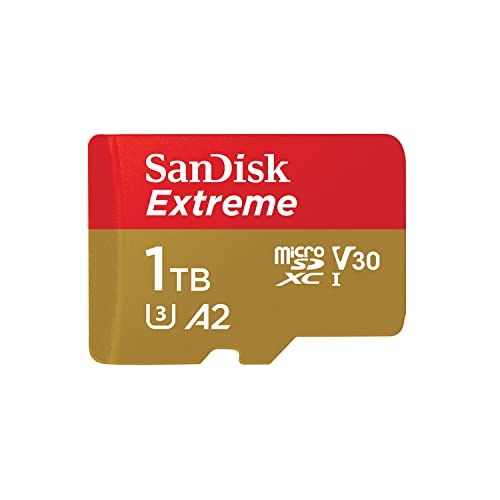
SanDisk 1TB Extreme microSDXC — Best overall 1TB microSD
The current-generation Extreme is the card this whole category is measured against, and at 1TB it makes its case on breadth rather than a single headline number. Its verified listing quotes read speeds up to 190MB/s and write speeds up to 130MB/s, with the full modern marking set — UHS-I, U3, V30 and A2 — which means one card legitimately covers the drone, the action camera, the handheld console and the phone without asking you to maintain a different card per device. That versatility is the actual product at this capacity: a terabyte is too expensive to specialise narrowly.
The write figure deserves emphasis because it is where this generation moved. Sustained writing is what a long 4K flight or a hundred-gigabyte game install actually experiences, and a card whose write ceiling sits well above the V30 floor keeps buffer clearing brisk and install progress honest. The A2 rating, meanwhile, is the difference between a game library that merely fits and one that loads with something like internal-storage manners on hosts that support A2 queueing. SanDisk bundles the card with a full-size adapter, which sounds trivial until the card needs to meet a laptop slot or a camera body at midnight. If you buy one 1TB card and stop researching, this is the defensible place to stop.
Consider how the card behaves across a whole ownership cycle, because a terabyte card is a multi-year companion rather than a consumable. In a handheld console it swallows a library that would otherwise live across three smaller cards, and the A2 behaviour keeps big open-world installs loading without the texture pop-in that betrays storage struggling underneath. In a drone it turns the pre-flight ritual from card management into battery management. In a phone it quietly ends the monthly storage warning. The common thread is absence: the best storage is the storage you stop thinking about, and this card’s combination of capacity, class and headroom is engineered to be forgotten.
- Capacity: 1TB microSDXC, UHS-I
- Verified listing figures: up to 190MB/s read, up to 130MB/s write
- Classes: U3, V30, A2, Class 10
- Adapter: full-size SD adapter included
- Positioning: flagship all-rounder for capture and storage
Strengths
- Strongest verified all-round speed profile in this capacity class.
- V30 and A2 together cover both capture work and app/game loading.
- Adapter in the box keeps the card useful across readers and cameras.
Trade-offs
- Carries flagship pricing; the tier below is far cheaper per card.
- Top read speeds need a capable reader to materialise in transfers.
- A single card holding a terabyte concentrates loss if it fails.
Best for: drone pilots, action-camera shooters and handheld gamers who want one verified 1TB card that does every job well. Not suited for: buyers who only need bulk media storage and would rather spend less per gigabyte.

SanDisk 1TB Extreme Pro microSDXC — Best for buyers who find it priced keenly
Here is the honest oddity of the 1TB tier: the Extreme Pro in this capacity is the earlier flagship, and its verified listing quotes up to 170MB/s read and up to 90MB/s write — figures the newer Extreme above matches or beats. Product-line seniority and real-world speed have come unstuck at this capacity because the Pro’s 1TB generation is older. That does not make it a poor card. V30 and A2 markings, U3, and write headroom far beyond any camera’s sustained demand mean it records 4K exactly as surely as its sibling; the difference appears in transfer sessions and giant installs, not in capture reliability.
So the Pro’s case is situational, and we would rather say so than dress it up. When the two SanDisk flagships are priced close together, the newer Extreme is the rational default. When the Pro is the one on promotion — as older generations often are — it becomes the smart buy: the same classes, the same adapter in the box, the same brand warranty machinery, at a gentler number. Shopping this pair against each other on the day you buy is the entire strategy, and it is a better strategy than pretending a hierarchy exists that the specification sheets no longer support.
There is a second, quieter argument for this card: fleet consistency. Many professional kits standardised on the Extreme Pro name across smaller capacities years ago, and a 1TB card from the same line keeps one warranty route, one behaviour profile and one set of reader habits across the whole bag. Photographers and pilots who already trust the 256GB and 512GB Pros in their cameras are not experimenting when they buy this card; they are extending a known quantity to the capacity the work now demands. Known quantities are worth money in the field, and that familiarity premium is a rational thing to pay for even when a newer sibling posts bigger numbers.
- Capacity: 1TB microSDXC, UHS-I
- Verified listing figures: up to 170MB/s read, up to 90MB/s write
- Classes: U3, V30, A2, Class 10
- Adapter: full-size SD adapter included
- Positioning: earlier-generation flagship, value when discounted
Strengths
- Full V30 and A2 class set; capture performance is not the compromise.
- Frequently the better-priced of the two SanDisk flagships.
- Same ecosystem, adapter and support route as the current Extreme.
Trade-offs
- Lower verified read and write ceilings than the newer Extreme.
- An older generation, so future refreshes will widen the gap.
- At price parity with the Extreme, it is hard to justify.
Best for: buyers who find it meaningfully cheaper than the current Extreme on the day and want flagship classes without flagship money. Not suited for: anyone paying equal money, where the newer card is simply the better specification.
Samsung 1TB microSD — Prose-only: the card that does not exist
This slot exists to save you money and confusion, because a great many shoppers arrive at this category looking for Samsung’s 1TB card — a reasonable expectation, given that Samsung’s EVO Plus and PRO Plus lines are among the strongest at 256GB and 512GB. Here is the plain fact: Samsung does not sell a 1TB microSD card. Its microSD range tops out at 512GB. There is no Samsung 1TB microSD product to buy, from any seller, at any price — which means any listing, marketplace offer or roundup entry claiming to be one is mislabelled at best and counterfeit at worst.
What should a Samsung loyalist do instead? Two honest paths exist. The first is to step down a tier to Samsung’s 512GB PRO Plus or EVO Plus — both verified in our pool for other guides — accept half the capacity, and gain a thoroughly modern card. The second is to accept that at 1TB the ecosystem changes hands and buy the SanDisk Extreme above, which is what most cross-shoppers end up doing. What you should not do is hand money to a no-name listing wearing Samsung colours at a terabyte. We include this entry, unlinked and unsold, because a buying guide’s first job is to keep you from buying things that are not real.
It is worth understanding why the phantom persists. Search demand for a Samsung terabyte card is enormous, because Samsung’s reputation at smaller capacities is enormous — and wherever demand exists for a product that does not, supply is invented by the unscrupulous. Marketplace algorithms do not verify existence; they surface listings. Some of those listings are sloppy relabels of 512GB cards, some are generic cards in copied packaging, and some are capacity-spoofed outright. The defence is boring and total: know the real ceiling of the range — 512GB — before you shop, and let any listing above it disqualify itself on sight, whatever its price or artwork.
- Capacity: not offered — Samsung microSD stops at 512GB
- Nearest genuine alternatives: Samsung 512GB PRO Plus and EVO Plus
- Classes: not applicable to a product that does not exist
- Adapter: not applicable
- Positioning: a correction, not a product
Strengths
- Knowing this fact inoculates you against the commonest fake in the category.
- Samsung’s 512GB cards remain excellent if half a terabyte suffices.
- The correction clarifies why SanDisk dominates this entire guide.
Trade-offs
- There is nothing to buy here — that is precisely the point.
- Brand loyalists must choose between capacity and ecosystem.
- Search results will keep surfacing phantom listings regardless.
Best for: every reader who arrived hunting for a Samsung terabyte card and deserves a straight answer. Not suited for: being purchased, because it cannot be.
Lexar 1TB PLAY microSDXC — Prose-only: gaming handheld pick
Lexar aims its PLAY line squarely at one job: holding a game library inside a handheld console or gaming phone and loading from it without making the storage feel like the bottleneck. The 1TB card sits at the top of that range, and its positioning is refreshingly narrow — where SanDisk sells an all-rounder, Lexar sells a library card. For a Steam Deck or similar handheld whose internal drive filled up months ago, that focus is a feature: the whole purchase conversation is about capacity plus app-class behaviour, and the PLAY line is specced and marketed around exactly that pairing.
We cover it in prose because our verified pool does not hold this card, so we will not attach a link or quote speed figures we did not confirm. What can be said fairly is that Lexar is an established memory brand with a long flash history, that the PLAY branding is its genuine gaming line rather than a marketplace invention, and that a 1TB game library card is a coherent product. If your terabyte is destined for a drone rather than a deck, the SanDisk pair above remains the better-evidenced choice; if it is destined for games and the PLAY is priced aggressively by a reputable seller, it is a legitimate alternative rather than a compromise.
Availability is the final practical note: gaming-positioned cards move in and out of stock with console release cycles, so a buyer who finds the PLAY at a fair price from a reputable seller should not assume the same offer will be waiting next month. The SanDisk flagships, by contrast, are stocked with the permanence of plumbing supplies. Neither fact changes which card suits the work — but both change when the sensible moment to buy arrives, and at this capacity, timing a fair price from a real seller is half the craft of the purchase.
The gaming use case deserves one more layer of honesty: a handheld’s card reader, not the card, sets most of the loading experience, and modern handhelds read microSD at speeds that flatter any competent modern card. What the PLAY buyer is really purchasing is Lexar’s tuning and testing aimed at game-library patterns — many medium files, random reads during play, long install writes — rather than a miracle. That is a perfectly good thing to purchase. It also means the card will serve a phone or tablet entirely respectably if its gaming tour ends; specialist positioning is a starting point, not a life sentence, for a well-made card.
- Capacity: 1TB microSDXC, UHS-I
- Speed figures: not quoted — outside our verified pool
- Classes: positioned for game storage and loading on handhelds
- Adapter: check the specific listing before buying
- Positioning: gaming-library specialist
Strengths
- Purpose-built around handheld game libraries rather than capture.
- From an established flash brand, not a marketplace label.
- Gives gaming buyers a real third option at this capacity.
Trade-offs
- Not verified in our pool, so no link and no confirmed figures here.
- Its gaming focus is wasted on pure camera or drone duty.
- Availability and pricing vary more than the SanDisk flagships.
Best for: handheld gamers who want a terabyte of library and find it well priced from a seller they trust. Not suited for: capture-first buyers, who are better served by the verified SanDisk pair.
SanDisk 1TB Ultra microSDXC — Prose-only: bulk storage value
Not every terabyte works hard. A media archive on a tablet, a music and film library in a phone, a documents-and-photos hoard in a laptop’s card slot — these workloads read constantly and write rarely, and they do not care about V30 floors or A2 queueing. SanDisk’s Ultra line exists for them, and its 1TB member is the capacity play: the same trusted brand and adapter ecosystem as the flagships, in a lighter-duty specification aimed at storage rather than capture. It is the card for the buyer who looked at the Extreme’s price, looked at their actual workload, and correctly concluded the flagship premium bought them nothing they would ever feel.
The discipline is in not drifting the card into harder work later. An Ultra-tier card pressed into 4K drone duty or a dashcam’s endless overwrite loop is being asked to sustain writes it was never classed for, and disappointment follows predictably. Kept in its lane — libraries, archives, backups-in-place, media playback — it is a sensible way to own a terabyte without flagship money. We list it prose-only because our pool does not hold this capacity of the Ultra line, so no link and no quoted figures; buy it from a reputable seller, because everything said about counterfeits in this guide applies to the cheaper card just as much.
One scenario flatters this card above all others: the family archive device. A tablet that holds a decade of photographs and home video, a phone that carries the offline map of a continent and the music library to match, a grandparent’s device loaded with everything and managed by someone else — these want capacity that never asks a question, from a brand whose cards simply do not feature in failure stories. The Ultra’s lighter specification is invisible in that life. Its price, spread across the years it will serve, is the smallest line in the whole setup, which is exactly what a storage card’s price should be.
- Capacity: 1TB microSDXC, UHS-I
- Speed figures: not quoted — outside our verified pool
- Classes: storage-class card, lighter-duty than the Extreme lines
- Adapter: typically bundled in SanDisk retail packs
- Positioning: bulk libraries and archives
Strengths
- A terabyte from a top-tier brand without flagship pricing logic.
- Ideal for read-heavy libraries where write class is irrelevant.
- Keeps phones and tablets expanded without card swapping.
Trade-offs
- Not classed for demanding sustained-write capture work.
- App performance class is a step below the A2 flagships.
- Still a counterfeit target; seller choice matters.
Best for: media hoarders and archive keepers whose terabyte mostly sits and serves files. Not suited for: drones, action cameras or any workload that writes hard and continuously.
PNY 1TB PRO Elite microSDXC — Prose-only: the third-brand alternative
PNY is the quiet third name in American flash memory — less marketed than SanDisk, less ubiquitous than Samsung, but a genuine manufacturer-grade brand with decades in the business — and its PRO Elite line is its top microSD tier, fielded at 1TB with the V30 video class that capture work requires. For buyers wary of putting an entire workflow on one brand’s shoulders, or who simply find PNY’s card priced under the SanDisk pair on the day, it is the most credible alternative in the class.
As with the other prose entries, our pool does not hold this card, so it carries no link here and we quote no figures we have not verified. The fair summary is positioning: PRO Elite is PNY’s flagship microSD line, V30-rated, aimed at 4K capture and fast transfers, and sold through normal retail channels rather than marketplace obscurity. Check the exact listing’s class markings and seller before buying, prefer the card in sealed retail packaging, and run the capacity test described below the moment it arrives. A terabyte from any brand deserves that thirty minutes of scepticism.
PNY’s broader position is worth a sentence of context for buyers meeting the brand here first: it is an American company with a long retail history in memory and graphics, the kind of firm whose products sit in big-box stores rather than only in marketplace listings. That distribution matters at 1TB, because it gives the buyer a physical, returnable, receipt-backed route to a genuine card — the single strongest anti-counterfeit measure available. A flagship card bought across a real counter, from a brand with a real address, is a different risk proposition from the same specification bought from a storefront that opened last month.
- Capacity: 1TB microSDXC, UHS-I
- Speed figures: not quoted — outside our verified pool
- Classes: V30 video class headline for the PRO Elite line
- Adapter: check the specific listing before buying
- Positioning: flagship alternative outside the biggest names
Strengths
- A real V30 flagship line from an established third brand.
- Sometimes undercuts the SanDisk pair at this capacity.
- Normal retail distribution makes genuine stock easier to find.
Trade-offs
- Unverified in our pool; figures here are positioning, not measurements.
- Smaller installed base means fewer community reports to lean on.
- Check seller and packaging carefully, as with every 1TB card.
Best for: buyers who want a genuine alternative flagship and find PNY priced keenly. Not suited for: anyone uncomfortable buying outside the two best-documented lines at this tier.
How Much of a Terabyte Will You Actually Use?
Capacity planning at 1TB fails in both directions: buyers who assume they will never fill it, and buyers who assume filling it is the goal. Start with the workloads. A modern handheld game runs from a few gigabytes for indie titles to well past a hundred for flagship releases, so a serious library of mixed sizes lands between three hundred and eight hundred gigabytes — the terabyte card is the first one that holds it whole. A phone shooting high-resolution video consumes roughly twenty to forty gigabytes in a heavy holiday week; a year of such weeks, plus apps, offline media and the camera roll’s steady creep, makes half a terabyte feel less like headroom and more like a plan.
Drone and action-camera work is the hungriest arithmetic. High-bitrate 4K recording consumes on the order of forty-five gigabytes per hour at common professional settings, and higher frame rates multiply it; a working pilot shooting a full weekend without offload access can legitimately arrive home with half a terabyte of footage. That is the honest case for this capacity in capture — not convenience, but continuity: the card stops being a consumable you manage and becomes a tank you empty at base. Shooters who offload nightly, by contrast, may find 512GB entirely sufficient, and the money saved buys the second card that backup discipline demands anyway.
There is also the question of usable space: a 1TB card presents roughly nine hundred and thirty gigabytes to your devices, because the industry counts capacity in decimal units and computers count in binary. Plan libraries against the smaller figure. And plan for the paradox of plenty — the fuller a card lives, the more its owner postpones the offload-and-backup ritual, and the more a single failure would cost. The terabyte’s real specification is not its capacity but the discipline it demands: the bigger the tank, the more deliberate the emptying schedule should be.
Cost per gigabyte frames the same decision from the wallet’s side. The terabyte tier charges a premium per gigabyte over 512GB — the density tax described earlier — so the buyer who will realistically use four hundred gigabytes is paying flagship rates to store air. The buyer who will use eight hundred is buying the only card that fits the library at any price. Estimate honestly, using the device in your hand rather than the device you imagine: check the current card’s usage, project a year of your real habits, and let that number, not the shelf’s maximum, choose the capacity.
How Do the Six Options Compare Side by Side?
| Card | Link status | Class highlights | Natural home |
|---|---|---|---|
| SanDisk 1TB Extreme | Linked | V30, A2, strongest verified figures | Everything: drone, camera, handheld, phone |
| SanDisk 1TB Extreme Pro | Linked | V30, A2, earlier-generation figures | Same jobs when priced below the Extreme |
| Samsung 1TB microSD | Does not exist | Range stops at 512GB | A warning, not a purchase |
| Lexar 1TB PLAY | Prose-only | Gaming-library positioning | Handheld consoles and gaming phones |
| SanDisk 1TB Ultra | Prose-only | Storage-class, lighter duty | Media libraries and archives |
| PNY 1TB PRO Elite | Prose-only | V30 flagship line | Capture buyers wanting a third brand |
The table compresses the whole guide into one pattern: at 1TB you are really choosing between the verified SanDisk flagship pair, a gaming specialist, a storage specialist, a third-brand flagship — and a mirage. Deciding which workload your terabyte will actually serve collapses the choice faster than any speed chart, because the honest answer for mixed work is the Extreme, for a keen price is whichever flagship is discounted, and for a pure library is the card that never pretended to be a capture card at all.
Notice what the table cannot show: time. Every card here will be asked to serve for years, across device generations, and the brands’ support horizons differ more than their specifications do. A card from a maker with a long, stable warranty operation is a different asset from the same specification sold by a label that may not exist at claim time. That is the final argument for the shape of this guide — two verified flagships from the deepest bench in the tier, and honest prose for everything else — because at a terabyte, you are buying a relationship with a manufacturer as much as a piece of silicon.
Which Devices Get the Most From a Terabyte Card?
Handheld consoles top the list, because their storage problem is structural: internal drives are modest, games are enormous, and the card slot is the library. A terabyte converts the console from a rotation — uninstalling one flagship title to install another — into an archive, and the A2-rated flagships here keep loading behaviour respectable across that archive. For this device class the capacity is not indulgence; it is the difference between a library you own and a library you visit.
Drones and action cameras come second, with a condition attached. The capacity pays when offload opportunities are scarce — expeditions, events, travel — and when the alternative is a pocketful of cards managed with cold fingers. It pays less when the workflow already offloads nightly, where two 512GB cards give the same total with a risk profile professionals prefer. The honest question is not how much you shoot but how long you shoot between safe harbours, and a terabyte is the answer only when that interval is genuinely long.
Phones and tablets are the third case, and the most personal. A terabyte in a phone is really a decision about time: it lets a device serve years longer before storage pressure forces an upgrade, holds offline media for the travel-heavy, and keeps the camera roll at full quality without cloud dependence. What a terabyte does not suit is continuous-overwrite duty — dashcams and security recorders want endurance-rated media at smaller capacities, because their enemy is write cycles, not space. Buy this capacity for libraries and capture; buy endurance for loops.
How Do You Test a 1TB Card Before Trusting It?
Buy from a reputable seller first; no test rescues a card bought from a listing that was implausible on its face. When the card arrives, before it touches a camera, run a full capacity verification with a tool such as H2testw on Windows or F3 on Mac and Linux. These utilities write data across the entire reported capacity and read it back, which exposes the classic fraud — small NAND spoofed to report 1TB — within one pass. On a genuine terabyte the test takes a while; that duration is the price of certainty, and it is trivial next to losing a shoot to a card that silently overwrote its own beginning once it filled past its real size.
Follow with a practical shakedown in the actual device. Format the card in the host you will use — cameras, drones and consoles each prefer their own formatting — then record or install something substantial and play it back from the far end of the card, not just the first files written. Check that the device reports the expected capacity, that no write errors surface under a long sustained session, and that your reader transfers at something like the card’s class behaviour. Only then promote the card to real work, and keep the packaging and receipt until it has survived a few full cycles; warranty claims on high-capacity media go smoother with both.
While the test runs, calibrate your expectations about what its numbers will mean. A benchmark on an empty card shows the ceiling; your camera at eighty percent full on a hot day shows the working reality, and the distance between the two is normal engineering, not evidence of a problem. What should concern you is never a modest gap between advertised and measured speed — it is errors: write failures, corrupted files, a capacity that does not survive verification. Judge the card pass-or-fail on integrity, and treat speed as a ranking between cards that passed, and a terabyte bought this way will justify its price the first time a smaller card would have run out.
One more habit separates careful owners from lucky ones: label the card. A terabyte card looks identical to every other black sliver in the drawer, and its contents are too large to identify by dipping in. A paint-pen dot or a labelled case, plus a note of what the card holds and when it was last verified, turns a drawer of identical slivers into a managed fleet. When a card eventually retires — and at this tier retirement should be planned, not suffered — the label is what lets you retire the right one.
What Should You Know About Readers, Adapters and Warranties at This Size?
The card is only one link in the speed chain, and at 1TB the other links start to matter. The flagship read figures quoted in this guide assume a reader that implements the maker’s high-speed mode; the same card in a generic reader or an ageing laptop slot will transfer at ordinary UHS-I pace, which turns a full-card offload into an overnight event rather than an hour’s errand. If your workflow involves regularly emptying this card, budget for the reader its maker sells for it — an unglamorous accessory that decides whether a terabyte feels like a tank or a swamp. Check, too, that your reader’s firmware and your computer’s port are not the bottleneck you blame on the card.
The bundled full-size adapter deserves similar realism. It is a passive bridge — no electronics, no speed penalty of its own — but it adds contacts, and contacts in dusty camera slots or worn readers are where intermittent errors are born. Use the adapter for transfers and occasional camera duty without worry; for a card living permanently in a full-size slot under vibration, seat it carefully and check it when errors appear before condemning the card. And keep the adapter somewhere findable: at this capacity the card will inevitably be asked to visit devices its native size does not fit.
Finally, warranties at this tier are a genuine differentiator, because the claim is expensive when it happens. The major brands back these flagships with long limited warranties, but a claim runs on proof: keep the receipt, keep the retail packaging with its serials, and register the card if the maker offers it. Buyers of the prose-only cards should apply the same discipline through their retailer. A terabyte card is a multi-year asset; treat its paperwork the way you would treat a lens’s, and the one bad day in its life becomes a replacement rather than a loss.
What Mistakes Do 1TB Card Buyers Keep Making?
The expensive mistake is believing a capacity claim from an implausible listing — a terabyte at a fraction of the flagship price, wearing any brand’s colours, is a smaller card in a costume, and the Samsung entry above exists because that costume is often stitched from a product that was never made. The second mistake is skipping the capacity test because the card “seems fine”; spoofed cards seem fine precisely until they fill past their true size, which happens mid-shoot, not mid-setup.
The quieter mistakes are about fit. Buyers put a storage-class card into a drone and blame the drone for dropped frames; they fill a terabyte with the only copy of a library and learn about backup from the loss side; they discover after purchase that an older device cannot address SDXC media at all. Each is avoidable with the checks in this guide: match the class to the workload, keep a second copy of anything irreplaceable, and read the host’s capacity ceiling before the card is in the basket.
Final Recommendation
For most buyers the decision is genuinely short. The SanDisk 1TB Extreme is the current flagship, verified, fully classed for capture and apps alike, and it is the card to buy when the price is simply the price. Check the Extreme Pro beside it on the day — the older flagship, equally classed, is the smarter purchase whenever it sits meaningfully cheaper — and treat every other name through the lens of workload: PLAY for game libraries, Ultra for quiet archives, PNY for a third-brand flagship. And carry the guide’s strangest lesson with you to every other capacity tier as well: at a terabyte, a card too good to be true is usually a card that was never manufactured at all.
If budget forces a compromise, compromise on capacity before class: a genuine 512GB flagship serves every workload in this guide at half the archive, while a dubious terabyte serves none of them for long. And if the work is truly irreplaceable — the wedding, the expedition, the final — let the second card be the purchase, because at this capacity redundancy is not paranoia but professionalism. The terabyte rewards the prepared; it merely stores for everyone else.
Frequently Asked Questions
Does Samsung really not make a 1TB microSD card?
Correct — Samsung’s microSD range currently tops out at 512GB across its EVO and PRO lines. Any 1TB listing wearing Samsung branding is mislabelled or counterfeit. Buy the 512GB genuine card, or buy a verified 1TB card from a brand that actually fields one.
Will a 1TB microSD card work in my phone, drone or console?
It will if the device supports SDXC media and a terabyte ceiling, which most current devices do. Older SDHC-era hardware will not address the card at all. Check the manual’s stated maximum capacity — thirty seconds there prevents the commonest compatibility disappointment in this category.
Is V30 enough for 4K video on a 1TB card?
Yes. V30 guarantees a minimum sustained write speed that 4K recording demands, and capacity does not change the class maths. What matters is that the specific card carries the marking genuinely — another reason the capacity test and a reputable seller matter at this tier.
How long does a full capacity test on 1TB take?
Expect hours rather than minutes, depending on your reader’s real throughput, because the test writes and verifies the entire reported capacity. Start it and let it run; discovering a spoofed card on your desk is infinitely cheaper than discovering it over a wedding, a flight or a final boss.
Should I buy one 1TB card or two 512GB cards?
One card wins on convenience — libraries stay whole, swaps vanish — while two cards win on risk spread and usually on price per gigabyte. Shooters who cannot reshoot should lean to the pair or back up relentlessly; gamers and media keepers usually prefer the single terabyte.
Why do the two SanDisk flagships have different speed figures?
Because the Extreme Pro’s 1TB version is the earlier generation: its verified listing quotes up to 170MB/s read and 90MB/s write, while the newer Extreme quotes up to 190MB/s read and 130MB/s write. Both carry V30 and A2; buy on the day’s pricing between them.
Is a 1TB card overkill for a smartphone?
For a light user, honestly yes — a quarter of the capacity will idle for the phone’s whole life. For anyone shooting high-resolution video, carrying large offline libraries or keeping a phone for many years, the headroom earns its place: storage pressure is the commonest reason a healthy phone feels old, and this card removes it in one move.
Can I use a 1TB microSD card in a handheld games console?
Yes, provided the console supports microSDXC — current handhelds do, and a terabyte library is precisely the use case the gaming pick in this guide addresses. Format the card as the console directs on first insertion, and remember the console will claim the card for its own library structure.
How long should a 1TB microSD card last?
Years of ordinary service: flash wears by write volume, and a terabyte spreads those writes across far more cells than a small card, which is why large cards often outlive their owners’ devices in library and capture duty. The exceptions are overwrite loops, which belong on endurance media. Verify the card’s health whenever behaviour changes, and retire it at the first unexplained error rather than the third.
Related Guides
Keep exploring storage with our companion roundups: best 512GB micro SD cards for phones and drones, best micro SD cards for action cameras and best SD cards for cameras and camcorders.


