What's inside
- Key Takeaways
- Quick Picks
- How We Chose These Picks
- How Do the Six Compare Side by Side?
- Is a 17.3-Inch Screen Actually Worth the Desk Space?
- What Should You Check Before Ordering Any Big-Screen Laptop?
- Which Processor Tier Actually Makes Sense at This Size?
- How Do You Set Up a Big Laptop So Your Neck Forgives You?
- What Are the Common Mistakes With 17.3-Inch Laptops?
- Final Recommendation
- Frequently Asked Questions
- Related Guides
As an Amazon Associate I earn from qualifying purchases. This post may contain affiliate links at no extra cost to you.
widgetverdict.com is reader-supported. When you buy through links on our site, we may earn an affiliate commission.
Four of the six machines below carry Amazon links, and each of those links opens the exact listing whose title we verified, so the screen size, processor and storage printed there are the ones you are actually buying. The remaining two picks are described in prose because their listings shift too often to pin down responsibly.
Shoppers hunting the best 17.3 laptops usually arrive with a spreadsheet open in one window and a tape measure in the other hand, because this size class makes a promise no smaller machine can: a desktop-sized canvas that still folds shut and travels. A 17.3-inch panel shows two documents side by side without squinting, keeps a full numeric keypad beside the keyboard, and turns a kitchen table into a workstation that feels permanent rather than improvised. The trade is bulk, and every manufacturer in this roundup negotiates that trade differently.
What separates the six machines below is not the diagonal — they all cluster around it — but the philosophy behind the panel. LG treats the big screen as something you should be able to carry under one arm. HP and ASUS treat it as the affordable centre of a family desk. Acer treats it as a gaming rig that happens to close. Reading this guide means deciding which of those philosophies matches the chair you actually sit in, because a 17.3-inch laptop is furniture as much as electronics: it will occupy the same square of desk for years.
It is also worth saying who should close this tab. If your laptop lives in a backpack and opens on trains, a 14-inch machine will make you happier, and no review can repeal the physics of a wide chassis in a crowded carriage. If your work is a single document at a time, the extra width buys little. This guide is for the rest: the spreadsheet keepers, the side-by-side readers, the households whose one computer must be everyone’s window. For them, the category is not a compromise at all — it is the point.
One honesty note before the picks. Screen-size labels in this class are loose. One machine below wears a 17.0-inch panel in its listing title despite sitting in every retailer’s 17.3-inch bucket, and we flag that where it appears rather than smoothing it over. Where a specification is stated in this guide, it comes from the verified listing title of that exact configuration; where a detail changes between configurations, we say what to check instead of guessing.
Key Takeaways
- The LG gram 17 is the outlier of the class: a WQXGA touchscreen and 32GB of memory in a chassis built to be carried, though its panel measures 17.0 inches in the listing title.
- HP’s OmniBook 3 17.3 and ASUS’s Vivobook 17 cover the sensible middle — full HD panels, modern efficiency processors and room for a numeric keypad at family-desk money.
- The Acer Nitro V 17 is the only gaming machine here, pairing its big IPS panel with an RTX 5060 and dual-fan cooling.
- Memory is the quiet divider: two picks carry 32GB or 16GB, while the two value picks ship with 8GB, which decides how they age.
- Two further machines — Dell’s older Inspiron 17 and Lenovo’s IdeaPad Slim 3 17 — earn prose places for buyers willing to shop previous generations carefully.
Quick Picks
| Pick | Badge | Why it is here |
|---|---|---|
| LG gram 17 | Lightest Big Screen | A WQXGA touchscreen, Ultra 9 power and 32GB of memory in the one 17-inch machine genuinely built to travel. |
| HP OmniBook 3 17.3 | Everyday Value | HP’s current big-screen all-rounder with a Core 5 processor and a full-size keyboard deck. |
| ASUS Vivobook 17 | Budget All-Rounder | The straightforward family laptop of the group, with a 17.3-inch FHD panel and a calm, quiet design. |
| Acer Nitro V 17 | Gaming Muscle | RTX 5060 graphics and dual fans behind a 17.3-inch IPS screen, for players who want the big canvas. |
| Dell Inspiron 17 (previous generations) | Used-Market Veteran | An older big-screen line that still surfaces through resellers and rewards patient, careful checking. |
| Lenovo IdeaPad Slim 3 17 | Worth Hunting Down | Lenovo’s slim take on the size, sold unevenly across regions, with the brand’s comfortable keyboard. |
How We Chose These Picks
A 17.3-inch shortlist collapses quickly once you insist on machines you can actually buy new today, because most brands have retreated to 15.6 and 16 inches and left this diagonal to a handful of holdouts. We started from that reality rather than padding the list with ghosts: every linked pick below resolves to a live listing whose title states its screen, chip, memory and storage, and we read those titles the way a careful buyer should, as contracts.
We also made a deliberate decision about generations. This class attracts leftover stock — last year’s model at a tempting discount beside this year’s quiet revision — and the two are not interchangeable bargains. A previous-generation machine with more memory usually outlasts a current one with less, while a current machine brings a longer support horizon and a fresher battery. The picks below are the configurations we would hand to a family member today, and where an older generation is the recommendation, as with the Dell, the guide says so in the open and prices the homework into the advice.
Within the class, we weighted four things. First, the panel itself — resolution and size honesty — because the screen is the entire reason for shopping this diagonal. Second, memory and storage as shipped, since several big-screen laptops are sold in thin configurations that feel cramped within a year. Third, the keyboard deck: a 17.3-inch chassis that wastes its width, squeezing the keys or dropping the numeric pad, has failed at its one job. Fourth, the machine’s intended life — desk-bound, carried daily, or gamed on — because the right answer differs completely by use, and a guide that pretends otherwise sells everyone the wrong laptop.
Weight claims deserved suspicion throughout. Manufacturers weigh the bare machine without its charger, and in this class the charger can add the equivalent of a paperback novel to your bag — trivial for a desk machine, decisive for the one pick here that promises travel. Where a brand’s whole identity rests on lightness, as LG’s does, we read the specification as a design commitment the line has kept across generations rather than a laboratory number, while still advising travellers to weigh the full kit, cable and all, before blaming a shoulder on a spec sheet.
Prose-only picks were held to a different standard. They are here because the model line matters to this category — through the used market, regional availability or sheer reputation — but no single listing could be pinned as the configuration to buy. For those, we describe what the line offers and exactly what to verify on whichever listing you find, instead of attaching a link that might land on a different machine than the one described.

LG gram 17 — Lightest Big Screen
LG’s gram programme rests on a single defiant idea: screen size and carrying weight are separate decisions. This configuration makes the strongest version of that argument the line has ever offered. The listing title specifies a 17.0-inch touchscreen IPS panel at WQXGA resolution — and yes, that is 17.0, a fraction under the 17.3 headline of this guide, a discrepancy we would rather print than hide. In exchange for that third of an inch, you get the sharpest display in this roundup by a wide margin, with a pixel density that keeps text crisp at the viewing distances a big laptop encourages.
The internals read like a flagship rather than a featherweight compromise. An Intel Ultra 9-288V processor drives the machine, backed by 32GB of LPDDR5X memory and a 1TB PCIe solid-state drive, with Intel Arc 140V integrated graphics handling display duties. That memory figure matters more than the processor badge: 32GB is the amount that lets a big-screen multitasker keep a browser’s worth of tabs, a sprawling spreadsheet and a video call alive simultaneously without the machine quietly paging to disk. Windows 11 Pro and a backlit keyboard complete a specification aimed at professionals rather than casual home use.
Who feels the benefit most? The consultant who presents from the laptop itself, turning the touchscreen toward a client. The analyst whose models genuinely need the column count. The writer who works from trains and relatives’ spare rooms and cannot treat any desk as permanent. For those users the gram’s trick is not a party piece; it changes which bag they pack and whether the big screen comes along at all. Integrated graphics set the ceiling — this is not a gaming or 3D-rendering machine — and the touchscreen, while responsive, serves presentation and scrolling better than pen artistry.
The WQXGA panel hides a subtler pleasure that spec sheets undersell: at this size and resolution, you can run the display at its native scaling and still read everything, which means the screen shows genuinely more of your work rather than a magnified slice of it. Code editors display more lines, timelines show more tracks, and a PDF reads at something close to paper size. The touchscreen earns its place in that context too — not as a tablet substitute, but as the fastest way to scroll a long document, pinch a map or tap through slides when the machine sits between you and an audience. LG also fits a backlit keyboard across a deck wide enough for a numeric pad, so the data-entry advantage of the class survives the diet.
- Display: 17.0-inch touchscreen IPS, WQXGA resolution
- Processor: Intel Core Ultra 9-288V
- Memory: 32GB LPDDR5X
- Storage: 1TB PCIe SSD
- Graphics: Intel Arc 140V integrated
- System: Windows 11 Pro, backlit keyboard
Strengths
- The sharpest panel in this guide, with resolution that rewards the large diagonal instead of merely stretching pixels across it.
- 32GB of memory and a full terabyte of storage mean the configuration needs no apology or immediate upgrade plan.
- Touch input and a professional operating system make it the natural presenter’s machine among the six.
Trade-offs
- The panel is 17.0 inches as listed, not the full 17.3 — buyers measuring for an exact fit should note the difference.
- Integrated graphics only, so demanding games and GPU-render pipelines belong on a different pick.
- Memory is soldered in this class of machine, so the generous fitted amount is also the permanent amount.
Ownership has one more dimension worth naming: resale and hand-me-down value. A machine with 32GB of memory, a terabyte of storage and a current professional operating system remains useful to the next person — a colleague, a student in the family — long after entry configurations have been retired. The gram’s specification is not only about your first year; it is about the machine’s whole biography, and buyers who pass laptops along should weigh that.
Best for: mobile professionals whose work fills a big screen and whose week involves more than one desk.
Not suited for: gamers, or anyone whose software leans on a discrete graphics card.
HP OmniBook 3 17.3 — Everyday Value
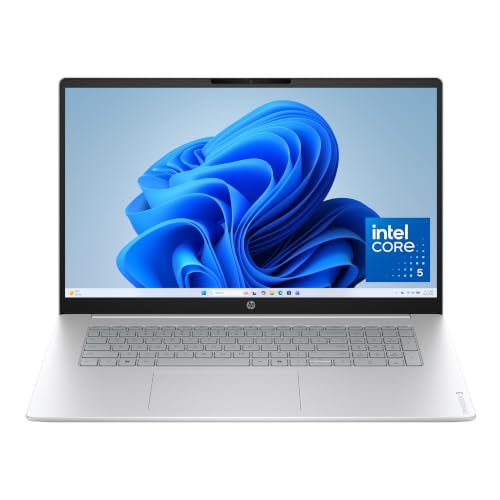
HP renamed its mainstream lines under the OmniBook banner, and this 17.3-inch model — the 17-dk0099nr in Glacier Silver — is the big-screen expression of that reset. The listing states the essentials plainly: a full HD 17.3-inch display, an Intel Core 5 120U processor, 8GB of memory, a 512GB solid-state drive and Intel integrated graphics under Windows 11 Home. Nothing in that sentence reaches for drama, and that is precisely the machine’s character. It is the laptop a household buys when the old one dies and the replacement simply has to work, largely, on the first evening.
The Core 5 120U belongs to Intel’s efficiency-minded family, tuned for the bursty rhythm of real domestic computing — documents, browsing, streaming, school platforms, photo libraries — rather than sustained rendering loads. Paired with a fast SSD, it makes the machine feel alert in the tasks that fill most days. The wide chassis earns its keep with a spacious keyboard deck and room for a numeric keypad, which anyone entering figures into spreadsheets or school accounts will use more than they expect.
The honest limitation sits in the memory line. Eight gigabytes is adequate for the workload described above, yet it is the specification most likely to define this laptop’s lifespan, since heavy browser habits grow heavier every year. Households whose work is genuinely light will never notice; a user who keeps forty tabs beside a video call will. We would rather name that boundary here than let a buyer discover it in year three. As a new, warrantied, current-model big screen at the accessible end of HP’s range, though, the OmniBook 3 understands its assignment completely.
Picture the machine’s actual week and the specification makes more sense. It opens at breakfast for news and weather, runs a morning of documents and email, hosts a grandchild’s homework platform in the afternoon, streams a film after dinner with the screen tilted back on the kitchen counter. The OmniBook’s tuning — an efficiency processor, integrated graphics, a solid-state drive — is aimed squarely at that rhythm, favouring quiet fans and instant wakefulness over benchmark drama. HP’s support network is part of the purchase too: when a household machine falters, a mainstream brand with parts and service everywhere is a different ownership experience from an exotic import, and for many families that difference is the decision.
- Display: 17.3-inch full HD
- Processor: Intel Core 5 120U
- Memory: 8GB RAM
- Storage: 512GB SSD
- Graphics: Intel integrated graphics
- System: Windows 11 Home, Glacier Silver finish, model 17-dk0099nr
Strengths
- A current-generation HP with a full-size deck and numeric keypad, bought new with a standard warranty.
- The efficiency processor and SSD keep everyday tasks feeling quick and the machine quiet.
- Glacier Silver finish and restrained styling suit shared family spaces rather than shouting for attention.
Trade-offs
- 8GB of memory is the ceiling for comfortable multitasking here and the likeliest reason to upgrade sooner.
- Full HD resolution is fine at this size for general use, but photo editors will want more pixels.
- Integrated graphics rule out serious gaming beyond casual and older titles.
One practical note for buyers choosing between this HP and the ASUS below: the two machines are closer in spirit than in detail. The OmniBook is the newer platform wearing HP’s current design language, and its support story is the stronger one for families who want a helpline and local service options. Neither will embarrass the other in daily use, which is why the deciding factors are honestly small — keyboard feel, finish, and which listing’s configuration is in front of you when you order.
Best for: households replacing a faithful old laptop with a big, calm screen for daily work and study.
Not suited for: heavy multitaskers or anyone planning to edit large photo and video projects.

ASUS Vivobook 17 — Budget All-Rounder
ASUS’s Vivobook 17, in this F1704VA-AS34 configuration finished in Quiet Blue, is the traditionalist of the group: a 17.3-inch full HD display, an Intel Core 3 100U processor, 8GB of memory, a 512GB SSD and Windows 11 Home. Where the gram experiments and the Nitro flexes, the Vivobook simply occupies the role that big-screen laptops held for a decade — the family computer, enlarged. There is a real virtue in that clarity, because buyers at this end of the market are usually replacing a machine, not pursuing a hobby.
The Core 3 100U is Intel’s entry efficiency chip, and it is important to be straight about what that means. For documents, web work, streaming, video calls and school platforms it is entirely sufficient, and the SSD keeps the machine feeling responsive in those tasks. For compiling code, editing video timelines or running large creative projects, it is the wrong tool, and no amount of screen size compensates. ASUS spends the money on the parts you touch — the big panel, the wide keyboard deck with its numeric pad, a chassis that does not creak through a day of being moved between rooms.
Consider this the pick for the buyer whose computing life is broad but shallow: many things, none of them punishing. The student whose essays and lectures all happen on one screen. The grandparent whose video calls and photo albums deserve a display that does not make them lean in. The home office that runs on browser tabs and documents. Each of them gets more daily pleasure from the 17.3-inch canvas than from any processor upgrade, and the Vivobook is priced and built around exactly that insight.
The Vivobook also illustrates a truth about this category that buyers resist: for screen-led purchases, the panel is the product and everything else is plumbing. A family upgrading from a cramped 14-inch machine will feel the Vivobook’s extra width in the first hour — two windows open, a film that fills the evening, a video call where faces are life-sized — and will still be feeling it in year four, long after processor differences between entry chips have blurred into irrelevance. ASUS’s hinge and lid design lets the machine sit open on a counter or desk without the wobble that plagues cheaper big laptops, a small engineering courtesy you appreciate every time someone bumps the table.
- Display: 17.3-inch 1080p panel
- Processor: Intel Core 3 100U
- Memory: 8GB RAM
- Storage: 512GB SSD
- Colour: Quiet Blue, model F1704VA-AS34
- System: Windows 11 Home
Strengths
- The full 17.3-inch canvas and numeric keypad at the most approachable end of this roundup.
- Quiet Blue finish and Vivobook build give it a more considered feel than most entry-level big laptops.
- An SSD as standard keeps boot times and everyday responses brisk despite the modest processor.
Trade-offs
- The Core 3 processor is for light workloads; demanding software will expose it quickly.
- 8GB of memory, again, marks the boundary of comfortable multitasking.
- The full HD panel serves general use well but offers nothing extra for colour-critical work.
There is also a household-politics argument for this machine that reviewers underrate: a big, inexpensive laptop becomes shared property without anxiety. Nobody hovers when a child carries the Vivobook to the sofa, nobody winces when it travels to a relative’s house for a weekend of photo sorting. Precious machines get guarded; useful machines get used. For the family that wants the big screen to be a utility rather than a treasure, the Vivobook’s price class is a feature in itself.
Best for: families and students whose days are documents, browsing and calls on the biggest affordable screen.
Not suited for: creative professionals or gamers, whose software needs muscle this chip does not have.

Acer Nitro V 17 — Gaming Muscle
The remaining machines in this guide treat the big screen as a productivity surface; the Nitro V 17 — configuration ANV17-41-R8ML — treats it as a viewport. The listing pairs the 17.3-inch full HD IPS panel with an NVIDIA GeForce RTX 5060 graphics card, 16GB of memory, a 512GB SSD, WiFi 6 and a dual-fan cooling system, running Windows 11 Home. That combination reframes what the diagonal is for: flight-sim cockpits that wrap wider, strategy maps you can read at a glance, racing games where the extra width is information rather than decoration.
The RTX 5060 is the headline, and it changes the machine’s whole category. Current games at full HD are its home territory, and the same GPU accelerates video encoding, 3D work and the growing set of creative tools that offload to graphics hardware. Sixteen gigabytes of memory is the correct partner for it — double what the value picks carry — because games and creative suites are exactly the workloads that punish 8GB. The dual fans are not a styling note; a 17.3-inch gaming chassis has the internal volume to move air properly, and sustained performance in long sessions is where big gaming laptops justify their footprint over slim ones that throttle.
Accept the terms, though. This is a desk machine with a power brick, built to live plugged in near an outlet, and its battery is a bridge between rooms rather than a day’s supply. The styling announces itself. The 512GB drive will fill faster than gamers expect once two or three modern titles land on it. None of that dents its position here: if the big screen is for play first and everything else second, this is the only pick in the guide actually engineered for the job.
The pairing of a full HD panel with the RTX 5060 deserves a word, because it is smarter than it looks. Pushing modern games at higher resolutions is where graphics cards go to struggle; at 1920×1080 the 5060 has headroom to hold smooth frame rates with quality settings up, which is the experience players actually remember. The big IPS panel’s viewing angles suit a second person watching over your shoulder, and the same screen serves strategy and simulation titles — the genres that gain most from sheer width — particularly well. When the machine is not playing, the GPU is not idle decoration either: it accelerates exports in video editors and previews in 3D tools, giving the Nitro a second life as a budget creative rig.
- Display: FHD IPS panel, 17.3-inch
- Graphics: NVIDIA GeForce RTX 5060
- Memory: 16GB RAM
- Storage: 512GB SSD
- Cooling: dual-fan system
- Connectivity: WiFi 6, Windows 11 Home, model ANV17-41-R8ML
Strengths
- A current-generation RTX graphics card behind the biggest panel class, at full HD where it performs best.
- 16GB of memory matches the gaming brief properly, unlike the 8GB value picks.
- Dual-fan cooling in a large chassis sustains performance through long sessions.
Trade-offs
- Built for a desk and an outlet; battery life is for moving rooms, not for a working day unplugged.
- 512GB of storage fills quickly with modern game installs.
- The gaming design language is unmistakable, which not every workplace welcomes.
Budget a second purchase alongside it: storage. Modern game installs are enormous, and 512GB shared with Windows, launchers and a media library leaves room for a handful of big titles at a time. Many gaming chassis in this class accept a second drive or a larger replacement, and even an external SSD for the back catalogue transforms the experience. Treat the fitted drive as the starting point of a gaming library, not its final size, and the Nitro’s one soft specification stops mattering.
Best for: players after a large, immersive screen and current graphics power in one machine.
Not suited for: commuters, and anyone whose day runs a full shift away from a charger.
Dell Inspiron 17 (previous generations) — Used-Market Veteran
For years the Inspiron 17 line was the default answer to this entire category: Dell’s big-screen mainstream laptop, sold in enormous numbers to households and small businesses. Dell has since wound the line down in favour of smaller formats, which is why this pick carries no link — what remains flows through resellers, refurbishers and the used market in configurations too varied to pin to one listing. That afterlife is the pick. A machine built in the hundreds of thousands leaves behind a deep pool of spares, documentation and second-hand stock.
Shopping one demands a different discipline than buying new. Verify the exact processor generation and memory from the seller’s photographs of the system screen rather than the listing headline, because Inspiron 17 models span years of silicon under near-identical shells. Ask about battery health directly; a five-year-old pack is a consumable, not a defect, but its replacement cost belongs in your arithmetic. Check that the machine ships with an SSD — many originals carried spinning drives that make them feel far older than they are — and confirm the Windows licence activates.
Why bother, against three warrantied newcomers above? Because the used pool sometimes prices a well-kept Inspiron 17 with a stronger processor than the entry picks in this guide at money those picks cannot match, and Dell’s service documentation for the line is thorough enough that a confident owner can replace a battery, drive or fan at a kitchen table. It is a pick for deliberate buyers, not first-time ones, and we include it with that warning attached rather than as a bargain mirage.
Two physical checks separate a good used Inspiron from a tired one. Open and close the lid slowly: the hinges on big-screen laptops carry a heavy panel, and a lid that flops or creaks at the corners is telling you its history. Then run the keyboard through every row, because ex-business machines often hide one dead key cluster behind a clean photograph. Ask for the original charger or confirm its wattage matches the model’s requirement — underpowered substitute adapters are the most common quiet downgrade in the used pool, throttling performance and charging slowly while looking perfectly plausible in the listing photos.
- Display: 17.3-inch class panel, specification varies by generation — confirm from the seller’s listing
- Processor: varies across the line’s long production run; verify the exact chip before paying
- Memory and storage: configuration-dependent; favour units already fitted with an SSD
- Battery: treat as a consumable on older units and price a replacement into the deal
- Support: Dell’s published service manuals for the line make owner repairs realistic
Strengths
- A deep used pool means choice, spares and documentation that current niche models cannot match.
- Well-kept units can carry stronger processors than today’s entry-level big screens.
- Serviceable design suits owners comfortable replacing batteries and drives themselves.
Trade-offs
- No single verified configuration exists, so every unit must be checked individually.
- Battery age is the standing risk, and warranty cover depends entirely on the seller.
- Older units with spinning hard drives feel sluggish until upgraded.
Where do the good ones hide? Ex-lease channels and reputable refurbishers who grade honestly are the productive hunting grounds, and a seller who photographs the actual unit — serial plate, ports, keyboard — is worth a premium over one using catalogue images. Time your purchase to business refresh cycles if you can; when companies retire fleets, the used pool briefly fills with uniformly specified, lightly worn machines, and that is when the Inspiron 17’s afterlife offers its best bargains.
Best for: experienced buyers comfortable vetting a used machine in exchange for value.
Not suited for: first-time buyers after a sealed box, a warranty and zero homework.
Lenovo IdeaPad Slim 3 17 — Worth Hunting Down
Lenovo builds a 17.3-inch member of its IdeaPad Slim 3 family, and on paper it is exactly what this category needs more of: a slim, sensible big-screen laptop from the world’s largest PC maker, with the comfortable keyboard Lenovo fits across its consumer range. The complication is distribution. The 17-inch variant appears and disappears across regions and retail channels, surfacing in one market’s catalogue while absent from another’s, which is why it sits here without a link — we could not pin one stable listing as the configuration to recommend.
What to look for when you find one: the IdeaPad Slim 3 line spans several processor generations under the same name, so the chip in the specific unit matters more than the badge. Favour the newest generation on offer, treat 16GB of memory as the configuration worth paying for if it appears, and confirm the panel is full HD, since budget lines occasionally mix resolutions within a family. Lenovo’s keyboard and the line’s generally quiet cooling are the reasons to hunt; the hunt itself is the cost.
Set beside the HP and ASUS picks above, the IdeaPad’s argument is feel rather than specification. If your hands already know Lenovo keyboards from a work machine, the familiarity is worth something real across thousands of hours. If no listing in your region cooperates, the OmniBook and Vivobook cover the same ground with far less effort — this pick is an opportunity to seize when it appears, not a quest to complete at any price.
A practical tip for the hunt: Lenovo sells the same machine under slightly different model codes in different territories, so search by the family name plus the screen size rather than one exact code, and let retailer filters do the narrowing. When a listing appears, the photographs of the keyboard deck are worth more than the headline — they confirm the numeric pad, the layout language and whether the unit is a regional variant with a keyboard you will actually enjoy typing on. A week of patience with saved searches usually surfaces one; a month of it usually surfaces one at a price that justifies the wait.
- Display: 17.3-inch class; confirm full HD resolution on the specific unit offered
- Processor: varies by generation within the line — the exact chip is the detail to verify
- Memory: configurations differ; the larger-memory builds are the ones worth choosing
- Keyboard: Lenovo’s consumer deck, a long-standing strength of the brand
- Distribution: regional and intermittent, which is why no single listing is linked
Strengths
- Lenovo keyboard quality in a slim big-screen chassis is a combination rivals rarely offer.
- The line’s sensible tuning favours quiet, cool running for home and study.
- When it surfaces at mainstream pricing, it competes directly with the HP and ASUS picks.
Trade-offs
- Availability is the problem: it may simply not be on sale where you live.
- Specification varies widely under one name, so careless buying can land an older generation.
- No verified listing means no shortcut — the checking is yours to do.
Students deserve a specific mention here, because the IdeaPad formula — quiet cooling, a keyboard that survives essays, a screen that fits a lecture and notes together — suits coursework unusually well, and the 17-inch version occasionally surfaces in education channels at the start of terms. If you are buying for a student, that seasonal window is the moment to look, and a unit with the larger memory configuration is the one that will still feel adequate in the final year of a degree.
Best for: Lenovo loyalists who find one in stock and can verify its exact configuration.
Not suited for: buyers on a deadline, who need a machine ordered today with certainty.
How Do the Six Compare Side by Side?
| Pick | Screen | Power | Memory / Storage | Character |
|---|---|---|---|---|
| LG gram 17 | 17.0-inch WQXGA touch IPS | Ultra 9-288V, Arc 140V graphics | 32GB / 1TB | The traveller: flagship memory and the sharpest panel, built to be carried |
| HP OmniBook 3 17.3 | 17.3-inch full HD | Core 5 120U, integrated graphics | 8GB / 512GB | The household default: current, warrantied, calm |
| ASUS Vivobook 17 | 17.3-inch full HD | Core 3 100U, integrated graphics | 8GB / 512GB | The traditionalist: big screen and big keys for broad, light work |
| Acer Nitro V 17 | 17.3-inch full HD IPS | RTX 5060 graphics | 16GB / 512GB | The player: discrete GPU and dual fans behind the wide panel |
| Dell Inspiron 17 (older) | 17.3-inch class, check the unit | Generation-dependent; read the seller’s system screen | Confirm SSD fitted before buying | The veteran: value through the used pool and Dell’s manuals |
| Lenovo IdeaPad Slim 3 17 | 17.3-inch class, confirm FHD | Generation-dependent within the line | Prefer the larger-memory builds | The keyboard pick: seize it when regional stock appears |
Is a 17.3-Inch Screen Actually Worth the Desk Space?
The case for the diagonal is arithmetic. A 17.3-inch 16:9 panel offers roughly a third more area than a 15.6-inch screen, and area — not resolution — is what determines whether two windows sit side by side at readable sizes. A document at full width beside a reference page, a spreadsheet beside the email that explains it, a lecture beside your notes: these are the pairings that define knowledge work, and they are cramped or impossible on smaller panels without constant window juggling. Add the numeric keypad the wide chassis makes room for, and data entry stops being a chore performed through an external keyboard.
There is a demographic truth inside the arithmetic, too. Eyes change. The buyer who happily read a 13-inch screen at thirty may find the same panel a strain at fifty, and the 17.3-inch class is where computing stays comfortable without reading glasses becoming part of the equipment. Families discover this when a parent inherits the big machine and suddenly uses the computer twice as much. Screen area is accessibility, and for a growing share of households that settles the question before specifications are even compared.
The case against is equally concrete. These machines span wider than most laptop sleeves, weigh on a shoulder across an airport, and dominate a small desk. Battery designers fight physics here too, since a large backlit panel is the hungriest component in any laptop. The honest summary: if the machine lives on one desk and moves between rooms, the screen pays rent daily. If it commutes, the same screen taxes you daily. Choose by where the laptop will spend its hours, not by the showroom thrill of the big display.
What Should You Check Before Ordering Any Big-Screen Laptop?
Measure your bag and your desk before measuring processors. A 17.3-inch laptop needs a sleeve or compartment rated for the size, and a desk deep enough that the screen sits at arm’s length — closer than that, the width forces head-turning. Check the listing title for the exact memory and storage, since every line in this guide is sold in multiple configurations under one name. Confirm whether memory can be upgraded later if you are buying an 8GB machine with ambitions; in much of this class it cannot, which converts a saving today into a replacement tomorrow.
Do not skip the warranty arithmetic either. A big laptop is a long-lived appliance in most homes, and the difference between a one-year and a longer cover plan matters more on a machine you expect to keep for six years than on a phone you will replace in two. Read what the warranty covers about the battery specifically — on a desk-bound machine the battery still ages, swelling quietly in forgotten cases — and register the product when it arrives, while the receipt and the box are still in the same room.
Then plan the desk around the machine. A big laptop pairs naturally with a separate mouse, and its keyboard deck — however wide — still sits at screen height, so a stand and external keyboard serve anyone working long hours. Verify the ports against your existing monitor, drives and headset before the box arrives, and photograph the listing title at purchase: if a different configuration turns up, that screenshot is your evidence. None of this is glamorous, and all of it decides whether the big screen becomes the household’s favourite tool or its largest regret.
Which Processor Tier Actually Makes Sense at This Size?
Big-screen laptops span a wider performance range than any other class, because the chassis accepts everything from an entry efficiency chip to a gaming GPU, and the screen size tells you nothing about the engine. So decide from software, not from the diagonal. List the three programs you open most. If all three run in a browser, the entry tier in this guide — the Core 3 and Core 5 machines — will feel indistinguishable from the flagship for years, and the money saved buys the bag, stand and keyboard that make the big screen comfortable. Processor envy is the most expensive emotion in laptop shopping, and at this size it usually funds nothing but a warmer palm rest.
The middle tier earns its premium in one specific currency: time inside heavy files. A photographer with a decade of RAW images, a bookkeeper whose spreadsheet recalculates across thousands of rows, a student compiling real code — these users feel processor and memory limits as minutes, daily. For them the gram’s combination of a high-end chip and 32GB of memory is not luxury; it is the difference between a tool and an errand. Judge by the heaviest file you open weekly, not the lightest, and not by the task you might take up someday.
Graphics are a separate axis entirely, and the only one that cannot be faked later. Integrated graphics — fitted to four of these six picks — handle video, casual games and everyday acceleration gracefully, then stop. A discrete card like the Nitro’s RTX 5060 opens modern gaming, GPU rendering and serious 3D, and no setting, driver or wish changes an integrated machine into that. If any program you depend on lists a discrete GPU in its requirements, the shortlist makes itself; if none does, paying for the card buys heat and weight you will never convert into work.
Memory quietly outranks them all for longevity. Processors age gracefully — a five-year-old mid-range chip still opens documents instantly — but memory pressure compounds as software grows, and in this class the memory is frequently soldered. That is the analytical reason this guide keeps returning to the 8GB line in the HP and ASUS picks: not as a criticism of two good machines, but as the single specification most likely to decide whether they serve three years or six.
How Do You Set Up a Big Laptop So Your Neck Forgives You?
A large screen tempts you to work closer and lower than you should. The top of the display belongs near eye level, which on a desk means a stand or a stack of something sturdy under the machine — and the moment the laptop rises, its keyboard leaves comfortable reach, so an external keyboard and mouse stop being accessories and become the setup. This is the hidden bargain of the class: the laptop supplies screen, computer and speakers in one box, and a modest stand-and-keyboard kit turns it into an ergonomic workstation that a desktop would envy, then folds away when the desk is needed for dinner.
Viewing distance matters more with width than with any other dimension. Sit too close to a 17.3-inch panel and your eyes travel constantly, which reads as fatigue by mid-afternoon; push the machine an arm’s length away and the whole canvas falls into a single gaze. Small desks defeat this, which is why the measuring advice earlier in this guide is not filler. If your desk is shallow, a wall-mounted or clamp-arm arrangement for an external display may serve you better than any laptop in this roundup — a conclusion we would rather hand you than sell around.
Sound and light complete the setup. Big laptops carry bigger speakers than their slim cousins, and placing the machine near a wall lets those speakers reflect usefully rather than firing into open air. Keep the screen perpendicular to windows where you can; a wide glossy panel is a wide mirror, and glare across 17 inches is harder to dodge by tilting than on a small screen. Ten minutes spent on placement repays itself every working day the machine serves.
What Are the Common Mistakes With 17.3-Inch Laptops?
Buying the screen and starving everything else leads the list. A huge panel on 8GB of memory and a weak processor produces a machine that displays your frustration at an impressive size. The second error is assuming portability from a product photograph: big laptops look ordinary in pictures, and buyers routinely discover the reality when the box lands on the doorstep. Read the dimensions, weigh your current bag mentally, and be honest about how often the machine will truly move.
Another recurring error is buying a big laptop for a small desk and discovering the geometry too late: the screen sits too close, the elbows have nowhere to go, and the machine that was meant to create space consumes it. The fix costs nothing at shopping time — a tape measure and thirty honest seconds — and everything afterwards. Relatedly, buyers forget that a laptop this wide needs its charger considered as luggage; the brick for a gaming model is itself the size of a small paperback, and it travels with the machine or the machine does not travel.
A third mistake is ignoring the panel specification in favour of the diagonal. Full HD spread across 17.3 inches is comfortable for documents and video, but it is not sharp in the way a higher-resolution panel is; buyers who edit photographs should look hard at the gram’s WQXGA screen or accept the compromise knowingly. Finally, shoppers forget the ecosystem costs — a sleeve that fits, a bag that closes, a desk that accommodates. Budget for the entourage, or the bargain machine becomes an awkward one.
Final Recommendation
If you are torn between the HP and the ASUS, let the keyboard decide: spend your hands’ memory wisely, because you will type on this deck for years, and a layout your fingers dislike is a tax on every single day. If you are torn between the gram and everything else, let the calendar decide — count the days the laptop will leave the house next month, honestly, and let that number speak. And if you are torn about the size itself, borrow the tape measure test: mark the footprint on your desk in painter’s tape for a day, live around it, and see whether the rectangle feels like a promise or a threat.
Match the machine to the room that will house it. For the professional who moves, the LG gram 17 stands alone here — the sharpest screen, the deepest memory, and a design brief that respects your shoulder. For the household desk, the HP OmniBook 3 17.3 is the calm current-model choice, with the ASUS Vivobook 17 beside it for buyers who prefer ASUS’s take on the same job. For play, the Nitro V 17 is the only honest answer in the six. And for the patient, the used Inspiron pool and the elusive IdeaPad Slim 3 17 reward those willing to verify before they pay. Whichever you choose, check price on Amazon against the listing title, and let the configuration printed there — not the photograph, not the headline — be the machine you believe you are buying.
Frequently Asked Questions
Will a 17.3-inch laptop fit in a standard laptop bag?
Usually not. Most everyday backpacks and sleeves are cut for 15.6-inch machines, and a 17.3-inch laptop is wider in every dimension. Look for a bag or sleeve explicitly rated for 17-inch laptops, and check its internal measurements against the laptop’s width rather than trusting the headline size, since gaming models run especially wide.
Is full HD enough on a screen this large?
For documents, browsing, video and everyday work, yes — text remains comfortable at normal viewing distances, and video content is overwhelmingly produced at that resolution. The exception is fine-detail work: photo editing, design and dense spreadsheets all benefit from the higher resolution of a panel like the gram’s WQXGA display, where the extra pixels are genuinely usable.
Can I upgrade the memory later in these machines?
It depends on the model, and in the slimmest designs the memory is soldered permanently. That is why the fitted amount matters so much at purchase in this guide: treat 8GB as a decision about the machine’s whole lifespan, and if your workload is growing, buy the configuration with more memory now rather than planning an upgrade that may not exist.
Why do two picks in this guide have no purchase link?
Because no single stable listing represents them honestly. The Dell Inspiron 17 survives through resellers in dozens of configurations, and Lenovo’s 17-inch IdeaPad Slim 3 appears only intermittently by region. Rather than link a listing that might describe a different machine, we describe what to verify on whichever listing you find.
Do 17.3-inch laptops run hot or loud?
The size works in their favour. A large chassis has room for bigger fans and longer heat paths than a slim 14-inch machine, so the efficiency-based picks in this guide — the HP, ASUS and LG — run quietly through ordinary work. The exception is any gaming model under load: the Nitro’s dual fans are audible when the graphics card works hard, which is the honest price of sustained performance in a closed box.
Is a big-screen laptop a good replacement for a desktop?
For most households, yes. A 17.3-inch laptop covers documents, browsing, streaming, school and office work with a screen large enough to skip an external monitor, and it can still be folded away or carried to another room — something no desktop offers. Sustained heavy gaming, rendering or multi-monitor setups remain desktop territory.
Related Guides
Still weighing screen size against battery endurance? Our guide to 17.3-inch laptops judged on battery performance looks at this same diagonal through an unplugged lens. If one brand already has your loyalty, the roundup of HP’s 17-inch Hewlett Packard laptops sorts that catalogue by line and purpose. And for buyers who know the processor they want, the guide to 17-inch laptops built around Intel’s i7 processors starts from the chip and works outward.


