What's inside
- Key Takeaways
- Quick Picks
- How We Chose These Picks
- Comparison
- What Does 64GB Actually Unlock, Workload by Workload?
- How Is 64GB Different From the 32GB Tier You Are Probably Leaving?
- How Should You Verify the Memory Figure Before Ordering?
- How Does Memory Interact With the Processor and Storage Around It?
- Which Professions Should Treat 64GB as Their Default?
- How Will a 64GB Machine Feel Different in the First Week?
- Common Mistakes
- How Should a Team Standardise on a 64GB Fleet?
- Final Recommendation
- Frequently Asked Questions
- Related Guides
As an Amazon Associate I earn from qualifying purchases. This post may contain affiliate links at no extra cost to you.
widgetverdict.com is reader-supported. When you buy through links on our site, we may earn an affiliate commission.
Memory is the specification that decides how a laptop ages, so the best 64gb ram laptops are bought by people who have already lived the alternative: the machine that was fast in year one and breathless in year three, swapping to disk while a deadline watched. Sixty-four gigabytes is where that story ends for most professional workloads — virtual machines run concurrently instead of consecutively, datasets stay resident instead of reloading, and the browser’s hundred tabs stop being a performance decision. This guide maps the verified 64GB machines across business, workstation and flagship classes, plus one 128GB machine included deliberately and labelled as exceeding the topic’s figure.
Five machines carry verified links: a Lenovo business flagship, two Dell Precision workstations at 64GB and 128GB, a Lenovo P16 workstation with a 3840×2400 touchscreen, and a Lenovo P16s with a 4K OLED panel. One further machine — Apple’s top MacBook Pro configuration class — is covered without a link. Follow a linked name to check price on Amazon and confirm the memory figure on the listing itself; in this category above all others, the RAM line is the contract, and it must be read, not assumed from the model name.
The sections after the picks explain what 64GB actually unlocks workload by workload, how it differs from the 32GB tier most buyers are upgrading from, why memory you cannot upgrade later must be bought generously now, and the narrow set of users for whom even 64GB is a waypoint rather than a destination. If you are cross-shopping this guide against thinner, cheaper machines, those sections are the argument — made in workloads, not adjectives.
Key Takeaways
- 64GB is the tier where memory stops being a daily negotiation for virtualisation, large datasets, heavy multitasking and professional creative work.
- The ThinkPad T16 Gen 4 is the business expression: 64GB of DDR5, a 2TB drive and Ryzen AI Pro power in a mainstream 16-inch chassis.
- Dell’s Precision 7680 pairs its 64GB with an HX processor and professional RTX 1000 graphics for engineering-grade loads.
- The ThinkPad P16 matches the memory figure and adds a 3840×2400 touchscreen — the highest-resolution panel among the linked picks.
- The P16s Gen 4 combines 64GB with a 4K OLED touchscreen and 2TB of storage in a genuinely portable workstation.
- The Precision 7780’s 128GB is included as the labelled exception: double the topic’s figure, for the workloads that already know they need it.
Quick Picks
| Pick | Badge | Why it earns a place |
|---|---|---|
| Lenovo ThinkPad T16 Gen 4 | The business 64GB standard | Ryzen 7 AI Pro, 64GB of DDR5 and 2TB of storage in Lenovo’s mainstream 16-inch workhorse. |
| Dell Precision 7680 | The workstation 64GB | An i7 HX chip and RTX 1000 professional graphics behind the same generous memory figure. |
| Lenovo ThinkPad P16 | The high-resolution workstation | 64GB of DDR5 and a 3840×2400 touchscreen in a 20-core mobile workstation. |
| Lenovo ThinkPad P16s Gen 4 | The OLED portable | 64GB, 2TB and a 4K OLED touchscreen in the slimmest workstation body here. |
| Dell Precision 7780 (128GB) | The exception — 128GB, double the topic figure | Included for buyers whose workloads have already outgrown 64GB and can prove it. |
| Apple MacBook Pro (top memory configurations) | The unified-memory route | Apple’s flagship in its high-memory builds, where the pool is shared between CPU and GPU. |
How We Chose These Picks
The memory figure was verified, not inferred. Every linked pick’s listing states 64GB — or, for the labelled exception, 128GB — in its own title, because in this category the model name alone guarantees nothing: the same laptop line ships in 16GB, 32GB and 64GB builds that are outwardly identical. A guide that linked a model name and hoped the configuration followed would be gambling with its readers’ money, so the listings here were checked at the figure this topic is about.
Beyond the headline number, we weighed what surrounds it. Memory without storage becomes a fast machine that cannot hold its own working set, so the 2TB drives on several picks counted heavily. Processor class was matched to memory ambition: the HX chips in the workstations sustain the parallel workloads that consume 64GB, while the business pick’s efficiency-oriented Ryzen suits the virtualisation-and-office pattern its buyers actually run. Graphics were scored by role — professional RTX where engineering is the job, integrated where it is not — rather than by a single ladder.
Platform honesty shaped the prose entry. Apple’s high-memory MacBook Pro configurations belong in any complete map of this tier, but their unified-memory architecture and configuration matrix resist a single representative listing, so the machine is discussed on its own terms. The comparison it invites — shared pool versus dedicated pools — is one of the genuinely interesting decisions in this category, and the guide treats it as a decision rather than a footnote.
Finally, the exception was included on purpose and labelled in every position it occupies. A 128GB machine in a 64GB guide could look like carelessness; it is instead a signpost for the minority whose workloads — simulation, enormous datasets, many concurrent virtual machines — have measured themselves past 64GB. Everyone else should read its entry as the boundary marker that confirms 64GB is, for them, the destination rather than a compromise.
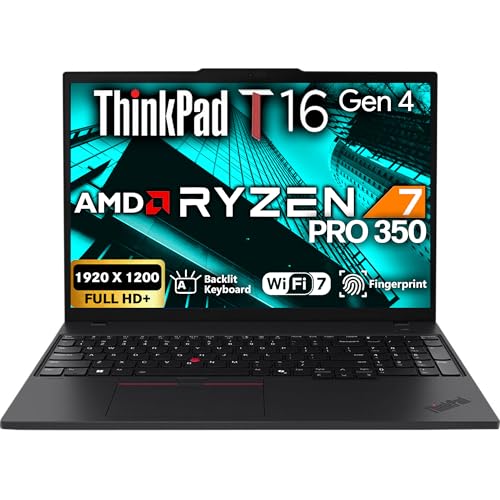
Lenovo ThinkPad T16 Gen 4 — The business 64GB standard
The T16 Gen 4 is what 64GB looks like when it grows up and gets a normal job. Lenovo’s T series is the default corporate laptop of the last two decades, and this configuration — an AMD Ryzen 7 AI Pro 350, 64GB of DDR5 memory, a 2TB solid-state drive — turns that dependable formula toward the workloads that define modern knowledge work: two virtual machines running while the host handles mail and documents, a local dataset open beside the analysis that consumes it, a development environment with containers that no longer needs to be shut down before the video call. Nothing about the machine is theatrical, and that is its credential.
The supporting details read like a facilities manager’s checklist, in the best sense. The 16-inch FHD+ display gives spreadsheets and code the vertical room the work wants. A 5MP webcam respects the reality that this machine’s owner lives in meetings. A fingerprint reader, a backlit keyboard and an RJ-45 Ethernet port cover the security, the late hours and the wired reliability that corporate life demands — the Ethernet port in particular is a small manifesto, since data-heavy work still moves fastest down a cable. Wi-Fi 7 handles the rest of the building.
Who is it for, precisely? The analyst whose models outgrew 32GB; the developer running a local stack that resembles production; the IT professional keeping several client environments alive on one machine; the consultant whose laptop is the office. What it is not is a graphics machine: integrated graphics bound it to productivity, virtualisation and analysis, and buyers whose work is rendering or engineering viewports should be reading the Precision and P16 entries below. Within its brief — memory-hungry knowledge work in a supportable business chassis — the T16’s combination of 64GB, 2TB and ThinkPad serviceability is the most complete answer in this guide.
Ownership economics seal the case. A business laptop’s cost is dominated by the years it remains adequate, and memory is the component whose inadequacy retires machines early. This configuration buys those years in advance, at the moment they are cheapest. The buyer who specced 32GB to save money in year one and replaces the machine in year three has not saved money; they have rented a laptop at a punishing rate. The T16 at 64GB is the alternative arithmetic, wearing a grey chassis.
- Memory and storage: 64GB DDR5 RAM, 2TB SSD
- Processor: AMD Ryzen 7 AI Pro 350
- Display: 16-inch FHD+
- Working details: 5MP webcam, fingerprint reader, backlit keyboard, RJ-45 Ethernet
- Connectivity: Wi-Fi 7 and Bluetooth
Strengths
- 64GB with a 2TB drive removes both ceilings knowledge work hits.
- Business-grade ports and security suit managed professional life.
- ThinkPad serviceability stretches the machine’s useful years.
Trade-offs
- Integrated graphics exclude rendering and heavy engineering viewports.
- FHD+ panel is a working screen, not a showcase.
- Specification is aimed at productivity, not creative finishing.
Best for: analysts, developers and consultants running virtual machines and large datasets daily.
Not suited for: 3D artists whose pipelines depend on a discrete graphics card.

Dell Precision 7680 — The workstation 64GB
Where the T16 spends its 64GB on virtualisation and data, the Precision 7680 spends it in the machine shop and the design office. The memory figure is identical; everything around it is re-aimed at engineering. An Intel Core i7-13850HX — a high-power processor built for sustained loads — drives assemblies and analyses that run for hours. An NVIDIA RTX 1000 with 6GB brings the professional graphics family and its certified drivers, the combination that CAD vendors test and support. Read the two 64GB picks side by side and the category’s real lesson appears: the number is the same, the machine is a different profession.
The rest of the configuration supports the engineering brief without waste. A 1TB NVMe drive holds active project sets, with the understanding that engineering archives live on network storage in most practices. The 16-inch FHD+ panel is the workstation pattern — a control surface, with review work destined for external monitors. Windows 11 Pro and the support tier named in the listing, Pro Support Plus, place the machine inside Dell’s professional ecosystem, where downtime is a priced and planned event rather than a surprise.
For the buyer choosing between this and the T16, the deciding question is embarrassingly simple: does your work need certified professional graphics? If the week is CAD, simulation prep and technical documentation, the Precision is the 64GB machine whose memory feeds a workstation’s appetite. If the week is virtual machines, data and documents, the same money in the T16 buys a terabyte more storage and a lighter ownership experience. Neither answer is a compromise; they are two correct responses to two different jobs that happen to share a memory figure.
Against the larger Precision below, the 7680’s discipline is its ceiling: 64GB, deliberately, where its sibling doubles it. Engineering practices whose assemblies are large but whose simulations are moderate will find this ceiling exactly where their workloads end. The machine’s honesty about that — a complete workstation specification with nothing inflated for spectacle — is why it anchors the middle of this guide.
- Memory: 64GB RAM
- Graphics: NVIDIA RTX 1000 with 6GB — professional, certified-driver family
- Processor: Intel Core i7-13850HX
- Storage: 1TB NVMe SSD
- Display and support: 16-inch FHD+, Pro Support Plus named in listing, Windows 11 Pro
Strengths
- 64GB feeding certified graphics and an HX processor is a complete engineering spec.
- Professional support culture matches department purchasing.
- Balanced configuration wastes nothing on spectacle.
Trade-offs
- 1TB of storage is the tightest among the workstation picks here.
- Too heavy and power-hungry for daily cross-city carrying.
- Buyers not using certified graphics pay for a programme they skip.
Best for: engineers whose assemblies and analyses have outgrown 32GB workstations.
Not suited for: virtualisation specialists who would rather have the T16’s storage and lightness.

Lenovo ThinkPad P16 — The high-resolution workstation
The ThinkPad P16 brings something none of the other linked picks offer: a screen that matches its memory’s ambition. Its 16-inch touchscreen runs 3840×2400 — a genuinely ultra-high-resolution panel, above the topic’s usual fare — in front of an Intel Core i7-14700HX that its listing counts at 20 cores, 64GB of DDR5 memory and a 1TB PCIe drive. For the professional whose 64GB workload is visual — geospatial data, medical or technical imaging, dense CAD review, high-resolution photo and design work examined at full fidelity — this is the pick where the display stops being the compromise the other workstations make.
Lenovo’s P series is its full-strength mobile workstation line, and the P16’s specification reads accordingly: Thunderbolt 4 for the desk, Wi-Fi 6E for the building, a backlit keyboard for the hours, Windows 11 Pro for the domain. The touchscreen is more than a gesture at modernity in this context — review work, markup and direct manipulation of visual material are genuine workstation tasks, and a panel you can touch while you inspect it at 3840×2400 is a coherent tool rather than a spec-sheet flourish.
Set it against its guide-mates honestly. It carries no professional discrete GPU claim in its listing, so engineering buyers who need certified graphics should weigh the Precision 7680’s RTX 1000 carefully against this machine’s screen. Its 1TB drive matches the Dell and trails the 2TB Lenovos. What it owns outright is the visual workstation niche at 64GB: the analyst of images, maps and dense interfaces, whose memory feeds data and whose eyes feed on pixels. That buyer has been underserved by plain-panelled workstations for years, and the P16 is the correction.
Portability sits where a 16-inch workstation’s should: movable between desks and sites, not a companion for all-day carrying. Battery expectations should be set by the panel — driving that many pixels is honest work — and by the HX processor’s appetite. Judged as the high-resolution member of the 64GB class, the P16 earns its place by refusing the category’s usual trade, and professionals with visual workloads will feel the refusal daily.
- Memory and storage: 64GB DDR5 RAM, 1TB PCIe SSD
- Display: 16-inch touchscreen, 3840×2400
- Processor: Intel Core i7-14700HX (20-core, per listing)
- Connectivity: Thunderbolt 4, Wi-Fi 6E
- Platform: Windows 11 Pro, backlit keyboard
Strengths
- The highest-resolution screen among the linked picks, with touch.
- 64GB behind a 20-core HX processor suits data-heavy visual work.
- Full-strength P-series build and connectivity.
Trade-offs
- No certified discrete GPU is claimed in the listing for CAD buyers.
- The dense panel and HX chip tax battery endurance.
- 1TB of storage trails the 2TB configurations in this guide.
Best for: imaging, geospatial and design professionals whose 64GB work is visual.
Not suited for: engineers who require certified professional graphics drivers.

Lenovo ThinkPad P16s Gen 4 — The OLED portable
The P16s Gen 4 asks what happens when the 64GB tier stops accepting that memory must live in a heavy chassis. Its verified specification — a Ryzen AI 7 processor, 64GB of memory, a 2TB drive — arrives in Lenovo’s slim mobile-workstation body, behind a 16-inch 4K OLED touchscreen that gives this guide its most beautiful working surface. For the professional whose memory-hungry work travels — the consultant with local datasets, the developer with a containerised stack, the analyst who reviews at client sites — this is the pick that removes the choice between capacity and portability.
Graphics honesty is required, and given: the Radeon 860M is integrated graphics. The P16s is therefore a memory-and-screen machine, not a graphics machine — its 64GB serves virtualisation, data, development and document-scale professional work, while GPU-bound rendering and certified CAD belong to the Precision entries. Within that truth, the specification is superbly judged: the 2TB drive matches the memory’s ambition, two Thunderbolt 4 ports dock it into a full desk, Wi-Fi 7 keeps it current, and the Copilot+ platform places it in the newest generation of Windows machines.
The OLED panel deserves its own sentence of caution alongside the praise. For the mixed, moving content of ordinary professional work it is simply gorgeous — contrast that makes dense dashboards and documents legible at a glance. Owners whose screens hold one static interface at full brightness for entire days should apply the usual OLED awareness. For the travelling professional this machine targets, whose content varies by the hour, the panel is the reward the category usually withholds.
Against the T16 — its closest relative in spirit — the P16s trades the business checklist (Ethernet, the mainstream chassis) for the OLED screen, the slimmer body and the workstation badge. Against the P16, it trades the 3840×2400 touch panel’s resolution for OLED quality and portability. These are taste-and-itinerary decisions, not quality rankings, and the guide’s comparison table lays them side by side so the traveller and the desk-bound can each find their machine.
- Memory and storage: 64GB, 2TB
- Display: 16-inch 4K OLED touchscreen
- Processor: AMD Ryzen AI 7 (Copilot+ PC)
- Graphics: AMD Radeon 860M — integrated
- Connectivity: 2× Thunderbolt 4, Wi-Fi 7, fingerprint reader
Strengths
- 64GB and 2TB in the most portable workstation body in this guide.
- 4K OLED touchscreen is a superb surface for review work.
- Current platform with Thunderbolt 4 docking and Wi-Fi 7.
Trade-offs
- Integrated graphics exclude GPU rendering and certified CAD.
- OLED needs ordinary awareness under static all-day interfaces.
- Premium pricing buys portability as much as capacity.
Best for: travelling professionals whose memory-heavy work is data, code and documents.
Not suited for: GPU-bound artists and engineers needing discrete graphics.

Dell Precision 7780 (128GB) — The exception — 128GB, double the topic figure
This entry breaks the topic’s number on purpose, and says so everywhere it appears: the Precision 7780 carries 128GB of memory, twice the figure this guide is named for. It is included because a real minority of readers arrive at a 64GB search already suspecting their workload has outgrown it — simulation meshes, genomic-scale datasets, a host running half a dozen virtual machines for a test lab — and a guide that hid the next tier from them would be tidier and less useful. Everyone else should read this entry as a boundary stone: it marks where 64GB ends, and its price and mass are the toll for crossing.
The specification justifies the toll where the workload does. An Intel Core i9-13950HX feeds the parallel stages; an NVIDIA RTX Ada 3500 with 12GB of graphics memory serves the largest viewports and GPU-accelerated work in this guide; a 2TB NVMe drive holds the result files that memory-hungry disciplines produce like weather. The 17.3-inch FHD panel is the familiar workstation economy — the real visualisation happens externally — and the chassis is a desktop replacement in the full sense: a studio that can relocate, not a laptop that commutes.
The decision discipline matters more here than any specification. Buy this machine when you can name the workload and its measured memory appetite — a study that peaked, a lab configuration that swaps, a dataset that will not load — because 128GB bought on a feeling is the most expensive reassurance in computing. Buy the 64GB picks when the feeling is all you have; they will carry you further than anxiety predicts, and the money saved funds the storage, screens and software the work also needs.
For the reader who does cross the boundary, ownership is correspondingly serious: this is capital equipment, bought with support expectations, desk infrastructure and a workload queue worthy of it. The guide salutes that reader and returns the rest to the 64GB tier with confidence — the destination this topic promises, delivered by four distinct machines above, is a genuinely capacious place to work.
- Memory: 128GB — twice this guide’s headline figure, stated openly
- Graphics: NVIDIA RTX Ada 3500 with 12GB
- Processor: Intel Core i9-13950HX
- Storage: 2TB NVMe SSD
- Display and form: 17.3-inch FHD, desktop-replacement chassis
Strengths
- Memory headroom for simulation and dataset workloads beyond 64GB.
- The strongest graphics and processor pairing in this guide.
- Storage depth matches the data its workloads generate.
Trade-offs
- Double memory most buyers need, at a flagship’s price and mass.
- Desktop-replacement size ends daily portability.
- Internal panel is plain beside the machine’s other figures.
Best for: simulation and data specialists with measured workloads past 64GB.
Not suited for: buyers upgrading on anxiety rather than evidence.
Apple MacBook Pro (top memory configurations) — The unified-memory route
Apple’s flagship belongs in this map because its high-memory configurations compete for exactly the buyers this guide serves — developers, data scientists, media professionals — while playing by architectural rules of their own. In Apple’s design the memory is a single unified pool shared by processor and graphics, so a high-memory MacBook Pro configuration spends its gigabytes on whatever the moment demands: a dataset, a render’s geometry, a wall of containers. For workloads that straddle CPU and GPU, that flexibility is a genuine structural advantage, and it is why the machine cannot be assessed by simply matching its figure against the Windows picks’ dedicated pools.
It is covered in prose because the configuration matrix — chip tiers crossed with memory and storage steps, all sealed at purchase — has no single representative listing, and because the buying decision is an ecosystem decision first. The disciplines, though, rhyme with the rest of the guide: buy the memory generously because it can never be added; count the storage with the same suspicion; and verify the exact configuration with a care this category’s identical-looking product names demand.
For the macOS-committed professional, the top configurations of this line are the 64GB-class answer, with efficiency and silence the Windows workstations do not attempt. For the Windows-committed, the machine is a reminder that the tier is contested across platforms — and that the correct first question in this category is not which laptop, but which memory architecture your workload thinks in.
- Class: flagship line in high-memory unified configurations
- Memory architecture: single pool shared by CPU and GPU
- Design: sealed — memory and storage fixed at purchase
- Availability: configuration matrix via Apple’s channels; no single listing represents it
- Role in this guide: the cross-platform alternative at this tier
Strengths
- Unified pool flexes between processor and graphics demands.
- Efficiency and quiet suit home studios and shared offices.
- High-memory builds serve development and data work superbly.
Trade-offs
- Nothing is upgradeable after the order is placed.
- Memory steps on the order page climb in price steeply.
- Windows-only tools require a separate solution.
Best for: macOS professionals whose workloads straddle CPU and GPU memory.
Not suited for: buyers who need Windows-native or certified CAD environments.
Comparison
| Pick | Memory | Processor | Storage | Display |
|---|---|---|---|---|
| ThinkPad T16 Gen 4 | 64GB DDR5 | AMD Ryzen 7 AI Pro 350 | 2TB SSD | 16-inch FHD+ |
| Dell Precision 7680 | 64GB | Intel Core i7-13850HX | 1TB NVMe SSD | 16-inch FHD+ |
| ThinkPad P16 | 64GB DDR5 | Intel Core i7-14700HX | 1TB PCIe SSD | 16-inch touch, 3840×2400 |
| ThinkPad P16s Gen 4 | 64GB | AMD Ryzen AI 7 | 2TB | 16-inch 4K OLED touch |
| Dell Precision 7780 | 128GB | Intel Core i9-13950HX | 2TB NVMe SSD | 17.3-inch FHD |
| MacBook Pro (top configurations) | High-memory unified builds | Apple silicon tiers | Chosen at purchase | Liquid Retina XDR class |
What Does 64GB Actually Unlock, Workload by Workload?
Virtualisation is the clearest case. A single well-provisioned virtual machine wants a double-digit share of memory; two or three concurrent machines — a test environment, a client image, a legacy system kept alive for one application — turn 32GB into an exercise in shutting things down. At 64GB the concurrent set simply runs, and the professional’s day stops being punctuated by the spin-up and spin-down of environments. Developers running containerised stacks feel the same unlock in miniature: the whole production-like environment, locally, all day, without the memory triage that teaches bad shortcuts.
Data work is the second case. Datasets that must be sampled or streamed at 32GB can be held whole at 64GB, and whole-dataset work is not merely faster — it is different work, because the analyst stops designing around the tool’s limits and starts asking the questions the data actually raises. The same logic governs media: large photo libraries in a single session, video timelines with generous cache, audio projects with sampled instruments resident. Creative tools publish minimums that keep them running and recommended figures that keep them pleasant; 64GB is where the pleasant figures live.
Multitasking is the third case, and the most universal. The modern professional’s memory bill is a sum of unglamorous parts — browser, mail, documents, calls, the specialist application — each modest, together formidable. At 64GB the sum stops mattering. That sounds like a small mercy until it is priced in attention: every swap-induced stall is a broken thought, and a machine that never stalls is, in the only accounting that matters, a machine that returns concentration to its owner all day long.
How Is 64GB Different From the 32GB Tier You Are Probably Leaving?
Thirty-two gigabytes is a respectable figure that most professional machines now treat as the ceiling of ordinary, and for ordinary work it suffices — which is exactly why the upgrade decision confuses people. The difference is not speed on the tasks both tiers can do; a document opens identically. The difference is the set of tasks that exist at all: the second virtual machine, the whole dataset, the render cache, the development stack left running through the meeting. Buyers should therefore not ask whether 64GB is faster, but whether their work contains tasks they currently route around — to a server, to a colleague’s machine, to overnight — because those routed-around tasks are the tier’s true content.
Longevity arithmetic sharpens the point. Software’s memory appetite grows by accretion, year on year, and the machine bought at the tier boundary retires when the growth crosses it. A 32GB machine bought today for heavy work is bought close to its ceiling; a 64GB machine has a generation of growth in hand. Since memory in most modern laptops is fixed at purchase, the tier decision is effectively the service-life decision — the cheapest years of a laptop’s life are the ones bought as headroom on day one.
There is also an honesty owed in the other direction. Plenty of professionals — writers, managers, sales staff, anyone whose heaviest application is a browser — will never present a 64GB workload, and for them this entire guide is an elegant irrelevance. The tier is a tool, not a status. The readers it serves can name their routed-around tasks; readers who cannot name one should close the guide with the money unspent and the guide’s respect.
How Should You Verify the Memory Figure Before Ordering?
Read the listing’s own specification, and then read it again on the manufacturer’s page for the exact model code. This category is the marketplace’s easiest place to buy wrong, because one product name spans memory figures from 16GB to 64GB and the buy box does not always hold the configuration the title describes. The linked picks in this guide were verified at their stated figures; the unit you land on deserves the same thirty seconds, with the memory line, the storage line and the processor line each confirmed against the maker’s documentation.
Distinguish, too, between memory installed and memory architecture. On the Windows picks, the figure is system RAM in the conventional sense; on the Apple route, it is a unified pool the graphics share — the same number, a different meaning, and a comparison this guide has flagged rather than fudged. Buyers cross-shopping the platforms should compare workloads, not figures: run your heaviest day mentally on each architecture and buy the one whose pool your day actually fills.
Finally, treat any listing ambiguity as information. A seller who cannot state the memory figure plainly, or whose specification table contradicts its title, has told you how the warranty conversation will go. In a category where the headline number is the entire purchase, clarity about that number is the seller’s first test — and the good listings, including every linked pick here, pass it in their opening lines.
How Does Memory Interact With the Processor and Storage Around It?
Memory does not work alone, and a 64GB figure bolted to the wrong partners disappoints in predictable ways. The processor decides how quickly the resident data is actually processed: the HX chips in this guide’s workstations exist because parallel workloads — solvers, compilers, encoders — convert cores into throughput, while the efficiency-oriented processors in the business and portable picks trade peak parallel speed for the endurance and thermals their owners’ days require. Neither is a mistake; a mismatch is. Sixty-four gigabytes feeding a processor that cannot use it is a warehouse served by a bicycle path.
Storage is the second partner, and its role is subtler than capacity. When memory is generous, the drive’s job changes: it becomes the loading dock rather than the overflow car park, and its speed shows up at the day’s edges — the dataset’s first load, the project’s open, the archive’s save — rather than in constant swapping. This is why the guide weighs the 2TB configurations so warmly: at this tier the question is rarely whether the drive is fast enough, but whether the working set’s home is roomy enough that the memory above it is spent on work instead of on compensating for evictions.
The third partner is the one buyers forget: the operating system and the software’s own ceilings. A 64-bit professional stack uses the tier fully; legacy 32-bit tools inside it cannot address the memory they sit within, which is why the upgrade sometimes disappoints an owner whose bottleneck was an application, not the machine. The diagnostic discipline is to watch the memory graph during your heaviest hour before buying: if the line never approached the ceiling, the constraint lives elsewhere, and this guide’s money is better spent there. Evidence first — the sermon of every section in this guide, applied to its own topic.
Which Professions Should Treat 64GB as Their Default?
Software engineers building modern stacks lead the list, because the local environment has quietly become a small data centre: containers, databases, emulators, indexing services and the editor that orchestrates them. Data scientists and analysts follow, their datasets growing with their organisations’ record-keeping. Virtualisation-dependent professions — IT consultants, support engineers, trainers who demonstrate inside virtual labs — treat the tier as the price of simultaneity. Engineers and media creators arrive by their own roads, mapped in this site’s companion guides.
The common thread is not prestige or even raw power; it is concurrency. Each of these professions runs several memory-hungry things at once and suffers when the set must be pruned. The 64GB tier is, functionally, the concurrency tier — the point where the set stops being pruned. Professions whose work is sequential, one application deep, will find their money better spent on screens, storage or a lighter chassis, and the guide’s honesty about that boundary is what makes its recommendation meaningful inside it.
Organisations standardising a fleet should read the tier as a retention decision. A 64GB fleet costs more this quarter and replaces later, disrupts less, and supports the software estate’s growth without a mid-life memory crisis that sealed machines cannot answer. The arithmetic belongs to whoever owns the replacement budget; this guide merely notes that the arithmetic, done honestly over four years, favours headroom with a consistency that surprises finance teams the first time and never the second.
How Will a 64GB Machine Feel Different in the First Week?
The honest answer is: quieter. Nothing dramatic happens, and that is the drama. The virtual machine you used to close before the call is simply still there after it. The dataset loads once, in the morning, and the afternoon’s questions are answered from memory rather than from disk. The development stack survives the meeting. Owners upgrading from 32GB consistently describe the change in negatives — the stall that did not come, the restart that was not needed, the tab that was not closed — because memory headroom is experienced as the absence of friction, and friction’s absence takes a week to notice and a day, back on a lesser machine, to miss.
Set the machine up to keep that promise. Migrate the full working set rather than a curated subset — the point of the tier is that curation is optional now — and let the environments, libraries and archives live locally where the memory can serve them. Configure the backups with the same generosity, because a machine that holds more of your work is a machine whose loss would cost more; headroom and backup discipline scale together, or the first eventually mocks the second.
Then do the experiment that converts sceptics: repeat your worst remembered hour from the old machine — the deadline afternoon, the demo, the dataset that would not load — on the new one, and watch it pass without incident. That hour is the purchase’s receipt. Keep it in mind a year later, when the tier has become invisible and someone asks whether 64GB was worth it. It was worth exactly that hour, repeated on every hard day since, which is how professional equipment always justifies itself: not in the benchmark, but in the afternoons that stopped going wrong.
Common Mistakes
Buying the model name instead of the configuration is this category’s defining error, and it is committed daily by intelligent people in a hurry. The 64GB figure lives in a specific build of a specific line; the badge on the lid is silent about it. Every protection is procedural — verify the figure on the listing, cross-check the model code, confirm on arrival — and every horror story in this market begins with one of those steps skipped.
Starving the rest of the specification to reach 64GB is the second error. Memory paired with a cramped drive produces a machine that holds its work in RAM and exiles it everywhere else; memory paired with a weak processor produces headroom nothing can use. The linked picks were chosen for balance around the figure — storage, processor class and platform all sized to the memory’s ambition — and buyers assembling alternatives should hold any candidate to the same whole-machine test.
Assuming memory can be added later is the third, and the most era-specific. A shrinking minority of laptops still offer accessible slots; the sealed designs dominating this tier do not, and the time to discover which kind you bought is before the order, in the maker’s service documentation. Where upgradability exists it is a genuine virtue worth weighing; where it does not, the purchase figure is the lifetime figure, and it should be bought like one.
Lastly, buying 128GB on a suspicion wastes the tier’s economics as surely as buying 32GB on a hope wastes a machine’s life. The exception pick in this guide is labelled, priced and massive for a reason. Evidence — a measured peak, a named workload — is the only key that should unlock it.
How Should a Team Standardise on a 64GB Fleet?
Departments buying this tier at scale face a version of the individual decision with the variables renamed. The first is image discipline: a standard software build deployed across every seat behaves identically only when the hardware beneath it has uniform headroom, and 64GB is the figure at which the standard image — virtualisation tools, security stack, the firm’s specialist applications — stops needing per-role exceptions. Exceptions are where fleet costs breed; the tier’s uniformity is a management feature as real as its capacity.
The second variable is the replacement cycle. Fleets are retired on schedules, and a memory-generous fleet’s schedule stretches because the machines remain adequate through software generations that retire lesser fleets mid-contract. Procurement teams should model the tier against the full cycle — purchase, support years, residual value — rather than against this quarter’s unit price, where it will always look extravagant. The workstations and business machines in this guide hold value unusually well precisely because their memory figure stays respectable; a three-year-old 64GB laptop is a plausible hand-me-down, while a three-year-old 16GB machine is e-waste with a keyboard.
The third variable is supportability, and it argues for concentrating the fleet within one maker’s ecosystem where possible — shared docks, shared parts, one support relationship — chosen from the families represented here. The individual buyer can afford eclecticism; the fleet cannot. Whichever ecosystem a department chooses, the discipline that matters is the one this guide has repeated for individuals, scaled: verify the figure on every configuration, because fleet orders are where a single misread line item replicates itself a hundredfold.
Final Recommendation
Let the workload choose among equals. The ThinkPad T16 Gen 4 is the default 64GB machine for knowledge work: memory, a 2TB drive and business manners in the class’s most serviceable form. The Precision 7680 is the engineer’s version, its identical memory figure feeding certified graphics and HX power. The ThinkPad P16 owns the visual niche with its 3840×2400 touchscreen, and the P16s Gen 4 owns the road, pairing 64GB with an OLED screen in a body that travels. The Precision 7780 stands at the boundary with its 128GB, for the measured few. The MacBook route serves the macOS professional whose memory should be one flexible pool.
Whichever machine you order, verify the figure on the listing, balance the specification around it, and buy the headroom your next three years require. Memory is the one component whose generosity you will feel every single day and whose stinginess you will also feel every single day — this tier exists so that the feeling is the former, and every pick above delivers it in a different professional dialect.
Students in technical disciplines should take a particular hint from this tier’s logic, even if their own purchase sits below it. The habit being taught — measure the workload, buy headroom against its growth, verify the figure rather than the badge — is the entire discipline of professional hardware buying in miniature, and it transfers to every category this site covers, from graphics cards to the workstations in the companion guides. A graduate who buys their first machine that way has learned something no syllabus lists: that equipment decisions are engineering decisions, made with evidence, against requirements, for a service life — and that the cheapest machine is very often the one that only had to be bought once.
So run the measurement before the money: one heavy hour, honestly observed, memory graph in view. If the line crowds the ceiling of the machine you own, the tier above is not an indulgence but a repair — and this guide’s six machines are the repair in its business, engineering, visual, portable, exceptional and cross-platform forms. If the line never stirs, close the guide and spend the money where your graph says the pressure lives. Either way the decision will have been made the way this category’s buyers, at their best, always make it: from the workload outward, with the figure verified and the headroom deliberate, so that the machine disappears into the work and stays disappeared for years.
One practical coda. When the machine arrives, confirm the figure a final time in the system information before the return window becomes a memory of its own — not from suspicion of the linked listings here, which were checked, but because the habit is the category’s whole lesson in one gesture. Then load the heaviest day you own, all of it at once, the way you always wished you could: every environment up, every dataset open, every tab restored. Watch it simply work. That quiet, uneventful hour is what 64GB buys, and buyers who have lived without it will recognise the silence for what it is — the sound of a specification doing its job so completely that the work, finally, is the only thing left to think about.
And if, a year from now, the workload grows again — a bigger dataset lands, a second client environment joins the set, the team standardises on a heavier stack — the headroom you bought will absorb the growth the way it was designed to, silently, in the background, while colleagues on lesser machines hold the meetings about replacement budgets. That is the tier’s final argument, and it does not appear in any benchmark: time. Sixty-four gigabytes, bought once and bought correctly, is three or four years of not thinking about memory at all. Price those years honestly against the alternative, and the figure that looked like the expensive line in the specification becomes what it always was — the cheapest one in the machine.
Order accordingly: the T16 for the desk-bound professional, the Precision 7680 for the engineer, the P16 for the visual specialist, the P16s for the traveller, the 7780 only on evidence, and the MacBook for the other platform’s faithful — each verified at the figure this topic exists to celebrate, each ready to make memory the thing you stop thinking about, starting the day it arrives and continuing, if the category’s long record is any guide, for every working day of the machine’s long and unglamorous and entirely dependable life. That is the whole promise of this tier, stated without decoration: not speed you can photograph, not a badge to display, but years of afternoons in which the heaviest hour of your week passes like any other — environments running, datasets resident, nothing closed in triage, nothing swapped in desperation. Professionals who have worked on both sides of the memory line know which side they intend to stay on. This guide’s six machines are how they stay there. Verify the figure, balance the machine around it, and join them — the analysts, engineers, developers and creators for whom memory stopped being a topic of conversation years ago, precisely because they bought enough of it, once, on purpose, with the evidence of their own heaviest hour in front of them and this guide’s insistence ringing, usefully, in their ears. The rest — the years of quiet capacity that follow a correct decision in this category — needs no further description. It describes itself, one unremarkable working day at a time. Keep the memory graph from your heaviest hour somewhere in the project file, next to the invoice or the receipt. Years from now it will read as the moment the decision stopped being a guess — the small, dated piece of evidence that turned a four-figure purchase into the least regretted line in the whole setup, and the reason the next machine, whenever it comes, will be bought exactly the same way.
Frequently Asked Questions
Who genuinely needs 64GB of RAM in a laptop?
Professionals whose work holds large things in memory concurrently: virtualisation users running several machines, developers with full local stacks, analysts working whole datasets, engineers with large assemblies, and media creators with cache-hungry timelines. The test is whether you currently route tasks around memory — to servers, to overnight, to a colleague’s machine. If you do, the tier is yours; if you cannot name such a task, 32GB will serve you honestly.
Is 64GB overkill for programming?
For writing code, yes; for running what the code becomes, often no. Containerised stacks, local databases, emulators and test environments sum quickly past 32GB, and the developer who runs production-like systems locally is this tier’s natural citizen. The T16 and P16s entries are aimed at exactly that pattern — memory as the enabler of a complete local environment.
Can I upgrade a 32GB laptop to 64GB later instead?
Only if the specific model has accessible memory slots, which much of this tier does not. Check the maker’s service documentation for the exact model before relying on the option. Where slots exist, upgrading is a legitimate strategy; where the design is sealed, the purchase figure is permanent and should be chosen as one.
Why is a 128GB machine in a 64GB guide?
As a labelled boundary marker for the minority whose workloads have measurably outgrown 64GB — simulation, very large datasets, many concurrent virtual machines. It is flagged as exceeding the topic’s figure in its badge, its spec box and its analysis. Everyone else should take its presence as confirmation that 64GB is a destination, not a compromise.
Does unified memory on a MacBook equal 64GB of system RAM?
Not exactly — it is a shared pool that the processor and graphics divide dynamically, which helps workloads that straddle both and complicates direct figure-matching. Compare by workload rather than by number: if your heaviest day’s combined appetite fits the pool with headroom, the architecture serves you; the guide’s prose entry explains the trade in full.
Does more RAM make a laptop faster at everything?
No — it makes the laptop stop being slow at the specific things memory shortage was throttling. Single tasks that already fit in memory run no faster; the gains live in concurrency, in large resident datasets, and in the absence of swapping. Buyers expecting a general speed transformation should recalibrate: 64GB is not an accelerant, it is the removal of a brake that only some workloads were pressing.
Should I choose 64GB with a weaker processor, or 32GB with a stronger one?
Follow the bottleneck you have measured. If your heaviest hour shows memory at its ceiling and the processor idling in turns, memory is the purchase. If the processor is pinned while memory loafs, the stronger chip serves you and this tier can wait. The mistake is buying either figure as a proxy for quality; the machines in this guide pair their 64GB with processors matched to the workloads that consume it, which is the pattern to copy.
Related Guides
Readers weighing adjacent categories may also find these guides useful: best 3 pound or less laptops, best 400 dollar laptops for students, and best 8 core laptops.



[…] comparing connected and portable categories may also find these guides useful: best 64gb ram laptops, best 3 pound or less laptops, and best 400 dollar laptops for […]