What's inside
- Key Takeaways
- Quick Picks
- How Did We Choose These Picks?
- What Do the Aspire Numbers Actually Mean?
- Which Screen Size Should an Aspire Buyer Choose?
- Which Acer Aspire Laptops Should You Buy?
- How Does the Aspire Range Stack Up Against Its Rivals?
- What Battery Life and Portability Should You Expect Across the Range?
- Should You Buy an Older Aspire Generation at a Discount?
- Can an Aspire Serve a Small Business Properly?
- Which Aspire Fits Which Person? Six Honest Scenarios
- What Are Aspire Keyboards, Trackpads, and Webcams Like to Live With?
- Which Ports and Connections Can You Rely On?
- How Do You Read an Aspire Listing Like Someone Who Sells Them?
- Can an Aspire Handle Gaming at All?
- What Should You Do in the First Week With a New Aspire?
- Where Does Each Aspire Sit Beside the Others?
- How Should You Maintain an Aspire to Keep It Fast for Years?
- What Mistakes Do Buyers Make When Choosing an Aspire?
- Final Recommendation
- Frequently Asked Questions
- Related Guides
As an Amazon Associate I earn from qualifying purchases. This post may contain affiliate links at no extra cost to you.
widgetverdict.com is reader-supported. When you buy through links on our site, we may earn an affiliate commission.
Where to buy: The four linked models below lead to their Amazon listings; confirm the processor, memory, and storage in the listing title, since Aspire model names cover several configurations. Two further Aspire variants are discussed as prose-only entries — they are covered for completeness of the range, without purchase links, so you can judge the whole family before deciding where to buy.
The Aspire line is Acer’s backbone: the laptops most people mean when they say they bought “an Acer.” For over a decade the family has occupied the sensible centre of the market — machines for students, families, home offices, and small businesses that need honest specifications at honest prices — and the best Acer Aspire laptops today span a wider range than the name suggests. At one end sits an ultra-budget Aspire 3 that costs less than many tablets; at the other, a 14-inch Aspire 5 with a Core i7 and a tall WUXGA screen that would not embarrass a professional. Between them lie the questions this guide answers: what the numbers 3, 5, and 7 actually mean, what the Go and Vero branches add, and which rung of the ladder matches the work you really do.
There is also a generational rhythm worth knowing before you shop: Acer refreshes Aspire tiers as new processor generations arrive, which means the range at any moment contains the current designs, the previous designs at clearance prices, and occasionally a genuinely old configuration still wearing a familiar badge. This is not a trap so much as a market — the guide’s configuration-first method is how a buyer walks it safely, and the sections below on reading listings and judging older generations exist because the Aspire name, uniquely among mainstream ranges, spans so much ground under one word.
Aspire buying is complicated by one habit of the range: the same model name recurs across years with different processors inside. An Aspire 5 from one generation is a different computer from the next, which is why this guide names the exact configurations it recommends rather than gesturing at the badge. Read the processor line of any listing as carefully as the model name — in the Aspire world, that is where the truth lives.
Key Takeaways
- The Aspire number is a tier, not a size: 3 is budget, 5 is the mainstream heartland, 7 adds performance hardware.
- The 14-inch Aspire 5 with Core i7-1355U and a WUXGA screen is the range’s high point for portable productivity.
- The Aspire Go 15 is the modern efficiency play — a current Intel Core 3 in a full-size, affordable chassis.
- The Aspire 3 remains the honest minimum: real Windows, real keyboard, very low price, modest pace.
- Always verify the exact processor and memory in a listing; Aspire names span multiple generations.
Quick Picks
| Pick | Badge | Why it earns a place |
|---|---|---|
| Acer Aspire 5 14 (Core i7-1355U) | Best overall Aspire | A tall 14-inch WUXGA IPS screen and Core i7 pace in the range’s most portable serious chassis. |
| Acer Aspire 5 A515-56 (Core i3) | Best 15.6-inch value | The proven Aspire formula: Full HD IPS screen, number pad, and a price that respects family budgets. |
| Acer Aspire Go 15 | Best modern budget pick | A current Intel Core 3 N355 brings up-to-date efficiency to a full-size everyday machine. |
| Acer Aspire 3 A315-24P (Ryzen 3) | Best ultra-budget Aspire | Ryzen 3 7320U power for the browser-and-documents essentials at the range’s lowest prices. |
| Acer Aspire 7 | Best for performance seekers (prose-only) | The step-up tier with stronger processors and dedicated graphics options for heavier work. |
| Acer Aspire Vero 16 | Best eco-conscious Aspire (prose-only) | Built with recycled materials for buyers who weigh a laptop’s footprint alongside its specifications. |
How Did We Choose These Picks?
We mapped the current Aspire family as a buyer meets it: by tier, by size, and by the exact configurations actually on sale. The four linked picks are the configurations we could verify and would hand to specific people — the portable professional, the family, the value hunter, the strict budget. The two prose-only entries complete the map: the Aspire 7, because many buyers cross-shop it against the 5 and deserve an honest account of what the step up buys, and the Aspire Vero, because its sustainability proposition is unique in the range and some buyers will choose it on those grounds alone.
Within each tier we favoured current or recent-generation processors over older stock wearing the same badge, screens at Full HD or better, and configurations whose memory suits the tier’s real workload. We also read owner-reported reliability patterns across the range’s long production history, because a model that has been sold for years carries evidence no launch review can offer: the hinge complaints, the keyboard quirks, the battery behaviour at year three are all documented by the crowd that lived with them, and the configurations recommended here are the ones that evidence treats kindly.
Price honesty governed the final cut. Aspire pricing moves with promotions, and a configuration that is the range’s value champion at one price becomes ordinary at another; the picks below were chosen because their value case survives ordinary price movement, resting on specification and design rather than on a single week’s discount. If you find one of them at a promotion price, so much the better — the recommendation was not depending on it. Aspire laptops are bought to be kept, so we weighted the unglamorous durability factors — hinge design, keyboard layout, port selection — alongside the specification lines that dominate listings.
What Do the Aspire Numbers Actually Mean?
Aspire 3 is the entry tier, engineered to a price. Expect plastic construction, efficiency-class processors from Intel or AMD, and specifications trimmed to the essentials of browsing, documents, and streaming. Crucially, the tier does not cheat on the fundamentals that make a laptop legitimate — full Windows, a proper keyboard, a screen you can work at — which is why it recurs in this guide as the honest minimum rather than a warning.
Aspire 5 is the heartland, and the tier where Acer’s value engineering shines brightest. Mainstream processors up to Core i7 and Ryzen 7 class, better screens including IPS and taller WUXGA options, more metal in the construction, and configurations that reach genuine professional adequacy. Most buyers researching this guide should start at the 5 and justify any move away from it: down to the 3 only on a strict budget, up to the 7 only for workloads the 5 genuinely cannot serve.
Aspire 7 is the performance branch — stronger H-series processors and dedicated graphics options in a chassis still recognisably Aspire. It serves creators, engineers, and light gamers who need the Aspire price discipline with workstation-adjacent muscle. The Go branch, newer, rethinks the budget end around modern efficiency processors and clean design. The Vero branch builds Aspire hardware with a substantial share of recycled materials and repairability in mind. Five branches, one philosophy: the specification you need, priced without theatre.
Which Screen Size Should an Aspire Buyer Choose?
Aspire sells in three broad sizes, and the right one follows the laptop’s working life. The 14-inch models — the Core i7 pick in this guide is the exemplar — suit people who carry the machine daily: students crossing campus, professionals crossing town. Their screens have grown taller in recent generations, and the WUXGA resolution on the recommended configuration shows more of a document per scroll than the 1080p panels of the bigger budget models, a quiet productivity gift that spec tables undersell.
The 15.6-inch models trade portability for two desk comforts: a larger canvas and, on most configurations, a dedicated number pad. Home offices, family desks, and anyone whose spreadsheet work is serious should weigh that pad heavily — it is the feature owners mention most after a year. The 16-inch territory, represented in this guide by the Vero, suits desk-first users who want maximum screen without an external monitor. Whichever size you choose, hold out for IPS-class panels and Full HD or better; the Aspire range’s cheapest screens are its weakest feature, and the step up is consistently worth its small premium.
Which Acer Aspire Laptops Should You Buy?

Acer Aspire 5 14 (Core i7-1355U) — Best overall Aspire
This configuration is what the Aspire 5 idea looks like fully realised. A Core i7-1355U — a processor with genuine professional headroom — drives a 14-inch WUXGA IPS display, and that screen is the detail to linger on. WUXGA’s 1920×1200 resolution adds vertical room that writers, coders, and spreadsheet users feel in every session: more lines of the document, more rows of the sheet, less scrolling through the working day. In a range where screens are often the compromise, Acer spent money here, and it shows from the first hour.
The 14-inch chassis changes the Aspire’s character. The 15.6-inch models are desk laptops that travel; this one is a travel laptop that desks, sliding into bags and onto café tables with an ease its bigger siblings cannot match, while the i7 ensures it never feels like the portable compromise once opened. Video calls, heavy browser work, large documents, light photo editing — the machine absorbs the mainstream professional workload whole, and its modern port selection, typically including USB-C and HDMI, connects it to a desk monitor when the day demands a bigger canvas.
Who should pay the premium over the bigger Aspire 5 below? Anyone whose laptop moves daily and whose work is document-deep rather than number-pad-dependent. The one genuine sacrifice is the dedicated number pad the 15.6-inch models carry; data-entry specialists should weigh that honestly. For everyone else, this is the Aspire to buy once and keep longest — the range’s best balance of pace, portability, and screen quality in a single machine.
- Processor: Intel Core i7-1355U
- Display: 14-inch WUXGA (1920×1200) IPS
- Role: portable professional all-rounder
- Keyboard: full-size, no dedicated number pad at this size
- Form factor: compact 14-inch chassis
Strengths
- Tall WUXGA IPS screen shows more work per glance than any 1080p rival here.
- Core i7 headroom covers professional workloads and years of software growth.
- Genuinely portable — the Aspire that commutes as easily as it desks.
Trade-offs
- No number pad; heavy data entry belongs on the 15.6-inch models.
- The range’s premium configuration, priced accordingly.
- Smaller screen is less kind to side-by-side document work than the 15.6-inch panels.
Best for: Mobile professionals and students who want the strongest Aspire in a carry-everywhere size.
Not suited for: Number-pad-dependent accountants and data-entry specialists.
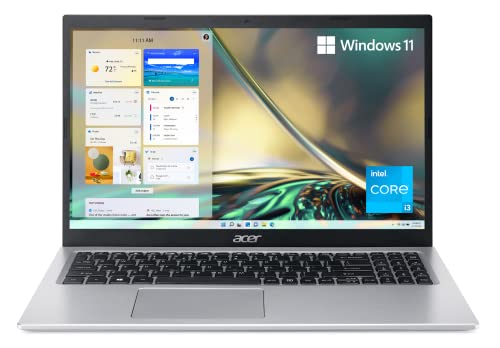
Acer Aspire 5 A515-56 (Core i3) — Best 15.6-inch value
The A515-56 is the Aspire the most people have actually owned: a 15.6-inch, Full HD IPS machine with a Core i3-1115G4, a full keyboard with number pad, and a price that has made it a default recommendation for family and home-office duty for years. Its specification reads modestly beside its i7 sibling above, and that modesty is the point — Acer aimed this configuration precisely at the browsing, documents, streaming, and light spreadsheet workload that fills most homes, and hit the aim dead centre.
The IPS screen is its quiet distinction at this price. Cheap laptops cut the display first, and the A515’s panel — proper 1080p, wide viewing angles, colours that stay honest when a second person leans in — refuses that cut. Shared homework supervision, family video calls, a film on the kitchen table: the screen serves the household pattern of the machine’s life. The chassis is plastic and unpretentious, the port selection covers the family’s accumulated USB gear and an HDMI run to the television, and the whole thing has the mature, known-quantity feel of a design Acer has refined across many production runs.
Its limits are the i3’s limits, and they are worth stating without drama: locally installed heavy software, big multitasking piles, and demanding creative tools will find them. A household whose computing is browser-centred will not. As the family computer, the homework machine, the home-office laptop for a cloud-based job, the A515-56 remains what it has been since launch — the value benchmark of the entire Aspire range, against which its own siblings must justify themselves.
- Processor: Intel Core i3-1115G4
- Display: 15.6-inch Full HD IPS
- Keyboard: full-size with dedicated number pad
- Role: family and home-office all-duty
- Form factor: 15.6-inch mainstream chassis
Strengths
- IPS Full HD screen outperforms the price class’s usual display compromises.
- Number pad and full-size layout serve real household productivity.
- Mature, proven platform with a long track record of reliability reports.
Trade-offs
- Core i3 ceiling excludes heavy local software and serious multitasking.
- Design is functional plastic, not an object of desire.
- Newer Aspire Go models offer fresher efficiency at similar money.
Best for: Families, homework duty, and cloud-based home offices wanting the classic Aspire formula.
Not suited for: Users with demanding local software or heavy parallel workloads.

Acer Aspire Go 15 — Best modern budget pick
The Aspire Go 15 represents Acer rethinking its budget line around a modern efficiency processor, and the Intel Core 3 N355 at its heart changes what “budget Aspire” feels like. Older cheap laptops paired low prices with yesterday’s chips; the Go pairs its price with a current-generation processor designed for exactly the browser, documents, video, and communication workload budget buyers actually run. The result is a full-size machine that feels contemporary rather than discounted — quick to wake, quiet in operation, and easy on its battery across a day of ordinary use.
Design is the Go’s second argument. Acer gave the branch a cleaner, more deliberate look than the workhorse Aspire 3 and 5 lines, and the 15-inch-class screen and full keyboard keep the working experience adult-sized. Students and home users who carry the machine between rooms — or between home and class — get a laptop that does not announce its price every time it opens, which matters more to daily satisfaction than any benchmark gap between it and the tier above.
Position it against its siblings honestly. Against the Aspire 3, the Go offers a fresher processor generation and design for typically a little more money — usually worth it. Against the A515-56, it trades the older machine’s proven track record and IPS screen pedigree for modernity and efficiency. Against the i7 Aspire 5, it concedes performance entirely and wins on price. For the everyday-computing majority, that trade is the correct one, and the Go is the budget Aspire we would hand a student or a home user first.
- Processor: Intel Core 3 N355
- Display: 15-inch class
- Role: modern everyday computing on a budget
- Design: cleaner, contemporary styling for the branch
- Form factor: full-size mainstream chassis
Strengths
- Current-generation efficiency processor keeps everyday work feeling fresh.
- Design and finish punch above the budget tier’s usual standard.
- Full-size screen and keyboard — no cramped compromises for the price.
Trade-offs
- Performance ceiling sits below the Aspire 5’s stronger configurations.
- Newer branch means a shorter long-term reliability track record.
- Memory and storage are budget-class; check the listing’s configuration.
Best for: Students and home users wanting a modern, full-size laptop without Aspire 5 money.
Not suited for: Heavy multitaskers or anyone running demanding local applications.

Acer Aspire 3 A315-24P (Ryzen 3) — Best ultra-budget Aspire
The Aspire 3 A315-24P is the floor of the range, and it is a well-built floor. Its Ryzen 3 7320U is a quad-core processor from AMD’s efficiency line — genuinely capable of the browsing, documents, streaming, and communication essentials, with integrated graphics that handle video and light casual games without embarrassment. Around it Acer assembles the minimum viable real laptop: a 15.6-inch screen, a full keyboard, full Windows, and a price that undercuts every other pick in this guide, often by a wide margin.
Understanding the A315 means understanding what its buyers are really purchasing: legitimacy. The ultra-budget market is full of devices that look like laptops and behave like compromises — restricted operating systems, toy keyboards, storage that fills in a month. The Aspire 3 is none of those. It runs the same Windows, the same office suites, the same browsers as machines three times its price, at a pace best described as patient. For a first laptop, a household’s second machine, a grandparent’s email-and-photos computer, or a student’s browser-based coursework device, patient and legitimate beats fast and restricted every time.
The disciplines that make it sing are the usual budget ones: keep the tab count moderate, let updates run overnight, store media in the cloud. Owners who observe them report machines that serve for years; owners who load them like workstations meet the Ryzen 3’s ceiling quickly and blame the badge unfairly. Buy it as what it is — the honest minimum of the Aspire range — and it is one of the best-value computers Acer sells.
- Processor: AMD Ryzen 3 7320U
- Display: 15.6-inch
- Role: ultra-budget essentials machine
- Operating system: full Windows
- Form factor: 15.6-inch mainstream chassis
Strengths
- The lowest price in the guide for a fully legitimate Windows laptop.
- Quad-core Ryzen handles the everyday essentials without fuss.
- Full-size screen and keyboard keep it usable for real tasks.
Trade-offs
- Pace is patient under multitasking or heavy browser loads.
- Screen and build are the range’s most basic.
- Storage fills quickly without cloud habits.
Best for: Strict budgets, first laptops, second household machines, and browser-based essentials.
Not suited for: Anyone whose daily work involves heavy software or many simultaneous applications.
Acer Aspire 7 — Best for performance seekers (prose-only)
The Aspire 7 is where the family reaches toward workstation territory. Configurations in this branch pair stronger H-series processors — the class of chips with higher sustained power budgets — with dedicated graphics options, and the combination changes the machine’s vocation: video editing timelines scrub smoothly, engineering and design applications run as intended, 3D work becomes possible rather than theoretical, and gaming at sensible settings joins the repertoire. It remains an Aspire in price philosophy, undercutting dedicated workstation and gaming lines with similar internals, which is precisely its appeal to creators and engineers on real budgets.
The costs of that muscle are physical. Aspire 7 models run heavier and thicker than the 5, their fans have real work to do under load, and battery life under light duty is shorter than the efficiency-tuned tiers achieve. The keyboards and screens stay in the Aspire mainstream — good, not luxurious — because the money went into the silicon. Buyers cross-shopping the 7 against the i7 Aspire 5 should ask one question: does my software use a dedicated graphics card or sustained multi-core power? If yes, the 7 is the correct Aspire and the 5 will frustrate. If no, the 5’s portability and screen are the better purchase, and the 7’s muscle becomes weight you carry for nothing.
We cover the Aspire 7 as a prose-only entry in this guide because verified purchase links for its current configurations were not part of this roundup’s confirmed pool; treat this as your orientation to the tier, and compare its exact configurations carefully wherever you buy, since the branch spans a wide range of processors and graphics options under one name.
- Processor class: H-series Intel or AMD performance processors (varies by configuration)
- Graphics: dedicated GPU options
- Role: creation, engineering, and gaming-capable Aspire
- Form factor: larger, heavier chassis than Aspire 5
- Availability note: covered without a purchase link in this guide
Strengths
- Dedicated graphics unlock creation and engineering workloads the rest of the range cannot serve.
- Performance-tier processors sustain heavy loads the U-series chips throttle away from.
- Aspire pricing discipline applied to workstation-adjacent hardware.
Trade-offs
- Heavier, thicker, and louder under load than the mainstream tiers.
- Battery endurance takes a back seat to performance.
- Wide configuration spread demands careful listing-reading.
Best for: Creators, engineers, and light gamers who need Aspire value with real graphics power.
Not suited for: Commuters and all-day unplugged workers, who should take the Aspire 5 14 instead.
Acer Aspire Vero 16 — Best eco-conscious Aspire (prose-only)
The Vero line exists because Acer decided the Aspire’s scale should do some environmental good, and the Aspire Vero 16 is its largest expression. A significant share of the chassis is built from post-consumer recycled plastic — visible in the material’s distinctive speckled finish, which Vero owners tend to read as a badge rather than a blemish — and the design emphasises repairability, with standard screws and accessible internals that extend the machine’s serviceable life. In a category that ships millions of plastic laptops into drawers and landfill, the Vero is a deliberate counter-argument you can also compute on.
As a laptop, rather than a statement, the Vero 16 is a mainstream 16-inch machine: current-generation Intel processors in its recent configurations, a big screen suited to desk-first work, and the ordinary Aspire virtues of honest pricing and full-size comfort. Its performance sits with the Aspire 5 class rather than the 7 — this is an everyday and productivity computer whose distinction is how it is made and how long it can be kept, not how fast it renders. The larger screen makes it the Vero for home and office desks; smaller Vero models exist for carriers, under the same philosophy.
Choose the Vero when the footprint genuinely ranks in your decision — for a business equipping to a sustainability policy, a school with procurement standards, or a buyer who simply prefers their purchases to argue for something. You give up little: a modest price premium over equivalent conventional models and a finish that announces itself. You gain a machine designed to be opened, repaired, and kept, which is, in the end, the most sustainable specification of all. Like the Aspire 7 above, it appears here without a purchase link because its current configurations sat outside this roundup’s verified pool.
- Construction: substantial post-consumer recycled plastic content, repairable design
- Display: 16-inch
- Performance class: mainstream productivity, comparable to Aspire 5 tier
- Role: sustainability-led home and office laptop
- Availability note: covered without a purchase link in this guide
Strengths
- Recycled construction and repairable design measurably reduce the machine’s footprint.
- Full 16-inch mainstream performance for everyday and office work.
- Designed to be kept and serviced, extending useful life beyond the category norm.
Trade-offs
- Speckled recycled finish is a matter of taste — some buyers love it, some do not.
- Modest premium over conventional equivalents with similar internals.
- Not a performance machine; heavy workloads belong on the Aspire 7.
Best for: Buyers and organisations whose purchasing standards include sustainability and repairability.
Not suited for: Performance seekers, or anyone indifferent to materials paying the eco premium.
How Does the Aspire Range Stack Up Against Its Rivals?
Every Aspire competes against three familiar families, and the comparison clarifies what Acer is selling. Lenovo’s IdeaPad line is the closest philosophical rival — same value-first mainstream territory — and tends to compete on keyboard feel and aggressive pricing in the budget tiers. Dell’s Inspiron range leans on brand trust and support infrastructure, often at a small premium for equivalent specifications. ASUS’s Vivobook family contests the design ground, offering OLED screens and bolder styling at prices that undercut Aspire less often than they first appear to once configurations are matched line by line.
Aspire’s durable advantage is the spread itself. Few rivals cover the distance from the Aspire 3’s floor to the Aspire 7’s graphics muscle under one family name with one design language, and that continuity has practical value: a household or small business can equip different people at different tiers and still share chargers’ general class, support knowledge, and keyboard layouts. Where a rival wins a specific duel — an OLED screen here, a keyboard there — this guide’s per-model reviews say so implicitly by what they praise; where the duel is value across a whole fleet, Aspire remains the name to beat first.
The buyer’s method matters more than the brand contest. Match configurations exactly — processor generation, memory, storage, screen resolution and panel type — then compare prices on the matched sheet. Aspire wins that disciplined comparison often enough to justify its reputation, and loses it gracefully when a rival’s promotion is genuinely better. Either way, the discipline protects you; brand loyalty, in the mainstream tier, mostly protects the brands.
What Battery Life and Portability Should You Expect Across the Range?
Aspire battery behaviour follows the tiers’ physics. The efficiency-processor models — the Aspire 3, the Go, and the U-series Aspire 5 configurations — are the range’s endurance performers, built from chips that sip power during the browsing and document work that fills most days. Expect a working day of light use from the stronger configurations, less from the budget floor, and treat every figure as hostage to screen brightness, the single largest variable any owner controls. The Aspire 7 inverts the priority: its performance hardware drinks deeper, and its owners should plan around a charger the way its designers plainly did.
Portability divides the same way. The 14-inch Aspire 5 is the only pick in this guide that disappears into a daily carry without negotiation. The 15.6-inch models are transportable — home to office, room to room, the occasional trip — rather than portable in the commuter sense, and the 16-inch Vero is a desk resident that visits other rooms. None of this is criticism; it is the range offering the same honesty at every size. Choose by the journeys the machine will actually make in a month, counted honestly, rather than the one annual trip that tempts buyers toward smaller machines than their desks deserve.
Charging deserves a practical note. Most current Aspire models charge from their bundled adapters, with USB-C charging appearing on some configurations — a convenience for travel, since one charger can then serve phone and laptop. Check the specific model’s specification if that matters to you, because the range’s breadth means the answer genuinely varies, and a travel-light buyer caught without it will feel the omission on the first trip.
Should You Buy an Older Aspire Generation at a Discount?
The Aspire range’s longevity means last year’s models linger in shops at attractive discounts, and the A515-56 in this guide is itself proof that an older configuration can remain the right buy. The case for the discount is strongest when the older machine’s specification still matches the workload — a browser-based household gains nothing from this year’s chip — and when the discount is real, measured against the current model’s street price rather than its launch price.
The cautions are threefold. Software support horizons shorten with age: an older processor generation reaches the end of its comfortable life sooner, which matters for a machine bought to serve five years. Battery wear on old stock is usually negligible — the machines are new in boxes — but warranty start dates and return terms deserve a check. And the screen trap returns: older Aspire stock includes configurations with basic panels that this guide would not recommend at any discount, because the screen is the component you cannot upgrade and cannot stop seeing. Discount the processor generation freely; never discount the display.
A practical rule emerges: one generation back, bought knowingly, is value; two or more generations back is a false economy unless the price is startling and the workload is light. The Aspire 3 and Go in this guide exist precisely to give budget buyers a current-generation alternative to elderly stock — compare the discounted veteran against them before deciding, because the fresher budget machine frequently wins on efficiency, support life, and warranty while costing little more.
Can an Aspire Serve a Small Business Properly?
Thousands do, and the pattern of their success is consistent. A small business equipping a handful of staff with Aspire 5-class machines gets modern performance, full Windows, and screens and keyboards that survive a working week, at a per-seat cost that leaves budget for the things businesses actually run on: software licences, backup services, a spare machine on the shelf. The Aspire’s mainstream nature is an asset here — parts, chargers, and replacements are everywhere, and any local technician knows the platform.
The honest limits are manageability and support tier. Aspire is a consumer line: it lacks the remote management hardware, the extended on-site support contracts, and the multi-year parts guarantees of Acer’s business families and their rivals. A business small enough that the owner is the IT department will rarely feel those absences. A business approaching the size where device fleets are managed centrally should price the business lines before defaulting to Aspire, because the management features it skips are exactly the ones that pay at fleet scale.
Security setup, covered in our accounting guide’s terms, applies with full force: encryption on, strong sign-in enforced, backups automatic. An Aspire so configured is a respectable business machine. An Aspire bought and left at factory defaults is a consumer laptop carrying company data — the distinction is the setup, not the badge, and it is entirely within the buyer’s control.
Which Aspire Fits Which Person? Six Honest Scenarios
The parent buying one laptop for a household’s everything — homework, bills, streaming, the occasional work-from-home day — should stop at the A515-56 and spend the savings on a good bag and a backup drive. The machine’s proven formula was designed for exactly this desk, and its IPS screen flatters every member of the family who uses it. Upgrading this buyer to the i7 buys performance the household will never request.
The student leaving for university with a four-year horizon and a mixed curriculum should weigh the Aspire 5 14 first: portable enough for daily carrying, strong enough for whatever the course assigns, with a screen that makes long reading days easier. The student on a strict budget, in a browser-based programme, takes the Go 15 and keeps the difference for textbooks — or the Aspire 3 if the budget is stricter still, accepting patience as the price of legitimacy.
The home-based professional whose employer runs on cloud tools and video calls lives well on the Aspire 5 14 or a 15.6-inch Aspire 5 configuration with a number pad if their work is numeric. The creator — the YouTube editor, the design freelancer, the engineering student — is the Aspire 7’s constituency, and should not let the 5’s lower price argue them out of the graphics hardware their software requires. The environmentally minded buyer, and the school or business buying to a sustainability standard, takes the Vero 16 for the desk or its smaller siblings for the road. Six scenarios, six answers, one family — that breadth is the Aspire range’s reason to exist.
What Are Aspire Keyboards, Trackpads, and Webcams Like to Live With?
Daily-contact components decide long-term satisfaction more than processors do, and Aspire’s are best described as competently mainstream. Keyboards across the range offer reasonable travel and sensible layouts, with the 15.6-inch models adding the number pad this guide keeps praising. They are not the best keyboards in the class — Lenovo’s reputation there is earned — but they are comfortably above the threshold where typing becomes a complaint, and backlit variants appear on higher configurations for dim rooms and evening work.
Trackpads are large and accurate enough that many owners never buy a mouse for portable use, though desk workers will still prefer one. Webcams across the mainstream tiers are serviceable for calls rather than flattering, which is the class norm; Acer’s recent models add software noise reduction and framing touches that help in poor light, but a window in front of you remains the best webcam upgrade available at any price. Speakers are adequate for calls, video, and casual listening, and quietly outclassed by any inexpensive external speaker for film nights — again, the class norm, stated so that no buyer is surprised in either direction.
The pattern across all three components is the Aspire philosophy in miniature: nothing that will delight a connoisseur, nothing that will irritate an ordinary owner, and the money saved spent where the range’s buyers value it — the screen options, the processor tiers, and the price itself.
Which Ports and Connections Can You Rely On?
Aspire port selections track the tiers. Expect USB-C and full-size USB-A ports, HDMI output for external displays and televisions, and a headphone jack across the mainstream models, with card readers and Ethernet appearing and disappearing by generation and size. The practical advice is unglamorous: count your desk’s permanent residents — monitor, printer, external drive, receiver dongles — against the specific model’s port list before ordering, and budget a modest hub if the count fails, rather than discovering the arithmetic during setup.
One loyalty deserves naming: the range’s persistence with full-size USB-A ports across most tiers is a genuine virtue in households and offices full of printers, drives, and receivers from the last decade. Where a sleeker rival imposes a hub on day one, many Aspires simply plug the old world in — count that convenience in any comparison, because its absence is billed later in adapters.
Wireless is uniform and modern across the current range: Wi-Fi generations recent enough for any home or campus network, and Bluetooth for the headsets, mice, and speakers that increasingly define a desk. Wired networking, where a model omits it, returns through an inexpensive USB adapter for the minority who need it. None of the six entries in this guide will strand a buyer on connectivity for ordinary work; the checks that matter are the numeric ones — how many USB ports, of which type — and they take two minutes on the listing you are already reading.
How Do You Read an Aspire Listing Like Someone Who Sells Them?
Listings reward a reading order. Start at the processor’s full model name — not “Core i5” but the digits after it, because those digits encode the generation, and the generation is the machine’s true age and support horizon. Move to memory and storage as a pair, and notice whether the listing states them in its title or buries them in a specification table; buried modest figures are a pattern worth recognising across the whole market, not just Acer’s corner of it. Then the screen: resolution first, panel type second, brightness if stated. A listing that leads with screen size and stays silent on resolution is telling you the resolution is the basic one.
Finish with the physical lines owners live with: weight, the port list, and whether the keyboard is backlit if evening work matters to you. Cross-check the model number against Acer’s own product pages when a listing’s claims look unusually generous for the price — marketplace listings occasionally blend configurations, and the manufacturer’s page is the court of appeal. Two minutes of this reading, applied to any Aspire, converts the range’s one genuine complexity — its breadth — into the buyer’s advantage, because breadth misread is confusion and breadth read properly is choice.
Can an Aspire Handle Gaming at All?
Set the question honestly and the answer is: the right Aspire, for the right games. The integrated graphics in the mainstream tiers run the enormous library of lightweight and older titles — strategy games, indie catalogues, esports staples at modest settings, the back catalogue every player accumulates — perfectly happily, and cloud gaming services run on any of them with a good connection. The Aspire 7’s dedicated graphics options move the boundary to modern titles at sensible settings. What no mainstream Aspire does is substitute for a gaming laptop against demanding new releases at high settings, and Acer sells the Nitro and Predator families — covered in our companion gaming guide — precisely for that job.
The practical advice mirrors the rest of this guide: name the workload before the machine. A student whose gaming is social and light loses nothing by buying an Aspire 5 and gains a better study computer for the money. A player whose library is the point should not ask an Aspire to apologise for its design brief — buy the gaming machine, and let each family do the work it was built for.
What Should You Do in the First Week With a New Aspire?
Begin with the unglamorous hour that protects all the others: run the updates — operating system, drivers, and Acer’s own utilities — until the machine reports itself current, then restart it and check again, because new laptops routinely arrive several update cycles behind. Remove the trial software you will never buy, not because it is harmful but because a clean machine teaches you its own behaviour; every notification you silence in week one is a small tax refunded weekly for years.
Then set the machine’s safety nets while nothing depends on it: sign-in secured, encryption confirmed on, the backup routine pointed at your coursework, documents, or family archive and test-restored once. Move your files deliberately rather than in a first-night flood, keeping the old computer intact until the new one has survived a full working week — the overlap week is the cheapest insurance in the whole purchase. Finally, register the warranty, photograph the serial number into your records, and put the box somewhere findable. Aspire ownership done this way is boring in the best sense: the machine disappears into the work, which is what the range has been promising its buyers all along.
Where Does Each Aspire Sit Beside the Others?
| Pick | Tier | Processor | Screen | Best role |
|---|---|---|---|---|
| Acer Aspire 5 14 (Core i7) | Aspire 5 | Core i7-1355U | 14″ WUXGA IPS | Portable professional |
| Acer Aspire 5 A515-56 (Core i3) | Aspire 5 | Core i3-1115G4 | 15.6″ FHD IPS | Family value |
| Acer Aspire Go 15 | Aspire Go | Core 3 N355 | 15-inch class | Modern budget |
| Acer Aspire 3 A315-24P (Ryzen 3) | Aspire 3 | Ryzen 3 7320U | 15.6-inch | Ultra-budget essentials |
| Acer Aspire 7 | Aspire 7 | H-series (varies) | 15.6-inch class | Creation and performance |
| Acer Aspire Vero 16 | Aspire Vero | Mainstream Intel (varies) | 16-inch | Eco-conscious desk use |
Read the table as a ladder with two side branches. The ladder runs 3, Go, 5 — climb it by workload weight. The branches leave the ladder for a reason: the 7 for graphics and sustained power, the Vero for materials and repairability. A buyer who cannot name the reason for a branch should stay on the ladder, where the value is most predictable.
How Should You Maintain an Aspire to Keep It Fast for Years?
Aspire laptops reward the same modest care as any mainstream machine, with two points of emphasis. Storage discipline comes first: these configurations often carry modest drives, and a Windows installation squeezed below a tenth free space slows in ways owners misread as age. Keep the drive airy, archive media to external or cloud storage, and let the built-in storage sense features work rather than disabling them. Second, updates: Aspire models receive driver and firmware attention through Acer’s support channels and Windows Update, and applying them on a calm schedule — monthly, not during a deadline — prevents the accumulation of small instabilities that make a three-year-old laptop feel tired before its hardware is.
Physically, the hinges and keyboard are the long-term wear points on any Aspire. Open the lid from the centre, keep liquids on a different level of the desk than the machine, and blow the vents clear of dust annually. Batteries follow the universal rule: a laptop that lives at a desk can spend its life plugged in, but an occasional battery cycle keeps the gauge honest and the cells exercised. None of this is Aspire-specific wisdom; it is the difference between a five-year machine and a three-year one, purchased with minutes rather than money.
What Mistakes Do Buyers Make When Choosing an Aspire?
The signature mistake is buying the badge instead of the configuration. Two laptops both called Aspire 5 can sit generations apart in processor, screen, and memory, and the cheaper one’s savings are usually the older one’s discount in disguise. Read the processor model, the screen resolution, and the memory figure on every listing — those three lines are the machine; the badge is the family name. The second mistake is its cousin: buying last year’s higher tier over this year’s mainstream one without comparing processors, when the newer mainstream chip is often the faster, cooler, longer-supported computer.
Third, buyers undervalue the screen at purchase and overvalue it every day after. The step from a basic panel to the IPS and WUXGA options in this range is among the cheapest daily pleasures in computing, and the one least possible to retrofit. Fourth, they forget the number pad question until the first spreadsheet: if your work is numeric, buy the size that has the pad. Finally, Aspire buyers sometimes skip the memory check on budget configurations, discovering the modest figure only when the browser pile grows — on the tiers where memory is not upgradeable, the listing’s number is the machine’s lifetime number, so choose it as one.
Final Recommendation
The Aspire range rewards buyers who match tier to truth. Most people should land on the Aspire 5: the 14-inch Core i7 configuration if the machine travels and the work is document-deep, the A515-56 if the desk is its home and the budget is shared with a household. The Aspire Go 15 is the budget pick with a modern heart, the Aspire 3 the honest floor beneath it, and the two branches — the 7 for graphics muscle, the Vero 16 for a lighter footprint — serve the buyers who can name their reason. Whichever rung you choose, verify the exact configuration in the listing, and you will own the thing the Aspire line has always promised: the specification you need, without paying for theatre.
Frequently Asked Questions
What is the difference between the Aspire 3, 5, and 7?
Tier and intent. The 3 is the budget essentials machine, the 5 is the mainstream range with configurations reaching professional adequacy, and the 7 adds performance processors and dedicated graphics for creation, engineering, and gaming-adjacent work. The Go branch modernises the budget end, and the Vero branch builds Aspire hardware from recycled materials with repairability emphasised.
Is the Aspire 5 good enough for professional work?
In its stronger configurations, yes — the Core i7 Aspire 5 14 in this guide handles the mainstream professional workload of documents, browsers, calls, and light creative work without strain. Professionals whose software needs dedicated graphics or sustained multi-core power should look at the Aspire 7 tier or beyond the Aspire family entirely.
Can you upgrade an Aspire’s memory or storage later?
It varies by model and generation: some Aspire configurations offer accessible slots and drive bays, others solder memory to the board. Check the specific model’s service documentation before counting on an upgrade path, and when in doubt, buy the memory figure you will need in year three rather than the one that suffices today.
How long does an Aspire laptop typically last?
With ordinary care, four to six years of useful service is a fair expectation for the mainstream tiers, with the battery the component most likely to need attention first. The Vero branch is designed explicitly for repairability and longer service; the budget tiers last longest when their owners respect their performance ceilings.
Aspire or Acer’s Swift line — which should I buy?
Swift is Acer’s premium thin-and-light family: more metal, less weight, higher prices for similar processors. Aspire is the value family: more plastic, more size options, lower prices. If the machine travels daily and budget allows, Swift tempts; if value per specification rules the decision, Aspire wins — which is why this guide exists.
Which Aspire has the best screen?
Among the configurations in this guide, the Aspire 5 14’s WUXGA IPS panel leads — its extra vertical resolution and IPS viewing angles make it the screen writers and spreadsheet users will appreciate most. The A515-56’s Full HD IPS panel is the value standout. On any Aspire, prioritise IPS and at least Full HD; the range’s basic panels are its weakest option and the upgrade is consistently worth its small premium.
Is the Aspire Go a replacement for the Aspire 3?
Not exactly — they coexist as two answers to the budget question. The Go modernises the formula with a current efficiency processor and cleaner design; the 3 holds the absolute price floor with a proven, simpler formula. Buyers who value the lowest possible price take the 3; buyers who can stretch slightly usually find the Go’s modernity worth it.
Are Aspire laptops good for students?
They are one of the classic student choices, and the range’s spread maps neatly onto student budgets: the Aspire 3 or Go for browser-based degrees, the Aspire 5 for students whose coursework or longevity expectations run higher. The full-size keyboards and screens suit essay work, and the prices respect the rest of a student’s budget.
Related Guides
Compare the wider field with our other roundups: best Acer gaming laptops, best Acer laptops for college students, and best budget laptops with number pads.



[…] out the study setup with our companion guides: best laptops for college students on a budget, best noise-cancelling headsets for online classes, and best laptop stands for dorm […]