What's inside
- Key Takeaways
- Quick Picks
- How We Chose These Picks
- Comparison
- What work honestly fits inside this budget?
- Why is the panel the specification to defend at this price?
- How do you make an entry-level laptop feel faster than it is?
- What does the second year of a budget laptop look like?
- How should families share a machine in this class?
- Why do these machines make such good writing laptops?
- What is the kindest way to retire the machine this one replaces?
- How do you keep expectations — and peace — when buying for someone else?
- Should you insure or extend-cover a machine at this level?
- What separates a good year for these machines from a bad one?
- How does a big budget screen change homework and family administration?
- What if the verified pick sells out while you are deciding?
- Why does this guide keep returning to the return window?
- Common Mistakes
- Final Recommendation
- Frequently Asked Questions
- Related Guides
As an Amazon Associate I earn from qualifying purchases. This post may contain affiliate links at no extra cost to you.
widgetverdict.com is reader-supported. When you buy through links on our site, we may earn an affiliate commission.
Honesty has to open this guide, because the best 17-inch laptops under 700 dollars form one of the thinnest categories in all of laptop shopping. Manufacturers build their budget lines around 15.6-inch panels, and the 17.3-inch screen at this level survives in a handful of models, most of them specified with entry-level processors, modest memory and basic Full HD panels. That is the true shape of the territory, and this guide will not pretend otherwise: below, three linked picks carry verified configurations from the current listings, and three further names are discussed without links because their presence in this price band is intermittent, older, or too configuration-dependent to pin down. The $700 figure is the theme’s budget frame throughout — confirm each machine’s live position with a check price on Amazon rather than trusting any guide’s snapshot.
What can this money legitimately buy? A large, readable screen for documents, browsing, streaming and schoolwork; a full keyboard with a numeric keypad; storage that does not embarrass; and performance that feels willing inside those tasks and strained outside them. What it cannot buy is speed with headroom, premium build, gaming ability or a panel with any ambition beyond correctness. Buyers who accept that contract get remarkable value per inch. Buyers who secretly expect a mid-range laptop wearing a budget costume will be disappointed by every machine in this guide, including the good ones.
The ordering below puts the most current design first. Two of the three linked picks are present-generation budget machines whose listings state Full HD panels; the third is an older design whose strong processor and weak panel have been debated in these pages before and are debated here again in this budget’s specific terms. The prose-only trio that follows represents the category’s penumbra — the lines and channels where a sub-$700 17-inch laptop appears when the main listings run dry.
Key Takeaways
- The ASUS Vivobook 17 with a Core 3 processor is the most current design in this frame: Full HD panel, 512GB SSD, Windows 11 Home.
- HP’s OmniBook 3 17.3 with a Ryzen 3 matches the ASUS line for line on panel and storage, differing in platform and styling.
- The IdeaPad 3 is older stock with a strong six-core chip but an HD+ panel and Windows 10 Home — its discount must pay for both facts.
- Expect entry-level performance: these machines serve documents, browsers and streaming, and decline heavy creative work or gaming.
- At this level, a Full HD panel is the specification to defend; anything less on 17.3 inches is a false economy.
- Stock in this category is intermittent — a verified configuration available today may rotate away, so decide promptly once yours is confirmed.
Quick Picks
| Pick | Badge | Why it is here |
|---|---|---|
| ASUS Vivobook 17 (Core 3 100U) | Most current design in the frame | A present-generation Vivobook with a 17.3-inch Full HD display, 512GB SSD and Windows 11 Home. |
| HP OmniBook 3 17.3 (Ryzen 3) | HP’s current answer | An OmniBook-platform machine with a Full HD panel, Radeon 610M graphics and a 512GB SSD. |
| Lenovo IdeaPad 3 17.3 (Ryzen 5 5500U) | Strong chip, older everything else | A six-core Ryzen in an older design with an HD+ screen — a processor-led bargain when priced as stock. |
| Acer Aspire 3 17.3 | Prose-only alternative | Acer’s big-screen budget line surfaces in this band regularly, with configurations too variable to pin. |
| HP 17 (entry configurations) | Prose-only alternative | HP’s long-running 17 line has included modest configurations that dip into this band during sale periods. |
| Dell Inspiron 17 (previous generations) | Prose-only alternative | Discontinued Inspiron 17 stock reaches this band through clearance channels; judge each unit on its own facts. |
How We Chose These Picks
The frame did brutal work here. Most 17-inch laptops simply do not participate in a sub-$700 conversation, so the first filter admitted only models and lines with a genuine presence at this level — and then the evidence filter did its own work: a linked pick needed a listing title stating its panel, processor, memory and storage completely. Three machines passed both filters, and the guide says plainly that the bench is short rather than padding it with smaller screens or invented configurations.
Panel resolution was policed hardest, because at this level the temptation to ship a big, soft screen is strongest and the buyer’s ability to detect it from a listing is weakest. Two linked picks state Full HD outright. The third states HD+, and it is included with that fact attached to every mention, because its processor strength makes it a real option for a defined buyer — not because the panel compromise stops mattering at this price. It matters more here, since the buyer has the least money to waste on a mistake.
Performance expectations were calibrated against the tasks this budget actually serves. Each linked pick was assessed for the browser-and-documents day, the streaming evening and the school or home-office workload — and none is recommended for anything beyond them. A guide that flatters entry-level hardware into creative or gaming roles manufactures returns; this one would rather lose a sale than a reader’s trust.
The prose-only picks were chosen to map the category’s real edges: a rival budget line with drifting configurations, the entry configurations of a mainstream line during sales, and a discontinued line in the clearance channel. Each is presented with the verification work it demands, because in the penumbra of a thin category, method is worth more than names.

ASUS Vivobook 17 (Core 3 100U) — Most current design in the frame
The Vivobook 17 leads this guide because it refuses the category’s usual bargain with age. Its listing specifies a 17.3-inch Full HD display, an Intel Core 3 100U processor, 8GB of memory, a 512GB solid-state drive and Windows 11 Home, in Quiet Blue. Every element is current: a present-generation design, the correct resolution for the screen size, storage in the sensible size, and the current operating system. In a frame where rivals are often yesterday’s machines at yesterday’s specification, that currency is the headline.
The Core 3 processor defines both the machine’s competence and its boundary. For the work this budget serves — documents, school platforms, browsing, email, video calls and streaming — it is a willing, efficient chip that keeps the big chassis quiet and cool. Its limits appear exactly where an honest guide should predict: sustained video editing, large photo workflows and modern games sit outside its brief, and no amount of screen size compensates. Buy it for the work it does, and it does that work without complaint.
Memory is the specification to interrogate hardest. Eight gigabytes serves a disciplined user well and a sprawling one poorly, and at this level there is no linked configuration with more — that is the frame talking, not this guide’s preference. Buyers whose habit is forty open tabs should either adjust the habit or adjust the budget, because no machine in this guide will absorb that pattern gracefully. The 512GB drive, by contrast, is genuinely sufficient for the documents-and-photos life, filling only when video archives or game libraries take up residence.
Considered as a whole, the Vivobook is the pick for the buyer who wants the category’s promise without its archaeology: the biggest screen the money reaches, in its current form, with its compromises located in performance headroom rather than in the panel you stare at or the platform you must maintain. Check price on Amazon, confirm the listing’s configuration, and the purchase is as clean as this price band allows.
- Screen: 17.3 inches, Full HD
- CPU: Intel Core 3 100U
- RAM: 8GB
- Storage: 512GB, solid-state
- OS: Windows 11 Home
- Finish and code: Quiet Blue, F1704VA-AS34
Strengths
- Current design and current operating system
- Full HD panel — the frame’s key specification, present
- Efficient, quiet processor for mainstream tasks
Trade-offs
- Entry-level performance ceiling
- 8GB of memory rewards tidy habits only
- No gaming or heavy creative capacity
Best for: home, school and office-mainstream users who want the current version of the big-screen bargain.
Not suited for: heavy multitaskers, creators, or gamers at any level of optimism.
Grandparents deserve a specific word here, because this machine may be the best-value gift in the entire size class for an older relative. Large text without zooming, a full keyboard that forgives imprecise hands, a screen that makes family photographs worth gathering around — these are the format’s gifts, and the Vivobook delivers them in a current, supportable package. Set the text scaling generously before handing it over, pin the video-call application where it cannot be lost, and the machine’s modest processor will never once enter the conversation.
There is a dignity to this machine that spec sheets miss: it does not look or feel like a punishment purchase. A student whose laptop is also the room’s television, a grandparent whose video calls finally happen at life size, a home worker whose spreadsheets stop scrolling sideways — each receives the format’s full benefit, and the compromises sit in workloads they may never attempt.
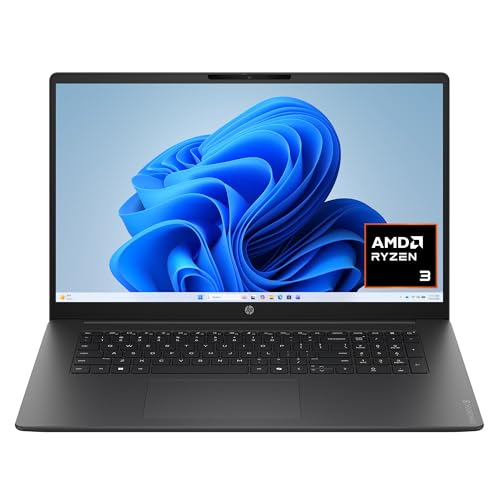
HP OmniBook 3 17.3 (Ryzen 3) — HP’s current answer
HP’s presence in this frame wears its newest badge. The OmniBook 3 17.3 lists a Full HD display, an AMD Ryzen 3 processor with Radeon 610M graphics, 8GB of memory, a 512GB solid-state drive and Windows 11 Home, in Mica Silver. The listing abbreviates the processor’s exact model, so this guide discusses the chip by family — a small honesty that costs the pick nothing, since at this level the family’s behaviour is the relevant fact: modern, efficient, and adequate to the mainstream day.
Against the Vivobook, the OmniBook’s argument is platform and presentation. HP’s current consumer line brings tidy styling that sits comfortably in shared living spaces, a keyboard deck designed around the numeric keypad this format exists to provide, and the support tail of a living product line — drivers, documentation and accessories all current. Budget buyers rarely price the support tail; they should, because a machine kept for five years will need it in three.
The Radeon 610M integrated graphics give the machine a modest edge in light visual work over the bare minimum — casual games at gentle settings, photo adjustments, smooth video playback across the big panel. Nobody should mistake that for a gaming specification. It is better described as headroom for the ordinary: the interface stays fluid, the streamed film stays smooth, and the machine never feels like it is rationing its graphics attention among windows.
The shared ceiling with the ASUS is memory, and the same counsel applies: 8GB, a defined workload, tidy habits. Between the two current picks, the choice is genuinely close — platform preference, styling, and whichever listing’s live position inside the frame is kinder when you shop. That closeness is itself good news for the buyer: this thin category, at its best, offers a real decision between two current machines rather than a Hobson’s choice among antiques.
- Screen: 17.3 inches, Full HD
- CPU: AMD Ryzen 3 (family wording per listing)
- Graphics: Radeon 610M, integrated
- RAM: 8GB
- Storage: 512GB, solid-state
- OS: Windows 11 Home
- Finish and code: Mica Silver, 17-dp0199nr
Strengths
- Current OmniBook platform and support position
- Full HD panel with capable integrated graphics
- Design that suits shared, visible spaces
Trade-offs
- Exact processor model abbreviated in the listing
- 8GB memory ceiling, shared with its rival
- Mainstream performance only
Best for: buyers who prefer HP’s current platform and design for the same mainstream workload.
Not suited for: buyers needing a precisely specified chip, or any workload beyond the mainstream.
There is a small-business pattern this pick serves almost secretly: the reception and counter machine. A business’s front desk needs a big, legible screen for bookings, forms and the customer’s own view of a transaction, a processor that never thinks about that workload, and a design that does not embarrass the premises. The OmniBook’s current styling and mainstream specification fit that counter precisely, and its price inside this frame leaves room for the second unit that sensible businesses keep as a spare.
Small organisations with a per-seat ceiling near this frame should look at the OmniBook closely for a fleet reason: a current, uniform model simplifies imaging and support in a way that a mixed bag of clearance bargains never will. The cheapest fleet is rarely the one with the cheapest units; it is the one with the fewest surprises, and currency is a surprise-reduction strategy.
Lenovo IdeaPad 3 17.3 (Ryzen 5 5500U) — Strong chip, older everything else
The third linked pick is the category’s recurring dilemma in its purest form. The IdeaPad 3’s listing states a 17.3-inch HD+ display, an AMD Ryzen 5 5500U, 8GB of memory, 512GB of storage, Radeon 7 graphics and Windows 10 Home, in Abyss Blue. The processor is the strongest in this guide — a six-core chip that out-powers both current picks for processor-led work — and nearly everything around it is a generation behind them.
At this budget, the dilemma sharpens rather than softens. A buyer under $700 is choosing which compromise to live inside, and the IdeaPad asks them to live inside the panel: HD+ resolution spread across 17.3 inches, visibly softer text, less information per screen. In exchange, the machine processes with an authority its fresher rivals cannot match — large documents, busy archives and background-heavy days all move with less hesitation. Neither side of that exchange is foolish. They serve different buyers, and this guide’s role is to keep the exchange explicit.
Windows 10 Home adds a errand to the purchase: establish the machine’s upgrade and support position before ordering, and price your own time into the bargain. A buyer comfortable with that errand, whose work is processor-led and whose reading is light, can defend this purchase to anyone. A buyer who reads for a living — documents, columns, code, coursework — should defend the opposite purchase with equal confidence, because the panel is the one specification encountered every minute of every day.
The deciding instrument is price position, as it was in this guide’s sister discussions: old stock must pay for its age. If the IdeaPad’s live figure sits meaningfully below the two current picks, the saving can fund the accessories and still leave the buyer ahead. If it drifts up toward them, the current machines win on every axis except raw processor cores, and the choice stops being a dilemma at all.
- Screen: 17.3 inches, HD+ (below Full HD)
- CPU: AMD Ryzen 5 5500U, six cores
- Graphics: Radeon 7, integrated
- RAM: 8GB
- Storage: 512GB
- OS: Windows 10 Home
- Finish: Abyss Blue
- Vintage: an earlier IdeaPad 3 generation
Strengths
- Six-core processor is the strongest here
- Storage matches the current picks
- Old-stock pricing can undercut the frame substantially
Trade-offs
- HD+ panel is the frame’s weakest screen
- Windows 10 Home requires a software plan
- Older platform in every other respect
Best for: processor-led workloads bought at a genuine stock discount.
Not suited for: readers, analysts, or anyone who wants the purchase finished when the box opens.
Writers of a certain kind should also hear the IdeaPad’s case fairly. A novelist or administrator whose screen shows one document at a time, in large type, and whose machine spends its life plugged in at one desk may never meet the panel’s limits — while meeting the processor’s strength every time a vast manuscript searches, indexes or exports. Fit is a personal geometry. This guide can map the trade; only the buyer’s actual day can settle it, which is why the return-window panel test matters more for this pick than for any other in the frame.
One more buyer fits this machine: the upgrader from a truly ancient laptop, for whom every specification here — even the panel — is an improvement, and whose budget is immovable. Guides write for the median reader; purchases happen at the margins, and at that margin the IdeaPad’s strong chip and big screen can be a transformation bought honestly.
Acer Aspire 3 17.3 — Prose-only alternative
Acer keeps a 17.3-inch Aspire 3 in its budget line more faithfully than most rivals keep any big-screen budget model, and it appears inside this frame often enough to be many buyers’ actual purchase. It is treated without a link because Aspire 3 configurations roam — processors, memory and even panels vary across sellers and seasons — and a pinned listing could easily describe a machine different from the one a reader would receive.
The line’s character is consistent even when its configurations are not: a large, simple chassis, a spacious keyboard, and internals chosen to defend a price. In its better configurations it matches the linked picks’ formula; in its weaker ones it dips below the floors this guide defends, with less memory or a lesser panel. The Aspire 3 is therefore less a product recommendation than a shopping exercise with a known answer key.
Use the answer key. Full HD in writing, solid-state storage in writing, 8GB as the memory floor, and a processor from a current or recent family — a unit that states all four competes with the linked picks on merit. A unit that will not state them is telling you something, and at this budget you cannot afford not to listen.
- Display: 17.3-inch class (confirm FHD per listing)
- Processor: set by each seller’s build
- Memory: confirm 8GB floor per listing
- Storage: confirm solid-state per listing
- Listing status: configuration drift prevents a pinned link
Strengths
- Faithful presence in the big-screen budget class
- Better configurations match the linked formula
- Aggressive sale pricing is common
Trade-offs
- Weak configurations hide under the same name
- Verification burden falls on the buyer
- Panel quality varies across the line’s life
Best for: methodical shoppers who will verify a unit against the floors above.
Not suited for: anyone buying in a hurry on the badge alone.
Acer’s line also teaches the category’s most transferable lesson: in thin, budget segments, the buyer’s checklist is worth more than the brand’s reputation. A verified Aspire with the right four figures is a better purchase than an unverified anything, and the habit of demanding those figures — panel, processor, memory, storage type — will serve its owner in every technology category they ever shop. If this guide’s prose-only sections feel repetitive on that point, it is because the point is the product.
HP 17 (entry configurations) — Prose-only alternative
HP’s 17 line is a broad church, and across its life it has included entry configurations — modest processors, basic memory — that sale pricing pulls down into this frame. Those configurations are discussed without a link because they are events as much as products: they appear when a retailer needs a headline, in specific builds that a standing guide cannot responsibly pin.
The opportunity is real. An HP 17 in a sale configuration can deliver the format’s essentials — the big Full HD-class panel in better builds, the keypad, the desk-friendly chassis — at a position deep inside the frame. The risk is equally real: entry builds of a broad line are exactly where lesser panels and minimal memory hide, and the badge gives no protection. The listing title, read completely, is the only protection there is.
Buyers who catch one of these configurations should apply the same floors as everywhere in this guide and move quickly once a unit passes them, because sale stock at this level does not linger. Buyers who miss it have lost nothing but an event; the linked picks remain, which is what anchors are for.
- Display: 17.3-inch class (verify resolution per build)
- Processor: entry configurations vary
- Memory: verify floor per build
- Storage: verify type and size per build
- Where it surfaces: retailer sale events, in specific builds
Strengths
- Sale events can price the format very keenly
- Mainstream line with plentiful support and accessories
- Keypad-equipped deck suits home administration
Trade-offs
- Entry builds vary in panel and memory
- Availability is episodic
- Verification cannot be skipped
Best for: alert shoppers watching for a verified sale configuration.
Not suited for: buyers who need to purchase today at a known specification.
Sale events deserve one tactical note. Retailers headline these configurations with the family name and the screen size, and the specification lives further down the page than the excitement. The disciplined buyer screenshots the full configuration before ordering, both to verify what is coming and to hold the evidence if a different build arrives. In a category built on rotating stock, that screenshot is the difference between a bargain and an anecdote.
Dell Inspiron 17 (previous generations) — Prose-only alternative
The clearance channel’s contribution to this frame is Dell’s discontinued Inspiron 17 stock: machines from a mainstream line, built in large numbers, now reaching buyers at prices their original positioning never imagined. They appear here without a link for the channel’s usual reason — the unit is the product, and units differ in age, condition and specification beyond what any model name can certify.
A good example is a genuinely pleasant computer: big screen, deep deck, the solidity of a line that served as many families’ main machine. The checks that separate the good example from the tired one are battery health, storage type — some generations shipped with mechanical drives, which must be priced as the defect they are — and panel resolution, all confirmed in writing before payment. Sellers of quality stock answer those questions readily; reluctance is itself an answer.
For a second machine, a spare, or a household computer bought by someone who enjoys the used market’s diligence, the Inspiron route can deliver this frame’s best value per inch. For a primary machine bought under time pressure, the linked current picks remain the advice, and this paragraph is a signpost rather than a suggestion.
- Display: 17-inch class (verify per unit)
- Processor: set by the model year in question
- Memory: verify per unit
- Storage: confirm solid-state per unit
- Where it surfaces: clearance aisles and refurbished listings
Strengths
- Mainstream build quality at clearance prices
- Huge installed base — parts and advice are plentiful
- Comfortable deck and screen for home duty
Trade-offs
- Condition and battery vary by unit
- Some generations carry mechanical storage
- Seller warranty replaces the retail one
Best for: diligent used-market buyers seeking maximum inches per dollar.
Not suited for: primary-machine purchases under deadline.
The Inspiron’s long production run carries one more advantage worth naming: familiarity in the repair ecosystem. Every independent repair shop has seen these machines, parts cross generations in useful ways, and a fault that would strand an obscure model for weeks is a shelf item for this one. For households far from big-city service options, that repairability is a form of value no specification table captures — and a legitimate reason to choose the known older machine over an unknown newer one.
Comparison
| Pick | Display | Processor | Memory | Storage | Position in frame |
|---|---|---|---|---|---|
| ASUS Vivobook 17 | 17.3-inch FHD | Core 3 100U | 8GB | 512GB SSD | Current design anchor |
| HP OmniBook 3 | 17.3-inch FHD | AMD Ryzen 3 | 8GB | 512GB SSD | Current platform alternative |
| Lenovo IdeaPad 3 | 17.3-inch HD+ | Ryzen 5 5500U | 8GB | 512GB | Older stock — discount decides |
| Acer Aspire 3 17.3 | Verify FHD per listing | Per configuration | Confirm 8GB | Confirm SSD | Intermittent, sale-driven |
| HP 17 (entry builds) | Verify per build | Entry configurations | Verify per build | Verify per build | Sale events only |
| Dell Inspiron 17 (older) | Verify per unit | Per generation | Verify per unit | Confirm SSD per unit | Clearance channel |
What work honestly fits inside this budget?
More than the specification suggests, provided the work is the mainstream kind. Documents and spreadsheets of ordinary size, school and learning platforms, email and messaging, video calls, web research, streaming video, light photo organisation, household administration — the complete domestic and much of the professional repertoire runs willingly on the linked picks here. The big screen arguably makes this budget go further than it would at a smaller size, because the format’s benefit — room to work — does not depend on processor speed at all.
The boundary is equally clear. Video editing beyond the casual, modern gaming, engineering or design software, and heavy multitasking across many local applications all live above this frame, and no cleverness in shopping relocates them. Buyers whose work sits on the boundary should save longer or buy smaller, because a 15.6-inch machine at this money carries meaningfully stronger internals — the inches, at this level, are bought with performance, and the exchange should be made knowingly.
Why is the panel the specification to defend at this price?
Because every other compromise in this frame is occasional, and the panel is constant. A slow moment in a heavy spreadsheet happens weekly; the screen’s resolution is present in every second of every task. At 17.3 inches, a sub-Full-HD panel spreads its pixels visibly thin, taxing reading and detail work alike, and the saving that bought it is spent once while the softness is paid daily. This is why two of the three linked picks state Full HD, why the third’s HD+ panel is flagged relentlessly, and why the prose-only sections repeat the resolution check like a refrain.
Brightness and viewing angles matter secondarily — a dim panel in a bright kitchen is its own frustration — but listings at this level rarely certify them, so the practical advice is procedural: use the return window as your laboratory. Open your real documents in your real room in the first days, and let the panel pass or fail there, while returning it is still a right rather than a negotiation.
How do you make an entry-level laptop feel faster than it is?
By removing the work it should never have been given. Keep the startup list short, because budget processors suffer most from the crowd of helpers that accumulate there. Keep the browser’s tab count honest, or use its tab-suspension features, because memory pressure — not processor speed — is what makes these machines feel old before their time. Keep the drive comfortably below full, keep updates current, and resist installing overlapping security and utility suites that spend the machine’s modest power policing each other.
None of this is glamorous, and all of it works, because entry-level hardware has little surplus to waste on disorder. Owners who run a tidy system routinely report machines that feel a class above their specification; owners who do not are soon shopping for a replacement whose extra power will be wasted the same way. At this budget, habits are a specification — the only one that ships free and upgrades forever.
What does the second year of a budget laptop look like?
Usually better than its reputation. The first year of any laptop includes the settling of software, the discovery of habits and the occasional return-window anxiety; by the second year, a well-bought budget machine has become furniture — known, configured, and quietly relied upon. The failures that dominate reviews cluster at the extremes: machines bought below their workload, which struggle from the first month, and machines bought carelessly, whose hidden compromises announce themselves once the return window closes. A verified purchase at this level, matched honestly to mainstream work, typically gives its owner several unremarkable years, and unremarkable is the highest praise a tool can earn.
Battery fade is the second year’s most predictable change, and at this size it matters less than in any other class: a desk-bound machine’s battery is a convenience for room-to-room moves, not the lifeline it is for a traveller. Owners who accept that framing stop mourning the fade and start enjoying the format’s compensations, which do not fade at all.
How should families share a machine in this class?
Deliberately, because a big inexpensive laptop becomes shared infrastructure whether it is planned as such or not. Give each regular user their own account from the first week; it costs nothing, keeps desktops and documents separate, and prevents the slow communal clutter that makes shared machines feel slower than they are. Agree where the family archive lives — one folder structure, backed up to one external drive — and the machine becomes the household’s memory rather than a pile of competing copies.
Scheduling helps more than specification. The homework hour, the administration hour and the film evening coexist peacefully on a machine that no single user monopolises, and the large screen serves the shared uses — calls with relatives, holiday planning, photographs — better than any personal device in the house. Bought as infrastructure and governed as infrastructure, a sub-$700 17-inch laptop may be the hardest-working object a family owns.
Why do these machines make such good writing laptops?
Because writing is the workload that asks least of a processor and most of a screen and keyboard, and this format inverts the usual budget allocation in the writer’s favour. A draft and its notes visible together, a keyboard deck with room for a full keypad and unhurried key spacing, a panel that holds a page at a comfortable size — a novelist, a student essayist or a report writer receives the complete professional geometry of their craft from machines in this frame, while the specifications they are supposedly missing sit idle in other people’s benchmarks.
The same logic extends to the other text trades: bookkeeping with its columns and keypad, administration with its forms, study with its sources. Text work is the mainstream’s core, and it is worth stating plainly that for text work, a verified machine from this guide is not a compromised tool. It is the right tool, bought at the right size, with the savings available for the chair, the lamp and the desk that complete the writer’s real workstation.
What is the kindest way to retire the machine this one replaces?
Pass it down the household before passing it out of the house. A replaced laptop, even a slow one, still serves as a recipe screen, a homework station for younger children, a dedicated machine for video calls with family, or a backup that turns a future breakdown from a crisis into an inconvenience. Wipe it properly, reinstall cleanly, and its second life costs nothing while insuring the household against the day the new machine is away for repair.
When a machine truly leaves, let it leave responsibly: factory-reset it, remove your accounts, and use a reputable recycling or donation channel, many of which refurbish serviceable machines for schools and charities. A laptop bought carefully and retired generously has justified its manufacture several times over — a consideration that belongs in any honest account of what a budget purchase means.
How do you keep expectations — and peace — when buying for someone else?
State the contract out loud before the box is opened. A machine in this frame is a wonderful gift for the mainstream day and a poor one for ambitions it cannot serve, and most disappointment with gifted technology is a failure of framing rather than of hardware. Tell the recipient what it is brilliant at — the big screen, the calls, the documents, the films — and what it was never bought to do, and you give them both a tool and the map of its territory. Recipients who know the map explore the territory happily; recipients left to discover the borders mistake them for defects.
Prepare the machine as part of the gift: accounts, updates, their browser and bookmarks, text scaled to their eyes, the call application pinned in sight. At this level, an hour of the giver’s preparation routinely contributes more daily happiness than a specification tier would have — and it signals that the gift was chosen, not merely purchased.
Should you insure or extend-cover a machine at this level?
The arithmetic that governs protection plans everywhere governs them hardest here: when the plan’s cost is a substantial fraction of a modest machine’s price, self-insuring through care and a small repair reserve usually wins. The exceptions are environmental — a machine carried daily by a young student, or working in a genuinely hazardous setting — where accidental damage is a probability rather than a possibility. Decide from the machine’s actual life, not from the checkout’s choreography, and remember that the rigid sleeve and the no-drinks-near-the-keyboard rule prevent more loss than most policies reimburse.
Whatever you decide about cover, decide about backup separately and immediately. Cover replaces hardware; nothing replaces the archive. The external drive remains the cheapest consequential purchase in this entire guide, at this budget most of all.
What separates a good year for these machines from a bad one?
Mostly the match made at purchase, maintained by small habits. The good year belongs to the owner whose workload was described honestly, whose configuration was verified, whose startup list stays short and whose drive stays backed up. The bad year belongs to the owner who bought a badge, inherited a cluttered system, and asked mainstream hardware to moonlight as a gaming rig. Both owners spent similar money; the difference was never the money. That is the most useful truth a budget guide can print, and it is why this one has spent so many words on method and so few on miracles.
There is a corollary for the anxious: if your machine in this class is serving your day without drama, it is not secretly inadequate. Adequacy, sustained for years at this price, is an achievement — of the manufacturer’s engineers and of the buyer who chose with open eyes. Enjoy it without apologising to anyone’s benchmark.
How does a big budget screen change homework and family administration?
It removes the negotiation. On a small screen, a parent helping with homework leans in, zooms, scrolls and eventually takes the device; on a 17.3-inch screen, the work sits between them at a size both can read, and help stays help instead of becoming a handover. The same geometry serves the household’s administration: two people reviewing a booking, a bill or a family budget see the same figures at the same time, which quietly prevents the misunderstandings that sequential, phone-sized review breeds.
These are unglamorous benefits, and they are the ones owners mention years later. Nobody reminisces about a processor. They remember that the big laptop was where the family did its thinking together — and at this frame, that memory is available for less than the cost of the phones already in the household’s pockets.
What if the verified pick sells out while you are deciding?
Return to the floors, not to panic. The category rotates: a configuration that vanishes this week often reappears as stock refreshes, and the rival current pick in this guide covers the same workload with a different badge. Set a stock alert if the platform offers one, keep your four verification figures written down, and refuse the substitute that a retailer proposes unless it passes the same figures in its own title. Scarcity is a sales technique as often as it is a fact, and the prepared buyer is immune to both versions.
If waiting is impossible — the old machine has died, the term has started — buy the available current pick and close the question. In a thin category, the difference between the two current machines is small enough that availability is a legitimate deciding vote, and a guide that pretends otherwise values its own rankings above its readers’ lives.
Why does this guide keep returning to the return window?
Because at this level it is the buyer’s laboratory, showroom and safety net combined. Listings cannot convey how a panel reads in your kitchen’s light, how a keyboard feels under your hands across an evening, or how a fan sounds in your quiet room — and those are the qualities that decide satisfaction with a budget machine, whose specifications leave little else to discover. The window exists so those judgements can be made with the actual unit, in the actual rooms, doing the actual work. Using it deliberately is not indecision; it is the final stage of the verification this guide has recommended from its first page.
Mark its dates when the machine arrives, run the real documents in the first days, and let the decision be evidence-based. Buyers who treat the window as a formality surrender the one advantage a retail purchase holds over every other channel — and in a thin category with real compromises, that advantage is too valuable to waste.
Common Mistakes
Expecting the frame to buy headroom is the foundational error. These machines meet the mainstream workload at its current size; they do not carry reserves for its growth. Buyers who know their workload is expanding — a course turning technical, a job turning data-heavy — should treat this guide as a description of what to save beyond, not a permission slip to buy at the floor.
Trading the panel for the processor is the second error, and the IdeaPad exists in this guide partly to expose it. Six cores cannot sharpen a soft screen. Unless your work is demonstrably processor-led and your reading demonstrably light, the Full HD picks are the correct side of that trade at any discount smaller than a transformation.
Ignoring total cost is the third. A machine at the frame’s edge still needs a bag that fits it, a backup for its archive and possibly a stand for its owner’s neck. Budget the desk, not the device — a lesson this price band teaches more harshly than any other, because there is no slack left to learn it with.
Finally, dithering while verified stock rotates. Thin categories reward the prepared: know your floors, verify the configuration, and act while the listing you audited is the listing that exists. The buyer who re-checks a vanished configuration for a month has paid for their hesitation with the very machine they wanted.
Rural and remote buyers should weigh one more factor that city shoppers never meet: service distance. A current machine from a living line, with parts and documentation plentiful, is worth a premium where the nearest repair option is a parcel and a fortnight. That consideration quietly strengthens the case for the two current linked picks over every older or clearance route in this guide — not because the older machines are worse computers, but because support is a specification too, and geography prices it.
There is one more household role in which this frame quietly excels: the dedicated machine for a single beloved purpose. The family-history scanner station, the music-library computer, the workshop’s reference screen, the kitchen’s recipe and video terminal — a big, inexpensive laptop devoted to one job does that job with a generosity of screen that a shared, powerful machine, always wanted elsewhere, never quite provides. Buyers who think in terms of stations rather than specs often find this frame not a compromise at all, but the first price at which dedicating a real computer to a single purpose makes sense.
Final Recommendation
Take the Vivobook 17 if you want this category in its current, cleanest form — the right panel, the current platform, the sensible drive — and take the OmniBook 3 if HP’s platform and presentation suit your home or your fleet better; between them, the decision is preference, not quality. Take the IdeaPad 3 only when its discount is doing real work and its panel serves your kind of day. Treat the Aspire, the sale-build HP and the clearance Dell as the category’s weather — real, sometimes favourable, never to be planned around. Under $700, a 17-inch laptop is a compromise by definition; bought with open eyes, it is one of the best compromises in computing.
And if the purchase is being made from a position of genuine financial care — as purchases at this level often are — let the record show that care is not the enemy of quality here. The disciplined buyer who verifies, compares and chooses a known compromise routinely ends with a better working life than the careless buyer who spent twice as much on a badge and a hope. This frame rewards exactly the virtues that tight budgets teach, which may be the most encouraging sentence in the whole guide.
Students in shared houses will find a social dividend, too: the big screen becomes the house’s cinema, quiz-night display and presentation rehearsal stage, and its owner becomes the person whose laptop everyone is grateful for. Machines earn their keep in goodwill as well as in work, and few purchases at this level generate as much of either.
One last encouragement for the buyer still hesitating between this frame and saving longer: time has a price too. A year spent squinting at a dying machine while a fund slowly grows is a year of worse homework, worse calls and worse evenings — and the verified machines above, bought now and used fully, may serve so well that the grander purchase never becomes necessary. Saving is a strategy; so is beginning.
Choose the compromise you understand, verify the unit that embodies it, and let the big screen start repaying you this week rather than in some perfectly funded future.
That, in the end, is the whole philosophy of this price band: the perfect machine is the enemy of the purchased one, and a big screen in the house this month beats a flawless specification in a wishlist next year — provided, always, that the panel is honest, the drive is solid-state, the memory meets the floor, and the compromise was chosen openly by the buyer rather than concealed from them by anyone.
Buy with that discipline, and the machine that arrives will feel less like a settlement and more like what it actually is: the largest honest computer this money can buy.
It will not do everything. It will do the things its owner actually does, at a size that makes those things pleasanter — and for a great many households, that sentence describes not a compromise but a conclusion.
Start there, and the rest of the decision tends to arrange itself.
Households that buy this way — floors defined, listings audited, compromises chosen — rarely join the chorus of regret that surrounds budget technology, and their machines’ long, quiet service is the standing refutation of the idea that a careful small budget cannot buy a good computer. It can. It simply cannot buy an unexamined one.
Frequently Asked Questions
Can a laptop at this level handle schoolwork?
Comfortably — schoolwork is the workload this frame was built around. Learning platforms, documents, research and presentations all sit inside the linked picks’ competence, and the large screen genuinely helps coursework that involves reading and writing side by side. The cautions are specialised software in technical courses and the daily carrying weight, both worth checking against the specific course rather than assumed.
Is 8GB of memory a deal-breaker?
Not at this level, where it is the frame’s standard rather than a defect — but it does impose a style of use. Keep applications purposeful, let the browser suspend its inactive tabs, and the machines here work smoothly. Buyers who cannot or will not work that way should raise the budget rather than lower their expectations, because no sub-$700 17-inch configuration in this guide offers more.
Why are there so few choices?
Because the category is genuinely thin: manufacturers concentrate budget production on smaller panels, and 17.3-inch models at this level are few, intermittently stocked and often older designs. This guide lists three verified current-or-stock configurations and maps the surrounding channels rather than inflating the bench with smaller laptops or unverifiable listings. A short, honest list serves a budget buyer better than a long, padded one.
Should I buy a smaller, faster laptop instead?
If the machine must travel daily or the workload is performance-led, yes — the same money buys meaningfully stronger internals at 15.6 inches. If the machine lives at home and its work is reading, writing, calls and film, the big screen returns more daily value than the extra speed would. The question is not which is better; it is which shortage you would rather live with, size or speed.
What should I check in the return window?
The panel, with your own documents, in your own rooms — it is the specification most likely to disappoint and the hardest to judge from a listing. Then the configuration against the title: memory, storage and processor as stated. Both checks take minutes, both belong in the first days, and together they convert the return window from a formality into the buyer’s most useful tool at this level.
How long will a laptop in this frame realistically serve?
For mainstream work, three to five years is a fair expectation, with the current designs’ platforms ageing most gracefully and the older IdeaPad’s software position needing attention soonest. The end usually arrives as accumulation — heavier websites, a faded battery, a workload that grew — rather than as failure, and owners who chose their compromise knowingly tend to replace on their own schedule instead of in a crisis.
Related Guides
Compare panels in best 17-inch laptops with best screen resolution, plan expansion in best 17-inch laptops with multiple screen interface, and survey the whole size class in best 17 laptops.


