What's inside
- Key Takeaways
- Quick Picks
- How We Chose These Picks
- How Do the Six Picks Compare for Presenting Duty?
- What Makes a Slide Legible in a Real Meeting Room?
- How Should a Rep Pack and Prepare for a Day of Meetings?
- Which Accessories Actually Earn Their Place in a Presenter’s Bag?
- How Does Presenting Over Video Calls Change the Calculation?
- What Should a Sales Organisation Check Before Buying in Bulk?
- How Do You Keep a Presenting Laptop Looking Professional for Years?
- How Should You Handle the Meeting Where Technology Fails Anyway?
- Which Presenting Skills Does the Right Laptop Quietly Teach?
- Common Mistakes
- Final Recommendation
- Frequently Asked Questions
- Related Guides
As an Amazon Associate I earn from qualifying purchases. This post may contain affiliate links at no extra cost to you.
widgetverdict.com is reader-supported. When you buy through links on our site, we may earn an affiliate commission.
Where to buy: four machines below link to their Amazon listings, so check price on Amazon once you have decided how your presenting life is actually divided between your own desk and other people’s rooms. The search for the best 17 laptops for sales presentations sounds like a search for a screen, and it is, but only partly. A presentation laptop earns its money in the ninety seconds after you open the lid in a room full of people who are deciding whether to trust you. Does it wake instantly? Does it find the room’s display without a ceremony? Is the deck legible from the far chair, and will the battery still be alive at the fourth meeting of the day? This guide judges six big laptops against those moments, not against a benchmark chart.
Four picks come from our verified pool: LG’s gram 17, the lightest serious presenting machine we know; ASUS’s Vivobook 17 with a Core i7, the mainstream workhorse; Microsoft’s Surface Pro 11, a 13-inch detachable included because its tablet posture solves a specific presenting problem elegantly; and HP’s 17-inch business configuration with memory and storage in abundance. Two further machines, Dell’s XPS 17 and HP’s Envy 17, are discussed without links, because salespeople still carry both and buyers still meet them in stock and used channels.
A note on honesty before the picks. No listing in our pool publishes brightness figures for these machines, so this guide will not invent any. Instead we talk about panel size, resolution and finish, about what those mean in a bright meeting room, and about the practical tests you should run in your own office during the return window. A presenter who has rehearsed their machine beats a presenter with a theoretically brighter screen, every single week of the year.
Key Takeaways
- Presenting rewards wake speed, connection reliability and battery depth more than peak processing power.
- The LG gram 17 is the standout for reps who present daily, because its weight disappears while its 17-inch WQXGA screen does the persuading.
- A 13-inch detachable sounds wrong for this category until you watch a one-to-one pitch conducted across a Surface Pro like a shared document.
- Memory and storage headroom, as in the HP 17 configuration here, matter for reps carrying years of decks, media and CRM data.
- Rehearse your exact connection routine, cable and clicker included, before the first client meeting, not during it.
Quick Picks
| Pick | Badge | Why it earns a slot |
|---|---|---|
| LG gram 17 | The travelling presenter’s flagship | A 17-inch WQXGA touch screen with 32GB of memory in a laptop light enough to carry between four meetings without thinking about it. |
| ASUS Vivobook 17 | The dependable deck-runner | A Core i7 17.3-inch FHD machine with 16GB of memory and 1TB of storage for reps who live in their slide library. |
| Microsoft Surface Pro 11 | The one-to-one pitch tablet | A detachable that turns a two-person pitch into a shared, pen-annotated conversation. |
| HP 17 Laptop | The memory-rich road warrior | A 17.3-inch FHD business configuration with 32GB of RAM and over a terabyte of combined storage for heavy local files. |
| Dell XPS 17 | The departed boardroom favourite | A discontinued premium machine still carried by many reps, covered here as a used-market proposition. |
| HP Envy 17 | The polished client-facing alternative | A premium consumer 17-incher whose finish flatters client settings, discussed without a link. |
How We Chose These Picks
We imagined the working week of the person searching this phrase: two days of desk work building decks and proposals, three days of trains, client offices, coffee-shop one-to-ones and one borrowed conference room with a television of uncertain vintage. Machines were judged on how gracefully they cross between those worlds. Pure gaming laptops failed, not on power but on manners; a sales laptop must look like a professional instrument in a conservative boardroom and wake like one too.
Specification discipline follows the same rule as the rest of this batch: only what the verified listings state is stated here. The Vivobook’s listing gives its refresh rate and memory plainly, the HP’s gives its unusual storage arrangement, and where a listing is silent, on ports or brightness, our prose says what can be reasoned from the machine’s class and tells you what to verify. A presenter burned by an assumed port remembers the lesson for a decade, and this guide would rather be careful than confident.
The Surface Pro’s presence needs its reasoning stated once, clearly. It is not a 17-inch laptop, and buyers who need the big built-in screen should pass it by. It is here because a large share of sales presenting is not a room and a projector but two chairs and a table, and in that setting a detachable tablet with a pen outperforms a big clamshell that walls the seller off from the buyer. Categories serve readers best when they admit the exception that proves the rule’s purpose.

LG gram 17 — The travelling presenter’s flagship
Ask travelling salespeople what they want from a laptop and the honest list rarely starts with speed. It starts with weight, because the machine crosses airports, climbs client staircases and sits on café tables from March to December. The LG gram 17 answers that list first: a 17.0-inch touchscreen IPS WQXGA display in a chassis light enough to carry all day without the shoulder ache that quietly shortens careers. Its verified listing adds an Intel Ultra 9-288V processor, 32GB of LPDDR5X memory, a 1TB PCIe SSD, Intel Arc 140V graphics, AI Copilot features, a backlit keyboard and Windows 11 Pro, which together describe a flagship that happens to be featherweight rather than a light machine with excuses.
On stage, metaphorically speaking, the gram’s screen does the work. WQXGA resolution keeps charts and contract text sharp at conversational distances, and in rooms where the house display fails, a common enough event, the 17-inch panel becomes the presentation surface for a small group gathered around it. Touch adds a presenter’s trick that keyboard-bound machines cannot copy: pinch into the relevant corner of a spreadsheet, tap the slide element under discussion, annotate a proposal live. These gestures read as fluency, and fluency is what a pitch is actually selling.
The memory figure deserves emphasis for this audience. Sales work accumulates windows the way airports accumulate delays: the deck, the pricing model, the CRM, the video call waiting in the corridor, the contract draft. Thirty-two gigabytes absorbs that sprawl without the mid-meeting stutter that makes a room glance at its phones. Paired with a terabyte of storage for offline copies of everything, the gram supports the cardinal rule of presenting technology, which is that the internet in a client’s building is a rumour until proven otherwise.
Its costs are price and the absence of discrete graphics, neither of which should trouble this buyer. A rep whose laptop pays for itself in won meetings will amortise the gram quickly, and the machine’s professional restraint suits rooms where a glowing gaming rig would raise eyebrows. For daily presenting on the move, this is the guide’s clearest recommendation.
- Display: 17.0-inch touchscreen IPS WQXGA, per its verified listing
- Processor: Intel Ultra 9-288V, per its verified listing
- Memory and storage: 32GB LPDDR5X and 1TB PCIe SSD, per its verified listing
- Graphics: Intel Arc 140V, per its verified listing
- Extras named in listing: AI Copilot features, backlit keyboard, Windows 11 Pro
Strengths
- All-day carry comfort that no other 17-inch machine in this guide approaches.
- Sharp, touch-enabled panel doubles as an emergency presentation surface for small groups.
- Memory and storage headroom built for offline, everything-local presenting.
Trade-offs
- Flagship pricing demands a workload that justifies it.
- Integrated graphics exclude 3D product visualisation at the heavy end.
- Its listing does not enumerate ports, so confirm your connection plan before ordering.
Best for: field reps and consultants who present several times a week and carry their office on their shoulder.
Not suited for: desk-based sellers who present twice a quarter and would never feel the weight saving.
ASUS Vivobook 17 — The dependable deck-runner
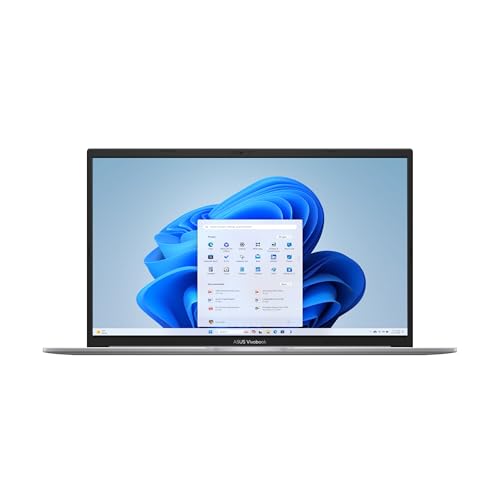
The Vivobook 17 is the machine for the rep whose presenting happens mostly across a desk, in meeting rooms they know, with a slide library measured in years. Its verified listing describes a 17.3-inch FHD display at 60Hz, an Intel Core i7-1355U processor, Intel Iris Xe Graphics, 16GB of memory and 1TB of storage, in Cool Silver, model F1704VA-ES76. Nothing there chases headlines, and that steadiness is the point: this is a big, clear, adequately powerful screen with room for every deck you have ever made, at a mainstream position in the market.
Sixteen gigabytes and a Core i7 handle the real presenting workload, decks with embedded video, a browser full of research tabs, a video call in parallel, without drama. The terabyte of storage deserves a presenter’s specific appreciation, because media-rich decks are heavy and the discipline of keeping local copies of everything, rather than trusting a client’s guest network, is what separates calm reps from apologetic ones. FHD resolution across 17.3 inches will not match the gram’s crispness for fine print, yet slides are designed to be read at distance, and for that task the panel’s size matters more than its density.
The Vivobook’s manners suit it to shared and conservative spaces. Cool Silver aluminium-toned styling reads as professional without shouting, the full-size layout gives number-heavy proposal work a proper keyboard, and the machine’s mainstream price means a sales organisation can equip a team rather than a chosen few. Fleet thinking matters in this category more than in most, because the best presenting laptop is often the one the whole team can be given, with identical chargers, identical behaviour and no hierarchy of hardware envy.
Where it concedes ground is travel. It is a full-size mainstream laptop, with the weight that implies, and its integrated graphics and 60Hz panel mark it as a business tool rather than a creative studio. Reps who present daily across a region should weigh the gram’s lightness seriously. Reps who present from a home base, a regional office or a car boot will find the Vivobook covers the job with money left over for the bag, the clicker and the spare charger that complete a presenter’s kit.
- Display: 17.3-inch FHD at 60Hz, per its verified listing
- Processor: Intel Core i7-1355U, per its verified listing
- Memory and storage: 16GB memory and 1TB storage, per its verified listing
- Graphics: Intel Iris Xe Graphics, per its verified listing
- Platform notes from listing: Cool Silver finish, model F1704VA-ES76
Strengths
- A terabyte of local storage built for offline deck libraries.
- Core i7 and 16GB cover the real multitasking load of a selling day.
- Mainstream pricing makes team-wide deployment realistic.
Trade-offs
- Full mainstream weight tells on daily regional travel.
- FHD resolution shows its limits on fine print at close range.
- Integrated graphics cap media-heavy creative work.
Best for: account managers and regional reps who present from familiar rooms and carry deep local archives.
Not suited for: daily flyers, for whom the gram’s weight saving compounds into a different working life.

Microsoft Surface Pro 11 — The one-to-one pitch tablet
Picture the pitch that actually closes deals in many industries. Not a stage, not a projector, just two people at a small table, a coffee going cold, and a set of figures that need walking through together. A 17-inch clamshell in that scene is a barricade; the lid rises between seller and buyer like a tiny fortification. The Surface Pro 11 dissolves the barricade. Laid nearly flat or propped at a shallow angle, its 13-inch touchscreen becomes a shared document both parties can point at, annotate and sign, and the conversation changes from a performance into a collaboration.
The verified listing describes the 2024 Surface Pro 11 with a Snapdragon X Plus processor, 16GB of memory and 512GB of storage, bundled here with a free Inateck Bluetooth backlit keyboard. Sixteen gigabytes is the right amount for the pitch workload, decks, documents, browser research and calls, and the Snapdragon platform’s efficiency suits a device that must survive a day of meetings on battery. The compatibility caveat from our interface guide applies here too: check any specialised Windows software your firm depends on, because ARM-based machines handle mainstream applications beautifully and obscure legacy tools less certainly.
For room-scale presenting, the Surface plays a different role: it becomes the presenter’s console rather than the screen. Connected to the room’s display by cable or dock, it sits beside you with the deck’s notes, the next slides and the annotation pen, while the big wall screen shows the audience only what it should. Presenters who have worked this way rarely return to mirroring a clamshell, because separating the audience’s view from the presenter’s view is the single largest professionalism upgrade available at any price.
The honest limits are size and ecosystem cost. Thirteen inches cannot serve as a group presentation surface, the keyboard and pen arrangements add purchases, and a rep whose work is all conference rooms gains little from the tablet posture. This pick is a specialist instrument for relationship selling, site visits, financial advice, real estate, design consultation and every trade where the pitch is a conversation. In those trades it is not a compromise pick; it is the best tool in this guide.
- Form: 13-inch touchscreen 2-in-1 detachable, per its verified listing
- Processor: Snapdragon X Plus, per its verified listing
- Memory and storage: 16GB and 512GB, per its verified listing
- Bundle note: this listing includes a free Inateck Bluetooth backlit keyboard
- Presenting mode: tablet posture for shared, pen-annotated one-to-one pitches
Strengths
- Tablet posture turns one-to-one pitches into shared, signable conversations.
- Separates presenter view from audience view when driving a room display.
- Light, instant and unobtrusive in cafés, site cabins and client kitchens alike.
Trade-offs
- The small screen cannot present to a group gathered around the machine itself.
- Keyboard, pen and connection accessories complete the kit at extra cost.
- Specialised legacy Windows software needs a compatibility check on this platform.
Best for: relationship sellers whose decisive meetings happen across a table of two.
Not suited for: reps whose presenting is exclusively conference-room and projector work.

HP 17 Laptop — The memory-rich road warrior
Some reps carry their entire territory in one machine: years of proposals, product photography, training videos, pricing models and a CRM that syncs when it feels like it. HP’s 17-inch business configuration reads as if specced by exactly that person. Its verified listing describes a 17.3-inch FHD thin and lightweight business laptop, new edition, with an Intel Core i7-1355U processor, 32GB of RAM, a 1TB SSD plus a 512GB SD card for expanded storage, Windows 11 Pro, Wi-Fi 6 and a Copilot key, in silver. The storage arrangement is the headline: a terabyte of fast internal storage with a further half-terabyte on card, a layout that suits media libraries which grow faster than internal drives do.
Thirty-two gigabytes of memory, matched with the Core i7, gives this machine the multitasking composure that presenting days demand. The pattern is familiar to anyone who sells: the deck open, the demo queued, the video call ringing, the spreadsheet recalculating, and a client asking a question that requires all four at once. Machines with half this memory survive that moment with visible effort; this configuration takes it in stride, and composure under a client’s gaze is a sales asset in the most literal sense.
Windows 11 Pro and Wi-Fi 6 place the machine comfortably in corporate environments, where Pro’s management and security features are often the difference between IT approving a device and tolerating it. The Copilot key signals the current generation of HP’s business line, and the thin and lightweight positioning, HP’s own words in the listing, acknowledges that even a spec-rich 17-incher must travel. We would still class it as a car-and-office machine rather than a daily flyer, a judgement about the size class generally rather than this model specifically.
Against the Vivobook, its near relation in spirit, the HP justifies its step up through memory and storage alone, the two specifications that presenting workloads actually exhaust. Against the gram, it trades lightness and screen sharpness for that same headroom at a different price logic. A rep whose bottleneck is files and multitasking, rather than shoulder strain, will find this the most rational machine in the guide.
- Display: 17.3-inch FHD, described as thin and lightweight in its verified listing
- Processor: Intel Core i7-1355U, per its verified listing
- Memory and storage: 32GB RAM, 1TB SSD plus 512GB SD card, per its verified listing
- Platform notes from listing: Windows 11 Pro, Wi-Fi 6, Copilot key, silver finish
- Position: new-edition business configuration in HP’s 17-inch line
Strengths
- 32GB of memory delivers mid-meeting multitasking without drama.
- Combined storage above a terabyte and a half swallows media-heavy archives.
- Windows 11 Pro fits corporate IT expectations for a rep’s machine.
Trade-offs
- FHD panel lacks the gram’s fine-text crispness for close work.
- SD-card storage is slower than the internal SSD and suits archives, not active projects.
- Size still makes it a car-and-desk machine more than an air-travel companion.
Best for: reps carrying deep local archives who present from offices, cars and client desks.
Not suited for: frequent flyers, or buyers who value panel sharpness over storage headroom.
Dell XPS 17 — The departed boardroom favourite
Plenty of salespeople reading this guide are presenting from an XPS 17 right now, and Dell’s decision to discontinue the line does not make their machines worse at the job. The XPS 17 earned its boardroom reputation on a sharp, tall display, a compact aluminium body for its screen size and an understated design that never embarrassed its owner in conservative rooms. We cover it without a link or quoted specifications, because our pool holds no verified listing and its configurations varied considerably across production years.
For owners, the guidance is to keep it healthy rather than replace it reflexively. Battery condition is the ageing factor that matters most to a presenter, since a machine that once lasted a meeting day and now fades by lunch changes how its owner works. Where battery service or replacement is available, it can restore the machine’s presenting career at a fraction of a new laptop’s cost. Storage housekeeping helps too; a deck archive pruned yearly keeps an older machine feeling brisk.
For buyers meeting the XPS 17 on the used market, the presenting lens sharpens the usual checks. Confirm the display variant, because the line offered meaningfully different panels; test the webcam and microphones on a real call, since those are a rep’s instruments; and price the machine as the used, unsupported-by-fresh-warranty purchase it now is. A well-kept example remains a genuinely desirable presenting laptop, provided the price admits what year it is.
Its presence in this guide is also a market signal. The premium 17-inch presenting space the XPS once anchored is now served by the gram’s lightness at one end and HP’s and ASUS’s mainstream breadth at the other, and reps replacing an XPS today will find the gram the closest spiritual successor in spirit, if not in badge.
- Status: discontinued; owned widely, bought now through used channels
- Configuration note: panels and internals varied by year; none quoted without a verified listing
- Owner guidance: battery renewal is the highest-value maintenance for a presenter
- Buyer guidance: verify display variant and call hardware before paying premium used prices
- Character: understated premium design suited to conservative client rooms
Strengths
- Display quality and design restraint made it a boardroom standard for years.
- Existing owners can extend its presenting life cheaply through battery care.
- Strong used supply lets patient buyers inspect and choose.
Trade-offs
- No new purchase route, fresh warranty or long support runway remains.
- Used examples vary widely in battery and panel condition.
- No verified listing here, so no specifications are quoted for it.
Best for: owners maintaining a good example, and used buyers who inspect before they commit.
Not suited for: firms standardising a team on a current, supported model.
HP Envy 17 — The polished client-facing alternative
HP’s Envy 17 occupies the space between the mainstream machines a firm issues and the flagships a partner carries. As HP’s premium consumer line at this size, it has generally offered aluminium construction, displays a step above the mainstream tier and a design language that flatters client-facing work. We discuss it without a link and quote no specifications, because no verified listing for it sits in our pool and its configurations have ranged widely, from everyday to creator-leaning, across its generations.
The presenting case for the Envy is about impression management, a phrase salespeople understand precisely. A machine that looks and feels considered supports the story a rep tells about their firm’s standards, particularly in design-sensitive industries, property, media, premium retail, where the client’s own environment is curated and a scuffed mainstream laptop subtly undercuts the pitch. The Envy’s typical panel quality also suits small-group presenting, where the built-in screen is the display and its clarity is the meeting’s limiting factor.
Shopping for one requires the configuration discipline this guide keeps recommending. The badge promises finish more reliably than power, so a buyer should verify memory, storage and panel variant for the specific unit, compare it honestly against the linked Vivobook and HP 17 configurations, and pay the premium only where the specification, not just the badge, earns it. Remaining stock and quality used examples are the realistic routes, and battery health governs value in the latter.
Within the six, the Envy is the connoisseur’s mainstream choice: not the lightest, not the most capacious, but the one whose daily feel rewards the person who has to open it in front of clients for years. Buyers who present mostly over video calls will capture less of that value, since their clients see the webcam’s output rather than the machine, and should weight the linked picks’ cameras and memory accordingly.
- Position: HP’s premium consumer 17-inch line, above its mainstream tier
- Configuration note: wide historical range; no verified listing in our pool to quote
- Presenting case: finish and panel quality for small-group, screen-on-table meetings
- Shopping route: remaining stock and inspected used examples
- Buyer guidance: pay for verified specifications, not for the badge alone
Strengths
- Client-facing polish that supports a premium sales story.
- Displays in this line have typically suited small-group presenting well.
- A large owner base means accessories and knowledge are easy to find.
Trade-offs
- Capability under the badge varies, so homework is unavoidable.
- New availability is inconsistent, pushing buyers toward used examples.
- Video-call-heavy sellers gain less from its physical finish.
Best for: reps in design-sensitive industries whose laptop is visibly part of the pitch.
Not suited for: buyers who want one current configuration, orderable today without research.
How Do the Six Picks Compare for Presenting Duty?
| Pick | Presenting style it suits | Display (as listed) | Memory / storage (as listed) |
|---|---|---|---|
| LG gram 17 | Daily travel, small-group screen presenting | 17.0-inch WQXGA IPS touch | 32GB LPDDR5X / 1TB SSD |
| ASUS Vivobook 17 | Known rooms, deep deck library | 17.3-inch FHD 60Hz | 16GB / 1TB |
| Microsoft Surface Pro 11 | One-to-one shared-table pitches | 13-inch touchscreen detachable | 16GB / 512GB |
| HP 17 Laptop | Archive-heavy territory selling | 17.3-inch FHD | 32GB / 1TB SSD + 512GB SD card |
| Dell XPS 17 | Boardroom polish, existing owners | Not quoted; variants differ by year | Not quoted; no verified listing in our pool |
| HP Envy 17 | Design-sensitive client settings | Not quoted; varies by generation | Not quoted; no verified listing in our pool |
Notice how the table refuses to produce a single winner, because presenting is not a single activity. The gram wins the travelling week, the Surface wins the two-chair meeting, the HP wins the archive, and the Vivobook wins the procurement meeting where a whole team must be equipped. The used pair win where budget and taste intersect. A reader who can name their dominant presenting scene can read their pick straight off this table, which is what a comparison in a specialist guide ought to do.
What Makes a Slide Legible in a Real Meeting Room?
Legibility is a chain, and the laptop is only its first link. Screen size sets the ceiling for group viewing around the machine itself; resolution decides how fine the smallest chart label can be; and the deck’s own design, font sizes chosen for the room rather than the designer’s monitor, decides whether any of the hardware matters. Presenters who blame their laptop for unreadable slides usually discover, on inspection, that the slides were composed at sizes no screen could rescue. Build decks for the far chair and every machine in this guide becomes a competent presenting tool.
Room light is the second link. Bright rooms wash out any panel, and while we publish no brightness figures for these machines, the practical mitigations are universal: choose the seat that keeps windows behind the audience rather than behind you, raise the screen’s brightness before the meeting starts, and favour high-contrast slide themes in bright spaces. The gram’s and the premium used pair’s stronger panels forgive more, yet no laptop screen defeats direct sunlight, and pretending otherwise in a guide would be a disservice.
The third link is the house display, which most room presenting actually uses. Your laptop’s job then becomes feeding that screen reliably and showing you a presenter view the audience never sees. Rehearse the handoff at home with a television: connect, extend rather than mirror where the software allows, confirm the deck advances from your clicker, and practise recovering from the wrong display arrangement, because it will happen publicly one day and recovery speed is what the room remembers.
How Should a Rep Pack and Prepare for a Day of Meetings?
Preparation separates the reps whose technology is invisible from those whose meetings begin with an apology. The night before, charge everything, download local copies of every file the day requires, and update nothing; update windows and travel days are natural enemies. In the morning, the bag check is short and absolute: laptop, charger, the cable your rooms need, a clicker with fresh batteries, and a printed one-page summary of each meeting’s key figures, because paper has never once failed to pair with a projector.
Between meetings, habits compound. Top up the battery whenever a socket and twenty minutes coincide, rather than gambling on the day’s final meeting. Keep the deck for the next meeting open and the previous meeting’s notes saved before you leave the building, while the conversation is still legible in memory. Close the day by syncing everything once, at home, on a network you trust. None of this is technology advice in the specification sense, yet it determines whether the specifications you bought ever get the chance to matter.
Machine choice feeds back into these routines. The gram’s lightness makes the full kit feel effortless, the Surface’s tablet form slips into a document case for short hops, and the bigger HP and Vivobook reward a proper bag with a padded compartment sized for 17 inches. Whichever you choose, buy the bag and the spare charger in the same week as the laptop, not after the first trip teaches you why they were necessary.
Which Accessories Actually Earn Their Place in a Presenter’s Bag?
A clicker with a laser or digital pointer is the first accessory that pays, because it frees the presenter from the keyboard and lets them stand where the room can see them. Choose one you can operate by feel, advance, back, blank screen, without glancing down, and practise until the buttons are memory. The second earner is the cable kit: one primary cable matching the rooms you visit most, one adapter for the other standard, both short, both labelled, both tested monthly at home.
A compact travel charger that lives permanently in the bag removes the forgotten-charger failure mode entirely, and a small power bank rated for laptop charging can rescue the final meeting of a long day, though it should be treated as insurance rather than a plan. Presenters who demonstrate software should consider a portable second screen only if their demo genuinely needs one; for most, the weight is better spent on the spare charger and the printed summaries.
Skip the rest until a real failure argues for it. Bags accumulate hopeful accessories the way desks accumulate cables, and every extra object is weight on the shoulder that this guide’s top pick worked so hard to save. The discipline is to add equipment in response to incidents, not in anticipation of anxieties.
How Does Presenting Over Video Calls Change the Calculation?
Half the readers of this guide now present through a camera as often as across a table, and the laptop that serves both lives must satisfy two different audiences. On a call, your clients never see your beautiful 17-inch screen; they see your webcam’s image and your shared deck, which demotes panel size and promotes camera quality, microphone clarity and the machine’s composure while screen-sharing, encoding video and running the deck simultaneously. That multitasking load is exactly where the 32GB configurations in this guide justify themselves on call-heavy days.
The big screen still earns its place on calls, but privately. Seventeen inches lets a presenter keep the shared deck, the audience’s video tiles, their notes and the next slide’s preview arranged simultaneously without window-shuffling, and that backstage organisation is what makes a remote presentation feel calm rather than improvised. The Surface Pro plays its own trick here, serving as a second, pen-equipped surface beside a main machine for annotating shared material live, a setup many trainers and consultants adopt after seeing it done once.
Lighting and framing complete the remote picture, and no laptop purchase substitutes for them. Raise the machine so the camera meets your eyes, face the window or a lamp rather than sitting against the light, and test the whole arrangement with a colleague before a client call. The reps who look professional on screen have universally spent one dull half-hour arranging these things, and that half-hour outperforms any hardware upgrade this guide could recommend.
What Should a Sales Organisation Check Before Buying in Bulk?
Fleet purchases fail differently from individual ones. A rep’s personal quirk becomes, at scale, a support ticket pattern, so organisations should pilot any model from this guide with three or four reps across a full month of real meetings before committing. The pilot should deliberately include the oldest meeting rooms, the longest travel day and the heaviest deck library in the company, because a machine that survives those will survive the average week, while the reverse inference fails constantly.
Standardise the accessories with the same rigour as the machines. Identical cables, clickers and chargers across the team mean any rep can borrow any colleague’s kit in an emergency, and the savings from bulk accessory purchases quietly fund the spare machines every fleet needs. Decide the local-storage discipline too: the terabyte drives in this guide make an everything-local policy feasible, and a firm that adopts it will watch its cloud-in-the-client’s-basement failures fall to zero within a quarter.
Finally, plan the refresh honestly. Presenting laptops live hard lives in bags and cars, and a three-to-four-year replacement rhythm with batteries inspected annually will serve a sales force better than stretching machines until they fail publicly. The used pair in this guide illustrate the end of that road: fine machines, still working, but no longer what a firm should issue to the person carrying its first impression into a client’s building.
How Do You Keep a Presenting Laptop Looking Professional for Years?
A sales laptop is inspected by clients at conversational distance, so its cosmetic condition is part of its function. A microfibre cloth in the bag and thirty seconds of screen and keyboard cleaning before a meeting maintain the impression that the machine, and by extension the firm, is looked after. Stickers, a divisive topic in sales culture, deserve a policy rather than an accident: in conservative industries a clean lid outsells a collage, while in creative fields the reverse can be true, and the rep should know which industry they are walking into.
Protect the corners and the screen in transit, because bag damage is the visible ageing that clients notice. A padded sleeve inside the work bag costs little and prevents the scuffed, tired look that undermines a premium pitch. At the desk, keep the vents clear and the charger cable unstrained, habits that preserve both appearance and the machine’s willingness to wake instantly when a room is watching.
Software tidiness shows too. A desktop crowded with a hundred files and a browser groaning under a year’s tabs reads, when screen-shared accidentally, as disorganisation. Presenters should maintain a clean presenting profile or at least a clean desktop, rehearse with notifications silenced, and treat the machine’s visible digital surface with the same care as its lid. Clients forgive many things; watching their own confidential deck notification pop up during another client’s meeting is not among them, which is why notification discipline belongs in every presenter’s setup routine.
How Should You Handle the Meeting Where Technology Fails Anyway?
It will happen, to every rep, on a long enough timeline: the room’s display is dead, the adapter is the wrong one, the laptop chooses that morning to install its updates in public. The machine you bought matters less in that moment than the fallback you rehearsed. The first fallback is the laptop’s own screen, which is why this guide favours 17-inch machines for room work in the first place; a group of four can gather around a gram or a Vivobook and lose surprisingly little. Practise pivoting to that posture without apology theatre, because the room takes its emotional cue from the presenter, and a shrug with a smile keeps the meeting a meeting.
The second fallback is the printed summary, the one-page document of key figures this guide has already urged into your bag. Handled well, twenty minutes of structured conversation around a printed page can outperform a distracted slide performance, and some reps deliberately open important meetings that way before touching the laptop at all. The third fallback is rescheduling the visual portion while completing the human portion, a judgement call that senior reps make calmly and junior reps should be given permission to make in advance.
After any failure, write down what happened and change one thing: a cable added, a setting altered, a file moved local. Presenting reliability is not a product feature that ships in a box; it is an accumulation of small corrections, and the machines in this guide are best understood as platforms on which that accumulation happens. The reps with reputations for flawless meetings are simply the ones whose correction lists are longest.
There is a budget corollary worth stating before the recommendations close. Money spent on the spare charger, the tested cable pair and the rehearsal hour returns more presenting reliability than the same money spent climbing from one of this guide’s linked machines to a nominally faster one. Buy the machine that fits your pattern, then spend the remainder on the unglamorous kit around it, and your clients will remember your meetings for the content, which is the entire point.
Which Presenting Skills Does the Right Laptop Quietly Teach?
Tools shape habits, and a good presenting laptop teaches better ones than its owner might expect. A machine that wakes instantly encourages arriving early and opening the deck before the room fills, which produces the unhurried small talk where trust actually forms. A big, legible screen encourages simpler slides, because the presenter can see at a glance which chart is carrying too much fine print. A battery that lasts the day encourages taking the meeting out of the conference room entirely, to the client’s factory floor, showroom or site, where products are real and competitors’ slides are not.
The opposite lessons exist too, and this guide’s warnings map onto them. A heavy machine teaches its owner to present from wherever they first sat down. A fragile connection routine teaches dread of unfamiliar rooms, which clients read as reluctance. A laptop that stutters under its own archive teaches the rep to keep fewer materials ready, narrowing the conversation they can have. None of these lessons appears in a specification table, yet they are the mechanism by which hardware quietly edits a sales career over several years.
Choose, then, not only for the meetings you have this quarter but for the habits you want the machine to build into your working week. That framing explains the guide’s enthusiasm for the gram’s lightness and the Surface’s posture more honestly than any benchmark could: both machines make the better habit the easier one, and in a profession built on repeated small performances, easier good habits are worth paying for.
Common Mistakes
Presenting from the cloud on a client’s guest network is the mistake that defines the genre. The deck that streamed flawlessly in your office will buffer in a basement meeting room in front of the exact people you came to impress. Local copies of everything, on machines with storage like the HP’s and the Vivobook’s terabyte drives, exist precisely to retire this failure, and there is no excuse for it surviving into a second year of selling.
Arriving without having tested the room connection routine is the close second. Every machine in this guide connects differently in practice, through different ports, docks and adapters, and the time to learn yours is at home with a television. The rep who rehearses looks lucky in public with suspicious consistency.
Choosing a presenting laptop by processor ranking misreads the job entirely. Decks do not need flagship compute; they need instant wake, dependable connections, screens that carry a room and batteries that outlast a day of meetings. The gram’s specification is instructive here, because its flagship money went into weight, memory and panel, the three things presenting actually consumes.
Neglecting the one-to-one format completes the set. Sellers who equip only for conference rooms discover that their most valuable conversations happen across small tables, where a barricade of a laptop lid works against them. That is why a 13-inch detachable sits in a 17-inch guide without apology.
One more scene deserves a place in a presenter’s guide, because it decides more purchases than any specification: the demonstration. Reps who show live software, configurators or dashboards rather than static slides place a different load on their machine, part performance, part multitasking, all of it unforgiving of hesitation. The linked HP configuration’s memory and the gram’s headroom both serve demo work well, while the discipline that matters most is rehearsing the demo on the actual laptop, on a throttled connection, with the demo data reset to a clean state. A demonstration that has only ever run on a desktop in the office is a rumour, and clients can tell the difference within a minute.
Demo sellers should also decide, in advance, what the audience sees when the software is thinking. A presenter who narrates the pause, pointing at the part of the result that will matter, turns latency into anticipation. The laptop contributes the size and clarity of the screen on which that narration lands, which loops the argument back to where this guide began: at 17 inches, competently chosen, the machine stops being the risk in the room and becomes the rep’s most reliable colleague.
Keep the same philosophy for follow-up work. The meeting’s second half happens afterwards, in the proposal written on the train home and the figures checked from a hotel desk, and a presenting laptop that doubles as a comfortable writing machine, with a proper keyboard and a screen your eyes can live in, shortens that second half considerably. Several reps buy for the pitch and stay for the paperwork, and the machines above were chosen with both halves of the day in view.
That paperwork test is worth applying literally during your return window: write the longest proposal of your typical month on the candidate machine, in the place you would actually write it, and notice whether the keyboard, the screen and the battery invite the work or resist it. A laptop can ace every meeting-room test in this guide and still fail the train home, and the train home is where deals are documented.
Finally, insure the instrument as you would any other business asset: a warranty position you understand, a backup of the deck archive held somewhere other than the laptop, and a plan, agreed with yourself in advance, for the morning the machine does not wake. Presenting careers survive hardware failures routinely; what they cannot survive is the appearance of never having expected one.
Write that plan on paper, keep it with the printed summaries, and hope the folder stays boring for years.
Final Recommendation
If presenting is your living and travel is your week, buy the LG gram 17; its combination of a big, sharp, touchable screen, deep memory and near-vanishing weight is the closest thing this category has to a purpose-built instrument. If your presenting radiates from a home base or a regional office, the Vivobook 17 covers the work at a mainstream price, and the HP 17 configuration outmuscles it for reps whose archives and multitasking have outgrown 16GB of memory. If your deals close across a table of two, the Surface Pro 11 will change how your pitches feel, for you and for the person across from you.
Existing XPS 17 owners should maintain rather than mourn, and Envy 17 shoppers should buy the specification in front of them rather than the badge. Above all, whichever machine you choose, rehearse it. A presenter’s laptop is a stage instrument, and the audience can always tell whether the performer has practised.
Frequently Asked Questions
Do I really need a 17-inch laptop for presentations?
Only if the built-in screen is often the presentation surface, for small groups, site meetings and rooms where the house display fails. If you always present to a projector or a large television, the laptop’s own size matters far less, and connection reliability plus battery life should drive the choice instead.
How do I handle a meeting room with an unfamiliar display connection?
Carry the cable and adapter pair you have tested at home, arrive ten minutes early, and connect before the audience settles. If the room defeats you anyway, present from the laptop’s own screen with the group gathered closer; a calm fallback delivered confidently beats a flustered ten minutes of cable archaeology.
Is the Surface Pro too small to be a serious sales laptop?
For room presenting, it relies on the room’s screen, as many laptops do. For one-to-one selling, its size is its advantage, turning the pitch into a shared document. Its 16GB configuration handles decks, documents and calls comfortably; only group-around-the-laptop presenting exposes the small panel.
Which matters more for presenting, memory or processor?
Memory, in the pattern of a selling day. Decks, browsers, pricing models and calls accumulate simultaneously, and the HP’s and gram’s 32GB configurations absorb that load without the stutters that break a presenter’s rhythm. Any modern Core i7-class processor in this guide handles the compute side of the job.
Should our firm equip the whole sales team with the same model?
Where budgets allow, yes, and the Vivobook’s mainstream pricing exists for that logic. Identical machines mean shared chargers, predictable behaviour in client rooms and internal help that actually helps. A mixed fleet of the picks in this guide still works, provided each rep’s machine matches their presenting pattern.
What size bag does a presenting rep with a 17-inch laptop need?
One whose laptop compartment is honestly rated for 17 inches, with room left for the charger, cable kit and documents without forcing the zip. Measure the compartment rather than trusting the label, and choose a bag you can set down and open flat in a client’s reception area without an unpacking performance. The gram’s lightness makes almost any such bag comfortable; the larger machines reward a structured bag with a real shoulder strap.
Should I present from my own laptop or the client’s system?
Your own, wherever security policies allow it. Your machine holds your fonts, your local files, your rehearsed connection routine and your presenter view, while a borrowed system holds none of those and several surprises. Where a client’s policy mandates their hardware, arrive early enough to test the deck on it, and carry your printed summary as the final fallback.
Related Guides
For the budget end of big-screen selling, read our honest assessment of 17-inch laptops under $400 before assuming the price buys a presenting machine. Brand-focused buyers can continue to our roundup of 17-inch Lenovo laptops. And engineers who present technical work should see our guide to 17-inch laptops for AutoCAD, where the screens serve drawings rather than decks.



[…] presenting is your big laptop’s main job, continue to our guide to 17-inch laptops for sales presentations. For a frank account of the budget floor, read our look at 17-inch laptops under $400. And brand […]