What's inside
- Key Takeaways
- Quick Picks
- How Did We Choose These Affordable Tablets?
- What Actually Makes a Cheap Tablet Feel Cheap?
- Which Affordable Tablets Earn a Closer Look?
- What Should You Check Before Choosing a Screen Size?
- How Long Will an Affordable Tablet Keep Receiving Updates?
- Which Affordable Tablet Suits Streaming, Reading or Light Gaming?
- What Accessories Are Worth Adding, and Which Are Not?
- How Do the Six Compare Side by Side?
- How Should You Set Up a Budget Tablet So It Stays Fast?
- When Should You Skip the Budget Class Entirely?
- How Do These Tablets Handle a Shared Household?
- What Mistakes Do Budget Tablet Buyers Keep Making?
- Final Recommendation
- Frequently Asked Questions
- Related Guides
As an Amazon Associate I earn from qualifying purchases. This post may contain affiliate links at no extra cost to you.
widgetverdict.com is reader-supported. When you buy through links on our site, we may earn an affiliate commission.
Where to buy: All six picks below carry checked Amazon links. If you want the short version, start with the Lenovo Tab M11 for a big sharp screen, the Samsung Galaxy Tab A11+ for the longest support runway, or the Fire HD 8 if small and simple beats big and clever in your house.
The best affordable tablets used to involve a compromise you could feel in your fingertips: a screen that washed out at an angle, a hinge of plastic flex in the frame, speakers that sounded like a phone call from another room. That era is mostly over. The six tablets in this guide are inexpensive, but each one earns its place by doing at least one thing properly — a genuinely sharp display, storage you will not fill in a month, a case in the box, or software that will still be receiving attention years from now. Affordable here means the money went to the parts you touch every day, not that the parts were chosen carelessly.
What separates these six from the anonymous slates crowding the same shelves is traceability. Every pick comes from a maker with a real support page, a stated storage figure, a named processor and a battery claim we can repeat back to you. Two of them include a folio case in the box, which quietly removes the first accessory purchase most buyers forget to budget for. One runs Chrome OS and arrives ready to type. One is small enough to live in a coat pocket. Read the detailed sections with your actual habits in mind, because at this end of the market the right tablet is the one whose strengths line up with the three or four things you genuinely do.
It is also worth saying what this guide is not. It is not a ranking of the cheapest tablets on sale this week, because that list changes with every promotion and includes machines we would not hand to a friend. It is a shortlist of the affordable tablets whose compromises are the ones ordinary owners can live with — a modest processor here, a smaller screen there — rather than the ones that poison daily use, like cramped storage or a display that tires the eyes. Price brought these six into consideration; judgement kept them here.
Key Takeaways
- The Lenovo Tab M11 is the default recommendation: an 11-inch 1920×1200 screen, 128GB of storage and a folio case in the box.
- Samsung’s Galaxy Tab A11+ pairs 6GB of RAM with expandable storage and a two-year warranty, the strongest support story here.
- The Fire HD 8 is the smallest and simplest pick, an 8-inch entertainment slate with no lockscreen ads on this listing.
- Amazon’s Alexa Tablet 8 runs full Android with Google Play, which the Fire line does not offer.
- The Lenovo Chromebook Duet is the pick for anyone who types: Chrome OS, a WUXGA screen and a 2-in-1 design.
- The Lenovo Tab M10 doubles its storage out of the box with a bundled SD card, a trick nobody else here matches.
Quick Picks
| Pick | Badge | Why it earns its place |
|---|---|---|
| Lenovo Tab M11 | Best for most people | An 11-inch 1920×1200 display, 128GB of storage and a folio case included make it the complete package. |
| Samsung Galaxy Tab A11+ | Best support story | 6GB of RAM, expandable storage, Dolby Atmos speakers and a two-year warranty. |
| Fire HD 8 | Best small and simple | An 8-inch HD screen and 32GB in a slate sized for one hand and long reads. |
| Amazon Alexa Tablet 8 | Best app freedom | Full Android with Google Play, 4GB of RAM and 64GB of storage in an 8.7-inch frame. |
| Lenovo Chromebook Duet | Best for typing | Chrome OS on a 10.1-inch WUXGA display, in a 2-in-1 that works as a small laptop. |
| Lenovo Tab M10 | Best storage value | 128GB built in plus a 128GB SD card in the box, behind a Full HD+ screen. |
How Did We Choose These Affordable Tablets?
We started with a simple test: if a friend asked what to buy with a modest budget and no patience for regrets, which tablets could we name without adding a paragraph of warnings? That filter removed the no-name slates whose listings change components between batches, the tablets with storage so small the operating system crowds out your apps, and anything whose maker offers no clear path for updates or warranty claims. What survived were six machines from Lenovo, Samsung and Amazon — brands with support infrastructure a buyer can actually reach.
From there we weighed the things owners feel daily. Screen resolution came first, because a cheap tablet with a soft display disappoints every single session, while a modest processor only shows itself when you push it. Storage came second: 32GB is workable for a streaming-only device, but 64GB or 128GB changes the tablet from a window into the internet into a place where your books, films and photos actually live. Memory mattered in proportion — 4GB is the sensible floor for Android multitasking, and the one pick with 6GB earns a genuine smoothness advantage. Finally we counted what arrives in the box. Two of these tablets include a folio case, and the Duet’s 2-in-1 design includes its keyboard half, and those inclusions are real money saved.
We also paid attention to software identity. Three different ecosystems appear in this guide — conventional Android, Amazon’s Fire OS approach and its newer Android-based Alexa tablet, and Chrome OS — and they are not interchangeable. The detailed reviews flag which app stores each pick can reach, because a tablet that cannot run the one app you bought it for is expensive at any price.
One more filter deserves naming: we read the listings the way a careful buyer should, looking for the details that reveal how a product will age. A stated battery figure beats a vague promise. A warranty length printed in the title beats a support page you must excavate. A case in the box beats a photograph of a case sold separately. Those small signals of candour correlate with makers who answer their support lines, and they broke several near-ties in this selection. Where a listing was vague — a battery described only as long lasting, a resolution left unstated — the reviews below say so rather than filling the gap with a guess, and the pick earned its place on its other strengths.
What Actually Makes a Cheap Tablet Feel Cheap?
Owners rarely complain about benchmark scores. They complain that text looks fuzzy, that the tablet stutters when switching from a video to a browser, that the speakers make dialogue hard to follow, and that the battery dies during the programme it was bought to watch. Those four failures map to four specifications worth checking before anything else: display resolution relative to size, memory, speaker quality, and an honest battery figure. Every pick in this guide clears a sensible bar on at least three of the four, and the reviews below say plainly where each one falls short.
Resolution deserves a moment of arithmetic. The M11 and the Duet and the M10 all render 1920×1200 pixels, which on screens between ten and eleven inches produces crisp text and clean video. The two 8-inch-class picks run lower pixel counts, but their panels are smaller, so the sharpness your eye perceives is closer than the raw numbers suggest — and for the Fire HD 8, Amazon’s own listing calls the panel HD, which suits its entertainment brief. What you should not accept at any size is a large screen with a low resolution, because that combination stretches too few pixels across too much glass. None of the six picks commits that sin.
Build feel is the last piece, and the hardest to read from a listing. Thin, light designs with even seams and buttons that do not rattle are achievable at this level now, and the Samsung and Lenovo picks here come from product lines that have refined exactly that over several generations. A tablet you pick up without thinking about its edges is a tablet you will use more, and use is the whole point of buying one.
Which Affordable Tablets Earn a Closer Look?

Lenovo Tab M11 — Best for most people
The M11 is what happens when a manufacturer spends the budget in the order owners would choose. The 11-inch display runs 1920×1200, so ebook text has clean edges, recipes stay legible across a kitchen counter, and streamed video carries the detail you paid the subscription for. Underneath sits a MediaTek Helio G88 octa-core processor with 4GB of RAM — not a gaming specification, but honestly matched to browsing, video, reading and light multitasking, which is the workload this class of tablet actually sees. The 128GB of storage is the quiet headline: it is four times the Fire HD 8’s capacity, enough for a real offline library rather than a token few downloads.
Lenovo rates the battery at ten hours, and the listing includes an ambient light sensor, a small feature with outsized daily value because the screen adjusts itself as you move between a bright kitchen and a dim sofa instead of demanding a brightness slider hunt. The folio case in the box deserves emphasis too. Most tablet buyers order a case within the first week; here that purchase is already made, and the case doubles as a stand for video. In Luna Grey the whole package looks like a considered object rather than a bargain-bin concession, which matters more than reviewers usually admit — people keep and use things they like looking at.
- Display: 11 inches, 1920×1200, ambient light sensor
- Processor: MediaTek Helio G88 octa-core
- Memory and storage: 4GB RAM, 128GB
- Battery claim: 10 hours
- In the box: folio case
Strengths
- The sharpest large screen in this guide relative to its class, with self-adjusting brightness.
- 128GB of storage removes the download-versus-delete juggling that plagues smaller tablets.
- The included folio case saves an immediate second purchase and props the tablet for viewing.
Trade-offs
- 4GB of RAM keeps heavy multitasking and demanding games off the menu.
- At 11 inches it is a two-hand tablet; one-handed reading belongs to the smaller picks.
- The Helio G88 is a sensible chip, not a fast one, and patient owners will be happier than impatient ones.
In daily rotation the M11 suits the household that shares one tablet among several jobs. It is the device that sits on the coffee table and gets picked up for the news, a streamed drama, a video call with the camera at a sensible size, and the homework document someone needs to check before signing. The screen’s resolution keeps shared viewing honest — two people watching over a train table both see a picture worth watching — and the storage means the family’s downloads coexist instead of competing. Nothing about it asks you to learn a new ecosystem or forgive a glaring omission, and that absence of friction is precisely what most buyers mean when they say they want a tablet that just works.
Best for: buyers who want one affordable tablet that handles reading, video and everyday apps without an obvious weak point. Not suited for: mobile gamers chasing high settings, or anyone who reads one-handed in bed for hours.

Samsung Galaxy Tab A11+ — Best support story
Samsung’s pitch with the A11+ is reassurance, and the listing backs it with specifics competitors here do not match: a two-year warranty, 6GB of RAM, and expandable storage on top of 128GB built in. The extra memory over the 4GB crowd is the difference between apps staying alive in the background and reloading when you return to them — the browser keeps your article, the recipe app keeps your place, the video resumes where it paused. For a tablet meant to serve for years, that smoothness compounds daily, and the warranty says Samsung expects the hardware to last those years too.
The entertainment side is taken seriously. Dolby Atmos speakers give dialogue weight and music some width, which matters on a device with no headphone wearer in most living rooms — the tablet itself is the speaker. Samsung lists AI Assist among the features and describes the design as slim and light, and the Galaxy ecosystem means the tablet pairs naturally with a Samsung phone for calls, messages and shared clipboards. Buyers already inside that ecosystem will feel the integration immediately; buyers outside it still get the strongest raw specification in this guide for the money.
- Memory and storage: 6GB RAM, 128GB, expandable
- Audio: Dolby Atmos speakers
- Warranty: 2 years
- Extras: AI Assist features, slim and light design
- Battery: described as long lasting in the listing
Strengths
- 6GB of RAM is the most in this guide, and everyday smoothness shows it.
- Expandable storage plus 128GB built in means capacity worries end on day one.
- A two-year warranty doubles the cover most rivals in this class provide.
Trade-offs
- No case is bundled, so budget for one separately.
- The listing does not headline a resolution figure, so screen obsessives should read the M11 first.
- Samsung’s software layer is feature-rich, and minimalists may find it busy at first.
Consider the A11+ as the pick for a buyer who has been burned before by a tablet that slowed to a crawl in its second year. The memory headroom is the practical defence: apps grow heavier with every update cycle, and the machine with room to spare absorbs that growth gracefully. The warranty is the psychological one — a two-year promise reframes the purchase from a gamble into an appliance. Owners who keep a tablet on the kitchen counter for timers, music with some Atmos width to it, and the evening’s streaming will find it settles into that role without ever announcing itself as the cheap option.
Best for: buyers planning to keep a tablet for years, and Samsung phone owners who want the two devices to cooperate. Not suited for: anyone who wants a case included, or who prefers the plainest possible Android interface.
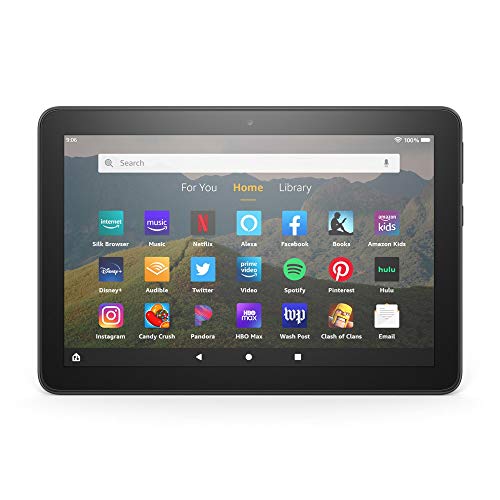
Fire HD 8 — Best small and simple
The Fire HD 8 is the elder of this guide — a 2020 release — and it stays here because its formula remains right for a particular job: portable entertainment without fuss. The 8-inch HD display and 32GB of storage frame it honestly as a streaming and reading slate rather than a computer, and within that brief it is easy to live with. It is the tablet you hand across a sofa, take on a train, or leave on a kitchen counter for radio and recipes, and its size means one hand can hold it while the other holds a rail, a mug or a chapter’s worth of attention.
This specific listing is the version without lockscreen ads, a detail worth more than it sounds: the screen you wake shows your content, not an advertisement, and over thousands of unlocks that absence is a genuine quality-of-life feature. The trade-offs are equally clear. Fire OS centres Amazon’s services and its own app store, so buyers whose lives run through Google’s apps should look at the Alexa Tablet 8 below instead. And 32GB fills quickly if you download films in bulk. Judged as a simple, inexpensive window onto Prime Video, Kindle books and the web, though, the HD 8 remains coherent in a way newer but muddled rivals often are not.
- Display: 8 inches, HD
- Storage: 32GB
- Version: without lockscreen ads
- Release: 2020 model, designed for portable entertainment
- Colour: Black
Strengths
- The one-hand size makes it the natural reading and travel pick of the six.
- No lockscreen ads on this listing keeps the experience clean from the first wake.
- A simple interface that non-technical owners rarely get lost in.
Trade-offs
- 32GB is the least storage here and fills fast with downloaded video.
- Fire OS and its app store do not suit buyers committed to Google’s app catalogue.
- As a 2020 design it lacks the polish and pace of the newer picks.
There is a dignity to a device that knows its job. The HD 8 does not pretend to be a laptop, a sketchbook or a games machine; it plays the programme, shows the page, reads the book aloud if asked, and then goes back to sleep in a drawer. Households often discover they need exactly one such tablet — the one nobody worries about, the one that travels to the beach rental and the hospital waiting room. Its age shows in its pace beside the newer picks, so treat it as an appliance with a defined role rather than a family’s main screen, and it will not disappoint you.
Best for: readers, streamers and travellers who want the smallest, simplest screen in the guide. Not suited for: households that need Google Play apps or download large offline libraries.

Amazon Alexa Tablet 8 — Best app freedom
Amazon’s newer 8-inch-class tablet answers the Fire line’s oldest criticism directly: this one runs Android OS with Google Play, so the app catalogue is the full one — banking apps, school apps, the streaming service with the awkward exclusivity deal, the video doorbell. The 8.7-inch display is a touch larger than the Fire HD 8’s, the specification doubles down with 4GB of RAM and 64GB of storage, and the design is built around Alexa+, Amazon’s current assistant, for voice control of playback, smart home kit and questions answered aloud.
The positioning is interesting: it is the pick for a household that likes Amazon’s hardware pricing and assistant but refuses to live inside the Fire OS app garden. All-day battery is the listing’s claim, and the Graphite finish keeps it looking like a grown-up device rather than a toy. What it does not do is match the M11’s screen size or resolution for long reading sessions, and assistant-forward design will not charm buyers who prefer their tablets silent and manual. As an affordable general-purpose Android tablet with the whole Play Store open, though, it occupies ground none of the other five quite stand on.
- Display: 8.7 inches, described as vivid in the listing
- Memory and storage: 4GB RAM, 64GB
- Software: Android OS with Google Play, designed for Alexa+
- Battery claim: all-day
- Colour: Graphite
Strengths
- Google Play access removes the app-store compromise of the Fire line.
- 64GB and 4GB of RAM double the Fire HD 8’s working room.
- Alexa+ voice control suits kitchens, workshops and hands-busy households.
Trade-offs
- The screen is smaller than the 11-inch picks for split-screen or long documents.
- Assistant-centred design is wasted on buyers who never talk to their devices.
- A newer product line, so the long-term accessory range is still growing.
The Alexa Tablet 8 also makes a quiet case as the household’s voice terminal. In a kitchen it answers timers and conversions aloud while showing the recipe; in a hallway it can front the doorbell camera; in a child’s bedroom it plays the audiobook and dims on schedule. Those are jobs the other picks can approximate, but the assistant-first design removes the friction of opening apps to do them. Buyers should simply go in clear-eyed: the convenience is real, and so is the always-listening premise that powers it, with a mute control that privacy-minded owners will want to locate on day one.
Best for: buyers who want Amazon hardware with the full Android app catalogue. Not suited for: readers wanting the largest page, or households avoiding voice assistants.

Lenovo Chromebook Duet — Best for typing
The Duet is the pick that refuses to be only a tablet. Its 10.1-inch WUXGA display renders the same 1920×1200 resolution as the M11 in a smaller frame, Chrome OS runs the software, and the 2-in-1 design means the keyboard half is part of the product rather than an accessory hunt. For a student, a writer, or anyone whose tablet use is really email, documents and web research wearing a disguise, that changes everything: the Duet opens like a small laptop, works like one, and still detaches into a slate for reading and video.
Chrome OS brings its own virtues — fast startup, automatic updates, and a desktop-class browser that handles the websites tablet browsers sometimes mangle. The MediaTek Helio P60T with 4GB of RAM and 64GB of storage is a modest specification, and honesty requires saying the Duet is a focused tool: superb for documents, browsing, streaming and school platforms, less happy with heavy Android games or serious photo work. The Ice Blue and Iron Grey two-tone finish gives it a designed look the budget class rarely attempts. Buy it for the keyboard and the browser, and it will feel like the cleverest money in this guide.
- Display: 10.1 inches, WUXGA 1920×1200
- Processor: MediaTek Helio P60T
- Memory and storage: 4GB RAM, 64GB
- Software: Chrome OS
- Design: 2-in-1 with keyboard, Ice Blue and Iron Grey
Strengths
- A real keyboard in the design makes writing and homework natural rather than possible.
- Chrome OS delivers a desktop browser and painless automatic updates.
- The 1920×1200 screen matches the M11’s sharpness in a more portable frame.
Trade-offs
- 64GB is the ceiling here, with no expandable-storage headline.
- Chrome OS suits web-centred work; specialist Android apps may not translate.
- The compact keyboard rewards smaller hands more than large ones.
The Duet’s party trick deserves a plain description: close it and it is a small laptop that fits the bags other laptops bulge out of; strip the keyboard and it is a reading slate with one of the sharpest screens in this guide. Students moving between a lecture hall and a library chair feel that duality hourly. So do commuters who write on the train and read on the platform. The compromise is performance ceiling — this is a machine for words, web and video, not for editing a film — but within its brief it offers a completeness the pure tablets cannot imitate at any specification.
Best for: students, writers and anyone whose tablet work is mostly typing and web. Not suited for: gamers, or buyers needing large offline storage.

Lenovo Tab M10 — Best storage value
The M10’s trick is printed right in its listing: 128GB of internal storage plus a 128GB SD card in the box. Rivals advertise expandable storage and leave you to buy the card; Lenovo simply includes it, so this tablet starts life with a quarter-terabyte of room for films, music, photos and the games a family accumulates. The 10.1-inch screen runs Full HD+ at 1920×1200 — the same resolution as the M11 on slightly less glass — and an eight-core MediaTek processor with camera pairing of 8MP at the back and 5MP at the front covers video calls and document snaps without drama.
Lenovo describes the design as ultra-light and aimed at students, casual gaming and everyday use, and bundles a folio case as with its bigger sibling. Positioned against the M11, the M10 trades an inch of screen for that doubled storage and a lower rung on the range ladder; positioned against everything else here, it is the pick for the household that downloads first and streams second — long flights, patchy holiday Wi-Fi, a child’s film library that must simply be there. Battery life is described as long in the listing rather than given a figure, so heavy travellers should read the M11’s stated ten hours as the safer promise.
- Display: 10.1 inches, FHD+ 1920×1200
- Storage: 128GB internal plus 128GB SD card included
- Processor: eight-core MediaTek
- Cameras: 8MP rear, 5MP front
- In the box: folio case
Strengths
- The bundled SD card doubles storage on day one at no extra errand or expense.
- A 1920×1200 screen keeps text and video sharp at a friendly size.
- Folio case included, like the M11, so it is protected from the first hour.
Trade-offs
- The listing gives no firm battery-hours figure to plan long days around.
- It sits close to the M11 in spirit; buyers wanting the bigger screen should step up.
- Camera quality is functional for calls and snaps, not a reason to buy.
Picture the M10 packed for a long-haul trip: a season of a series, a dozen films, the children’s favourites, a music library and a shelf of books, all resident on the device before the airport. That is the use its storage layout was designed for, and it performs it without the subscription maths of streaming abroad or the roulette of hotel Wi-Fi. At home the same capacity swallows a family photo archive or a student’s recorded lectures. It is the least glamorous pick in this guide and, for the right owner, possibly the most useful one.
Best for: downloaders, travellers and families building offline libraries. Not suited for: buyers who stream everything and would rather have the M11’s larger screen.
What Should You Check Before Choosing a Screen Size?
Size is the decision buyers feel in their hands every day, and this guide spans the full sensible range from 8 inches to 11. The small picks — the Fire HD 8 and the 8.7-inch Alexa Tablet 8 — are reading and carrying devices. They slip into a jacket pocket or the side pouch of a bag, they can be held in one hand on a train, and their screens are large enough for video when the video is entertainment rather than spectacle. Their limit appears the moment two things must share the glass: a document beside notes, a video call beside the agenda, a textbook beside a worksheet. Small screens show one thing well.
The 10.1-inch pair, the Duet and the M10, occupy the traditional middle. Held in landscape they approximate a hardback book opened flat; propped in their cases they become small televisions for a kitchen counter or a bedside table. For many households this is the natural size, big enough for split-screen in a pinch and small enough to remain furniture rather than equipment. The M11 at 11 inches pushes into territory where the tablet stops apologising: two apps side by side are genuinely usable, a film fills your field of attention on a train tray, and a page of sheet music or a comic reads at something close to printed size.
Weight follows size, and so does the question of who else will use the tablet. A slate bought for a grandparent’s video calls, a child’s reading app or a partner’s crossword habit will be passed between hands and rooms; the smaller picks forgive that life, while the 11-inch M11 rewards being settled in one place with its case as a stand. Think about where the tablet will live — a pocket, a counter, a desk — and let the answer choose the size before the specifications choose anything.
There is a test worth doing in a shop or with a borrowed device: hold the size you are considering for the length of a chapter, then prop it for the length of an episode. Tablets are unusual among gadgets in being used at both extremes — cradled like a book and parked like a television — and a size that flatters only one posture will quietly bias what you use the device for. The two 10.1-inch picks split the difference most evenly, which is why the middle of this guide is crowded; the extremes earn their places by being unapologetic about the posture they serve.
How Long Will an Affordable Tablet Keep Receiving Updates?
Software support is the specification nobody lists in large type, and it decides how long an affordable tablet stays safe and compatible. The honest picture varies by maker. Samsung builds its reputation partly on update commitments for its Galaxy lines, and the A11+ arrives with a two-year warranty as a hardware signal of the same intent. Chrome OS on the Duet updates automatically in the background on a published schedule, which is why Chromebooks remain popular with schools that cannot nurse individual machines. Amazon maintains its own devices on its own cadence, pushing updates to Fire and Alexa tablets quietly over the air.
What can a buyer actually do with this? Prefer makers with a named support page and a track record, which all six picks have. Turn on automatic updates the day the tablet arrives, because a supported tablet that never installs its updates is unsupported in practice. And judge longevity by memory as much as by promises: the A11+ with 6GB of RAM has more headroom for the heavier apps of future years than a 4GB machine, which is a concrete, present-day reason it anchors the long-keeping end of this guide. A tablet bought cheaply and replaced in eighteen months is not cheap; these six were chosen so that the first purchase can be the only one for a good while.
Battery ageing belongs in the same conversation. Every rechargeable cell loses capacity across years of cycles, and the practical defences are mundane: avoid leaving the tablet plugged in at full charge on a hot counter for months, let it discharge in ordinary use, and treat the stated battery figure as the fresh-device benchmark rather than a lifetime guarantee. Owners who follow that rhythm typically find an affordable tablet’s stamina declines gently instead of falling off a cliff, which is the difference between a device that ages and one that expires.
Which Affordable Tablet Suits Streaming, Reading or Light Gaming?
Streaming is the workload every pick here handles, but they do not handle it identically. For films and series, screen size and speakers divide the field: the M11’s 11-inch 1920×1200 panel is the cinema of the group, the A11+ counters with Dolby Atmos audio that gives voices and scores more presence than its screen size alone would suggest, and the M10 matches the M11’s resolution class on a slightly smaller panel while carrying the downloads to feed it. The two 8-inch-class tablets stream perfectly well for one viewer at arm’s length — a personal screen rather than a shared one — and the Duet’s sharp display does the same job in a frame that also writes essays.
Reading splits the field differently. For novels, the Fire HD 8’s one-hand weight and simple storefront make it the pick most likely to be beside the bed. For anything with layout — magazines, comics, cookbooks, sheet music, a child’s picture books — the larger 1920×1200 screens pull ahead, because the page arrives whole rather than in zoomed fragments. The M11’s ambient light sensor earns its keep here too, softening the screen as the room darkens without a settings dive.
Light gaming is where honesty matters most. Every chip in this guide runs the casual catalogue — puzzles, card games, word games, the gentle end of racing and building titles — without complaint. None of them is a machine for demanding 3D titles at high settings, and buyers shopping for a teenager whose gaming is the main event should treat this entire price class as a starting point to look upward from, not a destination. For the mixed household diet of video, pages, browsing and casual play, though, the six picks divide the work cleanly, and the detailed reviews above mark which appetite each one feeds best.
What Accessories Are Worth Adding, and Which Are Not?
A tablet’s purchase price is the beginning of its cost, and the picks divide sharply on what else they demand. Start with protection. The M11 and M10 close that question in the box; for the Samsung, the Fire HD 8 and the Alexa Tablet 8, a folio case is close to mandatory, because a slate lives on sofas, counters and car seats rather than desks, and its screen is its largest and most fragile component. A case with a stand fold earns more than a sleeve you must remove to use the device, and a raised lip around the glass is worth more than decorative thinness.
Storage is the second accessory that is not really optional for the expandable picks. The A11+ accepts additional storage, and a card bought with the tablet means photos and downloads never queue for internal room. Buy the card from a known brand at the same time as the tablet, format it in the device, and set the camera and download folders to use it from the first day rather than migrating later. For the Duet, the accessory conversation runs the other way: the keyboard is already part of the design, so the money others spend on typing can go to a mouse or a small hub for a desk setup.
What can you skip? Stylus pens for tablets without pen-focused designs, elaborate stands for a device whose case already props it, and extended warranties stacked on top of the A11+’s included two-year cover. A screen protector is a judgement call — worthwhile for a tablet that travels in a bag with keys, less so for one that lives on a counter in its folio. The discipline is the same as the tablet choice itself: buy for the life the device will actually lead, and the affordable purchase stays affordable.
How Do the Six Compare Side by Side?
| Pick | Screen | Memory / storage | System | Standout |
|---|---|---|---|---|
| Lenovo Tab M11 | 11in, 1920×1200 | 4GB / 128GB | Android | Folio case included |
| Samsung Galaxy Tab A11+ | Large display | 6GB / 128GB, expandable | Android | Two-year warranty, Dolby Atmos |
| Fire HD 8 | 8in HD | 32GB | Fire OS | No lockscreen ads |
| Amazon Alexa Tablet 8 | 8.7in | 4GB / 64GB | Android with Google Play | Alexa+ built in |
| Lenovo Chromebook Duet | 10.1in, 1920×1200 | 4GB / 64GB | Chrome OS | Keyboard in the design |
| Lenovo Tab M10 | 10.1in, 1920×1200 | 128GB + 128GB SD included | Android | Storage doubled in the box |
How Should You Set Up a Budget Tablet So It Stays Fast?
Affordable tablets reward a tidy first hour. Begin by installing only the apps you know you will use; every background service you skip is memory and battery returned to the things you actually open. Turn on automatic updates so security and app fixes arrive without a maintenance ritual, and set the screen timeout short — the display is the largest battery draw on any slate, and a screen that sleeps promptly stretches every charge. On the picks with expandable storage, move downloads and camera files to the card and keep the internal space for apps, which is where free room translates into smoothness.
Then arrange the home screen around reality: the five apps you open daily on the first page, everything else in the drawer. Add a second user profile or a guest mode if the tablet will be shared, so a borrowed device does not mean a borrowed identity. Finally, learn the split-screen gesture on the larger picks. An 11-inch screen showing a recipe beside a timer, or notes beside a lecture, is the moment an affordable tablet stops feeling like a compromise and starts feeling like a tool.
Two habits keep the tablet fast in month twelve. First, audit storage every few months: downloaded series you have finished, games a child has outgrown and duplicate photo folders are the usual squatters, and removing them returns the headroom the system needs to breathe. Second, restart the tablet occasionally rather than letting it sleep for months at a stretch; a clean start clears the accumulated oddities of long uptime. Neither habit costs money, and together they are most of the difference between owners who say their budget tablet still flies and owners shopping for its replacement.
When Should You Skip the Budget Class Entirely?
Honesty about a guide’s limits makes the guide trustworthy, so here are the buyers these six will not satisfy. If the tablet must run a specific demanding game at high settings, edit video beyond trims and captions, or serve as the only computer for a professional whose software lives outside a browser, the affordable class is the wrong shelf — those jobs justify the midrange, and forcing a budget slate into them produces the dissatisfaction that gives cheap tablets their reputation. Likewise, an artist who needs a pressure-sensitive pen as the main input should start from a pen-first guide rather than adapting one of these.
Everyone else — and that is most tablet buyers — uses a slate for a bundle of ordinary things: video, reading, browsing, calls, light documents, casual games, a child’s homework portal, a parent’s photo stream. For that bundle, the difference between these picks and tablets costing far more is real but narrow, and it narrows every year. The sensible question is not whether an affordable tablet can do the job, but which of the six does your version of the job with the fewest apologies. That is the question the reviews above were written to answer, pick by pick, without pretending the answer is the same for a student, a traveller and a grandparent.
How Do These Tablets Handle a Shared Household?
Most affordable tablets are not personal devices; they are household infrastructure, and the six divide by how gracefully they share. Android’s multi-user support on the Lenovo and Samsung picks lets each family member keep a profile with separate apps and files, so the tablet on the counter can be a parent’s news reader in the morning and a child’s homework screen in the afternoon without either seeing the other’s clutter. The Fire HD 8 leans the other way — a single simple environment that everyone understands instantly, at the cost of privacy between users. The Alexa Tablet 8’s voice profiles add a different kind of sharing, recognising speakers for personalised answers.
Sharing also means surviving shared handling. A tablet passed between rooms and generations meets more drops, spills and sticky fingers than a personal device ever does, which circles back to cases and warranties: the bundled folios on the Lenovo pair and the A11+’s two-year warranty are household features as much as individual ones. If the tablet will be the family’s, buy for the family — a profile system, a case from day one, and storage that assumes everyone’s downloads, not just yours. The picks above each make that case in a different dialect, and the right dialect is the one your household already speaks.
What Mistakes Do Budget Tablet Buyers Keep Making?
The classic error is buying storage by hope. Buyers tell themselves 32GB will be fine, then meet the tablet that cannot update its own system for lack of room. If your use involves downloads, choose the 64GB and 128GB picks and treat the smallest capacities as streaming-only. The second mistake is ignoring the app store question: a Fire OS tablet and a Google Play tablet are different commitments, and discovering the difference after purchase is an avoidable sorrow. Third, buyers forget the case until the first drop; two picks here include one, and the rest deserve one ordered the same day. Fourth, people compare processors by core counts in listings rather than by the work they do — for reading, video and browsing, every chip in this guide is adequate, and the screen and storage differences will shape your satisfaction far more.
A fifth mistake hides in the checkout options: choosing a configuration by its headline discount without checking which version of the product it describes. The Fire HD 8 in this guide is specifically the listing without lockscreen ads, and storage variants of the same tablet can differ enough to change which pick it should have been. Read the configuration line as carefully as the title, and the tablet that arrives will be the tablet the review described.
Final Recommendation
Buy the Lenovo Tab M11 if you want one answer: it pairs the big sharp screen with the storage and the case, and it asks nothing of you in return. Choose the Samsung Galaxy Tab A11+ if the tablet must serve for years and you value memory and warranty over bundled extras, and take the Chromebook Duet if your tablet work is really typing. The Fire HD 8 and Alexa Tablet 8 split the small-tablet vote by app store, and the M10 is the download hoarder’s friend. Our money, for a household buying one affordable tablet to do a bit of everything, goes to the M11 — it is the pick that makes the word affordable feel like a compliment.
A closing word on timing and expectations. Listings in this class change their bundles and configurations across the year, so confirm the storage figure and the case inclusion on the product page before ordering — the reviews above describe the listings as checked for this guide. Set the tablet up patiently, keep its storage breathing room, and an affordable tablet bought this year should still be earning its shelf space long after the receipt has faded.
Frequently Asked Questions
How much storage does an affordable tablet really need?
For streaming and browsing, 32GB survives. For downloads, books with images, games and photos, 64GB is the sensible floor and 128GB is comfort. Two picks here offer 128GB built in, and the M10 doubles that with its bundled card.
Can these tablets run Microsoft Office and school apps?
The Android picks run the mobile Office apps and common school platforms from Google Play or their respective stores. The Chromebook Duet runs web versions in a desktop browser and Android apps from its own store, which many schools standardise on.
Which pick is best for reading books?
The Fire HD 8 for one-handed reading and the M11 for long sessions at a table. Both keep text clean; the choice is size, not quality.
Do any of these include a case or keyboard?
The M11 and M10 include folio cases. The Duet’s 2-in-1 design includes its keyboard half. The Samsung, Fire HD 8 and Alexa Tablet 8 need accessories bought separately.
How long will an affordable tablet stay usable?
Hardware in this guide should serve several years of everyday use. The Samsung’s two-year warranty and 6GB of RAM give it the longest runway on paper; keeping storage free and updates current extends any pick’s life.
Are these tablets good gifts?
They make unusually safe gifts because none requires the recipient to learn an exotic system. The M11 and M10 arrive with cases, which makes the present feel complete; the A11+ suits a recipient who keeps things for years; the Fire HD 8 suits a reader. Set the tablet up before wrapping it — updates installed, the recipient’s account signed in, the home screen arranged — and the gift becomes an experience rather than a project.
Can I use these tablets for video calls?
Yes. All six carry front cameras for the major calling apps their stores offer, and the M10’s listing spells out a 5MP front camera for exactly that job. Larger screens make group calls easier to follow, which is one more argument for the M11 in a family that calls often.
Which of these is easiest to set up for someone else?
The Fire HD 8 and the Alexa Tablet 8 ask the fewest questions during setup, and the Duet signs in with a Google account and little else. The M11 and A11+ reward ten extra minutes arranging profiles and storage, after which they need less attention, not more.
Related Guides
Shopping for a younger reader next? See Best Affordable Tablets for Kids That Survive Childhood. Buying for a parent or grandparent instead? Best Affordable Tablets for Elderly Parents and Grandparents applies the same budget discipline to larger text and simpler calls. And if a pen matters more than a price tag, Best Affordable Drawing Tablets for Artists: Slates With Real Pens covers the slates built to draw on.


