What's inside
- Key Takeaways
- Quick Picks
- How We Chose These Picks
- What Does “All-Around” Really Demand?
- Which Six Tablets Do Everything Well?
- How Do They Handle the Jobs Nobody Puts on the Box?
- Can an All-Rounder Game?
- How Do You Set Up an All-Rounder for a Household?
- What Happens When an All-Rounder Gets Old?
- How Do the Six Compare Side by Side?
- How Do You Choose Between Apple and Android Here?
- Which Pick for Which Person in the House?
- How Do Warranties and Support Actually Differ?
- What Should You Budget Beyond the Tablet?
- How Does an All-Rounder Travel?
- How Does an All-Rounder Earn Its Keep at Work?
- What Mistakes Do All-Around Buyers Keep Making?
- Why Do Owners Keep All-Rounders Longest?
- What Should You Check in the First Week?
- Final Recommendation
- Frequently Asked Questions
- Related Guides
As an Amazon Associate I earn from qualifying purchases. This post may contain affiliate links at no extra cost to you.
widgetverdict.com is reader-supported. When you buy through links on our site, we may earn an affiliate commission.
Where to buy: all six tablets below carry checked Amazon listings, spanning the mainstream’s full range from the sensible default to the entertainment specialist.
Most people do not need the fastest tablet, the sharpest tablet or the cheapest tablet. They need the one that never makes them wish they had bought something else — and the best all-around tablets are the machines engineered around that unglamorous wish. An all-rounder is not a compromise in the insulting sense. It is a balance struck deliberately: a screen good enough for film and documents alike, performance that outlasts the apps’ ambitions, a battery that treats a day as a unit, software that will still be supported when the case is scuffed, and a price that leaves room in the budget for the case, the pen or the second machine for the household.
This guide ranks six of them for 2026, and the field divides by ecosystem before it divides by anything else. Apple’s pair — the iPad and the iPad Air — offer the deepest app catalogue and the longest support runway in the business. Samsung answers with two Galaxy Tabs at opposite ends of the mainstream, one a flagship with a pen in the box, one a household value machine with a two-year warranty in its listing. Lenovo closes the list with the budget all-rounder that embarrasses pricier rivals on completeness, and an entertainment-leaning machine whose speakers make it the family’s small television. There is no wrong ecosystem here — there is only the one your household already speaks, and the one you are willing to learn.
A note on method, because “all-around” invites vagueness: every pick below was scored against the same six jobs — film and reading, browsing and mail, documents and notes, video calls, light creation, and family sharing — and no pick is allowed to fail any job outright. Specialists may beat them one job at a time; that is what specialists are for, and several live in this batch’s other guides. These six are the answer to the question most buyers actually ask, which is not “what is best?” but “what should I just buy?”
Key Takeaways
- The iPad (A16) is the default answer for most people: the strongest app catalogue, a superb screen and Apple’s update longevity at the mainstream’s centre.
- The iPad Air (M4) is the step-up for buyers who keep tablets for years and want performance headroom they will never have to think about.
- The Galaxy Tab S10+ is the Android flagship all-rounder — a 12.4-inch AMOLED screen, S Pen included and 256GB of storage.
- The Galaxy Tab A11+ is the household value pick, balancing a big screen, 6GB of memory, expandable storage and a two-year warranty.
- The Lenovo Tab M11 is the budget all-rounder that feels least like one, with a 1920×1200 screen and a folio case included.
- The Lenovo Tab Plus leans entertainment-ward with eight JBL speakers and a 2K screen, while still covering every everyday job.
Quick Picks
| Pick | Badge | Why it earns its place |
|---|---|---|
| Apple iPad 11-inch (A16) | The default recommendation | Liquid Retina screen, A16 pace and the deepest app catalogue — the tablet to buy when you do not want a research project. |
| Apple iPad Air 11-inch (M4) | The long-term step up | M4 headroom, Wi-Fi 7 and the same ecosystem, built for owners who keep a tablet half a decade. |
| Samsung Galaxy Tab S10+ | The Android flagship | A 12.4-inch AMOLED 2X display, S Pen in the box and 256GB — Android’s most complete tablet. |
| Samsung Galaxy Tab A11+ | The household value pick | 6GB of memory, expandable 128GB storage, Dolby Atmos and a two-year warranty for shared family life. |
| Lenovo Tab M11 | The budget all-rounder | A true 1920×1200 screen, pen support in its line and a folio case included at a gentle price of admission. |
| Lenovo Tab Plus | The entertainer | An 11.5-inch 2K screen and eight JBL speakers — the all-rounder that throws the best film nights. |
How We Chose These Picks
All-around is a claim about the whole, so we tested the whole. Each candidate was walked through the six jobs named in the introduction and scored for the absence of weakness rather than the presence of a headline: a tablet that streams beautifully but makes documents miserable is a specialist, and specialists were sent to their own guides. What survived is a list where every machine can be handed to any member of a household, for any ordinary purpose, without a warning attached — the practical definition of the category.
Specifications are quoted from the verified listing titles: chip names, screen sizes and classes, storage, memory and inclusions like the S Pen and the folio cases appear only where the title states them. Longevity was weighted as a first-class criterion, because an all-rounder is bought to be kept — update support, build reputation and warranty terms all counted, which is why a two-year warranty in a listing earns a mention in a pick’s headline reasoning rather than its footnotes.
We also enforced a spread. A guide of six near-identical midrange Android tablets would be accurate about the market’s centre of mass and useless to everyone outside it, so the list deliberately spans the two great ecosystems, three price philosophies and sizes from eleven inches to the S10+’s flagship canvas. The ranking reflects the average household; the sections exist for yours.
What Does “All-Around” Really Demand?
Start with the screen, because a tablet is mostly a screen: it must be sharp enough for text at reading distance, bright enough for a kitchen, and sized for the two-body problem of tablets — large enough for film and split-screen, small enough to hold through a chapter. The eleven-inch class dominates this list because it is the industry’s negotiated settlement of that problem, and the one larger pick earns its exception with a canvas that justifies two hands.
Performance is the second demand, and its keyword is headroom rather than speed. An all-rounder’s chip should be boringly sufficient today and still sufficient after three years of app growth — the quality the A16 and M4 sell on the Apple side, and the reason the Android picks here carry memory figures a tier above the bargain basement. Storage follows the same logic: enough for the household’s working set with room to grow, or a card slot standing behind the number, because the all-rounder’s defining failure mode is not slowness but the slow accumulation of small frustrations — the full drive, the dropped app, the update that will not fit.
The last demand is the ecosystem’s quiet infrastructure: updates that arrive for years, accessories that exist when you need them, a repair and support story that does not end at a marketplace seller. All-rounders are bought by people who do not want a hobby, and infrastructure is what separates a product from a project. Every pick below clears that bar, though they clear it in different accents — and the accents are what the pick sections are for.
Which Six Tablets Do Everything Well?

Apple iPad 11-inch (A16) — The default recommendation
Every category needs its answer to “just tell me which one,” and in tablets that answer has been an iPad for a decade. This generation makes the case freshly: an 11-inch Liquid Retina display, the A16 chip, 128GB of storage in this configuration, Wi-Fi 6, 12MP cameras front and back, Touch ID and all-day battery life, in Blue. Nothing in that list leads its class by a headline margin, and the whole of it is the point — the iPad’s all-around supremacy is a team performance, every component good, the software deeper than any rival’s, the support runway the longest in the business.
Walk it through the six jobs and watch it refuse to stumble. Film and reading: a superb screen and every service’s best app. Browsing and mail: the A16 makes the web feel weightless. Documents and notes: the full office suites exist in polished tablet forms, and the Pencil path is there when handwriting calls. Video calls: a well-placed front camera and microphones that flatter. Light creation: photo and video apps that are the industry’s reference. Family sharing: the parental controls and app ecosystem parents actually ask about. Other tablets beat it in single events — the S10+’s screen is bigger, the Tab Plus is louder — but no pick here assembles the whole decathlon as calmly.
Its terms are Apple’s terms, stated plainly: storage fixed at purchase, accessories at Apple prices, a file system that assumes the cloud. Households already speaking Apple will not notice the terms; households entering should read them once and proceed with the confidence that this is the most-supported on-ramp in tablets. The iPad (A16) is our default because defaults are earned by the absence of regret, and this machine has been not regretted by more owners than any other on the page.
- Display: 11-inch Liquid Retina (per listing title)
- Chip: Apple A16
- Storage: 128GB in this configuration
- Connectivity: Wi-Fi 6; Touch ID
- Cameras: 12MP front and back
- Colour: Blue (this listing)
Strengths
- No weak job in the six-job test.
- The deepest app catalogue and longest support runway.
- Performance headroom sized for years of app growth.
Trade-offs
- Storage cannot be expanded after purchase.
- Pencil and keyboard are separate, premium purchases.
- Cloud-first file habits are assumed.
Best for: the iPad (A16) fits most people, most households, most purposes — the definition of this guide.
Not suited for: committed Android households and card-expansion devotees.
Apple iPad Air 11-inch (M4) — The long-term step up
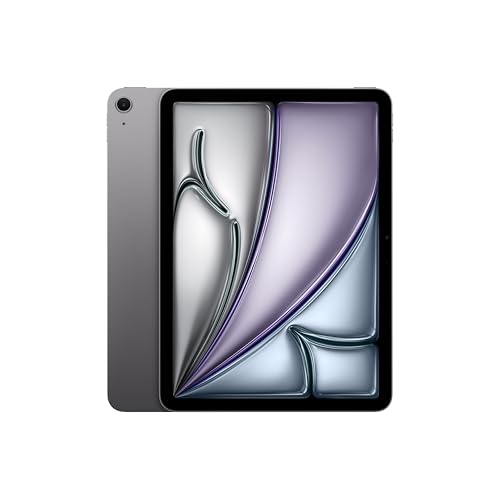
The Air is the iPad for people who think in ownership spans. Its listing specifies the M4 chip, an 11-inch Liquid Retina display, 128GB of storage, 12MP cameras, Wi-Fi 7 with Apple’s N1, Touch ID and all-day battery life, in Space Gray. The M4 is a laptop-class processor doing tablet duty, and the consequence is not that today’s apps run faster — they were never slow — but that the machine’s sufficiency horizon stretches years beyond the standard iPad’s. Buyers who keep a tablet for five or six years are not purchasing performance; they are purchasing the absence of a future upgrade conversation, and the Air is priced as exactly that insurance.
Around the chip, the Air refines rather than reinvents: the same size class, a display of the same family, the same accessory ecosystem of Pencils and keyboards, with the newer wireless standards aboard for the networks the next years will build. For creative work — drawing, photo editing, music, video at hobbyist-plus level — the headroom and the app catalogue combine into the strongest platform in this guide, and professionals who use a tablet as a second creative instrument default to this tier for a reason.
Who should not step up? Buyers whose tablet life is streaming, reading and browsing will never meet the standard iPad’s ceiling, and for them the Air’s premium buys a horizon they will not use — money better spent on storage, accessories or the household’s second screen. The iPad Air (M4) is the all-rounder for the long keeper and the creative user, and within that brief it is close to unimprovable.
- Display: 11-inch Liquid Retina (per listing title)
- Chip: Apple M4
- Storage: 128GB in this configuration
- Connectivity: Wi-Fi 7 with Apple N1; Touch ID
- Cameras: 12MP front and back
- Colour: Space Gray
Strengths
- Laptop-class performance with years of headroom.
- The creative app platform of choice in this guide.
- Newest wireless standards for a long ownership.
Trade-offs
- Premium over the standard iPad buys horizon, not today’s speed.
- Same fixed-storage and accessory economics as its sibling.
- Power is surplus for pure streaming-and-reading lives.
Best for: the iPad Air (M4) suits long-term keepers and creative users inside Apple’s world.
Not suited for: buyers who replace tablets every couple of years regardless.

Samsung Galaxy Tab S10+ — The Android flagship
If the all-around crown has an Android claimant, it wears this listing: a 12.4-inch Galaxy Tab S10+ with 256GB of storage, an AMOLED 2X display, Galaxy AI tools with Circle to Search, a long-life battery claim, a durable design and the S Pen included for note-taking, in Moonstone Gray, US version. Start with the screen, because Samsung’s AMOLED panels are the Android world’s reference — contrast and colour that make film look expensive — at a size that turns split-screen from a feature into a working method: document and notes, browser and spreadsheet, plan and map, side by side without apology.
The S Pen in the box is the flagship’s signature generosity and its all-around argument in miniature. Notes, annotations, signatures and sketches are core tablet jobs, and Samsung simply includes the instrument, where the Apple picks invoice it separately. Add DeX for a desktop-style windowed mode when the tablet docks at a desk, 256GB that postpones every storage conversation, and a durable build rated for real life, and the S10+ assembles the most complete Android package in this guide — the one with no asterisk beside any of the six jobs.
Its costs are size and admission. At 12.4 inches it is a two-handed, mostly-propped device — a small laptop’s screen that happens to detach from nothing — and readers who curl up with a tablet should look down this list to the eleven-inch machines. The flagship price, while it buys the flagship whole, competes with the iPad Air’s tier, where the ecosystem question must be answered honestly: Android households get their champion here, Apple households get a superb rival to admire. For the Android all-around buyer, the Tab S10+ is the complete sentence.
- Display: 12.4-inch AMOLED 2X (per listing title)
- Storage: 256GB
- Included: S Pen for note-taking
- Features: Galaxy AI tools, Circle to Search
- Build: durable design; US version
- Colour: Moonstone Gray
Strengths
- The finest screen in this guide for film and split-screen.
- S Pen included — the pen jobs cost nothing extra.
- 256GB and DeX widen its working range.
Trade-offs
- Size argues against reading in bed and one-handed use.
- Flagship admission price.
- Android’s tablet app catalogue still trails Apple’s in places.
Best for: the Tab S10+ fits Android households wanting the complete flagship with pen included.
Not suited for: buyers who prize a light, curl-up reading slate above all.

Samsung Galaxy Tab A11+ — The household value pick
The A11+ is what the all-around idea looks like at a household budget: 6GB of RAM, 128GB of storage with expansion, a large display, Dolby Atmos speakers, AI assistance, a slim light build and a two-year warranty, per its listing, in Gray. Judge it by the six jobs and the pattern is consistency — nothing here is the guide’s best, and nothing is close to its worst. The screen is big and sharp for film and homework; the memory figure, a tier above the true budget class, keeps the family’s app-juggling smooth; the speakers respect dialogue; the storage expands when the download library does.
The warranty deserves the emphasis we keep giving it, because a shared household tablet lives a harder life than a personal one — more hands, more journeys, more surfaces — and a two-year term in the listing is a maker’s confidence expressed in the only language that costs them money. Paired with Samsung’s kids environment and multi-window software, the A11+ reads as a machine designed by people who pictured its actual life: homework at the kitchen table, a film on the sofa arm, a grandparent call on Sunday, a parent’s spreadsheet after bedtime.
Its compromises are the honest midrange ones: performance that serves everyday apps without flagship flourish, a software layer fuller than stock Android, and no pen in the box. Households that need the pen daily should look at the M11 below or the S10+ above. For the household that needs everything done well and nothing done extravagantly, the Tab A11+ is the value centre of this guide.
- Memory: 6GB RAM (per listing title)
- Storage: 128GB, expandable
- Audio: Dolby Atmos speakers
- Warranty: two years per the listing
- Display: large screen for shared viewing
- Colour: Gray
Strengths
- The most balanced household package per pound or dollar.
- 6GB of memory keeps family multitasking smooth.
- Two-year warranty suits a hard-shared life.
Trade-offs
- No pen included for the note-taking jobs.
- Midrange performance, honestly labelled.
- Samsung’s fuller software layer will not suit purists.
Best for: the Tab A11+ suits families buying one tablet to do everything.
Not suited for: solo buyers who would rather fund a flagship’s screen.

Lenovo Tab M11 — The budget all-rounder
The M11’s presence in an all-around guide at its price is the market’s good news: an 11-inch display at a verified 1920×1200, a MediaTek Helio G88 octa-core processor, 4GB of RAM, 128GB of storage in this configuration, a ten-hour battery per the title, an ambient light sensor and a folio case included. That is not a stripped specialist; that is the full job list covered — film on a proper screen, documents at a resolution that respects them, reading without compromise, calls, browsing, light apps — with the case that a streaming tablet’s life requires already in the box.
Its all-around flavour is studious. Lenovo’s line supports pen input, which makes the M11 the budget pick for students and note-takers; its software layer is comparatively light, which keeps the everyday experience clean and the storage honest; and 128GB in this configuration removes the rationing that defines the tier below. In household terms it is the second tablet, the student’s tablet, the guest-room tablet that never feels like the cheap one — a role harder to fill than the flagship’s, because the budget all-rounder is judged by everyone who touches it against machines that cost twice as much.
The ceiling is performance ambition, as with every honest midrange machine: heavy games and dense multitasking will find the G88’s limits, and buyers whose “all-around” secretly means “including serious gaming” should climb this list. For the everyday six jobs at a gentle price, the Tab M11 is the guide’s proof that all-around is a design discipline, not a budget bracket.
- Display: 11-inch, 1920×1200 (per listing title)
- Processor: MediaTek Helio G88 octa-core
- Memory: 4GB RAM
- Storage: 128GB in this configuration
- Included: folio case
- Battery: ten hours per the listing title
Strengths
- A verified sharp screen at a budget point.
- Folio case included completes the streaming setup.
- Pen support in its line serves students.
Trade-offs
- Everyday processor — heavy gaming need not apply.
- 4GB of RAM is the multitasking ceiling.
- Less audio presence than the Tab Plus.
Best for: the Tab M11 fits students and households wanting everything covered on a budget.
Not suited for: performance-first buyers.

Lenovo Tab Plus — The entertainer
Every all-around list deserves one pick that leans, and the Tab Plus leans toward joy: an 11.5-inch 2K LCD display, eight JBL speakers, 8GB of memory, 128GB of storage, a MediaTek Helio G99 and a folio case included, per its verified listing. The speakers are the signature — tablet audio is usually an apology, and this machine treats a film’s dialogue and a kitchen playlist as headline events. But lean is not limitation: the 2K screen is the sharpest Android panel here after the S10+’s AMOLED, the G99 and 8GB give it the smoothest everyday pace of the Lenovo pair, and the everyday jobs — documents, browsing, calls, reading — are all covered without a caveat worth printing.
Its household role writes itself: the shared screen for film nights and match days, the kitchen’s radio and recipe display, the tablet that gets carried to the garden because its sound survives the outdoors. The folio case props it at the angles that life requires, and its size — the second largest here — suits the propped, watched, shared pattern better than the held, read, personal one.
Buyers whose tablet life is mostly solitary reading should take the M11 or an iPad and let this one’s talents go to a louder household. Buyers whose tablet is a small television with a library card will find the Tab Plus the most fun per unit of money in this guide — an all-rounder whose specialism is the job tablets are used for most.
- Display: 11.5-inch 2K LCD (per listing title)
- Audio: eight JBL speakers
- Processor: MediaTek Helio G99
- Memory: 8GB RAM
- Storage: 128GB
- Included: folio case
Strengths
- Speaker hardware that redefines tablet film nights.
- 2K sharpness with the pace to match.
- 8GB of memory leads the Android value tier here.
Trade-offs
- Built for propping and sharing, not one-handed reading.
- Entertainment tuning outranks pen-first design.
- Size is a commitment in a small bag.
Best for: the Tab Plus fits households whose tablet is the entertainment centre.
Not suited for: commuters and curl-up readers.
How Do They Handle the Jobs Nobody Puts on the Box?
Video calls first, because the all-rounder is the household’s telephone now. The front camera’s placement matters more than its megapixels: a camera centred on the long edge frames a propped tablet like a laptop, while a short-edge camera makes every caller look like they are addressing your ear. The iPads in this guide carry their 12MP front cameras in the modern landscape arrangement, and the Android picks have converged on the same wisdom in their current generations. Microphones and speakers complete the call — the Tab Plus’s eight-speaker array is overkill that grandparents will describe as “hearing you properly for once,” and the A11+’s Atmos tuning serves the same master at a household price.
Reading in bed is the second unboxed job, and it reverses the size ranking without appeal: the eleven-inch machines are holdable for a chapter, the S10+ is a commitment, and the Tab Plus is a pillow-propped screen. Battery behaviour at low brightness, night modes that warm the page, and sheer weight decide this job, and they are why “all-around” can never mean “best at everything simultaneously” — physics keeps a vote. The guide’s ranking assumes the mixed life; a reader whose life is ninety percent bedtime chapters should promote the lightest pick and demote the canvases without waiting for permission.
The third unboxed job is being borrowed. All-rounders are lent — to children, guests, grandparents, the neighbour’s teenager fixing the Wi-Fi — and the machines that survive lending gracefully are the ones with proper multi-user or guest arrangements, durable builds and accounts that keep the owner’s mail out of the borrower’s afternoon. Samsung’s and Lenovo’s Android builds handle the multi-user pattern natively; the iPads handle it by being personal devices that households share by custom rather than by architecture. Neither is a scandal. Both belong in the buying decision of any household where the tablet will have more users than owners.
Can an All-Rounder Game?
At the level most households mean by gaming, yes. The iPad Air’s M4 is a genuinely strong gaming engine and the standard iPad’s A16 is not far behind in the catalogue that matters, because Apple’s tablet game library is the deepest in the business. The S10+ carries flagship-class Android performance and a screen that flatters everything it shows. The midrange picks — A11+, M11, Tab Plus — run the mainstream mobile catalogue smoothly and ask only that flagship-showcase titles lower their settings or their ambitions.
What none of them is: a replacement for a games console or a gaming PC, and a buyer whose tablet decision is secretly a gaming decision should buy the gaming machine and let the tablet be the second device. The all-rounder’s gaming brief is the family’s shared fun — the puzzle games, the racers, the co-op diversions on a train — and at that brief every pick in this guide passes without breaking stride.
How Do You Set Up an All-Rounder for a Household?
Spend the first evening on structure and the machine will feel organised for years. Create the accounts properly — each regular user signed in as themselves where the platform supports it, the children’s accounts supervised from the start rather than retrofitted after the first incident. Arrange the home screen by job rather than by brand: watching, reading, calling, creating, in folders or rows that a borrowed hand can navigate. Install the household’s shared services — the photo library, the family calendar, the video-call app the grandparents already know — before the games arrive to claim the front page.
Add the small courtesies that keep a shared machine civilised: a downloads folder convention everyone follows, a photo routine that moves the week’s pictures to the family library before they pile up, and a standing rule that the tablet’s home screen belongs to the household rather than to whoever configured it last. Shared machines fail socially before they fail technically, and three sentences of convention, agreed while everyone is still pleased with the purchase, are the cheapest reliability upgrade in this entire guide.
Then make the two decisions that prevent the classic household-tablet failures. The charging decision: one home dock or cable in the room the tablet lives in, so “the tablet is dead” stops being a sentence in your house. And the storage decision, from our storage guide’s doctrine: streaming by default, downloads by decision, the card carrying the media on the machines that take one. An all-rounder set up this way disappears into the household’s routines — which, for a machine bought to simply handle things, is the highest available praise.
What Happens When an All-Rounder Gets Old?
It gets promoted sideways, and planning for that is part of buying well. The flagship becomes the kitchen screen; the midrange machine becomes the child’s supervised tablet, then the guest-room reader, then the workshop’s manual-and-music station. The picks in this guide were chosen partly for the length of that cascade: software support determines how many second careers a tablet can hold, and it is the deepest reason the iPads and the current Samsung and Lenovo generations outrank cheaper novelties whose support ends before their batteries do.
When the cascade finally ends, the exit deserves the same care as the entrance: accounts removed, a factory reset performed, the card — on the Android picks — taken out and kept, because the card holds the household’s media and the reset does not touch it. A tablet that served six jobs for six years has earned a tidy retirement, and the household that buys its replacement from this guide’s next edition will find the same six jobs waiting, wearing newer model names.
How Do the Six Compare Side by Side?
| Tablet | Ecosystem | Screen | Its all-around flavour |
|---|---|---|---|
| iPad (A16) | Apple | 11-inch Liquid Retina | The default — no weak job |
| iPad Air (M4) | Apple | 11-inch Liquid Retina | The long keeper’s headroom |
| Galaxy Tab S10+ | Android | 12.4-inch AMOLED 2X | The flagship, pen included |
| Galaxy Tab A11+ | Android | Large | The household balance |
| Lenovo Tab M11 | Android | 11-inch 1920×1200 | The budget complete package |
| Lenovo Tab Plus | Android | 11.5-inch 2K | The entertainer |
How Do You Choose Between Apple and Android Here?
By inventory, not ideology. List what your household already owns — phones, computers, the television’s streaming box, the photos’ home — and the ecosystem that already holds your purchases, messages and habits is the one whose tablet will feel like furniture instead of a guest. Cross-ecosystem households exist happily everywhere, but they pay a small translation tax forever: the app bought twice, the photo library in two places, the video call that defaults to the other platform’s tool. The tax is survivable; it should still be paid knowingly.
Within Apple, the choice in this guide is time: the standard iPad for the normal ownership span, the Air for the long one. Within Android, it is emphasis: the S10+ for the flagship whole, the A11+ for the household balance, the M11 for the budget complete, the Tab Plus for the entertainment lean. Notice that neither ecosystem’s ladder is a quality ladder in disguise — each rung is a different answer to “what does your tablet mostly do?”, and the honest answer to that question is the entire decision procedure of this guide.
Which Pick for Which Person in the House?
Run the household roster. The parent who runs the family’s logistics — calendars, school portals, shopping, calls — is the iPad’s natural owner, or the A11+’s if the house speaks Android, because those machines’ virtues are organisational. The student is the M11’s, with its pen line and document-honest screen, or the Air’s if the course is creative and the budget stretches. The grandparent is the A11+’s again — big screen, clear sound, a warranty that outlasts the learning curve — or the standard iPad’s if the grandchildren are on FaceTime. The teenager is the Tab Plus’s, because their tablet life is a film with homework occasionally interrupting. The creative hobbyist is the Air’s or the S10+’s, decided by ecosystem, both with pens that turn the tablet into an instrument. And the household’s shared second screen — the one nobody owns and everybody uses — is whichever of these the budget buys twice, because two good all-rounders in two rooms beat one flagship being negotiated over.
The roster method exposes the guide’s last honest truth: “most people” is an average no household exactly matches, and the six picks are six answers because households contain six kinds of people. The ranking serves the undecided; the roster serves you.
How Do Warranties and Support Actually Differ?
More than the marketing suggests, and at keeper timescales it matters. Apple’s support network and update record are the industry’s reference — stores, mail-in service, and software that arrives for years. Samsung operates the deepest Android support structure, with the A11+’s two-year warranty in this guide standing out precisely because the tier’s norm is one. Lenovo’s support is competent and channel-dependent, which makes the verified retail listing — the kind every pick here carries — worth more than a grey-market saving, because the warranty’s value is realised through the channel you bought from.
The practical advice is unglamorous: register the product, keep the invoice with the listing’s details, and learn the support route in the first week rather than the worst week. An all-rounder is infrastructure, and infrastructure is maintained by people who know where its paperwork lives.
What Should You Budget Beyond the Tablet?
The all-rounder’s accessories are few and predictable: a case that props as well as protects, because a shared screen spends its life at angles; a pen if — and only if — notes, drawing or signatures are in the job list, noting that Samsung’s flagship includes its pen while Apple’s are separate purchases; and storage headroom, bought as a card where the machine allows or as a higher configuration where it does not. A second charger for the room the tablet lives in completes the list. Totalled honestly, these additions move the comparisons in this guide by a rung in places — the S10+’s included pen and the M11’s included case are worth real money against rivals that invoice them — which is why the pick sections keep naming what is in each box.
How Does an All-Rounder Travel?
Travel is the all-rounder’s examination hall, because a journey compresses every job into one bag: films for the flight, books for the delay, maps and documents for the destination, calls home, photos coming back. The eleven-inch machines are the natural travellers — big enough for the film, small enough for the tray — and their all-day battery claims are written for exactly this day. The S10+ travels as a small laptop would, in a sleeve, with a purpose; the Tab Plus travels as entertainment infrastructure for a family car, where its speakers earn their carry. Download before departure, at full quality, onto the internal drive or the card — the journey is the one workload where the streaming default is suspended by universal consent — and the all-rounder becomes the trip’s most versatile object, outranking the camera and second only to the passport.
Connectivity on the road deserves its sentence too. Every pick here is a Wi-Fi machine in its listed configuration, which makes the travel pattern a familiar one — hotel and café networks, the phone’s hotspot for the gaps — and the cellular question belongs to the dedicated guide elsewhere in this batch for the travellers whose work cannot borrow a network. For the holiday-and-visit travel that fills most all-around lives, Wi-Fi plus downloads is not a compromise; it is the settled, sufficient arrangement, and the money not spent on a radio buys the storage the downloads live on.
One travel habit separates the serene from the stranded: the offline rehearsal. The evening before, in airplane mode, open the boarding documents, the maps, the downloaded series and the book, and confirm each works with the radios off. It takes four minutes at home and saves the particular despair of discovering a streaming-only ticket at a gate. Every pick in this guide will pass the rehearsal if its owner bothers to hold one.
How Does an All-Rounder Earn Its Keep at Work?
Most of these tablets will moonlight professionally whatever their buyer’s intentions, so the work case deserves its audit. Documents, mail, calls and browser-based tools — the bulk of knowledge work — run well on every pick here, with the S10+’s DeX and the iPads’ office suites offering the most laptop-like postures when a desk and a deadline coincide. The honest boundary is the one our 2-in-1 guide patrols: a specific desktop application, a peripheral with opinions, a workflow built on a full file system. An all-rounder covers the commute, the meeting and the sofa session of a working life beautifully, and defers to the work machine for the heavy days — a division of labour most owners find not limiting but clarifying.
For the growing class whose work is entirely web-and-documents, the boundary may never appear, and several picks here — the Air above all — quietly serve as only computers for their owners. That is a decision to make deliberately, with the 2-in-1 guide’s overlap-week test, rather than by drift; but it is no longer an eccentric one, and the all-around tier’s competence is the reason.
What Mistakes Do All-Around Buyers Keep Making?
The first is buying a specialist for a generalist’s life: the gaming-tuned slate that sulks at documents, the drawing machine whose speakers whisper, the media tablet whose software support ends before the loan does. This guide’s six-job test exists to catch exactly that error. The second is the reverse — buying the safest all-rounder for a life that is actually one job in a trench coat, when a specialist would have delighted daily. Know which buyer you are before the ranking seduces you.
Third is under-buying storage on the sealed machines, because the all-rounder accumulates a household’s whole digital life and cannot be expanded later; the card-carrying picks forgive this mistake, the iPads do not. Fourth is ignoring the support runway — an all-rounder is a keeper, and a cheap machine whose updates end next year is a short lease disguised as a purchase. Fifth is choosing the ecosystem by the tablet alone, forgetting the phones, photos and purchases that will live beside it for a decade.
Why Do Owners Keep All-Rounders Longest?
Because nothing about them begs to be replaced. A specialist dates by its specialism — the gaming chip outrun, the camera outclassed — but an all-rounder’s virtues are the slow ones: a good screen, enough pace, a battery that holds its character, software that keeps arriving. Owners report the peculiar satisfaction of a machine that simply continues, and the industry’s upgrade siren sounds faint against a tablet that still does every job it was bought for. That is the deepest argument for buying this tier well rather than cheaply: the all-rounder bought right is the one you forget to replace, and forgotten replacements are the best value in consumer electronics.
It also reframes the price conversation one final time. Divided by six years of six jobs, even the flagship picks here cost less per month than the streaming subscriptions they will display. The budget picks, divided by their shorter but still substantial spans, are among the cheapest computing a household can buy. Price per year of no-regret service is the all-around metric — and by that metric, this whole list is a bargain shelf wearing different badges.
What Should You Check in the First Week?
Run the six jobs deliberately, once each, while the return window is a formality. Watch a film in the room you will actually watch in, at the brightness your evenings use. Read a chapter in bed. Take a call with the person whose opinion of your audio you trust. Write a document with the household’s real tools, not the pre-installed demonstration. Hand the machine to the youngest and oldest users it will serve and watch where their fingers hesitate. And check the storage screen after the household’s apps have moved in, to see the tier’s true starting line rather than the box’s promise.
A machine that passes your week will pass your years, because all-around quality is not a specification that degrades — it is a fit that either exists or does not. The returns data of this entire industry says the misfits are discovered in week one or lived with forever; the week is cheap, and forever is not.
Final Recommendation
For most people reading this sentence, the answer is the iPad (A16): it is the machine with no weak job, the longest support and the fewest possible regrets, and there is no shame in the default when the default is this good. Step up to the Air if your ownership spans are long or your creative ambitions are real; step across to the S10+ if your household speaks Android and wants its flagship whole, pen in the box. Let the A11+ serve the shared household, the M11 the budget that refuses to feel like one, and the Tab Plus the home whose tablet is its loudest screen. An all-rounder is a promise that one machine will simply handle things — these six keep that promise in six different accents, and the right accent is the one your household already speaks.
Frequently Asked Questions
Which tablet should I buy if I have no idea what I need?
The iPad (A16) at the head of this guide. Its combination of screen, performance, app catalogue and support length is the industry’s default answer because it fits the widest range of lives with the fewest caveats. If your household is firmly Android, the same sentence is true of the Galaxy Tab A11+ at its tier and the S10+ at the flagship tier.
Is it worth paying more for the iPad Air over the iPad?
If you keep tablets for many years or do creative work — drawing, photo and video editing, music — yes: the M4’s headroom is time bought in advance. If your tablet life is streaming, reading and browsing on a normal replacement cycle, the standard iPad covers it completely and the saving is better spent on storage or accessories.
Android or iPad for a family tablet?
Both work; the decider is the household’s existing ecosystem and the warranty-and-sharing details. Android’s picks here offer card expansion and, in the A11+’s case, a two-year warranty that suits shared life. Apple’s offer the most mature parental-control ecosystem and the longest support. Choose by the phones in the house and the children in the schedule, in that order.
How much storage does an all-rounder need?
The 128GB configurations in this guide suit most households, with the S10+’s 256GB removing the question entirely. On card-carrying Android models, expansion forgives a smaller start; on the iPads, buy the configuration for the household’s third year, not its first month, because the choice cannot be revisited.
Do I need a pen with an all-around tablet?
Only if notes, annotation, drawing or signatures are genuinely in your week. The S10+ includes its S Pen, which settles the question for its buyers; elsewhere, treat the pen as a named-job purchase rather than a completeness purchase, and spend the money on the case and charger first if the job list is silent.
How long should an all-around tablet last?
Plan on four to six years for the flagships and Apple picks here, and a year or two less for the budget machines, with software support — not hardware — usually setting the end. That lifespan is why this guide weighs update runways and warranties so heavily: at keeper timescales, support is a specification.
What size is the true all-around size?
For most hands and most bags, the eleven-inch class that dominates this guide — large enough for film and split-screen, light enough for a chapter in bed and a day in a tote. The exceptions argue from their lives: the flagship canvas for desk-and-sofa workers, the compact sizes in our other guides for travellers. Default to eleven, and deviate only with a reason you can say out loud.
Are refurbished flagship tablets a smarter all-around buy?
They can be, with the renewed-market disciplines our other guides teach — a programme seller, a stated battery standard, a warranty with months on it. A renewed flagship offers yesterday’s best screen at a midrange price, and for a confident buyer that is a rational trade. The new midrange picks in this guide counter with fresh batteries, full support runways and warranties from day one, which is why they hold their places against the tempting arithmetic.
Can one tablet really serve a whole family?
One tablet can serve a family’s shared jobs — the film, the homework, the call, the kitchen — very well, and the A11+ in this guide is specified for exactly that life. What one tablet cannot be is simultaneously personal to everyone, which is why the mature household pattern is one shared all-rounder plus personal phones, and why the second-tablet purchase, when it comes, is usually a sibling of the first rather than a stranger.
Is the biggest tablet the best all-rounder?
Not by default. The S10+’s 12.4-inch canvas is this guide’s finest screen and its least holdable machine, and all-around means the whole life — including the bed, the commute and the one-handed moment. Size is a job-by-job trade, which is why eleven inches dominates this list and the flagship earns its place as the deliberate exception.
What is the one accessory every all-rounder needs?
A case that stands the tablet up. Protection matters, but the stand is the daily virtue — films, calls, recipes and reading all happen at an angle, and a tablet that cannot hold its own angle will be held, propped on cushions and eventually dropped by a tired hand. Two picks here include their folio in the box; for the rest, the standing case is the first purchase, before the pen, before the spare cable, before everything.
Should I wait for next year’s models?
The all-around tier improves by refinement rather than revolution, and every pick here is a current, supported machine with years of service designed in. Waiting buys a slightly better version of a decision you could be enjoying now; the honest exceptions are a purchase planned within weeks of a known launch in your chosen line, and even then the current machine’s price usually falls in your favour.
Related Guides
From the general to the particular: keep the budget honest with Best Affordable Tablets That Do Not Feel Cheap, plan for young users with Best Affordable Tablets for Kids That Survive Childhood, and set up the grandparents with Best Affordable Tablets for Elderly Parents and Grandparents.


