What's inside
- Key Takeaways
- Quick Picks
- How did we choose these six converters?
- Why does a converter behave differently from a full standing desk?
- How do the six converters stack up side by side?
- What should you measure before ordering a desktop converter?
- How do you set up a converter for a stable first week?
- What mistakes do converter buyers keep repeating?
- How does platform width change the way you actually work all day?
- How do lift mechanisms age, and what maintenance do they ask for?
- Who should skip converters entirely and buy a frame instead?
- Tray or single deck: which keyboard arrangement fits your posture?
- How should you build standing into your day once the converter arrives?
- How does a converter change a small or shared room?
- How do you verify a converter in the first days, while returning it is still easy?
- Final Recommendation
- Frequently Asked Questions
- Related Guides
As an Amazon Associate I earn from qualifying purchases. This post may contain affiliate links at no extra cost to you.
widgetverdict.com is reader-supported. When you buy through links on our site, we may earn an affiliate commission.
Shoppers hunting for the best desktop mounted standing desks usually own a desk they already like, and that single fact shapes everything that follows. A desktop-mounted converter is not a replacement desk. It is a lifting platform that sits on top of your existing work surface, carrying your monitor and keyboard up to standing height and settling back down when you sit. Your current desk keeps doing the job of holding weight, storing drawers of clutter, and filling the room. The converter only adds motion. Each pick heading and table row below carries its Amazon listing link; before ordering, check the footprint of the model against the depth of your own desktop, and treat the stated load figure in each listing title as a hard ceiling rather than a suggestion.
That distinction sounds obvious until you watch someone shop. People compare a converter against a full electric frame, wonder why the converter has no legs of its own, and then feel shortchanged. The honest comparison is narrower and more useful: how wide is the top platform, how does the lift mechanism behave under load, how much of your original desk depth does the unit swallow, and does the keyboard tray sit where your elbows actually want to work. A 32-inch top suits a laptop plus one screen. A 36-inch top opens room for two modest monitors. A 48-inch top starts behaving like a small desk in its own right, and it demands a host desk deep and sturdy enough to carry it without rocking.
Key Takeaways
- Every pick here is a converter that rides on an existing desk, so measure your current desktop depth and sturdiness before choosing a width.
- Three of the six tops come from VIVO in 32, 36 and 48 inch widths, each rated in its listing title to hold 33 lbs on the desktop platform.
- Manual lifting dominates this group; the Vari entry separates itself with a spring-assisted lift and delivery in a fully assembled state.
- Wide keyboard trays appear across the VIVO range, which matters because tray width, not top width, decides whether mouse and keyboard share one level.
- A converter raises your screen but adds no storage, no legs and no cable routing beyond what you arrange yourself.
- FLEXISPOT pitches its 36 inch riser around a spacious single platform for laptop, keyboard and monitor together rather than a separate lower tier.
Quick Picks
| Pick | Badge | Why it earns a place |
|---|---|---|
| VIVO Manual Height Adjustable Standing Desk Converter, 32″ | Compact manual starter | The narrowest VIVO here, with a wide keyboard tray and a 33 lb desktop rating for a laptop-and-monitor corner. |
| FITUEYES Height Adjustable Standing Desk 32” Wide Sit to Stand Converter | Dual-monitor claim at 32 inches | FITUEYES markets this tabletop workstation for dual monitor use and stresses easy assembly in its listing title. |
| VIVO Standing Desk Converter, 36″ Black Top | Middle-width all-rounder | Four extra inches over the 32 inch model, the same stated desktop load, and a tray sized for full-size keyboards. |
| VIVO Standing Desk Converter, 48″ Black Top | Widest platform | A broad top for sprawling multi-screen layouts, provided the desk underneath is deep and rigid enough to support it. |
| FLEXISPOT Standing Desk Converter 36″ Desk Riser | Single-deck spaciousness | Built around one generous work surface for a laptop, keyboard and monitor arranged side by side. |
| Vari Pro Plus 36 Standing Desk Converter, Black | Spring-assisted, arrives assembled | A two-tier design whose spring lift and zero-assembly arrival suit anyone dreading a parts box. |
How did we choose these six converters?
We started by excluding anything with its own legs or a motorised frame, because a shopper typing this search wants equipment that mounts on a desktop they already own. What remained had to offer a genuine sit-to-stand range, a keyboard surface separate from or generous enough alongside the monitor surface, and a listing title that states its size plainly so a buyer can measure before committing. Width became the organising axis of the final six: two models at 32 inches, three around 36 inches, and one stretching to 48 inches. Mechanism became the second axis. Most of these units lift by hand against gas or spring assistance, and the effort involved differs enough between designs that we weighted it heavily. Finally, we favoured converters whose titles describe the intended load or layout in concrete terms, since vague listings leave the buyer guessing about the one specification that can ruin the purchase on day one.
Why does a converter behave differently from a full standing desk?
A full standing desk moves the entire work surface, drawers, monitor arms and all, on legs engineered for that travel. A converter moves only what sits on its platform, and it borrows stability from furniture never designed to be a foundation for a raised, shifting load. Push down on the front edge of a raised converter and you are testing the host desk as much as the converter itself. Thin tabletops flex. Lightweight desks on carpet can rock. This is why the same converter earns praise on a solid oak bench and complaints on a hollow-core starter desk, and why our guidance throughout keeps returning to the furniture underneath.
Converters also change your geometry in ways a full desk does not. The platform adds its own thickness to your sitting height, so a keyboard tray that drops below the platform matters if your chair and desk were already borderline. When raised, the unit occupies depth that used to hold papers, a desk lamp or a printer, and those displaced objects need a new home before the box arrives, not after. Readers comparing ownership models may also enjoy Best Desktop Standing Desks, which approaches the same room from the complete-desk direction.
Height range deserves the same clear-eyed treatment. A converter can only lift its platform within the travel its linkage allows, and that travel must serve two masters: low enough that the keyboard stays comfortable while you sit, high enough that the screen centre meets your standing eye line. Taller users should check the maximum platform height in the manufacturer’s documentation against a simple measurement — stand at your desk, bend your elbow at a relaxed right angle, and note the distance from the desktop to your forearm. If the platform cannot reach roughly that height with the keyboard aboard, you will spend your standing hours typing uphill, and no width or tray design can compensate for a lift that runs out of travel.
None of this makes converters a compromise product. Renters who cannot replace furniture, workers assigned a desk by an employer, and anyone testing whether standing work suits them before committing to a frame all get real value from a platform they can lift off and store. The category fails only when buyers expect frame behaviour from a tabletop device.

VIVO Manual Height Adjustable Standing Desk Converter, 32″ — Compact manual starter
The smallest VIVO in this roundup, model DESK-V000K in the listing title, is the converter to study if your desk is a modest writing table rather than a sprawling bench. Its 32 inch black top keeps the footprint contained, while the title promises a wide keyboard tray, and that pairing is the whole proposition: a narrow platform that still refuses to cramp your hands. VIVO states the desktop holds 33 lbs, which covers a laptop and a typical monitor comfortably, or two lighter screens if their stands are compact, but leaves little headroom for a heavy monitor arm clamped to the rear edge plus a desktop computer tower parked alongside, an arrangement nobody should attempt on a riser anyway.
Manual adjustment here means you supply the lifting effort, guided by the mechanism, every time you change posture. On a lightly loaded 32 inch top that effort stays modest, which is precisely why the small model makes sense as an entry point: the physics forgive you. Load it near the ceiling, though, and each lift becomes a small negotiation. Set your expectations accordingly and keep the platform honest, with the monitor centred rather than shoved to one corner, because an off-centre load twists a narrow frame more noticeably than a wide one.
Sitting behaviour deserves equal attention. When lowered, the unit still stacks its structure between your desk surface and your keyboard tray, so measure the gap between your chair armrests and the underside of your desk if you roll close. Writers who spend long seated stretches drafting documents often prefer the tray arrangement here, since the wide tray lets the mouse travel without dropping to a different height mid-sentence.
- Top width: 32 inches, black finish, black frame
- Stated desktop capacity: 33 lbs per the listing title
- Adjustment: manual height adjustment
- Keyboard provision: wide keyboard tray named in the title
- Model reference in title: DESK-V000K
- Host desk requirement: the listing title is silent on a minimum desktop depth, so confirm the footprint against the manufacturer’s documentation before ordering
Strengths
- Fits desks where a 36 or 48 inch platform would overhang or dominate the room.
- Wide tray relative to top width keeps keyboard and mouse on one shared level.
- Light loads make the manual lift easy to manage several times a day.
Trade-offs
- Two large monitors with chunky stands will crowd the 32 inch top quickly.
- No powered lift, so raising a fully loaded platform takes deliberate effort.
- Adds no storage; everything the platform displaces must live elsewhere.
Best for: a single-monitor or laptop-led setup on a smaller desk where floor space and desktop depth are both tight.
Not suited for: triple-screen trading layouts or heavy monitor arms that would push the platform toward its stated load ceiling.
FITUEYES Height Adjustable Standing Desk 32” Wide Sit to Stand Converter — Dual-monitor claim at 32 inches
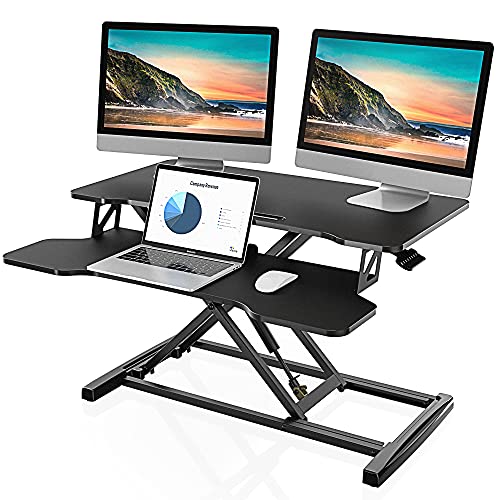
FITUEYES takes the same 32 inch width as the smaller VIVO and makes a bolder claim with it: the listing title describes a tabletop workstation intended for dual monitor use. Whether two screens genuinely thrive on a top this wide depends on their size. Two compact monitors angled inward can work, and a laptop beside one external screen works more comfortably still. What the title is really signalling is intent — this riser is aimed at screen-heavy home office workers rather than laptop-only users — and buyers should test that intent against the actual width of their own monitor stands before trusting it.
The second promise in the title is easy assembly, a phrase worth pausing on. Converters vary from fully built units to kits of linkages, trays and fasteners, and assembly effort is a legitimate deciding factor for someone setting up alone. FITUEYES positions this model toward the painless end of that spectrum. Beyond those two claims, the title stays quiet about load capacity and lift style specifics, so we will not invent numbers the manufacturer chose not to headline; check the full listing documentation for the rated weight before loading two heavier displays.
In daily use, a 32 inch dual-screen riser lives or dies by cable discipline. Two displays, a keyboard and a mouse generate a bundle that must travel up and down with the platform without snagging the host desk’s rear edge. Route everything with slack, anchor the bundle to the riser rather than the wall, and the FITUEYES behaves. Leave cables dangling to a floor socket and every lift becomes a tug of war you will eventually lose.
- Top width: 32 inches
- Intended layout per title: dual monitor riser and tabletop workstation
- Assembly: described as easy in the listing title
- Adjustment: height adjustable sit-to-stand conversion
- Load rating: the headline omits a figure entirely; the full product documentation is where FITUEYES publishes it
- Keyboard tray dimensions: absent from the headline listing; the manufacturer’s documentation carries the exact tray measurements
Strengths
- Explicit dual-monitor positioning at a width rivals reserve for single screens.
- Easy-assembly billing suits solo setup without a second pair of hands.
- Keeps the compact footprint that smaller home offices require.
Trade-offs
- Two widescreen monitors will overhang or force awkward inward angles.
- Headline specifications are thinner than the VIVO listings, so pre-purchase checking matters more.
- Screen-heavy loads on a narrow base amplify any wobble in the host desk.
Best for: a pair of modest monitors or a laptop-plus-display pairing on a compact desk, assembled by one person.
Not suited for: ultrawide single displays whose stands span most of a 32 inch top, leaving the keyboard nowhere level to sit.

VIVO Standing Desk Converter, 36″ Black Top — Middle-width all-rounder
Model DESK-V036KB occupies the sensible centre of the VIVO ladder. Moving from 32 to 36 inches sounds incremental on paper, yet those four inches change what the top can hold without argument: two average monitors sit side by side without their stands overlapping, or one generous screen gains elbow room for a notebook, phone stand and coffee mug that no longer compete for the same square of surface. VIVO again states a 33 lb desktop capacity in the title, and again describes a wide keyboard tray, so the family resemblance is deliberate — this is the same recipe cooked at a larger scale.
Manual lifting on a wider, potentially heavier load is where this model asks more of its owner. Thirty-three pounds of screens plus the platform’s own structure is a real lift, even with mechanical assistance smoothing the travel. People with shoulder or wrist trouble should rehearse the motion mentally before buying any manual converter, and this one in particular rewards honest self-assessment. The payoff for that effort is simplicity: no motor to fail, no control box to mount, no power cable tethering the platform to a wall outlet, and a unit you can relocate to another desk in minutes.
The 36 inch width also happens to match the span of many standard desks, so the converter reads as an intentional workstation rather than equipment perched on furniture. If your current desk came from the Best Crank Adjustable Standing Desks school of thought — hand-adjusted, mechanically honest — this VIVO extends that philosophy upward without replacing the piece you already own.
- Top width: 36 inches across a black top carried on a black frame
- Desktop load ceiling: the title states 33 lbs
- Lift style: raised and lowered by hand
- Tray: a wide keyboard tray is part of the design named in the title
- Model reference in title: DESK-V036KB
- Power requirement: none suggested by the manual design described in the title
Strengths
- The width most dual-monitor households actually need, without the 48 inch model’s footprint demands.
- Familiar VIVO tray layout keeps mouse and keyboard level with each other.
- No electronics, so nothing about the lift can be bricked by a failed controller.
Trade-offs
- Manual lifting at full load is the most physical in the VIVO trio relative to capacity.
- Same 33 lb ceiling as the 32 inch model despite the larger top, tempting overloads.
- Black-only presentation in this listing may clash with pale desk setups.
Best for: two-monitor home offices on a standard-depth desk, owned by someone comfortable lifting a loaded platform by hand.
Not suited for: shoulders or wrists that rule out repeated manual lifting of screens at full extension.

VIVO Standing Desk Converter, 48″ Black Top — Widest platform
At 48 inches, model DESK-V048KB stops behaving like an accessory and starts behaving like a second desk hovering over your first one. The title keeps the family figures — 33 lbs of stated desktop capacity, manual adjustment, wide keyboard tray — but spreads them across a top wide enough for three modest monitors, or two large ones with a laptop docked open between them, or a monitor pair flanked by studio speakers. That breadth is the entire argument for this model, and also its entire risk, because a 48 inch platform is only as steady as the furniture carrying it.
Put plainly: this converter needs a host desk with depth, mass and rigid legs. On a shallow desk the platform’s feet can sit uncomfortably close to the front and rear edges, and a raised load that far above a narrow base invites sway every time you lean on the tray to write. On a deep, heavy bench the same unit feels planted, and the width becomes pure luxury — documents beside the keyboard, a graphics tablet parked to one side, reference material open without covering your mouse path.
The manual lift deserves respect at this size. Even within the stated capacity, raising a broad platform loaded unevenly — heavier screen on the left, light laptop on the right — can rack the mechanism if you haul on one corner. Lift from the centre, load symmetrically, and the DESK-V048KB rewards you with the most desk-like standing experience a converter can offer without its own legs.
- Top width: 48 inches, finished in black over a matching black frame
- Desktop load ceiling: 33 lbs according to the title
- Lift style: manual, worked by hand from the centre of the platform
- Tray: the title names a wide keyboard tray beneath the top
- Model reference in title: DESK-V048KB
- Host desk requirement: depth and rigidity demands are the highest in this group, though the title states no minimum — confirm against the manufacturer’s documentation
Strengths
- Room for triple-screen or speaker-flanked layouts no narrower converter here can host.
- Documents and tablets can share the top instead of exiling themselves to the host desk.
- Same tray and lift language as its smaller siblings, so the VIVO range scales predictably.
Trade-offs
- Shallow or lightweight host desks will sway under a raised 48 inch load.
- The unchanged 33 lb ceiling is easiest to exceed precisely because the top invites more gear.
- Takes over the host desk visually and physically; little original surface remains visible.
Best for: multi-monitor professionals with a deep, heavy bench desk who want maximum platform width without buying a frame.
Not suited for: narrow starter desks, glass tops, or any host surface that already flexes under a firm palm press.

FLEXISPOT Standing Desk Converter 36″ Desk Riser — Single-deck spaciousness
FLEXISPOT describes its 36 inch riser with one word that reframes the design: spacious. Where the VIVO models split work across an upper platform and a lower keyboard tray, this listing pitches a stand up workstation where laptop, keyboard and monitor share one generous desktop riser surface. That single-deck philosophy suits a particular working style — the laptop as second screen, propped beside an external display, with a full keyboard in front and everything visible in one glance without a step down to a tray.
Single-deck layouts carry a trade worth naming. With no lowered tray, your keyboard sits at platform height, so when the riser is lowered for sitting, the keyboard rests higher above the host desk than a tray design would place it. Tall chairs and adjustable armrests can compensate; fixed seating cannot. Standing, the arrangement is clean and direct, and the absence of a tray removes one moving, flexing component from the structure entirely.
The title calls the unit height adjustable without specifying a powered mechanism, and gives no load figure, so disciplined buyers should read the manufacturer’s documentation for both before loading it with a heavy display. What the title does promise — a black 36 inch converter shaped around a combined laptop, keyboard and monitor setup — is a coherent, modern brief, and FLEXISPOT’s wider reputation in sit-stand furniture makes the execution worth shortlisting against the VIVO 36 inch alternative.
- Top width: 36 inches, black finish
- Layout per title: one spacious surface for laptop, keyboard and monitor together
- Adjustment: height adjustable desktop riser
- Load rating: shoppers must open the full product documentation, where FLEXISPOT publishes the capacity figure
- Lift mechanism detail: the headline listing leaves the mechanism unspecified, so check the full product documentation
- Tray: no separate keyboard tray is named in the title
Strengths
- Laptop can work as a genuine second display at the same level as the main screen.
- Fewer tiers means fewer edges, steps and flex points in the structure.
- Clean single surface tidies easily at the end of the day.
Trade-offs
- Seated keyboard height runs higher than tray-equipped rivals when lowered.
- Headline load and mechanism details require a documentation check before purchase.
- One shared level means the monitor cannot rise independently of the keyboard.
Best for: laptop-plus-monitor workers who prefer everything on one level and mostly stand or perch while working.
Not suited for: seated typists whose chair and desk heights are fixed and who depend on a dropped keyboard tray for comfortable wrists.

Vari Pro Plus 36 Standing Desk Converter, Black — Spring-assisted, arrives assembled
Vari built its name on office sit-stand equipment, and the Pro Plus 36 attacks the two complaints that dog this category: lifting effort and assembly dread. The title promises a spring-assisted lift, which changes the daily ritual — instead of muscling the platform upward, you guide it while the springs carry a share of the load, and the movement feels closer to opening a well-balanced hatch than hoisting a shelf. It also promises the unit arrives fully assembled. For anyone who has spent an evening on the floor surrounded by linkage bars and an instruction sheet, that phrase alone can justify a shortlist place.
The workspace is explicitly two-tier, with a keyboard tray as the lower level, matching the classic converter layout the VIVO models follow. At 36 inches the top handles dual monitors in the conventional arrangement, and the tray keeps input devices stepped down toward your body, which seated users generally find kinder over long days than a single raised deck.
Spring assistance has its own physics. Springs tuned for an average load can feel eager when the platform carries only a laptop, nudging upward more readily than expected, and feel merely adequate with two heavy displays aboard. Vari’s title does not publish a load figure, so verify the rated capacity in the manufacturer’s documentation and be honest about the combined weight of your screens and their stands. Matched to a sensible load, though, this is the converter in the group that asks the least of its owner, on day one and every day after.
- Top width: 36 inches, black finish
- Layout per title: two-tier workspace with keyboard tray
- Adjustment: spring-assisted lift
- Assembly: fully assembled on arrival, per the listing title
- Load rating: Vari keeps capacity figures in its product documentation rather than the headline listing
- Power requirement: none, given the spring mechanism described in the title
Strengths
- Spring assistance makes frequent posture changes genuinely low-effort.
- Zero assembly removes the biggest setup risk in the category.
- Two-tier layout preserves the seated ergonomics of a lowered keyboard level.
Trade-offs
- Spring feel varies with load; very light setups may find the lift eager.
- No powered fine-tuning of height beyond where you guide and release the platform.
- Capacity must be confirmed from documentation rather than the headline listing.
Best for: workers who change posture many times daily and want the easiest lift plus an assembled arrival.
Not suited for: extremely heavy dual-display rigs whose combined weight has not first been checked against the documented capacity.
How do the six converters stack up side by side?
| Model | Top width | Lift style | Keyboard arrangement | Stated desktop load |
|---|---|---|---|---|
| VIVO DESK-V000K | 32″ | Manual | Wide tray | 33 lbs |
| FITUEYES converter | 32″ | Height adjustable | Workstation layout | Check documentation |
| VIVO DESK-V036KB | 36″ | Manual | Wide tray | 33 lbs |
| VIVO DESK-V048KB | 48″ | Manual | Wide tray | 33 lbs |
| FLEXISPOT riser | 36″ | Height adjustable | Single shared deck | Check documentation |
| Vari Pro Plus 36 | 36″ | Spring-assisted | Two-tier with tray | Check documentation |
Treat the table as six design philosophies laid side by side, not as a league table. VIVO sells width choice inside one consistent design. FITUEYES squeezes dual screens into the smallest footprint. FLEXISPOT flattens the workspace into a single plane. Vari spends its engineering on the lift itself and on arriving ready to use. Stability, meanwhile, is the hidden column no table can print, because it depends on your desk; our guide to Best Non-Wobbly Standing Desks explains the tests worth running on your current furniture before any converter arrives.
What should you measure before ordering a desktop converter?
Start with the host desk. Record its depth front to back, then subtract the converter’s footprint depth from the manufacturer’s documentation; whatever remains is the strip where lamps, speakers and papers must survive. Check the desk’s construction with your palm in the centre — visible flex under body weight predicts sway under a raised converter. Confirm the floor beneath is level, because a rocking host desk makes every converter feel broken.
Next, measure your screens as a system: stand widths side by side, total weight including stands, and the height from desk surface to the centre of the display, which tells you how much lift you need for standing eye level. Weigh honesty about your own strength into the decision between manual and spring-assisted lifting. Finally, plan the cable run at full extension, with the platform raised, since cables measured while seated will bind, pull plugs and eventually drag a monitor toward the edge.
How do you set up a converter for a stable first week?
Clear the host desk completely, position the converter centred left to right, and load it in order: monitors first, centred, then keyboard and mouse, then small items. Raise and lower the empty-ish platform several times before adding fragile gear, learning where the mechanism stiffens and where it wants to travel. Route cables in a single bundle with enough slack for full height, secured so the bundle moves with the platform. During the first week, alternate sitting and standing in short spells, adjust monitor height rather than your neck, and re-tighten your cable routing once you discover where it actually snags. Small corrections made early become invisible habits; small annoyances ignored become reasons the converter ends up folded in a cupboard.
What mistakes do converter buyers keep repeating?
The recurring error is buying width for the monitors you dream about rather than the desk you own, then blaming the converter for sway that originates in a flimsy host surface. A second mistake is ignoring seated height: a converter that feels glorious standing can leave your keyboard awkwardly high all morning while seated, which is when most people actually type. Third, buyers overload cheerfully, stacking a monitor arm, speakers and a tower onto a platform with a plainly stated ceiling. Fourth, they skip the cable plan and discover at full height that the display power lead is two inches short. Each failure is preventable with a tape measure, a bathroom scale for your screens, and ten honest minutes before ordering.
How does platform width change the way you actually work all day?
Width sounds like a storage question, but in practice it is an attention question. On a 32 inch platform your working world narrows to the screens and the keyboard, and everything else — notebook, phone, printed pages — lives on the host desk below, at sitting height, effectively out of the standing workflow. Some people thrive on that enforced minimalism. A writer who stands to draft, with one document open and no reference material, loses nothing. A researcher who stands to compare a spreadsheet against a printed report loses the report, and either keeps bending to fetch it or abandons standing for exactly the tasks that fill the afternoon.
At 36 inches the platform starts admitting one companion object. A notebook fits beside a single monitor. A graphics tablet fits beside a laptop. The companion rotates through the day, and the standing workflow survives because the object you need most can ride along. This is why the middle width dominates the category: it matches the way most knowledge work actually alternates between screen-only tasks and screen-plus-one-thing tasks.
At 48 inches the platform becomes the desk, and the host surface below turns into a shelf for things you rarely touch. Reference books stay open. A second person’s laptop can dock briefly for a paired review. The cost is subtle: everything riding at standing height must also be cleared or tolerated at sitting height, and a crowded 48 inch platform lowered for the evening leaves a cluttered cave beneath it where your knees and the keyboard tray compete for room. Width, in other words, trades standing generosity against seated tidiness, and the right answer depends on which posture hosts your longest, most demanding work.
There is also a reach dimension. Screens pushed to the far corners of a wide platform sit farther from your eyes and at sharper angles than the same screens centred on a narrow one. If you buy width, spend it on objects, not on spreading the displays apart. Keep the monitors clustered in front of your sternum, let the spare inches accumulate at the sides, and the wide converter feels like a bench rather than a panorama you must scan with your whole neck.
How do lift mechanisms age, and what maintenance do they ask for?
Manual scissor and linkage mechanisms age mechanically and predictably. Pivot points develop a whisper of play, fasteners relax under thousands of load cycles, and the platform that travelled in a clean vertical path when new may drift a few millimetres sideways at full height after years of service. None of this is failure; it is wear you can manage. A twice-yearly pass with the correct driver on every accessible fastener, a check that both sides of the linkage rise evenly, and a habit of lowering the platform before leaning on it heavily will keep a manual converter honest far longer than most owners keep their monitors.
Gas-assisted and spring-assisted designs trade that simplicity for components that slowly lose force. A spring that once carried half your monitor load may, after years, carry noticeably less, and the lift grows heavier by degrees so gradual you blame your own fitness first. Vari’s spring system and similar designs are built for long service, yet the honest expectation is that assistance fades eventually, and a converter bought for an injured shoulder should be reassessed when the lift starts demanding the effort it was purchased to avoid.
Dust is the quiet enemy of every mechanism here. Converters live directly above desks where paper, crumbs and pet hair accumulate, and grit works into sliding surfaces each time the platform travels. A monthly wipe of the exposed rails and linkage with a dry cloth, plus keeping drinks on the host desk rather than the moving platform, prevents most of the grinding wear that owners mistake for poor manufacturing. Spilled coffee inside a scissor linkage, by contrast, can end a converter’s smooth travel in a single afternoon.
Finally, respect the feet. The pads under a converter’s base harden and compress over time, and once one pad thins more than its neighbours the unit rocks on a diagonal that no adjustment of the lift will cure. Replacing pads, or shimming a low corner with a folded felt pad, restores the planted feel. Owners who chase wobble by tightening the lift mechanism while the true fault sits in a crushed foot pad waste an evening and learn this paragraph the hard way.
Who should skip converters entirely and buy a frame instead?
Honesty about the category’s limits saves some readers a purchase. If your work involves a heavy desktop tower that must sit at hand height, a monitor arm carrying an oversized display, or frequent collaboration where colleagues gather around the screen and lean on the surface, a converter is the wrong tool; a full frame desk carries those loads on its own legs and shrugs at leaning elbows. If your host desk is a cherished antique with a soft finish, the concentrated feet and daily motion of a converter risk marks that a frame desk, standing independently, would never make. And if you are outfitting a permanent office you own, with no plan to move, the converter’s portability — its chief virtue — buys you nothing, while its seated-height penalty taxes you every day. Everyone else, and especially renters, hot-deskers, the standing-curious and the assigned-furniture workforce, is exactly who these six platforms were built for.
Tray or single deck: which keyboard arrangement fits your posture?
The keyboard question decides daily comfort more than any other choice in this roundup, because your hands spend more hours on that surface than your eyes spend reading specifications. A tray, as fitted to the VIVO trio and the Vari, steps the keyboard down and slightly toward you. Standing, that step lets your elbows hang at a relaxed angle while the screens ride higher, matching the natural gap between eye height and hand height. Seated, the tray slides the keyboard closer to the height your old desk offered, softening the penalty every converter imposes. Trays flex a little under enthusiastic typing, and narrow trays exile the mouse to the upper deck, splitting your hands across two levels — which is why the width of the tray, repeatedly named in the VIVO titles, is a specification worth caring about.
A single deck, the FLEXISPOT philosophy, keeps hands and screens on one plane. Typing feels rock solid because the keyboard rests on the same rigid surface as the monitors, and laptop users gain the rare ability to use the laptop’s own keyboard and screen as part of the array without a height mismatch. The compromise arrives when you sit: the whole plane, keyboard included, parks at platform height above your desk, and unless your chair rises to meet it, your shoulders creep toward your ears across a long seated morning. Perch stools and tall chairs erase the issue; fixed dining chairs used as office seating expose it mercilessly.
Mouse position is the tiebreaker many buyers miss. Gamers and spreadsheet workers who sweep a mouse across wide arcs need the mouse beside the keyboard on the same level, full stop, and should choose tray width or deck width accordingly. Trackball and compact-mouse users can tolerate a split-level arrangement that would drive a wide-arc mouser to distraction within a week. Picture your own hand movements honestly before ordering; no converter in this group can rearrange its surfaces after arrival.
How should you build standing into your day once the converter arrives?
New owners routinely overdo the first week, standing for three punishing hours, aching by lunch, and quietly abandoning the platform by Friday. The sustainable pattern is boring and effective: begin with twenty minutes standing in every hour, triggered by natural breaks — calls, reading, reviewing rather than composing — and let your feet and calves adapt across a fortnight before extending the spells. A mat or an old rug underfoot softens the transition, supportive shoes beat socks on hard floors, and shifting weight between feet prevents the stiff, statue-like standing that causes more discomfort than sitting ever did.
Arrange the work to suit the posture instead of forcing the posture onto unsuitable work. Standing excels at calls, triage, reading and short replies, where movement is welcome and precision demands are low. Long-form writing and detailed spreadsheet surgery often feel better seated, at least until standing becomes habitual. The converter’s gift is the choice, made in seconds, several times a day; owners who treat it as a permanent standing sentence have misunderstood the product, and usually end up selling it to someone who will use it as intended.
Keep a small ritual for the changeover itself. Raise the platform, step back while it travels, settle the cable bundle with one glance, and adjust the monitor tilt before you touch the keyboard. Lowering reverses the ritual. Thirty seconds of ritual sounds precious until the first time a rushed lift drags a coffee mug across a keyboard; after that, the ritual explains itself.
How does a converter change a small or shared room?
In a studio flat or a bedroom office, a raised converter redraws the room’s sightlines. A platform at full height puts screens at eye level for anyone standing nearby, which means your work is on display to partners, flatmates and children in a way a seated screen never is. Privacy filters exist, but the simpler adjustment is choreographic: lower the platform when the workday ends, and the room returns to being a bedroom. Several owners in small spaces report that this daily lowering becomes the ritual that separates work hours from home hours more effectively than closing a laptop ever did.
Shared desks raise a different negotiation. Two people of different heights can share a converter happily precisely because it adjusts, but they must agree on what lives on the platform. One partner’s triple-monitor sprawl cannot coexist with the other’s minimalist laptop habit on the same 36 inches. Households that share successfully tend to keep the platform stocked with the common equipment — screens and a keyboard both people accept — and keep personal gear on the host desk or in drawers, swapping it in as each shift begins.
Noise travels too. Manual lifts clunk softly, trays rattle when a heavy typist gets going, and in a room where someone sleeps behind a curtain while someone else works an early shift, those small sounds matter. The spring-assisted Vari is the considerate choice in such a home, its guided travel being the quietest motion in this group, while any converter beats the alternative of a motorised frame cycling beside a sleeping partner at dawn. Test your household’s tolerance during the return window rather than discovering it in month three.
Storage, finally, is the small-room superpower nobody advertises. A converter that no longer earns its place can be lifted off, folded or stood in a cupboard, and the desk returns to its original job within minutes. Try doing that with a frame desk during a house move, a redecoration or a change of job. For renters especially, the ability to take your standing setup with you — under one arm, in one trip to the car — is worth more than a marginal difference in lift smoothness, and it is the reason this category survives alongside cheaper full desks.
How do you verify a converter in the first days, while returning it is still easy?
Treat the first week as an audition with specific tests rather than a vague settling-in. On day one, load the platform exactly as you intend to use it, raise it to working height, and type a full paragraph while standing; any sway that reaches your fingers will only grow more irritating. On day two, work seated for a full morning and judge the keyboard height honestly, because seated discomfort is the slow poison of this category. Midweek, run the cable test at maximum height with every device plugged in and drawing power, watching for leads that pull taut or plugs that lever themselves loose. By the weekend, lift and lower the unit a dozen times in a row and listen: new noises, uneven travel or a platform that drifts downward under load are findings to act on while the box and the return label are still within reach, not quirks to forgive.
Final Recommendation
Choose by host desk first and by screen count second. A compact desk and one screen point to the VIVO 32 inch model; the same footprint with dual displays makes the FITUEYES worth its documentation check. Most households land happily at 36 inches, where the manual VIVO suits stronger arms, the FLEXISPOT suits single-deck laptop workflows, and the Vari earns its place whenever easy lifting and zero assembly matter most. Reserve the 48 inch VIVO for a genuinely substantial bench. Buy the converter your furniture can support, and it will feel like an upgrade rather than an experiment — a platform that turns the desk you already trust into one that finally lets you stand up to your work.
Frequently Asked Questions
Will a desktop converter damage the desk underneath it?
A converter spreads its weight through its feet or base frame, and on a sound wooden or laminate desktop that load is well within what the surface already carries from monitors and books. Risk rises on glass tops, hollow doors used as desktops, and surfaces with peeling veneer, where concentrated feet and repeated lifting motion can stress weak material. Felt pads under the base and a sensible load keep ordinary desks safe.
Can one person assemble and position these units alone?
Mostly yes, with the Vari removing assembly from the question entirely by arriving fully built. Tray-equipped manual converters involve attaching the keyboard tray and sometimes the lifting arms, which is manageable solo if you work on the floor and lift the finished unit onto the desk with your legs rather than your back. The 48 inch VIVO is the one model where a second person genuinely helps during placement.
How much height does a converter add while you are seated?
Every converter stacks structure between the desk and your keyboard, so seated keyboard height always rises somewhat. Tray models minimise the penalty by dropping the keyboard level below the main platform. Single-deck designs like the FLEXISPOT place the keyboard on the platform itself, which is why chair height adjustment matters more with that style. Measure your current seated elbow height before choosing between the two layouts.
Do converters work on corner desks and L-shaped desks?
They can, provided the corner section offers a flat, deep enough area for the base and your chair faces a screen positioned squarely rather than angled across the join. Wide models like the 48 inch VIVO usually fit better along one straight wing of an L. Check that the raised platform will not swing its rear edge into a wall or hutch as it travels.
Can a converter hold a monitor arm instead of monitor stands?
Sometimes, and the arithmetic decides. An arm plus the display it carries must fit inside the stated desktop capacity, with weight centred near the rear of the platform rather than cantilevered beyond it. The VIVO models publish a 33 lb ceiling in their titles, which a single arm and one moderate display can respect, but dual arms quickly consume the budget and shift the load in ways a moving platform tolerates poorly. If an arm is essential to your setup, weigh the complete assembly first and keep a generous margin below the ceiling.
Where should the converter sit on the desk, front to back?
Place the base so the keyboard tray, when lowered and extended toward you, clears the desk’s front edge without hanging your wrists over empty air, and so the raised platform’s rear edge keeps a small gap from the wall for cables to pass. Most owners end with the base a few inches back from the front edge. Sliding the unit too far forward steals knee room beneath the desk; too far back forces a reach that undoes the posture benefits entirely.
What is the practical difference between manual and spring-assisted lifting?
Manual designs ask you to supply most of the effort, with the mechanism guiding the path; spring-assisted designs store energy in springs that carry part of the load, so the platform feels lighter in your hands. The gap widens as loads grow and as you change posture more often. If you expect to raise and lower the unit six times a day for years, assistance stops being a luxury.


