What's inside
- Key Takeaways
- Quick Picks
- How We Chose These Picks
- Comparison
- Why Does Optical Zoom Matter More Than Megapixels in the Lab?
- How Do You Light and Stage a Specimen for the Big Screen?
- Which Camera Belongs on Which Science Bench?
- How Do You Record a Demonstration So Absent Pupils Actually Learn From It?
- What Should a Department Check About Safety and Care Around Bench Cameras?
- How Should a New Science Teacher Practise With the Camera Before Term Starts?
- Common Mistakes
- What Is the Sensible Order of Purchase for a Department Building a Fleet?
- Final Recommendation
- Frequently Asked Questions
- Related Guides
As an Amazon Associate I earn from qualifying purchases. This post may contain affiliate links at no extra cost to you.
widgetverdict.com is reader-supported. When you buy through links on our site, we may earn an affiliate commission.
Science teaching runs on things too small, too brief or too messy to pass around a laboratory. A pond-water sample holds its life in a drop. A titration changes colour for four seconds. The inside of a flower, the grain of a rock, the soldered joint a pupil is proud of — none of these survive being carried desk to desk, and all of them teach better large, live and shared. The best document cameras for science teachers are therefore not really cameras for documents at all. They are instruments for magnification and projection: optical zoom that closes on a specimen without dissolving into pixels, macro focus that works centimetres from the subject, and an HDMI path that puts the image on the laboratory’s big screen without asking a computer to mediate.
The six cameras below were chosen against that laboratory brief, and they split into clear tribes. Two Elmo presenters — the TT-12W STEM-CAM and its successor the TT-12G — bring the heavy zoom figures and the full rack of classroom connections. IPEVO contributes the VZ-R, a dual-mode camera that works with or without a computer, and the P2V Ultra, a handheld object camera whose title states a 1cm super macro focus. TreasLin’s 15MP HDMI camera offers the highest stated sensor figure with a rotating, multi-angle head and an LED light. The INSWAN INS-2 returns from the general classroom guide as the large-capture option, its A3 framing suited to specimens laid out on trays, charts and dissection diagrams. Every magnification figure quoted below comes from a listing title; where a title gives no zoom at all, the review says so and makes no claim.
A note on honesty before the reviews: zoom numbers are the most abused figures in this category. Optical zoom moves glass and keeps detail; digital zoom enlarges pixels and spends detail. Where a title separates the two, this guide separates them too. Where a title states only a total — 192x appears twice below, once with its optical and digital components itemised — the components are reported exactly as given, and the science teacher reading them should weight the optical figure when judging how a specimen will actually look at full stretch.
Key Takeaways
- The Elmo TT-12W states the most complete zoom breakdown here: 192x total, itemised as 12x optical plus 16x digital, with a 1/2.3-inch CMOS sensor and 30 frames per second.
- The Elmo TT-12G succeeds it with 4K Ultra HD, a 12MP sensor, a built-in microphone, a multi-angle flexible arm and the same stated 192x zoom across HDMI, USB and VGA.
- The IPEVO P2V Ultra is the macro specialist: its title states a 1cm super macro focus and handheld operation, with a built-in microphone carrying AI noise reduction.
- HDMI output is the laboratory’s lifeline — the TT-12W, TT-12G, VZ-R and TreasLin all state HDMI, and the VZ-R works with or without a computer at all.
- The TreasLin states the largest sensor figure, 15MP, over HDMI and USB-C, with multi-angle rotation and an LED light for bench work.
- The INSWAN INS-2 contributes A3 capture and dual auto-focus for tray work and diagrams, but states no zoom — it is the framing pick, not the magnification pick.
Quick Picks
| Pick | Badge | Why it earns its place |
|---|---|---|
| Elmo TT-12W STEM-CAM | Zoom-heavy lab presenter | 192x zoom itemised as 12x optical and 16x digital, 30 fps, and HDMI in and out alongside RGB, USB, Ethernet and Wi-Fi. |
| Elmo TT-12G | 4K successor with flexible arm | 4K Ultra HD, 12MP sensor, built-in mic, multi-angle flexible arm and 192x zoom over HDMI, USB and VGA. |
| IPEVO VZ-R | Works without a computer | HDMI/USB dual-mode 8MP camera for real-time projection and live demos, with or without a PC in the chain. |
| TreasLin 15MP HDMI Document Camera | Highest stated sensor, rotating head | 15MP over HDMI and USB-C, multi-angle rotation adjustment and an LED light for presentations and bench demonstrations. |
| IPEVO P2V Ultra | Macro and handheld specialist | 4K/13MP object camera with 1cm super macro focus, handheld operation and a microphone with AI noise reduction. |
| INSWAN INS-2 | A3 framing for trays and charts | 4K 13MP camera with A3 capture, dual auto-focus, LED light and microphone for large material. |
How We Chose These Picks
Laboratory demonstration imposes three demands that ordinary classroom presenting does not. The first is reach: the subject is small and the audience is thirty, so magnification decides whether the demonstration exists at all. Selection therefore privileged stated optical zoom above every other figure, and treated digital zoom as a secondary convenience for enlarging print and diagrams rather than specimens. The second demand is proximity. Bench science happens at close range — a circuit board, a leaf’s underside, a chemical colour change in a well plate — so macro focus distance, stated plainly by one pick here at 1cm, counts as a headline specification rather than a footnote. The third demand is the screen. Laboratories have projectors and panels that predate the laptops teachers carry, so direct HDMI output, ideally usable without a computer in the chain, was weighted heavily.
Connections were read with a technician’s eye. The two Elmo models state the deep benches of ports — HDMI in and out, RGB, VGA, Ethernet, Wi-Fi, USB — that let a presenter live permanently in a laboratory’s AV setup, passing the teacher’s computer image through when the camera is idle. The lighter cameras state fewer connections and ask less of the room: a single HDMI or USB-C lead, a screen, and the demonstration begins. Both philosophies are represented deliberately, because laboratories differ as much as classrooms do — the fixed demonstration bench in a purpose-built lab and the trolley wheeled into a general classroom are different workplaces that happen to share a timetable.
Sensor figures were treated with deliberate scepticism. Megapixels state how much detail the sensor can record, but a science demonstration is judged at the screen, where zoom quality, focus accuracy and light decide what pupils actually resolve. A 3.4-megapixel sensor behind genuine optical zoom can show a specimen more truthfully than a larger sensor behind digital enlargement, and the reviews below keep returning to that hierarchy. Light, finally, earned its place in the criteria because bench subjects are three-dimensional: they shadow themselves, they gleam, they sit in trays and dishes that shade their own details, and a stated LED light is often the difference between a visible dissection and a silhouette.

Elmo TT-12W STEM-CAM — Zoom-heavy lab presenter
Elmo built this model for the room it is named after, and the title’s figures are a science department’s shopping list written in order. Model 1379, the TT-12W STEM-CAM: a visual presenter with 192x zoom, itemised honestly as 12x optical and 16x digital; a 1/2.3-inch CMOS sensor at 3.4 megapixels; 30 frames per second; and a connection bench of HDMI in and out, RGB, USB, Ethernet and Wi-Fi. Begin with the zoom, because it is the reason this camera anchors the guide. Twelve times optical magnification is the figure that carries a demonstration — the zoom that moves glass, preserves the detail of a specimen’s surface, and lets a teacher travel from the whole leaf to the vein structure without the image dissolving. The digital extension beyond it is for print, diagrams and the final push on a distant detail, and it is reported here in exactly those terms.
The frame rate matters more in science than in any other subject. Thirty frames per second, as stated, is what makes a live subject watchable: the woodlouse that will not sit still, the convection current in a heated beaker, the pendulum, the heart dissection’s response to a probe. A camera that stutters turns living material into a slideshow and teaches pupils, wrongly, that science is static. The sensor’s modest megapixel count beside the big zoom tells a coherent story — this is an instrument tuned for live magnification rather than for still photography, and a department should buy it with that purpose clear.
The connections describe a permanent installation. HDMI in and out means the presenter sits in the middle of the laboratory’s display chain, passing the computer through and inserting its own image on demand. Ethernet and Wi-Fi speak to networked classrooms and distance learning from the lab bench. RGB and USB complete a bench that asks the room for nothing. For a science department equipping its main laboratory for years of demonstrations, this is the heavyweight answer: not portable, not minimal, but specified precisely where laboratory teaching actually presses.
- Zoom stated: 192x total — 12x optical + 16x digital
- Sensor stated: 1/2.3-inch CMOS, 3.4 megapixel
- Frame rate stated: 30 fps
- Connections stated: HDMI in & out, RGB, USB, Ethernet, Wi-Fi
- Built-in microphone: Not stated in the listing title — verify with the manufacturer documentation
- Built-in light: Not stated in the listing title — verify with the manufacturer documentation
Strengths
- The itemised 12x optical zoom is the strongest stated magnification foundation in this guide.
- HDMI in and out plus Ethernet and Wi-Fi suit a permanently installed laboratory presenter.
- 30 fps keeps live specimens and moving experiments smooth on screen.
Trade-offs
- The 3.4MP sensor is modest beside newer rivals; its case rests on zoom quality, not pixel count.
- No microphone or light is stated, so audio and bench lighting are the room’s responsibility.
- Its installation depth is wasted on a teacher who needs a camera that travels between rooms.
Best for: a science department’s main laboratory, where optical zoom, smooth live motion and a permanent AV installation matter most. Not suited for: a peripatetic teacher carrying a camera between general classrooms all day.
Examine the TT-12W’s current listing on Amazon: check price on Amazon.
Elmo TT-12G — 4K successor with flexible arm
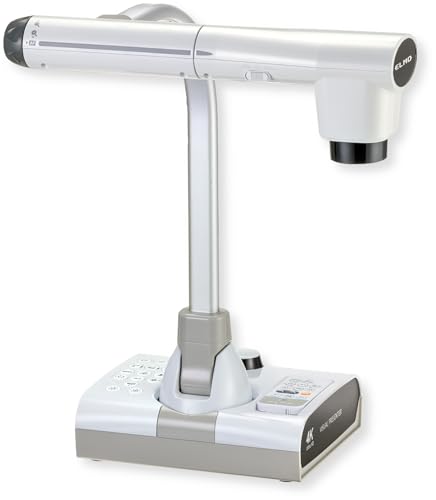
The TT-12G’s title closes with an unusually candid phrase: it replaced the 1379 TT-12W. Elmo is telling departments, in the listing itself, that this is the current model — and the specification above that phrase shows what the succession bought. Model 1380: 4K Ultra HD, a 12MP sensor, a built-in microphone, a multi-angle flexible arm, HDMI, USB and VGA connections, and 192x zoom, for classroom distance learning. Set beside its predecessor, the sensor figure jumps from 3.4 to 12 megapixels and the output to 4K, while the zoom headline stays at 192x — though this title does not itemise the optical and digital split, and this review does not invent one. A department comparing the two should ask the documentation for that split, because the optical portion is where specimen detail lives.
The flexible arm is the change a demonstrator feels first. A multi-angle arm lets the camera head leave the perpendicular: specimens can be viewed from the side, a piece of apparatus can be framed at its working angle, a pupil’s hands performing a technique can be shown from over the shoulder rather than from directly above. Bench science is rarely flat, and a presenter that only looks straight down spends its life apologising to three-dimensional subjects. The built-in microphone answers the predecessor’s silence on audio, bringing the narration of a demonstration — and the distance-learning lesson — into the camera itself.
VGA among the connections is a thoughtful retention. School laboratories are full of projectors a decade old that speak VGA and nothing else, and a new presenter that refuses to talk to them forces a display purchase nobody budgeted for. The TT-12G’s bench of HDMI, USB and VGA keeps it employable in the old lab and the refurbished one alike. Its honest cautions mirror its predecessor’s strengths: no light is stated, the zoom split is unstated, and a camera of this installation depth belongs to a room, not to a teacher’s bag. Within its room, though, it is the most current expression of the laboratory presenter idea in this guide.
- Output stated: 4K Ultra HD
- Sensor stated: 12MP
- Zoom stated: 192x (optical/digital split not stated in the title)
- Arm stated: Multi-angle flexible arm
- Microphone stated: Built-in mic
- Connections stated: HDMI, USB, VGA
Strengths
- 4K output and a 12MP sensor modernise the TT-12 line for large, current displays.
- The flexible multi-angle arm frames three-dimensional bench work that a fixed vertical head cannot.
- HDMI, USB and VGA together cover new panels and legacy laboratory projectors alike.
Trade-offs
- The title states 192x zoom without itemising optical versus digital — verify the split in the documentation.
- No built-in light is stated for shadowed bench subjects.
- It is a room’s camera, with an installation footprint to match.
Best for: departments replacing an older presenter and wanting 4K, a flexible arm and legacy projector support in one current model. Not suited for: a department that must have the optical zoom figure confirmed from the listing alone before committing.
See the TT-12G as currently listed on Amazon: check price on Amazon.
IPEVO VZ-R — Works without a computer
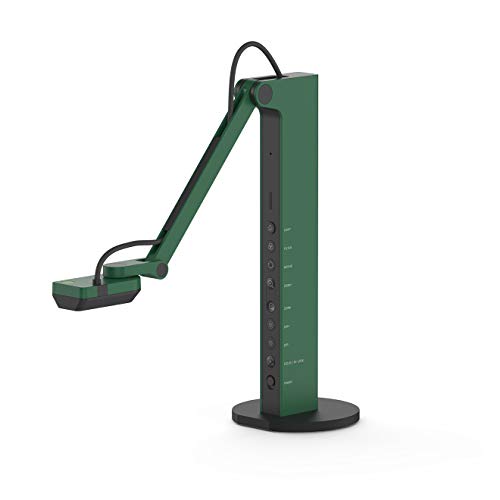
The VZ-R’s title contains the most liberating clause in this guide: works with and without a computer. This is an HDMI/USB dual-mode 8MP visual communication tool for real-time projection, distance learning, web conferencing, video recording and live demos — and in HDMI mode it drives a display directly, with no laptop in the chain to boot, update, log in or fail. In a laboratory, that independence has a specific value. The demonstration bench often sits far from the teacher’s desk computer; the lesson’s first five minutes are already consumed by practical setup; and a camera that wakes with the screen and shows the specimen is a camera that gets used for the thirty-second demonstration as readily as for the planned one.
Real-time projection is the stated heart of it. A science teacher’s most frequent camera need is not recording or conferencing but simply this: the object, on the big screen, now. The VZ-R’s dual mode covers the other needs when they arise — USB mode for the computer-based lesson, the recorded explanation, the remote class — without a second device. The 8MP sensor is the group’s middleweight figure, adequate for specimens and apparatus at ordinary demonstration distances, and the title makes no zoom claim at all, which this review honours: magnification beyond the camera’s native framing is not promised here, and teachers whose demonstrations live at high magnification should weigh the Elmo models first.
Placement is where this camera earns its laboratory keep. Freed from the computer, it can live at the demonstration bench permanently, cabled to the room’s display, while the teacher’s laptop comes and goes. It can also travel to the room with no computer at all — the prep room, the field centre, the borrowed classroom — and still project. No microphone or light is stated, so the laboratory’s audio plan and bench lighting remain the teacher’s to arrange. As the low-friction, screen-first option for live science demonstration, it is the pick that minimises everything except the image.
- Sensor stated: 8MP
- Modes stated: HDMI/USB dual mode; works with and without a computer
- Uses stated: Real-time projection, distance learning, web conferencing, video recording, live demos
- Zoom: Not stated in the listing title — verify with the manufacturer documentation
- Built-in microphone: Not stated in the listing title — verify with the manufacturer documentation
- Built-in light: Not stated in the listing title — verify with the manufacturer documentation
Strengths
- Direct HDMI projection without a computer removes the commonest setup friction in the laboratory.
- Dual mode still covers USB lessons, recording and conferencing when the computer joins in.
- Bench-permanent placement suits the thirty-second unplanned demonstration.
Trade-offs
- No zoom is stated, so high-magnification specimen work is outside its title’s claims.
- Audio and light are unstated and must be arranged separately.
- Its simplicity gives the teacher fewer stated tools for awkward, shadowed subjects.
Best for: laboratories wanting a screen-first demonstration camera that works the moment the display wakes, with no computer in the chain. Not suited for: magnification-led teaching, where a stated optical zoom is the whole point of the purchase.
Check the VZ-R’s Amazon listing as it stands: check price on Amazon.

TreasLin 15MP HDMI Document Camera — Highest stated sensor, rotating head
TreasLin leads its title with the largest sensor figure in this guide: a 15MP document camera for teachers, over HDMI and USB-C, with multi-angle rotation adjustment and an LED light, aimed at remote learning, classroom presentations, art classes and online teaching. Fifteen megapixels states a ceiling of recordable detail, and for science its honest use is this: fine surface texture — the crystalline structure of a mineral sample, the print on a component, the markings on a shell — has more sensor behind it when the camera is close and the framing is tight. Paired with the stated LED light, which attacks the bench demonstrator’s other enemy, shadow, the combination suits close, careful showing of specimens that reward a well-lit look.
The multi-angle rotation adjustment is the second stated virtue, and in a laboratory it translates into viewpoints. A rotating head can look along a piece of apparatus rather than down at it, frame a vertical subject — a plant stem, a suspended magnet, a burette’s meniscus at eye level — and swing between the bench and the teacher’s notes without the base moving. USB-C alongside HDMI reflects the current laptop generation, shortening the cable story for teachers whose machines have retired the older ports. The title’s own breadth — presentations, art classes, online teaching — positions the camera as a generalist with a big sensor rather than a laboratory instrument, and the review follows that positioning.
The discipline, then: no zoom is stated, so this camera’s magnification story is its sensor and its proximity, not a zoom figure, and a teacher planning to resolve tiny structures from a distance should not read 15MP as a substitute for optical reach. No microphone is stated either, so narrated recordings and remote lessons need the room’s audio. Within those bounds, the TreasLin offers the science teacher a bright, flexible, high-resolution eye for the bench — strongest where the subject can come to the camera and be lit, rotated and shown in detail.
- Sensor stated: 15MP
- Connections stated: HDMI, USB-C
- Head stated: Multi-angle rotation adjustment
- Light stated: LED light
- Uses stated: Remote learning, classroom presentations, art classes, online teaching
- Zoom: Not stated in the listing title — verify with the manufacturer documentation
- Built-in microphone: Not stated in the listing title — verify with the manufacturer documentation
Strengths
- The 15MP sensor is the highest stated figure here, serving close, detailed specimen views.
- A stated LED light tackles the self-shadowing that plagues three-dimensional bench subjects.
- Multi-angle rotation frames vertical and awkward subjects a fixed head cannot.
Trade-offs
- No zoom is stated; distance magnification is not its claim.
- No microphone is stated for narrated or remote lessons.
- Its generalist positioning means laboratory buyers should confirm their specific needs in the documentation.
Best for: teachers showing close, well-lit specimen detail who value sensor resolution, rotation and light over zoom. Not suited for: demonstrations that must resolve small subjects from across the bench, where optical zoom decides.
Look at TreasLin’s current Amazon listing: check price on Amazon.

IPEVO P2V Ultra — Macro and handheld specialist
Every other camera in this guide stands still and waits for the subject. The P2V Ultra goes to the subject. Its title describes a 4K/13MP object camera, handheld, with a 1cm super macro focus, a built-in microphone with AI noise reduction, sold with its full package, for close-up demo, teaching, presentation and online meeting. That 1cm figure is the most distinctive specification in the entire comparison: a stated ability to focus one centimetre from the subject. In science terms, that is the distance at which a circuit’s solder joints, an insect’s wing casing, the lettering on a component or the crystals in a rock sample stop being impressions and become structures. No zoom figure is needed to make the point — proximity is this camera’s magnification strategy, and the title states it in a single number.
Handheld operation changes the pedagogy around the camera. Instead of bringing specimens to a fixed frame — disturbing the pond sample, unmounting the apparatus, passing the fragile thing across the room — the teacher carries the camera along the bench, over the tray, into the fume cupboard’s mouth, pausing where the interesting thing actually is. A class watches a tour rather than a slideshow of relocated objects. The microphone’s stated AI noise reduction suits that mobile style: a voice narrating while moving, in a room with the ordinary clatter of a practical lesson, has a better chance of arriving intelligibly to anyone watching a recording or a remote feed.
The cautions are the counterparts of mobility. A handheld camera is only as steady as the hand, so long, still examinations of one subject are better served by mounting or by a fixed presenter; the full package wording suggests the box addresses handling, but this review claims only what the title states. No zoom and no light are stated. And a camera designed for close work will not frame an A3 chart or a whole dissection tray the way the INS-2 below can. The science department that buys the P2V Ultra buys it as the macro instrument in a small fleet — the camera for the centimetre-scale world that the big presenters cannot enter.
- Sensor stated: 4K / 13MP object camera
- Focus stated: 1cm super macro focus
- Form stated: Handheld
- Microphone stated: Built-in mic with AI noise reduction
- Uses stated: Close-up demo, teaching, presentation, online meeting
- Zoom: Not stated in the listing title — verify with the manufacturer documentation
- Built-in light: Not stated in the listing title — verify with the manufacturer documentation
Strengths
- The stated 1cm super macro focus reaches detail no other pick here claims.
- Handheld operation takes the camera to specimens that cannot be moved to a fixed frame.
- A noise-reducing microphone suits narrated close-up work in a busy practical room.
Trade-offs
- Handheld framing trades the rock-steadiness of a fixed presenter for mobility.
- Large material — trays, charts, spreads — belongs to the A3 picks instead.
- No light is stated for the shadowed interiors of apparatus and trays.
Best for: close-up science — electronics, specimens, samples and structures at centimetre range, shown live or narrated for recordings. Not suited for: whole-tray or large-chart framing, or long static examinations where a fixed head holds the image.
Review the P2V Ultra’s listing on Amazon: check price on Amazon.

INSWAN INS-2 — A3 framing for trays and charts
The INS-2 enters a science guide through a door the zoom cameras cannot use: size. Its title states UHD 4K and 13MP, a built-in LED light and microphone, A3 capture, dual auto-focus and plug-and-play operation across Mac, Windows and Chromebook, for large documents, artworks and big classrooms. Translate that into laboratory terms and the material becomes trays and layouts: a dissection laid out whole, a circuit built across a board and shown entire before any close view, a geological spread of labelled samples, the large chart or periodic-table extract that anchors a lesson. Science teaching constantly arranges things in space, and a camera that frames the whole arrangement first — establishing the geography before the detail — teaches the relationships between parts, which is where understanding actually forms.
Dual auto-focus supports that establishing work when the lesson moves: from the tray’s flat layout to a raised specimen in forceps, the focus follows the change of depth without the teacher’s intervention. The stated LED light lifts the shadows that trays and dishes cast across their own contents. The built-in microphone keeps the commentary attached. None of this makes the INS-2 a magnification instrument, and its title states no zoom — the review is explicit that a teacher needing to resolve fine structure should pair this camera’s wide framing with one of the zoom or macro picks, or accept the documentation’s word on any unstated capability rather than this page’s.
In a department equipping one camera for a laboratory that does as much layout work as close work — food science, earth science, design-and-technology crossovers, primary science in big rooms — the INS-2’s stated combination is the pragmatic centre of this guide. Its plug-and-play nature also suits the laboratory shared by several teachers with several laptops. It is the framing pick: buy it for the whole scene, lit and in focus, and let the specialists handle the centimetres.
- Sensor stated: 13MP, UHD 4K
- Capture stated: A3 capture
- Focus stated: Dual auto-focus
- Light stated: Built-in LED
- Microphone stated: Built-in mic
- Setup stated: Plug & play; Mac, Windows, Chromebook
- Zoom: Not stated in the listing title — verify with the manufacturer documentation
Strengths
- A3 capture frames whole trays, layouts and charts, teaching spatial relationships before detail.
- Dual auto-focus follows the lesson’s movement between flat layouts and raised specimens.
- Light and microphone are both stated, completing the hybrid and recording picture.
Trade-offs
- No zoom is stated, so fine-structure magnification needs a partner camera or the documentation.
- Its wide framing is surplus in a laboratory devoted to small specimens only.
- 13MP serves the scene; it does not substitute for optical reach.
Best for: laboratories whose science is laid out — trays, boards, samples and charts — and teachers in big rooms needing the whole scene lit and framed. Not suited for: a magnification-first laboratory, which should start with the Elmo models or the P2V Ultra.
See the INS-2’s present Amazon listing: check price on Amazon.
Comparison
| Camera | Zoom / macro stated | Sensor stated | Direct screen output | Microphone | Defining trait |
|---|---|---|---|---|---|
| Elmo TT-12W | 192x (12x optical + 16x digital) | 3.4MP, 1/2.3-inch CMOS, 30 fps | HDMI in & out | Not stated in title | Permanent lab presenter, deep connections |
| Elmo TT-12G | 192x (split not stated) | 12MP, 4K UHD | HDMI, VGA | Built-in mic | Flexible arm, current model |
| IPEVO VZ-R | Not stated in title | 8MP | HDMI, works without a computer | Not stated in title | Screen-first live projection |
| TreasLin 15MP | Not stated in title | 15MP | HDMI, USB-C | Not stated in title | Rotating head with LED light |
| IPEVO P2V Ultra | 1cm super macro focus | 13MP, 4K | Not stated in title | Built-in mic, AI noise reduction | Handheld macro instrument |
| INSWAN INS-2 | Not stated in title | 13MP, 4K | USB (plug & play) | Built-in mic | A3 capture, dual auto-focus |
The table separates three different instruments that marketing language blurs. The Elmo pair magnify from a distance, with optical zoom doing the honest work. The P2V Ultra magnifies by proximity, at a stated centimetre. The remaining three frame and project: the VZ-R to a screen without a computer, the TreasLin in lit, rotating detail, the INS-2 across an A3 field. A department that understands which of those three jobs dominates its timetable already knows its shortlist; a department with all three jobs should expect to own more than one of these cameras eventually, in the order its timetable dictates.
Why Does Optical Zoom Matter More Than Megapixels in the Lab?
Because the screen is the judge. When a teacher zooms digitally, the camera enlarges the pixels it already captured; edges soften, texture smears, and the specimen’s fine structure — the very thing the demonstration exists to show — is the first casualty. Optical zoom interposes glass: the lens gathers a genuinely closer view, and the sensor records detail that was never in the wide shot. The TT-12W’s title itemises its 192x into 12x optical and 16x digital, and that itemisation is the most scientifically literate sentence in this guide: it tells the buyer exactly how much of the magnification is real. Twelve times optical will carry a leaf’s venation, a mineral’s crystal faces, a circuit’s tracks. The digital reach beyond it is for labels and print.
Megapixels answer a different question — how much detail exists in the whole frame — and they earn their keep in two laboratory situations. The first is cropping room: a high-sensor image of a whole tray lets the teacher enlarge a region afterward with something left in hand, which is the INS-2’s and TreasLin’s quiet strength. The second is still capture for worksheets and revision, where a detailed frozen frame becomes a printed resource. Neither situation is the live demonstration’s core problem. Live, the class watches the framed subject, and framing at distance is zoom’s work. Buy the hierarchy in that order: optical reach first, then focus behaviour, then light, then sensor size — and be suspicious of any buying conversation that starts with the largest number on the box.
Frame rate completes the picture for living and moving subjects. The TT-12W states 30 fps, and that figure is the difference between a woodlouse and a woodlouse-shaped slideshow. Chemical demonstrations move too — effervescence, convection, the swing of a pendulum in a mechanics practical — and a camera that renders motion smoothly keeps the class’s intuition about the phenomenon intact. Where a title states no frame rate, as most here do not, the documentation is the place to confirm it before a department commits to the camera for practical work.
How Do You Light and Stage a Specimen for the Big Screen?
Bench subjects fail on screen for predictable reasons: they shadow themselves, they shine, or they sit against a background as busy as they are. Staging answers all three before the camera is blamed. Place the subject on a plain mat — matte, mid-toned, large enough to fill the frame’s edges — so the camera’s exposure settles on the subject rather than on a white bench or a cluttered tray. Raise small subjects on a block or a petri dish lid to bring them into the camera’s comfortable focus zone and to separate them visually from the surface they rest on. Keep a pair of forceps and a mounted needle in the presenter’s kit; a pointer that enters the frame steadily teaches the eye where to look far better than a fingertip the size of a tree trunk at magnification.
Light is the second half of staging, and it should come from the side. Frontal light flattens texture; side light rakes across a surface and reveals grain, crystal and relief — the information a science class is actually studying. The TreasLin’s stated LED and the INS-2’s built-in light give the teacher a controllable source to angle; rooms using the Elmo presenters or the VZ-R, whose titles state no light, should keep a small bench lamp with the camera kit and treat its position as part of the demonstration’s setup, tested on the subject before the class files in. Beware the glossy specimen — wet samples, polished minerals, anything in a dish of liquid — where any light can bounce a white glare patch across the detail; tilting the subject a few degrees usually moves the glare off the region that matters.
Rehearse the reveal order. Show the whole subject first, at the framing the class can orient by — the whole leaf, the whole board, the whole tray — then travel to the detail, by zoom on the Elmo models or by approach with the P2V Ultra, narrating the journey so pupils keep their bearings. Return to the wide view before questions. That discipline — whole, detail, whole — is the visual grammar of every good demonstration, and the cameras in this guide divide precisely by how gracefully they perform its middle movement.
Which Camera Belongs on Which Science Bench?
Biology’s bench is the land of the small and the once-living: dissections, slides’ larger cousins, pond samples, flowers, bones. It rewards the P2V Ultra’s centimetre macro for structures and the TT-12W’s optical zoom for specimens that must not be disturbed, with the INS-2 framing the whole dissection tray before either specialist closes in. Chemistry’s bench is the land of change over time — colour, fizz, crystal growth, the meniscus read to a room — where the fixed presenters earn their place: a steady frame, a smooth frame rate, and the patience to watch a reaction without a hand in shot. The VZ-R’s screen-first simplicity suits the chemistry demonstration that must start the second the reagent drops.
Physics and electronics benches are the land of apparatus: circuits, ray boxes, ripple tanks, component boards. They reward viewpoint — the TT-12G’s flexible arm looking along a bench, the TreasLin’s rotating head reading a scale at its own angle — and macro for the component-level view, where the P2V Ultra reads a resistor’s bands or a solder joint’s quality to the whole class at once. Earth science, finally, lives between scales: a rock’s hand specimen at tray distance, its crystal structure at macro distance, its context on a chart at A3 distance — the one subject that can justify three of these cameras in a single lesson, and the reason departments end up with a small fleet rather than a single champion.
The through-line is that “science” is four subjects wearing one timetable slot, and the honest purchase follows the department’s actual mixture. A department strong in biology practicals buys macro and zoom. A department whose demonstrations are mostly apparatus buys arms, angles and screen output. The generalist middle — TreasLin’s lit rotation, the INS-2’s wide frame — covers the mixed department that cannot specialise, and covers it respectably.
How Do You Record a Demonstration So Absent Pupils Actually Learn From It?
A recording fails in predictable ways: the teacher’s hand blocks the crucial second, the narration describes something the camera has already left, or the bench noise swallows the explanation. Recording well is a staging discipline, and it begins with the frame. Fix the camera’s position before the practical starts, frame the working area with margin on every side, and keep hands entering from the bottom of frame rather than across the subject. Where the camera states a microphone — the TT-12G, the P2V Ultra with its AI noise reduction, the INS-2 — the teacher’s voice stays near the instrument; where none is stated, a separate microphone near the bench is not an upgrade but a requirement, because a demonstration without audible narration is a silent film of someone else’s lesson.
Narrate for the viewer who cannot ask questions. Name each object as it enters the frame, state quantities and timings aloud, and pause at the moment of change — the colour turn, the first bubble, the needle’s swing — a beat longer than feels natural, because the recording’s viewer needs that beat to notice what the live class gasped at. Work more slowly than the live pace by a deliberate margin. Movements that read clearly across a room become blurs and mysteries on a screen watched at kitchen-table distance, and the macro camera in particular forgives nothing: at a centimetre’s focus, a brisk hand is a weather event.
Keep recordings short and titled by the phenomenon, not the date. A library of four-minute demonstrations, each covering one idea — one titration, one dissection stage, one circuit fault — gets used for revision all year, while an hour of undivided lesson footage gets watched by nobody. The cameras here that connect to a computer make that capture-and-trim workflow straightforward; the screen-only setups can still feed it through the display chain where the room allows. Either way, the department that records deliberately builds an asset; the department that records accidentally builds an archive.
What Should a Department Check About Safety and Care Around Bench Cameras?
Laboratories add hazards that ordinary classrooms do not, and a camera installation should be planned with the same risk-assessed care as any other bench equipment. Cables come first: a lead trailing across a demonstration bench will eventually meet a heat source, a corrosive spill or a pupil’s elbow, usually during the demonstration it was installed for. Route camera cables behind the bench’s working zone, keep them clear of sinks and burners, and give the travelling cameras — the handheld P2V Ultra above all — a defined parking place away from the wet end of the room. Electricity and liquids are kept apart by layout, not by vigilance.
Chemical and biological practicals argue for distance and disposability. A camera head positioned over a dissection or a reaction will accumulate splashes and vapours over a term; wipe-downs after practicals, with the cleaning the manufacturer documentation allows, keep lenses clear and mechanisms honest. Where a demonstration involves strong fumes, the camera’s great virtue is that it lets the class watch from their seats — the teacher performs at the fume cupboard or the demonstration bench, the screen carries the detail, and nobody crowds around a hazard to see it. That safety dividend is one of the strongest unspoken arguments for the zoom presenters: optical reach is also stand-off distance.
Care routines close the loop. Lenses in laboratory air film over with a mixture of dust and vapour that pupils will blame on the projector; a weekly lens wipe during term keeps the image honest. Arms and rotating heads — the TT-12G’s flexible arm, the TreasLin’s rotating head — should be moved through their range gently and parked in a neutral position rather than left straining at an extreme angle. And the department should keep one camera’s worth of slack in its fleet: a spare cable, a known-good laptop profile, a second camera that can step in. Practical examinations do not reschedule themselves around a faulty lead, and the department that planned for failure teaches through it without the class noticing anything at all.
How Should a New Science Teacher Practise With the Camera Before Term Starts?
Spend one afternoon with the department’s three hardest demonstrations and perform each of them to an empty room, watching the screen rather than the bench. The exercise is humbling in useful ways. Distances that feel close at the bench look remote on screen; movements that feel gentle look abrupt; the specimen that fills your attention fills a tenth of the frame. Practise the travel from wide view to detail until the hand that works the zoom or carries the macro camera moves at screen pace — roughly half the speed your instincts suggest. Learn where your own hands enter the frame and rehearse keeping the working hand low and the subject unobstructed at the moment of change.
Then invite one colleague to watch from the back row and report only what they could not see. That single piece of feedback — the meniscus unreadable, the colour change missed, the label upside down — is worth a term of private trial and error, and it arrives while the audience is still forgiving. Departments that timetable this rehearsal for new staff, alongside the safety induction and the practical-risk paperwork, produce demonstrators who look fluent by October. The camera rewards the rehearsed teacher out of all proportion to the afternoon it cost.
Common Mistakes
Reading the biggest zoom number as the biggest truth. A total zoom figure blends optical reach with digital enlargement, and only the optical part preserves specimen detail. Where a title itemises the split, as the TT-12W’s does, use the optical figure as the measure; where it does not, ask the documentation before buying for magnification.
Assuming a large sensor replaces a lens. Fifteen megapixels of a distant subject is a detailed picture of a small subject, not a close view of it. Magnification comes from optics or from proximity — the two strategies this guide’s Elmo and P2V Ultra picks embody — and sensor size supports both without substituting for either.
Mounting the whole department’s hopes on one camera. Macro, zoom, wide framing and screen-only projection are different instruments. A department that buys one camera to do all four will find it adequate at two and frustrating at the rest, and will blame the camera for a purchasing decision.
Neglecting light because the camera was expensive. Three-dimensional specimens shadow themselves under any camera. A stated LED, or a bench lamp kept with the kit, is not an accessory purchase; it is half the imaging system, and the half most often left in the cupboard.
Forgetting the legacy projector. Laboratories keep displays for a decade. A presenter whose connections match the room — HDMI for the new panel, VGA for the old projector, pass-through for the teacher’s machine — will be used; one that demands the room change around it will be routed around instead.
What Is the Sensible Order of Purchase for a Department Building a Fleet?
Start with the room that demonstrates most. Give the flagship laboratory the presenter its timetable deserves — the TT-12G for a mixed department, the TT-12W where optical zoom and live motion dominate — and let it become the standard against which later purchases are judged. Add the macro instrument next if practical subjects justify it, because the P2V Ultra’s centimetre-scale view opens demonstrations no presenter can imitate, and its absence is felt in every electronics and specimen lesson. Then spread the utility cameras — a VZ-R for the screen-only room, an INS-2 for the big framing jobs — as the remaining rooms’ needs prove themselves in real lessons rather than in a purchasing meeting’s predictions. Bought in that order, each camera arrives to a defined job, a trained owner and a class ready to watch; bought all at once in a single specification, the fleet tends to be identical, underused and quietly resented by the rooms it does not fit.
Final Recommendation
For a department buying one flagship laboratory presenter, the Elmo TT-12G is the current, complete answer — 4K, 12MP, a flexible arm, a built-in microphone and connections for new and legacy displays — with the TT-12W standing as the zoom-purist’s choice, its 12x optical figure itemised in its own title and its 30 fps serving live specimens. For close-up teaching, the IPEVO P2V Ultra is unchallenged here: a stated 1cm macro focus in a handheld body is a capability none of the fixed presenters offers. The VZ-R is the laboratory’s utility player, projecting to a screen with no computer in the chain; the TreasLin brings the biggest stated sensor with light and rotation for close bench detail; and the INS-2 frames the whole tray, chart or layout in A3 before the specialists move in. Equip the bench you actually teach at, in the order your timetable presses you, and the demonstrations will get larger, clearer and harder for a class to look away from.
Frequently Asked Questions
What is the difference between optical and digital zoom for specimens?
Optical zoom magnifies with the lens, so the sensor records genuinely closer detail; digital zoom enlarges the captured image, spending detail as it grows. The TT-12W states both figures — 12x optical, 16x digital — and the optical number is the one to judge specimen work by. Digital zoom remains useful for print, labels and diagrams.
Can these cameras show microscope slides?
That is a microscope’s job, not a document camera’s — the magnification and illumination of slide work belong to a different instrument, and the digital microscope guide linked below covers it. Document cameras excel a scale up: hand specimens, dissections, apparatus, samples in dishes and everything a class can nearly see unaided.
Do I need a computer in the laboratory to use one?
Not necessarily. The IPEVO VZ-R states that it works with and without a computer, driving a display over HDMI directly, and the Elmo presenters’ HDMI connections serve screen-first setups as well. Computer-connected modes add recording, conferencing and software control when the lesson wants them.
How close can the P2V Ultra focus?
Its title states a 1cm super macro focus — one centimetre from the subject. That is close enough for solder joints, insect structures, crystal faces and component markings to fill a screen, provided the teacher’s hand is steady or the camera is rested or mounted for longer examinations.
Which pick suits a laboratory with an old VGA projector?
The Elmo TT-12G states VGA among its connections, and the TT-12W states RGB, the older analogue family — both were specified with legacy laboratory displays in mind. Confirm the exact cabling against the documentation and the projector in your room before ordering.
Is a higher-megapixel camera always sharper on screen?
No. On-screen sharpness at demonstration distances is governed by the lens, the focus and the light before it is governed by sensor size. A well-lit, optically zoomed image from a modest sensor will resolve more visible structure than a dim, digitally enlarged image from a large one — which is why this guide ranks zoom, focus and light ahead of megapixels.
Related Guides
Departments equipping ordinary classrooms alongside the laboratories will find the wider field compared in our general guide to classroom document cameras. Departments buying under a hard budget cap should read our roundup of lower-cost document cameras for teachers before assuming the laboratory needs the flagship. And staff who carry a camera between the lab, the prep room and general classrooms will want our comparison of folding document cameras for the models built to travel.


