What's inside
- Where to Buy These Drives
- Key Takeaways
- Quick Picks
- How Did We Choose These Picks?
- Which Rugged Drives Can Actually Take a Fall?
- What Do Rugged Ratings Actually Promise, and What Do They Not?
- How Should You Handle a Rugged Drive Day to Day?
- Why Does the Second Copy Matter More Than the Shell?
- What Should You Do in the Hour After a Drive Takes a Fall?
- How Do Rugged Hard Drives Compare With Rugged Solid-State Drives?
- Which Rugged Drive Suits Students, Families, and Shared Bags?
- How Do You Carry a Drive So the Shell Rarely Has to Prove Itself?
- When Is a Standard Portable Drive Actually the Better Buy?
- What Should You Check When a Rugged Drive First Arrives?
- How Do the Six Picks Compare Side by Side?
- What Mistakes Do Buyers Keep Making?
- Final Recommendation
- Frequently Asked Questions
- Related Guides
As an Amazon Associate I earn from qualifying purchases. This post may contain affiliate links at no extra cost to you.
widgetverdict.com is reader-supported. When you buy through links on our site, we may earn an affiliate commission.
Where to Buy These Drives
Every rugged drive reviewed below is available from Amazon, and the links in the Quick Picks table and in each review heading go to the exact capacity and model discussed. Rugged lines often sell the same shell in several sizes, so confirm the capacity in the listing title matches the review you just read before the drive goes in the basket.
Hard drives and gravity have never been friends. A portable drive knocked off a desk, dropped from a car seat, or crushed in an overstuffed bag is a small mechanical instrument meeting forces it was never designed for, and the results are measured in lost files. This guide to the best drop proof hard drives rounds up six rugged portable models whose shells, bumpers, and stated resistance ratings are built to improve the odds when the drop happens anyway.
An honesty note belongs at the front. The shock, drop, water, and dust claims in these reviews are the claims the manufacturers publish in their listings, repeated here as listing claims rather than as results we independently verified by throwing drives off furniture. Standards and test methods vary between brands, so treat the ratings as evidence of design intent and construction, not as a licence to be careless.
What rugged design genuinely buys is margin. Reinforced shells, internal suspension, and sealed ports turn many would-be fatal knocks into non-events, and for drives that travel, work outdoors, or share bags with tools and sports kit, that margin is worth paying for. What it never buys is immunity, and every review below keeps a second copy of your data in the conversation, because that remains the only drop protection with a perfect record.
Key Takeaways
- Rugged claims in this guide are the manufacturers’ published listing claims, not independently verified test results.
- A reinforced shell improves the odds in a fall; no spinning drive is genuinely drop proof in the absolute sense.
- Capacity still matters: the rugged lines here run from 1TB field drives to a 5TB LaCie that can hold a whole archive.
- Water and dust resistance, where a listing claims it, suits outdoor and site work as much as impact protection does.
- Keep a second copy of anything important regardless of how tough the drive looks; toughness and backup solve different problems.
- Buy the rugged drive for the environment your drive actually lives in, not the toughest-looking shell in the list.
Quick Picks
| Pick | Badge | Why it earns a place |
|---|---|---|
| SP Silicon Power 2TB Rugged Portable External Hard Drive Armor A60 | Best value rugged all-rounder | The Armor A60’s shockproof design and broad device support make it the sensible rugged starter at 2TB. |
| LaCie Rugged USB-C Portable External Hard Drive 5TB | Best high-capacity rugged drive | LaCie’s flagship rugged pairs 5TB with stated drop, shock, dust, and rain resistance for serious field archives. |
| Silicon Power 5TB Rugged Portable External Hard Drive Armor A60 | Best big Armor for consoles and archives | The 5TB Armor A60 brings the line’s shockproof design to archive-sized capacity for games and media collections. |
| ADATA HD710 Pro 2TB External Hard Drive | Best for wet and dusty work | The HD710 Pro’s listing claims shockproof, waterproof, and dustproof protection for genuinely outdoor duty. |
| Silicon Power 4TB USB-C Rugged Portable External Hard Drive A60 | Best USB-C Armor model | This A60 variant pairs 4TB with USB-C and listing claims of military-grade shockproofing and water resistance. |
| LaCie Rugged Mini 1TB Portable External Hard Drive | Best compact field classic | The original Rugged Mini at 1TB, with a data rescue service in its listing, remains the field photographer’s pocket drive. |
How Did We Choose These Picks?
We built this list from the portable lines that have made ruggedness their identity rather than their footnote. Silicon Power’s Armor A60 appears three times because it is sold in several capacities and connection variants that genuinely suit different buyers, and each appearance is reviewed on its own merits. LaCie’s Rugged family, the orange benchmark of the category, appears twice, in a large USB-C model and the compact original Mini.
The ADATA HD710 Pro completes the six because its listing claims the full trio of shock, water, and dust protection, which speaks to outdoor and site environments where impact is only one of the hazards. Between the six, a buyer can choose by capacity from 1TB to 5TB, by connection from USB 3.0 to USB-C, and by the kind of punishment their routine actually dishes out.
We deliberately kept the analysis grounded in what the listings state. Where a manufacturer claims military-grade shockproofing or rain resistance, the review says that is the claim and discusses what it would mean in use. Where a listing is silent, the review does not invent a rating. Rugged marketing is the most inflated language in storage, and a guide that repeats it uncritically would fail its readers precisely where they are most vulnerable to believing it.
Ordinary portable drives were excluded even though many survive years of careful use. This guide is for the drives that live harder lives: site bags, field kits, student backpacks, vehicle consoles, and the hands of people who know, from experience, that their equipment gets dropped.
Which Rugged Drives Can Actually Take a Fall?
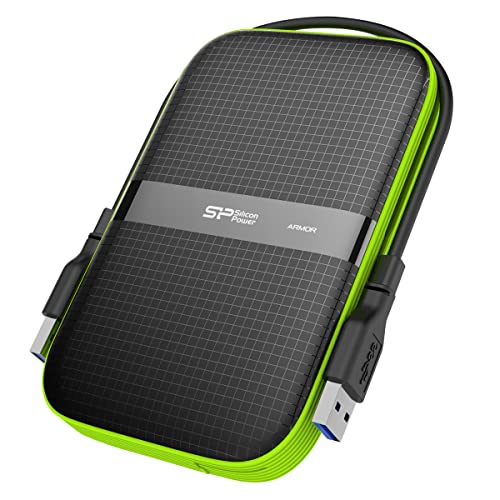
SP Silicon Power 2TB Rugged Portable External Hard Drive Armor A60 — Best value rugged all-rounder
The Armor A60 is where rugged storage starts making sense for most people. Silicon Power describes the drive as shockproof, with a rugged exterior built to absorb the knocks of travel, and the listing’s compatibility spans PC, Mac, Xbox, and PS4, which reflects how these drives actually live: one week carrying work files, the next holding a games library in a bag that travels between houses.
Two terabytes is the right size for that mixed life. It is enough for a working set of files, a respectable game collection, or a field backup of current projects, without the cost of the larger rugged models. Students, field technicians, and anyone whose drive commutes daily will find the capacity honest and the protection proportionate to the risks of a bag that gets set down hard and rained on occasionally.
The design philosophy of the A60 line is armour rather than sealing: a tough outer shell and internal protection against shock, aimed squarely at drops and bumps rather than submersion. Judge it on that brief and it makes sense. Owners whose hazards are puddles and dust storms should read the ADATA review below; owners whose hazard is gravity will find this drive aimed at them.
As with every drive in this guide, the shockproof claim is the manufacturer’s, presented as published, and it should adjust your behaviour only slightly. You may worry less about the drive in the bag; you may not stop backing up. A rugged drive that survives the drop and a second copy at home remain different layers of the same sensible system.
Buy the 2TB A60 as the default rugged portable for everyday travel, education, and mixed work-and-play duty. It is the pick for buyers who want real protection without paying for capacity or sealing they will never use.
- Capacity: 2TB
- Model line: Armor A60
- Connection: USB 3.1 Gen 1
- Listing claim: shockproof rugged design
- Compatibility per listing: PC, Mac, Xbox, PS4
- Colour: Black
Strengths
- Shockproof Armor design aimed at everyday drops and knocks
- Broad compatibility across computers and consoles
- 2TB suits mixed work, study, and games duty
Trade-offs
- Listing focuses on shock rather than water sealing
- Capacity is modest beside the 5TB models here
- Rugged shell is bulkier than a standard portable
Best for: a student, commuter, or field worker whose drive travels daily and needs honest drop protection at a sensible size.
Not suited for: an outdoor worker whose main hazards are water and dust, where the ADATA’s stated sealing matters more than armour.

LaCie Rugged USB-C Portable External Hard Drive 5TB — Best high-capacity rugged drive
The LaCie Rugged USB-C at 5TB is the heavyweight of this guide in every sense. Its listing claims resistance to drops, shock, dust, and rain, the broadest protection statement among the six picks, and the capacity matches the ambition: this is a drive that can hold a photographer’s working archive, a videographer’s current projects, or a field team’s entire reference library while living the rugged life those jobs involve.
The orange Rugged design has become the field industry’s visual shorthand for a drive that expects to be knocked about, and the USB-C connection suits the modern laptops that now dominate location work. One cable, bus power, and a shell you do not have to apologise for setting down on a tailgate: the working routine is as simple as rugged storage gets, which is why these drives are standard issue in so many production kits.
Five terabytes in a single portable concentrates value and risk together, so this review repeats the guide’s refrain with feeling: the tougher the drive, the more its owner tends to trust it as the only copy, and that is exactly backwards. Use the capacity to carry the archive; keep another copy of the archive somewhere that does not travel. The Rugged will likely survive the accident; the bag containing it can still be stolen, left, or lost.
The rain and dust claims deserve their practical reading. They describe a drive built to shrug off weather and gritty environments as its listing states, which suits outdoor shoots, construction documentation, and expedition work. They do not make it a diving accessory, and owners should treat the claims as margins for bad days rather than specifications to test for entertainment.
Choose this drive when the archive travels and the environment is genuinely hostile, when capacity and protection must arrive in the same shell, or when you are standardising a team’s field kit on the category’s reference design.
- Capacity: 5TB
- Model: STFR5000800
- Connection: USB-C
- Listing claims: drop, shock, dust, and rain resistant
- Compatibility per listing: Mac and PC
- Format: portable, bus-powered
Strengths
- Largest capacity here with the broadest stated protection
- USB-C suits modern field laptops
- Iconic rugged design trusted across location industries
Trade-offs
- Premium pricing follows the flagship positioning
- 5TB in one shell demands disciplined second copies
- Bulkier than standard portables of similar capacity
Best for: a creative professional or field team carrying a large working archive into rough, wet, or dusty environments.
Not suited for: a careful desk-based user paying for protection against hazards their drive will never meet.
Silicon Power 5TB Rugged Portable External Hard Drive Armor A60 — Best big Armor for consoles and archives
If the 2TB Armor A60 is the everyday rugged drive, this 5TB version is the same idea scaled for collectors. The listing describes a shockproof rugged portable for PC, Mac, Xbox, and PS4, and at this capacity the natural jobs are the big ones: a console games library that travels between rooms or houses, a media archive that lives in a bag, or a backup drive for a household whose files have outgrown polite sizes.
Console duty is where the size and the shell meet most happily. Game installations are enormous, reinstalling is tedious, and console drives get unplugged, carried, and set down on floors more than any other storage in the home. A shockproof exterior around 5TB of library is a proportionate answer, and the standard USB 3.0 connection matches the consoles and computers the listing names without adapter fuss.
As a backup drive, the capacity lets one A60 hold a whole household system’s worth of files with room for versions, which is what backups quietly need. Park it in a drawer rather than a bag and the ruggedness becomes a bonus rather than the point; carry it between home and office as an off-site copy and the ruggedness earns its keep weekly.
The compromises mirror its smaller sibling. The protection story centres on shock, not sealing, and the shell’s bulk is noticeable beside a slim standard portable of the same capacity. Buyers paying the rugged premium should have at least an occasional travel or handling risk in mind; a drive that will live its whole life on one shelf is over-served here.
Pick the 5TB A60 for big libraries that move: console collections, travelling media archives, and household backups that commute. It is the capacity pick of the Armor line, reviewed on its own terms rather than as a footnote to the 2TB.
- Capacity: 5TB
- Model line: Armor A60
- Connection: USB 3.0
- Listing claim: shockproof rugged design
- Compatibility per listing: PC, Mac, Xbox, PS4
- Colour: Black
Strengths
- 5TB holds console libraries and household archives whole
- Shockproof Armor design suits drives that get carried and unplugged often
- Simple USB 3.0 connection matches its stated devices
Trade-offs
- Protection story is shock-focused rather than sealed
- Shell bulk exceeds slim standard portables
- USB 3.0 rather than USB-C connection
Best for: a console gamer or media collector whose large library travels and gets handled by the whole household.
Not suited for: a USB-C laptop owner wanting the neatest modern connection, who should look at the LaCie or the 4TB Armor below.
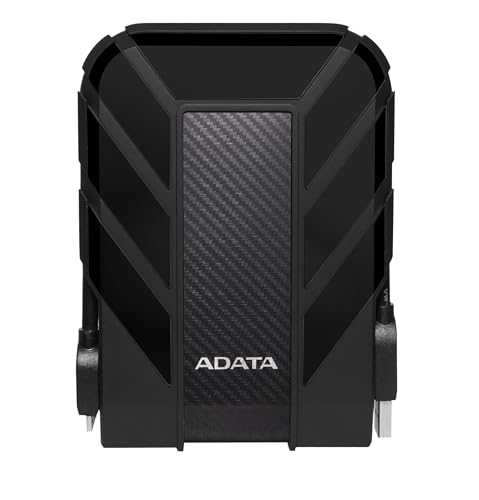
ADATA HD710 Pro 2TB External Hard Drive — Best for wet and dusty work
The ADATA HD710 Pro makes the boldest protection claims in this guide: its listing describes the drive as shockproof, waterproof, and dustproof, a trio aimed at environments where a drive’s enemies arrive from every direction at once. Building sites, farms, boats, outdoor events, and field research all qualify, and for those settings this is the pick whose stated design brief matches the hazards on the ground.
Two terabytes is the working size here, enough for a site’s documentation, a season of field data, or a professional’s current projects, and the listing’s stated audience of gamers, students, and professionals reflects the drive’s second life as an everyday portable that simply happens to be sealed against the weather. A student whose bag soaks through in a storm is using the same protection as the surveyor, just at lower stakes.
Claims of this breadth deserve the guide’s standard caution in its strongest form. Waterproof and dustproof are published listing claims with test conditions behind them that vary by manufacturer, and they describe a drive surviving incidents, not a drive designed to work underwater or live in a cement mixer. Read them as the difference between a spilled drink being an anecdote and it being a data-loss event, which is the honest scale of what sealing buys.
The rugged, sealed construction brings the usual trade of a chunkier shell, and owners who work at desks will feel they are carrying more drive than their day requires. That is the correct instinct, and it is why this guide places the HD710 Pro by environment rather than by capacity: buy it for the weather and the dust, not for the spec sheet alone.
Choose the HD710 Pro when your drive’s workplace is outdoors, wet, dusty, or all three, and when a sealed design brief matters more than the last word in slimness. It is the specialist pick of the six, and specialists should be bought for their specialism.
- Capacity: 2TB
- Model line: HD710 Pro
- Listing claims: shockproof, waterproof, and dustproof
- Stated users per listing: gamers, students, professionals
- Compatibility per listing: Mac and PC
- Format: portable, bus-powered
Strengths
- Listing claims the full shock, water, and dust protection trio
- Suits outdoor, site, and marine environments
- Everyday capacity for current projects and field data
Trade-offs
- Boldest claims here still warrant careful, incident-level expectations
- Chunky sealed shell is overkill at a desk
- 2TB limits archive-sized ambitions
Best for: an outdoor professional, site worker, or field researcher whose drive faces weather and dust as routine hazards.
Not suited for: a home user whose drive lives on a shelf, where the slimmer standard portables serve the same files for less bulk.

Silicon Power 4TB USB-C Rugged Portable External Hard Drive A60 — Best USB-C Armor model
This 4TB Armor A60 is the line’s modern-connections variant, and its listing raises the protection language a level: military-grade shockproof and water-resistant are the published claims, alongside USB-C connectivity that extends its stated compatibility to the iPad Pro as well as PC and Mac. For a buyer whose kit has moved to USB-C and whose drive travels, it is the Armor that asks for no adapters and no apologies.
Four terabytes sits in the productive middle of this guide: a serious working archive, a large games library, or a backup with genuine version room, in a shell designed for the bag rather than the shelf. Paired with the water-resistance claim, it suits the travelling professional whose hazards mix drops with weather, the exact combination that standard portables are worst prepared for.
The military-grade phrase deserves the calm reading this guide applies to all such language. It indicates the manufacturer tested the design against a military shock standard, as the listing presents it, which is a meaningful statement about construction and a poor excuse to drop the drive deliberately. Treat it as a strong margin for accidents, keep the second copy, and the claim will have done its job on the day it is needed.
Against its own family, this model is the one to choose when connections matter: the 2TB A60 serves lighter duty over USB 3.1, the 5TB serves capacity over USB 3.0, and this 4TB serves the USB-C present and future. Against the LaCie it trades some stated dust and rain breadth for the Armor line’s value positioning, a trade many buyers will make happily.
Buy it for a USB-C laptop or tablet workflow that travels in real weather, for a games and media library that moves house regularly, or as the off-site backup that commutes. It is the most current-feeling Armor in the list, and for many readers that settles the family argument.
- Capacity: 4TB
- Model line: Armor A60
- Connection: USB-C, USB 3.1 Gen 1
- Listing claims: military-grade shockproof, water-resistant
- Compatibility per listing: PC, Mac, iPad Pro
- Colour: Black
Strengths
- USB-C connection including stated iPad Pro compatibility
- Listing claims military-grade shockproofing and water resistance
- 4TB balances archive size and portability well
Trade-offs
- Strongest claims still describe margins, not immunity
- Pricier than the USB 3.0 Armor models
- Sealing claims are narrower than the ADATA’s stated trio
Best for: a USB-C-equipped traveller wanting rugged protection and modern connections in one 4TB drive.
Not suited for: a buyer on older USB-A machines who gains nothing from the connection and should take the better-value A60 models.

LaCie Rugged Mini 1TB Portable External Hard Drive — Best compact field classic
The Rugged Mini is the drive that defined this category, and the 1TB model is its most compact expression: a field drive for the current assignment rather than the whole archive. Photographers, journalists, and travelling professionals have carried Minis for years because the proposition is simple, a shock-resistant shell around enough space for the job in hand, in a size that fits the smallest kit bag.
The listing for this model includes a Data Rescue Service, which is a distinctive comfort in the rugged category: if the worst happens despite the shell, a professional recovery attempt stands behind the drive. Services have terms and no recovery is guaranteed, but as a statement of how the product is meant to be used, carried hard and trusted with real work, it completes the picture the orange shell begins.
One terabyte is a deliberate limitation, and this review will not dress it up. Modern cameras and video work fill it quickly, so the Mini’s owner must run the field discipline this guide keeps recommending: copy to a second location at base, then reuse the Mini for the next job. Treated as a shuttle and a shield for current work, the size is adequate; treated as an archive, it is a disappointment waiting for a busy month.
The Mini’s age as a design cuts both ways. It is proven in a way newer rugged drives are not, with years of field history behind the concept, and its connections and pace belong to its generation rather than to the USB-C present. Buyers standardising on new laptops should weigh the larger Rugged USB-C above; buyers who value the proven pocket classic will not be troubled.
Choose the Rugged Mini for the smallest, toughest job-specific kit: the drive in the camera bag, the journalist’s pocket, the glovebox. It remains the category’s reference point at the compact end, and its rescue service gives it a story none of the other five can tell.
- Capacity: 1TB
- Model: LAC301558
- Size class: 2.5 inch portable
- Listing feature: Data Rescue Service
- Design: Rugged Mini shock-resistant shell
- Format: portable, bus-powered
Strengths
- Proven Rugged Mini design in its most portable form
- Data Rescue Service included in the listing
- Ideal shuttle size for current assignments
Trade-offs
- 1TB is the smallest capacity in this guide
- Design generation predates USB-C standardisation
- Requires disciplined offloading to a larger archive
Best for: a photographer, journalist, or field worker wanting the classic compact rugged drive for the job in hand.
Not suited for: an archivist needing one drive to hold years of work, who should take the 5TB Rugged USB-C instead.
What Do Rugged Ratings Actually Promise, and What Do They Not?
The language on rugged listings mixes several kinds of claim, and separating them helps buyers compare honestly. Shock and drop claims concern impacts: the drive is designed and, per the manufacturer, tested to survive falls from a stated height onto a stated surface. Ingress claims concern dust and water, usually expressed as resistance levels, and describe sealing against particles and splashes or immersion under test conditions. Each claim is a manufacturer’s published statement, presented in this guide as exactly that.
What none of the claims promise is survival of your specific accident. A fall onto concrete at an angle, a drive in a bag that a vehicle reverses over, or a soaking beyond the tested conditions can defeat any product here. Real-world ruggedness is a distribution of outcomes, and a good shell moves your accident from the likely-fatal part of that distribution to the likely-survivable part. That is worth real money and zero complacency.
The practical reading is to match claims to hazards. Drops onto hard floors dominate most people’s risk, so shock construction matters most widely. Dust and rain dominate outdoor work, so sealing matters there. Submersion claims matter to almost nobody’s actual routine, and no drive in this guide should be bought with the intention of testing them. Buy for the accident you can plausibly describe, and let the rest be margin.
How Should You Handle a Rugged Drive Day to Day?
Rugged drives reward the same handling as standard ones, which surprises owners who expected the shell to change the rules. Never move a portable drive while it is copying, because the spinning platters and moving heads are at their most vulnerable mid-transfer whatever the exterior is made of. Eject properly rather than pulling the cable, and let the drive spin down before it goes back in the bag.
Keep the port covers and cable connections clean, especially on sealed models, because grit in a seal is how water resistance quietly expires. Store the drive in the padded pocket or case it deserves rather than loose among tools and keys, and avoid leaving it in vehicles through temperature extremes, which age any drive faster than drops do.
Finally, schedule the same health awareness you would give any drive. Rugged exteriors can hide a mechanism that is quietly deteriorating behind the armour, and the first sign of trouble should trigger the copy-everything-off response this guide recommends for every category. Toughness buys time in an accident; attention buys time in a decline, and a careful owner uses both.
Why Does the Second Copy Matter More Than the Shell?
Consider the ways data actually disappears from portable drives. Drops are only one entry on the list, alongside theft, loss, accidental formatting, file corruption, ransomware on a connected machine, and the drive simply being left in a hotel room in another country. A rugged shell addresses the first entry superbly and the rest not at all, which is why backup strategy, not armour, is the foundation of keeping files.
The arithmetic of a second copy is friendly. Any drive in this guide can serve as the field drive while an ordinary, inexpensive drive at home holds the mirror, or the arrangement can run the other way for owners whose rugged drive is the archive. Cloud storage adds a third layer for the truly irreplaceable material, at a pace that suits finished work rather than whole archives.
None of this diminishes the rugged picks here; it locates them. The shell protects the copy that travels, through the environments where travel is dangerous. The system protects the data itself, through every misfortune including the ones with no impact involved. Buy the shell for the journey and build the system for the data, and you will have understood this category better than its marketing usually encourages.
What Should You Do in the Hour After a Drive Takes a Fall?
The moments after a drop decide whether an accident becomes an anecdote, so they deserve a procedure rather than improvisation. First, do not plug the drive in repeatedly to see if it still works. If the fall damaged the mechanism, every power-up asks injured components to move, and a drive that might have surrendered its files gracefully to a careful first connection can worsen with each hopeful retry. Pick it up, look for cracked casing or a damaged port, and decide calmly whether the data on it exists elsewhere.
If the contents are safely backed up, the calculus is simple: test the drive once, gently, and if it mounts, treat it as untrustworthy anyway and replace it in due course, because impact damage that spares the drive today can declare itself in a month. If the contents are not backed up and the drive clicks, fails to spin, or is not recognised, stop. Professional recovery services, like the one named in the Rugged Mini listing, exist for this moment, and their odds are best when the drive reaches them in the condition the fall left it, not the condition repeated experiments produced.
If the drive mounts and reads normally, use the reprieve immediately: copy the most irreplaceable material off first, then the rest, and verify the copies open. A drive that survived a fall has given you information about its luck, not about its future, and the correct response to luck is to stop depending on it. Retire the drive to light, non-critical duty or replace it, and note the incident and date so its later behaviour is interpreted correctly.
Then fix the system, not just the hardware. Every post-drop story in this category ends with the same sentence in some form: the backup gets made that evening. Make it true while the lesson is fresh, because the second copy is the only participant in the whole event that performed perfectly, or the one whose absence turned a dropped drive into a disaster.
How Do Rugged Hard Drives Compare With Rugged Solid-State Drives?
Honesty requires acknowledging the rival technology. A solid-state drive has no moving parts, so its resistance to shock is inherent rather than engineered, and rugged SSDs are genuinely harder to kill with a fall. If drops were the only variable and money were no object, this guide would be shorter and entirely solid-state. The variables that keep spinning drives in this category are capacity and cost: the rugged hard drives here offer up to 5TB in a portable shell, at prices per terabyte that solid-state storage does not approach.
That arithmetic decides real purchases. A field team that must carry several terabytes and replace a lost drive without a budget meeting will keep choosing rugged hard drives, accepting the mechanical risk and managing it with shells and second copies. A user carrying a few hundred gigabytes of critical data, by contrast, should seriously consider whether a rugged SSD serves them better, and this guide would rather lose the sale than mislead that reader.
There is also a middle pattern worth copying: the rugged hard drive as the capacious field archive, with the day’s most critical files also copied to a small solid-state drive or the laptop itself. Layering the technologies by consequence, rather than by loyalty, is how professional field kits are actually built, and the drives in this guide slot into that pattern as the capacity layer.
Which Rugged Drive Suits Students, Families, and Shared Bags?
Not every rugged drive protects professional work. A large share of portable drives live in school bags, family cars, and shared household chaos, where the hazards are juice boxes, siblings, and floors, and the data is coursework, family photographs, and game saves whose loss would be genuinely mourned. For that world, the Armor A60 models in this guide are the natural fit: stated shock protection, console compatibility for the games library, and capacities that match how households actually accumulate files.
Coursework deserves a specific word, because students lose more work to storage accidents than any other group and back up less than any other. A rugged drive in the bag, paired with the habit of copying finished assignments to it weekly and leaving a second copy in cloud storage provided by the school, converts the classic lost-essay catastrophe into a minor inconvenience. The drive’s toughness matters here precisely because student bags lead the hardest lives in this entire guide.
For families, the discipline that matters is labelling and location. One rugged drive, clearly labelled as the family archive, living in one known place when it is not travelling, beats three anonymous drives in three drawers. Photographs consolidate onto it, the game library travels on it, and its toughness quietly covers the years of being knocked off coffee tables by the household it serves.
How Do You Carry a Drive So the Shell Rarely Has to Prove Itself?
The best drop protection is the drop that never happens, and carrying habits determine most of them. A drive loose in a bag migrates to the bottom, where it is crushed under books and bottles and dropped the furthest when the bag is upended. A drive in a padded sleeve, a hard case, or the dedicated pocket most camera and laptop bags provide, rides in a predictable place with padding on the faces that matter. Several listings in this category acknowledge the point by bundling or designing around cases, and owners should take the hint their own purchase is offering.
Cables cause a surprising share of portable drive falls. A drive copying on a desk edge with its cable stretched across a walkway is one passer-by away from flight, and the fall that follows is the kind no shell enjoys: powered, spinning, and swinging by its own lead. Coil the excess cable, keep the drive fully on the surface rather than overhanging it, and copy in places where people are not squeezing past. The majority of dramatic drive accidents begin as cable management failures.
In vehicles, the rules are temperature and restraint. A drive loose in a footwell or on a dashboard slides, falls, and bakes, sometimes all three in one journey. The glovebox or a bag on the floor behind a seat, out of direct sun, is the correct berth, and on site work the drive belongs in the same case as the laptop it serves rather than in a pocket of the jacket you throw over a fence. None of this costs anything, and over years it prevents more losses than any rating printed on a box.
Finally, hand the drive to people properly. Most drops happen in the half-second of a fumbled handover, so set it down and let the other person pick it up, the way camera crews handle lenses. It sounds ceremonial until the first time it saves the only copy of a day’s work, after which it simply becomes how your team, your family, or your household passes the orange drive.
When Is a Standard Portable Drive Actually the Better Buy?
This guide sells rugged drives, so its credibility depends on naming the cases where they are the wrong purchase. A drive that will live on a desk, plugged into a home computer, in a household without small children or travelling bags, gains almost nothing from armour. The same money buys more capacity in a standard portable, and capacity quietly used every day beats protection against a hazard that never visits.
Similarly, buyers whose data is fully and automatically backed up to the cloud may rationally treat the portable as a disposable convenience and spend nothing on its survival. The calculus changes completely when the drive is a working tool rather than a vault: losing it costs a replacement, not a history. Knowing which of those objects you are buying, vault or tool, is the real first decision of this category, and it precedes every claim comparison in the reviews above.
The rugged premium makes its sense in the wide middle: drives that travel sometimes, carry things that matter, and live among people and weather. That describes most readers of this guide, which is why the category exists. It simply does not describe everyone, and the readers it does not describe should keep their money for the extra terabyte instead.
What Should You Check When a Rugged Drive First Arrives?
Unbox with the same care you would give any drive. Confirm the capacity and model against the listing, because rugged families sell near-identical shells in several sizes and the box is the easiest place to catch a mix-up. Inspect the port covers and seals on models that claim water or dust resistance, since a cover that does not sit flush from the factory undermines the claim before the drive has lived a day, and register the warranty while the receipt is still in your hand.
Run one honest working test before the drive enters service: copy a large folder of real files, open a sample from the copy, and note roughly how long the transfer took as a baseline for the drive’s later life. Then place the drive in the rotation at the safest position, as the second copy rather than the only one, until it has a few uneventful weeks behind it. Armour earns trust the same way mechanisms do, by doing ordinary work reliably while someone is still paying attention.
Label it immediately, with its role and the month it entered service. Rugged drives all look deliberately similar, and a household or team with two orange drives and no labels is one tired evening away from formatting the wrong one. The label is also where the post-drop note will go if the day ever comes, turning the shell into its own service record.
One last consideration belongs to teams and households buying more than one drive from this list: standardise where you can. Two drives of the same model share cables, cases, and handling habits, and the person reaching into the bag at midnight does not have to wonder which lead fits which shell. Variety is a pleasure in most purchases; in field storage it is a small, recurring tax on tired people. Pick the model whose stated claims match your hazards, buy it in the sizes your work needs, label each one by role, and let familiarity do the protecting that no shell can.
And if the standardised pair ever grows into a full kit, keep one drive permanently at base as the copy that never travels, even if it is the oldest and plainest of the set. The travelling drives take the weather, the knocks, and the losses that field life distributes; the stay-at-home copy takes none of them, and its dull, stationary existence is precisely what makes the whole arrangement trustworthy. Every system in this guide quietly assumes such a copy exists, and the teams whose work survives decades are the ones who never let it leave the building for a more exciting job.
Review the arrangement once a year, on the same day you check the drives’ health and refresh their labels. Roles drift as drives age and kits change, and a system that was coherent last year can quietly become three travelling drives and no base copy at all. Ten minutes of deliberate review restores the design, and it is the cheapest maintenance in this entire category, cheaper even than the padded sleeve that started this section.
That yearly review is also the moment to retire the drive that has taken the worst of the travelling life, however fond of it the team has become. Shells accumulate invisible history: seals compress, bumpers fatigue, and ports loosen, and a drive that has absorbed three years of honest punishment has delivered the value its premium promised. Replacing it on schedule, while its contents copy off calmly, is the final habit that separates owners who use rugged drives from owners who merely believe in them.
Keep its replacement in the same model line where the kit allows, so the cases, cables, and habits carry over without a thought.
Continuity, in the end, is its own form of protection, and it costs nothing beyond the decision to value it.
That is the spirit in which every pick here was chosen.
How Do the Six Picks Compare Side by Side?
| Pick | Capacity | Interface | Standout trait |
|---|---|---|---|
| SP Silicon Power 2TB Rugged Portable External Hard Drive Armor A60 | 2TB | USB 3.1 Gen 1 | Value rugged all-rounder |
| LaCie Rugged USB-C Portable External Hard Drive 5TB | 5TB | USB-C | Flagship capacity and stated protection |
| Silicon Power 5TB Rugged Portable External Hard Drive Armor A60 | 5TB | USB 3.0 | Big Armor for consoles and archives |
| ADATA HD710 Pro 2TB External Hard Drive | 2TB | USB (HD710 Pro) | Stated shock, water, dust trio |
| Silicon Power 4TB USB-C Rugged Portable External Hard Drive A60 | 4TB | USB-C USB 3.1 Gen 1 | USB-C Armor with stated water resistance |
| LaCie Rugged Mini 1TB Portable External Hard Drive | 1TB | USB (Rugged Mini) | Compact classic with rescue service |
What Mistakes Do Buyers Keep Making?
Believing the marketing photograph is the foundational mistake of this category. Rugged drives are shown being dropped, soaked, and driven over because that is theatre; the products are engineered for accidents, not for abuse as a lifestyle. The owner who treats a shockproof drive casually will eventually find the accident that exceeds it, and will find it with the only copy on board, because confidence is the real hazard rugged marketing creates.
Buying protection against the wrong hazard wastes the premium entirely. A sealed drive for a desk worker and an unsealed shock design for a boat worker are both mismatches, and both happen when buyers shop by toughness headlines instead of by their own environment. Name your actual hazards first, floors, weather, dust, baggage handlers, and let the listings’ stated claims answer them in order.
Neglecting the connection is a quieter error. A USB-C drive for a household of USB-A machines, or the reverse, guarantees a life of adapters and borrowed cables, and every adapter is a future failed copy at a tired moment. Match the drive to the machines it will meet weekly, not the machine you hope to own next year.
Finally, owners forget that rugged drives age like all drives. Armour does not stop bearings wearing or sectors retiring, and a five-year-old rugged drive deserves the same health checks and replacement planning as any other. The shell may look immortal; the mechanism inside is keeping ordinary time.
Final Recommendation
Most buyers should start with the Armor A60 in the size their files demand, stepping up to the 4TB USB-C model when connections and weather enter the picture, and to the LaCie Rugged USB-C when the travelling archive is large and the environment is serious. The ADATA HD710 Pro is the wet-and-dusty specialist, the 5TB Armor is the console and library carrier, and the Rugged Mini remains the pocket classic for the job in hand.
Drops are a when, not an if, in the life of a drive that travels, so choose the shell that matches the falls your drive will actually take, keep the second copy that no fall can touch, and let the next knock on the desk be a story rather than a loss.
Frequently Asked Questions
Are drop proof drives really drop proof?
No drive is proof against every drop, and this guide uses the manufacturers’ published claims as claims rather than guarantees. Rugged shells are engineered and tested to survive specified impacts, which dramatically improves the odds in real accidents, but angle, surface, and height all matter. Buy the margin, keep the backup, and never drop one on purpose to check.
What does military-grade shockproof mean in a listing?
It generally means the manufacturer tested the design against a military shock or drop standard and presents the result as a listing claim. It is a meaningful indication of construction, not a promise of invincibility, and standards and test conditions differ between brands, which is why this guide compares the whole protection picture rather than one phrase.
Can a waterproof-claimed drive go in a bag that gets rained on?
That is exactly the scenario such claims address: resistance to rain and splashes as the listing states, so the drive shrugs off weather that would threaten a standard portable. It is not an invitation to submerge the drive or use it in the rain unprotected for hours, and drying the exterior before connecting it remains simple common sense.
Should a rugged drive be my only copy if it is tough enough?
No, because drops are only one way data disappears. Theft, loss, corruption, and accidental deletion do not care about the shell. The rugged drive should be the travelling copy inside a system that keeps another copy somewhere safer, which is the arrangement every review in this guide assumes.
Do rugged drives work with games consoles?
The Silicon Power listings here name Xbox and PS4 among their compatible devices, and rugged drives generally suit console libraries well because they are unplugged and moved often. Check your console’s own requirements for external storage formatting and capacity, and expect the console to format the drive for its use.
How long will a rugged drive last?
The mechanism inside ages like any hard drive, so plan on years of service with health checks and a replacement cycle rather than a lifetime guarantee. The shell may outlast several mechanisms’ worth of confidence, which is why the copy-everything-off response to any strange behaviour applies to rugged drives exactly as it does to standard ones.
Related Guides
Keep researching with Best External Hard Drives Under 50 Dollars for Simple Extra Storage Best Fastest External Hard Drives You Can Buy as Spinning Drives Best DVR Hard Drives for Round-the-Clock Recording.


