What's inside
- Key Takeaways
- Quick Picks
- How We Chose These Picks
- Comparison Table
- What Should Parents Configure on the First Evening?
- How Do Service Plans Change the Real Price?
- Why Does School Mode Matter So Much at This Age?
- How Should Families Handle the Privacy Conversation?
- What Does a Week of Real Use Look Like?
- How Do You Know When It Is Time for a Phone Instead?
- Which Watch Survives Childhood Best?
- What Should Grandparents and Other Carers Know?
- Common Mistakes
- Final Recommendation
- Frequently Asked Questions
- A Note on Battery Habits for Young Owners
- Buying for Siblings Without Buying Twice Wrong
- The Holiday Test
- What Good Looks Like After Three Months
- Comparing the Two XPLORA Listings One Last Time
- The Conversation to Have Before the Box Opens
- When the Watch Is a Gift From Someone Else
- Reading Any Kids’ Watch Listing Like a Parent
- The Reassurance Audit
- Sleepovers, Sports and Other Stress Tests
- A Closing Word on Trust
- Practicalities at the Checkout
- The School Bag Checklist
- Why the Right Answer Differs by Street
- One Final Rehearsal
- Growing the Rules With the Child
- The Measure That Matters
- Related Guides
As an Amazon Associate I earn from qualifying purchases. This post may contain affiliate links at no extra cost to you.
widgetverdict.com is reader-supported. When you buy through links on our site, we may earn an affiliate commission.
The best kids smartwatches for 11 and up solve a specific family negotiation: a child old enough to walk to a friend’s house, stay late at practice or navigate a school trip, and parents who want a voice line and a location check without handing over an open smartphone. Safety leads every decision in this roundup, ahead of screens, games and style. The six watches below all centre on GPS tracking and real calling, and they divide by philosophy. TickTalk and Cosmo build dedicated kid-phone watches with parental controls and emergency calling. Garmin’s Bounce strips the idea down to messaging and location inside a sports brand’s ecosystem. The Bark Watch adds content monitoring for talk and text. XPLORA’s two models bring school mode and a camera, with subscription requirements stated in their own listings. One general truth applies across the category and this guide states it early: GPS watches that make real calls generally need a service plan to do it, so the monthly cost belongs in every comparison from the start.
Eleven-and-up is a meaningful threshold rather than a marketing one. Children at this age travel further, organise their own afternoons and feel the social weight of a device that looks babyish, while still needing guardrails a phone would dissolve. The right watch therefore balances independence with supervision in proportions the family sets — contact lists parents approve, school modes that silence the playground buzz, emergency buttons that work without menus. The reviews below read each listing for exactly those controls, and they make no health or medical claims for any product, because that is not what these watches are for.
Key Takeaways
- Every pick here pairs GPS location with real calling or messaging — that combination is the category’s entry ticket.
- TickTalk 6 covers ages 3–12 on its listing, with HD face calling, SMS, SOS and parental controls.
- Cosmo’s JrTrack Pro adds SOS with 911 calling and Spotify music alongside parent controls and live tracking.
- Garmin Bounce keeps things focused: two-way text and voice messaging plus location tracking, in Black Camo.
- The Bark Watch is the monitoring specialist, watching text, video and phone activity with contact management.
- Both XPLORA models state a subscription requirement in their listings and include a school mode and camera.
Quick Picks
| Pick | Badge | Why it earns a place |
|---|---|---|
| TickTalk 6 | Full-featured kid phone | HD face calling, SMS, real-time GPS, SOS, parental controls and an LTE walkie-talkie mode. |
| Cosmo JrTrack Pro | Emergency calling plus | Live GPS, call and text, SOS with 911, multi-day battery claim and Spotify music. |
| Garmin Bounce | Focused messenger | Two-way text and voice messaging with location tracking from a sports-watch household name. |
| Bark Watch | Monitoring first | GPS with talk and text, monitoring of text, video and phone activity, and full contact management. |
| XPLORA X6 Play | School mode all-rounder | 4G calls and messages, GPS, SOS, school mode, camera and pedometer in pink. |
| XPLORA Kidzi | School mode on AT&T | The XPLORA formula on AT&T’s network, with school mode, SOS, camera and pedometer. |
How We Chose These Picks
Safety features were the first filter and the last word. A pick needed GPS location a parent can actually check, a calling or messaging path that works in an emergency, and controls that keep the contact list in adult hands. Watches that were merely small smartwatches — open app stores, browsers, unfiltered messaging — were excluded regardless of price or charm, because for this age group an open door is a design flaw rather than a feature. Every surviving listing states its guardrails in its own title: parental controls, school modes, SOS functions, managed contacts.
The second filter was honesty about running costs and networks. Two listings print the words subscription required; one names its carrier network; the category as a whole generally runs on service plans, as the introduction notes. This guide repeats those facts beside each model instead of letting any watch appear cheaper to own than it is. A family comparing a watch with a plan against a watch with a different plan is comparing fairly; a family surprised by a plan at activation has been failed by somebody’s review.
Age fit closed the shortlist. TickTalk’s listing spans ages 3–12, which covers the top of this guide’s range with room to spare, while the other models aim squarely at the school-age independence window. Style was weighed as a safety feature in disguise: a watch an eleven-year-old is embarrassed to wear gets left in a drawer, and a drawer provides no location data at all. Camo, pink and grown-up black finishes all appear below because dignity, at this age, is a functional specification.

TickTalk 6 — Full-featured kid phone
TickTalk’s sixth-generation watch is the most complete communication package in this roundup: GPS tracking, calls, texts and SOS for ages 3–12, HD face calling, SMS, real-time GPS tracking, parental controls, an LTE walkie-talkie mode, and kid-friendly music and wellness features. Face calling deserves its emphasis — for a child staying with grandparents or a parent travelling for work, seeing a face settles worries that a voice line leaves open, and for the child it turns the safety device into something warm rather than surveilling. The walkie-talkie mode adds a playful, push-to-talk channel that suits siblings and close friends inside the approved circle.
Parental controls anchor the package, because a feature list this rich needs an adult holding the keys: which contacts exist, when the watch can distract, what reaches the child’s wrist at all. Real-time tracking language in the listing sets the expectation of live location checks rather than occasional pings, valuable during the walk home or the theme-park afternoon. The stated age span reaching down to three makes this a watch a family can buy early and keep, though for the eleven-plus reader the relevant fact is that the top of the range is covered with headroom.
Richness carries the usual responsibilities. More features mean more settings to configure thoughtfully on day one, and a service plan should be assumed and priced, as with every real-calling GPS watch in this category. Music and wellness features are garnish on a safety purchase; judge the watch by its calling clarity, its location behaviour and its controls, and let the extras delight afterwards. On those primary measures, the TickTalk 6 presents the fullest brief here.
- Age range per listing: 3–12
- Calling: HD face calling, voice calls, LTE walkie-talkie
- Messaging: SMS and texts
- Safety named in listing: real-time GPS tracking, SOS, parental controls
- Extras named in listing: kid-friendly music and wellness features
- Service plan: not stated in listing title; generally required for calling GPS watches
Strengths
- Face calling turns check-ins into genuinely reassuring contact.
- Parental controls govern the richest feature set in this roundup.
- The walkie-talkie mode gives siblings a playful, approved channel.
Trade-offs
- The deep feature list demands a careful first-evening setup.
- Younger styling may test an image-conscious twelve-year-old.
- Calling features depend on a service arrangement to function.
Best for: families wanting face calls, real-time tracking and strong controls in one dedicated kid-phone watch.
Not suited for: minimalists wanting messaging only, or teens who have outgrown a managed device.

Cosmo JrTrack Pro — Emergency calling plus
Cosmo’s JrTrack Pro states its emergency credentials more explicitly than any rival here: a kid-safe phone watch with call and text, live GPS tracking, parent controls, and SOS with 911 — the listing names emergency services directly, which clarifies the worst-case conversation every parent has before buying. A child in genuine trouble should not need a parent to answer first, and a watch whose SOS path reaches emergency services answers that scenario in writing. Multi-day battery, water resistance and Spotify music round out a listing aimed at older kids whose independence is expanding fastest.
The music detail matters more than it looks. At eleven and twelve, a watch that also plays their music through a parent-approved service stops being a tracker imposed by adults and becomes a possession — and possessions get worn, charged and carried, which is the entire safety model working as intended. Live tracking plus parent controls keep the supervision layer intact while the child experiences the device as freedom. That balance, independence the child can feel and oversight the parent can verify, is the category’s whole art.
Water resistance is claimed without a depth figure in the title, so pool rules should be confirmed with Cosmo before the watch becomes a swim regular. As with every calling watch here, a service plan underpins the phone features and belongs in the budget. Within those ordinary cautions, the JrTrack Pro makes the strongest explicit emergency pitch in this line-up, and for many families that single line in the listing will settle the decision.
- Role per listing: kid-safe phone watch and GPS tracker
- Calling and messaging: call and text
- Safety named in listing: live GPS tracking, parent controls, SOS and 911
- Battery claim in listing: multi-day
- Resistance per listing: water resistant; depth not stated
- Extras named in listing: Spotify music
Strengths
- SOS with 911 gives the emergency path unusual clarity.
- Spotify music makes the watch a possession tweens actually want.
- Multi-day battery reduces the nightly-charge failure mode.
Trade-offs
- Water resistance arrives without a printed depth for swimmers.
- Phone features rest on a service plan, as across this category.
- The safety-first design keeps entertainment deliberately bounded.
Best for: independent tweens whose parents want an explicit emergency-calling path and live location.
Not suited for: families wanting face calling, or children ready for an unmanaged phone.

Garmin Bounce — Focused messenger
Garmin’s Bounce is the minimalist of the group: a kids’ smartwatch in Black Camo offering two-way text and voice messaging and location tracking, and — by the evidence of its listing — a deliberate absence of everything else. No app carnival, no camera, no music service; the watch exists so a child can message home, be located, and get on with being eleven. For families who find the fuller kid-phone watches overbuilt, that restraint is the product. Garmin’s name also brings an established family-app ecosystem and a hardware reputation built on devices that survive childhood’s weather.
Two-way messaging deserves a precise reading. Text and voice messages between the watch and the family app cover the realistic traffic of this age group — running late, arrived safely, practice moved, come to the other gate — without opening a phone number to the world. Location tracking supplies the map check that pairs with those messages. Black Camo styling pitches the watch at kids who would reject anything pastel, a small decision with outsized wear-time consequences.
The limits are the mirror of the virtues. There is no face calling for the grandparent scenario, no SOS-to-emergency-services claim in the listing to match Cosmo’s, and messaging runs through Garmin’s managed environment rather than open SMS. Families should also confirm the connectivity arrangement the Bounce requires, since messaging and tracking depend on it. Chosen by a family that values focus over features, the Bounce is the connoisseur’s answer in this category: less, done properly.
- Colour: Black Camo
- Messaging: two-way text and voice messaging
- Safety named in listing: location tracking
- Calling: voice messaging; live phone calls not stated in listing title
- SOS: not stated in listing title
- Camera: not stated in listing title
Strengths
- The focused feature set removes distractions by design.
- Garmin’s ecosystem gives parents a mature app to supervise from.
- Black Camo styling respects an older child’s self-image.
Trade-offs
- No face calling for relatives who love a video check-in.
- Emergency calling is not claimed in the listing’s own words.
- Messaging stays inside Garmin’s managed system rather than open texting.
Best for: families wanting messaging and location without a full kid-phone feature carnival.
Not suited for: video-call households, or parents who need an explicitly stated emergency-services path.
Bark Watch — Monitoring first
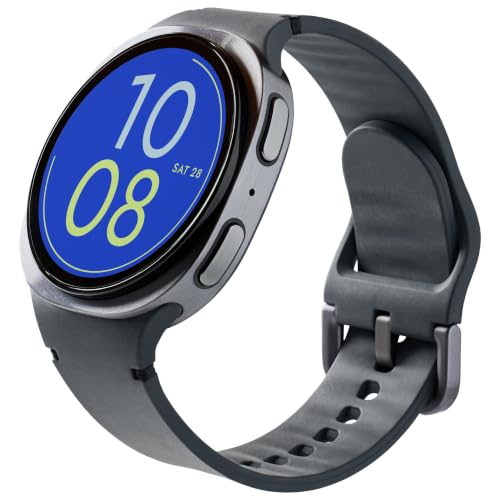
The Bark Watch enters from a different direction: Bark built its name on monitoring children’s digital lives, and this watch — described in its listing as built on a Galaxy Watch 8 — applies that philosophy to the wrist with GPS tracking, talk and text, monitoring of text, video and phone activity, an SOS feature, and management of all contacts. For parents whose worry is less about where the child is and more about who is reaching the child, this is the only pick whose headline is surveillance of content rather than of location alone. Contact management completes the picture: the parent curates the circle the watch can speak to.
Monitoring is a family-values decision before it is a feature, and this guide presents it neutrally: some households consider content oversight the entire point of a first connected device, others prefer trust with lighter tooling. The Bark Watch serves the first philosophy thoroughly, extending a monitoring relationship many families already have with the company on other devices into the watch a child wears to school. The Galaxy Watch 8 hardware basis, stated in the listing, means the underlying device is a mainstream modern smartwatch rather than a toy — relevant for an older child sensitive to wearing something that reads as grown-up.
Practical checks follow from the concept. Monitoring features live inside Bark’s service, so the subscription conversation is central rather than incidental; confirm what the watch requires and what the monitoring plan includes before comparing prices with simpler rivals. Families should also talk with the child about what is monitored and why — a conversation the category’s best outcomes all share, whatever the brand. For the oversight-first household, no other listing here speaks its language as fluently.
- Hardware basis per listing: Galaxy Watch 8
- Safety named in listing: GPS tracking, SOS feature
- Communication: talk and text
- Monitoring named in listing: text, video and phone monitoring
- Controls named in listing: manage all contacts
- Service: Bark monitoring service; terms to confirm with Bark
Strengths
- Content monitoring addresses who reaches the child, not just location.
- Full contact management keeps the communication circle parent-curated.
- Mainstream Galaxy hardware avoids a toy-like appearance.
Trade-offs
- The monitoring model will not suit trust-first family philosophies.
- Service requirements are central to the proposition and its cost.
- Setup involves more parental configuration than simpler trackers.
Best for: oversight-focused parents wanting monitored talk and text with managed contacts.
Not suited for: families preferring minimal supervision, or buyers wanting a standalone watch with no service relationship.

XPLORA X6 Play — School mode all-rounder
XPLORA’s X6 Play is a 4G watch phone in pink whose listing assembles the classic European kids’-watch formula: GPS, SOS, calls and messages, a kids’ school mode, a camera and a pedometer — with the words subscription required printed in the title itself, an honesty this guide appreciates and repeats. School mode is the feature parents of this age group ask about first after safety: during school hours the watch quiets into a timepiece, ending the classroom-distraction negotiation before it starts, then wakes into a phone again at the gate.
The camera distinguishes the X6 from the Garmin and, in kind, changes the watch’s social life — photos of the day, the dog, the goal at practice, shared inside the approved circle rather than broadcast to an open internet. The pedometer gamifies movement lightly, which suits an age where activity habits are still being formed and a step count can motivate without any health claims attached. Calls and messages over 4G cover the standard independence scenarios: the late bus, the changed pickup, the sleepover reassurance.
The subscription requirement is stated, so budget it plainly rather than treating it as fine print — the watch’s connectivity is a service, priced as one. Pink will delight some eleven-year-olds and horrify others, and XPLORA’s range logic suggests checking colour options at purchase. For families who want school mode discipline plus a camera’s joy inside a managed circle, the X6 Play is the most school-shaped answer in this roundup.
- Colour: Pink
- Connectivity per listing: 4G
- Safety named in listing: GPS, SOS function
- School feature named in listing: Kids School Mode
- Extras named in listing: camera and pedometer
- Service per listing: subscription required
Strengths
- School mode ends the classroom distraction debate by schedule.
- The camera adds shareable fun inside the managed circle.
- The subscription requirement is stated openly in the listing.
Trade-offs
- The subscription is a real, continuing ownership cost.
- Pink styling will not suit every child’s taste at this age.
- No face-calling claim appears in the listing’s wording.
Best for: school-focused families wanting GPS, SOS, school mode and a camera in one managed watch.
Not suited for: subscription-averse budgets, or children who reject the colour and style outright.

XPLORA Kidzi — School mode on AT&T
The XPLORA Kidzi repeats the brand’s formula — 4G watch phone, GPS, SOS, calls and messages, kids’ school mode, camera and pedometer, subscription required — with one decisive addition in its listing: it runs on AT&T’s network, in pink. Network identity is not a detail for a calling watch; coverage where your family actually lives, travels and attends school decides whether the safety promise holds at the bus stop that matters. A household already confident in AT&T’s local coverage can read this listing as the XPLORA brief with its connectivity question pre-answered.
Everything said about the X6 Play’s philosophy applies here in sibling form: school mode discipline during lessons, a camera for the managed circle’s fun, a pedometer for gentle activity encouragement, and an SOS for the scenario nobody wants to rehearse. The Kidzi and the X6 should be compared as network-and-listing variants of one idea rather than as rivals with different souls, and the choice between them belongs to coverage maps and the exact offer on the day, not to feature anxiety.
The subscription requirement is again printed in the title, and again this guide honours it by repeating it: the watch’s calling life is a service. Families comparing the two XPLORA listings should line up the plan terms beside the hardware, confirm the network performs at home and school, and then let the child’s colour preference cast a vote it has earned. In a category built on trust, a listing that states its costs and its carrier in its own title is practising what the whole roundup preaches.
- Colour: Pink
- Network per listing: AT&T
- Connectivity per listing: 4G
- Safety named in listing: GPS, SOS
- School feature named in listing: Kids School Mode
- Service per listing: subscription required
Strengths
- A named carrier network lets families judge coverage before buying.
- School mode and SOS cover the weekday safety brief completely.
- The camera and pedometer keep the watch fun inside its guardrails.
Trade-offs
- The subscription requirement adds a permanent monthly line.
- Value collapses where the named network’s coverage is weak.
- It duplicates the X6 Play’s formula rather than extending it.
Best for: AT&T-confident households wanting the XPLORA school-mode package with carrier clarity.
Not suited for: areas with poor coverage on the named network, or subscription-free expectations.
Comparison Table
| Watch | Calling style | Location | Guardrail headline | Service note |
|---|---|---|---|---|
| TickTalk 6 | HD face calling, voice, walkie-talkie | Real-time GPS tracking | Parental controls, SOS | Not stated in listing title; plan generally required |
| Cosmo JrTrack Pro | Call and text | Live GPS tracking | Parent controls, SOS and 911 | Not stated in listing title; plan generally required |
| Garmin Bounce | Two-way text and voice messaging | Location tracking | Managed Garmin messaging environment | Not stated in listing title; confirm connectivity terms |
| Bark Watch | Talk and text | GPS tracking | Text, video and phone monitoring; managed contacts | Bark service central; confirm terms |
| XPLORA X6 Play | 4G calls and messages | GPS location | School mode, SOS | Subscription required, per listing |
| XPLORA Kidzi | 4G calls and messages on AT&T | GPS location | School mode, SOS | Subscription required, per listing |
What Should Parents Configure on the First Evening?
Setup night decides whether the watch becomes a calm family tool or a new source of friction, and the order of operations matters. Start with the contact list: parents, grandparents, the one trusted neighbour, nobody else until the system has bedded in. Every contact added later should be a deliberate family decision, because the closed circle is the entire safety architecture — a kids’ watch is not a small phone, and its contact list is a guest list, not a directory. Test each contact from the watch itself, including the SOS path, with the child pressing the buttons while you watch.
Next, set the schedule. School mode or quiet hours should match the real school day, including the journey windows at both ends, and the family should agree what the watch may do at homework time, at the dinner table and after lights-out. Configure location alerts for the meaningful places — home, school, the regular practice ground — rather than fencing every street, because alert fatigue teaches parents to ignore the very signals they bought. Finish by charging the watch in its permanent spot and agreeing, out loud, who charges it and when; a flat kids’ watch is a plastic bracelet, and the charging habit is a safety feature.
Finally, rehearse the human scripts. The child should practise answering, calling home, triggering SOS and explaining the watch to a teacher. Parents should practise checking location without hovering — the goal is a check that takes seconds when worry strikes, not a live map watched through every school day. Families who treat setup as a small ceremony of trust, rather than a surveillance installation, consistently get the wear-time and honesty the technology was bought to support.
How Do Service Plans Change the Real Price?
The hardware price of a kids’ GPS watch is the down payment; the service plan is the mortgage. Two listings here print subscription required in their own titles, one names its carrier, and the category generally runs on plans because real calls and live location ride on mobile networks that somebody must pay for. The honest comparison therefore adds a year — better, two years — of plan cost to every watch’s sticker before ranking them, and checks what the plan includes: calling minutes or their modern equivalent, data for location and messaging, and the monitoring layer in Bark’s case.
Plan questions deserve the same rigour as hardware questions. Does coverage hold at the school, the grandparents’ village and the holiday destination, or only at home? Can the plan pause in a quiet month? What happens to the watch’s functions if the plan lapses — does location stop entirely, or degrade? A watch that becomes a paperweight without its plan is a different purchase from one that keeps time and dignity. Read the terms the way you would read a phone contract, because that is what it is, wearing a smaller screen.
Why Does School Mode Matter So Much at This Age?
Eleven is where school devices stop being novelties and start being social infrastructure, and schools have opinions about that infrastructure. A watch that can silence itself into a simple timepiece during lessons — the school mode named in both XPLORA listings — respects the classroom’s rules and the teacher’s patience, which protects the child’s permission to wear it at all. The alternative, a watch confiscated into a desk drawer for buzzing through maths, provides neither education nor safety.
Parents should configure school hours with the school, not against it: check the academy’s own device policy, set the quiet window to match, and let the child know the boundaries are the school’s as much as yours. That framing matters at this age, when fairness arguments are developing fast. A guardrail explained as respect for teachers lands differently from one explained as parental suspicion, and the watch’s acceptance — its wear-time, its survival — depends on that landing.
How Should Families Handle the Privacy Conversation?
A location watch is a promise and a surveillance tool at once, and children of eleven know it. The families who navigate this well say the quiet parts aloud: we can see where the watch is, we will check when we are worried or when plans change, we will not narrate your afternoon from the map, and the arrangement loosens as you show us it can. Written down or spoken at setup, that covenant converts monitoring from a discovered betrayal into an agreed stage of growing up — and agreement is what keeps the watch worn rather than forgotten in a PE bag.
Privacy also runs outward. The watch holds a child’s location history and conversations inside a company’s service, so parents should read the maker’s privacy policy with the same care as the feature list: what is stored, for how long, who can request it, how deletion works when the child graduates to a phone. Bark’s entire brand is an argument about this layer, but every maker here holds sensitive data about a minor, and the household is entitled to understand the custody terms before the first school run.
Siblings and friends enter the picture too. A camera watch at a sleepover photographs other people’s children; a speaker call in a playground broadcasts both sides. Teach the small etiquette early — ask before photographing, step aside for calls — because the guardrails in the software cannot supply manners, and manners are what keep other parents comfortable with the device in their homes.
What Does a Week of Real Use Look Like?
Monday tests the routine: charged overnight in its spot, school mode through lessons, a message at the gate when the club runs late. Wednesday tests the geography: a friend’s house, a location check that confirms the walk, a call that replaces the borrowed phone of another parent. Friday tests the social layer: music on the Cosmo, photos on an XPLORA, the walkie-talkie joke between siblings on the TickTalk. The weekend tests the battery and the boundaries — a full day out, an SOS drill disguised as a game, a Sunday-evening charge that resets the system for the week.
Notice what the week does not contain: no open internet, no stranger contact, no feed. That absence is the design, and it is why these watches can be handed over with a steadier heart than a first smartphone. The child’s independence is real — they travelled, arranged, reassured — while the family’s oversight stayed structural rather than theatrical. Any watch in this roundup can support that week; they differ in which day’s test they make easiest, and matching the model to your family’s hardest day is the practical core of the choice.
How Do You Know When It Is Time for a Phone Instead?
The signs are social before they are technical. Homework platforms that assume a phone, team organisation that lives in group chats, a contact circle that legitimately outgrows a guest list — when two or three of those arrive together, the watch has done its bridging work and the conversation about a managed phone should begin on good terms. Families who frame the phone as graduation, earned by the responsibility the watch years demonstrated, keep the guardrail culture alive into the device that needs it most.
Until those signs gather, resist upgrading out of embarrassment — the child’s or your own. A watch that is worn, charged and answered is safer than a phone that is resented, restricted and circumvented. The models here were chosen to stretch the bridge as long as it honestly serves: grown-up styling from Garmin and Bark, music from Cosmo and TickTalk, a camera from XPLORA. Let the bridge carry its full span.
Which Watch Survives Childhood Best?
Durability in this category is a daily negotiation with playgrounds, sinks and sports bags. Water resistance appears in the Cosmo listing without a depth figure; the other titles largely leave construction claims unstated, which this guide records rather than repairs. The buyer’s translation is practical: confirm the exact model’s water guidance with its maker before swimming becomes routine, teach the rinse-and-dry habit after wet days, and expect straps — the component childhood actually destroys — to be consumables worth pricing at purchase.
Loss is the other durability question, and the honest answer is procedural rather than material. A watch with a home — a charging spot, a school-bag pocket it always returns to, a rule about swimming pools and changing rooms — survives childhood far more reliably than a tougher watch without one. Location features even help here, since a misplaced watch that still reports its position is findable in a way a misplaced everything-else is not. Set the find-it routine up while the watch is still new and interesting, and it will still be working when the novelty has faded.
What Should Grandparents and Other Carers Know?
The contact circle usually includes grandparents, and the system works best when they are briefed as members rather than treated as entries in a list. Show them how a call from the watch appears, agree what an SOS alert means and who acts on it, and make sure the child can reach them without a parent relaying. Face calling on the TickTalk earns its keep precisely here, turning a grandparent across the country into a presence at the kitchen table.
Carers outside the family — the coach, the club leader, the friend’s parent — generally stay outside the contact list, and the child should know the watch’s circle is family-only by design rather than by oversight. That clarity protects everyone: the child is never unsure who can reach them, and the adults supervising an activity know the watch is a line home, not a general telephone. Families who explain the architecture once, kindly, rarely have to defend it twice.
Common Mistakes
Comparing sticker prices and ignoring the plan. A cheaper watch with a required subscription can out-cost a pricier rival across two school years. Add the plan to every candidate before ranking, using the listings’ own words — subscription required appears in two titles here — as the prompt to ask the question of all six.
Handing over the watch without rehearsing the SOS. An emergency button a child has never pressed in calm conditions may not be found in frightening ones. Practise the sequence at the kitchen table, including what happens next and who will respond, until the gesture is boring.
Opening the contact list to be kind. Every addition dilutes the closed circle that makes these watches safer than phones. Cousins, teammates and group chats can wait for the phone years; the watch’s guest list should stay short, known and entirely adult-approved.
Tracking constantly instead of checking purposefully. Live location exists for moments of genuine need — the late bus, the changed plan, the worry that will not settle. Parents who watch the map all afternoon teach the child that the watch is a leash, and leashes get left at home by exactly the age this guide covers.
Skipping the conversation about monitoring. The Bark Watch’s content monitoring, and every watch’s location history, work best as known family policy rather than discovered surveillance. Tell the child what you can see and why, in language about safety rather than suspicion, and renew the conversation as they grow.
Final Recommendation
Choose the TickTalk 6 for the fullest communication package — face calling, real-time tracking and parental controls in one watch. Choose the Cosmo JrTrack Pro when the emergency path matters most, since its listing names SOS with 911 outright, and its music makes the watch a tween’s own. Choose the Garmin Bounce for disciplined minimalism: messaging and location, nothing else, from a name outdoor families already trust. Choose the Bark Watch when content monitoring and managed contacts define your family’s philosophy. Choose an XPLORA — the X6 Play generally, the Kidzi where AT&T coverage is strong — when school mode and a camera inside a stated subscription suit your terms. Whichever badge wins, buy it as a safety system with a plan attached, set it up together on the first evening, and let the independence it grants grow at the speed your child demonstrates they can carry.
Frequently Asked Questions
Do these watches need a monthly plan?
Generally, yes — GPS watches that place real calls and report live location ride on mobile networks, and network service is sold as a plan. Two XPLORA listings state subscription required in their titles, the Kidzi names AT&T as its network, and Bark’s monitoring is a service by design. Confirm the plan, its coverage and its cost for the exact model before comparing hardware prices.
Can my child call emergency services from these watches?
The Cosmo JrTrack Pro listing states SOS and 911 directly. The other listings name SOS functions or features without specifying the destination in their titles, so parents should confirm exactly what each SOS button does — call a parent, call a contact list in sequence, or reach emergency services — with the manufacturer before relying on it in a safety plan.
Will a school allow a watch like this?
Policies vary, which is why school mode matters: both XPLORA listings name a kids’ school mode that quiets the watch during lessons, and schedules or quiet hours serve the same purpose elsewhere. Check your school’s device policy first, configure the watch to honour it, and tell the teacher the guardrails exist — cooperation keeps the watch on the wrist, where it can do its job.
Is location tracking accurate enough to rely on?
These watches report GPS-based location through their apps, which is the right tool for the questions parents actually ask: arrived at school, still at practice, on the way home. No consumer tracker should be treated as a guarantee of a child’s whereabouts minute by minute — signal, battery and coverage all bend the picture — so pair the technology with agreed routines, check-in habits and a child who knows the plan.
What age does this category stop fitting?
TickTalk’s listing spans ages 3–12, and the social ceiling usually arrives before the technical one: when a young teenager’s life genuinely requires group messaging, school platforms and a broader contact world, a managed phone with parental controls becomes the honest next step. The watches here serve the bridge years — roughly the later primary and early secondary stretch — and serve them best when families treat graduation to a phone as a milestone to plan, not a defeat to delay.
Are these watches health devices for children?
No, and this guide makes no medical claims for any of them. A pedometer counts steps, music plays, and wellness wording in one listing describes kid-friendly features — none of that is health monitoring in any clinical sense, and parents should not buy or use these watches expecting medical insight. Their job is communication, location and guardrails, judged on those terms alone.
A Note on Battery Habits for Young Owners
Charging is the first responsibility this category hands a child, and it should be framed as ownership rather than chore: your watch, your charger, your morning readiness. Anchor the habit to an existing one — teeth, breakfast, the school bag by the door — and choose the model whose rhythm fits it, remembering the Cosmo listing’s multi-day claim gives forgetful beginners the most forgiving margin in this group. A spare cable at the grandparents’ house, bought cheaply and early, prevents the weekend failure every family otherwise schedules by accident.
Buying for Siblings Without Buying Twice Wrong
Households with two children in the window often standardise on one model, and the logic is sound: one app to learn, one plan structure to understand, chargers that match in both bedrooms. The exception is temperament — a child who craves the camera and a child who craves invisibility may genuinely suit different picks from this page, and the modest extra learning is cheaper than a drawer-bound watch. Decide per child where the children differ, standardise where they do not, and let the older sibling’s hand-me-down carry a spare strap and a fresh setup ritual of its own.
The Holiday Test
Travel is where these watches quietly justify themselves to sceptical relatives: a location check in an unfamiliar town, a call from the pool to the apartment, a child who can be sent to the hotel desk with a line home on the wrist. Before a trip, confirm the plan’s coverage at the destination — roaming terms for kids’ watches vary and surprises are expensive — download nothing, change nothing structural, and rehearse the one new scenario, usually the separated-in-a-crowd drill, at the kitchen table before departure.
What Good Looks Like After Three Months
Success in this category is unglamorous and easy to recognise. The watch is worn without negotiation. The contact list has grown by two names, each debated and agreed. Location checks happen a few times a week, at moments that matter, and nobody opens the app out of boredom. The child has used the watch to solve real problems — a late bus, a moved pickup, a worry at a sleepover — and regards it as theirs. When a family reaches that steady state, the specific badge on the case has long since stopped mattering, which is the surest sign the original choice, and the setup evening that followed it, were both right.
Comparing the Two XPLORA Listings One Last Time
Because siblings invite confusion, the distinction bears a final plain statement. The X6 Play and the Kidzi share the brand’s school-mode, camera, SOS and subscription architecture; the Kidzi’s listing adds the named AT&T network, and that network fact — plus the live offer and plan terms on the day you buy — is the rational basis for choosing between them. Neither is the premium version of the other. Let coverage at your own front door cast the deciding vote, and spend the saved deliberation on the setup evening instead.
The Conversation to Have Before the Box Opens
Sit down for ten minutes before the watch is unwrapped and agree the family’s constitution for it: who is in the contacts and why, when location gets checked, what school mode means, what happens if the watch is lost, and how the rules will loosen as trust is earned. Write nothing down unless writing helps; the agreement itself is the technology’s operating system, and every model in this roundup runs on it. Children who helped write the rules defend them to friends, follow them at sleepovers and — the outcome every parent is actually buying — come home safe with the watch still on the wrist.
When the Watch Is a Gift From Someone Else
Grandparents love giving these watches, and the gift works when the parents remain the administrators: the account in a parent’s name, the contacts approved at home, the plan understood by whoever pays it. Agree those roles before the birthday rather than untangling them after, and brief the giver on what the watch does not do — no open internet, no games arcade — so expectations at the party match the guardrails at home. A well-briefed gift becomes a family project; an unbriefed one becomes a negotiation with wrapping paper on the floor.
Reading Any Kids’ Watch Listing Like a Parent
Keep three questions beside every future listing in this category. Who can contact the child, and who decides? Where does the emergency path actually go when the button is pressed? What does the second year cost, after the plan, the replacement strap and the inevitable lost cable are counted? The six listings in this roundup answer those questions with varying completeness — the best of them in their own titles — and a parent who insists on the answers before money moves will choose well even as models and brands rotate through the seasons.
The Reassurance Audit
Once a term, run the quiet audit: press the SOS in a drill, check the location against a known walk, review the contact list for names that no longer belong, and ask the child what they would change about the rules. Ten minutes, three times a year, keeps the safety system honest as friendships, routes and the child all evolve. A watch bought for a static eleven-year-old will otherwise be serving a thirteen-year-old it no longer fits, in rules as much as in strap length.
Sleepovers, Sports and Other Stress Tests
The sleepover is the category’s final exam: an unfamiliar house, excited children, a bedtime that dissolves. Agree beforehand whether the watch stays on, who the child may call and at what hour a call home is always allowed — the answer should be any hour, stated plainly, because a child who believes a 2 a.m. call will cause trouble will not make the 2 a.m. call that matters. Sports add their own clauses: some coaches ban wrist devices during matches, so the watch needs a known safe place in the kit bag and a routine for reclaiming it before the journey home.
A Closing Word on Trust
Every feature in this roundup is, in the end, a way of lending a child the world in measured portions: a street further, an hour later, a plan changed without panic. The watches differ in their portions and their prices, but the families who thrive with any of them share a posture — rules explained, freedom expanded on evidence, technology treated as a scaffold that comes down piece by piece as the building learns to stand. Buy the scaffold that fits your child’s next year, not their next five, and take the compliment when they eventually ask to take it down.
Practicalities at the Checkout
Before paying, screenshot the listing’s own claims for your records — the SOS wording, the subscription line, the network name — and read the returns terms with a parent’s eye for the setup reality: a watch can only be judged after a plan exists and a child has worn it through a school week. Confirm who sells the plan, who bills it and how it cancels. Those five minutes of administration protect the purchase far better than any extended warranty sold beside it.
The School Bag Checklist
Watch charged, strap secure, school mode set, one message sent and answered as the morning’s proof of life. That thirty-second ritual, repeated until it is muscle memory on both sides of the front door, is the entire safety system in miniature — everything else in this guide exists to support the mornings when the ritual is all that stands between a family and a worry.
Why the Right Answer Differs by Street
Coverage maps, school policies, bus routes and grandparents’ postcodes all vote in this decision, which is why no universal winner exists in the category and why this guide ranks philosophies rather than crowning hardware. The family on a rural route with one carrier’s signal, the family inside a strict device-policy school, the family split across two households — each reads the same six listings and correctly reaches a different answer. Trust your own map of the child’s actual week over any ranking, including the confident order implied by these pages.
One Final Rehearsal
On the first weekend, stage the gentle drill: the child walks to the agreed landmark, messages from there, answers a call, and walks home while a parent watches the location update from the kitchen. Celebrate the success plainly. That small, completed loop — independence granted, supervision verified, child home for lunch — is the product every listing in this roundup is really selling, and seeing it work once, early, settles the whole household into the arrangement.
Growing the Rules With the Child
Schedule the loosening before it is demanded: a new contact each term, a later quiet hour each school year, a first plan-free afternoon each season of proven reliability. Children who can see the ladder climb toward freedom lean into the rungs instead of resenting them, and parents who publish the ladder in advance negotiate from a plan rather than from pressure. The watch will be outgrown; the habit of earning trust in visible steps should not be.
The Measure That Matters
Judge the purchase a month from now by one measure only: whether the child’s world got bigger while the family’s worry got smaller. If both moved, the watch — whichever of the six it is — has done the whole job this category promises, and the rest is straps, chargers and the occasional triumphant message from the end of the street, sent entirely unprompted one ordinary afternoon — the clearest sign the device is doing its job while keeping the child safely within the family’s agreed circle.
Related Guides
Families graduating from kids’ watches toward grown-up platforms can compare the next step among home sublimation printers — a sharp change of subject, admittedly, toward the craft projects that fill the same kitchen table. School photography and family printing scale up in wide format photo printers, and the term-time workhorse question is answered by printers for craft and cardstock.


