What's inside
- Key Takeaways
- Quick Picks
- How We Chose These Picks
- What Is the Difference Between a 4G LTE Router and a 5G Router?
- Why Do SIM Slots, eSIM and Dual SIM Matter So Much?
- Should Your LTE Router Be a Backup or the Main Connection?
- Why Does Signal Quality Matter More Than the Router You Buy?
- How Do Data Plans and Plan Terms Shape the Real Cost of Cellular Internet?
- The Six LTE and 5G Routers in Detail
- How Do the Cellular Picks Compare on SIMs, Bands and Ports?
- How Should You Position and Test a Cellular Router in the First Week?
- How Does a Cellular Router Behave Differently From Fixed-Line Broadband Day to Day?
- What Mistakes Do LTE Router Buyers Keep Making?
- What Should a Farm, a Boat, a Site Cabin and a Small Shop Each Choose?
- Final Recommendation
- Frequently Asked Questions
- Related Guides
As an Amazon Associate I earn from qualifying purchases. This post may contain affiliate links at no extra cost to you.
widgetverdict.com is reader-supported. When you buy through links on our site, we may earn an affiliate commission.
Where to buy: Cellular routers hide behind near-identical names and region variants, so follow the model numbers in each review — a Cudy P5 and a Cudy LT500 differ by an entire network generation, and one pick below is explicitly sold as not for the USA, which its review states in plain words.
The best lte routers solve a problem fixed-line routers cannot: they take their internet from a mobile network, through a SIM card, and hand it to your home as ordinary Wi-Fi and Ethernet. That one trick serves several very different households. There is the rural home where the wired options are a insult and a rumour. There is the city flat that keeps a cellular router as a failover, so a cut cable never cancels a workday. There is the traveller, the boat, the site cabin, the market stall — anywhere a connection must exist where no line has ever been run. The six models in this guide cover that spread, from a pocket-sized travel router with its own battery to an industrial 5G unit built for cabinets and vehicles.
One discipline runs through everything below: cellular compatibility is specific. A router must support your carrier’s network type and frequency bands, and those details live in manufacturer band sheets, not in marketing headlines. Where a listing title states a certification or a SIM arrangement, we quote it. Where it is silent — and on band details it usually is — we say so rather than guess, because a guessed band is how a router becomes an expensive paperweight on delivery day. Read the reviews with your carrier and your use case side by side; in this category, more than any other in this batch, the right answer depends on where the router will live, which tower it can see from the window, what the weather does to that view in February, and whether the household it serves is streaming films, running a business, or simply grateful that the internet exists at an address the cable map forgot.
Key Takeaways
- These are real SIM routers: each pick takes a physical SIM (several take two) and turns mobile data into home Wi-Fi.
- 5G models — Hitron D60, Cudy P5, Teltonika RUTM50 — sit a generation above the 4G LTE picks in speed and price tier.
- Dual SIM means failover or two carriers; it never means double speed, whatever the product photos imply.
- Carrier band support is not stated in most listing titles — verify bands against your carrier before ordering, every time.
- The KuWFi outdoor unit’s own listing says it is not for the USA; it is included for outdoor and non-US use, labelled as such.
- The GL.iNet Mudi is the only battery-powered pick, built for travel rather than for anchoring a house.
Quick Picks
| Pick | Badge | Why it earns its place |
|---|---|---|
| Hitron D60 5G Cellular Router | Carrier-certified home 5G | AX3000 WiFi 6, mesh support, Nano SIM plus eSIM failover, certified with three named US carriers. |
| Cudy 5G NR SA NSA AX3000 WiFi 6 Router (P5) | Dual-SIM 5G powerhouse | Two Nano SIM slots, 5G SA/NSA, four gigabit ports, mesh and multiple VPN options. |
| Cudy LT500 AC1200 4G LTE WiFi Router | Value 4G home router | AC1200 dual-band Wi-Fi from a Nano SIM, VPN server and client, app and cloud control. |
| GL.iNet MUDI (GL-E750V2) 4G LTE Portable Router | Pocket travel router | 7000mAh battery for eight hours, OpenWrt with OpenVPN and WireGuard, 285g pocket size. |
| KuWFi Outdoor 4G LTE WiFi Router CPE | Outdoor CPE — not for USA | Waterproof CAT4 outdoor unit for cameras and yards; the listing itself excludes US use. |
| Teltonika RUTM50 5G Router | Industrial dual-SIM 5G | Dual SIM failover, gigabit Ethernet, VPN and RMS remote management for serious installs. |
How We Chose These Picks
The first filter was absolute: the device had to be a genuine cellular router with a SIM slot, not a fixed-line router with a USB dongle afterthought and not a phone hotspot in a trench coat. Every pick here routes a mobile connection as its primary job. The second filter was spread — we wanted the shortlist to map the category’s real shapes: home 5G, home 4G, dual-SIM flexibility, portable travel, outdoor CPE and industrial. A guide with six similar home boxes would be easier to write and useless to read, because LTE router buyers arrive with wildly different buildings in mind.
The third filter was honesty about compatibility. We favoured listings that state something checkable: the Hitron’s named carrier certifications, the Cudy P5’s dual SIM slots and 5G modes, the Teltonika’s failover design. And we kept one listing — the KuWFi — partly as a standing warning: its own title says it works with SIM card mode only and is not for the USA, a sentence many buyers would miss at speed. If this guide teaches one habit, it is to read cellular listings to the last word, because the last word is often the one that decides whether the box works at your address.
We also thought hard about who should not buy cellular at all, because a guide that sells its category to everyone serves no one. If your address offers a solid fixed line at a fair price and you have no failover anxiety, a conventional router from our dual-band or ASUS shortlists will give you a steadier, unmetered connection for less monthly thought. Cellular earns its premium where the line is absent, unreliable, temporary or mobile — or where a business has priced an outage and refuses to pay it twice. Keeping that boundary honest is why the backup-versus-primary question gets its own section below, and why several reviews name the buyer each model should politely decline.
Finally, we scored the home side of each device: Wi-Fi class, Ethernet ports, VPN depth, and whether management happens through an app, the cloud, or a professional platform like Teltonika’s RMS. A cellular router is two products — a modem and a home network — and a great modem feeding a miserable network is still a miserable purchase.
What Is the Difference Between a 4G LTE Router and a 5G Router?
Generation, in a word — but the practical meaning needs unpacking. A 4G LTE router like the Cudy LT500 or the GL.iNet Mudi connects to LTE networks, which now cover most populated areas and deliver speeds that handle streaming, calls and homework without drama, provided the signal is decent. A 5G router — the Hitron D60, Cudy P5 and Teltonika RUTM50 — connects to 5G networks where they exist and falls back to LTE where they do not. The Cudy P5’s listing names both 5G modes, SA and NSA: standalone 5G, where the whole connection is 5G, and non-standalone, where 5G radios ride on an LTE core. Both are real 5G service; the distinction matters mainly for latency and for how carriers build coverage.
Should you pay the 5G premium? If your address has genuine 5G coverage and the router will be a primary home connection, yes — the headroom is the difference between a network that copes and one that cruises, and 5G capacity in your area will only grow during the router’s life. If your local signal is LTE-only, a 5G router buys you future readiness but no present speed, and a good 4G model plus a better antenna position will serve you better today. Either way, the modem generation is not the speed guarantee marketing suggests: the same router can be swift on one street and sluggish in the next valley, because cellular is a conversation with a tower, and distance, terrain and congestion all talk back.
One more vocabulary item, because listings lean on it: CAT ratings on 4G gear (the KuWFi is CAT4) describe the LTE modem’s theoretical class. Higher categories aggregate more spectrum. Treat CAT numbers as tier labels within 4G, the same way you treat AX classes within Wi-Fi — useful for sorting, useless as promises.
Why Do SIM Slots, eSIM and Dual SIM Matter So Much?
The SIM is this category’s front door, and its arrangements decide the router’s resilience. A single Nano SIM slot — the Hitron D60, the Cudy LT500, the Mudi — is the standard pattern: one carrier, one plan, one point of failure. Dual SIM, on the Cudy P5 and the Teltonika RUTM50, adds a second carrier’s SIM as a standby; if the primary network drops or congests badly, the router can fail over to the second. For a business connection, a rural home at the edge of two networks, or anyone whose income rides on connectivity, that second slot is the feature that justifies the whole purchase.
The Hitron D60 adds a modern twist its listing states plainly: Nano SIM plus eSIM for dual failover capability. An eSIM is a carrier profile downloaded rather than inserted, which makes the backup line easier to provision — no waiting for plastic in the post — and lets the physical slot keep the primary plan. What dual SIM never does is combine two connections into one faster pipe; failover is a spare tyre, not a second engine. Budget accordingly: the second SIM usually carries a cheap standby plan, and its job is to exist on the worst day of the year, not to perform on the average one.
Practical SIM notes that listings rarely mention: data plans sold for phones sometimes restrict router use, so check your carrier’s terms for SIM-in-router or dedicated data plans before assuming a spare phone SIM will serve; and the router’s position — near a window, ideally on the side of the house facing the tower — routinely matters more than the model tier. Several of these picks support external antenna thinking through their designs, but where a listing is silent on antenna ports, the listing title does not name it, so treat it as unconfirmed until the manufacturer’s band sheet says otherwise.
Should Your LTE Router Be a Backup or the Main Connection?
Both roles are legitimate, and they favour different picks. As a main connection — the rural home, the new-build flat waiting for fibre, the small business beyond the cable map — the router works all day and its Wi-Fi and ports carry the whole household: that is the Hitron D60’s and Cudy P5’s stage, with the LT500 serving lighter homes. Buy for capacity and stability, place it like infrastructure, and consider the dual-SIM models if two carriers reach your address, because a main connection with a standby line is a genuinely robust design.
As a backup, the router sleeps until the fixed line fails, then carries the essentials: work laptops, the till, the security system. Backup duty favours quick failover behaviour and modest cost over raw speed — and it pairs naturally with a dual-WAN fixed router doing the switching. Households building that arrangement often start from the fixed side, choosing among the best dual band routers or the best asus wireless routers with dual-WAN models, then add the cellular box as the reserve. The Mudi plays a third role entirely: the connection that travels with you, where the fixed line is a hotel’s captive portal and the backup is whatever the phone networks offer.
Why Does Signal Quality Matter More Than the Router You Buy?
Every router in this guide is, at heart, a negotiator with a tower that may be a field away. Signal quality — not the modem’s badge — decides most of what you experience, and it has two components buyers conflate. Strength is how loud the tower sounds; quality is how clean the conversation is above the noise of other users, reflections and interference. A router can report a strong signal and still deliver mediocre speeds if the quality is poor, which is why two neighbours on the same carrier can live in different internet worlds, and why moving a router from a ground-floor cupboard to an upstairs window can outperform a model upgrade costing far more.
This has a buying consequence that runs against instinct: spend on placement before you spend on tier. A mid-range router in the best window of the house will beat a flagship in the worst corner, most days, on most carriers. It also means the first week’s experiments described later in this guide are not optional garnish — they are the moment the purchase is actually decided. Where a building defeats indoor placement entirely, the outdoor pattern represented by the KuWFi CPE exists precisely to move the modem outside the walls that block it, and professional installs in the Teltonika world routinely pair the router with externally mounted antennas for the same reason. The physics is democratic: it applies to the cheapest pick here exactly as it applies to the dearest.
How Do Data Plans and Plan Terms Shape the Real Cost of Cellular Internet?
The router is the one-off purchase; the plan is the subscription you will actually live with, and in this category the plan deserves as much research as the hardware. Three terms decide your experience. The data allowance decides whether a household can stream freely or must ration — and a family migrating from an unmetered fixed line routinely underestimates its own consumption in the first month. The router-use terms decide whether a SIM sold for a phone may legally and practically serve a router at all; carriers sell dedicated mobile-broadband and home-internet plans for these devices, and using the wrong plan class can end in throttling or a cut-off that no router setting can appeal. And the fair-use or deprioritisation language decides what happens at busy hours: many plans keep full speed until a threshold, then yield to other traffic when the tower congests, which feels exactly like the evening slowdown described in the placement section.
Failover arrangements add a second, smaller plan decision. A standby SIM that sits idle eleven months a year should be the cheapest credible plan on a different carrier — its value is diversity, not allowance. Travellers face the same logic per country: the Mudi’s SIM slot turns the local prepaid data SIM, bought at an airport kiosk, into the trip’s network, which is usually kinder than roaming a home plan through a month of maps and uploads. In every scenario the pattern holds — the hardware in this guide is the visible purchase, but the plan is the product, and choosing both together is the difference between a cellular setup that delights and one that generates a monthly argument with a bill.
The Six LTE and 5G Routers in Detail
Reviews follow the Quick Picks order, home models first, then the portable, outdoor and industrial shapes. Band support is quoted only where a listing states it; elsewhere the gap is flagged in this article’s own wording.
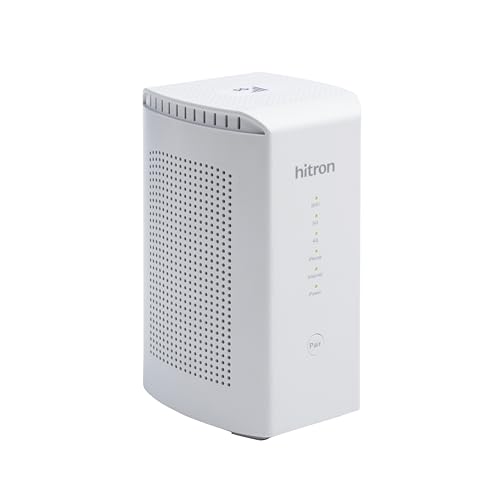
Hitron D60 5G Cellular Router — Carrier-certified home 5G
The Hitron D60 makes the most reassuring first impression in this guide, because its listing does the compatibility homework out loud: a 5G cellular router with a SIM card slot, AX3000 WiFi 6, mesh WiFi support, certification with T-Mobile, AT&T and US Cellular, a Nano SIM, and eSIM for dual failover capability. Named carrier certifications are gold in this category. They do not guarantee signal at your address — nothing can — but they remove the largest unknown, which is whether the carrier will accept the device on its network at all.
As a home hub, the D60 is sensibly specced: WiFi 6 in the AX3000 class is the right size for a family connection, mesh support means a weak far room can be fixed with a node rather than a new router, and the SIM-plus-eSIM failover arrangement gives a primary home connection a standby line without a second physical card. This is the pick for the household replacing a fixed line entirely — the rural home, the 5G-covered suburb — that wants the closest thing to an appliance experience cellular offers: certified, meshed, and quietly redundant.
- Cellular: 5G router with SIM card slot; Nano SIM plus eSIM
- Certifications: T-Mobile, AT&T and US Cellular named in the listing
- Wi-Fi: AX3000 WiFi 6, mesh WiFi supported
- Failover: dual failover capability via SIM and eSIM per the listing
- Specific frequency bands: the listing title does not name it, so treat it as unconfirmed until the manufacturer’s band sheet says otherwise
- Ethernet port count: not stated in the listing title
Strengths
- Named certifications with three major US carriers remove the biggest buying unknown.
- eSIM failover gives a main connection a standby without juggling physical cards.
- Mesh support lets coverage grow after installation.
Trade-offs
- Certification is not coverage — a weak 5G signal at your address still caps the result.
- The listing title leaves port counts and band lists to the manufacturer’s documents.
- WiFi 6 rather than WiFi 7 radios, a reasonable but real step behind the newest clients.
Best for: a US household making 5G its primary home connection on one of the three certified carriers.
Not suited for: a buyer on a different carrier who has not verified acceptance and bands first.
US buyers on those three networks can start at the Hitron D60’s Amazon listing and work outward from its certification line.

Cudy 5G NR SA NSA AX3000 WiFi 6 Router (P5) — Dual-SIM 5G powerhouse
The Cudy P5 is the enthusiast’s 5G router, and its listing reads like a spec sheet that escaped: 5G SA and NSA, AX3000 WiFi 6 split as 2402 plus 574 Mbps, dual Nano SIM slots, a Release 16 5G modem with 3.4 Gbps theoretical download class, four gigabit Ethernet ports, mesh support, multiple VPN options, and app plus cloud control. Two details separate it from the Hitron. The dual physical SIM slots suit buyers who keep two carriers’ cards permanently installed — a pattern common where coverage is patchy and one network’s bad day is the other’s fine day. And the four gigabit ports give it a real wired bench, so the desk, the TV and a switch can all hang off the cellular connection directly.
Release 16 is worth translating: it is a later 5G standard release than the first-wave modems carried, bringing refinements in efficiency and latency behaviour. Combined with SA support, the P5 is the most future-leaning modem in this guide. The VPN depth — multiple VPN, in the listing’s words — suits the remote-work household or the small office that must tunnel into another network while also serving local devices. If the Hitron is the appliance, the P5 is the instrument panel: more dials, more control, more responsibility on the owner to set it up thoughtfully.
- Cellular: 5G NR SA/NSA, Release 16, 3.4 Gbps download class stated
- SIM: dual Nano SIM slots
- Wi-Fi: AX3000 WiFi 6 (2402 + 574 Mbps as listed)
- Ports: four gigabit Ethernet ports
- Features: mesh support, multiple VPN, app and cloud control
- Named carrier certifications: the listing title does not name it, so treat it as unconfirmed until the manufacturer’s band sheet says otherwise
Strengths
- Dual physical SIM slots are the most flexible failover arrangement here.
- SA plus NSA 5G and a Release 16 modem give it the longest cellular runway.
- Four gigabit ports make it a complete home hub, not just a modem with Wi-Fi.
Trade-offs
- No carrier certifications are named in the title, so band homework is entirely yours.
- The feature depth rewards a confident setup hand; appliance-seekers should look at the D60.
- Two SIMs means two plans to manage and pay for if you use the failover fully.
Best for: a confident buyer wanting dual-carrier 5G with a full wired bench and VPN depth.
Not suited for: a first-time cellular buyer who wants certification certainty out of the box.
Compare the Cudy P5’s listing on Amazon against your carriers’ band sheets before anything else — that check is this router’s whole buying process.
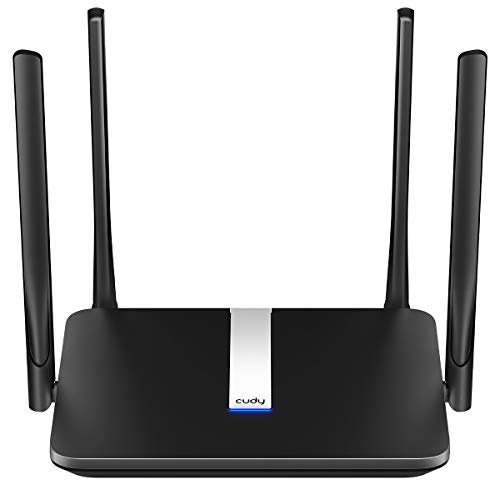
Cudy LT500 AC1200 4G LTE WiFi Router — The value 4G home router
The Cudy LT500 is the honest workhorse of the set: a 4G LTE router whose listing promises AC1200 dual-band Wi-Fi 5 at 867 plus 300 Mbps, a Nano SIM slot, four ports, multiple VPN in server and client roles, and app plus cloud control. One spec in that list needs a spotlight, because it decides who should buy it: the four ports are 100M ports, not gigabit. For an LTE connection at typical real-world speeds, 100 Mbps Ethernet is rarely the binding constraint — but a buyer planning to hang a fast local network off this router, or expecting gigabit file transfers between wired machines, should know the ceiling is printed in the title for anyone who reads it.
Within its tier, the LT500’s virtues are real. VPN in both directions — server, so you can reach home from away; client, so the household can route out through a service — is generous at this level, and app plus cloud control means the router at a holiday home or a relative’s house can be checked and rebooted without a site visit. As a primary connection for a lighter household, a backup for a small business, or the network heart of a rental where fibre has never arrived, it covers the brief with no wasted spec. Its Wi-Fi 5 radios are the oldest here, which matters less on a connection whose bottleneck is the mobile network anyway.
- Cellular: 4G LTE with Nano SIM slot
- Wi-Fi: AC1200 dual-band Wi-Fi 5 (867 + 300 Mbps as listed)
- Ports: four 100M ports — stated in the listing, note the ceiling
- VPN: multiple VPN, server and client roles named
- Management: app and cloud control
- Carrier band list: the listing title does not name it, so treat it as unconfirmed until the manufacturer’s band sheet says otherwise
Strengths
- VPN server and client at this tier is unusually complete.
- Cloud control suits remotely managed properties and relatives’ homes.
- A focused, honest spec for LTE-speed connections.
Trade-offs
- 100M Ethernet ports cap wired transfers well below gigabit.
- Wi-Fi 5 radios are a generation behind the rest of this guide.
- 4G only — no 5G future when coverage reaches your street.
Best for: a lighter household, a backup role or a remotely managed property on 4G.
Not suited for: a buyer needing gigabit wired networking or 5G speeds.
The LT500’s Amazon page rewards a slow read — the port speed is right there in the title, and it should confirm your use case rather than surprise you.

GL.iNet MUDI (GL-E750V2) 4G LTE Portable Router — The pocket travel router
Every other pick in this guide is furniture; the Mudi is luggage. GL.iNet’s listing describes a 4G LTE portable travel router with a SIM slot, OpenWrt firmware with OpenVPN and WireGuard, a 7000mAh battery rated for eight hours, dual-band Wi-Fi at 300 plus 433 Mbps, and a 285-gram pocket-sized body. That spec is a travel kit in one object: land in a hotel, a rental or a conference centre, insert a local or roaming SIM, and your laptop, phone and tablet join your own network — with your VPN already configured — instead of negotiating a captive portal one device at a time.
The OpenWrt foundation is the Mudi’s character. GL.iNet builds on open firmware, which means WireGuard and OpenVPN are first-class citizens rather than licensed extras, updates and community knowledge are plentiful, and tinkerers can shape the router to odd jobs: a secure bridge for a work laptop on café Wi-Fi, a private bubble for a family’s devices in an airport. The Wi-Fi speeds are modest by home standards and entirely sufficient for the role — the bottleneck on the road is almost always the mobile signal or the venue, not the router’s 300 plus 433. Judge it as travel infrastructure and it has no rival in this guide; judge it as a home router and you have brought the wrong tool to the wrong job.
- Cellular: 4G LTE with SIM card slot
- Battery: 7000mAh, eight hours stated in the listing
- Wi-Fi: dual-band, 300 + 433 Mbps as listed
- Firmware: OpenWrt, with OpenVPN and WireGuard named
- Size: 285g, pocket travel size
- Home Ethernet bench: not this device’s role — port detail beyond the listing’s scope; the listing title does not name it, so treat it as unconfirmed until the manufacturer’s band sheet says otherwise
Strengths
- Battery power makes it a connection that works in transit, outages and odd places.
- WireGuard and OpenVPN on OpenWrt is the strongest travel-security story here.
- One saved network profile set ends the per-device hotel Wi-Fi ritual.
Trade-offs
- Modest Wi-Fi speeds by home-router standards.
- 4G only, and travel data plans are a running cost to manage.
- Not built to anchor a household’s full device fleet.
Best for: a frequent traveller, remote worker or family wanting a private, VPN-ready network anywhere.
Not suited for: a household seeking its main home router.
Travellers should look at the Mudi V2 on Amazon with their next trip in mind — its value compounds with every hotel stay.

KuWFi Outdoor 4G LTE WiFi Router CPE — Outdoor CPE, not for USA
This review begins with the sentence its listing ends with, because it decides everything: this KuWFi outdoor CPE works with SIM card mode only and is not for the USA. Buyers in the United States should stop here and choose another pick. Buyers elsewhere, with a yard, a gate, a barn or a camera pole to cover, can read on — because as an outdoor tool the concept is sound: a waterproof CAT4 LTE CPE with two antennas, designed to live outside where the cameras and the coverage gaps are, taking a SIM and broadcasting Wi-Fi where running cable is miserable.
Outdoor CPE gear solves the last-fifty-metres problem. An IP camera on a gate post, a workshop across a yard, a holiday park pitch — places a home router’s signal reaches weakly through walls and weather, an outdoor unit reaches natively because it starts outside. CAT4 is a modest LTE class, ample for camera streams and light browsing, and the waterproof build is the entire point: this is infrastructure you mount and forget. The disciplines of this category apply with extra force — confirm your carrier’s bands against the manufacturer’s sheet, confirm the SIM plan allows router use, and respect the listing’s regional warning rather than assuming it is boilerplate. Listings print those words for reasons, usually returns.
- Cellular: 4G LTE CAT4, 150 Mbps class stated
- Build: waterproof outdoor CPE with two antennas
- Role: works with SIM card mode only, per the listing
- Region: explicitly not for the USA, per the listing title
- Intended use named in listing: IP camera coverage and outdoor Wi-Fi
- Specific band list: the listing title does not name it, so treat it as unconfirmed until the manufacturer’s band sheet says otherwise
Strengths
- Outdoor, waterproof construction serves yards and camera posts no indoor router reaches well.
- SIM-only operation keeps the install simple where no line exists.
- CAT4 capacity matches camera and light-use loads honestly.
Trade-offs
- Not for the USA — the listing’s own words, and a hard stop for US buyers.
- CAT4 is the slowest cellular class in this guide.
- Outdoor mounting, power routing and band checks make it a project, not an appliance.
Best for: a non-US buyer needing outdoor Wi-Fi for cameras or outbuildings from a SIM.
Not suited for: any buyer in the United States, or anyone wanting an indoor home router.
If you are outside the US with a yard to cover, the KuWFi listing on Amazon is worth reading to its final line before ordering — as every cellular listing should be.

Teltonika RUTM50 5G Router — Industrial dual-SIM 5G
The Teltonika RUTM50 comes from a different world than the home picks: industrial networking, where routers live in cabinets, vehicles and kiosks and are managed by the fleet, not by the sofa. Its listing states the essentials of that world — a 5G industrial router with dual SIM failover, WiFi 5, gigabit Ethernet, VPN support and RMS support. RMS is Teltonika’s remote management system, and its presence tells you the intended workflow: deploy the unit somewhere inconvenient, then configure, monitor and update it from a dashboard rather than a ladder.
Dual SIM failover is the RUTM50’s home turf — in industrial installs, connectivity is often the product (the kiosk sells, the camera watches, the sign displays), so a second carrier standing by is not a luxury but the design brief. Gigabit Ethernet suits the wired loads these units feed, and the VPN support is the professional kind, meant for permanent tunnels back to a head office. The WiFi 5 radio looks dated beside the home picks until you understand the role: in most installs it serves a technician’s laptop and a few local devices, while the real traffic rides Ethernet. Buyers running a small business, a vehicle fleet, a remote site or a seriously engineered home backup will find this the most purposeful tool in the guide; buyers wanting a friendly family app should look at the Hitron instead.
- Cellular: 5G industrial router
- SIM: dual SIM with failover stated
- Ethernet: gigabit Ethernet stated
- Wi-Fi: WiFi 5 — a service radio in this class of device
- Management: RMS remote management support named
- VPN: VPN support stated
Strengths
- Dual SIM failover designed for connections that must not drop.
- RMS fleet management is a capability no home pick here offers.
- Industrial build and brief suit cabinets, vehicles and remote sites.
Trade-offs
- WiFi 5 local wireless is modest for a family home’s main network.
- The management model assumes a technical owner or an IT helper.
- Home comforts like mesh ecosystems and family apps are not its language.
Best for: a business, vehicle or remote-site install needing managed, failover 5G.
Not suited for: a family wanting an app-led home router with mesh expansion.
Installers and small businesses can examine the RUTM50’s listing on Amazon with their RMS plans in mind.
How Do the Cellular Picks Compare on SIMs, Bands and Ports?
The comparison that matters in this category is not raw speed — the tower decides that — but arrangements: how many SIMs, which generation, what the home side looks like, and what certainty the listing gives you. On certainty, the Hitron stands alone with named carrier certifications; every other pick asks you to verify bands yourself, and this table marks that honestly rather than implying equivalence.
| Model | Cellular | SIM arrangement | Home side |
|---|---|---|---|
| Hitron D60 | 5G | Nano SIM + eSIM, dual failover | AX3000 WiFi 6, mesh support |
| Cudy P5 | 5G SA/NSA, Rel.16 | Dual Nano SIM | AX3000 WiFi 6, 4 x gigabit ports |
| Cudy LT500 | 4G LTE | Nano SIM | AC1200 WiFi 5, 4 x 100M ports |
| GL.iNet Mudi V2 | 4G LTE | SIM slot, portable | 300 + 433 Wi-Fi, battery powered |
| KuWFi CPE | 4G LTE CAT4 | SIM only, outdoor | Waterproof outdoor Wi-Fi — not for USA |
| Teltonika RUTM50 | 5G | Dual SIM failover | WiFi 5, gigabit Ethernet, RMS |
Two patterns stand out. First, failover appears in three different dialects — eSIM-assisted on the Hitron, dual physical slots on the Cudy P5 and Teltonika — and the right dialect depends on whether your standby line is a downloaded profile or a second carrier’s card in a drawer. Second, the home-side specs invert the cellular ones: the fastest modem here (the industrial Teltonika) carries the plainest Wi-Fi, because its buyers wire their loads. Match the column you care about to the job, and ignore the columns that belong to someone else’s installation.
How Should You Position and Test a Cellular Router in the First Week?
Placement is destiny with cellular, because the router is courting a tower, not a room. Start by the window on the side of the building facing your best signal — your phone’s field-test readings or a carrier coverage app will hint at direction — elevated, away from thick masonry and metal. Then test like you mean it: run speed checks in three candidate spots at three times of day, because a tower that flies at noon may crawl at 8 p.m. when the neighbourhood streams. A difference of one window can be worth more than a model upgrade, and it costs nothing but an afternoon.
Security deserves a deliberate pass in that first week, because a cellular router is a public-facing device in a way a router behind a carrier-grade fixed network sometimes is not. Change the admin password from its default before anything else, confirm the Wi-Fi encryption is set to its modern option, and if the router offers a VPN server — the LT500 names both server and client roles, the Mudi is built around them — configure it while you are motivated, so the first time you need to reach home from a hotel is not the first time you meet the settings page. Teltonika owners should enrol the unit in RMS during the same session; a management platform only helps with devices it can see.
Wire the stationary loads into the Ethernet ports where the model offers them, set the Wi-Fi name and password fresh, and turn on automatic firmware updates — cellular routers are edge devices and deserve current software. If your model supports failover, test it deliberately: pull the primary path (or the main SIM’s network) during a quiet hour and watch the household ride the standby, rather than discovering a misconfiguration during the outage that matters. Finally, watch your data usage for the first month against your plan’s terms; streaming habits that were free on an unmetered line can become expensive on a metered one, and several of these routers’ apps will show you the consumption if you ask them.
How Does a Cellular Router Behave Differently From Fixed-Line Broadband Day to Day?
New cellular households notice three differences in the first month, and forewarned owners adjust faster. The first is variability: a fixed line delivers roughly its speed at all hours, while a cellular connection breathes with the tower’s load — swift at midday, softer on a wet Friday night when the whole valley is home streaming. Scheduling the heavy, patient jobs — cloud backups, game downloads, system updates — for quiet hours turns that variability from an irritation into a rhythm. The second difference is latency texture: modern LTE and 5G are entirely adequate for calls and gaming, but the ping can wander in ways fibre users never see, which competitive players feel first; a wired Ethernet connection to the router removes the Wi-Fi half of that wander, leaving only the air link itself.
The third difference is the meter. Fixed-line households develop gloriously wasteful habits — every device auto-updating, every photo backing up at full size, a TV that streams all evening to an empty room. On a metered cellular plan those habits have prices, and the routers here give you the instruments to manage them: usage reporting in the apps, per-device controls on the home models, and the simple discipline of setting updates to manual on the biggest devices. None of this makes cellular a lesser connection. It makes it an honest one, whose costs and moods are visible — and many households, having learned its rhythms, keep it even after the fibre van finally reaches their street.
What Mistakes Do LTE Router Buyers Keep Making?
Assuming compatibility is the category’s original sin. A router can be excellent and still be wrong for your carrier’s bands or your plan’s router policy, and no amount of Wi-Fi spec repairs that. Verify bands on the manufacturer’s sheet, verify the plan allows router use, and — for the KuWFi’s regional warning — verify the listing’s intended market. The second mistake is the opposite laziness: buying on modem generation alone, paying for 5G where only LTE reaches, while placing the router in a basement cupboard that strangles the signal it does have.
A third error is expecting dual SIM to mean dual speed, then feeling cheated by a failover feature working exactly as designed. A fourth is ignoring the home side — the LT500’s 100M ports are printed in its title, yet they surprise buyers who never read past the Wi-Fi number. And a fifth, quieter one: forgetting that a cellular connection is metered in ways fixed lines often are not, and letting every device in the house back up to the cloud over it in the first week. Each of these mistakes is a reading or placement failure, not a hardware failure — which is good news, because reading and placement are free.
What Should a Farm, a Boat, a Site Cabin and a Small Shop Each Choose?
The farmhouse is the category’s founding story: a primary home connection, a long way from the cabinet, with outbuildings quietly wanting coverage too. That is Hitron D60 or Cudy P5 territory for the house itself — dual-SIM thinking if two carriers graze the property — with the understanding that the yard and barn are a second problem, solved by mesh reach or an outdoor unit where region allows, not by turning the house router up louder. The boat is the Mudi’s natural habitat, or a fixed dual-SIM unit for larger vessels: connections that move between marinas and anchorages, where the network must rebuild itself in every port and a battery or 12-volt-friendly install matters more than Wi-Fi class.
The site cabin and the market stall share a profile: temporary, practical, judged by whether the card machine and the laptop work by nine in the morning. The LT500 covers that brief without ceremony, and its cloud control lets whoever manages the site reboot it from town. The small shop is the most demanding of the four, because its connection carries money: tills, bookings, cameras. That is the Teltonika RUTM50’s argument — managed, dual-SIM, VPN-tunnelled back to base — or a dual-WAN fixed router with an LTE box as its reserve. Four buildings, four different right answers, one shared discipline: verify the carrier fit before the hardware charms you.
Final Recommendation
For a US household going cellular-first, the Hitron D60 is the confident starting point: certified with three named carriers, mesh-ready WiFi 6, and eSIM failover for the bad days. The Cudy P5 is the power user’s alternative — dual physical SIMs, SA/NSA 5G, four gigabit ports — for buyers willing to do their own band homework. The LT500 covers lighter homes, rentals and backup duty at a 4G tier, the Mudi owns travel outright, the KuWFi serves outdoor coverage outside the US, and the Teltonika RUTM50 is the professional’s managed, dual-SIM instrument.
A final word for the household sitting on the fence between a 4G value pick and a 5G model: look at your tower, not the calendar. If local 5G is real and your carrier sells a sensibly priced data plan for it, the 5G tier’s headroom will pay you back every evening for years. If the map says LTE and the mast on the hill agrees, the LT500 and a well-chosen window will serve you faithfully, and the money difference can fund the standby SIM that turns a single connection into a resilient one. In this category the network you have beats the network in the brochure, every single time.
Whichever shape fits your life, buy it the cellular way: bands verified, plan terms read, placement tested in the first week. Do those three unglamorous things and the best lte routers deliver the quiet miracle this category promises — a real home network, in a place the cables never reached, holding its own through the seasons and the streaming hours alike, for households that measure a connection by whether it is simply there when the kettle boils and the long workday begins for everyone currently living under its roof.
Frequently Asked Questions
Can an LTE router replace my home broadband entirely?
Yes, where mobile coverage is strong — the Hitron D60, Cudy P5 and Teltonika RUTM50 are built for exactly that role, and the LT500 serves lighter households. The honest checks are signal quality at your address across the day, and a data plan whose allowance and router-use terms fit a whole household’s appetite.
Will any SIM card work in these routers?
The SIM must match the slot size (Nano SIM on most picks here), come from a carrier whose bands the router supports, and sit on a plan that permits router use. The Hitron’s listing names its certified carriers; for the other models, the manufacturer’s band sheet and your carrier’s plan terms are the two documents to check before ordering.
Does dual SIM make my connection twice as fast?
No. Dual SIM here means failover: a second carrier stands ready if the first drops. The Cudy P5 and Teltonika RUTM50 carry two physical SIMs for that purpose, and the Hitron D60 pairs a Nano SIM with an eSIM. Speed comes from the active network’s signal, not from counting slots.
Why does one pick say it is not for the USA?
Because its listing says so, in those words: the KuWFi outdoor CPE is sold for SIM-card mode use outside the US market, most likely a matter of the bands and certifications it carries. We repeat the warning in its review and table row rather than softening it — US buyers should choose another pick.
Can I use an LTE router just as a backup for my fibre line?
That is one of its best roles. Pair a cellular router with a dual-WAN fixed router that switches automatically when the line drops; if your home runs on fibre, our guide to the best fiber optic routers covers the fixed side of that partnership, including which models accept a second WAN.
What speeds should I realistically expect from a 4G or 5G router?
Expect your street’s speeds, not the modem’s class figures. A 5G router near a good tower can outrun many fixed lines; the same router in a valley behaves like a modest 4G unit. Placement testing in the first week — windows, height, tower direction — is the only honest forecast, which is why the setup section treats it as part of the purchase. Owners who test three spots in the first week and settle the router in the best of them routinely report a larger improvement than any specification difference between the models in this guide could have given them — the tower rewards effort more reliably than it rewards spending, and an hour with a phone app and a stepladder is the highest-return upgrade in cellular networking.
Can I take my home LTE router abroad or use a foreign SIM in it?
The router will work wherever its supported bands overlap the local networks — which is exactly the check this guide keeps returning to, because band sets are regional. A locally bought data SIM is usually the simplest path abroad, and it is the pattern the Mudi was designed around. For a fixed home model, compare the manufacturer’s band sheet for your exact variant against the destination carrier before the router goes into the suitcase.
How is a cellular router different from tethering my phone?
A phone hotspot is a favour a phone does you; a cellular router is a network that happens to drink from the same tower. The router holds the connection permanently, with proper Wi-Fi for the whole house, Ethernet ports, failover options and none of the battery or thermal sulking a phone exhibits by the third hour of tethering. Households that start by tethering usually buy one of these routers within the season — the difference is not speed, it is permanence.
Do these routers need an external antenna to work well?
Not by default — every pick here is sold to work with its built-in arrangement, and good placement achieves most of what owners need. External antennas enter the conversation for fixed installs at the edge of coverage, particularly in the industrial Teltonika world. Where a listing is silent about antenna connectors, treat their presence as unconfirmed and check the manufacturer’s documentation for your variant rather than assuming a port exists.
Related Guides
Round out the picture with the best asus wireless routers for dual-WAN homes, the cross-brand best dual band routers, and the best fiber optic routers if a fibre line is your primary connection.


