What's inside
- Key Takeaways
- Quick Picks
- How Did We Judge Cases Built to Hide Wires?
- Back-Connector, Dual-Chamber or Managed Routing: Which Road Is Yours?
- What Should You Check Before Pairing a Case With a Back-Connector Board?
- The Wire-Hiding Cases, Pick by Pick
- Which Cable-Hiding Approach Suits Your Board?
- How Do You Route the Cables a Back-Connector Board Cannot Hide?
- How Does Wire-Hiding Change Upgrades and Daily Life?
- What Should a Conventional-Board Owner Expect From These Cases?
- How Do You Photograph the Result — and Know It Is Actually Finished?
- What Wire-Hiding Mistakes Do Buyers Keep Making?
- Final Recommendation
- Frequently Asked Questions
- Related Guides
As an Amazon Associate I earn from qualifying purchases. This post may contain affiliate links at no extra cost to you.
widgetverdict.com is reader-supported. When you buy through links on our site, we may earn an affiliate commission.
Where to buy: All six cases in this guide are sold through the Amazon listings linked from their names in the Quick Picks table and again in their detailed sections. One compatibility note belongs at the very top, because it decides half the list: the strongest cable-hiding here depends on a back-connector or hidden-connector motherboard, so check your board — or your planned board — against each pick’s stated support before falling for any photograph of a wire-free interior.
The best pc cases to hide wires all pursue the same mirage — a build that appears to run on no cables at all — but they pursue it by three different roads, and this guide’s first job is to keep the roads separate. Road one is the back-connector motherboard: the board’s power and data sockets move to its rear face, the cables plug in behind the tray, and the visible chamber simply never contains them. Road two is architecture: dual chambers, separated cabinets and cable channels that give ordinary cables somewhere disciplined to disappear. Road three is management systems — named routing schemes, hubs and covers that organise the wires a conventional build cannot avoid. Every pick below is labelled by its road, and its compatibility is claimed only where the listing title claims it.
That last discipline matters more in this category than in any other. Hidden-connector support is a specific, checkable fact — a case either has the tray cut-outs and clearance for rear-facing connectors or it does not — and titles state it in so many words when it exists. Where a title says a case supports hidden-connector or back-connect boards, this guide says so. Where it speaks only of cable management, this guide claims only management. The mirage is achievable, but only by matching the right road to the board you actually own.
Key Takeaways
- Five of the six picks state hidden-connector or back-connect motherboard support in their titles; the HAVN HS 420 instead offers its SimpliCable management system and a dual-chamber layout.
- Back-connector support only works with a back-connector motherboard — the case provides the cut-outs and rear clearance, the board provides the rear-facing sockets.
- The Thermaltake View 380 TG ARGB pairs hidden-connector support with four fitted ARGB fans and dual glass, the most complete wire-hiding kit here.
- The JONSBO TK-4 names its standard outright — SP Back-Connect (BTF) — alongside a stated 460mm GPU allowance in a separated-cabinet design.
- The HAVN HS 420 is the scale pick: eleven 140mm fan slots and three 420mm radiator positions behind its cable-managed dual chamber.
- The ASUS A31 states the mainstream formula plainly: panoramic design, hidden-connector support, 360mm radiators, 380mm cards, clean cable management.
Quick Picks
| Case | Badge | Why it is here |
|---|---|---|
| Thermaltake View 380 TG ARGB Black | The complete kit | ATX case with four 120mm ARGB fans included, hidden-connector motherboard support and dual tempered glass. |
| Thermaltake Tower 600 Matcha Green | The vertical hider | Mid-tower with three tempered glass panels, hidden-connector support and rotational PCI-e slots in Matcha Green. |
| ASUS A31 White Edition | The clean mainstream | White ATX mid-tower with panoramic design, hidden-connector support and clean cable management. |
| APNX C1-R | The hub organiser | High-airflow ATX case with back-connect support and a 5-port PWM ARGB hub across eleven fan slots. |
| HAVN HS 420 | The big chamber | Dual-chamber ATX case with SimpliCable cable management, eleven 140mm fan slots and three 420mm radiator positions. |
| JONSBO TK-4 | The BTF cabinet | Separated-cabinet mid-tower with surround-view glass and SP Back-Connect (BTF) motherboard support. |
How Did We Judge Cases Built to Hide Wires?
The first test was the title’s own words about connectors. A case earned the back-connector label only if its listing states hidden-connector or back-connect motherboard support — both Thermaltakes, the ASUS A31, the APNX C1-R and the JONSBO TK-4 pass in those terms, with JONSBO naming the BTF variant explicitly. The HAVN HS 420 makes no such claim in its title, and this guide does not make it for the case; its entry rests on its dual-chamber design and its named SimpliCable management system, which is road two and three combined, and a perfectly honourable way to hide wires from a conventional board.
The second test was what surrounds the claim. Wire-hiding lives or dies on the supporting cast: glass that shows the result, chambers that swallow the power supply and the cable mass, hubs that collapse a dozen fan leads into one run, fan provision that does not itself become a wiring problem. The C1-R’s 5-port PWM ARGB hub and the HS 420’s PWM fan hub both scored here, because a case that hides the motherboard’s cables while multiplying fan cables has moved the mess rather than removed it.
We also considered the reader who arrives with no board at all, planning the whole machine around the mirage. For that reader the guide’s ordering is deliberate: the complete kit first, the specialists after, the universal architecture where it belongs — because a first back-connector build succeeds on completeness and clear labelling, not on exoticism. Every pick here can anchor such a build; the sections simply refuse to pretend they all anchor it in the same way or under the same conditions.
The third test was honesty about the partnership. Every back-connector pick’s section states the obvious but essential truth that the board must match — a conventional motherboard in a back-connect case gains the chambers and channels but not the vanishing trick. Guides that blur that point sell disappointment. This one would rather lose a little magic and keep the reader’s build intact, which is why the compatibility language is repeated, pick by pick, until it cannot be missed.
Back-Connector, Dual-Chamber or Managed Routing: Which Road Is Yours?
Start with the board, because the board decides the road. If you own or are buying a hidden-connector motherboard — the class sold under names like BTF and Project Zero, with its sockets on the rear — then a case stating support for it is the only full solution: the View 380, Tower 600, A31, C1-R and TK-4 all open that door, and the resulting interior is the one in the photographs, genuinely free of the 24-pin drape, the front-panel spaghetti and the fan-lead crossings. If your board is conventional, those same cases still help through their chambers and channels, but the honest expectation is a tidy build, not an invisible one.
Dual-chamber design is the road that asks nothing of the board. By moving the power supply and the cable field into a separate chamber behind the display volume, cases like the HS 420 and the TK-4’s separated cabinet hide the mass of wiring by architecture: what remains in view is a short, deliberate set of runs that any careful builder can dress along edges. It is the most compatible form of hiding — every board benefits, no standard must match — and for many builders it is the sweet spot between the mirage and the money.
Managed routing, the third road, is the craft layer: channels, tie points, covers, grommets and hubs that turn cable dressing from improvisation into a system. The HS 420 names its system SimpliCable; the C1-R attacks the problem from the fan side with its hub. Readers whose interest is the broader glass-first world these cases live in will find the panoramic field gathered in the crystal shortlist elsewhere on the site, where several of the same architectures are judged on their views rather than their wiring. And readers still choosing a format should note that wire-hiding is now a mainstream ATX virtue, not a niche: the standard shortlist in our Best ATX PC Cases guide includes dual-chamber and cable-planned designs of its own.
What Should You Check Before Pairing a Case With a Back-Connector Board?
Standard first, because back-connector is a family, not a single socket layout. Boards in this class place their connectors by their makers’ own patterns, and a case’s cut-outs must align with the board’s positions. JONSBO states its allegiance in the title — SP Back-Connect (BTF) — which is the kind of specificity to look for; the other picks state hidden-connector support in general terms, and the pairing check belongs to the documentation of both case and board before money moves. Treat any listing that promises universal back-connect compatibility with the suspicion this guide treats unstated clearances: verify, then buy.
Rear clearance is the second check. A back-connector build moves the cable mass behind the motherboard tray, so the space between tray and rear panel becomes the build’s new engine room. It must swallow the 24-pin connector’s depth, the bent radius of thick leads, and the rear panel must still close without force. The dual-chamber and separated-cabinet designs here build that room in by architecture; in slimmer cases it is the dimension that decides whether the whole concept works, and it is rarely the figure a title prints.
Front-panel wiring deserves its own check in this category, because the case’s own leads — power switch, LEDs, front USB and audio — are the cables nobody advertises and everybody routes. In a hidden-connector build they are often the last visible threads in an otherwise empty chamber. Look for how each case gathers them: a single sleeved run to one corner is the tidy answer, and the documentation or the maker’s photographs usually show it. It is a small detail that separates interiors that look engineered from interiors that look merely empty, and it costs nothing to check before the order and an evening to fix after it.
Third, count the cables the board cannot hide. Graphics card power still runs to the card, wherever the board’s sockets sit, and a long card’s leads crossing the chamber remain the back-connect build’s last visible problem — which is why the TK-4’s stated 460mm GPU allowance and the A31’s 380mm figure matter to this guide: they describe the stage on which that one remaining run must be dressed. Plan its route — under, behind, along the chamber’s edge — before the build, and the mirage survives its only unavoidable cable.
The Wire-Hiding Cases, Pick by Pick

Thermaltake View 380 TG ARGB Black — The complete kit
The black View 380 TG ARGB is the most complete wire-hiding proposition in this guide because it attacks the problem from every side at once. Its title states support for hidden-connector motherboards, so a matching board’s cables leave through the rear and never cross the chamber. Its front and side dual tempered glass panels display the result. And its four included 120mm ARGB fans arrive as a matched set, so the fan wiring — the mess that survives most cable purges — starts as one coherent system rather than as four strangers with four leads. A three-year warranty in the title rounds out a listing that reads like it was written by someone who has built the machine it describes.
Think about what the combination means in practice. In a conventional glass build, the eye is drawn to three cable events: the thick motherboard power lead draping to the board’s edge, the graphics card’s power run, and the fan leads converging on a header like tributaries. The View 380 with a hidden-connector board eliminates the first entirely, organises the third at the source, and leaves only the card’s run to dress by hand. That is as close to the mirage as current hardware gets, delivered in a mainstream ATX format at no exotic premium of complexity.
The conditions are the category’s conditions, stated once more because they are the purchase: the vanishing trick needs the matching board class, and with a conventional board this becomes a well-glazed, well-fanned case with ordinary cable work to do. The title states no radiator size, so liquid plans go through the documentation. Judged as a kit — case, fans, glass, connector support, warranty — it is the pick this guide hands to the builder who wants the wire-free photograph without assembling the solution from four different ideas.
- Form factor: ATX
- Motherboard support note: supports hidden-connector motherboards
- Fans included: 4 x 120mm ARGB
- Panels: front and side dual tempered glass
- Colour: black
- Warranty: 3 years, per the title
- Radiator support: absent from the listing title — the manufacturer’s documentation is the place to confirm it
Strengths
- Hidden-connector support removes the main cable runs at the source.
- Four fitted ARGB fans keep fan wiring a single coherent system.
- Dual glass displays the clean result on both visible faces.
Trade-offs
- The full effect requires a hidden-connector motherboard.
- Radiator sizes are not stated in the title.
- The graphics card’s own power run still needs dressing by hand.
One more audience fits this case exactly: the builder whose desk is photographed, streamed or simply shared. A wire-free interior behind dual glass is the rare upgrade that reads instantly to a non-technical audience — no benchmark required, no explanation needed — and the View 380 delivers it as a kit rather than as a project. For a machine that represents its owner on camera or in a shared room, that immediacy is not vanity; it is the product working as intended, every hour it sits in frame.
Best for: a builder pairing a hidden-connector board with a complete, fitted-fan glass case. Not suited for: a conventional-board build expecting the cables to vanish, since the board is half the trick.

Thermaltake Tower 600 Matcha Green — The vertical hider
The Tower 600 takes the wire-hiding brief vertical. Thermaltake’s tower format stands the build in a tall, narrow volume behind three tempered glass panels, states hidden-connector motherboard support in the title, adds rotational PCI-e slots for presenting the graphics card, and finishes the whole object in Matcha Green under a three-year warranty. The colour matters to this guide for a practical reason: in a case bought to be looked at, the frame’s finish is part of the exhibit, and matcha is a shade that makes a cable-free interior look designed rather than merely tidy.
The vertical format changes the cable problem’s geometry. Runs that drape horizontally in a conventional tower hang or rise in the Tower, and gravity becomes a routing tool: leads fall along the case’s lines instead of crossing them. Add a hidden-connector board and the three glass panels have almost nothing left to confess — the motherboard’s rear takes the traffic, the card presents at its chosen angle, and the interior reads as components floating in a green-framed volume. It is the most theatrical wire-hiding here, and the theatre is earned by the format rather than applied to it.
Its demands are a desk position and a board decision. The tall footprint wants the desk’s end, in the round, where three glass faces justify themselves; under a desk it is a pretty secret nobody sees. And as with its View 380 sibling, the hidden-connector support only performs with the matching board class — with a conventional board the Tower remains a striking vertical case whose cables must be dressed the honest, manual way. Buyers who want the colour story widened beyond one shade will find the same case family in other finishes across the colour-led field covered by our Best Blue PC Cases guide, where its hydrangea sibling is judged on shade first.
- Form factor: mid-tower ATX
- Colour: Matcha Green
- Panels: 3 tempered glass panels
- Motherboard support note: hidden-connector motherboard support
- Extras named in the title: rotational PCI-e slots
- Warranty: 3 years, per the title
- Radiator support: not given in the listing title — verify against the manufacturer’s documentation
Strengths
- Three glass panels show off a cable-free interior from every side.
- Hidden-connector support suits the display format perfectly.
- Rotational slots let the card be presented as part of the exhibit.
Trade-offs
- The tall format needs a chosen desk position to justify itself.
- The vanishing effect depends on a hidden-connector board.
- Matcha Green is a commitment of colour as well as of format.
The Tower also rewards a particular building order worth passing on: in a vertical case, route from the top down, letting each lead find its resting line before the next is placed, and dress the card’s power last, when its presented angle is final. Builders who treat the Tower like a horizontal case lying on end end up fighting gravity for an afternoon; builders who let the format lead find the cables almost route themselves, which is the hidden compliment the design pays to owners who read it properly.
Best for: a display build in a vertical format, around a hidden-connector board, in a distinctive green. Not suited for: an under-desk installation, where three glass panels and a statement colour have no audience.
ASUS A31 White Edition — The clean mainstream
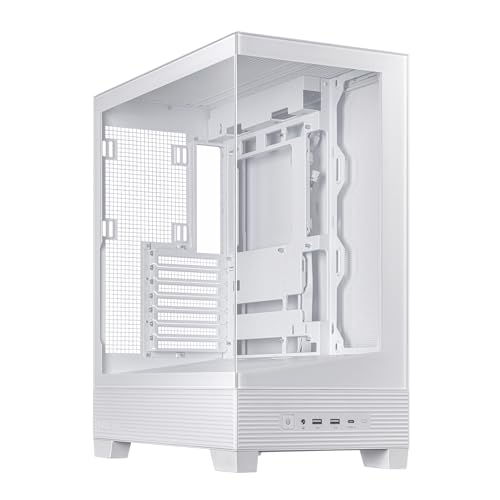
The A31 is the wire-hiding idea wearing a major maker’s polish: a white ATX mid-tower with a panoramic design, stated support for hidden-connector motherboards, support for 360mm radiators and 380mm graphics cards, and clean cable management named as a design aim in the title itself. That last phrase is doing honest work — ASUS distinguishes between the connector support, which is a compatibility fact, and the management, which is the case’s own contribution — and the distinction is exactly the one this guide has been insisting on. The result is the mainstream pick: panoramic glass, a white finish, printed cooling and card figures, and both roads to a tidy interior offered in one case.
The printed figures deserve their moment, because they make the A31 the easiest case here to plan around. A 380mm card allowance covers the large majority of current graphics cards; 360mm radiator support covers the mainstream AIO class; the panoramic format and the white finish define the look without further research. A builder can assemble the entire plan — board class, card, cooler, colour scheme — from the title and this section, which is rarer in this category than it should be and worth rewarding when a maker provides it.
White is the standing caveat, and in a wire-hiding build it cuts both ways: a white interior makes hidden cables look even cleaner and makes every visible cable look even dirtier. The card’s power run, the one cable no board can hide, will announce itself against the white unless it is dressed — or sleeved — to match. Plan that single run with the same care as the board pairing and the A31 delivers the category’s promise in its most accessible form: a bright, panoramic, genuinely tidy machine from a maker whose support network is part of the purchase.
- Form factor: ATX mid-tower
- Colour: white edition
- Design: panoramic
- Motherboard support note: support for hidden-connector motherboards
- Radiator support: 360mm
- Graphics card support: 380mm
- Cable note: clean cable management, per the title
- Fans included: the title does not say — check the manufacturer documentation for this figure
Strengths
- Printed radiator and card figures make the build plannable from the listing.
- Hidden-connector support plus named cable management covers both roads.
- White panoramic design gives the clean look its brightest form.
Trade-offs
- White shows every remaining cable, so the card’s run must be dressed.
- Included fan provision is not stated in the title.
- The full effect still pairs with a hidden-connector board.
The A31’s whiteness also makes it the guide’s best teaching case, literally: in a white interior, every routing decision is visible, so a builder’s first wire-hiding build in an A31 shows them exactly what they did well and what they fudged, at a glance, forever. That feedback loop is how tidy builders are made. Experienced hands may prefer the forgiveness of black glass; learners, and anyone who wants their standards raised by their own hardware, will get more from the case that hides nothing — including, paradoxically, in a guide about hiding.
Best for: a white panoramic build wanting hidden-connector support with figures printed up front. Not suited for: a slapdash cable job, which a white panoramic interior will display mercilessly.
APNX C1-R — The hub organiser
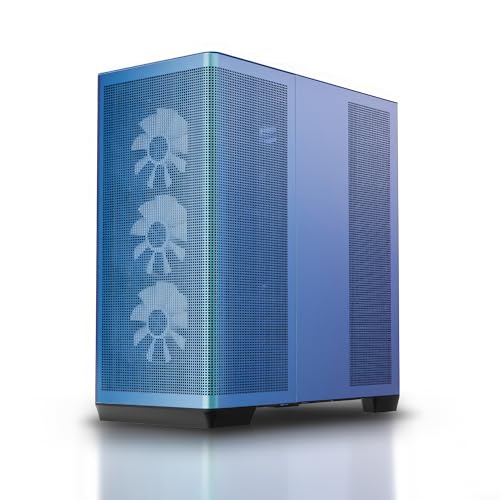
The C1-R approaches wire-hiding as an electrician would: yes, the board’s cables, but also the fans — all of them. APNX’s mid-tower ATX high-airflow case states back-connect motherboard support, fits four 120mm PWM ARGB fans, provides eleven fan slots and a 360mm radiator position, and ties the whole array together with a 5-port PWM ARGB hub. That hub is the section’s headline. In a case with eleven possible fans, fan wiring is the majority of the cable problem by count, and a hub collapses five fans’ worth of power and lighting leads into single runs to the board. The C1-R is the only pick here that treats the fan loom as a first-class citizen of the hiding problem.
The supporting cast is airflow-led: eleven slots, a 360mm radiator position, a tempered glass panel to show the result, and a ChromaFlair finish that shifts its colour with the light — a case that intends to be looked at and has organised its internals accordingly. The four fitted fans give the array a working start, and because they are PWM ARGB units on the maker’s own hub philosophy, expanding the set stays coherent: same fans, same hub logic, same lighting language, no tributaries of mismatched leads converging on the board.
The honest notes: back-connect support, like every such claim here, performs only with a matching board; the eleven slots are capacity, not provision, and filling them is a budget as well as a wiring project; and a hub centralises control, which suits owners who run their fans as one system and mildly inconveniences those who want per-fan curves. For the builder whose previous machine died by fan-cable spaghetti, the C1-R is the most specifically therapeutic case in this guide.
- Form factor: mid-tower ATX, high airflow
- Motherboard support note: back-connect motherboard support
- Fans included: 4 x 120mm PWM ARGB
- Fan slots: 11
- Hub: 5-port PWM ARGB hub
- Radiator support: 360mm
- Panel: tempered glass
- Finish note: ChromaFlair, per the title
Strengths
- The 5-port hub collapses fan wiring into single managed runs.
- Back-connect support removes the board’s cables at the source.
- Eleven slots and a 360mm position give the array room to grow.
Trade-offs
- Filling eleven slots is a real second spend in fans.
- Hub control suits system-wide fan curves over per-fan tuning.
- The vanishing trick still requires a back-connect board.
A practical note on growing into the C1-R: buy the additional fans in the same family as the fitted four when the array expands, because the hub’s promise — one control language, one lighting dialect — only holds if the array speaks it. Mixed fans on a shared hub are how a managed build quietly becomes two unmanaged ones sharing a box. The case gives the owner a system; keeping the system coherent across upgrades is the small ongoing discipline that separates a hub build from a hub accident.
Best for: a fan-heavy airflow build whose wiring problem is mostly its own fan array. Not suited for: a minimal two-fan build, where the hub and slots are capacity without a problem to solve.

HAVN HS 420 — The big chamber
The HS 420 is the guide’s reminder that wires can be hidden by architecture alone, at serious scale. HAVN’s dual-chamber mid-tower — black, ATX, a hybrid design in the title’s words — pairs its chamber layout with a named SimpliCable cable management system, a tempered glass view, a PWM fan hub, eleven 140mm fan slots and three 420mm radiator positions. Read the cooling figures again: this is a case with flagship thermal ambitions that has treated cable management as a named, designed system rather than as a handful of tie points, and it makes no back-connect claim in its title — its hiding is for every board, including the conventional one already on your desk.
That universality is the HS 420’s argument. The dual chamber exiles the power supply and the cable field behind the display volume; SimpliCable gives the remaining runs a designed route instead of an improvisation; the fan hub gathers the array’s leads — and with eleven 140mm slots, the array can be large — into managed order. An owner with a conventional board gets nearly the full benefit on day one, and an owner who later moves to a back-connect board loses nothing, because chambers and routing remain useful under any standard. It is the most future-proof interpretation of hiding in the guide.
Scale is its price. Three 420mm radiator positions and eleven fan slots describe a machine with serious cooling to house, and a modest build will leave the HS 420’s chambers echoing. The title also leaves the included fan count unstated — the slots and hub are stated, the fitted fans are a documentation question — so the cooling budget needs the same honest arithmetic as the C1-R’s. For the high-end conventional build, though, this is the pick: flagship volume, a named cable system, and no compatibility conditions attached to the tidiness.
- Form factor: dual-chamber mid-tower, ATX, black
- Design note: hybrid design, per the title
- Cable system: SimpliCable cable management
- Fan slots: 11 x 140mm
- Radiator support: 3 x 420mm
- Hub: PWM fan hub
- Panel: tempered glass
- Fans included: the listing title leaves this open — confirm it in the maker’s own documentation
- Back-connect note: no back-connect claim is made in the listing title; hiding is by chamber and routing
Strengths
- SimpliCable plus dual chamber hides wires for any motherboard.
- Three 420mm radiator positions top the cooling claims in this guide.
- Eleven 140mm slots suit a large, slow, quiet fan array.
Trade-offs
- No back-connect support is claimed, so board cables remain to be routed.
- Its scale dwarfs a modest build’s needs.
- Included fans are not stated in the title.
There is a room-scale consideration with the HS 420 that its specification invites: a case offering three 420mm radiators is planning to move a great deal of warm air, and the chamber that hides the cables will also be asked to organise a loop’s worth of tubing, pump leads and fan runs. SimpliCable’s real test is that build, not the tidy air-cooled one, and the design’s generosity of volume is what lets it pass. Owners planning the full loop should treat the cable system and the cooling plan as one drawing, made once, before either is installed.
Best for: a high-end conventional-board build wanting flagship cooling and designed cable management. Not suited for: a back-connector build specifically, since this title makes no such support claim.

JONSBO TK-4 — The BTF cabinet
The TK-4 is the specialist: a black ATX mid-tower built as a separated cabinet, wrapped in bi-bent surround-view glass over an aluminium alloy frame, stating support for Micro-ATX and ATX boards with SP Back-Connect (BTF) — the standard named outright — plus a 460mm graphics card allowance, a 200mm power supply allowance and a Type-C jack. That is the most precisely specified title in this guide, and precision is the right register for back-connect buying, where alignment between the case’s cut-outs and the board’s rear connectors is the entire game. JONSBO tells you which standard it built for; the buyer’s job is simply to own, or to choose, a board of that standard.
The separated cabinet is the architecture under the claim: the case divides its volume into distinct zones, so the rear-connector cable field gets its own territory rather than a squeezed gap behind a tray. The surround-view glass then displays the result — a build whose visible cabinet contains components and almost nothing else. The 460mm card figure, the largest in this guide, means the one cable that cannot hide, the card’s own power run, at least has a stage big enough to dress it gracefully along an edge.
JONSBO’s audience is the deliberate builder, and the TK-4 rewards deliberation: confirm the board’s standard matches the stated BTF support, confirm the power supply against the stated 200mm allowance, and the build becomes an exercise in watching cables not exist. Buyers whose boards are conventional, or whose standard is a different back-connect family, should treat this case as a beautiful mismatch and choose from the picks whose claims fit their hardware. Specialisation is this case’s virtue and its condition, in equal measure.
- Form factor: ATX mid-tower, separated cabinet
- Colour and material: black, aluminium alloy
- Glass: bi-bent surround-view glass
- Motherboard support note: Micro/ATX, SP Back-Connect (BTF) support
- Graphics card allowance: 460mm, per the title
- Power supply allowance: 200mm, per the title
- Front I/O: Type-C jack
- Fans included: not covered by the listing title — the manufacturer’s documentation has the figure
Strengths
- The BTF standard is named outright, making the pairing check simple.
- Separated cabinet gives rear-connector cables their own territory.
- A stated 460mm card allowance tops this guide’s figures.
Trade-offs
- Its support is standard-specific; other board families need not apply.
- Surround glass shows every remaining imperfection in the build.
- Fan provision is not stated in the title.
The TK-4 also makes a quiet case for standardisation itself. Back-connect building will only become easy when cases name their standard as plainly as this one does — BTF, in the title, beside the board sizes it accepts — and when buyers learn to shop the pairing as one product. Until that day, the TK-4 is what the mature version of this category looks like: a specialist case, honestly labelled, for a builder who has chosen their standard and wants a cabinet engineered around it rather than adapted to it.
Best for: a BTF-standard back-connector build wanting a separated cabinet and surround glass. Not suited for: a board from a different back-connect family, where the stated support does not apply.
Which Cable-Hiding Approach Suits Your Board?
| Case | Hiding road | Board condition | Fans fitted | Scale note |
|---|---|---|---|---|
| Thermaltake View 380 TG ARGB | Hidden-connector support | Needs hidden-connector board for full effect | 4 x 120mm ARGB | ATX, dual glass |
| Thermaltake Tower 600 | Hidden-connector support | Needs hidden-connector board for full effect | Not in title | Vertical, 3 glass panels |
| ASUS A31 | Hidden-connector support + management | Needs hidden-connector board for full effect | Not in title | 360mm rad, 380mm card |
| APNX C1-R | Back-connect support + hub | Needs back-connect board for full effect | 4 x 120mm PWM ARGB | 11 fan slots, 360mm rad |
| HAVN HS 420 | Dual chamber + SimpliCable | Any board | Not in title | 11 x 140mm slots, 3 x 420mm rad |
| JONSBO TK-4 | BTF back-connect, separated cabinet | Needs BTF-standard board | Not in title | 460mm card allowance |
The board-condition column is the whole guide in one glance: five cases ask for a partner board and reward it with invisibility, while the HS 420 asks for nothing and delivers architecture. If your build outgrows even these chambers, the full-tower field in Best Biggest PC Cases hides cables by sheer volume, with dual-chamber giants of its own.
How Do You Route the Cables a Back-Connector Board Cannot Hide?
Begin with the honest inventory. A back-connector board removes the motherboard’s own leads; what remains is the graphics card’s power run, the case’s front-panel wires where they are not part of the board’s system, fan and lighting leads, and any storage or USB devices cabled inside. Dress them in that order of visibility. The card’s run gets the chamber’s cleanest edge and, where the build allows, a route from below or behind that keeps it off the card’s face. Fan leads gather to the hub — the C1-R and HS 420 both provide one — so they travel as one cable, not eleven.
Work back to front and loose to tight. Connect everything with the cables at natural length, confirm the machine posts, and only then dress the runs: slack coiled in the rear chamber, never in the visible one; bends at the radius the cable chooses, not the radius the photograph wants; ties placed where a future upgrade can reach them. Photograph the rear chamber before closing it, because in a back-connect build the rear is the engine room and the photograph is its service manual. The final test is the glass test: sit where a visitor sits, and look. Whatever the eye lands on is whatever remains to be hidden, and in these six cases there is always somewhere designed for it to go.
How Does Wire-Hiding Change Upgrades and Daily Life?
The hidden dividend of a cable-free interior is maintenance. A build whose wiring lives behind the tray or in a second chamber can be opened, dusted, and upgraded without unpicking a web: the graphics card lifts out without freeing three leads from a knot, a drive change does not disturb the board’s power, and the annual clean is a panel off, a brush, a panel on. Owners of conventional tangled builds postpone maintenance because it is archaeology; owners of these cases do it because it is housekeeping. Across a five-year life, that difference in friction is worth more than the photograph that sold the case.
Upgrades follow the same curve. Adding a fan to a hub-managed array is one lead to a known port; adding one to a conventional build is a search for a free header and a route that does not cross a spinning blade. Swapping the board — the deepest upgrade — is transformed entirely in the dual-chamber and separated-cabinet designs, where the cable field stays in its territory while the tray’s tenant changes. Wire-hiding, bought for looks, turns out to be a service contract the owner holds with their future self, and it pays out at exactly the moments a PC is most annoying to own.
There is a thermal footnote that deserves honesty: hiding cables does not meaningfully cool a modern build by itself, because modern cases move air in volumes that a few leads cannot obstruct. The old claim that cable management is a cooling upgrade belongs to an era of ribbon cables and weak fans. What hiding buys today is visibility, serviceability and the simple pleasure of a machine that looks engineered — which is enough, and pretending it also buys degrees would be the kind of inflation this guide exists to refuse.
What Should a Conventional-Board Owner Expect From These Cases?
Realism, in a word, of the encouraging kind. A conventional board in the View 380 or the A31 will show its 24-pin lead and its front-panel wiring, dressed along the tray’s edge by the case’s channels; in the HS 420 it will show less, because the chamber swallows the supply and the slack; in the C1-R its fans at least will converge on a hub instead of a thicket. The result is a build that reads as tidy and deliberate — a different achievement from invisible, and the one most working machines should honestly aim for. Photographs of back-connect builds set an unfair standard for conventional hardware, and owners should grade their own work against tidiness, not against a standard their board was never built to meet.
The upgrade path also stays open, which is a quiet argument for buying these cases ahead of the board. A case bought today for its chambers and glass becomes a back-connect case the day the board is replaced, because the cut-outs and rear clearance were there all along. Few components offer that kind of forward compatibility: the case is not waiting for a feature, it is holding a door. Buyers mid-cycle — board now, case now, board again in three years — are precisely the people these dual-purpose designs serve best, and the picks above that state their support plainly are the ones holding the door widest.
How Do You Photograph the Result — and Know It Is Actually Finished?
A wire-hiding build has a natural acceptance test, and it is not the builder’s own eye, which has learned where every remaining cable lives and forgives them all. Photograph the finished machine from the three angles a visitor will see it — front three-quarter, side, and the low angle from a chair — and read the photographs as a stranger would. The eye in a photograph lands on contrast: a black lead crossing a white interior, a bright connector floating mid-chamber, a fan lead describing an arc against the glass. Each of those is a five-minute fix at build time and a permanent feature afterwards, which is why the photograph belongs in the build process rather than after it.
Finished, in this category, has a working definition worth adopting: no cable crosses the visible chamber without a reason the eye can accept — a deliberate run to the card, dressed along an edge, reads as intention; the same cable sagging across the board reads as surrender. All six designs here provide the architecture to reach that standard; the photograph is how the owner verifies the architecture was used. Builders who adopt the test find their second wire-hiding build takes half the time of the first, because the standard has moved from the page into their hands.
What Wire-Hiding Mistakes Do Buyers Keep Making?
The first and most expensive is buying the case for the photograph and the board for the price, then discovering the two were never introduced. Back-connector support is a pairing; check the standard, as the TK-4’s BTF naming invites, before either half is ordered. The second mistake is the opposite despair — assuming a conventional board condemns a build to visible chaos, when the HS 420’s chambers and SimpliCable exist precisely to prove otherwise. Architecture hides more than most builders expect, provided the routing is done as a system rather than as an afterthought.
The third mistake is hiding cables from the camera and strangling them in private: leads bent at brutal angles behind the tray, connectors under tension, the rear panel forced shut against a cable bundle. Hidden should mean relocated, not punished — a cable under strain is a fault scheduled for later. The fourth is forgetting the fans, whose leads outnumber every other cable in a modern build; a hub or a matched fan set, as the C1-R and View 380 provide in their different ways, is not an accessory in this category but half the product. Buy the system, not just the case, and the mirage holds.
Final Recommendation
Match the road to the board and the choice makes itself. With a hidden-connector board, the View 380 TG ARGB is the complete kit — fitted fans, dual glass, support stated, warranty long — while the Tower 600 is its theatrical vertical sibling and the A31 its white panoramic alternative. With a BTF board specifically, the TK-4 names your standard and builds a cabinet around it. With a fan-heavy build, the C1-R’s hub is the organiser the array needed. And with a conventional board and flagship ambitions, the HS 420 hides by architecture at a scale nothing else here attempts. The wires were never going to disappear by wishing; these six cases are the engineering that does it, each honest about the partnership it requires. Choose the partnership you can actually keep, and the empty-looking interior in the photographs becomes the machine on your own desk. That is the quiet satisfaction this category sells beneath all its glass and standards and hubs: not a trick, not a photograph, but a build whose orderliness you can see every day — and whose next upgrade, when it comes, will take an afternoon instead of an excavation, and whose cables, for once, are exactly where the design put them rather than where the deadline left them.
Frequently Asked Questions
Will a back-connector case work with my normal motherboard?
Yes, as a case: conventional boards mount and run in these designs, and the chambers, channels and glass all still serve the build. What a conventional board cannot do is use the rear cut-outs, because its connectors face the usual way — so the cables cross the interior in the usual places, dressed by the case’s management rather than eliminated by the board’s layout. The HS 420 is the pick designed to shine under exactly those conditions.
Are BTF and Project Zero the same thing?
They are members of the same idea — motherboard connectors moved to the rear face — from different makers, and their connector placements are not guaranteed to align with the same case cut-outs. That is why this guide repeats each case’s own wording: the TK-4 states SP Back-Connect (BTF) support, others state hidden-connector support generally. The pairing of a specific board with a specific case belongs to the two makers’ documentation, checked before purchase.
What cables remain visible even in a full back-connector build?
Chiefly the graphics card’s power run, which must reach the card wherever its connectors sit, plus any internal USB devices, storage cables for drives in the visible chamber, and lighting leads that are not gathered to a hub. The craft section above dresses each of them. The honest promise of this category is a dramatically emptier interior, not a literally empty one — and the difference is one cable, well routed.
Does hiding cables hurt airflow or maintenance?
Done properly it helps both: cables out of the intake path leave the air’s road clear, and a build whose wiring lives in a rear chamber or a second chamber is faster to service than one whose leads are woven through the components. Done badly — cables crushed behind a tray, connectors under tension — it hurts reliability instead. The systems in these cases, from SimpliCable’s routes to the hubs in the C1-R and HS 420, exist to make the proper way the easy way.
How much rear clearance does a back-connector build need?
Enough for the deepest rear connector plus its cable’s natural bend, with the rear panel closing without force — the exact figure belongs to the case and board documentation, and it is the dimension to verify before ordering either half of the pairing. Dual-chamber and separated-cabinet designs like the HS 420 and TK-4 build generous room in by architecture; in slimmer cases the check is essential, because a panel that will not close is the concept failing at the last centimetre.
Should I buy the case or the motherboard first for a back-connector build?
Decide them together, but if one must lead, let the board lead: its connector standard and positions are the fixed pattern, and the case’s stated support — BTF on the TK-4, hidden-connector support on the Thermaltakes and the A31, back-connect support on the C1-R — must be matched to that pattern. In practice the two purchases belong in the same order wherever possible, so an incompatibility is a returns-desk conversation held once, with both boxes still sealed, rather than a discovery made over a half-built machine.
Is a fan hub worth it for cable hiding?
In any build with more than a few fans, yes — fan leads are the most numerous cables in a modern case, and a hub turns five or more separate runs into one managed path for power and one for lighting. The C1-R builds a 5-port PWM ARGB hub into its proposition and the HS 420 includes a PWM fan hub, which is why both score in this guide beyond their chambers. A hub is the cheapest invisibility in the entire category.
Related Guides
Three neighbouring shortlists complete the picture: the mainstream format in Best ATX PC Cases, the full-tower field in Best Biggest PC Cases, and the colour-led cases in Best Blue PC Cases.


