What's inside
- Key Takeaways
- Quick Picks
- How Did We Verify Filtration Claims for This Guide?
- What Does a Dust Filter Actually Do, and What Does It Cost in Airflow?
- Filtered Case or Retrofit Mesh Sheets: Which Should You Buy?
- Six Filtered Cases, Reviewed on Their Rituals as Much as Their Specs
- Filters at a Glance: Claims, Fans and Fit
- What Filter Mistakes Cost Owners the Most?
- How Do You Clean Case Filters Properly?
- When Does Dust Mean a New Case Rather Than a Deeper Clean?
- Where Should a Filtered Case Live in the Room?
- How Do Filters Interact With Radiators and Air Pressure?
- What Are Case Filters Made Of, and Does the Material Matter?
- Final Recommendation
- Frequently Asked Questions
- Related Guides
As an Amazon Associate I earn from qualifying purchases. This post may contain affiliate links at no extra cost to you.
widgetverdict.com is reader-supported. When you buy through links on our site, we may earn an affiliate commission.
Where to buy: the six chassis reviewed here are sold through the Amazon listings linked in the Quick Picks table — be quiet!, Fractal Design, MONTECH and Redragon listings respectively — while replacement filter sheets and magnetic mesh add-ons, discussed later only as accessories, are separate products and never a substitute for a case that was designed around filtration.
Dust is the slow enemy of every PC: it felts across fan blades, insulates heatsinks, and turns a cool, quiet machine into a warm, loud one over the course of a year. The best pc cases with filters fight that enemy at the border, catching the dust on washable or removable screens at the intakes before it ever reaches a component. It sounds like a minor feature until you have owned both kinds of case — the filtered one, whose monthly maintenance is a rinse under a tap, and the unfiltered one, whose annual maintenance is a full strip-down with a brush and a certain amount of self-reproach.
One distinction must be drawn before the picks, because the marketplace blurs it deliberately. A filtered case is a chassis whose intake paths are screened by design — the filter is part of the case, shaped for it, removable from it. A sheet of magnetic mesh sold in a multipack is an accessory: sometimes useful as a retrofit, never a case, and not a pick in this guide. Four of the six titles below state their dust filtration outright — the three MONTECH cases and the Redragon with its magnetic dust filter — while two, from be quiet! and Fractal Design, keep the detail out of their titles entirely, and this guide says so plainly in their reviews rather than borrowing the claim. Filtration is a verifiable design feature, and a guide about it should model the verification it preaches.
The six span the filtered field usefully: a quiet-leaning German tower, a flexible flagship from Fractal, two MONTECH airflow cases at full and compact sizes, MONTECH’s lit mesh value tower, and a Redragon whose magnetic filter is its headline. Homes with pets, carpets, wood stoves or workshop air will feel the differences between them weekly; a sealed apartment with hardwood floors may feel them barely at all, and this guide will say that too.
Key Takeaways
- A filter only works where air enters: judge a case by whether its intake paths are screened, not by whether the word appears in marketing.
- Four picks state filtration in their titles — MONTECH AIR 903 MAX, AIR 100 ARGB, X3 Mesh and the Redragon GC-624 with its magnetic dust filter.
- The be quiet! Pure Base 501 and Fractal Meshify 2 titles do not mention filters; verify their filtration in manufacturer documentation before relying on it.
- Loose magnetic mesh sheets are accessories for retrofitting, not cases, and appear in this guide only as a prose warning.
- Filters need a rhythm: a clogged filter starves airflow worse than no filter at all, so monthly checks are part of the purchase.
- Pet hair and carpet dust shorten that rhythm to weeks; clean, hard-floor rooms can stretch it considerably.
Quick Picks
| Pick | Badge | Why it earns its place |
|---|---|---|
| be quiet! Pure Base 501 Black | The quiet filtered tower | Two preinstalled 140mm PWM fans, pressure-optimised design and USB-C in a compact ATX case from the silence specialists. |
| Fractal Design Meshify 2 Black ATX Flexible Light Tinted | The flexible flagship | Fractal’s adaptable Meshify interior in a light-tinted glass mid-tower built for changing builds. |
| MONTECH AIR 903 MAX | The filtered airflow maximalist | Dust filters stated in the title, four fans, 400mm GPU room and 360mm radiator support front and top. |
| MONTECH AIR 100 ARGB | The compact filtered mesh case | Dust filters, four fans and a mesh front in a Micro-ATX case that also fits Mini-ITX. |
| MONTECH X3 Mesh | The lit filtered value tower | Six fixed RGB fans, three 140mm intakes and dust filters in a high-airflow ATX mid-tower. |
| Redragon – GC-624 – ATX Gaming PC Case – Tempered Glass Gaming | The magnetic-filter gaming case | A magnetic dust filter named in the title, paired with a tempered glass side panel. |
How Did We Verify Filtration Claims for This Guide?
By reading titles the way a careful buyer should. Where a listing title states dust filters — the three MONTECH cases — or a magnetic dust filter, as the Redragon GC-624 does, the claim is documented at the point of sale and we report it as stated. Where a title is silent, we say so and direct the reader to the manufacturer’s documentation: the be quiet! Pure Base 501’s title speaks of fans, air pressure and USB-C but not filtration, and the Fractal Meshify 2’s title speaks of its flexible layout and tinted glass but not filters. Both makers are known for filtered designs across their ranges, but “known for” is not a specification, and this guide does not upgrade reputation into fact.
That discipline matters because filtration quality varies in ways a title cannot capture anyway: which intakes are screened (front only, or top and bottom as well), whether the filter slides out or requires panel removal, and how fine the mesh is. A filter that needs the front panel unclipped and four screws undone will be cleaned a quarter as often as one that slides from a tray, whatever the brochure claims. When you shortlist from this guide, take the extra ten minutes with the manual of your final candidate and find the filter’s removal path. You are not buying a filter; you are buying a cleaning ritual, and its convenience decides whether it happens.
We also weighted the rest of the case normally — fan inclusions, GPU room, radiator support — because a filter on a bad case is a bad case with a filter. The MONTECH AIR 903 MAX’s 400mm GPU clearance and dual 360 radiator support, the AIR 100’s 330mm card room in a compact body, and the Pure Base 501’s pressure-optimised quiet design all earned their places with filtration as the entry requirement, not the whole argument. For small filtered builds in particular, our companion guide to Best Air Filtered PC Cases for Mini-ITX Builds applies the same discipline at ITX scale.
What Does a Dust Filter Actually Do, and What Does It Cost in Airflow?
A case filter is a fine screen — woven nylon, foam or magnetic mesh — placed where air enters, sized so that dust and hair lodge in it rather than on your components. Its physics is a trade: every screen adds resistance, so a filtered intake moves slightly less air at a given fan speed than an open one. Case designers answer that trade in two ways, both visible in this guide. The airflow-first school fits large intake areas and multiple fans — the X3 Mesh’s three 140mm intakes, the AIR 903 MAX’s four-fan set — so the filtered total still exceeds what the components need. The pressure school, represented by be quiet!’s “optimized air pressure” design language, tunes fewer, larger fans to push steadily through resistance.
The trade reverses with neglect, which is the part brochures omit. A clean filter costs a few percent of airflow; a clogged filter costs most of it, and a machine behind a matted screen runs hotter than the same machine unfiltered and open. This is why the guide treats the cleaning rhythm as part of the product. Magnetic filters, like the Redragon’s, lower the ritual to seconds — lift, tap or rinse, replace — and slide-out trays approach the same convenience. Filters imprisoned behind screwed panels fail socially rather than technically: they exist, and they are never cleaned, and the case is blamed.
Pet owners should calibrate expectations precisely. Filters catch hair superbly at the intake, which is where hair does its damage; they do not make the room’s air clean, and a case sitting on a carpet in a two-cat household will load its filters in weeks. Raise the case onto the desk or a stand, keep the monthly rhythm honest, and a filtered case in a pet home is the difference between rinsing a screen and combing a heatsink. Few upgrades in computing repay their trivial effort so reliably.
Filtered Case or Retrofit Mesh Sheets: Which Should You Buy?
The retrofit sheets deserve their paragraph because they are aggressively marketed at exactly this keyword. A multipack of magnetic mesh, cut to size and stuck over an existing case’s intakes, can genuinely improve an unfiltered case you already own — as an accessory purchase, judged as accessories. What it cannot do is become a filtered case: the mesh is not shaped for the intake, its edges leak unfiltered air around every gap, and its magnetic grip on perforated steel is optimistic. If you are buying a case, buy one designed around filtration, as the picks here are. If you already own a decent unfiltered case, sheets are a reasonable plaster — and that is the whole of their role in this guide, prose rather than picks, because a sheet of mesh is not a chassis.
The same logic applies to external fan filters and magnetic vent covers sold for radiators. Useful accessories, honest products, wrong category. A reader who lands here shopping for a case should leave with a case; the accessories can be ordered later, from a position of knowledge, for the gaps a specific build reveals. With that boundary drawn, the six reviews below can be read cleanly: every pick is a case, every filtration claim is either stated in its title or honestly flagged as documentation homework.
Six Filtered Cases, Reviewed on Their Rituals as Much as Their Specs

be quiet! Pure Base 501 Black — The quiet filtered tower
The Pure Base 501 arrives from the manufacturer whose name is a design brief. Its title describes a black ATX midi tower with two preinstalled 140mm PWM fans, an optimised air pressure design, a compact footprint, vertical GPU installation support and USB 3.2 Gen 2 Type-C. Large, slow-turning 140mm fans under PWM control are the classic quiet-build recipe, and “optimised air pressure” is be quiet!’s way of describing a case tuned to push air steadily through resistance — which is precisely the quality a filtered intake demands, since a screen is resistance by design.
The honesty note, stated once here and applicable throughout: the Pure Base 501’s listing title does not mention dust filtration. be quiet! documents its cases’ filtration in its own materials, and a buyer choosing this case for dusty-room duty should confirm the filter arrangement — which intakes are screened, and how the screens remove — in the manufacturer’s documentation before ordering. We include the 501 in this guide on the strength of its maker’s documented design practice and its pressure-tuned suitability for filtered intakes, while flagging that the title alone does not prove the feature this guide is about. That flag is information, not disqualification; it is exactly the check a careful buyer performs.
As a case beyond the filter question, the 501 is the adult in the room: compact, black, unlit by default, with vertical GPU support for owners who want it and Type-C for owners whose boards provide it. For a quiet machine in a lived-in house — where filtration matters and spectacle does not — it is the pick that will still look appropriate in a decade, provided its filters are verified and then kept on the monthly rhythm every filtered case in this guide demands.
- Form factor: ATX midi tower, compact
- Fans included: 2x 140mm PWM preinstalled
- Design note: optimised air pressure; vertical GPU installation supported
- Front I/O: USB 3.2 Gen.2 Type-C
- Filtration: not mentioned in the listing title — verify arrangement in be quiet!’s documentation
Strengths
- Pressure-optimised design suits the resistance filtered intakes create.
- Two large PWM fans deliver quiet, controllable airflow from the start.
- Restrained black styling suits offices and shared living spaces.
Trade-offs
- The title’s silence on filters makes documentation homework mandatory for this guide’s purpose.
- Two fans is a starting set; high-heat builds will add more.
- Its quiet-first tuning will not match the raw airflow of the mesh MONTECH pair.
Best for: a quiet, adult build in a dusty home, after confirming the filter layout in the maker’s documentation.
Not suited for: a purchase that requires the filtration claim printed in the listing itself — the MONTECH cases below provide that.

Fractal Design Meshify 2 Black ATX Flexible Light Tinted — The flexible flagship
The Meshify 2 is Fractal Design’s adaptable flagship mid-tower, and its title emphasises exactly that: a flexible layout, light-tinted tempered glass, black ATX form. The flexibility is the story — the Meshify 2’s interior reconfigures between airflow-focused and storage-heavy arrangements, which is why it has served as everything from gaming rigs to home servers across its production life. Its mesh-front identity, carried in the very name Meshify, is built around moving air through a front that breathes across its whole face.
The same honesty discipline applies here as with the be quiet!: the Meshify 2’s listing title does not mention dust filters. Fractal’s own documentation for the model describes its filtration in detail, and any buyer whose purchase turns on filtered intakes should read that documentation — filter locations, removal method, the lot — before committing. We flag the gap because this guide’s entire premise is that filtration claims should be checkable, and a title that prefers to advertise flexibility leaves the checking to you. It is ten minutes well spent on a case of this calibre.
What needs no flagging is the chassis itself: a proven, spacious, well-finished mid-tower whose light tint keeps a black interior visible without glare, and whose reconfigurable interior means the filter question, once verified, is the only homework it sets. Builders planning a machine whose role will evolve — gaming now, storage later, or the reverse — will find no other pick here so willing to be rearranged. In a dusty home with a verified filter set, it is the long-term answer.
- Form factor: ATX mid-tower
- Interior: flexible, reconfigurable layout, per the listing title
- Panel: light-tinted tempered glass
- Front design: mesh-front Meshify family design
- Filtration: not mentioned in the listing title — verify in Fractal Design’s documentation
Strengths
- The reconfigurable interior outlasts several different builds’ requirements.
- Mesh-front design philosophy suits filtered, high-airflow intakes.
- Light tint balances component visibility with a calm appearance.
Trade-offs
- Filtration must be confirmed outside the listing before purchase.
- Its size is generous; small desks should measure first.
- Flexibility means configuration decisions the simpler cases make for you.
Best for: an evolving build — gaming, storage, workstation in sequence — in a home where dust is a real factor.
Not suited for: a purchase that requires every claim, filtration included, settled by the product title alone.

MONTECH AIR 903 MAX — The filtered airflow maximalist
With the AIR 903 MAX, the filtration claim returns to the title where this guide likes it: “dust filters” appears in the listing alongside four fans, a 400mm GPU allowance, top and front 360mm radiator support, tempered glass, USB-C, vertical GPU mount readiness, cable space and two USB 3.0 ports. That is a maximalist specification in every direction at once — E-ATX support in a mid-tower frame, cooling headroom for radiators at two positions, and filtration stated as a headline feature rather than buried in a manual.
The combination that matters for dusty homes is filters plus surplus airflow. The AIR 903 MAX can afford its screens because four fans and two radiator positions give it airflow to spare; the filter tax is paid from abundance. The 400mm card figure similarly removes the longest modern GPUs from the worry list, and the cable space MONTECH advertises is the unglamorous feature that decides whether a big build looks engineered or improvised. USB-C on the front panel keeps the case current with modern boards.
Its demands are space and a cleaning rhythm worthy of its intakes: a case that moves this much air through its filters will load them in proportion, and in a pet household the monthly check is not advisory. Owners who keep the rhythm get a machine that runs like the day it was built for years; the case has done everything else. For sheer filtered capability per chassis, the 903 MAX is the peak of this guide.
- Form factor: E-ATX mid-tower
- Fans included: 4
- Filtration: dust filters — named outright in the title
- GPU support: 400mm; radiators: top/front 360mm
- Front I/O: USB-C and 2x USB 3.0; vertical GPU mount ready
Strengths
- Filters stated in the title, backed by airflow surplus to pay their resistance tax.
- 400mm GPU room and dual 360 radiator positions remove most planning limits.
- E-ATX support in a mid-tower footprint suits workstation boards too.
Trade-offs
- High airflow loads filters faster; the cleaning rhythm is real.
- E-ATX-capable dimensions are the largest in this guide.
- Four stock fans are a start that radiator builds will rearrange anyway.
Best for: a powerful build in a dusty or pet-owning home that refuses to choose between airflow and filtration.
Not suited for: a small desk, or an owner who will not commit to monthly filter checks.
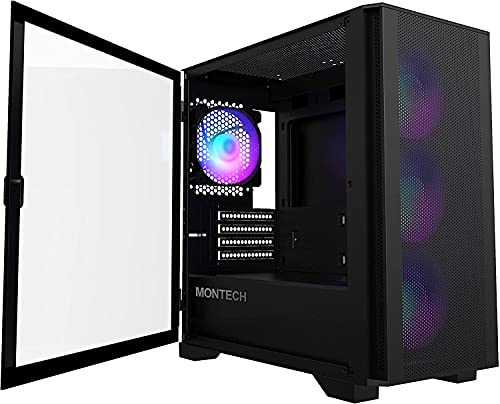
MONTECH AIR 100 ARGB — The compact filtered mesh case
The AIR 100 ARGB shrinks the filtered formula into a compact Micro-ATX case with a mesh front, and its title again states the essential word: dust filters. Around that claim it lists four fans, Mini-ITX compatibility alongside Micro-ATX, 330mm GPU support, 161mm cooler clearance, a lighting controller and swivel tempered glass. The swivel glass is a small delight with practical value — the panel swings open on a hinge for quick interior access rather than detaching entirely, which suits a compact case that will be opened for filter checks and small adjustments more often than a tower is.
The dimensions deserve respect for what they permit. A 330mm card allowance in a Micro-ATX body covers the mainstream of graphics cards, and 161mm of cooler clearance admits proper tower coolers — the compact case that does not force low-profile compromises. Four fans in this volume is a complete cooling set, not a starter, and the mesh front feeds them through the filtered intake the title promises. The lighting controller acknowledges the ARGB reality: colour exists, it is managed, it does not manage you.
For small desks in dusty rooms — student housing, a bedroom build, a workshop corner — the AIR 100 is the guide’s most complete small answer. Its limits are the honest ones of its size: no E-ATX adventures, radiator ambitions bounded by the compact frame (the title does not state radiator figures, so check MONTECH’s documentation for a specific AIO plan), and an interior that rewards tidy cabling. Within those lines, filters included and stated, it is a thoroughly sorted case.
- Form factor: compact Micro-ATX (also fits Mini-ITX)
- Fans included: 4
- Filtration: dust filters, per the title wording
- GPU support: 330mm; cooler clearance: 161mm
- Panel: swivel tempered glass; lighting controller included
Strengths
- Stated filtration and a mesh front in a genuinely compact body.
- 330mm GPU and 161mm cooler figures are generous for the size.
- The swivel glass panel makes frequent interior access painless.
Trade-offs
- Radiator support is not stated in the title; AIO plans need the documentation.
- Compact interiors punish careless cable routing.
- Four fans in a small case need curves set, not left at full speed.
Best for: a compact build on a small desk in a dusty room, with real components inside.
Not suited for: an E-ATX workstation or a dual-radiator cooling plan.

MONTECH X3 Mesh — The lit filtered value tower
The X3 Mesh is the extrovert of the filtered field: a high-airflow ATX mid-tower with six fixed RGB fans — three of them 140mm intakes — dust filters stated in the title, swivel tempered glass, USB 3.0, 305mm GPU support and 240mm radiator support. Six fans fitted is the most generous count in this guide, and the arrangement matters: three large intakes pushing through the filtered mesh front is exactly the configuration that keeps a filtered case breathing freely, because the filter’s resistance is met with area and numbers rather than hope.
“Fixed RGB” is the phrase to understand before ordering: the fans’ lighting is a set presentation rather than a fully addressable spectrum, which divides buyers cleanly. Those who want the machine lit, colourful and finished the moment it is switched on will find the X3’s show complete out of the box. Those who choreograph lighting through software should look at the AIR 100’s controller approach or the quieter picks. Neither preference is wrong; confusing them is the only error, and the title states the arrangement plainly enough to avoid it.
The 305mm GPU figure bounds the build sensibly — mainstream cards yes, the longest flagships no — and 240mm radiator support covers the standard processor AIO. As a value tower that arrives with its cooling, lighting and filtration already decided, the X3 Mesh asks its owner for exactly two things: a monthly filter rhythm and a graphics card measured before purchase. For a gaming build in a dusty room at a sensible total cost, that is a fair and clearly stated bargain.
- Form factor: ATX mid-tower, high airflow
- Fans included: 6 fixed RGB (3x 140mm intake)
- Filtration: dust filters (title confirms them)
- GPU support: 305mm; radiator support: 240mm
- Panel: swivel tempered glass; front I/O USB 3.0
Strengths
- Three 140mm filtered intakes give the mesh front real breathing surplus.
- Six fans and full lighting arrive fitted; nothing essential is left to buy.
- The swivel glass and stated filters make maintenance genuinely quick.
Trade-offs
- Fixed RGB lighting cannot be re-choreographed through software.
- 305mm GPU support excludes the longest flagship cards.
- Six fans at default settings will be audible; curves need setting.
Best for: a gaming build that wants light, airflow and stated filtration with zero extra purchases.
Not suited for: a flagship-length graphics card or a fully software-controlled lighting scheme.

Redragon – GC-624 – ATX Gaming PC Case – Tempered Glass Gaming — The magnetic-filter gaming case
The Redragon GC-624 makes its filtration the headline in the most literal way available: its title names a magnetic dust filter as the case’s defining accessory, alongside the tempered glass side panel on an ATX gaming chassis. Magnetic attachment is the convenience end of filter design — the screen lifts away in a second, taps or rinses clean, and snaps back without tools, clips or panel removal. In the economy of cleaning rituals, that difference in friction is the difference between a filter maintained monthly and a filter maintained eventually, and eventually is where dust wins.
Redragon’s gaming positioning frames the rest of the package: an ATX case with a glass panel for showing the build, from a brand whose audience is value-conscious gamers. The title is sparing beyond its headline — fan inclusions, GPU clearance and radiator figures are not stated in it — so a buyer with a specific long card or AIO plan should take those numbers from Redragon’s documentation before ordering. That is the same homework this guide has set twice already, and it is set here without apology: a title that leads with its filter has told you its priority, and the rest of the specification lives one click deeper.
Choose the GC-624 if the magnetic ritual is the feature that will actually keep your machine clean — for many owners it will be, and a slightly lesser specification lovingly maintained beats a flagship neglected. In a gaming room with carpet and a cat, the case whose filter you can clean during a loading screen is, in the only sense that matters by month six, the best-filtered case in this guide.
- Form factor: ATX gaming case
- Filtration: magnetic dust filter, named in the listing title
- Panel: tempered glass side panel
- Fans, GPU clearance, radiator support: not stated in the listing title — check Redragon’s documentation
- Maintenance style: tool-free magnetic removal
Strengths
- The magnetic filter makes cleaning a seconds-long, tool-free habit.
- Filtration is the headline claim, stated where buyers can verify it.
- Glass panel and gaming format suit mainstream ATX builds.
Trade-offs
- Key planning figures are absent from the title and require documentation checks.
- Magnetic screens seal less absolutely than framed slide-in filters at the edges.
- The specification beyond the filter is modestly documented at listing level.
Best for: a gaming build in a pet or carpet household where cleaning speed decides whether cleaning happens.
Not suited for: a paper-planned build that needs every clearance guaranteed by the title alone.
Filters at a Glance: Claims, Fans and Fit
| Case | Filtration per title | Fans included | GPU room | Character |
|---|---|---|---|---|
| be quiet! Pure Base 501 | Not mentioned — verify | 2x 140mm PWM | Not stated in title | Quiet, pressure-tuned |
| Fractal Meshify 2 | Not mentioned — verify | See documentation | Not stated in title | Flexible, reconfigurable |
| MONTECH AIR 903 MAX | Filters named in title | 4 | 400mm | Airflow maximalist, E-ATX |
| MONTECH AIR 100 ARGB | Filters named in title | 4 | 330mm | Compact Micro-ATX |
| MONTECH X3 Mesh | Filters named in title | 6 fixed RGB | 305mm | Lit value tower |
| Redragon GC-624 | Magnetic dust filter stated | Not stated in title | Not stated in title | Tool-free cleaning |
Read the first column as this guide’s thesis in miniature: filtration you can verify from the listing, or filtration you must verify in documentation — both legitimate, neither interchangeable. The rest of the table then does the ordinary work of case selection, matching size, fans and card room to the build. For the ATX field beyond filtration, Best ATX PC Cases surveys the wider territory, and legacy mid-tower layouts are covered in Best Mid Tower PC Cases With Optical Drive Support.
What Filter Mistakes Cost Owners the Most?
Buying the filter and skipping the ritual is the expensive one, already covered but worth its place in a mistakes list: a matted filter is an airflow wall, and the machine behind it ages thermally at double speed. Set a monthly reminder when the case is unboxed, not when temperatures first climb. The second mistake is washing a filter and refitting it wet; a damp screen in a running machine is a humidity source at the exact point of intake. Filters dry fully — an hour on a towel — before they go back.
Third, assuming every intake is filtered because the front is. Top intakes, bottom power-supply intakes and side perforations are separate paths, and cases differ on which are screened; this is precisely the detail the documentation check exists to reveal, particularly on the two picks whose titles stay silent. Fourth, placing a filtered case on deep carpet, where the bottom intake — filtered or not — breathes through pile. A stand, a board or the desk itself is a five-minute fix that outperforms any filter ever woven. Fifth, using compressed air on a fitted filter from outside, which drives the fine fraction through the mesh and into the case: remove the filter first, then clean it away from the machine.
How Do You Clean Case Filters Properly?
The routine is short enough to describe completely. Power the machine down. Remove the filter by its designed path — magnetic lift on the Redragon, tray or panel access on the others as their manuals describe. Take it away from the case and either tap it outdoors, vacuum it gently, or rinse it under a tap if the maker permits; most mesh and nylon filters welcome water. Shake, then dry fully on a towel. While it dries, wipe the intake area and glance at the fan blades behind it — the filter’s report card is written there, and clean blades mean the system is working.
Refit, power up, and note the date somewhere you will see it — a calendar reminder beats a note, because the rhythm’s enemy is not laziness but the absence of a trigger. In homes with shedding pets or a wood stove, halve the interval for the first two cycles and judge by what the filter shows you; the case will tell you its own correct cadence if you read the evidence. That is the entire maintenance burden of the filtered life, and set against the annual strip-down of an unfiltered machine, it is one of computing’s better bargains.
When Does Dust Mean a New Case Rather Than a Deeper Clean?
Owners of unfiltered cases eventually ask whether the machine in front of them justifies replacement, and the honest answer is: sometimes, and the evidence is easy to read. Open the case after a normal month. If the heatsinks wear a uniform grey felt, the fan blades are furred at their edges and the graphics card’s shroud has grown a matte coat, your home’s dust load is high enough that filtration is not a preference but a maintenance strategy — and retrofitting sheets onto a case never designed for them will capture perhaps half the benefit at all of the inconvenience. That household is this guide’s audience, and any pick here will repay its cost in cleaning hours within the first year.
If, instead, the interior shows a light, even dusting that a brush clears in minutes, your air is kind and your current case is innocent; buy nothing, or buy from this guide for other reasons entirely. The middle case — moderate dust, an ageing chassis due for replacement anyway — is where most readers honestly sit, and for them filtration should be a selection criterion carried into the planned purchase rather than a reason to accelerate it. Cases are decade-long purchases; letting the dust evidence set the timing, instead of marketing, is the grown-up version of this entire shopping category.
One more diagnostic deserves mention: noise creep. A machine that has grown gradually louder over two years is often not failing at all — it is insulated, its fans working harder against felted heatsinks to hold the same temperatures. Before budgeting for new fans or a new cooler, clean the machine completely and listen again. If the quiet returns, the diagnosis was dust, and the prescription is a filtered case at the next natural upgrade. Several of the picks here — the pressure-tuned Pure Base 501 most of all — exist to make sure the quiet, once restored, stays restored.
Where Should a Filtered Case Live in the Room?
Placement multiplies or divides a filter’s effectiveness before the machine is ever switched on. The worst address in any home is directly on carpet, where the bottom intake — the power supply’s breathing slot on most designs — sits inside the dust’s home territory and the pile itself restricts the flow the filter is meant to protect. A simple stand, a shelf board or the desk raises the case out of the reservoir and can halve the filter’s loading rate in a carpeted room. The second-worst address is the corner behind a door or beside a litter tray, a wood stove or a workshop entrance, where the air itself carries the heaviest load the house produces.
The best addresses share two properties: elevation and ordinary air. On the desk is ideal where space allows — the AIR 100 ARGB’s compact footprint exists partly for this — and a low stand beside the desk achieves most of the same benefit for the larger towers. Keep the case out of direct cooking zones, where grease aerosol defeats filters by coating rather than clogging, and out of the sunbeam a cat has claimed, because a sleeping pet against an intake is a filter event no mesh survives gracefully. None of this requires a filtered case specifically; it simply recognises that filtration is a system of case, filter and room, and the room is the cheapest part to optimise.
How Do Filters Interact With Radiators and Air Pressure?
Liquid-cooled builds feel filtration differently, because a radiator is itself a dense fin stack that traps whatever its fans inhale. A radiator mounted behind a filtered intake — the AIR 903 MAX’s front and top positions are the obvious candidates here — stays clean for years, its fins brushed occasionally rather than excavated. A radiator breathing unfiltered air becomes the case’s unofficial filter, and cleaning it means draining schedules and deep disassembly. If your build plan includes a radiator, the filtered intake in front of it is not a luxury; it is the maintenance plan, decided in advance.
Pressure balance is the second interaction. A case run with more intake than exhaust — positive pressure — pushes air out through its unfiltered gaps, so dust can only enter through the screened paths; a negative-pressure case inhales through every seam and slot, defeating its own filters at the edges. Filtered cases therefore reward an intake-heavy fan arrangement: the X3 Mesh’s three 140mm intakes against modest exhaust is the textbook example already configured by its maker, and the AIR 100’s four fans in a small volume achieve the same bias. When you add or rearrange fans in any pick here, preserve that bias — it is the difference between a filtration system and a filtration gesture.
Exhaust radiators complicate the picture usefully: a top radiator exhausting through a filter wastes the filter and taxes the fans, so top screens on exhaust duty should be removed where the design allows, or the position reconsidered. These are the judgements that separate a filtered build from a build that merely contains filters, and they cost nothing but thought at assembly time.
What Are Case Filters Made Of, and Does the Material Matter?
Three materials dominate. Woven nylon mesh, the commonest, balances fine filtration with washability and years of dimensional stability; it is the screen in most slide-out trays. Foam filters catch finer particles still and are the quietest, but they load faster, wash slower and eventually perish — a consumable wearing a component’s clothes. Magnetic mesh, the Redragon GC-624’s approach, trades a fraction of sealing perfection for total convenience: the screen is a flexible sheet that clings to the case’s steel around an intake, lifting away without tools.
Material choice should follow household reality more than filtration theory. A home with fine, dry dust — near a road, in a desert climate — benefits from foam’s finer catch and can tolerate its rhythm. A home with pet hair needs area and convenience more than fineness, because the load is bulky and frequent; nylon trays and magnetic sheets win there. A workshop-adjacent machine wants the coarsest practical screen cleaned often over the finest screen cleaned rarely. In every case — the pun is unavoidable and the point is serious — the best filter material is the one whose cleaning you will actually perform, which is why this guide keeps returning from specifications to rituals.
Replacement availability is the material question’s second half. Proprietary trays are superb until the maker discontinues them; generic mesh can be re-cut forever. Owners planning a decade with one case — the Meshify 2 and Pure Base 501 audience especially — should confirm that spare filters exist for their model, or that the filter’s shape is simple enough to replicate. A filter is a wearing part pretending to be a fixture, and buying one spare at the outset is the simplest safeguard in this entire guide.
Final Recommendation
For most dusty homes, the MONTECH AIR 903 MAX is the complete answer
: filtration stated in its title, airflow in surplus, room for everything. The AIR 100 ARGB compresses the same honesty into a compact case, the X3 Mesh adds the light show, and the Redragon GC-624 wins the maintenance argument outright with its magnetic screen. The be quiet! Pure Base 501 and Fractal Meshify 2 remain excellent cases whose filtration must be confirmed in their makers’ documentation rather than assumed — verify them, and either could anchor the quietest or most adaptable build here. Whichever you choose, keep the monthly rhythm: a filtered case is not a feature you buy once, it is a small habit that pays you back in cool, quiet years. And spare a thought, when the first filter comes out grey and laden a month after the build, for what that grey load represents — a month of your home’s air, intercepted at the border, rinsed down a sink instead of felted across a processor heatsink. That small, slightly disgusting moment of satisfaction is the filtered life in miniature, repeated monthly, and it is why owners of cases like these six so rarely return to the unfiltered world. The dust was always coming. Now it has an appointment, and the appointment is with a tap.
Frequently Asked Questions
Do dust filters reduce cooling performance?
A clean filter costs a small amount of airflow — the price of the screen’s resistance — and well-designed cases repay it with intake area and fan count, as the MONTECH trio here do with their multiple large intakes. A dirty filter costs a great deal, which is why the comparison that matters is not filtered versus unfiltered on day one, but filtered-and-maintained versus unfiltered at month twelve, when the unfiltered machine’s heatsinks wear felt coats. Maintained filtration wins that comparison decisively.
How often should case filters be cleaned?
Monthly is the right default for most homes, checked visually and cleaned as needed. Pet hair, carpets, wood stoves and workshop air shorten the interval to two or three weeks; a hard-floor apartment with no pets can stretch it. Let the filter itself report: if the screen shows a visible grey or furry load, it was due. The magnetic Redragon filter makes the check a five-second lift, which is its deepest advantage.
Are magnetic mesh sheets a good substitute for a filtered case?
They are a reasonable retrofit for a case you already own and a poor substitute when buying new. A sheet cut from a multipack leaks unfiltered air around its edges, grips perforated steel imperfectly and knows nothing of your case’s other intakes. A case designed around filtration — the picks in this guide — screens its intake paths as part of its structure. Buy sheets to improve an existing machine; buy a filtered case when the decision is open.
Which intakes should be filtered?
Every path where air enters: front, top if fans intake there, bottom for the power supply, and any side intake. Exhaust paths need no filter, since air is leaving. Cases differ in which intakes they screen, and that map is exactly what to confirm in the documentation — especially for the Pure Base 501 and Meshify 2, whose titles do not describe their filtration at all.
Can I wash every kind of case filter?
Most woven mesh and nylon filters rinse happily under a tap, and magnetic screens like the Redragon’s clean with a tap or a shake. Foam filters wash too but dry slowly. The invariable rules are to remove the filter from the case first, let it dry completely before refitting, and follow the maker’s guidance where it differs. A filter refitted damp is worse than a filter cleaned late.
Is a filtered case worth it in a clean apartment?
Worth it, but less dramatically. Even clean homes generate textile dust and skin cells that accumulate in heatsinks over years, and a filter converts the annual deep-clean into a monthly rinse. The benefit is real but modest, so apartment dwellers can choose from this guide on other merits — the Meshify 2’s flexibility, the Pure Base 501’s quiet — with filtration as a supporting reason rather than the headline.
Do filters help with pet hair specifically?
Yes — hair is the contaminant filters catch best, because its size makes it lodge in mesh rather than pass through, and keeping it out of heatsinks and fan bearings is where most pet-home damage is prevented. The discipline is frequency: hair loads a screen faster than fine dust, so pet households should start with a fortnightly check and adjust by evidence. Cases with fast rituals — the Redragon’s magnetic lift, the AIR 100’s swivel panel access — suit pet homes disproportionately well, because the cleaning that happens is the cleaning that counts.
Do filters make a case quieter or louder?
Indirectly quieter, over time. A screen adds a whisper of resistance noise at the intake on day one, inaudible outside contrived comparisons. Across a year, the filtered machine keeps its original fan speeds because its heatsinks stay clean, while the unfiltered machine’s fans climb steadily against insulating dust. Owners consistently report the filtered case as the quieter possession by the second summer — the Pure Base 501’s pressure-tuned design leans into exactly that long game.
Can filters be added to the exhaust to keep dust from settling inside when the PC is off?
It is rarely worth it. A resting machine inhales nothing actively, and the settling that occurs through vents while off is minor compared with what running intakes move in an hour. Filtering exhaust also taxes the fans whenever the machine runs. Spend the effort on the intakes and the cleaning rhythm; the off-hours take care of themselves.
Do I need to clean filters before the first use?
A rinse is not required, but a glance is wise: new filters occasionally carry manufacturing fibres or packaging dust, and the first monthly check doubles as a baseline — photograph the clean screen, and every later check has a reference for what “loaded” looks like in your particular home. That tiny ritual, started on day one, is how owners calibrate the interval honestly instead of inheriting a stranger’s cadence from a guide — including this one.
How can I tell if my filters are clogged without opening the case?
Watch the trends rather than any single reading: processor and graphics temperatures a few degrees higher than the same workload produced last season, fans audibly busier at idle tasks they once handled silently, and — on cases with visible intakes — a grey shadow across the mesh that was not there at the last check. Any one of these earns the five-minute inspection. The habit of noticing is the real maintenance skill; the rinse that follows is trivial.
Are filtered cases a good idea for allergy-sensitive households?
They help the machine, and by keeping its exhaust from redistributing settled dust during heavy fan activity, they marginally help the room — but a PC case is not an air purifier, and no claim stronger than that should be made for one. What can be said honestly is that the dust a filtered case traps in a washable screen is dust that is not accumulating inside the machine to be blown around later, and that households already managing dust carefully tend to appreciate any system that makes it visible, scheduled and removable.
What if a replacement filter for my case is discontinued?
All is not lost, because filter material is a commodity even when trays are not. Mesh and foam are sold in sheets precisely for the retrofit market this guide discusses, and a discontinued tray can usually be re-meshed, or its dimensions replicated, in an afternoon. This is one more reason to note your filter’s dimensions when the case is new — a thirty-second measurement that converts a future discontinuation from a crisis into a craft project.
Should the power supply intake be filtered too?
Ideally yes, and on many cases it is the forgotten path: the supply usually intakes from beneath the case, drawing the room’s heaviest, floor-level air. Where a case provides a bottom filter, keep it on the same rhythm as the front. Where it does not, elevation is the answer — a stand lifts the intake out of the carpet’s dust layer entirely. Checking the bottom path is part of the documentation homework this guide recommends for the two title-silent picks.
Related Guides
- Best Air Filtered PC Cases for Mini-ITX Builds
- Best Mid Tower PC Cases With Optical Drive Support
- Best ATX PC Cases


