What's inside
- Key Takeaways
- Quick Picks
- How Did We Divide the Small-Case Field for This Guide?
- Micro-ATX Compact or True ITX: Where Does Your Build Belong?
- What Do the Numbers in SFF Titles Really Promise?
- The Six Small Cases, Examined Closely
- Headline Figures Face to Face
- What Do First-Time SFF Builders Get Wrong?
- How Do You Assemble a Compact Build in the Right Order?
- How Should You Tune a Small Case for Quiet?
- Where Should a Small Case Sit, and How Does the Room Affect It?
- Does Small Form Factor Suit Workstations and Home Offices?
- How Do Small Cases Handle Storage, Ports and the Everyday Details?
- What Will an SFF Build Ask You to Upgrade First?
- What Should You Know About Riser Cables Before Choosing a Sandwich Case?
- Final Recommendation
- Frequently Asked Questions
- Related Guides
As an Amazon Associate I earn from qualifying purchases. This post may contain affiliate links at no extra cost to you.
widgetverdict.com is reader-supported. When you buy through links on our site, we may earn an affiliate commission.
Where to buy: small form factor cases are produced in shorter runs than mainstream towers, so use the Amazon listings linked throughout this guide — Lian Li, JONSBO, ASUS, Metalfish and JOYJOM listings respectively — where the exact variant, finish and riser specification in each title can be confirmed before the order is placed.
Small form factor is the most honest negotiation in PC building. A mid-tower forgives everything — a long card, a tall cooler, a power supply bought on a whim — while the best small form factor cases for pc builders ask a precise question in return for their saved litres: what, exactly, did you plan to put in here? The designs reviewed here answer that question across the whole breadth of the category, from a 33-litre Micro-ATX design that behaves almost like a tower, to aluminium ITX shells that treat a graphics card as a carefully folded guest. Between those poles sits the territory most small builds actually inhabit: compact Micro-ATX cases with tower-grade cooling figures, and ITX cases with handles for lives that move.
A boundary is worth drawing at the start, because this site also publishes a guide to mini PC cases, and the two categories overlap without being identical. That guide is ITX-first and NAS-friendly — drive bays, 65mm coolers, servers on shelves. This one is the wider small-form-factor field: Micro-ATX compact cases like the Lian Li A3, ASUS AP201 and the JONSBO pair (including the Z20, which lives here and not in the mini guide) alongside true ITX designs like the Metalfish T40 and the JOYJOM aluminium shell. No pick appears in both guides; the fields were divided deliberately so a reader can shop either without meeting the same case twice in different clothes.
What unites the six is that their listing titles publish the arithmetic small builders live by: graphics card lengths in millimetres, radiator and AIO support, cooler ceilings, power supply formats, and in the AP201’s case even the interior volume — 33 litres, stated outright. In small cases, those numbers are not specifications in the bureaucratic sense; they are the build, decided in advance. This guide reads them as the primary text and treats everything else — wood panels, handles, mesh — as character built on top of arithmetic.
Key Takeaways
- Small form factor spans two families here: compact Micro-ATX (A3-mATX, AP201, Z20, D32 STD) with tower-like cooling, and true ITX (T40, JOYJOM) where every millimetre is negotiated.
- The Lian Li A3-mATX states the boldest figures: 415mm GPU room and 360mm AIO support, with no fans included to rearrange.
- The ASUS AP201 is the measured middle: 33 litres, radiators up to 360mm, cards up to 338mm, quasi-filter mesh panels.
- The JONSBO Z20 and D32 STD bring handles, back-connect board support and 240mm AIO room to compact Micro-ATX.
- ITX picks trade depth for footprint: the Metalfish T40 caps coolers at 70mm and cards at 206mm, and says so in its title.
- Power supply format follows size: ATX units fit the Micro-ATX cases here, while the ITX pair require SFX-class supplies.
Quick Picks
| Pick | Badge | Why it earns its place |
|---|---|---|
| Lian Li A3-mATX PC Case, 415mm GPU, 360 AIO, Wood Black Mesh | The compact with tower figures | 415mm of GPU room and 360mm AIO support in a mesh Micro-ATX case designed with DAN Cases. |
| JONSBO/JONSPLUS Z20 Black Micro-ATX Mini Tower PC Case,with | The handled performance compact | A detachable carrying handle, 240mm AIO support and a 160mm cooler ceiling in a mini tower. |
| ASUS Prime AP201 (Mesh) | The 33-litre all-rounder | Quasi-filter mesh, tool-free panels, radiators to 360mm and cards to 338mm in a stated 33-litre volume. |
| JONSBO D32 STD Micro-ATX PC Case,High Compatibility Mini | The back-connect compact | Support for back-connect BTF boards, 365mm GPUs, 240mm AIO and ATX or SFX power supplies. |
| Metalfish T40 Mini ITX Case | The pocketable ITX | A detachable handle, SFX supply support and stated 70mm cooler and 206mm GPU limits in a tiny shell. |
| Aluminum Mini ITX Case with PCIe 3.0 Riser, JOYJOM Mini PC | The aluminium riser shell | An aluminium ITX case with a PCIe 3.0 riser for a graphics card in a sandwich-style small footprint. |
How Did We Divide the Small-Case Field for This Guide?
Selection began with the boundary described above: this guide takes the wider SFF field, the mini PC guide takes ITX-first and NAS designs, and the two lists share no picks — the JONSBO Z20, the case readers most often meet in both conversations, is assigned here, where its Micro-ATX board support and performance cooling figures belong. Within this field, we required the listing title to publish at least the core planning figures for its class: card length and cooling support for the Micro-ATX cases, cooler ceiling and card length for the ITX pair. A small case whose title hides its arithmetic is asking buyers to gamble at exactly the scale where gambles fail by millimetres.
The second test was honesty of intent. Each pick had to be designed small — a compact layout conceived for its volume — rather than a tower with its panels pulled in. The A3’s DAN Cases collaboration, the AP201’s stated 33 litres, the Z20’s mini-tower-with-handle concept and the T40’s pocketable shell all pass that test in different dialects. The third test was spread: two design-led Micro-ATX cases, two utility-led Micro-ATX cases, and two ITX shells of different materials and layouts give the reader real choices rather than six shades of the same wedge. Readers who want the filtered angle on small cases will find it pursued in Best Air Filtered PC Cases for Mini-ITX Builds, and the pure ITX field is surveyed in Best Mini ITX Cases PC Builders Actually Finish.
Micro-ATX Compact or True ITX: Where Does Your Build Belong?
The Micro-ATX compacts are the category’s pragmatic heart, and the four here show why. A Micro-ATX board costs less than its ITX equivalent in most platform generations, offers more slots and headers, and these cases wrap it in volumes a tower owner would call impossible: the AP201’s stated 33 litres with a 360mm radiator and 338mm card room is, functionally, a full gaming build that happens to be small. The A3 pushes further — 415mm of card room swallows any consumer GPU — while the Z20 and D32 STD trade a little radiator size for handles and back-connect tidiness. If your small build is a main machine, start in this family and justify leaving it.
True ITX, represented by the T40 and the JOYJOM shell, is for builds where the footprint itself is the feature: the machine on a narrow shelf, in a media unit, in a bag. Its costs are printed in the titles — a 70mm cooler ceiling on the T40, a 206mm card limit, SFX supplies, and on the JOYJOM a PCIe 3.0 riser whose generation should be noted by anyone pairing it with a card that prefers a newer link. None of those figures is a flaw; they are the price list of smallness, published honestly. The error is buying ITX dimensions for a build whose ambitions were Micro-ATX all along, and then blaming the case at assembly time.
A useful rule of thumb emerges from the titles themselves: if the case states a radiator size, it expects to be a main machine; if it states a cooler ceiling in the double digits of millimetres, it expects to be a compact companion. Both are honourable roles. The guides’ job — and this section’s — is to keep a reader from hiring one for the other’s job.
What Do the Numbers in SFF Titles Really Promise?
Read them as a system, not a list. GPU length interacts with radiator placement: a front-mounted radiator and its fans consume interior length that the card figure may or may not already account for, which is why the A3’s 415mm and the D32’s 365mm are best read alongside their AIO positions in each maker’s documentation. Cooler ceilings interact with processor choice: 160mm in the Z20 and 163mm in the D32 admit the tall tower coolers that make compact builds quiet, while the T40’s 70mm specifies a low-profile cooler and therefore a processor chosen for efficiency. Power supply format interacts with both, because an ATX supply’s cables occupy the same air the cooler breathes in a small case — the D32’s acceptance of ATX, SFX-L and SFX units is a planner’s gift precisely because it lets the builder choose which interaction to have.
Volume, stated only by the AP201 here at 33 litres, is the figure that converts all the others into a desk decision. Litres are abstract until the case arrives; the tape measure is not. Measure the shelf, the desk’s depth, the media unit’s compartment, and compare against each case’s external dimensions in its documentation before the order. Small form factor’s entire pleasure is a machine that fits its intended place exactly — a pleasure available only to builders who measure the place.
The Six Small Cases, Examined Closely

Lian Li A3-mATX PC Case, 415mm GPU, 360 AIO, Wood Black Mesh — The compact with tower figures
The A3-mATX is what happens when a mainstream maker collaborates with a boutique small-case studio — DAN Cases, named in the title — and the result reads like a tower’s specification sheet that wandered into a compact body. Graphics cards up to 415mm: effectively unrestricted. AIO support up to 360mm: the full-size radiator class. Boards in Micro-ATX and ITX. A modular design, a mesh exterior in black with wood — the A3X-WD variant in the title — and one conspicuous absence that is actually a philosophy: no fans included.
The empty fan mounts deserve defence, because in small cases the stock fan question is different from towers. Compact builders have strong, specific opinions about fan models, sizes and noise character, and a case that ships bare lets the entire cooling system be chosen as a system — sizes matched to the radiator plan, speeds matched to the owner’s ears. Lian Li and DAN are selling a designed volume, not a bundle. The cost, honestly stated, is that the cooling budget is entirely yours and entirely additional; a first-time SFF builder should price the fans before concluding the A3 is the economical route to its figures.
Choose the A3 if your small build is a flagship in exile — a top-tier card, a 360 AIO, a main machine that must fit a smaller desk or a quieter room. Its figures remove every usual compact compromise except the fans, and the wood-and-mesh exterior lets it sit in adult furniture without apology. Builders who want the cooling decided for them should look at the AP201’s completeness or the Z20’s focus instead.
- Boards: Micro-ATX and ITX, per the listing title
- GPU support: up to 415mm — the most generous figure in this guide
- Cooling support: up to 360mm AIO; modular design
- Fans included: none — cooling is entirely owner-specified
- Finish: wood and black mesh (A3X-WD variant)
Strengths
- Tower-grade GPU and radiator figures in a compact Micro-ATX volume.
- The DAN Cases collaboration shows in the modular, planned interior.
- Bare fan mounts let the whole cooling system be chosen deliberately.
Trade-offs
- Fans are an additional, unavoidable purchase on top of the case.
- Its capabilities tempt parts whose heat a compact volume must be tuned to handle.
- First-time SFF builders face more configuration decisions than with the ASUS below.
Best for: a flagship-spec main machine that must live in compact dimensions.
Not suited for: a build that wants its fans included and its decisions pre-made.

JONSBO/JONSPLUS Z20 Black Micro-ATX Mini Tower PC Case,with — The handled performance compact
The Z20 — filed in this guide by design, as the SFF representative of JONSBO’s compact line — is a Micro-ATX mini tower with a detachable carrying handle, and its title pairs that portability with performance figures that handled cases rarely offer: support for a 240mm AIO and a cooler ceiling of 160mm, under the banner of high-performance hardware compatibility. The 160mm figure is the headline inside the headline. It admits the tall tower air coolers that make a compact build quiet under load, which means the Z20’s owner can choose between a 240 AIO and a flagship air cooler — a choice most small cases make for you, badly.
The handle changes the machine’s social life. A compact tower with a grip becomes the PC that goes to the LAN weekend, moves between the desk and the television, or commutes between a term-time room and home. JONSBO describes the size as mini and the hardware compatibility as high-performance, and the pairing is the product: this is not a portable case that apologises for its components, nor a performance case that happens to be liftable. It is both, deliberately, in black.
Its bounds are the expected ones: 240mm rather than 360mm radiator support places it a class below the A3 and AP201 for liquid cooling, and the title does not publish a GPU length, so card planning belongs in JONSBO’s documentation with your exact model measured. For the builder whose life has two desks and whose standards have no asterisk, the Z20 is the most precisely aimed case in this guide.
- Boards: Micro-ATX, mini tower format
- Carrying: detachable handle, per the listing title
- Cooling support: 240mm AIO; air cooler ceiling 160mm
- Design intent: high-performance hardware compatible, mini size
- GPU length: not stated in the listing title — verify in JONSBO’s documentation
Strengths
- The 160mm cooler ceiling allows genuinely quiet tower air cooling.
- A real handle makes a performance build honestly portable.
- 240mm AIO support covers the mainstream liquid option.
Trade-offs
- No 360mm radiator class, unlike the Lian Li and ASUS picks.
- Card length requires a documentation check before purchase.
- The handle’s usefulness depends on a life that actually moves the machine.
Best for: a high-performance Micro-ATX build that travels between desks, rooms or events.
Not suited for: a dual-radiator liquid plan, or a card bought before its length is verified.
ASUS Prime AP201 (Mesh) — The 33-litre all-rounder
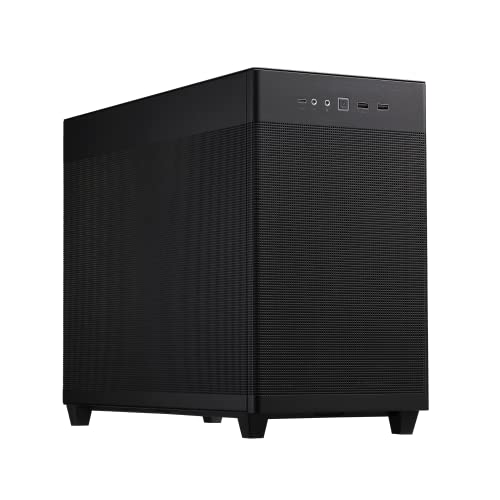
The AP201 may be the most completely specified case in this guide, because ASUS publishes the number everyone else makes you estimate: 33 litres. Into that volume the title fits a Micro-ATX case with support for radiators up to 360mm and graphics cards up to 338mm, wrapped in quasi-filter mesh panels with tool-free side panels. The quasi-filter mesh is the design’s signature — the panel perforations themselves are fine enough to act as a basic filter, so the entire exterior breathes and screens at once, with no separate filter trays to remove and rinse.
Tool-free panels complete the owner’s-experience argument. Small cases are opened more often than towers — for the upgrade, the adjustment, the cable you meant to move — and panels that release without tools turn each opening into a minute rather than a ritual. The 338mm card figure covers the mainstream of gaming GPUs with room to spare, and 360mm radiator support in 33 litres is a packaging achievement that makes the AP201 the default recommendation whenever a reader asks for “a small case that doesn’t compromise,” a phrase this guide has otherwise been careful with.
The compromises that remain are honest ones. Mesh on every face means the interior’s dust protection is the mesh itself — good, not absolute — and the case will benefit from the placement and cleaning habits our filters guide describes. The title does not state an included fan set, so confirm the cooling contents in ASUS’s documentation when budgeting. As an all-rounder, though, the AP201 asks the fewest questions of its owner while answering the most of theirs.
- Boards: Micro-ATX
- Volume: 33 litres, stated in the listing title
- Cooling support: radiators up to 360mm
- GPU support: up to 338mm
- Panels: quasi-filter mesh, tool-free side panels
Strengths
- 360mm radiator and 338mm card support inside a stated 33 litres.
- Quasi-filter mesh panels breathe and screen simultaneously.
- Tool-free panels make the frequent small-case opening painless.
Trade-offs
- Mesh filtration is basic rather than absolute; dusty homes still need a rhythm.
- Included fans are not described in the title — check before budgeting.
- Micro-ATX ceiling: no full ATX boards, by design.
Best for: a no-drama compact main machine — gaming or workstation — in a small footprint.
Not suited for: an ATX-board build, or a dust-phobic home wanting framed filter trays.

JONSBO D32 STD Micro-ATX PC Case,High Compatibility Mini — The back-connect compact
The D32 STD is JONSBO’s compatibility maximalist: a Micro-ATX mini desktop case whose title supports back-connect and BTF motherboards, graphics cards up to 365mm, a 240mm AIO, air coolers to 163mm, and power supplies in ATX, SFX-L or SFX formats, with USB 3.2 on the panel. Read that supply line again — three formats in one compact case is a planner’s freedom none of the other picks matches, letting the build use a quality ATX unit already owned or an SFX unit bought for cable shortness, as the rest of the parts dictate.
Back-connect support is the D32’s forward-looking feature. Boards in the BTF pattern move their connectors to the rear face, and in a compact case — where every cable is visible through proximity and every millimetre of cable slack is a routing problem — removing the main harness from the front chamber is worth more than it is in a tower. The 365mm card figure sits between the AP201’s 338 and the A3’s 415, covering all but the most extreme cards, and the 163mm cooler ceiling matches the Z20’s quiet-air potential with three extra millimetres of mercy.
The STD designation and the “high compatibility” banner tell you the design’s priority: fit things. It is less styled than the A3 and less singular than the Z20, and that is its market — the builder whose parts list is already long and specific, who needs a compact case that says yes to the board pattern, the supply on the shelf and the card in the basket. Where the parts are exotic, compatibility is the luxury.
- Boards: Micro-ATX, including back-connect / BTF patterns
- GPU support: up to 365mm
- Cooling support: 240mm AIO; air cooler ceiling 163mm
- Power supply: ATX, SFX-L or SFX — the widest acceptance in this guide
- Front I/O: USB 3.2
Strengths
- Three power supply formats remove a whole class of planning conflicts.
- Back-connect board support produces unusually tidy compact interiors.
- 365mm GPU room and a 163mm cooler ceiling cover serious hardware.
Trade-offs
- Radiator support stops at 240mm, below the A3 and AP201.
- Its styling is functional; the wood-and-mesh A3 wins the furniture contest.
- Back-connect benefits require a BTF-pattern board to fully realise.
Best for: a compact build around a specific parts list — especially a back-connect board or an existing power supply.
Not suited for: a 360mm radiator plan, which should start with the Lian Li or the ASUS.

Metalfish T40 Mini ITX Case — The pocketable ITX
The Metalfish T40 is the guide’s exercise in radical smallness, and its title is admirably blunt about the terms: a Mini-ITX case supporting SFX and SFX-L power supplies, a CPU cooler up to 70mm, a graphics card up to 206mm, in a portable shell with a detachable handle. Every figure there is a decision the buyer makes with open eyes. A 206mm card means the compact, efficient tier of graphics cards — which is a real and satisfying tier for esports, media and older-library gaming — and a 70mm cooler means a low-profile unit over a processor chosen for manners.
Within those terms, the T40 is a delight of intent. The handle is not a gimmick at this scale; the whole machine can genuinely be carried like a lunchbox, set on a shelf, a hotel desk, a friend’s media unit. SFX-L acceptance alongside SFX widens the supply choice slightly, a kindness in a format where the supply is a significant fraction of the total volume. Metalfish, a name known to the SFF community for exactly these aluminium-and-steel miniatures, has built the case as a known quantity for builders who speak its language.
The discipline required is total, and it is the same discipline the mini PC guide preaches at slightly larger scales: parts are chosen for the case, never the reverse. A builder who measures a 240mm card against this title’s 206mm and orders anyway has not bought the wrong case but made the wrong plan. For the efficient, portable, shelf-sized machine it describes, the T40’s honesty is its specification.
- Boards: Mini-ITX
- Power supply: SFX and SFX-L supported
- Cooler ceiling: 70mm — low-profile coolers only
- GPU support: up to 206mm
- Carrying: detachable handle; portable SFF design
Strengths
- Genuinely pocketable scale with a handle that suits its size.
- Every limit is printed in the title; planning is unambiguous.
- SFX-L acceptance widens the small-supply choice usefully.
Trade-offs
- 206mm card support excludes most performance graphics cards.
- The 70mm cooler ceiling demands an efficiency-first processor.
- No expansion headroom; the build is finished when it is built.
Best for: a portable, efficient ITX machine for media, esports and light gaming.
Not suited for: a performance graphics card longer than 206mm, under any circumstances.
Aluminum Mini ITX Case with PCIe 3.0 Riser, JOYJOM Mini PC — The aluminium riser shell
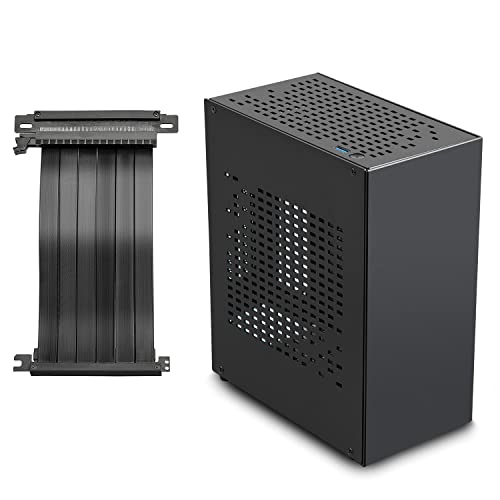
The JOYJOM aluminium ITX case closes the guide with the sandwich formula in its most elemental form: an aluminium Mini-ITX shell with a PCIe 3.0 riser cable, designed to support a graphics card in a small form factor footprint. The riser is the enabling component — it folds the card parallel to the motherboard, letting a case barely wider than the board itself contain a gaming-capable machine. Aluminium keeps the shell light and gives it the cool, machined feel that plastic small cases cannot imitate.
One specification in the title requires a planner’s attention rather than a reviewer’s gloss: the riser is PCIe 3.0. Many current graphics cards communicate over PCIe 4.0 or 5.0 links, and while a 3.0 riser generally carries them at reduced link bandwidth — with effects that vary from negligible to noticeable depending on the card and its memory configuration — the pairing should be a conscious choice, not a discovery. Research your specific card’s behaviour on a 3.0 riser, or plan the build around a card whose performance is indifferent to the link generation. The case is honest about what it includes; the homework is the buyer’s.
Beyond the riser, the title is spare — cooler ceiling, card length and supply format all live in the product documentation — so the JOYJOM suits the experienced small-case builder who enjoys planning from primary sources, or the modest build whose parts are far inside any plausible limit. As the aluminium entry point to riser-based ITX gaming, it earns its place as the guide’s final, most specialised pick.
- Boards: Mini-ITX
- Construction: aluminium shell
- GPU arrangement: PCIe 3.0 riser cable included — note the generation when pairing cards
- Cooler, GPU length, PSU figures: not stated in the listing title — plan from the product documentation
- Format: sandwich-style SFF layout
Strengths
- Aluminium construction keeps the tiny shell light and cool to the touch.
- The included riser enables a real graphics card in a minimal footprint.
- The sandwich layout is the SFF community’s proven compact formula.
Trade-offs
- The PCIe 3.0 riser generation must be considered against your card.
- Key planning figures require documentation research before ordering parts.
- Its minimalism suits experienced small-case builders best.
Best for: a compact aluminium ITX gaming build planned around the riser’s specification.
Not suited for: a first build that wants every figure guaranteed by the listing title.
Headline Figures Face to Face
| Case | Boards | GPU room | Cooling headline | Signature trait |
|---|---|---|---|---|
| Lian Li A3-mATX | mATX / ITX | 415mm | 360mm AIO | No fans included; wood mesh |
| JONSBO Z20 | mATX | Not stated in title | 240mm AIO; 160mm cooler | Detachable handle |
| ASUS AP201 | mATX | 338mm | 360mm radiators | 33 litres; quasi-filter mesh |
| JONSBO D32 STD | mATX (BTF) | 365mm | 240mm AIO; 163mm cooler | ATX / SFX-L / SFX supplies |
| Metalfish T40 | ITX | 206mm | 70mm cooler ceiling | Handle; SFX / SFX-L |
| JOYJOM Aluminium | ITX | See documentation | See documentation | PCIe 3.0 riser included |
The table sorts the field by a single glance: the Micro-ATX four compete on how much tower they can impersonate, and the ITX two compete on how little room a real computer can occupy. Neither contest has a loser. The A3 and AP201 will host builds that would satisfy most tower owners; the T40 will host a build that fits in a carry-on. Decide which contest you are entering before comparing the rows, because cross-family comparisons — 415mm against 206mm — measure different ambitions, not different qualities. The wider ATX context sits in Best ATX PC Cases for readers calibrating how far they have come.
What Do First-Time SFF Builders Get Wrong?
Ordering parts in tower order is the founding error: graphics card first, case as an afterthought, and the discovery — at midnight, with the build half-done — that 12mm of card has nowhere to exist. In this category the case is chosen first and every part is measured against its title figures, which is why this guide keeps returning to those figures with such insistence. The second error is forgetting the power supply’s cables: in a 33-litre case, a non-modular supply’s unused leads are not tucked away, they are a roommate. Modular supplies, or the D32’s format flexibility used wisely, prevent the eviction battle.
Third, cooling by optimism. A compact case with a flagship processor and card needs its fan plan designed, not accumulated — intake and exhaust assigned, curves set against sustained temperatures, the radiator position chosen before the parts arrive. The A3’s bare mounts are an invitation to do exactly that; the AP201’s mesh rewards it; the T40’s 70mm ceiling forbids the whole category of wishful thinking. Fourth, building in the wrong sequence: small cases have an order of operations, and a dry-fit rehearsal — every part placed without screws, cables routed in trial — is the cheapest hour in the entire project.
How Do You Assemble a Compact Build in the Right Order?
Begin with the case empty and the manual open, and identify the three tightest passages the cables must travel; route the front-panel and supply leads through them first, while both hands fit inside. Fit processor, memory and storage to the motherboard on the bench, then mount the board. In the Micro-ATX cases, install the power supply next and connect its motherboard leads before any cooler lands, because the cooler — especially a 160mm tower in the Z20 or D32 — will own the space above those connectors for the rest of the build’s life.
Cooling follows: radiator and fans as one planned assembly, or the tower cooler with its fan clips rehearsed outside the case. The graphics card goes in last among the major parts, since it bridges the interior and blocks more access than everything else combined; in the riser-based JOYJOM, the card and riser are fitted as a pair and tested before the shell closes. Close the case only after a first boot on the bench of your patience — panels off, temperatures watched through a warm afternoon of real use. A compact build is finished when it has survived its own heat, not when the last panel clicks.
How Should You Tune a Small Case for Quiet?
Small cases sit closer to ears and offer less material to absorb sound, so quiet is engineered from component choice upward. The processor and card tiers decide the heat; the heat decides the fan work; the fans decide the noise. Within that chain, the cases here offer different levers. The Z20’s and D32’s tall cooler ceilings admit large air coolers whose fans loaf where low-profile units sprint. The A3’s and AP201’s 360mm radiator support lets liquid cooling spread heat across three fans turning slowly. The ITX pair answer with efficiency: modest parts, honestly cooled, in machines never asked to be silent flagships.
Fan curves deserve the same deliberateness as the parts list. Set them against sustained load temperatures, allow a calm idle floor, and resist linking fan speed to instantaneous processor spikes, which produces the revving character that makes small builds sound nervous. A compact machine tuned this way has a single, even voice under work — and in a small room, that evenness is worth more than a marginally lower peak temperature bought with noise.
Where Should a Small Case Sit, and How Does the Room Affect It?
Small cases live on desks, shelves and media units rather than floors, and each address has a thermal personality. A desk gives the machine the room’s cleanest air and the owner’s ears the shortest distance to its fans — a pairing that rewards the quiet tuning described earlier and punishes its absence. A shelf inside a media unit is the harshest address in the home: enclosed on five sides, the unit returns the machine’s exhaust to its intakes, and even a well-planned SFF build will run warm and loud there unless the unit’s back is open and a hand’s breadth of space surrounds the case. Measure the compartment before the case, and treat a closed cabinet as a disqualification the tape measure delivers early and cheaply.
Carpeted floors, the traditional tower address, are the one place these cases should not go: the format’s whole point is the desk, and a compact case at ankle height collects dust at tower rates while surrendering its size advantage. Where a desk truly cannot hold the machine, a low stand beside it preserves the elevation benefit. The handled pair — Z20 and T40 — add a final placement consideration: a machine that moves should have a home position with its cables loosely managed, so the hundredth unplugging is as kind to the ports as the first. Small cases reward owners who think of placement as part of the build, because at this scale, the room is effectively the case’s outermost panel.
Does Small Form Factor Suit Workstations and Home Offices?
Increasingly, it is the default answer there. The home office’s constraints — a desk shared with paperwork, a room that hosts video calls, a machine that must look like furniture between meetings — read like a design brief for this category. The A3’s wood-and-mesh exterior and the AP201’s calm mesh presence both sit in a working room without announcing a gaming rig, while their internals hold workstation-class hardware without theatre. A compact case on the desk also returns the floor space a tower consumed, which in a small home office is not an aesthetic preference but square footage.
The professional caveats are practical rather than conceptual. Expansion is bounded: a second card, a capture device and a specialist interface cannot all live in a Micro-ATX case at once, so workstation buyers should list their cards before their case. Serviceability, though, cuts in SFF’s favour — the AP201’s tool-free panels and the general desk-height placement of compact machines make the inevitable drive swap or memory upgrade a five-minute, on-the-desk task instead of a floor expedition with a torch. For the single-GPU workstation that dominates real home offices, the format’s trade is all upside, and the titles in this guide publish exactly the figures needed to verify a given build fits.
How Do Small Cases Handle Storage, Ports and the Everyday Details?
Storage is where small cases quietly won their war years ago. The modern compact build stores everything on M.2 drives mounted on the motherboard itself, which means the drive cages that once defined case interiors have simply evaporated — a liberation the Micro-ATX four here all assume, and one reason their volumes can be spent on radiators and cards instead. Builders who still need spinning drives or multiple 2.5-inch SSDs should check each case’s stated bays in its documentation, because that figure, unfashionable as it is, varies more between these six than any other. The NAS-shaped end of small computing lives in the mini PC guide for good reason; this field’s storage story is solid-state and motherboard-borne.
Front-panel connectivity follows a similar pattern of quiet adequacy. The D32 STD states USB 3.2 outright; the others’ port selections live in their documentation, and a buyer whose desk life runs through front ports — drives, dongles, a phone cable — should spend the same ten minutes there that this guide keeps prescribing. What small cases rarely short-change is the power button’s placement and the panel’s reachability, because their owners place them on desks, within arm’s reach, rather than on floors. It is a small ergonomic dividend of the format, noticed daily and mentioned in no specification.
Cable management, finally, is the everyday detail that separates the designed compact from the merely shrunk one. The A3’s modularity, the AP201’s tool-free access, the D32’s back-connect support — each is a different manufacturer’s answer to the same problem: in a small case, the cables are a structural element, occupying volume the cooling wants. Judge any SFF case by whether its maker has visibly thought about where the cables go. All six here have; it is part of why they are here.
What Will an SFF Build Ask You to Upgrade First?
The graphics card, in most gaming builds — and that is precisely why the card-length figures in this guide’s titles deserve their emphasis. A case bought with 338mm or 415mm of room accepts the next card and the one after; a case bought at exactly today’s card length is a case with an expiry date printed in millimetres. The A3’s generosity and the D32’s 365mm are, in this light, not specifications but insurance policies, and the T40’s 206mm is an honest statement that its owner has chosen portability over that insurance, eyes open.
Second in the queue is storage capacity, answered cheaply by the M.2 slots the board already has, and third is cooling refinement — the better fans the A3’s bare mounts invite, the curve tuning every compact rewards. The board and processor come last, and here the format’s standards protect the owner: Micro-ATX and ITX mounting has been stable for years, so every case in this guide can host a second platform generation inside the same shell. Bought with headroom in the figures that matter, a small case is not the compromise in a build’s longevity story. It is frequently the longest-lived part of it.
What Should You Know About Riser Cables Before Choosing a Sandwich Case?
The JOYJOM’s inclusion makes one SFF component worth a section of its own. A riser cable folds the graphics card’s connection through a flexible ribbon so the card can lie parallel to the motherboard — the geometry that makes sandwich cases possible. Two properties matter when shopping. The first is generation: a riser speaks a PCIe generation, and the card’s link negotiates down to it, so a PCIe 3.0 riser under a newer card is a decision to research for that specific card, exactly as the JOYJOM review advises. The second is length and routing: a riser is sized to its case, bent along a planned path, and happiest when installed once and left alone — sandwich builds reward owners who finalise the card choice before assembly rather than swapping cards monthly through a flexed ribbon.
None of this is an argument against the format; the sandwich layout is how the smallest gaming-capable cases in the world are built, and a good riser is electrically invisible in a well-matched build. It is an argument for treating the riser as a component with a specification, like the cooler ceiling or the supply format, rather than as packaging. In small form factor, everything is a component. That is the category’s burden and, for the builders it suits, its entire charm.
Final Recommendation
For the majority of small-form-factor builders, the ASUS AP201 is the balanced answer
: 33 stated litres, a 360mm radiator class, 338mm of card room and panels that open without tools. The Lian Li A3-mATX is the choice when the build is a flagship that must shrink without surrendering — 415mm of card room and a bare, designable cooling canvas. The JONSBO Z20 owns portable performance, the D32 STD owns parts-list compatibility, and the Metalfish T40 and JOYJOM shell serve the true ITX builders at the field’s small, honest extreme. Measure your space, choose the case first, and let its printed figures govern the parts — in small form factor, that discipline is not a constraint on the build. It is the build, and each case here rewards it in a different size of satisfaction. If a single sentence could be carried away from this guide, it would be that smallness is not a sacrifice made at the end of a parts list but a design brief set at the beginning of one. The builders who internalise that — who fall for a volume first and a specification second — are the ones whose compact machines are still being admired, upgraded and carried happily between rooms years later, while the tower they replaced gathers the dust this batch’s filter guide was written about.
Frequently Asked Questions
What is the difference between small form factor and mini PC cases?
Small form factor is the wider family: compact cases for Micro-ATX and ITX boards, including the 33-litre AP201 and the Micro-ATX JONSBO pair in this guide. Mini PC cases, covered in their own guide on this site, are the ITX-first end of the family, often designed around NAS or ultra-compact roles. The two guides here share no picks — the Z20, for example, is filed as SFF — so each can be shopped without duplication.
Can a small form factor case hold a full-size graphics card?
Several here can, and their titles prove it in millimetres: the Lian Li A3-mATX allows 415mm, the JONSBO D32 STD 365mm and the ASUS AP201 338mm — figures that cover effectively the entire consumer card market. At the ITX end, the Metalfish T40’s stated 206mm limit defines the compact card tier instead. The rule is simply to read the number for the specific case rather than assuming the family shares one.
Do compact Micro-ATX cases run hotter than towers?
They run as cool as their planning. A compact case has less air volume, so its temperatures respond faster — in both directions. With the radiator support and fan planning these cases provide, a Micro-ATX build matches a tower’s thermals at the same parts; with parts chosen carelessly and fans left unplanned, it will throttle where a forgiving tower would merely warm. The margin for improvisation is what shrinks, not the achievable result.
Which power supply does a small case need?
It follows the case, and this guide’s titles show the whole range: the D32 STD accepts ATX, SFX-L and SFX units, the T40 takes SFX and SFX-L, and the Micro-ATX designs generally accommodate ATX supplies within their stated limits. SFX units cost more per watt but return the difference in cable shortness and interior air. Check the exact format and length against your chosen case’s documentation before ordering — in small builds the supply is a fitment part, not a commodity.
Is a 360mm radiator realistic in a case this small?
In the two that state it, yes — the Lian Li A3-mATX supports a 360mm AIO and the ASUS AP201 supports radiators up to 360mm, both in their listing titles. Modern compact design has become remarkably good at packaging, and a 360 in a well-planned 33-litre case is a normal build today. The planning caveat is interaction: radiator, fans and a long graphics card share the same interior, so confirm the combination in the maker’s documentation rather than each figure separately.
Are handles on small cases actually useful?
For the lives they are designed for, genuinely. The Z20’s detachable handle turns a performance Micro-ATX build into a machine that moves between rooms and events without a carry case or a two-handed cradle, and the T40’s handle suits its lunchbox scale exactly. If your machine will sit in one place for five years, a handle is harmless surplus; if it moves monthly, it becomes the feature you would least surrender.
How do I know if my existing parts will fit an SFF case?
Measure the three that decide everything: your graphics card’s length against the case’s stated figure (415mm, 365mm, 338mm or 206mm among these six), your cooler’s height against any stated ceiling (160mm, 163mm or 70mm here), and your power supply’s format and length against the case’s acceptance list. Where a title does not state a figure — the Z20’s card length, the JOYJOM’s set — the manufacturer’s documentation holds it, and the check takes minutes. Parts that pass all three measurements will fit; small-case building has no fourth surprise worth fearing.
Do small cases hold their value for a second build?
Better than most components do. Board mounting standards in both Micro-ATX and ITX have been stable for years, production runs are short enough that good compact cases stay desirable, and a well-kept A3, AP201 or Z20 will host a second platform generation without any sense of compromise. The cases that age are the ones bought at the exact limit of their figures; the cases bought with headroom — the theme of this guide — simply continue. Choose the headroom and the case becomes the build’s elder statesman.
How long does a compact build take to assemble?
Plan an unhurried afternoon — roughly twice the time of the same parts in a tower, with the dry-fit rehearsal included. Experienced SFF builders close the gap considerably, but the first compact build’s extra hour is tuition, not inefficiency, and it is repaid at every future upgrade.
Can an SFF case work as a home server?
It can, with the caveat that this field optimises for graphics and cooling rather than drive bays — a two-drive mirrored setup on M.2 and SSD storage suits these cases well, while a many-disk archive belongs in the NAS-designed shells of the mini PC guide. For a light server — media streaming, backups of a couple of machines, home automation — the AP201’s quiet mesh presence makes a particularly civilised always-on box.
Should I choose the A3 or the AP201 for a first compact build?
The AP201, for most first-timers: its mesh is forgiving, its panels are tool-free, its volume is stated, and its 360mm radiator and 338mm card figures cover a mainstream build without further research. The A3 is the connoisseur’s step up — more card room, a modular interior and a cooling system you design yourself from bare mounts. Neither choice is a mistake; they are the same good idea at two levels of owner involvement, and a builder who starts with the AP201 often graduates to appreciating exactly what the A3 was offering.
What is the smallest build in this guide that still games well?
The Metalfish T40, within its printed terms: a card up to 206mm from the efficient tier, a low-profile cooler over a frugal processor, and an SFX supply, in a handled shell that can sit anywhere. That combination plays esports titles and the great back catalogue beautifully. Games that demand flagship cards belong in the AP201 or A3 instead — the guide’s spread exists so that “smallest” and “strongest” can each be bought deliberately rather than confused.
Is building in a small case harder than in a tower?
It is less forgiving of sequence, in the same way the mini format is: cables must be routed before the components that cover them, and the order of assembly matters. The Micro-ATX four here are notably gentler than true ITX — more hand room, conventional layouts, tool-free panels on the ASUS — and make a reasonable first build for a patient beginner. The ITX pair reward experience. Choose by temperament honestly, and the difficulty becomes the satisfying kind.
Related Guides
- Best Mini ITX Cases PC Builders Actually Finish
- Best Air Filtered PC Cases for Mini-ITX Builds
- Best ATX PC Cases


