What's inside
- Key Takeaways
- Quick Picks
- How We Chose These Picks
- Side-by-Side Comparison
- How to Choose a PLA Printer
- Which PLA Habits Keep Prints Looking Clean?
- How Should a Family Share One PLA Printer?
- What Should the First Five Prints Be?
- How Long Do PLA Prints Actually Last Indoors?
- Common Mistakes When Buying a PLA Printer
- Final Recommendation
- Frequently Asked Questions
- Related Guides
As an Amazon Associate I earn from qualifying purchases. This post may contain affiliate links at no extra cost to you.
[SITE_DOMAIN] is reader-supported. When you buy through links on our site, we may earn an affiliate commission.
Ordering notes for this shortlist: every machine below links to its Amazon listing, and two pairs of near-identical names — the two Elegoo Centauri 2 variants and the two Entina models elsewhere in our guides — make it worth reading the full listing title before ordering, so the configuration that arrives is the configuration reviewed here.
Shopping for the best pla 3d printers is really shopping for forgiveness. PLA is the filament nearly every owner starts with and most owners never leave: it prints at modest temperatures, sticks willingly, smells faintly sweet rather than industrial, and forgives small setup sins that would ruin fussier materials. A printer that excels at PLA is therefore not a stripped-down toy — it is a machine tuned for the material that will carry school projects, prototypes, household repairs, gifts and prototypes again, in an endless friendly loop.
What separates a good PLA machine from a merely adequate one is consistency at ordinary settings. PLA rewards a stable first layer, even cooling and honest motion more than raw temperature headroom, because the material itself asks so little of the hotend. The six machines below all promise easy setup in their titles, yet they reach that ease by different roads: full auto calibration on the Elegoo models, a Sprite direct drive and dual Z-axis on the Creality, a fully assembled mini format on the Entina, Klipper firmware on the Sovol. Those differences decide which easy machine belongs on your desk.
Several picks here are open-frame designs, and that deserves a plain statement rather than a warning tone. PLA prints happily in open air — it does not demand a heated chamber the way engineering filaments do — so an open frame is a legitimate cost and simplicity choice for a PLA-first machine, not a defect. What an open frame does affect is noise travel and curious fingers, both manageable with placement. Where a machine in this guide is a mini or an open design, its review says so directly, and no pick below is credited with an enclosure its title does not claim.
Colour enters this category through two multicolour picks, the Anycubic Kobra X and the Elegoo Centauri Carbon 2 Combo, and PLA is the material that shows colour systems at their best: cheap, varied and endlessly available in bright shades. A family printing toys, decorations and labelled organisers in PLA will use multicolour capability weekly. A prototyper printing fit-check parts in one grey spool will not, and for that reader the single-colour machines here spend their money more honestly.
Budget thinking in this category should include the second month, not just the first. The printer is the headline purchase, but the household will also want a small stock of PLA in useful colours, sealed storage for it, a spare nozzle and eventually a second build plate. None of that is expensive individually, yet buyers who spend every coin on the machine itself start their ownership one clog away from a stalled hobby. The picks below were chosen partly on how gracefully they absorb that reality — common parts, common filament, forgiving plates — because a PLA printer’s true cost is measured across its first year, not at the checkout.
Key Takeaways
- Every pick auto-levels or auto-calibrates per its title, so PLA’s crucial first layer is handled by the machine across the whole list.
- The Sovol T300 is the firmware enthusiast’s pick, running Klipper with a 300°C all-in-one hotend and 95% pre-assembly.
- Entina’s Tina2 Plus is a fully assembled mini for home and school, with WiFi, app control and a PEI build plate.
- Two picks print in colour: the Anycubic Kobra X with native 4-colour support and the Elegoo Centauri Carbon 2 Combo.
- Build volumes are stated for three picks: 256x256x256mm on both Elegoo Centauri models and 11.8×11.8×13.8in on the Sovol T300.
- PLA needs no enclosure, so the open-frame designs here lose nothing for this material.
Quick Picks
| Pick | Badge | Why it earns a place |
|---|---|---|
| Creality Ender-3 V3 SE | Value starter with direct drive | Auto levelling, a Sprite direct drive extruder and dual Z-axis stability at an entry point into the Ender line. |
| Elegoo Centauri 2 | Calm CoreXY all-rounder | Full auto calibration and a 350°C nozzle on a 500mm/s CoreXY frame with a stated 256mm-cube build volume. |
| Anycubic Kobra X | Colour for families | Native 4-colour printing, an AI camera and a stated quiet 45dB for shared family spaces. |
| Entina Tina2 Plus | Fully assembled mini | Arrives assembled with WiFi and app control, auto levelling and a PEI plate, sized for home and school desks. |
| Sovol T300 | Klipper machine, mostly built | Klipper firmware, an 81-point auto levelling grid and an all-metal body that arrives 95% pre-assembled. |
| Elegoo Centauri Carbon 2 | Colour combo with headroom | Multicolour combo printing on a 500mm/s CoreXY platform with a 350°C nozzle and 1-click auto levelling. |
How We Chose These Picks
PLA-first buying inverts the usual specification hunt. Instead of asking which machine tolerates the most extreme material, we asked which machines make the friendliest material effortless: automatic levelling or calibration in every title, setup described as easy or beginner-friendly, and motion systems that hold quality at the speeds PLA owners actually use. Any machine whose title suggested a fight — manual levelling rituals, vague assembly demands — was cut, however impressive its other numbers looked.
The six that remain divide into honest sub-groups. Two Elegoo Centauri models anchor the modern CoreXY end, one single-colour and one a multicolour combo, sharing a stated build volume and nozzle ceiling. The Creality Ender-3 V3 SE represents the evolved budget classic: direct drive and dual Z hardware on the most famous name in home printing. The Anycubic Kobra X chases families with colour and quiet running. The Entina Tina2 Plus shrinks the whole idea into a fully assembled mini. The Sovol T300 serves the owner who wants Klipper’s tuning depth without building a printer from parts.
As with every guide on this site, claims stop where titles stop. Several spec boxes below carry the not-stated wording for figures like noise or build volume on machines whose manufacturers chose not to headline them. That restraint matters most in a beginner category, where a new buyer cannot yet smell an invented specification. Confirm the missing lines on the listing page, and treat any seller who fills them with vaguer language than the manufacturer does as a reason to buy the same machine from a clearer listing.

Creality Ender-3 V3 SE — Value starter with direct drive
The Ender name carries a decade of beginner hopes, and the V3 SE is the generation where Creality finally removed the chores that made earlier Enders a rite of passage. Its title lists auto levelling, auto filament loading and easy assembly, then adds the hardware that matters for print quality: a Sprite direct drive extruder and a dual Z-axis. Direct drive feeds PLA with short, controlled pushes that sharpen retraction and reduce stringing, while twin Z screws keep the gantry level across the bed instead of sagging toward one side as single-screw designs can.
A stated printing speed of 250mm/s places the SE honestly in the modern entry class — brisk for prototypes and household parts, without pretending to race the CoreXY machines elsewhere in this guide. For PLA work that pace is well matched to the material: PLA’s cooling needs set a natural ceiling on useful speed for detailed models, and a machine that prints cleanly at moderate speed beats a faster one leaving rough walls. New owners should expect their first prints to look genuinely good within an hour of assembly, which is precisely the confidence-building start the Ender line always promised and now delivers.
The open frame deserves its direct mention. The V3 SE prints in the open, like most of its class, and for PLA that costs nothing in print quality. It does mean the machine shares its sounds with the room and its moving gantry with the air, so placement on a stable desk away from the edge, in a room where a working appliance is welcome, is the right setup. Owners graduating later to heat-sensitive materials will eventually want an enclosure or a second machine; PLA-only households may never feel the lack at all.
- Extruder: Sprite direct drive, per the listing title
- Levelling: Auto leveling stated, with auto filament loading
- Frame motion: Dual Z-axis stated
- Top speed: 250mm/s printing speed stated
- Assembly: Easy assembly stated
- Build volume: Not stated in the listing title — verify with the manufacturer documentation
Strengths
- Direct drive sharpens PLA retraction and reduces stringing.
- Dual Z-axis keeps the gantry honest across wide prints.
- Auto filament loading removes a fiddly beginner chore.
Trade-offs
- Open-frame design shares noise with the room.
- 250mm/s pace trails the CoreXY picks in this guide.
- Build volume is not stated in the title and needs confirming.
Best for: a beginner seeking direct-drive print quality on the classic Ender platform. Not suited for: a bedroom desk needing near-silent overnight running, given the open frame.
Shoppers comparing Ender variants should check price on Amazon for the V3 SE specifically and confirm the Sprite extruder line appears in the title of the listing they open.
Ownership economics favour this Creality in a quiet way. The Ender ecosystem is enormous, so replacement nozzles, plates and fans are stocked everywhere and community answers exist for every error a new owner can produce. A first printer will be misused in creative ways — filament loaded badly, plates scraped, settings explored past sanity — and a machine surrounded by cheap parts and deep documentation forgives those lessons. Buy the SE as a learning platform that also produces good prints, and its value compounds long after the first successful benchy.
One habit multiplies the SE’s reliability: keep the dual Z screws clean and lightly maintained, because the gantry’s level depends on both sides travelling together. Dust and dried filament crumbs on the screws are the unglamorous cause of many mysterious layer shifts on machines of this layout. A monthly wipe during the first year teaches the machine’s anatomy while preventing the fault, and it takes less time than the print it protects.
Print orientation is the SE lesson that transfers everywhere. PLA parts are strongest along their layers and weakest across them, so a hook printed flat survives loads that snap the same hook printed upright. The direct drive’s clean retraction makes experimenting cheap — small test pieces in two orientations cost grams and minutes — and the SE’s forgiving nature encourages exactly that experimentation. Owners who learn orientation on this forgiving platform carry the instinct to every later machine, which is a quiet argument for the Ender as a first printer even in a guide full of newer names.

Elegoo Centauri 2 — Calm CoreXY all-rounder
Elegoo’s single-colour Centauri 2 is the composed centre of this guide: a CoreXY machine running at a stated 500mm/s, with full auto calibration, a 350°C high-temperature nozzle and a stated build volume of 256x256x256mm. That combination reads almost overqualified for PLA, and in one sense it is — PLA will never ask the nozzle for its ceiling or the frame for its full pace. The value of headroom is calm: a machine loafing well inside its limits prints quietly, consistently and without the strained edge that budget hardware shows on long jobs.
Full auto calibration is the feature new owners will feel most. Where the Ender automates levelling and loading, the Centauri 2’s title claims calibration of the whole setup, which is the difference between a machine that helps with one chore and a machine that prepares itself. For PLA printing in a family or classroom, that self-preparation is what turns the printer into an appliance: send a file, collect a part, repeat. Smooth print quality is the title’s own phrase, and it is the correct promise to make for PLA, a material whose glossy layer lines advertise every motion flaw.
The stated 256-millimetre cube quietly out-sizes the 220-class machines that dominate entry printing, and PLA projects notice: cosplay pieces split into fewer fragments, storage boxes print at useful dimensions, board-game organisers swallow full card decks. None of that requires the 350°C nozzle, but the same owners often discover PETG and tougher blends within a year, and this machine simply continues where a PLA-only design would stop. As a single purchase intended to serve several years of widening ambitions, the Centauri 2 argues its case patiently and well.
- Motion system: CoreXY, 500mm/s high-speed stated
- Calibration: Full auto calibration stated
- Nozzle: 350°C high-temp nozzle stated
- Build volume: 256x256x256mm
- Colour: Single-colour configuration in this listing
- Noise figure: Not stated in the listing title — verify with the manufacturer documentation
Strengths
- Full auto calibration makes setup a non-event.
- 256mm build cube exceeds the common 220mm class.
- 350°C nozzle leaves every common material within reach.
Trade-offs
- Single-colour printing in a guide with two colour rivals.
- Capability headroom is wasted on strictly PLA-only owners.
- No noise figure is stated for shared-room planning.
Best for: a buyer seeking a self-calibrating CoreXY machine sized a step above the entry class. Not suited for: colour-first projects, since this configuration prints one filament at a time.
Readers weighing the two Centauri listings can check price on Amazon for this single-colour Centauri 2 and confirm the 256-millimetre volume line before deciding the combo premium is unnecessary.
There is a particular pleasure in a machine whose spec sheet contains no anxiety. The Centauri 2’s owner does not wonder whether the next project fits, whether the new filament melts, or whether calibration has drifted, because the stated figures answer each question with room to spare. That calm is worth paying for in a shared household where the printer must simply work when called. Keep the calibration routine on its schedule, keep PLA spools sealed between jobs, and this Elegoo will produce the uneventful, high-quality printing that lets a hobby stay fun.
The Centauri 2 also handles the social side of printing gracefully. Because calibration is automatic, a guest, a partner or an older child can be taught the whole workflow in one sitting: choose a model, send it, watch the first layer, collect the part. No tribal knowledge about bed screws or paper gauges stands between a newcomer and a successful print. Machines that democratise their own use get used by the whole household, and a printer used by four people justifies its desk space four times over.

Anycubic Kobra X — Colour for families
Anycubic pitches the Kobra X at the family table: a multicolour machine with native 4-colour printing, support for up to 19 colours per the title’s phrasing, an AI camera watching the build, and a stated noise level of 45dB that undercuts even the quiet claims elsewhere in this category. PLA is the natural fuel for that pitch. Children’s models, holiday decorations, game tokens and labelled storage all gain more from colour than from any engineering property, and PLA’s palette is the widest and cheapest in filament.
The AI camera deserves a balanced word. A camera that watches for failures and lets an owner peek at progress from another room is genuinely useful on long prints, especially in a household where the printer runs while adults are elsewhere. It does not improve a single layer by itself; it protects the time invested in layers already printed. Parents running an overnight print for a morning deadline will understand the appeal instantly, and the 600mm/s stated top speed means those overnight jobs can also be ambitious ones.
Easy setup is claimed plainly in the title, and for this audience it is the deciding feature after colour. A family machine that needs an enthusiast’s tuning session before the first toy appears will be abandoned by everyone except the enthusiast. The Kobra X’s proposition is that colour printing — historically the fiddliest corner of the hobby — arrives as a family appliance. Buyers should still expect the standing multicolour tax: purge waste on colour changes, and slicer time spent painting colour regions onto models. Within those honest limits, this is the most child-delighting machine in the guide.
- Colour: Native 4-colour printing, up to 19 colours stated
- Monitoring: AI camera stated
- Noise: Quiet 45dB stated
- Top speed: 600mm/s fast printing stated
- Audience: Beginners, family, makers and professionals named in the title
- Build volume figure: Not stated in the listing title — verify with the manufacturer documentation
Strengths
- Native colour printing without an external add-on purchase.
- 45dB stated noise suits living spaces and evenings.
- AI camera guards long family prints from silent failure.
Trade-offs
- Colour-change purging consumes extra PLA on striped models.
- Build volume needs confirming on the listing before ordering.
- Colour painting in the slicer adds prep time to each model.
Best for: a family seeking native multicolour PLA printing at a stated 45dB. Not suited for: single-colour prototyping, where the colour hardware and purge waste add cost without benefit.
Families sold on colour can check price on Amazon for the Kobra X and confirm the native 4-colour line in the listing title, since Anycubic sells single-colour Kobra variants with similar names.
Practical colour advice for Kobra X households: start with models whose colour lives in a few layers — a name on a base, a face on a figure — rather than designs striped through their whole height. The purge cost of a print scales with the number of colour changes, and a wisely chosen model can carry four colours for a fraction of the waste of a striped one. Children learn that economy quickly when they can see the waste pile, and designing around it becomes part of the craft rather than a disappointment.
The camera also earns its keep as a teaching tool. A time-lapse of a print growing layer by layer explains the entire technology to a curious child better than any diagram, and reviewing a failed print’s footage shows exactly where a first layer let go. Households that treat the Kobra X as shared STEM equipment, not just a toy factory, will extract that educational value for years.
Filament budgeting in a colour household deserves one practical rule: keep the neutrals stocked deep and the novelty colours shallow. Black, white and grey carry lettering, bases and mechanical parts in most colour models, while the glitter and rainbow spools that delight children get used in small, joyful quantities. The Kobra X’s four native slots map neatly onto that rule — three standing colours and one rotating guest slot — and the arrangement keeps the machine ready for both a serious labelled enclosure and a spontaneous rainbow unicorn without a filament reshuffle.

Entina Tina2 Plus — Fully assembled mini
The Tina2 Plus removes the two obstacles that stop more home printing than any specification: assembly and size. Its title states the machine is fully assembled, and describes a mini printer for home and school with WiFi and app control, auto levelling and a PEI build plate. A printer that comes out of the box ready is a printer that gets used the same evening, by the person who bought it, without a YouTube apprenticeship. For gifts, classrooms and first family machines, that immediacy is the entire product.
PEI deserves its sentence, because the build plate is where PLA prints succeed or fail. A PEI surface grips PLA firmly while warm and releases it with a flex when cool, which spares beginners the glue sticks, tape and prayer that older plate surfaces demanded. Combined with auto levelling, the Tina2 Plus’s first-layer story is about as forgiving as the technology currently gets. The stated 250mm/s printing speed is brisk for a mini, and mini prints are small enough that jobs finish in the span of a homework session rather than overnight.
Honesty about scale completes the review. A mini printer prints mini things: figures, small organisers, name tags, educational models, replacement clips. Projects beyond its build area need splitting into glued sections or a bigger machine, and its open-source positioning in the title appeals to tinkerers who may eventually outgrow the hardware precisely because it taught them so well. None of that diminishes the Tina2 Plus; it defines it. This is the machine for a child’s desk, a teacher’s classroom corner, or an adult who wants to learn printing on hardware that never intimidates.
- Assembly state: Fully assembled, per the listing title
- Format: Mini printer for home and school
- Connectivity: WiFi and app control stated
- Levelling: Auto leveling stated
- Build surface: PEI build plate stated
- Top speed: 250mm/s fast printing stated
Strengths
- Zero assembly between the box and the first print.
- PEI plate makes PLA release a flex, not a fight.
- Mini footprint fits desks that cannot host full-size machines.
Trade-offs
- Mini build area excludes larger single-piece projects.
- Enthusiasts may outgrow the hardware within a year or two.
- Small size limits the machine to PLA-class ambitions.
Best for: a child or classroom seeking a fully assembled mini printer for same-day first prints. Not suited for: projects needing a full-size build area in a single piece.
On Amazon, the Tina2 Plus listing is worth a close read before paying — check the price there and look for the fully assembled wording in the title, because other Entina models in the same range ship in different assembly states.
Classroom deployment is where this Entina quietly shines brightest. A teacher can place the machine on a side bench, connect it to the school network, and let students submit designs through the app during a design-and-technology unit, with each small print finishing inside a lesson block. The auto levelling forgives the fact that no teacher has time to tram a bed between classes, and the PEI plate forgives thirty small hands’ worth of enthusiastic part removal. Supervision rules still apply — an adult owns the printer’s schedule and its hot end is respected — but as educational hardware the Tina2 Plus asks remarkably little of its keeper.
Home use follows the same pattern at smaller scale. The Tina2 Plus suits the corner of a kitchen or study where a full-size printer would be banished, and its app control means a parent can start a child’s chosen model from the sofa and let the machine work through it during dinner. Small prints finish quickly enough to hold a young maker’s attention, which is a real specification in disguise: attention spans are build volumes too, and this mini respects both kinds.

Sovol T300 — Klipper machine, mostly built
The Sovol T300 is the enthusiast hiding in a beginner guide, and its title tells on it immediately: Klipper firmware, a 300°C all-in-one hotend with a 30-second preheat, 81-point auto levelling, an all-metal body, and dimensions of 11.8×11.8×13.8in that out-size everything else here. Klipper is the firmware family that moved printer control to a proper processor and unlocked the tuning culture — input shaping, pressure advance, web interfaces, macro-driven workflows — that serious hobbyists treat as the hobby itself. PLA printed under well-tuned Klipper is visibly cleaner at speed, with sharper corners and calmer walls.
Ninety-five percent pre-assembly is the compromise that makes the T300 recommendable outside the build-your-own crowd. The remaining assembly is an evening’s familiarisation rather than a weekend’s construction, and it leaves the owner knowing where the major assemblies live — knowledge that pays back at the first nozzle change or belt adjustment. The 81-point levelling grid is the densest stated in this guide, mapping the bed in fine detail so first layers stay even across the T300’s generous area, and the all-metal body gives that area a rigid foundation.
Buyers should choose the T300 with eyes open about its centre of gravity. Klipper rewards owners who enjoy configuration; its web interface and tuning files are a playground for the methodical and a maze for the appliance-minded. PLA itself needs none of that depth, so the honest pitch is this: buy the T300 if the tuning journey appeals, or if the large build area and hotend headroom headline your needs, and it will print superb PLA from the first week. Buy it purely for plug-and-forget simplicity and the Centauri models above serve that wish better.
- Firmware: Klipper, per the listing title
- Hotend: 300°C all-in-one hotend, 30s preheat stated
- Levelling: 81-point auto leveling stated
- Assembly: 95% pre-assembled, all-metal body
- Build size: 11.8×11.8×13.8in stated
- Top speed: Up to 600mm/s stated
Strengths
- Klipper firmware unlocks deep tuning and fast, clean motion.
- Largest stated build dimensions in this guide.
- Dense 81-point bed mapping evens first layers across the area.
Trade-offs
- Klipper’s depth is wasted on appliance-minded owners.
- Five percent assembly remains — it is not a zero-build machine.
- All-metal build makes it the heaviest style of pick here.
Best for: a tinkerer seeking Klipper tuning depth with most of the assembly already done. Not suited for: a buyer wanting zero assembly and zero configuration between box and print.
Tinkerers comparing Sovol listings can check price on Amazon for the T300 and verify the Klipper line in the title, since firmware is the feature that defines this model’s whole ownership style.
The T300 also future-proofs in a direction the friendlier machines do not: its hotend ceiling and firmware headroom welcome the day its owner discovers abrasive or high-temperature filaments, and its community speaks the language of modification fluently. Owners who print PLA exclusively for years still benefit — Klipper’s input shaping keeps walls clean at the stated high speeds — but the machine’s ceiling sits far above PLA, waiting patiently. That makes the T300 the natural graduation target for a Tina2 Plus owner whose mini has done its teaching work.
A workspace truth follows from the T300’s dimensions: a printer of 11.8 by 11.8 by 13.8 inches plus filament and working clearance claims a real bench, not a desk corner. Measure before ordering, and plan the bench as a station — tools in reach, filament stored dry beside it, light above it. Owners who build that station around the Sovol tend to keep the machine for years, because the Klipper platform grows with their skill instead of being replaced by it. The five percent of assembly left to the buyer is best treated as the station’s housewarming: an evening that ends with a bench understood, not just a printer unboxed.
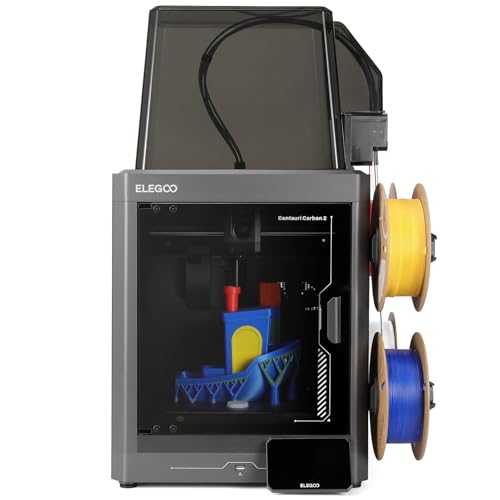
Elegoo Centauri Carbon 2 — Colour combo with headroom
The Centauri Carbon 2 Combo takes the composed Centauri formula and adds the thing its sibling lacks: multicolour printing in the bundle. The stated figures carry over — a 500mm/s CoreXY platform, a 350°C nozzle, the Nexprint model hub, a 256x256x256mm build volume — with 1-click auto levelling simplifying setup. For PLA buyers, that reads as the complete package: the friendliest material, printed in several colours, on a frame and hotend with years of headroom, inside a build area a step above the entry class.
Combo ownership follows the physics of every single-nozzle colour system in this guide. Colours change by purging, purge waste accumulates on colour-dense models, and the slicer’s estimate deserves a glance before any tall multi-colour print. PLA softens that tax better than any material could: it is the cheapest filament per spool and the most colourful, so the experiments that teach a household its colour habits cost little. Start with colour concentrated in caps, bases and lettering, and the Carbon 2’s colour system feels like pure gain.
Positioning this machine against its sibling is the buyer’s real task. The single-colour Centauri 2 costs its owner no purge waste and no colour-system complexity; the Carbon 2 Combo buys creative range. Households printing toys, gifts, decorations and labelled storage will use colour weekly and should pay for it gladly. Prototypers printing fit-checks in grey should not. Both Elegoo machines share the calm CoreXY manners and calibration story, so the decision is refreshingly honest: it is about colour, and only about colour.
- Colour: Multicolour printing, combo configuration
- Motion system: CoreXY, 500mm/s high-speed stated
- Nozzle: 350°C stated
- Build volume: 256x256x256mm
- Levelling: 1-click auto leveling stated
- Model hub: Nexprint named in the title
Strengths
- Multicolour printing bundled with the calm Centauri platform.
- 256mm build cube exceeds the entry-class standard.
- 350°C nozzle keeps future materials within reach.
Trade-offs
- Purge waste applies to every colour-dense model.
- Combo complexity is dead weight for monochrome prototypers.
- Colour prep in the slicer lengthens each new model’s setup.
Best for: a household seeking multicolour PLA printing on a large, self-levelling CoreXY platform. Not suited for: monochrome fit-check prototyping, where purge waste buys nothing.
Colour-committed buyers can check price on Amazon for the Centauri Carbon 2 Combo and confirm the multicolour combo line in the listing title before ordering their first palette of PLA.
A final ownership note pairs well with the combo format: keep the colour system’s filament paths tidy and the loaded spools curated. Four spools of PLA in a standing palette — two neutrals, two household accents — cover most colour work, and project colours can rotate through as birthdays and holidays demand. The Nexprint hub supplies a steady stream of models designed for exactly this machine class, which keeps the colour hardware exercised and the household’s print queue full without anyone hunting files across the internet.
Set against the Kobra X, the Carbon 2’s colour pitch is scale rather than novelty: a bigger build area for colour work, the same 350°C ceiling as its sibling, and a hub-driven workflow. A family whose colour projects are growing — larger decorations, full game sets, classroom batches — will feel the extra volume on every ambitious job. A family printing small figures will not, and for them the Anycubic’s quieter stated running may matter more. Both are honest colour machines; the tape measure, as so often in this category, casts the deciding vote.
Side-by-Side Comparison
| Pick | Levelling / calibration | Top stated speed | Build volume | Colour |
|---|---|---|---|---|
| Creality Ender-3 V3 SE | Auto leveling | 250mm/s | Not stated in the listing title | Single colour |
| Elegoo Centauri 2 | Full auto calibration | 500mm/s | 256x256x256mm | Single colour |
| Anycubic Kobra X | Not stated in the listing title | 600mm/s | Not stated in the listing title | Native 4-colour |
| Entina Tina2 Plus | Auto leveling | 250mm/s | Not stated in the listing title | Single colour |
| Sovol T300 | 81-point auto leveling | 600mm/s | 11.8×11.8×13.8in | Single colour |
| Elegoo Centauri Carbon 2 | 1-click auto leveling | 500mm/s | 256x256x256mm | Multicolour combo |
The table exposes the category’s shape at a glance. Calibration is universal, because PLA buyers rightly refuse manual bed rituals. Speed separates into two leagues — the 250mm/s pair built around value and mini format, and the 500–600mm/s CoreXY and Klipper machines. Colour is the sharpest divider of all: two machines print it natively, four do not, and no amount of specification shopping changes that after purchase. Choose your side of the colour line first, then let the other columns arbitrate.
How to Choose a PLA Printer
Begin with the room and the audience, not the specification sheet. A printer for a child’s desk or a classroom bench points at the Tina2 Plus or the Kobra X — assembled or easy, quiet or colourful, forgiving of beginners. A printer for an adult’s project desk can carry more ambition: the Centauri pair for calm CoreXY quality, the Ender-3 V3 SE for value with direct drive, the T300 for owners who hear the word firmware and lean closer rather than backing away.
Then decide the colour question with your actual project list open in front of you. Write down the last ten things you genuinely wanted to print. If colour appears in half of them, the Kobra X or the Carbon 2 Combo earns its premium and its purge waste. If the list is brackets, boxes and prototypes, colour hardware is a tax on every print, and the single-colour machines will serve the same list faster and simpler. Sentimentality about future colour projects is the most expensive emotion in this category; buy for the list you have.
Close with size honesty. Mini machines print mini objects beautifully and nothing else; the 256-millimetre Elegoo pair and the larger Sovol cover the broad middle of household ambition. Measure the largest object on your project list, add margin for the parts you have not thought of yet, and buy the smallest machine that swallows that measurement comfortably. Oversizing wastes desk and money; undersizing wastes entire projects.
Do not overlook the software half of the purchase. Every machine here lives inside an ecosystem of slicer profiles, model hubs and apps, and the hours you spend in that software will outnumber the hours you spend touching the hardware. Elegoo’s Nexprint hub, the app control on the Entina and Anycubic, and Klipper’s web interface on the Sovol are genuinely different daily experiences. Fans of phone-first control should weight those features as heavily as any motion specification, because convenience that matches your habits is what keeps a printer printing in month twelve.
Noise belongs in the same practical ledger. The Kobra X states a quiet 45dB in its title, which is why it headlines the family shortlist; the other five titles leave noise unstated, so the honest guidance for them is structural: open-frame machines share their sounds with the room, and placement decides the rest. A printer destined for a workshop can be as loud as it likes; a printer destined for the corner of a family room should be chosen, and placed, with evenings in mind.
Which PLA Habits Keep Prints Looking Clean?
PLA’s reputation for ease hides a few habits that separate clean prints from stringy ones. Dry filament is the first: PLA absorbs less moisture than engineering blends but still enough to pop and string after months on an open shelf, so sealed storage with desiccant keeps the easy material easy. The second habit is plate hygiene — a PEI or modern coated plate cleaned of finger grease grips PLA the way the brochures promise, while a greasy plate lets corners lift and owners blame the machine.
Cooling is the third habit, and it is where PLA differs from the pack. PLA wants generous part cooling for crisp overhangs and sharp detail, which is why open-frame machines lose nothing with this material — room air is a feature here. Resist the urge to enclose a PLA machine for tidiness during long prints; a heat-soaked chamber softens PLA mid-print and blurs the detail the material is loved for. Save enclosures for the filaments that demand them, and let PLA breathe.
How Should a Family Share One PLA Printer?
Agree the queue before the arguments. A shared printer needs a simple rule — homework and household repairs jump the line, decorative projects fill gaps, and whoever starts an overnight print tells the household. Machines with app control or cameras, like the Kobra X and Tina2 Plus in this guide, make that sharing visible: anyone can check whether the printer is free without walking to it. Visibility prevents the classic family failure where two people send jobs to one machine and discover the collision an hour later.
Assign filament ownership too. A house palette of shared colours plus personal spools for big projects keeps the colour machines loaded sensibly and stops the mystery of the vanished white spool. Children old enough to design models are old enough to log what they printed and roughly how much filament it used; that small accountability turns a toy into a genuine introduction to making things, which is the best outcome a family printer can produce.
What Should the First Five Prints Be?
Choose teaching prints, not trophies. The first should be the manufacturer’s sample, printed untouched, because it establishes what the machine does with factory settings. The second should be a small box or tray with a lid, because lids expose fit and dimension errors honestly. The third should be something the household actually needs — a hook, a clip, a drawer divider — because a useful object converts sceptics faster than any figurine. The fourth should be a deliberate experiment: the same model at a different orientation or layer height, compared side by side with the earlier version.
The fifth print is the important one: something slightly too ambitious. A larger organiser, a multi-part assembly, a colour job on the machines that support it. Ambitious fifth prints fail in instructive ways — a lifted corner, a support scar, a colour region painted wrongly — and each failure names a skill to learn next. Owners who rush to print a masterpiece first learn the same lessons with more filament and worse tempers. The sequence above costs little, teaches quickly, and leaves the household with four useful objects and one education.
How Long Do PLA Prints Actually Last Indoors?
Longer than the material’s biodegradable reputation suggests. Indoors, away from sustained heat and strong sunlight, PLA objects keep their shape and function for years — organisers, brackets, models and enclosures printed half a decade ago still serve in many households. The enemies are specific rather than general: a car dashboard in summer, a spot directly above a radiator, a load-bearing role under constant stress. Keep PLA in the conditions it was designed for and it behaves like the durable plastic it is; ask it to live in a hot car and it will soften its way out of the job.
That longevity shapes buying advice in a way newcomers rarely expect. Because PLA parts last, the printer’s output accumulates — the household fills with printed solutions, and the machine’s reliability compounds in value with every year. A printer that prints PLA cleanly and calmly is therefore not a starter compromise to be replaced quickly; for many households it is the whole hobby, permanently. Buy accordingly: the calm CoreXY machines and the friendly minis in this guide are endpoints for most owners, not stepping stones, and choosing the one that fits your room and people matters more than chasing a specification ladder you may never climb.
Common Mistakes When Buying a PLA Printer
Paying for temperature headroom you will never use is the gentle trap of this category. A 350°C nozzle is a fine thing on a machine bought for a widening material future, but a strictly PLA household gains nothing from it on any single print. Judge such figures as insurance, priced accordingly — worth having when the premium is small, skippable when it crowds out colour, size or calibration features the same money could buy.
Confusing mini with toy is the second error, and it cuts both ways. Dismissing the Tina2 Plus as a toy misses a genuinely capable classroom machine; buying it for adult-sized projects misses its build area entirely. Read the format line in the title as a specification, not a vibe. The mirror mistake is buying the largest machine for a beginner child, where an intimidating build teaches nothing and a same-day mini success would have hooked a maker for life.
Neglecting filament storage completes the set. PLA forgives much, but months of humid shelf life still degrade it, and owners reliably blame printers for the resulting stringing. A sealed box and desiccant cost less than one replacement spool and protect every spool you own. Start the storage habit with the first order and the easy material stays easy.
Final Recommendation
Most PLA buyers should start with the Elegoo Centauri 2: full auto calibration, a build area above the entry class, calm CoreXY manners and headroom that survives growing ambitions. Families who know colour is the point should go straight to the Anycubic Kobra X for its native colour and quiet running, or the Centauri Carbon 2 Combo for colour on the larger Elegoo platform. The Ender-3 V3 SE remains the value answer with direct drive quality, the Tina2 Plus is the gift and classroom machine, and the Sovol T300 awaits the owner who wants Klipper’s depth with the building mostly done. The best pla 3d printers are the ones that disappear into the household routine — choose the machine whose ease matches your people, and PLA will do the rest.
One last filter resolves ties between near-equal picks: buy the machine whose weaknesses you can live with, not the one whose strengths you admire most. Every pick here has a stated trade-off — an open frame, a mini build area, purge waste, a firmware learning curve — and ownership happiness tracks how invisible those trade-offs feel in daily use. A weakness that never touches your actual projects is not a weakness at all, which is why the honest project list, written down before ordering, remains the most powerful tool in this entire guide.
Frequently Asked Questions
Is PLA strong enough for functional parts? For household loads — hooks, brackets, organisers, clips, enclosures — yes, comfortably. Parts facing engine-bay heat, heavy outdoor sun or structural loads belong in tougher materials, which is where the high-temperature nozzles on the Elegoo and Sovol picks earn their place.
Do PLA printers need an enclosure? No. PLA prints best with generous cooling and open air, so the open-frame machines in this guide lose nothing for this material. Enclosures matter for nylon and similar engineering filaments, not for PLA.
Which pick suits a classroom best? The Entina Tina2 Plus: fully assembled, auto levelling, app control and a mini footprint that fits a side bench. The Kobra X is the alternative when colour projects and camera monitoring matter more than size.
What does full auto calibration actually save? The setup ritual before printing — bed levelling and related adjustments that beginners find opaque and experienced owners find tedious. On the Centauri 2 it is the difference between preparing the printer and simply using it.
Can these machines print materials besides PLA? Several state the headroom for it: 350°C nozzles on both Elegoo models and a 300°C Klipper hotend on the Sovol T300. Confirm each material against the listing and manufacturer documentation before buying filament.
How much filament should a new owner buy? Two spools teach more than ten. One neutral spool for functional work and one colour that delights you will carry the first month, including the instructive failures. By the second order you will know your household’s real consumption and favourite colours, and bulk buying can follow evidence instead of enthusiasm. Store every spool sealed with desiccant from the day it arrives, and even the first month’s leftovers will print like new in month six.
Is a faster printer always better for PLA? No. PLA detail quality depends on cooling keeping pace with extrusion, so beyond a point extra speed buys rougher walls rather than sooner parts. The 250mm/s machines in this guide print typical household objects at satisfying pace; the faster CoreXY and Klipper picks earn their speed on large, simple geometry where cooling can keep up.
What is the simplest upgrade for cleaner PLA prints? Filament storage and plate hygiene, in that order. A sealed box with desiccant keeps PLA behaving like the easy material it is famous for being, and a plate wiped free of finger grease grips first layers the way the manufacturer intended. Both habits cost almost nothing, apply to all six machines reviewed here, and fix more disappointing prints than any slicer setting ever discovered by a frustrated owner at midnight.
Related Guides
PLA is usually the first chapter, not the whole book. When tougher parts enter the project list, the nylon 3d printers built for engineering filament show what the next level demands. Bigger ambitions point to the big 3d printers for large-format single pieces. And readers who enjoyed the assembly side of ownership can explore the kit 3d printers for builders who want full control.
Staying with PLA permanently is equally respectable. A household whose printing life is toys, organisers, prototypes and gifts may never need another material, and the machines in this guide will serve that life for years without asking for a successor. The measure of a good purchase is not how quickly it leads to a bigger one; it is how completely it covers the work its owner actually does, week after ordinary week. Pick the printer that fits your room, your people and your project list, keep its filament dry and its plate clean, and the prints will look after themselves.


