What's inside
- Quick picks: best wacom enabled tablets
- Quick Comparison
- The Picks in Detail
- What Wacom EMR means and why it matters
- S Pen generations and compatibility
- Drawing apps for Wacom-enabled tablets
- Wacom EMR versus Apple Pencil and other styluses
- Caring for the S Pen and the screen
- Buying Guide
- Frequently Asked Questions
- Conclusion
As an Amazon Associate I earn from qualifying purchases. This post may contain affiliate links at no extra cost to you.
Wacom-enabled means a tablet has a Wacom digitizer built into the screen, so it works with a Wacom EMR pen that needs no battery, no charging, and no pairing, and offers pressure sensitivity, tilt, and palm rejection. Samsung Galaxy Tab S tablets are the main Wacom-enabled tablets, because Samsung licenses Wacom EMR technology for its S Pen, and the pen is included in the box. That combination, a real Wacom pen and a tablet that needs no extra purchase, is why artists, students, and note-takers choose these tablets.
This guide looks at six real Wacom-enabled tablets, all from Samsung, from the flagship Galaxy Tab S9 Ultra to the affordable Galaxy Tab S6 Lite. For each one we look at the pen, the screen, the performance, and who should choose it, because the right Wacom tablet depends on whether you draw professionally, take notes at school, or sketch for fun. Every tablet here includes the S Pen in the box, and every pen uses Wacom EMR technology.
Quick picks: best wacom enabled tablets
| # | Product | Where to buy |
|---|---|---|
| 1 | Samsung Galaxy Tab S9 Plus | Check on Amazon |
| 2 | Samsung Galaxy Tab S9 | Check on Amazon |
| 3 | Samsung Galaxy Tab S11 | Check on Amazon |
| 4 | Samsung Galaxy Tab S10 FE | Check on Amazon |
| 5 | Samsung Galaxy Tab S6 Lite (2024) | Check on Amazon |
Quick Comparison
The table below gives a fast overview of the picks in this guide, so you can shortlist two or three before reading the detail. Every entry here is a real, widely sold product, and each one suits a slightly different tablet, habit, or budget.
| Tablet | Screen and pen | Best for |
|---|---|---|
| Samsung Galaxy Tab S9 Ultra | 14.6-inch AMOLED, S Pen included | Best large Wacom tablet |
| Samsung Galaxy Tab S9 Plus | 12.4-inch AMOLED, S Pen included | Best balance of size and portability |
| Samsung Galaxy Tab S9 | 11-inch AMOLED, S Pen included | Best portable Wacom tablet |
| Samsung Galaxy Tab S11 | 11-inch AMOLED, new S Pen | Best new Wacom tablet |
| Samsung Galaxy Tab S10 FE | 10.9-inch LCD, S Pen included | Best mid-range Wacom tablet |
| Samsung Galaxy Tab S6 Lite (2024) | 10.4-inch LCD, S Pen included | Best budget Wacom tablet |
The Picks in Detail
Samsung Galaxy Tab S9 Ultra
The S9 Ultra is the largest Wacom canvas Samsung makes, and for a professional illustrator, that size is the point: a full illustration fits without zooming, tool panels sit beside the canvas, and the AMOLED display shows colours with the accuracy that client work demands. Its 120Hz refresh rate keeps strokes smooth, its IP68 rating protects against splashes, and its expandable storage holds a library of art files. For a studio artist, the Ultra is the tablet that replaces a pen display.
The Galaxy Tab S9 Ultra is the largest Wacom-enabled tablet Samsung makes, with a 14.6-inch Dynamic AMOLED 2X display, a 120Hz refresh rate, and an included S Pen that uses Wacom EMR technology. For drawing, the huge screen is the point: a full illustration fits without zooming, tool panels can sit beside the canvas, and the AMOLED panel shows colours with the accuracy and contrast that professional work demands. The tablet is IP68 rated, so it survives splashes, and the S Pen stores magnetically on the back.
The S Pen offers 4,096 pressure levels and tilt recognition, with no battery or pairing needed, and the tablet supports the full range of Android art apps, including Clip Studio Paint, Infinite Painter, and Krita. The processor handles large multi-layer files without lag, the battery lasts through a long drawing session, and storage is expandable with a memory card. The tablet is large and heavy for handheld use, so it suits a desk or a lap better than one-handed drawing, but for a studio artist, the size is an advantage.
Strengths: Enormous AMOLED canvas, included Wacom EMR S Pen, 120Hz smoothness, IP68 rating, expandable storage, and enough power for professional files.
Trade-offs: Very expensive, large and heavy for portable use, and the S Pen has no Bluetooth remote features on this model. The size dominates a small desk.
Who it fits: Professional illustrators, animators, and designers who want the largest Wacom canvas available in a tablet.
The S9 Ultra also works as a second screen for a laptop, showing reference images while the main screen holds the canvas, and its DeX mode turns it into a desktop workspace for editing and administration. For an artist who works in a studio, it can replace both a pen display and a laptop for many tasks, which helps justify the price.
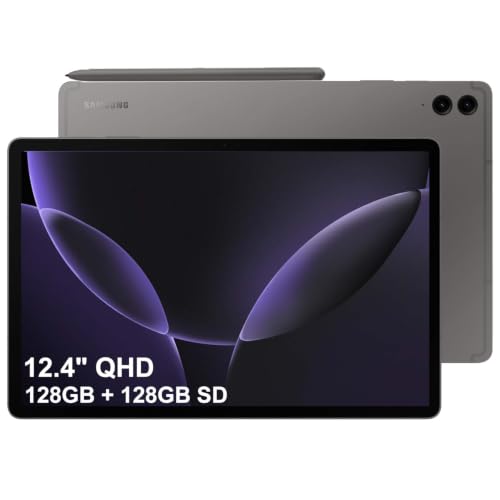
Samsung Galaxy Tab S9 Plus
The S9 Plus is the sweet spot in the range, offering a large AMOLED canvas, a fast processor, and an included S Pen in a size that still travels well. Its 12.4-inch screen suits illustration and comics, its battery lasts through a drawing session, and its DeX mode turns it into a desktop for administration. For most professional artists, the Plus is the right balance of size, performance, and portability.
The Galaxy Tab S9 Plus gives artists a 12.4-inch AMOLED display with the same Wacom EMR S Pen as the Ultra, in a size that is easier to carry and to hold. The screen is large enough for illustration and comics, the 120Hz refresh rate keeps strokes smooth, and the AMOLED panel shows deep blacks and vivid colour. The tablet is IP68 rated, the S Pen stores magnetically, and the processor handles large files with ease.
The S Pen offers pressure sensitivity and tilt, with no charging needed, and the tablet runs Clip Studio Paint, Infinite Painter, Krita, and Samsung PENUP without fuss. Battery life is good for a screen this size, storage is expandable, and the tablet is light enough to hold for a drawing session, though a stand helps for long work. It is the sweet spot in the range for most artists: large enough to draw comfortably, small enough to carry in a bag, and cheaper than the Ultra by a clear margin.
Strengths: Large AMOLED canvas, included Wacom EMR S Pen, 120Hz display, IP68 rating, expandable storage, and a portable size for a 12-inch tablet.
Trade-offs: Expensive, and the S Pen has no Bluetooth features. The screen is smaller than the Ultra, so very large work needs more zooming.
Who it fits: Illustrators, comic artists, and designers who want a large Wacom canvas that still travels well.
The S9 Plus pairs well with a keyboard case, turning it into a laptop for writing and administration, and a folding stand for drawing. For a freelancer who works in cafes and client offices, it is the most versatile tablet in this guide, handling drawing, notes, media, and work in a single device.
Check price on Amazon: Samsung Galaxy Tab S9 Plus

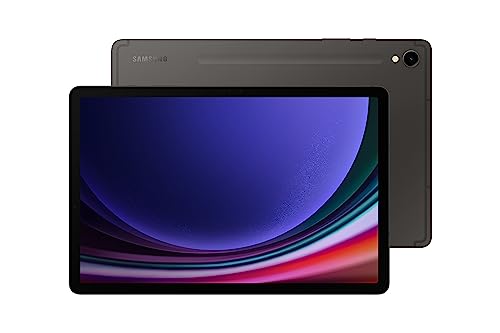
Samsung Galaxy Tab S9
The Tab S9 is the most portable flagship Wacom tablet, with an 11-inch AMOLED display, a fast processor, and an included S Pen in a body that fits in a small bag. Its bright screen stays readable outdoors, its battery lasts through a day of sketching, and its IP68 rating protects it in rain. For an artist who draws everywhere, the S9 is the tablet that will actually be carried, and a tablet that is carried gets drawn on.
The Galaxy Tab S9 is the smallest flagship Wacom tablet, with an 11-inch AMOLED display, a 120Hz refresh rate, and an included S Pen that uses Wacom EMR technology. For artists who draw on the move, its size is the advantage: it fits in a small bag, it can be held one-handed, and it sets up anywhere in seconds. The AMOLED screen is bright and colourful, the processor is fast, and the tablet is IP68 rated, so it survives rain and splashes.
The S Pen offers pressure sensitivity and tilt, and the tablet handles the full range of art apps, including Clip Studio Paint and Krita, with large files and many layers. Battery life is strong for the size, storage is expandable, and the tablet supports DeX mode for desktop work. It is the best choice for an artist who sketches in cafes, on trains, or in parks, because it is the flagship drawing experience in the most portable body Samsung makes.
Strengths: Portable 11-inch size, bright AMOLED display, included Wacom EMR S Pen, 120Hz smoothness, IP68 rating, and flagship performance.
Trade-offs: Smaller canvas than the Plus and Ultra, so detailed work needs more zooming, and the price is high for the size. The S Pen has no Bluetooth features.
Who it fits: Artists who draw on the move, students, and anyone who wants flagship Wacom performance in a portable tablet.
The Tab S9 is also a good travel companion, because its small size and long battery life suit a day out, and its bright screen stays readable outdoors. For a sketcher who draws everywhere, it is the tablet that will actually be carried, and a tablet that is carried gets drawn on far more than one left at home.
Check price on Amazon: Samsung Galaxy Tab S9

Samsung Galaxy Tab S11
The Tab S11 is the newest Wacom tablet, with a redesigned hexagonal S Pen that is more comfortable to hold, a bright anti-reflective display, and the latest processor. Its long software support means it will stay current for years, and its AI note features help students and professionals who take notes with the pen. For a buyer who wants the latest Samsung tablet, the S11 is the current choice, and its improved pen design is a genuine step forward.
The Galaxy Tab S11 is the newest Wacom-enabled tablet in this guide, with an 11-inch Dynamic AMOLED 2X display, a redesigned hexagonal S Pen, and the latest processor. The S Pen uses Wacom EMR technology, with a new design that is more comfortable to hold and supports increased tilt angles, and the tablet offers a 120Hz refresh rate, a bright anti-reflective screen, and IP68 water resistance. For buyers who want the latest Samsung tablet, the S11 is the current choice.
The redesigned S Pen draws with no charging or pairing, and its hexagonal shape prevents it from rolling off a desk, which is a small but welcome improvement. The tablet handles large art files smoothly, runs the full range of Android art apps, and offers a long battery life with fast charging. Storage is expandable, and the tablet supports DeX mode and Samsung AI features for notes and organisation. The S11 S Pen drops the Bluetooth remote features of older models, which matters for presentations but not for drawing, because the pen draws through EMR alone.
Strengths: Latest processor and design, redesigned comfortable S Pen, bright anti-reflective AMOLED display, IP68 rating, and long software support.
Trade-offs: Expensive as the newest model, the S Pen has no Bluetooth features, and the 11-inch screen is small for very large work. Accessories from older models may not fit.
Who it fits: Buyers who want the newest Samsung tablet with the latest Wacom pen, and artists who value the improved pen design.
The Tab S11 is a good long-term purchase, because Samsung supports it with years of software updates, so the tablet will stay current and secure. Its AI note features, including handwriting recognition and summarisation, are useful for students and professionals who take notes with the S Pen, making it more than just a drawing tablet.
Check price on Amazon: Samsung Galaxy Tab S11

Samsung Galaxy Tab S10 FE
The S10 FE is the best value Wacom tablet for most buyers, because it includes a real S Pen, offers IP68 water resistance, and costs far less than the flagship models. Its 10.9-inch display is bright and clear, its 90Hz refresh rate keeps strokes smooth, and its long software support means it will stay secure for years. For a student or a hobbyist, the S10 FE is the sensible choice, offering the core Wacom experience without the flagship price.
The Galaxy Tab S10 FE is the most affordable current Wacom-enabled tablet in the mid-range, with a 10.9-inch display, a 90Hz refresh rate, and an included S Pen that uses Wacom EMR technology. It offers the core Wacom experience, a pressure-sensitive pen that needs no charging, at a price well below the flagship S models, and it is IP68 rated, which is rare at this level. For students and hobbyists who want a real Wacom pen without a flagship price, the S10 FE is the sensible choice.
The S Pen offers pressure sensitivity and tilt, and the tablet runs Clip Studio Paint, Infinite Painter, Krita, and Samsung Notes without fuss. The LCD display is bright and clear, though it lacks the deep blacks of AMOLED, and the processor handles most drawing tasks smoothly, though very large files may lag. Battery life is good, storage is expandable, and the tablet is light enough to carry every day. It is the best value Wacom tablet for most buyers, because it includes the pen and the digitizer at a mid-range price.
Strengths: Affordable for a Wacom tablet, included S Pen, IP68 rating, 90Hz display, expandable storage, and long software support.
Trade-offs: LCD rather than AMOLED, slower processor than flagships for very large files, and the S Pen is a simpler version without Bluetooth. The screen is smaller than the FE Plus.
Who it fits: Students, hobbyists, and budget-conscious artists who want a real Wacom pen at a mid-range price.
The S10 FE is a good choice for a school or a family, because its price makes it feasible to buy one per person, and its durability and water resistance suit daily use by children and students. Its long software support means it will stay secure and current for years, which matters for a tablet bought for education.
Check price on Amazon: Samsung Galaxy Tab S10 FE

Samsung Galaxy Tab S6 Lite (2024)
The S6 Lite is the cheapest way to get a real Wacom pen, and its popularity at Walmart proves it: it includes an EMR S Pen, offers good palm rejection, and runs the art apps professionals use, all at a price that makes it feasible for a child, a student, or a beginner. Its modest processor is enough for sketching and inking, and its expandable storage holds a growing art library. For a first Wacom tablet, the S6 Lite is the easiest recommendation.
The Galaxy Tab S6 Lite (2024) is the cheapest Wacom-enabled tablet Samsung sells, and it is the best-selling drawing tablet at Walmart for a reason: it includes a real S Pen in the box, and it costs far less than any other tablet with a Wacom digitizer. The S Pen uses Wacom EMR technology, so it needs no charging or pairing, and it offers pressure sensitivity and tilt for sketching and note-taking. The 10.4-inch display is bright and clear, and the tablet runs the drawing apps Android artists rely on.
The S Pen tracks accurately, palm rejection works well, and the tablet handles most drawing apps smoothly, though very large multi-layer files may lag on its modest processor. Storage is expandable with a memory card, the battery lasts through a long drawing session, and the tablet is light enough to hold for hours. It is not water resistant, and the display is LCD rather than AMOLED, but for the price, and especially at Walmart frequent discounts, it is the easiest way to get a real Wacom pen.
Strengths: Cheapest Wacom tablet, real EMR S Pen included, good palm rejection, expandable storage, and a proven record as a best-seller.
Trade-offs: Modest processor for large files, LCD display, no water resistance, and the S Pen has no Bluetooth features. The screen is smaller than flagship tablets.
Who it fits: Beginners, students, and hobbyists who want a real Wacom tablet at the lowest possible price.
The S6 Lite is also a good choice for note-taking and schoolwork, because the S Pen writes naturally and Samsung Notes syncs across devices. Walmart often discounts it significantly, so patient buyers can get a capable Wacom tablet for the price of a basic media tablet, which is why it appears in so many back-to-school lists.
Check price on Amazon: Samsung Galaxy Tab S6 Lite (2024)
What Wacom EMR means and why it matters
Wacom EMR, or electromagnetic resonance, is the technology behind the S Pen on Samsung tablets. The tablet screen generates a magnetic field, and the pen draws a tiny amount of power from that field, so it needs no battery, no charging, and no pairing. The pen reports its position, pressure, and tilt to the tablet hundreds of times per second, which is why the line feels immediate and accurate.
The advantage over other stylus technologies is practical: an EMR pen never dies mid-drawing, it never needs a firmware update, and it works the moment it touches the screen. Active pens, such as the Apple Pencil, need regular charging and can die at the worst moment, while capacitive styluses offer no pressure sensitivity at all. For an artist, a pen that always works is worth more than any feature list.
S Pen generations and compatibility
Samsung has made several generations of S Pen, and they are not all interchangeable. The core drawing function, pressure and tilt through EMR, works across generations, but the Bluetooth features, such as remote shutter and air gestures, only work with the pen designed for that tablet, and the pen physical size differs between models. A Galaxy Tab S9 S Pen will not fit in a Galaxy Tab S6 Lite, and vice versa, though either pen will draw on either tablet.
The newest Galaxy Tab S11 S Pen drops Bluetooth entirely, focusing on the drawing experience with a redesigned hexagonal shape and increased tilt support. For drawing, that change does not matter, because the EMR drawing works the same, but for presentations, the loss of the remote shutter is noticeable. When buying a replacement pen, match the exact tablet model, and check the Samsung specifications for compatibility.
Drawing apps for Wacom-enabled tablets
A Wacom-enabled tablet is only as good as the apps it runs, and the Android art apps have matured significantly. Clip Studio Paint is the most popular professional app, with an excellent brush engine, comics tools, and animation features, and it offers a subscription that is free for the first months on Galaxy tablets. Infinite Painter is a strong alternative with a one-time purchase, while Krita is free and open source, with a capable brush engine and animation tools.
Samsung also includes PENUP, a social drawing app with tutorials and challenges, and Samsung Notes, which is excellent for handwritten notes and simple sketches. For note-taking, Goodnotes and Squid are popular, and for photo editing, the S Pen offers precise control in Lightroom and Photoshop. The best approach is to try two or three apps and keep the one whose brushes feel most natural, because the app shapes the drawing experience as much as the tablet does.
Wacom EMR versus Apple Pencil and other styluses
Wacom EMR, Apple Pencil, and Microsoft Surface Pen are the three main stylus technologies, and each has strengths. Wacom EMR needs no battery or charging, offers pressure and tilt, and works with a wide range of pens, including third-party options from LAMY and Staedtler. Apple Pencil needs regular charging, offers excellent latency and pressure, and works only with iPads. Surface Pen needs a battery, offers pressure and tilt, and works only with Surface devices.
For an artist choosing a tablet, the pen technology matters less than the ecosystem: a Samsung tablet with an S Pen suits Android users, an iPad with an Apple Pencil suits Apple users, and a Surface suits Windows users. The Wacom EMR advantage is practical: a pen that never dies and never needs pairing, with a choice of pen shapes from several makers, is the most convenient stylus to live with day to day.
Caring for the S Pen and the screen
The S Pen needs little care, because it has no battery and no moving parts, but its nib wears down with use and should be replaced when it feels scratchy or looks short. The tablet ships with spare nibs in the box or in the pen holder, and replacements are inexpensive. A worn nib can scratch the screen, so replace it promptly, and keep a few spares in the case.
The screen deserves a protector, especially for artists who press hard, because a matte screen protector adds a paper-like texture and protects against scratches. Clean the screen with a microfibre cloth, store the pen in its slot or a case rather than loose in a bag, and avoid leaving the tablet in a hot car, because heat can damage the battery and the display over time.
Buying Guide
Choose the screen size by how you draw. A 10-inch tablet suits sketching on the move, an 11-inch tablet balances portability and room, and a 12-inch or larger tablet suits illustration and comics at a desk. Hold the tablet if you can before buying, because the feel of the size matters more than the numbers.
Check the pen is included. Every tablet in this guide includes the S Pen in the box, but some retailers sell the tablet without it, and a replacement pen costs extra. Confirm the S Pen is included before buying, and check that it is the correct pen for the tablet model.
Think about the processor if you work with large files. A tablet with a modest processor will handle simple sketches happily but slow down on multi-layer illustrations with dozens of layers. The Galaxy Tab S9 and S11 handle large files better than the S6 Lite and S10 FE, and the difference is noticeable on complex work.
Consider water resistance if you draw outdoors. The Galaxy Tab S9, S9 Plus, S9 Ultra, S11, and S10 FE are all IP68 rated, which protects against rain and splashes, while the S6 Lite is not. For an artist who draws outside, water resistance is worth the premium.
Budget for the extras. A screen protector, a case with a pen holder, and a drawing app subscription can add to the total cost, and a good stand helps during long sessions. The tablet is the main purchase, but the accessories make it usable every day.
Try the pen before buying if possible. Visit a shop and draw a few lines, paying attention to how the pen feels, whether the line appears under the tip, and whether the pressure response suits your hand. A pen that feels right will be used every day, while one that feels wrong will gather dust, so a short hands-on check is worth the trip.
Check the software support life. Samsung supports its tablets with years of operating system and security updates, and a tablet with long support will stay secure and current. The newest models offer the longest support, while older models on sale may have less remaining, so check the support schedule before buying a discounted older tablet.
Frequently Asked Questions
What does Wacom-enabled mean?
Wacom-enabled means the tablet has a Wacom digitizer built into the screen, so it works with a Wacom EMR pen that needs no battery, charging, or pairing, and offers pressure sensitivity, tilt, and palm rejection. Samsung Galaxy Tab S tablets are the main Wacom-enabled tablets, because Samsung licenses Wacom EMR technology for its S Pen.
Do all Samsung tablets support the S Pen?
No, only models with a built-in Wacom digitizer support the S Pen, mainly the Galaxy Tab S series and the Fan Edition models, plus the Tab S6 Lite. Standard Galaxy Tab A models and most budget tablets do not support the S Pen, and no software update can add the missing hardware. Check the specifications before buying.
Does the S Pen need charging?
No, the S Pen uses Wacom EMR technology, which draws power from the tablet screen, so the pen never needs charging or batteries for drawing. Some older S Pen models used Bluetooth for remote features such as a camera shutter, and those features needed charging, but the core drawing always works without power. The newest S11 S Pen has no Bluetooth at all.
Can I use a Wacom pen on a Samsung tablet?
Yes, most Wacom EMR pens work on Samsung tablets, because they use the same technology, though the physical size and the Bluetooth features differ. A Wacom One pen, a LAMY EMR pen, and a Staedtler Noris digital pen all work on Galaxy Tab S tablets for drawing, which gives artists a choice of pen shapes and feels beyond the included S Pen.
What is the best Wacom-enabled tablet for drawing?
The Galaxy Tab S9 Ultra is the best for professional work, with the largest AMOLED canvas, while the Tab S9 Plus is the best balance of size and portability, and the Tab S9 is the best portable option. The Tab S10 FE is the best mid-range choice, and the Tab S6 Lite is the best budget option, with a real S Pen included at the lowest price.
Is a Wacom-enabled tablet better than a Wacom pen display?
It depends on the use. A Wacom-enabled tablet is portable, runs apps on its own, and works anywhere, while a Wacom pen display offers a larger screen and needs a computer. For drawing on the move, a Galaxy Tab is better, while for studio work, a Cintiq or a Movink display offers a larger canvas and a more precise pen.
Can I draw on a Galaxy Tab with my finger?
Yes, most drawing apps support finger drawing, but a finger offers no pressure sensitivity and poor precision compared with the S Pen. The S Pen is the reason to buy a Wacom-enabled tablet, because it offers pressure, tilt, and palm rejection that a finger cannot match. Use a finger for navigating the interface, and the pen for drawing.
Can I use any Wacom pen on a Galaxy Tab?
Most Wacom EMR pens work on Galaxy Tab S tablets, including the Wacom One pen, the LAMY EMR pen, and the Staedtler Noris digital, because they use the same electromagnetic resonance technology. The physical size and the Bluetooth features differ, so match the pen to the tablet for the best fit, but for drawing, any EMR pen will work.
Is the Galaxy Tab S9 Ultra too big for drawing?
It depends on the use. For a studio artist who draws at a desk, the 14.6-inch screen is an advantage, because a full illustration fits without zooming. For portable use, it is heavy and large, and the Tab S9 Plus or Tab S9 is a better choice. The Ultra suits a desk, while the smaller models suit a bag.
How long will a Galaxy Tab last for drawing?
A Galaxy Tab typically lasts five years or more for drawing, with the battery gradually losing capacity and the software support eventually ending. The S Pen lasts indefinitely, because it has no battery, and the tablet remains usable for drawing even after updates stop, as long as the art apps still run. Samsung long support means a new tablet will stay current for years.
Can I use a Galaxy Tab S Pen on a Wacom pen display?
No, not directly, because the S Pen is designed for a tablet screen, while a Wacom pen display uses a different pen, though both use EMR technology. Some Wacom EMR pens work on Galaxy tablets, and some Galaxy pens work on Wacom displays, but the physical size and the buttons differ, so the experience varies. For the best result, use the pen designed for the device, and keep the S Pen for the tablet.
Is the S Pen included with every Galaxy Tab S model?
Yes, every Galaxy Tab S, S Plus, S Ultra, and Fan Edition tablet in this guide includes the S Pen in the box, and the S6 Lite does too. Some retailers sell the tablet without the pen, or as a Wi-Fi-only bundle, so confirm the S Pen is included before buying, and check that it is the correct pen for the tablet model, because the pens differ in size and features.
What is the difference between the Galaxy Tab S9 and S10 FE for drawing?
The Tab S9 offers a brighter AMOLED display, a faster processor, and a 120Hz refresh rate, making it better for professional work and large files, while the S10 FE offers a good LCD display, a 90Hz refresh rate, and a lower price, making it better value for students and hobbyists. Both include a Wacom EMR S Pen, and both run the same art apps, so the choice comes down to budget and how demanding the work is.
Conclusion
The best Wacom-enabled tablet is the one that matches how and where you draw. The Galaxy Tab S9 Ultra is the largest canvas for professional work, the S9 Plus is the best balance of size and portability, the S9 is the best portable flagship, the S11 is the newest with a redesigned pen, the S10 FE is the best mid-range value, and the S6 Lite is the best budget starting point. Every one includes a real Wacom EMR S Pen that never needs charging, and every one runs the art apps that professionals use. Pick the largest screen you can comfortably carry, make sure the S Pen is included, and start drawing: the pen is the tool, and the art comes from practice.