What's inside
- Key Takeaways
- Quick Picks
- How We Chose These Picks
- Why Did 10.5 Inches Nearly Disappear?
- What Does 10.5 Inches Actually Feel Like in Use?
- How Do You Turn a Surface Go Into a Complete Working Kit?
- Who Is the 10.5 Inch Size Actually For?
- How Does 10.5 Inches Compare With Stepping Up or Down?
- What Should You Check in the First Week With a Surface Go?
- How Should You Set Up Windows for a 10.5 Inch Screen?
- How Do the Six Sit Alongside Each Other?
- How Do You Buy a Discontinued Tablet Without Regretting It?
- What Goes Wrong When People Shop This Size?
- Final Recommendation
- Frequently Asked Questions
- Related Guides
As an Amazon Associate I earn from qualifying purchases. This post may contain affiliate links at no extra cost to you.
widgetverdict.com is reader-supported. When you buy through links on our site, we may earn an affiliate commission.
Where to buy: honestly, the shelf is short. Two current machines carry checked listings in this guide — Microsoft’s Surface Go 3 and Surface Go 4 — and everything else at exactly 10.5 inches is a discontinued model, a predecessor or a category we discuss without links so you can recognise it when it surfaces second-hand.
Let us say the quiet part in the first paragraph: the best 10.5 inch tablets form one of the thinnest size classes in the entire tablet market. Manufacturers experimented with 10.5 inches as a premium step above the standard ten, buyers mostly shrugged and bought the cheaper ten or the grander eleven, and the class contracted to a handful of names. What remains is genuinely interesting, though. The two living members are Microsoft’s small Surfaces, which treat 10.5 inches as the smallest credible size for real Windows. Behind them stands a small museum of discontinued machines — an iPad Air, a Galaxy Tab and an earlier Surface Go — that still circulate and still tempt buyers with famous names at second-hand prices.
There is a reason the survivors cluster around one maker. Building a credible 10.5 inch tablet means designing for a narrow audience on purpose, and narrow audiences punish half-hearted products: the media giants walked away because their volumes live elsewhere, while Microsoft stayed because its audience — people who need Windows itself, shrunk — has nowhere else to go. A class kept alive by necessity tends to produce honest machines, and the two linked picks below are honest machines. The four prose picks are what the class looked like when it was still a fashion, and reading them alongside the survivors is a short education in how tablet categories live and die.
This guide therefore does two jobs at once. It reviews the two 10.5 inch tablets you can buy new with confidence, and it teaches you to evaluate the four you cannot, because the second-hand listings will not evaluate them for you. If you arrived expecting a long shortlist, recalibrate now: at this size, depth of judgement beats breadth of choice.
Key Takeaways
- The 10.5 inch class is thin by any honest count: two current linked picks and a tail of discontinued models.
- The Surface Go 4 is the refined choice, with Windows 11 Pro and the same travel-friendly footprint as its predecessor.
- The Surface Go 3 remains relevant because its Core i3 configuration still handles real desktop work in a tiny bag.
- The iPad Air 10.5 and Galaxy Tab A 10.5 are discontinued; buy them only knowingly, as used purchases with used-purchase risks.
- The Surface Go 2 explains where the line came from and still serves light duties, but its age shows in every comparison.
- At 10.5 inches you are buying a specific ergonomic idea — laptop enough, tablet sized — not a bargain tier.
Quick Picks
| Pick | Badge | Why it earns its place |
|---|---|---|
| Microsoft Surface Go 4 | The current standard | Windows 11 Pro, 8GB of memory and 128GB of storage in the 10.5 inch travel format. |
| Microsoft Surface Go 3 | Still genuinely useful | A Core i3 configuration that runs full Windows where other small tablets run mobile systems. |
| Apple iPad Air 10.5 (2019) | The discontinued favourite | A beloved model in its day; now a used-market judgement call, discussed without a link. |
| Samsung Galaxy Tab A 10.5 | The Android that was | Samsung’s one visit to this exact size; a media slate whose age must be priced in. |
| Microsoft Surface Go 2 | The origin story | The generation that proved the concept, now best understood as context and a budget used buy. |
| Marketplace 10.5 inch Android tablets | The unnamed remainder | Generic slates occasionally land on this size; the reading skills matter more than any badge. |
How We Chose These Picks
Size discipline came first, and at 10.5 inches it is a ruthless filter. Plenty of famous tablets live nearby — at 10.1, 10.4, 10.9, 11 — and a lazier guide would borrow them to fill the page. We refused: a pick either measures 10.5 inches or it does not appear, which is precisely why this list is short and why half of it is prose. The class’s thinness is not a failure of our research; it is the finding of our research, and reporting it plainly is more useful than disguising it.
Within that filter, we ranked by present-day buyability. The two Surface Go models carry verified listings, current-enough specifications and a clear reason to exist, so they anchor the guide. The discontinued trio — iPad Air 10.5, Galaxy Tab A 10.5 and Surface Go 2 — appear because buyers genuinely encounter them in resale channels and need a verdict that accounts for age, battery wear and software horizons rather than launch-era enthusiasm. The final prose pick covers the generic marketplace slates that occasionally surface at this size under unfamiliar names.
A note on what we excluded, because exclusion is half of editing a thin class. Several tablets market themselves with screen sizes that round toward 10.5 from either direction, and a few convertible laptops dip near it; none appear here, because a size guide that borrows from neighbouring sizes teaches its readers that sizes do not matter, in a guide whose entire premise is that they do. If your search began at 10.5 and ends at 11, the Related Guides at the foot of this page will take you there honestly, as a new decision rather than a smuggled one.
We also weighted the class’s actual purpose. Nobody buys 10.5 inches for a children’s cartoon screen; cheaper tens do that. This size sells an ergonomic proposition — large enough for split-screen work and comfortable reading, small enough for a coat-adjacent bag — and our judgements keep returning to whether each machine honours that proposition or merely occupies the measurement.
Why Did 10.5 Inches Nearly Disappear?
The size was born as a premium gesture. When Apple launched a 10.5 inch Pro-class iPad in 2017 and followed with the 10.5 inch Air, the extra half inch over standard models signalled thinner bezels and professional intent; Samsung answered with its own 10.5 inch Tab A for media buyers. For a moment the size looked like the new centre of the market. Then bezels shrank everywhere, and the same physical footprint that once housed 10.5 inches began housing 10.9 and 11. The size did not lose an argument about ergonomics; it was absorbed by its own success, as manufacturers kept the bodies and enlarged the glass.
Microsoft is the exception that kept the measurement alive, for a specifically Microsoft reason. The Surface Go line exists to shrink Windows, not to chase panel fashion, and 10.5 inches is where a touchscreen, a kickstand and a usable keyboard cover can coexist in something that still disappears into a small bag. Redmond kept the size because the size serves the brief, generation after generation, while everyone else’s 10.5 inch experiments were really bezel experiments wearing a size label.
The absorption had a second act worth knowing. As 10.5 inch hardware vanished from catalogues, its accessories, cases and replacement parts thinned with it, which is why a discontinued pick’s true cost includes a scavenger hunt its newer rivals do not impose. None of that makes the old machines bad; it makes them finite in a way a current product is not, and finite goods should be bought the way antiques are bought — for present pleasure at a present price, never as infrastructure.
Understanding that history protects your money. A discontinued 10.5 inch tablet is not an undiscovered bargain category; it is a leftover from a transition, and its value depends entirely on condition and price discipline. The two living Surfaces, meanwhile, should be judged as current products against current rivals at neighbouring sizes — which is the comparison the detailed sections now take up.
What Does 10.5 Inches Actually Feel Like in Use?
Half an inch sounds like a rounding error until it is expressed in area and in text. Against a 10.1 inch screen, a 10.5 inch panel carries noticeably more room: an extra column of a spreadsheet without horizontal scrolling, a document page that fits at a readable zoom beside a notes window, a film frame that fills more of your attention at arm’s length. Against an 11 inch screen, the difference reverses but shrinks; the 10.5 gives up a little canvas and buys back a little one-handed confidence and bag space.
The honest summary is that 10.5 inches is a worker’s increment. Readers will feel it mildly, viewers barely, but anyone who splits a screen — reference on the left, writing on the right — feels it every session. That is why the surviving machines at this size are keyboard-friendly Windows tablets rather than media slates: the increment pays rent in productivity and merely decorates entertainment.
How Do You Turn a Surface Go Into a Complete Working Kit?
Start with the keyboard cover, because without it the Go is a promise half-kept. Choose the cover as deliberately as the tablet: it is your keyboard, your trackpad and your screen protection in one object, and you will touch it more than any other part of the machine. Pair it on day one, set the trackpad sensitivity before frustration sets the habit of ignoring it, and learn the kickstand’s full range — the angle that suits a desk is not the angle that suits a lap, and the hinge is designed to serve both.
Next, the hub. A compact USB-C hub with an HDMI output and a couple of ordinary USB ports converts the Go from a traveller into a presenter: hotel televisions become second screens, projectors stop being negotiations, and the ancient printer in a client’s office becomes reachable. Keep the hub in the same bag pocket permanently; a hub that lives in a drawer at home is a hub you own but do not have.
Then the software habits. Pin your five real applications and remove the rest from the start view, because a 10.5 inch screen rewards focus and punishes clutter. Set cloud storage to keep recent files local and the archive online, so the 128GB in these listings works as a working shelf rather than a warehouse. Finally, configure the sign-in and updates once, properly: biometric or PIN entry for speed, updates scheduled overnight, and the machine will greet you each morning as a tool rather than a chore list.
Who Is the 10.5 Inch Size Actually For?
Three tribes keep this class alive. The first is the travelling professional whose laptop is technically portable but practically resented: the Go-sized machine goes to meetings the big laptop skips, and work that would have waited for the hotel happens in the room where it matters. The second tribe is students in web-and-document disciplines, for whom a small Windows machine covers the library, the lecture and the dorm desk without the ceremony of a full laptop setup. The third is the household second-computer buyer — the family that needs one real computer beyond the shared desktop, sized for a kitchen table and priced below a laptop, for homework, accounts and the hundred small tasks phones make miserable.
There is a fourth, smaller tribe worth a sentence: the deliberate minimalists, people who have decided that one small computer should do everything and have organised their digital lives — cloud files, web tools, modest demands — to make that true. For them the Go at 10.5 inches is not a compromise at all but a philosophy with a kickstand, and they tend to be the class’s most contented owners precisely because their expectations were designed alongside the machine’s limits.
Notice who is absent: the media-first family buyer and the bargain hunter. Both are better served at 10.1 inches, where the panels are cheaper and the ecosystems simpler. The 10.5 inch premium, such as it is, buys work ergonomics, and buyers who do not need work ergonomics are paying for a distinction they will never feel. That clarity — knowing the size is a tool shape, not a treat shape — is the difference between this class’s satisfied owners and its returned units.

Microsoft Surface Go 4 — The current standard
The Surface Go 4 is the 10.5 inch idea in its most mature form: a full Windows 11 Pro tablet, with 8GB of memory and 128GB of storage in the listed configuration, that weighs and travels like a paperback while behaving, once its keyboard cover is attached, like a small but serious laptop. That combination remains genuinely rare. Android tablets at this size ask you to accept mobile versions of your tools; the Go 4 simply runs the tools, in their desktop forms, with your files in their real folders.
Judge it by the days it is built for. It is the machine a consultant carries to a client site for the spreadsheet that must be edited in the room, the one a student takes when the library’s computers are all taken, the one that lives in a flight bag because the main laptop is overkill for a day of email, documents and calls. Windows 11 Pro in the listing matters for managed and business use, where joining domains and using professional security features are not luxuries. The 10.5 inch touchscreen is large enough for that work in focused bursts, and the Surface formula — kickstand behind, keyboard in front — turns café tables and train trays into plausible desks.
Day to day, the detail owners praise is the hinge. A kickstand sounds like a footnote until you have propped a tablet against a cereal box for the third morning running; the Go’s built-in stand holds its angle on a train tray, a kitchen counter and a conference table with the same indifference, and that reliability quietly converts sceptics. Combined with the touchscreen for quick taps and the cover for real typing, the machine covers the three postures of mobile work — hold, prop, type — without accessories beyond the one cover.
Its trade-offs are the line’s eternal ones, and maturity has softened rather than erased them. The keyboard cover is a separate purchase that belongs in your mental price from the first minute, because the Go without it is half a proposition. Performance is tuned for mobility, so sustained heavy workloads — large photo libraries, code builds, video timelines — will remind you that this is the smallest Surface, not a substitute for the largest. Battery expectations should be set at a working day of mixed use, not a weekend. Accept those boundaries and the Go 4 is the most coherent answer this thin class currently offers: a real computer that happens to measure 10.5 inches.
There is a subtler pleasure worth naming: the Go 4 is the rare tablet that improves a household’s other devices. Because it runs the same Windows as a desktop, files, passwords and habits transfer without translation, and the tablet becomes the desktop’s travelling half rather than a third ecosystem demanding its own rituals. Families with one Windows computer and a pile of phones will feel that coherence immediately; it is the unglamorous reason small Surfaces accumulate loyal owners out of proportion to their sales.
One more consideration separates satisfied owners from frustrated ones: ports and patience. A machine this small offers limited physical connections, so a small hub becomes part of the kit for anyone presenting, printing or wiring into older peripherals. Build that into the plan, and the Go 4’s compromises become a checklist rather than a series of surprises.
- Display: 10.5 inch touchscreen
- System: Windows 11 Pro
- Memory and storage: 8GB, 128GB
- Form: Surface tablet with kickstand; keyboard cover separate
- Colour in listing: Platinum
Strengths
- Full desktop Windows in a genuinely pocketable travel format
- Pro edition suits business and managed-device environments
- Kickstand design works on desks, trays and laps alike
Trade-offs
- Keyboard cover is essential and sold separately
- Performance ceiling shows under sustained heavy workloads
- Few ports make a small hub part of the real kit
Best for: mobile professionals and students who need real Windows in the smallest credible bag. Not suited for: buyers wanting a pure media tablet or a primary heavy-duty workstation.
Microsoft Surface Go 3 — Still genuinely useful
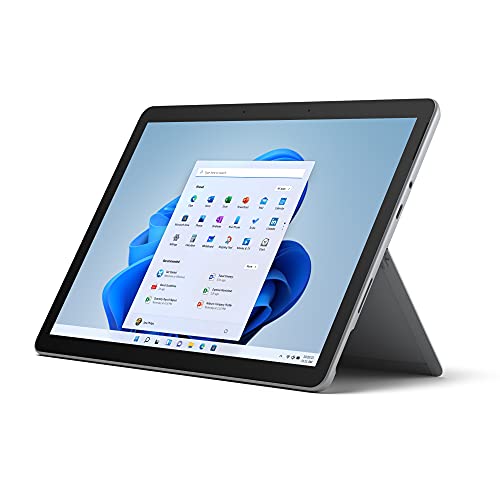
The Surface Go 3 survives in this guide on specification, not sentiment. The listed configuration pairs its 10.5 inch touchscreen with an Intel Core i3, 8GB of memory and a 128GB SSD — a specification that, even a generation on, describes a functioning Windows computer rather than a museum piece. For buyers who find the Go 4’s positioning steep, or who simply meet the Go 3 first in the listings, the question is not whether it was good in its launch year. It is whether it still does the job now, and for document work, browsing with many tabs, email, calls and light data tasks, it does.
Where the Go 3 earns its keep is predictability. It runs the same Windows world as its successor, accepts the same style of keyboard cover, and presents the same kickstand ergonomics at the same 10.5 inch size. An organisation or family that already owns Go accessories, or a traveller replacing a lost machine mid-season, will find the continuity valuable. The Platinum device-only listing also makes the purchasing clean: you are buying the tablet, and you should budget the cover as its own deliberate line rather than discovering its absence at unboxing.
Age shows in the margins rather than the centre. Newer machines sip power more efficiently, handle video calls with more polish and will receive major updates for longer; the Go 3’s horizon is shorter even though its present is sound. Think of it as the value expression of the same idea: if your workload is documents and daylight, the saving against the newer model buys the keyboard cover and the hub, and the resulting kit is arguably the smarter purchase. If your workload is growing, buy the headroom of the Go 4 instead and do not look back.
Consider also the Go 3 as the household’s deliberate second Windows machine. It is new enough to run current software without complaint, specified well enough in this configuration to avoid the small-Windows stutter that gives the category a bad name, and priced by the market as yesterday’s model — which, for homework, accounts, travel documents and video calls, is a distinction without a daily difference. The buyers who regret Go 3 purchases are almost never those who matched it to document-shaped work; they are those who asked it to be a gaming rig or a video studio, jobs its own maker assigns to larger Surfaces.
A practical note on configuration discipline: the Go line has always shipped in tiers, and the i3 with 8GB listed here is the tier worth having. Weaker configurations of small Windows tablets punish their owners daily, in stutters that no saving justifies. The presence of this particular specification in a verified listing is a large part of why the Go 3 holds a linked place while other ageing small tablets do not.
- Display: 10.5 inch touchscreen
- Processor: Intel Core i3 (listed configuration)
- Memory and storage: 8GB, 128GB SSD
- Form: device only in listing; keyboard cover separate
- Colour in listing: Platinum
Strengths
- Core i3 configuration keeps real Windows work fluid
- Same travel format and accessory world as the Go 4
- A rational value route into the Surface Go idea
Trade-offs
- Shorter remaining update horizon than its successor
- Keyboard cover still an additional, necessary purchase
- Efficiency and call polish trail the newer generation
Best for: buyers who want the Go concept at the older model’s positioning, with documents-first workloads. Not suited for: anyone planning to keep a tablet for the longest possible span.
Apple iPad Air 10.5 (2019) — The discontinued favourite
For a few years, this was simply the iPad most people were advised to buy: a 10.5 inch Air that borrowed the Pro line’s screen manners, stayed light in the hand and ran Apple’s ecosystem at full fluency. It is discontinued now, which is why it appears without a link and with a warning label made of words rather than icons. Everything admiring that follows is about the machine as designed; everything cautious is about the machine as you will actually find it — used, several years old, with a battery that has lived a life.
As a design, its virtues remain easy to feel. The 10.5 inch display was the size’s high-water mark for elegance, the body is thin and balanced for reading, and the app catalogue it unlocks is the deepest in this entire guide. Owners who bought one new and kept it often still use it daily, which tells you the concept was sound. If a family member offers you theirs, accept with gratitude.
Its afterlife in a household is worth picturing, because that is the realistic purchase. A used 10.5 inch Air becomes the reading tablet by the good chair, the recipe screen that replaced a paper cookbook, the travel companion whose loss would annoy rather than devastate. In those roles its remaining battery, even diminished, is usually sufficient, its screen remains lovely, and its app catalogue still covers the light end of life completely. The mistake is only ever the mismatch: buying it as a five-year primary device, or for a child whose school platform expects current software.
Buying one from a stranger is a different transaction. Battery health is the first unknown, and at this age it varies enormously; software support is the second, since a 2019 machine stands near the end of Apple’s update generosity; storage is the third, because many were sold in capacities that modern app sizes have outgrown. Price any example as what it is — a pleasant, ageing device with a finite horizon — and it can still be a kind purchase for reading, browsing and video. Price it by its famous name and you will overpay for nostalgia.
- Display: 10.5 inch, from Apple’s discontinued Air line
- Status: discontinued; used market only
- System: iPadOS, near the end of its update runway
- Key used-buy checks: battery health, storage tier, screen condition
- Listing status in this guide: prose-only
Strengths
- Elegant, balanced hardware that still feels well made
- Access to the deepest tablet app catalogue
- Excellent reading ergonomics at this size
Trade-offs
- Battery condition on used examples is a lottery
- Software support horizon is short and shrinking
- Famous-name pricing often exceeds rational value
Best for: a knowingly bought used iPad for reading and browsing, priced for its age. Not suited for: anyone needing years of updates or a warranty-backed purchase.
Samsung Galaxy Tab A 10.5 — The Android that was
Samsung visited 10.5 inches once, with a Tab A aimed squarely at living rooms: a media-first Android slate with a big-for-its-time screen, speakers tuned for shared viewing and the relaxed specification of a device meant for sofas rather than offices. It has since been discontinued, and Samsung’s own line moved to other sizes, leaving this model as the Android representative of a size the platform has largely abandoned. We include it because used listings keep it in circulation and because some buyers specifically want an Android tablet at exactly this measurement.
In its day, the proposition was coherent. A family could hand it around for video, keep it on the kitchen counter for recipes and calls, and rely on Samsung’s display competence to make both pleasant. The Tab A line has always understood the shared-screen job, and the 10.5 inch edition was its most spacious expression before the size was dropped.
There is one more honest use for it in 2026: the dedicated single-purpose screen. A discontinued Tab A, wiped and signed into a single streaming or music account, makes a calm kitchen or workshop companion precisely because nobody expects it to be anything else. Its large-for-Android screen flatters video, its age makes its owner relaxed about splashes and dust, and its limitations stop mattering the moment the job description shrinks to fit them. Many retired tablets across all brands end in exactly this honourable second career.
Time, though, has not been neutral. Android tablets of its era received shorter update support than buyers now expect, so a used example today is best regarded as a streaming and browsing appliance rather than a secure all-purpose computer. Battery wear compounds the caution. Our verdict mirrors the iPad Air’s, translated into Android terms: a fine machine to inherit, a machine to buy used only at a price that respects its age, and a machine whose existence mainly proves how completely Android has vacated this size since.
- Display: 10.5 inch, media-first positioning
- Status: discontinued; Samsung’s line moved to other sizes
- System: Android of its era; update support long ended
- Key used-buy checks: battery, charger inclusion, screen burn or wear
- Listing status in this guide: prose-only
Strengths
- Shared-viewing design from a display specialist
- Relaxed, family-friendly media positioning
- The rare Android option at exactly this size
Trade-offs
- Software support ended long ago
- Used batteries will show their years
- No successor keeps accessories or parts common
Best for: an inexpensive used media screen for a spare room, bought with open eyes. Not suited for: banking, work or any role needing current software support.
Microsoft Surface Go 2 — The origin story
The Surface Go 2 is where the surviving half of this class learned to walk. It took the original Go’s cramped-feeling concept, gave it the 10.5 inch screen the idea had always needed, and demonstrated that a genuinely small Windows tablet could be a pleasure rather than an apology. Every Go since is a refinement of this generation’s decisions, which makes the Go 2 historically important and, in the used market, perpetually tempting.
Temptation needs chaperoning. The Go 2’s configurations varied widely, and the weakest of them were underpowered in ways that frustrated even patient owners; the stronger ones remain pleasant for documents and browsing. A used buyer must therefore identify the exact configuration, not just the model name — a discipline this guide recommends for every discontinued pick and which matters most here, where the same badge covers machines of quite different ability.
There is also a collector’s footnote that occasionally distorts prices: because the Go 2 was the generation that fixed the concept, tidy examples with their original covers sometimes attract nostalgic listings at figures that belong to the Go 3’s territory. Resist the story premium. A used tablet’s value is its battery, its configuration and its remaining software life, and none of those improve because the model was historically significant. The Go 2 deserves respect in this guide; it does not deserve a surcharge in your basket.
Set against its own descendants, the Go 2’s role in 2026 is context and cautionary value. It explains why the Go 3 and Go 4 are shaped as they are, it serves light duties in homes that already own one, and it anchors the bottom of the used market for the size. Buy it only when the configuration is the strong one, the battery is healthy and the price acknowledges two successors. Otherwise, its own children are the better purchase — which is, in the end, what a good origin story is for.
- Display: 10.5 inch; the generation that set the Go formula
- Status: discontinued; two successors since
- Configurations: varied widely — verify the exact tier before buying used
- Key used-buy checks: processor tier, memory, battery health
- Listing status in this guide: prose-only
Strengths
- Proved the small-Windows concept at this size
- Strong configurations still handle documents pleasantly
- Shares the accessory logic of the current line
Trade-offs
- Weakest configurations were underpowered from new
- Age and battery wear are unavoidable factors now
- Two newer generations make a stronger case at most prices
Best for: informed used buyers who can verify a strong configuration at a fair price. Not suited for: anyone buying on the Surface name without checking the tier.
Marketplace 10.5 inch Android tablets — The unnamed remainder
The last seat in this guide belongs to a rotating cast: the generic Android tablets that occasionally appear at 10.5 inches under brands with short histories and shorter support pages. They exist because panel supply makes the size possible, and they sell because a famous measurement at an unfamiliar name still catches a searcher’s eye. We will not pretend a specific model represents them; instead, here is how to read any of them in ninety seconds.
First, find the resolution in numbers; if the listing offers adjectives instead, assume the softer tier of panel. Second, separate internal storage from any card bundled into the headline figure. Third, look for a named processor and a stated Android version, and treat the absence of both as information. Fourth, check the returns window, because with brands like these the returns window is effectively the warranty, the support desk and the resale market combined.
One pattern deserves its own warning, because it recurs at this size: the specification collage, where a listing assembles its headline from the best variant’s screen, the middle variant’s storage and a card’s capacity, none of which coexist in the box the buy button ships. The defence is boring and total — read the selected configuration summary immediately before paying, and screenshot it. Marketplace sellers rely on buyers reading the banner and skipping the summary; at 10.5 inches, where the generic tier hides behind a famous measurement, that skip is the entire business model.
Judged with that discipline, a generic 10.5 can be a defensible utility purchase — a recipe screen, a child’s supervised browser, a travel slate whose loss would sting briefly rather than deeply. Judged casually, it is how buyers end up owning a famous size attached to an anonymous disappointment. In a class this thin, the honest sentence is that the generic remainder is a reading exercise, not a recommendation, and we would rather teach the reading than fake the recommendation.
- Display: 10.5 inch claimed; verify resolution numerically
- Storage: separate internal memory from bundled card totals
- Processor: named chip or treat as a warning
- Support: the returns window is the safety net
- Listing status in this guide: prose-only category pick
Strengths
- Lowest-cost route to this exact screen size
- Adequate for streaming, recipes and supervised browsing
- Occasionally bundles cases or keyboards in the box
Trade-offs
- Brand continuity and updates are unreliable
- Specification claims require sceptical verification
- Resale value evaporates quickly
Best for: a low-stakes utility screen bought cheaply and checked carefully. Not suited for: a primary device expected to serve securely for years.
How Does 10.5 Inches Compare With Stepping Up or Down?
Step down to 10.1 and the market widens dramatically while the proposition changes character: cheaper panels, simpler systems, media first. A household choosing between a 10.1 inch Android slate and a Surface Go is not choosing between sizes at all; it is choosing between a screen and a computer, and should make that choice on software, not on the tape measure. Step up to 11 and the modern mainstream begins — the current iPads and Galaxy Tabs live there, with fresher processors, longer update runways and accessory ecosystems in full health. The 11 inch step is the right answer for most buyers who do not specifically need Windows in miniature.
So the honest map of the neighbourhood is this: 10.1 for value media, 11 for the modern mainstream, 12 and above for canvas and split-screen grandeur, and 10.5 as a narrow bridge occupied almost entirely by one idea — Windows, shrunk with intent. Buyers who cross that bridge deliberately tend to stay on it for years, upgrading Go to Go. Buyers who wander onto it because a discontinued badge looked cheap tend to wander back. The size is a destination for a specific traveller, and this guide’s structure — two living picks, four pieces of history — is simply that truth with the numbers filled in.
What Should You Check in the First Week With a Surface Go?
Run the updates before you judge anything; a small Windows machine out of the box is a half-finished sentence, and its fans, battery behaviour and drivers all settle after the first round of patches. Then test the three scenarios you actually bought it for, in their real locations: the document on the train tray, the call from the kitchen, the presentation through the hub. A Go that passes its own audition in week one will serve for years; a Go bought for imaginary scenarios fails slowly and expensively.
Check the keyboard cover’s behaviour on your lap as well as your desk, because the lap is where small convertibles are won and lost, and adjust your posture expectations accordingly — a kickstand design prefers a surface, and owners who mostly work from sofas should rehearse that reality early, while returns are still simple. Finally, set the backup and sign-in recovery options while the machine is new and the passwords are fresh in mind; small travel computers are lost and stolen out of proportion to their size, and the owner who prepared treats that as an inconvenience rather than a catastrophe.
How Should You Set Up Windows for a 10.5 Inch Screen?
Display scaling is the first decision, and the default is not always your friend. At 10.5 inches, a slightly larger scaling setting trades a little canvas for text that never needs squinting, and most owners settle happier a notch above the factory choice. Experiment for one day at each setting rather than deciding in the shop; eyes adapt, and the second day is the truthful one. Pair that with a dark theme for evening use and the small screen stops feeling like a compromise and starts feeling like a cockpit.
Window habits come next. Full-screen single applications waste the size’s one structural advantage, so practise the two-window split until it is reflex: source on the left, work on the right, each granted half a screen that the 10.5 inch panel makes genuinely usable where a 10.1 inch panel makes it cramped. Virtual desktops extend the trick — one desktop for the current project, one for communication — and cost nothing but the minute spent learning the gesture.
Finally, respect the touch-and-type duality. Use touch for consumption and the cover’s keys for creation, and resist the middle habit of pecking at the on-screen keyboard for anything longer than a search term; that habit, more than any specification, is what makes small Windows tablets feel inadequate to the people who abandon them. Set up well, the Go machines disappear into the work. Set up carelessly, they feel like small laptops with excuses — and the difference is entirely in these first-evening choices.
How Do the Six Sit Alongside Each Other?
| Pick | Status | System | Defining trait |
|---|---|---|---|
| Microsoft Surface Go 4 | Current | Windows 11 Pro | The mature small-Windows proposition |
| Microsoft Surface Go 3 | Current listing | Windows | Core i3 configuration keeps it capable |
| Apple iPad Air 10.5 (2019) | Discontinued | iPadOS | Elegant hardware, ageing software runway |
| Samsung Galaxy Tab A 10.5 | Discontinued | Android | Media-first slate from the size’s Android era |
| Microsoft Surface Go 2 | Discontinued | Windows | The generation that set the formula |
| Marketplace 10.5 inch tablets | Rotating | Android | Unnamed brands; a reading exercise |
How Do You Buy a Discontinued Tablet Without Regretting It?
Half of this guide is discontinued, so the skill matters more here than in any neighbouring size. Begin with the battery, because it is the component that ages whether the tablet is used or shelved: ask for its health or cycle information where the system provides it, and treat evasiveness as a no. Continue with the screen — bright patches, dead pixels and worn oleophobic coating all announce themselves in the first minute of handling, so buy where handling or a returns window is possible.
Add the accessories to the interrogation. A discontinued tablet without its charger, or with a case disintegrating at the corners, is telling you how its previous owner treated it; believe the evidence. Conversely, a complete kit — original charger, sound cover, no screen wear — signals the careful ownership that makes used purchases succeed, and is worth a modest premium over a bare, battered example of the same model. In the used market you are buying the previous owner as much as the product.
Then interrogate the software horizon honestly. A tablet that no longer receives security updates can still stream, read and display recipes for years, and pricing it as that appliance is fair to both sides. Pricing it as a general computer — for banking, work accounts and children’s unsupervised use — is where regret is manufactured. Match the machine’s remaining life to a job that fits inside it.
One more check costs nothing and reveals plenty: charge the machine fully, then use it for an hour of ordinary browsing and note the drain. A healthy used tablet sips; a tired one gulps, and that single hour tells you more about the next two years of ownership than any cosmetic inspection. Sellers who refuse the test have answered it.
Finally, verify the exact configuration against the model name, a discipline the Surface Go 2’s section insists on and which applies across this whole class. Badges persist; tiers differ. The ninety seconds spent confirming memory, storage and processor will save the ninety days of living with the wrong one.
What Goes Wrong When People Shop This Size?
The signature mistake is assuming the size is a tier. Buyers see 10.5 inches positioned above 10.1 in an old line-up and infer a hierarchy that no longer exists; today the measurement tells you about shape, not rank, and an 11 inch budget tablet will out-screen a 10.5 inch veteran while a Surface Go will out-work both. Buy the machine, not the number.
A second mistake is paying new money for discontinued names. The iPad Air 10.5 and Tab A 10.5 wear famous badges, and resale listings lean on that fame; the correct price for either is set by battery, condition and remaining support, not by what the badge cost in its launch year. A third mistake is forgetting the keyboard arithmetic on the Surfaces: the Go proposition includes a cover, and a comparison that omits it flatters the Go against rivals whose keyboards are bundled or irrelevant.
There is a fifth mistake, specific to the Surfaces: treating the device-only box as the whole purchase and then resenting the accessories. The Go is a system — tablet, cover, perhaps hub — and its honest price is the system’s price. Buyers who budget for the system from the start report satisfaction; buyers who discover it in instalments report feeling nickelled, even when the total is identical. Decide the whole kit on day one and the Go’s economics become calm.
And a fourth, quieter mistake: buying a 10.5 inch tablet for a job that never needed the increment. If the tablet will only ever stream video full-screen, a cheaper 10.1 inch machine does the same work; the half inch earns its keep in split screens, documents and reading, and buyers should be honest about whether their days contain those things.
Final Recommendation
Buy the Surface Go 4 if the 10.5 inch idea appeals in its living form: it is the class’s current standard, a real Windows computer in the smallest bag that can honestly hold one. Choose the Surface Go 3 when its Core i3 configuration meets your workload and the difference funds the keyboard cover that completes the machine. Treat the discontinued trio as used purchases governed by battery, configuration and price discipline, and the generic remainder as a reading exercise rather than a recommendation. The 10.5 inch tablet survives not as a crowd but as a proposition — laptop enough, tablet sized — and the buyers who understand that proposition precisely are the ones this small, stubborn class still serves beautifully.
Frequently Asked Questions
Why are there so few 10.5 inch tablets now?
Because the size began as a bezel statement. Once thin bezels became universal, manufacturers kept the same bodies and fitted 10.9 and 11 inch screens into them, absorbing the class. Microsoft kept 10.5 inches because the Surface Go’s brief — smallest credible Windows — still points at exactly that measurement.
Surface Go 3 or Go 4: which should I buy?
The Go 4 if you value the longer support horizon, Windows 11 Pro and the more efficient, polished generation. The Go 3 if its Core i3, 8GB configuration covers your workload and the saving usefully funds the keyboard cover and hub that both machines need to feel complete.
Is a used iPad Air 10.5 still worth it?
As a reading, browsing and video device at a price that respects its age and battery, yes. As a long-term primary tablet, no: its software runway is short, and a newer entry iPad at a neighbouring size is the safer spend for anyone planning years of use.
Does 10.5 inches make a real difference over 10.1?
For split-screen work and documents, yes — the extra area is felt in every session. For full-screen video, barely. The size rewards people who work in two windows and merely pleases people who watch in one, which is why its survivors are work-leaning machines.
Is 10.5 inches a good size for reading?
Quietly excellent. The page area sits close to a large paperback spread, text columns fall at comfortable widths in both orientations, and the machines at this size — the Air especially — were balanced for one-handed holding in a way larger tablets are not. Readers who find 11 inches a two-handed commitment and 10.1 inches a little tight often discover that this discontinued-feeling measurement was, for books, the sweet spot all along.
Are discontinued 10.5 inch tablets safe to use?
For streaming, reading and display duties, yes, with ordinary care. For accounts that matter — banking, primary email, work systems — a tablet beyond its security-update life should be retired from those roles, whatever its screen still promises. The sensible pattern is demotion, not disposal: the ageing tablet becomes the household’s media screen, and sensitive work moves to supported devices.
Why does this guide include discontinued tablets at all?
Because buyers meet them. Search results, resale platforms and family hand-me-downs put discontinued 10.5 inch tablets in front of real shoppers every day, and a guide that only lists what is new would abandon those shoppers to launch-era reviews written when the machines were young. Our prose sections exist to give those encounters a current verdict: what the machine was, what time has done to it, and what it is rationally worth now.
What accessories does a Surface Go really need?
The keyboard cover first, without debate. A compact USB-C hub second, if you ever present, print or connect older peripherals. After that, restraint: a sleeve for the bag, perhaps a pen if your work involves marking documents, and nothing else until a real need appears. The Go’s charm is travelling light; accessory sprawl quietly betrays it.
Can the Surface Go models replace a laptop entirely?
For documents, email, browsing, calls and light data work, genuinely yes — that is the line’s purpose. For sustained heavy workloads, large creative projects or all-day typing marathons, a larger laptop remains the right tool, and the Go works best as either a light-duty only computer or a traveller beside a bigger one.
Related Guides
The sizes and shapes around this one each make their own argument: Best 11 Inch Tablets for Work, Play and Everything Between, Best 12 Inch Tablets for Split-Screen Work and Big Canvas Apps and Best 7 Inch Tablets: A Small Size That Is Nearly Gone.


