What's inside
- Key Takeaways
- Quick Picks
- How Did We Choose These Powerline WiFi Range Extenders?
- How Does Powerline Networking Actually Work in a Real House?
- How Do the Six Powerline Picks Compare?
- How Do You Install a Powerline WiFi Kit for the Best Result?
- When Does Powerline Beat a Mesh System or an Ordinary Extender?
- What If Your Powerline Link Underperforms? A Troubleshooting Order
- What Mistakes Do Powerline Buyers Make?
- Which Rooms in Your House Are Quietly Asking for Powerline?
- Final Recommendation
- Frequently Asked Questions
- Related Guides
As an Amazon Associate I earn from qualifying purchases. This post may contain affiliate links at no extra cost to you.
widgetverdict.com is reader-supported. When you buy through links on our site, we may earn an affiliate commission.
Where to buy: the four linked kits in this guide are sold through Amazon at the listings attached to their names. Two further picks are covered in prose only, without links — they are wired-only powerline kits discussed honestly for the job they actually do, and you will find them in any networking retailer’s powerline section under the names given.
The best powerline wifi range extenders solve a problem that defeats ordinary extenders: the room where the signal dies is not merely far from the router, it is shielded from it — behind foil-backed insulation, across a metal-framed extension, down in a basement, or up in a loft conversion wrapped in modern building materials. A normal extender has to hear the router through all of that before it can repeat anything. A powerline kit sidesteps the fight entirely by sending the network through the house’s electrical wiring to the problem room, then broadcasting fresh WiFi from a socket there.
That difference in mechanism changes what “good” means. A powerline extender is not judged on how bravely it repeats a fading signal, but on how cleanly your wiring carries data, how honestly the kit’s speed class maps to your circuits, and whether the far unit’s WiFi is strong where your devices actually sit. It also introduces a condition no radio product has: your electrical installation becomes part of your network, with all the quirks — separate circuits, consumer units, noisy appliances — that implies.
This guide covers four linked WiFi powerline kits from TP-Link, Tenda and NETGEAR, plus two prose-only wired kits that we include deliberately and label clearly. The wired kits do not broadcast WiFi at all, and recommending them in a WiFi extender guide requires explanation, which the relevant sections give in full: for some houses, powerline Ethernet feeding a separate access point you already own is the strongest architecture of all, and a guide that hid that fact to keep its categories tidy would be failing its readers.
Key Takeaways
- Powerline kits carry the network through your electrical wiring, so they reach rooms that radio signals cannot penetrate.
- The TP-Link AV1000 kit with its AC1200 WiFi extender unit is the most complete linked pick: Gigabit ports and a passthrough socket per its listing.
- Powerline speed classes are laboratory ceilings; real throughput depends on your circuits, distance and electrical noise.
- Both adapters must usually sit on the same electrical system, and performance across separate consumer units or circuits varies by house.
- Two picks in this guide are wired-only kits covered in prose: they create no WiFi and suit owners feeding a separate access point.
- Plug powerline adapters directly into wall sockets — extension strips, especially surge-protected ones, can strangle them.
Quick Picks
| Pick | Badge | Why it earns its place |
|---|---|---|
| TP-Link AV1000 Powerline Ethernet Adapter WiFi Extender Kit | Best overall powerline | AV1000 powerline with an AC1200 dual-band WiFi extender unit and Gigabit ports per maker. |
| Tenda AV1000 WiFi Powerline Adapter Kit with Gigabit Ports | Best value WiFi kit | AV1000 kit with AC650 dual-band WiFi at the far end, aimed at streaming households. |
| TP-Link Powerline WiFi Extender – Powerline Adapter | Best established kit | The long-running AV600 kit that expands both wired and WiFi connections. |
| NETGEAR Powerline Adapter + Wireless Access Point Kit | Best NETGEAR option | A 1,000 Mbps-class wall-plug kit pairing powerline with a wireless access point. |
| TP-Link AV1000 wired powerline kit (prose-only) | Best wired-only | Ethernet over powerline with no WiFi radio — feeds a separate access point. |
| NETGEAR PLP2000 wired powerline kit (prose-only) | Best wired capacity | A wired-only kit in the 2,000 Mbps class per its maker, for Ethernet delivery only. |
How Did We Choose These Powerline WiFi Range Extenders?
We shortlisted for the houses that actually need powerline, not for the houses that merely find it interesting. The qualifying problem is a specific one: a target room that wireless cannot reach in usable strength, in a building where running an Ethernet cable is impractical — rented walls, finished interiors, listed fabric, or simply a route that would cross the whole house. Kits were judged on how completely they solve that problem end to end: the powerline link itself, the quality of the WiFi broadcast at the far end, the ports available for wired devices, and the honesty with which their speed classes can be interpreted.
Every linked pick had to deliver WiFi at the far end, because that is this guide’s subject. The two prose-only wired kits are present as a deliberate, labelled exception, included because a meaningful share of readers own a spare router or access point and would be best served by feeding it with powerline Ethernet. They are flagged in the table, in their sections and in the sources file, and no reader should finish this guide believing they broadcast WiFi. Clarity about that distinction is the price of including them, and we pay it repeatedly rather than once.
Brand accountability weighed heavily, as it should for devices that plug into your mains wiring and stay there for years. TP-Link effectively created the consumer powerline WiFi category and supports it in depth; NETGEAR’s kit serves owners who prefer that ecosystem; Tenda earns its place by bringing the AV1000 class and Gigabit ports to a value price with a WiFi extender unit included. All three publish the specifications we cite, and all speed figures in this guide are attributed to their makers as classes and ceilings, never as measured promises.
We also filtered for the practical details that decide ownership satisfaction: passthrough sockets, so the kit does not steal the wall outlet it occupies; Gigabit rather than older fast-Ethernet ports on the modern picks, so the wired side is not the bottleneck; and plug-and-play pairing, because a technology sold on simplicity should not demand a networking background to commission. Kits that failed the far-end WiFi requirement were excluded from the linked picks no matter how strong their powerline link was.
How Does Powerline Networking Actually Work in a Real House?
A powerline kit is a pair of adapters. The first plugs into a socket near the router and connects to it with a short Ethernet cable; it impresses the network signal onto the house’s mains wiring. The second plugs into a socket in the target room, recovers the signal, and — in the WiFi kits in this guide — broadcasts a fresh wireless network from that room while also offering Ethernet ports for wired devices. The data does not travel through your consumer unit to the street and back; it rides the internal wiring between the two sockets.
The wiring, therefore, is the network, and its condition sets the result. Short, direct runs on the same circuit give the best outcomes. Longer runs, journeys across circuits through the consumer unit, and wiring shared with electrically noisy devices — older motors, cheap chargers, some LED supplies — all take their share. This is why two neighbours can buy the same kit and report different experiences, and why powerline is best bought from somewhere with a sane returns policy and tested room by room during the first week.
The speed classes — AV600, AV1000, and the 1,000 and 2,000 Mbps classes used by the NETGEAR listings — are standardised laboratory figures for the powerline link under ideal conditions. Real throughput is a fraction of the class figure, and the fraction varies by house. What matters practically is that even a modest real-world powerline link usually delivers a steadier connection to a shielded room than a radio repeater straining through the shielding, because the powerline path does not pass through the wall materials that defeated the WiFi in the first place.
One installation rule outranks all others: plug the adapters directly into wall sockets. Extension leads add noise and distance, and surge-protected strips actively filter the frequencies powerline uses, sometimes reducing a kit to a crawl or preventing pairing altogether. If the socket by the router is precious, choose a kit with a passthrough socket — the top pick in this guide has one — so the outlet remains usable for an ordinary plug while the adapter keeps its direct connection to the wall.
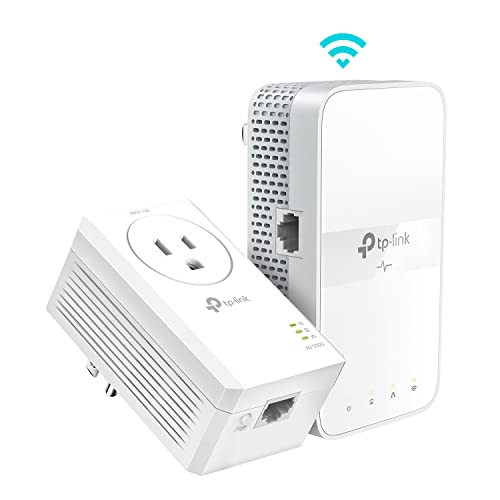
TP-Link AV1000 Powerline Ethernet Adapter WiFi Extender Kit — Best overall powerline
This is the kit that defines the modern category, and its listing describes the complete pattern: an AV1000 powerline adapter for the router end and an AC1200 dual-band WiFi extender for the far end, Gigabit ports, and a passthrough socket so the adapter does not consume the outlet it sits in. Each element of that description answers a real ownership complaint about earlier powerline generations — slow ports, stolen sockets, weak far-end WiFi — and the completeness is why it leads this guide.
The far unit’s dual-band AC1200 WiFi is the substantive upgrade over the older AV600 kit also listed here. The shielded rooms that need powerline — loft conversions, extensions, basement rooms — are usually rooms people live and work in, with laptops and phones that benefit from a proper 5 GHz lane at close range. Because the powerline link delivers the feed through the wiring, that far-end WiFi starts at full local strength; the room gets a genuinely fresh network rather than a repeated whisper, and the experience difference versus a straining radio repeater is immediate.
The passthrough socket sounds trivial until you map a real house’s sockets. The outlet nearest the router is often the most contested in the home, and a kit that monopolises it breeds resentment and extension leads — the very thing powerline must avoid. Passthrough keeps the adapter plugged directly into the wall, as the technology demands, while the socket stays available for the lamp or the television. It is a small design decision that protects the installation’s performance every day it is in service.
Set expectations on the AV1000 figure correctly: it is the powerline standard’s class ceiling, and your circuits will deliver a portion of it. For the shielded-room workload — streaming, calls, browsing, a wired desktop or console on the far unit’s Gigabit port — that portion is comfortably sufficient in most homes, and steadier than the radio alternative. Houses with very old wiring or adapters forced onto distant separate circuits will see less, which is why the first-week room-by-room test matters. Within the category’s honest limits, this is the most complete answer money buys here.
- Powerline class: AV1000 per maker
- Far unit: AC1200 dual-band WiFi extender
- Ports: Gigabit Ethernet
- Socket: passthrough design per listing
- Pairing: plug and play positioning
Strengths
- Complete pattern: AV1000 link, AC1200 dual-band far-end WiFi, Gigabit ports
- Passthrough socket keeps the wall outlet usable
- Strongest far-end WiFi of the linked kits
Trade-offs
- Real throughput is a fraction of the AV1000 class, set by your wiring
- Cross-circuit performance varies by house
- Costs more than the older AV600 generation it supersedes
Best for: shielded rooms — lofts, extensions, basements — needing a full fresh WiFi network delivered over the wiring.
Not suited for: homes where a simple radio extender already reaches, making powerline an unnecessary expense.

Tenda AV1000 WiFi Powerline Adapter Kit with Gigabit Ports — Best value WiFi kit
Tenda’s kit brings the AV1000 powerline class and Gigabit ports down to a value position, pairing them with an AC650 dual-band WiFi extender at the far end. The maker aims it at HD and 4K streaming households, and that framing is fair: the powerline link’s job is to deliver a steady feed through wiring to a room radio cannot reach, and a streaming workload cares about steadiness far more than about the last increment of headline speed class.
The far-end WiFi is a class below the TP-Link leader’s — AC650 against AC1200 — and the practical meaning of that gap deserves translation. In the target room itself, at the short ranges involved, the Tenda unit covers ordinary streaming, calls and browsing without strain. The difference appears with several busy devices in the far room at once, or when the far room is large enough that its own internal distances grow. A single-occupancy study, bedroom or snug is this kit’s natural territory; a family room full of simultaneous users is the TP-Link’s.
Gigabit ports on a value kit matter more than they appear to. Cheaper powerline generations often hid fast-Ethernet ports that capped wired devices well below what the powerline link could carry, quietly bottlenecking the desktop or television the owner wired in for reliability. Tenda does not make that mistake here: the wired device at the far end gets the full benefit of whatever your circuits deliver, which makes this kit a genuinely sensible feed for a single wired workstation plus wireless coverage around it.
Plug-and-play pairing keeps commissioning to the usual powerline pattern — adapters in wall sockets, pair, position, test. As with every kit in this guide, buy it expecting your wiring to have opinions, and run the room-by-room verification in the first week while returns are simple. Judged as the value route into the AV1000 class with real WiFi at the far end, it earns its place without caveats beyond the category’s own.
- Powerline class: AV1000 per maker
- Far unit: AC650 dual-band WiFi per listing
- Ports: Gigabit ports
- Positioning: plug and play, aimed at HD and 4K streaming households
Strengths
- AV1000 class and Gigabit ports at a value position
- Dual-band WiFi at the far end covers the target room properly
- Well matched to streaming and single-workspace rooms
Trade-offs
- AC650 far-end WiFi is a class below the guide leader
- Busy multi-user far rooms will feel the smaller WiFi budget
- Brand support depth trails TP-Link
Best for: single shielded rooms — a study, bedroom or snug — needing streamed and browsed coverage over the wiring.
Not suited for: large far rooms with several simultaneous heavy users.

TP-Link Powerline WiFi Extender – Powerline Adapter — Best established kit
This AV600 kit is the elder of the guide — the listing’s own language about expanding both wired and WiFi connections, with plug-and-play setup and power saving, describes the product that introduced many households to powerline WiFi in the first place. Its longevity is evidence in its favour: the design is understood, the behaviour documented, and the installed base enormous. For a modest need, an established kit at an established price remains a rational buy.
The AV600 class sets the honest ceiling. Its powerline link is a generation behind the AV1000 kits above it, and the far-end WiFi belongs to its era as well. What that means in practice is a kit for the lighter shielded room: the spare bedroom that needs browsing and a smart television fed, the study with one laptop, the room where the requirement is a dependable connection rather than a fast one. Powerline’s steadiness advantage over a straining radio repeater survives at this class; only the headroom shrinks.
Power saving, mentioned in the listing, is a small but real virtue in a device that lives plugged in permanently. Powerline adapters sip rather than gulp, and across years of always-on service the efficient kit is the one you forget about entirely — which is the correct relationship to have with infrastructure. The plug-and-play pairing similarly suits the buyer this kit serves: sockets, pairing button, done.
Why not simply always buy the AV1000 kit? Because categories have floors as well as ceilings, and a household solving one light-duty room gains little from headroom it will never use. The countervailing warning is about the future: if the far room’s role might grow — a home office forming, a teenager arriving — the price gap to the AV1000 kit is small insurance. Bought knowingly for a defined, modest job, the AV600 remains a sound and proven tool.
- Powerline class: AV600 per maker
- Role: expands both wired and WiFi connections
- Features: plug and play, power saving per listing
- Positioning: the long-running entry TP-Link powerline WiFi kit
Strengths
- Proven, widely deployed design with deep documentation
- Expands both wired and WiFi connections in the target room
- Power-saving, plug-and-play simplicity suits light-duty rooms
Trade-offs
- AV600 class gives a generation less headroom than AV1000 kits
- Far-end WiFi belongs to an older standard
- Small price gap to the leader makes it a considered, not default, buy
Best for: light-duty shielded rooms — a spare bedroom or single-laptop study — at a proven, modest price.
Not suited for: growing home offices or far rooms with several busy users.
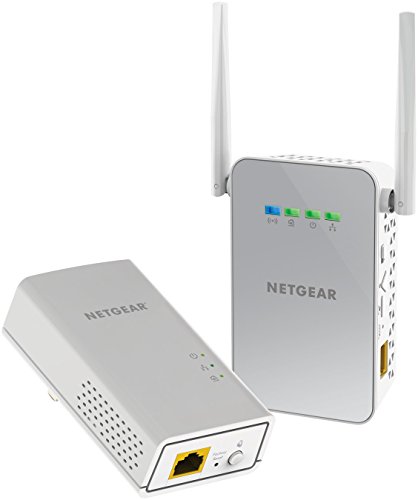
NETGEAR Powerline Adapter + Wireless Access Point Kit — Best NETGEAR option
NETGEAR’s entry pairs a powerline link in the 1,000 Mbps class with a wireless access point at the far end, in the wall-plug form the maker favours. The access-point wording matters: rather than repeating anything, the far unit is fed by wire — your mains wiring — and broadcasts from that feed, which is the strong architecture this whole guide is built around. Owners who already trust NETGEAR for their router or extenders get the powerline route without changing ecosystems.
The single Gigabit Ethernet port on the far unit defines its shape. This is a kit for covering a room wirelessly, with one wired seat available for the device that matters most — the television, the desktop — rather than a small wired hub. Households whose far room is primarily a WiFi problem will find that allocation natural. Households planning several wired devices at the far end should look at the TP-Link leader or add a small switch, which the port will happily feed.
The 1,000 Mbps class figure carries the standard powerline translation: a laboratory ceiling for the link, of which your circuits will deliver a portion determined by distance, circuit layout and electrical noise. NETGEAR’s positioning of the kit for whole-room coverage in hard-to-reach spaces matches what the technology genuinely does, and the wall-plug form keeps both ends of the installation tidy — no shelves, no trailing bricks, adapters living directly in the sockets the technology requires anyway.
Choose this kit when the NETGEAR name, the access-point architecture and the tidy form align with your house, and when the far room’s wired appetite is one device deep. It is a focused product rather than the most complete one in the guide, and its focus — clean wireless coverage for a shielded room, from a maker with a real support organisation — is a legitimate reason to prefer it over broader rivals.
- Powerline class: 1,000 Mbps class per maker
- Far unit: wireless access point
- Ports: 1 Gigabit Ethernet port per listing
- Form: wall-plug design
Strengths
- Access-point architecture: far-end WiFi fed by wire, not repeated
- 1,000 Mbps-class link with a Gigabit port for the key wired device
- Tidy wall-plug form at both ends
Trade-offs
- Single far-end Ethernet port limits wired expansion without a switch
- Class figure is a ceiling; circuits decide the real result
- Less complete on paper than the TP-Link AV1000 kit
Best for: NETGEAR households covering a shielded room wirelessly, with one wired device at the far end.
Not suited for: far rooms needing several wired connections built into the kit itself.
TP-Link AV1000 Wired Powerline Kit (Ethernet Only) — Best wired-only — prose-only
This pick requires the guide’s clearest label: a wired AV1000 powerline kit of the TP-Link AV1000 wired-kit type does not extend WiFi, because it contains no WiFi radio at all. It is two Ethernet adapters. One takes your router’s connection onto the mains wiring; the other delivers it, as Ethernet, at the far socket. Nothing in the box will appear in your phone’s WiFi list, and any review that implies otherwise is misleading you. We include it because, for a specific and common reader, it is the best component in this entire guide.
That reader owns a spare router, a mesh node with an Ethernet port, or a dedicated access point — hardware that already broadcasts excellent WiFi and merely needs a feed in the shielded room. Pairing that hardware with a wired powerline kit produces the strongest far-end result available here: a full-strength, fully featured WiFi network whose backhaul travelled by wire. It also suits the purely wired job — a desktop, a console, a network printer in a room where WiFi is irrelevant — with no wireless compromises at all.
The economics can favour it too. Wired kits typically cost less than their WiFi siblings because there is no radio to build, so a household that already owns the broadcasting hardware pays only for the delivery mechanism. The trade is complexity: two systems to configure instead of one integrated kit, and a far-end network that wears whatever name and settings your access point gives it. For the technically comfortable owner, that trade is all upside.
Be certain about the division of labour before buying. If you do not own, and do not intend to buy, a separate access point or router for the far end, this kit alone will leave the room exactly as unwired-for-WiFi as it found it — buy one of the four WiFi kits above instead. Chosen knowingly, as the wired half of a two-part solution, it is the connoisseur’s pick of this guide.
- Powerline class: AV1000 wired kit
- WiFi: none — this kit broadcasts no wireless network
- Role: Ethernet delivery over mains wiring
- Use: feeds a separate access point, switch or single wired device
Strengths
- Strongest architecture when paired with an access point you already own
- AV1000-class wired delivery with no radio compromises
- Typically cheaper than WiFi kits because there is no radio to buy
Trade-offs
- Broadcasts no WiFi whatsoever — not an extender by itself
- Requires separate access-point hardware for wireless coverage
- Two systems to configure instead of one integrated kit
Best for: owners with a spare router or access point to feed, and purely wired far-room jobs.
Not suited for: anyone expecting WiFi from the kit alone — it has no wireless radio.
NETGEAR PLP2000 Wired Powerline Kit (Ethernet Only) — Best wired capacity — prose-only
The second prose-only pick carries the same essential warning in a larger size: the NETGEAR PLP2000-type wired kit, sold in the 2,000 Mbps class by its maker, is an Ethernet delivery system with no WiFi radio. It does not extend your wireless network, appear in your devices’ WiFi lists, or cover a room in anything except wired connectivity at its far socket. A guide that listed it among WiFi extenders without that statement in its first paragraph would be miscounting its own picks, so the statement stands here, unmissable.
What the kit does offer is the highest powerline class in this guide, and the reader it serves is the wired counterpart of the previous pick’s: an owner feeding a far-end switch, a small cluster of wired machines, or a capable access point, who wants the most headroom the powerline medium can offer. A home office exiled to a garden building on the same electrical supply, a media room with several wired devices, a workshop with a small network of its own — these are PLP-class jobs, where the far end is a place, not a device.
The class figure needs the usual translation, doubled. A 2,000 Mbps-class powerline link delivers, over real wiring, a portion of its ceiling — a portion that still typically exceeds what the AV600 generation offers and competes with AV1000, with the gap decided by your circuits rather than by the box. Buyers should therefore treat the step up as headroom and future margin, not as a guaranteed multiple of a cheaper kit’s speed, and should test on their own wiring inside the return window like every powerline buyer in this guide.
The pairing logic mirrors the previous pick: this kit plus broadcasting hardware you supply equals a complete far-end network; this kit alone equals excellent Ethernet and no WiFi at all. If that division suits your house — and for the wired-heavy far room it genuinely might — the PLP2000 class is the ceiling of the wired-only route, and the natural end point of this guide’s honest detour into kits that are not, and never claim here to be, WiFi extenders.
- Powerline class: 2,000 Mbps class per its maker
- WiFi: none — wired Ethernet delivery only
- Role: high-capacity powerline link for a separate access point or switch
- Form: wall-plug adapters
Strengths
- Highest powerline class in this guide for wired delivery
- Suits far-end switches and clusters of wired devices
- Natural feed for a capable separate access point
Trade-offs
- No WiFi radio — creates no wireless coverage by itself
- Class ceiling translates to a variable portion on real wiring
- Premium buys headroom that light far rooms cannot use
Best for: wired-heavy far rooms — offices, media rooms, workshops — and feeding a strong separate access point.
Not suited for: any buyer expecting a WiFi network from the box alone.
How Do the Six Powerline Picks Compare?
| Pick | Badge |
|---|---|
| TP-Link AV1000 Powerline Ethernet Adapter WiFi Extender Kit | Best overall powerline |
| Tenda AV1000 WiFi Powerline Adapter Kit with Gigabit Ports | Best value WiFi kit |
| TP-Link Powerline WiFi Extender – Powerline Adapter | Best established kit |
| NETGEAR Powerline Adapter + Wireless Access Point Kit | Best NETGEAR option |
| TP-Link AV1000 wired kit (prose-only) | Best wired-only |
| NETGEAR PLP2000 wired kit (prose-only) | Best wired capacity |
Read the table as two guides sharing a page. The first four rows are complete WiFi solutions: plug in both ends and the far room gains a wireless network. The last two rows are components: superb delivery mechanisms that must be paired with broadcasting hardware you already own. Confusing those groups is the one genuinely expensive mistake available in this category, and it is why the prose-only picks are labelled at every appearance rather than footnoted once.
Among the complete kits, the ordering follows far-end ambition. The TP-Link AV1000 kit pairs the strongest WiFi with the modern link class and the passthrough socket. The Tenda delivers the same link class with a smaller far-end radio at a value price. The NETGEAR offers its access-point architecture and ecosystem in a tidy plug. The AV600 TP-Link serves the light room at the established end of the market. Your far room’s population — how many devices, doing what, at what hours — is the correct ruler for choosing among them.
How Do You Install a Powerline WiFi Kit for the Best Result?
Start with both adapters in the same room, plugged directly into wall sockets, and pair them there. Pairing at close range separates setup faults from wiring faults: if the units will not pair on the same wall, the problem is the kit or the procedure, not your circuits. Connect the router-end adapter to the router with the supplied Ethernet cable, confirm the powerline link light behaves as the manual describes, and only then carry the far unit to its room.
In the target room, again, use a wall socket directly — never an extension lead, and never a surge-protected strip, which filters the very frequencies the link uses. If the far room’s socket position is awkward for WiFi coverage, remember that the far unit is a broadcaster like any other: a socket toward the room’s centre serves it better than one hidden behind the wardrobe, and a short relocation within the room is free performance. Set the far network’s name and password deliberately; matching your main network’s credentials makes devices transition painlessly when carried between rooms.
Then test like a sceptic during the first week. Run the far room’s real workloads at real hours: the evening stream, the working call, the console download. Try the second-best socket if results disappoint — powerline performance can differ noticeably between sockets in the same room, because wiring routes are invisible and occasionally surprising. A kit that passes a week of real use has passed the only examination that matters, on the only wiring it will ever serve.
When Does Powerline Beat a Mesh System or an Ordinary Extender?
The three technologies answer three different geometries. An ordinary extender answers the open geometry: a room that is merely distant, with a usable signal available at the halfway point. A mesh system answers the roaming geometry: several weak areas in a house where people move constantly and expect one network to follow them. Powerline answers the blocked geometry: a specific room that radio cannot penetrate, where the signal at every possible halfway point is already too weak to repeat. Choosing among them begins with naming your geometry honestly, and most buying regret in this whole category comes from answering a blocked room with an open-room tool.
The blocked room has recognisable signatures. It sits behind foil-backed insulation in a modern extension. It is a basement under a concrete slab. It is a loft conversion wrapped in the materials that make it warm and radio-silent at once. Or it lies across a structural divide — the far side of a former exterior wall, now internal after an extension, built to outdoor thickness. In each case the radio path is not weak but absent, and no repeater placement conjures a signal out of shielding. The wiring, which passes through all of it without noticing, becomes the only infrastructure already installed in exactly the right place.
Cost geometry favours powerline more often than buyers expect. A mesh system capable of reaching a shielded room must place a node where it can still hear the rest of the mesh — which is the same problem, wearing a larger price tag — or accept a node repeating through the shielding at the same disadvantage as any extender. A powerline kit, by contrast, spends its whole budget on the one blocked room. For the single-room problem it is routinely the cheapest complete solution, and for the two-blocked-room problem a second kit or a multi-unit network often still undercuts mesh.
The honest counterweight is wiring uncertainty. A mesh system’s performance can be predicted from a floor plan with reasonable confidence; a powerline kit’s performance is locked inside your walls until the day it is plugged in. That asymmetry is why this guide’s buying advice is procedural as much as technical: choose the kit that fits the room, buy it where returns are painless, test it across sockets and workloads for a week, and let the house cast the deciding vote. Owners who follow that procedure almost never end up disappointed, because the procedure, not the prediction, is what makes powerline a safe purchase.
What If Your Powerline Link Underperforms? A Troubleshooting Order
Work through the causes in the order professionals do, cheapest first. Begin with the sockets: both adapters directly in walls, no strips, no leads, and try alternative sockets in both rooms before touching anything else, because socket choice alone explains a large share of weak installations. A different socket can mean a shorter wiring route or a quieter circuit, and the improvement is sometimes dramatic enough to feel like different hardware.
Next, hunt the noise. Electrical noise on the wiring comes from identifiable citizens: cheap phone chargers, ageing power supplies, some LED lighting, variable-speed motors and older appliances. The diagnostic is subtraction — unplug suspect devices near either adapter and watch the link respond. A single disreputable charger plugged in beside the far adapter can tax the whole link, and replacing it costs almost nothing. Noise filters and distance from the offending device are the graduated responses when subtraction finds the culprit but the device must stay.
Then examine the path. If the two adapters sit on circuits served by different consumer units — common in extended houses — test whether any socket pair shares a unit, and prefer it. Check also that no surge-protection device sits anywhere in the adapters’ own connections, including a protected socket built into the wall furniture. Each of these checks is free, and together they resolve most underperformance that is not fundamental to the building.
Finally, accept the verdict if the house delivers one. A kit that remains weak after socket testing, noise subtraction and path checks is telling you the wiring will not serve, and the correct response is a return and a different architecture — a cable run, however awkward, or a mesh node placed to flank the shielded room from its least-shielded side. Powerline’s fans are made by houses that suit it; its detractors are mostly owners who forced it on houses that did not and kept it past the return window out of stubbornness. Be a fan procedurally: test early, decide honestly.
What Mistakes Do Powerline Buyers Make?
The extension-lead mistake leads the list: adapters plugged into strips, especially surge-protected ones, perform badly or not at all, and their owners blame the technology. The second mistake is expecting the class figure. An AV1000 kit delivering a solid real-world fraction of its ceiling is performing correctly; a buyer measuring it against the box number will misjudge a working installation as faulty. The third is assuming all sockets are equal — circuits, distance and the consumer unit between them make some socket pairs far better than others, and the fix is often simply a different socket.
Buying a wired-only kit while expecting WiFi is the fourth mistake, and this guide has labelled its two wired picks exhaustively to prevent it. The fifth is giving up at the first disappointing room: powerline rewards a little socket experimentation, and the same kit that sulks on one circuit can thrive on another route through the house. Persistence within the return window is part of the technology’s ownership pattern, and sellers of powerline have understood that for years.
Finally, some houses are simply poor powerline candidates — very old wiring, adapters forced across multiple consumer units, or heavy electrical noise from ageing equipment. If a well-installed kit from this guide cannot hold a useful link after honest socket testing, believe the house, return the kit, and solve the room with the outdoor-style cabled route or a mesh system with a wireless backhaul instead. Powerline is a brilliant answer to a specific question; it was never the answer to every question.
A word about security and neighbours, since the wiring metaphor makes people ask. Powerline adapters pair with encryption between themselves, and a paired kit forms its own private network on your wiring; the signal also attenuates sharply at the meter and consumer unit, which is why your neighbour’s kit and yours do not mingle across the street. Use the pairing button rather than accepting any default state, exactly as the quick-start describes, and the link is as private as the rest of your home network. Owners in flats occasionally discover a neighbour’s unpaired adapters on shared building wiring — one more reason to pair deliberately at setup rather than someday.
One further consideration favours the wired-only route, and it belongs here rather than in the picks: radios age faster than wires. The WiFi standard in an integrated kit is fixed at purchase, while a wired powerline kit feeding a separate access point lets you upgrade the broadcasting half whenever standards move, keeping the delivery half in service. Households that think in decades rather than product cycles have quietly preferred separates for years, in networking as in audio — and the two prose-only picks in this guide are how that philosophy looks when applied to a shielded room.
Which Rooms in Your House Are Quietly Asking for Powerline?
Walk the house with the blocked-geometry question in mind and the candidates announce themselves. The extension built to modern insulation standards, where the phone drops to one bar at the doorway as if crossing a border. The basement media room under its concrete ceiling. The loft office that is warm, bright and completely unreachable. The annexe across what used to be the house’s exterior wall. Each of these rooms usually has excellent sockets — extensions and conversions are wired generously — which makes them powerline rooms in waiting: the infrastructure that defeats radio is mirrored by infrastructure that carries it instead.
The garden building deserves its own sentence, because it sits between categories. On the same consumer unit, a powerline kit can network a garden office through the armoured cable that already feeds it, with no regard for weather, foliage or sight lines — a trick no radio product can match for elegance. On a separate supply, the same kit does nothing at all, and the outdoor extenders take over. The deciding fact is electrical, not geographical, and it is knowable before purchase from the building’s fuse board. Check it first; the answer chooses the entire architecture.
Renters, finally, should note powerline’s peculiar kindness to them. It asks for no drilling, no cable clips, no landlord conversation, and it leaves in a carrier bag on moving day, ready to solve the next house’s blocked room sight unseen. In a housing life measured in tenancies, a good powerline kit is less a product than a piece of personal infrastructure that travels — which is one more reason the established kits in this guide, built to survive years of sockets, dominate its recommendations.
One last buying detail separates careful powerline purchases from hopeful ones: buy the kit whose far unit you would still choose if the powerline link turned out merely average. Links vary by house, but the far unit’s WiFi class, its ports and its socket design are fixed the day the box opens. An average link feeding the TP-Link leader’s AC1200 far unit still leaves the room with strong local WiFi for everything the link can carry; an average link feeding a weak far unit wastes what it delivers. That is the quiet logic behind this guide’s ordering, and it holds whichever kit your wiring ultimately votes for.
And when the week of testing ends well — as it does in the majority of suitable houses — powerline tends to disappear from its owners’ thoughts entirely, which is the highest praise available to infrastructure. No app to check, no signal bar to watch, just a room that used to be offline behaving like every other room in the house, season after season, through the same sockets that power the lamps.
Final Recommendation
For the shielded room that defines this category, the TP-Link AV1000 WiFi kit is the complete buy: modern link class, the strongest far-end WiFi here, Gigabit ports and a passthrough socket, from the maker that built the category. Value buyers and single-workspace rooms should take the Tenda; NETGEAR households the NETGEAR; light rooms the proven AV600. And the two wired kits stand as this guide’s honest footnote made flesh — not extenders at all, but the best possible purchase for the reader whose access point already waits for a feed. Match the kit to the room, plug it into the wall itself, and let the wiring do what the airwaves could not.
If you take one procedure from this guide, make it the same-room pairing followed by a week of honest socket testing in the room that matters. That ritual, more than any specification compared on this page, is what separates the households that swear by powerline from the households that swear at it.
Frequently Asked Questions
Do both powerline adapters need to be on the same circuit?
Ideally, yes — the cleanest links run between sockets on the same circuit. In many houses adapters on different circuits of the same consumer unit still communicate, because the signal crosses at the unit, but performance becomes house-specific and can drop sharply across separate consumer units or meter arrangements. There is no specification that settles it from the page; the first-week socket test on your own wiring is the authority, which is why buying with a return window matters for this category more than most.
Why is my powerline speed lower than the class on the box?
Because the class — AV600, AV1000, the 2,000 Mbps class — is a standardised ceiling measured under laboratory wiring conditions. Your result is set by cable distance inside the walls, circuit layout, and electrical noise from other devices, and a healthy installation delivers a fraction of the ceiling. Judge the kit by whether the far room’s real work runs well and steadily, not by the ratio to the printed class. Steadiness, not the ceiling, is what powerline is for.
Can I plug a powerline adapter into an extension lead?
You can, and you should not. Extension leads lengthen and noise the path, and surge-protected strips actively filter powerline frequencies, sometimes preventing pairing entirely. Plug adapters directly into wall sockets. If that monopolises a needed outlet, choose a passthrough kit like the TP-Link AV1000 leader here, which keeps the socket available while the adapter keeps its direct wall connection.
Will a powerline kit work in an older house?
Often, yes — age alone does not disqualify wiring, and many older installations perform perfectly well. The risk factors are less about age than about layout and condition: multiple consumer units from past extensions, very long circuit runs, and noisy ageing appliances all erode the link. The only honest test is the kit on your own sockets, which is why this guide keeps recommending purchase from a seller whose returns process you trust.
Can I mix powerline adapters from different kits or brands?
Adapters built on the same HomePlug AV standards generally interoperate, and extra units can usually be added to an existing network, but mixed generations run at the pace of the slower standard and management becomes fussier. For a first installation, a matched kit is the calm choice. Add same-family units later if the house grows; treat cross-brand mixing as a fallback rather than a plan.
Do the wired-only kits in this guide really provide no WiFi?
Really and entirely. The TP-Link AV1000 wired kit type and the NETGEAR PLP2000 type deliver Ethernet over your wiring and nothing else — there is no radio in them to extend. They earn their place here as feeds for a separate access point or for purely wired far rooms. If your plan is “plug in and get WiFi,” choose one of the four WiFi kits; the wired pair will not do that job at any price.
Can I add a third adapter later to cover another room?
Yes — powerline is a network, not just a pair. Additional adapters of the same family can join the existing link to serve further rooms, each broadcasting WiFi or delivering Ethernet according to its type. Keep generations matched where possible, since mixed standards settle at the slower pace, and remember that all rooms share the medium: three lightly used rooms coexist happily, while several simultaneous heavy workloads divide the wiring’s capacity between them.
Does powerline work between a house and a garage or garden building?
It can, when the building is fed from the same electrical supply and consumer unit — a common arrangement for garages and many garden rooms. Distance and any intermediate distribution boards erode the link, and buildings with their own separate meter or supply are outside the technology’s reach. Test it like any other socket pair, and if the wiring refuses, the outdoor extenders in our related guides solve the same geography through the air instead.


