What's inside
- Key Takeaways
- Quick Picks
- How We Chose These Picks
- Comparison
- How Much Wider Than Your Current Prints Should You Buy?
- Why Do Pigment and Dye Inks Divide This Category?
- What Does a Wide-Format Printer Need Around It?
- Sheet or Roll: How Does Media Handling Change the Decision?
- What Separates a Printer Purchase From a Printing Practice?
- How Should Colour Be Managed When the Print Is the Product?
- How Do Running Costs Behave at These Sizes?
- Where Should a Wide Printer Live in the House or Studio?
- Common Mistakes
- Final Recommendation
- Frequently Asked Questions
- Related Guides
As an Amazon Associate I earn from qualifying purchases. This post may contain affiliate links at no extra cost to you.
widgetverdict.com is reader-supported. When you buy through links on our site, we may earn an affiliate commission.
The best wide format photo printers are not simply bigger printers; they are the point where a photograph stops being a file and becomes an object with presence on a wall. The six machines below span that territory honestly, from a 13 x 19 inch home-studio Epson at one end to Canon’s 44-inch production flagship at the other, with 13-inch, 17-inch and 24-inch professional Canon bodies in between. Five of the six wear the imagePROGRAF name or sit in Canon’s professional line, which tells its own story about who still builds seriously for this demanding craft. What separates them is not a single specification but a working scale: the size of sheet you can hang, the volume of printing that justifies the bench, and whether the machine answers to a photographer printing Saturday exhibitions or a studio shipping client work daily against deadlines that do not move for anybody.
A warning about numbers belongs at the front of this particular guide. Several of these listings carry remarkably short titles — one Canon production model is described in barely half a dozen words — and this guide refuses to pad those silences with borrowed specifications. Where a title states an ink system, a screen size or a sheet width, the review uses it. Where it does not, the spec box records the silence and the review talks about role, scale and ownership instead. Linked names lead to the Amazon listings, where you can check price on Amazon and read the full specification from the seller rather than from a roundup’s imagination. That division of labour — this guide judging roles, scales and ownership, the listing supplying the fine print — is deliberate, and it protects the only thing a buyer cannot recover once spent: money committed against numbers that were never actually promised by anyone.
Key Takeaways
- Canon’s imagePROGRAF PRO-310 is the most completely described 13-inch machine here: a 3-inch colour LCD and a 9-color pigment ink system, aimed at prints meant to be kept and sold.
- The PRO-1100 lifts the sheet to 17 inches for exhibition work; its listing title is brief, so its role is judged by format class rather than invented ink details.
- Canon’s PRO-2600 and PRO-4600 are production machines — the 4600 topping the range at 44 inches — bought by studios whose output is measured in client deadlines, not weekend projects.
- The older PRO-2100’s title says only that it is a 24-inch wide-format fine art printer; this guide credits it with exactly that and nothing more.
- Epson’s Expression Photo HD XP-15000 is the accessible end of wide format: 6-color printing up to 13 x 19 inches, a stated up to 9.2 ppm and auto 2-sided printing for photographers and home studios.
- Sheet width should be chosen from the largest print you will hang or sell regularly, because every step up in width multiplies paper, ink, framing and bench commitments across the whole life of the machine.
Quick Picks
| Pick | Badge | Why it earns its place |
|---|---|---|
| Canon imagePROGRAF PRO-310 | The documented 13-inch pigment choice | A professional 13-inch wireless printer with a 3-inch colour LCD and 9-color pigment ink. |
| Canon imagePROGRAF PRO-1100 | The 17-inch gallery step | A 17-inch professional wireless inkjet photo printer for exhibition-scale sheets. |
| Canon imagePROGRAF PRO-2600 | The studio production floor | Canon’s imagePROGRAF production class for studios printing wide work to order. |
| Canon imagePROGRAF PRO-4600 | The 44-inch flagship | The top of Canon’s imagePROGRAF range, built for the largest gallery and display output. |
| Canon PRO-2100 | The established 24-inch fine art body | A 24-inch wide-format fine art printer from Canon’s professional line. |
| Epson Expression Photo HD XP-15000 | The home-studio wide all-rounder | 6-color wide-format printing up to 13 x 19 inches with auto 2-sided printing. |
How We Chose These Picks
Wide-format photo printing is a ladder, and a useful shortlist has to show the rungs rather than cluster around one comfortable size. The 13-inch rung is represented twice, deliberately, because it is where most photographers land: Canon’s PRO-310 brings a stated pigment system for archival-minded work, while Epson’s XP-15000 brings a six-colour system, a stated speed and everyday versatility for a home studio that also prints documents. The 17-inch rung belongs to the PRO-1100, the classic exhibition step. Above that, the guide stops pretending at domestic scale entirely: the PRO-2100 at 24 inches, the PRO-2600 and the 44-inch PRO-4600 are professional production machines, included because readers researching this category genuinely cross-shop them, and because their presence disciplines the smaller picks — you can see exactly what you are not buying, and why.
Evidence discipline shaped the writing more than the selection. This category’s listings range from the XP-15000’s forthcoming title, which offers colours, speed and sheet size, to the PRO-2600’s title, which offers a name and nothing else. A guide that invented parity between those would be lying with formatting. So each review below works only with what its own listing states, plus the generally known character of the product class — professional, wide-format, photographic — and says plainly when a buyer must open the listing to learn more. No ink counts, resolutions or speeds appear anywhere in this article unless the corresponding title printed them first.
A fourth consideration ran underneath the selection: honesty about audience. Several of these machines will be bought by fewer readers in a year than a single desktop model sells in a week, and a lazier guide would have padded the list with consumer all-in-ones to look approachable. That padding would betray the search itself — someone researching wide-format photo printers wants the real ladder, including the rungs they will decide not to climb. The production Canons are here because they belong to the category, labelled plainly as business machines, and the home picks are stronger for being measured against them.
Cost of ownership was the third filter. Wide format punishes casual buying: paper at these sizes is bought in small expensive packs or rolls, ink is consumed in quantities that make desktop cartridges look like samples, and a machine that sits idle still demands bench space and the occasional maintenance cycle. Every pick here had to justify its footprint against a plausible owner’s output — a condition the production machines meet only for studios, which is why their reviews are addressed to studios and not dressed up as home recommendations.

Canon imagePROGRAF PRO-310 — The documented 13-inch pigment choice
Thirteen inches is where serious home photo printing begins, and the PRO-310 is the most forthrightly specified machine at that size in this guide. Its title states the essentials outright: a professional 13-inch wireless inkjet photo printer, a 3-inch colour LCD, and a 9-color pigment ink system. Pigment is the load-bearing word. Pigment particles rest in the paper’s coating rather than dissolving into it, which is the chemistry behind matte and fine-art papers printing with deep, controlled blacks and behind prints that galleries and clients expect to endure. A photographer whose work lives on baryta, cotton rag or matte exhibition stock is shopping for exactly this ink behaviour, and nine colours give the engine room to render the subtle transitions — fog, skin, dusk skies — where smaller ink sets start to posterise.
The 3-inch colour LCD sounds like a furniture detail until you have stood in front of a printer mid-session. Paper changes, ink checks and maintenance prompts handled at the machine, on a screen you can actually read, keep a printing afternoon moving; settings buried in a driver on another floor of the house do the opposite. Wireless placement compounds the convenience: a 13-inch professional body is not small, and being able to put it on the studio bench that fits rather than the desk the cable reaches is a genuine ownership benefit. None of this makes the PRO-310 fast or cheap to feed — no speed is stated, and pigment ink at this level is bought with intent — but it makes the machine coherent: a kept-print engine with a control surface designed for the person standing over it.
Who should walk past it? Photographers printing mainly glossy colour work for albums and gifts may find a dye-based machine’s saturation friendlier, and anyone whose largest sheet is a standard photo print is buying width that will never be used. The PRO-310 also sits within a Canon ladder whose next rung, the 17-inch PRO-1100, is close enough to tempt: if your exhibition ambitions already exceed 13 inches, the honest move is to skip a rung rather than buy twice. For the photographer settled at 13 inches and committed to papers that keep, though, this is the guide’s most completely argued case.
Workflow fit seals the argument. A pigment machine rewards a deliberate rhythm — profile the paper, proof the difficult gradients, print the edition — and the PRO-310’s on-body screen and wireless placement slot into that rhythm without friction. Photographers coming from a lab relationship will recognise the feeling: the machine behaves like a printing partner with a speciality, not a peripheral awaiting instructions. Keep its diet to the matte and fine-art papers its ink was designed for, and the results justify the specialisation every time a finished sheet comes off the tray and goes straight into a mount.
- Class per listing title: professional 13″ wireless inkjet photo printer
- Display per title: 3″ colour LCD
- Ink system per title: 9-color pigment
- Print speed: not stated in listing title
- Scanner or copier: none — a dedicated printer
Strengths
- Nine-colour pigment ink suits matte and fine-art media and prints intended to last.
- A real on-body colour screen keeps paper and ink management at the machine.
- The title states its core specifications openly, easing honest comparison shopping.
Trade-offs
- Thirteen inches caps exhibition ambitions; larger work needs the PRO-1100 or above.
- Pigment running costs are a commitment, and no speed figure is offered in the title.
- Glossy-first photographers may prefer the saturation character of a dye system.
Best for: photographers printing matte and fine-art work at 13 inches for portfolios, clients and walls.
Not suited for: households whose printing is documents and snapshots, where this engine is wasted.

Canon imagePROGRAF PRO-1100 — The 17-inch gallery step
Seventeen inches is the size at which a photograph starts commanding a wall rather than decorating one, and the PRO-1100 is Canon’s professional wireless answer at that width. Its listing title is terse — a 17-inch professional wireless inkjet photo printer, full stop — and this review respects that terseness. No ink count, screen size or speed is stated there, so none is claimed here; a buyer comparing this machine’s internals against the PRO-310’s stated nine colours must open the listing and read Canon’s own full specification. What can be judged from the title, and from the model’s position in the range, is the proposition itself: professional-class output at the sheet size where exhibition prints, large portfolio pages and saleable wall pieces begin.
The jump from 13 to 17 inches changes more than the print. Paper is bought in larger, pricier packs; a finished sheet needs a bigger portfolio, bigger mounting board, bigger frames; the printer itself claims a bench with room to spare on every side for sheet handling. Photographers feel the difference in their workflow within a week — proofing at final size becomes possible, which quietly improves everything upstream, because crops and sharpening decisions made at 17 inches are simply better informed than decisions made at 8 x 10 and hoped upward. That proofing honesty is the deepest argument for the format: the print stops being an approximation of the file.
Wireless connectivity, stated in the title, matters at this size for a mundane reason — a 17-inch professional body goes where the studio has a bench for it, and that bench is rarely beside the computer. Place it where the paper handling works, and let the network carry the files. The PRO-1100’s natural buyer is a photographer whose 13-inch machine has become a constraint rather than a tool: the work is selling, the exhibitions are calling for larger pieces, and the cost of the bigger paper ecosystem has paying work to attach itself to. Bought earlier than that, it is a magnificent way to make small prints expensively.
There is a portfolio argument that deserves air as well. Photographers who assemble printed portfolios for clients, galleries or competitions work at sizes where the page itself signals seriousness, and a 17-inch sheet carries a body of work with a gravity that smaller formats imitate poorly. If your year includes portfolio reviews, grant applications judged on prints, or wedding clients choosing between you and a competitor across a table, the PRO-1100’s format is not vanity — it is presentation equipment. The calculation is professional rather than photographic, and it is exactly the sort of calculation that separates a justified step up from an indulgent one.
- Class per listing title: 17″ professional wireless inkjet photo printer
- Ink system: not stated in listing title
- Display: not stated in listing title
- Print speed: not stated in listing title
- Sheet width per title: 17 in
Strengths
- Seventeen-inch output enables true exhibition and large portfolio printing at home.
- Professional imagePROGRAF positioning with wireless placement freedom.
- Proofing at final size improves every editing decision upstream of the print.
Trade-offs
- The title’s brevity forces a listing visit for ink, screen and speed details.
- Paper, mounting and framing costs all step up with the sheet size.
- Bench footprint and sheet-handling clearance exceed casual home setups.
Best for: photographers whose work has outgrown 13 inches and sells or exhibits at larger sizes.
Not suited for: beginners still discovering whether they print enough to justify 13 inches.

Canon imagePROGRAF PRO-2600 — The studio production floor
Some listings describe a product; this one simply names it. “Canon imagePROGRAF PRO-2600” is the whole title, and the honest review of a machine sold that way begins by admitting what a name can and cannot tell you. It tells you the family — imagePROGRAF, Canon’s professional large-format line — and the tier, sitting in the production range above the desktop PRO bodies reviewed elsewhere in this guide. It does not tell you a sheet width, an ink configuration or a speed, and this guide will not supply them from memory or inference. A studio considering this machine should treat the listing page and Canon’s specification sheet as required reading, because at production prices the details are the decision.
What can be discussed responsibly is the role such a machine fills, because that role is well defined by its class. Production large-format printers earn their floor space by turning a studio’s digital work into saleable physical output at sizes no desktop body attempts — gallery pieces, display graphics, client deliverables — with the consistency that paying work demands across a run. The economics are equally defined: the machine is justified by throughput of paid output, maintained like a business asset, and fed media and ink in business quantities. A studio at that level is not comparison-shopping on adjectives; it is matching a specification to a workflow, which is precisely why this review declines to decorate the name with invented numbers.
For the home photographer browsing upward, the PRO-2600’s presence in this guide serves as a boundary marker. If your printing is your own work, for your own walls, the ladder’s sensible top is the PRO-1100 or the 24-inch class below; the production tier answers a commercial question — how does the studio fulfil wide-format demand in-house — that homes do not ask. Readers who do ask it commercially should shortlist this machine against its larger sibling on the next rung, gather both full specifications, and decide on the numbers rather than on anything a roundup can responsibly say about a name alone.
One more consideration belongs to the commercial reader: continuity. A production printer becomes part of a studio’s colour pipeline, and its output must match what clients approved last season. Studios therefore buy production machines conservatively, valuing a model’s established media profiles and service network over novelty. A name-only listing from Canon’s professional line speaks to that audience in their own language — the reputation is the specification they start from, and the detailed sheet confirms rather than introduces. Home buyers should read that terseness as a signpost: this tier assumes a professional reader, and prices its machines for professional arithmetic.
- Listing title content: model name only — “Canon imagePROGRAF PRO-2600”
- Family per title: imagePROGRAF professional large-format line
- Sheet width: not stated in listing title
- Ink system: not stated in listing title
- Speed and display: not stated in listing title
Strengths
- Production-class imagePROGRAF built for studio output at commercial scale.
- Sits in a range whose service and media ecosystem targets professional users.
- A serious in-house answer for studios currently outsourcing wide work.
Trade-offs
- The listing title provides no specifications; all diligence happens on the full listing.
- Production economics require paid throughput a home cannot supply.
- Floor space, media stock and maintenance are business commitments, not hobbies.
Best for: studios bringing wide-format client work in-house with volume to justify it.
Not suited for: any home buyer, however enthusiastic — the desktop rungs serve homes better.

Canon imagePROGRAF PRO-4600 — The 44-inch flagship
At 44 inches, a printer stops being equipment and becomes infrastructure. The PRO-4600 tops the imagePROGRAF range in this guide, and its listing title is as spare as its sibling’s — the model name alone. As with the PRO-2600, no ink architecture, speed or display is stated in that title, and none will be fabricated here. The 44-inch class itself is the specification that matters at first pass: output wide enough for gallery centrepieces, exhibition banners and display work that reads across a room, printed in-house under the studio’s own colour control rather than a bureau’s.
Studios buy at this width for two reasons, and both are commercial. The first is capability: some commissions simply are 40-inch pieces, and the choice is between printing them or declining them. The second is margin: wide-format work outsourced to a print bureau carries the bureau’s markup on every piece, and a studio with steady demand recovers a flagship’s cost by keeping that margin at home, while gaining the scheduling control to reprint a flawed sheet an hour before a deadline instead of reordering and praying. Against those gains stand the honest costs — a machine of this class anchors a room, drinks ink in production quantities, and expects media stock, maintenance and operator skill to match. It is the least forgiving purchase in this guide and, for the right studio, the most profitable.
Home readers should let this review be the one they enjoy and skip. Nothing about domestic photography needs 44 inches often enough to feed this machine, and an idle production printer deteriorates in exactly the ways an idle asset can least afford. The photographers who belong here know who they are: their order books already contain wide work, their current bottleneck is a bureau’s turnaround, and they will read the full listing’s specifications with a spreadsheet open. For them, the PRO-4600 is the ceiling of this guide’s ladder — the rung where the question stops being which printer and becomes whether the studio is ready to be a print shop as well.
Installation day at this scale is a project, not an unboxing: access routes, bench or floor placement, ventilation of the workspace and the first media loading all want planning, and studios typically schedule the machine’s arrival like a delivery of furniture. That ceremony is worth mentioning because it marks the psychological boundary of this guide — below this rung, a printer is something a person buys; at this rung, it is something a business commissions. Readers who feel a flicker of recognition at that description are the PRO-4600’s audience, and they will already be comparing installation requirements and service terms rather than admiring the width figure.
- Listing title content: model name only — “Canon imagePROGRAF PRO-4600”
- Format class: 44-inch production flagship of this line-up
- Ink system: not stated in listing title
- Speed and display: not stated in listing title
- Intended setting: commercial studio production
Strengths
- The widest output in this guide, for gallery and display work at full scale.
- In-house control replaces bureau markups and turnaround times for busy studios.
- Flagship positioning within a professional range built for production duty.
Trade-offs
- No specifications in the title; the full listing must carry the entire decision.
- Room, media and ink commitments are those of a small print business.
- Idle time is expensive — the machine needs a order book, not admiration.
Best for: established studios whose wide-format commissions already fill a weekly schedule.
Not suited for: homes and hobbyists at any level of enthusiasm — the scale mismatch is total.
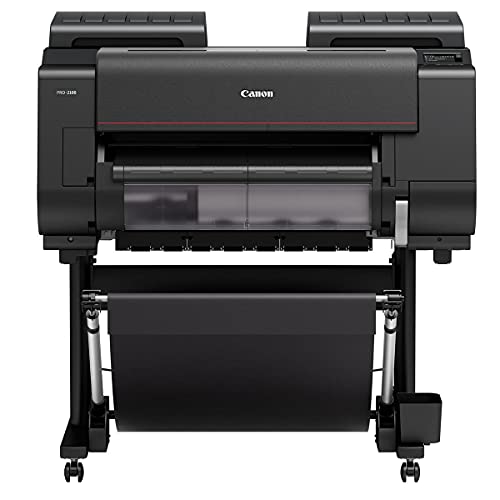
Canon PRO-2100 — The established 24-inch fine art body
The PRO-2100’s title is a single breath — a Canon PRO 2100, 24 wide, a format fine art printer — and this review will honour that brevity by crediting the machine with precisely what those words establish: a 24-inch wide-format printer from Canon’s professional line, positioned for fine art work. No ink count follows, because none is given. No speed, no screen, no connectivity claim, because none is given. Readers who have watched other roundups recite a full specification for this model should ask where those numbers came from; here, the answer for anything beyond width and class would be invention, and invention is not a reviewing method.
Twenty-four inches is a considered size, worth pausing on. It doubles the 13-inch desktop sheet’s presence while staying within the sheet and roll handling a small studio can manage without production infrastructure. Fine art positioning signals the intended media world — textured and matte papers, limited editions, the sort of output sold by the print rather than produced by the job — and Canon’s professional line supplies the ecosystem of papers and support that world expects. As an established model rather than a launch-day flagship, the PRO-2100 also carries the quiet advantage of a known ownership record: its quirks are documented by years of studio use, its media behaviour is mapped, and a buyer is joining a settled conversation rather than beta-testing one.
The counterweight is diligence. Precisely because the listing title is so short, the buyer must verify the machine’s current condition terms, included items and specification on the listing itself, and should weigh an established model against the newer desktop bodies with the question that actually matters: does its 24-inch fine-art output serve the work being sold? For a small studio or a serious photographer selling prints at sizes a 17-inch body crowds, the PRO-2100’s rung on the ladder is real, and its brevity in this guide reflects its listing’s brevity — not a lack of standing.
Edition printing is the use case that flatters this machine most. A fine-art photographer producing a numbered edition needs the same sheet, the same surface and the same rendering across weeks of printing sessions, and a 24-inch body built for that world delivers the format with room for borders, handling margins and the occasional test strip. The work is unhurried by design — editions are printed in sessions, checked under good light, and culled without mercy — and a machine from Canon’s professional line fits that tempo better than a fast desktop body ever could. Judge the PRO-2100 by that session rhythm rather than by office measures, and its proposition sharpens considerably.
- Width per listing title: 24 in wide-format
- Positioning per title: fine art printer
- Maker and line per title: Canon professional PRO series
- Ink system: not stated in listing title
- Speed, display, connectivity: not stated in listing title
Strengths
- 24-inch output serves saleable fine-art sizes beyond desktop machines’ reach.
- An established model with a settled ownership record and known media behaviour.
- Professional Canon line backing for papers, support and workflow fit.
Trade-offs
- The very short title leaves all specification work to the buyer’s listing visit.
- Studio-scale footprint and media costs exceed any desktop alternative here.
- Newer bodies may tempt buyers who value current-generation features over record.
Best for: small studios and selling photographers who need honest 24-inch fine-art output.
Not suited for: buyers who want a fully specified, current-generation desktop machine.

Epson Expression Photo HD XP-15000 — The home-studio wide all-rounder
Every ladder needs a first rung that a normal household can step onto, and the XP-15000 is this guide’s. Its title is the most forthcoming here: a wireless wide-format inkjet with 6-color printing, output up to 13 x 19 inches, a stated up to 9.2 ppm, automatic 2-sided printing, and an intended audience of photographers and home studios. Six colours at this level typically means the standard four plus lighter companions that smooth photographic gradients, and the result is a machine that treats photographs as its first language while still speaking document fluently — the auto 2-sided printing is a office habit no other pick in this guide bothers to claim.
That dual citizenship is the XP-15000’s real argument. The professional Canons above are single-purpose instruments; this Epson is a household’s printer that happens to produce 13 x 19 inch photographic output good enough to frame, sell at a market stall, or hang in a hallway without apology. For the photographer whose wide-format need is real but occasional — a monthly portfolio piece, prints for a local exhibition, large family photographs — a machine that also handles the household’s everyday pages earns its bench space twice. The stated speed, modest beside office machines, is honest context: photographic printing at this size is a deliberate act, measured in minutes per sheet by every machine in this guide regardless of what their document speeds claim.
Limits arrive where the professional class begins. Six colours is not nine; demanding matte fine-art work will eventually find this system’s ceiling, and high-volume sellers will outgrow a home-studio engine’s duty rhythm. The XP-15000 is best understood as the wide-format doorway: it teaches an owner what 13 x 19 printing does to their photography, at a commitment level a household can absorb, and it keeps teaching for years if the owner’s ambitions stay at that scale. Many do — and for them this is not the cheap option but the correct one.
Its second life deserves mention too. Because the XP-15000 remains a fully capable household printer, it survives changes of heart that strand dedicated machines: if wide-format enthusiasm fades, the Epson simply becomes the family printer with an unusually good party trick, still earning its shelf space daily. Dedicated professional bodies offer no such soft landing — an idle PRO machine is pure sunk cost. Households honest about their own follow-through should price that insurance into the comparison, because the best printer in this guide is ultimately the one still printing in three years’ time.
- Output per listing title: 6-color wide-format photo printing, up to 13 x 19 in
- Stated speed per title: up to 9.2 ppm
- Duplex per title: auto 2-sided printing
- Audience per title: photographers and home studios
- Connection per title: wireless
Strengths
- Genuine 13 x 19 inch photo output at a household-scale commitment.
- Six-colour printing plus everyday features like auto 2-sided document work.
- The title states its key facts openly, making the value easy to judge.
Trade-offs
- Six colours sit below the pigment systems serious fine-art work eventually wants.
- Home-studio duty rhythm will not satisfy high-volume print sellers.
- Photographic pace is deliberate; the stated document speed is no photo promise.
Best for: photographers and home studios printing wide work occasionally alongside daily pages.
Not suited for: dedicated fine-art sellers whose papers and volumes demand a pro body.
Comparison
| Pick | Width evidence from title | Ink evidence from title | Setting |
|---|---|---|---|
| Canon imagePROGRAF PRO-310 | 13 in | 9-color pigment | Serious home / pro desktop |
| Canon imagePROGRAF PRO-1100 | 17 in | Not stated in title | Exhibition home studio |
| Canon imagePROGRAF PRO-2600 | Not stated in title | Not stated in title | Studio production |
| Canon imagePROGRAF PRO-4600 | 44 in class | Not stated in title | Studio production flagship |
| Canon PRO-2100 | 24 in | Not stated in title | Fine-art studio |
| Epson Expression Photo HD XP-15000 | 13 x 19 in | 6-color | Home studio |
How Much Wider Than Your Current Prints Should You Buy?
One size up is a purchase; two sizes up is a lifestyle change. A photographer printing at 13 inches today who exhibits twice a year will feel the PRO-1100’s 17 inches as pure gain — the same workflow, grander results. The same photographer jumping to a 24-inch studio body inherits roll handling, bigger proofing costs and paper stock that ties up real money, all to serve exhibitions that may not exist yet. Let the work’s actual destinations decide: measure the largest print you sold, hung or were asked for in the last year, add one size of headroom, and stop there. Width bought for imaginary commissions is the most expensive width of all, because it taxes every sheet you print in the meantime.
Paper deserves its own sentence in that calculation. Wide media is not office paper scaled up; fine-art sheets at 17 and 24 inches are bought in small packs at prices that make a ruined proof sting, and rolls commit you to a single surface for metres of output. A realistic wide-format budget therefore names the two or three papers you will actually print on and prices a season of them beside the machine. Owners who skip that arithmetic tend to own impressive printers and a permanent reluctance to use them.
Framing belongs in the same honest ledger. A print’s cost is not finished at the output tray: mounting, matting and framing a 17-inch piece can exceed the paper and ink several times over, and a 24-inch piece multiplies again. Sellers price the finished object, so the full chain belongs in their maths; home photographers hanging their own work should simply know that the printer is the beginning of the spending, and choose a width whose finishing costs they can repeat happily rather than once, resentfully, for a single hero print.
Why Do Pigment and Dye Inks Divide This Category?
The one ink system fully stated in these listings — the PRO-310’s 9-color pigment — points at the category’s oldest fork. Pigment inks sit in the paper’s coating as particles, which suits matte and textured fine-art papers, delivers the deep controlled blacks those papers are loved for, and underpins the longevity claims that gallery work requires. Dye inks dissolve into the coating, which historically flatters glossy surfaces and saturated colour. Neither is simply better; they are optimised for different papers and different promises. The practical rule is to choose by the paper you will print on most: matte and rag point to pigment, glossy and luster pull the other way, and a mixed practice should weigh which half of the portfolio pays.
A second, quieter point follows: ink count is a means, not a score. Nine colours earn their keep through smoother gradients and a wider achievable gamut in difficult hues, but a well-profiled six-colour machine — the XP-15000’s class — produces prints most viewers cannot fault. Buy the ink system that matches your papers and your market’s expectations, and treat profile quality and paper choice as co-equal variables rather than worshipping a colour count.
What Does a Wide-Format Printer Need Around It?
Bench depth first: wide sheets enter and exit with clearance, and a machine wedged against a wall will crease the output it exists to perfect. Flat storage second: large prints curl, attract dust and damage each other in piles, so a drawer, portfolio or flat shelf is part of the true purchase. Third, a trimming and mounting path — the print is an intermediate until it is cut, mounted or framed, and wide work needs wide tools. Studios at the production end add a fourth requirement, a schedule: machines of the PRO-2600 and PRO-4600 class are kept healthy by regular work, and a studio that cannot feed them weekly should question whether a bureau relationship serves it better than ownership.
Sheet or Roll: How Does Media Handling Change the Decision?
Desktop wide-format machines are sheet-fed worlds: one sheet, one print, loaded by hand, which suits editions, portfolios and one-off exhibition pieces. Production machines live increasingly in a roll world, where a long media roll feeds print after print and the workflow gains efficiency while losing some of the ceremony — and gaining a cutting step at the end. The listings here do not state media-handling details for the production Canons, so this guide will not assign roll or sheet specifications to them; the point for a buyer is to ask the question explicitly on the listing, because the answer shapes everything from bench layout to how a studio batches its orders.
For home buyers the sheet world has a hidden virtue: it enforces deliberation. Each 13 x 19 or 17-inch sheet is loaded consciously, checked, and printed as an event, which matches how photographic printing at its best actually feels. The cost of that deliberation is throughput — a home body will never match a production machine’s unattended rhythm — but throughput was never the home photographer’s shortage. Time at the bench is the hobby. Studios invert the equation entirely, which is why the same category contains both the XP-15000 and the PRO-4600 without contradiction.
What Separates a Printer Purchase From a Printing Practice?
Every machine in this guide will produce an impressive first print; the differences emerge across the fiftieth. A printing practice — regular sessions, a settled paper, recorded settings, honest culling — extracts professional results from the XP-15000 and merely good ones from a neglected production flagship. This is worth stating plainly in a buying guide, because the marketplace will happily sell a struggling photographer a wider machine as a cure for what is actually a workflow ailment. If your current prints disappoint, diagnose before upgrading: paper pairing, profiling and viewing light fix more portfolios than width ever will. Buy the wider machine when the diagnosis honestly ends at the sheet size — when the work is good and simply needs to be bigger — and the purchase will feel like an arrival rather than another experiment.
That principle also orders the ladder kindly. There is no shame in the XP-15000 rung; there is a great deal of it in owning a 44-inch flagship that prints twelve sheets a year. The photographers whose work fills galleries from home studios are disproportionately the ones who climbed one rung at a time, letting each machine pay for its successor in sold prints. Ambition is welcome in this category — it is simply asked to bring receipts.
How Should Colour Be Managed When the Print Is the Product?
Wide-format printing punishes casual colour. A screen shows light; a print reflects it, and the translation between the two is where professional results are won. The working method is unglamorous: calibrate the display, use the paper maker’s profile for the exact paper loaded, soft-proof before printing, and evaluate finished sheets under the light they will hang in — a print judged under a warm desk lamp and hung in a daylight gallery is two different prints. At 13 inches a mistake costs a sheet; at 24 or 44 inches it costs a painful amount of paper and ink, which is why production studios proof small sections at full scale before committing a whole sheet.
Consistency across time matters as much as accuracy on the day. An edition printed across a month, or a portfolio reprinted for a second client, must match its earlier sheets — which means recording paper batches, profile choices and settings as carefully as exposure data. The machines in this guide supply the hardware half of that discipline; the notebook half belongs to the owner, and it is the half that separates a studio whose reprints match from one whose clients learn to accept drift.
How Do Running Costs Behave at These Sizes?
Wide-format ink economics invert the desktop pattern. On a small printer, ink is a drip; on a wide machine printing full-bleed photographic coverage, ink is a material cost that belongs in every price a seller quotes. Full-coverage sheets — a dusk landscape edge to edge — consume dramatically more than a document page, and a studio that prices prints without measuring its own consumption is donating margin. The discipline is simple: track sheets printed against ink purchased for a season, derive your real cost per sheet on your real papers, and let that number set edition prices. None of the listings here state ink capacities in their titles, so no consumption figure is quoted in this guide — your own season of records will be more truthful than any published estimate anyway.
Paper waste is the second cost, and the more controllable one. Misfeeds, wrong-side loading, profile mistakes and ambitious crops all consume sheets at the most expensive sizes. The mitigations are boring and effective: test strips before full sheets, a written loading routine for each paper, and a cull policy that treats a flawed sheet as tuition only the first time the same flaw appears. Studios insure against waste with margin; home printers insure against it with care. Either way, the wide-format owner who budgets only for the machine has budgeted for the smallest third of the hobby.
Where Should a Wide Printer Live in the House or Studio?
Placement sounds like housekeeping and behaves like print quality. Wide machines want a level, stable surface — a wobbling table telegraphs itself into long prints — plus clearance behind and in front for sheets that enter and leave on a straight path. They want distance from radiators, sunny windows and the household’s dustiest traffic, because a sheet resting in the output tray collects whatever the room is carrying, and a speck under ink is permanent. They also want to be near the flat storage and trimming space discussed earlier, forming a small production triangle: machine, flat surface, cutter. Studios arrange this triangle deliberately; home photographers who improvise it on a dining table learn why the deliberation matters the first time a 17-inch sheet meets a coffee cup.
Noise and patience belong in the placement plan too. A wide print is a minutes-long event with the machine working audibly throughout, and a printer exiled to a far room gets checked less, proofed less and used less. The best location is the one inside your actual workflow — visible from the editing desk, reachable without a expedition — because wide-format printing thrives on supervision and withers on neglect, whatever the badge on the machine.
Common Mistakes
Buying width before output is the signature error of this category — a 24-inch machine purchased for a portfolio that turns out to be twelve prints a year, each one subsidising an idle asset. A second error is judging a professional machine by a listing title alone in either direction: dismissing the tersely titled Canons as underspecified products, or — worse — assuming specifications from a sibling model and ordering paper and ink against numbers nobody stated. Third comes paper improvisation: feeding a pigment machine whatever glossy stock was on offer, then blaming the printer for results the paper pairing caused. Fourth, ignoring the room: no flat storage, no trimming space, prints stacked on the machine itself. Finally, proofing small and printing large — approving a crop at screen size and discovering at 24 inches that the file’s flaws scale up with everything else.
Two quieter errors deserve naming because they waste the most paper. The first is printing a treasured file before the machine, paper and profile have been introduced to each other on test images — the masterpiece should never be any setup’s first sheet. The second is changing several variables at once when a print disappoints: new paper, new settings and a new file in a single retry teaches nothing, and the same disappointment returns wearing a different costume. Change one thing, print, look, write it down. Wide-format printing rewards that laboratory patience disproportionately, because every sheet it saves is among the most expensive sheets in the building.
Final Recommendation
Most readers should land on one of the two honest 13-inch machines. The PRO-310 is the choice when matte and fine-art papers carry your work and its stated nine-colour pigment system matches the prints you sell or keep; the XP-15000 is the choice when wide printing shares a household with everyday pages and its six colours at 13 x 19 inches cover your ambitions. Step to the PRO-1100 when exhibitions and clients are already asking for 17 inches by name. Treat the PRO-2100 as the considered 24-inch fine-art rung, and the PRO-2600 and PRO-4600 as studio business decisions to be made from full specifications and order books, never from a roundup. Check price on Amazon for your finalist — then price a season of its paper and ink before the order is placed.
One closing test separates the rungs cleanly: name the next ten prints you will make, with their sizes and destinations. If all ten fit at 13 inches, the ladder’s lower rungs have already answered you. If three of them demand 17, the PRO-1100 has earned its bench. And if the list reads like a client schedule rather than a portfolio, you are shopping in the production tier and should bring a spreadsheet, not a wish.
Frequently Asked Questions
Is 13 x 19 inches big enough for selling prints?
For many sellers, yes: it frames handsomely, ships affordably and covers the sizes home buyers actually hang. Sellers whose market is galleries or large interiors will feel the ceiling and should look at 17 inches and above — but they should let sold work, not aspiration, make that call.
Why do some of these listings state so few specifications?
Production machines are often listed by name for professional buyers who work from full specification sheets, and marketplace titles compress accordingly. The correct response is diligence, not suspicion or invention: open the listing, read the complete specification, and compare machines on stated facts only.
Can a wide-format photo printer handle everyday documents too?
The XP-15000 is built for that double life, auto 2-sided document printing included. The professional Canon bodies are dedicated photo and fine-art instruments; they can print a page of text, but feeding them office work wastes their ink economics and their purpose.
What paper should a first wide-format owner start with?
One reliable luster or matte paper in your machine’s largest size, bought in modest quantity, printed on until its behaviour is boring. Mastery of a single paper teaches more than a sampler of ten, and it gives every later paper a baseline to be judged against.
Should a beginner start at 13 inches or grow into it?
Start at 13 inches if the interest is genuine, because smaller photo printers teach the same lessons at sizes that feel like toys once exhibitions beckon, and the XP-15000 keeps everyday value even if ambitions stall. The exception is the photographer already selling work: buy for the sizes your clients order, which may mean entering at 17 inches and skipping a rung the receipts justify.
How long do prints from these machines last?
Longevity is a property of the ink-and-paper pairing rather than the printer badge: pigment systems on quality fine-art papers carry the strongest keeping expectations, which is why the PRO-310’s stated pigment set matters to sellers. Display conditions — light, humidity, framing — then decide how much of that potential a given print realises, so longevity claims should always be read as partnerships between materials and care.
Do these machines need regular use to stay healthy?
Like most inkjets, they are happiest working regularly; long idle stretches invite the nozzle problems every ink system risks. A weekly small print is cheap insurance at desktop sizes, and at production sizes the workload of a real studio supplies the rhythm naturally.
What should I verify on a listing before ordering a production model?
Everything the title omits: the full ink configuration and media handling, the exact footprint and weight, what is included in the box, the warranty and service terms for your region, and the delivery arrangements for a machine of that size. Production purchases also deserve a call about installation support. None of that diligence is a criticism of the machines — it is simply the professional buying process their class assumes, and a buyer who enjoys it is a buyer matched to the tier.
Related Guides
Thick papers and rear feeds are the subject of printers for craft and cardstock work, while small desks get their due in dorm room printer shortlist. Volume buyers should also read high-volume printers for small businesses before committing a studio budget.
Related guides
- Best Gaming Keyboard: Six Boards From Rapid-Trigger Esports Picks to Macro Flagships
- Best Time Machine Compatible Hard Drives: Mac-Ready and Reformatted Picks
- Best 3.0 Qualcomm Quick Chargers: QC 3.0 Adapters That Still Earn Their Outlet
- Best 3D Mechanical Engineering Laptops: Certified Workstations for CAD and Simulation


