What's inside
- Key Takeaways
- Quick Picks
- How Did We Shortlist These A3 Photo Printers?
- What Changes When a Print Gets This Big?
- How Do the Six A3 Machines Compare?
- How Should You Prepare a File for a 13×19 Print?
- What Does A3 Printing Cost Once the Printer Is Home?
- How Do You Handle and Store Large Prints and Paper?
- What Mistakes Do New A3 Owners Make?
- Dye or Pigment at A3: Which Philosophy Fits Your Walls?
- How Do Paper Profiles Work With Third-Party Papers?
- What Room Will the Printer Live In, and Why Does It Matter?
- How Does a Disciplined A3 Printing Session Run?
- How Should Low-Volume Owners Maintain a Professional Printer?
- What If You Want to Sell or Exhibit A3 Prints?
- How Much Camera Do You Need for a Convincing A3 Print?
- Borderless or Bordered: How Should an A3 Print Be Presented?
- Final Recommendation
- Frequently Asked Questions
- Related Guides
As an Amazon Associate I earn from qualifying purchases. This post may contain affiliate links at no extra cost to you.
widgetverdict.com is reader-supported. When you buy through links on our site, we may earn an affiliate commission.
Where to buy: The linked printers below are available through Amazon, where you can pair the machine with the larger paper sizes it exists to print and confirm which ink cartridges ship in the box before ordering. At this level, also check the delivery options — these are heavy, awkward boxes that you want arriving with care, not left in the rain. Few purchases reward that care like the best A3 photo printers.
There is a moment every photographer recognises: a favourite image, printed at 13×19, filling a frame across the room and holding together when you walk up close. The best A3 photo printers — machines that print the A3/13×19 class and beyond — exist for that moment. Small prints forgive; large prints testify. At this scale, mediocre gradients smear across a sky, weak blacks turn a night scene to mud, and a slightly soft file has nowhere to hide. The six machines below were chosen for serious photographic output at A3 and 13×19: five dedicated photo printers spanning dye and pigment philosophies, plus one wide-format all-in-one included honestly as the budget doorway, with its photographic limits stated in plain terms.
One clarification before the picks: A3 photo printing is a commitment to a paper size, not to a brand of photography. Studio portraitists, landscape specialists, illustrators scanning and reprinting their own work, and parents enlarging one perfect frame of a child all arrive at this page with different images and identical hardware questions. The picks below are therefore organised by printing philosophy and ownership cost rather than by genre, because the machine that serves a matte-paper portraitist and the machine that serves a glossy landscape printer genuinely differ, while their cameras may be the same.
Expect a different ownership experience from smaller printers. Paper arrives in rigid boxes, cartridges are a considered purchase, and a single print at top quality can occupy the machine for several minutes. What you get in return is the print as an object — something that changes a room rather than filling a shoebox.
Key Takeaways
- A3 and 13×19 are near-identical in practice; both describe the class where home printing becomes wall art, and every dedicated pick here prints borderless at that size.
- Pigment machines (Epson P900, Canon PRO-1100 and PRO-310) own matte papers, permanence and black-and-white depth; dye machines (PRO-200S, XP-15000) counter with glossier colour and gentler running costs.
- At 13×19, file quality becomes the limiting factor — a clean, full-resolution original matters more than any difference between these printers.
- Budget for paper and ink as a system: a large print consumes several times the ink of an 8×10, and fine-art sheets at this size are a real per-print expense.
- The Epson WF-7840 prints the size but not the standard; it is here as a dual-purpose office machine, not a photographer’s tool.
Quick Picks
| Pick | Badge | Why it is here |
|---|---|---|
| Epson SureColor P900 | Best Overall | Seventeen-inch pigment flagship with violet ink, roll support and the deepest glossy blacks in the class. |
| Canon imagePROGRAF PRO-1100 | Best Colour Gamut | Eleven pigment inks plus optimiser, built for saturated colour and long-life exhibition prints up to 17 inches wide. |
| Canon imagePROGRAF PRO-310 | Best 13×19 Pigment Value | The PRO-1100’s pigment discipline in a 13-inch body, superb on matte and fine-art papers. |
| Canon PIXMA PRO-200S | Best Dye Gloss | Eight dye inks producing luminous glossy and luster 13×19 prints with minimal fuss. |
| Epson Expression Photo HD XP-15000 | Best Budget Entry | Six-ink photo quality at 13×19 for the price of an ordinary office machine. |
| Epson WorkForce Pro WF-7840 | Office All-in-One — With Limits | Prints, scans and copies at A3 for a working office; photos are presentable, never gallery-grade. |
How Did We Shortlist These A3 Photo Printers?
The first filter was genuine photographic intent. A printer qualified as a dedicated pick only if its ink set was designed for photographs — six channels at minimum, with pigment or dye photo inks — and if it fed 13×19 or larger media through a path that respects thick paper. Office machines that merely accept A3 paper were excluded from the dedicated slots; one appears at the end of the list, clearly badged, because some readers genuinely need a scanner and copier at this size more than they need gallery output, and pretending that need does not exist would make the guide less useful.
The second filter was ecosystem depth. At A3, you will live inside a paper and ink ecosystem for years: manufacturer profiles for their own papers, third-party ICC support for everyone else’s, cartridge availability in multi-packs, and a driver that exposes media types honestly instead of hiding them behind vague labels like “premium paper.” Both Canon’s and Epson’s professional lines pass this test comfortably, which is why the list is a two-brand conversation — at this size, those are the ecosystems with the depth to support a decade of printing.
We also considered what ownership looks like when something goes wrong at this scale, because at A3 something eventually does. Both pro ecosystems support user-replaceable maintenance parts, publish their error codes meaningfully and sustain parts and ink supply for their professional lines far longer than consumer models enjoy. A printer bought for a decade of work should be repairable for a decade; that, as much as any gamut measurement, separates the professional machines in this list from talented consumer devices that a manufacturer may abandon at the next product cycle.
Finally, we weighed the unglamorous mechanics: how the machine loads a rigid 13×19 sheet at midnight without skewing it, whether switching between matte and glossy work wastes ink in a black swap, and how the printer behaves after a month of idleness. A3 printing is a low-volume, high-stakes activity; the cost of a ruined sheet concentrates the mind, and the machines below earned their places partly by ruining fewer of them.
What Changes When a Print Gets This Big?
Viewing distance rescues some flaws and exposes others. A 13×19 on a wall is typically read from a metre or more, so pixel-level sharpness matters less than people fear — a well-exposed file from a modest camera prints beautifully. What does not survive distance is tonal failure: a banded sunset gradient announces itself across the room, and so does a colour cast in what should be neutral concrete or cloud. This is why the multi-ink sets in this guide matter more than their droplet specifications; they exist to lay down smooth, neutral transitions across very large areas of similar tone.
Paper becomes architecture at this size. A 13×19 sheet of cotton-rag fine-art paper is a stiff, heavy object that must be stored flat, handled by its edges and fed along a path that does not ask it to bend around a tight roller. Every dedicated pick here provides a rear or front manual path for exactly this reason. Glossy and luster resin-coated papers are more forgiving, but even they show roller marks if a machine’s transport was designed for office paper first and photographs second — another quiet argument for the dedicated machines over the all-in-one at this scale.
And the economics invert. With small prints, the printer is the expense and the consumables are pocket change; at A3, a serious printing habit spends more on paper and ink in a year than the machine cost. That reality argues for buying the printer whose ecosystem you can afford to feed — a point the per-pick sections and the cost discussion below return to from several directions.
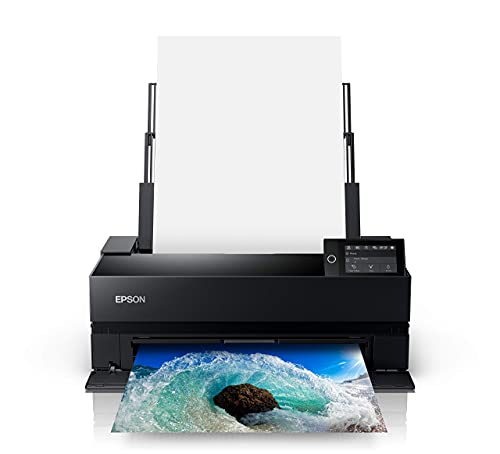
Epson SureColor P900 — Best Overall
The P900 treats a 13×19 print as a warm-up act. Its ceiling is 17×22 cut sheets and roll media, and that headroom shows in the engineering: a rigid feed path that takes fine-art board calmly, a ten-channel UltraChrome PRO10 pigment set with a violet ink that reaches into blues and magentas other sets approximate, and separate matte and photo black channels plumbed simultaneously, so moving from a matte landscape to a glossy portrait costs no purged ink and no waiting. Its carbon-black printing mode pushes glossy density to a depth that makes night photography hold its blacks at glancing angles, where lesser prints wash grey.
For A3 work specifically, the attraction is consistency. The 4.3-inch touchscreen exposes media settings clearly, Epson’s print layout software handles bordered and borderless arrangements without drama, and the machine’s enclosed paper path keeps dust — the enemy that prints as white specks across dark skies — away from the sheet. It is a large, deliberate instrument that assumes a dedicated surface and an owner willing to learn proper media selection. Photographers building toward exhibition, portfolio or sale work will not outgrow it; photographers who print four A3s a year should read the XP-15000 section twice before spending flagship money.
- Max size: 17×22 cut sheet; roll paper supported
- Ink system: 10 pigment inks including violet
- Black switching: none required — both blacks installed
- Connectivity: Wi-Fi, Ethernet, USB
- Display: 4.3-inch colour touchscreen
Strengths
- Gradient smoothness and shadow separation at 13×19 set the class standard.
- Roll feeding opens panoramas no other pick here can attempt.
- Large cartridges lower cost per print once volume grows.
Trade-offs
- Flagship purchase price and a full ink set is a major restock.
- Substantial footprint; needs a sturdy, dedicated table.
- Capability goes unused if your printing stops at occasional A3.
Best for: advanced photographers printing A3 and 13×19 regularly, with larger formats and roll work on the horizon.
Not suited for: first-time large-format buyers on a budget — its talents demand volume to justify themselves.

Canon imagePROGRAF PRO-1100 — Best Colour Gamut
Canon’s answer to the P900 arrives with eleven pigment inks and a clear coat, and a personality tuned toward colour that refuses to be muted. The LUCIA PRO II ink set reaches wide in reds and oranges — the territory of autumn woodland, desert rock and stage lighting — while the Chroma Optimizer lays a uniform finish over the top so a saturated print does not shimmer unevenly where ink coverage changes. At 13×19, a festival photograph or a fashion frame from this machine has a physical richness that pulls viewers across a room.
The PRO-1100 prints up to 17 inches wide like its Epson rival, and Canon’s Professional Print & Layout software is arguably the friendlier of the two ecosystems for photographers who think in images rather than settings, with pattern prints that let you dial in colour balance visually on the actual paper. Where it asks more of you is physical scale and appetite: it is a big unit, and eleven cartridges plus optimiser means the ink shelf is a real line in the household budget. For colourists printing A3 as their primary format, it is the most seductive machine in this guide.
- Max size: 17 inches wide, long sheets supported
- Ink system: 11 pigment inks plus Chroma Optimizer
- Connectivity: Wi-Fi, Ethernet, USB
- Software: Professional Print & Layout included
- Feed: top tray plus manual front/rear path for thick media
Strengths
- Exceptional saturated colour, especially warm hues, at full A3.
- Optimiser coat gives prints an even, finished surface.
- Excellent software for visual, paper-based colour adjustment.
Trade-offs
- Twelve consumable slots make full restocks expensive.
- Large and heavy; plan its home before it arrives.
- No roll-paper support, unlike the P900.
Best for: colour-driven photographers — fashion, festival, product and travel work — printing A3 and 17-inch work for display or sale.
Not suited for: panorama printers or anyone counting the cost of a twelve-slot ink shelf.

Canon imagePROGRAF PRO-310 — Best 13×19 Pigment Value
If the PRO-1100 is the flagship, the PRO-310 is the same argument made at the size most people actually print. Its ceiling is 13×19, which is precisely A3’s home turf, and its ten pigment inks — matte black, photo black and the Chroma Optimizer among them — deliver the matte-paper authority and handling durability that define pigment printing, without the flagship’s footprint or appetite. A 13×19 portrait on cotton-rag paper from the PRO-310 has the soft, deep, glare-free presence that makes visitors ask which lab printed it.
The compromises are honest ones. Seventeen-inch work is impossible by definition, roll paper is not on the menu, and glossy prints, while very good, concede the last degree of wet depth to dye machines and the last degree of density to the P900’s carbon-black mode. But judged strictly at A3 and 13×19 — the brief of this guide — the PRO-310 gives up remarkably little to its bigger sibling, and for photographers certain that A3 is their ceiling, it is the most rational pigment purchase here.
- Max size: 13×19 inches, borderless supported
- Ink system: 10 pigment inks including Chroma Optimizer
- Connectivity: Wi-Fi, Ethernet, USB
- Display: 3-inch colour LCD
- Feed: top tray plus rear manual feed
Strengths
- Reference-class matte and fine-art output at exactly A3/13×19.
- Pigment permanence for prints that will be sold or handled.
- Smaller footprint and ink bill than the 17-inch flagships.
Trade-offs
- Hard ceiling at 13×19 — no growth path to 17-inch work.
- Glossy depth a shade behind dye rivals.
- Rewards careful media-type selection; careless settings flatten matte prints.
Best for: photographers whose world is A3 and 13×19, especially on matte and fine-art papers.
Not suited for: anyone already dreaming of 17-inch prints or panoramas.

Canon PIXMA PRO-200S — Best Dye Gloss
Dye ink at 13×19 is a spectacle in the literal sense: light seems to come out of a glossy PRO-200S print rather than merely off it. The eight-ink set, with photo cyan, photo magenta and grey smoothing the transitions, renders the subjects most people enlarge — family gatherings, travel scenes, pets in good light — with a warmth and gloss that pigment machines politely decline to imitate. The printer itself is the most approachable of the dedicated five: a clear screen, a forgiving driver, and a rear feed that takes thick sheets without the ceremony the pro machines sometimes demand.
Its boundaries are the dye boundaries. A 13×19 dye print behind glass will look glorious for many years, but the same print unframed in a sunny room fades sooner than pigment, and its surface marks more readily under fingers. Cartridge capacity is sized for enthusiasts rather than studios, so a heavy month of A3 work means a restock. Within those boundaries — and for the majority of home photographers, the boundaries never bite — the PRO-200S produces the most immediately delightful large prints in this guide per unit of effort expended.
- Max size: 13×19 inches, borderless supported
- Ink system: 8 dye-based inks
- Connectivity: Wi-Fi, Ethernet, USB
- Display: 3-inch colour LCD
- Feed: top tray plus rear manual feed for thick media
Strengths
- Glossy and luster 13×19 prints have unmatched luminosity.
- Gentlest learning curve among the dedicated machines.
- Grey ink keeps large black-and-white prints neutral on glossy papers.
Trade-offs
- Dye permanence trails pigment for unframed, sunlit display.
- Modest cartridge capacity raises cost during heavy A3 months.
- Surface is less tolerant of bare-handed handling.
Best for: enthusiasts enlarging family, travel and event photography for framed display at home.
Not suited for: sellers of unframed prints or sun-drenched display locations.

Epson Expression Photo HD XP-15000 — Best Budget Entry
Every category needs its honest bargain, and the XP-15000 has held this one for years by refusing to be embarrassed in better company. Six Claria Photo HD dye inks — the red and grey channels doing real work in sunsets and monochrome respectively — produce 13×19 prints that visitors consistently overestimate the cost of. It is also the only dedicated pick that moonlights convincingly as a household printer, with a proper document cassette and automatic two-sided printing for the days when the big paper stays in its box.
Patience is the currency it charges instead of money. At its highest quality settings a borderless 13×19 is a slow meditation, the rear feed takes thick media one sheet at a time, and its driver presents beginners with a cockpit of options that takes an afternoon to map. Cartridges are small, so cost per A3 print is not the bargain the purchase price suggests — the machine is cheap to buy and average to feed. As a first step into A3 photography, though, nothing else lets you learn the craft — paper choice, profiles, proofing — at this entry cost, and many owners happily print on it for years.
- Max size: 13×19 inches, borderless supported
- Ink system: 6 dye inks including red and grey
- Connectivity: Wi-Fi, Ethernet, USB
- Feed: rear specialty feed plus front document cassette
- Extras: automatic two-sided document printing
Strengths
- Lowest entry cost to genuine photographic A3 printing.
- Warm colour and neutral monochrome from the red and grey inks.
- Doubles as the household’s everyday printer.
Trade-offs
- Slow at maximum quality, especially borderless 13×19.
- Small cartridges keep cost per large print merely average.
- Driver complexity can overwhelm newcomers initially.
Best for: photographers stepping up to A3 for the first time who want to learn the craft without flagship money.
Not suited for: impatient printers or high-volume A3 production.

Epson WorkForce Pro WF-7840 — Office All-in-One, With Limits
This pick requires the guide’s clearest disclaimer: the WF-7840 is an excellent machine that does not belong to the same species as the five above. It is a wide-format office all-in-one — print, scan, copy and fax up to A3, with two big paper trays, a 50-sheet document feeder and print speeds the photo machines cannot approach. Its four pigment inks are formulated for crisp documents on plain paper, and on photo paper it produces images best described as presentable: fine for a site presentation, a school display board or a property brochure, visibly behind every dedicated pick in gradient smoothness, black depth and colour subtlety the moment a photograph is the point.
Why include it at all? Because a real segment of A3 buyers — architects’ offices, schools, small studios — need the size for documents and only occasionally for images, and for them a dedicated photo printer plus a separate A3 scanner is absurd. The WF-7840 also scans at A3, which none of the photo machines do at any size, letting you digitise large artwork and plans. Buy it with your eyes open: you are purchasing an office hub that can print a decent big photo, not a photo printer that happens to scan.
- Max size: A3/13×19 print; A3 scan and copy
- Ink system: 4 DURABrite Ultra pigment cartridges
- Functions: print, scan, copy, fax with 50-sheet ADF
- Capacity: dual trays, 500 sheets total
- Connectivity: Wi-Fi, Ethernet, USB
Strengths
- Full A3 office workflow — including A3 scanning — in one machine.
- Fast, cheap document printing at any size up to A3.
- Huge paper capacity suits shared offices.
Trade-offs
- Photo quality is a clear class below every dedicated pick here.
- Four inks cannot render subtle photographic gradients cleanly.
- Big, heavy unit designed for offices, not desks at home.
Best for: offices and schools needing A3 documents and scanning, with occasional presentable photo output.
Not suited for: photographers. If the photograph is the product, choose any other pick in this guide.
How Do the Six A3 Machines Compare?
| Model | Inks | Max width | Roll | Character |
|---|---|---|---|---|
| Epson SureColor P900 | 10 pigment | 17 in | Yes | Flagship all-rounder |
| Canon PRO-1100 | 11 pigment + optimiser | 17 in | No | Widest colour |
| Canon PRO-310 | 10 pigment | 13 in | No | A3 pigment specialist |
| Canon PIXMA PRO-200S | 8 dye | 13 in | No | Glossy luminosity |
| Epson XP-15000 | 6 dye | 13 in | No | Budget teacher |
| Epson WF-7840 | 4 pigment (office) | 13 in | No | A3 office hub |
How Should You Prepare a File for a 13×19 Print?
Begin with honesty about the source. A 13×19 printed at a quality the eye accepts needs a file with real resolution across its dimensions; modern cameras and recent phones qualify easily, while screenshots, messaging-app downloads and aggressively cropped corners of larger frames do not. Cropping is the silent tax: a heavy crop that looked fine at 8×10 may fall apart at 13×19, which is why large-format printers teach their owners to compose more carefully in camera. If a beloved file is marginal, print it on matte paper — the surface’s softness forgives resolution sins that glossy paper prosecutes.
Sharpen for the print, not the screen. Output sharpening at final size, judged by viewing the file at the physical dimensions it will occupy, adds the crispness that ink spread on paper quietly removes. Soft-proof with the target paper’s profile when your editor allows it, watch for out-of-gamut warnings in saturated reds and blues, and let the proof — a partial strip at full size, showing the most detailed and most delicate regions side by side — make the final call. At A3 prices per sheet, the strip proof is not a ritual; it is insurance you buy with offcuts.
Colour decisions deserve the same discipline. Work on a monitor whose brightness has been lowered toward paper-white reality, or every print will come home darker than expected. Convert nothing twice: one colour manager, one profile, chosen deliberately. And keep the print-ready version of the file — cropped to the 13×19 ratio, sharpened, profiled — saved separately from the master, so a reprint next year starts from the exact artefact that pleased you rather than from a fresh round of decisions.
What Does A3 Printing Cost Once the Printer Is Home?
The sheet is the headline expense. Quality 13×19 luster or glossy paper costs several times its 8×10 equivalent, and cotton fine-art sheets at this size are priced like the gallery materials they are. Ink follows: a saturated 13×19 can consume as much ink as four or five small prints, and the flagship machines’ larger cartridges exist precisely because their owners felt that arithmetic. The XP-15000 inverts the pattern — cheap machine, small cartridges, unremarkable economy — which is why its section calls it a teacher rather than a production tool.
The costs nobody lists are failure and framing. A ruined 13×19 sheet hurts; the proofing discipline in this guide is an economic strategy, not perfectionism. And an A3 print demands a frame, mat and glazing of matching size, which routinely costs more than the print itself — many photographers standardise on one frame size and mat window so prints rotate through a fixed set of frames instead of funding new framing for every image. Budget the whole object, not just the printer, and A3 printing becomes a sustainable habit rather than an expensive surprise.
How Do You Handle and Store Large Prints and Paper?
Unprinted paper first: keep 13×19 stock flat in its box, in the room where it will be printed, so it acclimatises to the humidity it will be printed in. Sheets stored upright lean, curl and then feed crookedly; sheets stored in a cold garage and printed warm can show banding as they adjust. Handle every sheet by its edges with clean, dry hands — cotton gloves are not theatre at this size, because a fingerprint on glossy paper before printing becomes a permanent pale ghost in a dark sky.
Finished prints need rest before framing, especially dye prints, whose ink layer settles and releases trace gases for a day or more; sealing one behind glass too early can haze the glazing from inside. Pigment prints rest for a different reason — their surface is at its most scuffable when fresh. Store finished work interleaved with plain paper, flat, away from sunlight, and transport A3 sheets in a rigid portfolio rather than rolled in a tube unless the paper is a roll stock designed for it. The printers in this guide can produce objects that last decades; the drawer, the portfolio and the frame decide whether they actually do.
What Mistakes Do New A3 Owners Make?
Feeding thick fine-art paper through the cassette because it fits, then blaming the printer for the head strike and the scuffed surface. Choosing the wrong media type — matte paper told to expect glossy ink loads — and concluding the machine cannot print blacks. Printing a full 13×19 to test a colour decision that a strip would have settled. Letting the printer sleep for three months, then demanding perfection from a clogged head for a deadline print. And the classic: buying the flagship before printing anything, discovering the craft’s real costs in paper and framing, and letting a magnificent machine become furniture. Start where your volume is, not where your ambition shops.
Dye or Pigment at A3: Which Philosophy Fits Your Walls?
The dye-versus-pigment question matters more at A3 than at any smaller size, because the print is big enough for the surface itself to become part of the artwork. Dye ink soaks into the paper’s coating and dries beneath it, which is why a glossy dye print has that continuous, almost wet depth — the image seems to sit inside the sheet. Pigment ink rests on the surface as a layer of microscopic particles, and the eye reads it as an object with a finish: satin, matte, or the even sheen the Canon optimiser coat produces. Neither rendering is a defect. They are two different materials, and photographers who print large learn to choose per image — dye for the glossy travel scene that should glow, pigment for the matte portrait that should feel like a page from a book.
Permanence tilts the argument for work that leaves your home. Pigment prints tolerate the handling, humidity swings and light exposure of exhibitions, markets and clients’ offices with a composure dye cannot match, and their matte-paper blacks stay put when a thumb crosses them. Dye prints behind glass in a normal home, by contrast, will outlast most owners’ interest in redecorating. The honest summary is that dye’s weaknesses appear in professional circulation and harsh light, while pigment’s weaknesses — a slightly restrained glossy depth, a fussier relationship with media settings — appear at home. Most buyers should therefore decide by destination: walls you control favour either; the world favours pigment.
Black-and-white deserves its own paragraph in this debate, because A3 monochrome is where many photographers fall hardest for printing. A neutral grey scale at this size depends on dedicated grey and black inks doing the tonal work while colour inks stay nearly silent; both pro ecosystems here provide advanced monochrome modes that do exactly that. The P900’s carbon-black behaviour gives glossy monochrome a depth that recalls darkroom fibre paper, while the PRO-310 on matte cotton stock produces the soft, stonelike greys of a fine book plate. The XP-15000’s single grey cartridge makes it the only budget machine here that takes monochrome seriously at all — one more reason it teaches the craft so well.
How Do Paper Profiles Work With Third-Party Papers?
Every photograph you print is translated twice: once by the profile that describes your paper-and-ink combination, and once by the media-type setting that tells the printer how much ink to lay down and how long to let it dry. Manufacturer papers arrive with this translation done for you — select the paper’s name in the driver and the profile and media behaviour arrive together. Third-party papers, the cotton rags and barytas of specialist mills, hand you the translation as a downloadable ICC profile and a written instruction naming the media type to select. Follow that instruction literally; the mill has tested its paper on your printer family, and improvising a different media type because the name sounds closer is how good paper earns bad reviews.
Installing a profile is a five-minute, one-time task per paper: download it from the mill’s site, place it where your operating system keeps colour profiles, and it appears in your editor’s print dialog from then on. What changes with a good profile is not subtle at A3. Saturated colours that used to clip into flat patches separate again, shadow detail opens, and the print on the wall finally matches the file you approved on screen closely enough that your remaining corrections are artistic rather than corrective. Photographers who skip profiles and print everything through a generic glossy setting are using perhaps two-thirds of the machine they paid for.
Keep a reference print for each paper you adopt — the same test image, with skin, sky, deep shadow and a neutral grey scale — filed with the paper’s name and settings written on its back. When a later print looks wrong, reprinting the reference on the same paper instantly divides the world into printer problems and file problems. At A3 prices, that division is worth money every single time it is made.
What Room Will the Printer Live In, and Why Does It Matter?
Flagship A3 machines are furniture. The P900 and PRO-1100 each demand a surface with depth for the sheet’s travel — a 17-inch printer printing a long sheet needs clear space behind it as well as in front — plus a structure that does not wobble when the carriage sweeps. A printer on a rickety stand prints its own vibration into delicate work as faint banding, a fault owners routinely misdiagnose as clogging. Place the machine on something solid, level it, and give its rear feed a clear runway before the first sheet ever loads.
Light in the room matters for a subtler reason: you will judge prints there. A desk lamp with a strong colour cast teaches you to correct colours that were never wrong, and the corrections then travel with the print to every other room. Judge under the most neutral light you have, ideally near the wall where the print will hang, and distrust any evaluation made under a single warm bulb at midnight. Photographers with a permanent printing corner often fit a high-quality daylight-balanced lamp for proofing; it costs less than one ruined box of fine-art A3 and pays for itself in avoided reprints.
Finally, consider the room’s air. Dust settles on paper waiting in open trays and prints as specks; pet hair is worse. Keep the printer’s covers closed between sessions, store paper in its box rather than fanned in the tray, and resist locating the machine beside a workshop, a litter tray or a frequently opened exterior door. None of this is preciousness — at A3, every speck is enlarged.
How Does a Disciplined A3 Printing Session Run?
It begins the night before, unglamorously, with paper. Move the sheets you intend to use into the printing room so temperature and humidity equalise, and check the printer’s ink levels while there is still time for a delivery to save the session — running dry mid-print on a flagship means the sheet in the machine is lost along with its ink. Run the nozzle check on plain paper. A clean pattern is permission to proceed; a broken one is a cleaning cycle and a re-check, addressed now rather than discovered across a dark sky on expensive cotton stock.
Files come next, prepared as print copies rather than edited on the fly: cropped to the exact ratio of the sheet, soft-proofed against the paper’s profile, sharpened for the final size. Queue them in the order you will print, grouped by paper so the machine is loaded once per stock rather than swapped sheet by sheet — every paper change is an invitation to load one sheet wrong, and at A3 a wrongly loaded sheet is a costly lesson. For the first sheet of each paper, print a strip proof of the critical region at full scale; for familiar paper-and-image combinations, your reference-print file and your notes may let you skip it, and knowing when you may skip is precisely what experience means in this craft.
As prints emerge, they go face-up on a clean flat surface — not stacked, not leaned against a wall where they bow — and they rest there while the session continues. Evaluation waits until the whole batch exists, because judging wet prints under working light produces corrections the dry prints never needed. Then each print is inspected once, properly: at viewing distance for impact, at arm’s length for faces and skies, at an angle for surface faults on glossy stock. The keepers are logged with their settings; the failures are examined before they are discarded, because a failure you understand is tuition and a failure you bin unexamined is just an expense.
How Should Low-Volume Owners Maintain a Professional Printer?
Professional photo printers are designed for workloads most homes never reach, and their failure mode is not wear but neglect. Ink dries at the nozzle plate of a machine left idle for months; paper dust accumulates in a feed path nobody sweeps; firmware improvements pass uninstalled. The counter-regime is light but regular: a small print every couple of weeks keeps ink moving, the printer’s own power button — never a wall switch — parks the head in its sealed rest position, and a cover or closed trays keep the dust economy unfavourable to dust.
When a nozzle check does come back broken, restraint saves money. One cleaning cycle, one re-check; a second only if the pattern improved. Repeated deep cleanings consume the ink you are protecting and fill the maintenance cartridge — itself a replaceable part on pro machines, whose status the driver reports and whose replacement is a normal cost of ownership rather than a failure. Budget for it as you budget for paper, and the message announcing it will read as a reminder rather than a ransom.
Finally, keep the ecosystem current. Manufacturers refine paper profiles, borderless behaviour and wireless stability through driver and firmware updates across a model’s long life, and a printer that suddenly misbehaves after a computer update is usually a printer whose settings were reset by it. Your session log — paper, profile, media type, adjustments — is the map back to the last known-good configuration. Owners who keep one describe their printers as reliable for a decade; owners who do not describe the same machines as temperamental. The difference is paperwork, in every sense.
What If You Want to Sell or Exhibit A3 Prints?
Selling changes the specification. A print that leaves your custody needs pigment ink for handling resilience, a paper whose longevity claims you can repeat to a buyer without crossing your fingers, and consistency — the tenth print of an edition must match the first, which is why sellers standardise ruthlessly: one or two papers, profiles installed, settings logged, and a reference print of each edition kept in the dark as the master against which later copies are judged. The PRO-1100, PRO-310 and P900 are the natural tools for this work in our list; the dye machines can produce saleable beauty, but their prints belong behind glass with that condition stated to the buyer.
Exhibiting adds logistics to the same discipline. Venues want specific sizes, often matted to standard frames, delivered by a deadline that will inevitably collide with a clogged nozzle or an empty cartridge unless your maintenance and spares habits are already in place. Print the show early, keep one spare of every sheet size, and transport work flat and interleaved in a rigid case. Judges and gallerists rarely comment on printing technique when it is good — which is the point. At exhibition level, the printer’s job is to disappear, leaving the viewer alone with the image. Every machine among the dedicated five can achieve that disappearance on its best papers; the flagships simply achieve it with the fewest conditions attached.
Pricing the work, if you go that far, must internalise the true per-print cost this guide has been circling: paper, ink, failures amortised across successes, framing, and the hours inside a disciplined session. Photographers who price from the cost of the sheet alone discover the error at their second show. Photographers who price from the full system — and who chose their printer’s ecosystem with feeding costs in mind — are the ones still printing at their fifth.
How Much Camera Do You Need for a Convincing A3 Print?
Less than marketing suggests, and more than nostalgia admits. The arithmetic photographers quote — final dimensions multiplied by a target resolution — describes an ideal, but perceived quality at A3 is governed by the file’s cleanliness more than its pixel count. A sharp, well-exposed frame from a modest sensor, printed at a sensible viewing distance, looks genuinely fine; a noisy, heavily cropped frame from an expensive camera looks tired. What large printing punishes is not small sensors but small decisions: the aggressive crop, the high-ISO shortcut, the messaging-app copy saved over the original.
Upscaling software has moved the boundary further in the photographer’s favour. Modern AI-based enlargement can prepare a marginal file for 13×19 with results that would have required a reshoot a decade ago, particularly for landscapes and architecture where edges are cooperative. Faces are less forgiving — synthetic detail in skin and hair reads as artifice at A3 — so portraitists should still capture with the print in mind. The practical rule the owners of these machines converge on: shoot as if the A3 print were the assignment, and the printer will rarely be the weakest link in the chain.
Phones deserve a direct word, since they are now many photographers’ only camera. A recent phone’s main-camera file, shot in good light at its native setting rather than a digital zoom, prints at A3 far better than sceptics expect — computational sharpening, for once, works in the print’s favour. Low-light phone images are the exception, where noise reduction smears exactly the fine detail a large print exists to reveal. Judge by subject and light, not by the device category, and proof the critical strip before committing a full sheet.
Borderless or Bordered: How Should an A3 Print Be Presented?
Borderless printing feels like the modern default — the image runs to every edge, nothing wasted — and for posters, display boards and full-bleed portfolio pages it is exactly right. But the bordered print carries centuries of presentation logic that scale amplifies rather than dates. A white border gives the eye a rest between wall and image, gives hands somewhere to hold the sheet without touching ink, and gives a framer material to hinge and mat without covering a single millimetre of picture. At A3, where the sheet is an object people handle, those are practical virtues dressed as aesthetic ones.
There is also a technical dividend. Borderless mode works by overspraying — the printer deliberately prints slightly beyond the sheet’s edges onto absorbent pads, enlarging the image a touch and cropping its extremes. Fine detail at the frame’s edge, a signature, a carefully composed horizon near the border: all are trimmed by that expansion. Bordered printing on the exact sheet, or printing the image smaller on a larger sheet and trimming, keeps the composition you made. Photographers selling editions almost universally print bordered for this control; photographers filling a specific frame at home often choose borderless for its simplicity. Know which you are doing and why, and the setting stops being a default and becomes a decision.
Final Recommendation
For most serious photographers, the Epson SureColor P900 is the A3 answer with the longest future: it prints 13×19 superbly today and still has 17-inch and roll work in reserve. The Canon PRO-1100 counters with the richest colour and the friendlier software, and the PRO-310 distils pigment quality to exactly A3 size for less. The PRO-200S makes glossy enlargements a joy, the XP-15000 teaches the craft at the lowest entry price, and the WF-7840 serves offices that need A3 everything with photography as a side duty. Choose by the prints you will actually make this year, and the machine will feel less like a purchase and more like a pressroom.
Frequently Asked Questions
Is A3 the same as 13×19 inches?
Nearly. A3 measures 11.7×16.5 inches, while 13×19 — sometimes called Super A3 or A3+ — is slightly larger in both dimensions. Printers in this class handle both; check the specific paper size in the driver rather than assuming the tray label tells the whole story. When ordering paper, match the product name to the exact sheet dimensions on the box, because suppliers use the A3 label loosely and a mislabelled pack discovered mid-session, with a client deadline approaching, is an entirely avoidable and strangely common frustration.
Can these printers print A3 borderless?
The five dedicated photo printers print borderless at 13×19 on suitable papers. Borderless mode oversprays slightly beyond the sheet edges, so for bordered fine-art work where the margin is part of the presentation, print with borders on a larger sheet or accept the standard bordered mode.
Do I need a 17-inch printer if I only print A3?
No — the PRO-310, PRO-200S and XP-15000 exist precisely for you. The 17-inch machines earn their premium when you will use the width, the roll support or the larger cartridges. Paying for width you never use buys only a bigger footprint.
Which ink type lasts longest on the wall?
Pigment sets from both Canon and Epson are rated for very long display life under glass, comfortably ahead of dye sets in sunlit rooms. Behind glass and out of direct sun, all of the dedicated picks produce prints that outlast casual expectations; unframed and sunlit, pigment’s advantage becomes decisive.
Why does my large print show banding in the sky?
Banding at A3 usually traces to a partially clogged nozzle, a wrong media-type setting laying down too much or too little ink, or a highly compressed file whose gradient was already stepped before printing. Run a nozzle check first, confirm the media type matches the paper, and test with an uncompressed file before suspecting the machine itself.
Is the WF-7840 good enough for a photography business?
No. Its four office inks produce presentable images for reports and displays, but clients paying for photographs will see the difference against any dedicated pick here — in skin, in sky and in the blacks. It belongs in this guide for offices, not studios, and a photographer who bought one for client work would end up replacing it within the first commission that mattered.
How long does a 13×19 print take?
At the quality settings worth using, measure in minutes rather than seconds: a borderless 13×19 at top quality on any machine here is a small event, not a background task, and the pro machines add careful feed and drying behaviour on thick papers that extends the cycle further. This is a feature disguised as a cost. Large printing rewards batching your decisions — proof once, then let the machine work through a session — instead of treating each sheet as a print-preview-print loop. Owners who plan sessions produce more keepers per hour than owners who improvise, even on identical hardware.
Should I buy the printer or use a lab for A3 prints?
Count your honest annual volume. A handful of A3 prints a year belongs to a good lab, whose per-print price buys their paper, their maintenance and their colour discipline. Regular printing — monthly sessions, proofing iterations, editions, the freedom to reprint at midnight before a deadline — belongs at home, where the cost per print falls with volume and the control is total. The uncomfortable middle is owning the machine and printing rarely: idle months are what clog heads and strand expensive ink. If that is your likely pattern, the XP-15000’s modest appetite makes it the safest home choice, and the flagships should wait until your printing calendar can feed them.
Related Guides
Continue with best 8×10 photo printers for the smaller format most photographers print weekly, best A3 printers if your large-format needs lean toward documents and plans, and best photo printers for the complete field across all sizes.



[…] exploring with our companion roundups: best A3 photo printers for the step up to 13×19 and beyond, best 4×6 photo printers if compact snapshots are your real […]