What's inside
- Key Takeaways
- Quick Picks
- How Did We Choose These Address Label Printers?
- What Makes a Good Address Label, Specifically?
- How Do the Six Label Printers Compare?
- How Much Do Labels Really Cost Over a Printer’s Life?
- How Do You Set Up an Address-Printing Workflow That Stays Fast?
- What Mistakes Do Label Printer Buyers Make?
- Which Label Sizes Cover Real Life, From Envelopes to Parcels?
- How Does Direct Thermal Printing Actually Work, and What Ages It?
- Where Do Label Printers Earn Their Keep Beyond the Post?
- How Do You Keep a Label Printer Printing Like New?
- How Should You Judge Label Software Before You Buy the Printer?
- What Does a Sensible Label Stock Cupboard Look Like?
- How Do Address Labels Stay Readable Through the Postal System?
- When Does a Business Outgrow a Desktop Label Printer?
- What Should You Print in the First Week to Learn Your Machine?
- How Do the Ecosystems Treat Your Data and Your Address Book?
- What Is the Sensible Upgrade Path as Your Labelling Grows?
- Final Recommendation
- Frequently Asked Questions
- Related Guides
As an Amazon Associate I earn from qualifying purchases. This post may contain affiliate links at no extra cost to you.
widgetverdict.com is reader-supported. When you buy through links on our site, we may earn an affiliate commission.
Where to buy: The label printers below are sold through Amazon, where the listings also carry the label rolls each machine eats — check the roll sizes in the box before ordering, because a printer that arrives with a sample roll is a printer that stops on its second day.
An address label is a small promise: this parcel, this letter, this file folder is going to the right place, legibly, without a hand-written scrawl undermining it. The best address label printers make that promise at the press of a button — thermal machines that need no ink, print in seconds, and turn the tedious end of selling, filing and organising into the fastest part. This guide covers six of them across the category’s real divide, which is not speed or resolution but freedom: some of these machines accept any compatible label stock you feed them, and some — the DYMO 550 series, discussed with complete honesty below — recognise only their manufacturer’s own chipped rolls. That single design decision shapes everything you will pay and everything you can print for years.
One more framing note before the picks: an address label printer is a specialist living alongside a household’s ordinary printer, not a replacement for it. It will never print a letter, a boarding pass or a photograph, and it does not want to. Its kingdom is the small rectangle, printed instantly, without ink, a hundred times a week or once a month with equal readiness — and judged by how completely it disappears into the routines of posting, filing and dispatching, it may be the most satisfying printer category of all, precisely because its ambitions are so modest and so completely, reliably fulfilled every single time the button is pressed, in offices, clinics, classrooms, packing rooms, market stalls, school offices and kitchen drawers across the entire labelling world, every day, without exception or ceremony.
Read the DYMO sections carefully even if you end up buying one. Plenty of owners are perfectly happy inside a single-brand label ecosystem; the mistake is entering it unknowingly, with a cupboard full of third-party rolls already bought.
Key Takeaways
- All six picks are direct thermal printers: no ink, no toner, ever — the label stock itself is the only consumable.
- The DYMO LabelWriter 550 and 550 Turbo use RFID-chipped rolls and refuse unchipped third-party labels. That lock-in is a genuine, permanent trade-off, priced into their sections.
- Brother’s QL-820NWB is the most flexible address specialist here, printing black-and-red labels up to 62mm wide from almost any device.
- Rollo’s two machines are the shipping-volume picks, accepting fan-fold and third-party rolls; the wireless model frees the printer from the packing desk.
- Address labels and 4×6 shipping labels are different jobs; machines that do both well are worth their premium to sellers.
Quick Picks
| Pick | Badge | Why it is here |
|---|---|---|
| Brother QL-820NWB | Best Overall | Bluetooth, Wi-Fi and Ethernet, two-colour printing and a label range built for addresses, files and badges. |
| Rollo Wireless Label Printer | Best for Shipping Volume | Wi-Fi and AirPrint freedom with any-brand 4×6 stock, for sellers whose labels outnumber their addresses. |
| Rollo USB Label Printer | Best Wired Workhorse | The original Rollo formula — fast, brand-agnostic, commercial-grade — over a simple USB connection. |
| DYMO LabelWriter 550 | Best Software — With Lock-In | Superb label software and automatic roll recognition, in exchange for DYMO-only chipped labels. |
| DYMO LabelWriter 550 Turbo | Fastest DYMO | The 550 formula at higher speed with network connectivity — and the same chipped-label commitment. |
| Brother QL-810W | Prose-Only Alternative | The QL-820NWB’s close sibling for buyers who need wireless two-colour labels without the Ethernet and Bluetooth extras. |
How Did We Choose These Address Label Printers?
We judged these machines on the life of the label, not the thrill of the first print. An address label must survive the journey it is assigned to: thermal printing fades under heat and sunlight over time, adhesives behave differently on cardboard, poly mailers and file folders, and a printer whose cutter leaves ragged edges makes a small business look like one. Models earned their places by printing crisply at small text sizes — an address at 8-point type is the real resolution test — feeding reliably across a whole roll rather than a demonstration sheet, and cutting cleanly thousands of times.
Software carried unusual weight, because label printing is software with a printer attached. Address books, mail-merge from spreadsheets, barcode generation for the sellers among you, templates for the standard label sizes: the difference between the ecosystems here is the difference between a thirty-second task and a five-minute one, repeated daily. We favoured machines whose software treats addresses as the main event rather than an afterthought in a shipping tool — with the Rollos as the deliberate exception, included because so many address labels in 2026 are printed by people whose main event is shipping.
We also spent time on the small humiliations of the category, because they are where ownership is actually decided: the printer that beeps an error with no explanation at the exact moment the courier is at the door, the roll that loads beautifully and then feeds sideways on label nine, the software update that rearranges the template menu the morning of a mailing. Machines with a reputation for those moments were marked down in our ordering regardless of their specifications, and the survivors above share a common trait that no datasheet lists — they behave predictably under mild pressure, which in a tool whose entire purpose is the last thirty seconds before a parcel leaves is the specification that matters most.
Finally, we priced the marriage, not the wedding. Every thermal printer is cheap to buy relative to its label appetite, so the deciding economics are the rolls: their price, their variety and — the DYMO question — whether you are allowed to shop for them at all. That criterion is weighted in each pick’s trade-offs rather than hidden in a footnote, because it will still be true in year three when the purchase price is forgotten.
What Makes a Good Address Label, Specifically?
Legibility at arm’s length and at the sorting office. Postal systems read addresses with machines before humans do, and a clean sans-serif typeface at a sensible size, printed with enough contrast on a white label, sails through both audiences. Thermal printers earn their keep here because their output is uniformly dense and dry the instant it emerges — no smearing from a damp thumb, no inkjet feathering on the label’s coated surface. The 300dpi-class output of the Brother and DYMO machines renders small type with an edge that 203dpi shipping printers approximate; for pure address work, that crispness is the difference between a label that looks printed and one that looks produced.
Size is the second virtue. The classic address label is a modest rectangle, but real life asks for variety: a larger label for the parcel that also carries a return address and a fragile warning, a narrow one for file spines, a round one for jars and products. Machines with a range of roll widths — the Brother QL line is the exemplar — answer those asks from one printer, while the 4×6 shipping machines answer them by printing small labels on big stock and wasting the difference. Match the printer’s label wardrobe to the labels you actually produce monthly, not the one impressive label you produced once.
Adhesive honesty completes the picture. A label that curls off a poly mailer in transit, or welds itself permanently to a file folder meant to be reused, has failed at its only job. Genuine and quality third-party rolls both perform well here when matched to the surface; the disasters cluster around the cheapest unbranded stock, whose adhesive and coating are where its price was found. Your printer will be blamed for your labels’ failures — choose both as one system.

Brother QL-820NWB — Best Overall
The QL-820NWB is what happens when a manufacturer treats the label printer as a network citizen rather than a peripheral. It connects by Bluetooth, Wi-Fi and Ethernet simultaneously, prints from phones, tablets, PCs and Macs without negotiation, and carries a small LCD and label editor built into the machine for the quick one-off label when no computer is awake. Its party trick is genuine rather than decorative: with the right Brother roll, it prints in black and red — the red that turns a plain address label into a fragile warning, a priority marker or a price that reads as a sale — a capability none of its rivals here can imitate.
For addresses specifically, its wardrobe is unmatched in this guide: continuous rolls you cut to any length, die-cut address and file labels in the standard sizes, widths up to 62mm, all fed by an automatic cutter that keeps a batch of fifty envelopes’ worth of labels flowing. Brother’s P-touch Editor software is the category’s most capable free tool for mail-merge and template work. The honest costs are a purchase price above the shipping machines and Brother-brand rolls priced above the no-name alternatives it also accepts. As the single label printer for an office, a clinic, a school or an organised home, it is the most complete answer here.
- Print width: up to 62mm, continuous and die-cut rolls
- Special capability: black plus red two-colour printing on selected rolls
- Connectivity: Bluetooth, Wi-Fi, Ethernet, USB
- Display: built-in LCD with stand-alone label editing
- Cutter: automatic, full-cut
Strengths
- Widest label wardrobe and the only two-colour output here.
- Every connection a modern office could ask for.
- Superb software for address mail-merge and templates.
Trade-offs
- Premium price for a label printer.
- Two-colour printing requires the specific black/red roll.
- Maximum width stops at 62mm — no 4×6 shipping labels.
Best for: offices, clinics, schools and organised homes whose labels are addresses, files, badges and warnings.
Not suited for: e-commerce shipping at 4×6 — that is the Rollos’ country.

Rollo Wireless Label Printer — Best for Shipping Volume
The wireless Rollo answers the packing bench’s oldest annoyance: the printer tethered by USB to a computer that lives somewhere else. With Wi-Fi and AirPrint, it sits wherever the parcels are packed and prints from the phone in your hand, the tablet by the scales or the laptop in the office, at the commercial speed Rollo built its name on. It accepts rolls and fan-fold stacks of any brand — the label freedom that defines the anti-DYMO philosophy — and its appetite is the 4×6 shipping label, printed by the hundred without ink, toner or mercy for deadlines.
In an address-label guide, its role is the volume seller’s: the business whose “address labels” are mostly the shipping labels on outbound parcels, plus return labels, warehouse shelf labels and the occasional genuinely postal address, all of which it prints with the same indifference. Its compromises are focus — no dainty die-cut address sizes, no two-colour tricks, text crispness a step behind the 300dpi specialists — and the wireless setup, which rewards a stable network. Sellers printing labels daily will not miss the delicacies; they will notice the freedom and the speed on every single dispatch.
- Print width: up to 4×6 inch labels, rolls or fan-fold
- Label freedom: accepts third-party and fan-fold stock
- Connectivity: Wi-Fi with AirPrint, plus USB
- Technology: direct thermal, no ink or toner
- Orientation: commercial shipping volume
Strengths
- Print from anywhere; the printer lives at the packing bench.
- Any-brand label stock keeps running costs competitive.
- Commercial speed for dispatch-day label runs.
Trade-offs
- Built around 4×6; small die-cut address labels are not its craft.
- Print resolution trails the Brother and DYMO specialists.
- Wireless performance depends on your network’s quality.
Best for: online sellers and small warehouses printing shipping and return labels daily.
Not suited for: front-desk address elegance or filing-label variety.

Rollo USB Label Printer — Best Wired Workhorse
The original Rollo is the machine that taught small sellers they did not need a legacy brand’s permission to print labels. It connects by USB, prints 4×6 shipping labels at commercial pace, and accepts the entire open market of rolls and fan-fold stacks — the economic foundation of its reputation, since label stock bought competitively is where a shipping operation’s printing budget is actually decided. Its build is the commercial grade its listing claims: this is a tool for benches, not desks, and it behaves like one across long dispatch sessions.
Against its wireless sibling, the trade is pure and simple: you give up placement freedom and phone printing, and you receive a connection that never drops, never needs re-pairing and never depends on the router’s mood — plus a lower price for the same thermal engine philosophy. In this guide’s address frame, it serves the seller whose labels are printed from one computer at one bench, a workflow so common that the USB cable is not a limitation but a description. Buy the wireless model for a moving workflow; buy this one for a fixed bench and spend the difference on labels.
- Print width: up to 4×6 inch labels, rolls or fan-fold
- Label freedom: accepts third-party and fan-fold stock
- Connectivity: USB
- Technology: direct thermal, no ink or toner
- Orientation: fixed packing-bench volume
Strengths
- Utterly dependable wired connection and commercial pace.
- Open label market keeps per-label cost low forever.
- Simple setup: one cable, one driver, done.
Trade-offs
- No wireless or phone printing of any kind.
- Small address-label formats are outside its design brief.
- Industrial looks and fan-fold handling suit benches, not desks.
Best for: sellers with a fixed packing station printing shipping labels in volume.
Not suited for: mobile workflows or offices wanting delicate address labels.

DYMO LabelWriter 550 — Best Software, With Lock-In
Now the guide’s most important section, and it begins with the fact that must not be softened: the LabelWriter 550 only prints on DYMO’s own labels. Each genuine roll carries an RFID chip that the printer reads to identify the label type — and to refuse anything else. Third-party rolls, however good, however identical in size, will not print. This is not a warranty technicality or a quality recommendation; it is a hardware-enforced ecosystem lock, and it means your label costs for the life of this machine are DYMO’s prices, at DYMO’s variety, forever. We regard that as a serious, permanent trade-off, and it is why this printer is not our best overall despite everything in the next paragraph being true.
Because the machine itself is lovely. The same RFID system tells the software exactly which label is loaded, so the template always matches the roll; DYMO’s Connect software remains the friendliest address-printing environment in the category, with address-book integration, mail-merge and one-click printing from Office documents; the print quality at small sizes is crisp; and the printer is compact, quiet and civilised on a desk. For a professional office that values its hours over its label budget and prints addresses, file labels and badges in modest volume, the bargain can genuinely make sense. Enter it knowingly, price the genuine rolls for your expected volume, and it is a tool you may love. Enter it accidentally, and it is a grievance with a power cable.
- Print width: up to about 62mm class label range
- Label system: DYMO-only RFID-chipped rolls — third-party stock refused
- Software: DYMO Connect with address book and mail-merge
- Connectivity: USB
- Recognition: automatic label identification via RFID
Strengths
- The most polished address-printing software in the category.
- Automatic roll recognition eliminates template mismatches.
- Crisp small-text output in a compact, quiet desk machine.
Trade-offs
- Permanent lock-in to DYMO-branded chipped labels; no third-party stock, ever.
- Label costs are set by one supplier for the machine’s whole life.
- USB only — no network or wireless printing.
Best for: professional desks printing addresses and file labels in modest volume, valuing software polish over label freedom.
Not suited for: volume users, bargain label buyers, or anyone who resents a consumable monopoly.
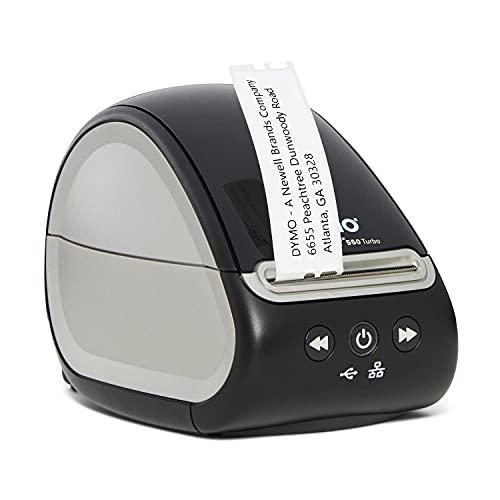
DYMO LabelWriter 550 Turbo — Fastest DYMO
The Turbo takes the 550’s entire philosophy — including, unchanged, the RFID lock-in to DYMO-branded labels — and adds the two things busy offices asked for: substantially faster printing and a LAN connection, so the machine can be shared across a small network rather than chained to one desk’s USB port. In a front-office setting where several people print visitor badges, file labels and outgoing addresses across the day, that combination of speed and sharing converts the LabelWriter from a personal peripheral into office infrastructure.
Everything said about its sibling’s software and output applies here, with interest: the same automatic roll recognition, the same Connect software strengths, the same crisp small type — and the same obligation to price genuine DYMO rolls into your decision before purchase, at the higher volumes the Turbo’s speed invites. Speed multiplies whatever economics you sign up for. If the 550’s bargain makes sense at your volume, the Turbo makes it faster; if the lock-in troubles you at low volume, it should trouble you more at high volume, and the Rollo and Brother sections are where your reading should go next.
- Print width: up to about 62mm class label range
- Label system: DYMO-only RFID-chipped rolls — third-party stock refused
- Connectivity: USB and LAN network
- Speed: fastest in the LabelWriter line
- Software: DYMO Connect with automatic label recognition
Strengths
- High speed plus network sharing for busy front desks.
- All the 550’s software polish and recognition convenience.
- Crisp output across addresses, badges and file labels.
Trade-offs
- The same permanent DYMO-label lock-in as the 550.
- Higher volume means the locked label prices compound faster.
- Still no Wi-Fi — network means a cable.
Best for: shared front offices printing badges, files and addresses all day inside the DYMO ecosystem, knowingly.
Not suited for: anyone seeking label-stock freedom or wireless placement.
Brother QL-810W — Prose-Only Alternative
The QL-810W is the QL-820NWB’s close sibling: the same label wardrobe up to 62mm, the same black-and-red two-colour capability on the appropriate roll, the same automatic cutter and P-touch software ecosystem, delivered over Wi-Fi and USB for buyers who do not need the flagship’s Bluetooth, Ethernet or built-in screen editing. In many offices it is, quietly, the more rational purchase — the features it omits are the ones a computer-connected workflow never touches.
It appears without a link because our verified pool carries the 820 model, and the guidance is straightforward comparison rather than a lesser recommendation: price both, list which of the flagship’s extras your office would genuinely use in a month, and let that list decide. If the answer is none, the 810W gives you the same labels from the same rolls with money left over for a shelf of them — which, in a category decided by consumables, is a thoroughly respectable outcome.
- Print width: up to 62mm, continuous and die-cut rolls
- Special capability: black plus red printing on selected rolls
- Connectivity: Wi-Fi and USB
- Cutter: automatic
- Status in this guide: prose-only, no verified pool link
Strengths
- Nearly the flagship’s label capability at a gentler price.
- Two-colour printing for warnings and priority labels.
- Full P-touch Editor software ecosystem.
Trade-offs
- No Bluetooth, Ethernet or on-device screen editing.
- Same 62mm ceiling — no 4×6 shipping labels.
- No link here; verify the exact bundle before buying.
Best for: offices wanting Brother’s label wardrobe and two-colour output without flagship extras.
Not suited for: shared-network deployments needing Ethernet, or 4×6 shipping work.
How Do the Six Label Printers Compare?
| Model | Max width | Label freedom | Connection | Character |
|---|---|---|---|---|
| Brother QL-820NWB | 62mm | Open (Brother + compatible) | BT/Wi-Fi/Ethernet | Complete label station |
| Rollo Wireless | 4×6 in | Fully open, fan-fold too | Wi-Fi/USB | Mobile shipping engine |
| Rollo USB | 4×6 in | Fully open, fan-fold too | USB | Bench workhorse |
| DYMO 550 | ~62mm class | DYMO chipped rolls only | USB | Software polish, locked |
| DYMO 550 Turbo | ~62mm class | DYMO chipped rolls only | USB/LAN | Fast and shared, locked |
| Brother QL-810W | 62mm | Open (Brother + compatible) | Wi-Fi/USB | Flagship minus extras |
How Much Do Labels Really Cost Over a Printer’s Life?
Run the arithmetic the category hopes you will skip. Estimate your monthly label count honestly — addresses, returns, file labels, badges, all of it — and multiply by three years of rolls at the prices your chosen ecosystem actually charges. Against that figure, the differences in printer purchase prices in this guide shrink to rounding. The open-ecosystem machines let competition discipline that figure forever: Rollo owners buy rolls and fan-fold stacks from a market, Brother owners choose between genuine and reputable compatible stock. DYMO 550 owners face a single price list, which may be fair today and is theirs to accept regardless of tomorrow.
There are softer costs in the same ledger. A printer that mis-feeds wastes labels in bunches; a cutter that tires leaves the last labels of every batch ragged; software that fights your address book taxes every mailing with minutes. The machines above were chosen to minimise those taxes within their philosophies, but no philosophy repeals the central equation: in label printing, you do not buy a printer, you subscribe to a label supply with hardware attached. Choose the subscription whose terms you can live with at year three, not merely at checkout.
How Do You Set Up an Address-Printing Workflow That Stays Fast?
Build the address book once, properly. Import your contacts into the printer’s software — DYMO Connect and P-touch Editor both do this well — clean the formatting as you go, and save templates for your three most-used label sizes with the fonts and layout already decided. The goal is a workflow where printing an address is a search, a click and a button, because a workflow that involves typing an address is a workflow that produces typos at postal scale. For mail-merge jobs — the Christmas list, the client mailing — keep one clean spreadsheet as the source of truth and merge from it every time, rather than maintaining parallel lists that drift apart.
Physically, keep the printer where the envelopes are, loaded with your default address roll, with the second-most-used roll within arm’s reach and labelled. Every ecosystem here makes roll changes easy; the friction is remembering which roll is inside, which is why the DYMO’s automatic recognition is genuinely convenient and why Brother and Rollo owners develop the sticky-note habit. Finish the setup with a test strip of every label type you own, filed in a drawer: when output looks wrong months later, the filed samples tell you instantly whether the printer changed or the roll did.
What Mistakes Do Label Printer Buyers Make?
Buying the DYMO 550 with a cupboard of third-party rolls already in it — the lock-in discovered at first print is this category’s most expensive surprise, and it is entirely avoidable by reading the section above before purchase. Buying a 4×6 shipping machine for an office whose labels are mostly small address and file formats, and wasting stock on every print. Buying a 62mm address machine for a shipping business and discovering the ceiling at the first parcel. Storing thermal labels in a hot room or sunlight, where the coating ages before it is ever printed. And printing addresses from a hand-typed list every time instead of building the address book once — the mistake that converts a ten-second machine into a five-minute chore for its entire life.
Which Label Sizes Cover Real Life, From Envelopes to Parcels?
The standard address label — roughly the size of the white rectangle on every returned envelope of your childhood — remains the volume leader because the world’s envelopes have not changed. It fits a name, an organisation, three or four lines of address and a return line if the layout is disciplined, and both the Brother and DYMO ecosystems stock it in their standard ranges. The larger address format earns its place for parcels and for addresses with long organisation names or international lines, where compressing type to fit the small label trades legibility for economy at exactly the wrong moment. International addresses deserve a special note: they run longer, include country lines that must never be abbreviated into ambiguity, and are the strongest argument for keeping a larger roll beside the everyday one.
Beyond addresses, the wardrobe widens by household type. File-folder labels serve anyone whose paper archive still exists physically — which, despite decades of predictions, includes most offices, clinics, schools and home businesses. Spine labels for binders, name badges for events and training days, and the small multi-purpose labels that end up on storage boxes, cables, chargers and pantry jars all come off the same 62mm-class machines in this guide, which is why those machines sell as organisation tools as much as postal ones. The shipping machines answer a different wardrobe entirely: the 4×6 label, its smaller return-label cousins, and the warehouse shelf label. Decide your wardrobe by auditing the labels you have applied in the last ninety days — the audit takes ten minutes and is a more reliable guide than any product page, including the ones this guide links to.
Colour deserves its small paragraph. The Brother QL line’s black-and-red printing is not a novelty for its own sake: a red “fragile,” a red “urgent,” a red expiry date performs work that black emphasis cannot, catching the eye of a handler or a colleague at the distance where reading has not yet begun. Offices that adopt the red roll for exactly those functional purposes report it becomes the roll they reorder most — a reminder that in labelling, colour is information, not decoration.
How Does Direct Thermal Printing Actually Work, and What Ages It?
A thermal print head is a row of tiny heating elements, each addressing one dot position across the label’s width. As the label passes beneath, elements pulse hot in the pattern of your text, and the label’s heat-sensitive coating darkens where it is touched. No ink moves, nothing dries, and the print emerges finished — which is why these machines are mechanically simple, fast and almost silent, and why their print quality depends so heavily on the label stock itself. A cheap coating gives a grey, reluctant image no printer can improve; a quality coating gives the dense black that makes small type sing. When output disappoints, the roll is the first suspect, ahead of the machine, every time.
The same chemistry explains thermal printing’s mortality. The coating that darkens under the print head also darkens, slowly, under heat and ultraviolet in the world: a label on a sunny warehouse shelf or a hot van dashboard is spending its contrast. Adhesives and certain plastics in contact with the printed surface can accelerate the fade, which is why archivists do not label century-boxes thermally and why shipping labels — whose working life is measured in days — are the technology’s perfect application. Address labels on files stored in cool, dark cabinets last years in practice; address labels on a kitchen window’s spice jars live harder lives. Match the technology to the label’s expected lifespan and it will never betray you mid-duty.
Print heads themselves wear by abrasion — every label is a gentle sanding — and the premium machines here use heads rated for kilometres of label stock. Keeping the head clean with the manufacturer’s routine, and feeding it labels whose adhesive does not ooze into the mechanism, extends that life from years into the better part of a decade. A label printer is one of the few machines whose maintenance can be fully described in one sentence, and this was most of it.
Where Do Label Printers Earn Their Keep Beyond the Post?
The home is the sleeper market. A household with a label printer reorganises itself in small, permanent ways: storage boxes that declare their contents, freezer portions dated before they become archaeology, cables identified at both ends, children’s belongings named before school names them lost. The Brother machines dominate this use because their label wardrobe and stand-alone editing suit the one-label-at-a-time rhythm of domestic life, and because a label made in the moment, at the shelf, is a label that actually gets applied. Households that buy the machine for Christmas-card addresses in December find it labelling the garage by March.
Clinics, schools and practices form the second territory, and theirs is a compliance story as much as an organisational one: patient files, sample pots, medication shelves, visitor badges, equipment asset tags. In these settings the DYMO machines’ software polish and the Brother’s two-colour warnings both earn their keep, and the purchasing question shifts from price to the cost of a mislabelled item — a figure that makes every printer in this guide look inexpensive. Volume settings — warehouses, dispatch operations, market stalls — belong to the third territory, where the Rollos’ open stock and pace convert labelling from a task into a by-product of packing. Three territories, three different winners, one category: which is why this guide crowns by use rather than pretending a single champion exists.
How Do You Keep a Label Printer Printing Like New?
Clean the print head on the manufacturer’s schedule with the approved method — usually a cleaning card or a soft cloth with the specified solution — because adhesive residue and paper dust accumulate exactly where the heat must reach the label, announcing themselves as a pale stripe down every print. Store rolls in their packaging, away from heat and sunlight, and never leave a half-used roll loaded in a machine parked beside a radiator for a season. Feed labels through the path they were designed for, resist the urge to pull a half-printed label backwards out of the mechanism, and let the cutter finish its work rather than tearing labels free — cutters stay sharp by cutting, and tearers eventually own a printer that chews.
Software hygiene matters as much. Keep the printer’s firmware and your label software current, because platform integrations — the marketplaces and postal tools the Rollos serve, the office suites the DYMO and Brother software plug into — change their interfaces regularly, and most “my printer stopped working with my shop” stories are really “an update arrived and one side of the conversation moved.” When an integration breaks, update both sides before blaming either; the fix is boring, which is precisely why it works.
How Should You Judge Label Software Before You Buy the Printer?
Download it first. Every ecosystem in this guide offers its software freely, and an afternoon’s experiment before purchase teaches more than any specification: import your real address book, build the template for your most-used label, run a mail-merge from your real spreadsheet, and time yourself. The software you will use daily for years should feel like it was designed by people who have printed addresses under deadline pressure, because the difference between ecosystems is measured in clicks per label, multiplied by every label you will ever print. DYMO Connect’s polish is real and this guide has praised it; P-touch Editor’s depth is equally real for template builders; Rollo’s platform leans on the selling and postal tools you already use, which is its own kind of polish for its audience.
Check the integrations your life actually uses. An office living in a particular contacts ecosystem, a seller living in a marketplace’s shipping flow, a clinic living in a records system — each has a native path in one of these softwares and a workaround in the others, and workarounds compound daily. Also check the unglamorous exports: when you change printers in five years, can your templates and address library leave with you? Ecosystems differ quietly here, and the time to discover your labels are hostages is not the day the new printer arrives.
What Does a Sensible Label Stock Cupboard Look Like?
Two rolls deep on your default label, one roll of each secondary size you genuinely use, and nothing else until the pattern of your life proves a third size. Label stock does not improve with age — its coating and adhesive are at their best fresh — so the bulk-buying instinct that serves paper so well should be moderated here: buy the quarter’s supply, not the decade’s, especially in the open ecosystems where a better deal is always one search away. Label each stored roll with its size in marker on the box, because rolls of near-identical width are indistinguishable at the moment you are in a hurry, and the wrong roll loaded confidently is this category’s most faithful recurring farce.
Keep one premium habit regardless of ecosystem: run the first labels of any new roll — particularly any new brand of roll — as tests on scrap envelopes before committing a mailing to it. Coating and adhesive vary between manufacturers in ways that announce themselves on the third label, not the thirtieth, if you give them the chance. Ten test labels a year is the least expensive safeguard in this entire guide.
How Do Address Labels Stay Readable Through the Postal System?
Postal automation reads the destination address from the bottom up and forgives almost everything except ambiguity. Help it: put the recipient’s name, then the organisation if any, then the street line, then city, region and postal code in the order your country’s post prescribes, in a plain typeface at a size a tired human can read at arm’s length — because the human is the fallback when the machine gives up, and the human is usually working at speed in poor light. Avoid decorative fonts, avoid all-italic addresses, and avoid printing a return address on the same label in a size that competes with the destination; sorting systems have strong opinions about which address is the destination, and a prominent return line is how parcels holiday in the wrong depot.
Placement is the second half of readability. A label applied flat, fully adhered, away from seams, tape and the parcel’s edges survives the journey; a label wrapped around a corner or laid over packing tape spends the journey peeling at its lifted edge. Thermal labels’ instant-dry surface tempts people to apply them the second they emerge — resist by seconds only, letting the label cool and its adhesive be handled by its backing until the moment of application. Press from the centre outward, and on poly mailers, choose the flattest panel the bag offers. These are thirty-second disciplines that decide whether the address promise this guide opened with is kept.
When Does a Business Outgrow a Desktop Label Printer?
The signs are operational rather than emotional: the dispatch queue waits on labels, the same roll change interrupts every session, or the label task has acquired its own staff member’s afternoon. At that point the answer is rarely a bigger desktop machine — it is a second one, because two desktop printers, one loaded with shipping labels and one with address and return stock, remove both the queue and the roll-changing from the critical path at a fraction of an industrial machine’s cost. The Rollo pair in this guide is the natural form of that answer, and the Brother-plus-Rollo combination covers the full wardrobe. Industrial label printers exist beyond this guide’s scope for operations counting labels in the thousands daily; the honest threshold is when your label volume, honestly tallied for a month, has three zeros in it.
What Should You Print in the First Week to Learn Your Machine?
Treat the first roll as tuition. Print your own address in every template the software offers and judge them on real envelopes, in daylight, at the distance a postal worker reads — you will discard half the layouts and discover your household standard in one sitting. Print a mail-merge of ten addresses from your real contacts, because merging is where formatting gremlins live and you want to meet them on a test, not on the annual mailing. Print the awkward cases: the longest organisation name you deal with, an international address, a label for a file spine and one for a jar. Each teaches the machine’s wardrobe and the software’s habits more honestly than a month of ordinary use.
Then print the failures deliberately. Feed a label and interrupt it; change a roll mid-queue; print in the wrong template for the loaded size if your machine allows the experiment safely. Knowing how your printer misbehaves — and how it recovers — before a deadline depends on it is the difference between an operator and an owner. File the week’s best samples in the drawer as the reference set this guide keeps recommending, and the machine’s education, and yours, is complete enough to begin.
How Do the Ecosystems Treat Your Data and Your Address Book?
A label printer’s software holds something quietly sensitive: your address book — clients, patients, family, the people a business writes to — assembled in one exportable place. The desktop applications in this guide keep that library on your own machine, which is the arrangement most small offices should prefer, and the discipline worth practising is the ordinary one: the computer’s own account security, a backup of the library alongside your other business files, and an export made before any software migration so your templates and contacts travel with you. Cloud-connected selling platforms, which the Rollo workflow touches, hold addresses under their own terms; sellers already live there for orders, but a clinic or practice should think once about whether its mailing list belongs in a commerce platform at all. None of this is alarming — it is the standard hygiene of any tool that touches other people’s addresses, applied to a category that rarely gets asked the question.
What Is the Sensible Upgrade Path as Your Labelling Grows?
Start where your labels are, not where your ambitions point. The home and small-office buyer whose labels are addresses and files should start with the Brother class of machine and let a year of real use reveal whether a second, shipping-focused printer is a need or a fantasy; the seller should start with a Rollo and discover the same about small formats. The pattern to avoid is the speculative purchase — the flagship bought for a business that has not yet shipped its first hundred parcels, the networked Turbo bought for an office of one — because label printers reveal their true requirements only in use, and every machine in this guide holds its value well enough that a deliberate second purchase, informed by a year of labels, beats a guess made on day one.
Final Recommendation
For address labels in the classic sense — envelopes, files, badges, the organised office — the Brother QL-820NWB is the complete answer: every connection, the widest label wardrobe, two-colour emphasis and software that respects your address book. Sellers whose labels are really shipping labels should take a Rollo, wireless for a moving workflow and USB for a fixed bench, and enjoy the open label market. The DYMO pair are excellent machines wearing a permanent condition: buy them for their software and speed only with your eyes open and your label budget calculated, because the RFID lock-in is not a footnote — it is the product. Choose the ecosystem first and the printer second, and your labels will still be making sense in year three. That is the whole of the law in this small category: the hardware is honest, the thermal chemistry is proven, and the only decisions with long shadows are the ones about whose labels you will be buying, at whose prices, in whose sizes, for as long as the machine sits on your desk doing its quiet, instant, inkless work.
Frequently Asked Questions
Do label printers need ink or toner?
No. Every machine here is direct thermal: heat darkens a coating on the label itself. The only consumable is the label stock, which is why the freedom to choose that stock — the DYMO question — matters so much in this category.
Can I really not use third-party labels in the DYMO 550?
Correct. The 550 and 550 Turbo read an RFID chip in each genuine DYMO roll and refuse unchipped stock. It is enforced by the hardware, not a setting you can change. If third-party labels matter to you, buy the Brother or a Rollo instead.
Will thermal address labels fade?
Over time, yes — heat, sunlight and contact with certain plastics accelerate fading, which is why thermal labels excel at addresses, shipping and filing, where the label’s working life is weeks to months, rather than archival labelling measured in decades. For long-lived labels, store the items away from heat and light.
What is the difference between die-cut and continuous rolls?
Die-cut rolls are pre-cut to fixed label sizes — the classic address label. Continuous rolls print and cut to any length, suiting banners, varied address formats and signage. The Brother machines handle both; the Rollos specialise in the larger shipping formats.
Can these printers print barcodes?
Yes. The software bundled with the Brother and DYMO machines generates standard barcodes, and the Rollos print shipping barcodes through the selling platforms’ own tools. For inventory and asset labelling, the QL-820NWB’s templates and database merging make it the strongest pick here.
Which printer should a small online shop buy?
If most labels are 4×6 shipping labels, a Rollo — wireless if the packing spot moves, USB if it does not. If the shop also prints many small address, return and product labels, add or choose the Brother QL-820NWB for the small formats. Many mature sellers end up running one of each, and this guide regards that as a system, not an extravagance.
Can I print address labels from my phone?
With the connected machines, yes: the QL-820NWB prints from Brother’s mobile label apps over Bluetooth and Wi-Fi, and the wireless Rollo accepts AirPrint and app-driven jobs from phones and tablets. The USB-only machines — the Rollo USB and the DYMO 550 — cannot; they print from the computer they are cabled to. Phone printing suits the one-off label at the shelf or the packing bench; batch mailings still belong to the desktop software where the address book and mail-merge live.
Why do my labels print with a pale stripe down one side?
Almost always a dirty or obstructed print head: adhesive residue or dust sitting on one section of the heating element, preventing full contact with the label’s coating. Clean the head with the manufacturer’s approved method and the stripe usually vanishes; if it survives cleaning on two different rolls, the head itself may be worn in that spot, which on a heavily used machine is a service conversation rather than a settings one. Rule out the roll first — a coating fault can imitate the same stripe for exactly one roll’s length.
Are fan-fold labels better than rolls?
For high-volume shipping, often: fan-fold stacks sit behind the printer, feed without a spindle, and remove roll-change pauses during long runs — which is why the Rollo design embraces them. Rolls win on tidiness, storage and the smaller formats; a roll lives inside or on the machine, protected from dust, while a fan-fold stack occupies bench space and collects the room’s debris on its top sheet. Choose by volume and by how much your workspace forgives clutter.
Related Guides
Round out the office with best A4 printers for the documents these labels attach to, best A3 printers when the documents outgrow standard sizes, and best affordable printers for the wider field of budget machines.


