What's inside
- Where to Buy These Internal PCIe Sound Cards
- Key Takeaways
- Quick Picks
- How Did We Shortlist These PCIe Sound Cards?
- Why Put a Sound Card Inside the PC at All?
- What Do SNR, Bit Depth and Headphone Impedance Ratings Actually Tell You?
- What Separates the Best Internal PCIe Sound Cards From the Rest?
- How Do You Install and Configure a PCIe Sound Card Correctly?
- PCIe Card, USB DAC or Onboard Audio: Which Path Fits Your PC?
- Do Sound Cards Still Help in Modern Games?
- How Should Speaker Owners and Headphone Owners Read the Same Card Differently?
- How Do the Six Cards Stack Up Against Each Other?
- What Goes Wrong When People Buy Internal Sound Cards?
- Final Recommendation
- Frequently Asked Questions
- Related Guides
As an Amazon Associate I earn from qualifying purchases. This post may contain affiliate links at no extra cost to you.
[widgetverdict.com] is reader-supported. When you buy through links on our site, we may earn an affiliate commission.
Where to Buy These Internal PCIe Sound Cards
Every few years someone declares the internal sound card dead, killed by USB DACs and competent motherboard audio, and every year a steady stream of builders goes looking for the best internal pcie sound cards anyway. Their reasons are practical rather than nostalgic. A card in a PCIe slot needs no desk space, no extra cable, and no USB port surrendered to audio. It draws clean power from the supply, it is awake before the operating system finishes loading, and on a gaming or home-theater PC it can hand discrete multichannel audio to a speaker system in a way that a headphone-oriented USB dongle never will.
The honest context matters, though. Motherboard audio on a good modern board is far better than its reputation, and a PCIe card earns its slot only when it beats that baseline clearly: a genuinely better converter, a headphone amplifier with real drive, cleaner microphone handling, or surround outputs your board lacks. Cards that merely duplicate the onboard codec at a markup are the reason the category got its dusty image. The six cards in this guide were chosen because each one clears that bar in a specific way — flagship conversion, gaming features, honest budget utility, or discrete surround plumbing.
You will notice Creative dominates the list, and that reflects the market rather than favoritism: the Sound Blaster line is most of what remains of the serious internal-card business, with ASUS’s Strix card representing the gaming-board tradition and one unapologetically cheap CMI8738 card representing the repair-and-utility end. Read the badges as job descriptions. A card bought to drive demanding headphones and a card bought to give an old office PC working 5.1 outputs are both legitimate purchases, but they are not interchangeable, and the reviews below keep their purposes separate.
Key Takeaways
- The Sound BlasterX AE-5 Plus is the flagship here: SABRE-class conversion at 32-bit/384kHz plus a discrete Xamp headphone amplifier that drives each channel separately.
- The Sound Blaster Z SE is the value center of the range, with 116dB SNR, ASIO support and a 600-ohm-rated headphone amp at a midrange price.
- The Audigy Fx Pro covers the basics — clean playback, surround outputs, a usable mic path — for builders who need a card rather than a hobby.
- ASUS’s Strix SOAR is the gaming-flavored alternative, built around 7.1 presentation and ASUS’s Sonic Studio software tradition.
- The Padarsey 5.1 card is a utility part for older systems and simple speaker setups; buy it for compatibility, not fidelity.
- The Sound Blaster AE-X brings the newest hi-res PCIe design in Creative’s line, aimed at builders who want current hardware for a long-lived PC.
Quick Picks
| Pick | Badge | Why it made the list |
|---|---|---|
| Creative Sound BlasterX AE-5 Plus | Best flagship for headphones and gaming | Flagship conversion and a discrete headphone amp make this the card for serious headphones on a gaming PC. |
| Creative Sound Blaster Z SE | Best value all-rounder | The balanced choice: strong specs, ASIO drivers and game-friendly processing without flagship pricing. |
| Creative Sound Blaster Audigy Fx Pro | Best affordable Creative card | An affordable way to add hi-res playback and surround outputs to a build that lacks them. |
| ASUS Strix SOAR | Best ASUS gaming alternative | A 7.1 gaming card from ASUS for builders loyal to that ecosystem and its software style. |
| Padarsey PCIe 5.1 Sound Card | Best utility card for older PCs | Pennies-for-a-card utility that gives older PCs working 5.1 sound and a mic input. |
| Creative Sound Blaster AE-X | Best new-generation hi-res card | Creative’s newest hi-res internal design, with 32-bit/384kHz playback for a fresh build. |
How Did We Shortlist These PCIe Sound Cards?
We began with the only question that justifies opening a PC case in 2026: what does this card do that the motherboard cannot? Candidates answered in four currencies — converter quality measured by published signal-to-noise figures, headphone amplification with a stated impedance range, discrete surround outputs for speaker systems, and driver features such as ASIO that onboard audio rarely offers properly. A card that answered in none of those currencies was cut, however famous its brand. Each surviving pick was checked against its verified Amazon listing and the manufacturer’s specifications for the exact model, because this category is plagued by listings that borrow the specs of a bigger sibling.
Driver reality filtered the list further. An internal card lives at the mercy of its Windows drivers in a way that a class-compliant USB device does not, so we favored cards with current driver support and a vendor still visibly maintaining the line. That is one reason the field narrows to Creative and ASUS so quickly: they are the manufacturers still shipping and supporting internal cards at retail. The one exception, the Padarsey, is included with its eyes-open caveat — it rides on a mature chipset with generic drivers, which is a workable arrangement for a utility card and a poor one for a flagship.
We also insisted on separating two audiences that reviews often merge. Headphone listeners care about the amplifier stage and the noise floor at low volume; speaker owners care about the number and quality of analog outputs and how the card handles bass redirection. A card can be excellent for one audience and merely adequate for the other, and several rankings below turn on exactly that distinction. Prices were treated as positioning only — flagship, midrange, budget — because what matters is whether the tier delivers its promise, not the number on a given day.
Finally, we checked the physical side of ownership: slot requirements, power connectors, and whether the card’s length and any daughterboards fit ordinary cases. A sound card that needs a Molex feed or blocks a neighboring slot is a legitimate design, but buyers deserve to know before the side panel comes off.
We also read owner reports with a filter for the classic confounders: cards blamed for problems that were really default-device mix-ups, and cards praised for improvements that were really a louder default volume. A card that survives that skeptical reading with its reputation intact has usually earned it. The six below did — some as flagships, some as humble utilities, all as the best current answer to a clearly defined job.
Why Put a Sound Card Inside the PC at All?
The case for internal cards starts with integration. A PCIe card is part of the machine: no cable to snag, no box competing for desk space, no USB bandwidth negotiated with webcams and drives. For a battlestation that already hosts a receiver or a 5.1 speaker set, the card’s rear panel becomes the permanent audio junction of the whole system, and the front-panel header keeps a headset convenient. Builders who move their PC between rooms or take it to events also appreciate that the audio hardware travels inside the chassis, protected, rather than in a peripherals bag.
There is an electrical argument too, though it is often overstated. A well-designed card isolates its analog section and draws from the power supply’s rails with proper filtering, and the best cards publish signal-to-noise figures that onboard codecs do not match. The inside of a PC is noisy, yes, but card designers have had three decades to learn shielding and layout, and flagship results speak for themselves. Where the internal approach genuinely loses is flexibility: the card serves one machine, forever, and a laptop household gets nothing from it.
Latency and drivers form the third leg. Internal cards from serious makers ship tuned drivers with features like ASIO for music software, hardware-accelerated effects for games, and control panels that unify every input and output. When those drivers are maintained, the experience is seamless in a way a generic USB device cannot replicate. When they are abandoned, the card becomes e-waste with a nice DAC on it — which is why the choosing section above weighted vendor commitment so heavily.
What Do SNR, Bit Depth and Headphone Impedance Ratings Actually Tell You?
Signal-to-noise ratio is the most useful number on a sound card box, because it describes the gap between the music and the card’s own electronic hiss. Figures around 116dB, like the Z SE’s, indicate a quiet card; flagship figures higher still indicate a very quiet one. In practice, once a card is quieter than your room and your headphones’ own sensitivity, extra decibels buy bragging rights rather than audible gains. Treat SNR as a threshold to clear — anything at or above roughly 110dB is doing its job — and spend your attention elsewhere.
Bit depth and sample rate describe the converter’s ceiling. Playback at 32-bit/384kHz, offered by the AE-5 Plus and AE-X, means the hardware will never be the bottleneck for any audio file you own, including the small world of high-resolution music. For games and films, which are produced at far more modest rates, the number is headroom rather than a daily benefit. It is a legitimate reason to prefer a flagship for a long-lived build — headroom ages well — but a poor reason to dismiss a midrange card whose conversion already exceeds the source material.
Headphone impedance ratings answer a different question: how much electrical push the amplifier provides. A rating up to 600 ohms, as on the Z SE, means the amp is designed to drive high-impedance studio headphones to full volume with control to spare. Ordinary gaming headsets and portable headphones need a fraction of that push, so the rating matters only if your headphone collection includes demanding models. Match the amp to the hardest headphone you actually own, not the hardest one you can imagine owning.
One more figure deserves translation: the amplifier’s output at low impedance. Headphones rated at 32 ohms or below — most gaming headsets and portable models — draw current rather than voltage, and a card whose amp is specified mainly for high impedance can still sound thin with them if its output impedance is poorly matched. In practice every card in this guide handles ordinary headsets comfortably, but owners of sensitive in-ear monitors should listen for background hiss at idle; a quiet card at zero signal is the mark of an output stage designed with care rather than merely with power.
What Separates the Best Internal PCIe Sound Cards From the Rest?
Six cards follow, ordered roughly from flagship to utility. Each review names the audience the card serves, because in this category the mismatch between card and owner causes more disappointment than any specification ever has.
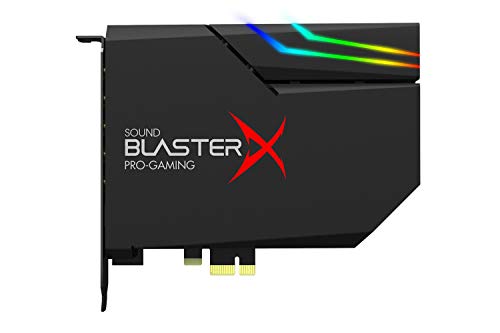
Creative Sound BlasterX AE-5 Plus — Best flagship for headphones and gaming
The AE-5 Plus is Creative’s argument that the internal card still has a flagship tier worth buying. Its conversion is built around a SABRE32-class DAC running at 32-bit/384kHz, and its headphone stage uses Creative’s Xamp design, a discrete amplifier that drives the left and right channels with separate amplifier circuits rather than a single shared chip. The audible result with good headphones is control: bass that starts and stops cleanly, quiet passages that stay silent instead of hazy, and volume headroom that never sounds strained. Dolby Digital and DTS encoding support lets it feed a receiver over optical when speakers take over from headphones.
Around those fundamentals sits the gaming layer: Scout Mode for footstep emphasis, virtual surround for headphones, and an RGB accent that syncs with the rest of a build for those who care. The card asks for a PCIe slot and a Molex power connection for its amplifier and lighting, which is worth knowing before installation day. It is unapologetically a card for a considered build — the one you install when the PC is being assembled around quality parts, and then forget about for the life of the machine.
Living with the AE-5 Plus clarifies its position against external rivals. A USB DAC can match its conversion, but the card counters with permanence and integration: it is configured once, it survives operating system reinstalls with a driver package that restores every setting, and it never competes for a USB port with the rest of a crowded desk. Owners who dual-purpose their PC for work calls appreciate that the microphone path shares the same quiet design as the playback path, so the voice going out is as clean as the game audio coming in.
The honest reservation is ecosystem commitment. You are buying into Creative’s software suite for the card’s full feature set, and while that suite is mature, it is another control panel to learn alongside your motherboard and graphics software. Builders who prefer zero vendor software should look at simpler cards or external DACs. For everyone else, the AE-5 Plus remains the benchmark internal card of its generation — the one other cards are measured against in this guide and most others.
- Connection: PCIe x1 slot; Molex power for amp stage
- Conversion: SABRE32-class DAC, 32-bit/384kHz playback
- Amplifier: Xamp discrete dual-channel headphone amp
- Surround: 5.1 discrete, 7.1 virtual; Dolby Digital and DTS encoding
- Extras: RGB lighting, Scout Mode game audio
Strengths
- Reference-grade conversion for an internal card
- Discrete amplifier drives demanding headphones with control
- Optical encoding feeds receivers for speaker listening
Trade-offs
- Needs a Molex power lead many modern builds hide away
- Full features depend on Creative software suite
- Premium tier pricing over midrange cards
Best for: builders assembling a gaming PC around quality headphones who want flagship conversion installed once and forgotten.
Not suited for: minimalists who avoid vendor software, or anyone whose PC lacks a free slot and Molex lead.
If your build brief says the audio should be as serious as the graphics card, start with the AE-5 Plus listing on Amazon and confirm your case has the slot and power lead it wants.

Creative Sound Blaster Z SE — Best value all-rounder
The Z SE is the card most buyers in this category should probably purchase, because it collects the features that matter and declines the ones that inflate prices. Conversion runs at 24-bit/192kHz with a published 116dB signal-to-noise ratio, the headphone amplifier is rated for models up to 600 ohms, and the rear panel carries discrete 5.1 outputs for a speaker system alongside an optical port. Microphone equalization and voice processing live in the software, aimed squarely at players who talk while they game. Crucially for musicians moonlighting on the same machine, ASIO support is present, which onboard audio seldom offers in usable form.
As a Special Edition refresh of a long-running design, the Z SE benefits from years of driver refinement; the rough edges that plagued earlier generations have been filed down by time. It lacks the flagship’s discrete dual-amp architecture and its conversion ceiling is lower, differences that reveal themselves with genuinely demanding headphones and quiet, dynamic recordings. For the headsets and speakers most gaming PCs actually use, the gap is academic. This is the card that respects a budget without apologizing for existing.
The Z SE’s versatility shows in mixed households. During the day it is a work card with a clean microphone channel and sensible EQ presets for calls; in the evening it drives a 5.1 speaker set for films or a good headset for games, switching profiles in software. That shape-shifting is what a sound card in a family PC is actually for, and the Z SE does it without the flagship’s price or power requirements. Installation is a single slot and no extra power lead, which keeps it viable in smaller cases.
Its ceiling appears at the extremes. Pair it with a truly hungry planar headphone and the amplifier, while strong, is not the last word in control; feed it a pristine high-resolution recording and the AE-5 Plus pulls ahead in refinement. Most owners will never push against either wall. What they will notice, daily, is the absence of onboard hiss, a microphone that flatters rather than embarrasses, and surround outputs that simply exist when a speaker set arrives. That is the definition of a value pick that earns the title.
- Connection: PCIe x1 slot, no extra power lead
- Conversion: 24-bit/192kHz, 116dB SNR
- Amplifier: headphone amp rated up to 600 ohms
- Surround: discrete 5.1 outputs plus optical
- Drivers: ASIO support; mic EQ and voice processing in software
Strengths
- Strong published SNR at a midrange price
- ASIO drivers widen it beyond gaming duty
- Discrete 5.1 outputs serve real speaker systems
Trade-offs
- Conversion ceiling below the flagship tier
- Amplifier is single-stage rather than discrete dual
- Software suite is extensive and takes learning
Best for: gamers who want one card covering headsets, speakers and light music software without flagship spending.
Not suited for: purists chasing the last degree of converter refinement for critical listening.
For most gaming PCs this is the sensible ceiling on sound card spending — compare the Z SE on Amazon against your speaker and headphone plans before paying flagship money.

Creative Sound Blaster Audigy Fx Pro — Best affordable Creative card
The Audigy name has served Creative’s entry tier for two decades, and the Fx Pro continues the tradition with clear priorities: hi-res playback, surround outputs for modest speaker systems, and a price that does not require a family meeting. It gives a build proper sound card features — a control panel with equalization and effects, a headphone output with more authority than a motherboard header, and microphone handling that suits calls and casual streaming — in a low-profile-friendly card that fits the small office PCs where such upgrades usually happen.
Judge it as an appliance and it succeeds; judge it as an enthusiast product and the omissions line up quickly. The converter and amplifier are a clear step below the Z SE, there is no ASIO story to tell musicians, and the software effects, while fun for films, are seasoning rather than substance. None of that matters to its actual buyer: someone whose onboard audio failed, whose motherboard lacks the outputs a speaker set needs, or whose employer-issue desktop sounds like a radio in a tunnel. For those rescues, a card from a maker with real drivers is worth far more than an anonymous card with bigger printed numbers.
The Fx Pro also makes sense as a deliberate second card in a household: the living-room PC that plays films through a 5.1 set, the teenager’s first build assembled from parts bin components, the streaming box that needs a cleaner output than its bargain motherboard provides. In each case the card’s job is competence, and competence delivered quietly for years is an underrated virtue in PC hardware. Creative’s driver support means a Windows update is unlikely to orphan it, which cannot be said for the no-name alternatives at similar prices.
Installation holds no surprises: a PCIe x1 slot, standard height or low-profile bracket depending on the case, and software that configures itself for the speaker arrangement you select. The one caution is expectation management with headphones — efficient models sound lively and clean, while demanding studio pairs will expose the modest amplifier. Keep the pairing sensible and the Audigy Fx Pro is the card that reminds you why the entry tier exists: most audio problems are simple, and they deserve simple, well-supported answers.
- Connection: PCIe x1, low-profile friendly design
- Playback: hi-res capable conversion
- Outputs: surround analog outputs for speaker sets
- Software: Sound Blaster control panel with EQ and effects
- Role: entry-tier upgrade over onboard audio
Strengths
- Real Creative drivers at an entry price
- Fits small and office-style cases
- Covers surround speakers and headsets adequately
Trade-offs
- Converter and amp a tier below the Z SE
- No ASIO support for music production
- Effects-heavy software will not suit purists
Best for: office and family PCs needing a supported, competent sound upgrade or replacement for failed onboard audio.
Not suited for: headphone enthusiasts or anyone recording with music software.
When the requirement is simply sound that works properly from a name with drivers, the Audigy Fx Pro fits the brief — check its bracket and slot needs on Amazon against your case.

ASUS Strix SOAR — Best ASUS gaming alternative
The Strix SOAR comes from ASUS’s gaming hardware stable, and it shows in the priorities: 7.1 surround presentation, a high published signal-to-noise figure for its tier, and software in the Sonic Studio tradition that wraps equalization, bass and voice controls into a gamer-styled interface. For builders whose motherboard, graphics card and peripherals already live in the ASUS ecosystem, the SOAR completes the set with an internal card that matches the build’s aesthetic and software habits.
On the hardware side it is a conventional, competent PCIe design: a proper converter stage, a headphone amplifier with enough output for gaming headsets and mid-impedance headphones, and the analog outputs a 7.1 speaker arrangement requires. It does not attempt the AE-5 Plus’s discrete amplifier architecture, and its software lineage has had a bumpier history across Windows versions than Creative’s — worth knowing if your PC is a production machine as well as a toy. As a gaming card inside an ASUS-flavored build, though, it delivers the immersion features its audience actually uses.
The SOAR’s appeal sharpens when you consider how its buyers actually listen. Gaming headsets dominate, films play through desktop speakers, and the card’s processing — surround virtualization, bass emphasis, voice clarity — is tuned for exactly those sources. Critical music listening through revealing headphones is not its home turf, and it does not pretend otherwise. There is integrity in that focus: every feature on the box maps to something a gamer will toggle in the first week.
Longevity is the question to weigh. The card has been in the market a long time, and while that means a deep well of user knowledge for any quirk you encounter, it also means checking current driver availability for your Windows version before committing. Builders comfortable with that small homework task get a card with a distinct personality in a field of one dominant brand — and for ASUS loyalists, the coherent software story across their whole rig is worth more than a spec-sheet skirmish.
- Connection: PCIe x1 slot
- Channels: 7.1 surround support
- Software: Sonic Studio control suite
- Amplifier: headphone output suited to gaming headsets
- Design: Strix gaming styling with shielded layout
Strengths
- Native fit for ASUS-ecosystem builds
- Full 7.1 outputs for speaker arrangements
- Gaming-tuned processing for headsets and films
Trade-offs
- Driver history less smooth than Creative rivals
- Not aimed at critical music listening
- Long-running design; verify current driver support
Best for: ASUS-loyal gamers building a 7.1-capable rig who want matching software across their components.
Not suited for: buyers who need guaranteed long-term driver maintenance above all else.
ASUS builders should weigh the SOAR on Amazon as the in-family option, after a quick check that drivers for your Windows version are current.
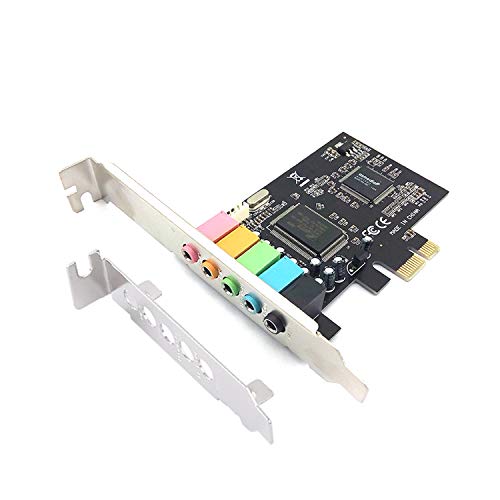
Padarsey PCIe 5.1 Sound Card — Best utility card for older PCs
Every category needs its honest bottom rung, and the Padarsey is this one’s: a PCIe 5.1 card built on the CMI8738 chipset, a design old enough to have drivers in places nobody remembers writing them. It exists for jobs like giving a Windows 7-era machine working sound again, adding a microphone input to a kiosk or office PC, or feeding a simple 5.1 speaker set in a workshop. The sound quality is firmly in the ‘works correctly’ class — no hiss storms, no drama, no fidelity revelations either.
Including it here requires the clearest caveat in this guide: support is generic, the software experience is whatever Windows and the chipset’s mature drivers provide, and nobody should buy this card expecting features, updates or refinement. What it offers instead is remarkable compatibility and a price low enough that the card can be treated as a consumable spare. For IT drawers and resurrection projects, that is a genuinely useful product. For a new gaming build, it would be a false economy, and the Z SE exists precisely to mark where sensible spending starts.
There is a certain respect due to the CMI8738 lineage: chips this mature have been integrated into so many systems that their behavior is completely known, and ‘completely known’ is a compliment when the machine in question runs a till, a CNC controller or a relative’s email. The Padarsey’s 3D stereo processing and 5.1 outputs cover the multimedia needs of such systems without asking the owner to learn anything new. Keep the original driver disc or a downloaded copy with the machine and the card will likely outlast the PC around it.
Set the boundary firmly, though. This is not the card for a headset you wear eight hours a day, not for speakers you chose carefully, and not for any microphone work beyond being understood in a call. Its presence in this guide is a service to the repair-minded reader, and a marker for everyone else: the distance between this card and the Z SE above it is exactly what the midrange premium buys, displayed in its starkest form.
- Connection: PCIe slot
- Chipset: CMI8738 audio processor
- Channels: 5.1 surround outputs
- Compatibility: long-standing Windows support including older versions
- Role: basic sound restoration and utility audio
Strengths
- Exceptional compatibility with older systems
- Very low cost makes it a sensible spare part
- Covers 5.1 speakers and a microphone input
Trade-offs
- Fidelity is basic by any modern measure
- Generic support with no feature software
- Not suitable for new performance builds
Best for: repair jobs, legacy machines and utility PCs that need working sound more than they need good sound.
Not suited for: any new build, any careful listener, any serious headset.
Treat the Padarsey as a repair part rather than an upgrade — if that matches your project, its Amazon listing confirms the slot and channel details you need.

Creative Sound Blaster AE-X — Best new-generation hi-res card
The AE-X represents Creative’s current thinking on the internal card: hi-res playback at 32-bit/384kHz, a clean modern design, and desktop application support that treats the card as part of a contemporary PC rather than a museum piece. For a builder assembling a machine intended to serve for many years, buying the newest design in the line has a logic of its own — the driver support runway is longest, the software reflects current Windows versions, and the hardware arrives without a decade of legacy compromises baked in.
Position it honestly within the family: it targets listeners who want hi-res conversion and a refined headphone output in a fresh build, standing alongside the AE-5 Plus’s gaming-flagship brief rather than replacing it. The Sound Blaster software ecosystem carries across, so equalization, surround processing and microphone shaping are all present. What the AE-X asks in return is the usual flagship-tier commitment — a free slot, a considered budget, and headphones or speakers good enough to justify installing conversion of this grade inside the case at all.
New-generation hardware also matters for the unglamorous parts of ownership. Power management behaves properly with modern sleep states, the control application speaks the design language of current operating systems, and the card’s presence does not fight with the rest of a 2026 build the way some long-in-the-tooth designs can. Builders who keep a PC for six or seven years feel those details accumulate; the card simply never becomes the component that forces an awkward workaround.
The buying question is whether newness or the AE-5 Plus’s proven flagship record matters more to you. The older card’s discrete amplifier and receiver-encoding tricks are documented quantities; the AE-X counters with freshness and the longest support horizon. Either answer is defensible, and that is a pleasant problem for a category once written off entirely. For a build starting today with hi-res listening in its brief, the AE-X is the forward-looking choice.
- Connection: PCIe slot
- Playback: hi-res 32-bit/384kHz conversion
- Software: current Sound Blaster desktop application support
- Role: new-generation internal hi-res card
- Design: modern shielded card layout
Strengths
- Newest design with the longest support runway
- Full hi-res conversion ceiling
- Modern software and power behavior
Trade-offs
- Flagship-tier pricing territory
- Track record still shorter than the AE-5 line
- Needs revealing headphones or speakers to justify itself
Best for: builders starting a long-lived PC today who want current hi-res internal audio rather than a legacy design.
Not suited for: bargain hunters, or systems whose speakers and headphones are basic.
Starting a fresh build with hi-res ambitions? Put the AE-X listing on Amazon beside the flagship alternatives and decide whether newness or track record wins your slot.
How Do You Install and Configure a PCIe Sound Card Correctly?
Installation is a fifteen-minute job done carefully. Power the machine fully down and unplug it, seat the card in a PCIe x1 slot — a longer slot works too, since x1 cards fit any PCIe slot — and connect any required power lead, such as the AE-5 Plus’s Molex, before closing the case. If your build has a front-panel HD Audio header, decide whether it should feed from the motherboard or the card; routing it to the card means the front headset jack enjoys the card’s amplifier and quiet output, which is usually the point of the purchase.
In Windows, install the vendor driver package before judging anything, because the generic driver Windows supplies will hide most of the card’s features and some of its outputs. Then disable the onboard audio in the BIOS or UEFI if the machine will never use it; this prevents applications from helpfully selecting the wrong device after updates. Set the card as default for playback and recording, choose the speaker configuration that matches your physical setup, and resist enabling every processing feature at once — add surround virtualization, then EQ, then voice effects one at a time so you can hear what each actually does.
Finish with a microphone check and a quiet-passage test. Record a few sentences and play them back for level and clarity, then play a track with a silent intro at your normal volume and listen for hiss as the music starts. Silence before the first note is the sound of money well spent on a card; if you hear the computer thinking, re-check cable routing inside the case and confirm the onboard device is not the one actually selected.
PCIe Card, USB DAC or Onboard Audio: Which Path Fits Your PC?
Onboard audio is the right answer more often than enthusiasts admit. If your motherboard is recent, your headphones are efficient, and your speakers are a simple stereo set, the integrated codec likely serves you well, and the money a card would cost buys more audible improvement spent on headphones themselves. The honest upgrade sequence is transducers first, amplification second, conversion third — a card sits at the end of that chain, not the beginning.
Choose the internal card when integration is the prize: a permanent gaming or theater PC, discrete surround outputs, a slot sitting empty, and a preference for hardware that disappears into the machine. Choose a USB DAC or amplifier when the same quality must serve several machines, when a laptop is involved, or when you want the volume knob physically on the desk. The two paths reach similar fidelity at similar money; they differ in where the hardware lives and how many computers it can serve.
There is also a longevity angle that favors neither camp absolutely. Internal cards depend on driver maintenance for one operating system family; USB class devices depend on almost nothing. A card from a maker with Creative’s track record narrows that risk considerably, which is why this guide’s list looks the way it does. Buy the form factor that matches your computing life, from a vendor who will still answer for it in five years, and the decision tends to age well.
Do Sound Cards Still Help in Modern Games?
Modern games render their audio in software engines, so the hardware acceleration stories of the past no longer apply; no card will raise your frame rate or unlock sounds a game does not contain. What a good card contributes is the last meter of the journey: a quieter background against which faint cues — a reload behind a wall, footsteps on a different floor material — remain audible at sensible volumes, and processing features that emphasize exactly those cues. Scout-style modes are equalization with a mission, and on a card with a genuinely low noise floor they work because the detail was there to emphasize.
Positional honesty matters too. A card’s virtual surround, fed a proper multichannel game mix, can place sounds more convincingly than a motherboard’s afterthought implementation, but it cannot invent information the game did not send. Set the game to output surround, set Windows to match, and let the card do the headphone rendering; mismatched settings at any layer collapse the whole chain into mush. Configured correctly, the advantage is real but modest — a card is an aid to awareness, not a substitute for it.
How Should Speaker Owners and Headphone Owners Read the Same Card Differently?
A single card can be two different products depending on what hangs off its outputs. The speaker owner cares about the analog surround jacks: their number, their signal quality, and whether the software handles bass management — sending low frequencies to a subwoofer rather than asking small satellite speakers to attempt them. Cards like the Z SE and AE-5 Plus serve this owner with discrete outputs and sensible configuration tools, and their reviews should be read with a tape measure in hand, counting the speakers actually in the room.
The headphone owner should ignore half of that and interrogate the amplifier instead. What impedance range is published? Is the output stage a genuine amplifier design or a line-out with ambition? How quiet is the card at the low volumes where sensitive in-ear monitors live? The AE-5 Plus’s discrete Xamp stage exists for this reader. Neither owner is wrong; they are simply shopping in different departments of the same store, and a card that delights one may merely satisfy the other. Naming your department before reading reviews is the fastest way to a shortlist that makes sense.
Mixed owners — headphones at night, speakers by day — should prioritize the switching experience. How quickly does the card move between outputs, does it remember separate volume levels, and can profiles be bound to a hotkey? Those daily frictions, invisible on a spec sheet, decide whether a dual-purpose setup feels seamless or feels like a chore you perform twice a day. The midrange and flagship cards in this guide handle switching in software profiles; budget cards make you reach behind the PC, which gets old faster than any specification suggests.
How Do the Six Cards Stack Up Against Each Other?
Six cards, four distinct jobs. The table sorts them by connection, defining trait and the builder each one suits.
| Pick | Connection | Standout trait | Suits best |
|---|---|---|---|
| Creative Sound BlasterX AE-5 Plus | PCIe x1 + Molex | Discrete Xamp amp, SABRE-class conversion | Flagship gaming builds with serious headphones |
| Creative Sound Blaster Z SE | PCIe x1 | 116dB SNR, ASIO, discrete 5.1 outputs | Most gaming PCs wanting one versatile card |
| Creative Sound Blaster Audigy Fx Pro | PCIe x1 | Supported entry-tier upgrade, low-profile friendly | Office and family PC rescues |
| ASUS Strix SOAR | PCIe x1 | 7.1 gaming card in the ASUS ecosystem | ASUS-loyal gaming rigs |
| Padarsey PCIe 5.1 Sound Card | PCIe | CMI8738 utility card for legacy systems | Repairs and older machines |
| Creative Sound Blaster AE-X | PCIe | Newest 32-bit/384kHz hi-res design | Fresh long-lived builds |
What Goes Wrong When People Buy Internal Sound Cards?
Buying conversion specs for headphones that cannot reveal them
A flagship card feeding a bargain headset is a chain with a golden link in the middle and plastic at both ends. The listener hears the headset, not the card, and concludes sound cards are a scam. Sequence your spending: headphones or speakers first, then the amplifier to drive them, then conversion refinement. If your transducers are modest, the Z SE or even the Audigy tier will serve you honestly while the rest of the chain catches up.
Leaving the onboard audio enabled and defaulted
Half the ‘my new card sounds identical’ complaints trace back to Windows cheerfully continuing to use the motherboard output. Applications remember old devices, updates reshuffle defaults, and the front-panel jack may still be wired to the onboard header. After installing a card, verify the actual output device in the sound settings, in each major application, and physically at the jack you are using. The card cannot improve a signal it was never given.
Expecting a sound card to fix game audio settings
If a game is set to stereo output while your card waits for a surround mix to virtualize, the result is flat and disappointing through no fault of the hardware. The chain — game output mode, Windows speaker configuration, card processing — must agree at every step. Work through it once, in order, and the surround features you paid for start doing their job. Skip it, and you own an expensive stereo card with unused talents.
Ignoring the power and slot requirements until installation day
Flagship cards may want an auxiliary power lead; long cards may crowd a neighboring slot; small cases may need a low-profile bracket. Ten minutes with the listing’s requirements and a look inside your case prevents the specific frustration of a card that almost fits. This is doubly true in prebuilt systems, where spare power leads are often absent entirely and a card like the Padarsey or Z SE, needing no extra feed, becomes the pragmatic choice.
Chasing virtual surround while ignoring the source setting
Virtual surround on a card can only reshape what it receives. Films streamed in stereo, games left on a headphone preset, and Windows configured for two speakers all starve the processing of the positional information it exists to render. Owners then conclude the feature is marketing, when in fact the feature never received its raw material. The fix costs nothing: set each layer of the chain to the richest output it supports, and let the card be the single place where surround becomes a headphone signal.
Final Recommendation
Match the card to the machine’s actual job. The AE-5 Plus is the flagship statement for a gaming build built around fine headphones; the AE-X is its forward-looking sibling for a fresh long-term rig. The Z SE is where most builders should land — it covers headsets, speakers and even music software with no embarrassing compromises. ASUS loyalists have the Strix SOAR, office and family rescues have the Audigy Fx Pro, and the repair bench has the Padarsey, each honest within its station.
A last word on timing: an internal card is one of the few PC components that can serve two full builds. Power supplies and cases get the credit for longevity, but a well-supported sound card installed today can move into your next motherboard when the current one retires, carrying its settings and its sound signature with it. That portability argues for buying one tier above your immediate need if the budget allows — the card will likely meet a second set of headphones and a second PC before it meets its end.
Whichever you choose, install it deliberately: drivers first, onboard audio retired, speaker configuration matched to reality, and one quiet passage of music as the acceptance test. Do that, and the best internal pcie sound cards prove the category’s continuing point — not that every PC needs one, but that the right PC, given the right card, sounds like a different and better machine.
Frequently Asked Questions
Is a PCIe sound card better than my motherboard’s audio?
It can be, and the size of the improvement depends on your motherboard and your headphones. A recent high-end board narrows the gap considerably; an older or budget board leaves hiss, weak headphone output and missing features that a card like the Z SE fixes all at once. The most reliable test is your own listening: if quiet passages on your current setup carry audible noise, or your headphones never get loud enough, a card addresses a real problem rather than an imaginary one.
Will a sound card improve my microphone quality?
Yes, within limits set by the microphone itself. Cards in this guide offer cleaner input stages and software processing — equalization, noise handling, voice effects — that onboard inputs usually lack, so a gaming headset microphone typically sounds fuller and clearer through a Sound Blaster than through a motherboard jack. A poor microphone remains a poor microphone, though; the card polishes the signal it receives, and the biggest single upgrade for voice remains microphone placement close to your mouth.
Do I need ASIO on a gaming sound card?
Only if the same PC runs music production software. ASIO lets applications like digital audio workstations talk to the hardware with low latency, which matters for playing virtual instruments and monitoring recordings. The Z SE’s inclusion of ASIO makes it a double-duty card for gamer-musicians. If no music software lives on your machine, ASIO’s presence or absence should not sway the decision at all — it is invisible in games and media playback.
Can a PCIe sound card drive 600-ohm headphones?
Cards that publish the rating, like the Z SE with its 600-ohm-rated amplifier, are designed to do exactly that: deliver enough voltage swing for high-impedance models to reach full volume with control. The AE-5 Plus’s discrete amplifier goes further in refinement and grip. What matters is matching: check the card’s stated impedance range against your headphone’s specification, and be skeptical of cards that promise to drive everything while publishing no rating at all.
Will these cards work in any PCIe slot?
Physically, a PCIe x1 card fits and works in any PCIe slot, including the long x16 slots usually reserved for graphics cards, because the standard is designed for exactly that flexibility. The practical checks are clearance — a long graphics card may overhang the only free slot — and lane sharing on some motherboards, where populating certain slots reduces bandwidth to others. Your motherboard manual lists any such sharing; a two-minute read prevents surprises.
How long will driver support last for an internal card?
That depends entirely on the vendor, which is why this guide leans on Creative and ASUS. Both have supported popular cards across multiple Windows generations, and Creative’s current lineup arrives with software built for today’s systems. No vendor guarantees a decade, and a card purchase should be made expecting the support window of a typical PC’s life — five to seven years — rather than forever. Utility chipsets like the CMI8738 survive differently: their drivers are so old and stable that they simply stop changing.
Related Guides
Keep building out your PC audio with these companion guides from our sound card coverage.
- Best external USB sound cards
- Best ASIO sound cards for low-latency work
- Best hi-fi sound cards for music listening


