What's inside
- Key Takeaways
- Quick Picks
- How We Chose These Picks
- Comparison Table
- Tank or cartridge — which ink system does a sticker workflow reward?
- How do you print a sticker sheet that survives the cutting machine and the weather?
- What separates a sticker that sells from a sticker that merely prints?
- Common Mistakes When Printing Stickers on Inkjet Printers
- Final Recommendation
- Frequently Asked Questions
- Related Guides
As an Amazon Associate I earn from qualifying purchases. This post may contain affiliate links at no extra cost to you.
widgetverdict.com is reader-supported. When you buy through links on our site, we may earn an affiliate commission.
Start with the truth this whole guide is built on: there is no such thing as a vinyl mode. None of the six titles below claims one, none claims a vinyl certification, and any guide that tells you a printer is “for vinyl” because a marketing page said so is selling you a shortcut past the actual craft. The best printers for vinyl sticker printing are, in reality, the best photo inkjet printers for printing onto printable vinyl media — sheets of inkjet-receptive vinyl that you buy separately, load like photo paper, print with your artwork, and then cut, weed and apply like any other sticker. The printer’s job is colour, detail and consistent feeding of a slightly unusual sheet. The vinyl’s job is to be a sticker. Keeping those two jobs separate in your mind is the difference between a sticker business and a drawer of curled disappointments.
That is why this shortlist is built from photo printers. Five of the six are inkjet photo machines whose titles state their colour counts and formats: the Epson EcoTank Photo ET-8550 and ET-8500, six-colour tank printers that the craft world treats as its standard; the Canon PIXMA G620 MegaTank photo printer; the Epson XP-15000, a six-colour wide-format cartridge machine; and the Epson Expression Premium XP-7100, a five-colour all-in-one. The sixth is the honest exception — the Cricut StickerPix, a dedicated print-then-cut sticker device that includes pre-cut sticker and photo paper in its bundle and works from an iPhone, included because some sticker makers do not want a workflow at all; they want a machine whose whole purpose is the sticker.
The practical differences that matter for stickers are not the ones printer marketing usually leads with. Tank versus cartridge decides your cost per sheet and your tolerance for mid-run surprises. Six colours versus five decides how gently gradients and skin tones and brand colours render on a sheet whose coating already asks a lot of the ink. Wide format — 13 x 19 inches, stated in the ET-8550 and XP-15000 titles — decides how many stickers share a sheet and how large a single design can be. And the all-in-one functions, scan and copy in several titles, matter more than they appear to: scanning your own artwork and proofs is half of a small sticker studio’s week.
Read the reviews with a sheet of printable vinyl imagined in the tray. Every judgement below is made against that sheet: how the ink system treats expensive media, how the colour system treats a design that must match a brand or a character, how the format treats a page of die-cut shapes waiting for the cutter. Then read the how-to section, because in this craft the settings and the media teach the printer what to be — the machine is only ever half of the result.
A word about evidence, since this category attracts fantasy. Every claim in the reviews below traces to a phrase in the pick’s own title — a colour count, a format, a function, a bundled paper — and where a title is silent, the review says so and treats the manufacturer’s documentation as the next stop. You will find no vinyl modes, no invented media certifications and no borrowed specifications from sibling models. A sticker studio runs on repeatability; a buying guide should be built the same way.
Key Takeaways
- No printer here has a vinyl mode or vinyl certification in its title — sticker printing is an inkjet-plus-printable-vinyl workflow, and the article teaches it as one.
- The EcoTank Photo pair are the craft standard: six-colour, cartridge-free tank printing, with the ET-8550 adding 13 x 19 wide format per its title.
- The Canon PIXMA G620 is the MegaTank alternative — refillable-tank photo printing from the other major maker.
- The XP-15000 is the wide-format cartridge route: six colours and 13 x 19 in its title, for studios that print big but not constantly.
- The StickerPix is the dedicated device: print-then-cut stickers from an iPhone, with pre-cut sticker paper included — a different species from the five workflow printers.
Quick Picks
| Pick | Badge | Why it earns its place |
|---|---|---|
| Epson EcoTank Photo ET-8550 | Craft standard, wide format | Six-colour cartridge-free tank printing up to 13 x 19, for creators and home studios per its title. |
| Epson EcoTank Photo ET-8500 | Craft standard, standard format | The same six-colour EcoTank Photo formula in the smaller body, with USB and memory card support in its title. |
| Canon PIXMA G620 MegaTank Photo | Best Canon tank route | Wireless MegaTank photo all-in-one printing for sellers who prefer Canon’s ecosystem and colour. |
| Epson Expression Photo HD XP-15000 | Wide format without tanks | Six-colour wide-format printing to 13 x 19 from a cartridge machine, aimed at photographers and home studios. |
| Epson Expression Premium XP-7100 | Best compact all-in-one route | Five-colour printing with ADF and borderless photo output for home and photo projects, per its title. |
| Cricut StickerPix Print Photo and Sticker Printer | Dedicated sticker device | A print-then-cut sticker machine for iPhone with its pre-cut media included in the bundle. |
How We Chose These Picks
The first filter was photographic honesty. A sticker is a small colour print that must survive being looked at closely, stuck to a laptop and compared with the artwork on a screen — so the shortlist is photo printers, with colour counts taken from the titles themselves: six colours on the two EcoTank Photos and the XP-15000, five on the XP-7100, and the Canon’s MegaTank photo positioning as titled. Office inkjets with four colours and a business brief were excluded, not because they cannot print a sticker, but because this guide’s promise is the best tool for the craft, and the craft is colour.
The second filter was the ink system, applied as a spread rather than a verdict. Tank printers — EcoTank, MegaTank — dominate serious sticker making for a structural reason the how-to section expands: printable vinyl is not cheap media, and a workflow that prints test sheets, proofs and full pages weekly feels its ink costs monthly. But cartridge machines serve real studios too, particularly wide-format ones printing occasionally at large sizes, so the XP-15000 holds that seat deliberately, and the XP-7100 holds the compact all-in-one seat.
Format came third. Two titles state 13 x 19 inches, and wide format changes sticker economics — more designs per sheet, larger single pieces, less media waste in the nesting. Studios whose stickers are uniformly small may never use the width; studios whose range includes laptop skins and signage-sized pieces cannot live without it. Both kinds of studio are served here, and the reviews say which is which.
The StickerPix was admitted under a different rule, stated openly: it is the dedicated-device answer. Its title describes an all-in-one photo, label and sticker machine with pre-cut media included, driven from an iPhone. That is not the inkjet workflow the rest of the guide teaches, and the review keeps the boundary bright — but a guide to sticker printing that ignored the one machine built only for stickers would be serving its own tidiness instead of its readers.
One more admission rule ran quietly underneath: nothing was credited with media handling it does not describe. Printable vinyl is thicker and stranger than photo paper, and feed behaviour lives in documentation and media makers’ compatibility notes rather than in titles — so the how-to section assigns that verification to the buyer’s first week with real sheets, instead of letting any review here promise a feed it cannot prove. Honesty about the unproven is part of the craft this guide teaches.

Epson EcoTank Photo ET-8550 — Craft standard, wide format
If the sticker-making world has a default printer, its title reads like this one: EcoTank Photo, wireless, wide-format, all-in-one, cartridge-free six-colour printing, scanning and copying, up to 13 x 19 inches, ideal for creators and home studios. Every clause answers a sticker maker’s actual week. Six colours for the gradients and character art that four-colour machines flatten. A tank system for the test sheets and reprints that are the hidden tax of the craft — proofing on printable vinyl is not optional, and a printer that makes ink feel abundant changes how carefully you proof. Wide format for sheet economics: a 13 x 19 sheet nests a small product line’s worth of designs in one pass, and the cutter’s work afterwards is one sheet, not five.
The all-in-one functions deserve more than their usual shrug. Scan is how hand-drawn artwork enters the workflow at full quality, and how a physical proof gets compared against the file; copy is the quick duplicate for the design that sold out at the market. A sticker studio is a small reprographics shop whether it calls itself one or not, and this machine is specified like it knows. Wireless, per the title, places the printer where the studio has room rather than where the computer happens to be — a real consideration when the wide body needs a wide home.
The title states a speed of up to 16 ppm; treat it the way this guide treats all such figures, as the maker’s rating for its own test documents, not a promise about full-coverage sticker sheets, which print at the pace quality demands. What the figure does signal is that this is a current, full-featured machine rather than a stripped craft special. Its honest costs are the class’s: it is a substantial printer for a substantial desk, and tank systems reward regular use — a studio that prints weekly is its natural home, while a twice-a-year hobbyist should weigh the smaller sibling or the cartridge machines below.
For sellers building a sticker line as a business — the Etsy shop scaling, the market stall going online, the illustrator productising a following — this is the guide’s central recommendation, the machine the workflow sections assume when they say “your printer”. It is not the cheapest way to print a sticker; it is the way that stops being the bottleneck when the stickers start selling. Those comparing the current bundle can check price on Amazon.
A note on colour confidence, since this machine will be asked for it more than any other here. Brand colours and character palettes are where six-colour printing quietly earns its keep — not in a side-by-side a customer could articulate, but in the absence of the almost-right print, the logo a shade off, the face a tone flat. Sellers whose stickers carry other people’s brands, or their own carefully built one, are buying that absence. It never appears in a specification, and it decides repeat orders.
- Ink system in title: Cartridge-free EcoTank, 6-colour
- Maximum format in title: 13 x 19 in.
- Functions in title: Print, scan, copy
- Connection in title: Wireless
- Maker’s stated speed: Up to 16 ppm
- Audience named in title: Creators and home studios
Strengths
- Six-colour tank printing is the craft’s reference combination — colour depth with proofing-friendly running costs.
- Wide format transforms sheet economics for mixed design ranges.
- Scan and copy complete the small-studio reprographics triangle.
Trade-offs
- A wide-format body needs a wide, permanent home in the studio.
- Tank systems suit regular printing rhythms better than rare ones.
- Its capability is wasted on a sticker range of three small designs.
Best for: sticker businesses and serious craft studios printing colour-critical work at sheet scale. Not suited for: occasional hobby printing on a small desk, where its size and system are surplus.

Epson EcoTank Photo ET-8500 — Craft standard, standard format
The ET-8500 is the ET-8550’s formula with the wide format removed, and its title is a study in what remains: wireless colour all-in-one supertank, cartridge-free six-colour photo printing, with scan and copy alongside, up to 16 ppm, USB and memory card support, ideal for creative projects. For the large population of sticker makers whose designs live at notebook, bottle and laptop sizes, nothing essential has been removed. The six-colour engine — the thing the craft actually runs on — is intact. The tank economics are intact. What is gone is the 13 x 19 tray and the desk footprint that comes with it.
The memory card support, named in this title and not in its sibling’s, is a small clause with a real constituency: photographers and crafters whose images live on cards, and studios that like a printer able to work without the computer awake. USB stands alongside the wireless claim as the wired path. Read together, the connections describe a flexible household-studio machine — the family’s good printer that also happens to be the sticker business’s engine — and for many sellers that dual citizenship is the correct purchase: one machine, two budgets, no apologies to either.
The honest boundary is format ambition. A sticker range grows the way product ranges do — a design succeeds at three inches and a customer asks for it at eight — and the standard-format machine meets that request with tiling, compromise or a polite no. Studios that can already see large pieces in their future should buy the wide sibling first and skip the upgrade conversation. Studios whose range is settled at small sizes will never miss the width, and will enjoy the smaller body every day in the meantime.
Between the two EcoTank Photos, then, the choice is a tape measure, not a quality judgement: measure your largest plausible design, add the sheet-nesting you actually do, and let the answer pick the model. The craft’s standard comes in two sizes; this is the one for studios whose stickers, like their desks, are honestly sized.
There is also a household peace treaty embedded in this model. The wide sibling announces itself as studio equipment; this one passes as the family’s printer that happens to be excellent — school projects, photographs, documents and the sticker business sharing one set of tanks without negotiation. Many real sticker businesses live exactly there, in the overlap between a home and a firm, and a machine specified for creative projects generally, rather than for a trade narrowly, fits that address.
- Ink system in title: Cartridge-free supertank, 6-colour
- Duties in title: Print, scan and copy
- Links in title: Wireless, USB, memory card support
- Title speed: Up to 16 ppm
- Audience named in title: Creative projects
- Format note: Wide format is not claimed in this title — see the ET-8550 for 13 x 19
Strengths
- The full six-colour EcoTank Photo engine in the smaller, desk-friendlier body.
- Memory card support serves card-based photo workflows directly.
- Tank running costs keep proofing on real vinyl affordable.
Trade-offs
- No wide format in the title — large single-piece designs are out of scope.
- Growing ranges may outgrow it into the sibling upgrade.
- Like all tanks, it prefers a regular printing rhythm.
Best for: sticker studios whose designs live at small and medium sizes, on desks of ordinary size. Not suited for: ranges built around large-format pieces or wide sheet nesting.

Canon PIXMA G620 MegaTank Photo — Best Canon tank route
The PIXMA G620’s title is the shortest in this guide — wireless MegaTank photo all-in-one, print, copy, scan, black, works with Alexa — and its brevity is itself a positioning statement. Canon is not arguing colour counts or sheet sizes here; it is offering the tank-photo formula inside Canon’s ecosystem, for the large population of photographers and households whose habits, lenses and loyalties already live there. For sticker making, the MegaTank half of the title is the operative half: refillable tanks are what make a proofing-heavy, media-expensive workflow sustainable, and a Canon-flavoured tank printer is the correct answer for the studio that would otherwise spend the craft fighting its own preferences.
The “works with Alexa” clause dates and places the machine in the connected home — voice-assistant compatibility is a household convenience, not a studio feature, and this review reports it as the title states it without inflating it into a workflow claim. Wireless is the working connection. Print, copy and scan complete the all-in-one set the studio pattern expects. What the title does not state — colour count, maximum format, speed — this review does not supply from Canon’s reputation; those figures live in the model’s documentation, and a buyer comparing the G620 against the six-colour Epsons should pull the Canon’s documented colour system into the comparison explicitly, because colour architecture is the sticker craft’s core variable.
Positioned honestly, the G620 is the ecosystem pick. A studio already fluent in Canon’s software, colour language and paper handling will produce better stickers sooner on this machine than on a technically louder rival it has to learn. Craft quality is partly the printer and partly the operator’s fluency, and fluency has a home-field advantage no specification sheet captures. New studios with no allegiance should compare documented colour systems across the tank trio before choosing; studios with a Canon-shaped past already know their answer.
One more consideration suits this machine: household sharing. A MegaTank photo printer in a home serves the family’s photographs, the children’s projects and the sticker business from one set of tanks, and its running costs make that sharing painless. Dedicated studios eventually separate their tools; growing ones thrive on a machine that earns its shelf three ways. The G620’s title, household-fluent and business-capable, describes exactly that stage of a sticker operation’s life.
Buyers cross-shopping this Canon against the Epson tanks should run one practical test with their own artwork before deciding, wherever a demonstration is possible: the same design, the same vinyl, both machines. Colour rendering is a dialect, and a studio’s back catalogue already speaks one. The test costs two sheets and settles arguments that specification tables — including this guide’s — can only frame. Where no test is possible, the documented colour system and the media profiles your vinyl maker publishes are the evidence to weigh.
- Ink system in title: MegaTank (refillable tank)
- Functions in title: Print, copy, scan
- Connection in title: Wireless
- Smart feature in title: Works with Alexa
- Finish: Black, per title
- Colour count: Not stated in the listing title — verify with the manufacturer documentation
Strengths
- Tank economics inside Canon’s ecosystem and colour habits.
- A complete all-in-one for households where the printer serves three jobs.
- Wireless placement suits shared home-studio spaces.
Trade-offs
- Its title states no colour count or format, so spec-led comparisons need documentation.
- Voice-assistant features add nothing to the sticker workflow itself.
- Studios standardised on Epson media profiles face a relearning curve.
Best for: Canon-fluent households and studios wanting tank running costs for sticker work. Wide sheets and six-colour work both sit outside this machine’s stated design, since its title claims neither the format nor the colour system.

Epson Expression Photo HD XP-15000 — Wide format without tanks
The XP-15000’s title makes the cartridge case for wide format: wireless wide-format inkjet, six-colour photo printing, up to 9.2 ppm, 13 x 19 inches, auto two-sided printing, ideal for photographers and home studios. Set it beside the ET-8550 and the trade is naked. Both print six colours at 13 x 19. One carries its ink in tanks, bought in bulk and sipped; the other in cartridges, bought in sets and swapped. Which is right depends entirely on the studio’s rhythm — and the honest variable is not price per millilitre, which favours tanks, but the pattern of use, which can favour cartridges in a studio that prints in bursts separated by quiet months.
Cartridges have genuine virtues for the intermittent studio: no ink sitting in a system between projects, a fresh set when a big commission lands, and a machine whose purchase and upkeep arrive in smaller, more predictable parcels. The cost is the proofing discipline — cartridge economics make every test sheet a small decision, and sticker making is a craft of test sheets. Studios on this machine learn to proof smart: small crops of the risky areas, colour-critical patches at final size, full sheets only when the file has earned it. That discipline is teachable and many excellent studios run it; it is simply a different culture from the tank studios’ proof freely and often.
The title’s speed figure — up to 9.2 ppm, the lowest printed here — should be read as the maker positioning the machine for considered output rather than volume, which matches the wide-format photographer’s pattern: fewer, larger, more valuable prints. Auto two-sided printing, also titled, serves the studio’s paper work rather than its vinyl — printable vinyl is a one-sided medium — and its presence marks this as a complete photographer’s printer that also does the sticker job, rather than a sticker appliance. Photographers who sell prints and stickers from one desk will recognise their machine in that description.
Choose it, then, if your studio’s centre of gravity is the photograph and the sticker is the second product — or if your printing arrives in projects rather than rhythms. Choose the tank sibling if stickers are the business and the business prints weekly. The titles of the two machines, read carefully, already contain that whole argument.
One more scenario belongs to this machine: the commission studio. A photographer commissioned for a wedding or a product line may need, twice a year, a run of large stickers, labels or display pieces at photographic quality — and need them without having fed a tank system through the quiet months between. Renting that capability is impractical; owning it in cartridge form is the XP-15000’s whole proposition. Judge it as capital for occasional excellence rather than as a factory, and its economics read correctly.
- Ink system: Cartridge inkjet (Expression line)
- Colour count in title: 6-colour
- Maximum format in title: 13 x 19 in.
- Stated speed: Up to 9.2 ppm
- Duplex: Auto 2-sided, per title
- Stated audience: Photographers and home studios
Strengths
- Wide-format six-colour output without committing to a tank system.
- Suits project-based, intermittent printing rhythms honestly.
- A complete photographer’s printer for desks where prints come first.
Trade-offs
- Cartridge economics tax the proofing habit the craft depends on.
- The stated speed is the guide’s lowest — volume sticker runs are not its brief.
- Weekly, high-volume sticker businesses will feel the ink system monthly.
Best for: photographers and project-based studios printing large stickers and prints in bursts. Not suited for: a sticker shop printing full sheets every day of the week.
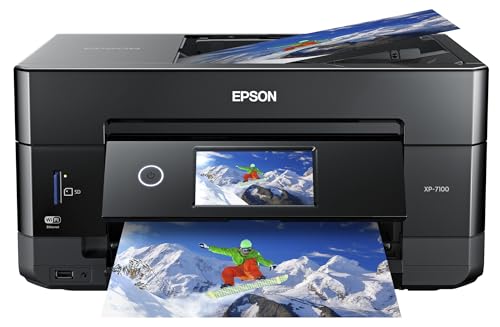
Epson Expression Premium XP-7100 — Best compact all-in-one route
The XP-7100’s title describes the household all-in-one at its most complete: wireless colour all-in-one inkjet, five-colour printing, scanning and copying, up to 15.8 ppm, an ADF, borderless photo printing, ideal for home and photo projects. The ADF — automatic document feeder — is the clause that betrays its centre of gravity: this is a machine for a home that scans paperwork in stacks as happily as it prints photographs one at a time. Its seat in a sticker guide is the compact, shared-household seat: the printer a small or beginning sticker practice uses because it is already the house’s printer, upgraded by good media and good settings rather than replaced.
Five colours is the specification to read carefully. The six-colour machines above add an extra colour channel whose absence shows in the gentlest gradients and the most demanding brand matches; five-colour printing remains genuinely photographic — borderless photo printing is in the title for a reason — and for the majority of sticker designs, bold graphics, lettering and character art among them, the difference never reaches the customer’s eye. The honest line runs through subject matter: photographic stickers, subtle gradients and colour-critical logos argue for six colours; graphic stickers argue for saving the difference and spending it on better vinyl.
Borderless printing matters to sticker work more than its photo framing suggests. A design that bleeds to the sheet’s edge — full-bleed backgrounds, sheet-filling layouts — needs a printer that prints to the edge, and the title confirms this one does. Combined with the all-in-one set, the XP-7100 covers a beginning studio’s whole loop: scan the drawing, print the sheet borderlessly, copy the packing slip. Its cartridge system carries the same proofing economics as the XP-15000’s, softened by smaller sheets and, for most households, smaller ambitions.
Recommend it, then, as the rational first printer for a sticker practice that is still proving itself — the bedroom studio, the kitchen-table shop, the illustrator testing whether the audience buys objects. If the practice grows into weekly sheet volume, the tank machines above are the graduation, and nothing about starting here is wasted: the media knowledge, the settings discipline and the design files all transfer upward intact.
Households should also notice what the ADF implies for the sticker practice’s paperwork: release forms, supplier invoices, market applications — the small studio’s admin scans in stacks, and a feeder turns that chore into a minute. It is not a sticker feature, and it may still be the feature the household uses most. Machines earn their shelves on their whole week, not on their best afternoon.
- Ink system: Cartridge inkjet (Expression Premium line)
- Colour count in title: 5-colour
- Functions in title: Print, scan, copy, with ADF
- Photo feature in title: Borderless photo printing
- Speed in title: Up to 15.8 ppm
- Stated audience: Home and photo projects
Strengths
- The most complete household all-in-one here — ADF included — for shared desks.
- Borderless printing serves full-bleed sticker sheet layouts.
- Five-colour output covers graphic sticker work convincingly.
Trade-offs
- Five colours, not six — the gentlest gradients are the six-colour machines’ ground.
- Cartridge running costs grow with the practice’s volume.
- No wide format in the title; large pieces belong to the 13 x 19 picks.
Best for: beginning and household sticker practices sharing one printer across home duties. Not suited for: colour-critical photographic sticker lines or wide-format ranges.

Cricut StickerPix Print Photo and Sticker Printer — Dedicated sticker device
The StickerPix is the guide’s deliberate outsider, and its title explains the species difference: a print photo printer for iPhone and sticker maker, an all-in-one photo, label and sticker machine, with pre-cut sticker and photo paper included, in an essential bundle, in sea green. Where the five inkjets above are printers that a workflow turns into sticker machines, this is a sticker machine from birth. Its media arrives pre-cut; its driver is the phone in your hand; its promise is that the distance between a photograph or design and a finished sticker is one appliance’s width. For the right buyer, that removal of process is not a simplification of the craft — it is the entire product.
Be precise about what the dedicated route gives and withholds, because the title supports precision. It gives immediacy: pre-cut sticker paper in the box, per the title, means the first sticker exists minutes after unboxing, with no media research, no settings experiments and no cutter queue. It gives the phone-first workflow an iPhone-native home. And it withholds the workflow’s freedoms: the media is the machine’s own pre-cut stock rather than the open world of printable vinyl sheets, the sizes are the bundle’s sizes, and the colour system is whatever the appliance carries — the title makes no colour-count claim, and this review makes none for it.
The comparison with the inkjet five is therefore not quality but philosophy. A sticker business is a workflow: files, media, settings, cutting, inventory, repeatability at volume. A sticker appliance is an occasion: the party, the trip, the gift, the journal, the laptop decorated tonight. Households and creators whose stickers are occasions will find the five workflow printers an absurd amount of machinery; sellers whose stickers are inventory will find the appliance’s media boundaries a ceiling. Both judgements are correct, and the title’s own words — photo printer, sticker maker, bundle, iPhone — tell you which side of the line it lives on.
It earns its place in this guide as the honest alternative the introduction promised: proof that “best printer for stickers” has two legitimate meanings. Choose the StickerPix when the sticker is the point and the process is the obstacle. Choose any of the five inkjets when the process is the business and the sticker is the product. Confusing those two buyers is how both end up unhappy, and the titles, read plainly, prevent the confusion. Gift-givers and phone-first creators can check price on Amazon for the current bundle in its sea green finish.
There is a gateway argument for the appliance, too, and it should be made kindly: many workflow studios began as occasion makers. A season of effortless stickers teaches a creator which designs strangers actually want — knowledge worth more than any printer — and if the answer is “all of them, weekly”, the five machines above will be waiting with their tanks and trays. The StickerPix is not the enemy of the workflow; for some sellers it is the workflow’s first, happiest draft.
- Device class in title: Dedicated photo and sticker printer
- Platform in title: iPhone
- In the box per title: Pre-cut sticker sheets and photo paper
- Roles in title: Photo printer, label maker, sticker machine
- Bundle name in title: Essential Bundle
- Finish: Sea Green, per title
Strengths
- Stickers from a phone with no workflow to learn and media in the box.
- Pre-cut stock removes the cutting stage entirely for standard sizes.
- The only pick designed from the first sketch as a sticker appliance.
Trade-offs
- Its media world is its own pre-cut stock, not open printable vinyl sheets.
- Sellers needing custom sizes, nesting and volume repeatability outgrow it quickly.
- No colour-system claims in the title for colour-critical brand work.
Best for: phone-first creators, gifts and occasions — stickers as a pleasure, not a product line. Not suited for: a sticker business with its own designs, sizes and weekly sheet volume.
Comparison Table
| Printer | Ink system | Colours in title | Max format in title | Sticker route |
|---|---|---|---|---|
| Epson EcoTank Photo ET-8550 | Tank | 6 | 13 x 19 in. | Workflow standard, wide |
| Epson EcoTank Photo ET-8500 | Tank | 6 | — | Workflow standard |
| Canon PIXMA G620 | MegaTank | Not stated in title | — | Canon ecosystem |
| Epson XP-15000 | Cartridge | 6 | 13 x 19 in. | Wide, project-based |
| Epson XP-7100 | Cartridge | 5 | — | Household all-in-one |
| Cricut StickerPix | Dedicated appliance | — | Pre-cut media | Print-then-cut device |
Tank or cartridge — which ink system does a sticker workflow reward?
Count your proof sheets, because they cast the deciding vote. Sticker making proofs constantly: the colour check on the real media, the size test, the sheet where one design’s gradient bands and must be coaxed. On a tank system those sheets cost media and pennies of ink, so the proofing habit survives contact with the budget — and proofing is where sticker quality is actually manufactured. On cartridges the same sheets are visibly priced, and studios adapt by proofing cleverly in crops and patches. Both cultures produce good stickers; the tank culture produces them with less arithmetic per decision, which is why high-volume sticker sellers migrate to tanks as reliably as they do.
Rhythm is the counter-argument. A studio that prints in commissions — quiet for a month, then three hundred sheets for a festival — asks its ink system to wait patiently and then perform. Cartridges wait indefinitely on a shelf and perform identically whenever the project lands. Tank systems are happiest in regular motion. Neither preference is a character flaw; both are descriptions of real studios, and the titles’ speed figures hint at the makers’ own sense of it — the tank pair print their 16 ppm for the weekly rhythm, the wide cartridge machine its 9.2 for the considered project.
Decide by your calendar, then, not by a cost-per-page spreadsheet alone. Weekly printing with proofing: tank. Project printing with pauses: cartridge is defensible and often right. And if the calendar is honestly unknown — a new practice, an untested audience — the XP-7100’s household route buys information cheaply: a season of real orders will tell you your rhythm, and the graduation to whichever system it implies will be an informed one.
There is a media-waste corollary worth adding to the arithmetic. Every misprinted sheet costs the same vinyl regardless of the ink system, so the true economy of a studio is measured in good sheets per pack, not millilitres per bottle. Tank owners waste less ink per experiment and therefore experiment more, which quietly raises their good-sheet ratio over a season. The spreadsheet that ignores the learning curve understates the tank case — and the discipline case for cartridges, whose owners learn to waste nothing because everything is priced.
How do you print a sticker sheet that survives the cutting machine and the weather?
Begin with the media, because in this craft the media is half the machine. Buy printable vinyl specified for inkjet printers — the coating is the technology; it is what receives dye ink and holds it as a surface image. Gloss and matte finishes change both the look and the lightfastness conversation, so choose per design and keep notes. Paper sticker sheets are a different, cheaper product for indoor, short-life uses; do not let a bargain confuse the two in your stock drawer, because their outputs age very differently on a customer’s laptop.
Set the printer for the sheet in front of it, in general terms that hold across the models here: choose the paper-type setting that matches a premium photo or matte presentation media as your media’s maker directs, select the highest quality mode your patience allows for final sheets, and turn off any high-speed or draft option for production work. Load vinyl sheets singly or in the small stacks the media maker allows, printed side as directed — printable vinyl has a right side, and a sheet loaded backwards is the craft’s most expensive blank page. Let finished sheets rest and dry fully before cutting; ink that feels dry can still mark under a blade or a fingernail.
Cut with the workflow your equipment expects: design files with cut lines registered to the printed sheet, a test cut on a proof sheet before the production sheet meets the blade, and weeding done with the sheet still flat and supported. Then protect the finished sticker according to its destination — indoor stickers can go as printed; stickers destined for bottles, vehicles and weather deserve the laminate or overcoat step your media system offers, because dye inks on vinyl are water-resistant in spirit but not immortal, and the honest studios say so on their listings.
Keep a settings journal. Media brand, paper-type setting, quality mode, drying time, cut settings — five lines per successful sheet, recorded once, consulted forever. Sticker quality is repeatability, and repeatability is written down or it is luck. The journal is also your evidence when a new media batch behaves differently: change one variable, note it, and the craft stays a craft instead of becoming a mood.
Store the media like the ingredient it is: flat, in its sleeve, away from heat and sunlight, with the printed sheets rested before they are stacked. Vinyl remembers curl and coatings remember fingerprints, and a sheet fed from a warped stack will misbehave in ways that look like printer faults. Half of troubleshooting in this craft is materials handling wearing a disguise; the journal and the shelf together unmask it.
What separates a sticker that sells from a sticker that merely prints?
Edge quality, first. A sticker is handled, flexed and stuck by its edges, and a clean cut line with a deliberate border — or a deliberate bleed — reads as manufacture, while a hesitant outline reads as homework. That quality is born in the file, preserved by registration between print and cut, and finished by weeding that does not stretch the vinyl. None of the six printers here can supply it alone; all of them can carry it when the file and the settings do their parts, which is why this guide keeps returning the reader to workflow over hardware.
Colour truth, second. The customer’s screen showed them one red; the sticker must be that red, or the review will say so. Studios build colour truth from the unglamorous kit: the same media, the recorded settings, the proof under the light the customer will see, the six-colour headroom when the design’s gradients demand it. A sticker business is a promise-keeping business at three inches wide, and the printers in this guide were chosen because their titles describe colour systems capable of keeping promises.
Honest durability, third. The sticker that survives its stated life — the journal year, the bottle’s month of dishwashing, the laptop’s three years — earns the second order. The one that fades, lifts or smears by spring earns a paragraph in somebody’s review. Match the media and the protection to the destination, say plainly what each version survives, and let the product line carry the honesty as a feature. In a craft sold on trust at pocket scale, that honesty compounds like interest.
Pricing carries the same lesson into the shopfront. A studio that knows its good-sheet ratio, its media cost per design and its protection step’s price can price stickers that survive success — the order for five hundred that ruins a studio priced on hope. The printers in this guide span the economics honestly, from the household all-in-one to the wide tank, and the right one is the one whose costs you can state, per finished sticker, without reaching for a calculator and a prayer.
Common Mistakes When Printing Stickers on Inkjet Printers
Believing a printer has a vinyl mode is the founding mistake, and this guide’s introduction exists to kill it. Buyers search settings menus for a certification that does not exist, then conclude the printer is wrong when the media was. The printer prints; the vinyl, its coating and your settings do the sticker part. Internalise that division and every other decision in the craft gets easier.
Printing production sheets without a proof is the second. Vinyl media costs more than paper by design, and a full sheet is the most expensive place to discover a banding gradient or a colour that drifted. Proof the risky patch at final size on the real media, every time the design, media or settings change. The tank owners above can afford whole-sheet proofs; cartridge owners proof in crops — but nobody proofs in finished inventory.
Cutting too soon is the third. Ink on a coated sheet needs its drying time, and a blade through a nearly-dry surface smears edges that no weeding can rescue. Build the rest into the production rhythm — print the next sheet while this one dries — and the patience costs nothing at all.
The fourth mistake is promising weatherproofing the workflow has not earned. A sticker on a car window lives a harder life than a sticker on a journal, and dye-ink output, however good the vinyl, has honest limits outdoors. Studios that state those limits — and offer the laminated version for outdoor duty — keep their reviews and their customers. The medium rewards honesty exactly as much as this guide has tried to practise it.
And a sixth, which is really the first mistake wearing a disguise: judging a printed sheet wet. Colours shift as coated media dries — a sheet that looks wrong at the tray can be right by morning, and a sheet approved wet can dry into a disappointment. Build the drying rest into judgement as firmly as into cutting, and let no production decision ride on a sheet younger than its maker’s stated drying time.
The fifth mistake is buying the printer before the media strategy exists. Printer first, vinyl later sounds harmless until the chosen machine’s feed path dislikes the thick stock a studio had set its heart on, or the sheet size the designs assume is the one format a printer handles awkwardly. Choose the media range — sizes, finishes, indoor and outdoor lines — alongside the machine, test the pairing in the first week, and let the two purchases ratify each other while returns are still a formality.
Final Recommendation
Sticker businesses should build on the EcoTank Photo pair — the ET-8550 when wide format is in the range’s present or near future, the ET-8500 when it honestly is not — because six-colour tank printing is the workflow the craft itself chose. Canon-loyal studios take the PIXMA G620 and its MegaTank economics. Photographers adding stickers to a print practice take the XP-15000; households testing a sticker idea take the XP-7100. And anyone whose stickers are occasions rather than inventory should skip the workflow entirely and enjoy the StickerPix. Whichever route you take, buy the vinyl as carefully as the printer — in this craft, the sheet is the product and the printer is its witness.
One closing counsel for the new studio, whichever machine lands on the desk: print your first fifty stickers before you sell your first one. Give them away, stick them on your own bottles and laptops, wash them, sun them, carry them through a month of your real life. The knowledge in those fifty — about your media, your settings, your designs’ weak colours — is the true starter kit, and no printer, however well chosen, can print it for you.
Keep the fifty, too, in a folder with their settings noted. A year later they become the studio’s archaeology: proof of how far the colour, the cutting and the judgement have come, and a standing argument, on the days a batch misbehaves, that the process once worked and can be made to work again by returning to what the folder records, line by line.
Frequently Asked Questions
How long do printed stickers last outdoors?
Honestly: it depends on the media, the protection and the exposure, and any single figure would be invented here. Unlaminated dye-ink output on vinyl is a light-duty outdoor product; laminated versions, built as the how-to section describes, are the outdoor line. Test your own construction in your own climate — a south-facing window ledge is a free weathering laboratory — and publish the result your test supports.
What paper-type setting should I start from?
Start where your vinyl’s maker tells you to — most inkjet printable vinyl is profiled against a premium photo or matte presentation setting — print one proof sheet, and adjust a single variable at a time from there. The settings journal turns that starting point into your studio’s standard within two or three sheets.
Matte or glossy vinyl — which should a studio choose?
By design and destination. Gloss deepens colour and sheds water cheerfully, which suits bottles, vehicles and bold graphics; matte reads premium, photographs honestly for listings, and suits journals, packaging and skin-tone work. Many studios stock both and let each design choose — the printer settings journal from the how-to section keeps the two media from confusing each other.
Can any inkjet printer print on printable vinyl?
In principle the workflow is general: an inkjet printer, inkjet-receptive printable vinyl, photo-grade settings and drying time. In practice, photo printers earn this guide’s places because stickers are colour work — the colour counts and formats in these titles are what separate a convincing sticker from a legible one.
Are inkjet-printed vinyl stickers waterproof?
Printable vinyl is water-resistant as a material, and dye inks sit on its coating rather than soaking in — so a printed sticker shrugs off splashes far better than paper, but prolonged weather, abrasion and sun are a laminate’s job. Promise indoor and light-duty performance honestly, and protect outdoor stickers as the how-to section describes.
Why do the EcoTank models dominate sticker making?
Arithmetic and colour. Six colours render the gradients and character art stickers live on, and tank ink makes the proofing habit — the craft’s quality engine — cheap enough to keep. Their titles state both halves of that argument, which is why the craft standardised on the formula.
Do I need a separate cutting machine?
For die-cut shapes at any volume, a cutter is the workflow’s second half — the printers here print the sheet; cutting, by machine or by hand for simple shapes, finishes the sticker. The exception is the StickerPix route, whose pre-cut media removes the cutting stage for its standard sizes.
What settings should I use for printable vinyl?
Follow your media maker’s direction, which typically means a premium photo or matte paper-type setting, the highest quality mode for production sheets, and high-speed options off. Record what works in a settings journal — media, setting, drying time, cut notes — because repeatability is the difference between a studio and a streak of luck.
Related Guides
For the rooms where sticker-covered products get shown off, the affordable outdoor projectors guide covers display on a budget. Training and event spaces built around simulation will want the short throw projectors for golf simulators comparison, and educators equipping rooms for the new term should read the classroom projectors roundup.



[…] who print their own product visuals as well as credentials will want the printers for vinyl sticker printing guide next. For the rooms where those credentials are presented, the affordable outdoor projectors […]