What's inside
- Key Takeaways
- Quick Picks
- How We Chose These Picks
- How Does a Travel VPN Router Actually Work in a Hotel Room?
- Which of the Six Belongs in Your Carry-On?
- How Do the Six Compare in a Suitcase?
- What Should You Configure at Home Before the First Trip?
- How Do You Run a Travel Router in the Wild, Day After Day?
- What Mistakes Do Travellers Make With Portable VPN Routers?
- What About Power — the Travel Spec Nobody Puts in the Headline?
- How Does the Travel Bubble Change Your Relationship With Home?
- Final Recommendation
- Frequently Asked Questions
- Related Guides
As an Amazon Associate I earn from qualifying purchases. This post may contain affiliate links at no extra cost to you.
widgetverdict.com is reader-supported. When you buy through links on our site, we may earn an affiliate commission.
Where to buy: every router in this shortlist links to the checked Amazon listing for that model, and because this category is effectively one maker’s catalogue, the links matter — small GL.iNet model names differ by a letter and a generation.
The best portable vpn routers exist to solve one specific discomfort: the moment you join a network you do not own — a hotel’s open SSID, an airport lounge, a conference centre, a rental’s mystery router — and remember that everything you do on it is visible to whoever runs it and whoever else is listening. A travel router answers by standing between you and that network. Your devices join your own little encrypted bubble; the bubble’s single connection outward rides through your VPN provider; and the venue sees one gadget doing something encrypted rather than your whole digital life in clear view.
Honesty requires an unusual disclosure for this category, so here it is at the top rather than buried: the portable VPN router market on Amazon is, at the time of writing, essentially a one-brand shelf. GL.iNet makes the category’s defining products, iterates them quickly, and occupies price points from a pocket-money mini to a touchscreen Wi-Fi 7 flagship. Rivals exist at the edges — a TP-Link or ASUS travel model appears in our companion small-travel-routers guide — but when the requirement is VPN-first, with OpenWrt underneath and WireGuard and OpenVPN treated as headline features, the six honest picks are the six below, and they are all GL.iNet. Rather than invent competition, this guide differentiates within the range: by generation, by port map, by weight, and by how much router your trips actually need.
One more framing before the products, because it decides budgets: a travel router is not a smaller home router, and judging it by home standards misleads. Its wireless serves one room, not a house; its processor serves one traveller’s bubble, not a family’s evening; its success is measured in rituals removed — portals tamed, devices covered, evenings unexamined — rather than in speed records. Buyers who internalise that framing choose well from the six below. Buyers who shop for the biggest numbers in a pocket format end up with the flagship, a fine machine, doing a job the Mango would have done in a smaller corner of the bag.
What separates them in practice is not the VPN concept, which the maker applies consistently, but the travelling life around it. How many wired ports does your hotel-room desk need? Will you feed the router from a power bank on a train? Do you present from a laptop in client offices where the captive portal is a daily ritual? Read the picks against your own itinerary and the right one is usually obvious by the third section.
Key Takeaways
- This category is dominated by one maker; the real choice is which generation and port map, not which brand.
- Every pick runs GL.iNet’s OpenWrt-based firmware with VPN client duty as a headline feature.
- Repeater mode plus a tunnel is the core trick: join the venue network once, and all your devices ride behind it.
- WireGuard’s quick handshakes suit travel, where networks change several times a day.
- The Mango remains the budget and size floor; the Slate 7’s touchscreen is the convenience ceiling.
- Power strategy — USB-C, power bank, or mains — decides real-world usability as much as radios do.
Quick Picks
| Pick | Badge | Why it earns its place |
|---|---|---|
| GL.iNet GL-MT3000 Beryl AX Wi-Fi 6 Travel Router | The modern default | Wi-Fi 6 speeds, a 2.5G WAN port, gigabit LAN and USB 3.0 in the format most travellers should start from. |
| GL.iNet GL-AXT1800 Slate AX Pocket-Sized Wi-Fi 6 Travel Router | Capacity for groups | Wi-Fi 6 to 1800 Mbps and up to 120 simultaneous devices for presenters and travelling teams. |
| GL.iNet GL-BE3600 Slate 7 Wi-Fi 7 Travel Router | Touchscreen flagship | Wi-Fi 7 with a touchscreen that toggles VPN on the device itself, built for hotels, cruises and RVs. |
| GL.iNet GL-MT300N-V2 Mango Portable Mini Travel Router | The pocket original | The tiny veteran with two Ethernet ports, OpenWrt and both OpenVPN and WireGuard in its title. |
| GL.iNet GL-A1300 Pocket VPN Travel Router | Captive-portal specialist | Positioned squarely at public and hotel Wi-Fi login pages, the daily friction of travel networking. |
| GL.iNet GL-MT3600BE Beryl 7 Wi-Fi 7 Travel Router | Wi-Fi 7 power traveller | Dual 2.5G ports, USB 3.0 and the maker’s own WireGuard figure in its title, at 205 grams. |
How We Chose These Picks
The brief for this list was VPN-first, and that phrase did real filtering work. Plenty of small routers repeat a hotel signal or share a wired connection; far fewer treat the tunnel as the reason to exist, with the provider configuration, the kill-switch thinking and the protocol support built into the firmware’s front office rather than its attic. Every pick below names VPN in its title or positions itself as a VPN travel router outright — that was the entry ticket, and it is why familiar small routers from other makers, however competent as repeaters, are discussed in the companion travel guide instead of here.
Within the maker’s own range, the six places were allocated by travelling pattern rather than by chronology: the modern default, the group-capacity model, the touchscreen flagship, the budget original, the captive-portal specialist and the Wi-Fi 7 power option. A traveller should be able to find their own itinerary in exactly one of those descriptions. Generational overlap is real — the Beryl line alone accounts for two picks — but the differences in ports, radios and weight are the kind that decide whether a router lives in the carry-on or gets left at home after two trips.
We also weighted the unglamorous details that travel exposes: how the router is powered, whether it can repeat and tunnel simultaneously without a laptop ceremony, and whether its firmware receives the maker’s current attention. A travel router is a security device; an abandoned one is a liability with an Ethernet port. GL.iNet’s habit of maintaining its OpenWrt-based firmware across the range counted in every pick’s favour.
How Does a Travel VPN Router Actually Work in a Hotel Room?
The sequence, once configured, takes about a minute. You power the router — from the room’s USB port, a power bank, or its adapter — and join its private SSID from your phone. In its admin panel you connect the router itself to the hotel network, clicking through the venue’s captive portal once, on one device. Then you enable the VPN client you configured at home, and from that moment every device on your private SSID — laptop, phone, tablet, e-reader, a colleague’s machine if you share the password — is behind the tunnel, seeing the internet from your provider’s endpoint rather than from the hotel’s.
Three quiet miracles hide in that paragraph. First, the captive portal is negotiated once for the whole bubble, instead of per device per day, which is the difference between a ritual and a non-event on a week-long stay. Second, devices that cannot run VPN software at all — the e-reader, the handheld console, the work laptop whose IT policy forbids your provider’s app — are covered anyway, because the router holds the account. Third, the venue network sees a single client; your device count, your device names and your traffic’s destinations stay inside the tunnel.
The limits deserve equal clarity. The tunnel encrypts between your router and your provider; it does not make the hotel’s physical network trustworthy for anything outside the tunnel, and it does not speed anything up — a dreadful hotel connection remains dreadful, merely private. Bandwidth is shared across your bubble, and the router’s modest processor sets a tunnel ceiling well below what a home flagship achieves. Travel VPN is a privacy and convenience technology, not a performance one, and the picks below are judged on that basis.
Which of the Six Belongs in Your Carry-On?
Each of the six routers gets a section of its own below. Weights and ports are quoted from the listings where given; where a title is silent, the text says what the model is for rather than inventing numbers.

GL.iNet GL-MT3000 Beryl AX Wi-Fi 6 Travel Router — The modern default
The Beryl AX is where most travellers should start, and its title reads like a checklist written by someone who has actually lived in hotels: Wi-Fi 6 dual-band at 574 Mbps on 2.4 GHz plus 2,402 Mbps on 5 GHz, a 2.5G WAN port, a gigabit LAN port, USB 3.0, VPN and OpenWrt. The 2.5G WAN is the detail that surprises people — in a travel router it is not about internet speed, since venue networks rarely offer a gigabit, let alone more. It is about the wired desk: plug the hotel’s Ethernet, a conference-room drop or your own laptop into fast ports and the little box behaves like a serious network hub, not a toy.
As a VPN endpoint the Beryl AX sits at the range’s sweet spot of processing headroom for its size. It is the model whose tunnel performance travellers most often describe as “forgot it was on”, which is the highest praise this category offers. The USB 3.0 port adds light file-sharing duty for a room’s devices, and the whole package has the mature, iterated feel of a design the maker has refined across generations of feedback from people who test products in airport lounges whether they mean to or not.
Buy it unless your pattern matches a later pick more precisely: groups presenting together, a touchscreen craving, the tightest possible budget, or Wi-Fi 7 clients you specifically want to feed. Defaults earn their status by being wrong for the fewest people, and the Beryl AX is this range’s default in the best sense.
One scenario deserves naming because it converts so many sceptics: the long conference week. Day one, the venue network is a novelty; day three, your laptop has joined it directly twice because the bubble felt like overhead, and your phone has been hopping between SSIDs like a frog. A router at the Beryl AX’s level removes the temptation by being boringly reliable — the bubble is simply the network your devices know, the tunnel is simply on, and the working week proceeds. Travel gear earns loyalty by disappearing, and this model disappears better than any other in the range.
- Wireless: Wi-Fi 6 dual-band, 574 Mbps (2.4 GHz) plus 2,402 Mbps (5 GHz)
- VPN: named in the title; OpenWrt underneath
- Wired: 2.5G WAN, gigabit LAN
- USB: USB 3.0
- Role: the range’s modern all-round travel router
Strengths
- The most balanced port and radio package in the travel line.
- A 2.5G WAN port makes wired venue connections and desk setups genuinely fast locally.
- Processing headroom suits an always-on tunnel for a room full of devices.
Trade-offs
- Wi-Fi 6 only — travellers already carrying Wi-Fi 7 laptops may look at the Beryl 7.
- It is the size of a small router, not a coin; the Mango below is the true pocket option.
- One LAN port means wired desks with several devices will want a small switch.
Best for: the regular business or leisure traveller who wants one travel router that simply covers the whole job.
Not suited for: the ultralight packer counting grams, who should start at the Mango and accept its ceilings.
GL.iNet GL-AXT1800 Slate AX Pocket-Sized Wi-Fi 6 Travel Router — Capacity for groups
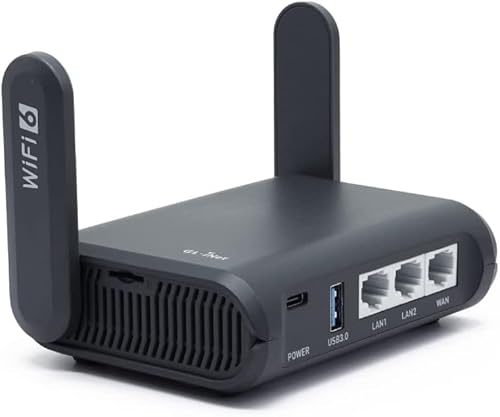
The Slate AX’s title makes a claim its siblings do not: up to 120 devices simultaneously, behind dual-band Wi-Fi 6 speeds of up to 1,800 Mbps with MU-MIMO and OFDMA named. A hundred and twenty devices is not a hotel-room number; it is a workshop number, a training-room number, a small team travelling together and presenting from one bubble. That is the Slate AX’s parish — the consultant who runs the room’s network from a pocket, the trainer whose class all join one SSID, the family reunion villa where one tunnel covers a houseful of cousins’ phones.
Pocket-sized is the title’s other promise, and it matters in this role because group kit gets carried by one person on everyone’s behalf. The VPN tooling is the maker’s standard — the same firmware habits as the rest of the range — so a team bubble can be tunnelled as readily as a solo one, with the provider account held by the router rather than installed on a dozen borrowed laptops. For presenters, that last point is quietly professional: clients join your network for the demo without your network joining their IT department’s incident list.
Choose it when the headcount is real. Solo travellers will find the Beryl AX’s faster per-device wireless and 2.5G port more relevant than a 120-device ceiling they will never approach; the Slate AX spends its budget on simultaneity, and it should be bought by people who will spend it.
There is a etiquette dividend to the group bubble that solo travellers never see. When a team works from one tunnelled network, nobody’s laptop is the one that wandered onto the venue’s open SSID and spent the afternoon exposed; the presenter’s bubble is a small act of professional care for everyone in the room. Trainers report the same effect in classes — one network name to announce, one password on the whiteboard, one encrypted exit — and the afternoon’s troubleshooting shrinks to the router’s admin page instead of twenty strangers’ machines.
- Wireless: Wi-Fi 6 dual-band, up to 1,800 Mbps
- VPN: named in the title — “Travel Router with VPN”
- Capacity: up to 120 devices simultaneously, per title
- Radio features in title: MU-MIMO and OFDMA
- Form: pocket-sized in the title’s own words
Strengths
- The group’s router: simultaneity figures none of its siblings claim.
- One tunnelled bubble for a whole team or class, held by a single provider account.
- Pocket format keeps the group-kit carrier’s bag sane.
Trade-offs
- Per-device wireless pace trails the Beryl AX’s faster radio package.
- Solo travellers pay for capacity they will never use.
- No 2.5G port story for the wired-desk pattern the Beryl models serve.
Best for: presenters, trainers and travelling teams who need one tunnelled network for many devices at once.
Not suited for: a lone traveller with two devices, for whom the Beryl AX is the sharper tool.

GL.iNet GL-BE3600 Slate 7 Wi-Fi 7 Travel Router — Touchscreen flagship
The Slate 7 adds something no other pick here has: a touchscreen, on the router itself, that the title says toggles VPN or AdGuard. That sounds like a gimmick until you have lived the alternative — phone in one hand, hotel portal misbehaving, laptop asleep — and realised that the most-used travel-router action, tunnel on or off, deserves a physical control. The screen turns the router from a configured appliance into a device you can operate half-asleep at a departure gate, and for non-technical travelling companions it removes the admin-panel barrier entirely: the bubble is up when the screen says it is up.
Around the screen sits a Wi-Fi 7 package with a 2.5G port, in a body the title describes with a mini-size flourish and aims at hotels, cruises, RVs and business trips. Those venues share a trait: their networks are the worst-administered you will ever join, which is precisely where a visible, tappable tunnel earns its keep. Cruise and RV use also changes the power conversation — the router becomes semi-permanent infrastructure in a cabin or a van rather than a nightly setup — and a flagship’s polish suits a device that will sit in view for a season.
This is the pick for travellers who value the interaction as much as the encryption, and for anyone buying for a less technical partner, parent or colleague. The technology underneath matches the rest of the range’s VPN story; the screen is what you are paying for, and for the right owner it is worth every bit of the premium.
Cruise travellers should pause on this model a moment longer than others. Ship networks are expensive, metered in spirit even when sold as unlimited, and shared with thousands of passengers; a single tunnelled bubble concentrates your devices through one shipboard login and keeps their chatter private from the cabin next door. The screen’s glanceable state matters at sea, where the connection drops and returns with the ship’s own rhythm — knowing at a look whether the tunnel re-established itself is the difference between confidence and a evening of settings pages.
- Wireless: Wi-Fi 7 dual-band class
- VPN: touchscreen toggles VPN or AdGuard, per title
- Wired: 2.5G port
- Stated venues in title: hotel, cruise, RV, business trip, plane connectivity
- Interface: touchscreen on the device itself
Strengths
- The touchscreen makes tunnel state visible and changeable without any other device.
- Wi-Fi 7 radios future-proof the bubble for current laptops and phones.
- Venue list in the title matches the worst networks travellers actually meet.
Trade-offs
- The screen is a premium feature; budget travellers get the same tunnel concept for far less below.
- A display is one more thing to protect in a tightly packed bag.
- Dual-band design leaves the 6 GHz band to home flagships, as travel routers generally do.
Best for: frequent travellers who want VPN control at a fingertip, and anyone equipping a less technical travelling companion.
Not suited for: the set-and-forget solo traveller, who will use the screen twice a year and should buy the Beryl AX.
GL.iNet GL-MT300N-V2 Mango Portable Mini Travel Router — The pocket original
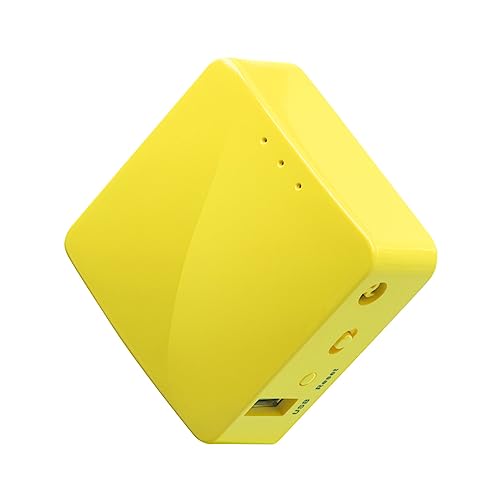
The Mango is the elder of this range and the reason the category has a shape at all. Its title is a compact autobiography: portable mini travel wireless pocket VPN router, two Ethernet ports, USB 2.0, OpenWrt, OpenVPN and WireGuard for public and hotel Wi-Fi, easy setup via the admin panel. It is small enough to live permanently in a laptop bag’s cable pouch, cheap enough in spirit to be bought as an experiment, and honest about its era — the wireless is a single-band design from a gentler time, and nobody should buy it expecting to stream a household.
What the Mango still does superbly is the core trick at minimum size and cost: repeat the venue network, tunnel the bubble, cover the devices that cannot cover themselves. For the traveller whose needs are email, documents, banking and messages — the actual workload of most business trips — its ceilings rarely intrude, and its two Ethernet ports remain genuinely useful for the wired hotel drop or a direct laptop link. It also has a second career as the spare: the router already configured in the bag of a person whose main unit is a Beryl, ready for the trip where the main unit is forgotten.
In the companion travel guide the Mango appears again from a size-and-power angle; here, in the VPN-first list, it earns its place as the proof that the concept does not require flagship money. Buy it as a first travel router without anxiety. If the habit sticks, the range above it is a staircase, and the Mango retires to the spare role with honour.
Longevity is the Mango’s quiet credential. It has been the entry point to this category for years of travellers, which means its quirks are documented, its setup is a solved problem in a hundred forums, and its firmware lineage is understood rather than novel. In security-adjacent purchases there is real value in being the ten-thousandth owner of a thing rather than the tenth. Newer siblings are faster in every measurable way, yet the Mango’s continued place in the maker’s catalogue — and in this guide — says something specifications cannot: the little box still does the job it was designed for, at the size it was designed at.
- Wireless: compact single-band travel design
- VPN: OpenVPN and WireGuard both named in the title
- Wired: two Ethernet ports
- USB: USB 2.0
- Platform: OpenWrt, admin-panel setup
Strengths
- The smallest, simplest expression of the travel VPN idea — it lives in the bag permanently.
- Both mainstream protocols are named in its title despite its budget position.
- Two Ethernet ports keep wired venue drops and direct laptop links available.
Trade-offs
- Wireless speed is a generation or two behind every other pick here.
- Tunnel throughput suits work traffic, not a room of streaming devices.
- USB 2.0 dates its file-sharing ambitions to the modest end.
Best for: the light traveller, the first-time travel-router buyer, and anyone who wants a configured spare in the bag.
Not suited for: a family room expecting simultaneous streaming through the tunnel; step up to the Beryl AX.
GL.iNet GL-A1300 Pocket VPN Travel Router — Captive-portal specialist
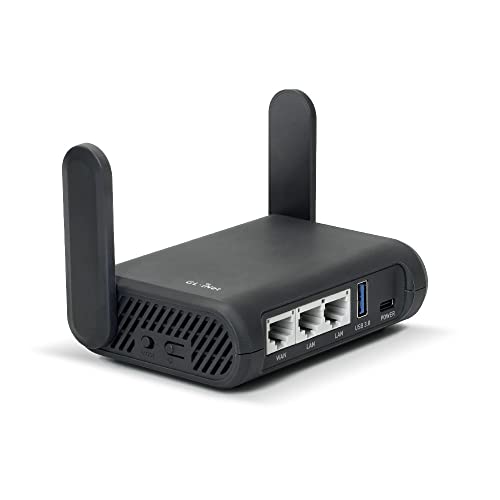
The A1300’s title aims at the least glamorous and most universal moment in travel networking: “Connect to Public & Hotel Wi-Fi login Page”. That login page — the captive portal — is where travel routers historically went to die, because a router repeating a network still has to convince the venue’s portal that it is a legitimate guest, and the ceremony confused devices and owners alike for years. A model whose listing leads with that moment is a model designed by people who read their own support tickets.
Positioned as a pocket VPN travel router for public and hotel Wi-Fi, the A1300 is the unshowy middle of the range: no touchscreen, no Wi-Fi 7, no group-capacity headline — just the core sequence of join, portal, tunnel, done, packaged for travellers whose trips are a rhythm of similar rooms. For the road-warrior pattern of three hotels a week, that focus on the repetitive friction is worth more than a faster radio: the minutes a travel router must save are the ones at check-in, tired, with a morning meeting on the other side of sleep.
Choose it if your travel is frequent, solo and hotel-shaped. The Beryl AX is the better all-rounder and the Slate 7 the better toy; the A1300 is the better ritual — the one whose design centre is the exact screen you will see most often.
Airport lounges and railway hotels share the portal problem in its purest form: short stays, aggressive session timeouts, and a login page that returns like a chorus. A router whose setup flow anticipates re-authentication — whose admin panel makes the renewal a two-tap errand rather than a rebuild — saves its owner the same small frustration dozens of times a year. Compounded across a travelling life, those saved minutes are the A1300’s real specification, and they never appear in a Mbps column.
- Wireless: pocket travel class, dual-band positioning in the range
- VPN: “Pocket VPN Travel Router” in the title itself
- Speciality in title: connecting through public and hotel Wi-Fi login pages
- Setup: positioned for easy set-up in the title
- Role: the frequent-hotel-stay specialist
Strengths
- Captive-portal handling is the headline, matching the real friction of hotel travel.
- The core VPN bubble without flagship distractions or pricing.
- Pocket format suits the multi-hotel weekly rhythm.
Trade-offs
- No touchscreen, no Wi-Fi 7 — the convenience and radio ceilings are deliberate.
- Group and family capacity belong to the Slate AX and Beryl models instead.
- Spec-sheet shoppers will find its title quieter than its siblings’; its virtues are procedural.
Best for: the frequent solo hotel traveller whose enemy is the nightly login-page ritual.
Not suited for: a travelling family or team, whose headcount points at the Slate AX.
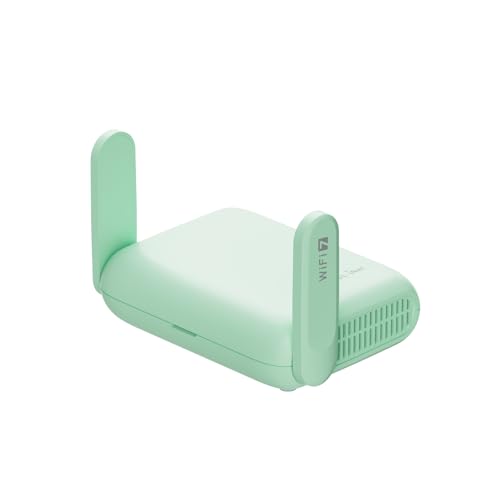
GL.iNet GL-MT3600BE Beryl 7 Wi-Fi 7 Travel Router — Wi-Fi 7 power traveller
The Beryl 7 is the range’s new flagship for travellers who carry current hardware: dual-band Wi-Fi 7 at 688 plus 2,882 Mbps in the title’s figures, dual 2.5G ports, USB 3.0, WPA3, AdGuard Home, OpenWrt 21.02 — and a weight, 205 grams, that keeps it honestly in the travel class despite the specifications reading like a home router’s. Dual 2.5G ports in a travel box serve the wired-desk pattern at full strength: venue Ethernet in on one fast port, your laptop out on the other, with the tunnel over everything.
Its title also carries the range’s only printed WireGuard figure — the maker’s own claim, quoted here as a claim rather than a measurement — which signals where the maker expects this model to be judged: tunnel pace. Treat the number as the manufacturer’s lab figure for its flagship travel hardware, not a promise about a hotel’s uplink, which will cap your real experience long before the router does. The honest summary is that the Beryl 7 removes the router from the list of things limiting a travel tunnel; the venue network remains, as ever, the ceiling.
Buy it if your laptop is Wi-Fi 7, your work is bandwidth-serious, or your trips are long enough that the travel router becomes a temporary home network — the month-long rental, the project abroad. For weekend trips it is splendid overkill, and the range below it exists precisely so that overkill remains a choice rather than a tax.
Digital nomads working from monthly rentals will recognise their pattern in this model’s brief most of all. A month in one apartment turns the travel router into the home network: the work laptop wired to the second 2.5G port, calls riding the tunnel daily, a streaming stick on the bubble in the evenings, the landlord’s router reduced to a dumb pipe in the corner. That is a home-router workload wearing a 205-gram coat, and the Beryl 7 is the only pick here specced for it without apology. Buy it as infrastructure for a travelling life, not as a gadget for a holiday.
- Wireless: dual-band Wi-Fi 7, 688 plus 2,882 Mbps per title
- VPN: WireGuard figure printed in the title as the maker’s claim; OpenWrt 21.02
- Wired: dual 2.5G ports
- USB: USB 3.0
- Weight: 205 g per title
- Extras in title: WPA3, AdGuard Home
Strengths
- The fastest travel package here across radios, ports and tunnel intent.
- Dual 2.5G ports make the wired hotel desk a first-class setup.
- AdGuard Home aboard extends the bubble’s manners to blocking as well as encrypting.
Trade-offs
- Venue networks will cap real speeds far below the hardware’s abilities.
- Flagship travel pricing for capabilities weekend trips rarely touch.
- At 205 g it is light, not Mango-light; gram-counters have their own pick above.
Best for: the long-stay or bandwidth-serious traveller whose travel router doubles as a temporary home network.
Not suited for: the occasional weekend traveller, who will never meet the ceilings this model raises.
How Do the Six Compare in a Suitcase?
| Pick | Wireless | Wired highlight | Defining trait |
|---|---|---|---|
| Beryl AX (MT3000) | Wi-Fi 6, 574 + 2,402 Mbps | 2.5G WAN, gigabit LAN | The balanced default |
| Slate AX (AXT1800) | Wi-Fi 6, up to 1,800 Mbps | Travel port set | Up to 120 devices |
| Slate 7 (BE3600) | Wi-Fi 7 | 2.5G port | Touchscreen VPN toggle |
| Mango (MT300N-V2) | Single-band mini | Two Ethernet ports | Smallest and simplest |
| A1300 | Pocket dual-band class | Travel port set | Captive-portal focus |
| Beryl 7 (MT3600BE) | Wi-Fi 7, 688 + 2,882 Mbps | Dual 2.5G ports | Flagship pace at 205 g |
Read the table by trait rather than by tier. Every row tunnels; the differences are the shape of your trip — headcount, grams, wired desks, long stays. That is what a one-maker category actually offers, and it is more useful than a false diversity of brands would be: the firmware habits, the app and the admin panel stay constant whichever row you choose, so a traveller can own the Mango as a spare and the Beryl 7 as the main unit and already know both.
Notice, too, what the table does not contain: a single rival badge. In most categories on this site the comparison table is a map of competing philosophies; here it is a family tree, and the honest response to a family tree is to choose by fit rather than by loyalty tests. If a rival maker’s travel VPN line matures into genuine competition, this guide’s successor will say so with pleasure. Until then, the category is what it is, and pretending otherwise would serve nobody standing in an airport with a laptop and a boarding call.
What Should You Configure at Home Before the First Trip?
Everything. The cardinal rule of travel routers is that the trip is the worst classroom: configure the bubble at your kitchen table, where the internet is friendly and the passwords are in the drawer. Add your VPN provider’s configuration, set the tunnel’s behaviour if it drops, name your SSID something that does not advertise your name or room number, and set an admin password that is not the one printed on the label. Then rehearse the venue ritual against your home network: join, portal if any, tunnel up, and check from a second device that its apparent location matches the endpoint.
While you are at the kitchen table, make one more decision that travellers reliably postpone until it is too late: which endpoint, and which protocol, are your defaults — and what is the fallback when the first choice is blocked or slow in a particular venue? Having a second provider configuration already loaded, tested once at home, converts a whole class of field failures into a menu choice. The routers in this range make carrying multiple profiles easy; the discipline of loading them before departure is the owner’s half of the bargain.
Pack the supporting cast deliberately. The right cable for the router’s power, a short Ethernet cable for the wired drop that half of hotel rooms still provide, and any adapter your destinations require — the router is only as portable as its power story. Save a photo of your configuration screens and a copy of the provider file somewhere reachable offline; if the router ever needs a reset in the field, those two artefacts turn a rebuild from an evening into ten minutes. Finally, decide your failure rule in advance: if the tunnel cannot come up in a venue, which tasks wait for a safer network? Banking can wait a day. Boarding passes cannot. Write the rule once, at home, calmly.
How Do You Run a Travel Router in the Wild, Day After Day?
Arrive, power, join, portal, tunnel, verify — in that order, every time, until it is muscle memory. Verification is the step travellers skip and the only one that proves the arrangement: open a location-check page on the phone and confirm the bubble’s exit is where the tunnel says it is. If the venue offers a wired drop, prefer it; a cable to the router beats the room’s congested air and usually survives the evening streaming peak that makes hotel Wi-Fi sag at nine.
Share the bubble carefully. The SSID password you give a colleague or a cousin extends your tunnel and your provider account to their traffic, which is usually fine and occasionally a surprise. For shared trips, the Slate AX pattern — one bubble, many devices, one administrator — beats five separate setups, but the administrator should say the quiet part aloud: everyone’s traffic exits together, so behave accordingly. When the trip ends, change the SSID password at home. It takes a minute and closes the bubble’s guest list properly.
Transit days deserve their own variation on the routine. On trains and in departure lounges the pattern compresses: the router comes out of the bag already configured, joins the transit network or your phone’s hotspot, and covers the laptop for the length of the journey. This is where the pocket end of the range justifies itself most plainly — a Mango-class bubble thrown up in ninety seconds for a two-hour ride — and where pre-configuration pays its highest dividend, because nobody has ever successfully configured a VPN profile while balancing a laptop on a fold-down tray table in a moving carriage.
Power discipline closes the routine. A router fed from a power bank is a bubble with a battery gauge; know roughly how long yours lasts, and do not discover the figure during a video call from a train. In rooms, plug into mains and save the bank for transit. In RVs and boats, the Slate 7’s semi-permanent pattern — mounted, powered, screen glowing — turns the routine into infrastructure, which is its own kind of luxury.
What Mistakes Do Travellers Make With Portable VPN Routers?
The first is unboxing at the destination. Every configuration horror story in this category begins with a sealed box in a hotel room and ends with an unencrypted evening “just for tonight”. Configure at home; the rule has no exceptions worth making. The second is forgetting that the tunnel protects the bubble, not the traveller: the phone that hops onto the venue SSID directly for a moment — because the bubble seemed slow — leaves the arrangement entirely, and phones do this automatically unless told not to. Forget the venue network on your devices so the bubble is the only door.
Third, travellers over-trust the venue’s wired drop, assuming a cable means a safer network. A wired port in a hotel room is the same untrusted network with better bandwidth; the tunnel matters just as much on it. Fourth, people buy the flagship for a twice-a-year trip and then leave it in a drawer, firmware ageing, while the humble Mango that would have lived in the bag goes unbought. The best travel router is the one that is with you, charged and configured. Fifth — the subtlest — travellers tunnel home-country services from abroad without checking the provider’s endpoint load at local evening peak; a nearer endpoint is usually a faster one, and the bubble does not care which city it exits from for most tasks.
A sixth mistake is quieter and sadder: buying the travel router, using it beautifully for one trip, and then letting it rot — firmware frozen at the version it shipped with, provider credentials expired, the whole arrangement discovered dead at the next departure gate. Security devices decay when ignored. The fix is the thirty-second habit from the related-guides note: home, plugged in, updated, back in the bag. A travel router should be maintained like a passport — checked before the trip, not during it.
What About Power — the Travel Spec Nobody Puts in the Headline?
Ask any honest frequent traveller what actually strands a travel router and the answer is rarely the radio: it is the plug. Rooms hide their sockets behind furniture, trains ration them, and a router whose power supply is a proprietary brick with a short cable loses to one that sips from USB-C and a power bank you already carry. The GL.iNet range’s general drift toward USB-powered designs is one of its least advertised and most lived advantages; check your chosen model’s exact power input before ordering, and then build the trip kit around it — one cable that feeds the router, one spare, and a bank whose capacity you have actually tested against the router’s appetite.
Power also decides placement, and placement decides performance. A router that can sit on the windowsill — near the corridor’s access point, in the room’s least obstructed corner — because a long USB cable freed it from the desk socket will outperform a faster router exiled behind the minibar. Travellers who treat power as an afterthought end up arranging their privacy around the furniture; travellers who pack two cables arrange the furniture’s electricity around their privacy. It is a small discipline with an outsized effect on how the bubble feels at nine in the evening when the whole hotel logs on at once.
For vehicle-based travel the question inverts: power is plentiful and permanent, so the router becomes furniture and the discipline shifts to heat and vibration. Mount it where air moves, feed it from a stable supply rather than a rattling accessory socket, and the Slate 7 or Beryl 7 will run a season without attention. The through-line of this whole section is that portable networking is a physical practice before it is a digital one — the travellers who master the physical half stop thinking about the digital half entirely.
How Does the Travel Bubble Change Your Relationship With Home?
An under-discussed pleasure of the travel router is that it makes everywhere feel administratively identical. Your devices join the same SSID in Lisbon as in Leeds; the tunnel exits in the same place; the streaming catalogue, the banking app’s mood, the search results all behave as they do on your sofa. For travellers whose work depends on services that sulk abroad, that sameness is productivity. For everyone else it is a subtler comfort — the digital equivalent of a familiar pillow — and it compounds across a long trip in ways a single hotel night never reveals.
The arrangement can also run in reverse, and many owners end up preferring it: the travel router as client to the home router as server, so the bubble abroad is not a provider’s endpoint but your own house. Your traffic emerges from your home address, your home devices are reachable as if you were on the sofa, and no subscription mediates the relationship. The pattern asks more of the home setup — the server side, the reachable address — but it closes the loop elegantly: the same maker’s firmware at both ends, one habit of mind for the whole map. Travellers who adopt it tend to describe the travel router not as a gadget but as a very long Ethernet cable to their own front room.
Final Recommendation
Buy the Beryl AX unless your itinerary names a different pick. It is the balanced centre of the range — modern radios, a serious wired port, mature firmware — and it will cover the great majority of travel patterns without a compromise worth discussing. Take the Mango instead if grams and simplicity rule, or as the configured spare every frequent traveller eventually wants; take the A1300 if your life is a rhythm of hotel login pages; take the Slate AX when the bubble must hold a team or a classroom. The Slate 7 earns its premium for the touchscreen alone if the router’s user values a visible, tappable tunnel, and the Beryl 7 is the flagship for long stays and Wi-Fi 7 laptops. Travellers whose trips are measured in size and power before VPN should cross-check this list against the best small travel routers guide, where these same models meet their TP-Link and ASUS rivals; those whose travel runs on mobile data rather than venue Wi-Fi belong in the best routers with sim card slot roundup. And when the trip ends, the home version of this entire idea — every device, every evening, no ritual at all — is waiting in our umbrella guide to the best routers that support vpn. Pack the router configured, rehearse the ritual once at the kitchen table, and let every strange network you ever join become somebody else’s problem.
Frequently Asked Questions
Do I need a VPN subscription to use a travel router?
For the client bubble described here, yes — the router holds your provider account’s configuration and your traffic exits at the provider’s endpoint. The router is the vehicle; the subscription is the road pass. Some travellers instead tunnel back to their own home router acting as a server, which needs no subscription at all and is a fine pattern if home is configured for it — several travellers run a travel client and a home server as one combined arrangement.
Should I buy one router per traveller, or share one bubble as a couple or family?
Share, in almost every case. One bubble means one portal negotiation, one tunnel, one password to manage, and devices that can see each other for the small collaborations travel involves — sharing a document, printing a boarding pass to the room’s printer, casting a film to the room’s television through your own network. Separate routers per person multiply every ritual and divide nothing that needs dividing. The exception is the travelling colleague arrangement, where separate work obligations and separate employers’ rules argue for separate bubbles and separate accounts.
Will a travel router make slow hotel Wi-Fi faster?
No, and any product implying otherwise should be distrusted. The tunnel adds encryption overhead to whatever the venue provides; what the router can improve is local order — your devices sharing one connection cleanly, a wired drop used properly, a 5 GHz bubble instead of the venue’s crowded 2.4 GHz. Privacy and sanity improve; raw venue bandwidth does not. Choose venues by their connectivity when work depends on it, and let the router handle the trust problem.
Can hotel networks block travel routers or VPNs?
Venues occasionally restrict unfamiliar devices or require per-device portal registration, and a small number of networks obstruct common VPN protocols. The practical defences are the ones these routers are built around: proper captive-portal handling so the router registers like a legitimate guest, a choice of protocols in the firmware, and the wired drop as an alternative path. If a venue’s terms prohibit personal routers, respect them and keep your devices’ own protections on — the bubble is a tool, not an entitlement.
How many devices can share one travel router’s tunnel?
It varies by model, and the titles tell the story: the Slate AX claims up to 120 simultaneous devices for group duty, while the pocket models are aimed at one traveller’s handful. Remember that headcount and happiness differ — every device shares the venue’s bandwidth and the router’s tunnel ceiling, so a family of five streaming through one bubble will feel the venue’s limits long before the router’s. Match the model to the real headcount, not the theoretical one.
Can a travel router share a phone’s connection instead of venue Wi-Fi?
Generally yes — USB tethering and repeating a phone’s hotspot are standard travel-router party tricks across this range, and they matter when the venue network is unusable or absent. The bubble then rides your mobile data through the same tunnel, with the router sparing each device from joining the phone directly. Watch the data allowance rather than the technology: a bubble full of devices behaves like a household, and households consume data like households, not like one careful phone.
Is it safe to leave the travel router running in an RV or rental for a whole season?
Yes, with the same housekeeping a home router deserves: current firmware, a changed admin password, and an occasional glance at the client list to confirm only your devices are aboard. The Slate 7’s venue list explicitly includes RV use, and its screen makes the tunnel’s state a glanceable thing for a semi-permanent install. Heat is the main enemy in vehicles — give the router air, shade and a stable power feed, and it will behave like the infrastructure it has become.
Related Guides
The pocket-router world is bigger than the VPN-first shelf this guide patrols. Travellers who care about size, power and captive portals in equal measure — and who want to see the one ASUS and the TP-Link models that compete at this scale — will find the fuller field laid out in the small travel routers roundup linked from the recommendation above. Read the two guides together and the category resolves into a simple map: VPN-first travellers start here, size-first travellers start there, and the wisest carry one configured router from whichever shelf they chose.
A closing habit costs nothing and repays itself on every trip: when you get home, plug the travel router in, let it take its firmware update on your own network, and leave it in the bag it travels in, cables coiled, ready. Travel gear fails its owners in the packing, not in the field — the router that lives configured and current in the carry-on is the one that will be there, working, on the night the hotel network turns out to be exactly as trustworthy as you feared.