What's inside
- Key Takeaways
- Quick Picks
- How We Chose These Picks
- Converter, Riser or New Desk — Which Problem Do You Have?
- What Does a Converter Ask of the Desk Beneath It?
- How Do You Set Screen and Keyboard Heights on a Converter?
- Manual or Electric — How Will You Actually Lift It?
- How Do You Keep a Converter Steady at Full Height?
- What Happens to Everything Around the Converter?
- The Six Desktop Converters, Reviewed One by One
- How Do the Six Converters Compare on the Desk?
- What Mistakes Do Converter Buyers Keep Making?
- Final Recommendation
- Frequently Asked Questions
- Related Guides
As an Amazon Associate I earn from qualifying purchases. This post may contain affiliate links at no extra cost to you.
widgetverdict.com is reader-supported. When you buy through links on our site, we may earn an affiliate commission.
Where to buy: Amazon is where all six of these converters are sold; each listing is one click from the pick’s name in the Quick Picks table, and the same link appears again at the head of its detailed review. Before anything else, be clear about what is being sold here: none of these products is a desk, and the first paragraphs below explain what they are instead, because buying one under the wrong impression is this category’s classic disappointment.
The best desktop standing desks are not desks. They are converters — also sold as risers and desktop workstations — that sit on top of a desk you already own and lift your monitors and keyboard from sitting height to standing height and back. The distinction is not pedantry; it is the entire product. A converter keeps your existing desk, its drawers, its size, its place in the room, and adds exactly one capability: the working surface rises. Buyers who understand that buy well in this category. Buyers who order expecting a complete desk receive a heavy, clever platform and a lesson.
Understood properly, the converter is the most surgical purchase in the standing-desk world. A full standing desk replaces furniture that may be good, costs the most, and demands a room reorganisation; a converter arrives, sits on the desk, and by lunchtime the workstation stands. It is also the renter’s and the cautious buyer’s format — reversible, removable, and testable. If standing work turns out not to suit you, the converter leaves and the desk remains, which no other standing format can promise.
The six picks divide by mechanism and footprint. Two are 32-inch manual converters — the VIVO, with a title-stated 33 lb capacity and a wide keyboard tray, and the FITUEYES, aimed at dual monitors. Two are 36-inch risers — the FLEXISPOT and the SANODESK — for the mainstream laptop-and-monitor or dual-monitor setup. One is the category’s powered exception, the electric VERSADESK PowerPro at 40 inches, built for triple monitors. And one is the shape nobody else here attempts: the Lubvlook, a 47-inch corner converter that wraps the riser format around the inside angle of an L-shaped or corner desk.
Key Takeaways
- These are converters that sit on an existing desk — none of them is a desk, and none includes legs or a floor-standing frame.
- Widths run from 32 inches (VIVO, FITUEYES) through 36 inches (FLEXISPOT, SANODESK) to 40 inches (VERSADESK) and the 47-inch corner Lubvlook.
- The VIVO converter states its capacity in its title: the desktop holds 33 lbs.
- Five picks lift manually or by assisted mechanism; the VERSADESK PowerPro is electric, with push-button adjustment for triple-monitor loads.
- Keyboard trays matter: the VIVO and VERSADESK name wide trays in their titles, and tray geometry decides wrist comfort.
- Measure your existing desk first — a converter consumes surface depth and adds its load to the desk beneath.
Quick Picks
| Pick | Badge | Why it earns its place |
|---|---|---|
| VIVO Manual Height Adjustable Standing Desk Converter, 32″ | Best proven manual converter | A 32-inch manual riser whose desktop holds a stated 33 lbs, with a wide keyboard tray. |
| FLEXISPOT Standing Desk Converter 36″ Desk Riser | Best mainstream riser | A spacious 36-inch converter sized for a laptop, keyboard and monitor setup. |
| FITUEYES Height Adjustable Standing Desk 32″ Wide Sit to Stand Converter | Best 32-inch dual-monitor pick | A 32-inch converter pitched at dual-monitor setups, with easy assembly in its title. |
| VERSADESK PowerPro 40 Inch Electric Standing Desk Converter | Best electric converter | A motorised 40-inch riser with push-button height, built for triple monitors and a laptop. |
| SANODESK 36″ Standing Desk Converter | Best effortless manual lift | A 36-inch converter for dual monitors with a keyboard tray and lifting pitched as effortless. |
| Lubvlook 47 inch Corner Standing Desk Converter | Best for corner desks | A 47-inch riser shaped for the inside corner of an L desk, in black. |
How We Chose These Picks
Fit came first, because a converter’s first job is to belong on your desk. We spread the six across the width classes buyers actually face — 32 inches for compact desks and single or dual modest monitors, 36 for the mainstream setup, 40 for triple monitors, and a corner shape for L desks — rather than crowding the guide with near-identical mid-size risers. A converter wider than the desk beneath it, or deeper than the surface allows once the keyboard tray extends, fails before its mechanism is ever tested.
Mechanism was judged second, and honestly: five of these picks ask your arms, assisted by springs or gas struts, to do the lifting, and one — the VERSADESK — plugs in and does it by motor. Neither is the correct answer in the abstract. Manual risers are lighter, silent and independent of sockets; the electric riser lifts heavy triple-monitor loads without a heave and stops precisely where it is told. We kept the ratio at five-to-one because that is the category’s honest centre of gravity, and we labelled the electric pick as electric everywhere it appears.
Stated figures were treated with the discipline this batch applies everywhere: quoted where the title states them, absent where it does not. The VIVO’s 33 lb desktop capacity is the one load figure in this guide because it is the one figure a title here provides. For the other five, the reviews talk about what the load will feel like and what to check in the listing, rather than inventing numbers. A converter’s real capacity question is anyway double: what the riser holds, and what the desk beneath holds, and the second figure lives in your home, not in any listing.
The keyboard tray closed the judging. A converter lifts two things — screen and hands — and the relationship between those two heights is the ergonomics of the whole arrangement. Trays that sit below the main platform, wide enough for keyboard and mouse together, keep wrists level while screens rise; flat single-surface risers force a compromise somewhere. The VIVO and VERSADESK name wide trays in their titles, the SANODESK names its tray, and the reviews note the tray arrangement of every pick because your wrists will notice it before your eyes do.
Converter, Riser or New Desk — Which Problem Do You Have?
Diagnose before you shop, because the three formats solve three different problems and are constantly bought in each other’s place. If your desk is good — the right size, the right place, storage you use — and only its height is wrong, you have a converter problem, and everything in this guide is addressed to you. If your desk is wrong in size, condition or position, no converter will save it; a riser on a bad desk produces a bad desk that moves, and the money belongs toward a complete standing desk instead.
The middle case is the desk you are indifferent to: serviceable, un loved, in a room that may change. Here the converter’s reversibility is the argument. It converts the indifferent desk for now, and if the room changes — a move, a dedicated office, a bigger desk later — the converter transfers to the next desk or leaves entirely. Renters, students and anyone in a home they expect to leave within a couple of years should weight that reversibility heavily; it is the format’s unique financial virtue.
There is also a trial argument, and it is legitimate. Standing work suits many people and not others, and the honest way to learn which person you are is the cheapest reversible experiment — a converter on the desk you own — rather than the most expensive commitment. A converter that teaches you standing is not for you has still done its job, and it resells or hands down more easily than any full desk. Buy the experiment before the institution.
A fourth case deserves naming because it is increasingly common: the desk that cannot be replaced because it is not yours. The employer’s desk, the furnished rental’s desk, the family desk that belongs to the household rather than to your job. A converter respects all of those ownerships — it arrives without tools against the desk’s structure, changes nothing permanently, and leaves with you. Workers furnishing a workstation inside someone else’s furniture have, realistically, no other standing option, and the six picks here should be read by them as the whole market that matters.
What Does a Converter Ask of the Desk Beneath It?
More than most buyers expect. Start with depth: a converter’s platform plus its keyboard tray, extended toward you, consumes the desk’s working depth and then some, and on a shallow desk the arrangement can push the chair — and you — further back than the room planned. Measure your desk’s depth, compare it with the converter’s footprint in its listing, and leave room for the tray at sitting height, which is where its geometry is least forgiving. Width is simpler: the converter should sit within the desk’s top with margin on both sides, not overhang like a diving board.
Then consider the desk’s own strength and stability, because the converter concentrates a moving load on it. The riser, two monitors, a laptop and your leaning forearms are a real weight, raised and lowered daily, on a piece of furniture that may have been designed for a typewriter’s worth of load. A solid desk shrugs this off; a lightweight flat-pack desk may develop opinions, expressed as wobble, that the converter then amplifies at standing height. If your desk already trembles when you type hard, fix that first — the converter is not the place to discover it.
Finally, the surface itself. Converters sit on feet or a base frame that will spend years in one patch of your desktop: felt or rubber contact points are kind, bare metal on a beloved wooden top is not, and the patch beneath a converter fades differently from the rest of the desk in sunlight. None of this is a reason not to buy; all of it is a reason to place the converter deliberately on day one, because it will likely still be in that exact patch in year five.
How Do You Set Screen and Keyboard Heights on a Converter?
A converter lifts screen and keyboard together, locked in a fixed relationship — and that relationship is the format’s central compromise, so it must be set up with care. Start at sitting height, converter fully down: your existing chair and desk ergonomics should be undisturbed, keyboard at elbow height, screen where it always was. This is the position you will still spend much of the day in, and a converter that degrades the sitting position to improve the standing one has failed its first duty.
Raise it to standing and check the two heights separately. The keyboard tray should meet your forearms with elbows near a right angle and shoulders relaxed; the screen’s top edge should sit near eye level. On most converters the screen will sit lower than ideal if the keyboard is perfect, because monitors on their factory stands were designed for desks, not risers — the standard fix is a monitor stand or a small riser block under the screen, restoring the gap the converter’s fixed geometry cannot. Budget for that small addition when you buy, and the standing position becomes correct rather than approximate.
Dual monitors add a third check: the pair, angled, must fit the platform’s width with their stands stable, and the platform must not flex under their combined weight at full height. The FITUEYES and SANODESK are pitched at exactly this load, the VERSADESK at triple monitors, and the reviews below read each pick against the monitor count its maker claims for it. A converter swaying gently under two large screens is not dangerous, usually — but it is distracting in a way that quietly shortens every standing session.
Manual or Electric — How Will You Actually Lift It?
The manual mechanism on most converters is a squeeze handle and an assisted lift — springs or gas struts that carry much of the load’s weight, leaving your arms to guide and control rather than deadlift. The SANODESK’s title promises effortless lifting, and the honest reading of that whole class is: light loads rise easily, heavy loads rise willingly, and the effort scales with what you put on the platform. A single laptop floats up; two monitors and a desktop’s worth of equipment ask for a deliberate two-handed heave, several times a day, every day.
The electric VERSADESK exists for the point where that arithmetic stops working. Triple monitors are heavy, and a push-button lift that raises them smoothly, stops at a remembered position and never asks your shoulders for anything changes the standing habit from a decision into a default. The costs are the format’s usual ones: a motor, a power lead to manage, a higher price class, and a heavier unit to place on the desk in the first place. Buyers with two modest screens rarely need it; buyers with three screens, or with a shoulder that has opinions, should not let category habit talk them out of it.
Frequency is the deciding question, as it is with every standing format. If you will change height at natural breaks — morning standing, afternoon sitting, one more stand before the day ends — a manual converter’s small effort disappears into the routine. If your work pattern is many short stands scattered through calls and tasks, the effort is charged many times a day, and the electric premium starts paying for itself in behaviour: the height you change often is the height that matters.
Noise belongs in the same comparison, honestly weighed. A manual riser moves at the speed of your arms and makes the sounds of its springs and latches — brief, mechanical, over in seconds. An electric converter hums for the length of its travel, which is also brief, but pitched in the register that carries through a quiet house. Neither should decide the purchase alone; both belong in the mental picture of the desk at six in the morning, in a home where other people are asleep and the standing habit must survive their schedule as well as yours.
How Do You Keep a Converter Steady at Full Height?
A converter at full extension is a table on a table, and it should be set up with the respect that image deserves. The first rule is load placement: the heavy items — the monitors — belong centred and toward the back of the platform, over the lifting mechanism’s heart, not cantilevered at the front edge near the keyboard tray. A platform loaded nose-heavy feels tippy at height even when it is perfectly safe, and the feeling alone shortens standing sessions. Load it as the maker photographed it, and the physics stays boring.
The second rule concerns the host desk’s feet and the floor beneath them, because wobble is a chain and the converter is only its last link. A desk that rocks on an uneven floor passes the motion upward, amplified by the converter’s height; shimming the desk’s feet on setup day is converter maintenance, whatever it feels like. Carpet adds its own slow settle: expect to re-check the arrangement after a fortnight, when the pile has compressed under the combined load, and to find the whole station steadier for the adjustment.
The third rule is behavioural: lean on the desk, not on the converter. At standing height it is tempting to rest forearms and half your attention on the platform’s edge while thinking, and a riser loaded that way, repeatedly, will develop the small movements that make owners distrust it. The keyboard tray takes your wrists; the platform takes the equipment; your weight stays on your feet, where the format always intended it. Owners who internalise that division get a converter that feels rigid for years.
What Happens to Everything Around the Converter?
The chair is the first neighbour to renegotiate. A converter household still sits — most standing workers sit for much of the day — so the chair stays, but it now parks in a room where the desk’s working position alternates, and it needs a home that is not directly in the standing user’s foot space. Push it to the side, angle it away, give it a place that reads as parked rather than abandoned; standing at a desk with a chair looming behind your calves is a small daily irritation with a free solution.
The lamp is the second. A desk lamp that served the sitting position may glare or shadow at standing height, because the geometry between lamp, screen and eyes has changed by a foot. Lamps on the desk but outside the converter — on the host desk’s surface beside it — keep their own height while the workstation rises past them, which usually works better than a lamp riding the platform and redrawing its angles at every lift. Task lighting deserves one experiment at full height before the arrangement is declared finished.
Everything else — the printer on the desk’s end, the speakers, the plant, the photograph — keeps its sitting-height life while the centre of the desk rises and falls, and that contrast is the converter format’s charm made visible: one island of the desk changes altitude, the archipelago stays. Plan the island’s borders so the rising platform never meets a shelf, a low lamp or a wall cabinet on its way up. The full-travel test on day one, platform loaded, eyes open, is the whole of the safety inspection this category asks for.
The Six Desktop Converters, Reviewed One by One

VIVO Manual Height Adjustable Standing Desk Converter, 32″ — Best proven manual converter
The VIVO is the manual converter in its classic form: a 32-inch black platform, a stated desktop capacity of 33 lbs, a wide keyboard tray, and a model number — DESK-V000K — that has been in the category long enough to be a reference point. VIVO’s catalogue is built on monitor mounts and desk ergonomics, and this converter reads like the company’s home turf: nothing decorative, every dimension aimed at the standard one-or-two-screen workstation that most desks actually hold.
The 33 lb figure deserves the prominence the title gives it, because it disciplines the purchase honestly. Two modest monitors, or one monitor and a laptop, sit comfortably inside it; a pair of large screens with heavy stands plus a desktop’s clutter should be weighed, literally if necessary, before ordering. That is not a weakness — it is the compact manual class stating its envelope — and buyers inside the envelope get a riser that lifts without drama and settles without creep. The wide keyboard tray is the other practical headline: keyboard and mouse side by side at the lower level, which is where wrists want them when the screens rise.
At 32 inches this is the converter for the normal desk and the normal setup, and its long presence in the market means its behaviour — the lift feel, the tray, the footprint — is the category’s known quantity. Buyers whose desks are compact, whose screens are modest and whose preference is for the proven over the novel will find this the guide’s default answer, as it has been the market’s for years.
A small practical note belongs to this pick’s manual mechanism. A hand-lifted converter teaches its owner the load’s weight honestly, and that feedback is useful: if the platform ever feels heavier month by month, something has crept aboard — the extra monitor, the desktop speakers, the stack of books that migrated. Treat the lift as a scale you use daily, and the 33 lb envelope stays respected without a single deliberate audit. It is the quiet advantage of muscle over motor: the mechanism reports on the setup every time it moves.
- Type: desktop converter platform — needs a host desk beneath it
- Width: 32 inches
- Capacity: desktop holds 33 lbs, as stated in the listing title
- Keyboard: wide keyboard tray
- Adjustment: manual
- Model: DESK-V000K; black
Strengths
- A stated capacity figure to plan the load against.
- Wide keyboard tray keeps keyboard and mouse together.
- The category’s established, well-documented design.
Trade-offs
- Thirty-three pounds excludes the heaviest multi-screen loads.
- Thirty-two inches is snug for two large monitors.
- Manual lift — heavy setups ask for a real heave.
Best for: a standard desk with one or two modest monitors and a buyer who values the proven. Not suited for: a triple-monitor rig or very heavy screens.

FLEXISPOT Standing Desk Converter 36″ Desk Riser — Best mainstream riser
FLEXISPOT’s name in standing desks is built on full electric frames, and this 36-inch converter is the company’s answer for the desk that stays: a spacious riser, in black, pitched at the laptop, keyboard and monitor setup that describes most home workstations. The extra four inches over the 32-inch class are felt where it matters — a monitor and a laptop side by side without the laptop hanging off the platform’s edge, or two monitors with their stands genuinely planted rather than perched.
Spacious is the listing’s own word for the platform, and it points at the converter buyer’s most common regret: the riser that fits the equipment but nothing else — no notebook, no phone, no coffee. A 36-inch platform restores a margin of surface around the screens, which at standing height is where the work’s small objects live. The trade is footprint: 36 inches of converter needs a desk with the width and depth to host it and still leave the room’s geometry sane, so measure the desk before the width seduces you.
Within the manual class, this is the mainstream recommendation for the mainstream setup — the buyer with a decent desk, a monitor-and-laptop or dual-monitor arrangement, and no appetite for either the compact class’s snugness or the electric class’s price and cabling. It is the converter as appliance: unremarkable in the best sense, sized for the median workstation, from a maker whose whole business is the standing category.
There is a longer-term thought behind buying the converter from a standing-desk maker, and it concerns the household’s likely future. Many converter owners eventually graduate to a full standing desk — not because the converter failed, but because it proved the habit. A maker like FLEXISPOT sells both ends of that journey, and owners who liked the riser often stay with the badge for the frame. That is not a reason to overpay today; it is a reason the riser’s build quality matters, because the converter frequently becomes the second desk — the partner’s, the teenager’s — when the main station graduates.
- Type: sit-stand riser for an existing desk
- Width: 36 inches
- Setup aimed at: laptop, keyboard and monitor
- Adjustment: height-adjustable riser mechanism
- Finish: black
- Maker’s field: standing desks and frames
Strengths
- Thirty-six inches fits monitor-plus-laptop without crowding.
- Surface margin for notebook, phone and coffee at standing height.
- From a maker specialising in the standing category.
Trade-offs
- Needs a desk with real width and depth to sit on.
- No capacity figure in the title to plan heavy loads against.
- Black only — light desks will show the contrast.
Best for: the mainstream home workstation — a good desk, one or two screens, daily standing. Not suited for: a compact desk or a triple-monitor load.
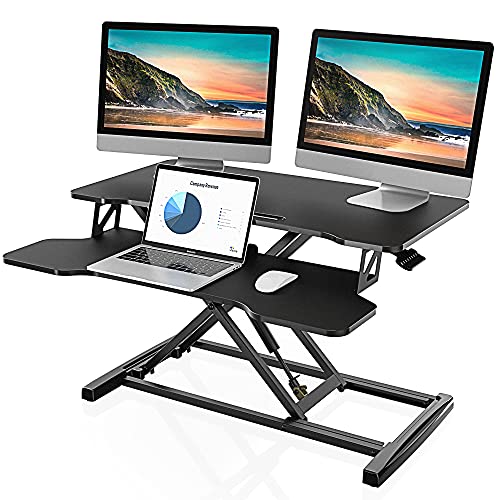
FITUEYES Height Adjustable Standing Desk 32″ Wide Sit to Stand Converter — Best 32-inch dual-monitor pick
The FITUEYES makes one claim above others in its title: it is a 32-inch converter for a dual monitor riser setup. That pairing — compact width, two screens — is the interesting engineering case in this class, because two monitors on 32 inches means stands close together, weight centred, and no room for the sloppy placement a wider platform forgives. A converter designed and pitched for exactly that load is a better bet for it than a wider generalist used hopefully, and FITUEYES, whose catalogue is stands and mounts, is speaking its native language here.
The title also promises easy assembly, which in converter terms is a real feature: most risers arrive nearly built, but the ones that do not can be surprisingly fiddly, and a converter is a product whose owner wants to be standing at it the same morning. A tabletop workstation that goes from box to desk quickly, and then spends its life doing one thing — rising and settling under two screens — is the FITUEYES proposition in full.
Dual-monitor owners should do one piece of homework the single-screen buyer can skip: add up the two stands’ footprints and set them side by side on the desk where the converter will sit. Stands vary enormously — a pair of compact feet leaves the 32 inches feeling generous, while two wide splayed bases can consume the platform’s depth as well as its width. The FITUEYES is pitched for the mainstream of that variation; the tape measure, applied to your own two stands, settles whether your setup is in it.
Read the limits as the class’s limits rather than this pick’s failures: 32 inches will not take two large monitors with wide stands plus a laptop, and buyers in that territory belong in the 36-inch class or the VERSADESK’s 40. For the dual-modest-monitor desk — the programmer’s second screen, the analyst’s paired displays, the writer with a reference screen — the FITUEYES is the size-class specialist, and specialists in a small class are usually the right purchase.
- Type: tabletop sit-to-stand workstation
- Width: 32 inches
- Setup aimed at: dual monitors
- Adjustment: height-adjustable sit-to-stand mechanism
- Assembly: pitched as easy in the listing title
- Maker’s field: stands and mounts
Strengths
- Pitched and sized specifically for dual-monitor setups.
- Easy assembly — working the same morning it arrives.
- Compact footprint suits smaller desks.
Trade-offs
- Two large monitors with wide stands will crowd 32 inches.
- No tray or capacity details stated in the title.
- No room for a laptop beside two screens.
Best for: a dual-monitor desk where space is tight and the screens are modest. Not suited for: a two-large-screen plus laptop arrangement.

VERSADESK PowerPro 40 Inch Electric Standing Desk Converter — Best electric converter
The PowerPro is the category’s heavy artillery and the only motorised pick here: a 40-inch electric converter with push-button height adjustment, a wide keyboard tray, and a title that names its load outright — triple monitors and a laptop. Everything about that specification answers the manual class’s honest limit. Three screens are too much weight to heave by hand several times a day, and a converter that lifts them electrically, smoothly, to a remembered position is not an indulgence but the only version of the product that will actually be used as intended.
Forty inches is also a statement about the desk beneath: this converter belongs on a large, solid desk, and it will find out a flimsy one. The wide keyboard tray keeps the hands’ level distinct from the screens’ platform, which at triple-monitor scale matters more, not less — the wider the visual field, the more the wrist geometry deserves its own considered surface. VERSADESK’s catalogue is converters specifically, and the PowerPro is its flagship format: the specialist’s answer to the heaviest desktop load.
The costs are real and should be bought knowingly. An electric converter brings a power lead to a product category whose charm is having none; it is the heaviest unit here to place; and it sits in a price class above the manual risers. For the triple-monitor professional whose desk is a genuine workstation — trading, design, development, video — those costs are the price of a standing habit that survives contact with a heavy rig. For everyone else, they are the reason the manual five exist.
Placement day deserves a plan of its own with this pick. A 40-inch electric converter is a two-person lift onto the desk, and it should land in its final position the first time, because nudging it afterwards with three monitors aboard is nobody’s idea of a good afternoon. Measure the desk’s depth for the tray’s travel, confirm the socket the motor will use, and route its power lead with the service loop the rising platform needs. Do those three things before the monitors go on, and the PowerPro becomes what it promises to be: the converter whose height you change without ever thinking about the changing.
- Type: electric desktop riser — needs a host desk beneath it
- Width: 40 inches
- Adjustment: electric, push-button
- Setup aimed at: triple monitors and a laptop
- Keyboard: wide keyboard tray
- Power: requires a mains connection
Strengths
- Motorised lift handles triple-monitor weight without effort.
- Forty inches gives three screens genuine room.
- Push-button precision suits frequent height changes.
Trade-offs
- Needs power — a cable the manual picks never ask for.
- The heaviest converter here; demands a solid desk.
- Over-specified for one or two modest screens.
Best for: a triple-monitor professional on a large, solid desk. Not suited for: a light setup or a delicate desk that cannot carry it.

SANODESK 36″ Standing Desk Converter — Best effortless manual lift
The SANODESK competes in the guide’s most contested class — the 36-inch manual converter — and its title leads with the quality that decides that class: effortless lifting. Read the claim as a design brief rather than a guarantee. A manual riser’s lift feel is its product, because a converter that fights its owner gets left at one height, and the SANODESK’s pitch is that its mechanism carries a dual-monitor load up and down without the heave that gives the category its sceptics. The keyboard tray and the black finish complete a specification aimed squarely at the dual-monitor home office.
Against the FLEXISPOT, its direct rival, the comparison is one of emphasis: both are 36-inch platforms for the mainstream setup, the FLEXISPOT leaning on its maker’s standing-desk pedigree and spacious surface, the SANODESK on the lift itself and the dual-monitor brief stated in its title. Buyers choosing between them should weigh how often they will change height — the more frequent the changes, the more the lift’s ease dominates every other consideration, because ease is what the habit runs on.
The dual-monitor framing deserves its practical footnote: two screens on a 36-inch platform fit with their stands planted and a margin for the small objects, and the tray keeps the keyboard where the wrists want it beneath them. It is the arrangement most standing-desk owners actually have, specified without exaggeration in either direction. For that owner, changing height several times a day without thinking about it, the SANODESK makes the strongest single-feature case in its class.
SANODESK’s wider catalogue is standing desks themselves, which shows in the converter’s proportions: the platform depths and tray placement read like a desk designer’s decisions rather than an accessory maker’s. That matters over years, because a converter is used with the same daily intimacy as a desk — it is, functionally, the top half of one. Buyers who have handled the brand’s full desks will recognise the intent; buyers who have not can take the dual-monitor brief and the lift pitch at face value and expect a coherent piece of furniture-grade hardware.
- Type: desktop riser platform — needs a host desk beneath it
- Width: 36 inches
- Setup aimed at: dual monitors
- Lift: pitched as effortless in the listing title
- Keyboard: tray included
- Finish: black
Strengths
- Lift ease is the design priority — the habit-forming feature.
- Thirty-six inches suits dual monitors with margin.
- Keyboard tray keeps wrist geometry separate from the screens.
Trade-offs
- Effortless is a claim to test against your own load’s weight.
- No capacity figure stated in the title.
- Shares its class closely with the FLEXISPOT — the choice is emphasis.
Best for: a dual-monitor owner who changes height often and wants the lift to disappear. Not suited for: a buyer who changes height rarely and would rather pay for surface than mechanism.

Lubvlook 47 inch Corner Standing Desk Converter — Best for corner desks
Every other pick here is a rectangle for a straight desk. The Lubvlook is the converter shaped for the corner: 47 inches across, in black, designed to sit into the inside angle of an L-shaped or corner desk and lift the workstation that lives there. That shape is a genuine gap in the category — corner desk owners are a large population, their screens sit at the angle, and a straight riser on an L desk wastes the corner’s depth on one side and overhangs the geometry on the other. A converter drawn for the angle uses the corner’s natural depth, which is the deepest part of any L, for the screens.
The corner position has an ergonomic gift that this shape exploits: the user sits at the angle, screens across the corner, with the surface’s depth putting the monitors at a comfortable distance without a deep desk. A corner converter keeps that geometry and adds height to it. Forty-seven inches across the angle accommodates the dual-monitor corner arrangement — one screen on each wing’s line, meeting at the corner — that straight converters serve awkwardly, and the return wings on either side stay free for the notebook, the printer or the second laptop at sitting level.
The checks are placement checks. The host desk must be a true corner or L with the depth at its angle to host the converter’s footprint, and the wings’ height relationship stays fixed — the converter lifts the corner station only, not the whole L, so the setup becomes a standing corner with sitting wings, which most corner workers will recognise as exactly how they work anyway. For the corner-desk owner whom every straight riser has ignored, this is the pick that was drawn for their desk.
One more arrangement suits this shape particularly well: the shared corner. In many households the L desk is the household’s one real workstation, used by different people across the day, and a corner converter lets each of them stand or sit at the same station without anyone’s chair-and-desk compromise becoming permanent. The wings hold the household’s shared layer — the printer, the post tray, the family laptop — at sitting height for everyone, while the corner rises to whoever is working. Few products in this guide serve a whole household’s rotation as naturally.
- Type: desktop converter for corner and L desks — not a desk
- Width: 47 inches across the corner
- Shape: corner format, for the inside angle of an L
- Adjustment: height adjustable
- Finish: black
- Model: GSD06T
Strengths
- The only corner-shaped converter here — uses the L’s deep angle.
- Forty-seven inches suits the dual-screen corner arrangement.
- Lets an L desk stand without replacing the whole desk.
Trade-offs
- Only suits corner and L desks — useless on a straight desk.
- Lifts the corner station; the wings stay at sitting height.
- Corner fit should be confirmed against your desk’s angle and depth.
Best for: an L-desk owner whose screens live at the corner angle. Not suited for: a straight desk, or a corner setup that needs the whole L to rise.
How Do the Six Converters Compare on the Desk?
| Pick | Width | Lift | Aimed at | Defining extra |
|---|---|---|---|---|
| VIVO Converter | 32 in | Manual | One or two monitors | Stated 33 lb capacity; wide tray |
| FLEXISPOT Riser | 36 in | Manual | Laptop, keyboard, monitor | Spacious platform |
| FITUEYES Converter | 32 in | Manual | Dual monitors | Easy assembly |
| VERSADESK PowerPro | 40 in | Electric | Triple monitors, laptop | Push-button height; wide tray |
| SANODESK Converter | 36 in | Manual | Dual monitors | Effortless-lift pitch; tray |
| Lubvlook Corner | 47 in corner | Manual | Corner workstations | Corner shape for L desks |
Two columns decide most purchases: width, matched to your screens and your host desk, and lift, matched to your load and your change frequency. The corner row stands apart — it is not a bigger rectangle but a different shape for a different desk, and corner owners should start there and only reconsider if their screens do not actually live at the angle.
What Mistakes Do Converter Buyers Keep Making?
The first is the category error this guide opened with: expecting a desk. A converter has no legs and no floor presence; it is a platform for a desk you own. Buyers who absorb that sentence buy happily; buyers who skim it write the angry reviews. The second mistake is measuring the screens and not the desk — ordering a 36-inch converter for a 30-inch-deep desk and discovering the keyboard tray’s geometry over the desk’s front edge, or a 40-inch electric unit for a desk that flexes under its weight.
The third is ignoring the sitting position. A converter lives on your desk at its lowest height for much of the day, and a platform that raises the keyboard awkwardly when collapsed, or pushes the screens too close at sitting height, taxes the position you use most to serve the position you use least. Set up and judge the collapsed position first. The fourth mistake is forgetting the monitor stands: converter platforms assume screens on their factory stands, and a monitor arm clamped to a converter is a load and a leverage the design never agreed to — check the listing before improvising.
The fifth is leaving the cables at sitting length. A converter rises, and everything plugged into the wall or the floor must rise with it or strain: monitor power, the laptop’s charger, the desk lamp’s lead if it rides along. Leave a service loop of slack behind the desk, route it once, deliberately, and the rise becomes silent about cables forever. Owners who skip this hear about it — as a tug, a flicker, an unplugged screen — at the top of the first enthusiastic lift.
The sixth is buying the converter for the desk you plan to replace. A converter is matched — in width, in load, in shape — to the desk beneath it, and a new desk next year may want a different converter or none at all. If a desk replacement is genuinely imminent, sequence the purchases the other way: desk first, converter after, sized to the furniture it will actually serve. The exception is the corner case — literally: an L desk today and an L desk tomorrow can share the Lubvlook between them, because the shape it answers to survives the upgrade.
Final Recommendation
Start with your desk, because the converter is its accessory. A standard desk with modest screens: the VIVO, with its stated capacity and proven design. The mainstream monitor-and-laptop or dual setup: the FLEXISPOT for surface, the SANODESK for lift, the FITUEYES if the desk is compact and the screens are two. Three screens on a serious desk: the VERSADESK, and accept its cable as the price of effortlessness. An L desk with its station at the angle: the Lubvlook, the only shape drawn for your furniture.
Set the collapsed position up first, leave slack in every cable, and give the standing habit a fortnight of anchored changes — stand for the first call, sit for the deep work, stand again after lunch — before judging either the converter or yourself. A platform on a desk in a spare room has no business changing how a household works, and yet the right one, honestly matched to the desk beneath it, quietly does exactly that.
And keep the receipt of the experiment in mind if the habit takes: the converter that proves standing works for you has also specified your eventual full desk — its width class, its load, its lift style — better than any showroom visit could. Owners who graduate from a converter buy their standing desk once, correctly, because the platform on the old desk already taught them what they actually needed.
Frequently Asked Questions
Will a converter damage or mark my desk?
Placed carelessly, it can leave the usual evidence of long residence — a patch that fades differently, small marks from feet that shifted. Placed deliberately, with its feet or base on felt or rubber pads and the position chosen once, a converter sits harmlessly for years. The greater risk is structural, not cosmetic: a converter concentrates a moving load, and a desk that is already unsound will say so. Check the desk first, pad the contact points, and the pairing is benign.
How much weight can I put on a desktop converter?
Only one pick here states its figure in its title — the VIVO, at 33 lbs for the desktop — so for the others, the listing’s own specification details are the place to check before loading, and this guide will not invent numbers the makers have not stated there. Remember the second half of the question too: the host desk carries the converter plus everything on it, so the desk’s strength is part of the same calculation.
Can I use a monitor arm with a converter?
Generally, treat it as a question for the specific listing rather than an assumption. Converters are designed around monitors on their factory stands, centred on the platform; a clamped arm moves the load’s leverage and can unbalance the lift or stress the platform’s edge. Many owners do it successfully with lighter arms and screens, but the safe route is the one the maker describes. If an arm is essential to your setup, that requirement may point you toward a full standing desk instead.
Is an electric converter worth it over a manual one?
When the load is heavy or the changes are frequent, yes — the VERSADESK’s case is a triple-monitor rig lifted many times a day, where manual effort would quietly end the standing habit. For one or two modest screens changed a few times daily, the manual picks lift willingly and ask for no power, no cable and less money. The deciding variable is not the budget; it is the honest count of how many times a day you will actually change the height.
Do converters work on corner and L-shaped desks?
Straight converters can sit on one wing of an L, but the corner itself — where most L-desk users actually place their screens — is served properly only by a corner-shaped unit like the Lubvlook in this guide. Its 47-inch span is drawn for the inside angle, using the corner’s depth for the screens while the wings stay at sitting height. Measure your corner’s depth against the listing’s footprint before ordering, as with any converter and its host desk.
Can two people share one converter workstation?
Yes, and converters handle sharing better than full standing desks in one respect: there are no presets to overwrite, and the manual lifts settle anywhere along their travel. Each user finds their standing height by feel — forearms level, shoulders down — and the sitting position is shared by definition, since the collapsed converter returns the desk to itself. Households where the desk changes hands across the day are among this format’s happiest owners.
How high does a converter raise the workstation?
Enough to move a seated workstation to a standing one for most adults — that is the format’s design brief — but the exact travel varies by model and is a figure to take from each listing’s specifications rather than from a category average. What matters practically is the pair of endpoints: low enough that the collapsed sitting position stays correct, high enough that at full lift the keyboard meets your forearms with your shoulders down. Judge both ends, not the middle.
Related Guides
When the workstation outgrows any converter, the next step is the full-size format, and our guide to the best large standing desks covers the largest electric desks and the multi-monitor setups they serve. If the appeal of the manual picks here was freedom from motors, the best crank adjustable standing desks roundup covers complete desks and frames that adjust by hand. And for the workstation that moves while you sit still at it, the best bike desks guide covers trainer desks and pedal setups for working riders.


