What's inside
- Key Takeaways
- Quick Picks
- How Did We Judge Sound Cards by Headphone Standards?
- What Do Impedance, Sensitivity and Gain Actually Mean for Your Headphones?
- What Is Output Impedance, and Why Does It Quietly Change Your Sound?
- Why Do Headphones Reveal Flaws That Speakers Forgive?
- What Changes When the Same Desk Also Plays Through Speakers?
- How Do the Six Compare as Headphone Devices?
- How Should You Think About EQ With a Capable Card?
- Which Headphones Should Send You to Which Pick?
- How Do You Set Up a Headphone-Focused Card for the Best Result?
- What Mistakes Do Headphone Buyers Make With Sound Cards?
- Final Recommendation
- Frequently Asked Questions
- Related Guides
As an Amazon Associate I earn from qualifying purchases. This post may contain affiliate links at no extra cost to you.
[widgetverdict.com] is reader-supported. When you buy through links on our site, we may earn an affiliate commission.
The best sound cards for headphones succeed or fail on a single component that speaker-focused guides treat as a footnote: the headphone amplifier. A sound card can carry a superb converter and still disappoint with the wrong headphones, because the amp stage decides how much clean power reaches the drivers, how the pairing behaves across the headphone’s impedance curve, and whether the background stays silent with sensitive earphones. This guide therefore ranks its six picks by headphone logic first — amplifier design, impedance reach, gain behaviour, and the honesty of the numbers each listing actually publishes — and treats everything else, from surround modes to lighting, as supporting cast. One pick is not a sound card at all, and it is labelled as such where it appears, because for some headphone owners a standalone DAC and amplifier is the correct answer wearing different clothes.
Where to buy: each headphone pick below is linked to its Amazon listing by product name, so you can confirm the current variant before ordering. Headphone gear is a category where small details — the included cable, the exact model revision — matter to fit and function, so read the listing’s own description against your headphones’ plug type and impedance before you commit. If your headphones use a balanced cable or an unusual connector, plan the adapter at the same time rather than discovering the mismatch on delivery day.
Key Takeaways
- For headphones, the amplifier stage matters more than the converter’s headline sample rate; both live in these products, but the amp decides the pairing.
- Impedance is a pairing question, not a quality score: high-impedance headphones need voltage swing, sensitive earphones need a silent noise floor, and planars need current.
- The Sound Blaster Z SE publishes the most explicit headphone credential here — an amp rated for headphones up to 600 ohms — while the AE-5 Plus counters with a discrete bi-amp design.
- The GLOTRENDS ST113 takes a different route to clean headphone sound: a named ESS SABRE DAC chip and an isolated optical output in a driver-free PCIe card.
- The Fosi Audio K5 Pro is a standalone DAC and headphone amplifier, not a sound card; it is included, clearly labelled, because its tone controls and console-friendly inputs solve a different version of the same problem.
- The Recon3D is the heritage option: an older THX-branded gaming card whose value depends entirely on finding a clean unit and modest expectations.
Quick Picks
| Pick | Badge | Why it is here |
|---|---|---|
| Creative Sound Blaster AE-X | Flagship all-rounder | Creative’s current top PCIe card, judged here by how completely it serves as a one-device headphone hub. |
| GLOTRENDS ST113 PCIe Sound Card | Named-DAC purist card | An ES9018K2M-based PCIe card with driver-free setup and an isolated optical output for noise-free hi-fi. |
| Creative Sound Blaster Z SE | Published 600Ω amp rating | The pick whose listing states its headphone reach outright, with mic EQ for headset users alongside. |
| Sound Blaster Audigy FX V2 | Compact internal upgrade | A slim PCIe card with a 120 dB DNR DAC claim, for desktops needing a headphone step-up in a tight case. |
| Sound Blaster Recon3D THX PCIe | Heritage gaming card | An older THX-branded Sound Blaster for buyers who value its processing flavour and find one in good order. |
| Fosi Audio K5 Pro DAC Headphone Amp | Not a sound card — DAC/amp | A desktop DAC and amplifier with bass and treble controls and console-friendly inputs, included as the external alternative. |
How Did We Judge Sound Cards by Headphone Standards?
Three questions decided the order. First, what does the listing actually say about the headphone stage — an impedance rating, an amplifier topology, an output power figure — and how much of the rest is inference? Picks were credited for checkable claims and described cautiously where the listing is silent, because headphone performance is precisely where marketing adjectives go to hide. Second, which headphones does the product serve? A card that drives a 600-ohm studio classic and a dongle that flatters sensitive earbuds are both legitimate; a guide that ranks them without naming their audiences is not. Third, what does the product ask of the owner — a PCIe slot and Creative’s software, a driver-free install, or desk space and its own volume knob?
Two Creative cards here also appear in this series’ Creative roundup, and they are written about differently on purpose: there, the AE-X and Z SE were judged as gaming and surround all-rounders; here, the only lens is the headphone socket — how the amp behaves with demanding loads, what gain discipline the pairing needs, and where each card’s published numbers help or mislead a headphone buyer. Readers coming from that guide will find the same hardware and a deliberately different verdict logic.
What Do Impedance, Sensitivity and Gain Actually Mean for Your Headphones?
Impedance, measured in ohms, describes how much a headphone resists the amplifier’s push. High-impedance headphones — the classic studio models in the 250 to 600 ohm region — need an amplifier that can swing enough voltage; plug them into a weak output and they play quietly with thin bass, not because they are broken but because the amp runs out of voltage before the music runs out of dynamics. Low-impedance headphones and earbuds ask the opposite favour: they need very little voltage, so the amplifier’s own noise floor becomes audible as hiss, and an output with too much fixed gain forces you to listen at the bottom sliver of the volume control where channel balance wanders. Sensitivity, stated in decibels per milliwatt or per volt, tells you how loud a given headphone gets for a given push, and together the two numbers predict whether a pairing will be too quiet, too hissy, or just right.
Planar magnetic headphones complicate the picture in a third direction: typically low impedance but hungry for current, they ask an amp to deliver power steadily rather than voltage dramatically, and a stage designed only with high-impedance voltage swing in mind can sound polite with them. This is why amplifier topology earns its place in this guide. A discrete amp stage, and especially a bi-amp arrangement with separate paths per channel, is engineering aimed at holding control across these different loads instead of optimising for one.
Gain is the owner’s side of the same bargain. Where a card or its software offers gain settings, match them to the headphone: low gain for sensitive earbuds so the volume control lives in its comfortable middle and the noise floor stays buried, high gain only when a demanding headphone genuinely cannot reach satisfying volume without it. More gain than needed buys nothing but hiss and a twitchy volume knob. The best headphone setups feel boring in this respect — volume sits mid-travel, silence is silent, peaks are clean — and reaching that boring state is the entire technical goal of this guide.
What Is Output Impedance, and Why Does It Quietly Change Your Sound?
One specification rarely appears in listings yet shapes pairings as much as any other: the amplifier’s output impedance. A headphone does not present a flat resistance — its impedance swings with frequency, especially in dynamic-driver models with a bass-region hump. The amplifier and headphone form a voltage divider, so a high output impedance lets those swings redraw the frequency response: bass blooms or thins, and the headphone you bought stops sounding like the headphone reviewers measured. The working rule is a ratio — an output impedance below roughly an eighth of the headphone’s impedance keeps the interaction negligible — which is why low-impedance portable headphones are the most easily coloured by a careless output, and why high-impedance studio models are comparatively forgiving of the source.
Practical consequences follow for this guide’s picks. A buyer pairing sensitive low-impedance headphones should prize a modern, low-noise, low-output-impedance stage — the flagship converter tier and dedicated amps exist partly to provide exactly that discipline — while the owner of a 300-ohm classic can relax about output impedance and shop on swing and noise instead. Listings seldom publish the figure, which is another reason this guide leans on the credentials makers do publish and describes the rest qualitatively. When a pairing sounds unexpectedly bass-heavy or oddly dull despite clean power, output-impedance interaction is the suspect nobody mentions, and trying the rear output or a different stage is the experiment that confirms it.
Why Do Headphones Reveal Flaws That Speakers Forgive?
New card owners often report that the upgrade sounded bigger through headphones than through their speakers, and the physics is unflattering to speakers rather than magical. Headphones couple drivers directly to your ears with no room in between: no reflections smearing detail, no furniture absorbing the noise floor’s evidence, no distance diluting hiss into the ambient sound of the house. Everything the output stage does — good and bad — arrives unedited. That intimacy is why a card’s hiss, hum and channel imbalance are headphone complaints first, and why this guide treats silence between notes as a headline feature rather than a spec-sheet filler.
It also explains the upgrade order experienced listeners recommend. With speakers, the room is usually the weakest link and a card is a refinement; with headphones, the source electronics sit much closer to the front of the queue, behind only the headphones themselves and the recording. A listener whose budget forces a choice between a card now and speakers later will usually hear more improvement per unit of money through the headphones they already own — provided, as every section of this guide insists, the amplifier pairing is the thing being bought, rather than a sample-rate figure in a larger font.

Creative Sound Blaster AE-X — Flagship all-rounder
Judged purely as a headphone hub, the AE-X’s case rests on completeness. It is Creative’s current flagship PCIe card with hi-res playback to 32-bit/384 kHz and desktop app support, and for a headphone owner that pairing means the amp stage, the converter and the profile system live in one managed chain: plug the headphones into the card, store an EQ for them in the app, and the same hardware serves speakers through a separate profile when you switch. Owners of several headphones will appreciate that structure more than any single specification, because each pair can carry its own correction instead of sharing a compromise.
The honest caveat, in a headphone-specific guide, is that Creative’s listing for the AE-X leads with conversion figures and app support rather than with a published impedance reach for its amp stage. The flagship’s drive is aimed at the broad middle of the headphone market plus a healthy margin, and in practice that covers most listeners; but a buyer whose entire purpose is a famously demanding 600-ohm classic should compare the Z SE’s explicit rating below before defaulting to the flagship. What the AE-X unquestionably offers the headphone listener is the quietest possible context for the amp’s work — a modern converter with flagship noise figures — plus the software layer to tune the result per headphone. As a one-card answer for a desktop that listens through both speakers and serious headphones, it remains the range’s centre of gravity.
There is a daily-life detail worth adding: flagship app support means headphone and speaker outputs stop fighting over Windows defaults. The profile remembers that headphones want their EQ and a lower ceiling, speakers want neither, and switching becomes a selection rather than a reconfiguration. Owners who have lived with a powerful card and no profile system know the small friction of re-trimming volume and EQ at every swap; the AE-X’s software layer is, in headphone terms, an ergonomic feature disguised as a bullet point.
- Form factor: internal PCIe card, desktop app control
- Playback ceiling stated: 32-bit / 384 kHz hi-res
- Headphone angle: flagship amp stage within a per-device profile system
- Best matched loads: the broad middle of the market, multiple-headphone desks
Strengths
- Per-headphone profiles in the app end the one-EQ-fits-all compromise
- Flagship conversion keeps the noise floor out of quiet listening
- One internal device serves headphones and speakers with stored settings for each
Trade-offs
- No explicit impedance reach published in the listing for the amp stage
- Desktop-bound: the investment serves one machine only
- Full value depends on using the software layer, not just the socket
Best for: a desktop listener with more than one headphone and a speaker set, who wants profiles rather than compromises. The single-demanding-headphone specialist should read the Z SE and AE-5-class arguments in this series before deciding the flagship is automatically the headphone answer.

GLOTRENDS ST113 PCIe Sound Card — Named-DAC purist card
The ST113 is the contrarian pick: a PCIe sound card from a maker better known for storage adapters, built openly around an ESS SABRE32 ES9018K2M DAC chip, with driver-free setup and an isolated optical output, aimed at hi-fi listening on a PC. For headphone buyers, the interesting claim is the combination of a named, respected converter chip with electrical isolation thinking. The isolated optical output tells you the design worries about noise paths, and that same worry is what a headphone stage needs, because headphones — especially sensitive ones — are where a PC’s internal noise becomes a listening companion.
Driver-free setup is the second half of its personality, and it cuts both ways in a way buyers should weigh honestly. The card asks nothing of you: install it, and the operating system’s standard audio handling does the rest, with no software suite to maintain across Windows updates. The price of that simplicity is the absence of a profile system — no per-headphone EQ stored in a vendor app, no surround processing layer, none of the Creative-style toolkit. Listeners who do their EQ in their music application, or who want the card to be a transparent converter and nothing else, will call that purity. Gamers who relied on virtual surround will call it absence. Both are right, which is precisely why this card and the Creative flagships can share a guide without competing for the same owner.
The optical output deserves a second look from headphone owners specifically, because it gives the ST113 an escape route no other internal pick here matches so cleanly: today it converts inside the PC; tomorrow, if a dedicated desktop DAC/amp joins the desk, the same card can feed it digitally through the isolated output and retire gracefully into being a transport. Purchases that survive their own upgrade path are rare in PC audio, and that forward compatibility is a genuinely audiophile-minded feature hiding in a modest listing.
- Form factor: internal PCIe card, driver-free setup
- Converter stated in listing: ESS SABRE32 ES9018K2M DAC
- Notable feature: isolated optical output for clean digital feed
- Headphone angle: transparent hi-fi conversion without a software layer
Strengths
- Named audiophile-grade DAC chip rather than an anonymous codec
- No driver or app maintenance — the operating system handles it
- Optical isolation option shows genuine attention to noise paths
Trade-offs
- No vendor EQ profiles or virtual surround processing
- Amp-stage credentials are less documented than the converter’s
- Smaller maker, so community knowledge is thinner than Creative’s
Best for: music-first listeners who want hi-fi conversion inside the PC without adopting a software ecosystem. If your listening includes games that lean on virtual surround, or you want stored EQ per headphone, the Creative cards in this guide carry that toolkit and this one deliberately does not.

Creative Sound Blaster Z SE — Published 600Ω amp rating
In the Creative roundup, the Z SE was the surround-and-microphone card. Through the headphone lens, a different fact takes the headline: its listing rates the headphone amplifier for loads up to 600 ohms, the most explicit drive credential published by any pick in this guide. That single line answers the question owners of classic high-impedance studio headphones actually ask — “will it drive mine?” — with a number instead of an adjective. Paired with the card’s stated 116 dB SNR and 24-bit/192 kHz playback, the picture is of an amp stage specified generously enough that voltage swing stops being the listener’s problem across essentially the whole high-impedance catalogue.
The rest of the Z SE’s toolkit reads differently for headphone users too. Its virtual 7.1 is a headphone feature — processing that gives games positional breadth through two drivers — and owners split honestly on it: some find the spatial cues valuable, others prefer clean stereo and the game’s own audio design, and the card serves both camps because the processing can simply be left off. Mic EQ, meanwhile, matters to the headset wearer rather than the headphone listener, but the distinction collapses at many desks where the same person games with a headset on weekdays and listens with proper headphones on weekends; one card covering both personalities, with ASIO support as a bonus for the musically inclined, is a coherent proposition. Its trade-off against the flagship tier is converter ceiling, and for headphone listening that trade is often painless, because the amp — this guide’s whole point — is not where the Z SE economised.
A word about living with a generously rated amp, because it changes a small daily habit: volume discipline becomes pleasant. With swing in reserve, a high-impedance headphone reaches listening level in the middle of the control’s travel, where channel balance is accurate and small adjustments are actually small. Pairings that live at ninety-eight percent of maximum teach their owners to accept distortion as character; pairings with headroom teach the opposite lesson, that the headphone’s real voice was there all along, waiting for an amplifier that could hold a loud passage together without leaning on its limits.
- Form factor: internal PCI-e card and DAC
- Headphone amp: rated for headphones up to 600Ω, per listing
- Stated figures: 24-bit / 192 kHz playback, 116 dB SNR
- Headphone extras: virtual 7.1 processing, mic EQ for headset use
Strengths
- The clearest published headphone-drive credential in this roundup
- Virtual surround available for games, optional for music
- Covers headset duty with mic EQ as well as pure listening
Trade-offs
- Converter ceiling sits below the 32-bit flagship cards
- High-impedance strength is wasted on easy earbuds, which need low noise more than swing
- Internal card, so one desktop benefits
Best for: owners of high-impedance headphones who want a stated rating rather than a hope, and dual-personality desks that game with a headset and listen with real headphones. Sensitive-earbud listeners should prioritise noise floor over impedance reach — a different virtue, better served by the flagship’s conversion tier.

Sound Blaster Audigy FX V2 — Compact internal upgrade
The Audigy FX V2 is the small-card option: a PCI-E sound card whose listing claims up to 24-bit/192 kHz playback and a 120 dB DNR DAC, in the half-height-friendly tradition of the Audigy line. For headphone listeners, its role is the everyday rescue — a desktop or small-form-factor machine whose onboard output hisses, distorts at volume, or cannot make a decent headphone properly loud, corrected by a card that fits where flagships cannot. The stated DNR figure, read properly, is a dynamic-range claim about the converter’s cleanliness, and cleanliness is the first thing a headphone upgrade should buy: quiet backgrounds make modest headphones sound like better ones.
Set the ceiling of expectation at the tier. This is a mainstream amp stage for mainstream headphones and headsets, and it performs that job without the flagship’s profile software depth or the Z SE’s published high-impedance reach. Owners of one demanding headphone should not stretch this card into that role; owners of ordinary headphones suffering under bad onboard audio will find it transformative in the unglamorous ways that matter — no more hiss between tracks, volume headroom in reserve, a microphone input that stops reporting every fan in the case. In the budget roundup of this series the same card appears wearing its price hat; here its hat is fit and sufficiency, and on those terms it earns its place.
One more headphone-specific virtue belongs to cards of this class: they rehabilitate the headset drawer. Every household accumulates serviceable wired headsets and headphones that sounded disappointing from a failing onboard jack and were quietly blamed for the PC’s sins. Given a clean, adequately powerful output, several of those exiles turn out to have been fine all along. A modest card that rescues existing gear delivers a peculiarly satisfying kind of value — the upgrade you hear is partly equipment you already owned, finally being driven properly.
- Form factor: PCI-E sound card, compact Audigy design
- Stated figures: up to 24-bit / 192 kHz playback, 120 dB DNR DAC
- Headphone angle: clean, adequate drive for mainstream headphones and headsets
- Fit note: suits small cases that flagship cards crowd
Strengths
- Fixes noisy onboard audio in machines with little internal room
- Strong stated converter cleanliness figure for the tier
- Simple, focused upgrade without flagship cost or complexity
Trade-offs
- Not the amp for demanding high-impedance or planar flagships
- Thinner software toolkit than the AE-series and Z SE
- Mainstream positioning means fewer published headphone specifics
Best for: small or ageing desktops whose onboard audio is the weakest link in an otherwise happy headphone setup. If your headphones are the expensive half of the system and your PC is roomy, aim higher in this guide — the amp should be bought to match the headphones, not the other way round.

Sound Blaster Recon3D THX PCIe — Heritage gaming card
The Recon3D is this guide’s heritage pick, and heritage needs handling honestly. It is an older Sound Blaster — model SB1350 in its listing — from the era when THX branding and gaming processing were the product, and its appeal today is specific: a buyer who remembers and likes that generation’s processing flavour, or who finds a clean unit at a price that makes experimentation painless. Its headphone offering is period gaming hardware: a capable-for-its-time output with the era’s surround processing for headsets, judged fairly against its contemporaries rather than against the converter figures elsewhere on this page.
The cautions are the honest core of this entry. Age means the software side belongs to an earlier Windows world, and buyers should expect to verify compatibility with their current system rather than assume the full original feature set survives intact. Condition varies across the units still circulating, so the listing’s exact state matters more here than for any current-production pick. And the headphone stage, while respectable, predates the current generation’s noise floors. None of that forbids the purchase; it defines it. The Recon3D is a flavour choice and a nostalgia purchase with real utility for the right gamer — not a shortcut past the modern cards, and this guide would be failing you if it pretended otherwise.
There is one legitimate modern use worth conceding: a secondary machine. A retro gaming PC, a spare rig for a spare room, a build assembled from the parts drawer — these are contexts where a period card’s processing is not a compromise but a match, because the games it was designed around are the games the machine exists to play. Heritage hardware in a heritage system is coherence, not nostalgia, and a Recon3D keeping a Windows-era game library company is arguably the most honest deployment of any pick in this guide.
- Form factor: internal PCIe card, earlier Sound Blaster generation
- Model in listing: SB1350, THX-branded
- Headphone angle: period gaming processing and output
- Buying note: condition and software compatibility need verification per unit
Strengths
- A distinctive processing character some gamers actively prefer
- Genuine Sound Blaster hardware from a well-documented era
- Can be inexpensive enough to buy as an experiment
Trade-offs
- Software support belongs to an older Windows generation
- Unit condition varies in the remaining circulation
- Noise floor and converter figures trail every current pick here
Best for: the nostalgic gamer who knows exactly which era’s sound they are shopping for and finds a unit in good order. Everyone else is better served by current production — the modern cards in this guide cost their money in converter quality and support, and both matter more than vintage flavour for a first purchase.
Fosi Audio K5 Pro DAC Headphone Amp — Not a sound card: DAC/amp
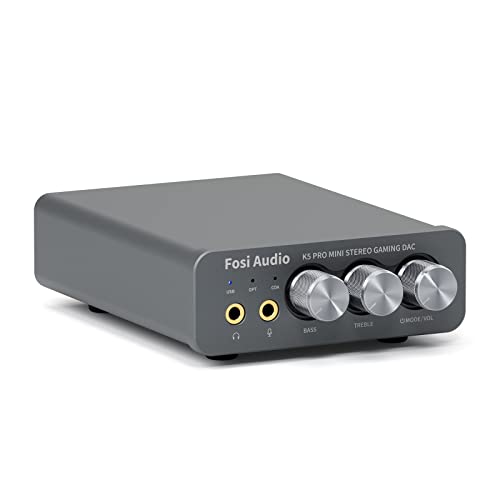
Label first, as promised: the Fosi Audio K5 Pro is not a sound card. It is a standalone gaming DAC and headphone amplifier — a desktop box with its own volume knob — and it appears in this guide because a headphone buyer comparing internal cards deserves to see the strongest alternative shape. Its listing describes a hi-fi headphone amplifier rated at 1000 mW, with a microphone input, physical bass and treble controls, and inputs over USB-C, optical and coaxial feeding RCA and 3.5 mm outputs, for PS5, PC and Mac at 24-bit/192 kHz. Almost every clause of that is a deliberate contrast with the internal cards: multiple sources including a console, tone shaping on physical knobs rather than in an app, and an amplifier figure published as power rather than implied.
That power figure needs the guide’s standard translation. A wattage claim describes the amp’s ceiling into some load; what matters is that a dedicated desktop amp of this class brings generous headroom for the great majority of headphones, including many planars that make sound-card outputs sound strained, and it does so with a knob your hand finds without a screen. The bass and treble controls are unfashionable in purist circles and beloved at real desks, because a slight treble trim at midnight volume or a bass lift for a film is a two-second gesture here instead of a software expedition. The trade-offs are equally concrete: it occupies the desk, it serves headphones and powered speakers rather than a multichannel set, and as an external DAC/amp it sits outside the sound-card category’s profile software entirely. Judge it as the external philosophy’s champion and it is formidable; judge it as a sound card and the comparison is meaningless, which is why this guide refuses to blur the label.
The console input set deserves emphasis for one growing audience: the player whose “PC” is partly a fiction — a laptop for work, a PS5 for games, headphones shared between them. An internal card serves only the laptop half of that life and sits dark during every console hour. A multi-input DAC/amp serves the whole desk, which is why, in headphone terms, the K5 Pro’s optical and coaxial sockets may matter more than its amplifier figure. It is the only pick here whose usefulness grows when the computer is switched off.
- Device kind: standalone DAC and headphone amplifier — not a sound card
- Amplifier figure in listing: 1000 mW class output
- Inputs: USB-C, optical, coaxial; outputs: RCA and 3.5 mm
- Controls: physical volume, bass and treble knobs, microphone input
- Stated playback: 24-bit / 192 kHz, plug and play across PS5, PC and Mac
Strengths
- Dedicated amp headroom serves demanding headphones, including many planars
- Physical tone controls answer in seconds, no software required
- Console and PC sources in one box, with a mic input for headset users
Trade-offs
- Desk footprint and its own cabling, unlike an invisible internal card
- No multichannel speaker path and no profile software
- Category difference means no internal-card features at all
Best for: headphone-first listeners whose sources include a console, or who simply prefer knobs to apps and want amp headroom in reserve. If your life is one desktop and you value invisible hardware with stored profiles, the internal cards above remain the shape of your answer.
What Changes When the Same Desk Also Plays Through Speakers?
Most headphone guides quietly assume a headphones-only life, and most desks disagree. The pairing logic in this guide extends to the mixed desk with one adjustment: switching becomes a feature. A card with stored profiles treats the headphone-to-speaker swap as a selection between two tuned states; a DAC/amp with a line output treats it as a physical handover to powered speakers; a card without profiles treats it as a small recurring chore of volume and EQ that owners either automate with discipline or endure. None of these is fatal, but the mixed-desk buyer should count the swaps they make in a week and buy the switching experience that matches — daily swappers will feel the difference between a profile click and a reconfiguration far more keenly than any converter figure.
How Do the Six Compare as Headphone Devices?
| Product | Kind | Headphone credential | Control style |
|---|---|---|---|
| Sound Blaster AE-X | PCIe sound card | Flagship amp stage, per-headphone app profiles | Desktop app |
| GLOTRENDS ST113 | PCIe sound card | ES9018K2M DAC, isolation-minded design | None — driver-free |
| Sound Blaster Z SE | PCIe sound card | Amp rated to 600Ω in listing | Creative software |
| Audigy FX V2 | PCIe sound card | 120 dB DNR DAC claim, mainstream drive | Creative software |
| Recon3D THX | PCIe sound card (heritage) | Period gaming headphone processing | Era software — verify |
| Fosi Audio K5 Pro | DAC/amp, not a card | 1000 mW-class amp, tone knobs | Physical knobs |
Read the credential column with the scepticism this guide has practised throughout: a published rating you can plan around (600 ohms, a named DAC chip, a power class) is worth more than a paragraph of adjectives, and the control column quietly decides daily happiness as much as any specification — app profiles, no software at all, or a knob. Your headphones’ impedance and sensitivity, looked up before ordering, will point at the right row more reliably than any ranking could.
How Should You Think About EQ With a Capable Card?
A good amplifier pairing makes EQ more useful, not less, and it is worth saying why. Equalisation asks the chain for small favours — a decibel or two of bass lift, a gentle trim where a headphone glares — and a stage with headroom grants those favours without strain, while a stage at its limit turns every lift into distortion at peaks. The discipline that keeps EQ honest is to cut before you boost: lowering the frequencies you want less of preserves headroom automatically, and most headphone corrections are really one excess asking to be trimmed rather than three deficiencies asking to be filled. Card software that stores per-headphone profiles, as the flagship Creative models do, turns this from a ritual into a one-time decision per pair.
There is also a boundary worth respecting between correcting a headphone and fighting it. EQ polishes a pairing that is fundamentally right; it cannot manufacture voltage swing for an underpowered classic or silence a noise floor that the hardware prints onto everything. Buyers sometimes hope software will let a modest card impersonate a stronger one, and the honest order of operations is the reverse: choose the amp that drives your headphones properly with EQ flat, then use EQ, if at all, as seasoning on a dish that already works. That ordering is the difference between a system that satisfies for years and one that gets re-tweaked every fortnight in search of a fix that lives in the hardware.
Which Headphones Should Send You to Which Pick?
Start with the classics: high-impedance studio headphones in the 250–600 ohm family need voltage swing above all, and the Z SE’s published rating is the straightest answer, with the AE-X as the flagship alternative for buyers who also want the newest software layer. Planar magnetic models invert the priority toward current and headroom, which is the Fosi K5 Pro’s home ground as a dedicated amp, with the caveat that it is an external box rather than a card. Sensitive earbuds and easy portable headphones invert it again toward silence: the converter tier matters most, hiss is the enemy, and the flagship cards’ noise figures — or the ST113’s isolation-minded design — serve better than raw drive.
Gaming headsets form their own constituency: moderate impedance, a microphone attached, and an owner who values voice clarity and optional virtual surround. The Z SE’s combination of amp rating and mic EQ is aimed at exactly that person, and the K5 Pro’s mic input plus tone knobs make it the external counterpart for console-inclusive desks. Readers whose headphone questions turn out to be budget questions should detour through our best sound cards under 50 dollars roundup, where the honest entry tier lives — the dongles there will not drive a 600-ohm classic, but for easy headphones they fix the commonest onboard sins for very little money.
How Do You Set Up a Headphone-Focused Card for the Best Result?
Begin with gain discipline, because it is free and it is where most pairings quietly go wrong. If the card or its software offers gain ranges, start at the lowest and raise it only if maximum comfortable volume is unreachable; every unnecessary step of gain raises the noise floor you will hear in quiet passages and crowds the volume control into its least accurate region. Set the operating system’s output format to match your main listening — the music application’s exclusive mode, if you use one, handles hi-res material itself — and disable any spatial or enhancement layers you do not deliberately want, since stacked processing is the commonest cause of a new card sounding “weird” on its first evening.
Then do the listening tests that actually diagnose a pairing. A quiet, sparse recording reveals hiss: if you hear the system rather than the silence, gain is too high for the headphone’s sensitivity or the front-panel case jack is reintroducing interference — use the rear output and compare. A dense, loud passage reveals strain: if peaks flatten or bass loses shape at your chosen volume, the amp is at its limit with that load, and the answer is a stronger stage, not more EQ. A familiar vocal recording reveals balance: channel imbalance at low volume points to the analogue volume pot’s bottom range, cured by lowering gain so the control rides higher. Ten minutes of this turns setup from superstition into measurement, and it tells you whether a disappointment belongs to the card, the settings, or the pairing itself.
A note on listening level belongs in any honest setup section, because amplifier headroom makes loud effortless and effortless loud is how hearing gets spent. A capable card will drive most headphones far beyond safe long-term levels without distorting, which removes the distortion cue that used to warn listeners they were overdoing it. Build the habit of setting volume by the quiet passages — if whispers are clear, the loud parts are already loud enough — and treat any session that leaves your ears ringing as data about your settings, not about your toughness. The best headphone system is the one still serving you, unimpaired, in twenty years.
Finish by saving what worked. If your card supports profiles, store one per headphone with its EQ and gain, named plainly. Future-you, swapping headphones at midnight, will not remember which slider mattered — but the profile will.
What Mistakes Do Headphone Buyers Make With Sound Cards?
The founding mistake is shopping by converter specification for a problem that lives in the amplifier. A card can advertise a spectacular sample-rate ceiling and still leave a demanding headphone underpowered and thin; the amp’s published credentials — an impedance rating, a topology, a power class — are the numbers that predict the pairing, and this guide weighted them accordingly. The second mistake is the opposite snobbery: assuming easy headphones need nothing. Sensitive earbuds expose noise floors mercilessly, and a quality card’s silence is as real an upgrade for them as swing is for a studio classic.
Third, buyers crank gain “for headroom” and manufacture their own hiss, then blame the card. Fourth, they judge a new card through a case’s front-panel jack, whose long unshielded cable re-imports the interference the card was bought to escape; the rear socket is the reference. Fifth, they stack virtual surround, an operating-system spatial mode and a game’s headphone mix into an unintelligible soup and conclude the hardware is muddy. And sixth, they forget the recording direction entirely — then discover their streaming ambitions need an interface, a subject our best pci sound cards for recording guide treats with the seriousness it deserves, including the limits of even good sound-card microphone inputs.
Final Recommendation
Match the amp to the headphone and this category resolves cleanly. The Z SE is the recommendation for high-impedance owners, because its published 600-ohm rating is the kind of fact a purchase should rest on, and its headset toolkit covers the gaming half of the desk as a bonus. The AE-X is the recommendation for the multi-headphone, multi-purpose desktop, where profiles and flagship quietness compound daily. The ST113 is the purist’s internal card — named DAC, no software marriage — and the Audigy FX V2 is the compact rescue for ordinary headphones trapped behind bad onboard audio. The Recon3D is a deliberate nostalgia purchase and should be bought as one. And the Fosi K5 Pro, labelled once more as a DAC and amplifier rather than a sound card, is the external answer for planar owners, console-inclusive desks, and anyone whose hand reaches for a knob before a settings menu.
If you arrived here from the broader Creative survey, you will have noticed the same flagship hardware wearing a different verdict — that is the honest consequence of judging by the headphone socket, and readers who want that full-family context will find it in our best creative sound cards roundup. Our own single purchase, for the commonest real case of a good headphone collection meeting an ordinary gaming desktop, would be the Z SE: it publishes the credential that matters, drives the widest range of what people actually own, and never asks its owner to take the amplifier on faith.
Frequently Asked Questions
Should I use the front-panel jack or the rear output?
The rear output, whenever the choice exists. The front-panel jack reaches the card through a long, thin, usually unshielded cable that runs past the case’s power wiring, and it can reintroduce exactly the interference and crosstalk the card was bought to eliminate — an effect headphone listeners notice first because headphones hide nothing. Use the front jack for convenience with a chat headset if you must, but judge any new card, and do all serious listening, from the rear socket. If the rear output sounds dramatically cleaner in a quick comparison, you have found one of the cheapest upgrades in PC audio: a shorter cable to your headphones.
How do I know if my headphones need a stronger amp?
Two symptoms tell the story. If your headphones reach comfortable volume only at the very top of the range and still sound thin or strained on peaks, the amp is short of swing or current for that load. If they are plenty loud but accompanied by hiss in quiet moments, the problem is the opposite — too much gain or too high a noise floor for their sensitivity. Look up your model’s impedance and sensitivity, compare them with the credentials each pick publishes, and the right tier usually identifies itself.
Does a higher sample rate make headphones sound better?
Not by itself. Headphones reproduce what the converter and amp hand them, and the audible differences between competent modern converters at ordinary rates are subtle compared with the differences between amplifier pairings. A hi-res ceiling signals a modern design tier, which is worth something; but a well-matched amp at standard rates will outperform a mismatched one at any rate. Buy the pairing first and let the ceiling be a tiebreaker.
Is virtual surround worthwhile for headphone gaming?
For many players, yes — good processing adds a sense of rear placement that plain stereo cannot, and in competitive games that cue has practical value. It is a taste, not a truth: other players find it smears detail and prefer the game’s own stereo mix. The sensible approach is to choose a card where the feature exists but can be fully disabled, as with the Z SE, so the experiment costs nothing and the verdict is yours.
Can I use a sound card with wireless headphones?
Mostly no, and the reason is architectural: wireless headphones contain their own converter and amplifier, fed by a digital radio link, so a sound card’s analogue stage never touches the signal. A card can still serve as the system’s hub for speakers and a wired pair, but buying one to improve Bluetooth headphones is money aimed at a stage that is not in the chain. Judge wireless headphones by their own electronics; judge cards by wired pairings.
What is the difference between a sound card and a DAC/amp like the Fosi?
A sound card lives inside the PC (or attaches as a full audio device) and typically combines conversion, amplification, inputs and software features in one managed package. A standalone DAC/amp like the K5 Pro is an external box devoted to conversion and headphone drive, with physical controls and often multiple source inputs, but no internal-card features such as per-application profiles. Neither is superior in the abstract; they are different shapes of answer, which is why this guide labels the Fosi every time it appears.
How long should a headphone-focused card last me?
Through several headphones, most likely. Headphone requirements change slowly — impedance families and sensitivity ranges have been stable for decades — so an amp stage bought generously today remains correctly specified for the next pair and the pair after that. The ageing risks are the platform ones this series notes elsewhere: slot availability in a future build and software support for future operating systems, which is one more reason the driver-free and external options hold their value philosophically even when a flagship card out-features them on day one.
Will a better sound card fix my headset’s microphone?
Partly. A card with a cleaner input and mic EQ — the Z SE is the example here — can make a decent headset microphone sound noticeably more controlled, and moving the input away from a noisy motherboard helps. It cannot repair a poor microphone capsule or a badly placed boom. If voice quality is a professional matter for you, the honest destination is an audio interface with a proper microphone, as the recording guide in this series explains.
Related Guides
Headphone decisions branch in three directions from here. If the budget is the binding constraint, the under-fifty-dollars roundup linked earlier shows what the entry tier can and cannot drive, in plain terms. If your desk records as well as listens, the recording guide linked in the mistakes section draws the line between sound cards and interfaces that your microphone will eventually enforce. And if the Creative half of this page intrigued you beyond the headphone socket — the surround tooling, the flagship software, the external units — the Creative roundup linked in the recommendation judges the same family by all-round standards. Bring your headphones’ impedance figure to whichever guide you read next; it is the one number that follows you through every branch of PC audio. And if this guide leaves you with a single working habit, let it be this: before any audio purchase, write down the two numbers of the headphones you own — impedance and sensitivity — and refuse to be sold an amplifier story that does not mention at least one of them. Sellers of genuine headphone hardware speak that language fluently; sellers of badges change the subject, and the change of subject is itself the most reliable specification on the page.
Related guides
- Best Backup Hard Drives for Home, Family Archives and Whole-House Copies
- Best 17 Laptops: The Complete Tier-by-Tier Guide to Big-Screen Machines
- Best 4K Monitors for MacBook Pro: USB-C Panels With Real Power Delivery
- Best Canvas Photo Printers: Wide-Format Machines for Canvas Work, From 13 Inches to a 24-Inch Plotter


