What's inside
- Key Takeaways
- Quick Picks
- How We Chose These Picks
- How Do the Six Compare Side by Side?
- What Should You Check Before Choosing a Movie Projector?
- How Do You Set Up a Projector for the Best Movie Picture?
- What Mistakes Do First-Time Movie Projector Buyers Make?
- Final Recommendation
- Frequently Asked Questions
- Related Guides
As an Amazon Associate I earn from qualifying purchases. This post may contain affiliate links at no extra cost to you.
widgetverdict.com is reader-supported. When you buy through links on our site, we may earn an affiliate commission.
A projector earns the title of one of the best projectors for movie watching in the first ten minutes of a dark scene, not in the first ten seconds of a bright one. Trailers and demo reels flatter almost every machine ever bolted to a ceiling; it is the night sequence in a crime drama, the candlelit interior, the slow pan across a harbour at dusk, where projectors separate into those that merely make a big picture and those that make a film feel like a film. This guide is organised around that distinction, and around a second one that matters just as much: the difference between a projector bought for a dedicated dark room and one bought for the sofa, the bedroom wall, and the occasional garden screening.
Six machines are reviewed here, and they fall into two honest tiers that this guide will never blur. At the top sit three conventional home projectors from Epson and BenQ, built around proven lamp and light-engine designs, sized for living rooms and media rooms, and judged here on the quality of the image they throw. Below them sit three compact smart projectors — an XGIMI flagship that genuinely straddles both tiers, an Aurzen with Roku built in, and a small YGSKK mini — whose appeal is convenience: streaming apps inside the box, autofocus, speakers that need no soundbar, and a footprint that fits on a bookshelf. Neither tier is a mistake. Buying the wrong tier for your room is the mistake, and the sections below are written to stop that happening.
One warning belongs at the front, because it governs how every brightness figure in this article should be read. Lumen numbers are not standardised across the projector industry. Some manufacturers quote ANSI lumens, some quote ISO lumens, and some quote a figure measured under no published standard at all. Where a listing title names the standard — the XGIMI below quotes ISO lumens, and one Epson quotes colour and white brightness side by side — that figure can be compared with care. Where no standard is named, the number is a claim, not a measurement, and this guide never ranks a budget mini against an Epson or BenQ on the strength of a printed lumen figure. A small projector advertising a huge lumen number is telling you about its marketing department, not its light output.
What actually decides a movie night, once the tier question is settled, is a short list of unglamorous things. Black level in a dark room, because films live in shadow. Colour accuracy out of the box, because skin tones are the first thing your eye audits. Motion handling, because a slow pan across a landscape will judder on a machine that cannot keep its frame cadence honest. Fan noise, because a projector three feet from your head competes with dialogue. And the streaming question — whether the apps live inside the projector or arrive through a stick, a console, or a laptop — because that choice shapes every single evening you use the thing, long after the novelty of the big picture fades.
Key Takeaways
- The Epson and BenQ picks are the picture-quality tier: full-size 1080p home projectors built for darkened rooms and screens or walls of a hundred inches and more.
- The XGIMI Horizon 20 is the one compact machine here that also competes on image: its title states 4K, an RGB triple laser light source, and 3200 ISO lumens — the only brightness figure in this guide tied to a named standard.
- The Aurzen D1R and YGSKK mini are convenience picks: streaming built in, autofocus, and speakers, bought for bedrooms and casual rooms rather than for critical viewing.
- Printed lumens cannot be compared across brands unless the same measurement standard is named; treat unlabelled figures as advertising, not data.
- Every pick here is a 1080p-class or 4K machine per its listing title; none of the six is a native 4K panel except the XGIMI as titled, so set expectations by tier, not by hope.
Quick Picks
| Pick | Badge | Why it is here |
|---|---|---|
| Epson Home Cinema 980 1080p | Picture-First Choice | Epson’s 3-chip 3LCD movie projector for buyers who want the film, not the gadget. |
| Epson Home Cinema 1080 | Bright Room All-Rounder | 3400 lumens of colour and white brightness with a built-in speaker for rooms that never fully darken. |
| BenQ TH575 1080p Home Entertainment Projector | Film-and-Games Pick | A 3800-lumen DLP machine whose low-latency game mode keeps it honest after the credits roll. |
| XGIMI Horizon 20 4K Triple Laser | Premium Smart Flagship | 4K RGB triple laser, Google TV with licensed Netflix, lens shift and optical zoom in one polished box. |
| Aurzen Roku TV D1R Smart Outdoor Projector | Roku Simplicity Pick | The full Roku TV interface inside a portable 1080P projector with autofocus and Dolby Audio. |
| YGSKK Mini Projector | Small-Room Convenience Pick | A compact mini with built-in apps and electric focus for bedroom walls and casual streaming. |
How We Chose These Picks
The starting point was the listing title of every candidate, because the title is the one document a buyer can hold a seller to. A projector entered this guide only if its title stated the facts this category turns on: resolution class, light source where relevant, and the streaming arrangement. Machines whose titles hid behind vague superlatives were set aside, however glossy their photography. That single discipline explains several absences a reader might expect, and it is why the spec boxes below sometimes contain an honest admission that a figure is not stated in the listing title — that admission is information, and it tells you to check the manufacturer documentation before money moves.
From the survivors, the six were balanced deliberately across the two tiers described in the introduction. A guide to movie watching that listed only full-size home projectors would fail the reader whose cinema is a bedroom ceiling; a guide listing only minis would fail the reader building a real theatre. Within the top tier, the split between Epson’s 3LCD designs and BenQ’s DLP design is real and worth your attention: 3LCD machines produce colour brightness equal to their white brightness and show no rainbow artefacts, while DLP machines are typically sharper-feeling and more compact, at the cost of rainbow flashes that a minority of viewers notice on high-contrast scenes. Neither technology is declared a winner here; each pick’s section says plainly which family it belongs to and what that means on film night.
Smart features were weighed as a convenience, never as a substitute for image quality. Built-in streaming matters — it removes a stick, a remote, and a tangle from the evening — but an app library has never improved a black level. The ranking instinct throughout is therefore simple: judge the top tier on picture, judge the mini tier on how gracefully it gets a film onto a wall, and never let a mini’s app list borrow credibility from a home projector’s optics, or the reverse.

Epson Home Cinema 980 1080p — Picture-First Choice
The Home Cinema 980 is the quietest claim in this guide, and that is its charm. Its listing title says exactly what the machine is — an Epson Home Cinema 980, 3-chip 3LCD, 1080p, a movie projector — and stops there. No lumen figure is printed in the title, no streaming platform is promised, no gaming statistic is waved around. Buyers cross-shopping on specification tables may read that restraint as absence; experienced projector owners will read it as the confidence of a manufacturer whose home cinema line has been the default recommendation in this class for years, sold on the strength of the picture rather than the brochure.
Start with the imaging technology, because it is the decision underneath every other decision in this tier. A 3-chip 3LCD engine gives each primary colour its own LCD panel, so colour brightness matches white brightness and the image holds its saturation in scenes where single-chip designs wash out. On film, that shows up as reds that stay red in a sunset rather than sliding orange, and as skin tones that survive a dim interior scene. It also means no rainbow effect — the brief colour fringing some viewers see on DLP projectors when they flick their eyes across a bright subtitle on a black background. If anyone in your household has ever complained about that artefact on a friend’s projector, a 3LCD machine removes the argument entirely.
The 1080p resolution deserves a direct word, because shoppers fresh from television shopping carry a 4K-or-bust instinct that misleads here. At the screen sizes and seating distances of a typical living room — a picture around one hundred inches viewed from three metres or so — a well-fed 1080p projector showing a good Blu-ray or a high-bitrate stream delivers a picture most viewers experience as sharp, with the limiting factor being the source and the room far more often than the pixel count. What 1080p cannot do is reward the viewer who sits close to a very large screen, where pixel structure becomes visible on fine text and hair. The 980’s honest place is the conventional cinema setup: darkened room, sensible distance, film-first sources.
Because the title states no brightness figure, this guide will not invent one, and the spec box below records that plainly. The practical consequence is a buying instruction rather than a judgement: confirm the rated brightness in Epson’s documentation, and plan this projector for a room you can darken, which is the environment its Home Cinema name promises and the environment in which its contrast will do its best work. A buyer needing a projector to fight afternoon sun through uncurtained windows should look at the Home Cinema 1080 below, whose title does publish a brightness figure, rather than hoping this machine is something its title never claimed.
Streaming is the other silence in the title, and it should be read the same way: as a machine designed around an external source. A streaming stick, a games console, an AV receiver, or a Blu-ray player will feed it, and many film enthusiasts prefer exactly that arrangement, because the source can be upgraded over the years while the projector — the expensive optical instrument — stays on the ceiling. The household that wants one remote and no extra boxes is served by the smart picks further down this guide; the household that already owns good sources will find the 980’s simplicity a virtue rather than a gap.
- Resolution: 1080p, as stated in the listing title
- Display technology: 3-chip 3LCD, as stated in the listing title
- Brightness: Not stated in the listing title — verify with the manufacturer documentation
- Built-in streaming: Not stated in the listing title — verify with the manufacturer documentation
- Product line: Epson Home Cinema, as stated in the listing title
Strengths
- 3LCD colour performance keeps saturated scenes saturated, with colour brightness in step with white brightness by design.
- No rainbow artefacts, which settles the question for households where any viewer is sensitive to them.
- A film-first design with no smart platform ageing in the background; the source you plug in defines the interface, and sources are cheap to replace.
Trade-offs
- The listing title publishes no brightness figure, so room planning requires a trip to the manufacturer documentation before purchase.
- 1080p resolution will show its limits to viewers sitting close to very large screens.
- Streaming depends on an external device, adding a box and a remote that the smart picks in this guide avoid.
Best for: a film lover with a darkenable room and an existing source — a player, a console, a receiver — who wants the picture to be the whole purchase.
Not suited for: bright, uncurtained rooms that need a published brightness figure to plan around, since this listing title states none.

Epson Home Cinema 1080 — Bright Room All-Rounder
Where its sibling above keeps its numbers to itself, the Home Cinema 1080 puts its headline figure in the title: 3400 lumens, specified as both colour brightness and white brightness. That pairing is the detail to notice. Many projectors advertise a white brightness figure while their colour brightness — the number that decides whether a football pitch looks green or grey-green — trails far behind. An Epson title that quotes the two figures as equal is making a specific, checkable claim about its 3LCD engine, and it is the claim that matters for the mixed viewing this machine is built for: films at night, sport and family viewing in rooms that never achieve full darkness.
That brightness shapes the projector’s whole personality. A genuinely bright 1080p image tolerates the realities of a living room — a lamp left on for the person knitting, daylight leaking around curtains, a screen that is actually a painted wall. Contrast still suffers when ambient light rises; no projector escapes physics, and the blacks in a bright room are the colour of the wall, not the colour of the film. But within that honest limit, output is what keeps an image watchable rather than washed to milk, and 3400 lumens is serious output for the class. For movie watching specifically, it means the evening screening can start before full dark in summer without the picture looking apologetic.
The title also states a built-in speaker and HDMI connection, small facts with daily consequences. The speaker will not trouble a soundbar in a fair fight — no projector speaker does — but it changes the machine’s social life: it can be carried to another room, set up for a children’s film afternoon, or used in a rented flat where a surround system is not arriving. HDMI, meanwhile, is the universal door: console, stick, laptop, and player all speak it, so the 1080 slots into whatever source collection a household already owns. Like its sibling, it carries no streaming platform in its title, so plan on an external source for apps; the projector’s job is the picture and, when needed, serviceable sound.
Set against the BenQ below, the comparison is the classic one in this tier. The Epson’s 3LCD engine gives it the colour-brightness argument and immunity from rainbow artefacts; the BenQ’s DLP engine answers with a gaming latency figure and a zoom lens stated in its title. For pure movie watching in a mixed-use room, the Epson’s brightness honesty is the stronger card. For a household splitting the projector between film nights and console sessions, the BenQ’s stated game mode earns its hearing. Neither answer is wrong; they are answers to different evenings.
Ownership of a lamp-era home projector also involves a ritual worth naming for first-time buyers: the lamp is a consumable with a finite life, and brightness fades gradually across it. That is not a defect of this model but a property of the class, shared by the BenQ below, and it is one reason the laser-lit XGIMI further down this guide attracts buyers planning a decade of use. Budget the replacement lamp as part of ownership, keep the filter clean, and a machine of this type will serve for years of film nights.
- Resolution: 1080p, as stated in the listing title
- Display technology: 3-chip 3LCD, as stated in the listing title
- Brightness: 3400 lumens colour brightness and 3400 lumens white brightness, as stated in the listing title
- Sound: built-in speaker, as stated in the listing title
- Connections named in the title: HDMI
Strengths
- Colour and white brightness quoted as equal figures, so colourful content keeps its punch in rooms with some ambient light.
- Built-in speaker makes the projector genuinely portable between rooms and occasions.
- 3LCD imaging avoids rainbow artefacts for sensitive viewers.
Trade-offs
- No streaming platform is stated in the title, so apps require an external source.
- Brightness cannot defeat direct daylight; a sunlit wall still washes the picture out.
- The lamp is a consumable whose output fades over its life, unlike the laser picks below.
Best for: a household whose movie nights share a living room with lamps, children, and imperfect curtains, and who want one projector to cover all of it.
Not suited for: a dedicated blacked-out theatre build, where this machine’s brightness is surplus and a contrast-led choice serves better.
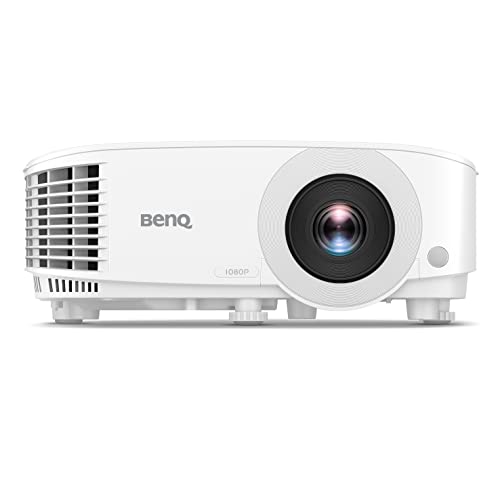
BenQ TH575 1080p Home Entertainment Projector — Film-and-Games Pick
The TH575’s title reads like a checklist written by someone who has actually lived with a projector: 3800 lumens, 1080p, low latency of 16.7ms with an enhanced game mode, dual HDMI, a 1.1x zoom, 3D readiness, auto vertical keystone, and a three-year warranty. Each item answers a friction that owners of lesser machines will recognise. The zoom answers the shelf that is slightly too far from the wall. The second HDMI answers the console and the streaming stick that both want the good port. The warranty answers the anxiety of a first projector purchase. And the latency figure answers the household’s second use for the big screen, the one that begins when the film ends.
For movie watching itself, begin with the light. 3800 lumens is a strong figure for the class, and BenQ’s DLP engine delivers it with the crisp, high-ANSI-contrast character that makes DLP images feel punchy in mixed scenes — bright highlights and detailed mid-tones in the same frame. The honest caveat travels with every DLP recommendation: a minority of viewers perceive rainbow artefacts, brief colour separations on high-contrast edges, particularly subtitles. Most never see them. If your household includes someone who has noticed them before, the Epson picks above exist precisely for you; if not, the TH575’s picture will impress from the first reel.
The gaming credentials are stated outright rather than implied, and that plainness counts in its favour. A 16.7ms input lag at 1080p is effectively a single frame, the threshold below which delay stops being a conversation even in rhythm and fighting games, and the enhanced game mode exists to protect that figure by stripping processing. For film, the same processing discipline matters in reverse: you will want the projector’s motion and picture modes set for cinema rather than games when the console hands over to a movie, and the TH575’s mode structure makes that a deliberate, findable choice rather than a buried menu expedition.
Placement flexibility is the quiet strength the spec list reveals. A 1.1x zoom sounds modest, and it is — it will not rescue a badly measured room — but combined with auto vertical keystone it forgives the real-world compromises of a coffee-table or shelf setup, where the projector sits a little low or a little off the ideal distance. Keystone correction costs a sliver of resolution and should be a last resort rather than a plan; the zoom is the tool to use first, and having both means most rooms can be made to work without a ceiling mount, a ladder, and a weekend.
The 3D readiness will matter to a small, devoted audience and to nobody else, and this guide will not dress it up as anything grander. If your shelf holds 3D Blu-rays, a current machine that still supports the format is genuinely scarce and worth valuing. If it does not, treat the feature as harmless surplus. What every buyer should value is the three-year warranty stated in the title: in a category where budget rivals often offer a fraction of that cover, it is a manufacturer’s own statement about expected service life, and it belongs in any honest comparison.
- Resolution: 1080p, as stated in the listing title
- Brightness: 3800 lumens, as stated in the listing title
- Input lag: 16.7ms with Enhanced Game Mode, as stated in the listing title
- Connections named in the title: dual HDMI
- Lens: 1.1x zoom and auto vertical keystone, as stated in the listing title
- Warranty: 3 years, as stated in the listing title
Strengths
- Strong stated brightness with DLP punch for mixed film and sport viewing.
- A genuine, titled gaming specification — 16.7ms lag and a dedicated game mode — rather than a vague games-friendly claim.
- Zoom, keystone, dual HDMI, and a three-year warranty cover the practical frictions of ownership.
Trade-offs
- DLP rainbow artefacts will bother a minority of viewers; the Epsons above are the escape route.
- The 1.1x zoom range is a fine adjustment, not a rescue for a badly sized room.
- No streaming platform is named in the title, so an external source is part of the setup.
Best for: the household whose projector splits its life between film nights and console sessions on the same big screen.
Not suited for: viewers who know they see DLP rainbow artefacts, because no brightness figure compensates for a picture that distracts you.

XGIMI Horizon 20 4K Triple Laser — Premium Smart Flagship
The Horizon 20 is the machine that refuses the tier system this guide has been building, and its title explains why: 4K resolution, an RGB triple laser light source, 3200 ISO lumens, Google TV with licensed Netflix, optical zoom and lens shift, IMAX Enhanced certification, Dolby Vision, a picture up to 300 inches, 240Hz support, and 1ms input lag. Read that list slowly, because several items on it are features the full-size projectors above do not offer at any point in their titles — lens shift and optical zoom in a compact smart projector, and a brightness figure tied to the ISO standard rather than to a marketing department’s optimism.
The laser engine is the foundation. An RGB triple laser design uses separate red, green, and blue lasers, a light source associated with very wide colour gamuts and with output that holds its brightness across a lifespan measured in tens of thousands of hours rather than the few thousand of a lamp. For movie watching, the practical dividends are colour volume — deep, saturated reds and greens that stay vivid at high brightness — and freedom from the lamp-replacement ritual and the slow dimming that accompanies it. The 3200 ISO lumen figure, stated against a named standard, also means this compact machine can be compared honestly with other ISO-rated projectors, a courtesy much of this category declines to extend.
Placement is where the Horizon 20 quietly humiliates most smart projectors. The class norm is a fixed lens and digital keystone: put the box where it must go, and let software square the picture at the cost of resolution and a faint grey border of unused pixels. Optical zoom and lens shift, both stated in this title, are the mechanical alternative — the lens itself moves, the full panel stays in use, and the image lands square on the wall from a shelf that was never built for a projector. For renters, for rooms with one possible shelf, for anyone who has fought a mini projector’s geometry for an evening, this is not a luxury feature. It is the difference between a picture that is correct and a picture that is corrected.
The smart platform is Google TV with licensed Netflix, and the word licensed deserves its underline. A long-running scandal of the budget projector class is streaming apps that run in unofficial forms, at reduced resolution, or not at all; a licensed Netflix on Google TV means the services behave as they do on a good television, in full quality, updated through the platform. Dolby Vision and IMAX Enhanced support, both titled, extend the same seriousness to the picture pipeline: the machine is built to accept the best versions of films that streaming and disc currently offer, and to tone-map them with the metadata the creators embedded.
Restraint is required on two points. The 240Hz and 1ms figures speak to gaming and to high-frame-rate handling, and film viewers should file them as headroom rather than as cinema features; a movie is a 24-frame artefact and always will be. And the 300-inch maximum picture is a statement about focus and brightness headroom, not a recommendation — at sane sizes, in the 100-to-150-inch range, this projector will look far better than it ever could stretched across a warehouse wall. Buy it for the lens, the laser, and the platform; let the headline extremes be what they are.
- Resolution: 4K, as stated in the listing title
- Light source: RGB triple laser, as stated in the listing title
- Brightness: 3200 ISO lumens, as stated in the listing title
- Platform: Google TV with licensed Netflix, as stated in the listing title
- Lens: optical zoom and lens shift, as stated in the listing title
- Picture formats named in the title: Dolby Vision, IMAX Enhanced
- Maximum picture size: 300 inches, as stated in the listing title
Strengths
- Optical zoom and lens shift give correct placement geometry without digital keystone compromises.
- ISO-rated brightness and a triple laser engine promise colour and output that hold up over years.
- Licensed Netflix on Google TV removes the unofficial-app lottery of the budget class.
Trade-offs
- It sits in the premium tier of this guide, and its price of entry should be weighed against the Epson and BenQ picks, which cost less as pure picture machines.
- Headline figures such as the 300-inch picture and 240Hz support are headroom, not everyday movie features.
- As a smart platform device, its interface will age with Google TV’s evolution in a way a source-fed projector’s never does.
Best for: the buyer who wants one polished machine — laser picture, real lens adjustments, full streaming — without building a component system around it.
Not suited for: dedicated theatres already wired with a receiver and sources, where its smart platform duplicates equipment you own and its talents go unused.

Aurzen Roku TV D1R Smart Outdoor Projector — Roku Simplicity Pick
The D1R’s proposition can be stated in one sentence: the Roku TV interface, complete and familiar, inside a portable 1080P projector with WiFi, Bluetooth, autofocus, auto keystone, and Dolby Audio. Every element of that sentence is drawn from its listing title, and together they describe a machine aimed at a specific and enormous audience — the household that already lives on Roku, whose members range from children to grandparents, and for whom a new interface is not a feature but a tax. Turn this projector on and the home screen is the one they know, with the apps they use, arranged the way they left them.
That familiarity is worth more than specification shoppers tend to allow. A projector’s hardest moments are social: a family film night with guests, a grandparent babysitting, a garden screening where the technically confident person is indoors making drinks. A machine that explains itself — that recovers gracefully from the wrong button, that finds its focus and squares its picture automatically when the table wobbles — gets used. A machine that needs its owner hovering gets used less each month. The D1R’s auto focus and auto keystone, stated in its title, are therefore not garnish; they are the features that decide whether this projector becomes furniture or remains an appliance.
The title calls it an outdoor projector, and the honest reading of that label is portability plus brightness ambition, not weatherproofing — no sealing claim appears in the title, so treat it as a machine you carry outside on a dry evening, not one that lives there. Outdoors, its competition is not other projectors but darkness itself: a garden after full sunset is a kind room, and a 1080P picture at a modest size, with Dolby Audio through its own speaker or a Bluetooth companion, makes an evening of it. The Zoom named in the title helps fit the picture to a sheet, a screen, or a garage door from wherever the table stands.
Set against the XGIMI above, the D1R concedes the picture-quality argument without a fight — no laser, no lens shift, no 4K — and wins on interface and price of admission to the category. Set against the YGSKK below, it offers the stronger platform story: Roku’s app catalogue and update discipline against a smaller brand’s built-in apps. Its natural home is the living room that wants occasional big-screen evenings and the garden that wants a film in August, both served by one box that anyone in the house can drive.
One discipline applies to the whole convenience tier and belongs in this section: judge these machines at the size they flatter. A portable 1080P projector at eighty to one hundred inches, in a dark room, looks genuinely good. Stretched to the extremes of its zoom on a bright wall, it will look like what it is. The D1R rewards the buyer who sizes the picture to the machine, and its autofocus and keystone make that right size easy to find and keep.
- Resolution: 1080P FHD, as stated in the listing title
- Platform: Roku TV built in, as stated in the listing title
- Wireless: WiFi and Bluetooth, as stated in the listing title
- Setup aids: auto focus, auto keystone, and zoom, as stated in the listing title
- Sound: Dolby Audio, as stated in the listing title
- Intended settings named in the title: home and outdoor movies
Strengths
- The full Roku TV experience means zero learning curve for Roku households and a mature, updated app catalogue.
- Autofocus and auto keystone make setup a one-minute task that survives a knocked table.
- Portable format serves the living room, the bedroom, and the garden with one machine.
Trade-offs
- 1080P resolution and a portable light engine concede the picture-quality contest to the Epson and BenQ tier.
- The outdoor label carries no weather-sealing claim in the title; dry evenings only.
- Built-in sound, even with Dolby Audio, will not match a soundbar for dialogue weight in a large room.
Best for: a Roku household wanting big-screen evenings indoors and out, driven by whoever happens to hold the remote.
Not suited for: dedicated dark rooms chasing the best achievable picture per screen inch, where the top tier of this guide spends its money on optics instead.

YGSKK Mini Projector — Small-Room Convenience Pick
The YGSKK mini closes the guide’s convenience tier, and it should be introduced the way it deserves: as a small, inexpensive projector with WiFi and Bluetooth, built-in apps, electric focus, and a stated ability to accept sources from a smartphone, a TV stick, an iPad, a PS5, a laptop, and HDMI and USB connections. That is the whole of its title, and within those facts it is a coherent little product — the projector a student buys for a bedroom wall, the one that travels to a friend’s flat in a tote bag, the one that turns a ceiling into a cinema for the price of a modest dinner out.
Electric focus is its most adult feature, and it separates the YGSKK from the cheapest rung of the mini class, where focus is a thumbwheel you nudge while standing on a chair. Adjusting focus from the remote, from the sofa, means the picture can be sharpened after everyone sits down — a small mercy that owners of manual minis will appreciate in their bones. The built-in apps perform the same trick for streaming: no stick to buy, no port to power, just the projector, the WiFi password, and an evening. Where the apps fall short of a title you want, the HDMI door and the stick support in the title mean a streaming stick can take over, which is the correct fallback architecture for the whole mini class.
The honesty paragraph matters more for this pick than for any other in the guide. Its title describes a 1080P video projector and lists compatibility with devices up to a PS5; it does not publish a brightness figure against any standard, and no lumen number from a listing of this type should ever be set beside Epson’s colour brightness or XGIMI’s ISO figure as if they were the same currency. In a dark bedroom, at a picture size the machine can genuinely light — think the span of a wardrobe door rather than a cinema wall — a mini like this produces a watchable, enjoyable image. In a bright room at a huge size, it will not, and no wording in any listing changes that physics.
Brand depth is the other honest cost. YGSKK is a small brand; its support, firmware updates, and warranty handling will not match Epson’s or BenQ’s organisations, and the three-year warranty in the TH575’s title throws that difference into relief. The rational way to buy a machine like this is as a low-stakes convenience purchase: priced as an experiment, expected to serve a bedroom or a student house, and judged a bargain if it gives two years of film nights. Buyers who need a decade of service and a service network should climb the tiers of this guide, not bargain with themselves here.
Used within its limits, though, the little machine earns its place in a movie-watching guide for a reason the specification tables miss: it gets watched. The projector that lives on the bedroom shelf, that needs no setup ritual, that a tired person can start with one remote at midnight, accumulates more film hours than the superior machine that requires a room, a mount, and a plan. There are households in which the YGSKK would be the most-used projector in this entire guide, and they know who they are.
- Resolution class: described as a 1080P video projector in the listing title
- Wireless: WiFi and Bluetooth, as stated in the listing title
- Platform: built-in apps, as stated in the listing title
- Focus: electric focus, as stated in the listing title
- Sources named in the title: smartphone, TV stick, iPad, PS5, laptop, HDMI, USB
- Brightness: Not stated in the listing title — verify with the manufacturer documentation
Strengths
- Electric focus from the remote removes the mini class’s most annoying ritual.
- Built-in apps plus stick support cover streaming with a sensible fallback.
- Small, portable, and low-stakes: the easiest entry into projected film nights in this guide.
Trade-offs
- No standardised brightness figure is published in the title, so output expectations must be set by room darkness and modest picture size.
- Small-brand support and updates will not match the major manufacturers in this guide.
- Picture quality is the convenience tier’s ceiling: fine for a bedroom, outclassed in a theatre.
Best for: a bedroom, a student room, or a first projector bought to discover whether big-screen evenings suit your household at all.
Not suited for: bright living rooms or very large screens, where its unpublished output figures give no promise the picture can stay watchable.
How Do the Six Compare Side by Side?
| Pick | Resolution per title | Light / brightness per title | Streaming | Character |
|---|---|---|---|---|
| Epson Home Cinema 980 | 1080p | 3LCD; brightness not stated in title | External source | Film-first traditional projector |
| Epson Home Cinema 1080 | 1080p | 3LCD; 3400 lumens colour and white | External source | Bright-room all-rounder with speaker |
| BenQ TH575 | 1080p | DLP; 3800 lumens | External source | Film and games, 16.7ms lag |
| XGIMI Horizon 20 | 4K | RGB triple laser; 3200 ISO lumens | Google TV, licensed Netflix | Premium smart flagship with lens shift |
| Aurzen Roku TV D1R | 1080P FHD | Portable class; figure not stated in title | Roku TV built in | Familiar interface, indoor-outdoor portable |
| YGSKK Mini | 1080P class | Mini class; figure not stated in title | Built-in apps | Bedroom convenience mini |
Read the table by tier, not by row envy. The top three rows are instruments for a room; the bottom three are appliances for a lifestyle, with the XGIMI straddling the border carrying a laser and a lens the others cannot match. The brightness column is deliberately worded per title, because the figures in it were measured under different standards — or none — and pretending otherwise would be the oldest trick in this category.
What Should You Check Before Choosing a Movie Projector?
Measure your room before you fall in love with a specification. The distance from the projector’s likely position to the wall, the width of wall actually available, and the seating position together decide the picture size your room can hold, and every projector has a throw relationship — picture size per metre of distance — that must fit that geometry. The full-size picks suit shelves and mounts at the back of a room; the minis suit a table between sofa and wall. A buyer who measures first never has to use keystone correction as a lifestyle, and a buyer who guesses often does.
Next, audit your light. Films are dark art; the single greatest upgrade available to any projector in this guide is a room that can be made properly dark, and it costs curtains, not electronics. If your room cannot darken — a studio flat with floor-to-ceiling glass, a family room in permanent use — weight brightness and colour brightness heavily and take the Home Cinema 1080’s stated figures seriously. If your room darkens well, weight contrast and colour instead, and the whole field opens up, minis included, at sensible picture sizes.
Then settle the source question honestly. A household with a Blu-ray collection, a console, and a receiver wants a source-fed projector and should not pay for a smart platform it will bypass. A household whose viewing is entirely streaming, and whose members rebel against multiple remotes, should buy the platform — Roku or Google TV — that matches the television they already like, because interface familiarity is a daily dividend. Both households should check the port story in the title: dual HDMI on the BenQ, the wide source list on the YGSKK, and plan the evening’s wiring before the box arrives.
Finally, think about sound as a separate purchase that may already be made. Every projector here can start an evening with its own speaker or a Bluetooth companion, and the convenience tier leans on that. But film sound — dialogue clarity at low volume, the weight of a score — rewards even a modest soundbar so heavily that this guide regards one as the second purchase for any tier, timed whenever budget allows. The projector throws the picture; the room, the source, and the sound decide how much of the film survives the journey.
How Do You Set Up a Projector for the Best Movie Picture?
Begin with geometry, because no picture setting repairs a crooked image. Level the projector, centre it on the wall or screen, and use lens adjustments — the XGIMI’s shift and zoom, the BenQ’s zoom — before touching digital keystone. Fill the surface you intend to use, whether that is a screen, a smooth painted wall, or a ceiling for the bedroom minis, and check the corners for focus evenness with a menu screen before the film starts. Ten patient minutes here are repaid every evening afterwards.
Choose the picture mode built for film. Manufacturers bury it under names like Cinema or Movie, and it typically trades the showroom brightness of the default mode for accurate colour and honest contrast — the correct trade in a dark room. Turn off motion smoothing for films; the feature exists for sport, and on a 24-frame movie it manufactures the soap-opera sheen that makes cinema look like a daytime serial. Set the source to output the film’s native frame rate where the option exists, and let the projector display it without invention.
Darken the room in stages and watch what each stage buys. Curtains first, then the hallway light, then the standby LEDs and the glowing router — a projected image competes with every photon in the room, and the cheapest contrast upgrade is always a light switched off. If the picture still looks grey in night scenes, the answer is a smaller picture or a darker wall treatment, not a brightness slider pushed into clipping.
Finish with sound placement. A projector behind the seating fires its speaker at the backs of heads; a Bluetooth speaker or soundbar placed under the picture restores the illusion that voices come from faces. Check lip-sync once, with a dialogue scene, and adjust the delay setting if your setup offers one. Then save the configuration, because the goal of setup is to never think about it again — the film should be the only thing the evening is about.
What Mistakes Do First-Time Movie Projector Buyers Make?
Comparing lumen figures across brands as if they were measured the same way is the founding error of this category. A mini advertising an enormous unlabelled figure is not brighter than an Epson quoting colour and white brightness or an XGIMI quoting ISO lumens; the numbers are different currencies, and the exchange rate is rigged. Buy on tier, technology, and the standard named — or accept that an unnamed figure tells you nothing.
Buying for the largest possible picture is the second error. Every projector looks its best at a size its light can fill with authority, and its worst stretched thin across a wall it cannot serve. The household that chooses a hundred honest inches over a hundred and fifty grey ones enjoys the better cinema every single night, and can sit closer if immersion is the craving.
Forgetting the room is the third. Buyers audition projectors in specification tables and install them in rooms with white ceilings, glossy paint, and a streetlight outside the curtain gap, then blame the machine for blacks that never stood a chance. The room is half the projector. Spend on darkness before lumens.
The fourth mistake is treating the streaming platform as the product. Apps age, services renegotiate, interfaces are redesigned by committee; optics and light engines are the durable part of a projector. A source-fed machine can meet each new streaming era with a new stick, while a smart projector whose platform fades must be rescued by the same stick anyway — so buy the picture first and the platform second, unless the platform is genuinely the point, as it honourably is with the Roku pick above.
Final Recommendation
Choose by tier and the decision makes itself. For a darkened room and film-first viewing, the Epson Home Cinema 980 and 1080 are the traditional instruments: take the 1080 where ambient light intrudes, the 980 where the room is properly dark and its specification should be confirmed in Epson’s documentation. For film plus games, the BenQ TH575’s stated latency and warranty make it the household machine. For one box that does everything with a laser and a real lens, the XGIMI Horizon 20 stands alone here. And for the casual, portable, anyone-can-drive-it evening, the Aurzen D1R’s Roku heart beats the YGSKK’s smaller-brand charm, while the YGSKK remains the low-stakes way to discover the habit. Match the machine to the room you actually have, and every one of these six will feel like the right answer.
Frequently Asked Questions
Is 1080p enough for movie watching, or should I hold out for 4K?
At typical seating distances and screen sizes around one hundred inches, a good 1080p projector fed a good source delivers a picture most viewers find fully satisfying, with room darkness and source quality limiting the experience before pixel count does. 4K earns its premium — as on the XGIMI in this guide — when you sit closer, project larger, or simply want the finest sources displayed without compromise.
Why do the lumen numbers in this guide come with so many warnings?
Because manufacturers measure brightness under different standards, and some under none that they name. Figures quoted as colour and white brightness, or against the ISO standard, can be compared with care. Unlabelled figures cannot, and this guide refuses to rank projectors by numbers that are not the same kind of number.
Do I need a screen, or is a wall enough?
A smooth, matte, light-coloured wall serves every pick in this guide respectably, and the convenience tier is designed around walls and ceilings. A proper screen buys uniformity, a defined border, and better contrast behaviour, and it is the natural first upgrade for the top tier — but it is an upgrade, not an admission fee.
Can these projectors replace a television for sport and everyday viewing?
The brighter picks — the Home Cinema 1080 and the TH575 on their stated figures — handle mixed everyday viewing in rooms with managed light. Projectors as a class still prefer darkness, and a household whose main viewing is daytime sport in a bright room should weigh that preference honestly before retiring the television.
What is the difference between the Epson 3LCD and BenQ DLP approaches?
3LCD uses three panels, one per primary colour, giving colour brightness equal to white brightness and no rainbow artefacts. DLP uses a single chip with a colour sequence, giving a compact, punchy image that a minority of viewers see rainbow fringing on. Both are mature, legitimate technologies; sensitivity to rainbows is the deciding test.
How long will the light source last?
Lamp-based machines, such as the Epson and BenQ tier here, dim gradually across a lamp life measured in thousands of hours, and the lamp is replaceable. The XGIMI’s laser engine is built for a far longer service span without that consumable ritual. Exact rated hours belong to each manufacturer’s documentation, which is where this guide directs you for figures its titles do not print.
Related Guides
Readers weighing a permanent television replacement should continue to our guide to projectors that can take over from a TV entirely, where ultra-short-throw machines move the picture to the wall the television vacated. If wireless connections are your deciding factor, our roundup of projectors with WiFi and Bluetooth built in compares the streaming classes in depth. And for small rooms, rentals, and tight shelves, see our picks among projectors designed for small spaces, where throw distance matters more than anything else.


