What's inside
- Key Takeaways
- Quick Picks
- What does a gig drive have to survive and satisfy?
- How do the six DJ drives compare side by side?
- How does the two-drive rule work in a real DJ week?
- Hard drive or SSD for the performance library?
- What mistakes end DJ libraries?
- How should the library itself be organised on the drive?
- What does a booth-ready drive setup look like on the night?
- Wedding and open-format work — why the archive travels too
- How do you retire and replace a gig drive without drama?
- Cables, hubs and the small print of the booth
- Final Recommendation
- Frequently Asked Questions
- Related Guides
As an Amazon Associate I earn from qualifying purchases. This post may contain affiliate links at no extra cost to you.
widgetverdict.com is reader-supported. When you buy through links on our site, we may earn an affiliate commission.
Where to buy: each drive below links to the Amazon listing checked for this guide; working DJs should read the whole shortlist before ordering, because the correct purchase for this job is almost never one drive — it is a matched pair, and the pair you choose matters more than the badge on either half.
A DJ’s music library is not a collection; it is the business. Years of rips, purchases, edits, acapellas, instrumentals, wedding standards, club versions and the folders of requests that make one DJ bookable over another all live on a drive that gets carried into rooms full of dancing people, spilled drinks and borrowed electricity. Choosing the best hard drives for djing is therefore less like buying computer storage and more like choosing the case for an instrument: it must run from the laptop’s own power with no wall adapter to forget, survive the bag it travels in, and be boringly reliable at the exact moment two hundred people are watching the booth.
Two properties dominate every recommendation that follows. The first is bus power: every pick here draws what it needs through its USB cable, because a drive that wants its own power supply is a drive that fails the night the venue’s sockets are all claimed by lighting. The second is physical protection. Four of these drives are armoured designs whose titles promise shock resistance in so many words; the other two are ordinary portables included deliberately, one as the plain everyday option and one as the high-capacity organiser, with their lack of armour stated rather than disguised.
Then there is the rule that outranks every product in this guide, and it is stated now so the picks can be read through it: a working DJ carries two drives. Not one drive and a hopeful attitude — two drives, synchronised before every gig, travelling in different bags or at least different pockets of the same bag. A library that exists in one copy, in one bag, in a room full of strangers is a library one spilled drink away from ending a career’s worth of preparation. Buy any pick below as a single and you have storage; buy it as a pair and you have a system.
A word about the elephant in the booth: solid-state drives. Many DJs have moved their performance libraries to SSDs for their speed and their indifference to vibration, and for the drive that is actually playing the set, that logic is sound — this guide discusses the comparison honestly in its own section below. Hard drives remain the working DJ’s bulk medium: the full archive, the backup twin, the drive that holds every version of everything. The picks that follow are judged for those roles, where capacity and armour matter more than split-second loading.
Key Takeaways
- Bus power is non-negotiable for gig work: every pick runs from the laptop’s USB port with no adapter to lose.
- Carry two synchronised drives, in separate bags where possible; one copy of a working library is a risk, not a setup.
- Armour is a stated feature, not a vibe — four picks name shock or drop resistance in their listing titles.
- Two terabytes is the working size for a performance library plus its archive; the 4TB pick serves organisers and collectors.
- An SSD may be the better performance drive for some DJs, but hard drives remain the capacity and backup medium — plan both roles.
- The plain, unarmoured pick in this list is a home-base drive, and the guide labels it that way rather than dressing it for the road.
Quick Picks
| Pick | Badge | Why it earns its place |
|---|---|---|
| Silicon Power Armor A60 2TB Rugged Portable Drive | The shockproof all-rounder | Armour in the name, shockproof in the title, and console-and-computer breadth. |
| LaCie Rugged USB-C 2TB Portable Hard Drive | The road legend | The orange-armoured drive whose title lists drop, shock, dust and rain resistance. |
| G-DRIVE ArmorATD 2TB Rugged Portable Drive | The USB-C moderniser | Rugged build with USB-C and Thunderbolt 3 compatibility for current laptops. |
| Transcend StoreJet 25H3 2TB Rugged Portable Drive | The triple-protected workhorse | Three-stage shock protection and a one-touch backup button for sync discipline. |
| Seagate Portable 2TB Hard Drive | The plain home-base drive | Unarmoured and honest about it — the archive copy that lives off the road. |
| WD My Passport 4TB Portable Hard Drive | The big organiser | Four terabytes with backup software and password protection for the master library. |
What does a gig drive have to survive and satisfy?
We judged these drives against the working week of the DJs who will actually carry them. The bag test came first: a gig drive lives in a backpack or record bag alongside headphones, cables, a controller or timecode vinyl, and it gets set down hard on booth floors, bar backs and car boots. Armour claims were therefore read from the titles literally — a drive whose listing says shockproof or drop resistant was credited with exactly that, and a drive whose listing says nothing of the kind was treated as unarmoured, whatever its product photos imply.
The booth test came second. The drive must mount quickly on the laptops DJs actually bring — Mac and Windows machines both appear in these titles — run from bus power through long sets, and stay awake and consistent while software reads it continuously for hours. Capacity was judged against real library shapes: two terabytes holds a deep working library with its edits and stems; four serves the open-format DJ whose requests span sixty years of music and who carries the archive to every booking.
The third test was the sync test, the one buyers forget: how easily does this drive participate in the two-drive rule? Standard connections, compatibility with ordinary backup software, and — in one pick’s case — a physical backup button all matter, because a backup routine that fights its owner is a routine that gets skipped on the tired night before a big gig, which is precisely the night it was for.
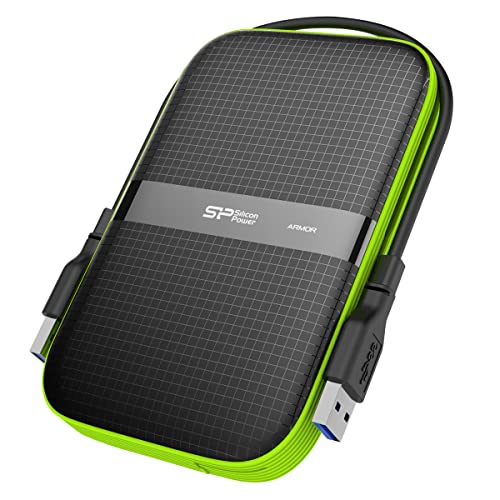
Silicon Power Armor A60 2TB Rugged Portable Drive — The shockproof all-rounder
The Armor A60 introduces itself without subtlety: rugged in the product line’s name, shockproof in the title’s own word, and aimed at PC, Mac, Xbox and PS4 alike. For a DJ, that breadth translates into a drive that does not care which laptop the venue, the agency or the other DJ on the bill hands it — a small mercy that matters during changeovers, when the previous set is still ringing and your library needs to mount on whatever machine is actually in the booth. Two terabytes is the correct working size for a performance library with room for the archive folders that ride along.
Its personality is the unglamorous one this category rewards. It is built to be knocked in a bag, set down on hard booth surfaces and carried through weather between the car and the door, and its USB 3.1 Gen1 connection, named in the title, is the ordinary, universally understood kind — no exotic cable to lose, no adapter whose absence ends the night. DJs who play several rooms a week and cannot predict any of them should start their shortlist here, because the A60’s entire design brief reads like their diary.
Buy it as the pair the rule demands and the economics still behave: two armoured drives, one in the gig bag and one in the backup bag, synchronised on the same weekday evening each week. Label them by role rather than by colour — Performance and Twin — because at midnight, tired, the label is the only documentation you will actually read.
One more working detail suits its cross-platform pitch: festival and multi-DJ bills often run a shared booth machine, and a library drive that mounts politely on an unfamiliar laptop — no special software, no account, no driver ritual — is worth more at a changeover than any benchmark ever printed. The A60’s ordinary presentation is that politeness in product form. Keep its cable coiled with the drive rather than loose in the bag’s cable nest, and the pair of them will survive seasons of being the least dramatic equipment you own.
- Capacity: 2TB
- Protection word used in the title: shockproof
- Connection named in the title: USB 3.1 Gen1
- Compatibility named in the title: PC, Mac, Xbox and PS4
Strengths
- Shockproof positioning stated outright, not implied by styling.
- Cross-platform breadth suits unpredictable booth laptops.
- Ordinary connection standard means replacement cables exist everywhere.
Trade-offs
- Two terabytes caps the open-format archivist; the 4TB pick serves that library better.
- Its title names no backup software, so sync discipline is entirely your routine.
- Rugged styling adds bulk beside slimmer portables in a tight bag.
Best for: mobile and club DJs who need one armoured model to standardise a two-drive rig on. Not suited for: the DJ whose library has already passed two terabytes and whose archive must travel complete — start with the My Passport’s capacity and armour its case instead. Check the listing, then order the pair, not the single.

LaCie Rugged USB-C 2TB Portable Hard Drive — The road legend
Some products become furniture in their industry, and the orange-sleeved LaCie Rugged is the DJ world’s example: the drive you see in other people’s booth photos, in tour riders and in the bags of photographers who work the same festivals. Its title earns the reputation in a single list — drop, shock, dust and rain resistant — which reads like a description of a festival season written by someone who has survived several. For a drive whose workplace includes outdoor stages, marquees and load-ins through British weather, that quartet of resistances is not marketing garnish; it is the job description.
The USB-C connection suits the current generation of DJ laptops, and two terabytes matches the working-library size this guide keeps returning to. What the LaCie really sells, beyond its sleeve, is the confidence of a design that has been the default answer for a very long time: replacement cables are standard, other DJs recognise it on sight, and a borrowed-booth situation never begins with an explanation of what the strange box is.
Reputation should not exempt it from the rule, though. The most famous drive in the bag is still one drive, and the DJs who treat the orange sleeve as invincibility eventually meet the drop, the spill or the theft that armour does not cover. Buy the legend twice, sync them weekly, and let one live outside the gig bag — the legend’s real professional users all do exactly that.
The sleeve deserves one practical note of its own: it is removable, and the drive inside it is an ordinary portable that fits docks and cases the sleeved version will not. Keep the sleeve on for travel — that is its entire purpose — and resist the aesthetic urge to strip it for a cleaner desk look during the season. More than one veteran of the road can date a library loss to the month the orange came off because the setup photographed better without it. The photograph is forgotten; the library was not replaceable.
- Capacity: 2TB
- Resistance list in the title: drop, shock, dust and rain
- Connection in the title: USB-C
- Compatibility in the title: Mac and PC
Strengths
- The broadest stated resistance list in this guide, aimed at real road conditions.
- Industry-default status means universal recognition and easy cable replacement.
- USB-C matches the laptops most working DJs now carry.
Trade-offs
- Fame invites complacency; it still needs its synchronised twin to be a system.
- Two terabytes is a ceiling the biggest open-format libraries will test.
- The armoured sleeve makes it one of the bulkier objects in a small bag.
Best for: touring and festival DJs whose drives work outdoors and travel constantly. Not suited for: a home-studio DJ whose drive will live on one desk, where the armour’s premium buys protection against journeys that never happen — the plain Seagate below covers that life honestly. Verify the current listing before the season starts.

G-DRIVE ArmorATD 2TB Rugged Portable Drive — The USB-C moderniser
The ArmorATD speaks to the DJ whose laptop is unambiguously current: USB-C connection, Thunderbolt 3 compatibility named in its title, and a stated transfer ceiling of up to 130MB/s that tells you plainly this is a hard drive with hard-drive pace, marketed without pretending otherwise. That honesty suits the role. Library syncs of a few new gigabytes land quickly enough, full-library operations are overnight affairs regardless of brand, and during the set the drive’s job is steady sequential reading, which its design serves without drama.
Its rugged positioning follows the Armor name’s promise, in the family of drives built for location work — the same lineage that media crews carry onto shoots. For the DJ who also produces, films sets or shares machines with a content team, that shared language matters: one drive standard across the whole crew’s bags, recognised by everyone, armoured against the van.
Choose it over the LaCie when your machines are firmly in the USB-C and Thunderbolt era and you want the newer platform’s native fit; choose the LaCie when mixed older laptops still populate your booths and its legend status smooths borrowed-machine moments. Either way the twin rule applies with its usual lack of negotiation — an armoured drive and its synchronised sibling are the smallest unit of professional seriousness this guide recognises.
Producer-DJs will appreciate one further trait of the modern connection: the same drive that holds the performance library can serve as the session drive on a studio day, shuttling project files between the booth laptop and the production machine without a format conversation. That double duty argues for buying the ArmorATD as the pair from the start rather than as a single, because a drive woven into two workflows gets synchronised by both of them — and a drive that is synced by routine is a drive whose twin is never stale.
- Capacity: 2TB
- Transfer figure stated in the title: up to 130MB/s
- Connections named in the title: USB-C, Thunderbolt 3 compatible
- Lineage in the title: G-DRIVE ArmorATD rugged portable HDD
Strengths
- Native fit for current USB-C and Thunderbolt laptops with no adapter dance.
- Stated transfer ceiling sets honest hard-drive expectations.
- Rugged Armor design brief matches bag and booth life.
Trade-offs
- Older booth laptops without the right ports make its modernity a liability.
- Hard-drive pace is hard-drive pace, whatever the port’s theoretical speed.
- Two terabytes again caps the complete-archive traveller.
Best for: DJs fully committed to current-generation laptops who want an armoured native drive. Not suited for: a circuit of venues and partners running older machines, where the A60’s ordinary connection causes fewer midnight surprises. Check your own laptop’s ports first — that check is the whole decision.

Transcend StoreJet 25H3 2TB Rugged Portable Drive — The triple-protected workhorse
Transcend describes this drive’s protection with an engineer’s specificity: a three-stage shock protection system, stated in the title, wrapped around two terabytes of portable storage. Layered protection is a meaningful claim in a gig bag, where the threats arrive in combination — the bag dropped, then stepped around, then rained on during the walk to the car — and a design that thinks in stages rather than in a single rubber sleeve deserves its place in an armour conversation.
Its distinctive feature for this guide’s purposes, though, sits on the case: the one-touch backup button named in its title. Remember the sync test from the judging section — the routine that gets skipped on the tired night is the routine that fails the library. A physical button that starts the backup turns synchronising the twin from a software errand into a single gesture performed while the kettle boils, and DJs who know their own discipline honestly should weigh that button more heavily than any specification in this article. The best backup system is the one that actually runs, and Transcend has bolted that truth to the front of the drive.
The connection is USB 3.1 in Type-A form per the title, the older rectangular plug — which, in booths full of mixed-age laptops, is frequently the plug that simply fits. Between its layered armour, its backup button and its unglamorous connector, the StoreJet makes a coherent argument: it is the drive for the working DJ who values routine over glamour, and there are more of those headlining than the industry admits.
The purple finish, mentioned in its listing, turns out to be a working feature in disguise: in a booth where every other drive is black, the odd-coloured one is the one nobody walks away with by mistake, and its owner can spot it across a dark room. Multi-DJ bills run on exactly such small clarities. Pair that visibility with the role label this guide keeps prescribing, and the StoreJet becomes the hardest drive on the bill to lose socially — which, after theft and confusion are counted honestly, is a protection category as real as the three stages inside its case.
- Capacity: 2TB
- Protection described in the title: three-stage shock protection
- Feature named in the title: one-touch backup
- Connection in the title: USB 3.1, Type-A
Strengths
- Layered shock protection described in engineering terms, not adjectives.
- The backup button directly serves the two-drive sync discipline.
- Type-A connection fits the widest range of booth laptops without adapters.
Trade-offs
- USB-C-native laptops will need the adapter conversation the G-DRIVE avoids.
- The title names no rain or dust resistance, so weather discipline stays yours.
- Two terabytes, as with its armoured peers, bounds the travelling archive.
Best for: working DJs who know a one-button sync is the backup routine they will actually keep. Not suited for: an all-USB-C rig that resents adapters on principle — the ArmorATD was picked with you in mind. Press the listing’s details against your own habits before deciding.

Seagate Portable 2TB Hard Drive — The plain home-base drive
Now the honest interlude. This Seagate is an ordinary portable drive: its title promises everyday storage, plug-and-play backup and Windows and macOS compatibility, and it says nothing — nothing at all — about shock, drops, dust or rain. It is in this guide because the two-drive rule needs a second drive, and the second drive’s life is different from the first’s. The twin that lives at home, in a drawer of the studio, synchronised weekly and carried nowhere, does not need armour. It needs to be capacious, compatible and inexpensive enough that buying it never gets postponed, and this plain Seagate is exactly that citizen.
Positioning is everything here. As the stay-at-home twin of an armoured performance drive, it is a professional component: the copy that survives the gig bag’s theft, the flood at the venue, the drive dropped on the booth floor. As a gig drive itself, carried loose to clubs, it is the wrong tool, and this guide will not soften that sentence — unarmoured drives and nightclub logistics have a long, documented history of disagreement.
Buy it, then, with its job written on its label: Home Twin. Sync it on the same evening each week, verify a handful of tracks after each sync, and let it grow old in the drawer while its armoured sibling takes the road’s punishment. When the road drive eventually fails — and the road eventually wins against everything — this quiet box is the reason the failure is an inconvenience rather than an obituary.
Its drawer life has one maintenance rule of its own: a twin that is never powered cannot be verified, and a twin that cannot be verified is a rumour. The weekly sync already solves this by definition — the drive spins, the copy is compared, three tracks are played from it — which is why this guide ties the Seagate’s value so tightly to the ritual rather than to the hardware. The box is ordinary. The ritual makes it professional. Owners who understand that distinction can build a genuinely tour-grade backup system around the plainest drive on this page.
- Capacity: 2TB
- Pitch in the title: everyday storage, plug-and-play backup
- Compatibility in the title: Windows and macOS
- Armour: none claimed in the listing title — treat it as a home-base drive
Strengths
- The natural, economical twin for the two-drive rule.
- Plug-and-play simplicity keeps the weekly sync painless.
- Cross-platform compatibility matches whichever laptop the household owns.
Trade-offs
- No stated shock or drop protection — it must not become the road drive by drift.
- Two terabytes mirrors a working library, not a lifetime archive.
- Its plainness tempts owners to skip labelling its role, which is how twins get separated.
Best for: the synchronised home twin in a two-drive DJ system, and home-studio libraries that never travel. Not suited for: the gig bag — not as the main drive, not as the only drive, not on the one night you think it will probably be fine. Check the listing, label the role, and keep it home.
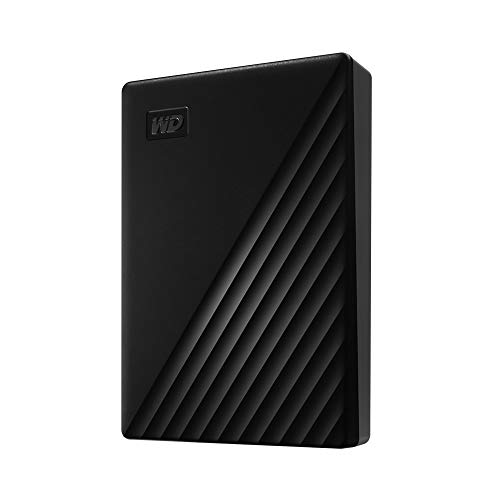
WD My Passport 4TB Portable Hard Drive — The big organiser
Every DJ in this guide’s audience has two libraries, whether they admit it or not: the working library that performs, and the everything library — every rip since the beginning, the inherited collections, the genre archives, the just-in-case decades. The My Passport 4TB is the pick for the second of those. Its title names backup software and password protection alongside the doubled capacity, which suits a master archive that lives mostly at home, travels to the occasional residency or long booking, and holds material whose loss would be a biography problem rather than a set problem.
The password protection deserves its DJ-specific reading. A master library represents years of purchasing and ripping that cannot be re-downloaded in an afternoon, and it travels — to the studio, to a collaborator’s flat, to the long-contract venue. A drive that resists casual reading when it is borrowed, left in a green room or carried through a festival site adds a layer of professional hygiene, provided the credential is recorded with the DJ’s business paperwork rather than trusted to memory at 2 a.m.
It is not armoured, and its size makes it a considered traveller rather than a nightly one. The natural system for the open-format DJ is this drive as the master, an armoured two-terabyte pick as the performance drive drawn from it, and the plain Seagate pattern as the master’s own twin when the archive truly matters. That is three drives in a mature rig — which sounds like excess until the first time one of them dies on a Friday and the weekend’s bookings never notice.
The master archive also changes how a DJ buys music across a career. Knowing the everything library exists, organised and twinned, frees the performance library to stay lean: tracks that have not earned a play in two seasons retire to the master instead of clogging the working drive, and the performance collection stays browsable at booth speed. Curation is a storage decision before it is a musical one, and the My Passport’s four terabytes are what make the curation painless — nothing is ever deleted, it is only promoted or retired, which is how a library becomes a life’s work instead of a pile.
- Capacity: 4TB, the largest in this guide
- Named in the title: backup software and password protection
- Compatibility in the title: USB 3.1 and USB 3.0
- Armour: none claimed in the listing title — protect it with its case and its itinerary
Strengths
- Double capacity holds the everything library the performance drives draw from.
- Backup software supports the master-archive sync routine.
- Password protection suits a valuable library that occasionally travels.
Trade-offs
- Unarmoured, so its travel needs a padded case and a deliberate plan.
- A forgotten password locks the archive as firmly as it locks out strangers.
- Its size tempts owners to make it the only copy of everything — resist, and twin it.
Best for: open-format and collector DJs maintaining a master archive behind the performance library. Not suited for: the nightly gig bag as a sole drive, where armour and the twin rule outrank raw capacity. If your everything library is the asset, check the listing and build its system properly.
How do the six DJ drives compare side by side?
| Drive | Capacity | Protection in title | Role it suits best |
|---|---|---|---|
| Silicon Power Armor A60 | 2TB | Shockproof | Armoured performance pair |
| LaCie Rugged USB-C | 2TB | Drop, shock, dust, rain | Touring and festival road work |
| G-DRIVE ArmorATD | 2TB | Rugged Armor design | USB-C-native performance drive |
| Transcend StoreJet 25H3 | 2TB | Three-stage shock protection | Sync-disciplined workhorse |
| Seagate Portable | 2TB | None claimed | Home twin and studio archive |
| WD My Passport | 4TB | None claimed | Master everything library |
How does the two-drive rule work in a real DJ week?
Pick a sync evening and defend it like a booking. Most working DJs land on the quiet weekday — the library is edited, new purchases are filed, the weekend’s folders are built — and the sync belongs to that same session’s end, while the laptop is still open and the week’s changes are fresh in mind. Software mirrors the performance drive to its twin; the DJ verifies by opening three tracks from the twin, including one added that week; both drives return to their separate homes. Fifteen minutes, once a week, and the library’s survival stops depending on any single object in any single bag.
Travel separation is the rule’s second half. The performance drive rides in the gig bag; the twin rides in the laptop bag, the car, or stays home entirely for local bookings — anywhere that is not the same bag, the same theft, the same spilled crate. For fly-out dates the twin’s place is the checked bag or a bandmate’s luggage, accepting the small social awkwardness of asking, because the alternative is both copies sharing one overhead bin and one hard landing. DJs who have rebuilt a library from streaming histories and old emails speak about this paragraph with unusual feeling.
Retirement belongs in the system too. A drive that begins mounting reluctantly, clicking, or failing a sync is demoted the same week — its contents verified onto a fresh drive, its label updated, its role ended. Drives in this life do not get to fail at their own convenience; the sync rhythm exists so that their decline is noticed during a calm weekday rather than announced by silence in a booth.
New DJs sometimes ask whether the rule can wait until the bookings justify it, and the honest answer inverts the question: the library is worth protecting from the week it contains anything that would hurt to lose, which for most DJs is the first month of serious collecting. The pair costs one extra drive; the unprotected alternative costs the collection, and collections are priced in years. Buy the twin when the library is small and the habit will already be old by the time the library is valuable — habits, like libraries, are far easier to grow than to rebuild.
Hard drive or SSD for the performance library?
The honest comparison, in prose as promised: a solid-state performance drive loads tracks instantly, shrugs off the vibration of a bass-heavy booth and fears no drop that a hard drive would remember. For the drive that plays the set, those are real virtues, and many professionals have moved that specific role to flash. What flash does not change is the arithmetic of the archive behind the set: the everything library, the twins, the masters — the bulk terabytes where hard drives remain the economical medium and where this guide’s picks do their work.
The mature rig therefore often runs both: flash for tonight’s performance, hard drives for everything that makes tonight possible. A DJ choosing only hard drives is not behind the times — the picks here will run sets reliably, as they have for years — but should choose them knowing the trade: gentler handling, no dancing on the booth subwoofer, and a twin that is truly synchronised. A DJ choosing flash for performance should still buy from this page for the archive and the backup, because the two-drive rule does not care what medium tonight’s drive uses; it cares that the library exists twice.
What mistakes end DJ libraries?
The single-drive career is the first, and this guide has prosecuted it throughout. The second is the unsynchronised twin: a backup drive last updated in spring, carried faithfully to every gig, whose owner discovers in autumn that it is a museum of the library rather than a copy of it. A twin is a schedule, not an object. Third comes the booth spill protocol that nobody planned — drinks belong on the other side of the booth from the bag, a rule that costs nothing and has saved more libraries than any armour standard ever published.
Fourth, the mystery format: a drive formatted for one machine, borrowed in a panic for another, and reinitialised by a helpful stranger at a changeover. Label the drive with its format and its owner, on the case, in marker. Fifth, the unlabelled everything: performance library, archive and twin all in identical black boxes, separated one tired night by guesswork. Roles written on drives are the cheapest professional system in this entire article, and the DJs who skip it eventually star in the same story with different venues.
How should the library itself be organised on the drive?
Storage discipline and library discipline are the same habit viewed from two sides. Keep the drive’s top level almost empty: the performance library in one folder tree, the archive in another, and nothing loose beside them. Inside the performance tree, organise the way you actually search at midnight — by energy and occasion for the working folders, by genre for the deep catalogue, with a small current-season folder that holds this month’s weapons regardless of category. A structure that mirrors your hands under pressure will be browsed calmly; a structure that mirrors a taxonomy essay will be abandoned by the third gig and replaced by frantic searching.
File hygiene pays its rent during syncs. Tracks named consistently, duplicates hunted monthly, and the downloads folder emptied into the library or the bin on the sync evening itself — these habits keep the twin’s copy identical to the original in the ways that matter, and keep the library’s size honest so the two-terabyte question answers itself early. The DJs whose drives fail socially — unfindable tracks, three versions of every song, a requests folder that became a swamp — rarely have a hardware problem at all. They have a filing problem wearing a hardware costume, and no purchase in this guide fixes it for them.
What does a booth-ready drive setup look like on the night?
The drive arrives in its own padded pouch inside the bag, cable coiled with it, never borrowed from the cable nest at the bottom. At the booth it sits on a stable, flat surface on the DJ’s side of the equipment, away from the drink ledge, away from the subwoofer’s cabinet, with the cable run short and untangled so a passing sleeve cannot sweep it. The laptop’s power is connected before the drive is, the drive mounts and is verified — one track loaded, one folder browsed — before the outgoing DJ’s last song, not during your first transition.
At the end of the night the order reverses with the same calm: software closed, drive ejected properly rather than pulled, pouch, bag, and a conscious note of anything that behaved oddly. That last note is the professional’s tell. A drive that mounted slowly, a folder that hesitated — mentioned in the crew chat or the notebook that night, these details become next week’s sync-eve investigation instead of next month’s emergency. Booth craft is mostly this: small observations, written down while they are still small.
Wedding and open-format work — why the archive travels too
Club DJs can curate ruthlessly because the room agrees to a direction; the wedding and open-format DJ signs a different contract. The library is the promise: the first-dance song in the couple’s exact version, the father’s era, the guests’ three generations of requests, the regional staples that a stranger will demand at midnight with total confidence that you own them. That promise is measured in decades of music, and it is why the open-format rig inverts the club pattern — the archive is not background, it is the act. For these DJs the My Passport’s four terabytes stop looking like an organiser’s luxury and start looking like the instrument itself, with an armoured two-terabyte drive drawn from it for the performance surface and the master never more than a bag away.
Requests discipline belongs in the same paragraph, because the archive only earns its travel when it can be searched at social speed. The open-format veterans organise a requests spine — the few hundred tracks that history says will be asked for, kept in a folder structure rehearsed to muscle memory — ahead of the deep catalogue behind it. The drive that holds both layers must mount fast, browse without stutter and survive the function-room environment of marquees, barns and hotel ballrooms, where the weather and the dancefloor are equally close. Read the picks again with that room in mind and their order rearranges itself honestly: capacity and searchability first, armour a close second, and the twin — at a wedding, of all places — treated as sacred.
How do you retire and replace a gig drive without drama?
Plan the succession while the old drive still works, because that is the only version of this story with a calm ending. The replacement arrives, is formatted and labelled, and receives a full verified copy from the healthier of the existing pair during a sync evening given extra time. The new drive then works a month of ordinary gigs as the twin — the lower-stakes role — while the veteran keeps performing. Only after that probation does the new drive take the performance role, and the veteran retires to the drawer as the emergency third copy for a season before being wiped and reassigned to lesser duties.
Keep the paperwork of the transition in the same notebook as the sync log: dates in service, dates retired, any strange behaviour and when it was first noticed. Across a career this log becomes the DJ’s own reliability database, more truthful than any review — which models survived your road, which connectors your bags destroy, which season’s purchase is approaching its trustworthy end. The DJs who keep it stop gambling on storage entirely, because their next purchase is decided by their own evidence. That is the final form of the system this guide has been describing: not two drives, but a practice, in which drives are simply the parts that get replaced.
Cables, hubs and the small print of the booth
More gig-drive failures trace to the cable than to the drive, and the cable is the cheapest component in the bag. Carry the drive’s own cable coiled with the drive, plus one spare of the same type in the laptop bag; a cable that has been kinked in a bag for a season gets retired to home duty before it gets to choose its moment. Avoid running the performance drive through an unpowered hub shared with controllers and lights — bus power is a budget, and a drive that browns out mid-set because a hub-mate spiked its draw will be blamed for a wiring decision. The drive goes directly into the laptop wherever the booth layout allows it, and the hub, if one is unavoidable, is the powered kind, tested at home across a full practice set rather than debuted in front of an audience.
Adapters deserve the same suspicion as cables. The DJ whose laptop speaks only USB-C and whose drive speaks only Type-A now owns a small plastic point of failure that will be lost, borrowed or crushed on a schedule set by fate. Standardising the pair on the laptop’s native connection — the quiet argument running underneath the G-DRIVE and LaCie picks — removes that component from the night’s risk register entirely. Where an adapter is genuinely unavoidable, it lives taped or tethered to the drive’s own cable, never loose in the bag, and its spare lives in the other bag with the twin. Small print, all of it — and the difference between a setup that has run for years and a story that starts with the words you would not believe what happened to my library.
Final Recommendation
Standardise on one armoured model and buy it twice: the Armor A60 for mixed booth laptops, the LaCie Rugged for the touring life its resistance list describes, the G-DRIVE ArmorATD for an all-USB-C rig, or the Transcend StoreJet when a one-button sync is the routine you know you will keep. Let the plain Seagate serve as the home twin where budgets divide the roles, and give the collector’s everything library to the My Passport 4TB with its own twin planned behind it. A DJ’s library is the one piece of equipment that cannot be rented, borrowed or replaced the week it dies — treat the pair of drives that hold it with the seriousness the bookings already assume you do.
And keep the system small enough to survive your own tiredness. Two drives, one sync evening, labels that say what things are, cables that live with their drives — a rig that a exhausted person can run correctly at the end of a long week is worth more than an elaborate scheme that requires enthusiasm to maintain. The bookings will provide the drama. Let the storage be the part of the night that never does.
If this page leaves you with one purchase order, make it this: choose the armoured model that fits your laptop’s ports, order two of them in the same transaction so the pair starts life as a true pair, and spend the first evening they arrive doing the unglamorous work — formatting, labelling, the first full sync, the first verification played aloud in an empty room. Every gig after that evening inherits the calm it created, and the library you have spent years becoming the DJ who owns will still be there, twice over, when the bookings that define your reputation come calling.
That is the whole philosophy, and it fits in a single sentence a beginner can memorise: the music is the business, the business travels in pairs, and the pair is only a pair when the sync is younger than the newest track you cannot afford to lose.
Frequently Asked Questions
Why does this guide keep insisting on two drives?
Because a working library is irreplaceable on any useful timescale. One drive can be dropped, stolen, spilled on or simply fail, and each of those is a when rather than an if across a long career. Two synchronised drives in separate bags reduce every one of those events to an inconvenience, which is the entire difference between a scare and a catastrophe.
Can I DJ directly from these hard drives, or are they only for storage?
They can play the set — DJs ran libraries from drives like these for years, and the armoured picks are built for exactly that life. Keep the drive on a stable surface away from subwoofer vibration and drinks, and understand the honest trade against flash: loading is hard-drive paced, and the hardware appreciates gentler handling than an SSD demands.
How often should the twin drive be synchronised?
Weekly suits most working DJs, tied to the same session where new music is filed and the weekend’s folders are prepared. The rule that matters is simpler than any interval: never leave for a booking with a twin older than your newest important additions, because the twin’s entire purpose is to be the library as it exists now.
Is two terabytes enough for a working DJ library?
For most performance libraries, comfortably — years of tracks, edits and stems fit with room for the archive folders that ride along. Open-format DJs carrying many decades of requests, and collectors whose everything library must travel complete, are the natural customers for the 4TB My Passport pattern instead.
What should I do the first time a gig drive behaves strangely?
Demote it that week. Sync everything to the twin, verify the twin by playing from it, and replace the suspect drive before the next booking rather than nursing it through a season. Strange behaviour from a hard drive is information delivered early and cheaply; the expensive version of the same information arrives in a booth, mid-set, in front of an audience.
Does my DJ software care which of these drives I choose?
Performance software reads a mounted drive as a mounted drive; what it cares about is consistency — the same drive letter or volume name, the same folder structure, every time. Standardise on one model for the pair, label the roles, and keep the twin a true mirror, and the software will never know a swap occurred, which is precisely the point of the system.
How do I know my sync actually worked?
Do not trust the progress bar’s cheerfulness; verify like a professional. After each sync, open the twin, play one track added that week all the way through its first minute, browse the folder you reorganised, and confirm the drive’s free space moved by roughly the amount you added. Those three checks take two minutes and catch the sync that silently copied nothing, the cable that truncated the transfer, and the week you accidentally mirrored an empty folder over a full one — an error whose direction matters, and which verification exists precisely to catch while both drives still hold a good copy between them.
Should the twin be the identical model, or is a different drive acceptable?
Identical is calmer — same cable, same behaviour, no surprises when roles swap — and this guide’s pair advice assumes it. A different model of the same capacity works as a twin provided the sync is verified by content rather than assumed, and the roles are labelled with extra clarity, because a mixed pair invites the one confusion a matched pair never suffers: not knowing, at midnight, which box is current. If budget forces a mixed pair, the armoured drive performs and the plain one stays home, exactly as the Seagate pick describes.
What do I do if my only drive fails the night of a booking?
First, do not experiment on it in the booth: repeated power cycles and hopeful software are how recoverable situations become permanent ones. Play the night from whatever legitimate fallback you have — a streaming set, a colleague’s library, the venue’s house collection — and give the failed drive to a recovery professional afterwards if the library exists nowhere else. Then let the experience finish its lesson: the twin you buy during the following week is the cheapest the rule will ever be offered to you, because you now know exactly what the alternative costs.


