What's inside
- Key Takeaways
- Quick Picks
- How Did We Choose Picks for a Keyword With One True Answer?
- Why Is 24-Inch 4K With a Webcam So Rare?
- The Standalone Webcam Route, Done Properly
- What Does 24-Inch 4K Actually Feel Like to Use?
- How Should You Verify Any “4K With Webcam” Claim?
- The Picks in Detail
- What About Microphones and Speakers — the Forgotten Half of Calls?
- How Do the Six Compare, With Nothing Hidden?
- What Should a Small Desk Check Before Choosing 24-Inch 4K?
- How Do You Decide Between the Three Honest Routes?
- What About Privacy With a Built-In Camera?
- What Mistakes Do Buyers of This Keyword Keep Making?
- How Does This Class Sit Beside the 27-Inch 4K World?
- Final Recommendation
- What Does the First Week With a 24-Inch 4K Desk Look Like?
- Frequently Asked Questions
- Related Guides
As an Amazon Associate I earn from qualifying purchases. This post may contain affiliate links at no extra cost to you.
widgetverdict.com is reader-supported. When you buy through links on our site, we may earn an affiliate commission.
Where to buy: four picks below carry verified Amazon links and two are covered in prose; every pick’s webcam status is stated in plain words in its heading summary, because on this keyword that fact is the whole shopping trip.
The best 24 inch 4k monitors for desktops computers with webcam is a keyword built on a product that barely exists, and this guide will not pretend otherwise. A 24-inch 4K panel is already a niche — most 4K production goes to 27 inches and above — and a built-in webcam is a feature monitor makers overwhelmingly put on 1080p conferencing models, not on small 4K screens. Intersect the two and the honest shortlist of current, buyable products contains essentially one name: LG’s UltraFine 24MD4KL, which pairs a true 24-inch 4K panel with a built-in camera and microphone. Everything else in this guide is a clearly labelled way around that scarcity.
So the six picks divide truthfully into three groups. One genuine article: the LG, 4K with a camera. Two excellent 24-inch 4K monitors with no webcam at all — the ViewSonic VP2488-4K you can buy today, and Dell’s older P2415Q covered in prose — each paired in its section with the standalone-webcam solution that completes the brief. And two conferencing monitors, the ASUS BE24EQK and the HP Series 5 Pro, that have proper built-in webcams but are 1080p, included only under a clear label: they trade the 4K away to give you the camera. Read the labels and this guide serves you honestly; ignore them and no guide can.
Key Takeaways
- Exactly one current pick here is both 24-inch 4K and webcam-equipped: the LG UltraFine 24MD4KL. That scarcity is the market, not this guide’s choice.
- The other true 4K picks have no camera; a good standalone webcam on top of them is the standard, respectable completion of the brief.
- Two conferencing picks carry real built-in webcams (2MP ASUS, 5MP HP) but are 1080p — they are labelled trade-off picks, not 4K picks.
- At 24 inches, 4K delivers exceptional text sharpness; most buyers want it for density and desk fit, not screen area.
- A monitor’s built-in camera serves calls; a standalone camera serves calls better and can be upgraded, angled and covered independently.
- Check any “4K with webcam” listing outside this guide with suspicion — the claim usually dissolves into 1080p or a bundled accessory camera.
Quick Picks
| Pick | Badge | Why it earns its place |
|---|---|---|
| LG UltraFine 24MD4KL-B | The genuine article — 4K WITH webcam | The one current 24-inch 4K monitor with a built-in camera and microphone, made for Mac-led desks. |
| ViewSonic VP2488-4K | True 4K, NO webcam | A modern 24-inch 4K colour screen with Thunderbolt 4 — add a standalone camera and the brief is complete. |
| ASUS BE24EQK | Webcam YES — but 1080p trade-off | A proper conferencing monitor with a 2MP camera and full business connections, at standard HD resolution. |
| HP Series 5 Pro Conferencing | Webcam YES — but 1080p trade-off | A 5MP pop-up camera, real speakers and USB-C make it the best call-centre desk here — at 1080p. |
| Dell P2415Q | True 4K, NO webcam (prose-only) | The discontinued 24-inch 4K pioneer; still found used, still sharp, and never had a camera. |
| LG 24UD58-B | True 4K, NO webcam (prose-only) | An older FreeSync 4K 24-incher from LG’s mainstream line; camera-free, covered for completeness. |
How Did We Choose Picks for a Keyword With One True Answer?
By refusing to manufacture answers. The first pass searched for the literal product — 24-inch class, 3840×2160 or true 4K panel, camera built into the bezel — and verified each candidate against its maker’s own specification rather than a retailer’s headline. That pass produced the LG and a trail of false positives: 27-inch screens wearing the keyword, 1080p conferencing models with “4K” nowhere in their panels, and listings where a bundled third-party camera had been photographed on top and written into the title. Those were excluded, and the exclusions are why this guide looks different from a search results page.
The second pass built the honest alternatives a real shopper needs. If the LG’s Mac-first design or availability does not suit, the practical completions of the brief are a true 4K screen plus a standalone webcam, or a conferencing monitor whose camera is excellent and whose resolution is not 4K. Both routes are represented with their labels showing, because a guide that listed only the LG would be a paragraph, and a guide that hid the labels would be a trap. Every pick below states its resolution and its camera status in its own section, in words, before any praise.
Why Is 24-Inch 4K With a Webcam So Rare?
Follow the manufacturing logic and the mystery dissolves. Panel makers cut 4K glass overwhelmingly in 27-inch and larger sizes, where the resolution’s cost makes sense against the selling price; the 24-inch 4K panel exists mainly to serve density specialists — Mac users matching a Retina-style scaling, designers wanting print-like text on a small desk. Webcams, meanwhile, are a conferencing feature, and conferencing monitors are bought by IT departments in fleets, at 1080p, where the camera, speakers and microphone are the specification and the panel is a commodity. The two product logics simply never meet in a planning meeting, which is why the intersection holds one LG and a great deal of misleading marketing.
There is also a camera-quality logic. A bezel camera is frozen at the technology of the monitor’s launch year, while a standalone webcam improves on its own cycle, can be positioned at a flattering angle, and can be physically covered or unplugged. Monitor makers know the built-in camera is the first component to feel dated, which dampens their enthusiasm for welding one into a premium panel. None of this excuses listings that blur the facts — but it explains why the honest shopper’s default plan should be screen plus camera, with the LG as the honourable exception.
The Standalone Webcam Route, Done Properly
If you take a true 4K pick and add a camera, do it as a designed setup rather than an afterthought. Choose a standalone webcam with a proper mount that grips the monitor’s top bezel without covering screen pixels, position it at eye level — the top of a 24-inch screen on a stand usually lands close — and route its cable with the monitor’s own so the desk stays one organism. A camera with a physical privacy shutter or a simple lens cap answers the always-connected unease that built-in cameras raise, and a separate microphone position — closer to you than the screen is — will flatter your voice on calls more than any bezel microphone can.
The arithmetic of this route deserves stating plainly: a good standalone webcam costs a modest fraction of a 24-inch 4K monitor, out-resolves most built-in cameras, and will outlive the screen, moving to its successor when the panel eventually changes. Judged as a system, screen-plus-camera is not the consolation prize of this guide. For Windows-led desks especially, it is arguably the strongest build here — the LG’s all-in-one elegance is real, but so is the freedom to choose each component on its merits.
What Does 24-Inch 4K Actually Feel Like to Use?
It feels like print. That is the shortest honest description of this class: at 24 inches, a 4K panel’s pixels shrink below the threshold where the eye separates them at desk distance, so text renders with the continuous edges of paper rather than the visible staircase of ordinary screens. Reading-heavy work — documents, code, spreadsheets, manuscripts — gains a calmness that is hard to explain until a week of it has passed and a lesser screen suddenly looks coarse. Interface scaling keeps everything at a comfortable size; the density buys smoothness, not tininess, and buyers who fear microscopic text are fearing a setting, not the product.
The costs are equally concrete. A 24-inch canvas is a small working area however many pixels it holds, so window jugglers will still want a second screen. Graphics hardware works harder than at 1080p, which matters for gaming and for older laptops. And the class’s scarcity means less choice, fewer sales and a shorter list of stands and features than the 27-inch world enjoys. Density specialists accept all of it knowingly; everyone else should test their conviction against the 27-inch alternative before spending, because this class rewards certainty and punishes dabbling.
How Should You Verify Any “4K With Webcam” Claim?
Use the two-line test this guide was built on. Find the manufacturer’s own specification page — not the retailer’s — and read the panel resolution line and the camera line as separate facts. A genuine match states a 3840×2160 (or true 4K) panel and a camera in the same document. Then check the photographs: a real bezel camera is visible as a lens in the frame, while bundled accessory cameras appear perched, cabled and obviously separate. Finally, search the model number with the word “webcam” and read what owners, not marketers, report.
This ninety-second discipline defeats the keyword’s entire fog machine — the retitled 1080p conferencing screens, the 27-inch panels borrowing the size, the bundles wearing the camera in the photo and omitting it from the spec. Keep the habit for every monitor purchase after this one; specification literacy compounds like interest, and this category is merely where most buyers first learn they need it.
The Picks in Detail
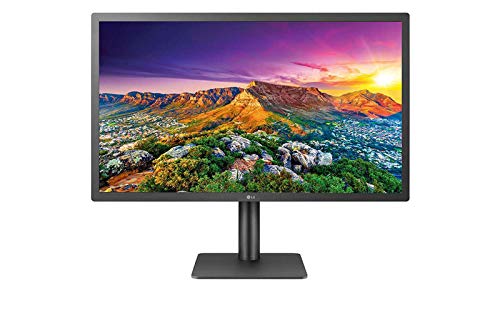
LG UltraFine 24MD4KL-B — The genuine article — 4K WITH webcam
Here it is, the monitor the keyword describes: a 24-inch IPS panel at true 4K resolution with a camera and microphone built into the bezel, from LG’s UltraFine line. The panel is the line’s usual standard — wide P3 colour, high brightness for the class, and the pixel density that makes 24-inch 4K a connoisseur’s choice, rendering text with the smoothness Mac users describe as Retina-like when the screen is scaled the way macOS intends. The built-in camera covers video calls without a single extra object on the desk, and stereo speakers and a microphone complete the all-in-one brief.
Understand its ecosystem allegiance before buying. The UltraFine 24 was designed alongside Apple hardware: its main connection is Thunderbolt, its brightness and volume are meant to be driven from a Mac keyboard, and its stand offers tilt rather than the full ergonomic repertoire. Windows users can drive it and many do, but they inherit small frictions — control quirks, a feature set tuned for another platform — that the ViewSonic below does not impose. This is a Mac-desk product that tolerates Windows, not a neutral product, and its section says so because the rest of this guide exists for the desks it does not suit.
Within its intended world, though, it is close to perfect: one cable to a MacBook, a dense and beautiful panel, calls handled by the bezel, and a footprint that suits the small desks 24-inch buyers have. It is also, to repeat the guide’s founding fact, the only current product that satisfies every word of the keyword at once. If your desk is Mac-led and the brief is literal, the shopping ends here, and it ends well.
One longevity note: because the camera is built in, its quality is fixed at the model’s vintage. For ordinary calls that is no hardship at all — the camera is entirely respectable — but the professional whose income rides on looking immaculate on video should compare it honestly against the standalone route in the HP and ViewSonic sections before deciding that integration wins.
A word about the scaling life this screen expects: paired with a Mac, it is meant to run in a scaled mode where the interface stays readable and the panel’s density becomes smoothness rather than microscopic text. Owners who force native resolution and then complain the menus are tiny have misread the product’s entire premise. Set the scaling the way its designers intended and the 24MD4KL delivers the crispest desktop its size can offer, with the camera simply there, in the bezel, every time a call arrives — which is, in the end, the whole fantasy the keyword was chasing.
- Panel: 24-inch IPS, true 4K (3840×2160), wide P3 colour
- Webcam: built into the bezel, with microphone and stereo speakers
- Connection: Thunderbolt-led, designed for Mac desks
- Stand: tilt adjustment, compact footprint
- Status: the only current pick that is both 24-inch 4K and webcam-equipped
Strengths
- Satisfies the entire keyword literally — nothing else current does
- Superb panel density and colour for small-desk 4K
- One-cable, zero-clutter call setup on a Mac desk
Trade-offs
- Designed for macOS; Windows users inherit control frictions
- Camera quality is frozen at the model’s vintage
- Tilt-only stand trails the ergonomics of business rivals
Best for: Mac-led desks that want the literal product — 24-inch 4K and a built-in camera in one object.
Not suited for: Windows-first desks, professional streamers needing a top-tier camera, or buyers wanting full stand ergonomics.

ViewSonic VP2488-4K — True 4K, NO webcam — add a standalone camera
The VP2488-4K is what the 24-inch 4K class looks like when it is built for colour professionals rather than for Apple: a 3840×2160 IPS panel with wide-gamut coverage aimed at the DCI-P3 space, Thunderbolt 4 connectivity with strong USB-C power delivery for a laptop, and ViewSonic’s ColorPro seriousness about factory calibration. It is, on panel merits alone, arguably the most complete modern 24-inch 4K monitor in this guide. And it has no webcam. None. The bezel is clean, the specification is silent, and this section will not let the keyword’s wishful thinking blur that fact.
So buy it as the screen half of the system the keyword wants. Mount a standalone webcam on its top bezel — the monitor’s standard connections and sturdy build make it an ideal host — and the completed desk gives you a better camera than any bezel in this guide, positioned and replaceable at will, in front of a better-colour 4K panel than the conferencing picks can dream of. For a Windows-led professional desk, that composite is the strongest honest answer this guide can build, and it is built from the best parts rather than the only all-in-one.
The ViewSonic’s own virtues reward the choice daily: Thunderbolt docking that turns a laptop desk into one cable, colour modes for the standard spaces creative work uses, and the ergonomic stand the LG omits. Its compromises are the class’s — 24-inch 4K is a density choice, not an area choice, and buyers wanting a big canvas should be at 27 inches — plus the small discipline of buying and mounting the camera as a separate line item.
Judge it as the connoisseur’s route: the reader who cares enough about 24-inch 4K to be reading this guide at all is exactly the reader who will appreciate choosing the camera separately too. The keyword asked for one product; the market’s best answer is these two, and this pick is the half that matters more.
ViewSonic’s colour management deserves its extra sentence, because it is the reason this screen and not another headlines route two. The VP line’s factory calibration, its colour-space modes and its uniformity behaviour are the working tools of people who prepare images for other screens and for print — the exact readership a 24-inch 4K panel attracts. A webcam can be added in an afternoon; a panel’s colour discipline is bought once and lived with for years. Route two is therefore not screen-plus-compromise. It is the professional’s stack, assembled in the open.
- Panel: 24-inch IPS, true 4K (3840×2160), wide colour gamut
- Webcam: NONE — a standalone camera is required to complete the brief
- Connectivity: Thunderbolt 4 and USB-C with high-wattage power delivery
- Orientation: ColorPro line for colour-sensitive work, Mac and PC
- Stand: full ergonomic adjustment
Strengths
- Finest modern 24-inch 4K panel package in this guide
- Thunderbolt 4 docking suits a one-cable laptop desk
- Pairs with a standalone webcam to beat every built-in camera here
Trade-offs
- No built-in camera, microphone array or conferencing furniture
- Requires the extra purchase and mounting of a separate webcam
- Small-canvas 4K is a density choice some buyers will find tight
Best for: Windows and Mac professionals who want the best 24-inch 4K screen and accept a standalone camera as the honest completion.
Not suited for: buyers who want calls working out of the box with nothing else to purchase or mount.
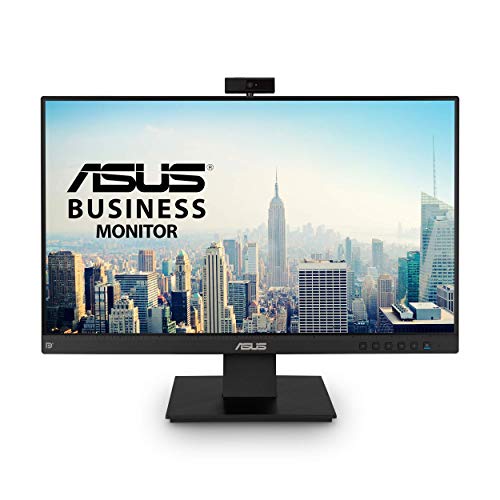
ASUS BE24EQK — Webcam YES — but 1080p trade-off pick
Label first, as promised: the BE24EQK is a 1080p monitor. It is included because its webcam is real — a built-in 2MP camera with an adjustable mount and a microphone array, in a 24-inch business monitor with every connection an office desk uses — and because a large share of the people typing this keyword actually want dependable calls on a 24-inch screen more than they want 4K pixels. If that is secretly you, this ASUS is a thoroughly sensible product. If you truly need 4K, this pick is not it, and the guide has already told you where it is.
As a conferencing tool it is well judged. The camera tilts to frame you rather than the ceiling, the bezel design keeps the lens unobtrusive, and ASUS’s business line supplies the port selection — HDMI, DisplayPort, even legacy VGA — that mixed office hardware demands. The IPS panel is a proper office panel: accurate enough colour, wide viewing angles for a shared screen, and eye-care tuning for long days. It is the monitor an IT department buys by the corridor, and its virtues are the fleet virtues of reliability and completeness.
What it cannot do is sharpen text like the 4K picks or flatter a spreadsheet with density. At 24 inches, 1080p is perfectly serviceable — the previous guide in this series is built on that fact — but the buyer who arrived wanting 4K’s particular crispness will feel its absence in the first hour. The BE24EQK therefore asks for an honest self-interrogation: was “with webcam” the operative phrase in your search, or was “4K”? If the camera was, take this or the stronger HP below and be happy.
It earns its place in this guide precisely by being the respectable version of the compromise — a real camera, a real office monitor, a label with nothing hidden in it.
Fleet buyers should also note the BE24EQK’s manageability virtues, invisible in a photograph: a Kensington lock slot for shared spaces, a stand that survives being adjusted by a hundred different hands, and a menu that locks down gracefully in administered environments. None of that will trend on a spec sheet, and all of it explains why this model, rather than a dozen rivals, became the default answer when offices standardised on camera-equipped screens. Home buyers inherit that institutional testing for free — the corridor’s loss-leader is the spare room’s safe buy.
- Panel: 24-inch IPS, 1920×1080 — NOT 4K
- Webcam: built-in 2MP camera with adjustable angle, plus microphone array
- Connections: HDMI, DisplayPort and VGA for mixed office hardware
- Orientation: ASUS business line, eye-care tuning
- Status: trade-off pick — camera over resolution
Strengths
- A genuine built-in webcam that works out of the box
- Business port selection covers old and new machines alike
- Fleet-grade reliability and sensible office tuning
Trade-offs
- 1080p — buyers who truly want 4K density will feel it immediately
- Camera is call-grade, not creator-grade
- Design and features are office-plain by intent
Best for: call-heavy office desks that value a built-in camera and total connection coverage over panel resolution.
Not suited for: anyone whose brief genuinely starts with 4K — take the LG or the ViewSonic route instead.

HP Series 5 Pro 24 Conferencing — Webcam YES — but 1080p trade-off pick
The same label, in the same plain words: this HP is a 1080p monitor, and it is in this guide because it carries the best built-in webcam package of any pick here. The camera is a 5MP unit that pops up from the top bezel when needed and disappears into it when not — a physical privacy gesture more elegant than a sliding shutter — and it is backed by real speakers with actual wattage behind them and a microphone setup tuned for meetings. For a desk that lives on video calls, this is the most complete conferencing instrument in the list, and it is not close.
HP builds the rest of the monitor to the same professional standard: a 24-inch FHD IPS panel with a height-adjustable stand, USB-C connectivity that docks a laptop with one cable, and the management-friendly plainness of the Series 5 Pro line. On calls, the experience is the point — you look sharper than the ASUS’s camera renders you, you sound clear, you hear the room properly, and the camera vanishes when the meeting ends. If the webcam half of the keyword is your real priority and 4K was aspirational garnish, this is your pick and the guide blesses it without reservation.
The reservation is only ever the resolution. Beside the LG and the ViewSonic, this panel shows a quarter of the pixels, and dense documents, code and design work all feel the difference on a 24-inch canvas. Buyers must therefore choose their identity honestly: meeting-led professional, take the HP and enjoy the best camera here; document-led professional, take a 4K pick and add a camera. The one unforgivable purchase is buying this while telling yourself it is 4K — it is not, and now nobody can say they were not told.
There is a final, subtler virtue: the pop-up camera’s disappearance act changes behaviour. A camera that is physically absent when idle ends the low-grade awareness of being watched that fixed bezel cameras impose, and meeting-heavy owners consistently cite it as the feature they would not give back.
One more meeting-led detail: the HP’s camera and audio were tuned for the acoustics of real rooms rather than demo booths, with noise reduction aimed at the keyboard clatter, air conditioning and echo of actual home offices. That tuning is the difference between a webcam package that photographs well and one that survives a Tuesday. Buyers whose professional reputation is substantially carried by their call presence should weight it accordingly — it is a larger share of how colleagues experience you than any panel specification in this guide.
- Panel: 24-inch IPS, 1920×1080 — NOT 4K
- Webcam: built-in 5MP pop-up camera, retracts into the bezel
- Audio: integrated speakers with real output, meeting-tuned microphones
- Connectivity: USB-C docking plus standard display inputs
- Status: trade-off pick — the best camera here, at 1080p
Strengths
- Best built-in camera package in this guide, with true privacy when retracted
- Speakers and microphones are meeting-grade, not token
- USB-C one-cable docking and full stand ergonomics
Trade-offs
- 1080p panel — a quarter of the 4K picks’ pixels
- Camera excellence cannot help documents, code or design work
- Conferencing focus means fewer colour-work features
Best for: meeting-led professionals who want the finest integrated camera and call experience on a 24-inch desk.
Not suited for: density seekers, colour workers, or anyone who would trade the camera for pixels — the 4K picks await.
Dell P2415Q — True 4K, NO webcam — the discontinued pioneer (prose-only)
The P2415Q is the reason this keyword exists at all: when Dell launched it, a 24-inch 4K monitor was a revelation — a dense IPS panel at 3840×2160 in a business chassis, years before the size class had competition. It has no webcam, never had one, and is long discontinued, which is why it appears in prose without a buy link: remaining stock is used, refurbished or old inventory, and buyers should verify a specific unit’s condition rather than trust a category listing. What they would be verifying is a screen whose panel remains genuinely good — the density that made it famous has not dated, because pixels do not age the way features do.
Its compromises are its vintage’s: connections from an earlier generation of standards, no USB-C docking, a stand and menu from a plainer era, and colour and brightness figures that modern panels like the ViewSonic’s have moved past. Against that, a clean used example delivers the core experience of this entire guide — true 24-inch 4K sharpness — at the kind of price that makes the standalone-webcam route almost free by comparison. For the buyer who understands used-market diligence, it is the value ghost of the class.
We include it with deliberate transparency about its status, because guides that silently list discontinued stock as if it were current do their readers a disservice this guide is trying to correct. The P2415Q’s role here is completeness and history: it proves the class is a decade old, it benchmarks what the modern picks improved, and it gives the used-market hunter a name worth hunting — with eyes open about warranty, panel hours and the absence of any camera whatsoever.
A note on verifying a used P2415Q specifically: ask for a photograph of a mid-grey screen, which reveals uniformity and backlight age more honestly than any colourful desktop image, and confirm the stand and the original cables are included, since replacements quietly eat the bargain. Panels of this era are also worth checking for the image persistence that long office service can leave. None of this is a reason to avoid the model — it is the standard diligence that turns a discontinued pioneer from a gamble into the smartest money in this guide.
- Panel: 23.8-inch IPS, true 4K (3840×2160)
- Webcam: NONE
- Connectivity: earlier-generation HDMI and DisplayPort, no USB-C
- Status: discontinued — used and remaining stock only, covered in prose
- Role: the class pioneer and used-market value route
Strengths
- The original 24-inch 4K experience, still sharp today
- Used pricing can make the whole setup remarkably affordable
- Business Dell build was made to last, and much of it has
Trade-offs
- Discontinued — condition, warranty and panel hours vary by unit
- No USB-C, no camera, older connection standards
- Brightness and colour trail the modern picks
Best for: used-market hunters who can inspect before buying and want true 24-inch 4K at a pioneer’s price.
Not suited for: buyers needing a warranty, modern docking, or any built-in camera at all.
LG 24UD58-B — True 4K, NO webcam — the older mainstream route (prose-only)
LG’s 24UD58-B was the mainstream face of 24-inch 4K in its era: a 3840×2160 IPS panel with FreeSync for the gaming-curious, gamer-adjacent features like dark-scene enhancement, and pricing that brought the class below the professional tier. It has no webcam — the UD line never carried one — and like the Dell it is an older model whose availability now runs through remaining and secondary stock, so it is covered in prose with the same advice: verify the individual unit and its seller rather than assuming a current retail product.
In its day its argument was breadth: one screen that could show a designer a dense canvas and then run a game at 4K with adaptive sync after hours. Both halves of that argument have since been inherited by better screens — the VP2488-4K above out-classes it for work, modern panels out-run it for play — but a fairly priced example still delivers the essential 24-inch 4K picture, and for a buyer assembling the screen-plus-webcam system on a strict budget, that may be the whole requirement.
Its inclusion completes the honest map of the class: one current all-in-one, one current professional panel, two conferencing trade-offs, and the two historical 4K models a shopper will keep encountering in listings and search results. When those listings appear wearing this keyword’s promises, you now know exactly what they are — good old 4K screens, camera-free, to be bought knowingly at used-market prices or not at all.
The 24UD58-B also carries a small lesson for readers of every other section: its listings across the internet demonstrate this keyword’s whole problem in miniature, with the same camera-free screen described in language that lets hurried buyers assume a webcam, 4K-readiness or current production. It is a decent old monitor being sold in a fog. Let your dealing with it be the template — manufacturer specification first, seller’s poetry last — and the fog stops being a hazard anywhere else in this category either.
- Panel: 24-inch IPS, true 4K (3840×2160)
- Webcam: NONE
- Gaming: FreeSync adaptive sync and dark-scene features
- Status: older model — remaining and secondary stock, covered in prose
- Role: the mainstream historical route into the class
Strengths
- Brought true 24-inch 4K to mainstream pricing in its era
- FreeSync gives it a gaming afterlife few office panels have
- The essential dense-4K picture remains intact
Trade-offs
- Older stock — verify unit, seller and warranty carefully
- Modern picks beat it on colour, brightness and connections
- No camera, no USB-C docking
Best for: budget system-builders assembling screen plus standalone webcam from remaining stock.
Not suited for: buyers wanting current production, full warranty and modern connectivity.
What About Microphones and Speakers — the Forgotten Half of Calls?
A webcam brief is secretly an audio brief. Colleagues forgive a soft picture in the first minute of a call; they do not forgive echoing, distant audio in the fortieth. The conferencing picks understand this — the HP’s meeting-tuned speakers and microphones and the ASUS’s microphone array exist because their makers sell to call-led desks. The LG carries its own speakers and microphone in the all-in-one spirit. The true 4K picks, the ViewSonic and the two prose-only models, make no conferencing promises at all, which is why route two’s shopping list should honestly read screen, camera, and a moment’s thought about a headset or a desk microphone you may already own.
The practical hierarchy is simple: a headset beats everything for voice clarity, a good standalone camera’s microphones beat most bezel arrays, and any of them beat a laptop’s built-ins from across a desk. Buyers assembling route two should audition their own voice once — record thirty seconds in a real call application — before spending on audio, because half of them will discover their existing headset already closes the question.
How Do the Six Compare, With Nothing Hidden?
| Pick | Resolution | Built-in webcam | Buy link | The honest summary |
|---|---|---|---|---|
| LG UltraFine 24MD4KL-B | 4K (3840×2160) | YES | Yes | The literal product, Mac-led |
| ViewSonic VP2488-4K | 4K (3840×2160) | NO | Yes | Best modern panel; add a camera |
| ASUS BE24EQK | 1080p | YES — 2MP | Yes | Trade-off: camera over pixels |
| HP Series 5 Pro Conferencing | 1080p | YES — 5MP pop-up | Yes | Trade-off: best camera, at 1080p |
| Dell P2415Q | 4K (3840×2160) | NO | Prose-only | Discontinued pioneer, used market |
| LG 24UD58-B | 4K (3840×2160) | NO | Prose-only | Older mainstream 4K, remaining stock |
Print this table mentally over every other listing you meet while shopping this keyword. If a product cannot fill in its two middle columns as clearly as these six do, the listing is hoping you will not ask — and asking is the entire skill this category demands of its buyers.
What Should a Small Desk Check Before Choosing 24-Inch 4K?
Three measurements settle most regrets in advance. First, viewing distance: density pays at arm’s length and fades beyond it, so a deep desk that pushes any screen back may quietly prefer the 27-inch class. Second, the second-screen question: a 24-inch 4K as half of a pair is a glorious reading setup, but two of them double the scarcity pricing, and many desks are happier with the 4K as the main screen beside a humbler companion. Third, the laptop’s output: confirm the machine drives 4K at a full refresh rate over the cable you intend to use, because a screen this specialised deserves to be fed properly from day one rather than discovered at half rate in month two.
None of these checks requires equipment beyond a tape measure and a specification page, and together they take less time than one return. This class above all others rewards the measured buyer — its products are too specialised, and its marketing too foggy, for impulse to end well.
How Do You Decide Between the Three Honest Routes?
Route one, the LG, suits the Mac-led desk that wants one object, one cable and no decisions left over. Route two, a 4K screen plus a standalone webcam, suits the buyer who wants the best components and accepts two purchases — it is the connoisseur’s route and the Windows desk’s natural one, with the ViewSonic as its strongest current screen and the two prose-only models as its budget archaeology. Route three, a conferencing monitor, suits the meeting-led life whose real specification was always the camera, with the HP as its champion and the ASUS as its fleet-priced alternative.
The decision tool is a single question: in your last twenty working days, which did you complain about more — blurry text or bad calls? Density complaints point to routes one and two; call complaints point to route three; complaints about both point to route two with a genuinely good camera, which is the only route that refuses to compromise either. Answer with the diary, not the aspiration, and the correct pick usually names itself.
What About Privacy With a Built-In Camera?
A camera in the bezel is a camera that is always pointed at you, and the picks handle that fact with different levels of grace. The HP’s pop-up design is the gold standard here — retracted, the lens is physically inside the monitor, and no software state needs trusting. The LG and ASUS keep their lenses visible, where the honest mitigations are the operating system’s camera permissions, the indicator light’s discipline, and a simple physical cover or cap for the truly cautious. None of this is an argument against built-in cameras; it is an argument for buying the privacy design you will actually live with, rather than discovering your own unease a month in.
The standalone route, it should be said, wins this section outright: a separate camera can be unplugged, capped, angled at the wall or left in a drawer between calls, and that physicality settles the question for many buyers more completely than any software promise. Privacy, like the camera itself, is a component choice — one more reason route two deserves its place at the head of this guide rather than in its footnotes.
What Mistakes Do Buyers of This Keyword Keep Making?
The founding mistake is trusting a listing’s title over a manufacturer’s specification sheet — the exact habit this keyword’s ecosystem farms. “4K webcam monitor” in a title can mean a 1080p screen with a camera and a 4K-capable port, a bundle with a separate camera in the box, or nothing defensible at all; the spec sheet’s panel resolution line and camera line, read separately, end the ambiguity in ten seconds. The second mistake is the mirror image: dismissing the conferencing picks as failures of the keyword when they may be the honest answer to the buyer’s actual life.
There is also a sequencing mistake specific to route two: buying the camera first and the screen later, or vice versa, months apart, so the system never quite assembles and each half gets blamed for the other’s absence. Route two is one purchase in two boxes — order them together, mount the camera the day the screen arrives, and judge the completed desk rather than either orphan. Half-built systems are where good components go to be unfairly reviewed.
The third mistake is buying 24-inch 4K for screen area. It has none to spare — it is a density purchase, and buyers who wanted a bigger canvas should have been at 27 inches from the start. The fourth is forgetting the operating system’s scaling: 4K at 24 inches is meant to be scaled, giving you the sharpness at a readable size, and judging it at native tiny text misreads the product entirely. Buy the density knowingly, scale it properly, and the class delivers exactly what it promised.
How Does This Class Sit Beside the 27-Inch 4K World?
It sits in its shadow, and a buyer should hear the comparison plainly. At 27 inches, 4K monitors are plentiful, competitively priced and increasingly offered with the USB-C docking and colour features that are scarce at 24 — and a small number of larger conferencing models even close the webcam gap from the other direction. The 24-inch class survives for two honest reasons: desks that physically cannot take the larger screen, and eyes that want the density only this size delivers at 4K. If neither reason is truly yours, the neighbouring class will serve you with less scarcity and less money, and this guide would rather lose the sale than the reader’s trust.
If both reasons are yours, though, the scarcity stops mattering — you were never shopping the whole market, only its one dense corner, and this guide has now mapped that corner completely: the one all-in-one, the best modern panel, the two honest trade-offs and the two historical routes. Few keywords in this series resolve into so small a map. Small is not the same as simple, but after the sections above, it is at least fully legible — every product named, every label showing, every route priced in honesty if not in currency, and every compromise placed exactly where the reader can see it.
Final Recommendation
And a last word for the reader who arrived annoyed — at the keyword, at the market, at a guide that refused to simply list six matching products. That annoyance is the correct response to a category whose marketing promised an intersection its factories never built. The desks described above are all genuinely good desks; they are just assembled honestly, from components whose labels tell the truth. That is the most any guide can hand you, and on this keyword it is considerably more than most.
If your brief is literal and your desk runs on a Mac, buy the LG UltraFine 24MD4KL — it is the product the keyword describes, and it is a good one. If your brief is literal and your desk runs on Windows, build route two: the ViewSonic VP2488-4K with a standalone webcam mounted on it, a system that beats the all-in-one on camera quality and panel alike. If your brief was secretly about calls all along, buy the HP Series 5 Pro and enjoy the best integrated camera in this guide at 1080p, with the ASUS as its value alternative. What we would not do — what this entire guide exists to prevent — is buy anything on this keyword without reading its resolution line and its camera line as two separate facts. Do that — read the two lines, choose your route with open eyes, and assemble the desk deliberately rather than hopefully — and even a keyword built on a near-nonexistent product can land you a setup that works beautifully, looks sharp on every document, and handles every call of the working week without a single apology.
What Does the First Week With a 24-Inch 4K Desk Look Like?
Day one is scaling: set the operating system’s display scaling so text lands at the size your eyes expect, and resist judging the panel until you have, because unscaled 4K at 24 inches makes every interface microscopic and every buyer briefly furious. Day two is the call test — join a meeting with a friend or record yourself in the actual application you work in, and judge the camera, the microphone and your lighting as one system, since that is how colleagues will meet them. Somewhere in the week, place a familiar photograph and a familiar document on the screen together; that pairing, beauty and density in one frame, is the moment the class explains itself.
By day seven the specialised nature of the purchase has usually sorted its owners into the two camps this guide predicted: the density devotees, who now find every other screen faintly coarse, and the area hunters, who quietly admit the canvas is small and start pricing a companion screen. Both camps bought correctly if they bought knowingly. The only failed purchase in this class is the surprised one — and surprise, after the sections above, is now strictly optional.
Frequently Asked Questions
Does any 24-inch 4K monitor besides the LG have a webcam?
Not that we could verify as a current, mainstream product at the time of writing — and we looked, because the keyword demands it. The category’s history holds the LG and a scattering of regional or short-lived models, which is why this guide is structured around one genuine article plus honest alternatives. If a listing claims otherwise, verify the panel resolution and the camera on the manufacturer’s own specification page before believing a word of it.
Is a standalone webcam really better than a built-in one?
Usually, yes, on every axis except tidiness. A separate camera can carry a larger sensor and better optics than a bezel allows, can be angled independently of the screen, upgraded without replacing the monitor, and physically covered or unplugged for privacy. The built-in camera’s victory is integration — nothing to buy, mount or think about — which is a real victory for many desks, but it is a convenience victory, not a quality one.
Why would anyone buy 4K at only 24 inches?
For density, not area. At this size 4K renders text and interface elements with a smoothness no 1080p or 1440p screen at the same size can match, which is why Mac users pairing with a laptop’s Retina display and detail-led professionals seek it out. It is also the only way to get that density on a small desk. Buyers who want more room to spread windows should take the same money to 27 inches instead.
Will a 24-inch 4K monitor work with my laptop?
Almost certainly, with the connection deciding the experience. Modern laptops drive 4K over USB-C or Thunderbolt happily, and the LG and ViewSonic here are built around exactly that one-cable life. Older machines may cap the refresh rate or need a specific port. Check your laptop’s video output specification once, and remember the screen will also need scaling set in the operating system to be readable — that is expected behaviour, not a fault.
Are the 1080p conferencing picks a rip-off on this keyword?
No — they are the keyword’s other honest answer, provided they are labelled, as they are here. A meeting-led professional gets more daily value from the HP’s 5MP pop-up camera and meeting audio than from pixels they will never miss. They become a rip-off only when a listing dresses them as 4K, which is a sin of the listing, not of the monitor. Judge the label, then judge the product.
Does a 24-inch 4K monitor need a powerful computer?
For desktop work, no — integrated graphics in any reasonably modern laptop or desktop drive 4K for documents, browsing and video without complaint, because drawing a desktop is light work however many pixels it holds. The power question arrives with gaming and heavy 3D, where 4K is genuinely demanding at any size. Buyers in that world should budget the graphics card for the resolution, or accept lower settings, and should not blame the monitor for arithmetic it merely displays.
Can I just use my phone as the webcam instead?
Yes, and modern phones make surprisingly good cameras for exactly this — often better than a bezel unit — mounted at eye level beside or above the screen. As a permanent desk arrangement it has friction: calls interrupted by the phone’s other life, battery and heat over long meetings, and one more mount to manage. As a trial, though, it is the smartest experiment in this guide — live with phone-as-camera for a fortnight and you will learn whether your real need is a camera at all, which reshapes the entire purchase toward the panel you actually wanted.
What should I check before buying the discontinued models?
Condition, in writing: panel hours if available, dead-pixel policy of the seller, included cables and stand, and what warranty, if any, survives. Photographs of the actual unit beat stock images, and a seller who answers specific questions beats a cheaper one who does not. The P2415Q and 24UD58-B are good screens whose risk now lives entirely in the individual unit — price that risk in, or buy current production and skip it.
Related Guides
Still shaping the desk around whichever route you chose — all-in-one, assembled system, or conferencing instrument? Still shaping the desk? Compare the neighbouring classes in our guides to the best 24 inch computer monitors, the best 24 25 inch 1080p monitors and the best 21 9 gaming monitors before you commit the money, the desk space and the next several years of your working eyesight to any single one of them.
Related guides
- Best Time Machine Compatible Hard Drives: Mac-Ready and Reformatted Picks
- Best 3.0 Qualcomm Quick Chargers: QC 3.0 Adapters That Still Earn Their Outlet
- Best 3D Mechanical Engineering Laptops: Certified Workstations for CAD and Simulation
- Best Tattoo Printers: Thermal Stencil Machines for Clean, Lasting Transfers


