What's inside
- Key Takeaways
- Quick Picks
- How We Chose These Picks
- How Does a Heatpipe Case Actually Cool a Processor?
- What Does TDP Mean for a Fanless Build?
- The Six Fanless Cases, Pick by Pick
- How Do the Six Compare Side by Side?
- Where Should a Fanless PC Live in the Room?
- What Mistakes Do Fanless Buyers Keep Making?
- How Do You Plan a Fanless Build, Step by Step?
- How Does Ambient Temperature Change the Fanless Bargain?
- What Graphics and Storage Suit a Fanless Build?
- Final Recommendation
- Frequently Asked Questions
- Related Guides
As an Amazon Associate I earn from qualifying purchases. This post may contain affiliate links at no extra cost to you.
[widgetverdict.com] is reader-supported. When you buy through links on our site, we may earn an affiliate commission.
Where to buy: the six chassis below are sold through their linked listings; four are Streacom heatpipe designs and two are small fanless ITX boxes, and none of them forgives a parts list chosen carelessly.
The best fanless pc cases begin with a sentence most case guides never have to write: in this category, the case is the cooler. A fanless chassis does not merely lack fans — the serious designs here replace the entire active cooling system with the enclosure itself, conducting the processor’s heat through heatpipes into aluminium fins that form the case’s own walls, and radiating that heat silently into the room. There is no fan noise because there is no fan. There is also no fan’s forgiveness, and that is the fact this guide will keep in the centre of the table: a fanless case has a hard thermal ceiling, set by its fin area and its heatpipe path, and the components inside must be chosen to live beneath it.
That ceiling is why this category must not be written or shopped like ordinary cases. A conventional tower accepts nearly any processor and cools it with enough fan; a heatpipe chassis accepts a defined class of processor, on a defined class of motherboard, mounted in the orientation its heatpipes expect, and it rewards that discipline with the one thing no fan can offer — true silence, and no moving part in the cooling path to wear, whine or fail. Streacom, whose four designs dominate this guide, builds its cases around manufacturer-stated processor support and motherboard compatibility requirements, and those documents are not fine print for this category; they are the product. The two smaller picks at the end, mini-ITX fanless boxes for home theatre duty, play by a gentler version of the same rules: low-power parts, modest expectations, silence as the reward.
Price honesty belongs up front too. Fanless done properly is machined aluminium, heatpipes and engineering time, and it costs what that costs — these are specialist instruments bought by people who know exactly why they want one: the recording room that cannot have fan noise near a microphone, the listening room where the PC is a music source, the bedroom media machine, the industrial corner where a fan is a failure point. A buyer shopping this keyword for a cheap quiet gaming rig should stop here and reconsider, because nothing below will cool a flagship graphics card, and pretending otherwise would be the easiest lie in this guide to tell and the cruellest to believe.
Key Takeaways
- In a heatpipe chassis the enclosure is the heatsink: processor heat travels through heatpipes into the case’s finned walls and radiates silently away.
- Every fanless case has a thermal ceiling. The processor must be chosen from the maker’s stated support range — this is a compatibility purchase, not a style purchase.
- Motherboard compatibility is specific in this class: socket position and board layout decide whether the heatpipe path can be built at all.
- Four picks are Streacom designs — FC10 Alpha, DB4, DB1 and FC5 Alpha — spanning larger builds down to a small ITX cube.
- Two picks are mini-ITX fanless boxes for low-power home theatre machines, where the heat load is small enough for a plain finned shell.
- No pick here suits a gaming graphics card of any consequence; fanless computing is a low-and-moderate-power discipline.
Quick Picks
| Pick | Badge | Why it earns its place |
|---|---|---|
| Streacom FC10 Alpha Fanless Chassis | The flagship heatpipe tower | Streacom’s full-size fanless design, its finned walls doing the cooling for a serious silent build. |
| Streacom DB4 Fanless Chassis | The sculptural cube | A compact fanless cube whose thick aluminium panels are both the structure and the heatsink. |
| Streacom DB1 Fanless ITX Chassis | The small extruded build | An extruded aluminium ITX chassis for a low-power silent machine in the smallest Streacom form here. |
| Streacom FC5 Alpha Fanless Chassis | The slim AV-width case | A low, wide fanless chassis shaped for the hi-fi rack and the media shelf. |
| Mini ITX Aluminum Fanless Chassis (Silent HTPC) | The wall-mountable media box | A brushed aluminium fanless ITX shell that stands vertically or mounts on a wall for living-room media duty. |
| Goodisory TX01 Fanless Thin Mini-ITX Chassis | The thin budget HTPC shell | A thin SECC fanless mini-ITX chassis with a 2.5-inch drive bay and a vertical stand foot. |
How We Chose These Picks
We chose for honesty of concept first. A fanless case must actually be one — an enclosure designed to shed its components’ heat without moving air — and not a small case with the fans merely unplugged in the photography. The four Streacom designs are the category’s reference engineering: heatpipe systems that clamp to the processor and conduct its heat into the chassis structure, sold with stated compatibility expectations. The two mini-ITX boxes are simpler instruments, finned or plain shells sized for processors whose heat a modest enclosure can radiate unaided, and they are included because a large share of real fanless demand is exactly that: a silent little media machine, not a workstation.
We also chose against a temptation: padding the list with passively cooled curiosities that cannot sustain a real computer’s heat, or with small-form-factor cases that quietly rely on a fan the marketing cropped out. What remains is a short, defensible shelf — four expressions of one maker’s heatpipe philosophy at different sizes, and two honest small boxes. Buyers will notice the Streacom titles are terse to the point of silence about specifications, and the spec boxes below handle that the only defensible way: what the title does not state is recorded as unstated, with the manufacturer’s documentation named as the authority, because in this category those documents — processor support, board compatibility, mounting requirements — are where the truth of each chassis lives.
Finally, we set the guide’s own boundary in the open. Every pick assumes a processor chosen for the chassis, a graphics solution that is integrated or genuinely low-power, and an owner who values silence enough to accept the ceiling those choices impose. Builds that cannot accept the ceiling should not be forced under it by optimistic reading, and each review below names the build it suits and the build it refuses in those terms.
How Does a Heatpipe Case Actually Cool a Processor?
The mechanism is conduction, end to end. A copper block sits on the processor exactly where a conventional cooler’s base would sit. Heatpipes — sealed copper tubes whose inner working fluid evaporates at the hot end and condenses at the cool end, shuttling heat with remarkable efficiency — run from that block to the chassis walls. The walls themselves are the radiator: thick aluminium panels or finned extrusions with a large surface area, which absorb the conducted heat and radiate and convect it into the room’s still air. No step in the chain involves a fan, a pump or any other moving part, which is why the result is not merely quiet but silent in the strict sense — there is nothing present that could make a sound.
The same mechanism explains the category’s limits with no mystery attached. The walls can only radiate what their surface area and the room’s temperature allow, so the system’s ceiling is fixed at the factory in a way a fan curve never is. Exceed it — fit a processor beyond the maker’s stated support — and there is no reserve to call on: temperatures climb until the processor throttles itself to survive, and the silent machine becomes a slow one. The heatpipe path also explains the motherboard specificity. The pipes run from a socket in an expected position to walls at expected distances; a board whose socket sits elsewhere can make the geometry unbuildable, which is why Streacom publishes compatibility guidance and why this guide keeps pointing at it.
What Does TDP Mean for a Fanless Build?
TDP — the thermal design power figure attached to a processor — is, in a fanless build, the closest thing to a contract the buyer signs. In a fanned system it is a rough sizing hint that a large cooler can overrule; in a fanless system it is the load the entire enclosure must radiate, continuously, in a warm room, forever. The chassis maker states the processor class or thermal ceiling a design supports, and the buyer’s job is to choose a processor comfortably inside that statement rather than at its edge — because the edge is measured in the maker’s conditions, and a chassis tucked into a media cabinet in summer lives in harder ones.
Three practical consequences follow. Efficient modern processors are this category’s best friends: performance per watt has improved to the point where a genuinely capable desktop or media machine can live inside a fanless ceiling, provided it is chosen from the efficient end of the catalogue rather than the flagship end. Sustained loads matter more than peaks — a processor that spikes briefly will coast on the aluminium’s thermal mass, while an all-day rendering load must be radiated as fast as it is made, so the honest question is what the machine does for hours, not seconds. And everything else in the box adds its mite: drives, chipsets and voltage regulators all warm the same enclosure, which is one more reason the low-power picks later in this guide keep their whole parts lists modest rather than only their processors.
The Six Fanless Cases, Pick by Pick

Streacom FC10 Alpha Fanless Chassis — The flagship heatpipe tower
The FC10 Alpha is the fullest expression of Streacom’s philosophy in this guide: a substantial fanless chassis whose finned aluminium walls are the cooling system, built for a silent machine with real work to do — the audio workstation beside the microphone, the listening-room source, the office computer in a room where concentration is the product. Its listing title is a model code and little more, and this review will treat that terseness as the category demands: the FC10’s true specification is Streacom’s documentation for the chassis, which states the processor support and board compatibility the heatpipe system was designed around, and no purchase in this class should be made without reading it.
What can be said from the design’s standing is the shape of the proposition. The FC series is Streacom’s larger fanless line, and the Alpha generation refined its heatpipe mounting — the part of a fanless build where engineering quality decides everything, because a poorly clamped pipe or a badly seated block silently taxes the whole system’s ceiling. A flagship fanless chassis is bought precisely for that quality: the machining, the pipe bends, the mounting pressure, the fit of panels that are structural heatsinks rather than covers. This is also why the FC10 costs what it costs, and why comparing its price to a fanned tower’s is a category error — the comparison is to a tower plus the quietest cooler money buys, and even then the tower still has a fan in it.
The build it suits is disciplined: a processor from the maker’s stated support, integrated graphics or a genuinely low-power card where the design allows one at all, storage that does not cook itself, and placement in open air where the finned walls can breathe — a heatpipe case inside a closed cabinet is a radiator in a cupboard. The build it refuses is equally clear, and the refusal is a feature: flagship processors, gaming graphics, overclocking ambitions. Owners who accept the terms describe the same experience in the same words — a powerful machine that makes no sound at all, in a room that notices.
- Design: fanless heatpipe chassis — the finned aluminium enclosure is the heatsink
- Model: ST-FC10B-ALPHA-OPT, per the listing title
- Processor support and thermal ceiling: the listing title gives no figures — Streacom’s documentation for this chassis is the authority and must be checked before choosing a CPU
- Motherboard compatibility: not stated in the listing title — verify your board against the maker’s compatibility guidance
- Cooling fans: none, by design
Strengths
- True silence — no moving part exists in the cooling path to make noise or wear out.
- The flagship of a specialist line, with the heatpipe mounting quality the category lives or dies by.
- A substantial chassis for a real workstation build, not only a media toy.
Trade-offs
- The processor ceiling is absolute: parts must come from the maker’s stated support.
- Board compatibility is specific — an unlisted motherboard can make the build impossible.
- Machined aluminium and heatpipe engineering price it far above fanned towers of its size.
Best for: a silent workstation or listening-room machine built around a supported processor, placed in open air. Not suited for: gaming graphics, flagship processors, or any build whose parts list is already fixed and merely hopes to fit.
Serious buyers should open the FC10 Alpha listing and then read Streacom’s documentation for the chassis before choosing a single other component.
Streacom DB4 Fanless Chassis — The sculptural cube
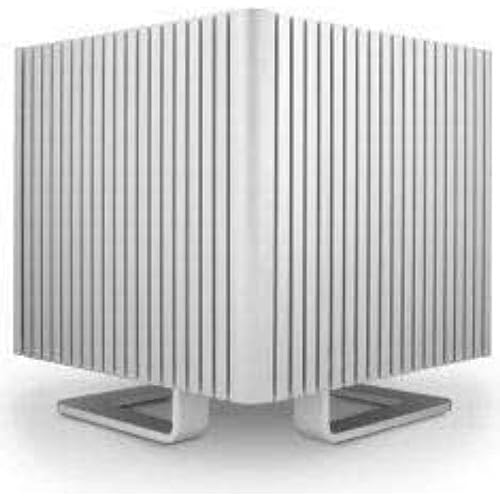
The DB4 is the fanless case that people who do not care about cases tend to ask about. It is a compact cube of thick aluminium panels — the silver finish in this listing — whose walls are not covers over a frame but the heatsink itself, with the heatpipe system conducting the processor’s heat into that mass of metal. The result is an object that looks like a piece of audio equipment or a small sculpture and behaves like a radiator, and it has become the category’s emblem for a reason: it makes the fanless idea visible. A machine that cools itself with its own body looks like this.
The cube form dictates the build. Space inside is finite and arranged around the thermal design, so the DB4 suits a compact, efficient parts list — an efficient processor within the maker’s stated support, integrated graphics doing the display work, storage chosen small and cool. Within those terms it is a genuinely capable little computer: the modern efficient processor is this chassis’s natural partner, and a DB4 on a desk running office, media or development work in complete silence is one of the category’s most satisfying objects. The panels’ thickness is the cooling budget; treat it with respect and it does not disappoint.
As with its larger sibling, the title is a model code and the documentation is the specification. Streacom’s guidance for the DB4 covers the processor support and the motherboard requirements its heatpipe layout imposes, and the cube’s compactness makes that guidance more binding, not less — there is less slack in a small chassis for an almost-compatible board. Buyers should also think about placement: the cube radiates from its panels, so it belongs on a desk in the open, where it also happens to look its best, rather than inside furniture. It is the pick for the buyer who wants the fanless statement made beautifully and is happy to build the modest, efficient machine the statement requires.
- Design: fanless cube chassis; thick aluminium panels serve as the heatsink
- Model: ST-DB4S, silver finish, per the listing title
- Processor support and thermal ceiling: no figures appear in the listing title — consult Streacom’s documentation for this chassis before selecting a CPU
- Motherboard requirements: not stated in the listing title — confirm board compatibility with the maker first
- Fans fitted: none — the panels do the work
Strengths
- An enclosure that is genuinely beautiful, because the heatsink is the sculpture.
- Complete silence in a desk-sized footprint suited to visible rooms.
- Thick aluminium panels give the compact build a real thermal mass to work with.
Trade-offs
- The compact interior limits the parts list to efficient, small components.
- Integrated graphics is the realistic display solution; gaming cards are outside the concept.
- Its documentation-first purchase process rewards patience and punishes impulse.
Best for: a visible desk machine — design-conscious office, studio or listening room — built from efficient parts within the maker’s support. Not suited for: a compact gaming build, or a buyer who wants to choose components first and the case afterwards.
Design-minded buyers can open the DB4 listing, then confirm their intended board and processor against Streacom’s published guidance for the cube.

Streacom DB1 Fanless ITX Chassis — The small extruded build
The DB1 takes the same philosophy down to its smallest scale in this guide. Its title is the most descriptive of the four Streacom listings — a fanless ITX chassis in black, built from extruded aluminium — and the extrusion is the engineering: the case’s body is formed as a finned aluminium profile, so the entire shell is heatsink, with the fins running its length. For a mini-ITX build around a low-power processor, that is an elegant sufficiency. There is less metal here than in the DB4’s panels, and the honest reading is a lower thermal ceiling in exchange for a smaller, lighter machine.
The build this suits is the small silent appliance: a home server that idles for years in a corner, a media player, a network box, a dedicated machine for one quiet job. Mini-ITX boards built around efficient processors — including the many boards with the processor already fitted at the efficient end of the market — are the natural contents. The DB1’s discipline is the category’s discipline in miniature: the processor must sit inside the chassis’s stated support, the workload must be the kind that sips rather than gulps, and in return the machine makes no sound and asks for no maintenance, there being no fan to clog or fail at year three.
Buyers stepping down from the DB4 should understand the trade they are making, because the two are easy to confuse at a glance. The DB1 is not the cube made cheaper; it is a smaller thermal system for smaller thermal loads, and a processor that the DB4’s panels could radiate may exceed what an extruded shell of this size can shed. Streacom’s documentation states each chassis’s terms, and in this class the difference between the two documents is the difference between a silent machine and a throttling one. Chosen correctly, the DB1 is the purest appliance in the guide — the computer you forget is in the room, which for a fanless build is the entire ambition.
- Design: fanless mini-ITX chassis, extruded aluminium body acting as the heatsink, black
- Model: ST-DB1B, per the listing title
- Motherboard format: Mini-ITX, stated in the listing title
- Processor support and thermal ceiling: the listing title states no figures — Streacom’s documentation for this chassis decides which CPUs belong in it
- Cooling fans: none, by design
Strengths
- The smallest, lightest route into genuine heatpipe-era fanless computing in this guide.
- An extruded finned shell means the whole body works as the radiator.
- Ideal appliance manners: silent, sealed against fan-borne dust paths, nothing to service.
Trade-offs
- The smallest thermal ceiling among the Streacom picks — processor choice is tightly bounded.
- Mini-ITX only, with the expansion limits that format always carries.
- No headroom for a workload that grows hotter over the machine’s life.
Best for: a low-power ITX appliance — media player, home server, network box — that should run silently for years. Not suited for: a desktop replacement with performance ambitions, or any discrete graphics plan.
Appliance builders should open the DB1 listing and match their chosen ITX board and processor to Streacom’s stated support for the chassis.

Streacom FC5 Alpha Fanless Chassis — The slim AV-width case
The FC5 Alpha is the fanless idea translated into the language of the hi-fi rack: a slim, wide, low chassis in the FC line, shaped to sit among amplifiers and source components rather than under a desk. That shape is not a styling whim. A media or listening room already has a furniture grammar — wide components, low stacks, black finishes — and a tower in the middle of it looks like a mistake someone gave up on. The FC5’s proposition is that the silent PC belongs in that stack, cooled by its finned enclosure like its larger FC10 sibling, and visually indistinguishable in spirit from the audio equipment it feeds.
The slimness carries the category’s usual arithmetic in a particular form. A low chassis has less internal height, which shapes everything from the board and riser arrangements the maker specifies to the storage that fits, and its heatpipe system is laid out for that wide, flat geometry. The FC5 therefore asks for the most homework of the Streacom picks in one sense: the build must follow the maker’s documented layout for the chassis rather than the builder’s habits from tower cases. Owners who do that homework get the thing the case exists for — a proper computer, in the rack, making literally no noise in a room built for listening, where a single fan’s whir would be the loudest flaw in the system.
It should be said plainly that this is a connoisseur’s purchase. The FC5 serves a room and a purpose, and its value collapses outside them: as a general desktop case it is expensive, restrictive and shaped for furniture the buyer may not own. Inside its purpose it has few peers, because the intersection of AV-width dimensions, genuine heatpipe fanless cooling and Streacom’s machining is a small neighbourhood. The listing title, again, is only a model code — the documentation states the processor and board terms — and the rack-bound buyer should read it with the dealer-demo seriousness the room deserves.
- Design: fanless heatpipe chassis in a slim, wide AV-style form, black
- Model: ST-FC5B Alpha, per the listing title
- Processor support and thermal ceiling: not given in the listing title — Streacom’s documentation for this chassis is the deciding document
- Internal layout and board requirements: maker-specified for this design; not stated in the listing title and to be confirmed in the documentation
- Moving parts in the cooling path: none
Strengths
- The only pick shaped for the hi-fi rack, where silent operation matters most.
- Genuine heatpipe cooling rather than a small fan hidden in a slim shell.
- Streacom machining suits a room where equipment is seen as much as used.
Trade-offs
- The slim interior imposes the maker’s layout discipline most strictly of the four.
- Outside a media or listening room, its shape and price make little sense.
- Documentation-first buying applies in full — nothing important is in the title.
Best for: a listening-room or media-rack PC that must be silent and must look like audio equipment. Not suited for: a general-purpose desk build, or a buyer whose furniture has no AV-width shelf to offer it.
Rack builders can open the FC5 Alpha listing, then plan the build from Streacom’s documentation for the chassis before ordering parts.
Mini ITX Aluminum Fanless Chassis (Silent HTPC) — The wall-mountable media box
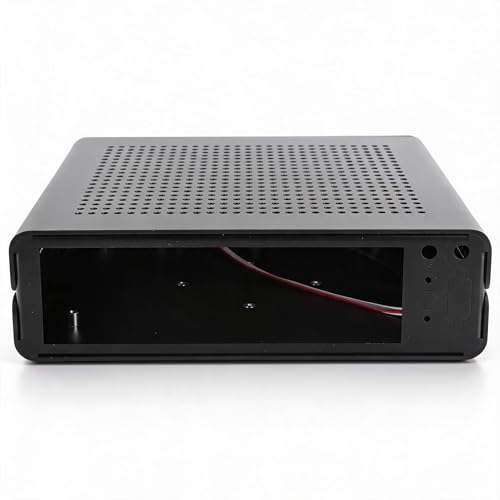
With this pick the guide steps down from heatpipe engineering to the simpler fanless tier: a mini-ITX aluminium chassis with a brushed metal shell, sold for silent home theatre builds, which stands vertically or mounts on a wall. There is no heatpipe system conducting a desktop processor’s heat here; the proposition is humbler and, for its job, sufficient — a low-power ITX board, of the kind built around efficient or embedded processors, inside a metal shell that radiates the modest warmth such boards produce. The honesty is in the match between claim and duty: the title says home theatre, and home theatre is what it is for.
The mounting flexibility is the design’s real character. A media box that can stand vertically beside a television or mount flat on the wall behind one solves the living room’s actual problem, which is not performance but placement — the little computer must disappear into the room’s arrangement, and a box with two honest ways to disappear beats a more powerful box with none. The brushed aluminium shell supports the disappearing act visually, reading as a piece of AV equipment rather than a computer, and the fanless design means it can live behind the television, in the warm pocket where a fanned box would cook its own intake air and announce itself through the vent.
The boundary must be drawn where the design draws it. This chassis is for boards whose heat a plain shell can shed — the low-power end of the ITX world, media and streaming duties, light server work. A desktop-class processor under sustained load is beyond its terms, and unlike the Streacom designs there is no heatpipe path to extend them. Buyers should choose the board for the box, confirm the pairing is a low-power one, and the result is the living room’s ideal media machine: invisible, inaudible, and exactly powerful enough for the films it exists to play.
- Design: fanless mini-ITX chassis, brushed aluminium shell
- Mounting: vertical standing or wall mount, per the listing title
- Intended duty: silent home theatre PC builds, per the listing title
- Processor class: low-power boards are the design’s terms; the listing title names no specific CPU support, so pair conservatively and check the seller’s guidance
- Fans: none — the shell radiates unaided
Strengths
- Two placement options — stand or wall — solve the living room’s real problem.
- A brushed metal shell that reads as AV equipment, not as a computer.
- Fanless operation suits the warm pocket behind a television where fans suffer.
Trade-offs
- No heatpipe system: the thermal ceiling is a plain shell’s, and it is low.
- Desktop-class processors under sustained load are outside its design.
- The title names no CPU support list, so the board pairing is the buyer’s responsibility.
Best for: a low-power ITX media machine that should vanish beside or behind the television. Not suited for: a compact desktop with real processing work, or any build whose processor was chosen for speed first.
Media builders should open this chassis listing to check its internal clearances against their chosen low-power ITX board.

Goodisory TX01 Fanless Thin Mini-ITX Chassis — The thin budget HTPC shell
The TX01 closes the guide at the category’s most accessible tier: a thin mini-ITX HTPC chassis in SECC steel, fanless, with a 2.5-inch drive bay and a vertical stand foot, from Goodisory. Thin is the operative word — this is the flat little box pattern that thin-client and low-power ITX boards were made for, the kind of machine that mounts behind a monitor, stands on a shelf like a book or disappears into a media unit. Its fanless claim lives at the same modest tier as the previous pick: the shell and the still air handle the heat of genuinely low-power hardware, and the design makes no pretence of handling more.
The 2.5-inch drive bay in the title is a small detail with real meaning at this size. Thin ITX builds often rely on a single small SSD, and a stated bay for a 2.5-inch drive means the storage plan is a standard laptop-size drive — cheap, silent by nature, and replaceable in minutes — rather than a hunt for mounting improvisation inside a thin shell. The vertical stand foot likewise matters more than it sounds: a thin box lying flat radiates from one face against a shelf, while the same box standing as designed presents its surfaces to the room’s air, which for a fanless enclosure is the difference between cooling as designed and cooling as hoped.
Set expectations by the tier and the TX01 is a likeable little instrument: a silent shell for a thin ITX board, a media or kiosk or light-duty machine, bought without the Streacom budget. Reach beyond the tier — a hotter board, a sustained workload, a graphics ambition — and no goodwill will save the build, because there is no fan to forgive the reach and no heatpipe to extend the ceiling. The category’s rule holds at every price: the parts serve the enclosure’s thermal terms, and the enclosure rewards the obedience with silence. For the thin, cheap, silent corner of that bargain, this is the guide’s pick.
- Design: fanless thin mini-ITX HTPC chassis, SECC steel, black
- Storage: 2.5-inch drive bay, stated in the listing title
- Placement: vertical stand foot included in the design, per the listing title
- Processor class: low-power thin ITX boards; the listing title names no CPU support figures, so the pairing must be chosen conservatively
- Cooling fans: none, by design
Strengths
- The thinnest, most placeable shell in the guide — shelf, stand or behind a screen.
- A stated 2.5-inch bay keeps the storage plan standard and simple.
- The accessible end of fanless: silence without the machined-aluminium budget.
Trade-offs
- Steel sheds heat less eagerly than the aluminium designs above it here.
- Strictly low-power territory — the ceiling is the lowest in the guide.
- No stated processor support in the title leaves the pairing entirely to the buyer.
Best for: a thin ITX media, kiosk or light-duty machine that should be silent and nearly invisible. Not suited for: a desktop workload of any weight, or a board chosen without regard to its heat.
Budget fanless builders can open the TX01 listing to confirm its dimensions against the thin ITX board they plan to house.
How Do the Six Compare Side by Side?
| Chassis | Cooling concept | Form | Documentation states | Defining trait |
|---|---|---|---|---|
| Streacom FC10 Alpha | Heatpipes to finned walls | Larger fanless chassis | CPU support, board list | Flagship silent workstation |
| Streacom DB4 | Heatpipes to aluminium panels | Compact cube | CPU support, board list | The heatsink as sculpture |
| Streacom DB1 | Finned extruded shell | Mini-ITX | CPU support, board list | Smallest silent appliance |
| Streacom FC5 Alpha | Heatpipes, slim chassis | AV-width, low profile | CPU support, layout | Built for the hi-fi rack |
| Mini ITX Aluminum Fanless | Plain aluminium shell | Mini-ITX, wall-mountable | Low-power pairing | Placement flexibility |
| Goodisory TX01 | Plain steel shell | Thin mini-ITX | Low-power pairing | Thinnest budget shell |
The table’s real dividing line is the cooling concept column. The four Streacom designs conduct heat deliberately, through pipes, into structures engineered as radiators, and their documentation quantifies what they can hold. The two small shells radiate whatever a modest enclosure naturally sheds, which is enough for low-power boards and nothing beyond. A buyer who understands which side of that line their parts list lives on has understood the guide; a buyer who does not will learn it from a throttling processor, which is the expensive tutor this category employs.
Where Should a Fanless PC Live in the Room?
Placement is a cooling decision in this category, because the room is the final stage of every design here. A heatpipe chassis radiates from its walls into the surrounding air, so it needs that air to be open and reasonably cool: on a desk, on an open shelf, in the room. The classic placement error is the closed media cabinet — doors shut, other warm equipment stacked alongside, the chassis radiating bravely into a pocket of its own exhaust. Machines that ran perfectly on the workbench throttle in the cabinet, and the cabinet, not the case, is the fault. If the machine must live in furniture, the furniture needs ventilation of its own, and the honest test is whether the cabinet’s interior stays near room temperature with the doors closed and everything running.
Vertical surfaces deserve a thought too. Finned walls radiate in every direction but convect best when air can rise past them, which is why the small picks’ designed orientations — the aluminium box’s vertical stand, the TX01’s stand foot — should be used as the makers intended rather than laid flat for tidiness. A fanless machine also rewards distance from other heat: the amplifier that warms the rack warms the FC5 beside it. None of this is demanding — it asks for open air and a moment’s thought — but it is not optional either, because a fanless design has no fan to compensate for a bad address.
There is one more placement virtue worth naming, because it is unique to this category: a fanless machine can live where its owner actually sits. Every fanned PC negotiates a small exile — under the desk, behind the monitor, across the room on a long cable — because its noise, however modest, taxes the ear over a working day. The silent machine owes no such tax, so it can sit on the desk beside the keyboard, in the listening chair’s reach, at the front of the rack where its ports are useful. Owners consistently report that this, more than the silence measured in a specification, is what changes their relationship with the machine: the computer rejoins the room it serves, and the room is quieter for its presence rather than in spite of it.
What Mistakes Do Fanless Buyers Keep Making?
The first and most expensive mistake is choosing the processor for performance and the case for silence, then expecting the two decisions to reconcile themselves. They reconcile at the chassis’s stated ceiling or not at all, and the reconciliation failure is called throttling. The second mistake is skipping the motherboard compatibility check on the Streacom designs — the heatpipe geometry assumes a socket position, and a board outside the maker’s guidance can turn a premium chassis into an unbuildable sculpture. The third is placement in closed furniture, covered in the section above. The fourth is assuming fanless means maintenance-free in every sense: there is no fan to fail, true, but dust still settles on fins and reduces their generosity, and a soft brush twice a year is the whole service schedule — small, but not zero.
The fifth mistake is subtler: buying a fanless case for a workload that was never silent-shaped. A machine that renders, compiles at full tilt for hours or games will either exceed the ceiling or force the parts list down to a level where a quiet fanned build would have been faster for the same money. Fanless is a bargain — silence in exchange for a thermal ceiling — and like every bargain in this guide series it rewards buyers who read its terms and punishes, gently but completely, the ones who sign on the strength of the headline alone.
How Do You Plan a Fanless Build, Step by Step?
Begin with the chassis, which reverses the usual order and is the category’s first lesson. Choose the design whose form suits the room — tower, cube, rack-width or thin box — and read its documentation before another part is named. From the documentation, take the processor terms: the supported class or ceiling, and the board requirements. Choose the motherboard from the compatible set, then the processor from the supported set, preferring the efficient end of the catalogue and leaving margin beneath the stated ceiling for warm rooms and closed doors that life will eventually introduce.
Then keep the rest of the list in the same spirit. Integrated graphics, or the lowest-power graphics the duty genuinely needs. Storage that runs cool. A power solution sized to the modest load rather than a flagship supply loafing at a fraction of its rating in a warm box. Assemble with attention to the heatpipe mounting — clean surfaces, the maker’s specified order and pressure — because in this category the mounting is the cooling system, and a careless clamp taxes every hour the machine ever runs. Finally, place it in open air, run the heaviest real workload it will ever see, and watch the temperatures settle: a fanless build is verified, not assumed, and the verification is a quiet afternoon’s work that pays for itself in certainty.
How Does Ambient Temperature Change the Fanless Bargain?
A fanned system fights a warm room with fan speed; a fanless system has no such reserve, and its ceiling is best understood as a gap — the difference between the processor’s safe temperature and the room’s air. Shrink the gap by heating the room and the same chassis radiates less, which is why this guide keeps advising margin beneath the maker’s stated support. That support figure is established in the maker’s conditions; a machine that must work through a hot summer in an unconditioned room, or beside other warm equipment in a rack, lives in harder ones, and the processor chosen at the very edge of the documented ceiling in spring can become the processor that throttles in August.
The practical responses are simple and worth listing. Choose the processor a step inside the stated support rather than at its limit — the performance surrendered is small and the thermal insurance is permanent. Keep the chassis out of direct sun and away from radiators and amplifier exhausts, the room’s own heat sources. And if the machine’s room genuinely runs hot, favour the larger Streacom designs, whose greater finned area is a larger radiator against the same air. None of this diminishes the category; it is the same honesty a sailor applies to weather, and a fanless build planned with the room in mind stays silent and unthrottled in every season.
What Graphics and Storage Suit a Fanless Build?
The graphics answer is short: the processor’s integrated graphics, wherever the duty allows, because it adds no second heat source to an enclosure with one radiator. Modern integrated graphics drive multiple displays, decode video in hardware and handle every media, office and browsing duty the fanless buyer typically has — the home theatre machines in this guide lose nothing by it, since film playback is a decoding task, not a rendering one. Where a discrete card is genuinely required, it must be a low-power, passively cooled model chosen with the same discipline as the processor, and the buyer should accept that the pair of ceilings — the card’s and the chassis’s — now both bind at once. Anything beyond that is a different computer wearing a fanless case as a costume.
Storage answers itself almost as quickly. Solid-state drives are the natural citizens: silent, cool-running and free of moving parts, they preserve the machine’s defining property in a way a spinning drive cannot, since a hard drive’s whir would be the only sound in an otherwise silent system. The TX01’s stated 2.5-inch bay takes the standard small SSD directly. Capacity-hungry archives belong on the network, in a separate machine whose noise lives in another room — a division of labour the fanless philosophy encourages everywhere: heat and noise are exiled, and the silent machine keeps only the work that deserves silence.
Final Recommendation
The FC10 Alpha is the recommendation when the silent machine must also be a serious one — a workstation-class build inside the maker’s stated support, cooled by the best heatpipe engineering in this guide. The DB4 is the recommendation when the machine will be seen: no other pick turns its cooling system into an object worth looking at. The FC5 Alpha owns the hi-fi rack, the DB1 the small silent appliance, and the two little ITX shells serve the media corner at honest prices for honest duties. Our own choice, for the room where silence is worth the most, is the DB4 — the one case here whose limitation and whose beauty are the same fact, aluminium doing physics in the open. Choose the chassis first, obey its documented terms, and the reward is the rarest specification in computing: a machine that makes no sound at all.
Frequently Asked Questions
Can a fanless PC handle gaming?
Not in any form this guide would recommend. A gaming graphics card produces heat on a scale that passive enclosures are not built to radiate, and no pick here is designed for one. Light, older or very low-power gaming on integrated graphics is possible within a chassis’s stated processor support, but the buyer whose priority is games should buy a quiet fanned case instead — fanless computing trades exactly that headroom away for silence.
How do I know which processors a Streacom chassis supports?
From Streacom’s documentation for that specific chassis — not from the listing title, which carries only the model code, and not from another model’s paperwork, since each design’s heatpipe layout and ceiling are its own. The documentation states the processor terms and the motherboard compatibility the build must respect. Treat that reading as step one of the purchase; in this category it is not research, it is the specification.
Is a fanless PC completely silent?
The cooling system is: with no fan and no pump there is no moving part to generate noise, which is a stronger claim than any quiet fan can make. Two honest footnotes remain. Electronic components can occasionally produce faint coil whine under load, which is a property of the components rather than the case, and spinning hard drives make their own small sounds — one more reason fanless builds favour solid-state storage, which keeps the whole machine as silent as its cooling.
Does a fanless case need any maintenance?
Very little, and none of it mechanical. Dust settles on finned surfaces over time and slightly dulls their ability to shed heat, so an occasional soft brush or a gentle pass of compressed air restores the design’s full generosity. There are no fan bearings to wear, no fan filters in the usual sense and no moving part in the cooling path at all — the maintenance advantage over a fanned machine is real, and over years it compounds.
Can I put a fanless PC inside a media cabinet?
Only if the cabinet breathes. The chassis radiates into the air around it, and a closed cabinet traps that air until the machine is radiating into its own exhaust. Open-backed or ventilated furniture, with space around the case and no hot equipment stacked against it, can work; a sealed cabinet cannot, and the failure will look like a case problem while being a furniture problem. When in doubt, the open shelf is the fanless machine’s natural home.
Why are fanless cases so much more expensive than fanned ones?
Because the enclosure is doing a cooler’s job with a cabinet-maker’s materials. Thick machined aluminium, finned extrusions, bent heatpipes and precise mounting hardware cost what they cost, in production runs far smaller than the stamped-steel tower market enjoys. The fair comparison is a fanned case plus the quietest cooling available for it — and even that machine still contains a fan. The fanless premium buys the one outcome no fan can reach, and buyers who do not need that outcome should not pay it.
Can I convert my existing PC into one of these chassis?
Sometimes, and the documentation decides. The conversion keeps the parts that the chassis’s terms allow — storage, memory, often the power solution — and usually replaces the two that define the thermal system: the motherboard must come from the maker’s compatible set for the heatpipe geometry to work, and the processor must sit inside the stated support. Owners of efficient recent processors and flexible boards sometimes convert with little waste; owners of flagship hardware will find the honest answer is that the existing machine and the fanless ambition are different computers. Price the conversion as a partial rebuild, read the chassis documentation against your exact board model, and let that document — not optimism — give the verdict.