What's inside
- Key Takeaways
- Quick Picks
- How We Chose These Picks
- Comparison
- What Should a Travelling Teacher Pack Around the Camera?
- How Do Folding and Wireless Designs Change the Demonstration Itself?
- How Do You Settle a Portable Camera on an Unfamiliar Desk in Two Minutes?
- What Happens to Image Quality When a Camera Is Built to Travel?
- How Should a School Equip Staff Who Teach Across a Whole Site?
- Common Mistakes
- What Is the First Journey a New Portable Camera Should Make?
- Final Recommendation
- How Do You Protect a Travelling Camera From the Journey Itself?
- Frequently Asked Questions
- Related Guides
As an Amazon Associate I earn from qualifying purchases. This post may contain affiliate links at no extra cost to you.
widgetverdict.com is reader-supported. When you buy through links on our site, we may earn an affiliate commission.
The timetable, not the teacher, decides where lessons happen — and for a growing share of staff, it decides differently every period. Room 4 before break, the library after it, a borrowed classroom across the site in the afternoon, and remote lessons from the kitchen table on Friday. A document camera that lives bolted to one desk serves exactly one of those lessons. The best folding document cameras exist for the rest: bodies that collapse into a bag, arms that pose again in seconds on an unfamiliar desk, and connections simple enough that a strange computer in a strange room is a two-minute problem rather than a lost lesson. Portability, in this guide, is not a lifestyle adjective. It is the difference between a camera a teacher owns and a camera a teacher uses.
Six cameras are compared, and honesty about the word folding matters from the first paragraph. Some titles state the folding claim outright — the BexonRuihe declares a foldable design, and the Elmo OX-1 in the classroom guide wears the same word. Here, IPEVO’s two DO-CAM models declare themselves portable and compact, which is the travelling claim in its other dialect: a camera built small and light for a life in motion. The IPEVO V4K and the wireless VZ-X state neither word, and their reviews say so plainly, placing them by their other travelling virtues — simplicity in the V4K’s case, and in the VZ-X’s case a connectivity set, Wi-Fi among it, that frees the camera from the desk’s cable geography altogether. The PAKOTOO states no folding claim either; it earns its place as the A3-capable resident that the travelling teacher returns to, and as a measure of what portability trades away.
That discipline — claim only what the title claims, mark the rest as not stated — runs through every specification list below. A camera’s weight, its folded dimensions, its case: none of these appear in the titles, so none are invented here. What the titles do support is a rich comparison of how each design approaches the moving teacher’s actual problems: setup speed, platform breadth, freedom from cables, light and microphones for the remote lesson at the journey’s end, and capture size for the material that travels worst.
Key Takeaways
- Folding, portable and compact are different claims: the BexonRuihe states foldable, the two DO-CAM models state portable and compact, and the V4K, VZ-X and PAKOTOO state neither — their reviews place them by other travelling virtues.
- The IPEVO VZ-X states three connectivity modes — Wi-Fi, HDMI and USB — the broadest freedom from any single desk’s wiring in this guide.
- The two DO-CAM models are near-identical in title, both portable, compact, Ultra HD 8MP USB cameras; the Creator’s Edition and the standard grey model are best chosen on the day’s listing details.
- The BexonRuihe pairs its stated foldable design with manual focus and a microphone — the travelling hybrid teacher’s minimal kit.
- The PAKOTOO states no folding but declares A3/A4 capture, dual microphones and a three-level LED — the settled-desk counterweight that shows what portability costs.
- Every pick connects by USB and declares broad platform support, the travelling teacher’s insurance against unfamiliar classroom computers.
Quick Picks
| Pick | Badge | Why it earns its place |
|---|---|---|
| IPEVO DO-CAM Creator’s Edition | Portable presentation specialist | A portable, compact Ultra HD 8MP USB camera for professional visual presentations, conference calls, distance learning and remote work. |
| IPEVO DO-CAM | The compact traveller | The same portable, compact 8MP recipe in grey, adding real-time image capture among its stated uses. |
| IPEVO V4K | Simple standard for any room | An 8MP USB camera whose broad platform support and live-demo purpose make it the camera most likely to just work on a strange machine. |
| IPEVO VZ-X | Wireless freedom | An 8MP camera with Wi-Fi, HDMI and USB modes that works wirelessly with iOS, tvOS and Android as well as conferencing software. |
| PAKOTOO 8MP USB Document Camera | The settled A3 base station | A3/A4 capture with dual microphones and three-level LED light — the home-desk anchor of a travelling kit. |
| BexonRuihe USB Document Camera | Stated folder with microphone | A foldable-design USB camera with manual focus and a microphone, for remote teaching and live demonstrations anywhere. |
How We Chose These Picks
A travelling camera is judged by a sterner test than a resident one: the unfamiliar room. Selection therefore began with the setup story. How many connections does the camera need, how many platforms does its title declare, how much of its value survives a computer it has never met? USB connection and multi-platform compatibility — Mac, Windows, Chromebook in varying combinations across these titles — form the floor. Above that floor, the picks divide by their answer to the cable question. Most accept the USB tether as the price of simplicity. One, the VZ-X, states Wi-Fi among three modes and thereby changes the geometry of the borrowed classroom: the camera can stand where the material is, while the computer stays where the desk is.
The second filter was the honesty of the portability claim itself. This guide separates three statements that marketing blends: foldable, stated where a body is designed to collapse; portable and compact, stated where a camera is designed small for carrying; and unstated, where a camera’s travelling case must rest on simplicity or connectivity rather than on its body. All three categories appear below, labelled as what they are, because a teacher packing a bag deserves to know which promise was actually made. A department buying for peripatetic staff should read the specification lists with that single question in mind — what, exactly, did this title claim about movement?
The third filter was the journey’s end. Travelling teachers increasingly travel toward a screen: the remote lesson from home, the conference call from a borrowed office, the presentation in a room with a panel and no desk computer. Microphones, lights and direct display connections were weighed accordingly. The DO-CAM pair speak the language of professional presentation and remote work; the VZ-X speaks to wireless displays and tablets; the BexonRuihe carries its stated microphone into every room it folds into. The PAKOTOO, by contrast, was selected as the control in the experiment — the fully-featured resident whose A3 capture and dual microphones mark what a travelling kit gives up, and what a hybrid teacher might keep at the home desk while a smaller camera rides in the bag.

IPEVO DO-CAM Creator’s Edition — Portable presentation specialist
The DO-CAM’s title performs a small act of positioning honesty: it calls the device a portable and compact Ultra HD 8MP USB camera for professional visual presentations and communication, and a webcam for conference calls, distance learning and remote work. Notice what is absent — the words document camera never appear. IPEVO is describing a camera whose home ground is the presented object and the presented person in roughly equal measure: the prototype shown to the remote team, the sketch talked through on a call, the product sample, the page. For the teacher, that translates into a camera equally at ease in the classroom demonstration and the parents’-evening video call, carried between them in the same bag without a thought.
Portable and compact are the stated travelling claims, and they should be read as design intent rather than as a folding mechanism — the title claims no fold, and the specification list below records that silence. What smallness buys the travelling teacher is cumulative: the camera that fits the bag’s side pocket is the camera that is actually in the bag, on the day the timetable moves a lesson to the room with no equipment. The Creator’s Edition suffix suggests a bundle or finish aimed at presenters who make content as well as conversation; the title itself differentiates the edition by name and purpose rather than by a divergent specification, and a buyer choosing between the two DO-CAM listings should compare what each currently includes rather than imagine a technical gulf.
The stated uses sketch the working week of its owner with unusual completeness: professional presentations for the formal room, conference calls for the collaborative one, distance learning for the pupil at home, remote work for the teacher at the kitchen table. An 8MP sensor and Ultra HD designation cover the imaging ground those uses need. What the title does not state — a microphone, a light, a capture area, a focus type — this review leaves open, noting only that a camera so thoroughly aimed at calls will usually be paired with the computer’s own audio arrangements, and that the manufacturer documentation is the place to confirm each point before the bag is packed around it.
- Sensor stated: Ultra HD 8MP
- Form stated: Portable and compact
- Connection stated: USB
- Uses stated: Professional visual presentations, conference calls, distance learning, remote work
- Folding design: Not stated in the listing title — verify with the manufacturer documentation
- Built-in microphone: Not stated in the listing title — verify with the manufacturer documentation
- Capture area: Not stated in the listing title — verify with the manufacturer documentation
Strengths
- Portable, compact design intent suits a camera that must live in a teaching bag.
- The stated use set spans presentation, calls, distance learning and remote work without a second device.
- An 8MP Ultra HD foundation covers both object demonstration and webcam duty.
Trade-offs
- No folding mechanism is stated; its portability is smallness, not collapse.
- Microphone, light and capture area are unstated and need the documentation’s word.
- Its presenter-first positioning serves pages as a role, not as the headline.
Best for: teachers and presenters whose week mixes classroom demonstration with calls and remote work, carried everywhere in one bag. Not suited for: a travelling kit list that requires a stated folding mechanism or a declared capture area before purchase.
Look at the Creator’s Edition listing on Amazon: check price on Amazon.
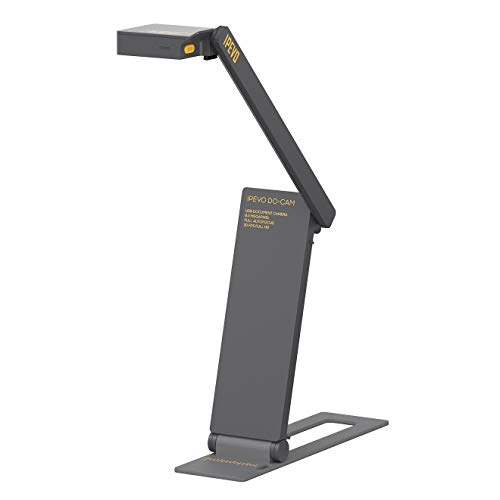
IPEVO DO-CAM — The compact traveller
The standard DO-CAM’s title walks almost exactly the ground of its Creator’s Edition sibling — portable and compact, Ultra HD 8MP, USB, professional visual presentations and communication — with two small differences worth a careful buyer’s attention. It names real-time image capture among its functions, where the Creator’s Edition does not, and it closes its compatibility sentence with conference calls and distance learning, in grey. Real-time image capture is a modest phrase with a practical payload for teachers: the ability to grab the frame — the pupil’s diagram, the worked example, the object at its best angle — as an image for the class record, the shared drive or the worksheet being built that evening. A travelling camera that can also harvest stills from its travels earns its pocket space twice.
Beyond that phrase, this review declines to invent differences, because the titles offer none worth inventing. Both cameras are IPEVO’s portable-compact answer to the same working life, and the sensible comparison between the two listings is the one the buyer performs on the day: what each bundle includes, what each currently states in its full detail, and which finish suits the bag it will live in. Grey, the stated colour here, is the finish that forgives a travelling life — scuffs and marks sit quieter on it than on brighter colours, a trivial-sounding virtue that a camera pulled from bags twice a day appreciates by half-term.
As with its sibling, the silences are recorded rather than filled: no fold is claimed, no microphone or light or capture area is stated. The DO-CAM’s travelling case rests on the two words its title does claim — portable, compact — joined to an 8MP sensor and a use list that covers the mobile professional’s whole week. For the teacher whose camera must simply always be there, small and ready, that is a coherent and honest proposition, and the standard model’s real-time capture gives it a slight documentary edge for classroom record-keeping.
- Sensor stated: Ultra HD 8MP
- Form stated: Portable and compact
- Connection stated: USB
- Functions stated: Real-time image capture; webcam for conference calls
- Uses stated: Professional visual presentations, distance learning
- Colour stated: Gray
- Folding design: Not stated in the listing title — verify with the manufacturer documentation
- Built-in microphone: Not stated in the listing title — verify with the manufacturer documentation
Strengths
- Real-time image capture turns demonstrations into records and resources.
- The portable, compact body and grey finish suit a twice-daily bag life.
- Its stated uses cover presentation, calls and distance learning in one device.
Trade-offs
- Portability rests on smallness; no folding design is stated.
- Audio, light and capture details await the manufacturer documentation.
- Near-identical to its Creator’s Edition sibling, so the listings themselves must arbitrate the choice.
Best for: travelling teachers who want stills from their demonstrations as well as live images, in a compact grey body. Not suited for: travelling teaching whose material needs stated A3 capture or a built-in microphone confirmed in the title.
See the standard DO-CAM’s Amazon listing: check price on Amazon.

IPEVO V4K — Simple standard for any room
The V4K makes no portability claim in its title at all, and its inclusion in a folding guide is a deliberate argument: some cameras travel well not because of their bodies but because of their manners. The title states an ultra high definition 8MP USB document camera compatible with Mac OS, Windows and Chromebook, for live demo, web conferencing, distance learning and remote teaching. That is the specification of a camera that asks a strange room for exactly one thing — a USB port — and repays it by working. A teacher carrying the V4K between classrooms is carrying certainty about the encounter with each room’s computer, which is the encounter that actually decides whether the lesson starts on time.
Departments understand this value instinctively, which is why models of this profile become corridor standards: the same camera in several rooms, or the same camera following a teacher, behaving identically everywhere. Shared know-how accumulates around a standard — the supply teacher has met one before, the colleague’s setup advice transfers, the one-page instruction card taped in each room describes the camera in your hand. A folding mechanism cannot buy that familiarity; only sameness can, and the V4K’s broad stated compatibility is sameness engineered into a listing title.
The travelling debits are recorded plainly. No folding or portable claim is stated, so the bag must accommodate the camera’s working shape, whatever the documentation gives as its dimensions. No microphone or light is stated, so the hybrid lesson at the journey’s end needs the room’s or the computer’s audio, and lighting the room can manage. None of this disqualifies the V4K from a travelling life — generations of teachers have carried less suitable objects — but it defines the kind of traveller it suits: the one moving between equipped classrooms on one site, rather than the one teaching from bare rooms and kitchen tables.
- Sensor stated: 8MP, ultra high definition
- Connection stated: USB
- Compatibility stated: Mac OS, Windows, Chromebook
- Uses stated: Live demo, web conferencing, distance learning, remote teaching
- Folding / portable design: Not stated in the listing title — verify with the manufacturer documentation
- Built-in microphone: Not stated in the listing title — verify with the manufacturer documentation
- Capture area: Not stated in the listing title — verify with the manufacturer documentation
Strengths
- Three-platform compatibility makes it the safest encounter with an unfamiliar classroom computer.
- A widely standardised profile means colleagues, cover teachers and setup cards all transfer.
- The stated uses cover the full in-room and remote teaching mixture.
Trade-offs
- No portability claim is stated; the bag accommodates its working shape.
- Audio and light are the destination room’s responsibility.
- Capture area is unstated for teachers of large-format material.
Best for: teachers moving between equipped classrooms who value a camera that behaves identically on every computer it meets. Not suited for: a bag-first traveller who needs the body itself to collapse or be declared compact.
Check the V4K’s current Amazon listing: check price on Amazon.
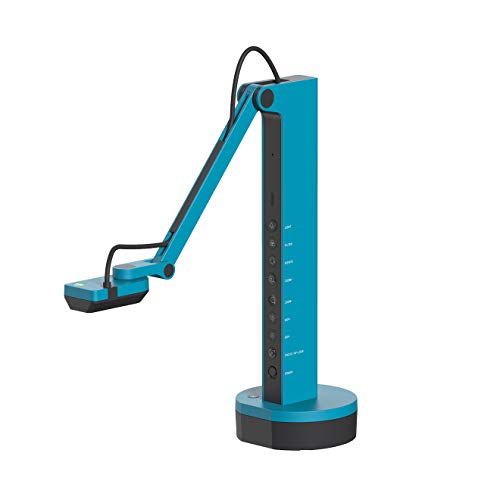
IPEVO VZ-X — Wireless freedom
The VZ-X attacks the travelling problem from the opposite end: not the body’s size but the cable’s tyranny. Its title states a wireless 8MP document camera with three modes of connectivity — Wi-Fi, HDMI and USB — compatible with web conferencing software, working wirelessly with iOS, tvOS and Android. Read that as a map of the rooms a travelling teacher actually meets. The room with a modern panel: HDMI, direct. The room with a teacher laptop: USB, familiar. The room with an Apple TV or a tablet-driven display: Wi-Fi and tvOS, with the camera standing where the material is rather than where the cable reaches. Three modes is not a specification flourish; it is three different classrooms answered by one device in the bag.
Wireless operation rearranges the demonstration itself. A tethered camera anchors the material to the desk’s geography — the page must come to the camera, the class watches the desk’s corner of the world. A wireless camera can stand at the demonstration bench, beside the pupil’s project at the back of the room, on the windowsill where the plants are growing, while its image travels to the screen without a cable crossing the floor for thirty pupils to trip over and one teacher to apologise for. For science-adjacent and project-based teaching, where the interesting objects refuse to live on the teacher’s desk, that freedom is the closest thing in this guide to a new capability rather than a convenience.
The debits are the honest price of the freedom. No folding or portable claim is stated, so the body’s travelling manners rest on the documentation rather than the title. Wireless modes introduce their own setup conversation — networks, pairing, the school Wi-Fi’s opinion of new devices — which should be rehearsed in each regular room before a lesson depends on it, exactly as a cabled camera’s drivers once were. No microphone or light is stated. But for the teacher whose rooms and material refuse to sit still, the VZ-X’s three stated modes make it the most genuinely mobile instrument in this comparison, mobile in the sense that matters: free of the desk.
- Sensor stated: 8MP
- Connectivity stated: Wi-Fi, HDMI and USB — three modes
- Wireless platforms stated: iOS, tvOS, Android
- Compatibility stated: Web conferencing software
- Folding / portable design: Not stated in the listing title — verify with the manufacturer documentation
- Built-in microphone: Not stated in the listing title — verify with the manufacturer documentation
- Built-in light: Not stated in the listing title — verify with the manufacturer documentation
Strengths
- Three connectivity modes answer wired, computer-free and wireless-display rooms with one camera.
- Wireless placement frees demonstrations from the desk’s corner and its cable hazards.
- tvOS and tablet compatibility suit the tablet-driven classrooms travelling teachers increasingly meet.
Trade-offs
- Wireless setup needs rehearsing in each room’s network before lessons rely on it.
- No folding or size claim is stated; portability is connectivity, not collapse.
- Microphone and light are unstated, so hybrid audio and dim rooms need other arrangements.
Best for: teachers whose material and rooms will not sit still, and whose displays include wireless and tablet-driven screens. Not suited for: a kit list whose first requirement is a stated folding body for the smallest possible bag.
Review the VZ-X listing on Amazon as it stands: check price on Amazon.

PAKOTOO 8MP USB Document Camera — The settled A3 base station
Every travelling kit implies a home base, and the PAKOTOO is included as this guide’s portrait of one. Its title states an 8MP USB document camera for A3 and A4 sizes, with a dual microphone, a three-level LED light and image inversion in both axes, for distance teaching and learning — and states no folding, portable or compact claim whatsoever. That silence is the review’s starting point: this is a camera designed to live somewhere, fully featured at its station, and its presence in a portability guide is as the measure of the trade. The teacher who carries a DO-CAM in the bag and keeps a PAKOTOO at the home desk owns both halves of the hybrid week; the teacher choosing only one should see clearly, in this pick, what the settled half offers.
What it offers is the complete distance-teaching station. Declared A3 and A4 capture frames the spread and the artwork whole. Dual microphones listen to a teacher who moves around the desk. Three light levels tame the home office’s evening gloom and the glossy page’s glare. Inversion in both axes corrects material fed from any side of the desk. None of those virtues travels, and all of them matter at the desk where remote lessons are actually taught — which, for many travelling teachers, is the most technically demanding desk of their week, because the remote pupil has no other window into the lesson.
Focus type is not stated, and the review leaves it to the documentation as before. The PAKOTOO’s role in the comparison is nonetheless precise: it demonstrates that portability is purchased with features, and it prices the exchange honestly. A department equipping hybrid staff should consider whether the right answer is one camera per teacher or a division of labour — travellers in the bag, stations on the desks where remote teaching concentrates — because the second arrangement, which this pick embodies, often serves the timetable better than asking a single folding body to be everywhere and everything.
- Sensor stated: 8MP
- Capture stated: A3 and A4 sizes
- Microphones stated: Dual mic
- Light stated: 3-level LED light
- Functions stated: Image inversion, up/down and left/right
- Folding / portable design: Not stated in the listing title — verify with the manufacturer documentation
- Focus type: Not stated in the listing title — verify with the manufacturer documentation
Strengths
- Declared A3/A4 capture with dual microphones makes a complete home-desk hybrid station.
- Three-level lighting handles evening remote lessons and glossy pages.
- Two-axis inversion corrects material from any side of the desk instantly.
Trade-offs
- No portability claim is stated; it anchors a desk rather than riding in a bag.
- Focus behaviour is unstated in the title.
- Its feature depth is surplus for a teacher who never teaches remotely.
Best for: the home or classroom desk where a travelling teacher’s remote lessons are taught, as the fully featured base of the kit. Not suited for: daily bag travel, which is the stated territory of the folding and compact picks.
Look over the PAKOTOO’s Amazon listing: check price on Amazon.

BexonRuihe USB Document Camera — Stated folder with microphone
The BexonRuihe closes the guide as the pick that uses the title word itself: a USB document camera for teachers with manual focus, a webcam role and a microphone, compatible with Mac OS, Windows and Chromebook, in a foldable design, for remote teaching and live demonstrations. In a comparison where several rivals offer portability by implication — smallness, simplicity, wireless freedom — the stated foldable design is a promise of a specific kind: the body is engineered to collapse, to take a travelling shape, to survive the bag as a designed condition rather than as an owner’s hope. Teachers who have watched a rigid camera arm snap its dignity in a crowded tote will read that single word with feeling.
Manual focus, its other stated discipline, suits the travelling page-teacher’s reality. The material is books and worksheets at a predictable distance; the focus is set for the desk of the day and holds, immune to hands crossing the frame. The stated microphone completes the minimal hybrid kit — image and voice in one folding object — so the borrowed classroom and the kitchen table both receive the complete lesson without a second device. Three-platform compatibility covers the computers the journey meets. As a specification, it is the leanest in this guide; as a match for the peripatetic teacher’s actual week, it may be the most precisely aimed.
The silences are recorded in the same spirit as everywhere in this guide: no sensor figure, no light, no capture area is stated, and each belongs to the manufacturer documentation for the buyer who needs it answered. A teacher whose material is A3, or whose rooms are dim, should confirm those points or look to the guide’s other picks. But for the teacher whose defining constraint is motion itself — five rooms, three buildings, a bag that is packed nightly — the BexonRuihe states the two things that matter most, foldable and microphone-equipped, and declines to pretend about the rest.
- Body stated: Foldable design
- Focus stated: Manual focus
- Microphone stated: Mic included
- Connection stated: USB; webcam and visualiser roles
- Compatibility stated: Mac OS, Windows, Chromebook
- Uses stated: Remote teaching, live demonstrations
- Sensor: Not stated in the listing title — verify with the manufacturer documentation
- Built-in light: Not stated in the listing title — verify with the manufacturer documentation
- Capture area: Not stated in the listing title — verify with the manufacturer documentation
Strengths
- A stated foldable design makes the travelling shape a designed promise, not a hope.
- A built-in microphone completes the hybrid kit in one folding object.
- Manual focus holds its plane through hands, pages and borrowed desks.
Trade-offs
- Sensor, light and capture area are unstated and rest on the documentation.
- Manual focus asks a hand’s attention when material changes depth often.
- Its leanness omits the lighting and dual-microphone depth of the settled picks.
Best for: peripatetic teachers who need a stated folding body and a microphone in the leanest travelling kit. Not suited for: A3 material or dim rooms, until capture and light are confirmed from the documentation.
See the BexonRuihe’s current listing on Amazon: check price on Amazon.
Comparison
| Camera | Portability claim stated | Connectivity stated | Microphone | Defining trait |
|---|---|---|---|---|
| IPEVO DO-CAM Creator’s Edition | Portable, compact | USB | Not stated in title | Presenter-grade portable for calls and remote work |
| IPEVO DO-CAM | Portable, compact | USB | Not stated in title | Compact traveller with real-time image capture |
| IPEVO V4K | Not stated in title | USB | Not stated in title | Three-platform standard that works anywhere |
| IPEVO VZ-X | Not stated in title | Wi-Fi, HDMI, USB | Not stated in title | Wireless placement freedom |
| PAKOTOO | Not stated in title | USB | Dual mic | Settled A3/A4 hybrid base station |
| BexonRuihe | Foldable design | USB | Mic | Stated folder with manual focus |
The second column is the guide’s conscience. One camera states foldable. Two state portable and compact. Three state nothing about their bodies, and earn their rows by connectivity, familiarity or features instead. A buyer who reads that column first will never be surprised by the camera that comes out of the box — and surprise, in a purchase made for a life in motion, is the one outcome the budget cannot afford.
What Should a Travelling Teacher Pack Around the Camera?
The camera is the centre of the kit, not the kit. Around it belong the artefacts of a hundred small rescues: a USB cable longer than the one in the box, because borrowed classrooms place their computers by their own logic; a second, shorter cable for the laptop-on-desk rooms; a plain mat or sheet of dark card that gives any desk a presentable stage and any page a calm background; a microfibre cloth, because the lens that travelled in a bag arrives filmed with the bag’s atmosphere; and the one-page setup card for each regular room, recording which input, which application and which network the camera needed there. None of this weighs anything. All of it converts the unfamiliar room from an expedition into a routine.
Pack for the audio reality too. Where a camera states no microphone — the DO-CAM pair, the V4K and the VZ-X in this guide — the travelling hybrid teacher’s kit needs a voice plan that travels: the laptop’s own microphone tested at teaching distance, or a headset that lives in the same bag. The BexonRuihe’s stated microphone and the PAKOTOO’s dual microphones at the home base show the two settled answers; the travelling answer is whatever you have rehearsed. An unrehearsed audio plan is the commonest reason a well-chosen portable camera gets blamed for a bad remote lesson.
Finally, pack the habit of the two-minute rehearsal. Arrive, unfold or place the camera, connect, and show one page to the empty room before the class enters. The rehearsal catches the dead port, the wrong input, the network that wants a password, while the catching is free. Travelling professionals in every field — musicians, photographers, examiners — sound-check as a religion. The travelling teacher’s camera deserves the same liturgy, and repays it with lessons that begin as if the room had always been theirs.
How Do Folding and Wireless Designs Change the Demonstration Itself?
A resident camera teaches from a fixed point of view, and classes absorb that point of view as the shape of knowledge: the desk’s corner, the page’s flatness, the object’s front. Portable designs loosen the geography. The folding camera that can be posed on a pupil’s desk turns the class’s own work into the demonstration without the work travelling; the wireless camera that can stand at the back of the room beside the growing plants or the half-built bridge brings the screen to the material instead of dragging the material to the screen. Teachers who adopt portable cameras often report the same discovery: they demonstrate more, in shorter bursts, from more places, because the activation energy of each demonstration has fallen. Frequency, more than fidelity, is what portability really buys a lesson.
The costs are real and should be budgeted as habits. A camera that moves must be re-posed and re-framed each time, and its focus — manual on the BexonRuihe, unstated on several others — must be re-established for each new distance. A wireless camera adds a network to the list of things that can have an opinion. The mitigations are the travelling craft of the previous section: marked positions, rehearsed setups, a mat that defines the stage wherever the stage happens to be. Teachers who build those habits find the portable camera disappears into the teaching; teachers who skip them find the camera reappearing, awkwardly, in every lesson’s first three minutes.
There is also a quieter change, in who presents. A camera light enough to carry and quick enough to pose can be handed — metaphorically and sometimes literally — to pupils: their desk becomes the stage, their work the material, their hands the demonstrator’s. Resident cameras, enthroned at the teacher’s desk, rarely make that journey. For departments that value pupil presentation as pedagogy, the portable camera is not merely a teacher’s convenience; it is a redistribution of the room’s attention, and worth choosing with that ambition in mind.
How Do You Settle a Portable Camera on an Unfamiliar Desk in Two Minutes?
Work in the same order every time, because order is what makes two minutes enough. First, position: place the camera at the desk’s corner nearest the screen’s sightline, on the plain mat from the kit, with the material’s space in front of it and the traffic of the room behind you rather than through the shot. Second, connection: the cable or the wireless mode you rehearsed for this room, and nothing experimental — new rooms are for teaching, not for discovering whether a different mode also works. Third, the test page: one sheet, shown to the empty room, checked for framing, focus and light from the furthest seat a pupil will occupy. Fourth, the queue: the lesson’s material stacked in order at the camera’s left, so the performance never waits on a search.
Each step retires a category of failure. Position retires the knocked camera and the wandering shadow. A rehearsed connection retires the login screen, the wrong input and the network negotiation. The test page retires the out-of-frame spread and the focus set for a distance the material never uses — a particular risk for the manual-focus BexonRuihe, whose set plane is a virtue only when it is set for the desk of the day. The queue retires the dead air in which classes decide to entertain themselves. Two minutes is not a boast; it is simply what a fixed order costs, and teachers who keep the order find that strange rooms stop feeling strange by the third visit.
Write the room’s answers down as you learn them. Which socket is live, which input the panel wants, whether the wireless mode or the cable won — a line on the setup card per room converts next visit’s two minutes into one. A term of such cards is the travelling teacher’s real infrastructure, worth more than any single specification in this guide, because it compounds: every room visited becomes a room known.
What Happens to Image Quality When a Camera Is Built to Travel?
Less than travellers fear, and the titles here show why: the portable picks state the same 8MP imaging class as the resident cameras in the companion guides, and the DO-CAM pair add an Ultra HD designation. Smallness in a modern camera is bought mostly with geometry, not with pixels — a shorter arm’s reach, a capture field the documentation must state, a body that asks the desk to be nearer the material. The travelling teacher’s image-quality risks are therefore practical rather than electronic: a lower stance that frames less of a large page, a lighter body that a knocked desk can jog, a lens filmed by its life in a bag. Each has a craft answer — the mat and the marked position for framing, a stable desk corner for the jog, the cloth for the lens — and none requires surrendering the portability that was the point.
Where travel genuinely taxes the image is at the extremes of the material. The A3 artwork that the resident PAKOTOO declares in its title is not declared by any travelling pick here, and a teacher whose portable life includes large material should treat that silence as the comparison’s most important sentence. Likewise the demonstration that depends on a stated light or dual microphones — declared by the settled PAKOTOO, absent from the portable titles — will be served at the destination by the room’s own resources or by the kit the teacher packs. Portability does not degrade the picture; it relocates responsibility for the picture’s conditions from the product to the professional, which is a fair trade only when the professional knows it has been made.
The wireless VZ-X reframes the question once more. Its image travels by Wi-Fi to screens and tablets, and its quality in a given room will be partly the network’s biography — a consideration no specification list can settle and only the two-minute rehearsal can. Teachers in wireless-rich schools will find it the most capable traveller here; teachers in buildings where the network is a rumour will use its HDMI and USB modes and lose nothing by the redundancy. That is the deepest sense in which the three stated modes matter: they let the camera’s quality be decided by the lesson, room by room, instead of by the building.
How Should a School Equip Staff Who Teach Across a Whole Site?
Start by counting journeys, not rooms. A site where six teachers each teach in four rooms has a portability problem; a site where twenty teachers each own a room has a residency problem wearing similar clothes. The first school buys travellers and stations: folding or compact cameras for the staff whose bags are offices, a smaller number of fully featured residents — the PAKOTOO’s profile — where remote lessons and large material concentrate, and perhaps a wireless VZ-X for the hall, the library and the other shared stages where no desk is anyone’s. The second school buys residents and keeps one or two travellers as the shared float for the week a room’s camera fails or a trip takes a class off site.
Standardise the float ruthlessly. A shared travelling camera should be one model, with one cable kit, one setup card format and one page of instructions that a colleague can follow without the owner’s phone number. The DO-CAM pair and the BexonRuihe each make a coherent float standard — compact polish in the first case, stated folding and a microphone in the second — and the choice between them should be made by the staff who will carry them, after a fortnight of real journeys, rather than by a catalogue comparison in an office. Tools that travel are adopted by their carriers or not at all.
Budget the invisible half: the bags, the spare cables, the replacement cycle for the camera that will inevitably be dropped in a car park in November. A fleet plan that prices only cameras will spend its second year improvising the accessories that make the first year work. Sites that equip mobile staff well discover the return in an unexpected currency — the demonstration habit spreads, because the tool is present in the rooms where demonstrations were previously impractical, and presence, repeated daily, becomes pedagogy.
Common Mistakes
Assuming every camera in a portability guide folds. Titles claim different things — foldable, portable, compact, or nothing — and the differences are the design’s intent written down. Buy the claim your bag actually needs, and treat an unstated claim as an unmade promise.
Testing the camera only at home. A travelling camera’s whole life is strange computers and strange rooms. Rehearse it on the oldest laptop, the locked-down Chromebook and the hall’s display before the timetable does the testing for you, in front of an audience.
Forgetting the far end of the hybrid lesson. Portability gets the camera to the room; the remote pupil still needs a voice and a lit page when it arrives. Cameras without a stated microphone or light need those arrangements packed alongside, rehearsed rather than improvised.
Packing the camera and nothing else. The cable that is too short, the missing mat, the absent setup card — the kit around the camera is what makes portability feel effortless. Teachers who pack only the device spend their ingenuity on logistics that a two-hundred-gram kit would have retired.
Judging a travelling camera by its home-desk performance alone. The resident station will almost always out-feature it, as the PAKOTOO here out-features the folders. The travelling camera’s test is the worst room of the week, not the best desk — buy for the room that has nothing.
What Is the First Journey a New Portable Camera Should Make?
A short one, to a friendly room, with a forgiving class. Let the camera’s first public performance be a single page in a lesson that does not depend on it, while the packing, the setup order and the test-page ritual are still conscious acts. Travelling equipment earns trust in instalments: the bag packed the same way each night, the joint folded without thought, the room’s setup card begun. By the fifth journey the liturgy is muscle memory and the camera has become what it was bought to be — not an event in the lesson, but a condition of it, present in rooms where no camera lived before. Choose the first journeys kindly and the hundredth will look after itself. Teachers who have made this transition before describe the same milestone, usually around the end of the first term: the moment a colleague in the corridor asks to borrow the camera for a single lesson, because word has travelled — as the camera itself does — that the thing simply works wherever it goes.
Final Recommendation
For the teacher whose bag is the office, the BexonRuihe states the essential promise — a foldable design with a microphone and manual focus that holds its plane — in the leanest kit here. For the presenter whose travelling week is calls and remote work as much as classrooms, the DO-CAM pair bring portable, compact polish, with the standard model’s real-time capture edging it for teachers who harvest stills from their demonstrations. The VZ-X is the choice when the rooms themselves are the obstacle: Wi-Fi, HDMI and USB together free the camera from every desk’s wiring. The V4K remains the standard to carry between equipped classrooms, and the PAKOTOO waits at the home desk as the fully featured station the remote lessons deserve. Pack the kit around whichever you choose, rehearse the two minutes in every new room, and the camera will stop being luggage and start being the lesson’s most reliable traveller.
How Do You Protect a Travelling Camera From the Journey Itself?
Give it a defined place rather than a shared volume. A camera riding loose in a tote among bottles, books and lunchboxes is being consumed by its own commute; a camera in a padded sleeve or a bag’s structured pocket, with its cable coiled beside it rather than around it, arrives as equipment instead of as cargo. The folding designs ask one specific courtesy: fold them along their joints, fully, rather than travelling them half-posed, because a joint held mid-travel is a joint taking the journey’s knocks at its weakest angle. The compact designs ask another: keep the lens capped or facedown against the sleeve, since the lens is the one surface the bag can permanently mark.
At the destination, unpack onto the mat, not the bare desk, and let the camera’s setup begin from the same physical arrangement every time. Habits of this smallness sound fussy in print and feel invisible in practice, and they are the entire difference between a travelling camera in its third year and one in its third month. The journey is not the interval between the camera’s work; for a portable instrument, the journey is half the work, and it should be resourced — with a sleeve, a routine and ten unhurried seconds — exactly as the lessons are.
Frequently Asked Questions
Is portable the same as foldable?
No, and the titles in this guide keep the words separate for a reason. Foldable describes a body engineered to collapse; portable and compact describe a camera designed small and light for carrying. The BexonRuihe states the first, the DO-CAM pair state the second, and several picks state neither — read the specification lists for the claim each camera actually makes.
Can a folding camera survive daily travel?
A designed fold is a designed stress path: the joint exists to be used. What shortens a travelling camera’s life is the treatment around the travelling — being forced past a joint’s stop, riding loose among hard objects, cables yanked rather than unplugged. A padded pocket, a coiled cable and ten seconds of care at packing time are the whole secret.
Do wireless document cameras work on school networks?
The VZ-X states Wi-Fi among its three modes and wireless working with iOS, tvOS and Android — but school networks have their own policies, and a camera that joins happily at home may need the IT team’s blessing at school. Rehearse in each regular room, and keep the HDMI and USB modes as the rehearsed fallback; the three-mode design exists precisely so one refused network cannot cancel a lesson.
What size of material can a portable camera show?
Only one pick in this guide declares its capture sizes — the PAKOTOO, with A3 and A4 — and it is the resident, not a traveller. The portable picks’ titles leave capture unstated, so a teacher whose travelling material is large should confirm framing in the manufacturer documentation before building a scheme of work around any of them.
Should a travelling teacher also keep a desk camera?
Many should. The division of labour — a folding or compact camera in the bag, a fully featured station where remote lessons are taught — matches how hybrid weeks actually distribute. The PAKOTOO’s profile shows the station’s virtues: declared capture, dual microphones, adjustable light, none of which the bag should have to carry.
How do I keep setup fast in a new room?
Standardise everything that can be standardised: the same cable routine, the same application on your laptop, a setup card per regular room, and a two-minute rehearsal with one page before the class enters. Speed in a strange room is a prepared habit, not a talent — and after a term of travelling, the cards and routines will have quietly become the most valuable teaching equipment you own.
Related Guides
Presenters whose travelling ends in formal rooms — exhibits, evidence and a screen the whole room must read — should see how the portability questions change under those demands in our guide to courtroom document cameras. When the material that travels shrinks below page scale to coins, components and specimens, our comparison of digital microscope cameras takes over the argument. And for the inspector’s version of the travelling kit, where the camera leaves the classroom for roofs, walls and plant rooms, our roundup of thermal cameras for the home covers the instruments built for that journey.


