What's inside
- Key Takeaways
- Quick Picks
- How We Chose These Picks
- Comparison
- Is an LED or a Laser Projector Actually Better for Gaming?
- What Input Lag Figure Should a Gamer Actually Aim For?
- How Do You Set Up a Gaming Projector Room That Works?
- Which Games Show Off a Projector, and Which Expose One?
- What Does HDR Add to a Game Picture, and What Does It Ask in Return?
- Common Mistakes
- Final Recommendation
- Frequently Asked Questions
- Related Guides
As an Amazon Associate I earn from qualifying purchases. This post may contain affiliate links at no extra cost to you.
widgetverdict.com is reader-supported. When you buy through links on our site, we may earn an affiliate commission.
The search for the best led projectors for gaming starts with a naming problem, and this guide refuses to hide it. Of the six machines below, only two are actually LED projectors according to their own listing titles: the BenQ TH690ST, which calls itself a 4LED model, and the Optoma Photon Life PK32, whose title says LED outright. Three others — the BenQ TK710, the ViewSonic LX700-4K and the Optoma GT2400HDR — are laser projectors, and their titles say so just as plainly. The sixth, the Yaber T1 Pro2, does not state a light source in its title at all. That mix is not a flaw in the shortlist. It reflects how gaming projectors are actually sold in 2026: LED and laser have converged on the same job, and a buyer who filtered strictly by lamp technology would throw away some of the fastest machines on the shelf.
Why include laser models in an LED guide at all? Because the numbers that decide a gaming session are not written on the light source. They are input lag, refresh rate, throw distance and brightness, and on those measures the laser trio here posts the strongest figures in the group — the TK710 states 4ms of input lag, the LX700-4K states 4.2ms, and both claim 240Hz refresh support. A guide that excluded them on a technicality would be tidier and less useful. Instead, each review below names the light source exactly as the title states it, the spec box repeats it without embroidery, and a dedicated section further down weighs LED against laser honestly, so you can decide whether the distinction matters for the games you play and the room you play them in.
One rule governs every lag figure quoted below. Input lag is only quoted where a listing title prints it. The TH690ST states 8.3ms at 120Hz in its game mode, the TK710 states 4ms, and the LX700-4K states 4.2ms. The GT2400HDR says low input lag without a figure, so no figure is invented for it here. The PK32 and the T1 Pro2 say nothing about lag in their titles, and their spec boxes record that silence in plain words rather than filling it with a borrowed number from a review elsewhere. Gaming buyers live and die by milliseconds they cannot see on a spec sheet they half trust; the least a guide can do is keep the confirmed numbers and the unknowns in separate piles.
Key Takeaways
- Only two of the six picks are LED by their own titles — the BenQ TH690ST (4LED) and the Optoma Photon Life PK32 (LED); the TK710, LX700-4K and GT2400HDR are laser models, named as such in every review below.
- Stated input lag figures exist for just three picks: 4ms on the BenQ TK710, 4.2ms on the ViewSonic LX700-4K and 8.3ms at 120Hz on the BenQ TH690ST.
- The TH690ST and GT2400HDR are the short throw pair, built for big pictures in small rooms where a coffee table sits close to the wall.
- Brightness runs from the PK32’s stated 1,100 lumens to the GT2400HDR’s stated 4,200 lumens, which maps roughly onto dark-room versus lights-on play.
- The Yaber T1 Pro2 is the portable outlier: native 1080p with HDR10 and auto focus in a mini body, with neither a light source nor a lag figure stated in its title.
Quick Picks
| Pick | Badge | Why it earns its place |
|---|---|---|
| BenQ TH690ST 4LED Short Throw Gaming Projector | True 4LED short throw pick | The one machine here that is both genuinely LED and genuinely built for games, with a stated 8.3ms at 120Hz game mode and a short throw for small rooms. |
| Optoma Photon Life PK32 4K LED Projector | LED 4K living-room pick | A true LED machine by its title, presenting 4K UHD at a stated 1,100 lumens with premium auto-setup doing the alignment work for you. |
| BenQ TK710 4K Laser | Fastest stated lag in the guide | A laser projector — stated openly — with the sharpest gaming numbers here: 4ms input lag, 240Hz refresh and 3200 lumens of brightness. |
| ViewSonic LX700-4K Laser Gaming Projector | Xbox-focused 4K laser pick | Another openly laser machine, tuned around Xbox play with a stated 4.2ms lag, 240Hz support and the highest resolution-plus-brightness pairing here. |
| Optoma GT2400HDR Short Throw Gaming Laser | Brightest short throw pick | A laser short throw machine with the highest stated brightness here — 4,200 lumens — aimed at gaming and golf simulation in ordinary rooms. |
| Yaber T1 Pro2 Mini Projector | Portable native 1080p pick | A mini projector stating native 1080p with HDR10, Dolby Audio and auto focus — gaming as a portable pleasure rather than a fixed installation. |
How We Chose These Picks
The selection began with a single question: what does a projector have to do before a game feels right on it? The answer has four parts. The picture must arrive quickly, which is the input lag question. It must update smoothly, which is the refresh rate question. It must fit the room, which is the throw distance question — a long-throw machine behind a sofa and a short-throw machine on a low table are different products wearing the same category name. And it must be bright enough for the light the room actually has at the hour games get played, which for many households is early evening with curtains drawn imperfectly, not a sealed cinema at midnight.
Against those four tests, the six picks divide into clear roles rather than a single ranking. Two LED machines anchor the guide’s title honestly. Three laser machines earn their places on stated speed figures and brightness that LED models in this company do not match. One portable mini projector serves the player whose gaming happens in different rooms, at friends’ houses and outdoors after dark. Every fact claimed for a pick comes from its listing title; where a title is silent — most often on input lag — the silence is printed in the spec box instead of being smoothed over.
A note on resolution, because the badges invite confusion. The TH690ST and GT2400HDR are 1080p machines. The PK32, TK710 and LX700-4K present themselves as 4K UHD models. The T1 Pro2 states native 1080p with HDR10. For gaming, that ladder matters less than reflex suggests: a 1080p image at a high refresh rate with low lag usually feels faster and plays better than a 4K image arriving late, and several of these machines make exactly that trade in their game modes. The reviews judge each pick first on the gaming numbers it actually states, and treat resolution as the second question, which is the order competitive players themselves use.

BenQ TH690ST 4LED Short Throw Gaming Projector — True 4LED short throw pick
Begin with the badge, because this projector is the reason the guide’s title can be used without an asterisk. The TH690ST calls itself a 4LED projector in its own name, and that architecture is the substance behind the claim: four LEDs rather than a single lamp or a colour wheel arrangement, which in practical terms means instant on and off, no lamp replacements on a schedule, and colour that holds up well in game mode. Buyers who came to this page wanting an LED gaming projector specifically — for the longevity, for the lack of a spinning wheel, for the way LED machines behave when switched on for a forty-minute session rather than a three-hour film — are looking at the pick that answers the search most literally.
The gaming figures are stated and respectable. Game mode delivers 8.3ms of input lag at 120Hz, a pairing that tells an honest story: at 120 frames per second, a frame lasts about 8.3 milliseconds, so the projector is adding roughly a frame of delay, which fast players can work with and most players will never consciously feel outside of rhythm games and high-level fighting play. The resolution is 1080p with HDR support, and the stated brightness is 2300 lumens — enough for a darkened room and a dimmed one, not a specification that promises victory over afternoon sun through open blinds. Short throw geometry does the rest of the work: the machine sits close to the wall and still fills it, which keeps the projector out of the play space, away from gesturing arms and wandering pets, and lets a small bedroom or a student room host a screen size a television in that room could never justify.
The supporting details suit a console household. Dual HDMI inputs mean a PlayStation 5 and an Xbox Series X or S — both named in the title — can stay plugged in without a cable swap ritual, and an S/PDIF output gives a soundbar or an older amplifier a clean digital feed while the built-in speakers, stated as two 5W units, cover casual play. Two-dimensional keystone correction helps when the projector cannot sit perfectly square to the wall, though competitive players should still aim for a square setup, since heavy digital correction is rarely a friend to sharpness or latency. Three-dimensional content support is stated too, a legacy pleasure that a shrinking number of machines still offer. Taken together, this is the most complete answer to the literal question the keyword asks.
- Light source stated: 4LED
- Resolution stated: 1080p with HDR
- Brightness stated: 2300lm
- Input lag stated: 8.3ms at 120Hz in Game Mode
- Throw stated: Short throw
- Inputs stated: Dual HDMI, S/PDIF output
- Speakers stated: 5W x 2
- Extras stated: 2D keystone, 3D support, PS5 and Xbox Series X and S named
Strengths
- It is a genuine LED machine, so the guide’s core promise is met without qualification.
- The stated 8.3ms at 120Hz gives console players a concrete, usable lag figure rather than a vague low-lag claim.
- Short throw placement keeps the projector close to the wall and out of the room’s traffic.
Trade-offs
- At 1080p it concedes resolution to the 4K picks, which matters more for films and desktop text than for fast games.
- The stated 2300lm brightness suits darkened rooms better than bright living rooms at midday.
- Keystone correction is a convenience to use lightly; a square physical setup remains the better route to a sharp, fast image.
Best for: console players who want a real LED light source, a stated lag figure and a big picture from a short distance in a bedroom or small living room. Not suited for: a sunlit open-plan room at midday, where its stated 2300lm will look washed out no matter how the curtains are arranged.
Look over the TH690ST listing on Amazon to confirm the current bundle: check price on Amazon.

Optoma Photon Life PK32 4K LED Projector — LED 4K living-room pick
The Photon Life PK32 is the second honest LED in the room, and it aims at a different evening than the BenQ above it. Its title leads with 4K UHD and describes a home entertainment and gaming projector, in that order, which is a fair summary of its character: this is a living-room machine that plays games gladly, rather than a gaming machine that tolerates films. The LED light source is stated plainly, and with it come the familiar LED virtues — quick start, long service life, no lamp to budget for — in a projector pitched at the household screen rather than the dedicated games room.
Brightness is the number to read carefully. The title states 1,100 lumens, the lowest figure among the six picks, and that single fact arranges the PK32’s whole life. In a darkened room, on a screen of moderate size, 1,100 lumens with 4K detail is a perfectly coherent proposition: films look rich, story games look lush, and the picture rewards the viewer who controls the light. In a bright room, or stretched across a very large wall, the same figure will feel thin, and no setting inside the projector changes that arithmetic. Buyers should size their expectations — and their screen — to the number rather than hoping the number behaves differently in their house.
The feature the title chooses to boast about is premium auto-setup, and for this class of projector that boast is well aimed. Machines that move between rooms, or that live on a sideboard rather than a ceiling mount, spend their lives being knocked a few degrees off square; auto-setup that handles focus and alignment on each power-up removes the fiddly preamble from every session. What the title does not state is an input lag figure, and this guide will not supply one. For turn-based games, racers played casually, platformers and the whole story-driven catalogue, the absence of a published figure is a shrug. For a player whose evenings are ranked fighting game sets, it is a genuine unknown, and the honest recommendation is to treat the picks above and below this one — which print their milliseconds — as the competitive shortlist.
- Light source stated: LED
- Resolution stated: 4K UHD
- Brightness stated: 1,100 lumens
- Setup stated: Premium auto-setup
- Positioning stated: Home entertainment and gaming
- Input lag: Not stated in the listing title — verify with the manufacturer documentation
- Throw type: Not stated in the listing title — verify with the manufacturer documentation
- Speakers: Not stated in the listing title — verify with the manufacturer documentation
Strengths
- A stated LED light source with 4K UHD resolution, a combination none of the other picks offers in one title.
- Premium auto-setup suits a projector that gets moved, bumped and re-aimed between sessions.
- Its entertainment-first tuning fits households where film nights outnumber ranked matches.
Trade-offs
- The stated 1,100 lumens is the dimmest figure here, so screen size and room darkness need to respect it.
- No input lag figure is stated, which leaves competitive players without the number they shop by.
- Nothing in the title addresses throw distance, so room fit must be confirmed from the manufacturer documentation.
Best for: households wanting an LED 4K picture for films and relaxed gaming in a room that can be properly darkened. Not suited for: ranked fighting or rhythm play, where an unstated input lag figure is a risk the stated-figure picks remove.
Check the Photon Life PK32 listing on Amazon for its present details: check price on Amazon.

BenQ TK710 4K Laser — Fastest stated lag in the guide
Say it in the first sentence, because the whole LED-versus-laser discussion in this guide pivots on this machine: the TK710 is a laser projector. Its title says 4K HDR Laser without apology, and it earns its place in an LED guide by posting the strongest gaming specification on the page. Four milliseconds of stated input lag is the lowest figure among the six picks. A 240Hz refresh rate is stated twice in the title, as if BenQ wanted no reader to miss it. For the player who measures a projector the way they measure a monitor — milliseconds first, everything else second — this is the machine the rest of the list has to answer.
Unpack what those numbers buy. At 240Hz a frame lasts a little over four milliseconds, so a 4ms lag figure means the projector is keeping pace with the fastest signal it accepts rather than trailing it; fast pans stay fast, and the delay between a button press and its consequence shrinks toward the floor set by the console and the controller themselves. The stated brightness is 3200 lumens, which widens the rooms this machine can serve beyond the dedicated dark den — a living room with the lamps low and the curtains drawn is comfortably within reach. HDR10 support is stated, and for games that master their highlights well, that translates into muzzle flashes, headlights and sunlit levels that hold detail instead of blowing out to white.
The installation features read like they were written by someone who has actually mounted a projector. Lens shift is stated, which lets the image be moved mechanically without tilting the machine and reaching for keystone correction — the clean way to align a picture, preserving sharpness and, in spirit at least, the purity of that 4ms pipeline. A 1.3x zoom gives placement flexibility front to back. eARC support means a single HDMI cable can carry high-quality audio back to a soundbar or receiver, which matters in a gaming setup where the projector sits far from the speakers. A three-year warranty is stated in the title, an unusually concrete promise to find in a listing. None of this makes the TK710 an LED projector, and this review does not claim that; it makes it the speed benchmark against which the true LED picks should be judged.
- Light source stated: Laser
- Resolution stated: 4K with HDR10
- Brightness stated: 3200 lumens
- Input lag stated: 4ms
- Refresh rate stated: 240Hz
- Optics stated: Lens shift, 1.3x zoom
- Audio stated: eARC support
- Warranty stated: 3 year warranty
Strengths
- The stated 4ms input lag is the lowest figure in this guide.
- Lens shift allows proper alignment without leaning on digital keystone correction.
- At a stated 3200 lumens it stays credible in rooms that are dimmed rather than blacked out.
Trade-offs
- It is a laser machine, so buyers committed to LED technology specifically should look at the TH690ST or PK32 instead.
- No built-in speaker power is stated in the title, so external audio deserves a line in the budget and the plan.
- Its speed figures reward fast sources; a 60Hz console feed will not show what the 240Hz support exists for.
Best for: competitive and fast-twitch players who shop by milliseconds and want 4K detail alongside them. Not suited for: a purchase defined by an LED-only requirement — this machine is laser, and its spec box says so without hedging.
Review the TK710 listing on Amazon before deciding where your priorities sit: check price on Amazon.

ViewSonic LX700-4K Laser Gaming Projector — Xbox-focused 4K laser pick
The LX700-4K wears its allegiance in its title: 240Hz Xbox. ViewSonic built this laser projector — laser, again, stated in its name — around Microsoft’s console, and the specification follows that brief. Input lag is stated at 4.2ms, a whisker behind the BenQ TK710 and comfortably in the territory where the projector stops being the slowest link in the chain. Brightness is stated at 3500 lumens, the second-highest figure in this guide, and the resolution is 4K UHD. For an Xbox household with a living room that never quite gets dark, that trio of numbers is a coherent answer: sharp, bright and quick, in the room as it actually is at seven in the evening.
Dual HDMI inputs are stated, which in an Xbox-centred home usually means the console on one port and a streaming stick, a second console or a PC on the other, with no cable swapping behind the unit. Streaming itself is mentioned in the title, reflecting how these machines now live: half game display, half the household’s big screen for everything else. SuperColor is ViewSonic’s colour branding, stated here alongside HDR support; treat both as indications of intent rather than measurements, and expect the practical outcome to be saturated, lively game worlds rather than a calibrated cinema presentation. Optical zoom and keystone correction are both stated, giving the installer two different tools — the zoom for honest placement flexibility, the keystone for the imperfect room where the projector cannot sit dead square.
Where does it sit against the TK710, its obvious rival? The BenQ states the lower lag figure by a hair and adds lens shift, the more elegant alignment tool. The ViewSonic states more brightness and leans harder into the Xbox identity, with 240Hz support called out next to the console’s name. Neither is an LED projector, and a buyer whose heart is set on LED should not be talked out of it by either. But for the household that arrived at this guide through a search box and stays for the gaming numbers, the LX700-4K makes the laser case about as strongly as it can be made: the milliseconds and the lumens are printed in the title, and they are both excellent.
- Light source stated: Laser
- Resolution stated: 4K UHD
- Brightness stated: 3500 lumens
- Input lag stated: 4.2ms
- Refresh stated: 240Hz, Xbox named
- Inputs stated: Dual HDMI
- Optics stated: Optical zoom, keystone correction
- Colour stated: SuperColor, HDR support
Strengths
- A stated 4.2ms lag pairs with the guide’s second-highest brightness figure.
- The Xbox-focused tuning and dual HDMI suit a console-first living room.
- Optical zoom gives real placement freedom before keystone correction is needed.
Trade-offs
- It is laser, not LED, which settles the question for technology-specific buyers.
- Lens shift is not claimed in the title, so off-centre mounting leans on zoom and keystone instead.
- Streaming is mentioned without a named platform in the title, so app availability needs confirming for your services.
Best for: Xbox households wanting a bright 4K picture and a stated low-lag figure for a living room that stays fairly light. Not suited for: a ceiling installation that must be significantly off-axis, where the absence of stated lens shift makes alignment harder work.
See the LX700-4K listing on Amazon for the full current specification: check price on Amazon.
Optoma GT2400HDR Short Throw Gaming Laser — Brightest short throw pick
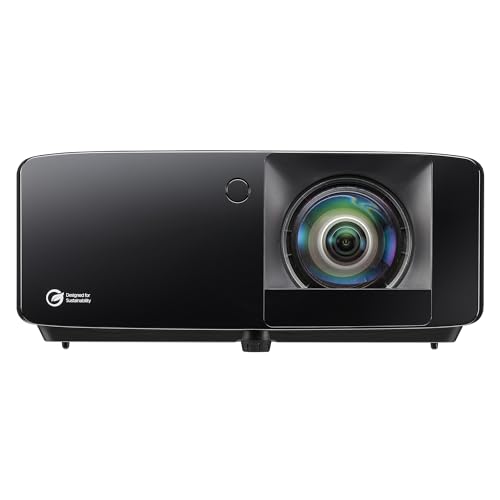
The GT2400HDR completes the laser trio, and its title reads like a checklist of practical virtues: Full HD 1080p, 4,200 lumens, short throw, laser, low input lag gaming, golf simulation ready. Start with the brightness, because 4,200 lumens is the largest figure in this guide and it changes where the machine can live. Golf simulation is the tell. A simulator bay is rarely a blacked-out cinema; it is a garage, a spare room or a garden studio with light leaking in, and a projector that stays watchable there will stay watchable in a family living room at dusk with a lamp on. Buyers whose rooms refuse to darken — and there are more of those rooms than projector marketing admits — should read this pick first among the short throw options.
Short throw is the second half of the proposition. Like the TH690ST, the GT2400HDR sits close to the screen and throws a large image across a short distance, which in a simulator bay keeps the projector safely out of the swing, and in a living room keeps it on a low cabinet rather than mounted behind the sofa. The resolution is Full HD 1080p rather than 4K, a trade this guide regards as defensible for its stated jobs: at gaming distances, on moving images, the difference between a sharp 1080p picture and a 4K one is far smaller than the difference brightness makes in a lit room. The HDR in its name signals high dynamic range support for compatible content.
Now the honesty item. The title claims low input lag without printing a number, and in a guide where rivals state 4ms, 4.2ms and 8.3ms outright, that omission must be carried into the open rather than filled in. Optoma’s gaming line has a reputation in this area, but reputations are not specifications, and this review deals in specifications. The practical reading is this: for golf simulation, sports games, racers and the broad middle of console play, the GT2400HDR’s combination of brightness and placement is compelling even with the figure unstated. For the player choosing specifically on milliseconds, the stated-figure picks give firmer ground. The machine’s case rests on light and geometry, and on those two axes it is the strongest short throw option here.
- Light source stated: Laser
- Resolution stated: Full HD 1080p
- Brightness stated: 4,200 lumens
- Throw stated: Short throw
- Input lag: Stated as low input lag in the title, with no figure given
- Use stated: Gaming, golf simulation ready
- HDR: Named in the model designation
- Speakers: Not stated in the listing title — verify with the manufacturer documentation
Strengths
- The stated 4,200 lumens is the highest brightness in the guide, opening up lit rooms and simulator bays.
- Short throw placement keeps it clear of golf swings, ceiling fans and the middle of the room.
- A 1080p laser at this brightness is a pragmatic pairing for fast, bright play.
Trade-offs
- No numeric input lag figure is stated, so millisecond shoppers cannot rank it against the 4ms picks.
- 1080p resolution concedes fine detail to the 4K machines on large screens viewed closely.
- Built-in audio is not described in the title, so plan on external sound for anything beyond casual play.
Best for: golf simulator builders and bright-room gamers who need short throw geometry and maximum stated brightness. Not suited for: a tournament fighting-game setup chosen purely on published lag figures, where this title offers a claim instead of a number.
Examine the GT2400HDR listing on Amazon to weigh its brightness against your room: check price on Amazon.

Yaber T1 Pro2 Mini Projector — Portable native 1080p pick
Every guide needs one pick that questions the premise, and the T1 Pro2 is this one’s. The other five machines assume a room: a wall, a cabinet or a mount, a console that lives in one place. The Yaber assumes a life instead — WiFi and Bluetooth in the title, portable in the description, outdoor and indoor use both named. Its gaming case is the gaming that actually fills many weeks: a co-op session on a bedroom wall, a football game in the garden after dark, a console carried to a friend’s flat where the projector is the screen. A mini projector with auto focus and auto keystone, as stated here, sets up in the time a fixed installation spends warming up its owner’s patience.
The stated picture specification is better than the mini class usually manages. Native 1080p is claimed in the title — native, the word that matters, meaning the imaging chip itself resolves Full HD rather than accepting a signal and downscaling it — with HDR10 support alongside. Auto focus and auto keystone are both stated, which in a machine that moves constantly is not a luxury but the whole point: point it at a wall, let it square and sharpen itself, play. Dolby Audio and a feature Yaber calls Turbo Sonic Bass suggest the built-in sound has been given more attention than the mini class average, which matters in exactly the portable situations this machine is for, where no soundbar travels with it.
Then the two silences, stated as plainly as they appear in the spec box. The title does not name a light source, so this review does not call the T1 Pro2 an LED projector, however likely that may seem for its class; likelihood is not a specification. The title also gives no input lag figure, so competitive play cannot be evaluated from the listing, and this machine should be bought for the gaming it describes — social, casual, portable — rather than for ranked ladders. Brightness, too, goes unstated in the title, which for a portable machine usually means: use it after dark, as its outdoor billing implies, and it will reward you; ask it to fight daylight and it will not. Judged on its own stated terms, it is the most flexible pick here. Judged as a tournament display, it is simply answering a different question.
- Resolution stated: Native 1080p FHD with HDR10
- Light source: Not stated in the listing title — verify with the manufacturer documentation
- Input lag: Not stated in the listing title — verify with the manufacturer documentation
- Brightness: Not stated in the listing title — verify with the manufacturer documentation
- Setup stated: Auto focus and auto keystone
- Audio stated: Dolby Audio, Turbo Sonic Bass
- Connectivity stated: WiFi and Bluetooth
- Use stated: Portable, outdoor and indoor
Strengths
- Native 1080p is stated outright, which separates it from mini projectors that only accept HD signals.
- Auto focus and auto keystone make each new wall a two-minute setup.
- Dolby Audio branding and a bass feature suit a machine that often plays without external speakers.
Trade-offs
- No input lag figure is stated, so its competitive gaming credentials cannot be judged from the listing.
- Brightness is unstated in the title, and portable minis should be planned around after-dark use.
- A mini projector’s built-in sound, however tuned, will not match a soundbar for film-scale dynamics.
Best for: players whose gaming moves between rooms, gardens and friends’ houses, and who value instant setup over installation permanence. Not suited for: a fixed esports corner where published lag figures and a mounted, aligned picture are the entire point.
Browse the T1 Pro2 listing on Amazon if portable play is your real use case: check price on Amazon.
Comparison
| Projector | Light source | Resolution | Stated lag | Stated brightness |
|---|---|---|---|---|
| BenQ TH690ST | 4LED | 1080p HDR | 8.3ms at 120Hz | 2300lm |
| Optoma Photon Life PK32 | LED | 4K UHD | Not stated in title | 1,100 lumens |
| BenQ TK710 | Laser | 4K HDR | 4ms | 3200 lumens |
| ViewSonic LX700-4K | Laser | 4K UHD | 4.2ms | 3500 lumens |
| Optoma GT2400HDR | Laser | Full HD 1080p | Low lag claimed, no figure | 4,200 lumens |
| Yaber T1 Pro2 | Not stated in title | Native 1080p | Not stated in title | Not stated in title |
The table is deliberately blunt about light sources, because blurring them would betray the search that brought you here. Two LED machines, three laser machines, one unstated. It is equally blunt about lag: three printed figures, one unquantified claim, two silences. Read across a row and each projector’s bargain appears — the TH690ST trades resolution for true LED light and short throw manners, the TK710 trades the LED badge for the fastest stated response, the GT2400HDR trades a published lag figure for the most brightness, and the PK32 trades brightness for LED 4K in a dark room. There is no row that wins every column, which is precisely why the choice belongs to your room and your games rather than to a ranking.
Is an LED or a Laser Projector Actually Better for Gaming?
Strip the marketing away and the two technologies differ in ways a gamer can feel, though not always in the ways the brochures suggest. LED projectors switch on instantly, reach full brightness without a warm-up curve, hold their colour as they age rather than dimming on a lamp’s schedule, and ask for no lamp replacements across a long service life. For the household pattern of gaming — short sessions, switched on for an hour after dinner, off again before bed — that instant, maintenance-free behaviour fits beautifully, and it is the honest core of the LED case. The TH690ST and PK32 in this guide carry that case, at 1080p and 4K respectively.
Laser projectors answer with output and focus. A laser light source can be driven brighter in this class — the three laser picks here state 3200, 3500 and 4,200 lumens against the LED pair’s 2300lm and 1,100 — and laser machines in this generation have chased gaming specifications hardest, which is why the 4ms and 4.2ms figures in this guide both belong to laser models. Laser sources also hold focus uniformity well across a large image and share LED’s long-life, no-lamp-replacement character. The costs are subtler: laser machines often carry higher prices within a range, and some viewers notice speckle on certain screen surfaces, a faint shimmer in flat areas of colour that most people never see and a few people cannot unsee.
So the practical verdict is unglamorous. Choose LED when your sessions are short and frequent, your room darkens well, and you value instant-on simplicity — the TH690ST embodies that choice for gaming specifically. Choose laser when you need brightness for a room that stays lit, or when the lowest stated lag is the whole point of the purchase, as it is for the TK710. What you should not do is choose by technology label alone and assume the gaming numbers follow; in this very guide, the fastest and slowest stated figures sit on opposite sides of the divide from where a label-first shopper would predict.
What Input Lag Figure Should a Gamer Actually Aim For?
Every frame arrives late by a small, stackable margin: the projector adds its own delay between receiving a frame and showing it, on top of every other delay in the chain: controller, console processing, the game engine itself. The projector’s share is the only share you buy, so it deserves scrutiny, but it also deserves proportion. As a working scale drawn from the figures in this guide: a stated 4ms or 4.2ms is excellent, effectively invisible even to practised players in fast genres. A stated 8.3ms at 120Hz is very good, roughly one frame at that refresh rate, and entirely workable for competitive console play outside the most timing-obsessed disciplines. Figures several times larger — common on projectors with heavy image processing left switched on — are where delay becomes a felt sponginess in aiming and platforming.
The companion lesson is that refresh rate and lag travel together. A projector accepting 120Hz or 240Hz signals, as the TH690ST, TK710 and LX700-4K state in their titles, can display frames sooner after they are rendered, which is a real responsiveness gain when the console or PC can feed those rates. Feeding a 240Hz-capable projector a locked 60Hz signal is not a failure — most console games still live there — but it leaves the machine’s headline talent unused. Match the source to the screen: players on current consoles should check which of their games offer 120Hz modes, and PC players should confirm their graphics card and cable can carry the rate and resolution they are imagining.
Finally, a warning about game modes, because every pick here leans on one. The low lag figures in listing titles are achieved in a dedicated game or low-latency mode, and engaging that mode commonly disables some picture processing and sometimes keystone correction. Set the projector up physically square, switch the game mode on, and leave it on for that input; toggling picture enhancements mid-session is how a fast projector gets made slow by its owner.
How Do You Set Up a Gaming Projector Room That Works?
Geometry first, because it is free. Place the projector square to the wall or screen — centred, level, at the height its throw expects — and use optical tools before digital ones: lens shift where it is stated, as on the TK710, zoom where it is stated, and keystone correction only for the last stubborn degree. Every degree of keystone is a small tax on sharpness, and on some machines engaging it rules out the fastest game mode entirely. Short throw models like the TH690ST and GT2400HDR simplify the room: a low cabinet close to the wall, cables short and tidy, and nobody’s shadow crossing the picture when they stand up for a drink.
Light second. Even the brightest pick here, at a stated 4,200 lumens, produces a better game picture with the room’s light controlled than a dimmer projector does in darkness — but the ranking between machines does not change, only the overall quality does. Blackout curtains on the window behind the players, a bias light behind the screen if eye strain creeps in during long sessions, and matte rather than glossy wall paint all pay off more reliably than any picture preset. Sound third: route audio out early in the setup, whether through the TH690ST’s S/PDIF, the TK710’s eARC or plain HDMI to a soundbar, because projector speakers — even the TH690ST’s stated dual 5W units — are built for intelligibility, not for the low-end weight that modern game soundtracks assume.
Wiring last, and briefly: the cable between console and projector must actually support the refresh rate and resolution you bought the machine for, at the length you run it. Long, elderly HDMI cables are the silent cause of many a 120Hz mode that refuses to appear in a settings menu. Test the full chain — console, cable, projector, game mode — on the first evening, at the settings you intend to keep, rather than discovering a limitation during the session that mattered.
Which Games Show Off a Projector, and Which Expose One?
Big, scenic games are the projector’s home turf. Open-world adventures, racing games with long sightlines and sports titles all gain something real from scale: a corner taken at genuine peripheral width, a stadium that fills a wall, a landscape that stops being a picture of a place and starts feeling like a view into one. Co-operative and split-screen games gain even more, because each player’s portion of a projected image can be larger than a whole television in a small flat — the social gaming that consoles were built for, restored to a size that suits it. The picks with stated brightness headroom, the laser trio especially, keep these scenes punchy in rooms that are merely dimmed.
The exposing genres are the timing purists. Rhythm games grade you on windows measured in milliseconds and will find every delay in the chain; high-level fighting games treat a frame as a unit of strategy. Players in those worlds should shop exactly as this guide’s spec boxes invite: by stated lag figures, in game mode, at the highest refresh rate their console sustains — the territory of the TK710 and LX700-4K, with the TH690ST’s 8.3ms at 120Hz as the LED standard-bearer. Text-heavy strategy and simulation games ask a different question, about resolution and focus uniformity across a huge image; the 4K picks answer it best, and the GT2400HDR’s golf simulation billing is a reminder that some genres care about brightness and geometry more than either speed or pixels.
What Does HDR Add to a Game Picture, and What Does It Ask in Return?
HDR appears across these titles in several forms — the TH690ST lists HDR alongside its 1080p resolution, the TK710 specifies HDR10, and the LX700-4K states HDR support — and it is worth understanding as a trade rather than a free upgrade. High dynamic range widens the distance between the darkest and brightest parts of the picture, so a torchlit cave keeps its shadows while the flame itself glows, and a racing game at sunset holds detail in both the tarmac and the sky. On a projector, whose absolute brightness is modest next to a television panel, HDR becomes a tone-mapping exercise: the machine decides how to fit a wide range into a narrower one, and the quality of that decision varies more between models than the badge on the box suggests. Two projectors can carry the same HDR label and produce noticeably different sunsets, which is why the label should start a buyer’s questions rather than finish them.
The return HDR asks is setup care. The source must be set to output it, the cable must carry it alongside the refresh rate you want, and the game itself usually carries an HDR calibration screen that deserves the five minutes it requests — peak brightness set by eye, in the room’s actual light, rather than accepted at defaults tuned for a different display in a different room. Players who skip that calibration often conclude HDR looks washed out, when what they are seeing is a correct signal mapped by incorrect settings. Treat HDR as the last step of the setup evening, after geometry, game mode and refresh rate are settled, and it becomes what the titles promise: a richer picture for the games that were mastered to use it, with highlights that behave like light instead of like white paint.
Common Mistakes
Shopping by the technology in the search box and never reading the light source in the title. Two of this guide’s six picks are LED, three are laser and one is unstated, and all six were sold under gaming searches. The title always knows; read it before the badge in any roundup, including this one, persuades you.
Treating an unquantified low-lag claim as a number. A projector that states 4ms and a projector that states the words low input lag are making different kinds of promise. The first can be held to account; the second is an invitation to check the manufacturer documentation before money moves, especially if your games are timing-critical.
Correcting a crooked setup with keystone and then wondering where the sharpness and the game mode went. Digital correction rescales the image, and on many machines it conflicts with the low-latency path. Ten minutes with a spirit level and a repositioned cabinet is worth more than any correction menu.
Feeding a high-refresh projector through an old cable and concluding the feature is broken. The chain is only as capable as its weakest link, and in most living rooms the weakest link is a long HDMI cable bought years ago for a slower standard.
Judging brightness by the biggest number on the page without asking about your room. A stated 1,100 lumens in a blacked-out bedroom beats 4,200 lumens fighting sunlight through a glass wall. The room is half the specification; measure it honestly before ranking the machines.
Final Recommendation
For the buyer who typed the search and means it literally, the BenQ TH690ST is the answer: a true 4LED gaming projector with a stated 8.3ms at 120Hz, short throw manners and console-friendly connections. For the buyer who means the spirit of the search — the best gaming picture in this company — the BenQ TK710’s stated 4ms and 240Hz make the laser case decisively, with the ViewSonic LX700-4K a breath behind it and brighter in the bargain. The Optoma GT2400HDR owns the bright-room and simulator corner, the Optoma Photon Life PK32 owns LED 4K for dark-room households that game gently, and the Yaber T1 Pro2 owns every evening that happens away from a fixed screen. Choose by the number you care about most — milliseconds, lumens or metres from the wall — and let the light source be the second line of the decision, which is where, on the evidence of these six titles, it belongs.
One last practical note before the questions below: whichever of these six you choose, spend the first evening on setup rather than on judgement. Align the picture physically, engage the game mode, confirm the refresh rate your console is actually sending, and only then decide what you think of the image. More projectors are condemned by a crooked first night than by any weakness in their light source, and the machines in this guide — LED and laser alike — all deserve a fair first hearing.
Frequently Asked Questions
Are laser projectors in an LED guide a mistake?
No — they are labelled as laser in their own titles, in their reviews here and in the comparison table, and they are included because their stated gaming figures lead the class. If your requirement is LED specifically, the TH690ST and the Photon Life PK32 are the two picks that meet it, and the guide says so wherever the distinction matters.
Is 8.3ms of input lag good enough for competitive play?
For the great majority of console competition, yes. At 120Hz, 8.3ms is roughly one frame of delay from the projector, and the TH690ST states that pairing openly. Players at the highest level of fighting or rhythm games may still prefer the stated 4ms of the TK710, but the difference is a refinement, not a disqualification.
Why do some picks have no input lag figure listed?
Because their listing titles do not state one. The PK32 and T1 Pro2 print no lag figure, and the GT2400HDR claims low input lag without a number. This guide records the silence in the spec box rather than importing a figure from elsewhere, and advises checking the manufacturer documentation if that number will decide your purchase.
Does 4K matter for gaming on a projector?
It matters most in slow, detailed games viewed from closer distances, and least in fast games where refresh rate and lag dominate the experience. Three picks here state 4K, three state 1080p or native 1080p; a sharp 1080p image at a high refresh rate is not a consolation prize, it is a legitimate configuration that many players prefer.
Can a short throw projector work in a normal living room?
Yes, and it often works better than a long throw design there. The TH690ST and GT2400HDR sit close to the wall on a low cabinet, keep cables short, and stay out of the room’s walking paths. The discipline required is alignment: square to the wall, level, with keystone correction kept as a last resort.
What should I check before buying any of these?
Confirm the light source and lag figure in the listing title itself, measure your throw distance against the machine’s stated type, make sure your HDMI cable supports the refresh rate you intend to use, and decide your audio route — S/PDIF, eARC or built-in speakers — before the projector arrives rather than after.
Related Guides
Players building a room around one of these machines may next want our guide to gaming projectors under the entry-level budget line, where smaller and simpler machines take over. Movie-first households should compare the home cinema angle in our roundup of home theater projectors at the same entry budget. And if the budget stretches further, our guide to projectors with built-in speakers at a higher tier shows what the extra money buys in sound and brightness.


