What's inside
- Key Takeaways
- Quick Picks
- How Did We Sort Travel Routers, Gateways and Home Routers Into One List?
- VPN Server at Home or VPN Client on the Road: Which Do You Actually Need?
- What Else Decides Whether a Working Day Runs Smoothly?
- How Do You Keep Calls Stable When the Whole House Is Online?
- What Does OpenWrt Actually Buy a Remote Worker?
- The Six Picks, From Suitcase to Spare Room
- Side by Side: Which Tool Fits Which Working Pattern?
- How Do You Set Up a Home VPN Server Without Locking Yourself Out?
- What Security Hygiene Does a Home Router Owe a Remote Worker?
- Working From Rentals, Second Homes and the Guest House
- What Mistakes Do Remote Workers Make When Buying a Router?
- What Should You Check During the First Week With a New Work Router?
- Final Recommendation
- Frequently Asked Questions
- Related Guides
As an Amazon Associate I earn from qualifying purchases. This post may contain affiliate links at no extra cost to you.
widgetverdict.com is reader-supported. When you buy through links on our site, we may earn an affiliate commission.
Where to buy: the six products below split into travel gear, a wired gateway and full home routers, so read each Amazon listing for the exact hardware in the box — a gateway with no Wi-Fi radios of its own looks identical in a thumbnail to a router that has them.
Remote work exposes a router in ways streaming never does. The best routers for remote work are not simply the fastest routers; they are the ones that keep a video call intelligible at 9 a.m., hold a VPN tunnel to the office without dropping it at lunch, and let you reach your home network securely when you are working from somewhere else entirely. A film buffering is an annoyance. A frozen screen-share in front of a client, or a tunnel that collapses mid-upload, is a professional problem — and it usually traces back to a router that was chosen for its headline wireless speed rather than for the unglamorous features this guide concentrates on.
That is why this list is deliberately mixed. Three of the six picks come from GL.iNet, a maker that treats VPN as the main event: a pocket travel router, a wired VPN gateway that can run a server and a client at the same time, and a Wi-Fi 7 home router built around VPN for home and gaming. The other three are conventional home routers — from Tenda, NETGEAR and Linksys — where VPN support, coverage and device capacity decide whether the working day runs smoothly. The honest thread running through every section: a VPN feature counts here only where the listing title itself names it. Where a title stays silent about VPN, the spec list says so in plain words rather than assuming the feature from a brand’s reputation, because firmware menus and marketing pages change faster than listings do.
One more framing note before the picks. “Remote work” pulls in two directions that buyers often confuse. Working from home needs a stable, well-covered home network and, increasingly, a VPN server at home so you can reach your own files and printers as if you were sitting at your desk. Working from anywhere — hotels, rentals, a client’s office — needs the opposite geometry: a small router that joins an untrusted network and wraps your laptop’s traffic in your own tunnel. This guide covers both directions and labels which pick serves which, because buying the travel tool for the home job, or the home tool for the road, is the most common way this purchase goes wrong.
Key Takeaways
- VPN is the deciding feature in this category, and it counts here only where the listing title names it — two picks are flagged where the title stays silent.
- A VPN server at home and a VPN client on the road are different jobs; the Brume 2 is listed as running both at once, the Beryl AX is built for the road.
- Travel routers trade raw coverage for safety on untrusted networks — hotel and café Wi-Fi is their home turf, not yours.
- For the home office itself, boring virtues win: stable firmware, enough coverage for the desk’s room, and wired ports for the work machine.
- Wi-Fi 7 and 6E headroom helps a house full of simultaneous calls, but no radio standard fixes an overloaded or badly placed router.
- Match the tool to the direction of travel: reach home from away, protect yourself while away, or simply keep the home desk online.
Quick Picks
| Pick | Badge | Why it earns its place |
|---|---|---|
| GL.iNet GL-MT3000 Beryl AX Wi-Fi 6 Travel Router | The road warrior | A pocket Wi-Fi 6 router with 2.5G WAN, VPN and OpenWrt, made to make hotel networks safe for work laptops. |
| GL.iNet GL-MT2500A Brume 2 Wired VPN Security Gateway | Server and client in one box | A wired gateway whose title promises a VPN server and client running simultaneously, aimed squarely at site-to-site and remote work. |
| GL.iNet GL-BE6500 Flint 3e Wi-Fi 7 Router with VPN | Home base with VPN built in | A Wi-Fi 7 BE6500 router whose title names VPN for home alongside streaming, gaming and video calls. |
| Tenda RX2L Pro AX1500 WiFi 6 Router | Budget desk anchor | VPN support, WPA3 and four gigabit ports in a vertical Wi-Fi 6 design for a single-room office corner. |
| NETGEAR Nighthawk RAX50 AX5400 Router | Mainstream coverage pick | Six-stream AX5400 Wi-Fi 6 with 2,500 sq. ft. of claimed coverage for a busy house; its title does not mention VPN. |
| Linksys Hydra Pro MR7500 WiFi 6E Mesh Router | Mesh-ready 6E option | Tri-band Wi-Fi 6E mesh router rated in its title for 55+ devices across home, work and guest house; VPN is not named in the title. |
How Did We Sort Travel Routers, Gateways and Home Routers Into One List?
By starting from the working day rather than from the spec sheet. We listed the failures remote workers actually report — the tunnel that drops, the call that pixellates when a housemate starts a download, the hotel network nobody trusts, the files stranded on a home machine — and then asked which hardware in our pool answers each failure. That produced three families. Travel routers answer the untrusted-network problem. A wired VPN gateway answers the reach-home and site-to-site problem. Full home routers answer the everyday problem of keeping a desk, in a house full of other people’s traffic, consistently connected.
The discipline rule for this guide is strict, because VPN claims are where router marketing gets slippery. A pick’s VPN capability is described as present only when its listing title says so — the two GL.iNet travel and gateway products and the Flint 3e say it outright, the Tenda says “VPN Support,” and the NETGEAR and Linksys titles do not mention VPN at all, which their sections state openly along with what that means for a buyer. Speeds, coverage and port counts follow the same rule: quoted from titles, attributed to titles, never borrowed from a review of a sibling model. Six products survived, and the mix is the message — remote work is a system, and the router is only one part of it.
VPN Server at Home or VPN Client on the Road: Which Do You Actually Need?
The vocabulary confuses buyers because both directions wear the same three letters. A VPN server at home means your router accepts an incoming encrypted connection, so a laptop in another city can join your home network and reach the NAS, the printer and the desktop machine as though it were plugged in at your desk. You need this if your files live at home, if your employer expects you to reach an office-adjacent home lab, or if two small sites — a home and a workshop, say — should behave like one network. A VPN client on a router means the router itself dials out to a VPN service or to another site’s server, wrapping some or all of your traffic in that tunnel; on the road, it is how a travel router turns a hotel network into a pipe you can trust.
The Brume 2’s title makes the strongest claim in this guide: run a VPN server and a VPN client on the same device at the same time, pitched at site-to-site and remote work. That simultaneity is genuinely useful — the gateway at home can host your incoming connection while also maintaining an outbound tunnel elsewhere — and it is a wired device’s party trick, since a gateway spends its whole life doing this one job. The Beryl AX plays the client role from your bag, and it can also serve as the home endpoint in lighter setups. The Flint 3e puts VPN into the main home router, which suits households that want one box rather than a gateway plus access points. Decide which direction your work actually travels before you shop; the right box follows from the direction, not the other way round.
What Else Decides Whether a Working Day Runs Smoothly?
Beyond VPN, three unglamorous factors decide most remote-work days. The first is placement and coverage for the desk specifically: a router rated for a whole house can still leave the spare-room desk behind two walls and a bathroom, so the coverage figures in the titles — 2,500 sq. ft. for the RAX50, 2,700 sq. ft. for the Hydra Pro — should be read as whole-home claims, with the desk’s actual position checked against them. The second is a wired option for the work machine. Every home pick here except the travel router offers Ethernet for the desk, and a cable to the laptop dock removes Wi-Fi from the equation for the one device whose calls pay the mortgage.
The third factor is contention. A remote worker rarely suffers from a slow router; they suffer from a busy house at the wrong moment — a console update, a housemate’s cloud backup, a 4K stream — all landing during a presentation. Newer Wi-Fi generations help by handling simultaneous devices more gracefully: the Hydra Pro’s title speaks of 55+ devices across home, work and guest house, and the Flint 3e’s Wi-Fi 7 design with MLO is pitched at exactly the streaming-plus-calls mix. But honesty requires saying that traffic management and a wired desk connection beat any radio standard. Buy the router whose features match your failure mode, then give the work machine the cable and the quiet corner of the network.
How Do You Keep Calls Stable When the Whole House Is Online?
The remote worker’s enemy is rarely average speed; it is the spike. Your connection tests beautifully at 7 a.m. and falls apart at 10, when a housemate’s console pulls a multi-gigabyte update, a cloud photo backup wakes up, and someone starts a 4K stream — all while you are presenting. Video calls need modest bandwidth but relentless consistency: a connection that delivers plenty on average yet stutters in bursts will smear voices and freeze slides, because the call cannot borrow back the seconds it lost. This is why so much of this guide’s advice is about removing contention rather than adding speed.
Three practical moves do most of the work. Wire the desk machine, as the picks sections keep insisting, and the call leaves the shared air entirely. Separate the household’s heavy background jobs in time where you can — backups and updates scheduled overnight stop ambushing the morning stand-up. And give the call a network with headroom: the reason Wi-Fi 6E and Wi-Fi 7 picks appear here is not their peak figures but their extra capacity lanes, the 6 GHz band on the Hydra Pro and MLO on the Flint 3e, which let a busy house spread out instead of queuing behind itself. None of this requires enterprise gear. It requires matching the router to the household’s busiest hour rather than to its quietest test result.
What Does OpenWrt Actually Buy a Remote Worker?
Two of the GL.iNet picks rest on OpenWrt foundations, and the name deserves unpacking because it signals a different ownership model. OpenWrt is an open, Linux-based router firmware with a long public history; on the Beryl AX it means the travel router’s behaviour — its VPN options, its handling of captive portals, its firewall — can be configured in depth and inspected rather than taken on faith. For a worker whose laptop carries client data onto hotel networks, that transparency is not hobbyist decoration; it is the difference between trusting a black box and running a system whose rules you set.
The honest counterweight is responsibility. Deep firmware rewards the user who reads one documentation page and punishes the one who changes three settings at midnight before a flight. GL.iNet layers its own friendlier interface over the foundation, so ordinary travel use stays simple, but the depth is there when a work trip turns strange — a network that needs a cloned MAC address, a portal that misbehaves, a tunnel protocol an employer prefers. Buy OpenWrt-based gear when you value that control; buy the mainstream picks when you want the network to disappear. Both are legitimate remote-work philosophies, and this guide’s split between GL.iNet and the big brands maps almost exactly onto that choice.
The Six Picks, From Suitcase to Spare Room

GL.iNet GL-MT3000 Beryl AX Wi-Fi 6 Travel Router — Your own network, anywhere
The Beryl AX exists for the nights when work happens on a network you do not control. In a hotel room or a short-let flat, you join the building’s Wi-Fi once with this little router, connect your laptop and phone to the Beryl’s own network instead, and let its VPN — named in the title, along with OpenWrt — wrap everything you send. The practical gains compound: your devices remember one trusted network across every trip, the hotel sees a single connection rather than your whole kit bag, and a captive portal is negotiated once, by the router, instead of separately by every gadget you own.
Seasoned road workers develop rituals around a device like this: the router comes out with the laptop, joins the room’s network while the kettle boils, and by the time the first call starts, every personal device is already on the trusted network with the tunnel up. That ritual quality matters because security habits that depend on remembering extra steps fail under travel fatigue. A dedicated travel router turns the safe behaviour into the default behaviour — you connect to the Beryl because it is your network, and the protection rides along without a decision. It also keeps work and personal traffic off a hotel’s per-device limits and login screens, a mundane frustration anyone who has fought a captive portal at midnight will recognise.
The title’s numbers describe a genuinely capable pocket router rather than a toy:
Wi-Fi 6 dual-band at 574 Mbps on 2.4 GHz plus 2,402 Mbps on 5 GHz, a 2.5G WAN port, a gigabit LAN port and USB 3.0. That LAN port matters more than it looks — plug the work laptop straight in and the most important device in the room stops depending on hotel airtime altogether. OpenWrt underneath means the firmware can be inspected, extended and configured far beyond travel-router norms, which is why these devices attract both security-conscious travellers and tinkerers. What it is not: a home router. Its radios are sized for a room, not a house, and asking it to cover a family home is the category error this guide opened with.
- Role: travel router for untrusted networks
- Wi-Fi: Wi-Fi 6 dual-band — 574 Mbps (2.4 GHz) + 2,402 Mbps (5 GHz), per the title
- Ports: 2.5G WAN, gigabit LAN, USB 3.0
- VPN and firmware: VPN named in the title; OpenWrt-based
- Coverage: the title gives no whole-home coverage figure — it is a single-room device by design, and we describe it that way rather than guessing
Strengths
- Purpose-built for hotel and rental networks, with VPN as a headline feature rather than a menu afterthought.
- A wired LAN port lets the work laptop bypass shared airtime entirely.
- OpenWrt foundations reward users who want to inspect and shape their own tunnel setup.
Trade-offs
- Single-room reach; it will not cover a house and was never meant to.
- Its VPN throughput is bounded by a pocket device’s processor — fine for calls and documents, not for moving huge files through the tunnel all day.
- You are the network administrator on the road; there is no IT desk when a setting is wrong.
Best for: consultants, field staff and anyone whose working week includes hotel desks and café tables. Not suited for: serving as the only router in a family home — its radios cover a room, so a household spread over several rooms needs a home router from further down this list.
The Beryl AX listing shows the port layout that makes wired laptop use on the road possible.

GL.iNet GL-MT2500A Brume 2 Wired VPN Security Gateway — The tunnel specialist
The Brume 2 is the most single-minded product in this guide: a wired VPN security gateway with a 2.5G WAN port and no Wi-Fi radios of its own, sold on one sentence in its title — run a VPN server and a VPN client on the same device at the same time, great for site-to-site and remote work. Sit it between your modem and your existing router or access points and it becomes the house’s tunnel endpoint: you dial home to it from a laptop anywhere, reach the machines behind it, and meanwhile it can hold its own outbound tunnel to another site or service without the two roles interfering.
Picture the working arrangement it enables, because the scenario is common: a designer keeps the project archive on a home NAS, works three days a week from a partner’s flat across town, and occasionally visits a small studio that shares files with the house. With the gateway hosting the server role, the laptop joins the home network from either place and the archive is simply there, at LAN speed for local machines and tunnel speed for remote ones. The client role running alongside keeps the house’s own outbound connection to the studio constant, so the two sites behave like one building with a long corridor. No cloud subscription mediates any of it — the traffic is yours, on hardware you own, which is precisely the appeal for workers handling material that should not sit on third-party servers.
That division of labour is exactly why a wired gateway still earns a place in a wireless world.
The device doing your encryption does nothing else — no radios to manage, no household traffic to prioritise — and it can be added to a network you already like instead of replacing it. The 2.5G WAN port keeps it ahead of gigabit internet plans, so the gateway does not become the ceiling on a fast connection. The limits are equally clear: it provides no Wi-Fi whatsoever, so a household buying it as “the router” still needs something to broadcast a network, and its value only materialises if your work genuinely involves reaching home from away or linking two sites. For the remote worker whose files live on a home machine, though, this is the most direct answer in the guide.
- Role: wired VPN security gateway — no Wi-Fi radios; pair it with your router or access points
- Headline capability: VPN server and VPN client running simultaneously, per the title
- Port: 2.5G WAN named in the title
- Intended uses named in the title: site-to-site links and remote work
- Wireless coverage: none by design — any coverage figure would belong to the access points you pair with it, not to this gateway
Strengths
- Server-plus-client simultaneity is a rare, genuinely useful trick for two-site workers.
- Adds serious VPN capability to an existing network without replacing routers you already like.
- A 2.5G WAN port keeps the gateway from capping a faster-than-gigabit connection.
Trade-offs
- No Wi-Fi at all; bought alone, it leaves a household with no network to join.
- Its value is invisible on days you work from the desk it sits beside.
- Site-to-site setups still demand configuration care at both ends — the hardware enables, it does not automate away, the networking.
Best for: a home worker who must reach home machines from elsewhere, or link a home and a small second site. It broadcasts nothing itself — there are no Wi-Fi radios inside, only wired 2.5G ports — so another router must still provide the household’s wireless network.
See how the gateway sits in a home setup on the Brume 2 listing.

GL.iNet GL-BE6500 Flint 3e Wi-Fi 7 Router with VPN — One box for the whole house
The Flint 3e is GL.iNet’s answer for households that like the travel-router philosophy but need it at home scale: a Wi-Fi 7 router whose title puts VPN for home and gaming in the product’s name, rated BE6500 at up to 6.5 Gbps with MLO and 4K-QAM, and pitched at 4K streaming, gaming and video calls in the same breath. For the remote worker, the significance is that the VPN habit — tunnels configured once, at the router, covering every device — moves from the suitcase to the hallway cupboard. Devices that cannot run VPN software of their own, from work-issued hardware to smart televisions, inherit the router’s tunnel by simply joining the network.
The Wi-Fi 7 toolkit is relevant to the working day in a specific way: MLO lets a device hold links across bands so a call survives a band getting busy, and the BE6500 class gives a crowded house headroom when calls, streams and game downloads coincide. GL.iNet’s OpenWrt-flavoured firmware heritage also means the settings go deeper than mainstream routers typically allow, which cuts both ways — powerful for the household’s designated network person, occasionally bewildering for everyone else. The title does not state a coverage figure, so we do not invent one; judge its reach as a single-unit home router to be placed centrally, and check the listing for the current detail if your desk sits at the far end of a long house.
- Role: full home router with VPN as a headline feature
- Wi-Fi: Wi-Fi 7, BE6500 class, up to 6.5 Gbps per the title
- Named technologies: MLO and 4K-QAM
- Title’s stated workloads: 4K streaming, gaming and video calls
- Coverage: the listing title states no square-foot figure for this model — verify the current listing detail against your floor plan before relying on a single unit for a large home
Strengths
- Router-level VPN covers devices that cannot run their own VPN software.
- Wi-Fi 7 with MLO suits houses where calls and streams collide daily.
- Deeper firmware control than mainstream rivals, in the GL.iNet tradition.
Trade-offs
- No coverage figure in the title, so large or awkward homes are a judgement call.
- Deep settings assume a household admin willing to use them.
- A single unit still obeys placement physics; it is not a mesh system.
Best for: a remote worker who wants one home router that handles the family’s traffic and the tunnel too. Not suited for: a sprawling multi-floor house needing several nodes — a single router, however new its Wi-Fi generation, cannot be in three rooms at once.
The Flint 3e listing carries the current firmware and port details for the home-VPN setup.

Tenda RX2L Pro AX1500 WiFi 6 Router — The honest budget anchor
Not every remote-work problem needs Wi-Fi 7 money spent on it. The Tenda RX2L Pro is an AX1500 Wi-Fi 6 router in a vertical design, and its title lists the working-from-home essentials without decoration: smart dual-band gigabit Wi-Fi, four GE ports, long-range coverage claims, VPN support, WPA3 and parental controls with easy setup. For a single worker in a flat, or a desk in one room of a house where the router can sit nearby, this is a rational specification — the four gigabit ports alone cover the classic desk cluster of laptop dock, desktop, printer and a spare for whatever arrives next.
Read the AX1500 class honestly: it is the entry tier of Wi-Fi 6, and in a household where three other people stream and game through the same router during your calls, its airtime budget will show. The vertical design takes little desk or shelf space and the router asks little of its owner, which for many home workers is the entire point — the network should be furniture, not a hobby. VPN support is named in the title, though the title does not specify server versus client roles, so a buyer whose plan depends on one particular role should confirm the implementation on the listing and in Tenda’s documentation before ordering. Within its tier, it is a straight deal: current security in WPA3, wired ports for the desk, and no pretending to be a flagship.
- Role: budget home router for a desk-centred setup
- Wi-Fi: Wi-Fi 6, AX1500 class, dual-band
- Ports: 4 × gigabit Ethernet (GE) ports, per the title
- VPN: support named in the title; the server/client split is not specified there — confirm the role you need in the listing documentation
- Security and extras: WPA3, parental controls, easy setup, vertical design
Strengths
- Four gigabit ports wire the whole desk cluster without a switch.
- WPA3 and named VPN support cover the remote-work checklist at an entry tier.
- Vertical footprint suits a desk corner or a narrow shelf.
Trade-offs
- AX1500 airtime is finite; a busy multi-streamer household will find its edges during your calls.
- VPN roles are unspecified in the title, so tunnel plans need a documentation check first.
- Coverage is described only as long-range in the title — no figure to plan a large home by.
Best for: a flat-dwelling remote worker, or a single dedicated office room with the router in it. Not suited for: a whole large house expecting one entry-tier router to serve every room and every housemate’s stream simultaneously.
Check the VPN implementation notes linked from the RX2L Pro listing if a specific tunnel role matters to you.

NETGEAR Nighthawk RAX50 AX5400 Router — Mainstream muscle, no VPN in the title
The RAX50 is the conventional choice in this guide: a six-stream AX5400 Wi-Fi 6 router, dual-band, rated in its title at up to 5.4 Gbps and 2,500 sq. ft. of coverage. For a remote worker whose employer provides the VPN software on the laptop — the most common arrangement in corporate life — the router’s job is simply to be a strong, stable pipe, and that is the job this Nighthawk is built for. Its streams and coverage suit a house where the office is a real room among other busy rooms, and NETGEAR’s Nighthawk line is the known-quantity option for buyers who want a mainstream brand’s firmware and support behind the home network.
There is a desk-specific virtue worth naming: six-stream Wi-Fi 6 routers of this class handle the modern open-plan problem — one room serving as office, another as classroom, a third as cinema — without the call quality becoming the household’s negotiable resource. If your employer’s IT department has a list of routers they will support questions about, a mainstream Nighthawk is the sort of name that appears on it, and there is real value in that boring compatibility when something breaks at 8:55 on a Monday morning.
The honesty note for this pick is short and important: the listing title does not mention VPN at all.
That does not make it a bad remote-work router — a laptop-side VPN client passes through any competent router — but it does mean you should not buy it expecting router-level tunnels, a home VPN server, or whole-network wrapping based on the title. If your work pattern needs the router itself to host or dial a tunnel, the GL.iNet picks above are the honest addresses for that need. Buy the RAX50 for what its title actually promises: six-stream Wi-Fi 6 coverage for a mid-sized home, from the desk’s point of view a strong signal and a router that stays out of the way.
- Role: mainstream home router; VPN handled by your devices, not promised by the router’s title
- Wi-Fi: Wi-Fi 6, six-stream AX5400, dual-band, up to 5.4 Gbps per the title
- Claimed coverage: 2,500 sq. ft., per the title
- VPN: not mentioned anywhere in the listing title — treat router-level VPN as unconfirmed and check NETGEAR’s current documentation if it is essential
- Brand line: Nighthawk series
Strengths
- Six-stream AX5400 capacity handles a house of simultaneous calls and streams.
- A stated 2,500 sq. ft. coverage figure gives a concrete planning number.
- Mainstream brand firmware and support suit buyers who do not want to tinker.
Trade-offs
- No VPN promise in the title; router-level tunnel plans belong with the GL.iNet picks.
- Dual-band design shares airtime between the desk and the rest of the house.
- Its coverage claim still assumes reasonable placement — a router in a corner cupboard wastes it.
Best for: an employee whose VPN lives on the work laptop and who needs a strong, simple home pipe. Not suited for: a worker who needs the router itself to run a VPN server for reaching home — the title makes no such promise, so look at the Brume 2 or Flint 3e.
The RAX50 listing confirms the current hardware revision and port layout.
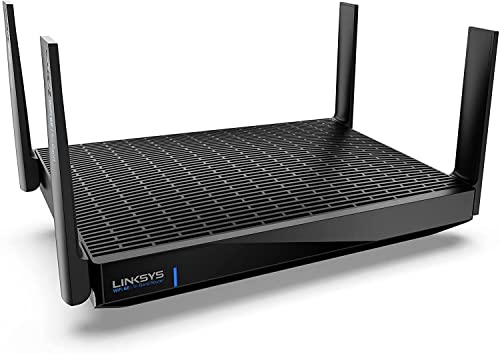
Linksys Hydra Pro MR7500 WiFi 6E Mesh Router — 6E headroom that can grow into mesh
The Hydra Pro MR7500 speaks directly to the mixed household in its title: a tri-band Wi-Fi 6E mesh router, AXE6600 class, for the home, work and guest house, connecting 55+ devices across 2,700 sq. ft. The 6E generation’s extra band gives a busy house breathing room — newer laptops can sit on the cleaner 6 GHz band while the crowd stays on 5 and 2.4 — and because it is a mesh router, it can stand alone today and gain Linksys mesh companions later if the home office expands into the garden room. For a remote worker in a device-dense house, that combination of headroom now and expandability later is the argument.
Its honesty note mirrors the NETGEAR’s: the title does not mention VPN. Linksys sells this router on coverage, device count and the 6E band, and those are the grounds on which to buy it. A worker whose employer’s VPN runs on the laptop loses nothing; a worker counting on router-level tunnels should treat the feature as unconfirmed by the title and verify against Linksys’s current documentation, or choose a pick whose title makes the promise outright. Judged on its stated merits, the Hydra Pro is the forward-looking mainstream option here — the one whose network still feels roomy when the household’s device count doubles, as household device counts reliably do.
- Role: tri-band Wi-Fi 6E mesh-capable home router
- Wi-Fi: Wi-Fi 6E, AXE6600 class, tri-band
- Claimed coverage: 2,700 sq. ft., per the title
- Device count: connect 55+ devices, per the title
- VPN: the listing title is silent on VPN — do not assume router-level tunnel features from the brand; verify in Linksys documentation if your setup depends on them
Strengths
- The 6 GHz band gives modern work laptops a quieter lane in a crowded house.
- Mesh capability lets one router today become a multi-node system later.
- A 55+ device title rating matches genuinely smart homes.
Trade-offs
- Older devices cannot use the 6 GHz band, so part of the premium serves only newer hardware.
- No VPN statement in the title; tunnel-first buyers should look to the GL.iNet trio.
- Tri-band 6E pricing buys headroom a small, quiet household may never use.
Best for: a device-heavy house where the office competes with a family’s worth of gadgets, with mesh growth planned. Hosting a VPN server is simply absent from its title, so households needing that function must pair this 6E mesh unit with different gateway hardware.
Review the mesh expansion options on the Hydra Pro MR7500 listing before committing to a single-unit start.
Side by Side: Which Tool Fits Which Working Pattern?
| Pick | Form | VPN per title | Headline figure from title | Natural habitat |
|---|---|---|---|---|
| GL.iNet Beryl AX (GL-MT3000) | Travel router | VPN named | 574 + 2,402 Mbps Wi-Fi 6, 2.5G WAN | Hotel rooms and rentals |
| GL.iNet Brume 2 (GL-MT2500A) | Wired gateway | Server + client at once | 2.5G WAN | Beside the home modem |
| GL.iNet Flint 3e (GL-BE6500) | Home router | VPN named | Wi-Fi 7 up to 6.5 Gbps | The family hallway cupboard |
| Tenda RX2L Pro | Home router | Support named, role unspecified | AX1500, four gigabit ports | A flat or one office room |
| NETGEAR RAX50 | Home router | Not mentioned in title | AX5400, 2,500 sq. ft. | A mid-sized busy house |
| Linksys Hydra Pro MR7500 | Mesh router | Not mentioned in title | AXE6600, 2,700 sq. ft., 55+ devices | A device-dense, growing home |
The VPN column is the one to read twice. It records only what each listing title claims, which is why two capable routers show an honest gap there — a reminder that in this category, the feature that matters most is also the one most often assumed rather than checked. The habitat column matters nearly as much: three of these six products would be miserable if swapped into each other’s homes, which is why this guide refuses to crown a single winner for every working pattern.
How Do You Set Up a Home VPN Server Without Locking Yourself Out?
Carefully, and in the right order. First, configure the server while you are at home, on the local network, with the router’s ordinary admin access still working — never make your first tunnel attempt the moment you also need it for a deadline. Second, create a separate account or key for remote access rather than reusing the router’s main admin credentials, and write the recovery steps down somewhere that is not only on a machine behind the tunnel. Third, test from a genuinely external network — a phone hotspot with Wi-Fi off is the classic trick — and confirm you can reach one harmless thing, like the printer’s page, before you trust the setup with real work.
Then rehearse the failure. What will you do from a hotel room if the tunnel will not come up? The households that cope are the ones with a fallback: files that also live in a synced folder, a colleague who can forward the one document, a travel router like the Beryl AX whose client tunnel gives a second path. A VPN server is infrastructure, and infrastructure is judged on its bad days. Set it up on a quiet weekend, test it from the café down the road, and only then let a work trip depend on it. One last detail belongs in the rehearsal: confirm that your home connection’s public address behaves the way the tunnel expects, because some internet plans place households behind carrier-level address sharing that blocks incoming connections entirely — discovering that from a hotel room, the night before a deadline, is the single most preventable failure in this whole category, and a five-minute check at setup time is what prevents it.
What Security Hygiene Does a Home Router Owe a Remote Worker?
When the office moved home, the home router quietly became part of the employer’s attack surface, and most households have not caught up with that fact. The router is the border between the internet and the machine with client data on it, so its hygiene matters in ways it never did when it only served films and games. Current encryption is the visible part — WPA3, named in the Tenda’s title, is the modern standard your network should speak — but the invisible parts matter more: firmware that still receives updates, an admin password that is not the one printed on the sticker, and remote administration switched off unless you deliberately set it up through a VPN you control.
This is another place where the picks divide by philosophy. The GL.iNet devices put tunnel-based access at the centre, so reaching your router or your files from outside means coming through an encrypted door you configured. Mainstream routers lean on the maker’s cloud and app model, which is convenient and, for most households, adequately maintained — provided updates are actually applied. The guest network deserves a mention too: the Hydra Pro’s title explicitly spans home, work and guest house, and separating visitors and smart gadgets from the work machine’s network is basic hygiene that costs nothing once the router supports it. None of this requires paranoia. It requires treating the router as the office door it has become, and locking it accordingly.
Working From Rentals, Second Homes and the Guest House
A growing slice of remote work happens in a place that is yours only sometimes: a rented flat for a month, a family’s second home, the guest house the Hydra Pro’s title name-checks. These setups have their own router logic. The connection belongs to someone else or sits idle for weeks, the desk moves between visits, and the network must come back to life after long sleeps without a site visit from IT — because IT is you, arriving with the luggage. Reliability across neglect matters more here than peak performance, and simplicity of resurrection matters most of all: a router that needs an hour of reconfiguration after every power cut will eventually be abandoned for the laptop’s hotspot, at which point the work setup has quietly failed.
Two patterns from this guide fit the scenario. A travel router like the Beryl AX can simply live in the bag and recreate your network wherever you land, treating every rental’s Wi-Fi as raw material. Or a modest home router — the Tenda’s easy setup and wired ports, or the Hydra Pro anchoring home, work and guest house as its title suggests — can be installed once and left to be furniture. The VPN thread returns here too: a gateway at the main home, Brume 2-style, lets the second place dial back to base, so files and services live in one location while you work from two. Choose per the pattern of your stays: short and varied points to the bag, long and repeated points to installing something and leaving it.
What Mistakes Do Remote Workers Make When Buying a Router?
Assuming VPN from the brand. Two excellent routers in this very guide do not mention VPN in their titles. If the router itself must host or dial a tunnel, buy where the title promises it, and verify the role — server, client, or both.
Buying the travel router as the home router. The Beryl AX is superb in a hotel room and inadequate across a house. Form follows habitat; match the device’s room-sized design to room-sized jobs.
Forgetting the gateway has no Wi-Fi. The Brume 2 is a wired device. Households that unbox it expecting a network to join discover the missing half of the system at the worst moment — read form factors before ordering, not after.
Leaving the work laptop on Wi-Fi beside a wired router. If the desk sits near the router and the laptop still joins wirelessly out of habit, the cheapest performance upgrade in this entire guide — one cable — goes unused.
Testing the tunnel for the first time on a work trip. A home VPN that has never been dialled from outside is a hypothesis, not a tool. Prove it from a phone hotspot before the trip that depends on it.
What Should You Check During the First Week With a New Work Router?
Treat the first week as a probation period with specific tests, not a vague feeling. On day one, run your normal call schedule from the desk and note any freeze or smear with the time it happened; patterns tied to the hour usually point at household contention, while random failures point at the connection or the tunnel. Midweek, test the feature you actually bought the router for: dial the VPN from a phone hotspot if it is a server, join a deliberately foreign network if it is a travel router, or walk the house with a call running if coverage was the promise. Features untested in week one tend to stay untested until the day they are urgently needed.
By the weekend, do the boring checks that protect the whole arrangement: confirm firmware is current, change any default credential you have not already changed, and make sure the work machine’s connection — wired where planned — is the one it actually uses, since laptops cheerfully fall back to Wi-Fi when a cable is nudged loose. Write down what you configured while you still remember why. A router set up this way stops being a purchase and becomes part of the furniture of your working life, which is the highest compliment this category of hardware can earn.
Final Recommendation
Start by naming your direction of travel. If your work takes you to other people’s networks, the Beryl AX is the pick — small, honest, built for exactly that. If your work needs to reach back home, the Brume 2’s simultaneous server and client is the most purposeful tool here, provided you remember it needs a Wi-Fi partner. If you want one home box that does the family’s streaming and your tunnel together, the Flint 3e carries VPN in its very name. The Tenda anchors a modest desk setup without waste, while the RAX50 and Hydra Pro serve workers whose VPN lives on the laptop and who need, respectively, mainstream coverage or 6E headroom with mesh growth. The worst purchase in this category is the vague one — a router bought on a brand’s aura, for a feature its title never promised. Read the titles the way this guide has, and the right box tends to introduce itself.
Frequently Asked Questions
Do I need a VPN router if my employer already gives me VPN software?
For reaching the office, no — the laptop’s software handles that through any competent router, which is why the RAX50 and Hydra Pro remain valid picks here. A VPN-capable router earns its place for the other directions: reaching your home network from outside, or wrapping devices that cannot run VPN software of their own. There is also a resilience argument: when the employer’s software misbehaves after an update, a worker with a router-level path home still has options, while a worker with only the laptop client has a helpdesk ticket. Most households will never need that redundancy, but consultants who bill by the day tend to value it the first time it saves one.
Can a travel router really make hotel Wi-Fi safe for work?
It changes the exposure in the ways that matter most: your devices join your own network rather than the hotel’s, and the router’s VPN tunnel encrypts traffic across the untrusted segment. The Beryl AX is built for precisely this, with VPN and OpenWrt named in its title. It does not make a compromised work laptop safe, and your employer’s own policies still apply — but the network side of the risk is genuinely reduced.
What does it mean that the Brume 2 runs a server and client at once?
Per its title, the gateway can accept your incoming connection from a laptop elsewhere — the server role — while simultaneously maintaining its own outbound tunnel to another site or service — the client role. Site-to-site workers use that pairing to keep two locations linked while still dialling in personally. It is the only pick here whose title claims both roles together.
Why do two picks in a remote-work guide not promise VPN?
Because most remote work runs on employer software installed on the laptop, and for those workers a router’s coverage, stability and device capacity matter more than its tunnel features. We included the RAX50 and Hydra Pro for that majority — and labelled the absence plainly, so nobody buys them expecting a feature their titles never claimed.
Should the home office machine be wired even with a strong router?
Yes, whenever the layout allows it. A cable removes the work machine from contention with every other device in the house, and four of the six picks here can offer the desk a port — the Tenda even provides four gigabit ports of its own. Save the Wi-Fi for the devices that genuinely move around. The one exception is the deliberate travel setup: on the road, the Beryl AX’s gigabit LAN port gives the same wired privilege in miniature, which is why road workers who care about call quality carry a short cable in the same pouch as the router.
Related Guides
If the rest of the house needs the same treatment, see also the best smart TV routers, the best hotspot routers and the best routers to handle bufferbloat.
Related guide: Best WireGuard Routers
Related guide: Best Routers with Guest Access


