What's inside
- Key Takeaways
- Quick Picks
- How We Chose These Picks
- Comparison
- Anatomy of a Dedicated Disc Tray: What the Real Component Looks Like
- Dedicated Tray, Multi-Purpose Tray, Add-On Tray: Telling Them Apart
- A Warning About Labels, Loose Trays and Other Impostors
- How Do You Verify a Tray for an Exact Model?
- Living With a Tray Machine: Storage, Spares and the Tray’s Own Care
- What a Tray Machine’s Software Half Tells You About the Hardware Half
- Tray Questions to Ask Before Any Purchase, in Order
- What to Do When the Tray Is Real but the Machine Is Old
- The Tray as a Diagnostic: What Its Absence Tells You About a Listing
- A Closing Observation About Components and Claims
- Common Mistakes
- Final Recommendation
- Frequently Asked Questions
- Related Guides
As an Amazon Associate I earn from qualifying purchases. This post may contain affiliate links at no extra cost to you.
widgetverdict.com is reader-supported. When you buy through links on our site, we may earn an affiliate commission.
Everything in disc printing comes down to a piece of shaped plastic. A CD cannot bend through a paper path, so a printer that prints one carries it flat on a tray — a rigid carrier that slides the disc through a guided route while the head passes over its coated face. Shoppers searching for printers with cd tray are searching, knowingly or not, for that carrier and the engineering behind it. This guide examines the tray itself: what a dedicated disc tray is, how it differs from the multi-purpose paper tray whose name causes so much confusion, why a tray sold separately can never convert a machine that lacks the path, and how to verify — in a manufacturer’s manual, by a tray’s proper name — whether any exact model truly has one. The six machines reviewed below are the desktop printers this search most often returns, and their position must be stated at once: not one of their listing titles names a disc tray or claims disc printing, so every tray line in every spec box here reads, in fixed wording, not stated in the listing title — verify with the manufacturer documentation.
That verdict makes this a guide about a mechanism and a market rather than a simple ranking, and it is the more useful for it. The tray is where disc-printing claims become checkable. Marketing can blur around photo quality, colour counts and creative projects; it cannot blur around a named component in a manual’s parts list. A model with a genuine disc tray has a tray part, a loading procedure, a printable-area specification and usually a storage slot for the tray in the machine’s body. A model without one has none of those artefacts, and no quantity of listing prose can conjure them. Learn to ask for the artefacts and the category becomes transparent.
The six machines, meanwhile, deserve fair hearings as what they are: two feeder-and-photo Epson all-in-ones, an office Canon, a wide-format Epson veteran, a wide-format all-in-one and a Canon photo all-in-one. Several would serve a disc household handsomely for sleeves, covers, documents and artwork. They are reviewed on those stated merits, with their tray status labelled in every spec box, so that no reader mistakes a fine paper printer for a tray machine — and so that every reader leaves knowing exactly what a tray machine would have to show them to earn the name.
Key Takeaways
- None of the six listing titles names a disc tray or states disc printing; each tray spec line reads “Not stated in the listing title — verify with the manufacturer documentation”.
- A dedicated disc tray is a named component of an engineered disc path, documented in the model’s manual with a loading procedure and printable dimensions.
- A multi-purpose tray is a paper feeder for thick or specialty stocks; the shared word tray is this category’s most expensive ambiguity.
- An add-on tray bought separately is a spare for a documented disc model — never a conversion that gives a paper printer a disc path.
- Genuine tray machines leave artefacts: a tray part name, a media list naming printable discs, a disc chapter in the manual, often a storage slot in the body.
- Adhesive labels are not tray printing and carry lifting and balance risks inside drives; they are covered in the warning section below.
Quick Picks
| Pick | Badge | Why it earns its place |
|---|---|---|
| Epson Expression Premium XP-7100 | Feeder-equipped photo all-in-one | Five-colour printing with an auto document feeder and borderless photos; its title names no disc tray. |
| Epson Expression Premium XP-6100 | Home photo all-in-one | Five-colour wireless printing with memory card support; no tray or disc claim in its title. |
| Canon MX922 | Office all-in-one | A wireless office-line all-in-one with mobile printing; its title is silent about trays for discs. |
| Epson Artisan 1430 | Wide-format veteran | An earlier-generation wide-format colour inkjet; a disc tray is not stated in its listing title. |
| Epson Expression Photo XP-970 | Wide-format all-in-one | Six-colour wide-format print, scan and copy; nothing in its title mentions a disc tray. |
| Canon PIXMA TS8322 | Photo all-in-one | Wireless photo printing with copier and scanner; disc trays appear nowhere in its title. |
How We Chose These Picks
The six were chosen as the representative desktop machines a tray search surfaces: Epson’s Premium all-in-ones in feeder and non-feeder forms, Canon’s office all-in-one, Epson’s wide-format veteran and wide-format all-in-one, and Canon’s photo all-in-one. Between them they cover the feature vocabulary — feeders, six colours, wide formats, memory cards — that shoppers most often mistake for tray evidence. Each title was read literally, each spec box given the fixed wording where the title is silent, and each machine then evaluated for the paper work its title genuinely describes.
The guide’s teaching sections were given equal weight to the reviews, because in this category the mechanism is the message. A reader who understands what a dedicated tray is — and how it differs from a multi-purpose paper tray and from a third-party add-on — can evaluate any machine the market shows them, including the genuine tray models that still circulate in specialist and second-hand channels. The reviews supply the worked examples; the sections on tray anatomy, verification and impostors supply the transferable skill.
One selection note on honesty: no machine was excluded for lacking a tray, because excluding them all would have left an empty page and a misled reader who would simply meet the same machines elsewhere, unlabelled. Labelling the real shelf is the service. The tray machines exist — in production publishers, in documented older models, in specialist lines — and this guide’s final sections explain how to find and verify them where they actually live.
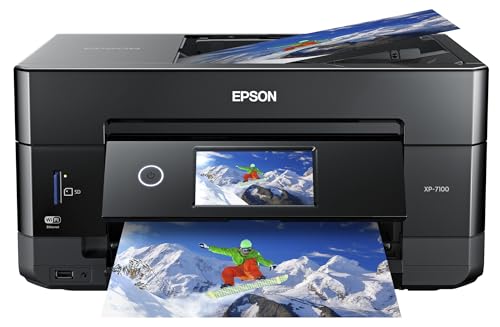
Epson Expression Premium XP-7100 — Feeder-equipped photo all-in-one
The XP-7100’s stated trays and feeders are all paper ones, and enumerating them is the fastest way to see this guide’s point. The title promises an auto document feeder — a paper mechanism, for scanning stacks. It promises five-colour print, scan and copy at up to 15.8 pages per minute, borderless photo printing, wireless, for home and photo projects. Every mechanism named is a paper mechanism, competently assembled: the feeder eats document stacks, the engine prints borderless photographs, the scanner and copier complete the all-in-one. As a paper machine, the XP-7100 lacks nothing its title reaches for.
The disc tray line, accordingly, carries the fixed wording. No disc tray is named in the title, no disc printing is stated, and the spec box says so. The XP-7100 is a useful first example because its feature list is long — long enough to tempt the inference that one more capability must be in there somewhere. Feature lists do not work by saturation. A disc tray is present in a model’s engineering and documentation, or it is absent from both, and length elsewhere in the list has no bearing on the question. The manual for the exact XP-7100 code is where any lingering doubt belongs, and this guide predicts nothing about what a reader will find there — it simply refuses to let a title’s silence be read as a yes.
For a disc household, the machine’s honest employment is the paper perimeter of the collection: sleeves from its borderless engine, archive documents from its feeder, photographs for the room. That perimeter is most of the household’s printing by volume, and the XP-7100 serves it with the guide’s full endorsement — as a paper printer, bought on paper evidence.
Ownership is conventional and calm: wireless service for the household, cartridges in step with colour work, a feeder kept clean. Nothing about the machine asks its owner to think about discs at all, which is precisely the clarity this guide wants every purchase in the category to have.
- Type: Wireless colour all-in-one inkjet
- Functions stated: Print, scan, copy
- Colour system stated: 5-colour print
- Speed stated: Up to 15.8 ppm
- Feeder stated: Auto document feeder (paper)
- Photo feature stated: Borderless photo printing
- CD tray: Not stated in the listing title — verify with the manufacturer documentation
Strengths
- A document feeder plus borderless five-colour printing covers a disc household’s paper perimeter completely.
- Wireless all-in-one design serves every device in the house.
- Stated speed suits busy mixed paper work.
Trade-offs
- No disc tray is named in its title; its trays and feeders are paper mechanisms.
- A long feature list can tempt inferences its documentation does not support.
- Cartridge costs follow photo volume in the ordinary way.
Best for: households wanting a feeder-equipped photo all-in-one for paper work. Not suited for: printing discs on a tray — no disc tray is stated for it in this listing.
Appraise the XP-7100 as the paper all-in-one it declares: check price on Amazon.

Epson Expression Premium XP-6100 — Home photo all-in-one
The XP-6100 covers the home desk in five colours: wireless all-in-one printing, scanning and copying at up to 15.8 pages per minute, borderless photo printing, USB and memory card support, for home projects. Its tray story is the paper story of its class — input for sheets, output for finished pages — and its title tells that story completely. Nothing in it reaches toward a disc, and the spec box records the tray line in the fixed wording.
Why does a machine with no tray claim earn a full review in a tray guide? Because it is exactly the machine a tray shopper will be offered, in the first row of results, with photography good enough to make the offer feel plausible. Plausibility is the enemy this guide fights. A borderless photograph and a printed disc face share a superficial resemblance — colour, on a surface, from an inkjet — and that resemblance has sold more wrong printers than any deliberate deception. The mechanisms share almost nothing: one surface flexes through rollers, the other must ride rigid and centred while a head maps ink onto a ring. Resemblance is not mechanism, and the XP-6100’s genuine excellence at the first says nothing about the second.
On paper evidence, the machine is easy to recommend for its stated life. Memory card support serves the camera-owning household; borderless output finishes its photographs and sleeves; the all-in-one functions cover the home’s documents. Home projects, its title’s own phrase, is the accurate summary of a machine that will be used weekly and understood completely — two virtues that outweigh, in real ownership, any number of speculative capabilities.
Keep the spare-cartridge habit if it joins a project-heavy household, and keep its manual — as with every machine in this guide — as the final word on any feature its title does not state. The manual habit, practised on a machine bought for paper, is the same habit that will one day verify a genuine tray model correctly.
- Type: Wireless colour all-in-one inkjet
- Functions stated: Print, scan, copy
- Colour system stated: 5-colour print
- Speed stated: Up to 15.8 ppm
- Photo feature stated: Borderless photo printing
- Inputs stated: USB and memory card support
- CD tray: Not stated in the listing title — verify with the manufacturer documentation
Strengths
- Five-colour borderless printing finishes sleeves and photographs properly.
- Memory card support fits camera-driven home projects.
- A complete, understandable all-in-one for weekly household use.
Trade-offs
- Its title names no disc tray, and its photo quality is not tray evidence.
- Cartridge rhythm follows colour volume.
- Home sizes only; wide work belongs elsewhere in this guide.
Best for: home-project households printing photos, sleeves and documents. Not suited for: a CD tray purchase — the component is absent from everything its listing states.
Look at the XP-6100 for its stated home strengths: check price on Amazon.

Canon MX922 — Office all-in-one
An office all-in-one thinks in trays more than most machines — paper in volume, documents in stacks — which makes the MX922 a fitting place to practise tray literacy. Its title states an office and business all-in-one with wireless and mobile printing. The trays such a machine carries are paper trays, sized and guided for sheets, and its feeder mechanisms serve documents. None of that vocabulary touches a disc tray, and the spec box records the fixed wording for the disc line.
The MX922’s generation adds the guide’s recurring complication: age and folklore. Established office models accumulate owner lore the way ships accumulate barnacles, and tray claims are among the commonest growths, because a machine that has been on desks for years has been described by thousands of hands with varying care. The antidote is unchanging — the manufacturer’s manual for the exact model, whose parts list either names a disc tray or does not. In a parts list, there is no folklore. There is a component, with a name and a diagram, or there is empty space where the component would be drawn.
As an office machine, the MX922’s stated virtues are organisational: wireless and mobile printing for a team, all-in-one functions for the document churn of a small organisation. Recording groups — the choir, the society, the school — run their media work on exactly such administrative backs, and the machine that keeps the registers, the permissions and the catalogues in order is doing disc-adjacent work of real importance, even though no disc ever enters it.
Buyers of established models should apply the standing checks — condition, completeness, support — with the listing open in front of them. A tray guide’s final word on the MX922 is the same as its first: an able paper administrator, honestly titled, with no disc tray stated.
- Type: All-in-one printer, office and business line
- Positioning stated: Office and business use
- Connectivity stated: Wireless and mobile printing
- CD tray: Not stated in the listing title — verify with the manufacturer documentation
- Listing note: Established model — check condition and completeness on the live listing
Strengths
- Office positioning suits the paperwork behind a recording or collection operation.
- Wireless and mobile printing serve several contributors at once.
- All-in-one functions consolidate the administrative desk.
Trade-offs
- No disc tray is stated in its title, amid the folklore its generation attracts.
- Established hardware needs condition and support diligence.
- Its trays are paper trays, and should be read as such.
Best for: small organisations needing a wireless all-in-one for documents. Not suited for: tray-based disc printing, for which its listing offers no stated component.
Review the MX922’s listing as an office paper machine: check price on Amazon.

Epson Artisan 1430 — Wide-format veteran
No machine in this guide tests tray discipline like the Artisan 1430. It is a wireless colour wide-format inkjet, model code in its title, from the generation in which disc trays genuinely circulated in wide-format photo lines — which means its name attracts more tray claims, from more directions, than any other pick here. Owners remember trays; sellers repeat memories; listings inherit both. And the listing title in front of us states wide-format colour printing and no disc tray at all. The spec box therefore carries the fixed wording, and this review treats the 1430 as the guide’s masterclass in why the manual, and only the manual, settles tray questions.
Consider what settling it properly looks like for a machine of this era. The exact unit’s documentation — obtained by model code — either contains a tray in its parts list, with a loading sequence and printable dimensions, or it does not. If it does, that unit is a documented tray machine and should be valued as one, with the tray’s presence and condition checked like any other component. If it does not, the machine is a wide-format paper printer, full stop, and its price should be a paper printer’s price. Both outcomes are respectable. The only disreputable outcome is paying the tray price for the paper machine on the strength of the era’s reputation.
As a wide-format paper printer, the veteran’s questions are condition, consumables and support, asked in that order. A well-kept 1430 prints the large photographic work its generation was loved for — the posters and big stills of a listening room, the artwork of a handmade box set. A neglected one consumes its bargain price in coaxing. Documentation, once again, is the difference between the two purchases, and it costs nothing but the asking.
The 1430 thus earns its place twice: once as a wide-format classic worth a careful buyer’s attention, and once as the standing proof that tray literacy — parts lists over reputations — is a skill with money attached to it.
- Type: Wireless colour wide-format inkjet
- Format stated: Wide-format printing
- Model code stated: C11CB53201
- CD tray: Not stated in the listing title — verify with the manufacturer documentation
- Listing note: Earlier-generation model — condition and documentation decide its value
Strengths
- Wide-format colour printing serves large artwork and display pieces.
- A deeply documented generation — its paper behaviour is well understood.
- Wireless design suits studio and listening-room placement.
Trade-offs
- No disc tray is stated in its title, despite its era’s tray associations.
- Veteran hardware demands scrutiny of condition, ink supply and drivers.
- Wide format claims serious space and paper storage.
Best for: careful buyers of wide-format paper printing from a documented veteran machine. Not suited for: a tray purchase made on generational reputation — only its own manual could support that, and its title does not.
Examine the Artisan 1430’s listing with a documentarian’s eye: check price on Amazon.

Epson Expression Photo XP-970 — Wide-format all-in-one
The XP-970’s mechanisms are capture and output at creative scale: six-colour wide-format printing with scanning and copying, up to 8.5 pages per minute, USB and memory card support, for creative projects. Its paper handling is correspondingly ambitious — large sheets in, large prints out, originals scanned at the same desk. A tray guide should acknowledge that ambition precisely, because precision is the guide’s whole method: this machine moves paper in more sizes and directions than most, and moves discs not at all, on any evidence its title provides. The spec box records the tray line in the fixed wording.
The multi-purpose tray confusion often attaches itself to machines like this, and the XP-970 is a good place to defuse it. Creative printers handle thick and specialty papers, and the feeders that do so acquire names — rear feed, specialty tray, multi-purpose tray — that a hopeful shopper can misread as media versatility extending to discs. Read such names by their documented media lists, which name paper stocks, weights and envelopes. A feeder whose list is paper from top to bottom is a paper feeder, however versatile, and versatility within paper is the only kind it sells.
For the collection household, the XP-970’s documented talents make it the art department: originals scanned and restored, covers printed wide, posters for the room. Those talents are weekly, visible and valuable. They are also, in the strict accounting this guide keeps, entirely paper talents — and a machine bought for them, at a paper price, with paper expectations, will satisfy its owner for years.
Size the purchase honestly: wide format needs its surface and its paper storage, and six colours need their stewardship. A creative desk that provides both gets a machine proportionate to its ambitions.
- Type: Wireless all-in-one wide-format printer
- Colour system stated: 6-colour wide-format print
- Functions stated: Print, scan, copy
- Speed stated: Up to 8.5 ppm
- Inputs stated: USB and memory card support
- Audience stated: Creative projects
- CD tray: Not stated in the listing title — verify with the manufacturer documentation
Strengths
- Wide-format six-colour printing with scanning makes a complete creative paper bench.
- Specialty paper handling serves thick stocks and large sleeves.
- Card and USB inputs fit archive-driven workflows.
Trade-offs
- No disc tray is stated; its specialty feeders are documented for paper.
- Wide format demands space and flat paper storage.
- Six colours mean six cartridges to maintain.
Best for: creative households printing and scanning collection artwork at wide sizes. Not suited for: disc tray printing, a mechanism absent from its stated design.
Weigh the XP-970 as a wide creative paper machine: check price on Amazon.

Canon PIXMA TS8322 — Photo all-in-one
The TS8322 closes the six in black: an all-in-one wireless inkjet photo printer with copier and scanner. Its mechanisms are the domestic set — paper in, photographs and documents out, originals captured on the glass — arranged for a living room rather than a workshop. Nothing in its title gestures at a disc tray, and the spec box closes the question with the fixed wording. By the sixth review, the pattern is the lesson: six capable machines, six paper mechanisms, zero stated disc trays. A reader who has absorbed that pattern owns the category’s central fact.
The Canon’s own merits are placement and friendliness. A photo all-in-one that lives where the collection is enjoyed gets used in the small sessions that keep a library’s paper current — a sleeve reprinted, a photograph copied for a relative, a document scanned before it is lost. Equipment’s value is mostly frequency of use, and frequency is mostly geography. The TS8322 is designed, on its title’s evidence, to win the geography contest in a media room.
Its limits are the honest ones of its class: no wide format for the poster work, no feeder for the document stacks, and no tray for the discs. A household whose needs stop at everyday photo and document work will never feel those limits. A household with tray ambitions should feel the third limit clearly, here at the end of the reviews, and carry it into the sections that follow — where the tray itself, its anatomy and its impostors, finally takes the stage.
Buy the TS8322, if you buy it, for the room it will live in and the paper it will print there. That is a complete justification, needing no borrowed mechanism.
- Type: All-in-one wireless inkjet photo printer
- Functions stated: Printer with copier and scanner
- Colour stated: Black
- CD tray: Not stated in the listing title — verify with the manufacturer documentation
Strengths
- A living-room design wins the frequency-of-use contest for collection paper.
- Scanning and copying cover the household’s everyday capture jobs.
- Wireless photo printing serves everyone’s devices.
Trade-offs
- No disc tray is stated anywhere in its title.
- No wide format or document feeder is stated for larger work.
- Its virtues are domestic and everyday, not specialist.
Best for: media-room households wanting friendly photo printing, scanning and copying. Not suited for: printing discs on a tray — the component is not part of its stated design.
See the TS8322’s domestic offer on its current listing: check price on Amazon.
Comparison
| Printer | Disc tray stated | Paper mechanisms stated | Format | Honest role |
|---|---|---|---|---|
| Epson Expression Premium XP-7100 | Not stated in title | Auto document feeder, borderless | Home sizes | Feeder-equipped paper all-in-one |
| Epson Expression Premium XP-6100 | Not stated in title | Borderless, memory card | Home sizes | Home photo all-in-one |
| Canon MX922 | Not stated in title | Wireless office paper handling | Home and office sizes | Office all-in-one |
| Epson Artisan 1430 | Not stated in title | Wide-format paper path | Wide-format | Veteran large paper prints |
| Epson Expression Photo XP-970 | Not stated in title | Specialty paper feed, scan and copy | Wide-format | Creative paper bench |
| Canon PIXMA TS8322 | Not stated in title | Photo print, scan, copy | Home sizes | Living-room photo all-in-one |
The paper-mechanism column is full and varied; the tray column is uniformly unstated. That contrast is the most honest summary this guide can print. It does not make the six machines lesser — their paper mechanisms are real and variously excellent — it makes them paper machines, and it leaves the tray column to be filled, elsewhere, by models whose documentation can fill it.
Anatomy of a Dedicated Disc Tray: What the Real Component Looks Like
A genuine disc tray announces itself in four artefacts, and a buyer should learn to ask for all four by name. The first is the tray itself as a documented part: it appears in the manual’s parts list or accessories diagram, usually with a name of its own — disc tray, CD/DVD tray, media tray followed by a part number — and it is shaped unmistakably, with a circular recess that cradles the disc and alignment features that register it in the machine. The second artefact is the loading procedure: a manual chapter or section that walks the owner through placing a disc in the recess, inserting the tray until it registers, and selecting the disc print function. Procedures exist for real components; nobody writes a loading chapter for an imaginary part.
The third artefact is the media specification: printable discs named in the supported-media list, with the printable area given as inner and outer diameters. Those numbers are the tray system’s fingerprint, because they describe a relationship between a specific transport and a specific surface that exists nowhere else in the machine. The fourth artefact, present on many tray machines, is storage: a slot or bay in the printer’s body where the tray lives when not in use. Manufacturers build storage for components owners would otherwise lose, and a body moulded to hold a disc tray is physical testimony that the tray belongs to the design.
Against those four artefacts, set the claims this guide has declined all along. A listing that speaks of photo quality offers none of them. A seller’s assurance offers none of them. A photograph of a disc near a printer offers, at most, a disc and a printer. The artefacts are the difference between a feature and a story, and they are all documentary — which is why the verification section below is short. Checking for four named things in one manual is the work of minutes, and it settles what pages of listing prose cannot.
Dedicated Tray, Multi-Purpose Tray, Add-On Tray: Telling Them Apart
The dedicated disc tray, described above, exists for one medium and one path. Its recess fits a 120-millimetre disc, its body fits one machine’s disc route, and its name in the manual is a disc name. Nothing else in a printer looks like it or does its job.
The multi-purpose tray is a paper feeder with an ambitious name. Built for thick paper, envelopes, card and specialty stocks, it gives a printer a straighter or stronger paper path than its main cassette offers. Its documented media list is the tell: paper, in weights and sizes, from the first line to the last. Shoppers misread it because the word tray promises a carrier and the imagination supplies a disc. The imagination is not a specification. A multi-purpose tray multiplies the papers a printer handles; it has never, in any documented model, multiplied them into optical media.
The add-on tray is sold separately, and it splits into two moral categories. As a replacement for a documented disc model’s own tray — lost, damaged, worn — it is a legitimate spare, bought by part name, for a machine whose manual already names it. As a conversion offered for a machine without a disc path, it is an impostor with a price tag: the path, the disc mode and the layout software are the capability, and the tray is merely their servant. A servant arriving alone, at a house with no master, serves nothing. Worse, feeding a rigid disc on an unregistered carrier through a paper path risks jams and damage to a machine that never wronged anyone. The rule bears its final repetition: capability first, documented; tray second, as its accessory. The order has no exceptions.
A Warning About Labels, Loose Trays and Other Impostors
Labels impersonate tray printing by reaching the same visual neighbourhood — a disc with a designed face — by a road this guide refuses to call printing. The label is printed paper, glued on. Inside a drive it spins at speed, and a label that lifts, bubbles or was centred by an optimistic eye becomes a mechanical risk to disc and drive alike; on an archive disc it is also a permanence fraud, since glue and paper age faster than the disc they decorate. Tray printing puts ink on the disc’s own coating. The difference is not snobbery; it is physics and time.
The loose tray warning is this guide’s home ground, so let it be stated in its strongest form. Any seller offering a tray as the thing that makes a printer print discs has the causality backwards. Manufacturers who build disc printing document the tray as one component of a system; sellers who lack the system sell the component as though it were the system. Buyers should ask the one question that separates them: show me the tray in the printer’s own manual, by name. A genuine spare answers instantly. An impostor answers with more photographs.
Staged photography is the third impostor and the cheapest. A disc can be balanced in any slot, laid in any feeder, propped at any angle in thirty seconds, and the resulting image will look, to a tired shopper at midnight, remarkably like capability. Images are arrangements. Manuals are evidence. In a category where the genuine article is documented to the last diameter, no buyer should ever settle for an arrangement.
How Do You Verify a Tray for an Exact Model?
Take the exact model code — from the listing, the box or the rating plate, suffixes included — to the manufacturer’s support site, and download that code’s manual. Open the parts list and look for a disc tray by name. Open the media specifications and look for printable discs. Open the how-to chapters and look for the loading procedure. Three searches, four artefacts among them, and the question is settled in whichever direction the evidence points. A model with the artefacts is a tray machine; a model without them is a paper printer, and both answers are valuable because both are true.
Handle the second-hand market with the same documents and one addition: inspect the tray itself as a component. A genuine tray for the model will match the manual’s diagram, carry the right registration features, and fit the machine’s disc route as the procedure describes. A tray that merely resembles the diagram is a story in plastic. Sellers of documented tray machines expect these questions; sellers of stories find them inconvenient, which is itself diagnostic.
Finally, keep the manual of any tray machine you verify and buy. Its printable diameters become your layout template’s foundation, its media list becomes your buying list for blanks, and its procedure becomes your workflow. Verification, in this category, is not a gate before the real work. It is the real work’s first page, and the buyers who write it are the ones whose discs print centred, on the right media, from the first run.
Living With a Tray Machine: Storage, Spares and the Tray’s Own Care
Owners of genuine tray machines learn that the tray leads a double life: it is a precision component during a print run and a loose object the rest of the time, and the second life is where trays are lost, warped and sat upon. The storage slot many tray machines build into the body exists for this reason, and owners should use it religiously — a tray returned to its slot after every session is a tray that will be found, flat and clean, at the next one. Where a design offers no slot, dedicate a shallow drawer or a sleeve near the machine, and let nothing else live there. A tray stored under a stack of paper is a tray being slowly bent by its environment, and a bent tray is a centred print’s quiet enemy.
Cleanliness is the tray’s second need. The recess that cradles a disc collects dust, and dust under a disc lifts it microscopically and prints its displeasure into the finished face — or worse, transfers to the coating. A soft, dry wipe of the recess before a run, and a habit of keeping blank discs in their packaging until the tray is ready, keeps the partnership clean. The tray’s registration edges deserve the same respect: they are the geometry the machine reads, and nicks or grime there are not cosmetic. Treat the tray as the instrument it is and it will serve for the machine’s whole life.
Spares complete the owner’s discipline, planned with clear eyes. A second tray — the model’s own, bought by its documented part name — is cheap insurance for a component that is both essential and losable, and it lets a workflow continue while one tray is cleaned or, in tray designs that allow it, loaded in rotation. What a spare must never be is a substitute from another model: trays are keyed to their own machine’s path, and near-fit is a jam wearing a disguise. The part name in the manual is the spare’s identity; buy that identity or none.
What a Tray Machine’s Software Half Tells You About the Hardware Half
Disc layout software is the tray’s invisible partner, and its presence in a model’s ecosystem is one of the most reliable signs that the hardware half is real. Manufacturers do not write and maintain layout tools — with their circular templates, printable-diameter settings and title tools — for machines that cannot print discs. So a buyer’s verification can run in either direction: from the manual’s tray to the software’s existence, or from a manufacturer’s disc layout utility, documented for an exact model, back to the tray it serves. Either direction, the two halves corroborate each other, and claims that can only produce one half — a tray with no software story, software with no named model — should be treated as unfinished evidence.
The software also teaches the craft’s parameters before a disc is ever loaded. Its template shows the printable ring for the model’s media; its diameter settings reveal whether hub-printable media is supported and how close to the centre a design may go; its title tools show how the manufacturer expects faces to be composed. A buyer who downloads the layout tool for a candidate model and studies its template has, in ten minutes, a more concrete understanding of that model’s disc printing than a month of listing prose provides. Documentation, once again, is not the obstacle to the work. It is the work, arriving in its most useful form.
For owners, the software is where templates live, and templates are where consistency lives. Build the collection’s face once — title block, positions, diameters matched to the media in the tray — save it beside the manual, and every future disc inherits a decision made calmly. The tray guarantees the disc’s position; the template guarantees the design’s. Together they are the whole secret of discs that look published rather than homemade, and both halves of that secret are documents and components with names, findable by anyone willing to ask for them by name.
Tray Questions to Ask Before Any Purchase, in Order
Compress this guide into an interrogation and it runs to five questions, asked in order, with the purchase proceeding only while the answers hold. First: what is the exact model code of the machine in front of me — not the family, not the series, the code? Second: does that code’s own manual name a disc tray in its parts list? Third: does its specification name printable discs among its media, with diameters? Fourth: does a chapter teach the loading and printing procedure, and is the layout software it references obtainable? Fifth: if the sale is second-hand, is the tray itself — the model’s own tray, matching the diagram — physically included? Five questions, each answerable from documents and one honest look in the box, and together they are a complete defence against every impostor this cluster of guides has catalogued.
Notice what the five questions never ask. They never ask how good the photographs are, how many colours the engine has, how wide the paper path runs or how warmly the seller speaks of the machine’s history. Those are paper questions, legitimate in their place, and their place is after the tray questions have been answered — when the buyer is choosing a paper printer with open eyes, or confirming that a documented tray machine also suits their paper needs. Order is the discipline: capability documented first, qualities weighed second. Purchases made in that order do not get returned in disappointment, because nothing about them was ever imagined.
Keep the five questions with the collection’s other documents. They will be needed again — at the next machine, the next hand-me-down, the next too-good listing at midnight — and a written checklist asks them identically every time, immune to tiredness and enthusiasm alike. That immunity, more than any single printer, is what this guide has been selling from its first paragraph: a way of asking that makes the category’s fog irrelevant, because fog cannot survive five specific questions asked of a document that either contains a tray or does not.
What to Do When the Tray Is Real but the Machine Is Old
Suppose verification succeeds: the manual names the tray, the media list names the discs, the procedure is all there — and the machine itself is a decade old. The purchase then becomes a condition judgement, and it should be made with the tray system specifically in mind. Run the disc procedure, not only a paper test page: a machine can print paper beautifully while its disc path — used rarely, stored worse — has suffered in ways paper never reveals. Print one test disc on your own media, judge its centring against the template, and let that single run arbitrate the sale. Sellers of genuine tray machines understand the request; it is the category’s equivalent of a test drive, and a refusal to allow it is information.
Price the whole system, not the box. A verified old tray machine with its tray, its manual, obtainable ink and obtainable layout software is a complete instrument and should be valued as one. The same machine missing its tray is a paper printer awaiting an expensive scavenger hunt, and missing its software story it is a tray in search of a composer. Completeness is the currency of this market precisely because the mainstream no longer replenishes any of the parts. Buy the complete system when it appears, document it the day it arrives — photographs of the tray, the manual saved in two places, the media it likes recorded — and the oldest machine in this guide’s world becomes, for its new owner, simply the machine that prints the discs, which was the only thing ever asked of it.
The Tray as a Diagnostic: What Its Absence Tells You About a Listing
There is a final, almost pleasurable use for tray literacy: it grades the honesty of everything else a seller says. A listing that describes a paper printer accurately — paper trays named as paper trays, features kept inside the manual — has earned trust for its remaining claims about condition and completeness. A listing that lets a disc lean against the machine in its photographs, or that seasons its prose with tray language it never documents, has told you how it treats truth generally, and the wise buyer applies that lesson to the listing’s other promises about heads, mileage and accessories. The tray question, in other words, is a character test disguised as a component check. Ask it early, watch how it is answered, and let the answer price the seller as much as the machine.
A Closing Observation About Components and Claims
Features that live in software can be exaggerated invisibly; features that live in hardware leave parts behind. That is the tray’s final gift to the buyer: it is a claim you can hold. A disc tray can be photographed in a parts diagram, matched against a physical object, fitted or not fitted to a machine in front of witnesses. Categories built on components are harder to lie about than categories built on adjectives, and shoppers who learn to prefer component questions — what is the part called, where is it drawn, does the box contain it — will find that preference paying for itself far beyond the small world of disc printing.
Common Mistakes
Reading “tray” and picturing a disc. Paper trays, multi-purpose trays and output trays fill every printer; the disc tray is one specific, named component. Ask which tray, by name, in the manual.
Paying a tray premium for a paper machine. Era, lineage and photography cannot substitute for a parts list. If the manual names no disc tray, the price should be a paper printer’s price.
Buying an add-on tray as a conversion. A tray serves an existing disc path; it cannot create one, and forcing rigid media through a paper path risks the printer.
Accepting a photograph as tray evidence. Discs can be posed anywhere. The artefacts — part name, media list, loading procedure, storage slot — are the evidence, and they live in documents.
Gluing a label and calling it tray printing. A label is paper on glue, with lifting and balance risks in a drive. Ink on a printable coating, laid by a documented tray, is a different and durable thing.
Skipping the parts list because the model is famous. Fame accumulates other variants’ features. The parts list of the exact code describes one machine only — yours, if you buy it.
Final Recommendation
Let the tray be found where trays actually live: in the parts list of a manual, under its own name. If your disc work is production, the publishers covered elsewhere in this cluster state the complete disc system outright. If your disc work is a home archive, hunt the documented tray models — in specialist listings and the second-hand market — with the four artefacts as your checklist, and pay tray prices only for tray documentation. And if you buy any of the six machines in this guide, buy them for their considerable stated paper virtues: the XP-7100 for its feeder and borderless photos, the XP-6100 for the home desk, the MX922 for office administration, the Artisan 1430 for wide veteran prints, the XP-970 for the creative bench, the TS8322 for the living room. Not one of them states a CD tray, and this guide’s last word is the one it has repeated in every spec box: the tray you cannot find in the manual is a tray the machine does not have — and knowing that, precisely and in advance, is worth more than any printer in this category.
Frequently Asked Questions
Do any of these six printers come with a CD tray?
None of their listing titles names a disc tray or states disc printing, and this guide records the tray line for all six as not stated in the listing title. A specific model’s manual would be the document to confirm any individual case, by exact model code.
What is the difference between a disc tray and a multi-purpose tray?
A disc tray is a named component that carries a printable disc through an engineered disc path; it appears in the manual’s parts list with a loading procedure. A multi-purpose tray is a paper feeder for thick and specialty stocks, whose documented media list names papers and envelopes only.
Can I buy a tray separately and add disc printing to my printer?
Only as a spare, if your printer is already a documented disc model whose manual names that tray. A tray cannot add a disc path, disc mode or layout software to a machine that lacks them, and forcing a disc through a paper path risks damaging the printer.
How can I tell whether a tray in a second-hand listing is genuine?
Match it against the manual for the exact model: the genuine tray appears in the parts diagram with the right shape and registration features, the media list names printable discs, and a loading procedure describes its use. A tray that cannot be matched to those documents is an accessory in search of a machine.
Why do some printers have a slot where the tray would go?
Body mouldings, service access and shared chassis designs across a model family all produce slots and panels that suggest components a given variant does not carry. Geometry is not capability; the manual for the exact variant decides what its body actually contains.
Are labels a reasonable substitute while I look for a tray machine?
For throwaway working copies, some owners accept them knowingly. For anything meant to last, this guide advises against them: a glued paper label can lift or unbalance a disc in a drive, and it is not printing on the disc in any case. A printed title from a dedicated title printer is the durable interim solution.
Related Guides
Finished discs deserve a finished room, and our projector coverage applies the same documentary discipline to screens: start with LED projectors for gaming for the stated-specification approach to gaming projectors. The budget shelf of that room is surveyed in our guide to gaming projectors under 100, where entry prices meet honest limits. And the room itself comes together in our roundup of home theater projectors under 100, the natural next read after the discs are printed and shelved.


