What's inside
- Key Takeaways
- Quick Picks
- How We Chose These Picks
- Comparison
- Why Does the Same Model Family Differ Between Regions?
- What Does Genuinely Integrated Disc Printing Consist Of?
- A Warning About Labels, Loose Trays and Other Impostors
- How Do You Pin Down One Exact Model’s Truth?
- What Happens to Disc Features When a Model Line Is Refreshed?
- How Should Businesses and Institutions Handle the Same Question?
- The Resale and Hand-Me-Down Problem: When a Printer Changes Homes
- What Should a Sensible Buyer Do With All of This?
- Reading a Specification Sheet Like an Auditor
- How the Word “Supports” Should Be Read in Any Listing
- Common Mistakes
- Final Recommendation
- Frequently Asked Questions
- Related Guides
As an Amazon Associate I earn from qualifying purchases. This post may contain affiliate links at no extra cost to you.
widgetverdict.com is reader-supported. When you buy through links on our site, we may earn an affiliate commission.
The phrase “with CD DVD printing” sounds like a specification, and shoppers searching for printers with cd dvd printing reasonably expect a shelf of machines that have it built in. Here is what the current market actually holds, stated without varnish: built-in disc printing has almost entirely left current desktop model lines, and whether any given model has it depends — maddeningly, but verifiably — on the exact model code and the region it was sold in. Of the six machines in this guide, one states a disc function in its listing title, and it is not a desktop printer at all but a dedicated disc publisher. The other five are current-form Epson and Canon machines — a tank flagship, two wide-format photo models, a print-only unit and a home all-in-one — whose titles describe integrated wireless, integrated scanning, integrated everything except the one integration this keyword names. Their disc capability is recorded below, in fixed wording, as not stated in the listing title.
This guide’s angle is integration itself: what it means for a capability to be built into a model line, how manufacturers distribute features unevenly across regions and generations, and how a buyer can pin down the truth for one exact machine. That last skill is the real product here. Model families in this category are long-lived and widely travelled; a name like Expression or PIXMA covers dozens of variants across a decade and six continents, and disc trays have appeared and disappeared within those families like a tide. The reader who learns to verify by model code — in the manufacturer’s manual, where a disc tray is either named or absent — becomes immune to the entire fog of inherited claims that surrounds this category.
Integrated also deserves a word against its impostors, because the market sells integration’s appearance in pieces. A printer with a slot a disc can physically enter is not integrated. A printer bundled by a seller with a third-party tray is not integrated. A printer whose sibling model in another region had the feature is not integrated. Integration is a property of one exact model: an engineered disc path, firmware that knows it, software that composes for it, and documentation that teaches it. The sections below keep returning to that four-part test, and the reviews apply it without exception.
Key Takeaways
- Only the Epson Discproducer PP-100III states a disc function in its title; the five desktop models state no disc capability in theirs.
- Disc printing within a model family varies by exact model code, generation and region — a sibling model’s tray proves nothing about the machine in a listing.
- Genuine integration has four parts: an engineered disc path, firmware with a disc mode, layout software, and a manual that documents all three.
- A slot that admits a disc, or a seller-bundled third-party tray, is not integration and does not create a disc printer.
- Adhesive labels are not built-in disc printing either; they are glued paper, with lifting and balance risks inside drives.
- The manual for the exact model code is the decisive document: search it for a named disc tray and a disc-printing chapter.
Quick Picks
| Pick | Badge | Why it earns its place |
|---|---|---|
| Epson EcoTank Photo ET-8550 | Tank flagship | Six-colour cartridge-free wide-format printing for creators; its title states no disc function. |
| Epson Expression Photo XP-970 | Wide-format all-in-one | Six-colour wide-format print, scan and copy; nothing in its title claims disc printing. |
| Epson Expression Photo HD XP-15000 | Wide-format photo printer | Six-colour printing to 13 by 19 inches with auto two-sided; disc capability is not stated. |
| Canon PIXMA TS702a | Print-only unit | A wireless single-function printer with AirPrint and Mopria; its title mentions no discs. |
| Epson Expression Premium XP-6100 | Home all-in-one | Five-colour wireless printing with borderless photos; no disc function appears in its title. |
| Epson Discproducer PP-100III | Stated disc publisher | A CD/DVD/Blu-ray publisher and printer — disc output is its entire stated purpose. |
How We Chose These Picks
The five desktop machines were chosen to span the current model lines a disc shopper actually cross-examines: Epson’s tank line at its photo flagship, Epson’s Expression Photo line in two wide-format forms, Canon’s single-function PIXMA, and Epson’s home Premium line. If integrated disc printing were hiding anywhere in the mainstream market, it would be hiding in lines like these — photo-led, media-proud, feature-rich. Reading their titles literally, line by line, is therefore a fair test of the whole market’s position, and the test’s result is uniform: no stated disc function in any of them.
The publisher was chosen as the control in the experiment — the machine that shows what a stated disc function looks like when it is real. Its title names three disc formats and two disc jobs, publishing and printing. Placed beside the desktop titles, it calibrates the reader’s eye: genuine disc capability announces itself in the vocabulary of discs, trays and media, not in the vocabulary of photographs and page speeds.
Analysis throughout applies the four-part integration test and the model-code rule. Where a family is known to have varied across regions — and in this category, most have — the review says so and directs the reader to the exact model’s documentation, rather than laundering a regional memory into a universal claim. That restraint is the guide’s method and its value.

Epson EcoTank Photo ET-8550 — Tank flagship
Integration is the ET-8550’s genuine theme — just not disc integration. Its title integrates a great deal: cartridge-free six-colour tank printing, wireless connectivity, scanning and copying, speeds up to 16 pages per minute and a 13 by 19 inch format, for creators and home studios. As an integrated studio system for paper, it is one of the most complete propositions in this entire cluster of guides. The ink arrives from tanks, the colour comes from six channels, the size reaches poster territory, and the all-in-one functions keep the desk consolidated. A creator can run a small studio’s whole paper life through this one machine.
Against that fullness, the missing integration stands out cleanly: no disc printing is stated, no disc tray is named, no optical media appears. The spec box records the fixed wording. The ET-8550 matters to this guide precisely because it refutes the assumption that integration is cumulative — that a machine integrating this much must integrate discs too. Feature sets are chosen, not accumulated. Epson chose tanks, width and colour for this flagship; the disc path was not among the choices its title reports, and a buyer must take the title’s word over the assumption’s.
The model-line angle sharpens the point. EcoTank is a family, and families sprawl across regions and years; a buyer’s research will surface EcoTank discussions touching every feature the family has ever carried anywhere. The discipline is to keep the unit of truth at the exact code. The ET-8550 in this listing states its features in its title; any disc question about it is answered by its own manual or not at all. Research that respects that boundary stays accurate; research that roams the family becomes folklore with citations.
For the studio that buys it on stated grounds, the ownership story is strong: tank refills as planned events, wide proofs judged at full size, documents at a credible pace. Buy the integration that is documented — tanks, colour, format, functions — and the machine will not disappoint. Buy the integration that is merely imagined, and no flagship is good enough to survive the misunderstanding.
- Type: Wireless wide-format all-in-one tank printer
- Ink system stated: Cartridge-free, 6-colour
- Functions stated: Print, scan, copy
- Speed stated: Up to 16 ppm
- Maximum size stated: 13 x 19 in.
- Audience stated: Creators and home studios
- Disc capability: Not stated in the listing title — verify with the manufacturer documentation
Strengths
- Deep paper integration — tanks, six colours, wide format, all-in-one functions — in one studio machine.
- Tank economics suit iterative, proof-heavy creative work.
- Stated speed keeps everyday documents credible alongside showcase prints.
Trade-offs
- Disc printing is not among its stated integrations, despite the breadth of the rest.
- Family-level research misleads easily; only the exact model’s documents count.
- Wide-format footprint and tank discipline are real ownership commitments.
Best for: studios wanting one deeply integrated paper machine for creative work. Not suited for: a purchase premised on built-in CD or DVD printing, which its title does not state.
Value the ET-8550 for the integration it documents: check price on Amazon.

Epson Expression Photo XP-970 — Wide-format all-in-one
The XP-970 integrates around creativity: six-colour wide-format printing with scanning and copying, up to 8.5 pages per minute, USB and memory card inputs, aimed at creative projects. The integration that matters here is capture-to-output at one desk. A creative project’s paper — source images, restored artwork, proofs, final prints — circulates through scan and print repeatedly, and a machine that holds both ends of that circulation removes the friction that kills iterative work. For a disc household, the circulation produces the collection’s visible identity: covers, sleeves, booklets, the artwork that makes a shelf of discs look like a library.
The disc line is the fixed wording; the title’s creative vocabulary is entirely paper vocabulary. Expression is one of the long, travelled families this guide warns about — a name spanning many models, markets and years — and the XP-970’s own title and manual are the only authorities on the XP-970. That sentence is worth generalising, because buyers resist it: a model family’s history is background colour, never evidence. Evidence has a model code on it.
Within its documented integration, the machine’s inputs deserve their moment. Memory card and USB support suit creative material that lives off-network — camera cards, archive drives, a collaborator’s stick — and the wide format gives that material room to become posters and large sleeves. The all-in-one’s pace is unhurried, which suits proofing: creative printing is judged, not merely produced, and 8.5 pages per minute of judged output beats a faster machine printing work nobody examined.
Buyers should size the machine to a real creative desk: space for the wide path, storage for large paper, six colours to steward. Sized honestly, the XP-970 is the collection’s art department. Asked to be its disc department as well — on no stated evidence — it becomes another cautionary tale this guide exists to prevent.
- Type: Wireless all-in-one wide-format printer
- Colour system stated: 6-colour wide-format print
- Functions stated: Print, scan, copy
- Speed stated: Up to 8.5 ppm
- Inputs stated: USB and memory card support
- Audience stated: Creative projects
- Disc capability: Not stated in the listing title — verify with the manufacturer documentation
Strengths
- Scan-to-print integration at one desk serves iterative creative work.
- Six-colour wide format produces a collection’s covers and artwork at quality.
- Card and USB inputs fit off-network creative material.
Trade-offs
- No disc integration is stated in its title.
- The Expression family name spans too many variants to research by name alone.
- Wide format demands space and paper storage.
Best for: creative desks producing a collection’s paper artwork end to end. Not suited for: built-in disc printing, which must be documented per exact model — and is not, here.
Consider the XP-970 as a creative paper system: check price on Amazon.

Epson Expression Photo HD XP-15000 — Wide-format photo printer
The XP-15000 integrates for the photographer: six-colour wide-format inkjet printing, up to 9.2 pages per minute, sheets to 13 by 19 inches, automatic two-sided printing, wireless, for photographers and home studios. Its integration story is about output size and tonal quality arriving together — the two things photographic printing at home usually forces a choice between. A studio that prints its own exhibition-size work, judges it on the wall and reprints without a lab’s timetable lives inside this machine’s stated strengths.
Disc capability: the fixed wording, for the fixed reason. The title states photographic paper features exclusively. The XP-15000 also carries this guide’s generational warning in its sharpest form, because wide-format photo lines are exactly where disc trays historically came and went between generations and regions. A researcher will find disc discussions attached to this lineage; some belong to other models, other years, other markets. None of them amend this listing’s title, and only this model’s manual can speak for this model. Integration, to repeat the guide’s thesis, is a property of an exact machine, documented — not a property of a bloodline.
Automatic two-sided printing, almost a footnote in a photo title, is worth rescuing from footnote status: it integrates the studio’s documents into the same machine, so the photographer’s desk needs no second printer for its paper correspondence. Small integrations like that — documented, daily, unglamorous — are what ownership satisfaction is actually made of, and they contrast instructively with the grand imagined integration of disc printing that the title never mentions.
Placement and paper logistics complete the ownership picture, as they do for every wide-format machine: a stable surface, room for sheets to travel, flat storage. A studio that solves those will use the XP-15000 at the centre of its work. A studio that cannot should buy smaller and happier.
- Type: Wireless wide-format inkjet printer
- Colour system stated: 6-colour wide-format photo printing
- Speed stated: Up to 9.2 ppm
- Maximum size stated: 13 x 19 in.
- Duplex stated: Auto 2-sided printing
- Audience stated: Photographers and home studios
- Disc capability: Not stated in the listing title — verify with the manufacturer documentation
Strengths
- Six-colour wide format integrates exhibition-size output with photographic tonal quality.
- Auto two-sided printing folds the studio’s documents into the same machine.
- Wireless design suits flexible studio placement.
Trade-offs
- Its title states no disc integration, in a lineage where generational confusion is rife.
- Wide format requires space and flat, clean paper storage.
- Cartridge costs follow large-format photographic volume.
Best for: photographers integrating large, high-quality paper output into a home studio. Not suited for: a built-in disc printing requirement, which this listing does not document.
Judge the XP-15000 on its documented photographic integration: check price on Amazon.

Canon PIXMA TS702a — Print-only unit
Subtraction is also a form of integration, and the TS702a integrates by refusing: a wireless single-function printer, print only, no scan or copy, with AirPrint and Mopria mobile printing, in black. Canon integrated exactly one job and the connections that job needs — the two mobile printing standards that between them cover the phones households own. For a desk whose scanning lives elsewhere, that focus is a feature with daily dividends: fewer menus, fewer modes, a machine whose whole personality is receiving a document and producing it.
On the keyword’s question the TS702a is the guide’s simplest case. A print-only machine’s title states no disc capability, and its spec box carries the fixed wording. If integration is the theme, this machine demonstrates its floor: a product can be honestly, usefully integrated around paper printing and contain no disc engineering whatsoever. Shoppers who internalise that — who stop reading integration as a rising tide that lifts every feature — will read every listing in this category more safely.
The PIXMA family context deserves the standard caution in miniature. PIXMA is a vast, long-running Canon family across every market; family-level claims about any feature, discs included, are meaningless until they are pinned to an exact code and its manual. The TS702a’s own title is admirably specific about what it does. Let that specificity be the model for how all such claims should be evaluated: this machine, these words, this manual.
As a purchase, it suits the second-printer role and the focused station role — the desk that prints sleeves, documents or drafts while other machines scan and publish. Its black finish and single purpose make it easy to place and easy to understand, which in a shared household are operational virtues, not aesthetic ones.
- Type: Wireless single-function printer
- Functions stated: Print only — no scan or copy
- Mobile printing stated: AirPrint and Mopria
- Colour stated: Black
- Disc capability: Not stated in the listing title — verify with the manufacturer documentation
Strengths
- Single-job integration keeps operation as simple as printing gets.
- AirPrint and Mopria together cover the household’s mobile devices.
- Focused design suits a second-printer or station role.
Trade-offs
- No scan or copy functions at all.
- No disc capability is stated; its integration is entirely a paper integration.
- Family-level research about PIXMA models cannot substitute for its own manual.
Best for: a focused paper-printing station in a home equipped elsewhere for scanning. Not suited for: built-in CD or DVD printing, which appears nowhere in its stated design.
See the TS702a’s focused offer on its current listing: check price on Amazon.

Epson Expression Premium XP-6100 — Home all-in-one
The XP-6100 integrates for the home: wireless colour all-in-one, five-colour printing, scan and copy, up to 15.8 pages per minute, borderless photo printing, USB and memory card support, for home projects. Its integrations are the domestic ones — the camera card that prints without a computer, the photograph that emerges borderless and finished, the document that scans and copies at the same desk. A household’s printing is mostly this texture, and a machine integrated around it will be used weekly for years.
Disc integration is absent from the title, and the spec box records the fixed wording. The Premium line, like every family in this guide, has travelled across markets and model years, and the same rule applies: the XP-6100 is what its own documentation says it is. A disc tray in a Premium ancestor or cousin, in any market, is a fact about that machine. This listing’s facts are five colours, borderless photos, memory cards and home projects — a good list, honestly stated, that should be bought or declined as stated.
For the disc household, the XP-6100’s honest role is the home paper hub: sleeves for the discs other equipment finishes, photographs for the walls, documents for the family. That role is not a consolation prize. In most disc households, paper printing outnumbers disc printing fifty to one across a year, and the machine that carries the fifty deserves as much care in choosing as the machine that carries the one.
Running pattern is the class standard — cartridges matched to colour volume, spares kept ahead of projects — and the machine’s stated speed keeps it credible when the household’s documents bunch up, as they do at term starts and tax time. A balanced, documented, domestic all-in-one: that is the whole claim, and it is enough.
- Type: Wireless colour all-in-one inkjet
- Functions stated: Print, scan, copy
- Colour system stated: 5-colour print
- Speed stated: Up to 15.8 ppm
- Photo feature stated: Borderless photo printing
- Inputs stated: USB and memory card support
- Disc capability: Not stated in the listing title — verify with the manufacturer documentation
Strengths
- Domestic integration — photos, cards, scanning, copying — matches a household’s real week.
- Borderless five-colour printing finishes sleeves and photographs properly.
- Stated speed handles the household’s document bursts.
Trade-offs
- No disc integration is stated in its title.
- Lineage research across the Premium family cannot establish features for this model.
- Cartridge rhythm follows colour volume, as with all its class.
Best for: households wanting one documented all-in-one for home paper and photos. Not suited for: a requirement of built-in disc printing, which this listing leaves unstated.
Weigh the XP-6100 on its stated domestic strengths: check price on Amazon.
Epson Discproducer PP-100III — Stated disc publisher
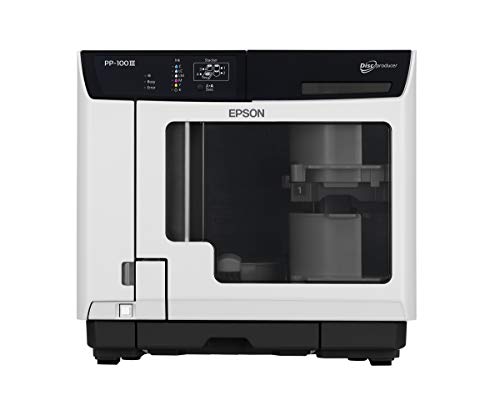
Here, at the end of the reviews, is what integration with disc printing actually looks like when a manufacturer builds it: the Discproducer PP-100III, titled in full as a CD/DVD/Blu-ray Disc Publisher and Printer. Every part of the four-part test is present by design. The transport is engineered for discs — not adapted from a paper path but built around optical media. The system’s whole operation assumes discs as its input and finished discs as its output. Its documentation exists to teach a disc workflow. And its title, unlike every desktop title in this guide, says all of that in the open, in the vocabulary of the media themselves.
Note, though, the form the integration takes. This is not a desktop printer with a disc mode tucked inside; it is a publisher, a production instrument whose integration serves repetition. The buyer it fits produces discs as deliverables — the videographer, the training provider, the congregation, the small label — where the same artwork and data must arrive on disc after disc, identically, on schedule. Integration at that level is a workflow commitment: media stock, artwork prepared to production standard, output counted and delivered. Households with two discs a year to print should admire it the way one admires a printing press — as magnificent equipment for somebody else’s life.
The publisher also completes this guide’s argument by contrast. Five desktop machines integrated everything except discs, and their titles showed it. One machine integrated discs completely, and its title showed that too. Titles, read literally, told the truth in all six cases. A shopper who trusts that pattern — who treats a silent title as a silent feature — will navigate this category without a single bad purchase, and will recognise the rare genuine article, like this one, the moment its title speaks.
Production buyers should still do production diligence: confirm the current listing’s configuration and included equipment, and plan media supply as part of the purchase. But they begin from the strongest ground available in this category — a stated function, in the manufacturer’s own words, on the machine’s own title.
- Type: Disc publisher and printer
- Disc capability stated: CD/DVD/Blu-ray Disc Publisher and Printer
- Media stated: CD, DVD and Blu-ray discs
- Role: Repeatable production of finished printed discs
- Paper printing role: Not a general-purpose document or photo printer
Strengths
- Complete, stated disc integration across CD, DVD and Blu-ray.
- Publishing design produces identical finished discs across production runs.
- Its title models what a genuine disc claim looks like for every other listing a buyer reads.
Trade-offs
- Production integration is far beyond a household’s occasional disc needs.
- It integrates no paper printing role for the home or studio desk.
- Ownership means committing to a disc production workflow and its media supply.
Best for: producers whose discs are deliverables, made repeatedly and identically. Not suited for: a home wanting a desktop printer that occasionally prints a disc — this is a publisher, not a desktop with a disc mode.
For complete, stated disc integration, examine the publisher’s listing: check price on Amazon.
Comparison
| Printer | Stated disc status | What is integrated, as stated | Format stated | Honest role |
|---|---|---|---|---|
| Epson EcoTank Photo ET-8550 | Not stated in title | Tank ink, 6 colours, scan and copy | 13 x 19 in. | Studio paper flagship |
| Epson Expression Photo XP-970 | Not stated in title | 6 colours, scan and copy, card inputs | Wide-format | Creative paper bench |
| Epson Expression Photo HD XP-15000 | Not stated in title | 6 colours, auto 2-sided | 13 x 19 in. | Photographic paper printing |
| Canon PIXMA TS702a | Not stated in title | Print only, AirPrint and Mopria | Home sizes | Focused paper station |
| Epson Expression Premium XP-6100 | Not stated in title | 5 colours, scan and copy, card support | Home sizes | Domestic all-in-one |
| Epson Discproducer PP-100III | Publisher and Printer stated | Disc publishing across CD, DVD, Blu-ray | Optical discs | Finished-disc production |
The middle column is the table’s lesson. Five machines integrate impressive lists of paper capabilities; one integrates discs. Integration is always integration of something specific, and a buyer who asks “integrated with what, exactly, according to its own title?” will never be misled by the length of a feature list again.
Why Does the Same Model Family Differ Between Regions?
Manufacturers build one family name into many regional products because markets ask for different things. A feature prized in one country — and disc printing, in its era, was prized unevenly around the world — could justify its tray, its tooling and its support burden there, while another market’s buyers chose price or size instead. Regulations, media habits, retail channels and simple fashion all pulled feature sets apart. The result, entirely rational from the factory’s side, is a family tree whose branches differ in exactly the features that enthusiasts later argue about in forums.
Generations compound the geography. A family that runs for a decade sheds features as the market’s centre of gravity moves; disc trays were shed across the industry as optical media retreated, but not everywhere in the same model year. So the family’s timeline and its map interact: a 2014 variant in one region may carry a tray that a 2016 variant in another region dropped, while a third region never had it at all. Any sentence beginning “this model has a disc tray” that does not finish with a model code, a year and a region is, strictly, unfinished.
The buyer’s defence is procedural rather than encyclopaedic. Nobody can memorise the family trees; anybody can read one manual. Take the exact code of the machine in front of you — the one on the listing, the box, the rating plate — and let its manufacturer’s documentation describe it. Regional variation is only a trap for shoppers who research by family name. For shoppers who research by code, it is a curiosity of manufacturing history that never touches their wallet.
Second-hand buying raises the stakes, because there the variant in front of you may have crossed regions in its life, and its seller may describe the variant they believe they own rather than the one on the desk. The rating plate and the manual travel with the truth. Ask for the code, check the code, and let the code’s documents settle every feature question the sale raises.
What Does Genuinely Integrated Disc Printing Consist Of?
Four components, all present, all documented. First, the transport: a disc cannot flex through a paper path, so an integrated machine carries it on a rigid tray through a guided route built into the chassis for that purpose. Second, the firmware: the machine must know a disc is loaded, know its diameter, and govern the print pass accordingly — a disc mode, in the machine’s own logic. Third, the software: layout tools that compose onto the printable ring, with the inner and outer diameters set for the media in use. Fourth, the documentation: a manual that names the tray, lists printable discs among supported media, and teaches the procedure step by step.
The test’s power is that each component leaves documentary evidence, and the absence of any one component breaks the chain. A tray without a disc mode is plastic. A disc mode without layout software is unusable. Software without a transport is a screensaver. When a seller’s claim is tested against the four components — show me the tray in the manual, the media in the specification, the procedure in the chapters — genuine integration answers every question and imitation answers none of them.
Apply the test generously in one direction only: to machines, never to marketing. A current desktop model that passes all four parts in its own manual is a genuine disc printer and should be celebrated as a find. A model that passes three, or that passes them in a sibling’s manual, is a paper printer with an interesting story. The category’s whole history of disappointed purchases is the history of stories accepted in place of the fourth component — the documentation for the exact machine being bought.
A Warning About Labels, Loose Trays and Other Impostors
Impostors thrive where a feature is desired and scarce, and integrated disc printing is both. The adhesive label is the oldest: printed paper, glued to a disc, marketed with photography that makes it look like printing. It is not integrated, not printed on the disc, and not safe for the disc’s long-term life — glue ages, edges lift, balance suffers inside drives. An archive built on labels is an archive renting its appearance.
The bundled tray is the impostor tailored to this keyword. A seller takes a paper printer, adds a third-party tray to the box, and describes the bundle in language that lets a hurried reader believe the combination is a disc printer. Unbundle the claim mentally: the printer’s own title and manual describe the printer; the tray is an accessory in search of a path. If the printer’s documentation names no disc tray of its own, the bundle integrates nothing — it merely co-locates a machine and a piece of plastic in one parcel.
The staged photograph is the third impostor, and the cheapest to produce: a disc resting in a paper slot, leaning on a lid, emerging from a feeder it was placed in by hand. Photographs show arrangement, not capability. The manual shows capability, or its absence, and cannot be staged. In a category this prone to wishful imagery, the buyer’s rule deserves its bluntness: if it is not in the manual, it is not in the machine.
How Do You Pin Down One Exact Model’s Truth?
Start at the rating plate or the listing’s full model code, and copy it exactly — every suffix, every regional letter. Then go to the manufacturer’s support library and pull that code’s manual and specification sheet. Search the manual for the tray’s name and the specification for printable discs among supported media. Read the disc chapter if one exists; note its printable diameters and its software. If no disc chapter exists, the inquiry is complete and the answer is no, whatever the internet’s chorus says.
Corroborate with the manufacturer’s own regional site for the market the machine was sold in, because documentation libraries are regional too — a code’s manual on the wrong continent’s site may describe a sibling. When the code, the region and the manual align, you hold the most reliable product description that exists for that machine, better than any review, including this one. Reviews can point; manuals decide.
Keep the documents. A verified model’s manual becomes a working asset — its media guidance and dimensions belong in your printing notes — and a rejected model’s manual is your receipt for a purchase correctly not made. Either way, the five minutes of documentation work pays for itself, which is more than can be said for the printer bought on a family name and returned on a disappointment.
What Happens to Disc Features When a Model Line Is Refreshed?
Model lines refresh constantly, and each refresh is a quiet referendum on every feature the line carries. Mainstream features survive by default; niche features must argue for their tooling, their support burden and their place in the marketing story, every single generation. Disc printing lost that argument across the industry as optical media retreated — not in one dramatic announcement, but in a decade of refreshes in which the tray appeared in one fewer variant, then one fewer region, then one fewer line. Understanding that mechanism matters for buyers because it predicts where the feature survives: in specialist lines whose entire market is discs, and in long-running variants in the regions where demand held longest.
Refreshes also scramble the evidence. A review written for one generation is quoted against the next; a manual’s disc chapter, accurate for its year, is attached by search engines to a refreshed model whose chapter was removed; a retail listing is copied forward with a feature list nobody re-read. The half-life of a disc claim is longer than the half-life of the disc feature, which is precisely why this guide anchors every judgement to the listing title of the machine actually on sale and to the manual of the exact code actually being bought. Refresh-proof reading is literal reading.
For owners, the refresh cycle carries a practical instruction: when you find a documented disc-capable model that suits your work, its documentation, its tray and its media supply become assets to protect, because the refresh that replaces it will very likely not carry the feature forward. Keep the tray safe, keep the manual, keep a sensible stock of the printable media the machine likes. Stewardship of a verified machine is the long game in a category the mainstream has left, and it is a perfectly playable game — the machines are durable, the media still made, the documentation permanent once downloaded.
How Should Businesses and Institutions Handle the Same Question?
Organisations meet the integrated-disc question with higher stakes and better habits available to them. A school, congregation, studio or archive that ships discs should write its requirement down — finished discs, in quantity, identically — and let that sentence choose the equipment class before any brand is discussed. Written requirements point unerringly at dedicated publishing equipment, whose titles state the function, and away from desktop printers whose titles do not. The procurement error this guide sees in institutions is the consumer error at larger scale: a capable office printer bought on an implication, discovered wanting on the day a hundred discs are due.
Institutions should also verify as institutions: by model code, in documentation, with the four-part integration test recorded in the purchase file. That paper trail protects the decision when staff change — and staff always change — because the next media volunteer inherits the manual and the requirement rather than a rumour about what the printer supposedly does. Organisations that record why equipment was bought keep using it correctly for a decade; organisations that buy on memory re-litigate the purchase with every new volunteer.
Finally, institutions should plan the exit as carefully as the entrance. Disc workflows inside organisations end by migration — to downloads, to streaming, to drives — and the archive of discs already produced must remain readable and findable after the workflow closes. Titles printed properly, catalogues kept with the collection, and media stored well are what an institution owes its future self. The equipment question, answered honestly at purchase, is what makes that legacy possible rather than accidental.
The Resale and Hand-Me-Down Problem: When a Printer Changes Homes
Printers in this category change homes constantly — sold, donated, inherited, passed from a studio to a school — and every change of home is a moment where feature claims mutate. The seller describes the machine they remember; the machine they remember is a blend of the unit on the desk, its predecessor and something read online in 2016. Integrated disc printing, being rare and desirable, is the claim most often mutated in transit, because a vague memory of a tray somewhere in the model’s family hardens, by the third retelling, into a definite feature of this unit. Buyers receiving a hand-me-down should therefore verify with more care, not less, when the source is friendly: friendship is not documentation, and a well-meant wrong claim disappoints exactly as much as a commercial one.
The documentary habit scales to gifts as gracefully as to purchases. The exact code is on the rating plate whether money changes hands or not; the manual is a download away in both cases; the four-part test asks the same four questions. A recipient who runs the test on a donated machine is not being ungrateful — they are learning what they actually own, which is the precondition for using it well. And donors can perform the category’s kindest act: download the manual, print its key chapters, and pass the documents with the machine. A printer that travels with its paperwork keeps its identity; a printer that travels on memory alone arrives as a rumour with a power cord.
There is a wider lesson here about how features live and die in the second-hand world. A capability survives in circulation exactly as long as its documentation circulates with it. Disc trays get separated from machines, manuals get lost, software becomes unfindable — and a genuinely disc-capable unit degenerates, across two changes of home, into a paper printer with a mysterious slot. The collectors who keep integrated disc printing alive are, in the end, archivists of paper and plastic: they keep the tray with the machine, the manual with the tray, and the claim exactly as large as the documents that support it.
What Should a Sensible Buyer Do With All of This?
Reduce the whole guide to a shopping procedure and it fits on an index card. Decide which job is actually yours: production of finished discs, a home archive’s titles and faces, or the paper life around a collection. For production, buy stated publishing equipment. For a home archive, use the stated title printer for identification, and hunt full-face capability only in documented tray models, verified by code and manual. For paper, choose freely among machines like the five desktop picks here, on their stated merits, at paper prices, with paper expectations. At every step, let titles and manuals outrank memories, photographs and family names.
That procedure will feel slower than impulse for exactly one purchase, and faster for every purchase after, because it converts a confusing category into a checklist. The buyers who suffer in this market are not the uninformed; they are the almost-informed, carrying half-remembered features from other models and other years into a transaction that needed five minutes of documentation. Be the buyer with the manual open. In a category this thin, that buyer is effectively unhurried, unfooled and — rarest of all — still satisfied with the purchase a year later, because the machine in their home does precisely what its own words promised on the day it arrived.
Reading a Specification Sheet Like an Auditor
A specification sheet rewards the same literal reading as a title, applied line by line. The media section is the auditor’s home: every medium the machine genuinely accepts is itemised there, with sizes and weights, because owners and regulators both rely on it. Printable discs, where they belong to a model, appear in that company — named, dimensioned, unmissable. Their absence from a thorough media list is therefore stronger evidence than their absence from marketing prose: marketing selects, but specifications enumerate. An auditor reads the enumeration and treats it as complete, because completeness is the document’s entire purpose.
The connectivity and software lines deserve the same treatment in miniature. Disc layout tools, where a manufacturer provides them, are listed as software for the model, and their presence in a model’s software ecosystem corroborates the hardware claim from a second direction. Auditors love corroboration from independent sections of the same record: tray in the parts list, discs in the media list, layout in the software list, procedure in the chapters. Four sections, one conclusion. A claim that can only find support in one section — or in none, only in a seller’s paragraph — fails audit, and purchases that fail audit should fail with it, calmly and before payment.
How the Word “Supports” Should Be Read in Any Listing
One verb does most of the quiet damage in this category, and it deserves a paragraph of its own: supports. A printer “supports” many things in loose listing language — media, formats, features, workflows — and the word stretches to cover everything from a documented, engineered capability to a seller’s belief that nothing physically prevents an attempt. The auditor’s translation is simple: a machine supports exactly what its specification enumerates. Discs in the media list means support; discs in a headline means a headline. When the verb appears without its documentary object — supports disc printing, full stop, with no tray named and no media listed — read it as a question the seller is hoping you will not ask, and ask it anyway, in the manual, where support is either itemised or absent.
The habit generalises beyond discs, which is why this guide keeps teaching it. Every category has its stretched verb and its thin feature — the specification that appears in search results long after it leaves the product line. Buyers who learn, on this small and unusually clear example, to follow a claim from the headline to the enumeration become harder to mislead everywhere. That may be the most valuable thing a guide to a nearly vanished feature can still give its readers: not a printer, but a way of reading that the next category cannot fool either.
Common Mistakes
Researching by family name. Expression, PIXMA and EcoTank are continents, not machines. Features live at model-code level; research that stays at family level imports other machines’ features into your purchase.
Counting a long feature list as disc evidence. Integration is specific: tanks, colours and feeders integrate paper capabilities. A list can be long and its disc column still empty, as five of this guide’s machines demonstrate.
Accepting a seller’s bundle as integration. A printer plus a third-party tray in one box is a parcel, not a disc printer. The printer’s own manual decides what the printer is.
Trusting staged photographs. A disc can be posed on any machine in seconds. Only documentation — tray names, media lists, procedure chapters — evidences capability.
Assuming a sibling region’s variant settles your model. Regional feature differences are the norm in this category’s history. Your code, your region, your manual: nothing less specific is evidence.
Overlooking the publisher’s lesson. When disc integration is real and complete, the title says so in disc vocabulary. Silence in a title is information; learn to hear it.
Final Recommendation
Buy integration where it is documented, and let this guide’s six titles stand as the calibration set. If finished discs are your product, the Epson Discproducer PP-100III states complete disc integration — publishing and printing across CD, DVD and Blu-ray — and production buyers should evaluate it on production terms. If you want a desktop machine with disc printing built in, accept the market’s reality and hunt it the documented way: exact model codes, regional manuals, the four-part test, in specialist and second-hand channels where verified tray models still circulate. And if you buy any of the five desktop machines here — the ET-8550 for a studio’s paper, the XP-970 for creative capture and output, the XP-15000 for wide photographic work, the TS702a for focused printing, the XP-6100 for the home — buy them for the integrations their titles genuinely state, which are considerable. The shopper who reads titles this literally will never own a printer that disappoints them about discs, because they will never have asked a title to promise what it never said.
Frequently Asked Questions
Which of these printers has CD and DVD printing built in?
On the evidence of the titles, only the Epson Discproducer PP-100III — a dedicated publisher and printer for CD, DVD and Blu-ray. The five desktop models state no disc capability in their listing titles; any individual model’s manual would be the place to confirm otherwise for that exact code.
Why do some listings describe the same model family as disc-capable?
Because families vary by generation and region, and descriptions migrate between variants. A sibling model in another market may genuinely have carried a disc tray. That fact describes the sibling; your model’s truth lives in your model’s manual.
What are the four parts of genuine disc integration?
An engineered disc transport with a tray, firmware with a disc mode, layout software that composes on the printable ring, and a manual documenting all three for that exact model. Missing any one, the capability is not integrated, whatever accessories are bundled with the machine.
Does a disc-sized slot in a printer mean it prints discs?
No. Paper paths contain gaps and slots for many mechanical reasons. Capability is documented, not geometric: without the tray, the disc mode and the manual chapter, a slot is just a slot, and feeding a rigid disc into an unintended path risks damage.
Can a seller’s bundle of a printer and a tray be a good buy?
Only if the printer itself is a documented disc model and the tray is its proper spare. If the printer’s manual names no disc tray, the bundle combines a paper printer with an accessory it cannot use, and the bundle should be priced — and judged — as a paper printer alone.
How long does proper verification take?
Minutes. Copy the exact model code, open its manual from the manufacturer’s support site, and search for a named disc tray, printable discs in the media list and a disc-printing procedure. The manual either documents the feature or settles its absence; either outcome is a successful verification.
Related Guides
The tray itself — dedicated, multi-purpose and add-on — gets its own examination in our guide to printers with a CD tray. When the discs are finished and the room turns to watching and playing, our coverage of LED projectors for gaming applies the same literal reading to projector claims. And for the budget end of that room, our roundup of gaming projectors under 100 separates stated specifications from hopeful ones just as carefully.


