What's inside
- Where to Buy These mATX Cases
- Key Takeaways
- Quick Picks
- How Did We Choose These mATX Cases?
- What Actually Separates a Good mATX Case From a Cramped One?
- Which Dimensions Should You Measure Before Ordering?
- The Six mATX Cases, Reviewed One by One
- How Should You Cool an mATX Build Without Turning It Into a Wind Tunnel?
- What About Power Supplies and Cable Room at This Size?
- What Front-Panel Connections Should an mATX Buyer Insist On?
- How Long Should an mATX Case Stay in Service?
- How Do These Six mATX Cases Stack Up Side by Side?
- How Do You Move an Existing Build Into an mATX Case?
- What Mistakes Do mATX Builders Keep Making?
- Final Recommendation
- Frequently Asked Questions
- Related Guides
As an Amazon Associate I earn from qualifying purchases. This post may contain affiliate links at no extra cost to you.
widgetverdict.com is reader-supported. When you buy through links on our site, we may earn an affiliate commission.
Where to Buy These mATX Cases
Shopping for the best matx pc cases starts with a board you may already own: micro-ATX sits between tiny mini-ITX and full ATX, and it is the size that quietly powers most sensible gaming and family PCs. A good mATX enclosure keeps that board cool, swallows a modern graphics card without a shoehorn, and still fits on or under a desk that also has to hold a monitor, a keyboard, and everyday clutter. Every case in this guide links to a checked Amazon listing, so the name on the box is the name that arrives at your door.
The six picks below split along honest lines. Two chase airflow through mesh, two put tempered glass on display, one wears a walnut front that belongs in a living room, and one adds a carry handle for builders who move their machine between rooms or events. None of them needs an ATX board, none of them wastes the footprint, and each one earned its place for a different reason rather than by filling a quota. Read the trade-offs as carefully as the strengths, because at this size the compromises are where cases separate.
Key Takeaways
- Micro-ATX is not mini-ITX: these cases take the larger board with four expansion slots, so check your motherboard box before ordering anything.
- The ASUS Prime AP201 leads on cooling headroom, supporting radiators up to 360mm inside a 33-liter mesh shell.
- Glass-front picks such as the Zalman CUBIX-G and Thermaltake View 170 trade some intake freedom for a cleaner display look.
- Graphics card length is the silent deal-breaker at this size, ranging from 280mm on the compact glass cases to 338mm on the AP201.
- A handle sounds like a gimmick until the third time you carry a build across a parking lot; the handled case here earns its keep honestly.
- Front-panel USB Type-C appears on only part of this field, so laptop-style one-cable desk setups should check the port list first.
Quick Picks
How Did We Choose These mATX Cases?
We started from what micro-ATX builders actually struggle with. First is heat: a mid-range graphics card and a six or eight core processor in a small box will cook quietly behind a sealed front panel, so ventilation design carried real weight. Second is fit: card length, radiator support, and power supply format decide whether a build goes together in an evening or turns into a returns label. Third is the desk itself, because an mATX case lives in view far more often than a tower hidden under a workstation bench.
Only models with a verified listing and a title that states its key dimensions or features made the cut. Where a listing title names a radiator size, a card clearance, or a fan count, we treated that as the claim to judge the case against, and we say so in each review. Where a title stays quiet about something important, the review says that too instead of filling the gap with a guess dressed up as a specification.
We also refused to pad the list with near-duplicates. The two mesh cases here differ in power supply placement and radiator ambition, the two glass cases differ in fan package and price class, and the handled case solves a transport problem none of the others addresses. If two enclosures had truly been the same box with different badges, one of them would have been cut.
One more discipline governed the final list: every figure quoted in a review — 338mm, 280mm, 360mm, 33 liters — had to come from the pick’s own listing title rather than from a review elsewhere or a sibling model’s page. Case families share names across sizes, and a specification borrowed from the wrong sibling is a lie with good intentions. Where a title was silent, the review says what is not claimed instead of borrowing confidence.
What Actually Separates a Good mATX Case From a Cramped One?
Volume is the first clue, and around 33 liters is the sweet spot this category keeps returning to. Below that, builders start surrendering radiator space or card length; above it, the case stops feeling meaningfully smaller than an ATX tower and the whole point of the board size dissolves. The AP201 sits right on that line, which is part of why it anchors this guide. Treat any mATX case advertising huge internal support in a tiny shell with suspicion until you check which dimension paid for it.
Panel construction matters more than panel marketing. A quasi-filter mesh side, like the one wrapped around the AP201, breathes along its whole surface and doubles as dust control, while a solid glass side shows off lighting and cable work but pushes all intake duty to the front and bottom. Neither is automatically better. A dusty workshop argues for mesh you can wipe down; a streaming desk argues for glass that makes the build part of the backdrop.
Power supply placement is the third separator, and it is easy to miss in photos. The Rosewill in this guide mounts its supply at the front, which shortens the case’s depth and changes how heat leaves the box. Traditional rear-bottom mounting, used by most of the others, keeps cable runs familiar and leaves the front free for intake fans or a radiator. Decide which layout your cables and your patience prefer before the box is on your desk.
Which Dimensions Should You Measure Before Ordering?
Start with the graphics card, measured in millimeters from bracket to the end of the cooler shroud, and compare it against the case’s stated maximum rather than a forum estimate. The spread in this guide runs from 280mm to 338mm, and that gap is the difference between a card sliding in cleanly and a card arriving to find the front fan already living in its space. Measure the card you own, not the card you remember buying, because factory overclocked coolers grow longer than reference designs.
Radiator support needs the same literal reading. A case that supports a 360mm radiator, as the AP201 and the Rosewill both claim in their titles, still needs thickness clearance for fans above the motherboard, and tall memory heat spreaders can steal exactly that space. A 240mm or 280mm claim is not a failure; it is a promise sized for the processors most mATX builds actually run. Match the radiator to the chip’s heat, not to the biggest number on the page.
Finally, measure the desk, the shelf, or the TV stand. Height with a carry handle, width against a monitor arm, and depth once cables bend out of the back all count as real dimensions. A case that fits on paper and then forces its rear cables into a wall has not actually fit, and mATX buyers choose this size precisely to avoid that kind of furniture negotiation.
Builders who still spin optical discs for ripping or legacy software should detour through Best PC Cases With 5.25-Inch Bays before settling here, because not one case in this mATX six offers an external drive bay.
If your priority is a machine that arrives cool without a separate fan order, Best PC Cases That Come With Fans compares enclosures sold with their cooling already installed and wired.
And anyone sketching a pump-and-reservoir loop inside a compact board build will find the radiator-first thinking in Best PC Cases for Custom Water Cooling worth an evening, even if most of those enclosures wear larger footprints.
The Six mATX Cases, Reviewed One by One
Badges here describe the job each case does best, not a ranking from first to worst; the right pick is the one whose compromises land where your build can absorb them.
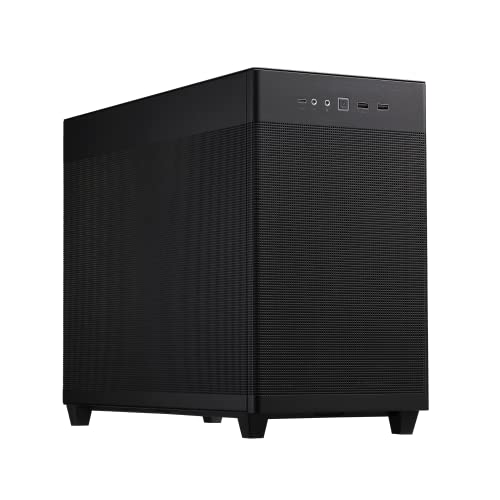
ASUS Prime AP201 Micro-ATX PC Case | Supports Radiators up to 360mm & Graphics Cards up to 338mm Long, 33-liter, Quasi-Filter Mesh Panels, Tool-Free Side Panels — Best airflow-first mATX case
The AP201 is the case that makes people recheck whether their board is really micro-ATX. Its quasi-filter mesh wraps the panels in a fine perforated skin, so the enclosure breathes from nearly every direction instead of begging for air through a slit at the front. In a warm room or a carpeted office, that all-over intake is the difference between fans idling politely and fans working audibly through every game session.
Cooling ambition is the headline: support for radiators up to 360mm in a case this size is genuinely unusual, and it changes what processors make sense here. A hot flagship chip on a compact board stops being a contradiction when the top or front can carry a full-length radiator. Graphics cards up to 338mm long also fit according to the title, which covers the long triple-fan coolers that usually force builders up a case size.
Daily life with the AP201 is helped by the tool-free side panels, which pop off for a memory swap or a dust wipe without hunting for a screwdriver. The mesh does ask for that wipe more often than glass does, since the same perforations that admit air collect a visible film of dust on their outer surface. That is maintenance measured in seconds, though, and the panels being their own filter keeps the interior cleaner than an unfiltered open intake would.
Cable work inside is honest rather than luxurious. There is room to route the main runs tidily, but the compact chamber rewards builders who plan the order of installation: radiator first, then board, then the card, then the patience-testing front-panel leads. Builders expecting a cavernous dual-chamber layout should recalibrate, yet for a single-GPU mATX machine this remains the most capable small box in the guide.
Ownership of the AP201 has a rhythm: a quick mesh wipe every few weeks, a deeper clean each season, and temperatures that stay boring in between. Owners who came from sealed glass cases tend to report the same surprise — the system runs cooler at lower fan speeds, so the machine they hear least is the one with the most holes in it. That paradox is the AP201’s whole design thesis, and a summer of gaming validates it more honestly than any launch-day benchmark.
- Form factor: micro-ATX mini tower, 33-liter volume
- Radiator support: up to 360mm per the listing title
- Graphics card clearance: up to 338mm long
- Panels: quasi-filter mesh with tool-free side panels
- Brand line: ASUS Prime series
Strengths
- Mesh on nearly every surface keeps intake unrestricted in warm rooms
- 360mm radiator support is rare at this footprint and unlocks hotter CPUs
- Tool-free panels make cleaning and upgrades a two-minute job
Trade-offs
- Mesh skin shows dust on its outer surface and wants regular wiping
- No tempered glass, so showcase lighting builds lose their stage
- Tight chamber rewards planned assembly order rather than improvisation
Best for: air-cooled or liquid-cooled mATX builds running a long graphics card and a warm processor in a room that gets hot in summer
Not suited for: showcase builds that need a glass side to display lighting, since every panel here is perforated mesh
Check the current listing for the ASUS Prime AP201 on Amazon and confirm the mesh variant before ordering.
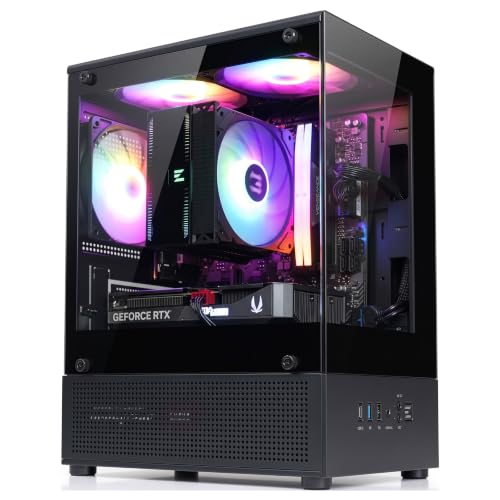
Zalman CUBIX-G Micro-ATX MATX Compact Mini Tower Gaming PC Case, Black | Includes 3x 120mm FRGB Fans, Panoramic View Tempered Glass Panels, USB Type-C, Up to 280mm GPU Support — Best glass showcase in miniature
The CUBIX-G is what happens when the panoramic glass trend shrinks to micro-ATX scale. Tempered glass wraps the view so the board, card, and lighting sit on display from the front and side at once, and Zalman includes three 120mm FRGB fans so the glow is present from the first boot rather than after a second order. On a desk that faces a room, it looks like a deliberate exhibit instead of an appliance.
The honesty check is the 280mm graphics card ceiling stated in the title. That figure welcomes compact dual-fan cards and most mid-range models, then politely declines the longest triple-fan flagships. Builders should measure their exact card, shroud included, before falling for the glass. A build planned around a shorter card will never notice the limit; a build planned around a card already owned might hit it on day one.
USB Type-C on the front panel is a small line in the title that matters daily. Phones, modern headsets, and fast external drives all expect that connector now, and having it on the case keeps a dongle from living permanently on the desk. Combined with the included fans, the CUBIX-G asks very little extra spending to feel finished, which suits first-time builders who want the reveal moment without a parts pile.
Thermally, a panoramic glass front means intake leans on side and bottom paths, so fan curves deserve ten minutes of attention after assembly. Keep the included fans as intake where the layout allows, avoid parking the case inside a closed cabinet, and the compact showcase behaves. Builders chasing silence records or stuffing in the hottest silicon should look at the mesh picks instead, and this review will not pretend otherwise.
One practical note for CUBIX-G buyers: fixed-effect FRGB fans set their mood at the hardware level, so decide whether the included glow suits your room before the build is photographed into permanence. The case looks best with a restrained interior — black boards, tidy cables, one accent color — because the panoramic glass multiplies whatever it frames. Builders who treat the interior as a composition, rather than a storage area with lights, get the result the product photography promises.
- Form factor: micro-ATX compact mini tower, black
- Included fans: 3x 120mm FRGB fans
- Panels: panoramic tempered glass
- Front connectivity: USB Type-C listed in the title
- Graphics card support: up to 280mm
Strengths
- Panoramic glass shows the whole build from two angles at once
- Three fans included means lighting and airflow start on day one
- USB Type-C front port suits modern phones and peripherals
Trade-offs
- 280mm card ceiling excludes the longest flagship coolers
- Glass front restricts direct intake compared with mesh rivals
- FRGB lighting is fixed-effect rather than fully addressable control
Best for: desk-facing display builds around a dual-fan graphics card no longer than 280mm, where looks carry equal weight with thermals
Not suited for: builds carrying a graphics card longer than 280mm, because the title states that ceiling plainly
See the Zalman CUBIX-G listing on Amazon and measure your card against its 280mm limit first.

Thermaltake View 170 TG ARGB Black Micro-ATX Case; 3x120mm ARGB Fans Included; Supports Up to 280mm Radiator; Front & Side Dual Tempered Glass Panel; CA-1Z4-00M1WN-00; 3 Year Warranty — Best lit-up compact tower
Thermaltake’s View 170 approaches the small showcase brief with a warranty in its title, which is a quietly confident move. Three 120mm ARGB fans come included, the front and side are both tempered glass, and the stated radiator support runs to 280mm. For a builder who wants the finished, lit, photographed look without assembling a fan kit from separate orders, the package reads as deliberately complete.
Addressable lighting is the real divider between this case and fixed-glow rivals. ARGB fans can take their cues from the motherboard, so the case, memory, and cooler can share one lighting scheme instead of competing rainbows. That matters more in a small case than a big one, because everything sits closer together in the glass view and mismatched effects are impossible to ignore.
The 280mm radiator figure tells you the intended processor class: healthy mid-range chips and modest overclocks, cooled properly, rather than flagship silicon under a sustained all-core load. Paired with the glass front, the sensible build here is efficient parts chosen well, not maximum parts cooled hopefully. Thermaltake’s three-year warranty, printed right in the listing title, softens the risk on fans and front-panel hardware over that span.
Assembly follows the usual compact-tower choreography. The dual glass panels come off for the build and go back on for the reveal, and cable tidiness shows through both panes, so sloppy runs behind the tray will be visible from the side. Spend the extra quarter hour with the cable channels; in a case designed to be looked at, cable work is part of the specification whether the title lists it or not.
Thermaltake’s support footprint is an unglamorous advantage that shows its value in year two, when a fan bearing tires or a front-panel lead frays. A three-year warranty in the title and a global parts channel behind it mean the View 170 can be maintained rather than replaced, which suits a case bought as a long-term desk fixture. Keep the model number from the title — CA-1Z4-00M1WN-00 — in your records; support conversations go faster when it leads.
- Form factor: micro-ATX tower, black, model CA-1Z4-00M1WN-00
- Included fans: 3x 120mm ARGB fans
- Radiator support: up to 280mm per the listing title
- Panels: front and side dual tempered glass
- Warranty: 3 years, stated in the title
Strengths
- ARGB fans sync with motherboard lighting for one unified scheme
- Three-year warranty is stated up front in the listing title
- 280mm radiator support covers the realistic mATX processor range
Trade-offs
- Glass front panel limits direct fresh-air intake paths
- Radiator ceiling rules out 360mm liquid cooling plans
- Visible cabling through two glass panes punishes rushed builds
Best for: lighting-led mATX builds on mid-range processors, where synchronized ARGB and a stated warranty matter more than maximum radiator size
Not suited for: liquid cooling plans built around a 360mm radiator, which exceed the 280mm support in the title
Open the Thermaltake View 170 TG ARGB listing on Amazon to confirm the included fan package.

Rosewill Micro ATX Gaming PC Case | Walnut-Finished Mesh Front Panel | 3 × 120mm PWM Fans, Supports Dual 360mm Radiators | Front-Mounted PSU | Mini-ITX or Micro-ATX | USB 3.0 x 2 & USB 3.2 Gen 2 — Best furniture-friendly front panel
The Rosewill is the pick for rooms where a gaming PC has to earn its place among furniture. Its front panel wears a walnut finish over mesh, so the case reads as a piece of decor from across the room while still breathing through the wood-look surface. That combination is rarer than it should be: most airflow cases announce themselves as gaming hardware, and most pretty cases seal their fronts and cook their contents.
Under the calm face sits unusually serious cooling. The title claims support for dual 360mm radiators, a figure that belongs to much larger enclosures, alongside three included 120mm PWM fans. PWM control matters in a living room because fan speed can track temperature instead of idling at a fixed audible hum during films or conversation. A quiet, cool, wood-fronted box is a genuinely different proposition from the glass light shows elsewhere in this guide.
The front-mounted power supply explains how the layout works. Moving the supply forward reshapes the interior, shortening some cable runs and lengthening others, and it gives the case a different depth profile on a shelf or media unit. Builders with modular supplies and patience will adapt quickly; builders reusing a non-modular supply with short leads should check cable reach before committing, since the front mount changes distances that standard layouts take for granted.
Board support covers both mini-ITX and micro-ATX, and the front panel carries two USB 3.0 ports plus USB 3.2 Gen 2 connectivity per the title. For a shared family machine or a media-room gaming build, this is the case that least needs an apology to the rest of the household, while quietly offering the most radiator headroom of the six.
The Rosewill’s dual-radiator claim invites a question worth answering before checkout: do you actually need two 360mm radiators, or is the honest build a single radiator and the three included PWM fans? Most micro-ATX systems need the latter, and the case loses nothing by it — the walnut front and front-mounted supply still deliver the room-friendly design that is this pick’s real distinction. Buy the headroom as insurance, not as a homework assignment.
- Form factor: mini-ITX or micro-ATX, front-mounted PSU layout
- Front panel: walnut-finished mesh
- Included fans: 3 × 120mm PWM fans
- Radiator support: dual 360mm per the listing title
- Front connectivity: USB 3.0 x 2 and USB 3.2 Gen 2
Strengths
- Walnut finish lets a gaming PC sit comfortably in living spaces
- Dual 360mm radiator support is exceptional for this board size
- PWM fans adjust speed with temperature for quieter rooms
Trade-offs
- Front-mounted PSU changes cable distances versus standard layouts
- Wood-look finish divides opinion among RGB-first builders
- Deep cooling support tempts overspending on radiators a build may not need
Best for: living-room and shared-space builds that need furniture manners outside and dual-radiator cooling ambition inside
Not suited for: builders reusing a short-cabled non-modular power supply, because the front-mounted layout stretches some runs
Look over the Rosewill walnut case listing on Amazon, paying attention to the front-mounted PSU layout.

Micro ATX Case, MATX PC Case with Handle for ITX MATX Motherboard, Support for 240 mm Coolers, Graphics Cards up to 310 mm Length, and Micro Power Supply and ATX Standard Power Supply(Without Fans) — Best carry-it-anywhere pick
A handle changes what a PC is. This unbranded micro ATX case treats the machine as luggage: pick it up, carry it to a friend’s place, a tournament desk, a workshop bench, or the other end of the house where the good monitor lives. The title is admirably blunt about the arrangement, even noting in parentheses that no fans are included, so nobody can claim they were misled about what the box contains.
The internal numbers suit the mission. Graphics cards up to 310mm long cover most dual-fan and many triple-fan models, and support for 240mm coolers gives a traveling build a real liquid or large air cooling option. Accepting both micro power supplies and ATX standard units is a thoughtful touch: a small supply saves weight and space, while a standard unit lets a builder reuse the supply already on the shelf.
Because no fans are included, the first job after unboxing is a shopping decision, and the honest total cost of this case includes whatever fans the build needs. Two or three decent 120mm fans transform it; without them, the handle merely makes a hot box easier to carry. Budget for that from the start and the case’s value story still holds, because portability this direct is scarce among mATX enclosures at any badge level.
The unbranded nature cuts both ways. There is no big support organization or polished manual tradition behind it, so builders should be comfortable working from the hardware itself. In exchange, the design stays single-minded: strong handle, flexible supply mounting, sensible clearances. For a LAN bag build or a machine that splits its life between two desks, that focus is exactly the point.
A carried PC lives a harder life than a parked one, so two habits protect this handled case’s build: transport it with the graphics card’s power leads checked afterward, and let the machine cool for a few minutes before it goes into a car on a hot day. The handle itself should be tested with the full build’s weight before the first real trip — confidence in the grip is part of the product, and a slow lap of the room at home beats a surprise in a parking lot.
- Form factor: micro ATX and ITX boards, carry handle fitted
- Cooler support: 240mm coolers per the listing title
- Graphics card clearance: up to 310mm length
- Power supply: micro or ATX standard units accepted
- Fans: none included, stated plainly in the title
Strengths
- Integrated handle makes the whole build genuinely portable
- Accepts both micro and standard ATX power supplies
- 310mm card clearance covers most performance graphics cards
Trade-offs
- Ships without fans, so cooling costs extra on top
- Unbranded support and documentation are thinner than big-name rivals
- Handle styling suits transport better than formal desk setups
Best for: LAN-goers, students, and two-desk builders who move their mATX machine often enough that a handle earns its place
Not suited for: builders expecting fans in the box, since the title states plainly that none are fitted
Review the handled MATX case listing on Amazon and price a fan set alongside it.

Micro ATX Case PC Case: MATX Case Mini PC ITX Desktop Computer Case Support Micro ATX MATX DTX ITX Mini PC with USB3.0, Support 3.5” HDD (Black) — Best plain workhorse box
Not every build wants to be furniture or a light show. This plainly titled micro ATX case supports an unusually wide board family — micro ATX, DTX, and ITX per the listing — and keeps a place for a 3.5-inch hard drive, which makes it a natural home for a rebuilt office machine, a home server conversion, or a first PC assembled from a mix of new and salvaged parts.
The 3.5-inch drive support deserves emphasis because the rest of this guide has quietly moved past spinning drives. Anyone holding a large archive drive, a surveillance disk, or a backup HDD pulled from an older tower will find most fashionable cases offer nowhere to bolt it in. Here the bay exists, the USB 3.0 front connectivity exists, and the black steel box asks for nothing else. Utility is the entire pitch, and it lands.
Expectations should be set by what the title does not claim. There is no fan package bragged about, no radiator figure, no glass, no Type-C port. Cooling for a modest processor and a mid-range or integrated graphics setup is the design center, and pushing flagship heat through a workhorse box like this would be blaming the case for a mismatch the buyer created. Matched to its class, it is a sensible, inexpensive-feeling home for hardware.
For builders assembling a PC for a relative, a spare-room workstation, or a small business desk, the wide board compatibility also protects against a classic mistake: discovering the salvaged motherboard is DTX rather than the mATX the buyer assumed. That flexibility, plus the hard drive bay, makes this the quiet problem-solver of the six rather than the headline act.
For a workhorse like this, the smart money goes on the unlisted things: a pair of decent fans if the box arrives sparsely cooled, and a front dust routine if it works in a carpeted room. Neither addition changes what the case is — a flexible, drive-friendly steel home for modest hardware — and both extend its working life for very little. Judge it after a year of quiet service, which is the timescale this design was built to be judged on.
- Form factor: micro ATX, DTX, and ITX board support
- Storage: supports a 3.5-inch HDD per the listing title
- Front connectivity: USB 3.0
- Color: black mini PC tower styling
- Cooling claims: none stated in the title; plan fans separately
Strengths
- Widest board compatibility here, including DTX alongside mATX and ITX
- Keeps a 3.5-inch hard drive bay that fashionable cases have dropped
- Plain black styling suits offices and spare rooms without comment
Trade-offs
- No radiator or fan package claims in the title to plan around
- No USB Type-C front port for modern peripherals
- Steel workhorse looks will not satisfy showcase builders
Best for: rebuilds and utility PCs mixing salvaged boards and a 3.5-inch archive drive into one honest black box
Not suited for: high-heat gaming builds needing stated radiator support, which this listing title does not claim
Check the plain Micro ATX case listing on Amazon if a 3.5-inch drive bay is on your must-have list.
How Should You Cool an mATX Build Without Turning It Into a Wind Tunnel?
Small cases punish the habit of adding fans until the noise stops being funny. A better sequence starts with intake direction: feed the graphics card cool air from the front or bottom, give the processor its own supply, and let one rear exhaust carry the mixture out. In mesh designs like the AP201, the panels themselves join the intake path, so fan placement matters less than fan curve discipline. Set curves against component temperature rather than a fixed speed and the same hardware runs cooler and quieter.
Radiator placement deserves a decision before the loop or AIO is ordered. A top-mounted radiator exhausts processor heat out of the case but warms its own coolant with graphics card air; a front-mounted unit drinks fresh air and dumps heat inside for the card to breathe. Neither answer is universal. In a 33-liter box the differences show up within minutes of a gaming load, so choose based on which component your workload stresses harder and accept the trade consciously.
Dust is the slow variable nobody graphs. Mesh panels that filter as they breathe, like the AP201’s quasi-filter skin, stretch the interval between cleanings, while open intakes in a pet household can felt over in a season. Whatever case you choose, put it on the desk or a stand rather than the carpet, and schedule a two-minute panel wipe with the same regularity as emptying a robot vacuum. Cooling performance in year two is maintenance, not magic.
What About Power Supplies and Cable Room at This Size?
Micro-ATX cases divide quietly into those built around standard ATX supplies and those that also accept smaller units. The handled case in this guide takes both micro and ATX standard supplies, which helps travelers shave weight. The Rosewill moves its supply to the front entirely. Before ordering, confirm your supply’s format against the case’s stated support and think about cable length, because a compact chamber gives modular cables nowhere to hide their excess.
Cable management in a small case is less about beauty than about airflow and sanity. A bundle stuffed against an intake fan costs cooling; a cable trapped under a side panel costs twenty minutes during the next upgrade. Route the 24-pin and graphics power first while the chamber is empty, keep the front-panel leads for last, and leave one clear channel from intake to exhaust. Glass-sided picks make the result visible, but even a steel box runs better for the discipline.
What Front-Panel Connections Should an mATX Buyer Insist On?
The front panel is the part of a case you touch daily, and its port list ages faster than any other specification. USB Type-C, present on the CUBIX-G in this guide, has crossed from luxury to expectation for phones, headsets, and fast portable drives; a case bought without it will spend its life hosting an adapter. Audio jacks, power button feel, and even the humble reset switch all belong to the same daily-touch category, and none of them can be upgraded later without replacing the case itself.
Read the port list in each title the way you read the radiator figures: as a promise with a date on it. The Rosewill’s pairing of USB 3.0 ports with USB 3.2 Gen 2, and the workhorse’s plain USB 3.0, describe different desk futures. A builder whose external drives and capture gear are current-generation should weight the newer connectivity as heavily as a radiator size, because the desk will ask about it every single day.
One more front-panel habit is worth forming at purchase: photograph the internal front-panel leads during the build and note which pin block positions they occupy. In a compact case those leads are the fiddliest part of any later board swap, and the photograph turns the next upgrade’s worst ten minutes into a reference check. Small cases reward documentation out of proportion to its effort.
How Long Should an mATX Case Stay in Service?
A case is the longest-lived part of a PC, and a good mATX enclosure should expect to host two or three motherboard generations. That horizon changes what matters at purchase: steel that does not fatigue, panels that still seat cleanly after fifty removals, front ports that match where peripherals are heading, and clearances generous enough for the next graphics card rather than only the current one. The AP201’s 338mm card room and the Rosewill’s radiator headroom read differently through that lens — they are futures, bought in advance.
It also reframes the budget picks. The plain workhorse in this guide will serve a decade of office duty without a single feature it lacks becoming urgent, while a fashionable glass case can date itself in three years when its fixed lighting scheme falls out of step with the rest of the desk. Longevity is not the same as expense; it is the match between a case’s fixed properties and the slow direction of your own habits.
Before ordering, run one final check against that horizon: imagine the build you will want in three years — hotter card, bigger cooler, one more drive — and ask whether the case in your cart says yes or no to each. The answers, more than any badge in this guide, decide which of the six belongs under your desk.
How Do These Six mATX Cases Stack Up Side by Side?
Read the table by constraint rather than by badge. If your card is 320mm long, the field narrows before taste gets a vote; if your room is a shared living space, the walnut front may settle the argument from the other direction.
Notice also what the table cannot show: noise character, panel feel, and the small friction of daily use. Those live in the individual reviews above, which is why each pick there carries its own trade-offs instead of borrowing a verdict from its neighbors.
| Pick | Badge | Defining trait |
|---|---|---|
| ASUS Prime AP201 | Best airflow-first mATX case | 360mm radiator support and 338mm card clearance in 33 liters of mesh |
| Zalman CUBIX-G | Best glass showcase in miniature | Panoramic glass, three FRGB fans included, 280mm card ceiling |
| Thermaltake View 170 TG ARGB | Best lit-up compact tower | Dual glass, three ARGB fans, 280mm radiator support, 3-year warranty |
| Rosewill Micro ATX Walnut Case | Best furniture-friendly front panel | Walnut mesh front, front-mounted PSU, dual 360mm radiator support |
| MATX Case with Handle | Best carry-it-anywhere pick | Carry handle, 310mm card room, 240mm cooler support, no fans fitted |
| Micro ATX Case (USB 3.0) | Best plain workhorse box | DTX-inclusive board support and a surviving 3.5-inch HDD bay |
A pattern worth noticing across the table: the two cases with the strongest cooling claims, the AP201 and the Rosewill, arrive at them from opposite directions — all-over mesh in a conventional layout, and a front-mounted supply behind a wooden face. Cooling at this size is a design philosophy, not a single feature, and both philosophies here are executed honestly enough to trust.
The glass pair, by contrast, sell the same desk presence with different fine print: fixed glow and a smaller card ceiling from Zalman, addressable light and a stated warranty from Thermaltake. Reading fine print is the entire skill this category rewards, and the table above is best used as an index into the reviews where that print lives.
How Do You Move an Existing Build Into an mATX Case?
Begin on the old case, not the new one. Photograph every cable connection before touching a screw, especially the front-panel leads whose labels shrink with age. Remove the graphics card first and set it somewhere static-safe, then the power supply cables, then the board with its processor and memory still seated if your cooler allows it. A board carried as an assembly survives the move far better than a tray of separate parts.
In the new case, fit the power supply and route its main cables while the chamber is empty, because compact interiors punish anyone who saves cabling for last. Mount the board, connect the front-panel leads while you can still see the header, then add storage and finally the graphics card. If a radiator is part of the plan, it goes in before the card, and its fans should be test-spun by hand to confirm nothing fouls a cable.
First boot happens with the side panel off and expectations low. Confirm every fan spins, check temperatures at idle, then run a game or a render for fifteen minutes while watching the processor and card readings climb and settle. Only then fit the panels, set fan curves against the temperatures you actually saw, and cable-manage the desk run. A transplant done this way takes an afternoon; done in a hurry, it takes an afternoon plus a troubleshooting evening.
Set the transplanted machine’s first task to something it already knows — the game, render, or workload it ran in the old case — and compare its behavior against your memory of the old enclosure. A transplant judged against familiar work reveals its cooling and noise character immediately, in a way synthetic tests never quite match.
A week later, revisit the build with fresh eyes. Reseat any cable the panels pressed on, confirm the fan curves still match the temperatures you recorded, and wipe the intakes once so the habit exists before the dust does. Transplants fail slowly more often than suddenly, and a ten-minute second inspection is the best-value safeguard in the whole process.
What Mistakes Do mATX Builders Keep Making?
Assuming micro-ATX and mini-ITX are the same size. They are not, and the confusion runs both ways: an ITX board rattles around in an mATX case with wasted space, while an mATX board simply refuses an ITX enclosure. Read the board’s format off its box or spec sheet and match it against the case title before money moves.
Measuring the graphics card by memory. A card remembered as ‘about standard length’ can be 320mm of cooler shroud. Against a 280mm ceiling like the CUBIX-G’s, memory is not a measurement. Use the manufacturer’s stated length for your exact model, shroud included.
Buying the radiator after the case arrives. Radiator support is a case property, stated in titles like the AP201’s 360mm figure or the View 170’s 280mm one. Choosing the cooler first and the case second reverses the dependency and manufactures a returns process.
Forgetting that ‘without fans’ means without fans. The handled case says it in its own title, and similar plain listings imply it. A build budget that omits the fan purchase is not finished, and a first boot without intake is a thermal experiment nobody requested.
Sealing a glass case inside a cabinet. Panoramic glass already narrows intake paths; a closed media cabinet removes the rest. Glass picks belong in open air on a desk, with room behind for exhaust to escape.
Final Recommendation
For most micro-ATX builders, the ASUS Prime AP201 is the answer that survives every follow-up question: it breathes from all sides, carries a 360mm radiator and a 338mm card in 33 liters, and asks only for a dust wipe in return. Choose the CUBIX-G or View 170 when the build is also decor, the Rosewill when the room is shared and the cooling ambition is real, the handled case when the machine travels, and the plain workhorse when a salvaged board and an old hard drive need a home.
Measure your card, match your board, respect each title’s stated ceilings, and the case you pick will disappear into the background of a machine that simply works — which, for the micro-ATX builder who chose this size on purpose, is the highest compliment a box can earn.
Frequently Asked Questions
Is micro-ATX the same as mini-ITX?
No. Micro-ATX is the larger format, with room for four expansion slots, while mini-ITX is a compact square with a single slot. Cases in this guide are built around micro-ATX boards, and several also accept ITX, but an ITX-only case cannot take an mATX board. The distinction decides fit before any other feature matters, so confirm your board’s format first.
Can an mATX case hold a full-length graphics card?
Some can and some cannot, and the titles here prove the spread: the AP201 claims clearance up to 338mm, the handled case allows 310mm, and the CUBIX-G stops at 280mm. There is no category-wide answer. Match your exact card’s stated length against the exact case’s stated ceiling and leave a small margin for power cables at the card’s end.
Do I need a 360mm radiator in a case this small?
Only if your processor generates flagship-level heat under sustained loads. Most mATX builds run mid-range chips that a 240mm or 280mm unit, or even a good air cooler, handles comfortably. The AP201 and Rosewill offer 360mm-class support for builders who want it; treating that support as a requirement confuses an option with an obligation.
Are mesh cases louder than glass cases?
Mesh lets fan noise escape more directly, but it also lets fans run slower for the same temperature, and slower fans are quieter fans. Glass muffles some sound while forcing higher speeds under load. In practice the fan curve you set matters more than the panel material, and a mesh case with a sane curve is rarely the loud option in the room.
What power supply fits an mATX case?
Most accept a standard ATX supply, and some, like the handled case here, also take smaller micro supplies, while the Rosewill relocates its supply to the front of the chassis. Check the case title for the formats named, and remember that cable length and modularity matter more in a compact chamber than raw wattage bragging.
Why do some of these cases include fans and others none?
Included fans are part of the product’s positioning: showcase cases like the View 170 and CUBIX-G ship with lighting fans because the look is the product, while the handled case states ‘without fans’ in its title because its price and purpose assume the builder will choose their own. Neither approach is a trick, provided the title tells you plainly, which is why we quote it.
Can I reuse my ATX power supply in an mATX case?
Usually, yes — most micro-ATX cases accept a standard ATX supply, and the handled case in this guide takes both standard and micro supplies, while the Rosewill relocates its supply to the front. The checks that matter are the case’s stated supply support, the supply’s cable lengths against a compact chamber, and whether a very long supply body collides with drive mounts or cable channels in the specific model you choose.
Is a 33-liter case too small for a gaming PC?
No — 33 liters, the AP201’s stated volume, is close to the category’s sweet spot for a single-graphics-card gaming build. It fits long cards, real radiators, and full cooling while still reading as a compact object on a desk. Smaller cases exist and impose sharper compromises; larger ones surrender the size advantage that justified a micro-ATX board in the first place.
Related Guides
Keep reading: Best PC Cases With 5.25-Inch Bays · Best PC Cases That Come With Fans · Best PC Cases for Custom Water Cooling


